
 Paplašinājums
TL;DR: What you need to know
What is conversational intelligence? It’s software that records, transcribes, and analyzes spoken and written conversations to surface decisions, tasks, and trends. It turns meetings into searchable knowledge so teams act faster, resolve issues sooner, and reuse insights across projects.
Who should read this
- CX and contact center leaders
- Sales and enablement heads
- Product managers and meeting-heavy roles
- Ops, CS, and research teams
Three core takeaways you can act on now
- Start by capturing every key meeting with reliable transcription and timestamps.
- Use AI summaries and topic tags to extract tasks, risks, and decisions.
- Measure wins with simple KPIs: time saved in notes, faster follow-ups, and fewer missed actions.
What is conversational intelligence (CI)? A simple definition
If you’re asking what conversational intelligence is, think of it as software that listens, reads, and links conversations to surface useful insights. CI turns spoken and written exchanges into searchable data, highlights decisions and tasks, and flags patterns that matter to CX, sales, and product teams.
CI is more than transcription or call logs. According to The 2023 CICS Forrester Wave™ Is Live, And Competition Is Fierce (2023), Forrester defines conversation intelligence for customer service as: "Software solutions that analyze speech and text conversations between contact center agents and customers to derive actionable insights for improved operational efficiency in the contact center, increased agent and organizational compliance, and better customer experience (CX)."
How CI differs from call tracking, QA, and transcription
Call tracking records who called, when, and for how long. Basic QA checks a few scripted behaviors on a handful of calls. Standalone transcription converts voice to text. Each of these helps, but they leave gaps. CI adds three key capabilities:
- Context linking: it joins calls, chats, emails, and CRM entries into one view.
- Topic and intent detection: it finds intent and themes across sessions, not just single lines.
- Action extraction: it pulls out tasks, decisions, and commitments automatically.
Core data sources CI uses
- Speech: live or recorded audio captured from meetings and calls.
- Chat and messaging: Slack, Teams, or in-product chat logs.
- Email and documents: customer threads, proposals, and briefs.
- CRM records and activity: opportunity stages, notes, and deal outcomes.
Why converging sources creates richer signals
When you combine these data types, signals get stronger and fewer false leads appear. For example, a sales call phrase that signals interest becomes high-confidence when email follow-ups and a CRM status change show the same intent. Convergence helps teams find root causes, measure behavior, and act faster. That’s the practical value of conversational intelligence: it turns scattered talk into repeatable insight.
How conversational intelligence works (the tech explained)
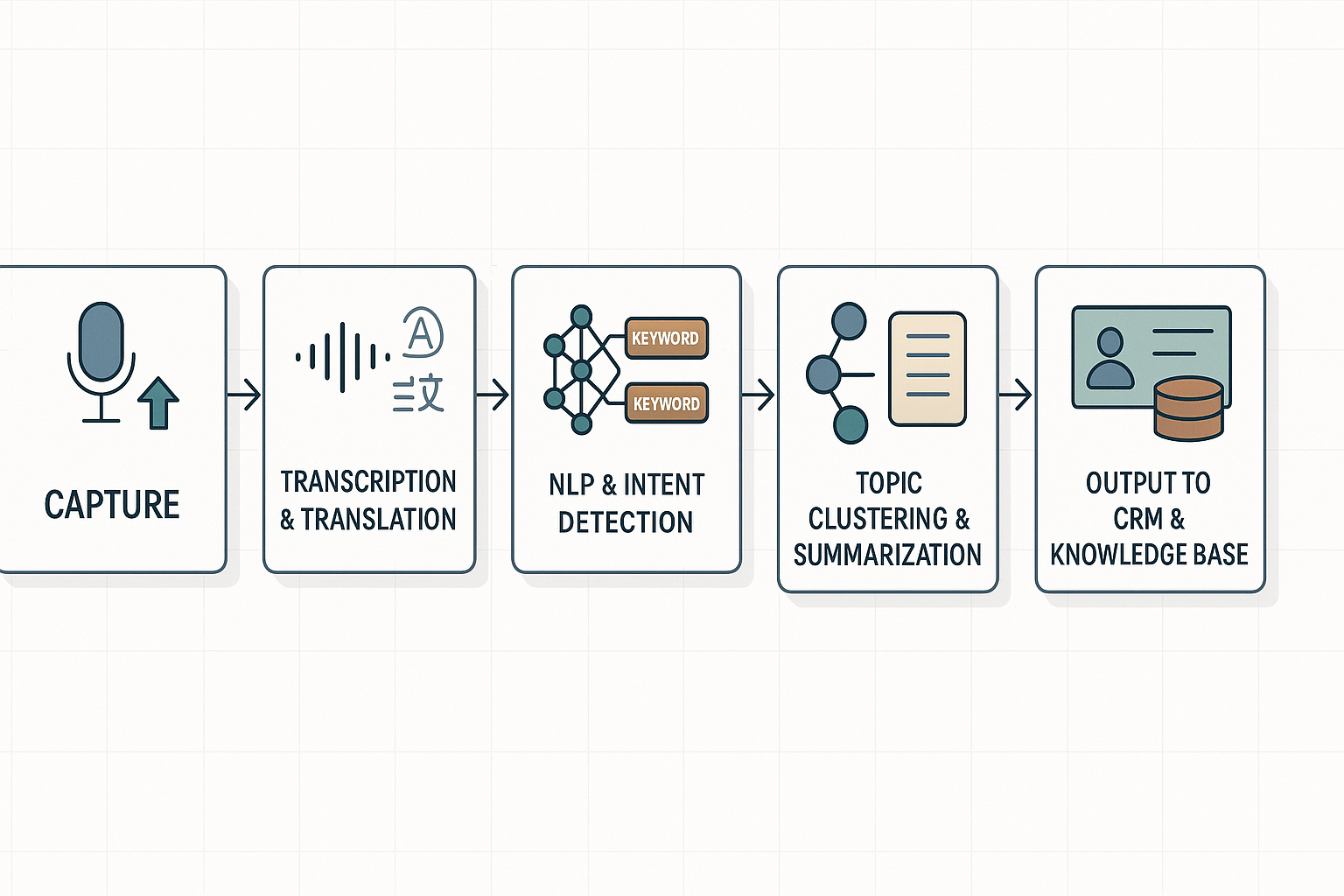
Start to finish, conversational intelligence turns raw audio into actionable insight. If you asked "what is conversational intelligence" expect a pipeline: capture, clean, transcribe, analyze, cluster, and surface. This section walks each stage and explains why clean ingestion and schema mapping matter for reliable outputs.
Capture and ingestion
Recordings and uploads are the data sources. Call audio, recorded video, and exported meeting files enter the system. Clean ingestion means accurate timestamps, speaker labels, and file metadata. Map fields early: meeting ID, participants, account, and tags. Good mapping makes later CRM sync predictable.
Transcription and translation
Automatic speech recognition (ASR) converts audio to text. Modern ASR has high accuracy, but audio quality matters. Noise reduction and speaker separation improve results. After transcription, machine translation can normalize language across transcripts, enabling cross‑market analysis.
NLP: intent, entities, and sentiment
Next, natural language processing extracts meaning. Intent detection finds what participants want. Intent Detection in the Age of LLMs (2024) states that Intent detection is a critical component of task-oriented dialogue systems (TODS) which enables the identification of suitable actions to address user utterances at each dialog turn. Entity extraction pulls product names, dates, and numbers. Sentiment and urgency flags surface risks and moments that need follow up.
Topic clustering and summarization
Clustering groups related turns across a call or many meetings. Algorithms use embeddings to measure semantic distance. Summaries use extractive or abstractive methods to create concise notes and action lists. Auto mind maps can visualize these clusters for quick review.
Integration points: CRM and knowledge bases
Common integrations push decisions and tasks into CRMs and KBs. Key fields to sync include contact, deal, outcome, and action owner. If ingestion is messy, you’ll see duplicate records, missing fields, and bad reporting. A stable schema prevents those errors.
Why clean ingestion and schema mapping matter:
- They keep records consistent across systems.
- They allow reliable tracking of actions and outcomes.
- They improve model accuracy by supplying labeled context.
Ordered pipeline recap:
- Capture and tag audio.
- Transcribe and translate.
- Run intent and entity extraction.
- Cluster topics and summarize.
- Sync outcomes to CRM and KB.
Try TicNote Cloud free to see transcription, AI notes, and CRM-ready outputs in action
Key CI features and metrics to watch
This section lists practical CI features leaders should evaluate. For each, you’ll see the business signal it provides and the actions teams can take.
Real-time coaching cues
Business signal: live prompts reveal skill gaps and coaching moments during calls. Use cues to nudge reps on objection handling, compliance, or upsell opportunities. Action: route low-scoring calls to targeted coaching, and add cue trends to weekly training plans.
Automatic summarization
Business signal: fast summaries show topic coverage and decision density. They cut meeting review time and highlight missed agenda items. Action: auto-send summaries to stakeholders, and require summary-based signoff for decisions.
Action-item extraction
Business signal: extracted tasks show execution risk and ownership gaps. Missing owners or overdue items point to follow-up failures. Action: push extracted tasks into ticketing or CRM systems, and track completion rates weekly.
Sentiment and emotion signals
Business signal: sentiment trends surface customer friction or delight over time. Emotion spikes can predict churn or escalation before metrics do. Action: tag accounts with negative trend flags, prioritize outreach, and feed signals to CS and product teams for root cause work.
Talk-time and interruption metrics
Business signal: talk-time balance measures enablement and customer engagement. Too much agent talking may show scripting or lack of listening. Action: set talk-time targets, coach on active listening, and correlate changes with conversion or NPS scores.
Model confidence scores and transcription accuracy
Business signal: confidence scores show where AI may be wrong. Transcription accuracy also varies by vendor and audio; a 2024 study evaluating 11 ASR services found wide vendor variation and lower quality for streaming ASR compared to batch processing, so treat low-confidence segments as review candidates (Measuring the Accuracy of Automatic Speech Recognition Solutions (2024)). Action: flag low-confidence passages for human review, require transcript verification for compliance, and log confidence trends as part of vendor SLAs.
Quick metric tracker leaders can use:
- Percent of calls with action items extracted
- Average summary read time saved per meeting
- Share of calls with negative sentiment trend
- Agent talk-time ratio (agent versus customer)
- Percent of transcript minutes below confidence threshold
Use these signals to make coaching, escalation, and product decisions faster. Track them as part of regular ops reviews to turn talk into repeatable outcomes.
Real-world use cases and 2 mini case studies
To show practical value, this section maps common problems to concrete conversational intelligence uses. If you wondered what is conversational intelligence in practice, read these three high-impact examples and two short case studies. Each shows the workflow, the benefit, and what you measure.
Customer support: find root cause fast
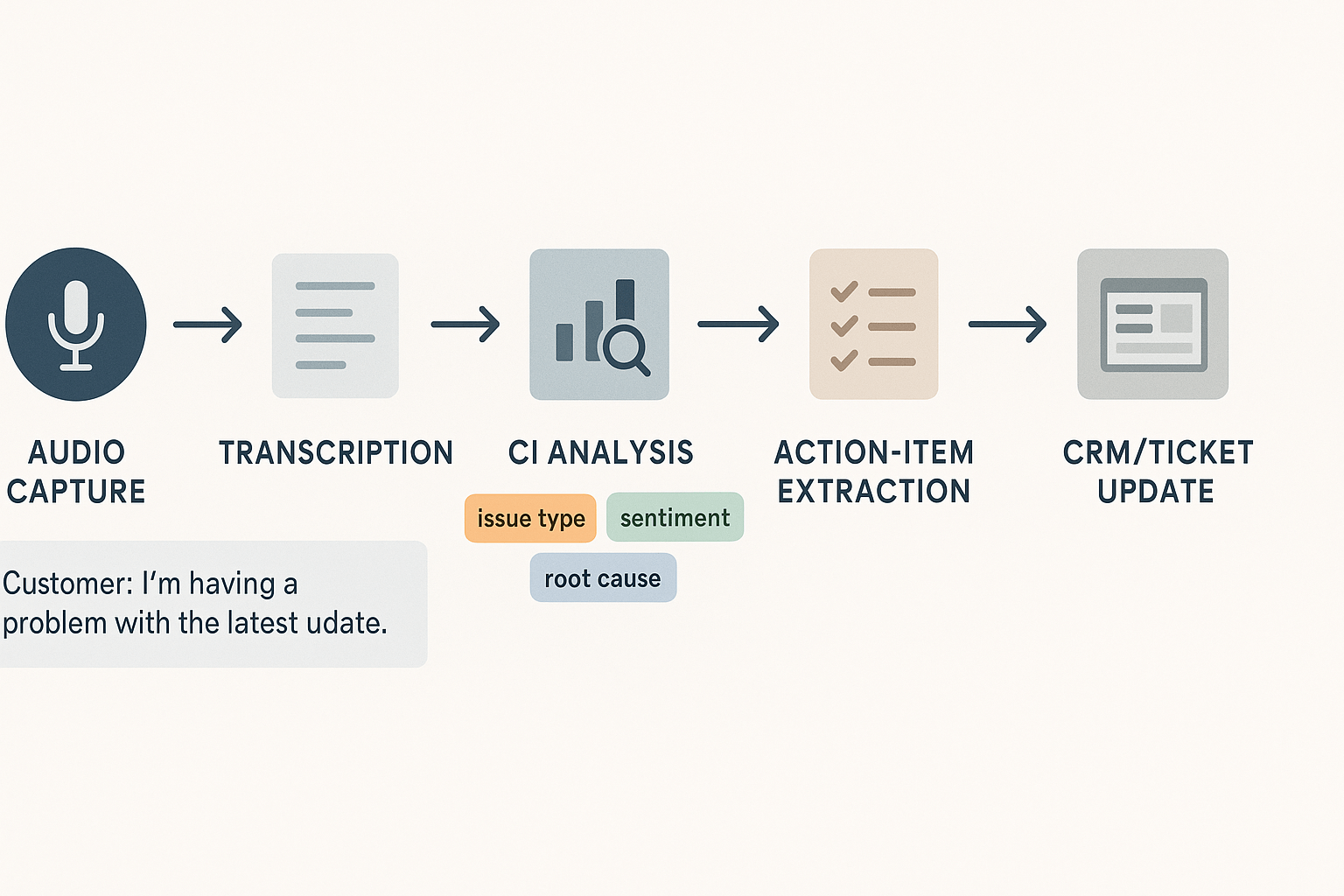
Support teams drown in tickets and one-off fixes. CI (conversational intelligence) turns support calls into searchable data. Typical workflow:
- Capture the call and transcribe audio to text.
- Auto-tag issues, product areas, and sentiment.
- Group similar calls to spot repeat failures.
- Create action items and push them to the ticketing system.
Benefits: faster resolution, fewer repeat tickets, and clearer escalation paths. Metrics to track: time to resolution, repeat ticket rate, and volume of tagged root causes.
Sales enablement: coach reps and flag deal risk
Sales leaders need a fast way to coach reps and protect high-value deals. CI extracts signals like pricing objections, competitor mentions, and buyer intent. Use these steps:
- Record and transcribe sales calls.
- Run call scoring against playbook criteria.
- Surface risky calls to managers for quick coaching.
- Log key moments to CRM as notes or tasks.
That workflow reduces ramp time and lowers deal slippage. Track win rate by rep, average deal cycle, and coaching actions completed.
Product research: surface voice of customer patterns
Product teams struggle to turn conversations into roadmap insight. CI finds recurring requests and feature gaps across channels. Typical process:
- Ingest meeting transcripts, support calls, and interviews.
- Cluster topics and map them to user segments.
- Generate a research brief or mind map for stakeholders.
This speeds prioritization and helps teams answer which feature changes will move metrics. Measure feature request frequency, cross-segment overlap, and time to insight.
Mini case study: Mid-market team speeds follow-ups
Problem: A mid-market SaaS company missed post-meeting actions and faced long follow-ups. They used a CI workflow to capture meeting audio, auto-generate notes, and create tasks.
What they did: every meeting uploaded to the CI workspace was auto-transcribed. The system highlighted action items and assigned owners. Managers got a one-click export to project boards.
Outcome: follow-up time dropped from days to hours. Teams reported fewer missed tasks and faster project momentum. The simple win was better meeting hygiene and faster execution.
Mini case study: Enterprise multi-language support and compliance
Problem: An enterprise with global teams needed multilingual notes and strict data controls. They needed transcripts in many languages, and data policies had to be enforced.
What they did: they used CI to translate transcripts into English and to redact sensitive fields before storage. The platform supported SSO and policy controls for access.
Outcome: localized insights flowed to product and support teams. Compliance checks became part of the workflow, and audit trails made reviews faster.
Key takeaway: conversational intelligence powers faster decisions across support, sales, and product. It turns noise into actions and gives teams measurable ways to improve.
Implementation checklist & best practices
Start with clear outcomes and a short plan. Explain what success looks like, who owns it, and why you need conversational intelligence in this workflow. Use the plan to map features like live transcription, AI notes, Shadow chat, and mind map to real team problems.
1) Align goals and stakeholders
- Set measurable goals. Pick 2 to 3 outcomes, for example faster meeting follow-ups, fewer missed actions, or searchable knowledge. Define success metrics and a baseline.
- Map stakeholder roles. Include CX, sales, product, IT, legal, and an executive sponsor. Name owners for data, adoption, and reporting.
- Create a short RACI. That keeps decision-making clear and avoids stalled rollouts.
2) Map data sources and integrations
- Inventory meeting sources, recordings, and docs. Note platform, file types, and retention rules.
- Plan integrations early, such as calendar, Slack, and your knowledge base. Confirm export formats you need, for example TXT, DOCX, or WAV.
- Decide on privacy settings and storage. Keep data private by default and document retention policy.
3) Choose templates, playbooks, and reporting
- Pick 3 starter templates: a meeting summary, a decision log, and an action tracker. Tailor fields to team needs.
- Build playbooks for intake, labeling, and naming conventions. Clear rules make search and cross meeting Q&A work.
- Define a reporting cadence. Weekly insight snapshots help prove early ROI.
4) Pilot plan: 30/60/90 days
30 days: Run a closed pilot with 1 team. Train users, capture 10 to 25 meetings, and collect feedback. Measure transcription quality and note usefulness.
60 days: Expand to 2 to 3 teams. Start automation for summaries and mind maps. Track task completion rate and search queries.
90 days: Scale org-wide if metrics improve. Add integrations and governance. Run a retrospective and share wins with stakeholders.
5) Change management and adoption tips
- Start with champions. Give a small group advanced access and ask them to demo wins.
- Keep training short, recorded, and task-focused. Use real meeting examples.
- Celebrate quick wins, like a saved hour per week or a critical decision found fast.
- Monitor usage and iterate on templates. Adoption changes with feedback.
Rollouts that map features to clear problems move faster. Keep goals visible, measure early wins, and iterate your playbooks.
Privacy, ethics & compliance: what to consider
When evaluating what conversational intelligence is for your organization, start with legal and ethical basics: consent, recording laws, data retention, and how personal data is handled. These rules shape how you can record meetings, store transcripts, and let teams query past calls. This section gives a short checklist and practical vendor questions you can use during procurement.
Consent and recording laws to check
Consent rules vary by country and state, so map requirements for every jurisdiction where you record. Note that California Consumer Privacy Act (CCPA) grants consumers the right to know about the personal information a business collects about them and how it is used and shared. For EU users, confirm GDPR obligations, like lawful basis for processing and rights to access or delete data. Also confirm whether local call recording laws require one-party or two-party consent, and bake that into your meeting policy.
Data handling: retention, access, and PII
Define a clear retention policy, with automatic deletion or archival after a fixed period. Require role based access controls, single sign-on, and audit logs so only authorized people read transcripts. Insist on anonymization or redaction for sensitive fields (PII: names, contact details, health data) when you run analytics. Finally, confirm data residency, export and deletion tools, and proof that provider data is not used to train third-party models unless you opt in.
Vendor security checklist and practical questions
Use this checklist when evaluating vendors:
- Encryption at rest and in transit, and key management details.
- Data residency options and exportable backups.
- Does the vendor use customer data to train models, and can you opt out?
- Access controls: SSO, SCIM, role based permissions, and audit logs.
- Retention and deletion policies, plus forensic logs for incident response.
- Certifications: SOC 2, ISO 27001, and a GDPR Data Processing Addendum.
- Ability to anonymize/redact PII and support legal holds when needed.
Ask for documentation and a short security demo during procurement. Require a sample export, a DPA, and a clear incident response plan before you sign.
How to choose a CI vendor: comparison & evaluation framework
It focuses on the six decision factors most teams use: accuracy, integrations, language coverage, analytics, privacy, and enterprise support. Read fast, score vendors in a demo, and align choices to your risk and ROI goals.
Prioritize the six core criteria
- Accuracy: transcription and intent detection that cuts false positives. Accuracy matters for legal notes and coaching. Ask about word error rate and domain tuning.
- Integrations: does the product plug into your meeting stack, CRM, and knowledge base? Native connectors reduce manual work.
- Language coverage: Look for multilingual transcription and translation if you work globally.
- Analytics: dashboards, search across meetings, topic trends, and action extraction.
- Privacy and compliance: encryption, tenant isolation, data residency, and policy controls.
- Enterprise support: SSO, SLAs, admin controls, and dedicated onboarding.
According to Gartner's 'Market Guide for Meeting Solutions' (2023), organizations are evaluating generative AI and other AI-based capabilities to improve employee productivity and meeting experiences.
Quick conceptual comparison: TicNote vs Otter vs Fireflies vs Granola
| Criterion | TicNote | Otter | Fireflies | Granola |
| Accuracy | High, enterprise tuning | Good general accuracy | Good, focused on ease | Varies by use case |
| Integrations | Notion, Slack, exports | Major meeting platforms | CRM integrations | Lightweight connectors |
| Languages | 100+ translations | Multiple languages | Primarily English | Limited multilingual support |
| Analytics | Cross-meeting search, mind maps | Basic analytics | Coaching transcripts | Focused summaries |
| Privacy | Private by default, US cloud | Standard controls | Team sharing model | Varies by vendor |
| Enterprise | SSO, custom plans | Business plans | Enterprise options | SMB focus |
Vendor demo questions
- How do you measure transcription accuracy for our industry?
- Can you show a live cross-meeting search and action extraction?
- What integrations are native, and what use APIs?
- How do you handle data residency and encryption?
- What admin controls and user provisioning do you offer?
- Can we tune models to our domain or vocab?
- What SLAs and support options come with Enterprise?
- How do you prevent data from being used to train external models?
How TicNote Cloud Turns Conversations into Insight
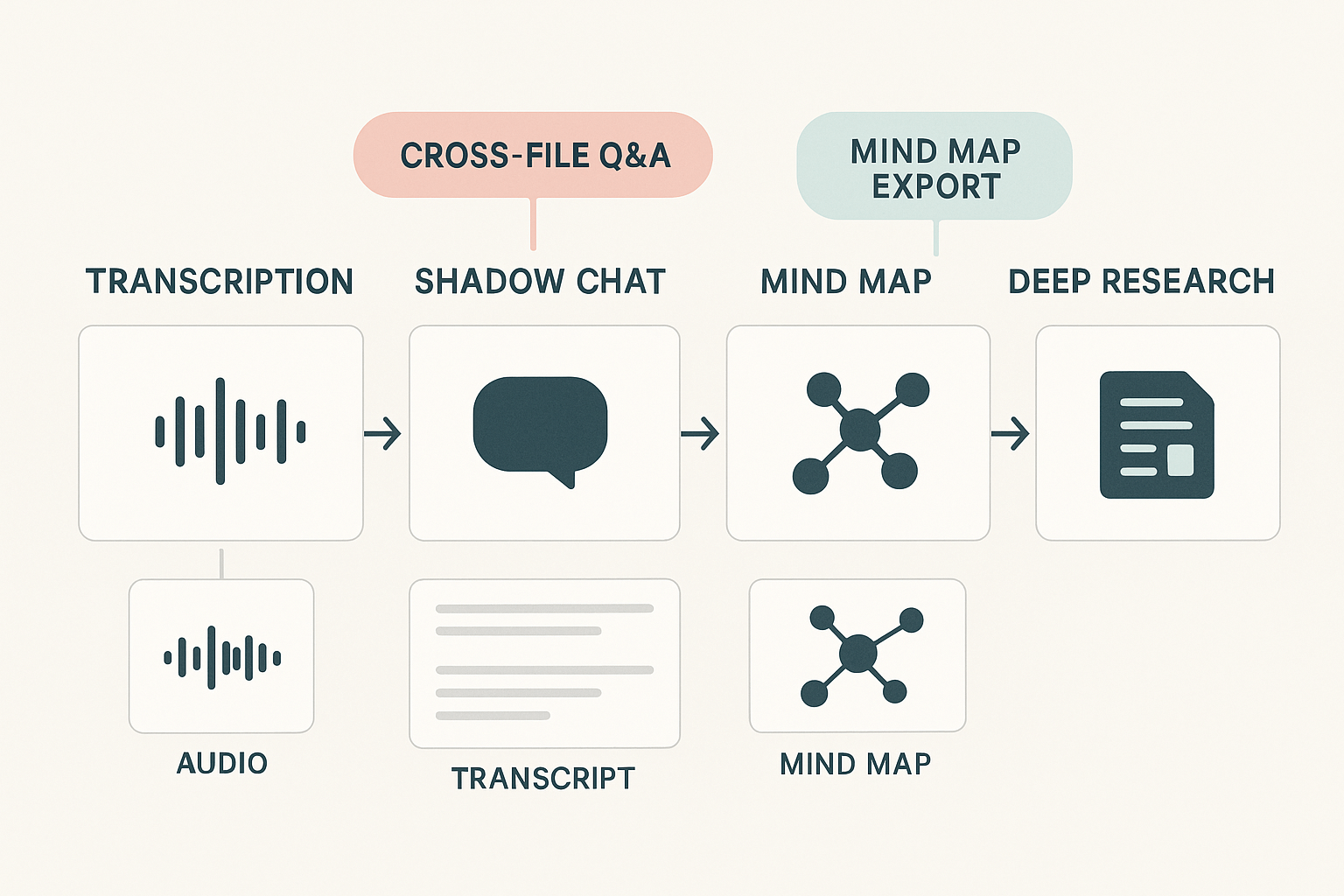
TicNote transforms meetings and recordings into structured, searchable knowledge using four key modules: Transcription, Shadow Chat, Mind Map, and Deep Research. Here's how each step helps teams move from audio to action.
Step-by-Step Workflow
- Record & Transcribe: Upload or record meetings to generate time-stamped, speaker-labeled transcripts in multiple languages.
- Auto Notes & Topics: AI summarizes discussions, identifies key decisions, action items, and topic clusters.
- Shadow Chat: Ask questions about any recording, folder, or set of meetings and receive source-cited, context-rich answers.
- Mind Map & Exporting: Instantly create a visual mind map of the conversation. Export to PNG, Xmind, or DOCX.
- Deep Research: Aggregate content across multiple files into a purpose-built research report or handoff document.
Each module adds structured metadata, enabling cross-meeting Q&A and intelligent search.
Module Overview
- Transcription: Accurate, multilingual text; live or post-upload. Includes speaker IDs and timestamps.
- Shadow Chat: Conversational queries across conversations. Supports ask-follow-up style interactions.
- Mind Map: Auto-generated summaries with visual nodes. Edit, rearrange, then export.
- Deep Research: Create slide-digest or product summaries combining multiple meetings and docs.
Try Templates Like:
- Sales call summary
- Research interview report
- Support triage brief
TicNote helps teams build working knowledge from conversations—turning voice into verifiable, reusable insight.
Get Started Free with TicNote Cloud