


 Extension
TL;DR — Quick takeaways
Capture clear action items in meetings by naming the task, assigning one owner, and setting a due date. Keep each item short and measurable, and include the context or deliverable that signals done. Use a single tracking field or table so nothing gets lost later.
Key fields and quick wins:
- Task title: one concise sentence describing the work.
- Owner: a single person, no group assignments.
- Due date: specific day, not a vague window.
- Success criteria: what is done looks like, one line.
- Source link: timestamp or file for the original note or recording.
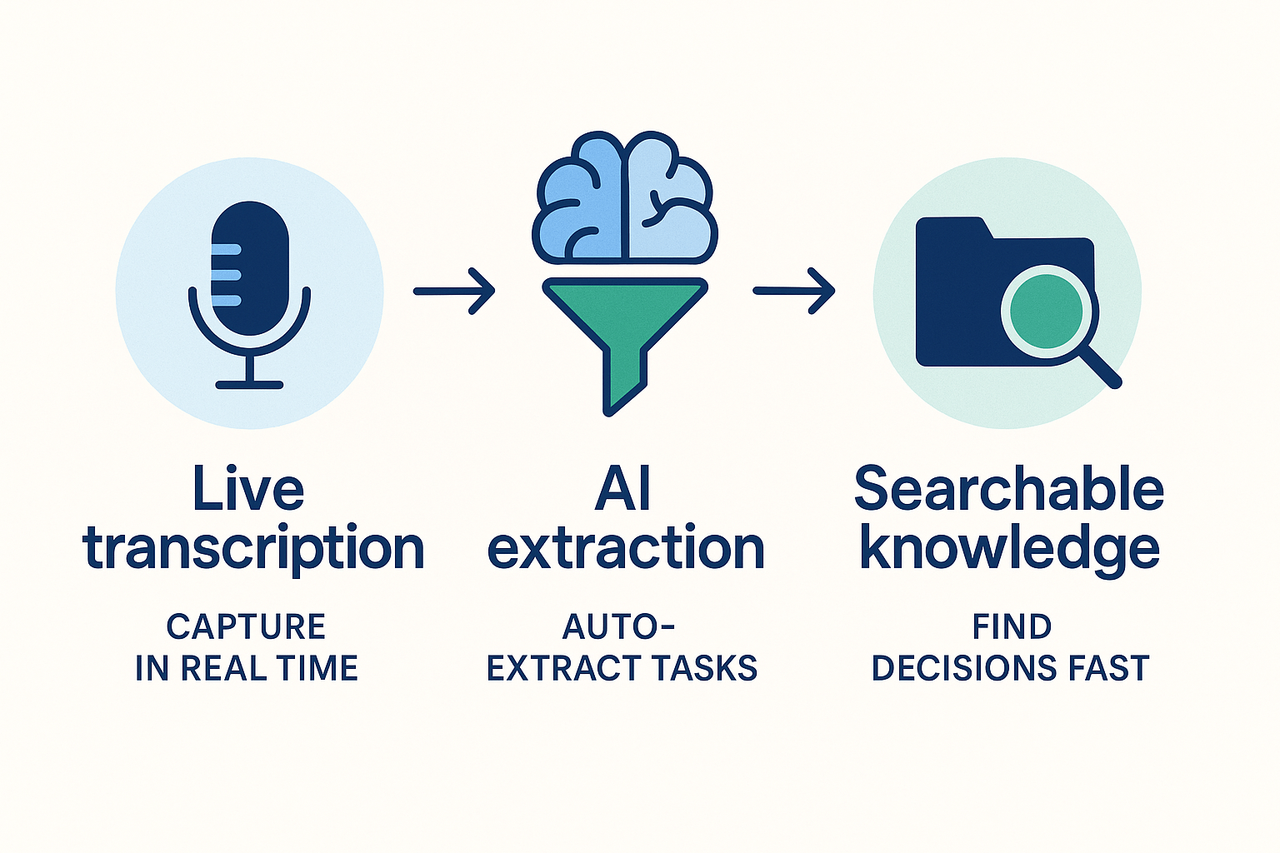
Quick captures: note the who, what, and when in the moment, then tag or mark items for follow-up. After the meeting, batch-edit items to add success criteria and links. If you use live transcription plus post-meeting AI extraction, you’ll save time locating actions and turning them into searchable knowledge.
Ready to start? Run a short demo, and import a sample transcript to see capture and tracking work end to end.
Why action items in meeting minutes matter
Action items in meeting minutes are the bridge between talk and results. When teams fail to capture or assign tasks clearly, work stalls, and accountability vanishes. That gap costs time, money, and trust, and it turns routine meetings into recurring rework sessions.
Missed actions cause real, measurable loss
Missed tasks don’t just delay projects; they multiply hidden costs. For example, Estimate the Cost of a Meeting with This Calculator found that a single weekly meeting of mid-level managers was costing one organization $15 million a year. Lost focus, duplicate work, and late deliveries all add up, especially at scale.
How consistent capture drives accountability and outcomes
Clear capture does three things: it assigns ownership, sets deadlines, and creates a record for follow-up. When every action item names an owner and a due date, teams hit targets more often. A simple habit of noting actions in minutes converts meetings from information sessions into execution engines.
- Status meetings: A checklist of actions keeps sprints on track. Note blockers, owners, and next steps.
- Decision meetings: Record the decision, follow-up tasks, and who must validate the result.
- Retrospectives: Turn insights into concrete experiments, with owners and review dates.
Concrete use cases that show immediate impact
Status meeting example: A weekly product standup captures three action items. One owner addresses a bug, another drafts a release note, and the third schedules a stakeholder demo. Follow-up prevents the bug from slipping into the next sprint.
Decision meeting example: A procurement choice requires vendor research. The minutes assign the research task, request quotes, and set a decision review. Without that record, vendors are re-contacted, and timelines slip.
Retrospective example: The team lists three improvement experiments, each with a single owner and a six-week test window. The next retrospective reviews results, not promises.
Recording and tracking action items make meetings accountable. It reduces rework, shortens feedback loops, and speeds decision cycles. Tools for live capture, transcription, and searchable minutes help sustain this habit. For teams that run many meetings, adopting a consistent action-item workflow is the fastest path to clearer outcomes and fewer missed commitments.
Anatomy of an effective action item
Action items in meeting minutes should make nthe ext steps impossible to misread. A crisp action item tells who does what, by when, and why. Belo,w we break down the five fields every actionable entry needs and show quick rewrites you can apply right away.
What every action item needs
- Task: a single, specific task.
- Assignee: one clear owner.
- Due date: a firm deadline or milestone.
- Context: short background or link to reference materials.
- Status: current state and any blockers.
Task: say exactly what to do
A task should be a single, measurable step. Avoid vague verbs like "help" or "discuss more." Good tasks reduce back-and-forth and speed execution. For audit trails, name deliverables, not intentions.
Assignee: one owner only
Assigning one person avoids finger-pointing. If multiple people contribute, name a lead and list collaborators. For records, include initials or an email so future readers can verify responsibility.
Due date: set a date or milestone
A due date creates urgency and makes tracking simple. If the work depends on another event, use a milestone date. For compliance or audits, capture both date and time zone when relevant.
Context: add the why and the source
Context links the task to a decision, doc, or customer ask. A one-line why helps the assignee prioritize. For traceability, include a link to the agenda item, transcript, or slide number.
Status: track progress and blockers
Status shows if work is not started, in progress, blocked, or done. Update the status in the minutes or your task tool after each meeting. This builds a useful audit trail and speeds follow-up.
Weak vs strong phrasing: quick rewrites you can use now
Use the table below to spot unclear notes and turn them into crisp actions. Rewrite your own minutes the same way.
| Weak phrasing | Strong phrasing |
| "Improve onboarding." | "Draft a 3-step onboarding checklist for new hires by May 15. Owner: J. Patel." |
| "Talk to client about pricing." | "Email the revised pricing sheet and confirm the decision by April 28. Owner: L. Gomez." |
| "Follow up on budget." | "Prepare Q2 budget draft and circulate to finance by May 1. Owner: Finance Lead (E. Sun)." |
| "Look into the issue." | "Run error log report for product v2 and post findings in #ops by Friday. Owner: S. King." |
| "Schedule training." | "Schedule 60-minute product training for the support team on June 3, send calendar invite. Owner: M. Lee." |
Clear action items cut handoffs, reduce rework, and make audits simple. Keep each entry short, specific, and traceable so anyone can pick it up and move forward.
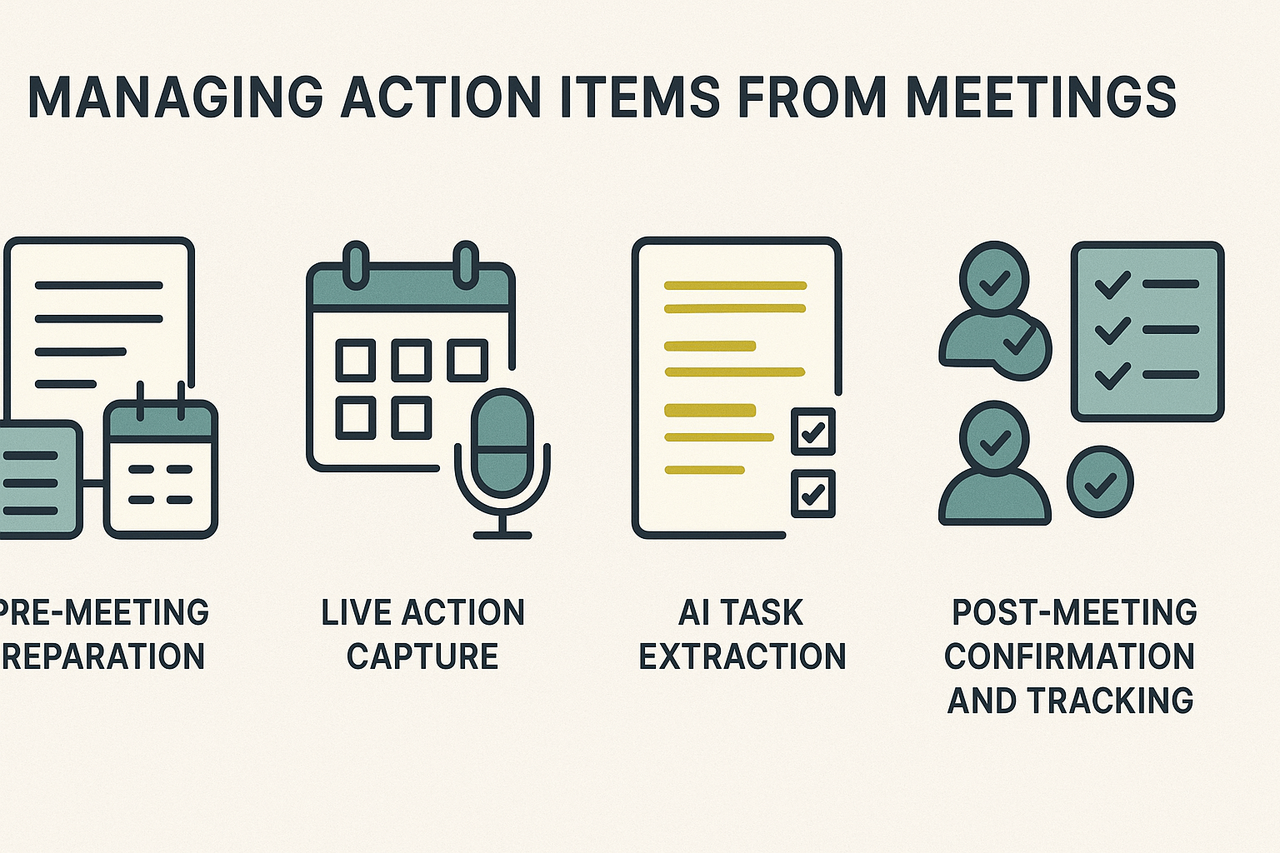
Capturing clear action items in meeting minutes starts before the meeting and continues after it. To ensure clear accountability, use a structured approach: prepare beforehand, take accurate notes during the meeting, and confirm ownership afterwards.
1. Prepare Before the Meeting
- Set an agenda with likely decisions and assign space for action items (e.g., Topic, Owner, Due Date).
- Add a template for capturing action items directly in the invite or shared document.
- Assign roles: designate a note taker and an action verifier.
- Inform attendees if you’re recording or transcribing the meeting to comply with privacy guidelines.
2. Capture During the Meeting
- Use a shared doc or note-taking tool to centralize input.
- Assign two people: one notes the conversation, the other listens for and confirms action items.
- When an action emerges:
- Write it concisely: verb, owner, due date (e.g., "Draft Q2 report, Alex, by May 5").
- Confirm verbally with the suggested owner.
- Link to supporting content, like documents or slides.
- Flag unclear items with a question mark.
- Use shorthand: initials for names, short dates, and a standard list of verbs (draft, follow up, review).
3. After the Meeting
- Review notes and the transcript within 10 minutes.
- Expand shorthand into full sentences.
- Send a digest: task list with owner names, due dates, and reference links.
Post-meeting checklist:
- Reconcile live notes with any transcript or recording.
- Use AI to suggest tasks — verify them manually.
- Assign tasks in your team’s system and tag status (Open, In Progress, Done).
- Schedule any necessary follow-ups.
4. Confirm Ownership
Ask task owners to reply or acknowledge the assignment. This creates accountability.
Tools & Roles Summary
| Role | Responsibility |
| Note Taker | Logs discussion and action items |
| Verifier | Confirms owner and clarity of action |
| Recorder | Captures audio or generates transcript |
| Task Owner | Accepts and completes assigned tasks |
Why It Works
Clarifies ownership, avoids missed tasks, and ensures a consistent follow-up rhythm.
Try TicNote Cloud free — capture and track meeting actions reliably
TicNote Cloud walkthrough: live capture to exported tasks
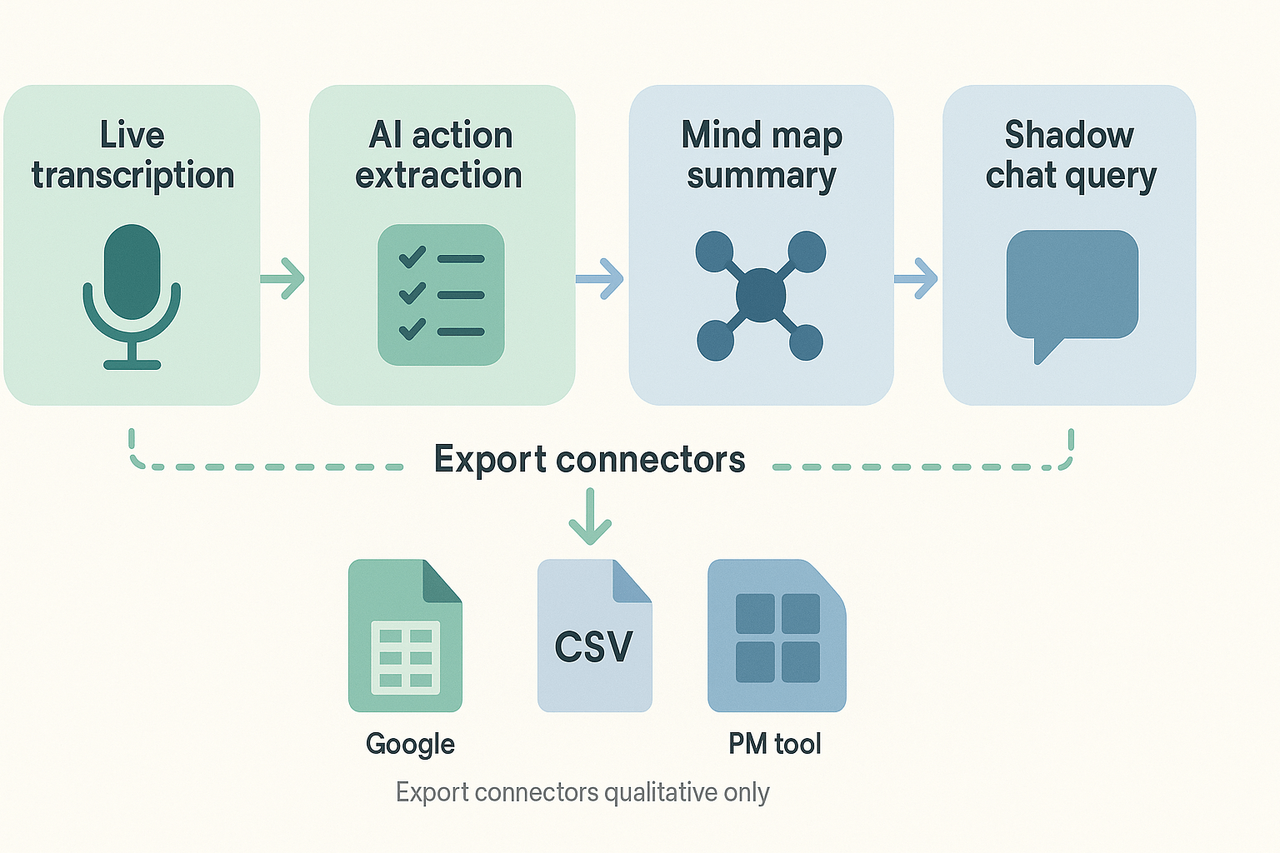
This walkthrough shows a typical flow: live transcription, AI extraction of action items, quick scope checks with Shadow chat, and export to a PM tool. Use TicNote Cloud once in this section and then call it "the platform."
Step 1: Start a recording or upload audio. The platform creates a time-stamped transcript in minutes. Keep the meeting open and let live transcription run.
Step 2: Run the AI extraction feature to surface action items and decisions. The tool groups candidate tasks by topic and attaches transcript snippets. Scan the list, edit language to be owner- and outcome-focused, and assign owners.
Step 3: If an item’s scope is vague, open Shadow chat (the platform’s contextual Q&A) and ask concise questions like: “What’s the deliverable for task X?” or “List dependencies and stakeholders for this item.” Shadow pulls context from the transcript and linked files.
Step 4: Export selected rows to your project tracker. Export options should include CSV, a direct connector to common PM tools, or copy-to-clipboard for quick paste. Use the sheet template to prepare the CSV mapping.
Example short transcript sample
Speaker 1: "Action, Mike, to draft the vendor RFP by next Tuesday."
Speaker 2: "I'll review the draft and give feedback by Friday."
AI note: Action item detected, Owner: Mike, Task: Draft vendor RFP, Due: next Tuesday, Context: review required by team.
Use this sample in the template to show how the platform links text to tasks. Short transcript snippets make extraction checks fast.
Exporting action items to PM tools
When you export, follow these rules for reliable imports:
- Normalize date formats to ISO (YYYY-MM-DD).
- Use the owner's email or username, not display name.
- Map priority to the PM tool’s fixed values.
- Include a source link to the full transcript for context.
Also, keep a staging sheet where you validate one or two rows before a large import.
Best practices and common pitfalls to avoid
Action items in meeting minutes often fail because they start vague and stay buried. This section lists the most common failure modes and gives clear, small fixes you can apply right away. Follow these, and you’ll see fewer missed tasks and cleaner follow-up.
Quick fixes for common failure modes
- Vague owners (no clear person): Always name an owner and confirm them aloud. Use "owner" and add a short parenthetical label, for example, owner (person responsible).
- Missing or soft deadlines: Record a specific date or sprint number. If a date is negotiable, add a review date and next check-in.
- Buried actions: Put all actions in a single, shared action list. Highlight or tag new items so they don’t get lost in the full minutes.
- Unclear scope: Add one short acceptance criterion per task, e.g., "Draft sent to legal for review." That tells people when work is done.
- No follow-up ritual: Run a 3-minute action review at the end of every meeting and read back owners and dates.
Troubleshooting recurring misses
- Audit one week of past meetings. Find tasks that were late or never started. Look for patterns.
- Reduce cognitive load: cut long tasks into smaller steps with short deadlines. Smaller wins stick.
- Add lightweight accountability: a weekly digest of open actions sent to owners. It nudges without micromanaging.
- Use a single source of truth. Export or sync the final action list to your task tracker or project board.
- If items repeat, add a root cause note to the action: dependency, blocked, or resource shortage. That makes future planning easier.
Tips for hybrid and remote meetings
- Confirm assignments on camera or in chat, so both in-room and remote attendees hear them.
- Use live captioning or transcription to capture the exact wording. If you use a tool like TicNote Cloud, enable live transcription and AI summarization to turn talk into assignable tasks.
- Share the action item list in the meeting chat and pin it in your collaboration tool.
- Schedule a 24‑hour check-in for critical items to catch misunderstandings early.
Standardize a short template, run a quick end-of-meeting review, and keep one shared list. Do that and follow up becomes a habit, not a hope.
Tracking, integrations, and measuring success
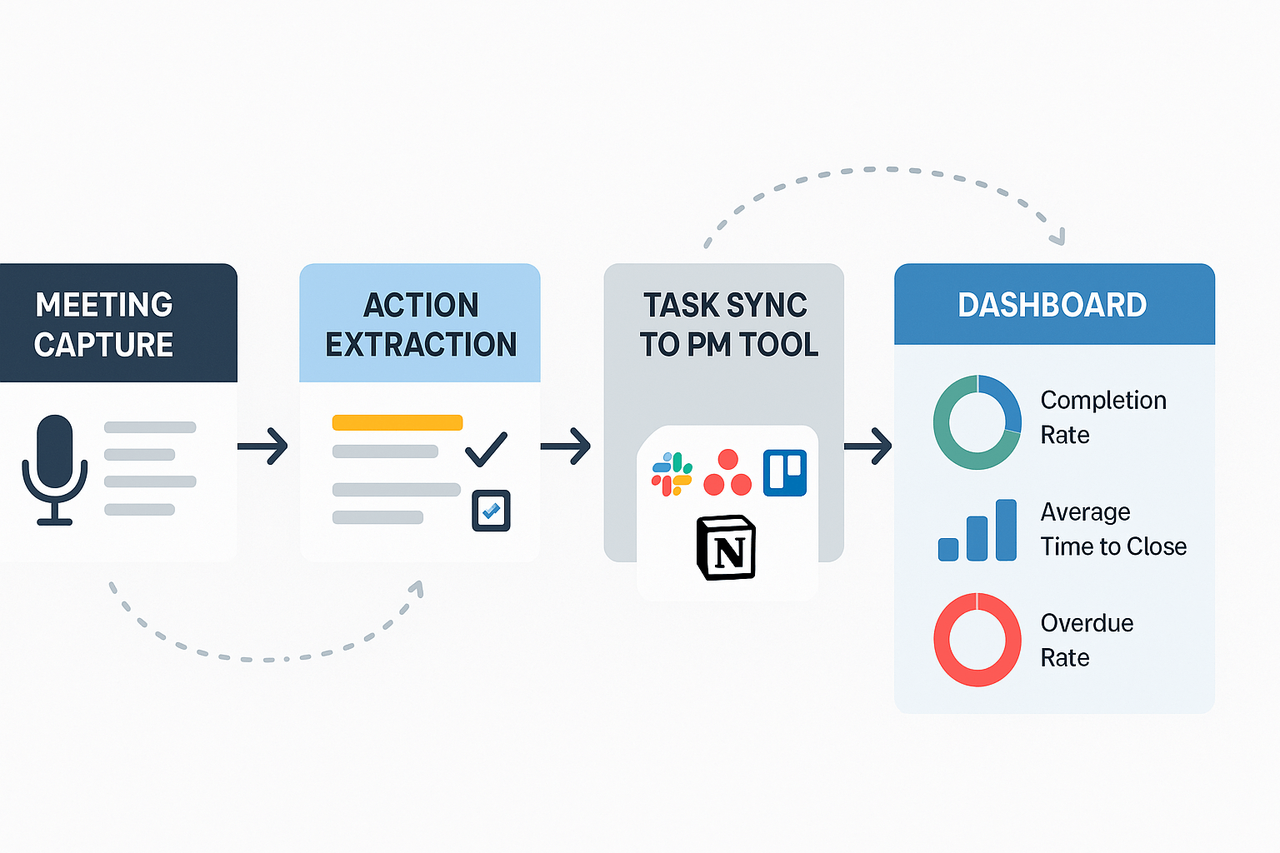
To improve follow-through, you need clear metrics and automated flows. Start by tracking action items in meeting minutes with a small set of KPIs. Then feed those metrics into a simple dashboard so teams see progress at a glance and managers can act fast.
Define and track three core KPIs
Keep metrics tight. Focus on the three that predict outcomes.
- Completion rate
- Formula: completed tasks ÷ assigned tasks. Track weekly and monthly. This shows whether people finish what they commit to.
- Average time to close
- Formula: sum of days to close ÷ number of closed tasks. Shorter times mean faster momentum.
- Overdue rate
- Formula: overdue tasks ÷ open tasks. This highlights bottlenecks and capacity problems.
Track these metrics by owner, project, and meeting type. Use rolling windows (7, 30, 90 days) to spot trends. Set a target for each KPI, for example, completion rate above 85 percent, average time to close under 5 business days, and overdue rate under 10 percent. Adjust targets to fit your team.
Sample tracking dashboard and what to include
A compact dashboard keeps everyone aligned. Build three widget panels and a task drilldown.
- Widget 1: Completion Rate with a 30-day trend sparkline.
- Widget 2: Average Time to Close, showing median and mean.
- Widget 3: Overdue Rate with owner heatmap.
- Drilldown table: open actions, owner, due date, source meeting, and link to the note.
Use conditional colors: green for on track, amber for at risk, and red for overdue. Add quick filters for meeting type, project, or owner so stakeholders can slice the data.
Automate updates with integrations and exports
Integrations cut follow-up friction. Connect your meeting notes to the places where work actually happens. For example:
- Slack: post new action items to a channel or send direct reminders.
- Asana and Trello: create tasks automatically with due dates and owners.
- Notion: sync action tables for project pages and status boards.
TicNote Cloud can export transcripts, structured summaries, and task lists to CSV or through connectors. The platform uses those exports to push tasks into PM tools and trigger reminder messages. Once you set rules, new action items appear in your task tool, and status changes flow back to your dashboard.
Because many vendors embed collaboration features, integration is easier now. According to Gartner (2019), by 2023, nearly 60% of enterprise application software providers will have included some form of social software and collaboration functionalities in their software product portfolios.
How automation improves KPIs
Automation reduces manual handoffs and lost actions. Set these simple rules:
- Auto-create a task whenever a note line is tagged "Action".
- Assign an owner and due date from the meeting transcript or follow-up chat.
- Send an automatic reminder two days before the due date.
These rules lift completion rates and cut time to close. They also let you focus on exceptions, not status updates.
Quick checklist to measure improvement
- Baseline your three KPIs for 30 days.
- Turn on task exports to one PM tool.
- Run weekly dashboard reviews for two months.
- Iterate rules where overdue rates or time to close stall.
A simple, visible dashboard plus automated task syncs will make action items part of your team’s daily workflow. That means fewer missed commitments and faster delivery.
Industry-specific examples & templates
Different industries need small but important tweaks to capture and track action items in meeting minutes. Below are five mini cases that show one compliance or workflow change per sector, plus a link to a ready-to-use template you can copy. Each template includes a task table, owner, due date, context, and retention note.
Common fields in each downloadable template:
- Action description, owner, due date
- Priority, status, related doc links
- Compliance tag, retention period, approval step
- Notes and follow-up checkboxes
Healthcare: add consent and retention tags
Healthcare teams must flag patient data and consent in notes. Use a compliance tag for PHI (protected health information) and a retention period column (how long to keep records). Make approval steps explicit, for example, sign-off by the clinical lead.
Legal: record retention and approvals
Legal teams need a clear audit trail and a retention schedule (how long to keep records). Add fields for version, approver name, legal hold flag, and link to case files. Lock the final minutes copy and export a PDF for the file server.
Education and research: ethics and data provenance
Researchers must record data sources and ethics approvals. Add a column for IRB or ethics ID, dataset link, and consent status. Make tasks time-bound to match the semester or study phases.
Non-profits and boards: donor sensitivity and decision logs
Boards must log decisions and funding approvals clearly for auditors. Add a donor sensitivity flag and a motion outcome field with votes recorded. Keep a public summary separate from the full minutes where needed.
Remote teams: timezone handoffs and async follow-up
Cross-timezone teams need explicit handoffs and local deadlines. Add timezone, local due date, and a "handoff to" field showing next shift owner. Include a quick summary line so the next person can act fast. Tip: import any template into TicNote Cloud to turn sheets into searchable tasks and link them to transcripts.
Accessibility, privacy, and compliance should be part of every meeting notes workflow. Start by making meeting content readable and reachable, then lock down who can see, export, or keep it. Clear action items in meeting minutes help teams act faster, but they must be accessible and legally defensible.
Make minutes accessible for everyone
- Use plain language and short sentences. Headline each section, and call out decisions and tasks.
- Include a full transcript and simple timestamps so readers jump to the right moment.
- Provide alt text for images and exportable formats: DOCX, PDF, and TXT for screen readers.
- Offer a translated version when teams are multilingual, or include AI translation for quick reads.
- Supply a one‑line summary and a bullet list of action owners for fast skimming.
Privacy by default and retention guidance
Keep access narrow and retention short. Limit who can view or export notes, and store only what you need. For regulated teams, keep a clear retention schedule tied to legal requirements, and purge records when the retention period ends. TicNote Cloud is private by default, stores data in a U.S. cloud, and supports export and delete controls to help meet these needs.
Audit-ready configs and legal checkpoints
Consider formal frameworks: ISO/IEC 27701:2019, which specifies requirements and provides guidance for establishing, implementing, maintaining, and continually improving a Privacy Information Management System (PIMS). Follow a short checklist:
- Apply role-based access and SSO for admins.
- Enable audit logs and export history.
- Use encryption in transit and at rest.
- Record consent and meeting attendees for legal tracing.
- Keep a written retention policy referencing applicable law, like GDPR or sector rules.
Quick tip: document your retention policy and include it in meeting templates. That makes minutes easier to audit and reduces rthe isk of over‑retention.


