


 Extension
TL;DR, Key difference in 60 seconds
Quick one-minute snapshot: an agenda lists what will happen, and minutes record what happened. The agenda sets the plan; minutes capture decisions, tasks, and facts. Use the agenda and minutes of the meeting to prepare, run, and preserve outcomes.
Three fast action steps:
- Before the meeting, share a short agenda with objectives and time per item.
- During the meeting, note decisions and assign action items with owners and due dates.
- After the meeting, publish concise minutes and highlight tasks to follow up.
If you want automated transcription and action extraction, see the TicNote Cloud workflow later in this guide.
What is a meeting agenda? (purpose & anatomy)
A meeting agenda is a short plan that lists goals, topics, and who leads each item. It sets expectations so the group stays on task and leaves with clear outcomes. It’s the planning side of the agenda and minutes of meeting practices, and it helps people prepare before they join.
Why a good agenda matters
A clear agenda keeps meetings focused and shorter. When attendees know goals and time limits, conversations stay on topic. That means faster decisions, fewer follow-up emails, and better use of everyone’s time.
Core elements of an effective agenda
- Meeting title and purpose (one sentence).
- Date, time, duration, and location or link.
- Attendees and roles (host, note taker, decision maker).
- Clear goals or desired outcomes (decide, align, inform).
- Topics or agenda items, each with a timebox (minutes) and an owner (person who leads).
- Prep required and attachments (documents, slides).
- Decisions to be made and any success criteria.
- Logistics and ground rules (mute phones, cameras on, parking lot for side issues).
Corporate sample: 15-minute project standup
- Welcome and goal: align blockers and actions (1 min) — Host: Maria.
- Quick updates, team members (8 min total, 2 min each) — Owners: Adam, Priya, Chen, Lola.
- Blockers and decisions needed (4 min) — Owner: Project Lead.
- Actions and owners (1 min) — Note taker lists tasks and deadlines.
This sample shows short timeboxes and named owners. It also calls out the note taker, so minutes are captured and shared.
When to send the agenda
For short recurring meetings, share the agenda 24 hours ahead. For complex or strategic sessions, send it 3 to 7 days before so people can prepare. If materials are heavy, attach them with the invite or link to a shared folder. Update the agenda before the meeting if the scope changes, and note the change in the invite.
Short, focused agendas make meetings work. They set the stage for clear minutes and faster follow-up.
What are meeting minutes? (purpose & anatomy)
Meeting minutes are the official, written record of what happened in a meeting. They capture decisions, assign tasks, and agree on deadlines. If you ever need to prove what was decided or who owns a task, minutes are the source of truth. Include the phrase agenda and minutes of meeting when you explain both planning and record keeping to newcomers.
Why minutes matter
Minutes protect teams from confusion and scope drift. They let absent members catch up quickly. They also create accountability by linking decisions to owners and dates. In regulated or funded settings, minutes can support audits and compliance.
Core elements of effective minutes
- Meeting header: meeting title, date, time, location, and meeting type (regular, ad hoc, board). Keep it short and clear.
- Attendance: list who attended, who joined late, and who was absent with apologies. This resolves quorum questions.
- Agenda reference: note the agenda topics and any changes during the meeting. Cross-reference agenda items to make navigation easier.
- Decisions: record each decision in plain language, and note any votes or approvals. Use short declarative sentences.
- Action items: for each task, list the owner, the task, and a clear deadline. Example: Sarah M., Prepare Q2 budget, due May 12.
- Key discussion points: capture summary points only, not every comment. Focus on the reasons that led to decisions.
- Attachments and references: include links or file names for relevant documents and slides.
- Approval and next meeting: note who will approve the minutes and the date of the next meeting if known.
Corporate minutes sample (condensed)
- Meeting: Finance Steering Committee, April 10, 2025, 10:00 AM
- Attendees: A. Patel, S. Morgan, K. Lee, T. Green (absent: J. Cruz)
- Decisions: Approved Q1 variance report and reallocated $50k to marketing.
- Action items:
- S. Morgan to update forecast model, due April 17.
- K. Lee to draft vendor RFP, due April 24.
- Documents: Q1 Report v1.pdf; Budget Request.xlsx
When to distribute and store minutes
Send draft minutes within 24 to 48 hours while details are fresh. Mark them "Draft" until approved at the next meeting. Store final minutes in a shared folder or knowledge base for search and auditability.
Agenda vs Minutes — side-by-side comparison
The agenda and minutes of a meeting serve different but linked roles. The agenda plans the meeting, while the minutes record what actually happened. This section compares both by role, timing, content, format, and legal use so you can create clear documents that prevent confusion.
Quick comparison table
| Attribute | Agenda | Minutes |
| Primary role | Plan topics, goals, and time | Record decisions, votes, and assignments |
| Timing | Created before the meeting | Created during or right after the meeting |
| Owner | Chair, organizer, or facilitator | Secretary, scribe, or assigned note taker |
| Content focus | Items, objectives, presenters, duration | Attendance, motions, outcomes, action items, timestamps |
| Level of detail | Bullet points and time blocks | Full results, who did what, deadlines |
| Format | Outline, numbered items, slide handout | Narrative, structured template, or transcript |
| Distribution | Sent with invite or pre-read | Sent as an official record after approval |
| Legal/official use | Not usually a legal record | Can be an official legal record in many contexts |
Regulatory bodies sometimes require detailed minutes; for example, according to Minutes of Institutional Review Board (IRB) Meetings Guidance for Institutions and IRBs, the Department of Health and Human Services states that 45 CFR 46.115(a)(2) require institutions to prepare and maintain minutes of IRB meetings in sufficient detail to show attendance, actions taken, votes, the basis for requiring changes or disapproving research, and a summary of discussions on controverted issues.
Example agenda-to-minutes pairings
- Corporate status update
- Agenda: Sales update, 10 minutes, lead: VP Sales
- Minutes: Sales figures, decision to extend pricing promo, owner: VP Sales, due: May 12
- Academic faculty meeting
- Agenda: Curriculum change proposal, 20 minutes, presenter: Dept Chair
- Minutes: Vote result, wording of change, vote tally, requested revisions
- Nonprofit board meeting
- Agenda: Grant approval, 15 minutes, presenter: Program Director
- Minutes: Motion to approve grant, recorded vote, assigned follow-up tasks
Quick checklist to confirm both are complete
- The agenda contains objectives, time, and presenters
- Minutes show attendance, decisions, and votes
- Action items include the owner and due date
- Documents are dated and versioned
- Minutes distributed within 48 hours for review
This table and checklist make it easier to see meeting minutes vs the agenda at a glance. Use the checklist before and after each meeting to close the loop.
When to use each — meeting types & examples
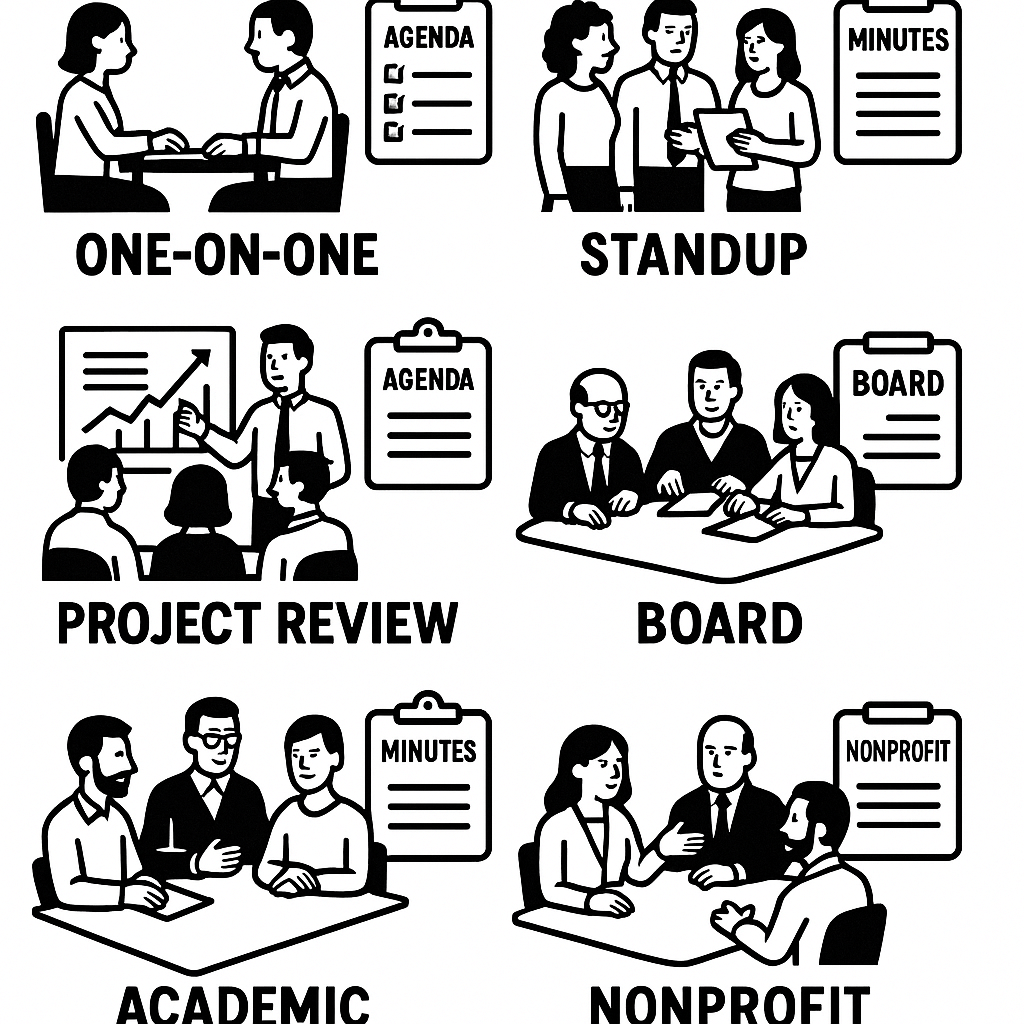
Know when to prepare an agenda and when to focus on minutes. The agenda and minutes of a meeting have different jobs: the agenda sets purpose, topics, and time; minutes capture decisions, assigned tasks, and outcomes. Below are common meeting types, when to use each, and short sample agendas and minutes you can copy.
One-on-one (manager and direct report)
Use an agenda to steer coaching and prep. Keep minutes brief, noting decisions and follow-ups.
Sample agenda:
- Check-in (5 min)
- Progress vs goals (10 min)
- Roadblocks and support (10 min)
- Next steps and priorities (5 min)
Sample minutes:
- Check-in: On track; mood good.
- Decision: Shift priority to X this week.
- Action: Alex to unblock vendor by Fri (owns).
- Next meeting: Same time next week.
Team standup
Agenda holds the timebox and focus. Minutes capture blockers and quick asks.
Sample agenda:
- Yesterday’s highlights (2 min each)
- Today’s plan (2 min each)
- Blockers (1 min each)
Sample minutes:
- Highlights: QA tests passed for feature B.
- Blocker: DB access for Sam; dev leads to grant access by EOD.
- Action: Sam to confirm once access is set.
Project review
Use a detailed agenda to cover scope, risks, and milestones. Capture minutes as an official record of decisions and owners.
Sample agenda:
- Status vs plan, risks, budget, decisions required, action list
Sample minutes:
- Decision: Approve scope change C. Budget reallocated from contingency.
- Actions: Maria to update timeline; dev team to deliver change by 09/15.
- Record added to project folder.
Note: Record and auto-transcribe long reviews with a tool like TicNote Cloud to extract tasks faster.
Board meeting
Agendas must be formal and distributed in advance. Minutes are legal records and list motions, votes, and resolutions.
Sample agenda:
- Call to order, approval of minutes, financials, motions, executive session, adjourn
Sample minutes:
- Motion passed to approve Q2 budget (unanimous).
- Resolution signed; CFO to file paperwork.
Academic committee
The agenda lists papers, reports, and decisions. Minutes show approved actions, votes, and follow-ups.
Sample agenda:
- Minutes approval, proposals, curriculum changes, timelines
Sample minutes:
- Curriculum change A approved, pending minor edits. Senate notified by committee chair.
Nonprofit meeting
Use an agenda to keep focus on impact, fundraising, and compliance. Minutes record donor commitments and next steps.
Sample agenda:
- Impact report, fundraising update, compliance items, volunteer needs
Sample minutes:
- Donor pledge secured: $25k for program Y. Fundraising lead to send acknowledgment.
- Volunteer drive set for Oct 1.
How to write effective agendas and minutes (step-by-step)
Good agendas and clear minutes save time and reduce confusion. This short guide shows how to prepare an agenda, run the meeting, and convert notes into tracked tasks. It also shows common note cues, role assignments, and downloadable templates for DOCX, Markdown, and Google Docs.
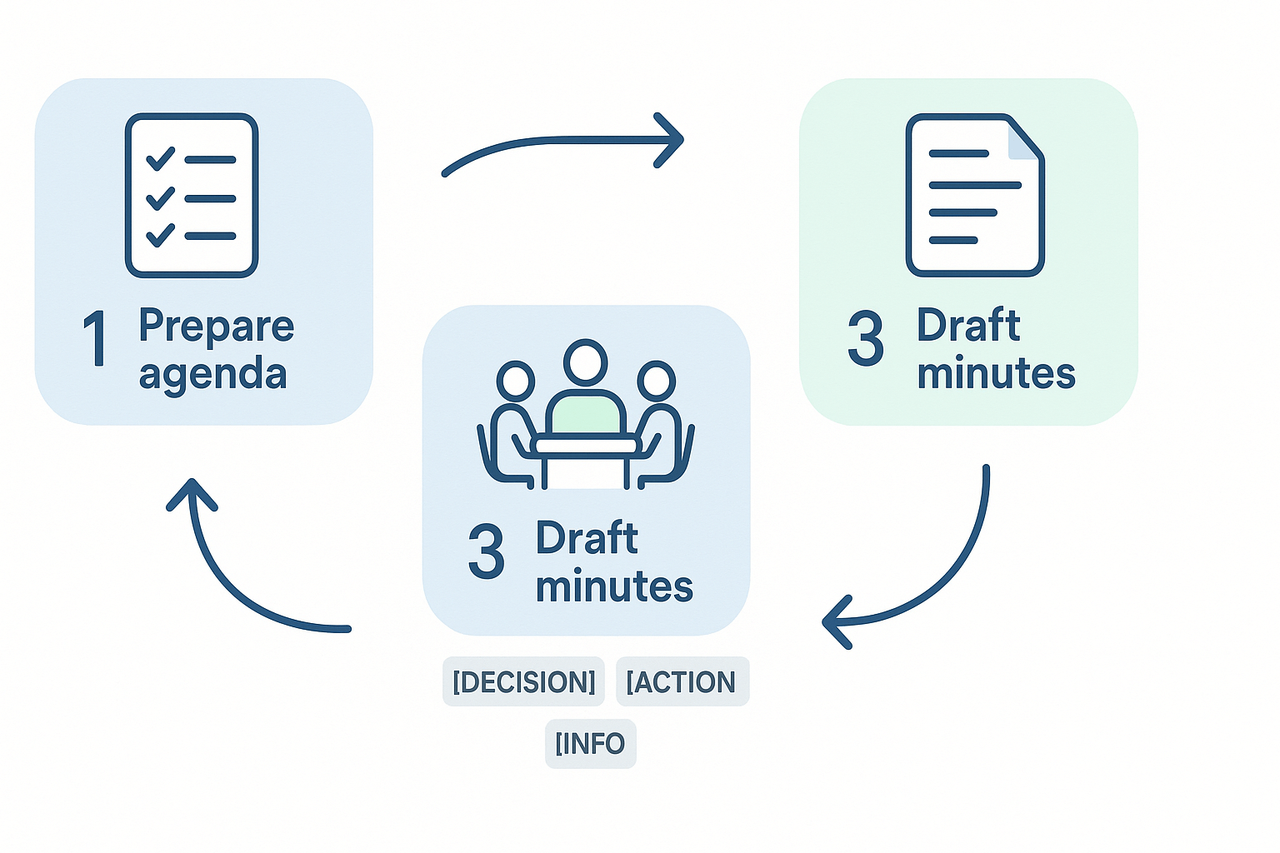
1. Prepare the agenda: focus and outcomes
Write the agenda at least 24 hours before the meeting. Start with a clear meeting purpose and one or two expected outcomes. List timeboxed items and owners. Use simple headings:
- Purpose: Decide Q2 product priorities.
- Outcome: Agree on the top three initiatives and owners.
- Time: 45 minutes.
- Items: Prioritized backlog review, decision on pilot, action list.
Quick checklist for agendas:
- Add attendees and required attendees.
- Assign a facilitator and a note taker.
- Include prework and links to files.
- Highlight decisions to be made.
2. Run the meeting: keep it on track
Start by stating the purpose and outcomes again. The facilitator enforces timeboxes. The note taker records decisions, action items, and open issues only. Use these note cues to tag content during the meeting:
- [DECISION] short sentence of the decision.
- [ACTION] owner, task, due date.
- [DISCUSSION] 1-2 lines summary if needed.
- [INFO] links or references.
Roles to assign before the meeting:
- The chair or facilitator who guides the agenda.
- Note taker, who writes minute content.
- Timekeeper, who protects timeboxes.
- Decision owner, who follows up on choices.
3. Draft the minutes: structure and clarity
Write minutes within 24 hours while the meeting is fresh. Use the agenda as the outline to keep notes aligned. Keep each item concise: state the decision, why it matters, and single-line context. Use this action-focused format for each action item:
- Action: Draft Q2 budget proposal.
- Owner: Priya.
- Due: 2025-09-01.
- Status: Open.
Sample minute excerpt for a decision item:
[DECISION] Approve 10% pilot budget increase. Rationale: test two enterprise features. Owner: Alex. Follow-up: Alex to share revised budget by next Wednesday.
4. Convert minutes into tracked tasks
Turn each [ACTION] into a task in your tracker. Include the owner, due date, priority, and a link back to the minute. If you use a workspace or task tool, create tasks immediately after the meeting. Automate where you can:
- Export action items as CSV or Markdown.
- Bulk-import into your task manager.
- Tag items with meeting date and project code.
This keeps accountability clear and lets you measure follow-up rates.
Quick templates and examples
Download or copy editable templates for different formats: Agenda DOCX, Agenda Markdown, Agenda Google Doc, Minutes DOCX, Minutes Markdown, Minutes Google Doc. Each template uses the note cues above and a one-line action format.
Examples:
- Corporate agenda: timeboxed, decision-focused.
- Academic seminar: goals, readings, action items for next meeting.
- Nonprofit board: motions, votes, and assigned follow-ups.
Best practices for virtual & hybrid meetings + tools
Start every remote meeting with a clear purpose and the expected outputs. That purpose ties the agenda and minutes of the meeting to real work: decisions, owners, and deadlines. When everyone knows why the meeting exists, it becomes easier to keep on track and capture useful notes.
Set remote meeting etiquette
- Share the agenda at least 24 hours before the meeting. Keep it brief, with timeboxes for each item.
- Ask participants to join five minutes early to check audio and video.
- Mute when not speaking and use a short verbal cue before speaking to avoid cross-talk.
- Tell attendees how you will record and use notes, and who will own follow-ups.
Access and tech tips that reduce friction
- Pick one shared document for live agendas and action items. Use a simple template with sections for decisions, tasks, and attachments.
- Use browser-based recording or the meeting app so participants can rewatch snippets. Keep recordings accessible only to the meeting group.
- Test mic and camera settings, and turn on captions if available.
- Assign a note owner and a backup. The note owner reviews the transcript within 24 hours and publishes the final minutes.
Use AI to speed up notes and improve accuracy
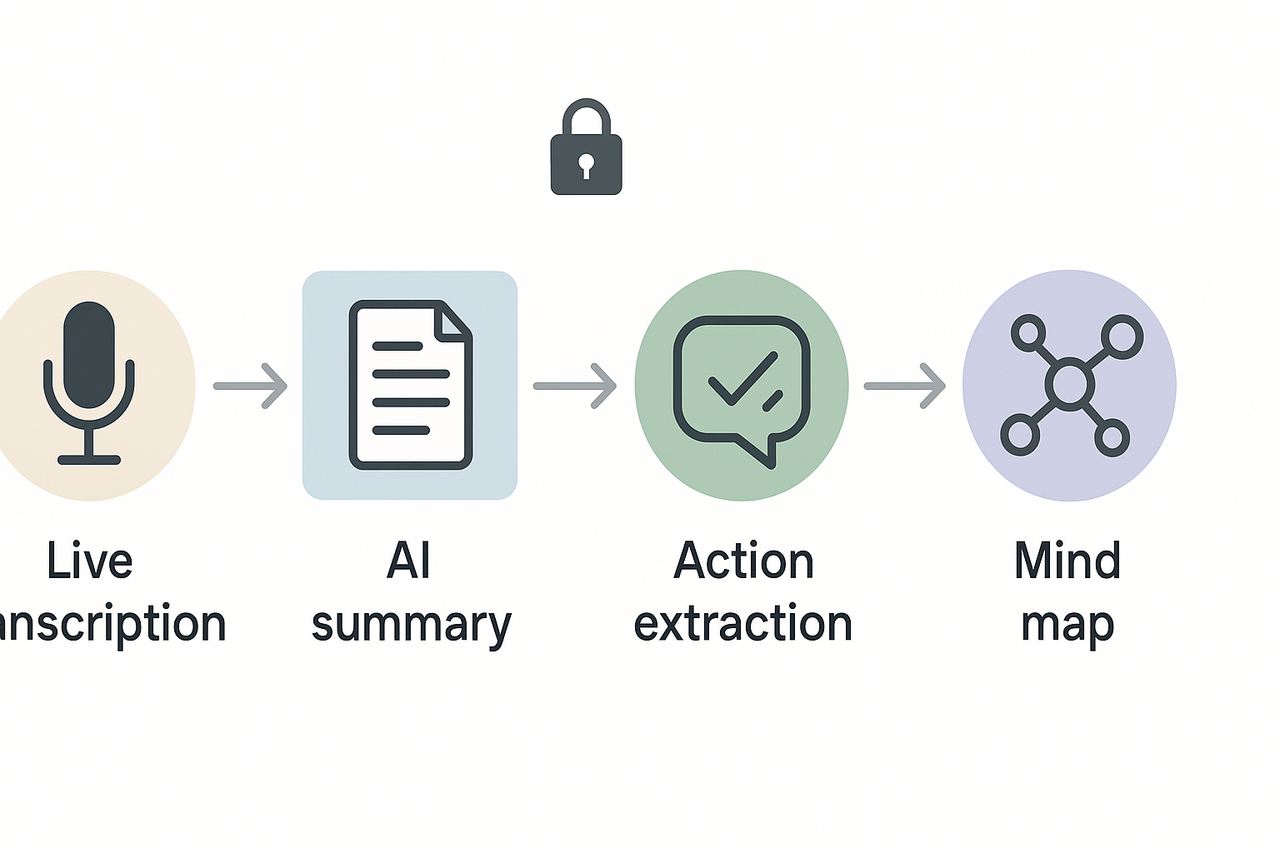
AI tools can make agendas and minutes less work. Use live transcription to capture what was said. Then run an AI summary to turn long transcripts into a short minutes document. Next, extract action items and owners automatically. Finally, generate a mind map for a quick visual of topics and decisions.
TicNote Cloud fits this flow: it does live transcription, creates AI summaries, extracts actions with Shadow chat (a contextual Q and A), and builds mind maps from the transcript. The platform keeps the transcript and summary linked so you can jump from an action item to the exact recording.
Security, privacy, and consent
Always get consent before recording. Participants can object to recording and publishing, as noted by the European Sustainable Energy Week Data Protection Notice. When you record, do these steps:
- State the recording purpose and retention period at the meeting start.
- Offer an audio-only or off-camera option for those who object.
- Limit access to the transcript and attachments, and use role-based sharing.
- Store recordings in encrypted cloud storage and set a deletion policy.
Follow these practices and you will run tighter virtual meetings, reduce follow-up work, and keep sensitive information safe. Use the platform’s live and post-meeting AI tools to speed minutes creation, and keep a short human review step before posting final minutes.
Common mistakes, troubleshooting & measuring meeting effectiveness
Knowing common meeting mistakes helps protect the value of your agenda and minutes of the meeting. Meetings eat time, and a few small fixes cut waste and improve follow-up. According to Stop the Meeting Madness (2017), executives spend an average of nearly 23 hours a week in meetings, so make each one count.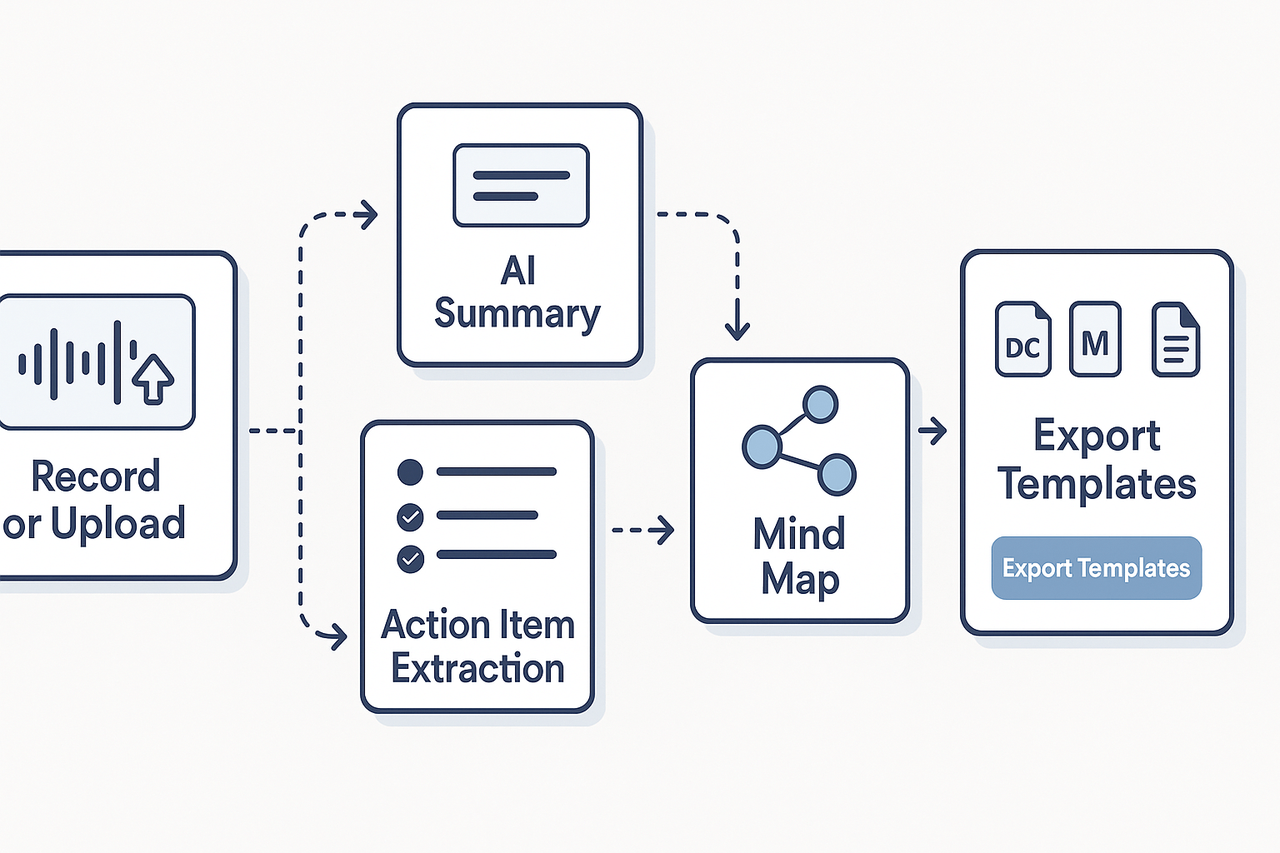
Top mistakes and quick fixes
- No clear objective: state one goal at the top of the agenda so everyone knows the outcome.
- Too many attendees: invite only decision-makers or contributors, or split into focused sessions.
- Silent notes: assign a note taker and use a template so minutes capture decisions and owners.
- Action items without owners or dates: require an owner and a due date before moving on.
- Overlong meetings: time-box agenda topics and use a visible timer.
- No follow-up: send minutes and a short summary within 24 hours.
Simple meeting effectiveness rubric
Score five items 0 to 2 (0 poor, 1 okay, 2 good): purpose clarity, right attendees, decision clarity, action ownership, and follow-up speed. Total 0–10. 8 to 10 means effective; 5 to 7 needs tweaks; under 5 needs a format change. Use this rubric after each meeting to spot trends.
Post-meeting review checklist
- Publish minutes within 24 hours.
- Confirm action owners and due dates.
- Track follow-up rate: completed actions divided by assigned actions.
- Ask attendees one quick question: Did the meeting reach its stated goal?
- Archive notes where the team searches them.
Use the checklist for two weeks, then compare rubric totals to measure improvement.
TicNote Cloud next steps
Uses TicNote Cloud, then we show how the platform turns conversations into actions and visuals.
Watch the short demo flow
- Live record or upload audio or video. The platform transcribes automatically.
- AI generates a concise meeting summary organized by topic.
- Action extraction pulls assignments, owners, and due dates into a task list.
- An auto mind map visualizes topics, decisions, and next steps. Export summary and minutes to your chosen template.
This flow saves time and reduces missed follow-ups. For larger teams, request a live enterprise demo to see SSO and admin controls in action. Want to try it yourself now?
Try TicNote Cloud free today and generate your first AI summary