


 Extension
TL;DR: Use an AI agent for interview screening to build better shortlists
Try TicNote Cloud for Free to use an AI agent for interview screening that turns resumes, a JD, and interview notes into consistent shortlist decisions. Create one Project per role, add the JD and resumes, then score each candidate across skills, experience, culture fit, education, and added value.
Resume inboxes get messy fast. When every reviewer uses different notes, strong candidates can be missed. With TicNote Cloud, teams keep scorecards, radar-chart recommendations, rankings, and archived resumes in one reviewable workspace.
Use batch evaluation for dozens of applicants, then turn scorecard gaps into targeted interview questions.
What is an AI agent for interview screening?
An AI agent for interview screening is a workflow assistant that turns messy hiring inputs into structured evidence. It helps recruiters summarize resumes, map experience to role requirements, create an interview scorecard, and build a candidate ranking. The goal is not to replace judgment. It gives the hiring team a cleaner shortlist to review.
Use it where screening gets repetitive
This kind of agent fits three common moments:
- Before the first interview, when you need to filter a large applicant pool.
- Between rounds, when new notes, portfolios, or assessments change the picture.
- During a re-screen, when the panel needs one consistent rubric across candidates.
For example, TicNote Cloud can keep the job description, resumes, interview notes, and team comments inside one Project. Shadow AI can then work from that shared context instead of a one-off prompt.
Feed the agent role context
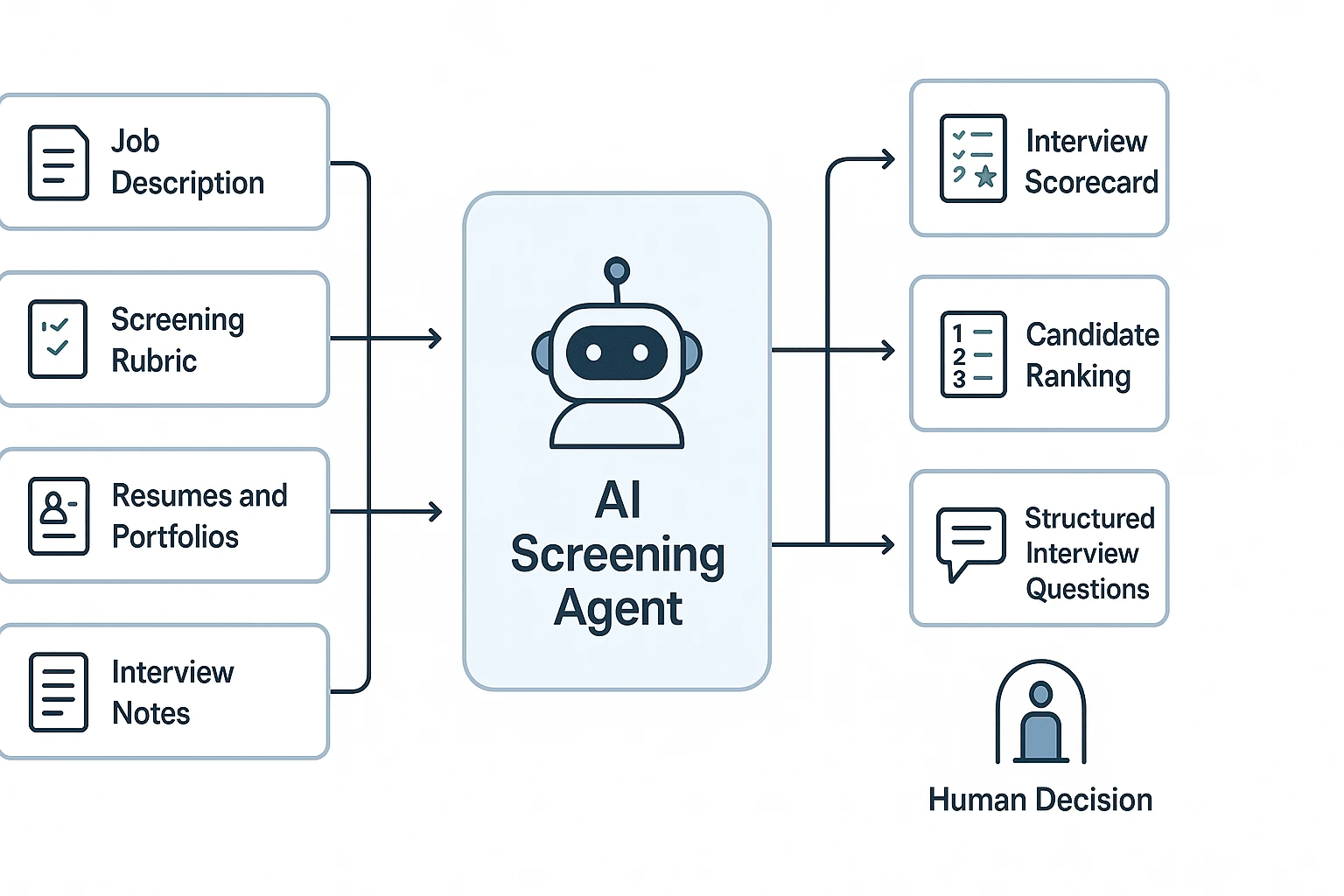
Reliable automated candidate evaluation needs clear inputs:
- Job description and core responsibilities
- Must-have vs. nice-to-have criteria
- Seniority level and team context
- Examples of strong past hires
- Resume, portfolio, assessment, or interview notes
Garbage in, garbage out still applies. A vague rubric creates false positives and false negatives because the agent has no firm standard to apply.
Keep humans in control
AI can standardize scoring, flag missing evidence, and suggest structured interview questions. It cannot confirm truthfulness, predict job performance with certainty, or make a final hiring decision.
Fairness matters here. AI can amplify bias when protected attributes leak into scoring or when the rubric is unclear. Humans must define the criteria, review cited evidence, and document any override.
Before you start: inputs, permissions, and a fair screening rubric
An AI agent for interview screening is only as consistent as the role context you give it. Before you upload resumes or notes into TicNote Cloud, lock the job criteria, access rules, and review process so every candidate is judged against the same standard.
Prepare the role criteria
Rewrite the job description into clear signals. Define the role outcomes, core responsibilities, must-have skills, minimum experience, and true disqualifiers, such as an active license or work authorization requirement.
For example, don't use "strong communicator" as a screening rule. Use: "Has led client updates, written decision summaries, or presented project trade-offs to non-technical stakeholders." That gives Shadow AI evidence to look for instead of guessing.
Collect the right source files
Create one role workspace and add every screening source there: resumes, cover letters, LinkedIn PDFs, portfolios, recruiter intake notes, hiring manager notes, and prior interview transcripts.
Use a simple naming format:
Role_CandidateName_Resume_DateRole_CandidateName_RecruiterNotes_DateRole_CandidateName_InterviewTranscript_Round1
A single source of truth cuts rework because the team can review the same files, comments, and AI-generated scorecards.
Set a five-dimension rubric
Score each candidate across five stable dimensions:
- Skills: tools, methods, certifications, and role-specific abilities.
- Experience: years, scope, industry match, and comparable projects.
- Culture fit: work style, collaboration signals, and communication habits.
- Education: degrees, training, or equivalent practical learning.
- Added value: unique strengths, domain knowledge, or network advantages.
If you weight dimensions, set the weights before screening starts. Don't change them midway through the applicant pool.
Add privacy and bias safeguards
Limit access by role, remove sensitive data where possible, and document the rubric. Do not score protected attributes. Require a human review before rejection, and define retention, deletion, and consent rules for candidate data.
Copy this kickoff checklist:
- Rubric defined and approved
- Must-have criteria separated from nice-to-have criteria
- Access permissions set
- Sensitive data minimized
- Human review required before rejection
- Audit trail kept for scorecard changes
Step-by-step: screen candidates with an AI agent (example: TicNote Cloud)
The fastest way to use an AI agent for interview screening is to give it a clear role context, a fixed rubric, and clean candidate files. In TicNote Cloud, that means building one Project per role, then using Shadow AI to compare candidates against the same five dimensions every time.
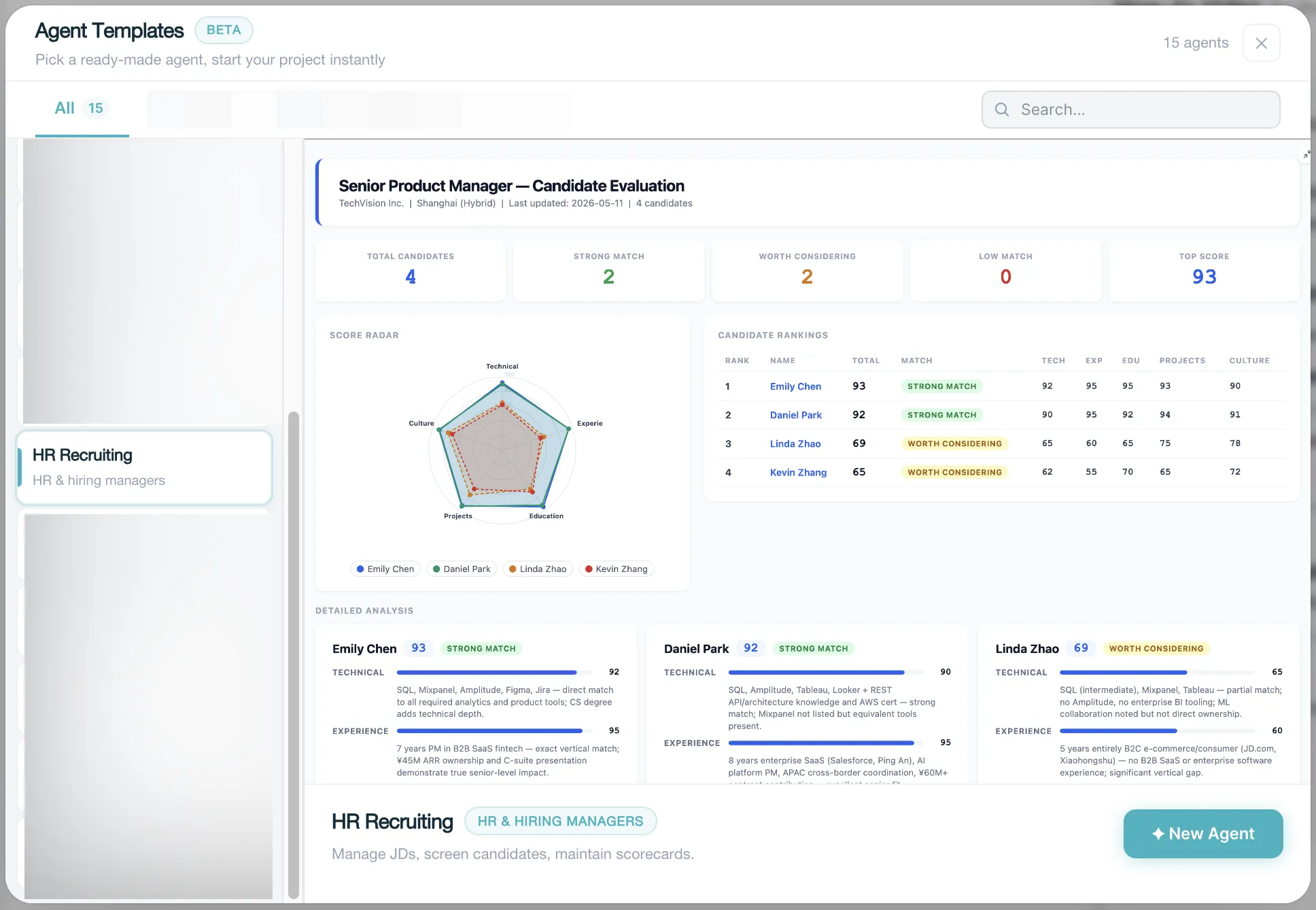
TicNote Cloud keeps updating. This is a preset skill, and the function will be published soon. Before that, you can go to TicNote Cloud and create your own project based on your own needs, following the steps below.
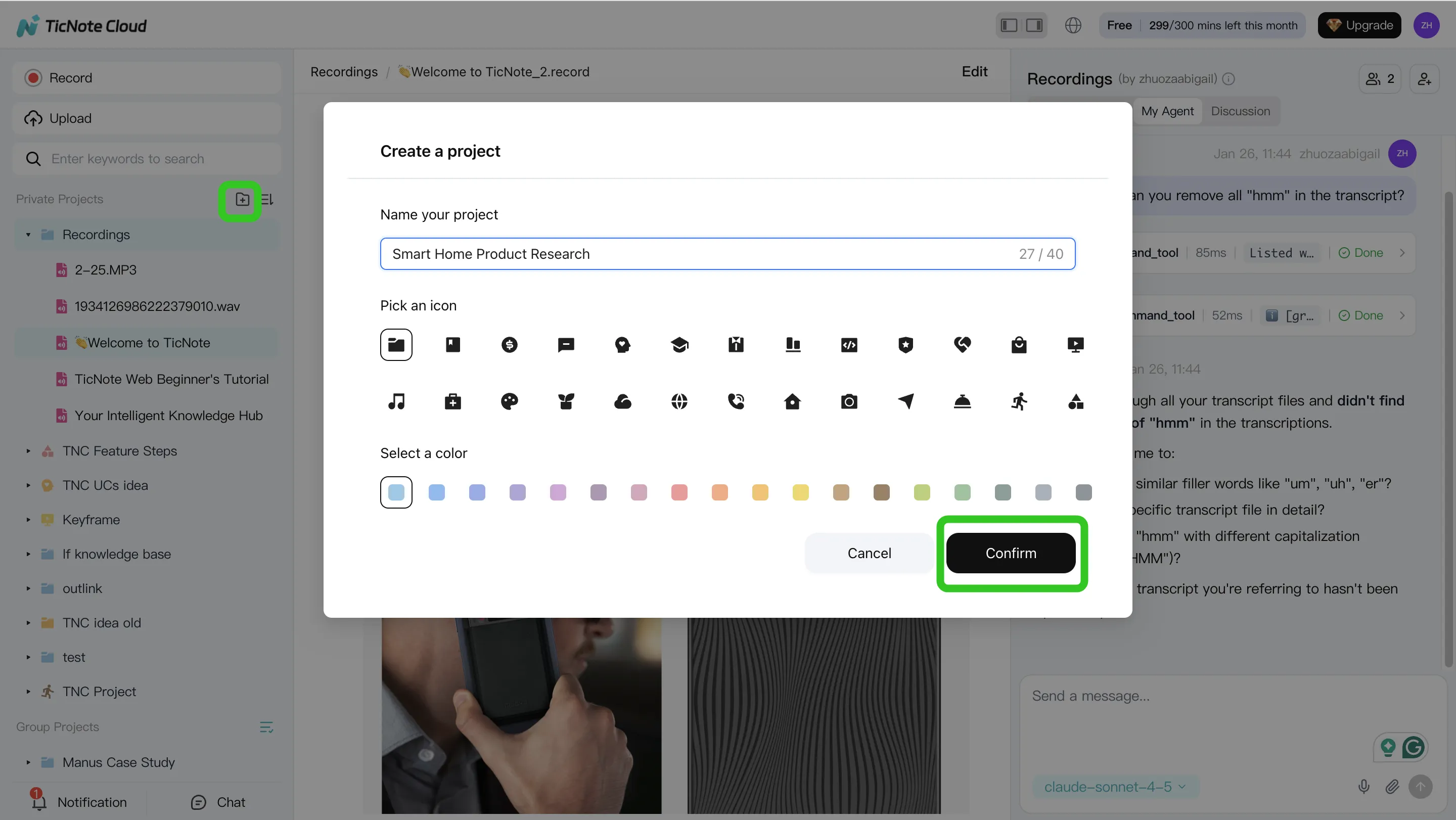
1. Create or open a role Project and add content
Start in TicNote Cloud web studio. Create a Project for the open role, such as "Sales Ops Manager — Q3," or open the existing Project if the hiring team has already started intake. Add the final job description, must-have criteria, and your five-dimension rubric: skills, experience, culture fit, education, and added value.
Keep the workspace clean. Use one folder for intake files and another for decisions. Upload each resume, portfolio, take-home assignment, or recruiter note as its own source so the AI can cite evidence clearly. Before upload, confirm you have permission to store and process candidate materials, and remove anything the team does not need.
You can add files in two ways: direct upload from the Project folder area, or through the attachment icon in the Shadow AI panel on the right side of the screen. If you use the attachment route, ask Shadow AI to save files to the right folder.
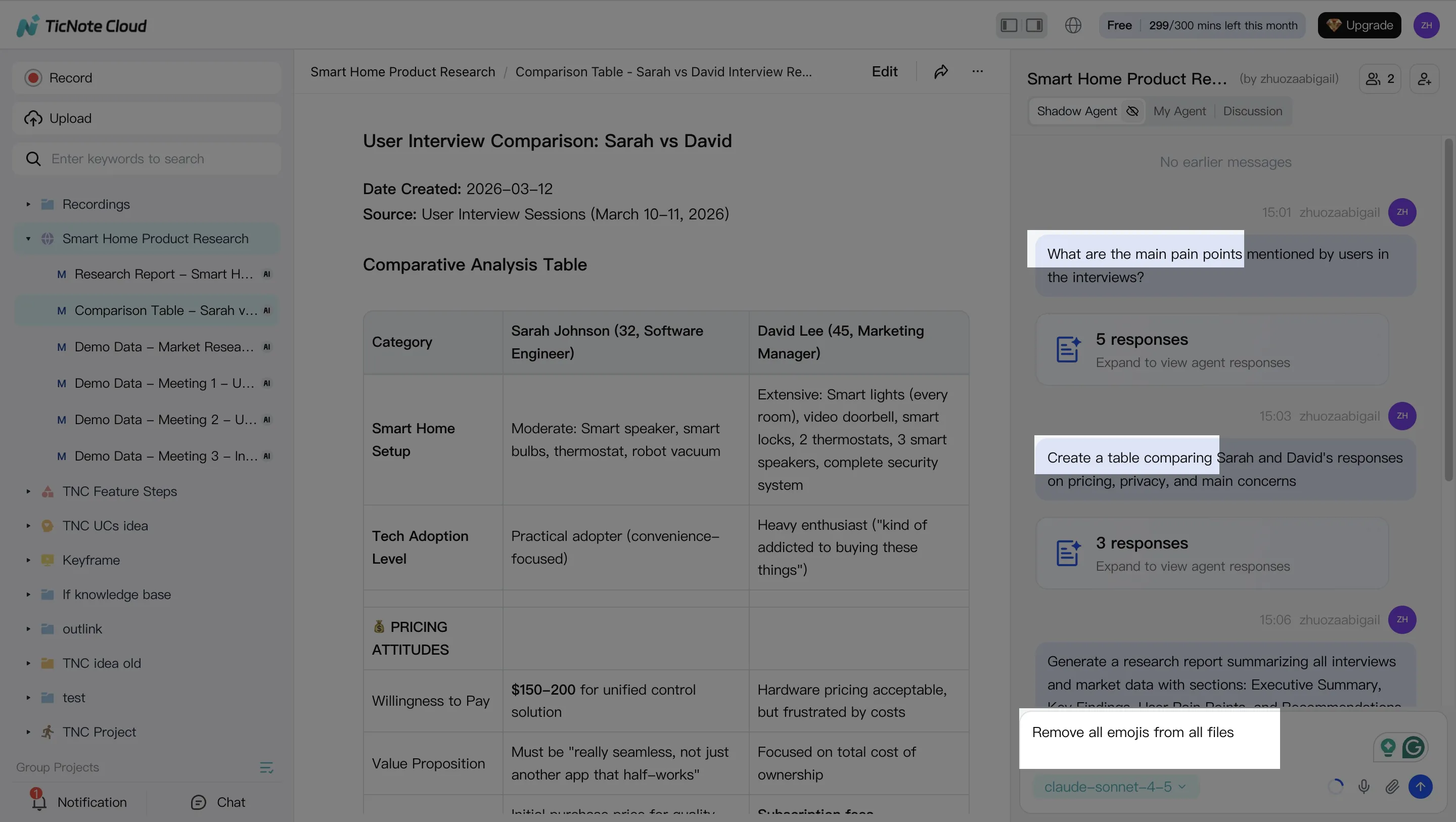
2. Run a batch evaluation with Shadow AI
Once the JD and candidate files are in place, ask Shadow AI to search across the Project and score candidates on the same rubric. Use a 1–5 scale for each dimension, and require evidence snippets for every score. This keeps the first pass consistent and easier to audit.
A practical prompt looks like this: "Evaluate all candidates in the intake folder against the role rubric. Score skills, experience, culture fit, education, and added value from 1 to 5. Include resume evidence, risks, and open questions for each person."
Then ask for an interview scorecard per candidate. Each scorecard should include a short summary, proof points, possible concerns, and questions to ask in the next screen. Finally, request a live ranking with shortlist tiers: Strong yes, Yes, Maybe, and No. Project-level memory helps keep standards consistent as new applicants arrive.
3. Generate shortlist deliverables
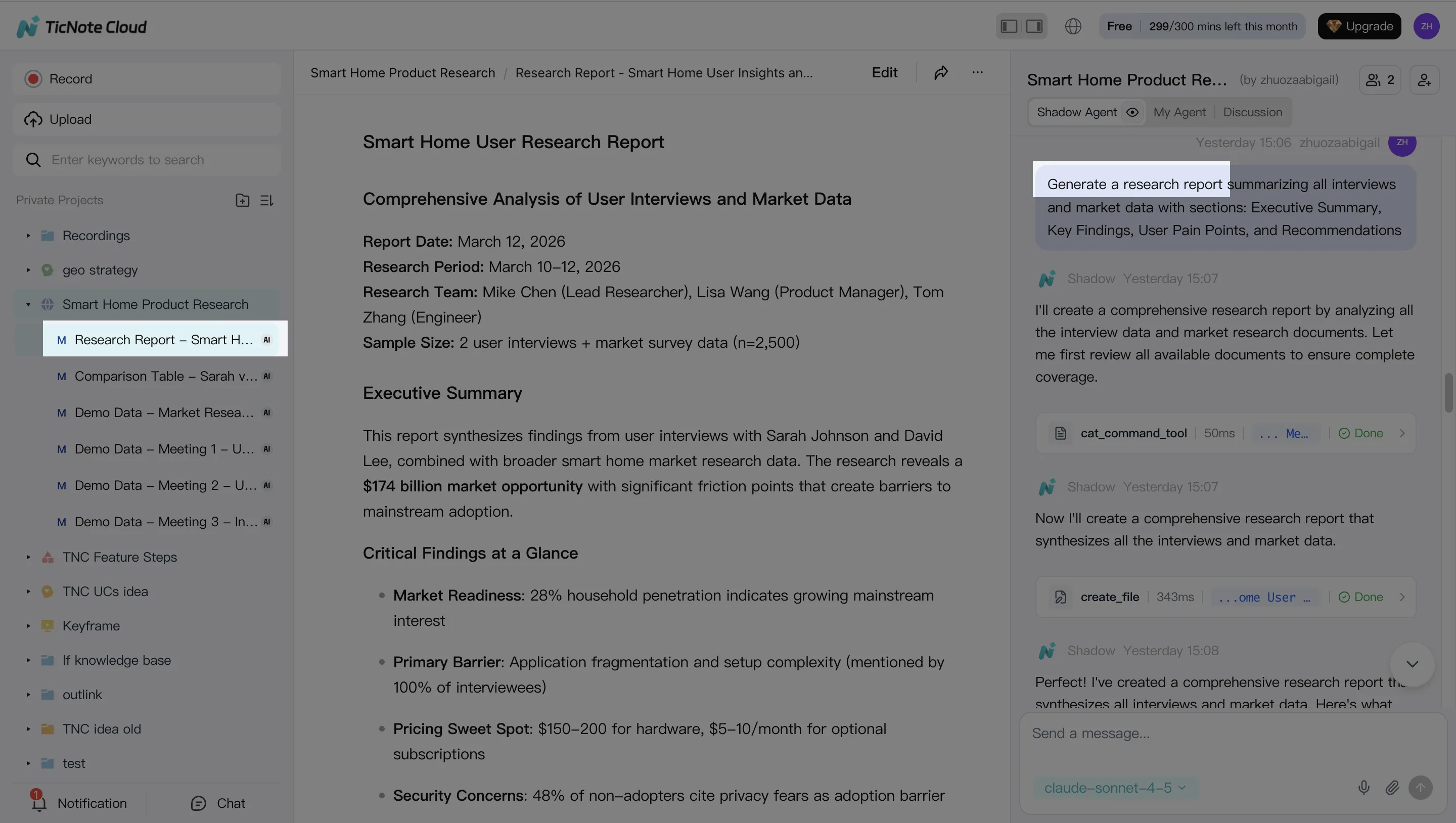
After the evaluation pass, turn the working notes into assets the hiring manager can use. Ask Shadow AI to generate a shortlist report with top candidates, key evidence, concerns, and recommended next steps. You can also create a structured interview plan with question banks based on scorecard gaps and role-specific probes.
For review meetings, use the Generate option to create a report, web presentation, mind map, podcast, or HTML page from the Project content. This is useful when a founder, recruiter, and panel lead need the same decision context without reading every resume.
4. Review, refine, and collaborate with the team
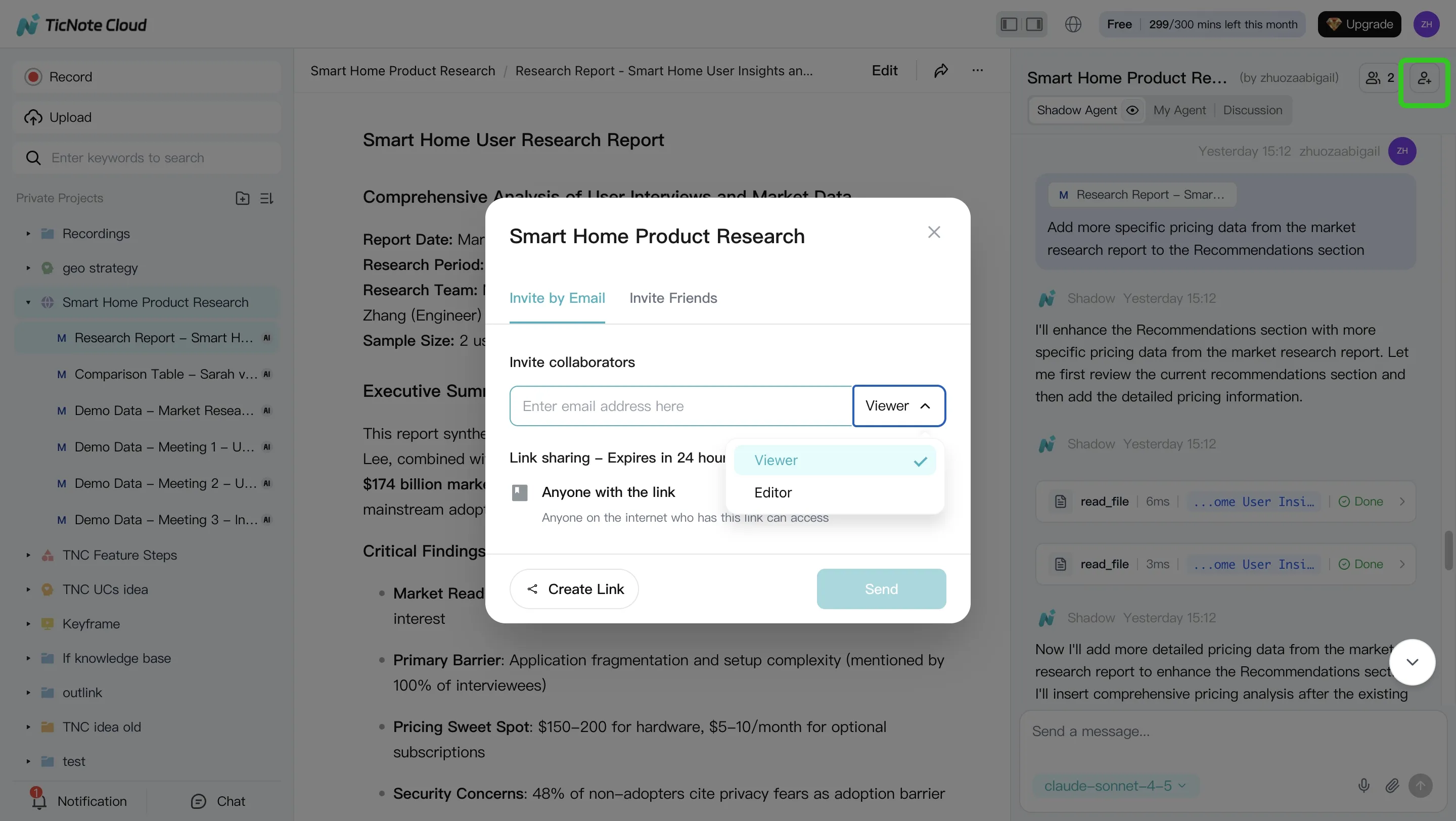
Do not accept AI rankings blindly. Open the evidence links, check the source text, and add human notes where the recommendation is weak or incomplete. If you also upload screening call recordings, use editable transcripts and notes to capture panel feedback in the same Project.
Share the Project with the right permissions, such as Owner, Editor, or Viewer. Panelists can comment, ask Shadow AI follow-up questions, and request updated reports. When new applicants arrive, keep the rubric locked and refresh the ranking instead of restarting the process.
On mobile, use the same role Project when files arrive on the go. Upload or attach the candidate material, ask Shadow AI for a quick comparison or scorecard, and share the updated shortlist with the team before the next review meeting.
TicNote Cloud capabilities you will not get from a generic chatbot
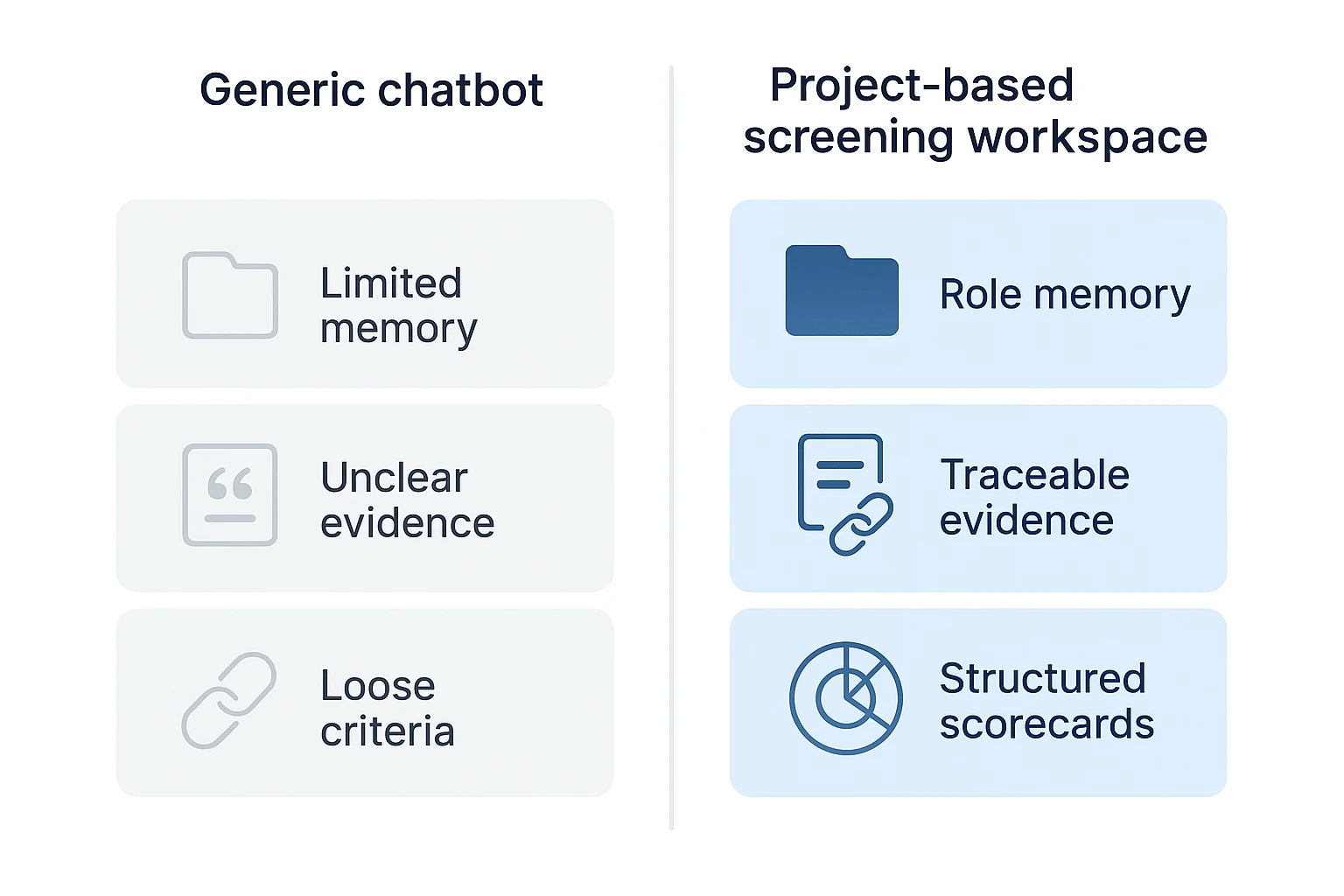
A generic chatbot can summarize a resume, but it doesn't make screening repeatable. TicNote Cloud works better as an ai agent for interview screening because each role can live inside a Project with the job description, rubric, resumes, recruiter notes, and past examples kept together.
Project-level memory keeps standards in scope
Chat-only tools often start from zero with each prompt. That creates drift: one candidate may be judged on technical depth, while the next is judged on communication style. In a TicNote Cloud role Project, Shadow AI works from the same source set each time, so screening stays aligned across weeks of intake.
Five-dimension scoring supports cleaner ranking
Instead of switching criteria from resume to resume, teams can evaluate candidates across five fixed dimensions:
- Skills
- Experience
- Culture fit
- Education
- Added value
This structure makes candidate ranking easier to explain. It also improves handoffs because a hiring manager can see why one profile moved forward and another stayed in reserve.
Radar scorecards show tradeoffs fast
A strong scorecard should show each dimension separately, not just one blended grade. A radar-chart view helps panels spot patterns, such as high skills but weaker domain experience, or strong education but limited added value. Still, recommendations are only as reliable as the rubric and the evidence behind them.
Candidate files stay organized and traceable
TicNote Cloud can archive incoming resumes into a Candidates/ area, which reduces lost files and makes re-screening easier when the role changes. Traceable answers matter here: every claim should point back to the resume, notes, or transcript so reviewers can verify decisions quickly.
Teams can also add recruiter screens or panel interviews as recordings and editable transcripts. Fixing names, titles, and company terms improves later search and analysis across the role Project.
When to use what
- Use batch evaluation for first-pass resume intake.
- Use side-by-side comparisons during shortlist meetings.
- Use question generation when preparing focused interview plans.
How should recruiters review and act on AI scorecards?
An AI scorecard from an AI agent for interview is a decision aid, not a decision maker. Review it in the same order every time. This helps teams see facts first and avoid automation bias.
Read evidence before the recommendation
Use this review order:
- Evidence: resume lines, portfolio items, transcript timestamps, or assessment results.
- Dimension scores: skills, experience, education, culture fit, and added value.
- Risks and unknowns: missing files, unclear dates, tool mismatch, or weak examples.
- Suggestion: only then read hire, hold, or reject.
This keeps the rubric, not the tool, in control. In TicNote Cloud, sources stay traceable.
Compare candidates side by side
Side-by-side review makes tradeoffs explicit. Candidate A may have stronger role experience. Candidate B may add more value through market knowledge, language skills, or a rare technical background. Compare only candidates screened against the same role, rubric, and Project context. Otherwise, the ranking looks precise but isn't fair.
Use evidence-based notes
Write notes that hold up in a debrief:
- Evidence: "Portfolio project shows three B2B onboarding flows."
- Interpretation: "Likely strong in user journey mapping."
Always cite the source type: resume section, portfolio project, transcript timestamp, or interviewer note.
Turn weak signals into interview probes
Score gaps should become questions. Low culture-fit evidence? Ask behavioral questions. Unclear education? Ask about training or certifications. Tool mismatch? Ask for a work sample walkthrough.
Know when to override the AI
Require human review for nontraditional backgrounds, unclear resumes, possible bias signals, missing portfolio access, and high-stakes roles. Set one rule: any AI-assisted rejection needs a human check and a documented reason.
Best practices for secure, consistent, and repeatable screening
An AI agent for interview screening only improves hiring when the workflow is controlled. Treat screening like a repeatable process: one workspace, one rubric, one review path, and clear data rules.
Keep one source of truth per role
Create one TicNote Cloud Project per role, such as "Account Executive — Q1 2026 — Screening." Store the job description, resumes, transcripts, scorecards, and panel notes there. This cuts version mismatches and gives the team a clearer audit trail.
Add a "decision log" note with 3 fields: date, change made, and owner. Keep it short.
Use the same rubric for every applicant
Freeze the screening rubric before candidate review starts. If the role changes, document the change, update the rubric, and re-run the evaluation for all candidates. Otherwise, rankings stop being comparable.
Separate screening from final hiring decisions
The AI agent should support screening and interview prep, not make the final hire/no-hire call. The panel owns that decision.
Use this debrief template:
- Scorecard summary: strongest and weakest dimensions
- Evidence checked: resume, transcript, or project note
- Human observations: communication, context, constraints
- Decision: advance, hold, or decline
Protect candidate data
Candidate files often contain personal data, so use strict hygiene. Under Regulation (EU) 2016/679 (General Data Protection Regulation) — Article 5 (2016), GDPR Article 5(1)(c) requires that personal data be "adequate, relevant and limited to what is necessary in relation to the purposes for which they are processed" (data minimisation).
Apply these rules:
- Use least-privilege access for Owners, Members, and Guests.
- Share role Projects only with the hiring team.
- Don't copy candidate PII into external tools.
- Set retention rules for declined candidates.
- Archive or delete closed-role Projects on schedule.
Add related next steps
Place a short next-steps block after this section: interview prep guide, structured interviewing guide, and consistent hiring workflow guide.
Troubleshooting common AI screening workflow issues
Even a strong AI agent for interview screening needs clean inputs and clear rules. Most workflow problems come from messy files, thin role context, or teams changing the standard after scoring starts.
Fix resume import problems
If resumes don't import cleanly, re-export the file as a fresh PDF or upload a DOCX version. Remove password protection, split large portfolios into smaller files, and use one naming pattern, such as Lastname_Firstname_Role.pdf. Before batch evaluation, run a 5-minute import QA: open 3–5 files, check text extraction, confirm candidate names, and verify each file sits in the right Candidates folder.
Correct inconsistent scores
Uneven scores usually point to one of four issues:
- The rubric uses vague wording.
- Must-have skills are missing.
- Seniority level is unclear.
- Evidence extraction differs across resumes.
Fix the loop, not just one score. Tighten the criteria, re-run batch evaluation, then compare results against one benchmark resume that your team already agrees is strong.
Add missing role context
If the agent lacks context, add:
- One example of a strong candidate.
- The top 5 daily tasks.
- Deal-breakers.
- Team culture notes.
- Tech stack and required tools.
Richer context improves automated candidate evaluation because the agent can match evidence to the actual job, not a generic title.
Resolve team disagreement
When reviewers disagree, debrief in the Project. Review evidence together, adjust weighting, document any human overrides, and save "team standards" so future runs match the same bar.
Refresh rankings on a cadence
When new applicants arrive, re-run batch scoring. Keep shortlist tiers stable, then re-check top ties with work samples or structured questions.
Final thoughts: build a faster candidate shortlist
An AI agent for interview screening won't replace recruiter judgment. It gives that judgment a cleaner workspace: resumes, transcripts, scorecards, rankings, and decision notes stay tied to one role. That means faster reviews, fewer "why did we pass?" debates, and stronger context when a hiring manager joins midstream.
For your next opening, create a TicNote Cloud Project, add the job description and resumes, run a batch evaluation, then turn scorecard gaps into interview questions.
Try TicNote Cloud for Free — no credit card required.


