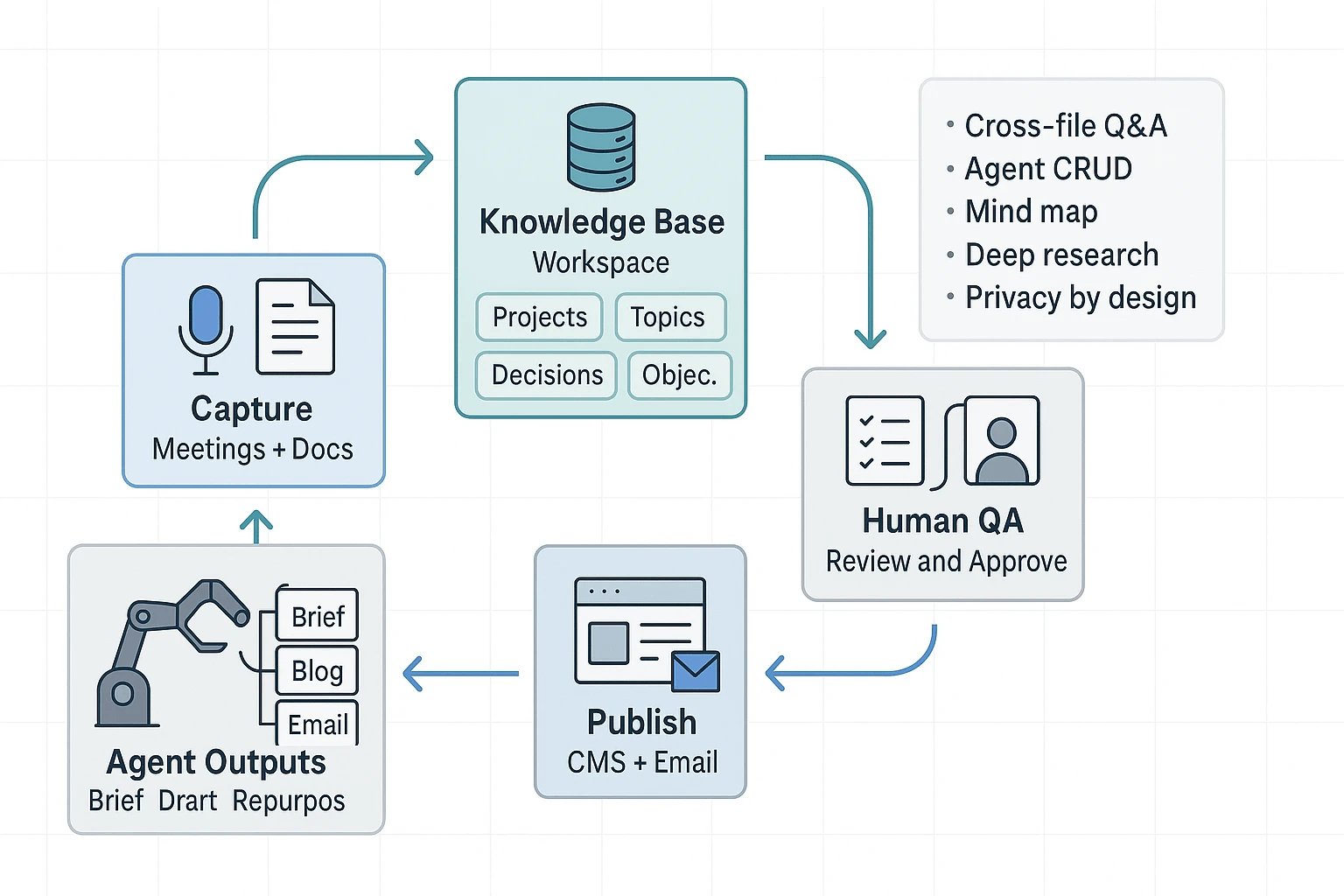
Extension
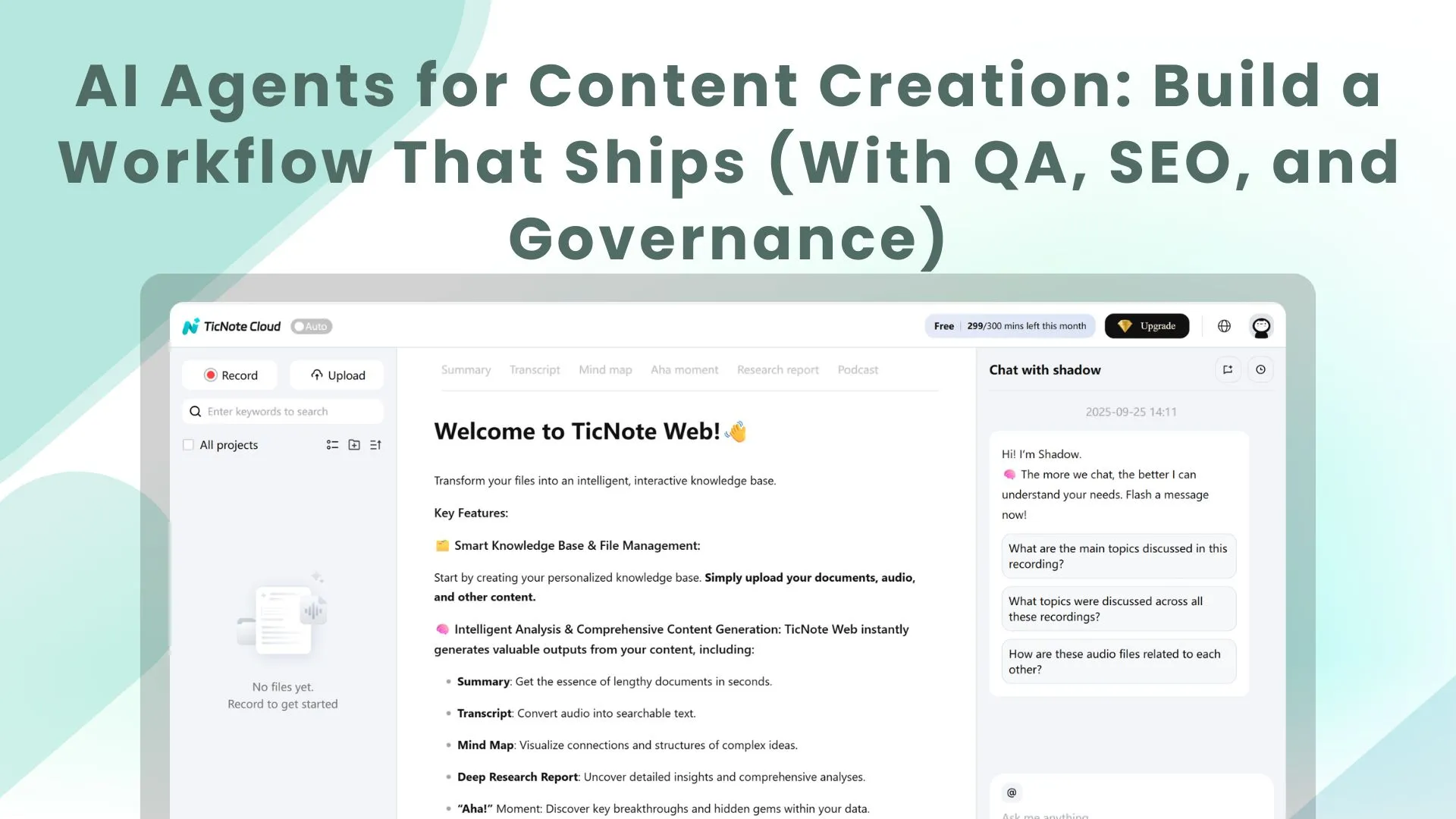
TL;DR: How an AI agent workflow turns raw inputs into publishable content
Start by trying TicNote Cloud for free to capture meetings and turn transcripts into a clean first draft, then run a simple agent loop that adds QA, SEO, and approvals so you can ship. An AI agent workflow is a repeatable system that turns messy inputs (notes, docs, SERP findings, analytics) into publishable outputs (briefs, outlines, drafts, metadata, and internal links), with humans deciding what goes live.
You're stuck with messy notes and scattered docs. That slows reviews, and it makes mistakes easier to miss. A practical fix is to use TicNote Cloud as your input and knowledge base layer, then add clear checkpoints before publishing.
Use this 5-step loop: Plan → Draft → Verify → Publish → Learn. In this guide, you'll build two complete pipelines: (1) meeting notes to blog plus email, and (2) agent-driven SEO execution (brief fields, internal linking, and validation).
Skip agents for high-risk claims (legal, medical, financial), sensitive data, or any team that can't enforce review gates. Agents can speed up drafting, but they should never be the final approver.
What are AI agents for content creation (and how are they different from chatbots)?
AI agents for content creation are systems that can chase a content goal across steps, not just answer a prompt. They use tools (like search, doc parsing, or filling CMS fields), memory (your notes plus approved sources), and checkpoints (stop-and-review gates). That setup matters because content teams need repeatable outputs, not one-off chat replies.
Agent basics in plain words
An agent starts with a goal, like "publish a compliant blog post from this call." Then it breaks the work into steps, runs them, and checks results.
Most content agents have four parts:
- Goal: The outcome and constraints (audience, angle, brand rules).
- Tools: Actions it can take (read a transcript, extract quotes, format Markdown).
- Memory (RAG): Retrieval-Augmented Generation, meaning it pulls facts from your workspace instead of guessing.
- Checkpoints: Places where a human reviews before it moves on.
AI agent vs chatbot vs workflow automation
Here's the fast way to tell them apart.
| Type | What it is | How it "thinks" | Best for in content | Main risk |
| Chatbot | A conversational helper | Responds turn by turn | Ideation, rewrites, headline options | Drifts off-brief fast |
| AI agent | A goal-driven system | Plan, act, reflect across steps | Brief to draft to QA with handoffs | Can make confident mistakes without checks |
| Workflow automation | Rule-based orchestration | If-this-then-that | Scheduling, assigning, moving files | Breaks when inputs change |
Common agent patterns you'll actually use
Most practical setups follow Plan, Act, Reflect.
- Planner to executor: One step creates an outline and task list. Next steps write sections and build assets.
- Retrieval (RAG): Pulls from meeting notes, past posts, and approved claims so drafts stay grounded.
- Tool-use: Applies formatting rules, creates tables, and outputs in the right template.
- Reflect and revise: Runs a QA pass (SEO basics, tone, compliance flags), then routes to a human.
What agents are not: they don't guarantee truth, they don't replace compliance sign-off, and they won't match your brand voice without clear guidance and examples.
If you're evaluating different setups, this overview of all-in-one AI workspaces can help you separate "chat-first" tools from systems built for repeatable workflows.
Which parts of your content pipeline should you automate first?
Automate the steps that are repetitive, easy to check, and already grounded in real inputs like transcripts, notes, and past posts. Those give you fast wins without raising risk. The goal is simple: cut cycle time, not add more review work.
Run a 15-minute workflow audit (find the real bottleneck)
Grab your last 3 content pieces. For each one, write the minutes spent in each stage:
- Capture (calls, interviews, notes)
- Research (sources, quotes, links)
- Outline
- Draft
- Edit (clarity, tone)
- SEO (titles, metas, internal links, schema checks)
- Approvals (legal, brand, product)
- Publish (CMS formatting, images, tags)
- Repurpose (email, social, deck)
- Reporting (rankings, CTR, conversions)
Now circle any stage where you already had meeting notes or a transcript, but still restarted from a blank page. That "lost reuse" is usually the best place to start.
Start with safe, high-ROI agent tasks (assist then approve)
These are strong pilots because outputs are structured and easy to review:
- Notes to a structured content brief (angle, audience, key points, quotes)
- Outline options (H2 and H3 map, logic order)
- Repurpose from transcript (blog to email, email to LinkedIn post)
- SEO packaging: meta title, meta description, FAQ candidates
- SEO execution helpers: internal link suggestions, schema candidate list, cannibalization warnings
Keep the rule: agents draft, humans approve. No autopublish.
Use a quick risk score to pick your first pilot
Score each planned automation 1 to 5 (low to high risk):
- Claim sensitivity (health, finance, legal promises)
- PII exposure (names, emails, customer details)
- Brand tone risk (voice and positioning)
- Factuality risk (needs verification)
- SEO risk (duplication, thin content, cannibalization)
Regulated teams should start with summaries, briefs, and outlines. Save publish-ready copy for later.
Decision rule: pick one workflow that saves at least an hour per asset and does not increase the number of review rounds.
How do you set up an end-to-end agent workflow (brief → draft → review → publish → measure)?
An end-to-end agent workflow turns messy inputs into content you can ship, with clear rules on what the agent can use, what it must produce, and where humans must approve. Think of it like an assembly line: each step has an input contract, an output spec, and a "stop the line" QA gate. That's how you get speed without losing accuracy, brand voice, or compliance.
1) Define the input contract (so the agent can't guess)
Start by listing every source the agent is allowed to use. Then define what "good input" looks like. This prevents free-form filling in the blanks, which is where most content errors come from.
Include these common inputs:
- Transcript or meeting notes (plus time stamps if possible)
- Agenda, decision log, and action items
- SME references (links, docs, or pasted excerpts)
- Product docs, release notes, pricing page copy, and FAQ docs
- Style guide and "good example" content
- SERP notes (top ranking angles, common questions, formatting patterns)
- Performance data (GSC queries/pages, GA4 landing page metrics)
Add two lists to every workflow:
- Allowed sources: specific folders, projects, and documents the agent may retrieve from
- Do not use: personal data, customer names, unreleased roadmap details, or anything outside the workspace
If you're using TicNote Cloud, you can keep those inputs in a project-based workspace, then use Shadow to answer questions grounded in that project instead of the open web. That makes "where did this come from?" easier to audit later.
2) Specify outputs with acceptance criteria (outline, draft, repurpose, SEO)
Agents work best when the output spec is strict. Don't just say "write a blog post." Define what "done" means.
For each asset, set:
- Target reader and job-to-be-done
- Angle and what it must not claim
- H2 and H3 structure
- Word count range and reading level
- Required entities (products, roles, standards, use cases)
- CTA placement rules
- Evidence rules (what needs quotes, links, or source snippets)
SEO brief checklist you can hand to an agent:
- Draft 5 titles that match the search intent
- Choose 1 primary title and 1 backup
- Write a meta description under 155 characters
- List 5–8 target subtopics for H2s
- Identify one featured snippet target (definition, steps, or table)
- Add an FAQ block with 4–6 questions
- Suggest schema opportunities (Article, FAQPage if you include FAQs)
- Create an internal linking plan (where to link out, and where to link in)
3) Add human-in-the-loop gates (approve, edit, reject)
Treat approvals as part of the system, not as a last-minute scramble. A simple gate model looks like this:
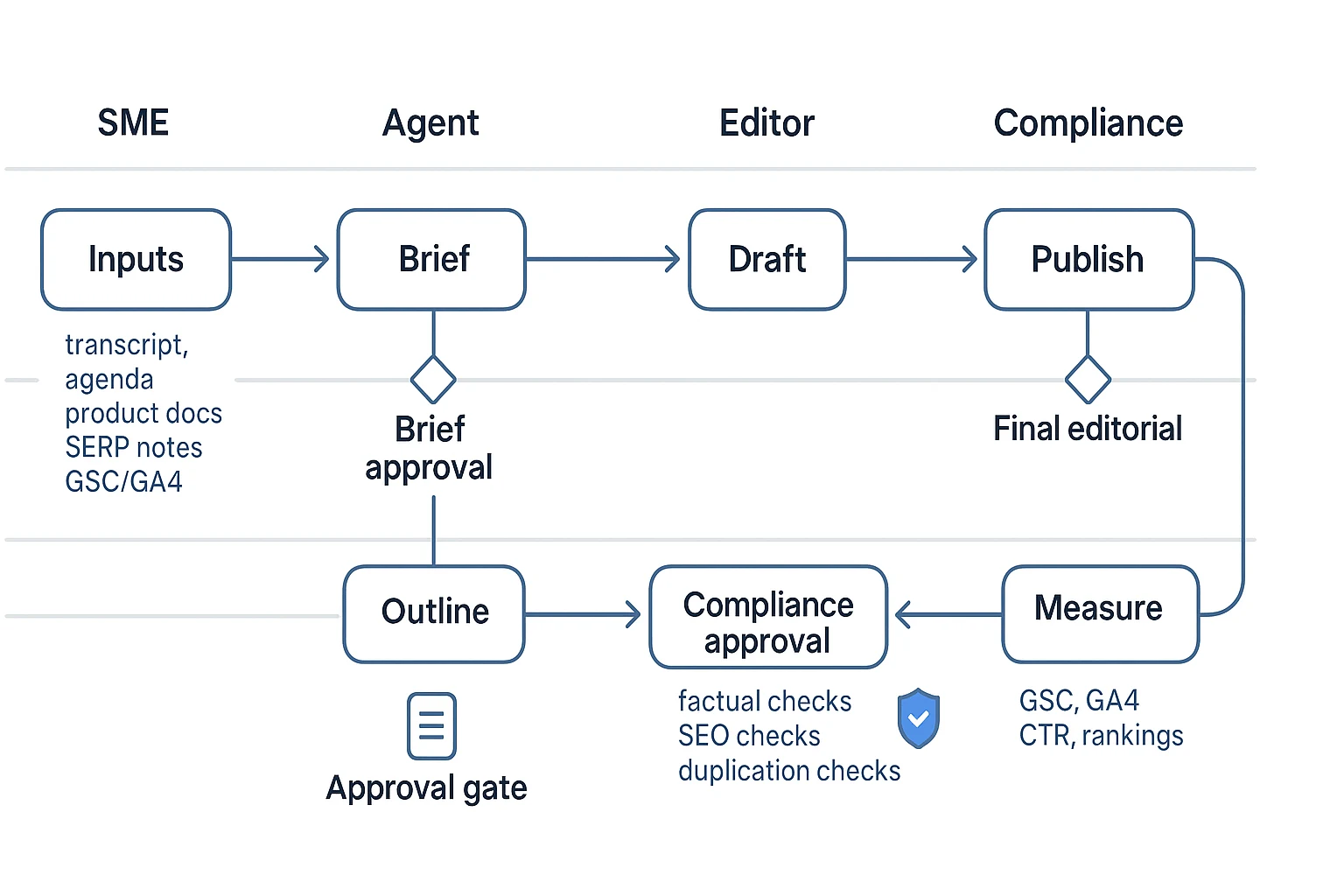
- Brief approval (marketing lead): confirms goal, angle, and allowed sources
- Outline approval (editor): checks structure, intent match, and missing sections
- Factual QA (SME): verifies claims against sources and corrects nuance
- Legal or compliance review (if needed): checks regulated language and privacy
- Final editorial (editor): tone, clarity, formatting, and publish readiness
Define "reject" in writing: the reviewer must leave comments, and the content goes back to the prior step. Don't allow silent regeneration. That hides what changed and why.
4) Build a failure plan (what breaks, how you catch it)
Common failures are predictable, so you can design checks up front:
- Hallucinations: require inline source quotes from allowed docs
- Wrong tone: add a style block and 2 sample paragraphs to imitate
- Duplicated content: run a uniqueness check and enforce canonical rules
- Sensitive data leakage: redact before ingest and ban client identifiers
- Missing SEO basics: validate title length, meta length, heading order, and FAQ formatting
A lightweight "stop the line" QA rubric can be as simple as: accuracy, clarity, voice, SEO hygiene, and compliance readiness. If any item fails, it goes back one stage.
5) Close the loop with measurement (publish → learn → update brief)
After publish, feed results back into the next brief. Track what actually moved the needle:
- Which queries drove impressions and clicks (GSC)
- Which sections earned the best scroll depth or time on page (GA4)
- Which FAQs got impressions but low CTR (rewrite and retest)
- Revision rate and cycle time (how many rounds, how long each gate took)
Then update your workflow templates. For example: "Add more definition-style paragraphs in the first 200 words" or "Include 2 internal links above the fold." That's how the agent system improves without inventing new facts.
Try TicNote Cloud for Free to turn meeting notes into a governed content workflow.
Workflow example 1: How can an AI agent turn meeting notes into a blog post and email?
If your team lives in meetings, you already have content. An agent workflow turns that raw talk into assets you can ship, with a human check before anything goes live.
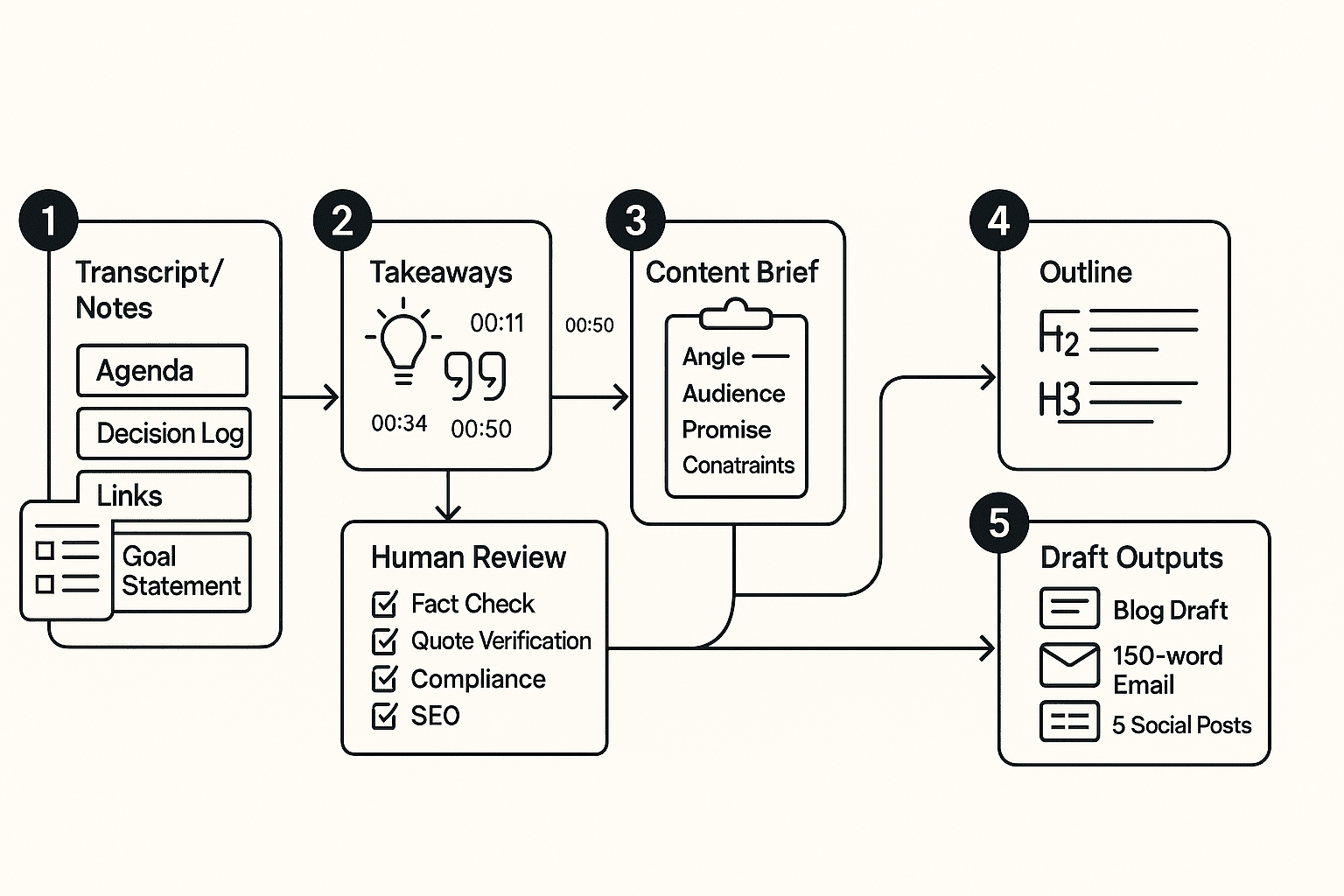
Start with an input bundle (so the agent doesn't guess)
Treat "meeting notes to content" like a packaged handoff. Your bundle should include:
- Call transcript (with timestamps) and speaker list
- Agenda (what the meeting was meant to decide)
- Decision log (final calls, tradeoffs, what changed)
- Action items (owner, due date, dependency)
- Relevant links (docs mentioned, product pages, tickets)
- Goal statement (who the post is for, and what you want them to think or do)
Privacy note: before processing, remove client names, personal emails, phone numbers, and any regulated identifiers. If you can't remove it, don't include it.
Run the agent steps (extract → brief → outline → draft)
Here's a simple agentic flow you can reuse.
- Extract themes, objections, and quotable lines
- Pull 5 to 10 themes.
- Capture common objections and how the team answered them.
- Save 6 to 12 quotable lines with timestamps and speaker labels.
- Convert takeaways into a publishable brief Include:
- Angle (what's new or useful)
- Audience and pain point
- Promise (what they'll get)
- "Do not say" constraints (no client names, no unverified claims)
- Sources allowed (transcript plus approved links)
- Generate an outline mapped to intent
- Write H2 and H3s that match the reader's questions.
- Add "proof slots" for each claim (quote, example, link).
- Draft the blog and the email
- Use one set of terms (don't rename features mid-post).
- Keep claims tight and easy to verify.
- Add CTA slots and a short disclosure if needed.
Human review checklist (fast, but strict)
Before you publish, a person should check:
- Facts and claims: every claim ties to the transcript or an approved source
- Quotes: wording matches the transcript and keeps the original intent
- Compliance: no sensitive details, no private pricing, no client identifiers
- Tone: helpful, plain language, no "magic automation" promises
- SEO basics: primary keyword used naturally, draft internal links plan, add meta title idea
Outputs you should expect (and rules for repurposing)
Deliverables and formats:
- Blog draft (with CTA slots and a "source notes" section for reviewers)
- 150-word email (problem, key takeaway, next step)
- 5 social posts (each tied to a specific moment or objection from the call)
Repurposing rules:
- Don't invent metrics, results, or customer stories.
- Don't turn a question into a "fact."
- If a point is uncertain, label it as a hypothesis.
Secondary CTA line to use in-context: "Turn your next meeting into a draft in one workspace."
Workflow example 2: How do you use agents for SEO execution and internal linking?
Agents help with SEO when you treat them like an analyst plus a checklist. Give the agent your seed keywords, your audience, and your "don't say this" rules. It can turn that into clusters, briefs, link maps, and QA checks that editors can trust.
Map keywords to intent (and add guardrails)
Start with a seed list like: "ai agents for content creation", "agentic workflow content", "internal linking automation". Ask the agent to group them by intent, not just volume.
Guardrails to include in the prompt:
- Don't chase volume alone. Pick topics you can prove with real examples.
- Match claims to product reality and evidence you can cite.
- Prefer "how-to" queries when you can show steps, inputs, and outputs.
Output you want from the agent:
- Cluster name (job to be done)
- Primary keyword
- Secondary variants and "also ask" questions
- Must-answer questions (what readers need before they act)
Use a brief template that keeps writers aligned
Here's a sample SEO brief the agent can fill in.
- Search intent: Informational "how to" with light tool comparison
- Audience pain: Too much time on briefs, links, and QA
- Unique angle: Workflow-first with approval gates
- Primary keyword: ai agents for content creation
- Secondary variants: agent workflow for SEO, content ops automation
- Required entities/terms: search intent, internal linking, schema, QA checklist, cannibalization
- SERP constraints: Define "agent vs chatbot"; include 2 workflow examples; add a KPI table
- Suggested H2s: Setup, examples, governance, measurement
- Internal link targets: 1 hub page + 2 to 4 related guides
- Do not claim list: "fully automated publishing", "guaranteed rankings", "no human review needed"
Build an internal linking plan (hub + cluster + anchor rules)
Keep it simple:
- Pick 1 hub page for the main topic.
- Add 2 to 4 supporting pages that answer narrower questions.
- Use anchor variety. Mix partial match, branded, and descriptive anchors.
- Avoid exact-match stuffing across many links.
- Place links early (first 25%) and mid-body where they help.
Mini map example:
- Hub: AI agent content workflows
- Cluster: Meeting notes to blog workflow
- Cluster: SEO brief templates
- Cluster: Governance for regulated teams
- Cluster: Internal linking playbook
Validate before publish (SEO + QA checks)
Use a final checklist the agent can run:
- Title length in a safe range (about 50 to 60 chars)
- Meta description around 150 to 160 chars
- One H1, logical H2 and H3 order
- FAQ section fits FAQ rich result rules if you add it
- Internal links: enough to guide users, not clutter
- Cannibalization scan: no other page targets the same query
- Schema opportunities: Article, FAQPage when eligible
One-page handoff: SEO execution sheet (for the editor)
- Target query + intent:
- Angle and proof points:
- Required terms and "do not claim" list:
- H2 outline:
- Internal links to add (page, placement, anchor idea):
- Title + meta draft:
- QA checklist status (pass or fix):
- Measurement plan (rank, CTR, conversions, revision rate):
What governance and safety controls do teams need (especially in regulated industries)?
If you use AI agents for content creation in insurance, finance, or healthcare, treat governance as part of the workflow. You want fast drafts, but you also need privacy, approvals, and a clear paper trail. The goal is simple: the agent can help write, but it can't decide what's safe to publish.
Control data first (classification, redaction, retention)
Start with a simple data class system:
- Public: already on your site or in approved collateral.
- Internal: operating notes, product plans, non-public metrics.
- Confidential: client data, contracts, claims, tickets, call recordings.
Then add guardrails by default:
- PII redaction before drafting: names, emails, phone numbers, addresses, claim IDs, policy numbers, bank details.
- Scoped access: agents can read only the project or folder they need.
- Retention windows: keep raw transcripts only as long as needed. Regulation (EU) 2016/679 (General Data Protection Regulation), Article 5 (EUR-Lex) states that personal data must be "kept in a form which permits identification of data subjects for no longer than is necessary for the purposes for which the personal data are processed" (storage limitation principle, Article 5(1)(e)).
Insurance example: redact "John Smith, Policy #A12345, Claim #C9981, 12 Oak St" into "Customer, policy ID redacted, claim ID redacted, address redacted."
Require roles and sign-off (by content risk)
Use clear roles and gates:
- Owner: sets policy, retention, and access.
- Editor: can draft and revise.
- Approver: compliance or legal sign-off.
- Viewer: read-only.
Match approval depth to risk:
- Low risk (how-to posts, process docs): editor review only.
- Medium risk (pricing, claims guidance, comparisons): editor plus approver.
- High risk (regulated advice, client stories): approver plus documented sources.
Audit habits that save you later:
- Keep a changelog of what changed.
- Store source references (transcript file, meeting date, speaker).
- Record who approved what and when.
Enforce originality and citation rules
Set a hard rule: every non-obvious claim needs a source. Also:
- Quotes must map to transcript timestamps.
- Run a plagiarism check before publishing.
- Add a "no competitor copying" rule (no rewriting a rival's page line-by-line).
Set a disclosure policy (and follow contracts)
Decide when to disclose AI help. For example:
- Tell clients when drafts were AI-assisted.
- Never upload client-restricted data if the contract forbids it.
- Follow platform rules for synthetic content and attribution.
Checklist: governance + QA gates (paste into your SOP)
- Classify input: Public / Internal / Confidential
- Redact PII: names, emails, phones, addresses, policy and claim numbers
- Limit agent access to approved folders only
- Apply retention window for raw transcripts and exports
- Require sources for non-obvious claims; link quotes to timestamps
- Plagiarism check and competitor-copy check
- Risk-based approvals: editor, compliance, legal as needed
- Keep changelog, sources, and approval record (who, what, when)
- Publish only after final human review
How is an AI note-taking workspace an alternative for agent-based content creation workflows?
The steps below will be demonstrated using TicNote Cloud as an example tool, but you can adapt the same setup to other stacks. The core idea is simple: your transcripts and notes become the source of truth. Then your "agents" (automations plus AI) draft from that source, and humans approve what ships. That's a practical way to use ai agents for content creation without pretending it's hands-free.
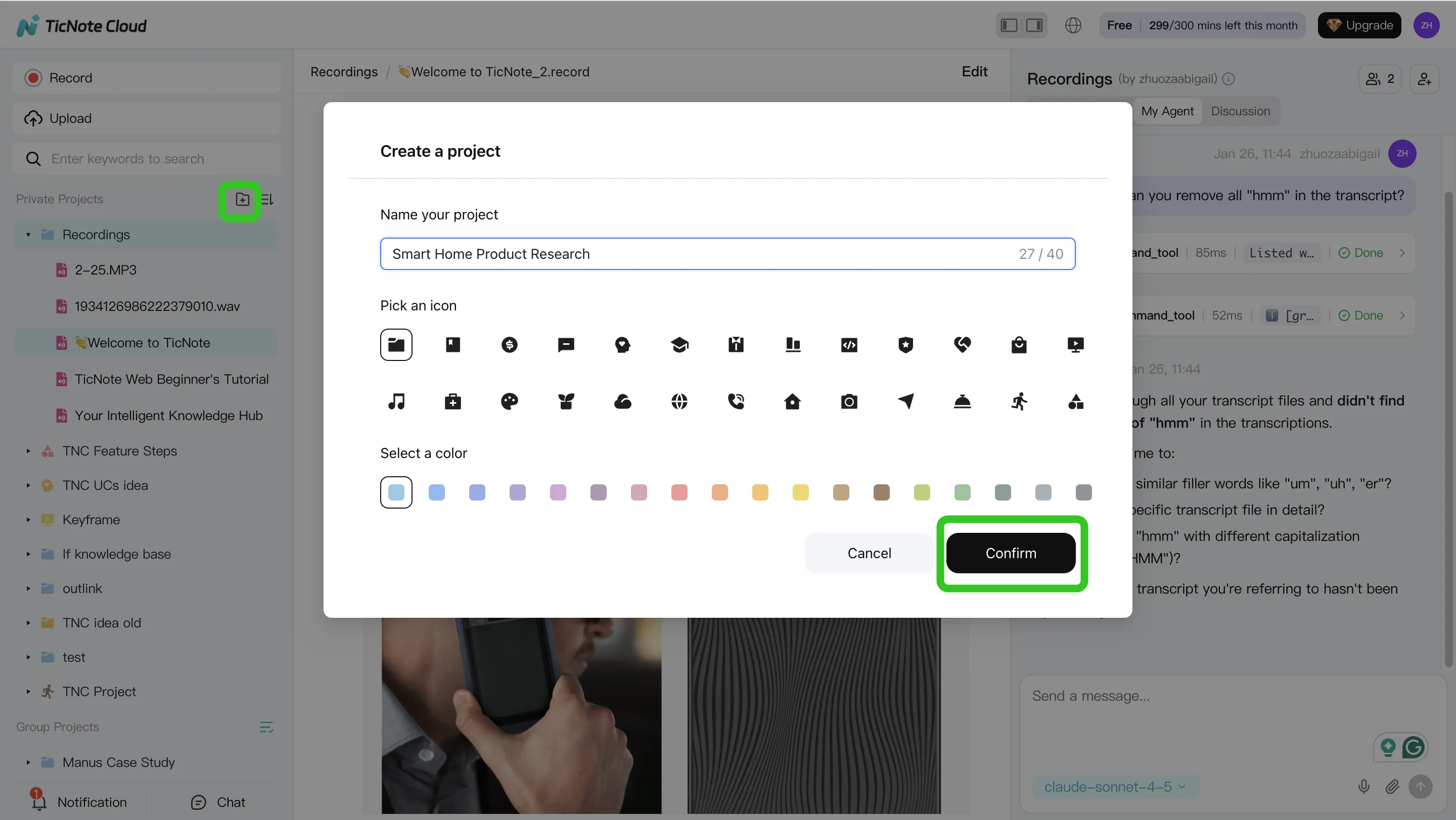
1) Create a project and add content (your source of truth)
Start with one Project per campaign, client, or product line. This keeps context clean, and it makes reuse easy later.
In the TicNote Cloud web studio, create a new Project (or open an existing one). Then ingest your raw inputs: meeting recordings, call recaps, interview docs, and research notes.
You can upload in two common ways:
- Direct upload from the file area when you already have the files
- Attach files inside Shadow AI, then ask it to save them into the right folder
Use a naming rule that sorts well: YYYY-MM-DD + meeting name + topic. It's boring, but it saves hours.
2) Use Shadow AI to search, analyze, edit, and organize content (turn notes into building blocks)
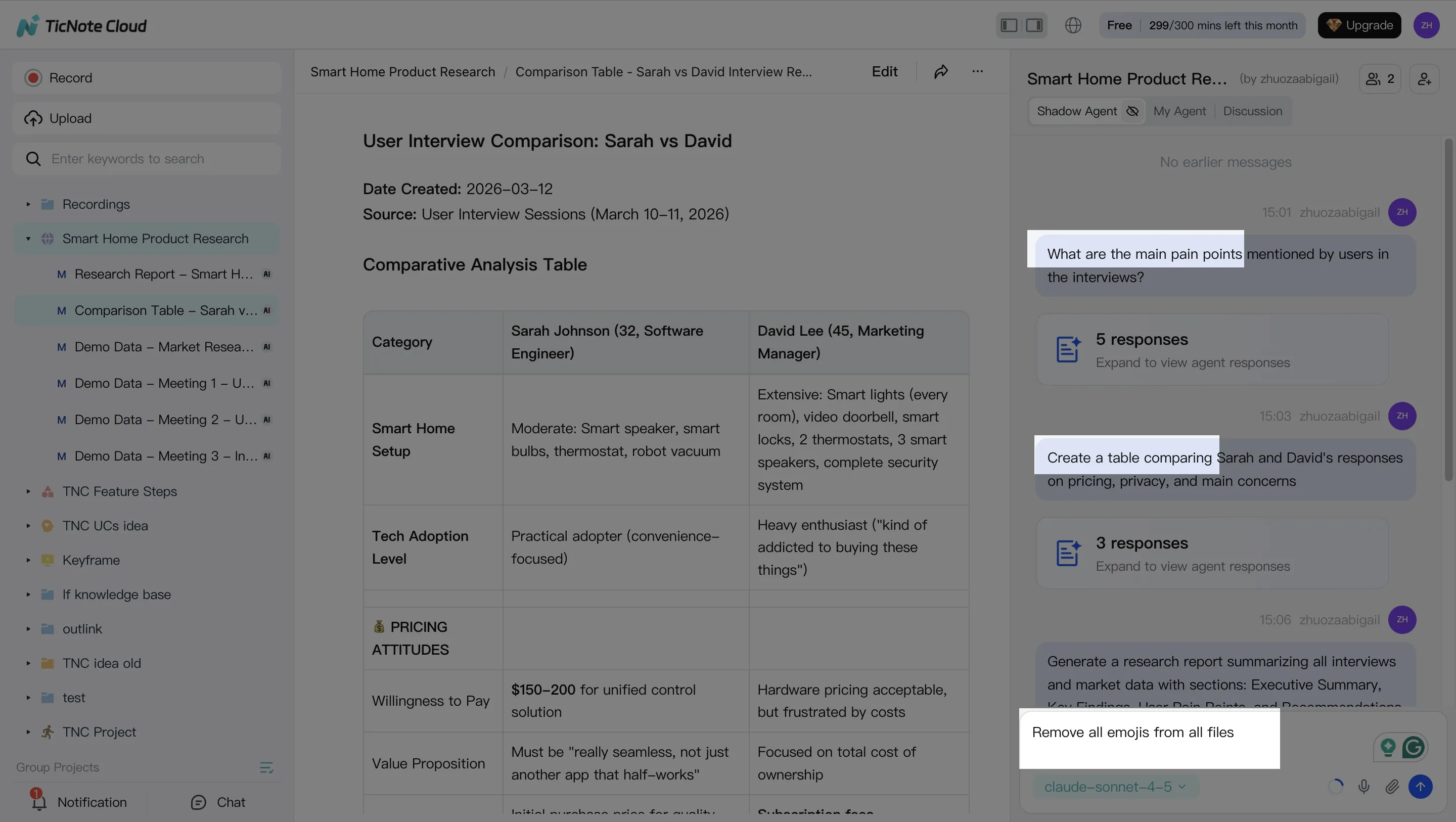
With the Project built, use Shadow AI on the right side of the screen as your "content ops" layer. Keep requests grounded in what's inside the Project so outputs stay tied to real quotes, decisions, and constraints.
Good prompts focus on facts you can verify fast:
- Decisions: "What did we decide, and who owns each action?"
- Objections: "List the top 5 buyer concerns mentioned."
- Definitions: "How did we define the problem and the target user?"
Then extract reusable blocks and save them as durable files:
- Approved quotes (with speaker and context)
- FAQs (question, short answer, longer answer)
- Talk tracks for sales or customer success
3) Generate deliverables from the same grounded sources (briefs, drafts, variants)
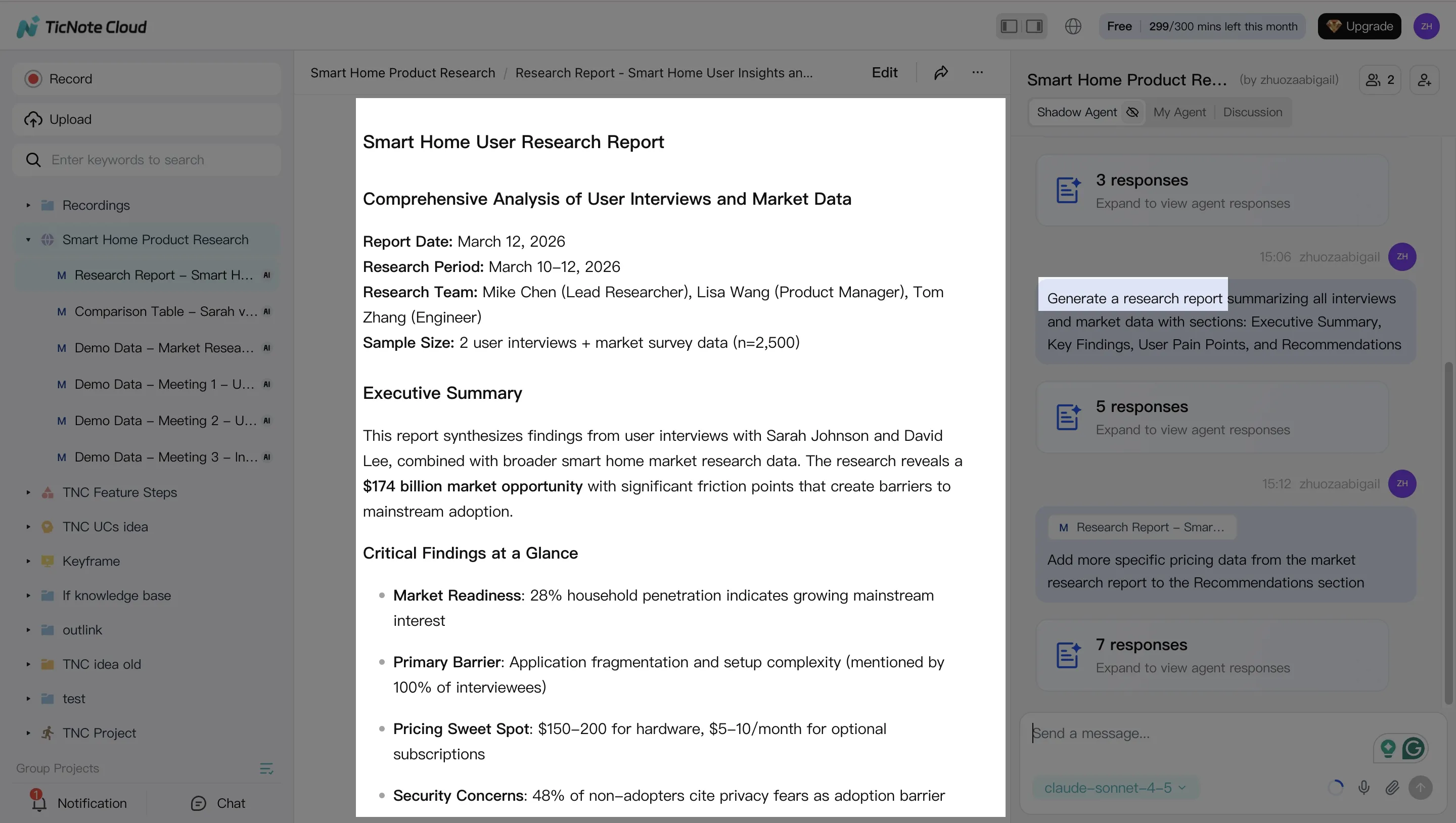
Next, create assets from the Project context. For example, ask Shadow to generate a blog brief and outline that only uses the meeting notes and supporting docs you already added.
From that same source, generate repurposed versions that stay consistent:
- Blog brief + outline
- Email summary for subscribers or customers
- Social post set (3 to 7 posts, each with one point)
When you're ready to move to publishing tools, export in the format your team uses (Markdown, DOCX, or PDF).
4) Review, refine, and collaborate (where humans keep you safe)
This is the non-negotiable step. Assign reviewers by risk: editor for structure, SME for accuracy, and compliance for regulated claims.
Use targeted edits instead of full rewrites:
- Tighten claims that sound too broad
- Add missing proof points from the transcript
- Adjust tone to match your brand voice
Keep the final approved version inside the Project. That way, future content starts from what your team already signed off on.
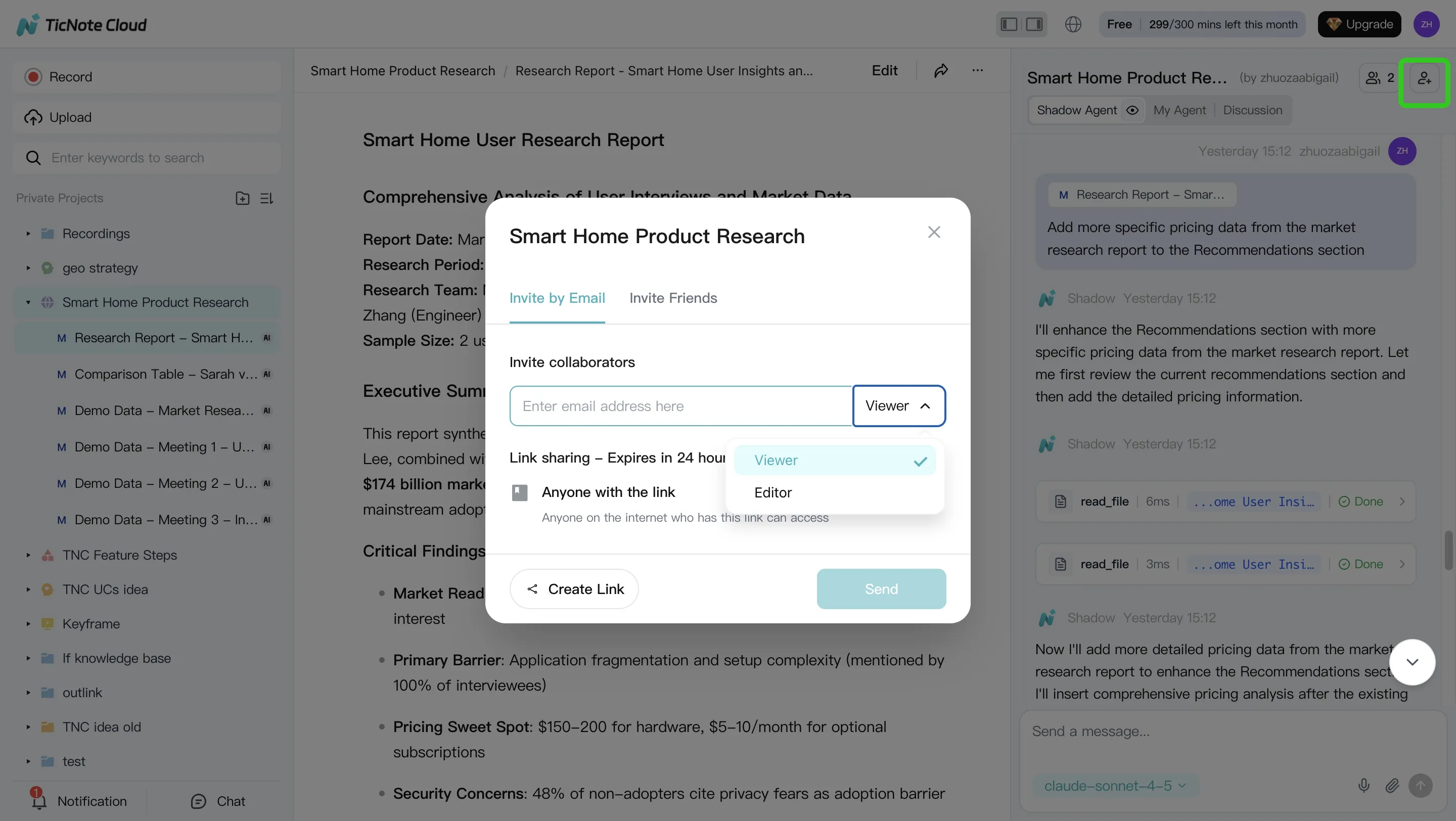
One more practical note: you can capture or ingest on mobile, then continue analysis on the web. And for team workflows, share Projects with role-based permissions so the right people can review and approve without exposing everything to everyone.
Try TicNote Cloud for Free to turn meeting notes into a reusable content knowledge base.
What can TicNote Cloud do that's exclusive for this workflow?
If your content workflow starts with meetings, TicNote Cloud helps you turn scattered calls into a usable system for ai agents for content creation. The key is that it doesn't just store transcripts. It helps you query, organize, and reuse them as living knowledge.
Shadow cross-file Q&A across a workspace (turn meetings into reusable knowledge)
Shadow can answer questions across many files in a project. So instead of searching one call at a time, you can ask things like "What did we decide about X?" or "Which objections keep coming up?". That's useful for:
- Building a content brief from real customer language
- Creating an FAQ section based on repeated questions
- Finding proof points, examples, and edge cases fast
Shadow Agent CRUD for creating and updating project files (keep briefs and drafts organized)
Most teams don't fail at writing. They fail at file chaos. Shadow Agent CRUD (create, read, update, delete) helps keep a single source of truth inside your projects.
You can have it:
- Create a standard brief file for each topic
- Update an outline after stakeholder notes come in
- Apply batch edits across related docs (like changing product naming)
- Keep "evergreen" docs current, instead of copying and pasting
Mind map plus deep research reports (faster SME synthesis)
Long calls are hard to scan. Mind maps help you see the structure fast: themes, sub-topics, and what to write first. Deep research reports go one step further. They turn meetings plus uploaded docs into a writer-ready pack of insights, claims, and open questions.
Privacy-by-design positioning (what to say, what not to assume)
For governance, keep the language simple and accurate: TicNote Cloud is private by default, uses encryption, and customer data isn't used to train AI models. For regulated teams, you should still verify details in a security review, like retention controls, access roles, audit trail needs, and SSO requirements.