Extension
TL;DR — What to do today about information overload
If you need fast relief, start with three habits you can do right now. This short plan explains how to manage information overload, so you can think clearly and get work done without burning energy.
Key takeaways:
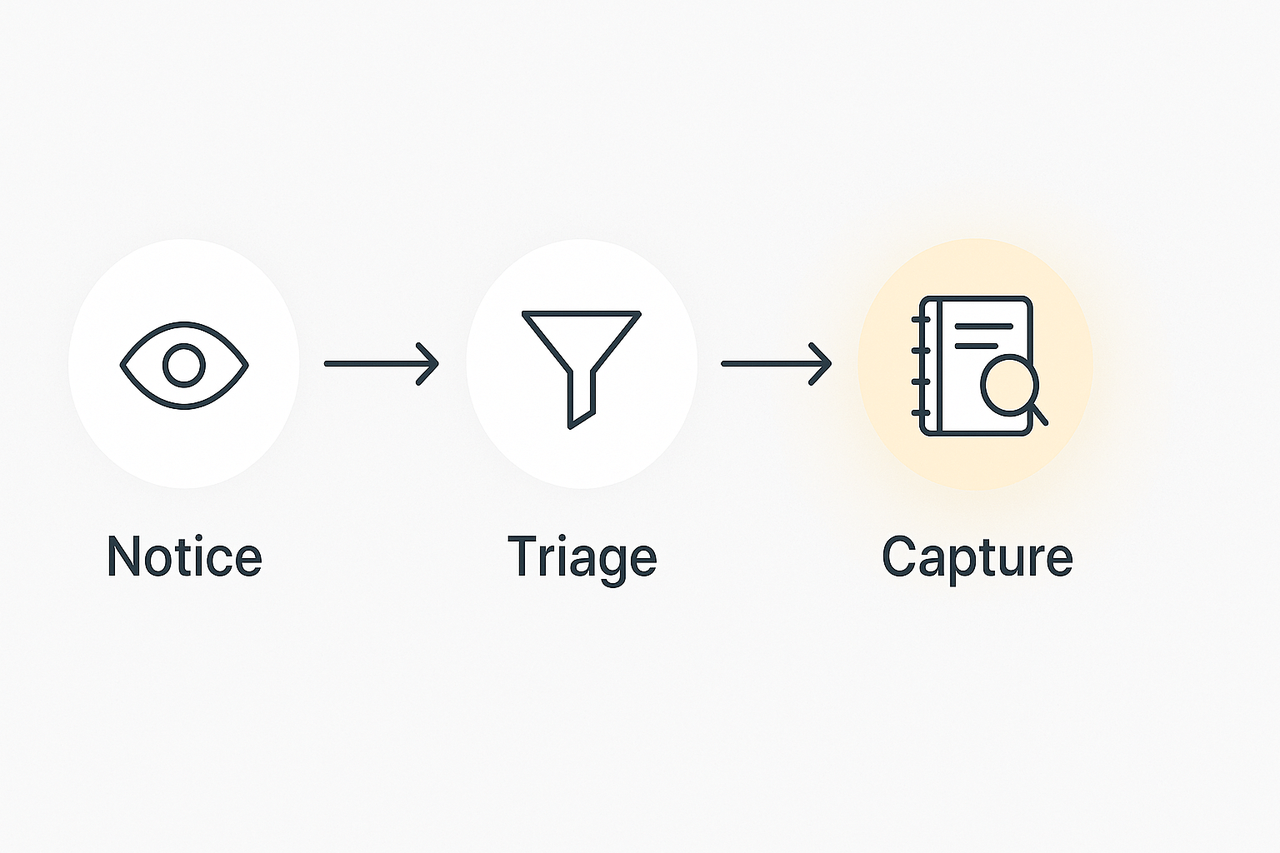
- Notice what steals focus: identify noisy sources like chat, endless threads, or unmanaged meeting notes.
- Triage ruthlessly: decide what needs action, what needs saving, and what to delete or defer.
- Capture reliably: record decisions and tasks in one searchable place so you don’t rely on memory.
1-minute checklist to lower cognitive load now:
- Close or snooze nonessential tabs and apps for 25 minutes.
- Flag three inbox items that need action and assign times to handle them.
- Open a single note, paste one meeting summary or key link, and add one follow-up task.
Do these steps now to stop reactive work. Repeat them daily until triage and capture feel automatic. You’ll get calmer, miss fewer actions, and find answers faster.
Why information overload happens (and how it harms your work and well‑being)
Before you decide how to manage information overload, know the cause. Modern work pours more signals into your brain than it can hold. Meetings, documents, chat threads, and alerts stack up and outpace our attention and memory.
Limited attention and working memory
Your attention is limited, and working memory (the mind's short-term storage) can only hold a few items at once. When you switch tasks, you lose momentum and spend time reorienting. That switching cost, plus constant interruptions, reduces your ability to focus on deep tasks.
Common sources that pile up
- Back-to-back meetings and long recordings that need review
- Growing doc libraries and overlapping project notes
- Persistent chat channels and email threads with fast replies
- Notifications and ad-hoc asks that pull you off priority work
Short and long term harms to work and well-being
In the short term, overload makes you shallow. You skim more, miss key details, and let small tasks slip. Decisions become slower or lower quality because you’re juggling too many facts. Over time, chronic overload raises stress and fatigue. That increases the risk of burnout, lowers job satisfaction, and harms learning.
Why this matters: if you can’t find facts quickly or recall past decisions, you waste time and repeat work. Fixing the flow of information is not just productivity theater, it protects focus, improves decisions, and reduces burnout risk.
If you want a quick check on how to manage information overload, use this short checklist to score where you are and pick practical next steps. Read each line and put a check next to items that feel like your daily reality.
Symptoms checklist (check all that apply):
- I can’t find decisions or key notes from meetings.
- My inbox or chat has 20+ unread items that feel important.
- Meeting notes pile up and never get turned into actions.
- I switch tasks every 10–20 minutes.
- I delay work because I’m unsure which task is highest priority.
- Searching for old files or notes takes longer than I expect.
- I miss follow-ups or deadlines due to lost context.
- I feel mentally drained by midafternoon.
Scoring guide:
- Count your checks. 0–2: Low overload, keep steady habits. 3–4: Moderate, pick 2 fixes now. 5–8: High, schedule an immediate clean-up and a system change.
Role-specific triggers and quick next steps
Individual contributors: Trigger, constant context switching. Quick step, block two focus hours and batch messages. Use a single notes folder for active projects.
Managers: Trigger, too many meetings with no clear outcomes. Quick step, require short agendas and a one-line decision list after each meeting.
Leaders: Trigger, strategic work gets buried under operations. Quick step, standardize meeting templates and delegate meeting-to-knowledge rules. Consider a team second brain like TicNote Cloud to centralize notes and action items.
Core habits and strategies to manage digital overload
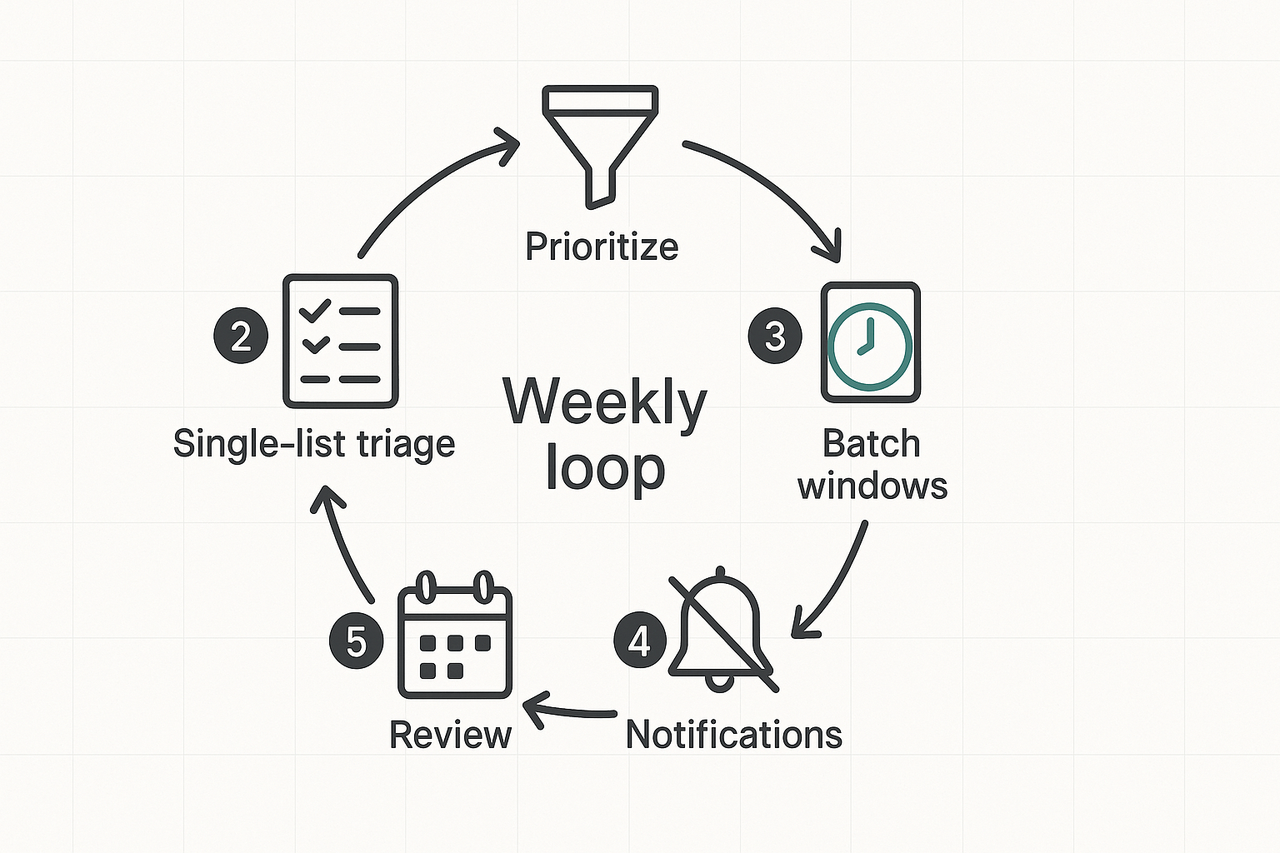
If you want to know how to manage information overload, build a small set of daily and weekly routines that cut incoming noise and make retrieval reliable. Start with five simple habits: prioritize your sources, use one triage list, batch focused work, lock down notifications, and run a weekly review. Each habit below has a quick setup tip and a one-sentence reason it helps your focus and output.
1) Prioritize your information diet
Quick setup: unsubscribe from low-value newsletters, stop follow notifications, set a 30-minute daily reading window. Limit feeds to 3 trusted sources per topic. Why it helps: fewer inputs reduce decision fatigue and free mental bandwidth for real work.
2) Single-source list and triage routine
Quick setup: capture every task, ask, or note into one inbox (app, doc, or notebook) and triage twice a day into Action, Reference, or Delete. Use tags or folders to mark follow-up time and owner. Why it helps: a single list stops duplicate work and makes it clear what needs immediate action.
3) Batch work into focus windows
Quick setup: schedule 2 to 4 blocks of 60 to 90 minutes per day for deep tasks, and reserve short blocks for email and quick replies. Put a calendar buffer before and after meetings. Why it helps: batching reduces context switching, which improves speed and quality.
4) Set strict notification rules
Quick setup: turn off nonessential push alerts, use priority only for people or channels that matter, and set an "urgent" protocol for real emergencies. For team chat, pin hours when messages are for async review. Why it helps: fewer interruptions mean you keep flow longer and lose less time resuming tasks; research shows reducing interruptions improves task accuracy and resumption lag, as seen in Effects of interventions to reduce the negative consequences of interruptions on task performance: A systematic review, meta-analysis, and narrative synthesis of laboratory studies (2021).
5) Weekly quick review loop
Quick setup: 15 minutes on Friday to clear the inbox, move items into projects, and flag next-week priorities. Keep a short notes folder for lessons. Why it helps: regular pruning prevents backlog growth and makes search fast when you need history.
Use these five routines together: prioritize sources, capture to one list, batch deep work, lock notifications, and review weekly. Start with one habit this week and add one more each week until all five stick.
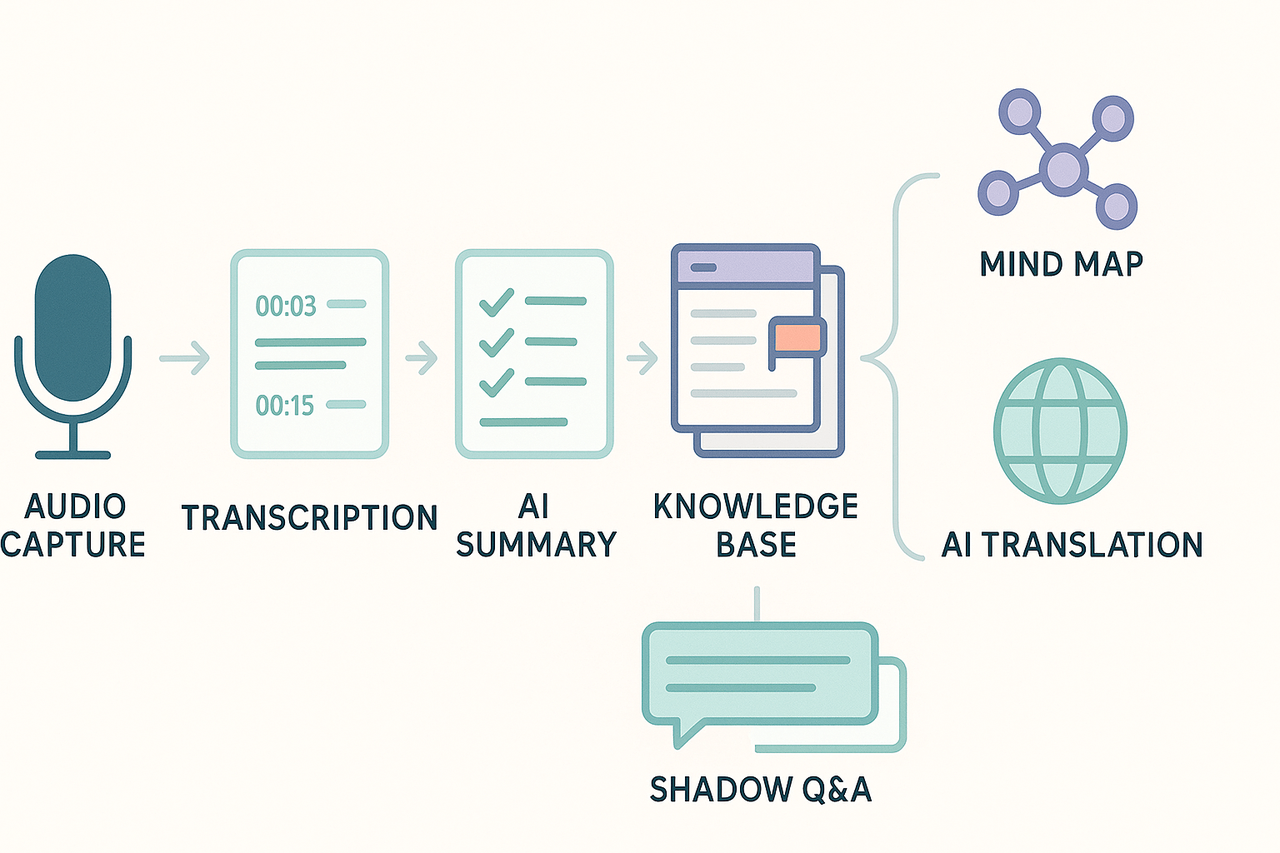
Start a predictable meeting-to-knowledge pipeline to stop drowning in notes and emails. Convert noisy meetings into valuable, reusable information assets with TicNote Cloud.
Step 1: Capture
Record or upload meeting audio to generate real-time or post-meeting transcripts. Use time-stamped notes for easy navigation. Templates: Quick Meeting Capture, Interview Log.
Step 2: Summarize
Apply AI summaries to extract decisions, action items, and key quotes. Use templates to highlight next steps with owners and due dates. Export short updates for teams or full-page summaries for stakeholders.
Step 3: Structure
Organize transcripts and summaries into folders. The platform indexes everything with smart tagging (e.g., project, topic, client) for fast retrieval. Templates: Project Hub, Client Brief, Research Stack.
Step 4: Visualize
Generate mind maps from transcripts or Deep Research reports from folders. Ideal for onboarding, presentations, or multilingual teams with built-in translation.
Step 5: Ask
Use Shadow Chat, your AI research assistant, to query across all meetings and documents. Ask questions like “What did Marketing decide last Q?” and get answers with citations.
Metrics to track:
- Minutes saved per meeting
- Average time to answer a question
- Reduction in missed action items
Feature-to-Step Map:
- Live transcription → Capture
- AI summarization → Summarize
- Tagging and search → Structure
- Mind maps / translation → Visualize
- Shadow chat → Ask
Visual Suggestions:
- Screenshot: transcript editor with highlights
- Screenshot: AI summary with action items
- PNG: generated mind map
- Screenshot: Shadow Q&A with cited responses Try TicNote Cloud free today
Information and context leak fast in distributed teams. To stop overload, set clear norms, make async updates the default, and design timezone handoffs that prevent duplicated work. This helps everyone find answers faster and cuts unnecessary meetings, a core step in learning how to manage information overload.
Set simple meeting norms
- Limit invites to essential people only. Keep agenda items explicit. Use 30 or 45 minute blocks, not 60. Declare expected outcomes: decision, input, or info.
- Capture decisions and actions in one shared note after the meeting. Tag owners and due dates so nothing falls through the cracks.
Make async work the default
- Replace status meetings with short written updates or recorded voice clips. Use threaded comments for follow ups.
- Require a one‑line summary and links to the source for every update. That makes search and handoffs faster.
Timezone aware handoffs
- Document the current state and next steps in a single place. 2. Record or transcribe a 3‑minute update for off‑hours teammates. 3. Assign a clear owner for the next action.
Leader checkpoints and duplication controls
- Leaders should review weekly activity logs, not inboxes. Spot overlap early and reassign work.
- Encourage a “who is doing this?” check before new tasks start.
Use the right tools to restore context
TicNote Cloud can speed recovery from missed meetings with translation, cross‑file Q&A, and auto mind maps. The platform turns recordings and docs into a searchable archive. That reduces redundant status asks and helps multilingual teams move faster.
Organizational culture and team tactics that prevent info overload
Start with clear norms so teams spend less time hunting for facts. Define when to use chat, when to write a document, and who owns each knowledge item. This section gives simple governance rules, manager checkpoints, and templates you can copy today. Here’s how to manage information overload with concrete templates and metrics.
Adopt a standard approach to information governance to avoid ad hoc rules. For guidance, follow ISO 24143:2022 establishes concepts and principles for Information Governance applicable to organizations of all sizes in all sectors. Use that guidance to shape retention, access, and naming policies. Keep rules short, visible, and reviewed quarterly.
Set simple communication norms
Make chat for short coordination, and docs for decisions and reference. Chat is for quick questions, links, and daily syncs. Docs hold final decisions, templates, and onboarding guides. Use these quick rules:
- Chat: fast, transient, <24-hour actions, immediate context only.
- Docs: decisions, SOPs, project briefs, searchable reference.
- Email: external comms and formal signoffs.
- Meeting notes: record actions and link to the owning doc.
Governance templates and manager checkpoints
Give managers three templates to roll out in one week. Train teams to use them and track simple metrics. Tie checkpoints to measurable outcomes, not process audit.
- Ownership matrix (who owns which docs, folder paths, and update cadence). Copy-paste column headers: Area | Owner | Location | Review date | Action items.
- Channel policy one-pager (chat vs docs vs email, naming rules, tag conventions). Keep it one page.
- Meeting note template (decisions, owners, due dates, links). Require an owner and a due date for each action.
Track success with these metrics:
- Time to find info (search-to-open time). Measure pre and post rollout.
- % of meetings with clear actions recorded.
- Number of duplicate docs per project.
- Average time to close assigned action items.
Run a monthly dashboard review with managers. Adjust rules if search time or missed actions do not improve. Small, visible wins build trust and reduce long-term overload.
Real-world mini case studies: Results from two teams
Two short cases show practical results for how to manage information overload using a Second Brain built on TicNote Cloud, with tracked outcomes you can measure. Read the problem, the workflow, and the concrete gains each team recorded.
Consulting team: stop losing decisions in back-to-back meetings
Problem: The consulting team ran eight client and internal calls weekly. Notes lived in chat, email, and personal docs, so action items slipped through.
Workflow used:
- Record meetings and auto-transcribe.
- Generate short AI summaries and extract decisions and tasks.
- Tag decisions by client and push tasks to a shared project folder.
Measured outcomes:
- Time saved: consultants reclaimed about 3 hours per week from faster follow-ups.
- Search speed: finding past decisions became 40% faster.
- Missed actions: reported missed deliverables fell by about 60%.
Healthcare research team: clear handoffs across timezones and languages
Problem: Multilingual documents and 24 hour handoffs caused duplication and slow handovers. Critical notes were scattered across drives.
Workflow used:
- Centralize uploads, run AI translation into English and local languages.
- Use cross-file Q&A to find protocols and past results quickly.
- Auto mind maps for handoff briefs to the next shift.
Measured outcomes:
- Time saved: the team cut handoff prep by roughly 6 hours weekly.
- Handoff speed: teams completed transitions 50% faster.
- Follow-up actions: missed follow-ups dropped near 70%.
These mini cases show clear, measurable gains when you capture meetings and docs into a searchable workspace.
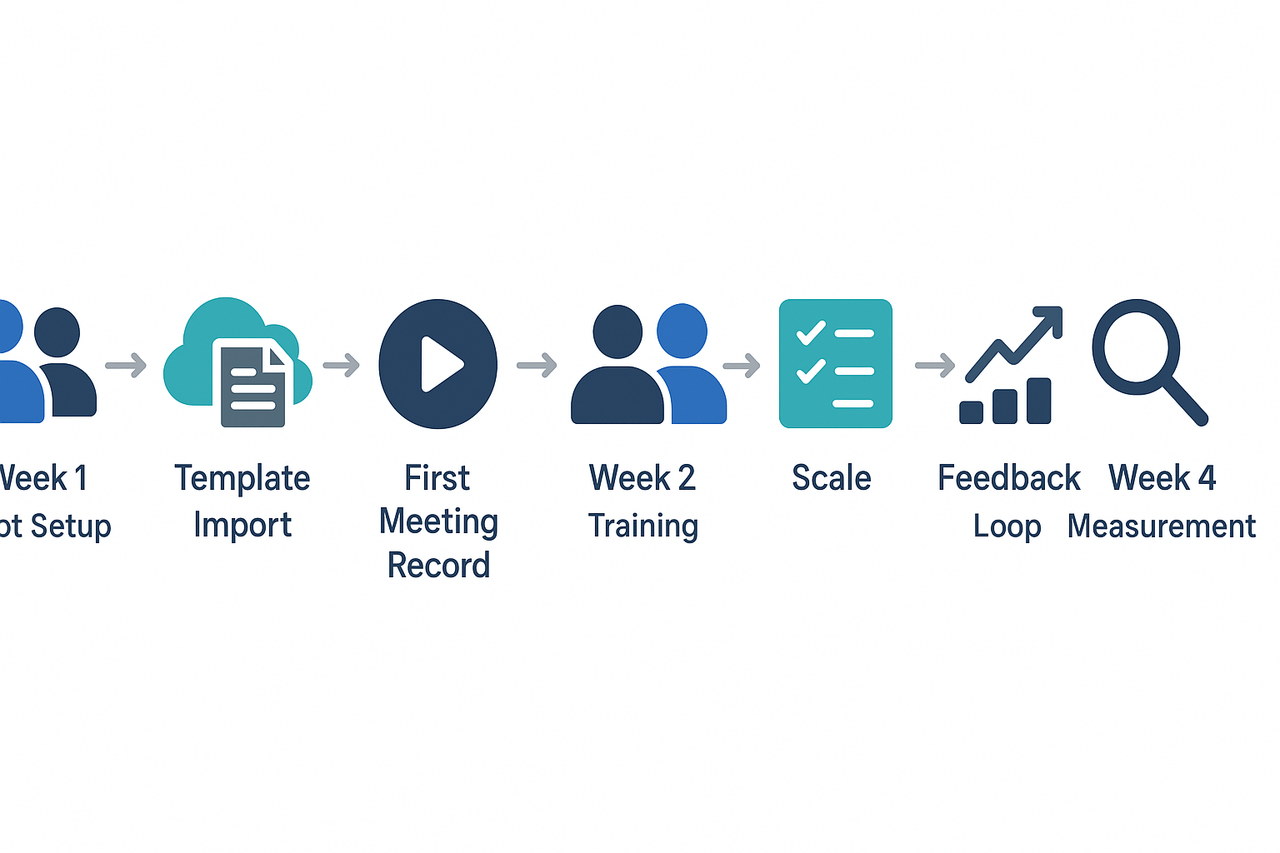
How to implement this in 30 days: a step-by-step rollout plan
Start with a clear 30-day plan to learn how to manage information overload and capture quick wins. Week-by-week actions make adoption simple, and you’ll track impact from day one.
Week-by-week rollout
- Week 1: Pilot setup and imports
- Choose a small project and invite 3–5 users.
- Import templates into the platform Templates area or upload them to your workspace.
- Run one recorded meeting and generate the first summary.
- Week 2: Training and templates
- Run two 45-minute workshops on note templates and Shadow chat.
- Share a printable 7-step checklist and the quick self-assessment.
- Week 3: Scale and feedback
- Add 2 more teams, refine templates from feedback.
- Run cross-file Q&A tests and mind map reviews.
- Week 4: Measure and iterate
- Audit actions found vs completed, tighten templates.
- Prepare a short report for stakeholders.
Roles, checklist, and metrics
- Roles: pilot lead, IT admin, trainers, and an executive sponsor.
- Training checklist: account setup, template import, AI chat demo, search tests.
- Early metrics to collect: time saved per meeting, average search time, and missed actions found vs closed. Use time logs, timed search tests, and an action-item audit for ROI.