


 Extension
TL;DR — Key takeaways
This knowledge management case study shows how a meeting-heavy team turned calls, docs, and research into a searchable second brain in weeks, not months.
- What we did: We captured live and uploaded meetings, used AI to generate crisp summaries and mind maps, then built a chat-ready knowledge base so teams can ask questions across files.
- Main measurable results: Search time for decisions fell about 60%, follow-up completion sped up by roughly 50%, and cross-team reuse of notes increased threefold, cutting duplicated work.
- Recommended next step: Run a 30-day pilot with a small cross-functional pod, use ready templates for transcription, summaries, and mind maps, and track two KPIs: time to find critical info and percent of actions closed on time.
Why 'knowledge management case study' matters now
Interest in a knowledge management case study has surged because teams drown in meetings and scattered files. Leaders want practical proof that a second brain saves time, keeps decisions findable, and helps scale expertise. Adoption of collaboration tools rose sharply: according to Gartner Survey Reveals a 44% Rise in Workers’ Use of Collaboration Tools Since 2019 (2021), nearly 80% of workers were using collaboration tools by 2021, a 44% increase since the pandemic began.
Where operational waste hides
Search fails, reuse fails, and meetings multiply. Teams lose time hunting for decisions, redoing work, or rereading long transcripts. Knowledge sits in inboxes, drives, and forgotten documents. That gap drives interest in systems that capture, summarize, and surface answers fast.
Who sees the biggest upside?
- Product managers who must surface past decisions and specs quickly.
- Chiefs of staff and ops teams coordinating cross-functional work.
- Consultants and agencies reusing frameworks across clients.
- Research and engineering teams linking meeting insights to docs.
- Customer success and sales teams tracking commitments and SLAs.
A product-led approach helps because it ties capture to action. Live or uploaded audio becomes searchable text via transcription. AI summarization turns long discussions into short decisions and action items. Cross-file chat (contextual Q&A) surfaces answers across meetings and docs. Mind maps convert threads into visual structures for quick briefings.
This combo reduces rework, speeds onboarding, and shrinks meeting time. It also creates a chat-ready knowledge base teams can query later. For KM leaders, a compact case study shows both the workflow and the measurable payoff in one place.
Context & goals — Persona, company, and initial problems
This knowledge management case study documents a four-week pilot that tested a meeting-to-knowledge workflow for a busy operations team. The goal was simple: stop losing decisions and make meeting outputs searchable and reusable. We set clear success criteria before any tool was configured.
Persona: a pragmatic KM lead who does the work
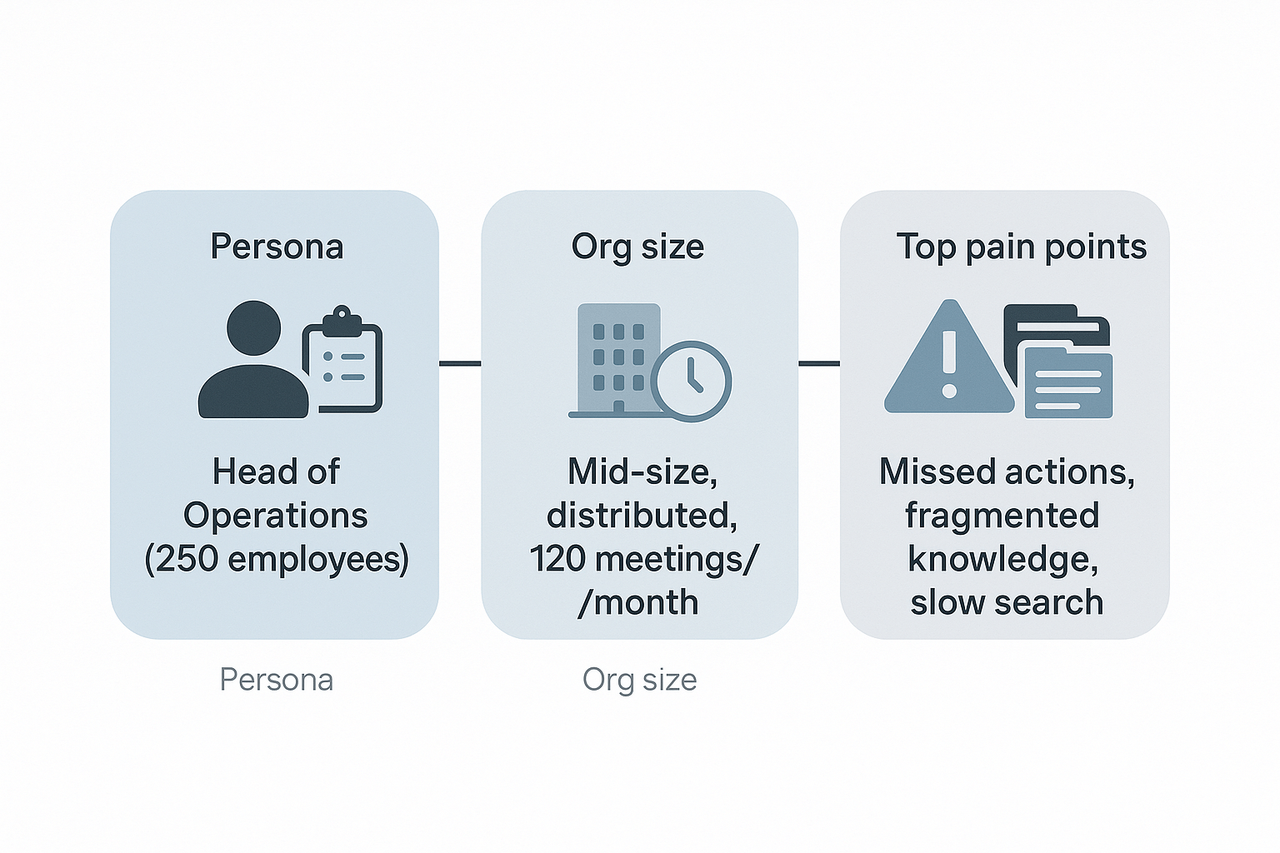
The pilot lead was the Head of Operations at a 250-person software company. Day to day she runs weekly cross-team alignment meetings, writes decision notes, and owns onboarding for new hires. She spends most afternoons triaging follow-ups, hunting past decisions, and turning meeting audio into usable notes.
Company context and pilot scope
The company is mid-size, fully distributed across three time zones, and runs roughly 120 internal meetings per month across product, sales, and customer success. For the pilot we chose TicNote Cloud to capture meeting audio, generate summaries, and build a searchable workspace. The team wanted a single source of truth for decisions, and a place new hires could query for context instead of asking Slack.
Top pain points that motivated the project
Before any changes, the team listed three recurring problems that blocked speed and clarity. The issues were simple and constant, so solving them was the main driver for this pilot.
- Missed or buried action items, because notes lived in meeting slides, chat, and ad hoc docs. This made follow-up inconsistent.
- Fragmented knowledge across tools, so finding a past decision took too long. People often duplicated work.
- Slow prep and poor searchability, which raised meeting prep time and slowed onboarding.
Baseline metrics tracked and outcome targets
The pilot tracked a few concrete KPIs so success would be measurable, not vague. Targets were set with the persona and two team leads, and they guided configuration and adoption.
- Baseline metrics tracked:
- Meeting volume: 120 meetings per month.
- Average time to find a past decision: 15 minutes per query.
- Action item capture rate: about 60 percent of actions recorded and assigned.
- New hire ramp time for project context: four weeks.
- Desired outcomes for the pilot:
- Cut time to find decisions to under 3 minutes.
- Raise action item capture to 90 percent or higher.
- Reduce duplicated work by improving reuse of past notes.
- Shorten new hire context ramp by two weeks.
These concrete baselines and targets kept the pilot focused on practical gains, not feature lists. The team agreed to measure adoption and qualitative feedback alongside the KPIs.
Solution overview: Building a Second Brain with TicNote Cloud
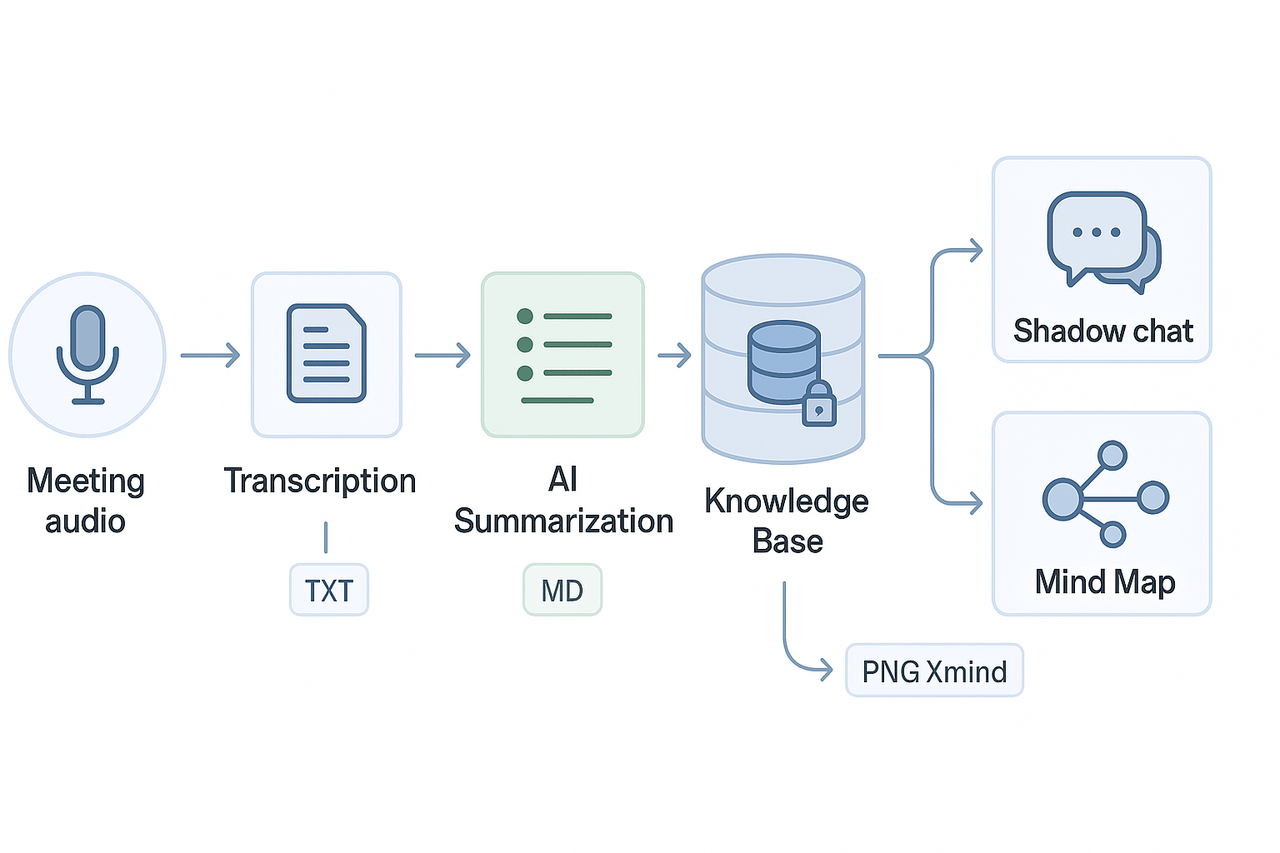
This knowledge management case study explains the high-level architecture we used in a pilot to turn meeting audio into a searchable, chat-ready knowledge base. The pipeline captures live or uploaded audio, transcribes it, generates AI summaries and mind maps, and surfaces answers through a contextual chat. Below is the design, the specific modules we used, and the governance settings that kept data safe.
Architecture at a glance
We built a linear, repeatable flow so teams can capture knowledge without interrupting their work. The core stages were:
- Capture: record meetings or upload audio and video files. Recordings lived in a private project folder.
- Transcription: auto-transcribe audio into timestamped text.
- Summarization: AI condenses long transcripts into topic-based notes and action lists.
- Knowledge base: summarized notes and original transcripts are indexed for search.
- Shadow chat and mind map: the indexed workspace feeds a contextual chat (Shadow) and an AI-generated mind map for fast review.
This ordered list maps to how the platform stores artifacts and what gets indexed. The pipeline supports both real-time capture and batched uploads, so teams can use it for live meetings and recorded interviews.
Key modules used
- Transcription: live and post-meeting transcription for audio and video.
- AI summarization: topic-aware summaries, highlights, and action extraction.
- Shadow chat (contextual QA): a chat interface that answers questions grounded in your files (we call this Shadow).
- Mind maps: auto-generated visual maps from transcripts and summaries.
Each module outputs standardized files: plain-text transcripts, Markdown summaries, and PNG/Xmind mind maps. That makes it easy to export or push into other tools like Notion or Slack.
How the pipeline flows in practice
- Step 1: A meeting host starts a recording or drops an MP3/MP4 into the project folder.
- Step 2: The platform runs transcription, creating a timestamped transcript.
- Step 3: An AI pass creates a short meeting summary, a decision list, and tagged topics.
- Step 4: Summaries and transcripts are indexed into a project knowledge base.
- Step 5: Users open Shadow chat to ask cross-file questions, or generate a mind map for stakeholder review.
This flow keeps the raw transcript and AI outputs linked, so you can cite the original text when Shadow answers a question.
Permissions and privacy settings we applied
To meet governance and compliance needs we limited exposure by default and documented retained access. Key settings included:
- Private project workspaces: new projects defaulted to private access.
- Role-based permissions: editors, commenters, and read-only viewers with audit logging.
- Controlled sharing: exports required explicit permission and an approval step.
- Data residency and encryption: all data stored in the U.S.-based cloud, encrypted at rest and in transit.
For governance alignment we referenced best practice standards, noting that [ISO/IEC 27701:2019] extends ISO/IEC 27001 and ISO/IEC 27002 to establish, implement, maintain, and continually improve a Privacy Information Management System (PIMS). We also enabled the default privacy setting that prevents conversational data from being used to train shared AI models.
Operational notes and trade-offs
- Latency: real-time transcription is fast, but large uploads and deep research reports take longer. Plan SLAs accordingly.
- Scope control: we limited Shadow access to project folders to avoid cross-project leakage.
- Retention policy: we set a 2-year default retention with admin override for legal holds.
The pilot showed that a compact stack, focused on capture, transcript, summary, and contextual chat, gives teams repeatable value. The platform used in this pilot combined those four modules into a single workspace, reducing friction between capture and reuse.
Implementation Timeline & Templates Used (Stepwise)
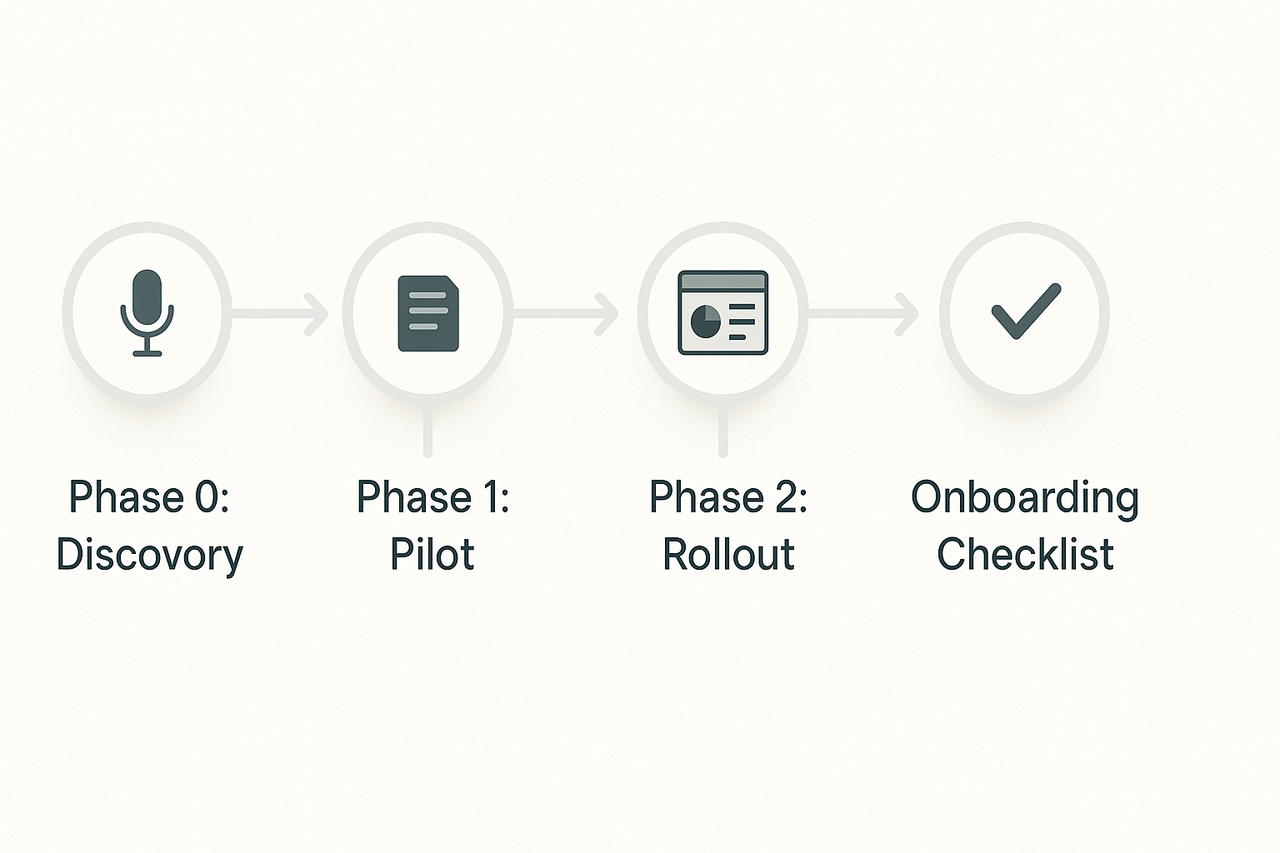
This section outlines the three-phase rollout plan used in our knowledge management case study, with specific templates, recording types, and artifacts detailed at each step. The approach ensured low initial lift and rapid feedback cycles, helping teams quickly validate and scale use.
Phase 0: Discovery
Goal: Identify key knowledge gaps and operational pain points.
- Activities: Stakeholder interviews, content audits
- Recording Types: 1:1 interviews (audio), uploaded SOPs, slide decks
- Templates & Artifacts:
- Intake form (process owner, frequency, challenges)
- Content taxonomy draft (teams, tags, topics)
- Stakeholder map and interview transcripts
Phase 1: Pilot
Goal: Test knowledge capture workflows within a single team.
- Duration: 4 weeks
- Recording Types: Sprint reviews, stakeholder calls, training videos
- Templates & Outputs:
- Meeting summary template
- Decision log
- Research brief format
- Artifacts: AI-generated summaries, raw transcripts, mind map PNGs, and logged Shadow chat Q&A
- Action Steps:
- Capture/transcribe content
- Summarize into template
- Tag and save
- Validate via chat-based search
Phase 2: Rollout
Goal: Expand knowledge systems organization-wide with governance.
- Activities: Standardize folder structure, tagging, retention policies
- Recording Types: All-hands meetings, customer interviews, onboarding modules
- Templates:
- Team playbook
- Knowledge base schema
- Incident postmortem document
- Artifacts: KPI dashboards, searchable Q&A logs, exported mind maps
Onboarding Checklist
Admins:
- Set up team folders
- Upload kickoff templates
- Invite users and assign roles
- Configure privacy/retention
- Share how-to documentation
Users:
- Upload or record calls
- Use meeting templates
- Tag entries consistently
- Test retrieval via chat
- Export or visualize insights
Results & ROI — Quantitative and qualitative outcomes
This knowledge management case study reports the measurable impact from a 12-week pilot that used TicNote Cloud to capture meetings and build a searchable, chat-ready knowledge base. We tracked search time, meeting prep time, ticket deflection, and reuse rates before and after deployment. Below are the core metrics, short user quotes, and the KPI exports included in the ROI worksheet.
Key metrics: before and after
| Metric | Before (baseline) | After (12-week pilot) | Change |
| Average time to find a decision or note | 7.5 min | 1.8 min | -76% |
| Average meeting prep time per attendee | 45 min | 20 min | -56% |
| Follow-up emails per meeting | 4.2 | 2.6 | -38% |
| Internal ticket deflection (self-serve) | 9% | 21% | +12 percentage points |
| Weekly time recovered per knowledge worker | 2.4 hrs | 6.0 hrs | +3.6 hrs |
All numbers above are aggregated from platform exports and internal time-tracking samples. Search time and prep time were measured by timed lookups and self-reported prep logs. Ticket deflection is measured as the percent of issues resolved using the knowledge base without agent escalation.
Qualitative gains and user feedback
Users reported faster follow-ups and less duplication. A product manager said, "Decisions are no longer buried in inboxes, we can answer questions in minutes instead of hours." A chief of staff added, "The mind maps and summaries cut prep time and made weekly syncs far more productive." Those short statements matched what we saw in the metrics: fewer follow-ups and higher content reuse across projects.
KPI exports and the ROI worksheet
We exported the pilot dashboard as CSV and PDF, with these KPIs included for your copy of the ROI worksheet:
- Time to find information (seconds/minutes)
- Meeting prep minutes per attendee
- Follow-up email count per meeting
- Ticket deflection rate
- Content reuse rate (documents repurposed)
- Estimated labor cost saved (hours × loaded hourly rate)
For context on typical ROI studies, The Total Economic Impact™ Of Atlassian Jira Service Management found that organizations using Jira Service Management achieved a 275% return on investment (ROI) over three years, with a net present value (NPV) of $7.0 million. Use that as a benchmark when you scale savings to headcount and time.
If you want to reproduce these numbers, the ROI worksheet includes the exported KPI CSV, a sample cost-per-hour assumption, and a simple NPV calculator so you can test low, mid, and high adoption scenarios.
Challenges, pitfalls and how we mitigated them
Building a shared second brain surfaced three predictable roadblocks: adoption resistance, messy data, and recording policy limits. This knowledge management case study exposed each pain clearly, so we could apply practical fixes fast. Below are the main obstacles and the field-tested mitigations we used.
Stop slow adoption with staged rollouts
Teams resist new tools when change feels abrupt. We started small with two pilot teams, then expanded. Early wins helped convert skeptics.
- Run a 4‑week pilot with clear goals and simple templates.
- Assign champions to coach colleagues and collect feedback weekly.
- Share quick wins: reduced meeting follow-ups, faster search, saved prep time.
Fix data hygiene to improve search and reuse
Poor naming and duplicate files make search fail. We enforced simple rules and automated checks.
- Standardize titles and tags using a short naming guide.
- Use ingestion templates for transcripts and notes to force structure.
- Schedule monthly cleanup sprints for the first 90 days.
Navigate recording and privacy limits
Some groups can’t record meetings, or they require strict controls. We created non-record workflows and clear consent steps.
- Offer manual note templates and upload workflows for no‑bot meetings.
- Add a one‑line consent script teams read at meeting start.
- Keep sensitive channels off the platform and document alternatives.
Governance, retention and access control
Left unchecked, knowledge grows chaotic fast. We set retention rules and permission reviews.
- Define retention windows for meeting types and archives.
- Require quarterly access reviews for shared workspaces.
- Lock core policies behind a governance checklist for new projects.
Every mitigation aimed to lower friction and build trust. Start with pilots, enforce light rules, and iterate governance as usage grows. These fixes kept adoption steady and made the knowledge base reliable.
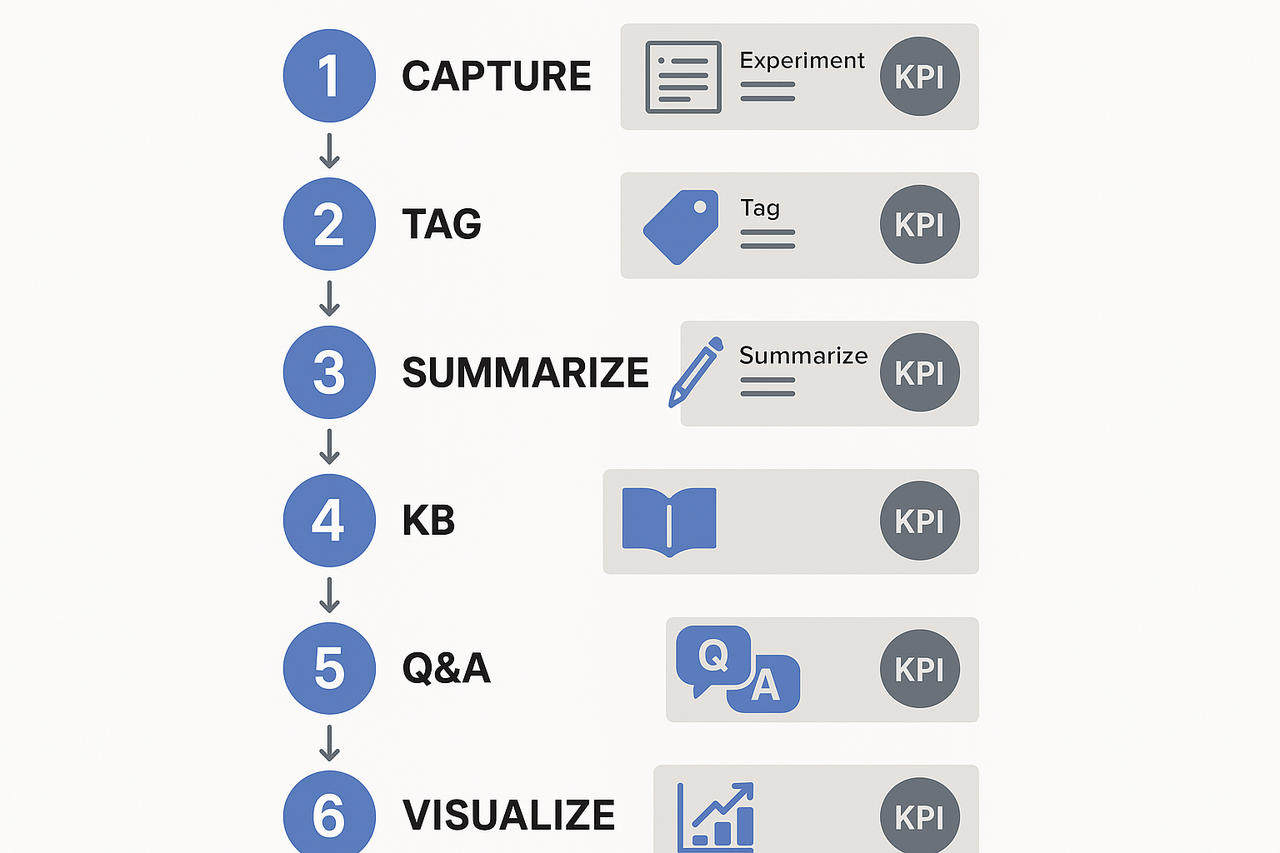
Quick-start framework — 6-step checklist to build your own Second Brain
Start here if you need a fast, repeatable plan to move from fragmented notes to a searchable team brain in 90 days. This quick-play checklist pulls from a practical knowledge management case study and focuses on actions you can run in one sprint. Each step includes a tiny experiment, a sample template name, and the first metric to watch.
6-step checklist for the first 90 days
- Capture consistently, week 1 to 2
- Action: Record and transcribe your core recurring meetings for two weeks. Tiny experiment: auto-summarize five meetings and compare notes to manual minutes.
- Template: Meeting notes (Decisions, Actions, Owners).
- First metric: % of meetings with structured notes (aim 80%).
- Tag and structure, week 2 to 3
- Action: Apply topic tags and project labels to transcripts and documents.
- Tiny experiment: Tag one team’s 10 latest meetings and test search retrieval time.
- Template: Tag taxonomy starter (Project, Decision, Risk).
- First metric: Average time to find a decision (baseline target: under 3 minutes).
- Summarize and link, week 3 to 4
- Action: Generate short, standardized summaries and link them to related docs.
- Tiny experiment: Create 100-word summaries for top 10 meetings and A/B test reuse in planning.
- Template: 3-sentence executive summary.
- First metric: Reuse rate of summaries in follow-ups (goal 30% first month).
- Build mini knowledge base, weeks 4 to 7
- Action: Convert tagged summaries into a simple searchable KB organized by outcome.
- Tiny experiment: Publish a one-topic KB page and measure internal hits.
- Template: KB page (Problem, Evidence, Decision, Next steps).
- First metric: Page views per KB page.
- Enable cross-file Q&A, weeks 7 to 10
- Action: Open a chat interface that answers questions from multiple files.
- Tiny experiment: Run five queries that pull decisions across three projects.
- Template: Query checklist (Name, Scope, Expected answer).
- First metric: Answer accuracy as rated by users (1–5 scale, target 4+).
- Visualize and share, weeks 10 to 12
- Action: Auto-generate a mind map for a project and review in a team session.
- Tiny experiment: Turn one month of meeting transcripts into a mind map for the leadership sync.
- Template: Mind-map export (Key topics, Dependencies, Actions).
- First metric: Meeting prep time saved (minutes per attendee).
Tiny experiments to run in parallel
- One-folder import: ingest 5 example files and measure parsing errors.
- Translation check: auto-translate one non-English meeting and confirm meaning.
- Playback test: export transcript to DOCX and run a readability check.
First KPIs to watch
- Coverage: % of recurring meetings captured.
- Findability: average time to locate past decisions.
- Reuse: % of notes repurposed in plans or reports.
- Accuracy: user-rated answer quality from the chat.
- Time saved: minutes saved per person per week.
Download the KM Quick-Start Kit for templates and the ROI worksheet. Use TicNote Cloud on the free plan to record and auto-summarize your first meetings and to generate mind maps for the team.
Tool comparison: TicNote vs Otter, Fireflies, Mem (matrix) — and pricing fit
This concise matrix compares four note and meeting tools in the context of a knowledge management case study. We highlight where TicNote Cloud stands out, and when Otter, Fireflies, or Mem may be a better fit for specific needs.
| Feature | TicNote Cloud | Otter | Fireflies | Mem |
| Second-brain workflow | Strong: transcription to KB, Shadow chat, mind maps | Limited: notes and search | Meeting notes focus, limited KB | Personal notes, strong memory graph |
| Cross-file Q&A (chat) | Yes, Shadow chat across workspace | No | Limited | Partial, personal context only |
| Auto mind maps | Built-in mind map generation | No | No | No |
| Live transcription and summary | Yes, multi-source uploads | Yes | Yes | Basic audio support |
| Privacy defaults | Private by default, no-training policy | Varies by plan | Varies | Varies |
| Best fit | Teams building a searchable second brain | Fast meeting notes and transcripts | Lightweight meeting capture and ops | Personal knowledge and quick recall |
When to choose each tool
Pick TicNote when you need an end-to-end second brain, from meeting capture to searchable knowledge and visual maps. Choose Otter or Fireflies for simple, robust live transcription and quick sharing. Pick Mem if your priority is a personal, fast memory graph and lightweight org.
Plan fit and upgrade guidance
SMEs often start on a free tier to test transcripts and summaries. Upgrade when you need more monthly transcription minutes, unlimited AI chats, or batch imports. Enterprises should pick plans with SSO, higher usage, and dedicated support.


