


 Extension
TL;DR — What you'll get from this guide
This guide shows how to build a practical second brain for teams and individuals using clear knowledge management practices. You’ll get a step-by-step playbook for capturing meeting and document knowledge, turning it into searchable notes, and reusing it across projects. Expect hands‑on templates, governance checks, and measurable outcomes.
Core steps at a glance:
- Capture: record meetings and import files for reliable transcripts and notes.
- Organize: tag, link, and structure content so it’s easy to find and reuse.
- Summarize: generate clean, action‑focused summaries and mind maps.
- Surface: enable cross‑file Q&A and chat over your workspace.
- Govern: set access rules, templates, and an ownership model.
- Scale: run pilots, measure ROI, and expand across teams.
What’s included: downloadable meeting note templates, a governance checklist, an ROI calculator, sample workflow diagrams, screenshot and audio demo assets, and copy‑ready templates for meeting summaries and research reports.
Who should read this: IT managers, knowledge managers, PMs, support and ops leads, consultants, and anyone building a personal second brain. Next step: try the platform’s free plan to generate your first AI summary and test search‑ready notes.
Why modern knowledge management matters (and what's changed)
Teams can no longer rely on folders and memory alone. Knowledge management now means capturing decisions, making content findable, and turning meeting noise into reusable insights. This section explains why the problem is urgent, what has changed, and what leaders must fix first.
Work has shifted, so knowledge must follow
Hybrid work created more distributed conversations, and those conversations are harder to track. According to Gartner HR Research Shows Organizations Are Eroding Employee Performance and Well-Being with Virtualized Office-Centric Design (2021), a survey of more than 2,400 knowledge workers in January 2021 reveals that employers' attempts to recreate visibility by investing in tracking systems have made employees nearly 2 times more likely to pretend to be working, exacerbating the 'always on' phenomenon. The result is more meetings, more recordings, and more fragments of context spread across tools.
Key drivers of urgency:
- Hybrid and remote teams that scatter knowledge across time zones.
- Meeting overload, where decisions hide in chat and audio.
- Faster product cycles, which demand faster reuse of insights.
- Multilingual and multi-source content, which needs translation and normalization.
Search and AI reset what people expect
Search used to mean finding a file. Now people expect an answer, not a pile of documents. AI, including transcription and conversational agents, changes expectations for retrieval and reuse. Teams want:
- Instant, conversational answers from meeting notes and docs.
- Cross-file Q&A that surfaces decisions and action items.
- Auto-summaries and mind maps for quick onboarding.
These features shift KM from passive storage to active knowledge services. The shift means platforms must connect audio, video, and text, and make them queryable in natural language.
The rising cost of knowledge friction
When knowledge is hard to find, teams waste time and repeat work. That hidden cost shows up as slower projects, missed deadlines, and low morale. Consider three quick impacts:
- Productivity loss from hunting for prior decisions.
- Risk and compliance gaps, when policies live in silos.
- Onboarding delays, because new hires can’t find tribal knowledge.
Fixing friction is a strategic investment. Analysts and leaders now treat knowledge capabilities as part of digital transformation. A modern KM program reduces rework, speeds decision making, and protects institutional memory.
Short list: what modern KM must deliver
- Unified access across meetings, docs, and audio.
- Fast, accurate search with contextual answers.
- Lightweight governance: templates, ownership, and retention.
Modern knowledge management is urgent because work has changed. Expectations for instant answers rose. The cost of not acting grows every quarter. Addressing this gap turns scattered conversations into shared, searchable knowledge.
What is a 'Second Brain' for teams and individuals?
A second brain is a system for capturing, organizing, and reusing knowledge so people stop relying on memory. It is a practical approach to knowledge management that turns meetings, notes, and files into searchable, actionable assets. The goal is simple: make the right information easy to find and use when teams need it most.
What a second brain looks like
A second brain collects inputs from meetings, documents, chats, audio, and research. It tags and links ideas so context stays with the content. It also exposes that content for fast search, Q&A, and reuse in playbooks and reports.
Core benefits for individuals and teams
For individuals
- Faster decisions: find past decisions, risks, or rationale in seconds rather than hunting through mail.
- Better focus: capture ideas immediately, then rely on the system to remind you.
- Repeatable work: save note templates, checklists, and reusable snippets for common tasks.
For teams
- Repeatable playbooks: standardize onboarding, runbooks, and postmortems from real meeting outcomes.
- Faster onboarding: new hires read concise histories, not thousands of emails.
- Shared memory: avoid knowledge silos by surfacing who decided what, and why.
How it differs from a traditional knowledge base
Traditional knowledge bases store static articles or FAQs. A second brain adds ongoing context: meeting transcripts, decision trails, and cross-file Q&A. It focuses on search and conversational access, not only browse-and-read. Where KBs expect users to know what to look for, a second brain helps users ask and discover the right question.
Key differences
- Inputs: includes audio and meeting transcripts, not just documents.
- Linking: connects decisions to the meeting and follow-ups.
- Retrieval: supports natural language queries, not just menu navigation.
When it delivers the biggest ROI: short examples
- Sales handoff: after a demo call, a transcript with action items becomes a one-page buyer brief. The rep saves prep time and closes faster.
- Engineering incident: transcripts and chat logs form a postmortem playbook. The team fixes root causes and reduces repeat incidents.
- Onboarding: new hires get a curated primer made from product demos and FAQs. They reach full productivity sooner.
- Research sprints: meetings and notes turn into a structured report for stakeholder review.
These outputs are repeatable artifacts: meeting summaries, decision logs, playbooks, and searchable Q&A. When knowledge is captured at the point of work, reuse becomes routine and ROI follows naturally.
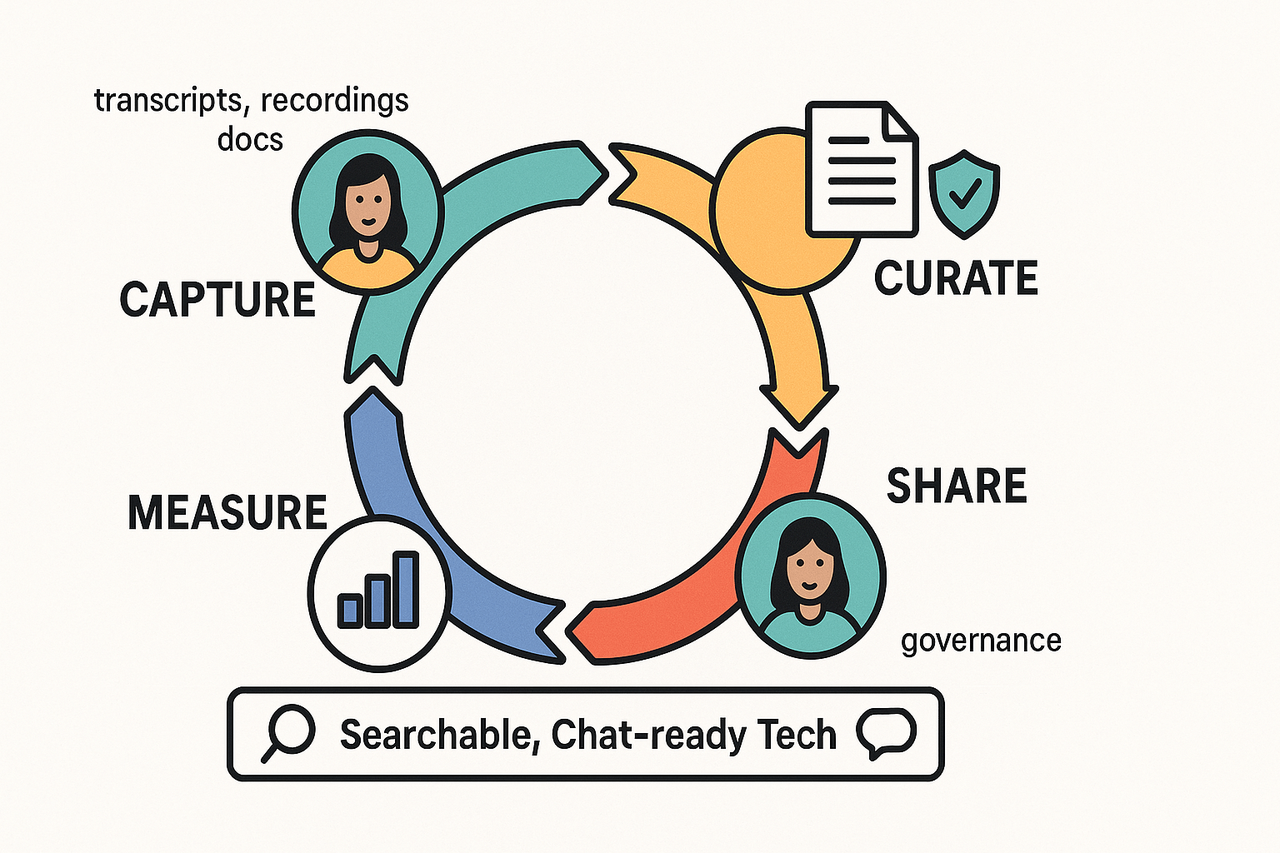
Effective knowledge work needs four things: the right people, repeatable processes, useful content, and clear governance. This section breaks those parts down and shows how they form an operational loop you can run every week. It also explains why a searchable, chat-ready technology layer makes reuse real.
People: roles that keep knowledge alive
Every KM program needs role clarity. Assign knowledge owners for key topics, a curator who vets notes and templates, and local champions to drive adoption. Owners set what stays and what retires. Curators enforce structure so others can find and use content. Champions train teams and collect feedback.
Content types: what to capture and why
Capture the formats teams actually use: meeting transcripts, decision logs, how-to guides, project briefs, recordings, and research reports. Tag each item with project, decision, date, and owner so search finds the right result. Keep short, reusable formats for quick reuse: 1-2 sentence decisions, 5-bullet action lists, and single-paragraph summaries.
Processes: the capture, curate, share, measure loop
Run a four-step operational loop and repeat it after every sprint or major meeting. Make each step actionable.
- Capture: Record meetings and upload files. Use templates so each capture has a clear title, participants, decisions, and actions. Keep capture friction low.
- Curate: Review within 48 hours. Clean the transcript, extract actions, and add tags and links to related work. Convert long transcripts into short summaries and a mind map for quick scanning.
- Share: Publish to a team space or topic hub. Broadcast only the decision and actions in a digest. Link back to full notes for context.
- Measure: Track reuse, search queries, and time-to-answer. Use simple metrics to spot gaps and iterate.
These steps reduce duplication and make knowledge findable.
Governance: policy, privacy, and quality
Set simple rules: retention periods, access levels, and a review cadence. For privacy-led environments, use standards-based guidance such as ISO/IEC 27701:2019, which specifies requirements and provides guidance for establishing, implementing, maintaining, and continually improving a Privacy Information Management System (PIMS) as an extension to ISO/IEC 27001 and ISO/IEC 27002 for privacy management within the context of the organization. Map those controls to your retention and sharing rules. Keep governance practical, not bureaucratic.
Why the tech layer matters: searchable and chat-ready
A fast search is necessary, but not enough. Make knowledge chat-ready so teams can ask natural questions across meetings and files. Cross-file Q&A surfaces decisions and action items without re-reading hours of transcript. Auto-generated mind maps and summaries speed review and reduce time-to-decision.
Practical checklist: define owners, pick capture templates, schedule 48-hour curation, publish to topic hubs, and measure three KPIs: time-to-answer, reuse rate, and percentage of captures reviewed.
When people, processes, content, and governance work together, knowledge turns from scattered files into reliable reuse. A searchable, chat-ready layer ties it all together so teams can find answers fast and act with confidence.
How TicNote Cloud helps you build a second brain (feature-to-problem mapping)
Good knowledge management saves time, reduces rework, and makes decisions visible. This section maps common KM pain points to specific platform features you can use to capture, curate, find, and scale knowledge.
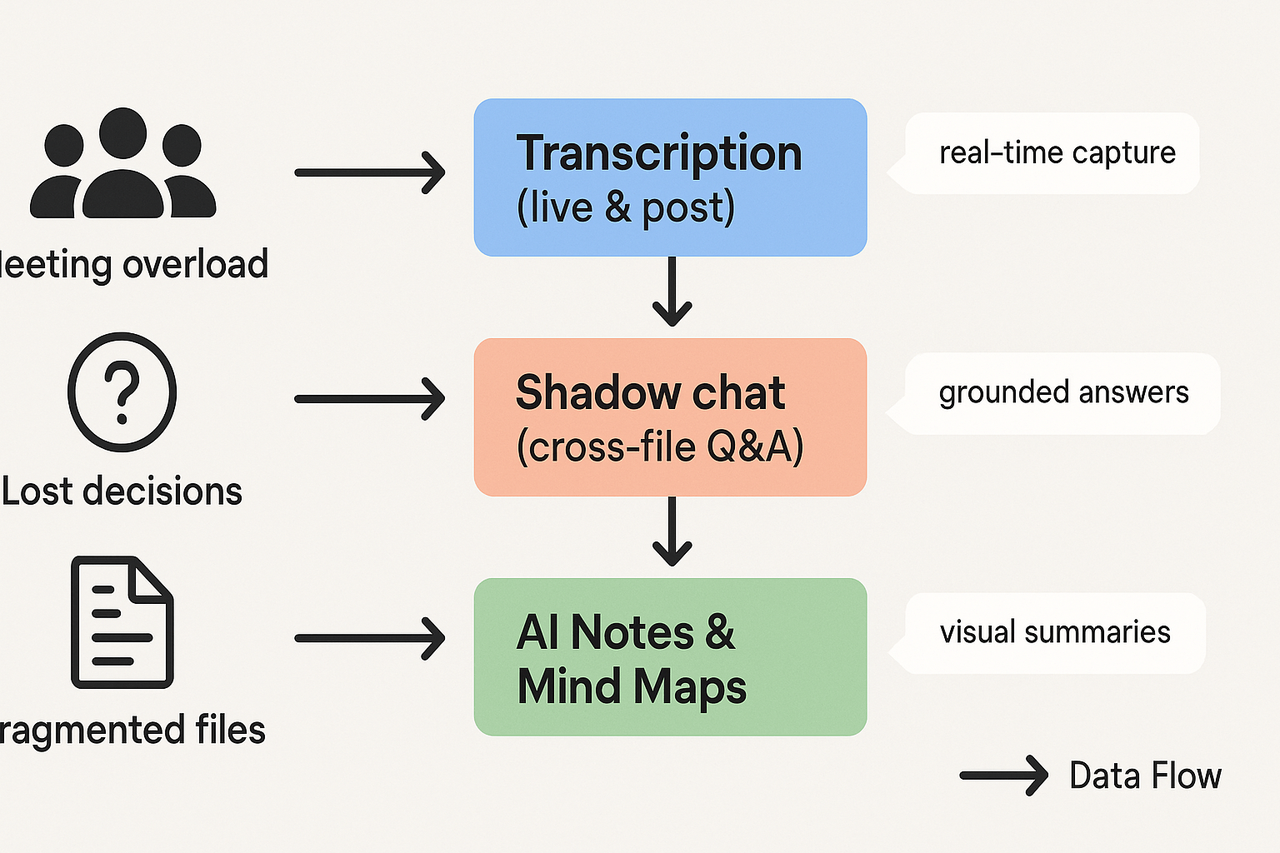
Capture: stop losing context from meetings
Problem: Meetings are the single largest source of tacit knowledge, and teams often lose important context and decisions. The platform solves this with live and post-meeting transcription. Use live transcription during calls to capture decisions as they happen, and upload audio or video after meetings for full transcript generation. Features to highlight:
- Live transcription for real-time capture and faster note-taking.
- Post-meeting transcription from uploads, to capture offline or recorded sessions.
- Multilingual transcription and AI translation to support global teams.
Demo assets: short audio clips showing a live transcription, and a before-and-after transcript with highlights.
Curate: turn noisy recordings into reusable notes
Problem: Raw transcripts are long and noisy, so teams rarely reuse them. The platform’s AI notes and summaries clean this up. Use topic-aware templates to extract decisions, tasks, and key quotes. Auto-generated mind maps help visual learners scan content quickly. Typical flow:
- Import transcript or recording.
- Run AI Notes to produce a structured summary by template.
- Generate a mind map for a visual overview and export it for presentations.
Export formats: Markdown, DOCX, PDF for summaries; TXT for transcripts; PNG and Xmind for mind maps. Demo assets: a non-UI mind map visual and a downloadable meeting note template.
Find and act: cross-file Q&A and task surfacing
Problem: decisions and action items are scattered across files, chats, and meeting notes. The platform’s Shadow chat provides cross-file Q&A. Ask natural questions and get grounded answers from your workspace. Use this to surface missed tasks, link related decisions, and prep follow-ups. Useful capabilities:
- Cross-file Q&A across transcripts, documents, and folder scopes.
- Chat-ready knowledge base built from meetings and uploads.
- Highlighted action items and decision timestamps for quick follow-up.
Analyze and scale: Deep Research for structured insight
Problem: scaling knowledge requires synthesis across many meetings and docs. Deep Research converts workspaces into structured reports and insight decks. Use Deep Think mode for step-by-step reasoning on complex topics, like post-mortems or product research. Benefits:
- Faster synthesis of recurring themes across projects.
- Research reports you can share with stakeholders.
- Inputs for strategy, retros, and onboarding material.
Exports, integrations, and privacy-by-design
Make validation simple. Test exports to common formats and connectors to tools like Notion and Slack to measure fit. The platform keeps data private by default and uses industry encryption. For vendor privacy assessments, consult guidance such as the NIST Privacy Framework 1.1 Initial Public Draft (2025), which helps teams evaluate AI and privacy risk controls. Also, check GDPR and your internal security checklist during pilot sign-off.
Start small: pilot with one team, run 4 to 8 real meetings through the workflow, collect KPI signals, and iterate on templates and governance. A focused pilot shows how capture, curation, and cross-file search replace manual note chasing.
Step‑by‑step implementation checklist (from pilot to scale)
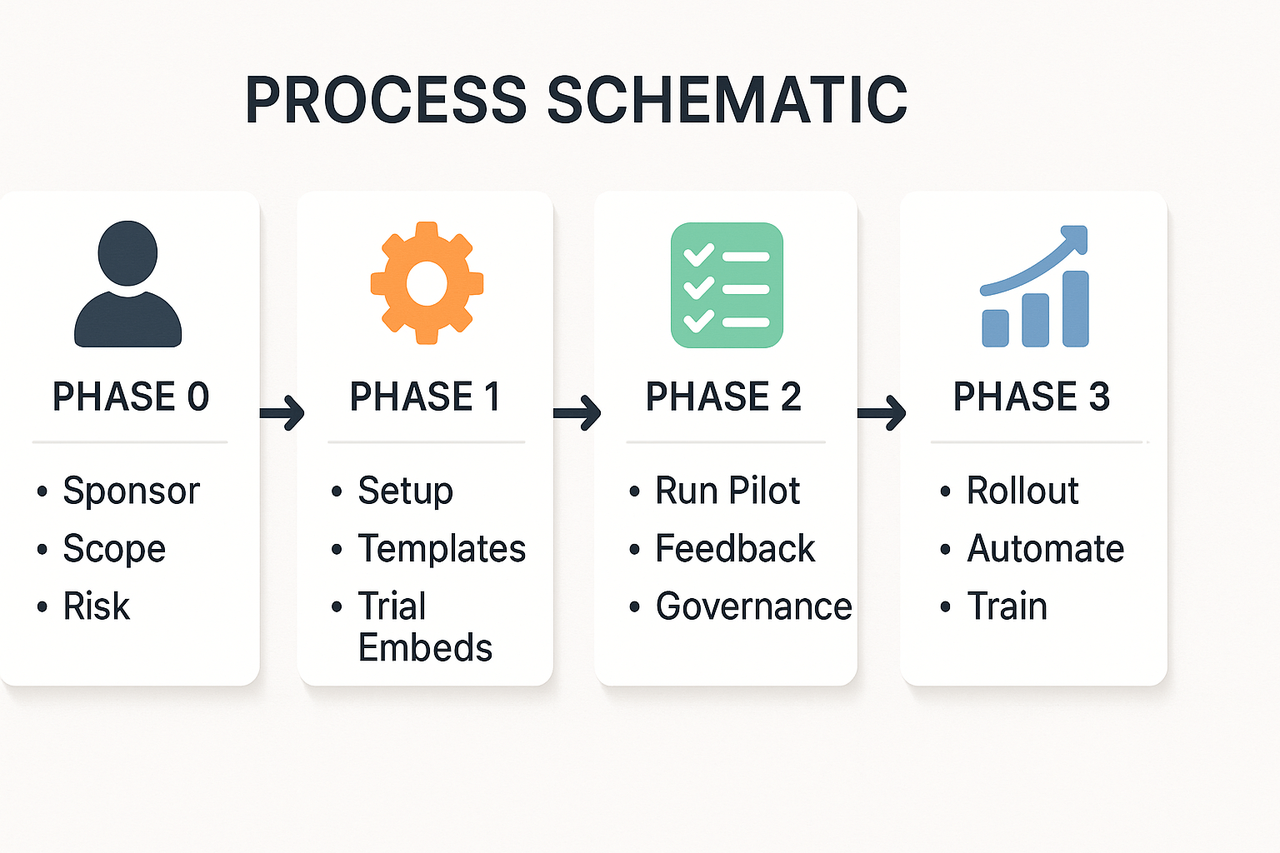
This phase-based checklist helps teams move from planning to full-scale knowledge management with clear actions and templates you can copy. Follow the four phases below, assign owners, and run a 30 to 90-day pilot that proves value quickly.
Phase 0: Plan and secure sponsorship
- Confirm executive sponsor and KPIs. Example KPIs: time to find decisions, meeting follow‑up rate, and reuse of meeting notes.
- Map stakeholders: IT, security, legal, KM leads, and pilot teams.
- Define pilot scope and duration, 30, 60, or 90 days.
- Risk checklist to copy:
- Data access needs
- Compliance review scheduled
- Backup and export plan
Template to copy: "Pilot Brief"
- Objective: [one line goal]
- Teams: [pilot teams]
- Duration: [30|60|90 days]
- Success metrics: [KPIs]
Phase 1: Set up pilot tools and templates
- Create a workspace for the pilot and set permissions.
- Upload representative meeting recordings and documents.
- Add 2 to 3 note templates: meeting notes, decision log, and action register.
- Where to add product trial steps and embeds: sign up for a free account, connect to Slack or Notion if needed, and embed a demo recording in the workspace. For teams testing TicNote Cloud, include a step to generate live transcripts and an AI summary during the pilot.
Quick templates to paste into your platform:
- Meeting note header: Date, Project, Attendees, Objective
- Decisions table: Decision, Owner, Date, Context
- Actions list: Action, Owner, Due Date, Status
Phase 2: Pilot execution and feedback loops
- Train pilot users in a 60-minute session and share quick reference cards.
- Run live meetings through the tool, then tag notes and mark decisions.
- Collect feedback weekly: ease of search, accuracy of summaries, and CTA tracking.
- Governance checklist to copy:
- Naming conventions for folders
- Tag taxonomy for topics and projects
- Retention and export rules
Sample success criteria:
- 80 percent of pilot users can find a decision in under 2 minutes
- Average meeting follow-up time reduced by 30 percent
Phase 3: Rollout and scale
- Create rollout waves by team or region and reuse the pilot templates.
- Automate exports and set SSO and access controls for scale plans.
- Publish an internal FAQ and short how‑to videos.
- Measure adoption and iterate on templates and taxonomies.
Checklist for scaling:
- Central KM owner assigned
- Integration plan with knowledge base and CRM
- Ongoing training schedule
Running a 30–90 day pilot: practical notes
Start small and measure. Use one or two high meeting teams. Run a demo embed and a recorded meeting in week one. In week two, try cross‑file Q&A and an auto mind map review. End the pilot with a demo of top insights and a decision log export.
For governance, keep a single living doc for rules and a monthly review cadence. Export templates and governance checklists to a shared drive so new teams can copy them.
Try the platform free to run your first pilot and generate an AI summary in minutes.
Start with measurable goals, and you’ll know if your knowledge program works. Good KPIs focus on speed, reuse, and reduction of duplicate effort. Track these so teams see concrete gains from better meeting notes, searchable transcripts, and a shared repository for decisions and tasks.
Primary KPIs to track
- Time to answer: measure the median time for staff to find a reliable answer. This shows search and reuse quality.
- Ticket deflection rate: the share of incoming support tickets resolved by self-serve content or internal notes.
- Onboarding time: days until new hires reach a productivity baseline. Shorter onboarding shows knowledge capture is working.
- Search success rate: percent of searches that lead to a useful click or follow-up action.
- Mean time to resolution (MTTR): average time to close incidents when knowledge articles are used.
- Note reuse and citation rate: how often notes or transcripts are referenced across projects.
- Action closure rate from meetings: percent of meeting actions completed on time.
A simple first-year ROI model you can copy
Use a lightweight spreadsheet. Start with three assumptions: headcount covered, average hourly cost, and time saved per person per week.
- Inputs (example):
- Headcount: 120 knowledge workers
- Avg hourly cost: $50
- Weekly time saved per person: 30 minutes (0.5 hours)
- Annual work weeks: 48
- Program annual cost (tools, admin): $60,000
- Annual hours saved = headcount × weekly hours saved × weeks.
- 120 × 0.5 × 48 = 2,880 hours saved
- Annual value = hours saved × hourly cost.
- 2,880 × $$50 =$$144,000
- First-year ROI = (Annual value − Program cost) ÷ Program cost.
- ($$144,000 −$$60,000) ÷ $60,000 = 1.4 or 140% ROI
Adjust assumptions to match your org. Run three scenarios: conservative, expected, and optimistic.
Dashboards and data sources
Build a few focused dashboards: executive summary, support ops, and content health. Feed them with these sources: transcripts and their topic tags, search logs (queries and zero-result rates), Shadow queries and answer quality, helpdesk ticketing metadata, and LMS or onboarding completion stats. Use transcription volume and Shadow query trends from TicNote Cloud as an early indicator of adoption, then map those to support and resolution metrics.
Review cadence and action plan
- Weekly: ops team reviews ticket deflection and search success. Triage broken content.
- Monthly: KM lead checks adoption, onboarding time, and top missed queries. Update templates.
- Quarterly: leadership reviews ROI, roadmap, and staffing impact. Reset goals and budget.
Tracking these KPIs and running a simple ROI model gives you clear proof points to expand the program. Keep reviews short, data-driven, and tied to concrete fixes like updated templates or targeted training.
Real user mini case studies & expert takeaways
This short set of reproducible stories shows how teams turn meeting notes into operational knowledge fast. It uses clear steps you can copy to improve knowledge management in your team. Each mini case includes measurable outcomes, the exact steps used, and a suggested template to download or replicate.
Ops team: convert meetings to playbooks in 30 days
A mid-size ops team captured recurring weekly meetings and built reusable playbooks from them in 30 days. They used one workspace to record meetings, tag decisions, and publish step-by-step playbooks for incidents and onboarding.
Steps they followed:
- Capture: record 8 recurring meetings in week one, using short templates to capture goals and outputs.
- Extract: use meeting summaries to pull decisions, owners, and action items into a single doc each week.
- Structure: map actions into a playbook template with sections: trigger, steps, owner, checklist, and rollback.
- Publish: share playbooks in a team folder and assign one owner for each playbook.
- Iterate: run a 7-day feedback loop, update playbooks, and mark them final after two successful runs.
Outcome: Incident response time fell, and new hires followed documented steps rather than asking peers. You can replicate this with a meeting note template, a playbook template, and a weekly review slot.
Consulting team: reuse knowledge across clients
A consulting squad cut prep time by reusing client discovery and solution notes across projects. They organized client files into a tag system and built a small library of reusable snippets and solutions.
Replicable checklist:
- Standardize a client intake note: objectives, constraints, contacts, timelines.
- Tag by industry, problem type, and tech stack to enable cross-client search.
- Create a snippet library of proposals, troubleshooting steps, and slide fragments.
- Run a monthly sync to surface high-value snippets and retire duplicates.
Result: proposal drafting moved from days to hours, and consultants reused proven patterns across accounts. For teams evaluating knowledge management platforms, focus on search, tagging, and cross-file Q&A to speed reuse.
Mini case: small product team, big clarity win
A five-person product team trimmed meeting time by turning decisions into a decision register. They logged decision context, alternatives considered, chosen approach, and implementation owner.
Quick steps to copy:
- Add a one-line decision item at the end of each meeting note.
- Tag the item with the product area and priority.
- Link to related specs and tickets.
- Review the register fortnightly and close stale items.
This simple habit cut duplicate work and made handoffs cleaner.
Expert takeaways: three practical tactics you can apply today
"Capture small, capture often" is the first rule. Record or transcribe short meetings and save a two-line summary immediately. The second tactic: enforce a file-naming and tagging habit. Make it as small as one required tag per note. The third tactic: convert repeated decisions to templates and playbooks, then assign an owner to maintain them.
Action checklist for immediate use:
- Start a 30-day pilot with one team and three templates: meeting note, playbook, and decision log.
- Run weekly reviews and measure reuse and time saved.
- Assign knowledge owners and a retirement policy for stale content.
Teams in these case studies used TicNote Cloud once to capture, summarize, and export notes into templates, then built a searchable workspace for reuse. For reproducible results, download the meeting note and playbook templates, or set up a pilot and request an enterprise demo to test governance and scale.
How TicNote Cloud compares to other knowledge management platforms
Good knowledge management starts with capture, indexing, and re-use. This section gives a tight side-by-side view of capture, search, AI chat, visuals, integrations, and privacy so you can compare options fast. It also covers migration tips and practical scenarios for choosing the right tool.
Quick feature comparison of knowledge management platforms
| Feature | TicNote Cloud | Otter | Fireflies | Other players |
| Capture | Live and uploaded audio, web recording, multi-source uploads | Live meeting bot, uploads | Meeting bot, uploads | Varies: mostly bot or upload only |
| Search & retrieval | Cross-file search, chat-ready knowledge base | Transcript search by recording | Transcript search with highlights | Full text search is common |
| AI chat | Grounded cross-file chat, Deep Think mode | Limited summary tools | Q&A across transcripts is limited | Few offer grounded AI chat |
| Visuals | Auto mind maps, exportable diagrams | Basic summaries, no mind maps | No native mind maps | Some have visual notes |
| Integrations | Notion, Slack, exports to DOCX/Markdown | Slack, calendar integrations | Slack, calendar | Varies widely |
| Privacy | Private by default, data not used to train AI | Provider terms vary | Provider terms vary | Depends on vendor |
Migration tips and quick win scenarios
Start with a small pilot. Ingest a month of recordings and documents. Tag and map one team workflow. Use cross-file Q&A to validate knowledge coverage. That proves value without heavy governance.
Short migration checklist
- Run a two-week pilot with 5 users.
- Import a sample set of docs and recordings.
- Build topic templates, test cross-file Q&A, and export a mind map.
- Measure search time and reuse wins, then scale.


