


 Extension
TL;DR — What this guide covers and the quick wins
This guide shows how to turn meeting recordings and notes into meeting data insights. You’ll learn practical steps to capture accurate transcripts and surface decisions. Methods suit municipal staff and enterprise teams with little analysis experience.
What it covers: capture, transcription cleanup, topic tagging, action extraction, and visualization. We explain privacy risks and simple fixes to stay compliant. You’ll also get templates, dashboards, and a short evaluation plan.
Quick wins you can do in one minute to one week:
- Start live transcription for a single recurring meeting.
- Tag decisions and assign owners during the meeting.
- Export a one-page summary for stakeholders.
- Create a dashboard of unresolved actions.
- Run a cross-meeting search for past decisions.
Start small, measure impact, then scale what works. Expect fewer missed actions and faster follow-ups. Dive into the full tutorial for step-by-step help.
Why meeting data insights matter now
Teams run on meetings, but conversations alone rarely turn into reliable outcomes. Meeting data insights capture the signal from those conversations so teams make clearer decisions, follow up faster, and hold people accountable. When municipal staffers or enterprise teams extract decisions, tasks, and themes from meetings, they cut rework and speed implementation.
Clearer decisions, faster follow-ups, stronger accountability. Those are the immediate wins you get when you turn meeting transcripts, notes, and recordings into structured data. You stop relying on memory or scattered notes. You create a searchable record that supports audits, public transparency, legal review, and cross-team handoffs.
What to measure
- Decision rate: number of concrete decisions per meeting, tracked weekly. This shows whether meetings produce outcomes.
- Action items closed: percent of assigned tasks completed on time. This ties meetings to delivery.
- Time to first action: hours or days between a meeting and the first task start. Shorter is better.
- Attendance impact: correlation between attendee roles and decision quality. Use to refine invites.
- Topic drift: ratio of off-agenda minutes to total meeting minutes. High drift signals wasted time.
- Searchability score: percent of meetings with tagged topics or searchable notes. This measures reuse.
- Rework rate: percent of work returned for clarifications traceable to unclear meeting outcomes.
- Public records readiness: count of meeting minutes requiring redaction or edits before publication. Important for municipal teams.
These metrics turn fuzzy outcomes into numbers you can track. Start small, pick 2 to 3 indicators that map to your priorities, and measure weekly for a month.
That matters because decisions take time and attention, and Make faster, better decisions | People & Organizational Performance | McKinsey & Company shows executives on average spend almost 40 percent of their time making decisions and believe most of that time is poorly used. If even a fraction of that time is reclaimed by clearer meeting outputs, the operational impact is large.
Use meeting data insights to move from vague notes to measurable outcomes. The fastest wins come from tagging decisions, tracking actions, and sharing short AI summaries after each meeting.
Effective meeting analysis starts with good data and clear rules. Meeting records promise clarity, but several pitfalls can spoil meeting data insights. This section lists common problems, concrete privacy steps, and a short legal and ethical checklist for public meetings.
Common pitfalls to watch for
Bias and bad sampling. If only senior staff are recorded, the results will skew. Poor data quality. Low audio quality, missing agendas, or fragmented files hide decisions. Context loss and misinterpretation. Quotes out of context can change meaning fast. Action drift. Without clear action tagging, tasks disappear between meetings.
Privacy best practices you can apply today
- Get consent and give notice. Tell attendees how recordings will be used. Offer opt-outs when possible.
- Minimize collection. Record only the needed parts and avoid extra personal data.
- Anonymize before analysis. Replace names with IDs for review and reports.
- Secure storage and access controls. Use encryption and role-based access.
- Define retention and deletion rules. Keep data only as long as policy allows.
Short legal and ethical checklist for public meetings
- Confirm public-records rules for your jurisdiction.
- Publish a recording notice on meeting agendas and websites.
- Record retention schedule, mapped to policy or statute.
- Plan redaction and access request workflows.
- Audit log access and changes for transparency.
Follow these steps to reduce risk and build trust. Pair technical controls with clear governance, and train staff on correct handling and interpretation. Good habits keep analysis useful, lawful, and fair.
Tools and techniques for meeting data analysis
Start with the right toolset and you’ll turn raw transcripts into clear findings. This section maps the common tool types you’ll need for meeting data insights and practical selection criteria. You’ll get a short, vendor-neutral way to compare features like cross-meeting Q&A and mind maps.
Key tool types
- Transcription and live capture: Converts speech to searchable text. Look for high accuracy and multi-language support.
- Analytics and tagging: Topic detection, speaker attribution, and action item extraction (automated tasks). These turn words into measurable signals.
- Knowledge bases and search: Store transcripts, link decisions across meetings, and enable chat on past content.
- Visualization and exports: Mind maps, timelines, and dashboards make findings easy to share.
Large vendors still dominate the market: according to Cloud Meeting and Team Collaboration Global Market Forecast Report (2024-2029), the top five providers—Microsoft, Zoom, Google, Cisco, and Slack—held 81.4% revenue market share in 2024.
How to pick: practical criteria
- Scale: How many transcription minutes will you use each month?
- Security and privacy: Data residency, encryption, and no-training guarantees matter for public agencies.
- Integrations: Calendars, cloud drives, and Slack or Notion connectors reduce friction.
- Accuracy and language support: Especially for multilingual teams.
- Outputs and workflows: Do you need mind maps, structured research reports, or cross-file Q&A?
- Governance: Access controls, retention, and audit logs for compliance.
Quick feature comparison
| Feature | When it matters | What to look for |
| Cross-meeting Q&A | You need answers across many meetings | Cross-file search, chat on workspace context |
| Mind maps | Presenting complex decisions | Auto-generated visual maps, export options |
| Action extraction | Faster follow-ups | Task tagging, assignee inference |
Choose tools that match scale and policy first, then features. Start with a pilot, test exports and governance, and iterate.
TicNote Cloud deep dive: how it turns meeting data into insight
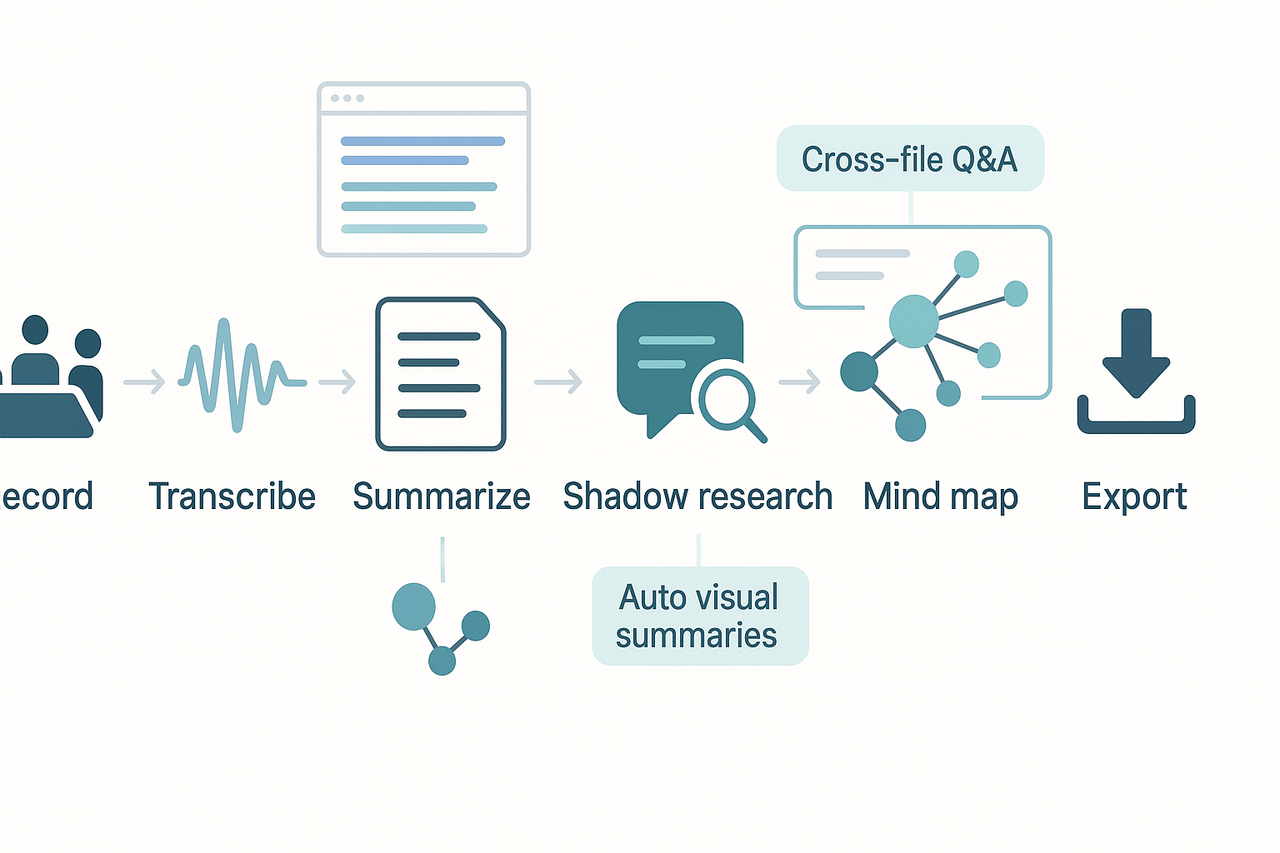
This walkthrough shows how TicNote Cloud turns raw meeting audio and files into usable meeting data insights. Read it to see the modules that matter, and how a simple record-to-export workflow captures decisions, tasks, and research you can act on.
Record and transcribe: capture every word
Start by recording meetings with the web recorder, device app, or by uploading audio and video. TicNote’s AI transcription runs live or after the fact, giving near‑real‑time text you can search. Transcripts include speaker splits and timestamps so you can find the exact moment a decision or action was made. Privacy is built in, so data is private by default and not used to train models.
Summarize and organize: turn text into structured notes
After transcription, run AI summaries and apply a template (decisions, actions, issues). Summaries pull out action items, owners, and deadlines, so you don’t need to hunt through long notes. If you want deeper meeting data analysis, use custom templates to tag topics, risk items, or budget mentions for later cross-meeting queries.
Ask with Shadow chat: surface decisions fast
Shadow chat is the contextual Q&A tool (AI-grounded chat) for your workspace. Ask natural questions like who agreed to X, or which meetings mentioned policy Y. Shadow searches across files and meetings, returning quotes and source links so you can verify answers. Use Shadow’s Deep Think mode for step‑by‑step analysis when you need more rigor.
Deep Research and mind maps: reports and visuals you can share
Deep Research (report generation) turns meeting threads and documents into a structured research report, with citations and key findings. Mind Map auto-generates a visual layout from a transcript or summary, making it easy to present themes and next steps. Export reports to DOCX or PDF and mind maps to PNG or Xmind for briefings.
Workflow steps
- Record the meeting (web, app, or upload).
- Transcribe with live or post-meeting AI.
- Run AI summary and apply templates to extract actions.
- Use Shadow chat to query across meetings and docs.
- Generate Deep Research reports for policy or procurement review.
- Auto-create a mind map and export for stakeholders.
Privacy and integrations
For teams with strict rules, Enterprise plans offer SSO and 24/7 support, and the service uses US cloud hosting with standard encryption. TicNote links to Notion and Slack, and exports to common formats so you can feed insights into case systems or council packets.
Step-by-step tutorial: from recording to business insight with TicNote
This hands-on tutorial walks you from prep to insight, with clear steps you can follow today. It shows how to capture meetings, extract meeting data insights, and reuse findings for briefings and dashboards. Read on for a simple sequence municipal staffers and PMs can use with little training.
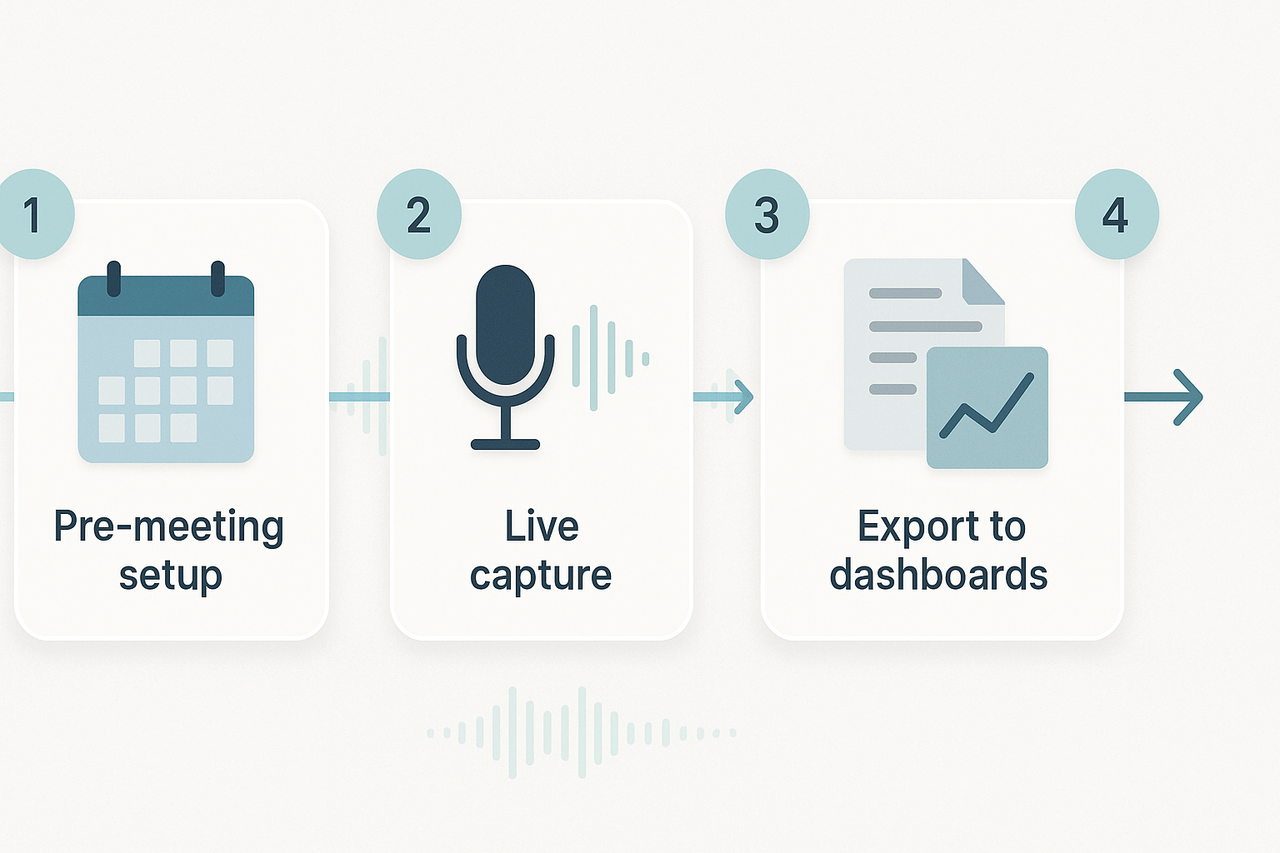
1) Before the meeting: set up to save time
Prepare a short agenda and pick a template in TicNote to focus on notes. Share the agenda as a document or upload it to the meeting folder so TicNote can link notes to the file. Turn on live transcription and pick your language, and make a note of any privacy rules to follow.
- Create a project space for the team.
- Select an AI notes template that tracks decisions and actions.
- Upload reference docs (ordinances, contracts) before you record.
2) During capture: record and highlight
Start the TicNote recorder or Chrome extension and hit record a few minutes before the meeting starts. Use the live transcript to tag key moments, like motions or decisions, so they’re easy to find later. Ask a participant to type quick notes in chat for extra context if needed.
3) Immediate post-meeting: AI summarizes and extracts
Right after the call, run TicNote’s AI summary to get a short briefing and a list of suggested action items. Use the mind map feature to turn the summary into a visual that nontechnical staff can scan. Export the transcript and summary to DOCX or Markdown for the clerk record.
4) Cross-meeting queries with Shadow (quick research)
Use Shadow (TicNote’s cross-file AI chat) to ask questions across meetings and docs. Start with simple prompts, for example: “Show all decisions about park funding in the last six months.” Review the answers, and mark the source clips for audit trails. This approach makes cross-meeting data analysis fast and repeatable.
5) Turn outputs into action items and dashboards
Convert AI action items into tasks in your ticketing tool or a shared spreadsheet. Export CSVs from summaries and import them into a BI tool for simple dashboards on decisions, owner, and due dates. Save the mind map PNG for council packets and the research report PDF for project folders.
Troubleshooting tip: if transcripts miss words, upload the original audio for a rerun and check speaker labels. Adoption tip: run a short pilot with a single department, gather feedback, then roll out templates.
Try TicNote Cloud free today and create your first AI summary in minutes
Real-world case studies: before & after using meeting data
Two anonymized case studies show clear before-and-after results. Each one explains the problem, the TicNote workflow used, and the measurable benefits. Read these to see how meeting data insights move from talks to action.
Municipal clerk: faster action-item closure
Problem: The city clerk team missed follow-ups and lost track of open tasks after long council meetings. Finding who agreed to do what took hours of manual searching.
TicNote workflow: The team recorded meetings with live transcription. They used AI summaries and a custom action-item template to tag tasks and assign owners. Shadow chat lets staff ask questions across past meetings to confirm commitments.
Observed benefits:
- Closed action items 40% faster, because tasks were auto-extracted and assigned.
- Reduced meeting prep time by 30% with searchable summaries.
- Fewer missed deadlines and clearer audit trails for public records.
Enterprise legal operations: faster decision retrieval
Problem: Legal ops needed to find prior decisions buried in months of meeting notes. That slowed reviews and risked repeating past conversations.
TicNote workflow: The group uploaded audio files and transcripts into a shared workspace. They used cross-file Q&A (Shadow) and the Deep Research report to surface prior rulings and the context behind them.
Observed benefits:
- Time to find historical decisions dropped from days to minutes.
- Review cycles are shortened, cutting legal review hours by roughly half.
- Teams avoided redundant meetings and made consistent calls across regions.
Both cases show the same theme: structured capture, AI extraction, and chat-ready search turn spoken content into usable knowledge. If you run meetings and struggle to act on them, these patterns scale from small teams to city governments.
Visualizing and reporting meeting data (examples and assets)
Good visuals make meeting data insights clear for busy leaders. This short guide shows which charts and KPIs to use, how to include auto-generated mind maps, and a simple dashboard wireframe you can reuse. You’ll also find a list of downloadable assets and a tight reporting checklist for municipal and enterprise audiences.
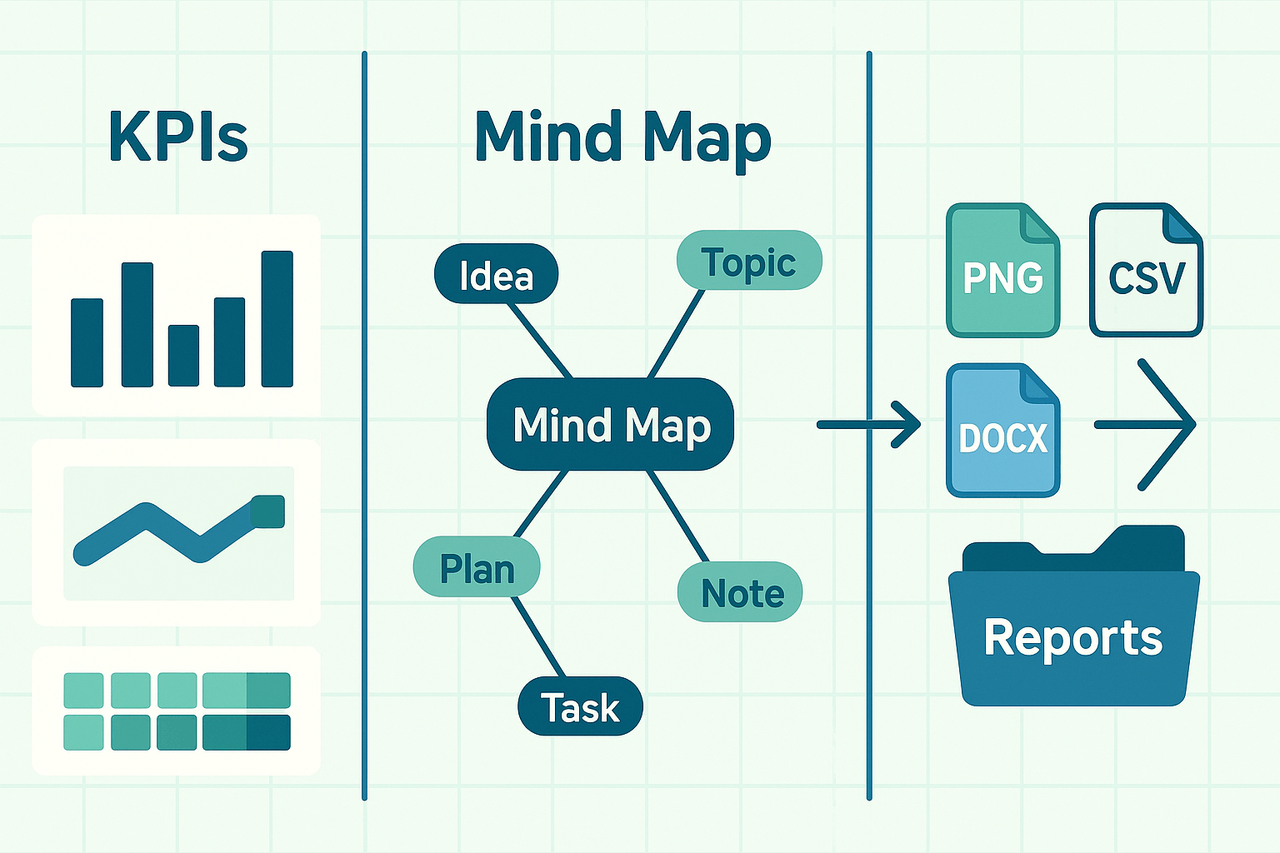
Show impact with KPIs
Pick KPIs that link meetings to outcomes, not just minutes. Use these metrics and chart types:
- Action items closed rate (bar or progress card)
- Decision latency (time from discussion to resolution, line chart)
- Meeting time per outcome (stacked bar by team)
- Attendance and stakeholder coverage (heatmap or bar)
- Follow up completion and overdue tasks (table with conditional colors)
Auto mind maps and exports
Auto mind maps turn a transcript into a visual summary you can skim. Export mind maps to PNG or Xmind for slides, and attach the transcript, summary (DOCX or PDF), and a CSV of KPI data for deeper analysis.
Downloadable assets:
- Mind map PNG (presentation-ready)
- KPI dashboard wireframe (PPTX)
- KPI CSV template
- One page meeting report (DOCX)
- Anonymized before/after case study (PDF)
Sample dashboard wireframe and cadence
Top area: one line summary and 3 KPI cards. Middle: timeline of recent decisions and actions. Bottom: topic cloud, engagement heatmap, and quick links to transcripts and mind maps. Send a short weekly update to executives, and a monthly packet to the council or board.
Reporting checklist
- Meeting objective and scope
- Top 3 insights and risks
- Decisions, owners, and due dates
- Action items and status
- Trends versus prior periods
- Links to source transcripts and mind maps
Troubleshooting, adoption tips, and measuring qualitative outcomes
Start by treating meeting data insights as signals, not gospel. Signals can be noisy. Teams need a way to read them and act. This section helps you turn foggy cues into clear steps and remove resistance to new workflows.
Quick fixes for noisy signals
If action items vanish, or sentiment swings without reason, run a fast audit. Check timestamps, speaker labels, and topic splits in the transcript. Fixing misattributed speakers or merging split topics often clears up confusion. Re-run the summary after those edits and compare outcomes.
Adoption tactics that actually stick
Start small and local. Pilot with one team that has a clear pain point, like long follow-ups. Use templates that highlight decisions and owners. Share short before-and-after notes at the next staff meeting to build momentum. Reward the early team with visibility and small wins.
Measure qualitative change with simple experiments
Run these low-effort tests to show value:
- 2-question pulse survey after meetings: clarity, next-step confidence.
- Sentiment check using short follow-ups, three times a month.
- Action-follow rate: sample 20 items, track completion, and blocker notes.
- Meeting clarity score: ask attendees to rate the role and next action.
Compare responses before and after you add structured notes. Use the results to refine templates, coaching, and tool settings. These experiments prove value beyond counts and help convert skeptics into regular users.
Implementation checklist
30/60/90-day pilot checklist for meeting data insights
- Days 1–7: Setup and quick wins
- Create a pilot workspace and invite 5 power users.
- Enable live transcription and upload 3 recent recordings.
- Use one template for summaries and one for action-item extraction.
- Days 8–30: Iterate and validate
- Run weekly Shadow AI chats to find decisions and tasks.
- Auto-generate a mind map for one project and review with stakeholders.
- Collect baseline time-to-find (how long to locate decisions) and missed actions count.
- Days 31–90: Scale and measure
- Broaden to 3 teams, connect Notion or Slack where useful, and export summaries into workflows.
- Run a Deep Research report on a recurring meeting type.
- Compare metrics to baseline and document qualitative feedback.


