


 Extension
TL;DR — What this guide gives you
This meeting minutes guide shows how to capture decisions, assign actions, and produce legally sound notes fast. You’ll get step-by-step methods, templates, and examples you can use right away.
Who benefits: board secretaries, administrative professionals, executive assistants, project managers, legal officers, and anyone taking formal minutes. The guide covers corporate, nonprofit, academic, and government settings, and includes accessibility tips for remote and hybrid meetings.
What’s included: downloadable, editable templates (DOCX and PDF), side-by-side samples of good versus poor minutes, a short audio transcript sample, workflow diagrams, and a mini case study with an expert quote. You’ll also find a checklist of mandatory fields, legal recordkeeping notes by entity type, and quick tips to make minutes audit-ready.
Quick test you can run in five minutes: record a short meeting, auto‑transcribe it with any AI note taker, generate a one‑paragraph summary, and extract three action items. If the summary and actions match the live meeting, your capture process works. If they don’t, tighten your template and role assignments, then repeat.
Why meeting minutes matter (and common mistakes to avoid)
A good meeting minutes guide helps you create a precise, auditable record of decisions, assigned tasks, and the context that led to them. Minutes make meetings useful: they turn conversation into action, protect organizations in audits or disputes, and speed follow-up. Clear records matter most when boards, regulators, or public bodies need an official account of what happened.
What minutes are for
Minutes are not a transcript. They are an official summary that captures decisions, the vote or approval state, assigned owners, deadlines, and any key context needed later. As one review notes, Nursing Management (2013) says, "Well-documented meeting minutes serve as communication tools, legal documents, instruments for good management practices, and historic records." Store those items consistently,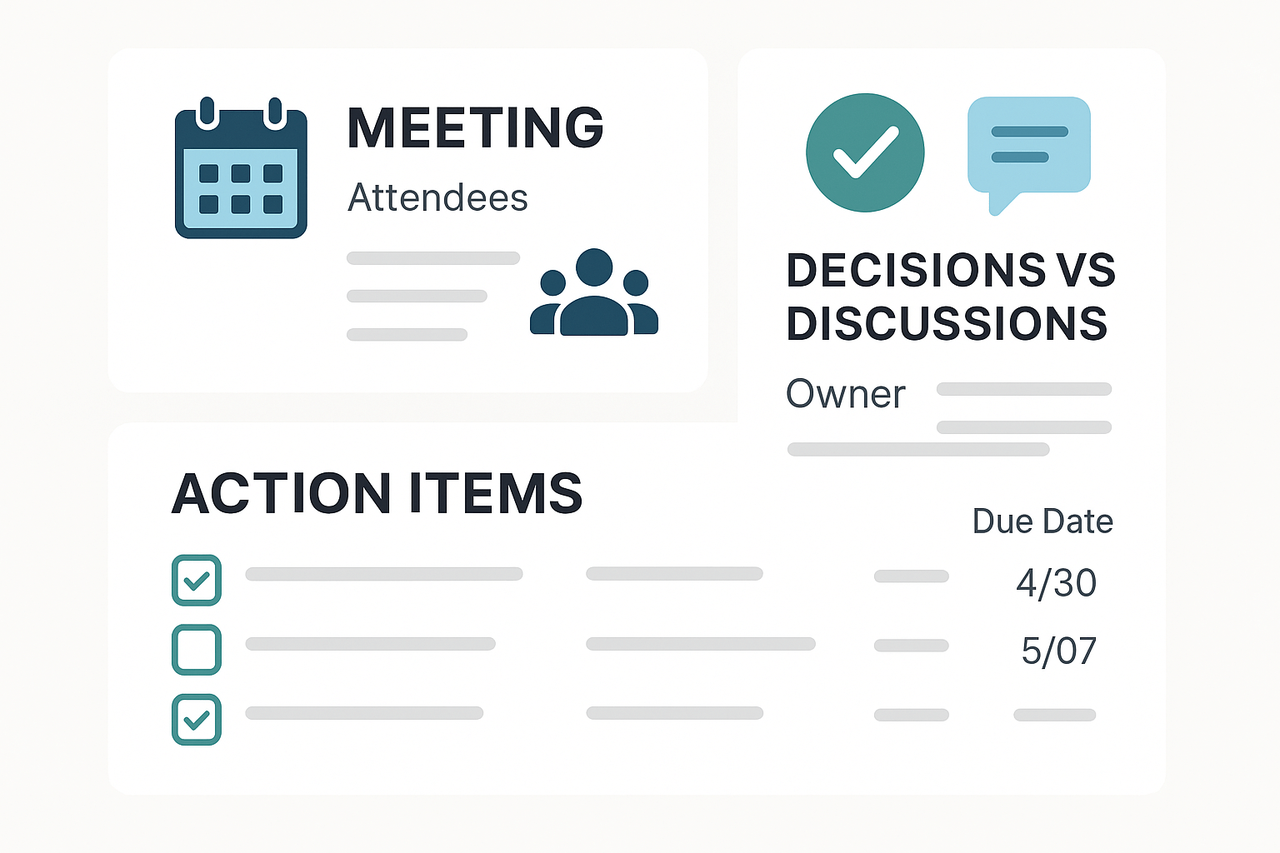 and you turn meetings into reliable records.
Common mistakes to avoid
- Too much verbatim: long transcripts bury decisions and actions. Summaries work better than word-for-word notes.
- Missing actions: no tasks, no owners, no due dates. Without these, nothing gets done.
- Unclear owners: vague assignments like "team" or "discuss later" create follow-up gaps.
- Late distribution: if minutes arrive days later, participants forget context and priorities.
- No attendance or approvals: for governance bodies, missing sign-ins or voting records creates compliance risk.
- Poor version control: multiple conflicting drafts cause confusion and legal questions.
The real operational cost
Poor minutes add real time and money costs. Teams waste hours chasing context and redoing work when actions are unclear. Projects stall because decisions must be re-made or re-clarified. For governance and audit teams, weak minutes mean extra legal review, requests for clarifications, and potential regulatory flags. In short, bad records slow execution, raise risk, and increase admin overhead.
Fixing these problems starts with a simple rule: capture decisions, owners, and deadlines every time. Use a short template, get sign-off or approval where needed, and distribute minutes promptly. Do that, and meetings stop being a memory game and start being a source of clear, defensible action.
Use this checklist to capture the minimum audit‑ready facts every time. Keep entries short, use consistent labels, and record decisions and actions in plain language. This section gives a compact, prioritized list you can paste into any template or notes app, so minutes are searchable and ready for review.
Top priorities: record these first
- Meeting header: Date, start time and end time, location or platform, meeting type (board, team, ad hoc). Keep it one line.
- Attendees and absences: List names and roles. Mark "joined late" or "left early" if relevant.
- Chair and minute‑taker: Name the chair (or meeting lead) and who took minutes.
- Decisions: Short, definitive statements. Use this phrasing: "Decision: [what] — [reason if needed]." Limit to one decision per line.
- Action items: Use this exact format: "Action: [task] | Owner: [name] | Due: [YYYY-MM-DD]." That makes tasks sortable and traceable.
- Votes (if any): Record motion text, proposer, seconder, result (for/against/abstain), and vote tally.
- Key references and attachments: Filename and brief note, for example: "Attachment: Q2 budget, page 4".
Distinguish decisions from discussion
- Decisions are explicit and final. Write them as outcomes.
- Discussion notes are context only. Keep them to one short line and link to a transcript or recording when available.
Formatting rules to apply to every meeting
- Use a standard template and short labels: Date, Attendees, Decision, Action, Attachment.
- Use present tense and active verbs for actions: "Complete", "Approve", "Submit".
- Avoid verbatim transcripts. Capture outcome, not every remark.
Example snippet (paste into your template):
Date: 2025-08-27 | Time: 10:00-11:00 | Platform: Zoom Attendees: A. Lee (Chair), R. Khan, M. Ortiz; Absent: T. Green Decision: Approve Q2 budget revision. Action: Update budget spreadsheet | Owner: M. Ortiz | Due: 2025-09-03
Image prompt: A clean infographic in 4:3 showing three blocks: meeting header & attendees, decisions vs discussions, action items with owners and due dates, using corporate colors and simple icons.
Step‑by‑step: How to write clear, accurate meeting minutes
A good meeting minute records decisions, assigns owners, defines deadlines, and provides the context to enable action. This guide outlines a repeatable process for writing meeting minutes clearly and consistently.
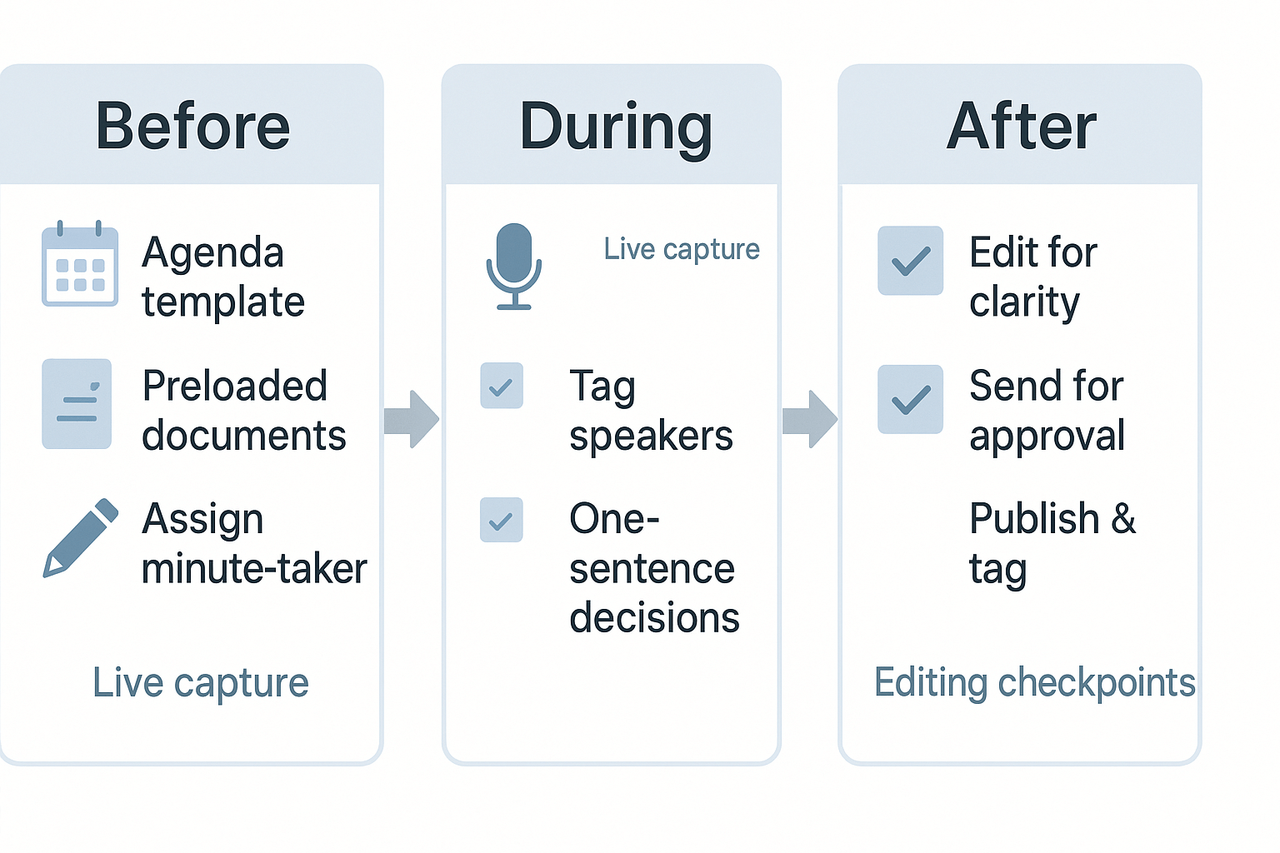
Before the Meeting: Set Up for Success
- Use a Template: Start with an agenda-based template. Include fields for attendees, agenda items, decisions, action items, and approvals.
- Gather Documents: Upload or link relevant background materials to the note-taking space.
- Assign Responsibilities: Designate a primary and backup minute-taker. Confirm who will review and approve the minutes post-meeting.
Checklist:
- Confirm attendees, roles, and decision requirements.
- Review confidentiality or legal flags (e.g., closed sessions).
- Add placeholders for expected motions or decisions.
During the Meeting: Capture with Structure
- Label Clearly: Tag speakers (Chair, Secretary, initials). Use shorthand and keep formatting consistent.
- Capture Key Points:
- Decision: Clear, one-line summary.
- Rationale: Brief explanation or context.
- Action Items: Assigned owner and due date.
- References: Mention and link any documents.
- Formal Details (if applicable): Record who moved, seconded, and the voting outcome.
- Timestamp Complex Topics: Helps in editing and syncing with recordings.
After the Meeting: Refine, Approve, Share
- Edit for Clarity: Convert shorthand to full sentences. Ensure decisions are precisely summarized.
- Verify Accuracy: Check spelling, names, motion wording, and attachment labels.
- Approval Workflow:
- Send draft to designated approvers within 24 hours.
- Record the approver's name and approval date.
- Distribute and Archive: Publish final minutes to your records system. Tag with metadata (e.g., project, team, meeting date).
Formatting Best Practices
- Header: Meeting name, date, location, start/end times, version number.
- Attendance: Mark present, apologies, arrivals, and early departures.
- Decisions: Numbered list; keep each decision concise.
- Action Items: Separate list with owners and timelines.
Tone and Style Guides
- Board/Legal Minutes: Use formal, neutral third-person tone. Stick to facts with no editorializing.
- Team/Project Notes: May use first-person for task assignments. Include next steps and relevant context.
Using Live Transcription Tools Effectively
- Use transcripts as a reference—not the final source.
- Label participants to ensure correct diarization.
- Highlight or tag moments during discussion for easier editing later.
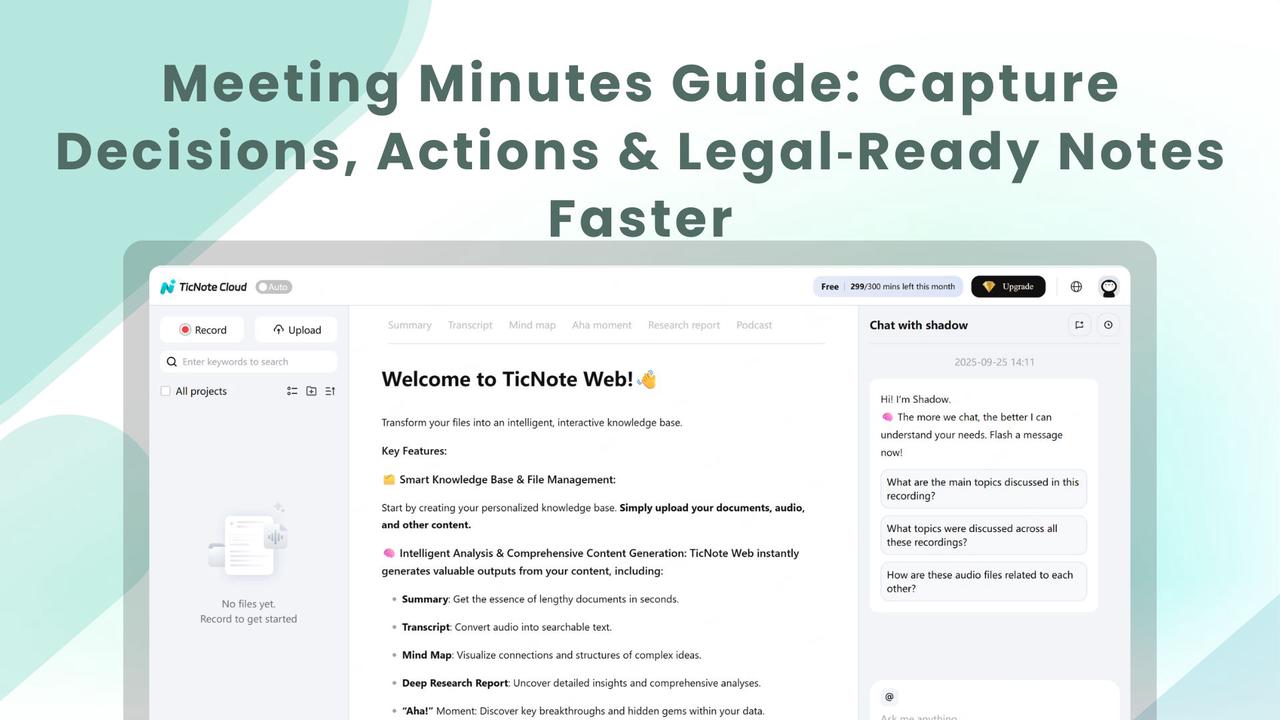
- Tools like TicNote Cloud can assist with AI summaries — always review and align them with official tone and accuracy.
Quick Recap 📝
- Prepare your template 📋
- Tag speakers 👤
- Record one-sentence decisions 💬
- Assign actions with due dates ⏰
- Track approval ✅
Examples templates — Good vs. poor minutes
This section pairs one poor and one effective example for three meeting types: formal board minutes, a team stand-up, and a project steering meeting. You’ll see quick annotations that explain what to copy and what to avoid. Use this meeting minutes guide to sharpen your templates and speed up follow-up.
1) Formal board minutes
Poor minutes
- Date: May 7
- Attendees: Some board members were present
- Notes: Discussed budget and future plans. Agreed to follow up.
- Actions: Someone to send details later.
Good minutes
- Date: 7 May 2025, 10:00–11:30
- Location: HQ Boardroom/hybrid
- Present: Jane Smith (Chair), Mark Lee (Treasurer), Dr. Ana Ruiz, plus minutes taker
- Quorum: Present (5 of 7 directors)
- Agenda item 3: FY25 budget approval. Motion: Treasurer moved to approve the FY25 budget. Seconded by Dr. Ruiz. Vote: 4 in favour, 1 against, 0 abstained. Motion carried.
- Decision: FY25 budget approved. See Appendix A for line items.
- Action: Mark Lee to circulate the final budget spreadsheet by 14 May 2025. Owner: Mark Lee. Due: 14 May 2025.
Why the good version works
- Precise facts: date, times, attendees, and quorum are recorded. That supports legal and governance checks.
- Clear motions and votes: records who moved, who seconded, and the vote result. This avoids ambiguity.
- Action clarity: each task has an owner and a due date. That prevents silent assumptions.
Why the poor version fails
- Vague language, no decisions logged, and no owners. It’s not legally reliable or useful for follow-up.
2) Team stand-up
Poor minutes
- Daily stand-up
- People talked about tasks. Some issues noted.
Good minutes
- Date: 7 May 2025, 09:15 (15 minutes)
- Attendees: All present
- Yesterday: Alice finished invoice import; Ben completed the UX page.
- Today: Alice will QA import; Ben starts user flows. Sam will unblock the API key with IT.
- Blockers: API key pending from IT (Sam assigned). ETA: 2 working days.
- Quick decisions: Skip design review this week, resume next Tuesday.
Why the good version works
- Short, scannable lines map to stand-up questions (yesterday, today, blockers).
- Actions and blockers have owners and ETAs making follow-up fast.
- Decisions that change cadence are recorded for team alignment.
Why the poor version fails
- It’s a brain dump with no tasks or owners. Teams waste time chasing context later.
3) Project steering meeting
Poor minutes
- Reviewed timeline. Budget might be tight. Need a plan.
Good minutes
- Date/time and attendees (see header)
- Risk: Integration supplier delay. Impact: 3 weeks on milestone M2.
- Decision: Reduce the scope of M2 to critical features only. Owner: Project Lead (Ravi). Revised milestone: M2 on 28 June 2025.
- Action: PM to prepare scope reduction memo by 12 May 2025 and send to steering group.
- Follow up: Steering to reconvene on 13 May 2025 if vendor ETA is not met.
Why the good version works
- It ties risks to decisions, owners, and new dates.
- It records the fallback plan and follow-up triggers, so the steering group can act fast.
Why the poor version fails
- Lacks concrete outcomes, so risks remain unmanaged and accountability is lost.
customization tips
- Board: Add an appendix section for attachments and an attendance table that logs absences.
- Stand-up: Use bullets for yesterday/today/blockers and one line for decisions.
- Steering: Add a risk table and a versioned decisions log that references milestone IDs.
If you use the platform for notes, import DOCX templates directly to prefill meeting sessions and generate automatic summaries.
Legal, records & confidentiality: What minute‑takers must know
This section explains core retention rules, governance needs, and how to protect confidential discussions. Use this meeting minutes guide to decide what stays in the official file and what goes into a restricted record. You’ll also get clear steps for approvals, signatures, audit trails, and e‑discovery readiness.
Retention rules, by entity
Retention rules vary by organization type and by jurisdiction. Treat these as practical starting points, not legal advice, and check company policy and local law.
- Corporations: Keep board minutes permanently in the corporate minute book. Keep general committee minutes and supporting documents for 7 years, or longer if they affect tax or contract rights. Financial records may need longer retention.
- Nonprofits: Store board minutes permanently. Retain donor, grant, and financial records for at least 7 years, and keep governance files while obligations remain.
- Academic bodies: Keep governing board minutes permanently. Course or departmental records follow institutional policy; student records have separate retention rules.
- Government entities: Follow the public records schedule that applies to your agency. Many logs, contracts, and minutes have specific statutory retention periods.
Handling confidential discussions and restricted attachments
When topics are sensitive, record only the decision and its lawful basis. Avoid verbatim sensitive details in the public record. Use a clear, repeatable process:
- Mark the minute or attachment as confidential and limit distribution.
- Summarize the outcome, but omit or redact personal data or privileged details.
- Store restricted files in an access‑controlled folder. Log who accessed them and when.
- If legal privilege applies, label and preserve the privileged version separately.
Use role‑based access controls and encryption for restricted files. Keep a short index entry in the main minutes that notes a confidential appendix exists, without publishing the appendix content.
Approval, signatures, and version control
Draft minutes promptly and circulate a marked copy with a clear review deadline. At the next meeting, record the motion to approve and any amendments. Signed approval usually requires:
- A formal approval vote or written resolution.
- The chair or presiding officer's signature and the secretary’s signature.
- The approval date and version number are on the signed page.
Keep both the unsigned draft and the final signed version. Use simple filename conventions that show dates and versions.
Audit trails and e‑discovery readiness
Prepare for audits and legal holds by keeping searchable records and change logs. Best practices:
- Timestamp every draft and export PDF or DOCX copies for the official file.
- Keep an access log and preserve metadata.
- Place a legal hold on relevant files if litigation is possible.
- Keep originals of signed pages and scanned backups.
For digital meetings, consider tools that record timestamps, exports, and access logs. For example, TicNote Cloud can export transcripts and logs to support audit trails and legal reviews.
If in doubt, consult legal counsel and your records officer. Clear policies, consistent labeling, and basic tech controls cut compliance risk and save time during audits.
Taking minutes in remote & hybrid meetings (accessibility & inclusivity)
A good meeting minutes guide covers more than content. For hybrid and remote meetings, you must make notes accessible to everyone, including people with hearing, vision, or cognitive differences. Set simple rules, use live captions, and give easy read summaries so everyone can follow and act.
Set ground rules before the meeting
Start by sharing how notes will be taken and shared. Tell participants if the meeting will be recorded or transcribed. Ask people to say their name before speaking, and to use a virtual hand raise. These small steps make it easier to assign speakers and reduce errors in the final minutes.
Use live captions and clarify speaker identity
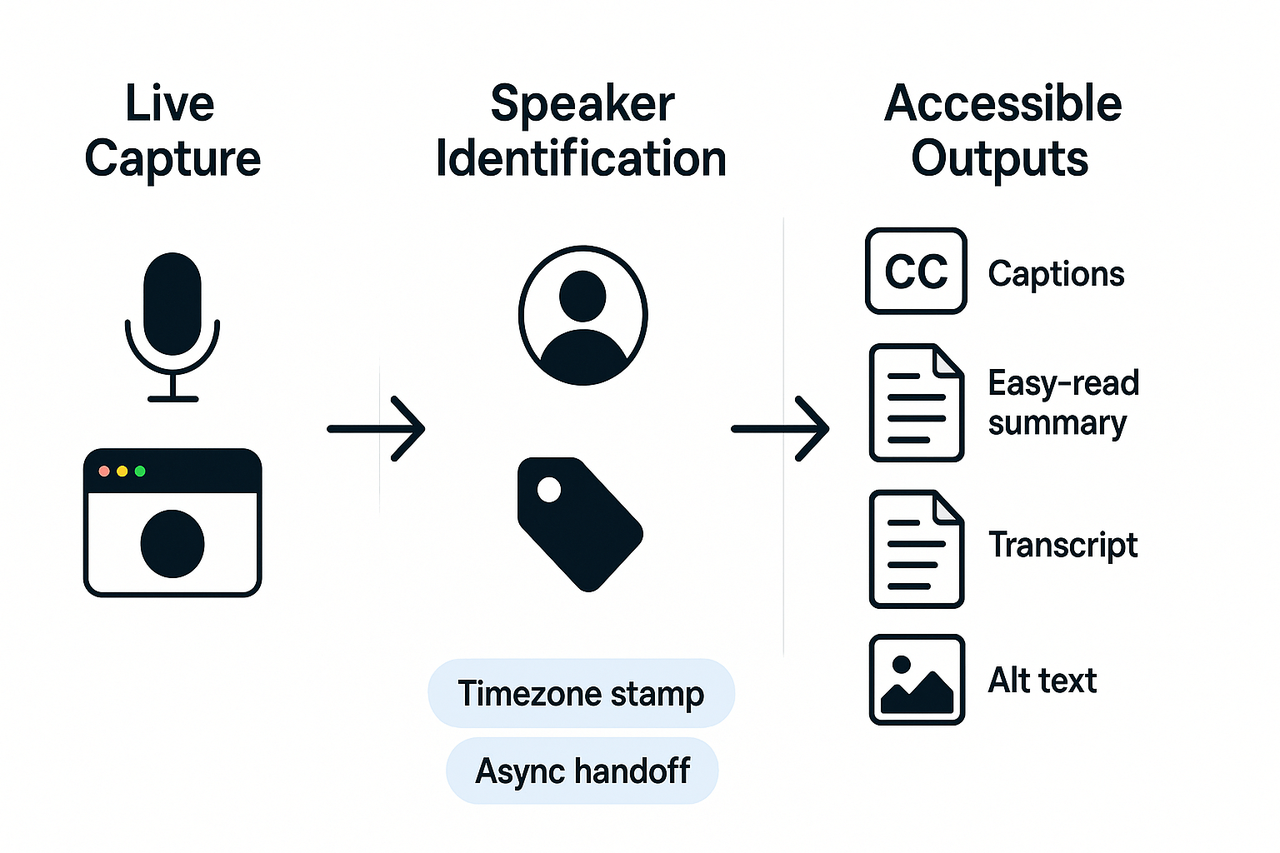
Live captions help people who are deaf or hard of hearing. The Web Content Accessibility Guidelines (WCAG) 2.1 Level AA require that captions be provided for all live audio content in synchronized media, per Understanding Success Criterion 1.2.4: Captions (Live) (2018). Offer captions and a transcript after the meeting. If you can, add a short speaker tag when someone starts talking, for example: “Anna (Finance):” This helps readers match decisions to people.
Provide accessible outputs and async handoff
Not everyone can join live. Prepare outputs that work for async contributors. At a minimum, include:
- A short easy read summary with decisions and action items.
- A full searchable transcript for reference.
- Alt text for slides and images, and downloadable DOCX or PDF minutes.
Give a clear timezone stamp and a meeting window in UTC. That helps people know deadlines and who attended across zones.
How AI tools can help, and their limits
AI can make minutes faster and more inclusive. Use AI to generate live captions, summaries, and easy-read versions. Tools can translate transcripts into other languages, too. Note diarization limits: Some tools do not reliably separate every speaker, so always verify speaker IDs before finalizing minutes. For example, if your platform mislabels speakers, correct the transcript before you publish.
Practical tips for minute takers
Record the meeting with consent. Use short action item lines: owner, task, due date. Keep one place for links and documents. Offer multiple formats: plain text, DOCX, and PDF. Lastly, check accessibility: run alt text checks and test captions on a sample playback.
How TicNote Cloud transforms minute‑taking (demo, workflows & integrations)
This section maps practical minute‑taking pain points to AI features in this meeting minutes guide, and shows a clear path from messy audio to legal‑ready notes. TicNote Cloud speeds capture, organizes decisions, and surfaces actions so you spend less time hunting for what happened. Read the demo script, the side‑by‑side workflows, export options, and quick setup tips.
Match features to minute‑taking pain points
Live transcription fixes the problem of missing quotes and unclear speakers. Turn audio into a searchable transcript in real time or upload a recording after the meeting. AI summaries reduce a long transcript to decisions, action items, and votes so you can act fast.
Customizable templates make notes consistent across boards and teams. Use a template for agendas, resolutions, and action logs to reduce rework and legal risk. Mind‑map outputs give a visual overview, helpful for presentations and follow-ups.
Shadow chat (contextual Q&A) solves the cross‑meeting search problem. Ask the tool what was decided across weeks of meetings, and get grounded answers, not noise. Exports in DOCX, PDF, TXT, and WAV help you file minutes with counsel or upload them to records systems.
Short demo script you can run in a meeting
- Before the meeting, open the agenda template and attach supporting files. 2. Click record and let live transcription capture the discussion. 3. Tag agenda items when the topic starts, or let the AI auto‑detect sections. 4. When a decision lands, mark it as a resolution and add an owner and due date. 5. After the call, generate an AI summary and review highlighted action items. 6. Export the summary to DOCX for the board packet, and save the transcript as TXT for eDiscovery.
Follow this script in a test meeting. It takes minutes to see the workflow in action.
Manual vs automated workflow: what changes
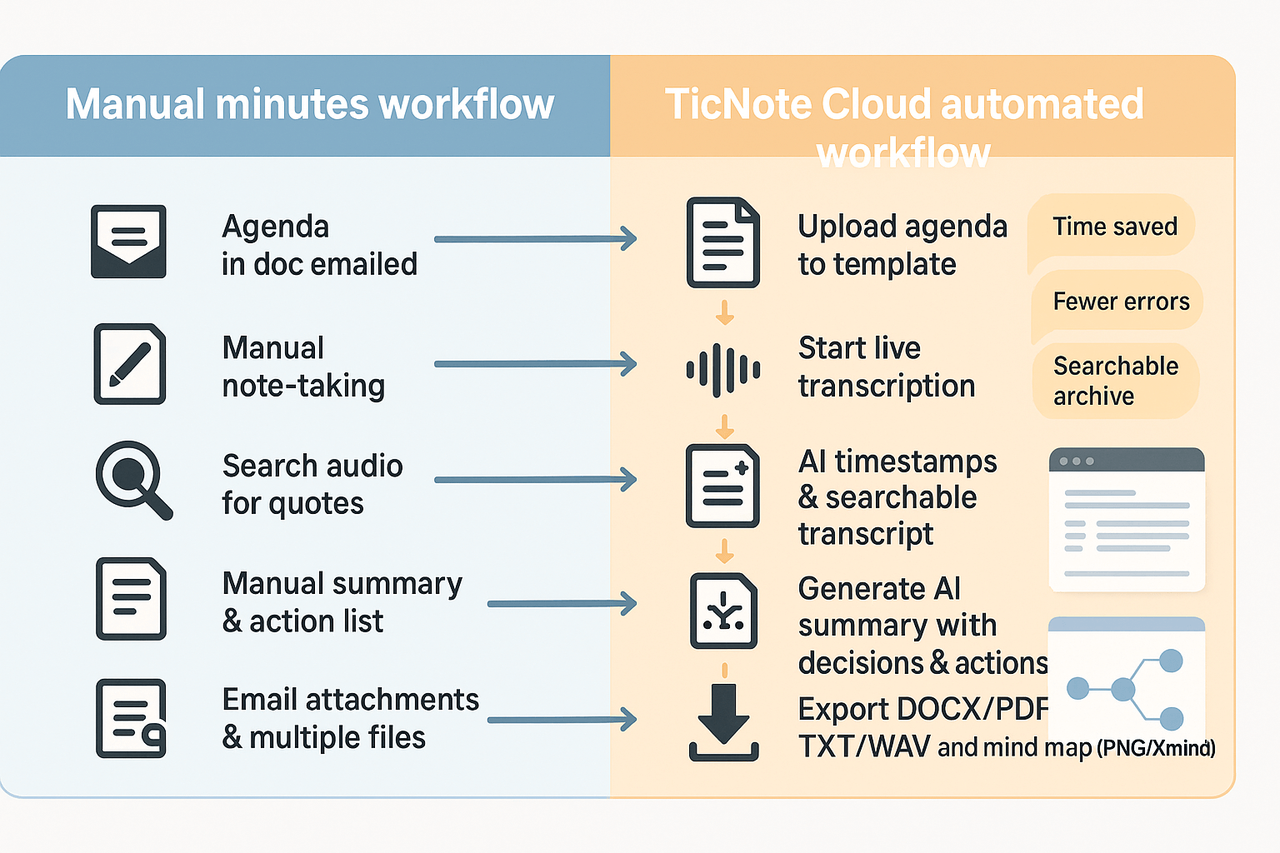
Below is a simple side‑by‑side comparison of a common manual path and the TicNote workflow. The diagram for this comparison should show two parallel lanes: Manual on the left, Automated on the right. Each lane lists the steps and the outputs.
| Manual minutes workflow | TicNote Cloud automated workflow |
| Prepare agenda in a doc, email it out | Upload agenda to template, link files to meeting |
| Take live notes by typing or recording brief clips | Start recording, live transcription runs automatically |
| Manually hunt audio for quotes | AI timestamps and a searchable transcript surface quotes |
| Summarize by hand, often after hours | One‑click AI summary extracts decisions and actions |
| Email attachments and save files in multiple drives | Export DOCX/PDF/TXT and publish to your knowledge base |
That visual helps stakeholders see time saved, fewer errors, and better reuse of meeting outputs.
Exports, integrations, and file formats
Export options cover legal and operational needs. Common outputs: DOCX for formal minutes, PDF for archival, TXT for full transcripts, and WAV for audio evidence. Mind map exports come as PNG or Xmind for presentations.
Connectors include Slack and Notion for downstream collaboration. The platform also supports multi‑source uploads, so you can attach prereads, recordings, and slides before you hit record.
Quick rollout tips for minute takers
Start with a single template for one meeting type, like board minutes. Run one recorded meeting in parallel with manual notes to compare accuracy. Train owners to make decisions during the call; it cuts cleanup time.
Keep a short post‑meeting checklist: review AI summary, confirm owners, export official minutes, and file them in your records system. If your org needs SSO or custom policy controls, plan an enterprise demo.
This troubleshooting section helps you fix the most common minute-taking problems fast, and it shows advanced tricks to keep minutes accurate, searchable, and signoff-ready. Use this part of the meeting minutes guide when you hit bumps during a meeting or when follow-ups go missing. The advice below is practical and ready to apply in corporate, nonprofit, academic, or government settings.
Bring the meeting back to the agenda
If the discussion drifts, act quickly. Remind attendees of the agenda item and the time limit. Say something like: "We need to wrap this topic in five minutes and move to the next item." If a side issue needs more time, log it as a separate action and schedule a follow-up.
Quick script for minute takers:
- Note the point where the conversation veered and mark it as a separate topic.
- Ask the chair to confirm the next step, then record the decision or deferred item.
- If the group debates wording, capture a neutral summary and flag the exact quote for review.
Resolve conflicts about wording
Disputes over phrasing are common. Don’t guess legal language. When wording matters, take these steps:
- Read the disputed wording back verbatim and ask for consensus.
- If consensus fails, record both positions and the agreed decision to review later.
- Attach the exact draft text to the minutes for version control.
This keeps your notes defensible and prevents rework.
Recover missing action items
If actions disappear between meetings, use a quick recovery process:
- Search past transcripts for verbs like "action", "assign", "due". Use timestamps if you have them.
- Email attendees a short "actions reconciliation" asking for confirmation within 48 hours.
- If the tool supports it, regenerate an AI summary to surface missed tasks.
A short audit trail every time you recover an action helps prove intent and ownership.
Handle low attendance and repeated absences
When key members miss meetings, document attendance and quorum status. Record any proxy votes or remote approvals. If absences repeat, propose a standing action: require pre-meeting updates or delegated votes.
Advanced tips: fast sign-offs, version control, and AI search
Use an explicit sign-off line for decisions and attach a versioned appendix for any text that may change. Keep one canonical file with tracked versions, and use searchable transcripts or AI summaries to locate decisions across meetings. AI summaries make it fast to find the sentence that created an action, and searchable transcripts let you show context without replaying hours of audio.
Use these techniques together: they reduce disputes, speed approvals, and make your minutes legally useful and easy to reuse.


