Extension
TL;DR: What this guide will help you do
This guide shows how to turn meeting notes into a searchable second brain. You'll build a searchable, reusable meeting notes knowledge base. It includes templates, a pilot-to-rollout plan, and practical adoption tactics.
Quick takeaways:
- Capture decisions, key quotes, and action items so they are easy to find.
- Use templates and AI summaries to speed prep and follow up.
- Link meetings across projects so context is preserved and searchable.
- Run a small pilot, iterate, then scale with onboarding playbooks.
- Measure results with follow-up rates, search use, and reduced rework.
Who should read this: team leads, project managers, ops, and knowledge managers. You’ll cut prep time, miss fewer actions, and reuse answers across teams. Read on for templates, onboarding checklists, and a real case study.
Why turn meeting notes into a company knowledge base?
Turn meeting notes into a searchable meeting notes knowledge base to stop information from vanishing in inboxes and shared drives. According to Stop the Meeting Madness (2017), executives spend an average of nearly 23 hours a week in meetings, up from less than 10 hours in the 1960s. A second brain for meetings saves time, preserves decisions, and makes work repeatable.
Top business benefits
- Faster onboarding and ramp time: New hires can read past meeting summaries and decisions, not sit through recorded rehashes. That cuts training time and reduces context gaps.
- Fewer repeated decisions: Searchable notes surface past conclusions so teams don’t re-discuss solved problems. That drives consistency across projects.
- Better cross-team handoffs: Action items, owners, and links live in one place, so product, sales, and ops handoffs are clean and auditable.
- Better reuse and research: When meeting outcomes are indexed, teams reuse snippets, templates, and quotes for reports and planning.
What meeting notes usually fail to solve
- Fragmentation: Notes end up in personal docs, chat threads, or attachments. No central index means lost context.
- Poor structure: Raw transcripts lack decisions, owners, and tags, so they are not searchable for next steps.
- Low discoverability: Teams don’t know what to search for or which meeting contains the answer.
- No cross-meeting insight: Patterns across meetings stay hidden without a unified knowledge layer.
A structured, searchable note system turns meetings into reusable knowledge. That creates faster decisions, fewer duplicated efforts, and clearer ownership across the company.
What to capture and how to structure meeting-note content
Save the right items from every meeting so notes are useful later. For a meeting notes knowledge base, capture decisions, action items, and concise context for each topic. Also record metadata like date, attendees, project tags, and source links.
What to save from every meeting
Make capture simple and repeatable. At minimum save:
- Decision: the outcome and who agreed.
- Action item: task, owner, and due date.
- Context: one paragraph summary and why the item matters.
- Risks or blockers: anything that could stall progress.
- References: links to docs, recordings, or slides.
Reusable templates (copy and paste)
- Decision template
- Title:
- Decision:
- Rationale:
- Owner:
- Impact:
- Action template
- Task:
- Owner:
- Due:
- Status: (todo/in progress/done)
- Related decision:
- Context template
- Summary (2 lines):
- Background:
- Key links:
- Next steps:
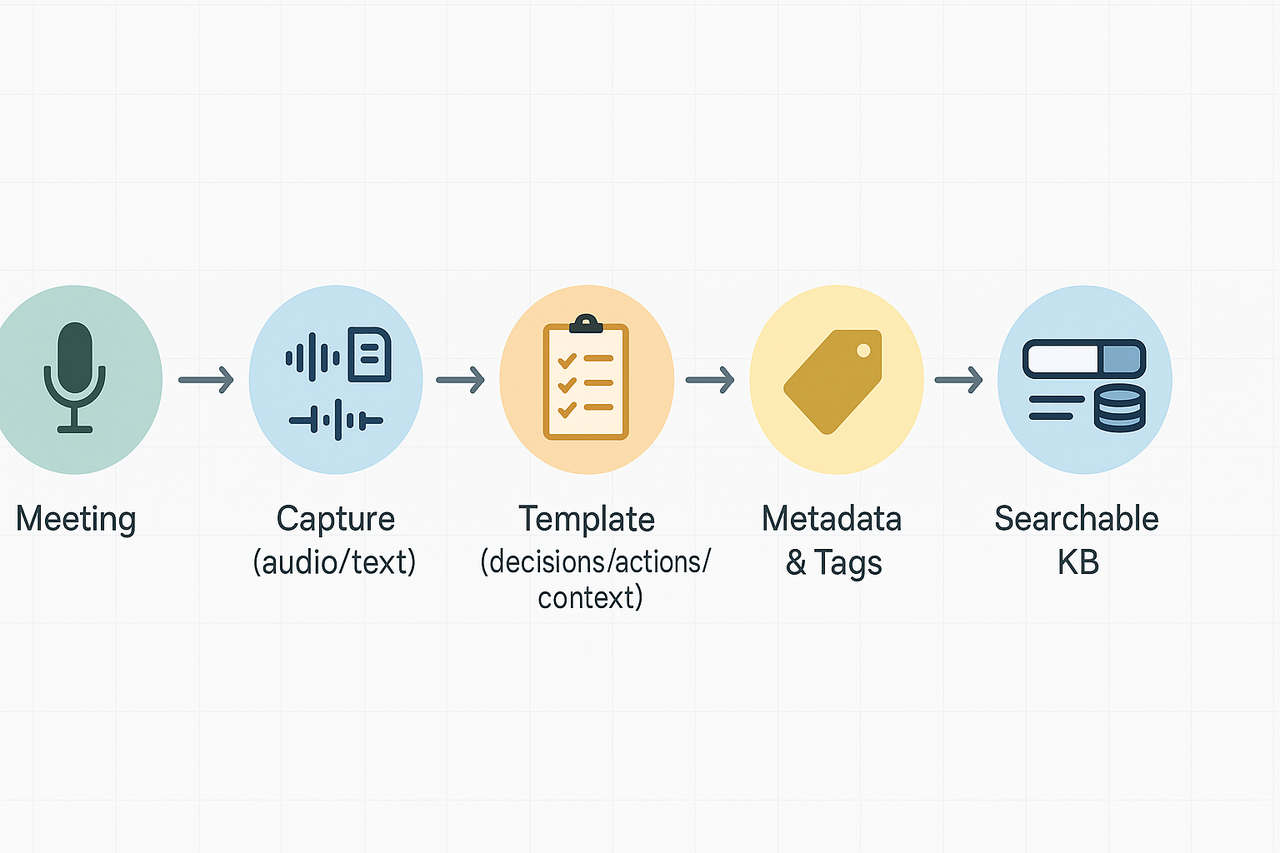
How to structure notes: a quick process
- Capture live: add decisions and actions during the meeting. Keep text brief.
- Post-meeting edit: clean language, remove filler, add links.
- Tag and link: add project tags and related doc links.
- Summarize: write a single-line summary at the top.
- Publish to the KB: move into the searchable space and set visibility.
Tagging and taxonomy best practices
Use short, consistent tags. Prefer project codes and role tags like proj-123 or eng, sales. Create tag types: project, topic, status, and owner. Avoid synonyms, merge duplicates, and prune unused tags quarterly. Good taxonomy makes meeting notes knowledge management scalable across teams.
Keep templates tight and tags consistent. That makes each note findable, reusable, and action oriented.
Tools & features to look for (and how TicNote maps to them)
A meeting notes knowledge base must make audio, text, and decisions searchable. This short guide lists the core capabilities to require, and explains how a modern note workspace maps each requirement to product features. Use the checklist to vet tools and plan your implementation.
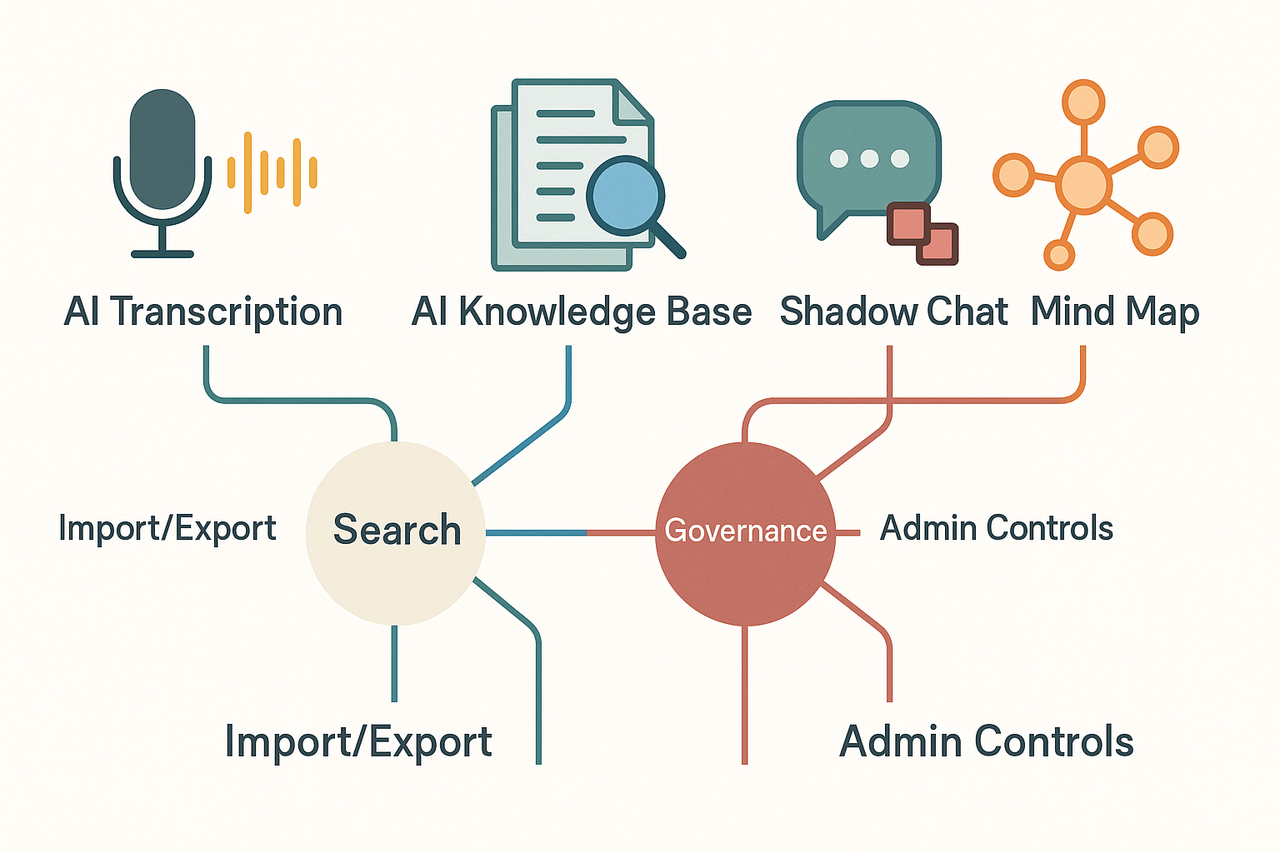
Core capabilities every system needs
- Accurate transcription: verbatim transcripts plus speaker labels for clarity and later search. Capture keywords, decisions, and action items.
- Robust search and metadata: full-text search, timestamps, tags, and custom fields to filter by project, owner, or date.
- Cross-file Q&A: ask questions across meetings and documents to surface prior decisions and references.
- Imports and exports: bulk upload of audio, video, and documents, plus export formats for sharing and compliance.
- Admin controls and governance: access roles, retention rules, and audit logs to meet privacy and security needs.
How these map to TicNote Cloud
TicNote Cloud maps directly to this checklist. Below are practical pairings you can expect.
- Accurate transcription: AI transcription handles live and uploaded audio for searchable text. The tool creates tidy summaries and timestamps for quick skimming.
- Robust search and metadata: an AI Knowledge Base indexes transcripts, tags, and summaries. The platform supports saved filters and topic grouping for fast retrieval.
- Cross-file Q&A: Shadow chat (an AI chat over files) lets teams ask contextual questions across meetings and docs. It surfaces decisions, linked timestamps, and source excerpts.
- Imports and exports: multi-source uploads accept audio, video, and text. Export options include transcripts, summaries, and mind maps for downstream workflows.
- Admin controls and compliance: grant role-based access and set retention policies. Remember, General Data Protection Regulation (GDPR) requires that personal data be processed in a fair and transparent way, with legitimate purposes, and that appropriate technical and organisational measures are implemented to ensure secure processing.
Together these features accelerate searchability and enable cross-meeting insights. Mind maps and auto-summaries turn noisy transcripts into clear, reusable knowledge.
Step-by-step implementation plan: pilot to full rollout
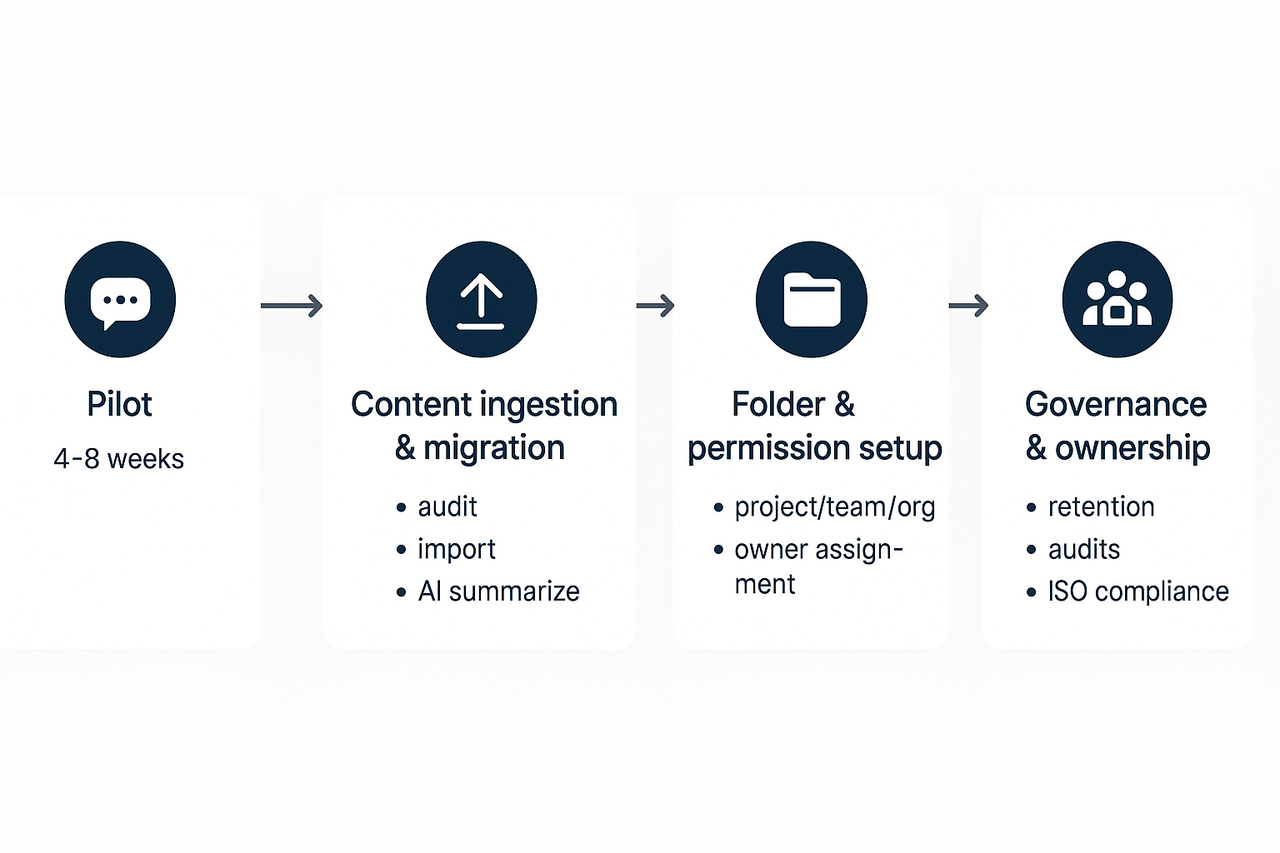
Start with a focused experiment to prove value, then scale. This plan shows how to move from a pilot to an organization wide meeting notes knowledge base, while protecting data quality and ownership. It covers pilot design, content ingestion, folders and permissions, governance rules, and the rollout milestones you’ll need.
Design a short pilot
Run a 4 to 8 week pilot with one cross-functional team. Keep the scope tight: one project, three recurring meetings, and a single owner. Success criteria should include searchable records, reused content, and faster follow ups.
Pilot checklist:
- Select 1 owner, 2 power users, and 8 end users.
- Choose source formats: live transcripts, uploaded recordings, and slide decks.
- Use a standard meeting note template and tagging rules.
Content ingestion and migration
Start with new meetings, then import historic files in batches. Use automated transcription for audio and upload key documents. If you’re testing a platform like TicNote Cloud, enable AI summaries and mind maps to speed review. After the pilot, migrate high-value content first, not everything at once.
Migration steps:
- Audit existing notes and rank by reuse value.
- Export high-value files and convert to clean transcripts or markdown.
- Ingest into the workspace and run AI summarization.
- Tag and link items to projects and decisions.
- Archive low-value legacy notes.
Folder and permission strategy
Keep a clear top-level structure: Project, Team, and Org. Limit edit rights to owners, give comment rights to contributors, and read rights to broader teams. Apply naming patterns and require tags for meeting type and decision status.
Ownership, governance and retention
Define owners for each folder and require quarterly audits. Follow ISO 30401:2018 sets requirements and provides guidelines for establishing, implementing, maintaining, reviewing, and improving an effective management system for knowledge management in organizations. Apply retention windows, review cycles, and a process for correcting poor quality entries.
Ownership rules:
- One owner per folder, with backups.
- Change-log and edit approvals for critical records.
- Quarterly quality checks with a simple scorecard.
Metrics to track and rollout steps
Use these metrics to judge readiness: search success rate, time-to-find, number of reuses, and percentage of meetings ingested. Scale in waves: expand to three teams, then a department, then enterprise. At each wave, run training, update templates, and audit for quality.
Onboarding workflows: small teams vs. large enterprises
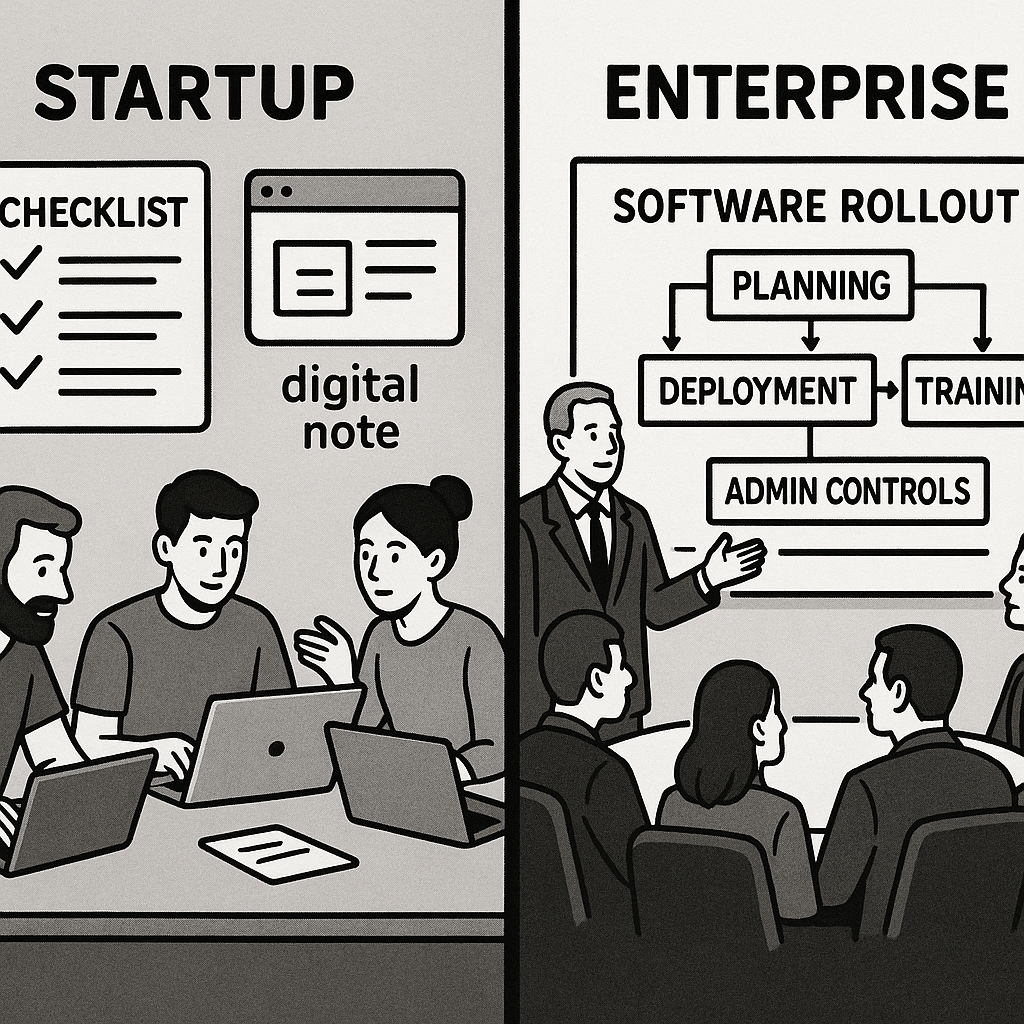
Turning meeting notes into a searchable knowledge base requires tailored onboarding strategies.
Quick-start playbook for small teams
Small teams benefit from rapid setup and quick wins:
- Day 0: Create a shared folder; invite 3–5 power users. Choose one meeting type (e.g., standups) to standardize.
- Day 1: Record a meeting using live transcription and auto-summarize it. Save the summary as a reference note.
- Days 2–3: Tag the note with projects, decisions, and actions. Share a 1-page guide on searching and asking questions.
- Ongoing: Run weekly reviews and refine meeting-note templates.
Checklist for small teams:
- Use a standard template: title, attendees, decisions, actions, links.
- One folder with consistent naming.
- Short demo video & FAQ.
Phased rollout for enterprises
Larger organizations need a structured plan:
Phase 1: Pilot (4–6 weeks)
- Choose 2 teams
- Enable SSO and test access/privacy settings
- Measure time saved and gather user feedback
Phase 2: Secure and govern
- Add admin controls and retention policies
- Provision users via SCIM
- Offer templates by department (PM, Legal, Sales)
Phase 3: Scale and adopt
- Appoint onboarding champions
- Onboard in cohorts
- Integrate with Slack, Notion, and calendar tools
Checklist for enterprises:
- Admin console, SSO, SCIM
- Departmental templates
- Training playbooks
- Change management KPIs (e.g., search usage, task completions)
Recommended templates for both: meeting recap, decision register, action tracker.
Try TicNote Cloud free today — create your first searchable meeting note library!
Measuring adoption means tracking behavior and outcomes, not just logins. Start by defining a small set of KPIs you’ll review weekly, then instrument events so you can tie activity to impact. Use the meeting notes knowledge base as the source of truth for decisions and follow ups. According to Business Transformation: Success Metrics (2023), Companies that fully implemented health-improvement measures during transformations saw nearly double the excess total returns to shareholders compared to those that did not.
KPIs to track and how to instrument them
Begin with three core measures that show value fast, and make them easy to report. Capture these with analytics, small surveys, and cross-system event logs.
- Search rate (useful searches per user per week)
- Instrument search events, mark results clicked, and flag queries that return action items or decisions. Track weekly active searchers and average queries per user.
- Reused decisions (times a decision or resolution is cited or referenced)
- Tag meeting notes with a decision ID. Log when that ID is linked in documents, tickets, or later meetings.
- Task closure time (avg time from action item to done)
- Sync action items to your task system and measure time-to-close. Break this down by team and meeting type.
Also set qualitative checks: quick pulse surveys about findability, and quarterly audits of note quality.
Tactics to boost adoption and sustain momentum
Measurement alone won’t change behavior, pair metrics with these tactics:
- Templates: ship short, role-based note templates to make capture consistent.
- Incentives: reward teams for tagging decisions and closing actions on time.
- Training sprints: run 30-minute hands-on sessions tied to real workflows.
- Champions: pick power users per team to model habits and give feedback.
- Integrations: auto-create tasks or links from notes to reduce manual work.
Make reporting visible, celebrate weekly wins, and iterate templates from user feedback. Over time, the data will tell you where to tighten governance and where to loosen controls to keep adoption growing.
Case study: turning meetings into searchable knowledge (real-user example)
A small product team converted quarterly meeting transcripts into a searchable meeting notes knowledge base to speed onboarding and reduce rework. They wanted searchable decisions, clear action items, and a single source for meeting context. This case traces their process, the steps they took, and what changed after rollout.
Context and goals
The team ran cross functional discovery, sales handoffs, and planning sessions. Notes were scattered across drives, chat, and docs, so answers lived in different places. The goals were simple: capture decisions, tag action owners, and let people search meeting outcomes across projects.
Implementation steps
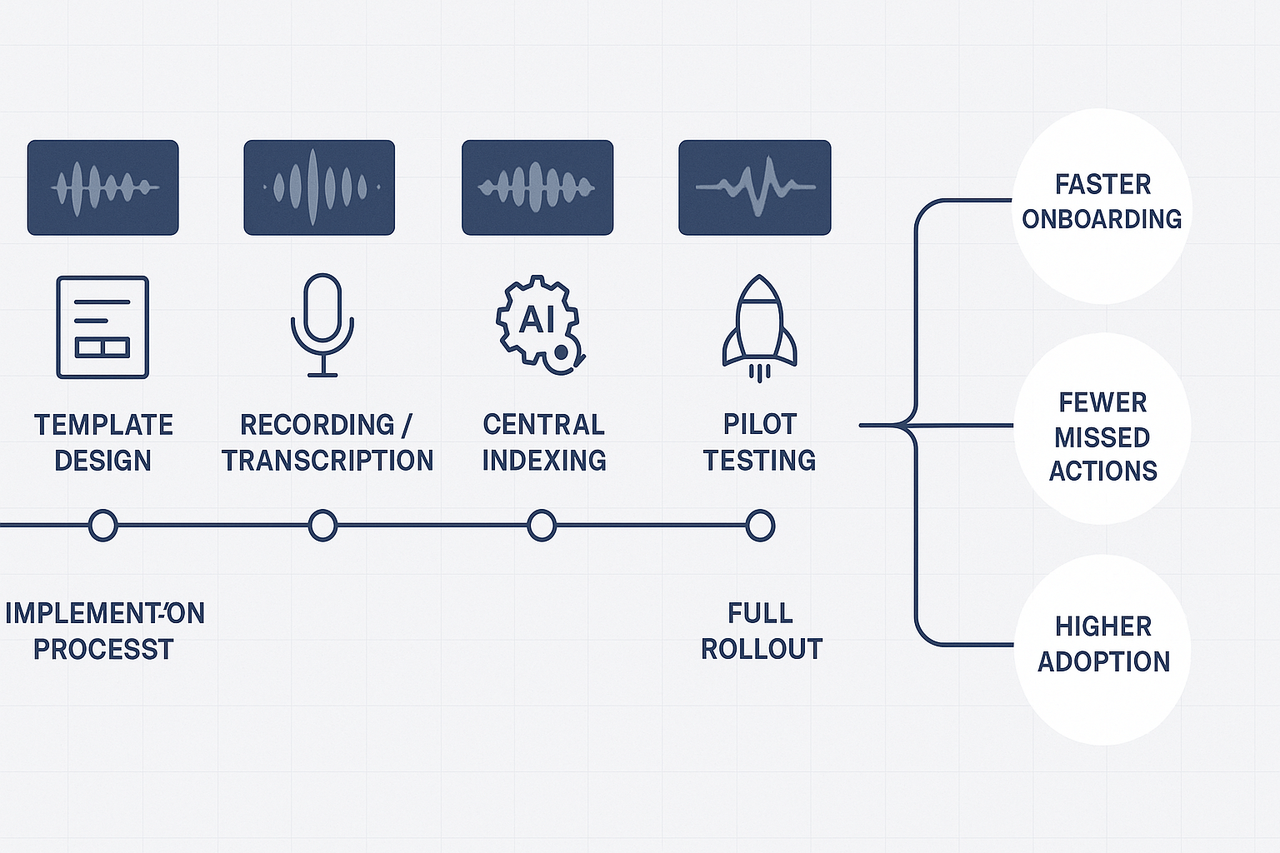
- Align templates: the team created a one page note template with sections for goals, attendees, decisions, and actions.
- Capture consistently: meetings were recorded or uploaded, then transcribed so each note had a timecoded transcript.
- Auto-summarize and tag: they used an AI tool to generate short summaries and add project tags. The platform was used for transcription, summaries, and building the searchable index.
- Centralize storage: all notes and transcripts were stored in a single workspace with folder and tag conventions.
- Train and pilot: a three-week pilot covered two teams, feedback was used to tighten templates and tag rules.
- Rollout and sync: after pilot tweaks, rollout included a 30-minute training, quick-reference cards, and a search demo.
Outcomes and lessons learned
- Faster onboarding, because new hires could find past decisions by searching a single index.
- Fewer missed actions, since every meeting produced tagged action items.
- Adoption grew when search demos showed real results.
User quote: “We stopped hunting through threads. Now we search and find decisions in seconds.”
Lessons: keep templates short, enforce tags, and run a short pilot to prove value. The clear win was turning meeting content into reusable knowledge that teams actually use.
Quick comparison: TicNote Cloud vs. competitors for meeting-note KBs
Here’s a tight side-by-side look at how TicNote Cloud stacks up against Otter, Fireflies, and Mem for building a meeting notes knowledge base. It focuses on live and post-meeting transcription, searchable knowledge, cross-meeting Q&A, and enterprise controls.
Feature snapshot
| Feature | TicNote Cloud | Otter | Fireflies | Mem |
| AI transcription | Strong, multilingual | Accurate live notes | Good auto-capture | Lightweight transcribe |
| Built-in KB / chat | Yes, chat-ready knowledge | No native KB | Limited KB | Notes-first, linkable KB |
| Cross-file Q&A | Cross-meeting Q&A (Shadow) | No | No | Partial, personal search |
| Visuals & repurpose | Auto mind maps, exports | Basic highlights | Highlights & tags | Minimal visuals |
| Enterprise controls | SSO, support, custom templates | Team features | Enterprise add-ons | Team workspaces |
Decision rules
- Pick TicNote Cloud when you need an end-to-end second brain: live transcription, a searchable KB, cross-file Q&A, and visuals.
- Choose Otter for simple, reliable live notes and speaker timelines.
- Choose Fireflies if you want broad meeting capture integrations and playback.
- Choose Mem for personal knowledge capture and fast link-based notes.