


 Extension
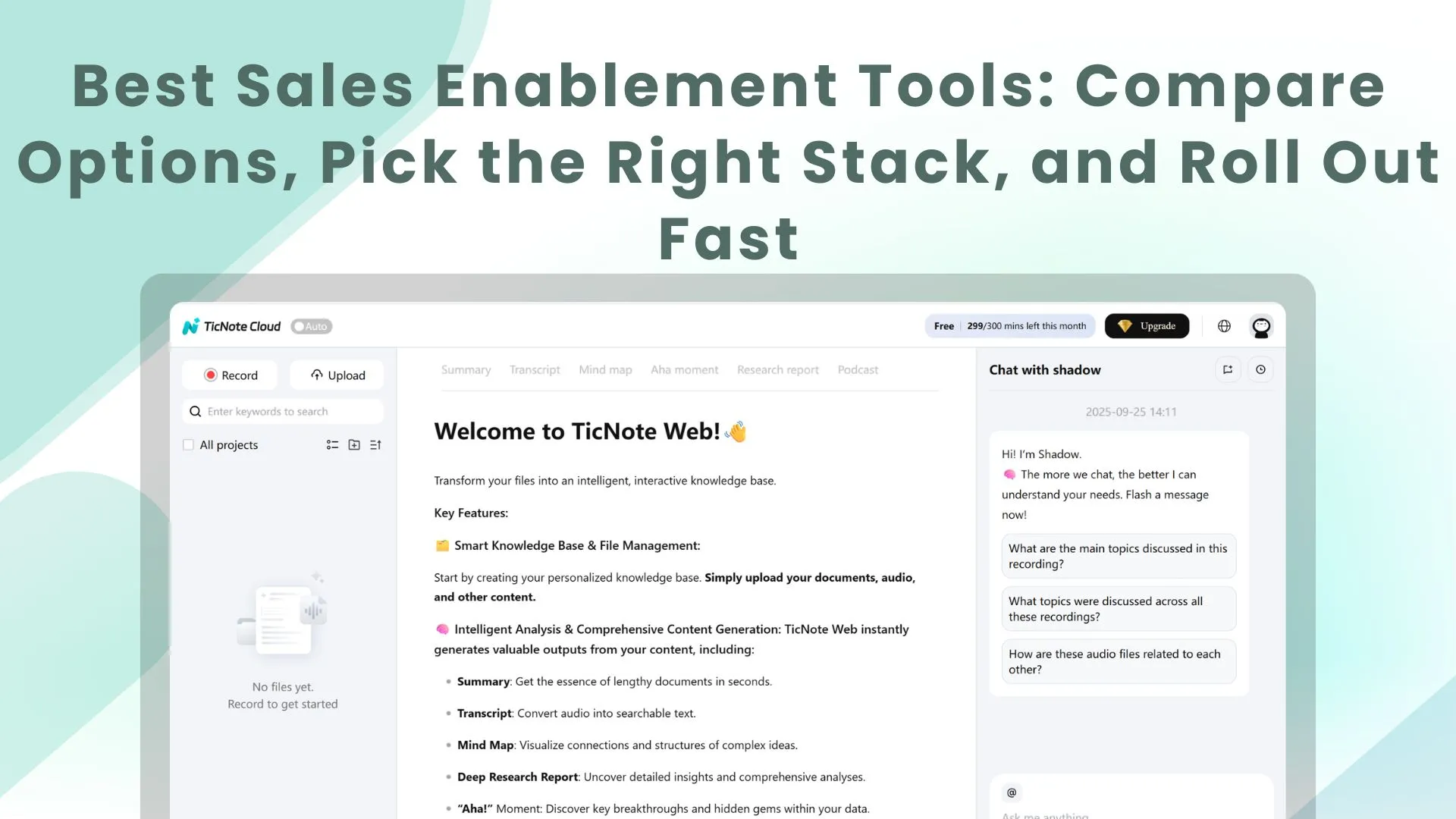
TL;DR: Skill agent shortlist for sales enablement teams
If your sales enablement tool gap starts after calls, try TicNote Cloud free to create transcripts, coaching reports, follow-ups, and searchable knowledge.
Revenue teams buy more apps, then still lose call context. That slows coaching, repeats objections, and weakens handoffs. TicNote Cloud turns real conversations into reusable enablement assets without copy-paste.
- TicNote Cloud: post-meeting transcription, coaching outputs, follow-ups.
- Highspot or Seismic: enterprise content governance.
- Mindtickle: readiness, training, certification.
- Showpad: buyer content journeys.
- Spekit or Guru: in-workflow guidance.
- HubSpot Sales Hub: CRM-led pipeline execution.
Best sales enablement tool shortlist for 2026
Use this shortlist to compare each sales enablement tool by job: content, coaching, meeting intelligence, CRM fit, and AI. The goal is a stack that helps reps act faster, not another shelf of disconnected apps.
TicNote Cloud
- Best for: Teams that need sales meeting transcription, coaching reports, follow-ups, and reusable knowledge from real calls.
- Website and pricing: Official site; Try TicNote Cloud for Free. Free (0/month): 300 transcription minutes, 3 document imports, 10 AI chats/day. Professional: 12.99/month or 79 annually, 1,500 minutes, 30 imports, unlimited AI chat. Business: 29.99/month or $239 annually, 6,000 minutes, 100 imports. Enterprise: custom usage, AI meeting agent, SSO, 24/7 support. Free is always-on, not a time-boxed trial.
- Key features: Bot-free recording, editable transcripts, Projects, Shadow AI with citations, PDF/HTML/podcast/mind map outputs, exports, comments, and permissions.
- Limitations: Not a full CMS, LMS, or CRM forecasting suite.
- Why it stands out: It's a meeting-to-assets workspace with a sales coach skill agent that turns what was said into coaching, emails, and talk tracks.
Highspot
- Best for: Enterprise content management, guided selling, and training paths.
- Website and pricing: Quote-based; expect procurement-led buying.
- Key features: Governance, search, recommendations, playbooks, coaching, analytics.
- Limitations: Heavier admin; less focused on raw meeting-to-deliverable work.
- Why it stands out: Strong enterprise content control and engagement analytics.
Seismic
- Best for: Large organizations needing broad enablement across content, learning, and insights.
- Website and pricing: Quote-based; implementation can be complex.
- Key features: Content orchestration, personalization, learning, integrations.
- Limitations: Overkill for smaller teams.
- Why it stands out: Deep suite coverage for complex revenue teams.
Mindtickle
- Best for: Readiness programs: onboarding, certification, role-play, and reinforcement.
- Website and pricing: Often quote-based or variable by plan.
- Key features: Training paths, assessments, practice, coaching workflows, analytics.
- Limitations: Not mainly a content hub; meeting capture may need another tool.
- Why it stands out: Clear focus on skill development.
Showpad
- Best for: Teams combining enablement content with buyer-facing experiences.
- Website and pricing: Commonly quote-based.
- Key features: Content control, sharing, engagement, training, coaching.
- Limitations: Less suited to project-level meeting knowledge reuse.
- Why it stands out: Strong controlled external content sharing.
Spekit
- Best for: In-workflow guidance inside tools reps already use.
- Website and pricing: Per-seat pricing is common; plan gating applies.
- Key features: Embedded playbooks, alerts, updates, integrations.
- Limitations: Not a meeting intelligence layer.
- Why it stands out: Practical just-in-time enablement.
Guru
- Best for: Verified internal knowledge and AI-assisted answers.
- Website and pricing: Per-seat tiers; verification workflows matter.
- Key features: Knowledge cards, AI search, Slack, browser extension.
- Limitations: Needs a process to turn calls into knowledge.
- Why it stands out: Governance for trusted internal answers.
HubSpot Sales Hub
- Best for: CRM-led teams managing pipeline, sequences, emails, and rep workflows.
- Website and pricing: Tiered plans; features vary by tier.
- Key features: CRM workflows, playbooks, reporting, conversation intelligence, integrations.
- Limitations: Not a specialized enterprise CMS or LMS.
- Why it stands out: Strong all-in-one execution for HubSpot teams.
Sales enablement tool comparison table by use case
A fair sales enablement tool comparison starts with the same scoring axes for every vendor. This table uses practical buying criteria, not vendor-defined categories, so you can build a shortlist in minutes. Scope note: this is for commercial investigation across common enablement stacks, not an exhaustive market map.
Compare tools on the same criteria
Scoring: ✅ = strong native fit, ❌ = not a core fit, Partial = available through add-ons, integrations, or limited depth, and — = not the main use case. Content management means libraries, permissions, and versioning. Coaching/training covers onboarding, practice, and certification. Meeting intelligence covers transcripts, call insights, and coaching artifacts.
| Tool / layer | Content management | Coaching / training | Meeting intelligence | CRM fit | AI capabilities | Pricing transparency | Ideal team size | Key tradeoff |
| TicNote Cloud | Partial | ✅ | ✅ | Partial | ✅ | ✅ | SMB to enterprise teams | Not a full CMS or LMS |
| Highspot | ✅ | ✅ | Partial | ✅ | ✅ | ❌ | Mid-market to enterprise | Heavier rollout |
| Seismic | ✅ | ✅ | Partial | ✅ | ✅ | ❌ | Enterprise | Complex administration |
| Mindtickle | Partial | ✅ | Partial | ✅ | ✅ | ❌ | Mid-market to enterprise | Readiness-first scope |
| Gong | Partial | ✅ | ✅ | ✅ | ✅ | ❌ | Revenue teams | Call-intelligence focus |
| Salesforce Enablement | Partial | ✅ | ❌ | ✅ | Partial | Partial | Salesforce-led teams | Best inside Salesforce |
Pick your shortlist faster
Use these selectors before booking vendor calls:
- If post-call follow-up and coaching artifacts are the biggest loss, prioritize meeting intelligence plus deliverable generation.
- If marketing needs approved libraries and version control, prioritize sales content management.
- If onboarding and certification are the KPI, prioritize a sales readiness platform.
- If reps need prompts inside CRM, prioritize in-workflow enablement.
- If managers coach from real buyer conversations, prioritize searchable transcripts, citations, and reusable talk tracks.
Many strong teams use two layers: an enterprise CMS or LMS for controlled assets, plus a conversation-to-knowledge layer that turns meetings into coaching, follow-ups, and reusable field insight.
What capabilities matter before vendor selection?
Before you demo any sales enablement tool, agree on the gaps you need to close. A clear requirements list keeps the decision tied to revenue work: finding content, coaching reps, reusing call insights, and proving impact.
Audit content access and governance
Check whether reps can find the right asset by sales stage, segment, persona, and product line. Then test the admin side: taxonomy, versioning, approvals, expiry dates, permissions, and content ownership. This separates true sales content management from a wiki, shared drive, or meeting-derived knowledge base.
Validate coaching and reinforcement loops
Coaching features should go beyond a training library. Look for onboarding paths, certifications, practice or role-play, manager scorecards, reinforcement nudges, and assignment workflows. The risk is simple: a platform may "have coaching" but still fail to create repeatable follow-up after the first training session.
Test conversation intelligence and meeting knowledge
Conversation intelligence is software that captures sales calls and turns them into searchable insights. Check transcription quality, speaker labels, summaries, evidence trails, highlights, and clipping. More important: ask whether call insights become enablement-ready artifacts, such as playbooks, objection talk tracks, coaching notes, and follow-up drafts. Many stacks record calls but don't reliably convert them into reusable assets.
Connect analytics to CRM reality
Confirm native CRM integrations and the metrics you can instrument today. Good targets include ramp time, win rate, sales cycle length, content influence, activity trends, and pipeline stage movement. If your CRM fields are incomplete, fix measurement first; otherwise ROI reports will look precise but stay weak.
Review security and admin effort
For baseline control language, NIST Special Publication 800-53 Revision 5 (September 2020) "provides a catalog of security and privacy controls for federal information systems and organizations." Use this checklist before procurement:
- SSO and role-based access
- Audit trails for admin and user actions
- Data retention and deletion rules
- Export controls for transcripts, files, and reports
- Permission levels for teams, guests, and managers
- Admin workload for setup, updates, and governance
Meeting-to-coaching workflow for modern sales enablement
The steps below are demonstrated using TicNote Cloud as an example, but the workflow is tool-agnostic. The goal is simple: make your sales enablement tool turn real calls into coaching reports, follow-up drafts, and reusable talk tracks without losing context.
Step 1 — Add the sales coach and upload the call
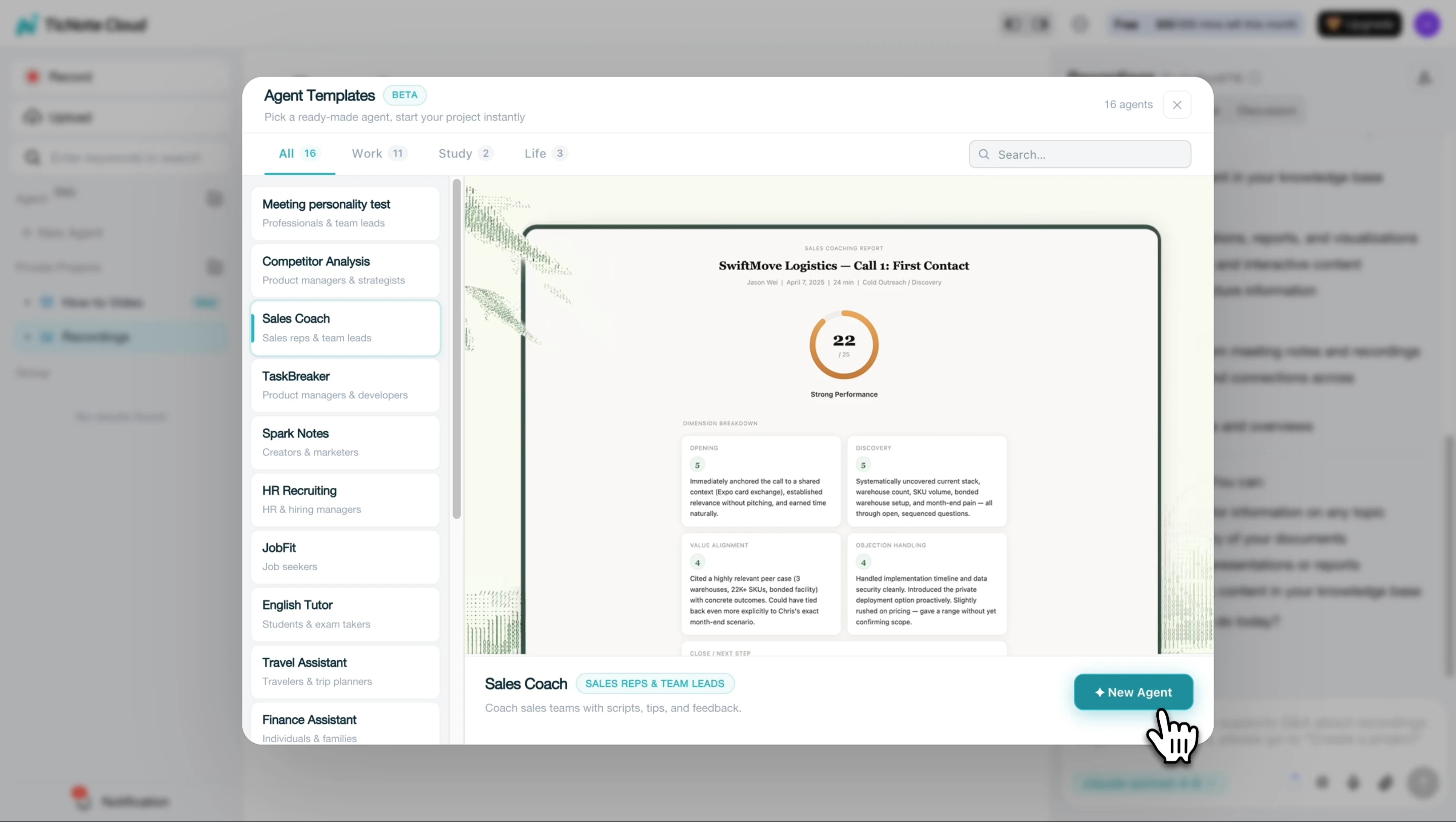
In TicNote Cloud, start by adding the Sales Coach skill agent from the agent library. This creates a ready-to-use workspace for analyzing call recordings and transcripts.
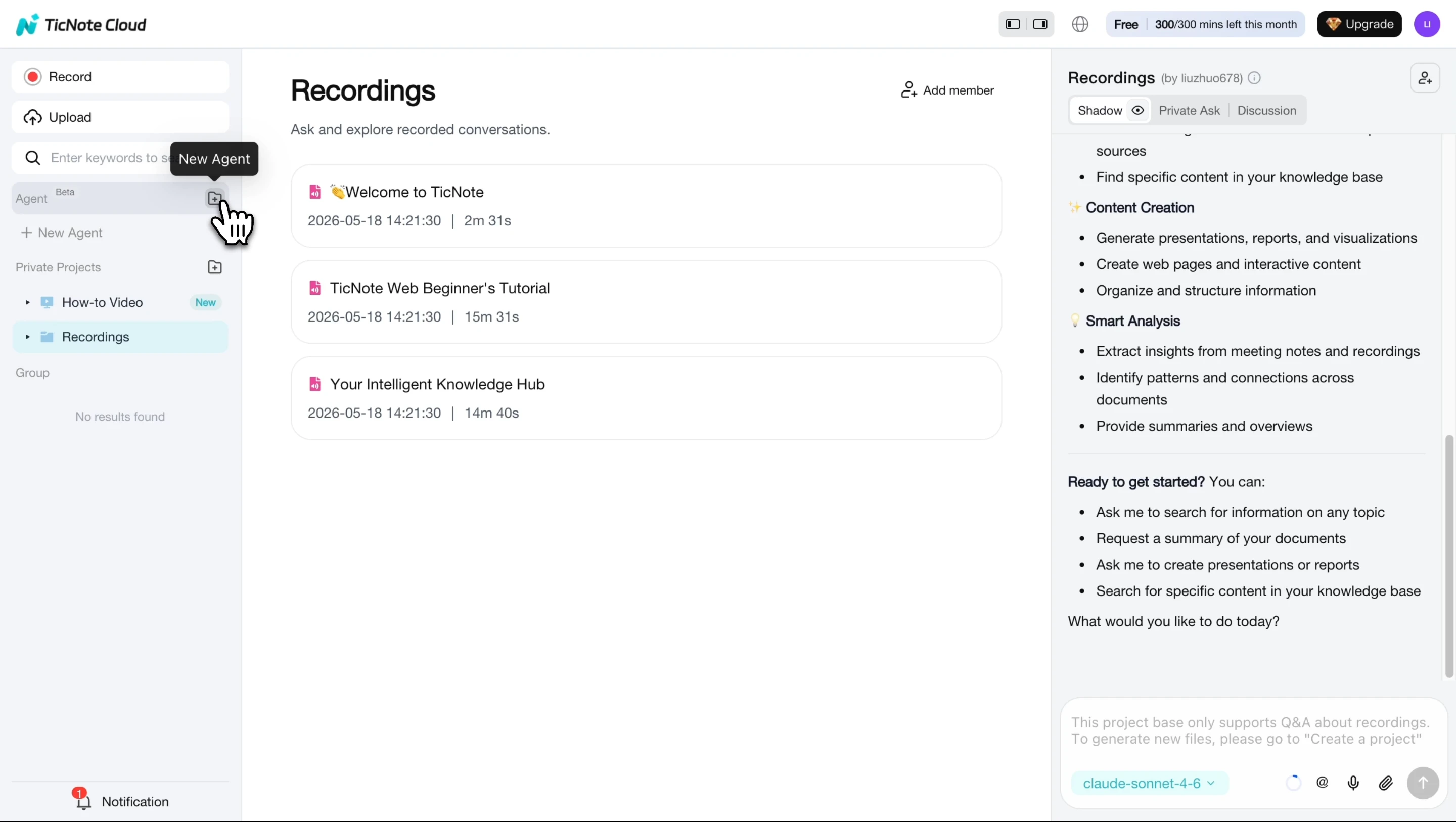
Choose the Sales Coach skill agent, then add it to your workspace. No complex setup is needed before the first review.
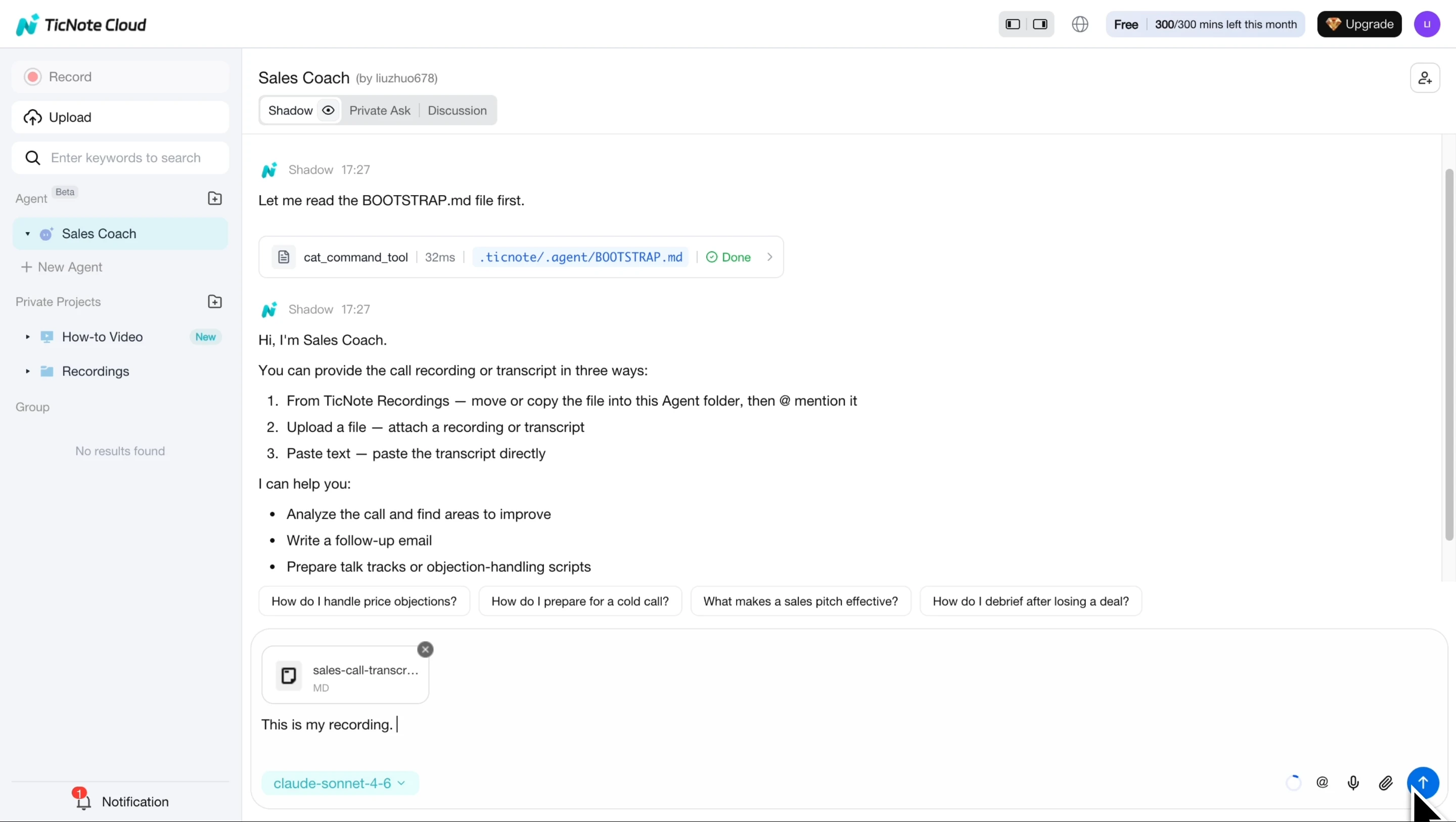
Next, upload a call recording, such as an MP3, or paste a transcript into chat. Confirm the client name, speaker details, and any important deal context so feedback stays tied to the right person and account.
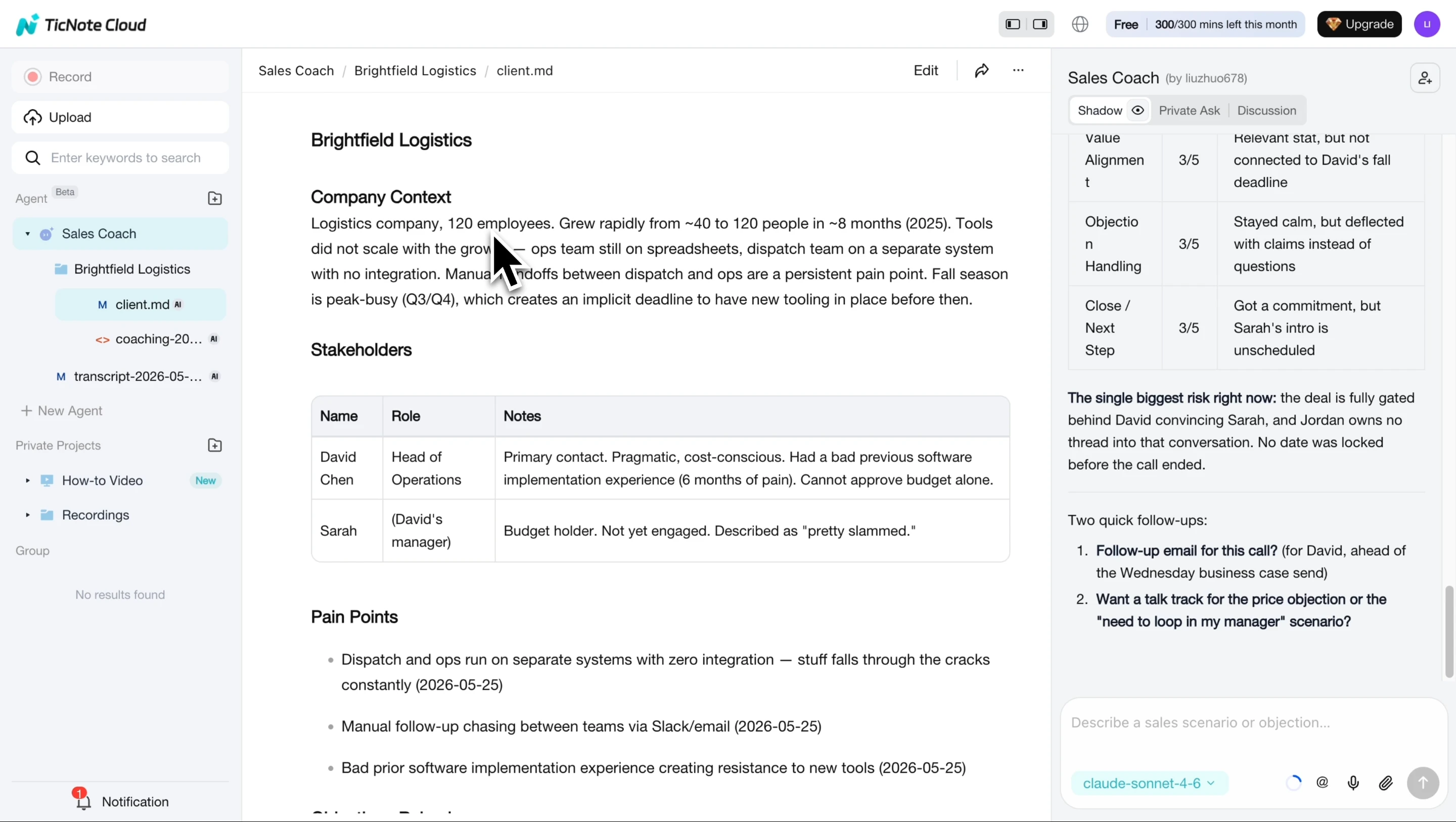
Step 2 — Receive a citation-backed coaching report
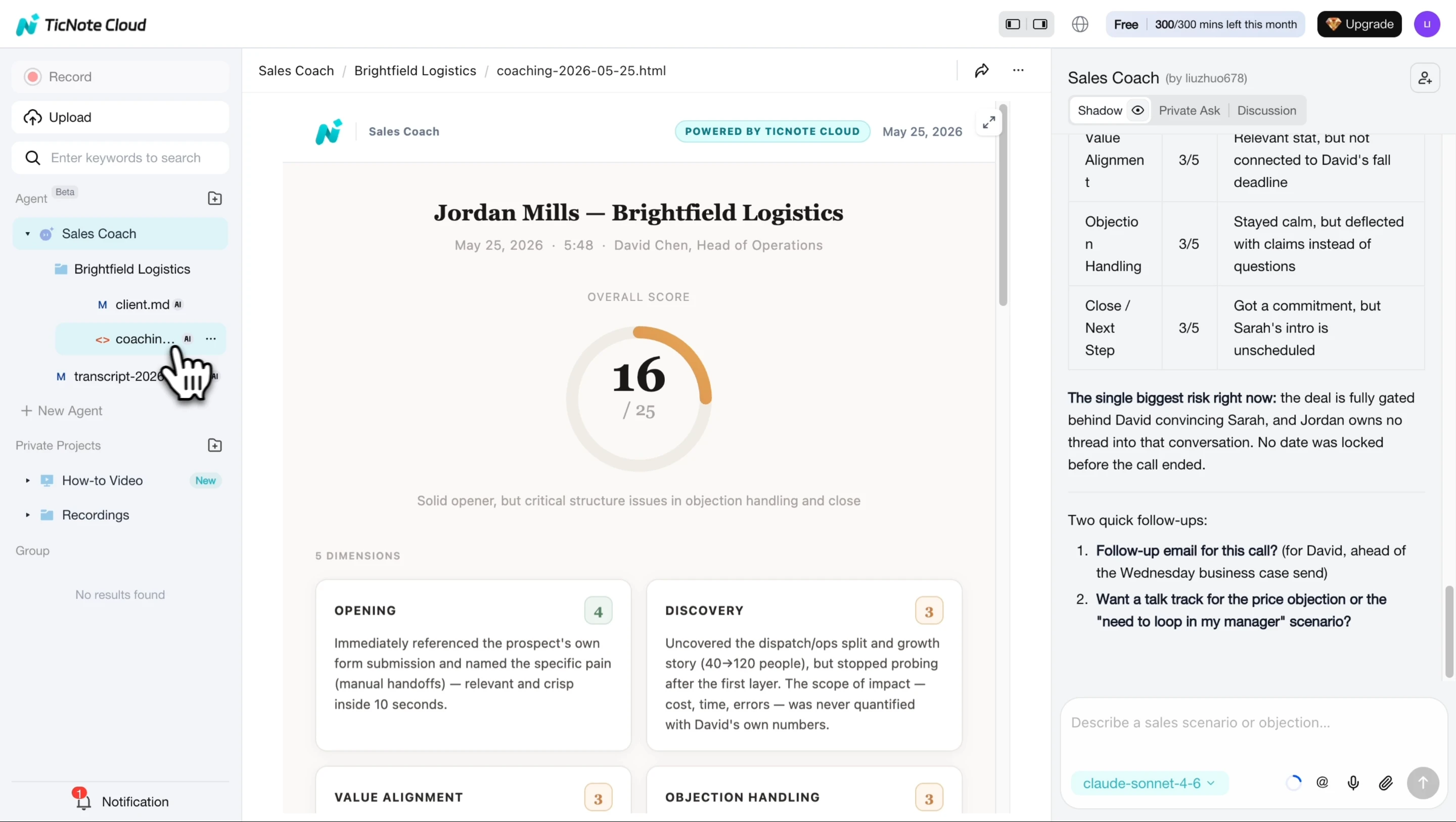
The agent analyzes the call and creates a coaching report. It scores key sales dimensions and ties each point to a direct quote or timestamp. That matters because managers can verify the evidence quickly instead of relying on vague advice like "ask better questions."
Step 3 — Confirm follow-up and talk track outputs
After the report is ready, the agent asks whether you want a follow-up email and an updated objection talk track. Approve the outputs you need, then review them before sharing. The email should reflect the actual client, topics discussed, and agreed next steps. The talk track should stay organized by objection type, with the newest response easy to find.
Step 4 — Share and reuse the learning
Store the coaching report, follow-up draft, and talk track in the same Project. Give managers edit access, give reps view access where needed, and keep permissions consistent across the team.
For mobile work, the flow is shorter: record or upload from the app, generate the same coaching assets, then share them back to the team workspace. Keep naming rules, review steps, and access controls the same as the web process.
Common pitfalls to avoid:
- Missing deal context before analysis
- Inconsistent call names across reps
- Sharing outputs before checking citations
- Letting talk tracks split across folders
- Giving broad edit access without ownership
Start with one recorded call, generate the first report, and use the evidence to coach within minutes.
How to choose the right product
The best sales enablement tool is the one that fixes your highest-friction handoff first. Don't start with the biggest feature list. Start with the work that breaks most often: call follow-up, coaching, content governance, rep readiness, CRM execution, or internal knowledge trust.
Choose by the bottleneck, not the category
Use this quick rule: if one problem creates 70% of the missed work, solve that problem before buying a broader suite.
- Choose TicNote Cloud when meeting knowledge and coaching assets are the bottleneck. Pick TicNote Cloud when strong sales calls turn into weak follow-up, inconsistent coaching, and scattered notes. It fits teams that need meeting transcription for sales, editable transcripts, Project-based knowledge, and fast conversion into coaching reports, follow-up assets, talk tracks, mind maps, or reusable summaries. It's strongest for enablement leaders, sales managers, founders, and consultants who need real conversations to become usable assets quickly. The compromise: it's not a full enterprise content governance suite.
- Choose Highspot when enterprise sales content governance is the priority. Highspot is a strong fit when marketing-controlled content libraries, approvals, content usage, and engagement analytics are the main needs. It works well for teams that need to control what reps send and measure which assets influence deals. The compromise: you may still need a meeting intelligence layer to turn live conversations into reusable coaching and content artifacts.
- Choose Seismic when a large organization needs broad enablement suite depth. Seismic fits complex companies with multiple business units, regions, content types, compliance rules, and integration requirements. Choose it when enablement must connect content, training, buyer engagement, and enterprise workflows. The compromise: rollout is heavier, and smaller teams may see slower time-to-value.
- Choose Mindtickle when readiness, certification, and practice are primary. Mindtickle is the better choice when the KPI is onboarding speed, rep certification, role-play, and reinforcement cadence. It helps managers standardize what "ready" means. The compromise: content governance and meeting-to-knowledge reuse may require adjacent tools.
- Choose Showpad when buyer-facing content experiences matter. Showpad fits teams that need curated buyer rooms, controlled sharing, and polished external content experiences. It's useful when the sales motion depends on guided buyer education. The compromise: meeting-to-knowledge reuse is usually a separate layer.
- Choose Spekit when reps need in-app guidance. Spekit is best when reps get lost inside CRM workflows, tools, or process steps. It delivers just-in-time guidance without forcing reps to leave their workflow. The compromise: it has limited meeting intelligence and long-form knowledge capture.
- Choose Guru when verified internal knowledge is the main gap. Guru fits teams with repeated questions, stale internal docs, and low trust in answers. It helps verify and distribute internal knowledge. The compromise: you still need a reliable way to turn meeting learnings into verified knowledge.
- Choose HubSpot Sales Hub when CRM workflows come first. HubSpot Sales Hub is the practical pick when your team standardizes on HubSpot and wants playbooks, reporting, sequences, and rep activity tied to the CRM. The compromise: as you scale, you may need specialized layers for content management, training, or conversation-to-asset workflows.
A practical rollout plan for adoption, governance, and ROI
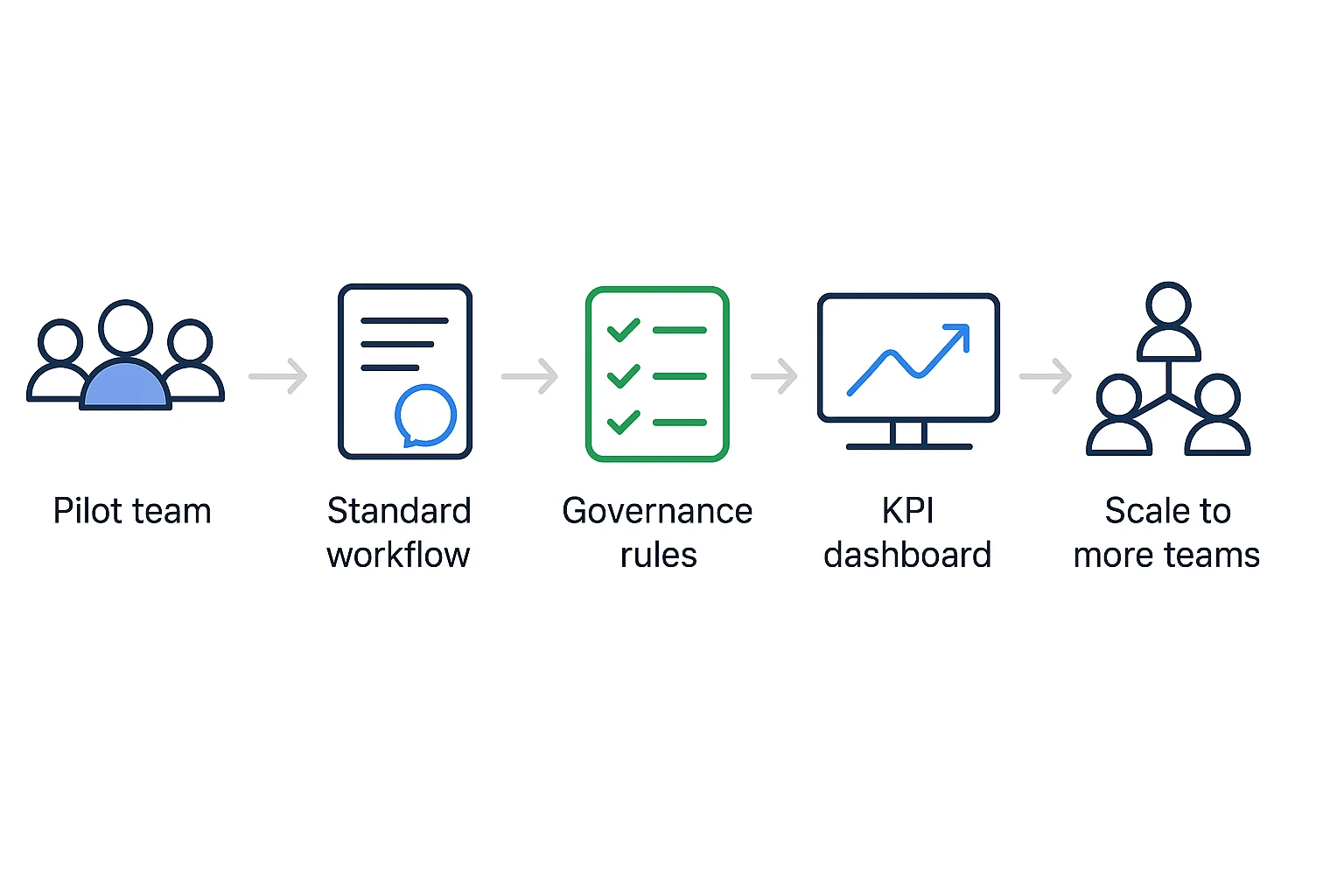
A sales enablement tool only pays off when it changes daily behavior. Roll it out around a few high-value sales moments, clear owners, and metrics that leadership already trusts.
Map the sales moments first
Pick 3–5 moments where better capture and coaching will improve outcomes:
- Discovery calls → coaching notes, buyer pain points, follow-up emails.
- Demo calls → talk tracks, objection snippets, next-step summaries.
- Proposal reviews → decision criteria, pricing risks, mutual action plans.
- Handoffs → customer context, commitments, implementation notes.
- Renewals or QBRs → expansion signals, account risks, reusable content.
This keeps the rollout tied to revenue work, not admin work.
Assign owners before scale
Give each team a clear lane. Enablement owns coaching standards. Sales managers own weekly review rituals. RevOps owns CRM fields, naming rules, and reporting. Marketing owns approved content reuse.
Define "done" in simple terms: every captured meeting has a name, segment tag, owner, next step, and review status. Run a 30-minute governance check every two weeks during the pilot.
Start with one team and one workflow
Begin with TicNote Cloud for one segment, one manager, and one weekly coaching ritual. Standardize this path: meeting capture → editable transcript → coaching report → follow-up asset → reusable knowledge.
That small loop creates visible proof. John P. Kotter (1995), in Leading Change: Why Transformation Efforts Fail (1995), recommends creating "short-term wins" as one of the eight steps for successful organizational change.
Measure what affects revenue
Set a baseline, then review results at 30, 60, and 90 days. Track:
- Ramp time for new reps
- Win rate by segment
- Average deal size
- Follow-up speed after meetings
- Coaching completion rate
- Content reuse in active deals
- CRM field completion where possible
Avoid vanity metrics like logins alone. A rep who logs in daily but sends no better follow-up hasn't adopted the workflow.
Add internal links where they help
Place internal links in the final article near the moments they support: skill agents in the workflow section, AI meeting notes near capture, AI workspace near knowledge reuse, and sales coaching near KPI tracking.
Final thoughts
The best sales enablement tool is the one that closes your clearest revenue gap: content governance, rep readiness, CRM execution, or conversation intelligence. Don't buy a larger stack before you name that gap and map it to one daily workflow.
For many teams, the hidden tax starts after the call. Decisions, objections, and next steps sit in recordings, then never become coaching notes, follow-up assets, or searchable knowledge. That is where a meeting-centered layer can create fast ROI.
If that sounds familiar, start by testing TicNote Cloud on real calls. Then use the comparison table and decision guide above to validate the rest of your stack.


