


 Extension
TL;DR — What this post covers and the fastest next step
This guide shows how to build a practical second brain (a personal knowledge repository) and use AI to capture, organize, and reuse meeting knowledge. Read on for a short playbook, a starter template, privacy tips, and three quick case studies that prove it works.
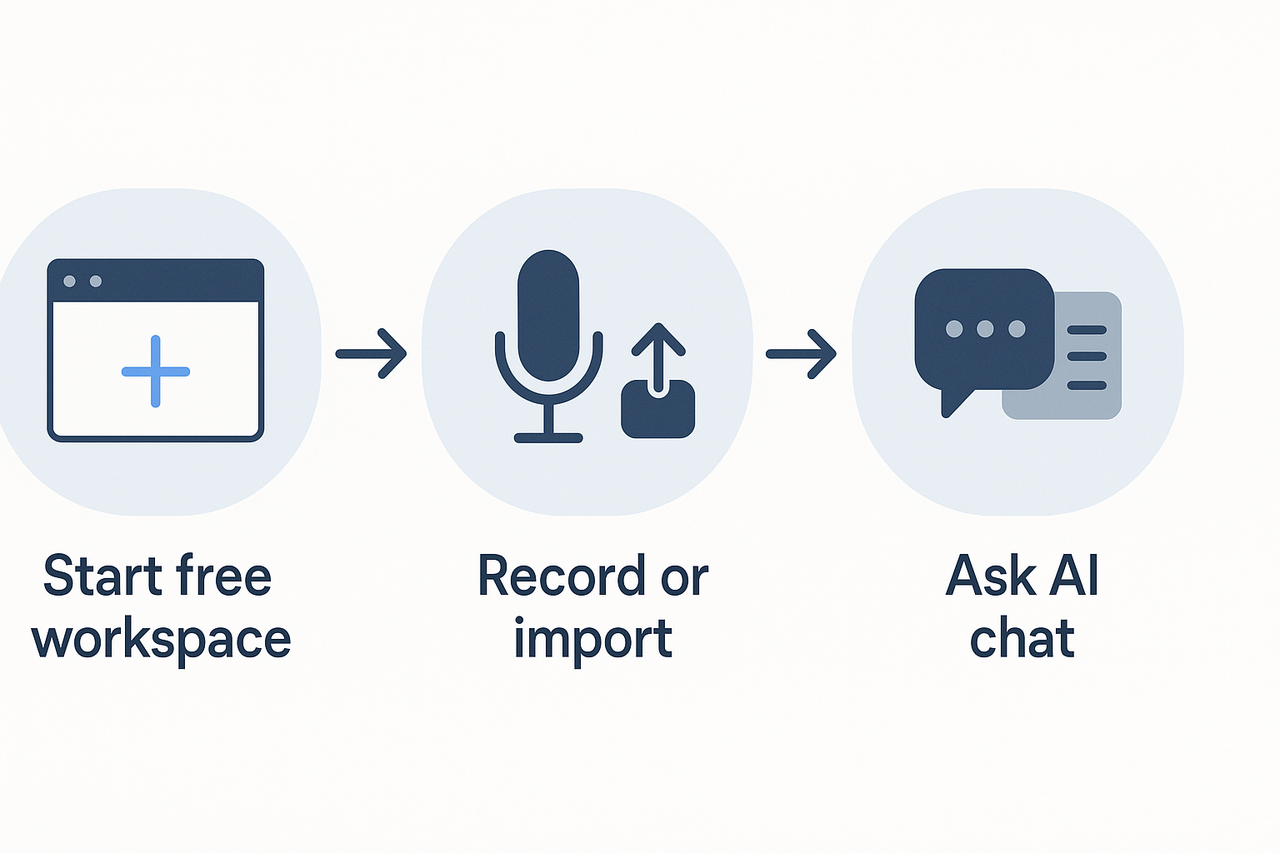
Fast outcome: capture one meeting, get a clean summary, and surface decisions and action items in minutes. The fastest next step is simple: create a free note-taking workspace, record or import your next meeting, and ask the AI chat to pull out the highlights.
30-second checklist:
- Create a free workspace and connect your mic or upload the meeting file.
- Record the meeting live or import the audio/video within minutes.
- Run the automatic summary and ask the chat for decisions, tasks, and follow-ups.
One-line result: start a free workspace and capture your next meeting to see instant value and a searchable summary you can act on.
What is a 'Second Brain' (simple definition and why it matters)
A second brain is a personal, searchable system for capturing and reusing knowledge. It stores notes, meeting summaries, files, and decisions so you don’t rely on memory alone. For busy knowledge workers, it means decisions surface faster and context stays attached to every idea.
A plain definition
Think of a second brain as external memory you control. It is not a folder or a to-do list alone. It combines captured content, simple structure, and fast search so you can find what matters in seconds. The goal is to turn scattered inputs into reusable knowledge, not just archived files.
Why this matters for knowledge workers
Work today has three problems: too much input, short attention, and brittle context. A second brain fixes those by offloading recall and making signals easy to find. Here are the core benefits:
- Faster decisions: search pulls up past decisions, notes, and related files without hunting.
- Clearer handoffs: shared notes preserve context for teammates and reduce follow-up questions.
- Better reuse: templates, summaries, and tags let you reapply insights across projects.
- Less cognitive load: capture now, think later, so your working memory stays free.
- Consistent history: meeting outcomes and action items stay linked to source material.
What a useful second brain looks like
It should be simple, searchable, and actively used. Capture happens automatically when possible, for example via meeting transcription or quick uploads. Notes are organized with predictable labels or templates so you know where to save things. Search returns answers not just file names, so you can pull decisions, owners, and next steps quickly.
A modern second brain often adds AI to speed summary and retrieval. That is called second brain AI in product descriptions. AI helps surface patterns, summarize long conversations, and let you ask natural questions across files. Still, the foundation remains good capture and clear organization.
Use this section as the north star: your second brain is a working, searchable memory for your job. Build it to save time, reduce stress, and make work decisions visible and repeatable.
Why build a Second Brain now: the role of AI in 2025
A modern second brain adds fast capture, instant summarization, and smarter search to your daily work. It helps you stop losing decisions buried in meeting notes, and it turns scattered documents and recordings into reusable knowledge. If you feel overwhelmed by meetings and follow ups, adopting AI-enhanced workflows can cut friction and save time.
Capture more, instantly
AI improves the speed and coverage of capture. Instead of relying on manual notes, you can record audio, upload documents, and let auto transcription create a searchable record. That raw capture feeds downstream features like topic extraction and speaker-aware timestamps.
Benefits:
- Less missed detail during meetings.
- Faster handoffs: summaries and action items are ready after a call.
- Multi-format intake: audio, video, slides, and text all live together.
Summaries that scale
Instant summarization turns long recordings into short briefs you can scan in minutes. Good summaries flag decisions, actions, and unanswered questions. They also make prep faster: read a three-sentence brief instead of a full transcript before a meeting.
Use cases:
- Send concise follow-ups to stakeholders.
- Prep for recurring meetings by reviewing prior decisions.
- Turn meetings into briefs for wider teams.
Search and cross-file thinking
Modern AI gives you search that understands context, not just keywords. You can ask across meetings and files, and get answers grounded in the source material. That reduces rework and stops teams from reinventing answers already decided.
What this enables:
- Find past decisions across projects in seconds.
- Surface related notes and documents you forgot about.
- Turn a workspace into a chat-ready knowledge base for quick Q&A.
Trade-offs to weigh
AI adds speed, but it introduces new risks. The big ones are hallucination (AI asserting wrong facts), privacy exposure, and over-reliance on automation. You also get vendor lock or hidden costs if you scale quickly.
Mitigations:
- Require source links for all AI claims.
- Keep raw transcripts and exports under your control.
- Start small with a pilot, then scale policies.
When to adopt AI workflows
Adopt AI when the time saved outweighs the setup and governance costs. If your team runs many meetings, reuses knowledge often, or struggles to find decisions, it’s worth piloting an AI second brain. For regulated or finance teams, note that Gartner (2024) predicts that by 2026, 90% of finance functions will deploy at least one AI-enabled technology solution, which shows adoption is accelerating in risk-sensitive areas.
Pilot checklist:
- Pick one high-value workflow, like weekly recurring meetings.
- Capture all sources: audio, slides, and documents.
- Use AI to summarize and tag outcomes.
- Verify outputs against sources for accuracy.
- Define retention and export rules.
Practical next step
Start with a focused pilot that measures time saved on prep and follow-ups. Choose a tool that offers private-by-default storage, clear export options, and grounded answers. For example, TicNote Cloud supports transcription, summaries, cross-file Q&A, and private workspaces, making it a low-friction option to test in meeting-heavy teams.
If you run the pilot for 4–8 weeks, you’ll have real data on time saved and quality of outputs. That evidence makes it easy to build policies and scale your second brain with confidence.
A second brain is a habit and a system, not a single AI. It’s a personal knowledge workflow you design to capture ideas, decisions, and reusable notes. Adding AI tools can speed capture and surface patterns, but it does not replace human context, judgment, and responsibility.
What each does, in plain terms
A human-designed second brain is a set of rules, folders, and rituals: where you store meeting notes, how you tag action items, and how you review key decisions. It answers the question: how will I find and reuse work next week or next year? An AI-augmented second brain uses models to transcribe, summarize, map topics, and answer questions across your files. Both are useful, but they solve different problems.
Practical examples
- Capture: The person records a meeting, tags attendees, and names the project. The AI transcribes audio and suggests topic headings and tasks. The human confirms errors and writes the final decisions.
- Synthesis: The tool generates a draft summary and a mind map. The human checks facts, corrects missing speakers, and highlights the decisions to be tracked.
- Retrieval: The AI can surface likely past decisions by searching across transcripts. The human validates context and assigns ownership.
Common mistakes when people trust AI only
Large language models (LLMs) are prone to hallucination, generating plausible yet nonfactual content, which raises significant concerns over their reliability in real-world information retrieval systems, as noted by A Survey on Hallucination in Large Language Models: Principles, Taxonomy, Challenges, and Open Questions (2023). Keep that in mind.
Other common errors:
- Treating AI summaries as definitive, without verification.
- Not recording decision provenance, which makes it hard to audit who decided what.
- Over-automating labels and tags, which creates inconsistent metadata.
- Skipping a short human review, which lets subtle errors or tone problems slip into follow-ups.
These lead to missed actions, bad handoffs, and confusion when compliance or audits require exact wording.
Blended workflows that keep humans in the loop
Follow simple rules to get the speed of AI and the safety of human review.
- Record, then review: Use AI to transcribe and draft summaries. Always do a 3-minute human pass to confirm actions, dates, and named entities.
- Mark uncertain claims: Train your team to flag any AI-generated sentence that starts with a claim. Create a short checklist: cite source, confirm with participant, or mark as hypothesis.
- Decision log pattern: After each meeting, capture a one-line decision with an owner and deadline. Let AI propose candidates, humans approve one.
- Two-stage publish: Drafts go to a private review folder. After human sign-off, the AI can repurpose the cleaned content into templates, mind maps, or research reports.
Use tools that support easy edits and provenance, so every summary keeps an edit trail. Keep templates for common meeting types so automations follow predictable structures.
Quick guardrails for teams
- Assign a reviewer for every meeting summary.
- Limit auto-publication until two approvals exist for client-sensitive meetings.
- Keep a short changelog entry for every AI edit.
- Add periodic audits: every month, sample five AI summaries and check for factual errors and missing owners.
Final thought: design human checks into your second brain
AI makes your second brain faster, and often smarter at pattern recognition. But the human role is to provide context, verify facts, and own outcomes. Design workflows that use AI for draft work and humans for judgement. That combination keeps knowledge reliable, auditable, and useful over time.
Meet TicNote Cloud: How this product maps to a practical Second Brain
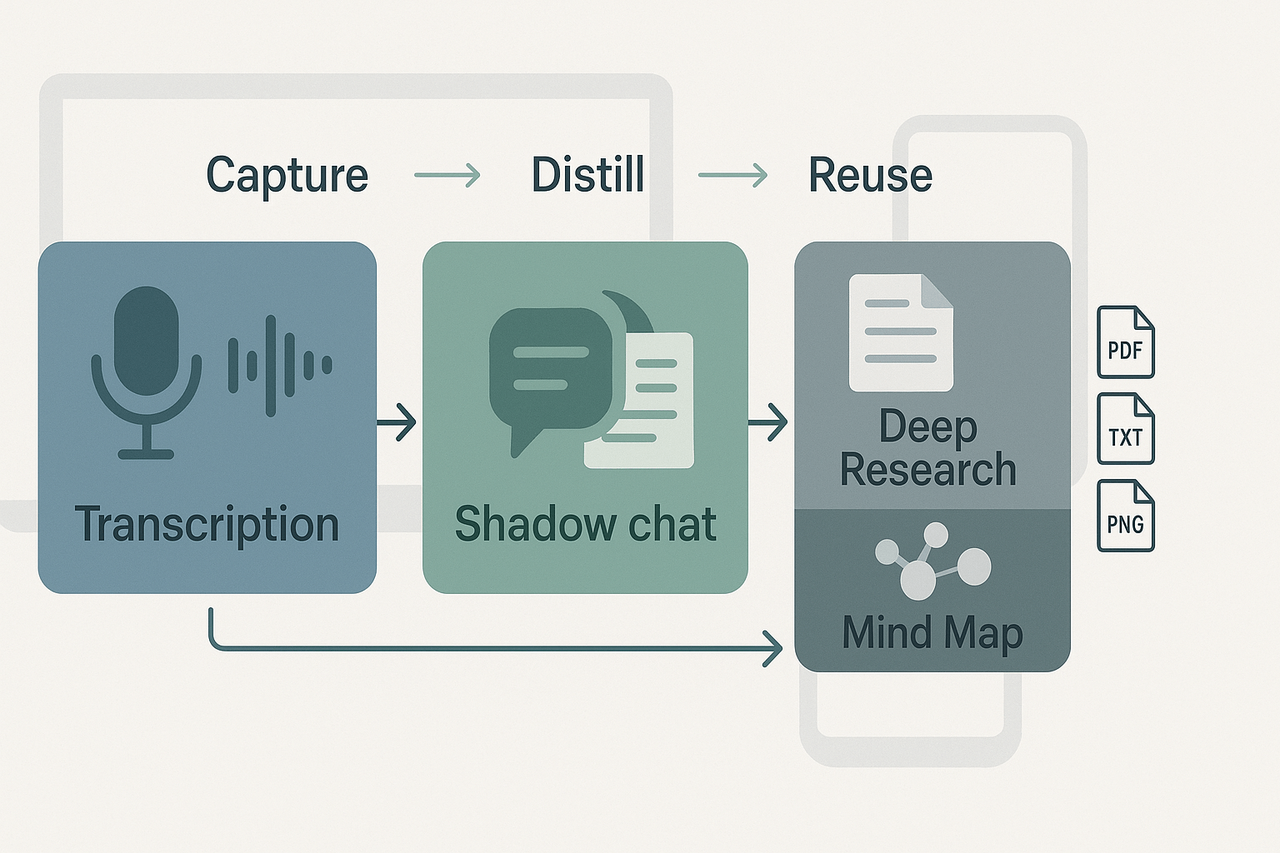
TicNote Cloud turns meetings, files, and recordings into a single searchable workspace that behaves like a second brain. Use it to capture raw material, distill meaning, and reuse insights across projects. This section shows how the platform’s main modules map to the classic capture, organize, and retrieve workflow.
Core modules that mirror the second brain workflow
Capture: Transcription and multi-source uploads
- Live and file transcription record what was said, and store text next to audio or video. This makes spoken decisions findable without manual note taking.
- You can also upload documents and recordings, so all raw inputs live together in one workspace.
Distill: AI Notes, Summaries, and Deep Research
- AI summarization turns long transcripts into short briefs, decisions, and action lists.
- The Deep Research feature converts collections of meetings and files into structured reports. Think of it as turning messy inputs into polished, reusable knowledge.
Query and reuse: Shadow chat and AI knowledge base
- Shadow is a contextual chat for your files and folders. Ask it where a decision was made, or which meeting assigned an action.
- The AI knowledge base makes answers context aware, so you get grounded responses rather than generic guesses.
Visualize: Mind Map output
- Auto-generated mind maps turn long conversations into a visual hierarchy. Use them for quick reviews, slide decks, or planning sessions.
- Export options let you share maps as PNG or Xmind files for your team.
How these pieces solve everyday pain points
Lost decisions and action items
- Problem: Decisions get buried in meetings and chat.
- How it helps: Transcripts plus AI summaries highlight decisions and actions. You can extract a meeting’s action list in minutes.
Fragmented files across tools
- Problem: Notes, recordings, and documents live in different apps.
- How it helps: The platform ingests text, audio, and video. Everything is searchable in one place.
Slow cross-meeting search and reuse
- Problem: Finding prior research or client notes takes too long.
- How it helps: Shadow chat searches across files and folders. You ask a question and get focused, sourced answers.
Multilingual teams and global meetings
- Problem: Language barriers slow understanding and reuse.
- How it helps: Built-in AI translation turns transcripts into 100+ languages. That speeds handoffs across time zones.
Privacy and control: keep your knowledge private
- Data privacy is set to private by default. Your workspace and uploads are not used to train general AI models.
- Exports and connectors let you move data out for audits or backups.
- Enterprise features include SSO and admin controls for policy compliance.
A short privacy checklist
- Confirm default workspace visibility and sharing rules.
- Review export and retention settings for sensitive projects.
- Enable SSO or enterprise policies if required by your org.
Quick implementation mapping
- Start by recording two meetings and importing one file.
- Run AI summaries and tag one meeting with a project name.
- Ask Shadow to pull decisions across those three items.
This simple loop maps directly to the capture, distill, and reuse stages that make a second brain practical. Use the platform to reduce time spent hunting for context and increase time for work that matters.
Step-by-step: Build your first Second Brain using TicNote (starter template)
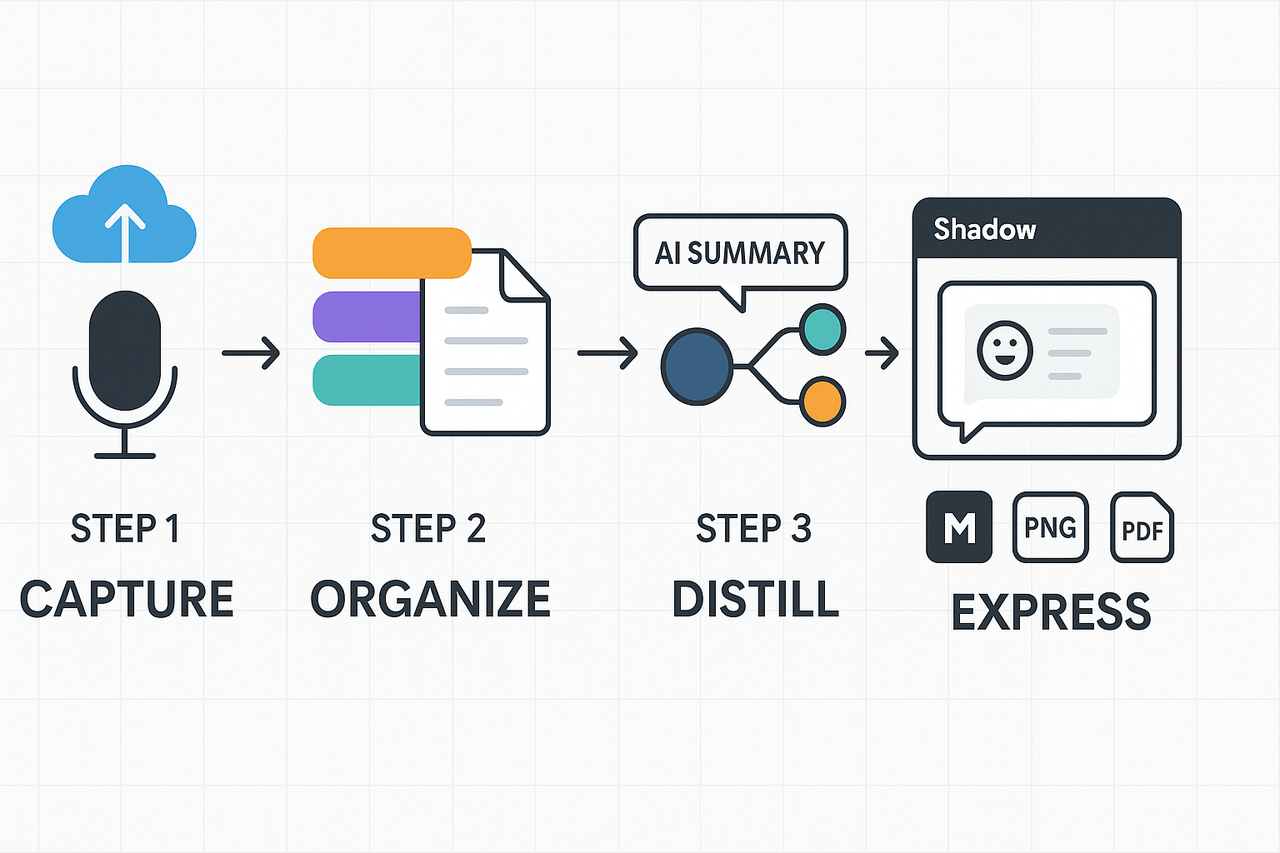
Start here to capture meeting knowledge and turn it into a usable second brain in minutes. This hands-on guide walks you from raw audio and uploads, to organized notes, to AI-distilled summaries and mind maps, and finally to reuse with chat and exports. Follow the starter template, import the workspace export, and you can run this workflow after your next meeting.
1 Capture: record or upload
Record live or upload audio, video, or documents to the workspace. Keep recordings short for faster transcripts, or use a longer file when you need full context. The platform transcribes audio into text automatically, so you won’t lose decisions, action items, or quotes.
Practical tip: name each file with a project tag and date. That small step makes search and cross-file Q&A much faster later.
2 Organize: tags and templates
Use tags to create instant buckets: project, client, meeting type, and priority. Apply a meeting template to every capture, so notes include fields for goals, attendees, decisions, and next steps. Templates make outputs consistent and save editing time.
How to start: create three tags (Project, Decision, Follow-up) and attach the meeting template to your recording. That structure surfaces actions across many meetings.
3 Distill: AI summaries and mind maps
Run an AI summary on the transcript to get a short meeting brief and a task list. Then generate an AI mind map to visualize topics and dependencies from the same content. Summaries give quick context for readers, while mind maps help presenters and reviewers scan themes.
Action steps:
- Open the transcript and click Summarize. Choose the short brief option for quick follow-up emails.
- Generate the mind map to review topic clusters and hand off to stakeholders.
- Attach the summary and map to the recording as canonical notes.
Why this helps: distilled notes reduce rework and speed up handoffs. You’ll find decisions without rewatching the full call.
4 Express: Shadow chat and exports
Ask follow-up questions across your workspace using the platform’s Shadow chat (an AI assistant that cites source notes). Shadow finds where decisions live, surfaces unresolved action items, and links back to the exact transcript segment. Use it when prepping for a next meeting or writing a status update.
Export the brief as Markdown or PDF, and the mind map as PNG for slide decks. For handoffs, export the transcript as TXT and attach the summary. Use the workspace chat to create a one-paragraph executive update from the summary.
Quick import checklist to run in minutes
- Import the starter workspace export you downloaded.
- Add two recent meeting files or one long recording.
- Apply the meeting template to both files.
- Tag each item with Project and Follow-up.
- Run AI Summarize, then generate the mind map.
- Open Shadow chat and ask: What are the open action items?
- Export one summary as Markdown and one mind map as PNG.
Accessibility and small-team tips
If someone is neurodiverse, shorten recordings into 10-minute clips and add timestamped notes. For multilingual teams, run AI translation on the summary before sharing.
Downloadable starter template and workspace export
The starter package includes: a meeting template, a tag set, and a sample workspace export you can import. Use the checklist above after import to validate the setup in under ten minutes.
Privacy matters because your notes often contain decisions, personal data, and client secrets. Treat your second brain like a controlled library, not a public bulletin board. This section covers who owns meeting data, default privacy settings, quick ways to limit sensitive exposure when using AI notes, common capture mistakes and recovery steps, and a simple 12‑month hygiene plan teams can follow.
Data ownership and default privacy
Remember this compliance baseline: European Commission (2025) The General Data Protection Regulation (GDPR) mandates that, by default, companies should ensure personal data is processed with the highest privacy protection, such as processing only necessary data, limiting storage periods, and restricting accessibility, so that personal data isn't made accessible to an indefinite number of persons. Put plainly, keep data access tight and store only what you need.
Practical checklist for ownership and settings:
- Confirm who owns recorded files and transcripts in your team contract.
- Set workspace defaults to private, not public or shared.
- Require permission before uploading client or patient data.
Minimize sensitive-data exposure: quick actions
Start with capture rules. If you follow a few disciplined steps you reduce risk immediately.
- Before recording, mute or redact sensitive fields: social security numbers, credit cards, and patient identifiers.
- Use meeting templates that flag sensitive topics and automatically add a retention tag (for example, 90 days).
- Limit auto-sharing: turn off auto-post to Slack, shared drives, or public links.
- Use on-device recording when possible, then upload under a secure account.
Encryption and access control
- Use systems that offer at-rest encryption and TLS in transit (industry standard).
- Require strong authentication and role-based access (admins, editors, viewers).
- Keep audit logs for uploads, downloads, and exports.
Common capture and organization mistakes, and how to recover
Mistakes happen. Here are the frequent ones and fast fixes.
- Mistake: Recording without consent. Recovery: Delete recording, notify participants, re-run meeting with consent, and document the incident.
- Mistake: One-person ownership of notes, causing knowledge bottlenecks. Recovery: Assign a shared owner and export a canonical summary into the team knowledge base.
- Mistake: Over-tagging and inconsistent folder rules, making search worse. Recovery: Run a 30-minute audit to standardize tags; merge duplicates; remove orphaned files.
- Mistake: Leaving sensitive attachments in public folders. Recovery: Revoke public links, move attachments to a private folder, re-share with approved users only.
12-month maintenance checklist: monthly, quarterly, annual
Monthly tasks:
- Review new recordings for accidental disclosures. Flag sensitive items.
- Clean up tags and merge duplicate notes.
- Check that permission lists match current team membership.
Quarterly tasks:
- Export and archive records that passed retention thresholds.
- Run a small privacy audit: sample 5 projects for compliance with templates.
- Update templates and retention tags based on legal or client changes.
Annual tasks:
- Full access review, remove old accounts, and rotate service credentials.
- Re-confirm data residency and encryption policies for compliance reviews.
- Train teams on sensitive capture rules and run one tabletop incident simulation.
Ethics, neurodiversity, and accessibility
Respect consent and clarity. Use clear pre-meeting prompts so everyone knows what will be recorded. For neurodiverse team members, offer text-only summaries or time-stamped highlights instead of long transcripts. Provide audio players with variable speed and adjustable captions.
How TicNote Cloud’s privacy-by-default fits a compliance review
TicNote Cloud is private by default and states that user data is not used to train models. For a security review, present: data ownership terms, retention controls, encryption claims, and export options. Also provide links to export formats and integration controls for legal teams. These elements help map the tool to a vendor risk checklist.
Follow a simple rule: assume anything captured could be requested in a compliance audit. Keep access tight, rotate credentials, and document exceptions.
Use this checklist and the monthly hygiene plan to reduce risk while keeping your knowledge usable and searchable.
Real-world mini case studies: 3 meeting-heavy teams using TicNote as a Second Brain
Knowledge workers need a reliable second brain to capture decisions, research, and customer commitments. These three short case studies show practical setups, the platform workflow, and clear day-to-day outcomes. Read how a product manager, a research team, and a multilingual customer success team turn meetings into reusable knowledge.
Product manager: track decisions and owners
Setup: A product manager runs nine weekly syncs across three squads. Keeping decisions and action owners straight was a drain. They added TicNote to record standups and design reviews, and to store meeting notes in project folders.
Workflow in the platform:
- Start local audio recording for each meeting and upload recordings to the project folder.
- Use automatic transcription to get a searchable transcript within minutes.
- Run the AI summarizer with a custom template that extracts decisions, action items, and due dates.
- Tag decisions by project and assign action owners via a quick task list export.
Everyday outcome: The PM stopped hunting for decisions in chat threads. Weekly prep time fell by one hour. Action items are clearer, and follow ups drop by about 30 percent in the manager’s routine. Teams can find past decisions in seconds using keyword search.
Research team: surface cross-file insights fast
Setup: A five-person research team worked with interviews, field notes, and slide decks. Insights lived in separate files, so patterns were missed. They centralized uploads and named folders for topic threads.
Workflow in the platform:
- Upload audio interviews, PDFs, and slide decks to a shared workspace.
- Use cross-file Q&A to ask the workspace for mentions of specific themes or quotes.
- Generate a Deep Research report that consolidates findings and citations.
- Export the report as Markdown for the team wiki.
Everyday outcome: The team found recurring themes within two days, not two weeks. Summary reports cut the prep time for weekly reviews by half. Junior researchers can now jump into projects with a short annotated report, speeding onboarding.
Multilingual customer success: translate summaries and speed responses
Setup: A customer success team handled clients in four languages. Agents spent time translating call notes and localizing follow-up messages. They needed fast, accurate summaries and translations.
Workflow in the platform:
- Record client calls and upload recordings to a client-specific folder.
- Produce an AI summary that highlights commitments and next steps.
- Use AI translation to create localized summaries in the client’s language.
- Share the translated summary and an English master note with stakeholders.
Everyday outcome: Response time to client requests fell by two business days on average. Translation errors dropped because the team now sends AI-generated drafts for quick human review. The team saved about three hours weekly that used to go to manual translation.
Key takeaway: These three teams used the platform to capture more of what happens in meetings and make it actionable. Each setup is small to start and scales with folders, templates, and cross-file search. Try this approach if you want meetings to feed a usable, searchable second brain.
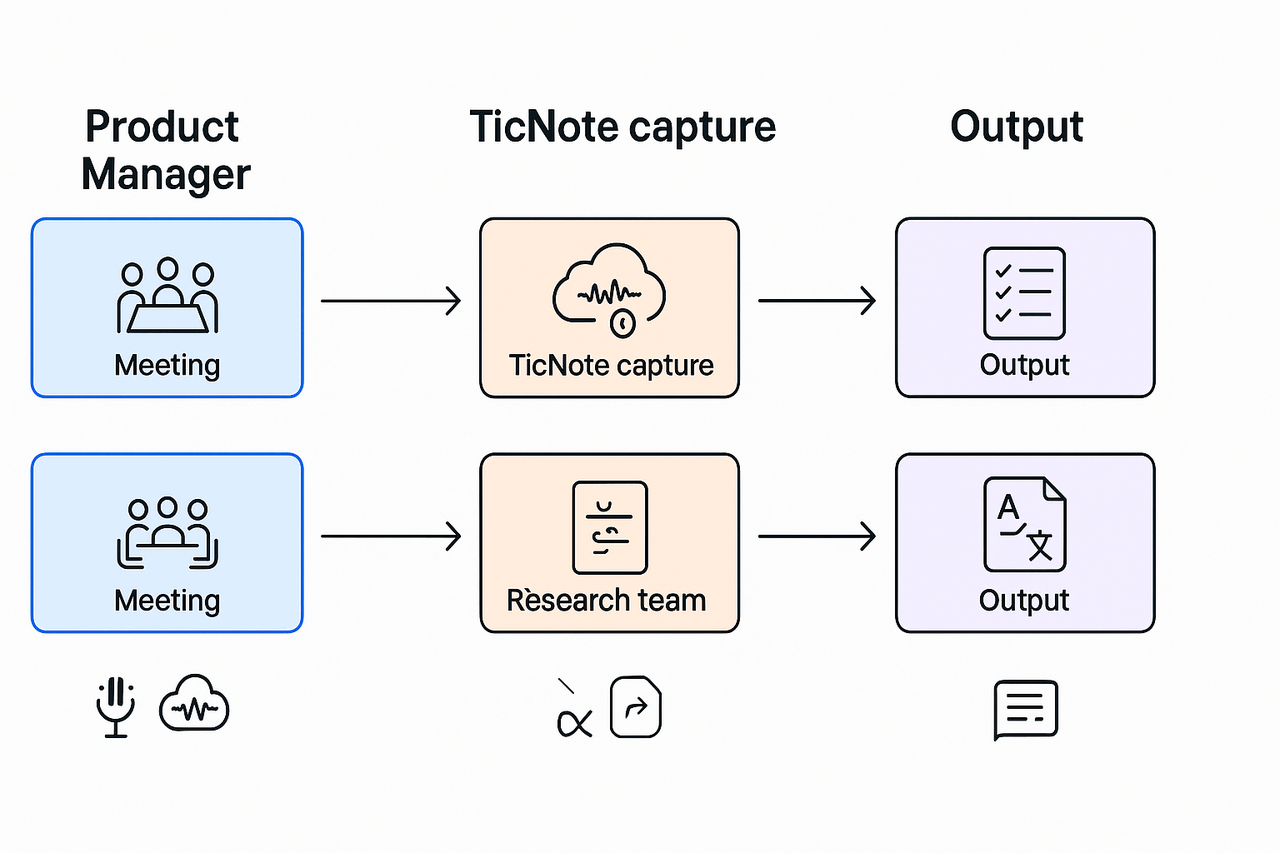
Visuals & comparisons: CODE framework mapped to tools (chart + recommended workflows)
This section maps the CODE stages to concrete product features and gives a side by side comparison to help you pick a tool to trial. Use the CODE steps to judge how well each platform supports a reusable second brain. Read the mapping, scan the table, then pick one workflow to test in a week.
CODE to TicNote feature map
- Capture: Live transcription, device recording, and multi-source upload. The platform grabs audio and text, then tags speakers and timestamps for quick recall.
- Organize: Auto-topics, folders, and AI notes let you group meetings by project or client. Shadow (AI chat) and folder-level search make reuse simple.
- Distill: AI summaries, auto mind maps, and Deep Research convert long transcripts into short briefs and insight reports. Use the mind map export for slide-ready visuals.
- Express: Exportable summaries, cross-file Q&A, and a chat-ready knowledge base let you reuse insights in decks, proposals, or Slack.
Quickly recommended workflows and diagram templates
- One-click meeting digest (good for PMs)
- Capture: Start live transcription.
- Organize: Tag meeting with project, attach agenda template.
- Distill: Run AI summary and mind map.
- Express: Share a short summary and tasks to Slack.
- Diagram template: Linear timeline with decisions and owners.
- Research-to-report (good for researchers)
- Capture: Upload interviews and recordings.
- Organize: Group by theme and import reference docs.
- Distill: Run Deep Research to produce an annotated brief.
- Express: Export DOCX and a mind map PNG for review.
- Diagram template: Topic cluster map with source links.
- Cross-meeting knowledge base (good for CS/sales)
- Capture: Sync recurring calls and one-off demos.
- Organize: Use cross-file Q&A and topic tagging.
- Distill: Create a weekly digest and action list.
- Express: Build a chat-ready workspace for reps.
- Diagram template: Decision matrix with recurring actions.
When accuracy on speakers matters, remember tool selection criteria; according to Transcription Showdown: Comparing the Accuracy and Efficiency of Top AI Meeting Transcription Tools, 75% of businesses consider speaker identification and accent recognition to be critical or very important when evaluating transcription tools.


