Extension

TL;DR — What small teams need to know (quick answer)
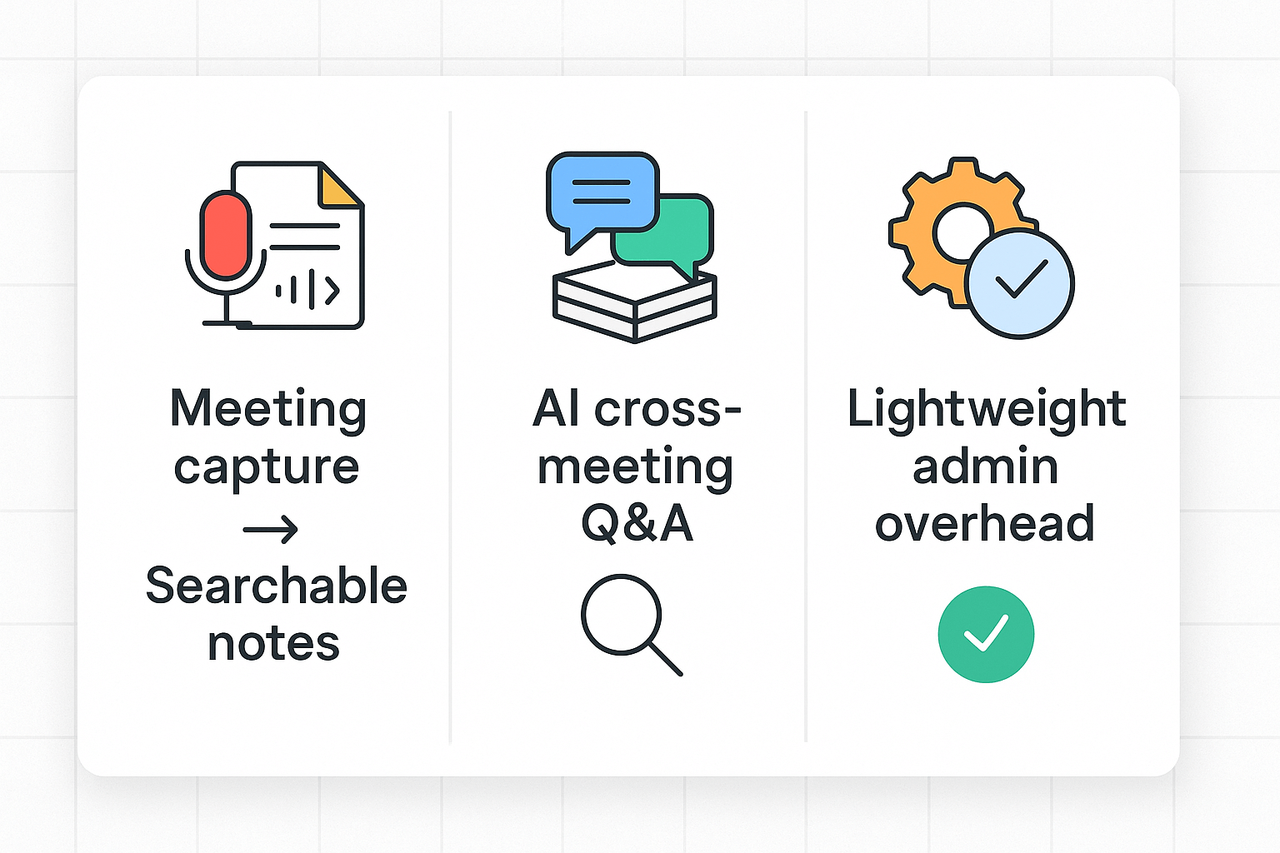
When shopping for tools for knowledge management, small teams should focus on three things: meeting capture that becomes searchable notes, cross-meeting Q&A (so insights don’t live in one file), and low admin overhead. Pick a tool that minimizes setup and makes info easy to find.
Best pick overall: a lightweight, searchable knowledge base that auto-links notes, supports multi-format uploads, and offers helpful AI summaries. It should work for 5–50 people without heavy IT support and keep policies simple.
Best for meeting-heavy teams: a meeting-to-knowledge workflow that records or transcribes conversations, extracts decisions and action items, and lets you ask questions across meetings. That alone cuts follow-up time and repeat work.
Buyer quick test: run a 30–60 day pilot. Validate search relevance, cross-meeting answers, and admin time. If the pilot shows faster follow-ups and fewer missed actions, buy and roll out gradually.
Why knowledge management matters for small teams
Small teams juggle a lot at high speed. Meetings, shared drives, and ad hoc notes pile up fast, and knowledge hides in chat threads and meeting recordings. Choosing the right tools for knowledge management helps rescue decisions, actions, and insights before they are lost.
Common pain points that trigger a KM purchase
Teams usually buy formal KM software after a few recurring problems stack up. Typical triggers include:
- Lost decisions and missing context after meetings. Teams forget who agreed to what.
- Fragmented files across drives, chat apps, and personal notes. No single source of truth.
- Slow onboarding, with new hires repeating old questions. That wastes senior time.
- Repeated follow-ups and missed action items. Work stalls and trust erodes.
- Risk and compliance gaps when record keeping is inconsistent.
These issues cost time and create friction. Small teams feel the pain quickly because every team member wears multiple hats.
Practical benefits small teams get from KM
A focused knowledge system makes daily work simpler. It reduces rework and speeds decisions. It also makes work visible across the whole team.
- Faster onboarding: new hires find past decisions, templates, and meeting summaries in one place.
- Fewer missed actions: searchable notes and clear meeting outcomes cut follow-ups.
- Better reuse: templates and tagged content speed repeat work and proposals.
- Faster search: one query finds conversations, recordings, and documents together.
- Risk reduction: consistent records help with audits and client questions.
If your team needs searchable meeting records and cross-file Q&A, review options among the best knowledge management software. For meeting-heavy teams, platforms that capture recordings and make notes chat-ready add outsized value.
When to invest in formal KM software
You don’t need a full system on day one. But buy sooner rather than later if these signs appear:
- You hold many recurring meetings and decisions are slipping.
- New hires keep asking basic questions about processes.
- People spend more than 30 minutes a day hunting for documents.
- You must keep traceable records for clients or compliance.
- Work relies on insights from recorded calls or interviews.
Small teams that act at these points usually save time and avoid costly mistakes.
One practical example
A meeting-driven team can get immediate value by capturing audio and turning it into searchable notes. TicNote Cloud can record meetings, transcribe them, and group insights across sessions into a single workspace. This type of workflow turns ephemeral conversations into reusable knowledge.
Investing in KM isn’t about adding bureaucracy. It’s about saving collective time, keeping decisions visible, and making your team confident it can find the right answer fast.
How we chose the Top 7, evaluation criteria and methodology
Choosing the Top 7 tools for knowledge management started with one goal: pick practical platforms small teams can adopt fast. We prioritized tools that make meetings, documents, and recordings useful again. Below we list what we scored, how we tested, and why the shortlist is trustworthy.
Scoring factors we used
We scored each tool on five weighted areas. Each area maps to common small team needs.
- Features and workflow fit (30%): Meeting capture, searchable transcripts, team Q&A, knowledge base, and AI-assisted summarization. We checked how well a tool turns meeting content into reusable knowledge.
- Usability and setup time (20%): How long to onboard five to 50 users, clarity of UI, templates, and admin controls. We measured setup steps and first‑hour productivity.
- Integrations and import/export (15%): Native links to Slack, Notion, calendar apps, common file types, and bulk import. Export formats matter for backups and compliance.
- Pricing transparency and value (15%): Clear plan tiers, real limits on transcription or storage, and predictable per-user costs. We favored tools with free tiers for pilots.
- Security, privacy, and compliance (20%): Data handling, encryption, admin controls, and company privacy claims.
To ground our security and KM requirements we referenced the industry standard [ISO 30401:2018] which provides requirements and guidelines for establishing, implementing, maintaining, reviewing, and improving an effective knowledge management system in organizations.
Reviewer testing and data sources
We combined three evidence streams. First, vendor docs and pricing pages gave raw feature lists. Second, hands-on testing checked real behavior. Our review team ran scripted pilots, which included:
- Record and transcribe a 45 minute meeting.
- Upload three file types: audio, video, and a PDF.
- Ask five cross-file queries in the tool’s chat or search.
- Export notes in common formats and check metadata.
Each task had pass, partial, or fail scoring. We logged time to complete tasks, error rates, and quality of summaries. We also ran quick user tests with small teams in real workflows. Finally, we searched public reviews and product changelogs for stability signals.
E-E-A-T, traceability, and how you can replicate this
Expertise, experience, authoritativeness, and trust matter. Our reviewers have enterprise search and KM experience. We document test scripts, raw scores, and notes. That lets you audit our findings or repeat the tests.
To replicate: use the same scripted pilot above, apply the five weighted criteria, and score each tool numerically. Share raw notes and screenshots. That transparency helps buyers with different needs and legal constraints.
The result is a shortlist that balances features, cost, speed of adoption, and safety. Use the same steps to validate fit for your team before you buy.
At‑a‑glance comparison: Top 7 KM tools for small teams
Small teams need a tool that captures meeting knowledge, makes it searchable, and fits tight budgets. This quick table compares the top 7 tools for knowledge management so you can scan features, pricing, and best fit at a glance. Use it to spot platforms that turn meetings and notes into a second brain.
Quick comparison table
| Tool | Transcription | AI notes & summaries | Collaboration | Integrations | Typical pricing | Best fit | Quick pros/cons |
| TicNote Cloud | Live + upload | Topic-aware summaries, AI chat | Shared workspace, searchable KB | Notion, Slack, exports | Free / Pro $$12.99 / Biz$$29.99 | Meeting-heavy small teams | Pros: meeting-to-knowledge flow. Cons: speaker diarization limited |
| Otter | Live + upload | Smart summaries, highlights | Shared folders, comments | Zoom, Google Meet, Slack | Free / Paid from ~$8/mo | General note takers | Pros: strong live captioning. Cons: less research tools |
| Fireflies | Live join + upload | Auto-summaries, action items | Team libraries, playback | Slack, CRM connectors | Free / Paid from ~$10/mo | Sales and ops teams | Pros: CRM hooks. Cons: bot joining limits privacy |
| Mem | Upload + live | AI notes, networked memos | Real-time editing, feeds | Slack, calendar | Free / Paid from ~$8/mo | Personal and knowledge workers | Pros: fast capture. Cons: less meeting-focused features |
| Tactiq | Live captions | Clip highlights, notes export | Shareable clips, threads | Google Meet, Zoom | Free / Paid | Quick meeting clips and snippets | Pros: easy clips. Cons: limited long-form KB |
| Granola | Upload-focused | Automated summaries | Team workspace | Common exports | Freemium | Teams that work from recordings | Pros: good uploads workflow. Cons: fewer live tools |
| MeetJamie | Live + upload | AI summaries, task extraction | Shared notes, task links | Calendar, conferencing | Free / Paid | Coaching and client-facing teams | Pros: task capture. Cons: fewer integrations |
Short notes on scanning the table: transcription means live caption or post-meeting upload. AI notes covers automated summaries and chat or Q&A features. Collaboration flags whether shared libraries, comments, or team chats are native.
Pick a shortlist of two tools and run a 2-week pilot. Test three scenarios: a live meeting capture, an upload with multi-file search, and a follow-up Q&A from notes. That will reveal search, reuse, and handoff gaps fast.
Deep dive: TicNote Cloud - meeting notes to second brain (full product profile)
TicNote Cloud turns meeting audio, uploaded files, and notes into a searchable knowledge hub. For teams evaluating tools for knowledge management, this profile shows what the platform does, who it fits, and how a meeting-heavy product team would use it day to day.
One sentence value
TicNote Cloud captures meetings, transcribes and summarizes them, and builds a chat-ready second brain you can query across files.
Core features explained
- AI transcription: live and post-meeting text from audio and video. Multilingual support helps global teams.
- AI summaries and notes: topic-aware summaries and custom templates for decisions, actions, and highlights.
- Shadow cross-file chat: ask questions across meetings and documents with grounded answers (contextual Q&A).
- Deep Research reports: turn a set of meetings and docs into a structured research brief.
- Mind map generator: auto-create visual maps from transcripts for quick review and presentations.
- AI translation: translate transcripts and summaries into 100+ languages for handoff.
- Multi-source uploads: ingest audio, video, and documents to enrich the knowledge base.
- Exports and integrations: export transcripts, summaries, and mind maps, and connect to Slack and Notion.
- Privacy by design: workspaces are private by default and data is not used to train models.
Pricing tiers at a glance
- Free: basic live transcription, 300 minutes per month, 10 AI chats per day, and limited imports.
- Professional: $$12.99 per month or$$79 billed annually. More transcription minutes, longer recordings, unlimited AI chat, and more imports.
- Business: $$29.99 per month or$$239 billed annually. Higher usage caps and extended recording length.
- Enterprise: custom pricing, SSO, 24/7 support, and advanced security features.
Who should consider it
- Meeting-heavy roles: product managers, sales, operations, and customer success.
- Small teams with 5 to 50 people that need to capture tribal knowledge.
- Multilingual or remote teams that must translate notes and share across time zones.
- Teams that want a second brain you can chat with, not just a folder of recordings.
How it turns meetings into a second brain
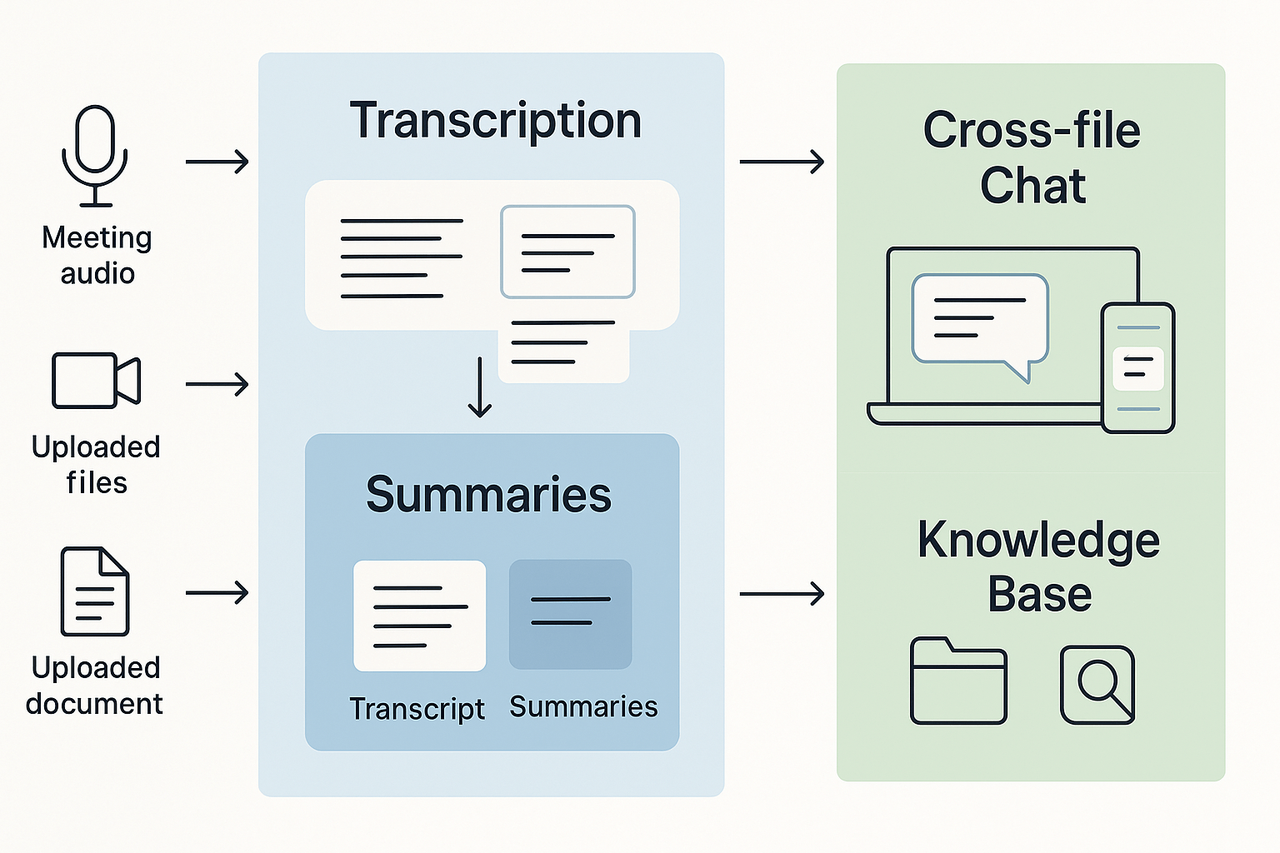
- Capture: record a meeting on device or upload an audio or video file.
- Transcribe: the platform converts speech to text and timestamps key speakers and sections.
- Summarize and tag: AI creates concise notes, marks decisions, and extracts action items.
- Index: transcripts and notes are indexed across the workspace for full-text search.
- Cross-file Q&A: use Shadow to ask questions across meetings and files to surface past decisions.
- Reuse: export summaries, create mind maps, or generate research reports for briefs.
This flow keeps meeting context alive and reduces manual note cleanup.
Mini user case: how a PM team used it
Context: a five-person product team had 10 weekly syncs, ad-hoc user interviews, and a shared drive of scattered docs. They wanted faster handoffs and fewer missed actions.
Week 1: They started on the free plan and recorded all planning and interview calls. The team used a template to capture decisions and owner tags. Each meeting produced a short summary and a list of next steps.
Week 2: The PMs used Shadow to find all past decisions about a feature, across three meetings and two specs. Instead of hunting in folders, they asked one question and got a grounded answer with links to the original meetings.
Week 3: The designer exported a mind map to align the sprint demo. The team reused interview snippets in a research report for stakeholders.
Outcome: prep time dropped before meetings. Follow-ups were clearer. The team reduced repeated questions about past choices, and onboarding a new hire was faster because the new hire could read summaries and ask Shadow for a quick tour of prior work.
Pros and cons
Pros:
- Strong meeting-first workflow that links audio, transcripts, and notes.
- Cross-file Q&A makes historical context easy to surface.
- Mind maps and research outputs help share findings beyond raw transcripts.
- Generous free tier for small teams to test core features.
- Built-in translation supports global collaboration.
Cons:
- Speaker diarization (automatic speaker labels) is limited.
- Enterprise controls like SSO are gated behind the Enterprise plan.
Bias disclosure
This profile highlights the platform as a top option for meeting-driven knowledge workflows. The content is designed to guide buyers but is not an independent lab test. Readers should trial the platform with their own meetings and files before a purchase decision.
Quick checklist for a fast trial
- Record two meeting types: a planning sync and a user interview.
- Upload one past project audio or video file.
- Run Shadow queries for two research questions about past decisions.
- Export a summary and a mind map and share them with one stakeholder.
These steps give a realistic sense of value in less than a week.
Short reviews: 6 other KM tools small teams should consider
Small teams often need dependable tools for knowledge management to capture work and make it findable. This list gives quick, comparable reviews of six strong options. Each mini review names the one best fit, a short pros and cons sentence, and the ideal small team scenario for choosing it.
Notion
Notion is best for unified notes, docs, and lightweight databases. It blends freeform pages with relational databases for projects and SOPs. Pros: flexible layout and templates speed setup. Cons: large workspaces can feel messy without strong structure. Ideal scenario: teams that want a single workspace for docs and project trackers.
- Best fit: all-in-one docs and simple databases.
- Quick pro: highly customizable templates and blocks.
- Quick con: needs a workspace owner for structure.
Quick buying note: start with the free tier. Build a template library first. Assign page owners to avoid drift.
Google Workspace and Drive
Google Workspace is best for real-time collaboration on familiar docs and sheets. It is low friction because most teams already use Gmail and Drive. Pros: fast, reliable collaboration and search. Cons: limited structured knowledge features for long-term reuse. Ideal scenario: teams that need simple, live collaboration and shared folders.
- Best fit: real-time editing and team drive sharing.
- Quick pro: ubiquitous apps and easy sharing controls.
- Quick con: not built for cross-doc knowledge linking.
Quick buying note: use shared drives and consistent naming. Add a short index doc per folder to aid discovery.
Microsoft OneNote and SharePoint
Microsoft handles mixed content and enterprise file control well. OneNote fits informal note capture, while SharePoint offers structured libraries and permissions. Pros: strong file governance and Office integration. Cons: setup and permissions can be complex. Ideal scenario: teams on Office 365 seeking tighter document controls.
- Best fit: regulated teams needing secure storage and governance.
- Quick pro: integrates with Outlook and Teams easily.
- Quick con: admin overhead for small teams.
Quick buying note: map permissions before you migrate. Use site templates for repeatable structure.
Mem and Obsidian (personal-second-brain tools)
Mem and Obsidian are best for personal knowledge and fast search. They shine at linking notes and building a personal second brain. Pros: fast capture and strong cross-linking. Cons: team features are lighter than full KB platforms. Ideal scenario: individual contributors and small teams that want linked personal notes.
- Best fit: knowledge workers building personal repositories.
- Quick pro: frictionless capture and backlinks.
- Quick con: limited multi-user governance out of the box.
Quick buying note: choose Mem for cloud sync and team sharing. Choose Obsidian for local control and plugins.
Confluence and classic knowledge base tools
Confluence is best for formal documentation and policy libraries. It supports hierarchical pages, templates, and page history. Pros: built for documentation lifecycle. Cons: it can feel heavy for very small teams. Ideal scenario: teams that need living SOPs and audited version history.
- Best fit: documentation, SOPs, and regulated notes.
- Quick pro: strong templates and permissioning.
- Quick con: can be slow to update without a content owner.
Quick buying note: adopt a clear page lifecycle. Use labels and a short index per team.
Otter and Fireflies (transcription-led workflows)
Otter and Fireflies are best for teams that rely on meeting transcripts. They turn audio into searchable text and highlights. Pros: saves meeting note time and improves recall. Cons: transcripts need cleanup and tagging for long-term use. Ideal scenario: meeting-heavy teams that want searchable conversations.
- Best fit: transcription and post-meeting note capture.
- Quick pro: automated transcripts and speaker notes.
- Quick con: requires manual tagging for knowledge reuse.
Quick buying note: combine transcripts with a KB. Tag action items immediately after the call.
Comparison checklist for small teams
Use this checklist to match choice to your team needs. Pick the items that matter most, then match a tool above.
- Need live editing and low friction: Google Workspace.
- Need structured docs and templates: Confluence or Notion.
- Need personal second brain: Mem or Obsidian.
- Need secure file governance: SharePoint and OneNote.
- Need meeting transcripts: Otter or Fireflies.
How to pick in 10 minutes
Start by listing three must-haves. Time to value, search, and governance are common ones. Score each tool above on those three items. Run a short pilot with 2 to 5 users for two weeks. Use that pilot to test capture, search, and reusability.
By the end of the pilot you should know which tool matches your workflow and culture. If you need both transcripts and a KB, combine a transcription tool with a documentation platform. That pairing often gives the best results for meeting-led teams.
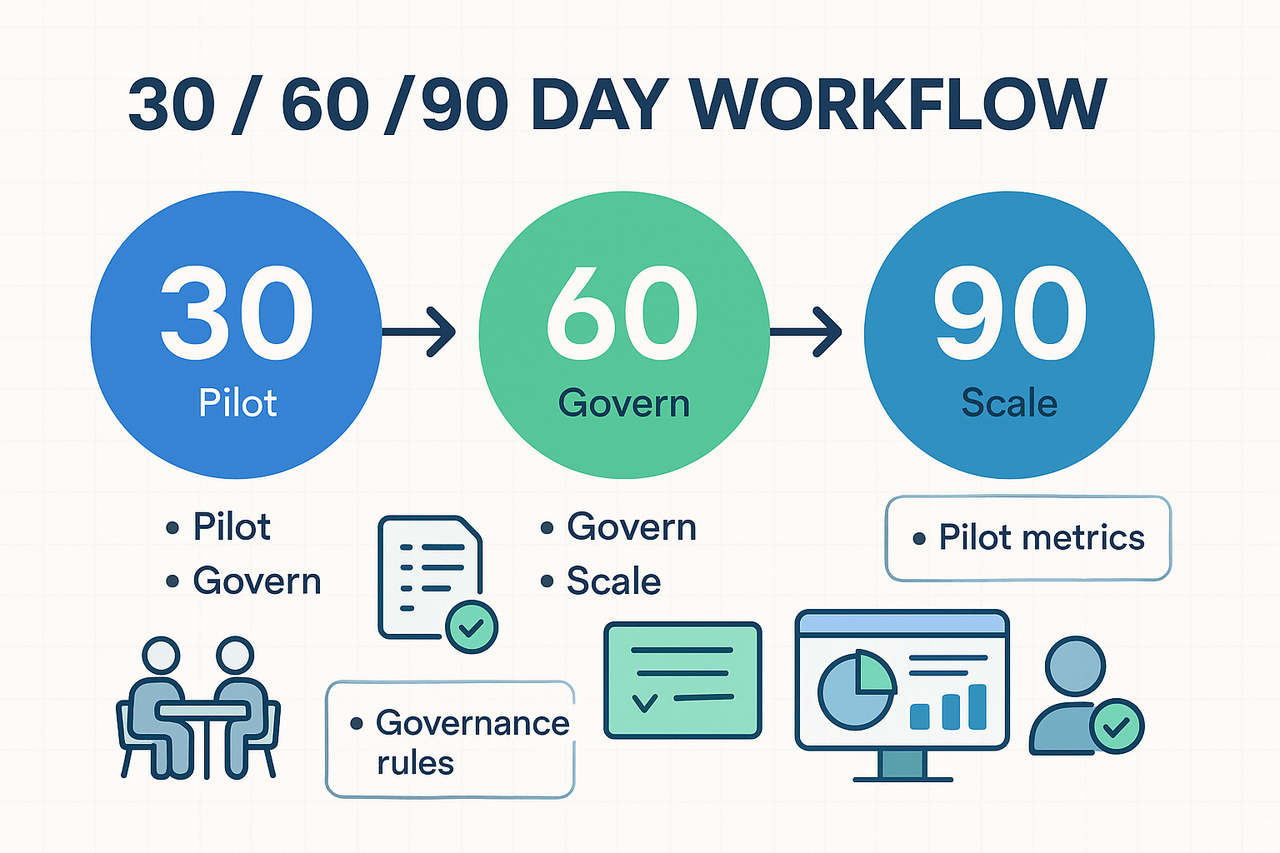
Implementation playbook for small teams (30/60/90 day plan)
Choosing and rolling out tools for knowledge management takes focus and short loops. This playbook shows a practical 30, 60, and 90 day sequence you can run with a small team. It prioritizes a tight pilot, simple governance, and measurable signals of value. Keep meetings as a primary knowledge source and turn notes into reusable assets.
Before you start: pre-launch checks
Run these checks in the week before your pilot. Keep the list short and visible.
- Define success, in plain language: faster find time, fewer follow ups, or better onboarding. Pick one primary metric.
- Pick a small scope: one team, two workflows, or three regular meeting types.
- Inventory sources: meeting recordings, slide decks, shared drives, and key docs.
- Confirm privacy and security needs for recordings and AI use.
- Prepare simple templates: meeting note, decision log, and task handoff.
Days 1 to 30: run a focused pilot
Goal: prove the tool captures and returns usable knowledge. Run only what you can measure.
- Kickoff in 30 minutes. Explain goals and what success looks like.
- Onboard 5 to 12 core users who run frequent meetings.
- Connect sources: calendar, Zoom or audio recorder, and file storage.
- Use one meeting template for all pilot meetings. Capture actions and owners.
- Transcribe and summarize every pilot meeting. Share summaries in the same channel.
- Ask users to perform two tasks: find a past decision, and extract assigned actions.
- Log friction points each week. Triage fixes fast.
- Track pilot metrics (see list below). Review week three and adjust templates.
Pilot metrics to track (simple, binary where possible)
- Minutes transcribed per week.
- Percentage of meetings with a usable summary.
- Time to find a decision or task in search.
- Number of follow ups created from meeting notes.
- Active users and weekly retention.
Days 31 to 60: govern and optimize
Goal: reduce noise, tighten structure, and make the workspace repeatable.
- Define ownership: who curates the knowledge base and who audits content.
- Create three governance rules: where notes live, naming conventions, and retention.
- Roll out 3 templates: sprint retro, client meeting notes, and onboarding checklist.
- Train users in 20 minutes: quick wins, search tips, and how to ask the workspace questions.
- Set a weekly review ritual: one person verifies summaries and tags items.
- Capture reuse examples: when a summary saved time or prevented a duplicate meeting.
Use two lightweight governance checks each week: content accuracy and tag consistency. Keep automation on by default for transcription and summarization. That reduces manual work for busy teams.
Days 61 to 90: scale and measure value
Goal: expand to adjacent teams and measure business impact.
- Open access to one new team. Keep the same templates and naming rules.
- Run short onboarding sessions for new users. Focus on search and the Q&A feature.
- Establish fortnightly metrics reviews with a short dashboard.
- Tie one operational KPI to the tool, like reduced meeting time or faster onboarding.
- Capture three user stories showing time saved or better decisions. Share them widely.
- Decide whether to add more integrations or upgrade plan tiers.
Measurement checklist for the 90 day review
- Adoption rate by team and role.
- Mean time to find decision or reference.
- Reduction in follow up meetings per week.
- Number of notes reused across projects.
- Qualitative user feedback and three short case notes.
Governance essentials and starter templates
Keep governance practical, not bureaucratic. Start with these essentials.
- Naming convention example: YYYY-MM-DD_team_topic.
- Access rule: default viewable, edit by role.
- Retention: keep raw transcripts but summarize and archive monthly.
- Templates: meeting summary, decision record, and task handoff.
Quick risks and mitigation
- Risk: low adoption. Mitigate with two champions and clear quick wins.
- Risk: noisy summaries. Mitigate with a short template and a reviewer.
- Risk: data privacy concerns. Mitigate with explicit rules and consent before recording.
Want a simple example of a tool that covers transcription, summaries, and cross-meeting search? One platform offers a free tier you can trial during the pilot to validate these steps.
Decision matrix: which tool to pick (role, budget, use case)
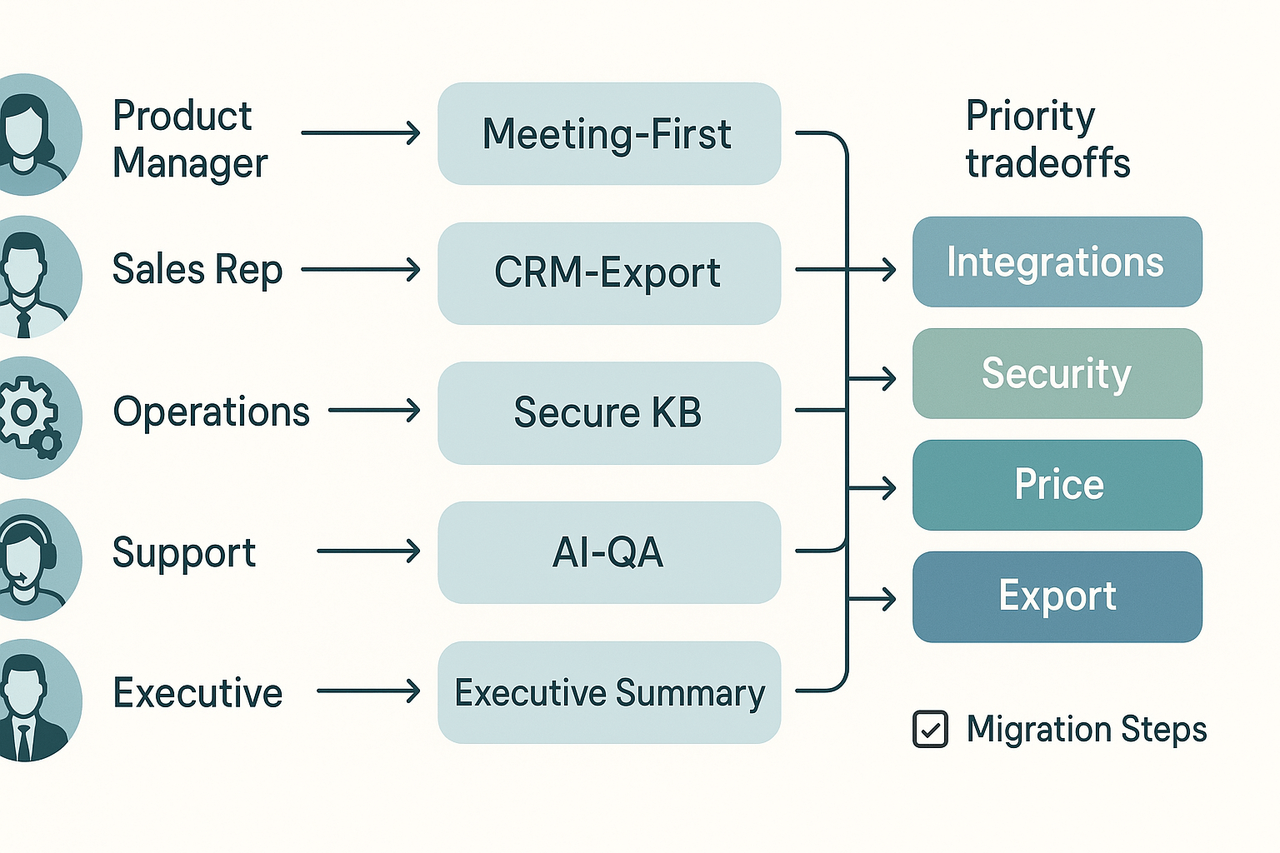
Picking the right tool starts with who will use it and what success looks like. Use this decision matrix to map common roles to recommended tool archetypes, weigh budget and security tradeoffs, and plan a safe migration. If your team runs meetings as the main source of knowledge, prioritize platforms that convert calls, recordings, and notes into a searchable second brain, since tools for knowledge management should reduce search time and surface decisions.
Role driven recommendations
- Product manager (PM)
- Best fit: meeting-first KM tools with topic tagging, cross-meeting search, and task extraction. These tools capture decisions and link action items to tickets.
- Priority tradeoffs: look for lightweight templates and Shadow-style cross-file Q&A. If meetings are the content hub, consider TicNote Cloud for its meeting-to-knowledge workflow and cross-meeting insights.
- Sales
- Best fit: capture-and-send KM tools that support call summaries, CRM exports, and snippets for playbooks.
- Priority tradeoffs: favor fast export options and native Slack or CRM integrations over complex admin controls.
- Operations and HR
- Best fit: secure knowledge bases with structured templates, role-based access, and SSO (single sign-on) support.
- Priority tradeoffs: prioritize compliance features and admin controls even if advanced AI features cost more.
- Support and success teams
- Best fit: searchable KBs with AI Q&A across tickets and recordings. Look for topic-aware notes that reduce time to answer.
- Priority tradeoffs: choose tools with easy ingestion of past tickets and call recordings; speaker diarization is nice but not required.
- Executives and chiefs of staff
- Best fit: concise executive summaries, meeting highlights, and cross-team syncs.
- Priority tradeoffs: pick tools that offer tight privacy defaults and fast export to slide or doc formats for board packs.
Budget tiers and best fits
- Bootstrapped teams ($$0 to$$15 per user monthly)
- Pick tools with free tiers that include transcription minutes and basic exports. Prioritize platforms that let you trial core workflows without a time-limited trial.
- Growth teams ($$15 to$$40 per user monthly)
- Expect richer transcription, more import capacity, and unlimited AI chat. Focus on integrations, team controls, and moderate admin features.
- Enterprise buyers (custom pricing)
- Require SSO, dedicated support, and custom data residency. Budget for onboarding and security review time.
Choose the best knowledge management software for your tier by matching minutes of transcription, file import limits, and AI features to your meeting density.
Migration and integration checklist
Follow this ordered checklist when you move knowledge into a new platform:
- Inventory sources: list meeting platforms, drives, docs, ticketing systems, and recorded audio.
- Map content types: tag items as decisions, tasks, reference, or research.
- Prioritize quick wins: migrate recent, high-value meetings and top-playbook docs first.
- Confirm exports and imports: test transcript, markdown, and audio exports.
- Set access policies: create role groups and test SSO or invite flows.
- Train champions: run short sessions for 2–3 power users who will shape templates.
- Monitor and iterate: track search queries, saved answers, and reuse rates for 30 days.
This order keeps risk low and shows value fast.
Security and compliance tradeoffs
- Data residency and encryption: check whether the vendor stores data in a jurisdiction your team requires. If you need EU data controls, confirm residency options.
- Admin controls: SSO and granular permissions prevent accidental exposure, but they often appear only on higher tiers. Plan license costs accordingly.
- AI and training data: prefer vendors that state the data is private by default and not used to train public models. That matters for client-sensitive work.
- Legal review: for EU rules, note that European Data Protection Board (2025) issues guidelines, recommendations, and best practices to clarify EU data protection laws and promote common understanding. Use those recommendations to scope vendor contracts and data processing agreements.
Quick decision flow and next steps
- If meetings create most knowledge: pick a meeting-first tool with strong cross-meeting search and summaries.
- If you need strict controls: pick a tool with SSO and enterprise contracts, even if it costs more.
- If budget is tight: start on a free plan, migrate a small pilot, and measure reuse before expanding.
Use this simple scoring method: assign 1 to 3 points per requirement across role fit, budget fit, integration fit, and security fit. Total scores guide shortlisting. Run a 30-day pilot with 2 champions and 10 core users. Track three metrics: search success rate, time to decision retrieval, and number of tasks captured from meetings.
Decision aids like this reduce guesswork. Follow the checklist, run a focused pilot, and pick the tool that balances role needs, budget, and compliance.
Next steps & recommended CTAs (how to evaluate in your team)
Start small, test fast, and measure what matters. This brief plan shows three practical CTAs your team can run this week to evaluate tools for knowledge management and pick a winner. Each item is executable, low overhead, and aimed at turning meetings into reusable knowledge.
Run a quick free trial checklist
- Invite two pilot users from different functions, like product and customer success.
- Record three typical meetings and upload one recorded call.
- Create one custom note template for decisions and action items.
- Test search across meetings, docs, and transcripts.
- Try the AI chat on one project folder and ask three cross-meeting questions.
- Capture feedback with a 5-question survey after three sessions.
Run a focused two-week pilot
- Week 0, prep: Pick success metrics and baseline them, e.g., time-to-find notes, action follow-through, and meeting prep time.
- Week 1, adoption: Onboard five active users, run daily check-ins, and collect usage logs.
- Week 2, evaluation: Run task tests: find a decision, export a summary, and ask a cross-file question.
- Wrap: Hold a 45-minute review, score outcomes, and record blockers.
Use this internal review scorecard
Score each category 1 to 5, where 4 means “meets needs” and 5 means “exceeds.” Key categories:
- Adoption friction (setup, training)
- Capture quality (transcription and summaries)
- Search and cross-meeting Q&A
- Integrations and exports
- Privacy and compliance
- Cost and licensing fit
A passing pilot needs an average score of 3.5 and no score lower than 2 in privacy or capture quality.
Downloadables and next steps: offer a linked 30/60/90 onboarding checklist at demo time, schedule a product walkthrough, and join a live webinar for hands-on tips.
Try TicNote Cloud free today, get the 30/60/90 onboarding checklist and book a demo