Extension
TL;DR: Key takeaways on academic transcription for research interviews
What is academic transcription in one line: it’s the process of turning recorded research interviews into written text for coding, quote extraction, and accessibility. Transcripts make interviews searchable, comparable, and ready for analysis or archiving.
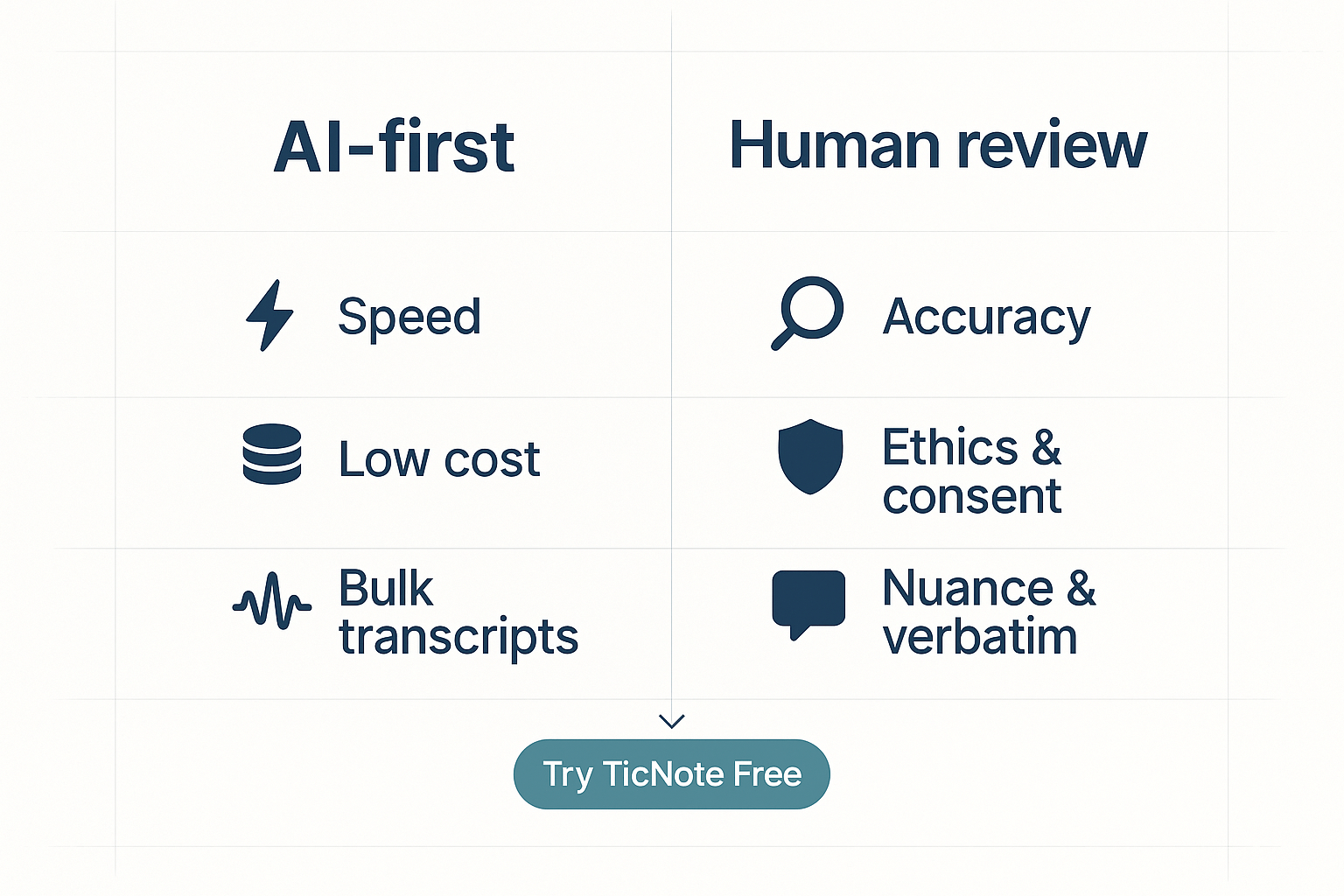
Use AI when you need speed, scale, and lower cost: bulk uploads, quick summaries, live captioning, and initial coding. Use human transcribers for legal or ethical sensitivity, poor audio, heavy dialects, or when verbatim nuance matters. A pure human approach brings accuracy but costs time and budget.
Best practice: AI-first plus targeted human review. Let automated transcription handle the heavy lifting, then have trained reviewers fix speaker labels, timestamps, and high-stakes quotes. This hybrid workflow saves weeks on large projects while protecting quality and consent.
Choose tools that offer live transcription, contextual AI chat, and exportable summaries or mind maps. Those features speed note taking, support cross-file Q&A, and turn raw interviews into research-ready artifacts. Always pair the tech with clear consent, secure storage, and a transcript QA checklist.
What is academic transcription and common research use cases
What is academic transcription, and why does it matter for research? Academic transcription is the process of turning audio or video recordings from studies into written text. It covers many spoken data types, and it makes qualitative work searchable, shareable, and analyzable.
Scope: which recordings count as academic transcription
Academic transcription covers interviews, focus groups, lectures, and participant observation recordings. It also includes oral histories, seminar Q and A sessions, and recorded usability tests. Researchers may transcribe audio captured in the field, recorded online interviews, or classroom sessions.
- Interviews: one-on-one or paired interviews used for thematic or narrative analysis.
- Focus groups: multi-speaker sessions where turn-taking matters.
- Lectures and seminars: for content analysis and citation.
- Field notes and participant observation: when recorded audio supplements notes.
Transcript styles: verbatim, intelligent, and edited
Transcripts come in three common styles. Verbatim captures every filler word, pause, and nonverbal utterance like laughter. Intelligent verbatim cleans fillers and small false starts, while keeping meaning intact. Edited transcripts polish grammar and remove repetitions to improve readability for publications.
Choose verbatim when you need precise talk features for discourse analysis. Pick intelligent verbatim for coding and grounded theory work, where clarity speeds analysis. Use edited transcripts for reports, teaching, or public-facing materials.
Why transcripts matter for qualitative coding and rigor
Good transcripts let you run reliable qualitative coding. Text lets you tag themes, assign timestamps, and measure inter-coder agreement. Transcripts improve reproducibility because other researchers can audit your coding and methods. They also make archiving easy: searchable text files fit institutional repositories and long-term storage.
Transcripts support accessibility and inclusion. They provide readable versions for participants with hearing loss and for interdisciplinary teams. They also let reviewers and IRBs inspect consent, anonymization steps, and sensitive content without replaying audio.
How transcripts speed synthesis, ethics, and IRB processes
Well-made transcripts cut time in literature synthesis and write-ups. You can quote participants directly, compare cases, and extract excerpts for tables. Transcripts also simplify IRB reviews: de-identified text shows how you protect privacy. That clarity shortens ethics approvals and helps meet journal transparency standards.
Common research use cases in practice
Here are quick, practical uses where transcripts add value.
- Thematic analysis and codebook development.
- Discourse and conversation analysis that needs exact wording.
- Training and calibrating multiple coders with the same source text.
- Creating teaching case studies and annotated excerpts.
- Building searchable qualitative datasets for meta-synthesis.
A clear transcript is more than a record. It is a research artifact that improves rigor, speeds review, and expands participation. Use the style and level of detail that match your method, your IRB terms, and your archiving plan.
Why use AI to transcribe research interviews: benefits and trade-offs
If you ask what is academic transcription, the short answer is this: it turns recorded interviews into usable text for analysis. AI transcription speeds that work up. It also cuts costs, makes text searchable, and helps teams share data quickly.
Major benefits of AI transcription
- Speed and turnaround. AI gives near-instant transcripts after upload or live capture. This speeds coding and early analysis.
- Lower per-hour cost. Automated tools cut the hourly spend versus full human services. That matters for large interview sets and student budgets.
- Searchable and structured text. AI outputs searchable transcripts, timestamps, and speaker markers. You can jump to quotes fast.
- Better accessibility and sharing. Transcripts help participants with hearing loss and simplify team review across time zones.
- Integrations and analyses. Many AI tools connect to note workflows, summarizers, and mind-map generators. That turns raw text into insight faster.
Key accuracy trade-offs and limits
AI is fast, but it is not perfect. Accuracy dips with heavy jargon, noisy audio, and overlapping talk. Accent and dialect variation can raise error rates. Even with modern models, proper nouns and discipline terms still get garbled.
An ICASSP 2023 study found LLM rescoring cut WER by up to 8% (Large-scale Language Model Rescoring on Long-form Data (2023)). That shows model improvements matter. Still, an 8 percent improvement does not erase all errors. For verbatim quotes, small errors can change meaning.
Other limits to watch:
- Speaker overlap. AI often misassigns lines when people talk at once.
- Domain jargon. Rare technical terms may be transcribed poorly.
- Punctuation and pauses. AI may not mark emphasis, tone, or hesitations reliably.
- Consent and privacy. Automated uploads change data flow and storage risks.
Rules of thumb: when AI-only is acceptable
Use AI-only transcription for low-stakes tasks. Good cases include:
- Exploratory interviews and early-stage user research. You need broad themes fast.
- Internal notes and accessibility aids. Quick drafts are often enough.
- Large-sample surveys where verbatim accuracy is not critical.
When you choose AI-only, add a short human spot check. Review key quotes and any passages you plan to publish.
When to require human or hybrid workflows
Use human or hybrid review when the stakes are high. Choose human verification for:
- Thesis chapters, peer-reviewed publications, and direct participant quotes.
- Interviews where legal or safety issues are present.
- Complex, jargon-heavy fields where exact wording matters.
A simple hybrid approach works well: run AI first, then assign focused human review. Humans correct named entities, speaker labels, and verbatim quotes. This saves time and retains accuracy.
Quick checklist before you pick a path
- Confirm consent for recording and automated processing.
- Test audio quality with one sample interview.
- Build a short domain glossary for names and terms.
- Decide whether verbatim quotes will be published.
- Plan a review step if accuracy matters.
AI transcription is a powerful tool for research interviews. It speeds work, lowers cost, and opens new analysis paths. But it comes with real accuracy and privacy trade-offs. Use AI where speed matters, and add human review where precision matters.
Academic teams need clear features that match their research workflows. TicNote Cloud groups live audio capture, transcript cleaning, and insight tools into one flow. If you asked "what is academic transcription" this section shows how that work looks in practice, from record to coded insight.
Live transcription and multi-source uploads: capture every voice
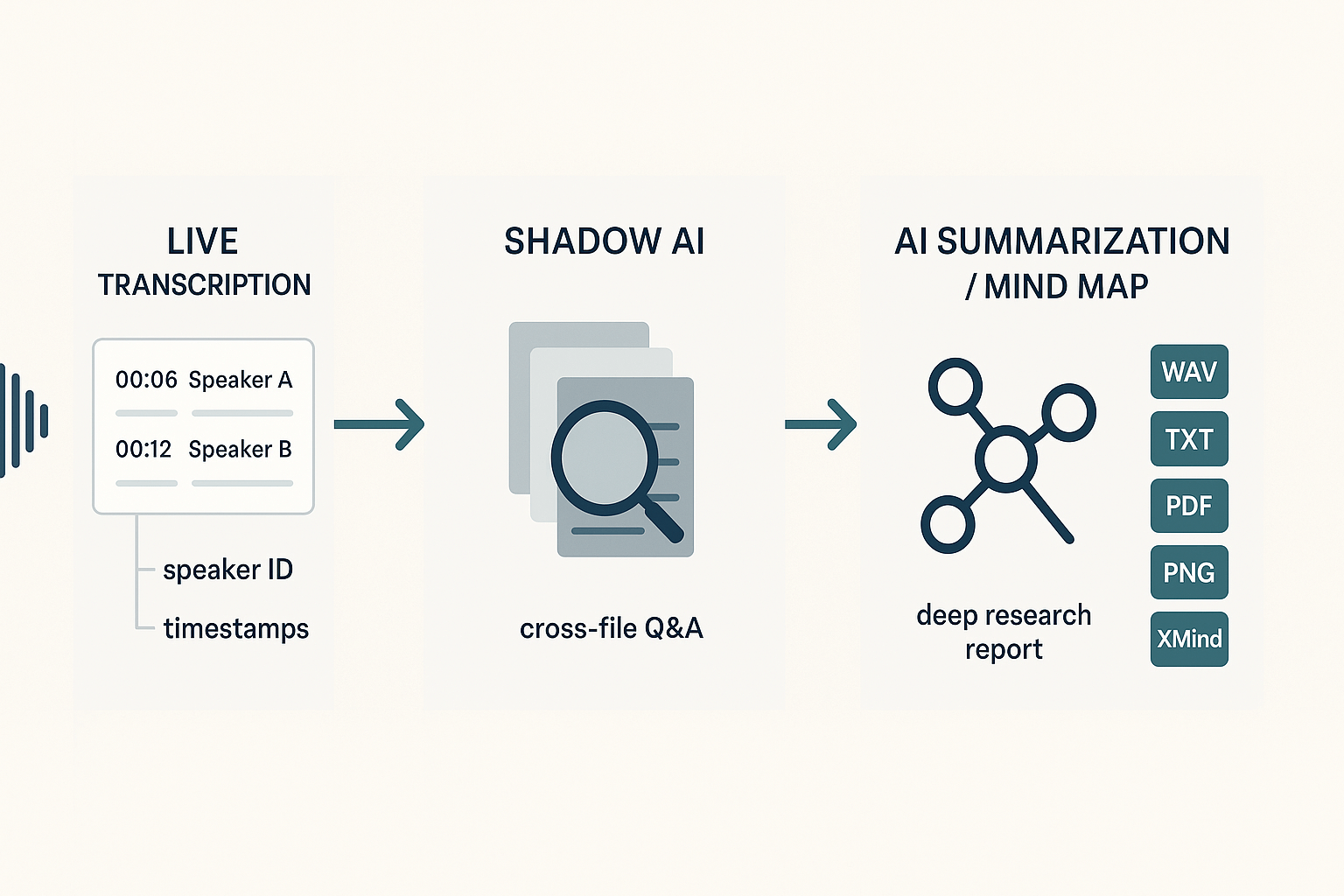
Live transcription records interviews in real time and creates timestamped text instantly. You can also upload interviews, focus group recordings, or lecture videos to create post-hoc transcripts. That matters for studies that mix field audio, Zoom calls, and recorded lab sessions.
Key benefits for researchers:
- Real-time captions for accessibility and note-taking.
- Batch uploads for large interview sets.
- Speaker ID and timestamps so you can link quotes to audio clips.
Shadow AI for cross-file Q&A: search across a project
Shadow AI lets you ask questions across transcripts, notes, and files in one place. Ask for all mentions of a theme, or pull every quote from a participant group. Shadow helps with rapid memoing and early theme spotting, so you can surface candidate codes faster.
Why that matters for qualitative teams:
- Cross-file recall speeds literature triangulation.
- Grounded answers come from the workspace, not generic web models.
- Works for multi-language projects with translation support.
AI summarization and Deep Research reports: from raw text to structured insight
Use AI summarization to create short summaries and topic-based notes for each interview. Deep Research turns a folder of transcripts into structured findings, with suggested themes and supporting quotes. That saves time on first-pass analysis and helps teams prep codebooks.
Use cases where this helps most:
- Rapid synthesis for meeting updates and ethics reviews.
- Drafting results sections for papers or theses.
- Preparing pre-registered analysis plans with exemplar quotes.
Speaker ID, timestamps, and export options: auditability and reuse
TicNote supports speaker labels, precise timestamps, and exports in common academic formats. You can download WAV for audio, TXT for raw transcripts, Markdown or PDF for summaries, and PNG or Xmind for mind maps. Those exports fit institutional storage, manuscript drafts, and teaching reuse.
How does this map to audit and archiving needs:
- WAV and TXT files meet many IRB archival rules for raw data.
- Time-aligned transcripts make quote verification fast.
- Passportable formats support sharing with collaborators.
Mind maps for visual summaries: present and teach findings
Auto-generated mind maps turn long transcripts into visual hierarchies. Use these for lab meetings, poster sessions, or stakeholder briefings. The visuals help communicate themes to non-technical committees and accessibility offices.
Privacy by default and workflow fit
TicNote stores data privately by default and does not use user data to train public models. That design supports institutional review and data governance. Combined with encrypted storage and standard export formats, the platform fits common university workflows.
Quick feature checklist for academic fit:
- Capture: live transcription, device or extension recording.
- Ingest: multi-source uploads (audio, video, doc).
- Search: Shadow cross-file Q&A and translation.
- Summaries: AI notes, topic summaries, Deep Research reports.
- Visualization: mind map export to PNG and Xmind.
- Audit: speaker ID, timestamps, WAV and TXT exports.
- Privacy: private-by-default storage, encryption, and exportable artifacts for IRB.
These modules make TicNote Cloud a practical choice when you need fast transcripts, quality control, and shareable insights. The flow from audio to transcript to structured findings is designed to support coding, IRB archiving, and accessible outputs in a single workspace.
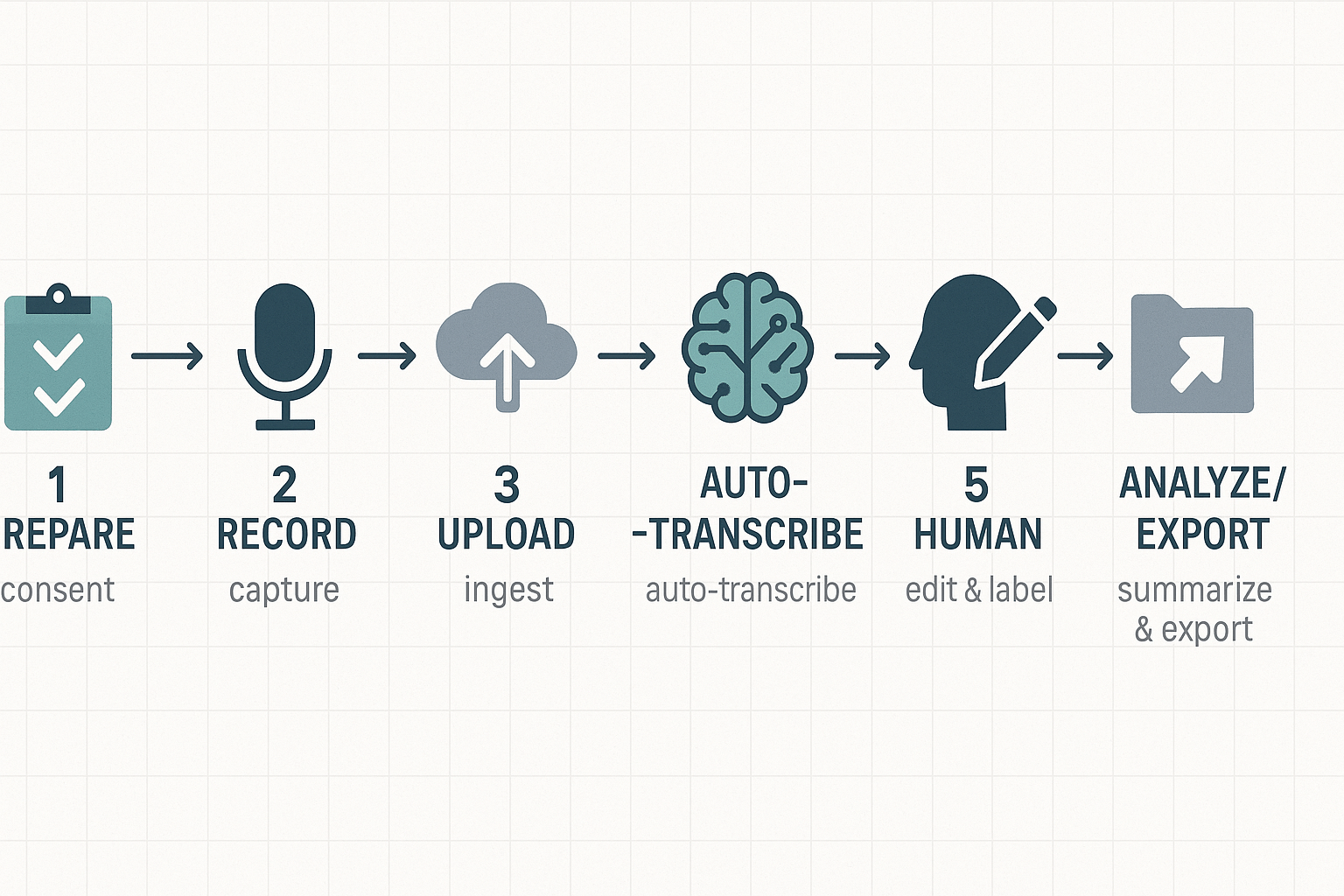
Step-by-step workflow: record, transcribe, verify, and analyze in TicNote
Start with a clear plan, a consent script, and a quick tech check. If you are wondering what academic transcription is, this workflow shows how to capture interviews reliably, convert audio to text, and prepare verified data for coding and analysis. The steps below are practical and chronological, written for researchers and students who need both speed and rigor.
1. Prepare: consent language and recording checklist
Write one short consent script to read or send before each session. Include recording purpose, storage length, who can access the files, and whether automated transcription will be used. Keep a checklist: device battery, external mic test, quiet room, backup recorder, participant initials, and IRB notes. Save a master consent template to reuse across interviews.
2. Record: browser extension and offline capture tips
Use TicNote Cloud for browser-based capture when you run online interviews. For phone or in-person sessions, use a high-quality recorder and a separate backup. Record mono audio at 44.1 kHz if available. Place the mic close to the speaker and keep background noise low. Note start and stop times and a brief session log with participant ID.
3. Upload: get audio into the TicNote Cloud fast
After the interview, upload the original audio or video to TicNote. The platform accepts WAV and common video files. Give each file a clear, project-based name and add metadata: date, interviewer, participant code, and consent status. That metadata helps later retrieval and IRB audits.
4. Auto-transcribe: use live or post-meeting AI
Start automatic transcription in TicNote Cloud. You can use live transcription during interviews or post-process uploads for higher throughput. TicNote’s AI auto-transcribes and timestamps the text, then generates topic-aware notes and an initial summary. Let the AI create a draft transcript, but do not treat it as final data.
5. Human verify: edit, flag, and version control
Open the transcript and play the audio while you edit. Correct names, jargon, and overlapping talk. Use TicNote’s annotation tools to mark low-confidence segments and add speaker labels. Keep a version history and store the verified file as the official transcript. If coding will be shared, create a read-only copy for the analysis team.
6. Analyze: query, annotate, and build a codebook with Shadow
Use Shadow AI to ask direct, grounded questions about a transcript or folder. Pull quotes by topic and auto-generate thematic summaries. Create or refine a codebook inside TicNote: list codes, definitions, inclusion and exclusion examples. Use the mind map feature to visualize relationships between themes before formal coding.
7. Generate outputs: summaries, codebook exports, and archives
Create an AI summary and a formatted transcript export for your NVivo, MAXQDA, or Atlas.ti workflow. Export the transcript as TXT and the summary as DOCX or PDF. Export the mind map as PNG for presentations. Archive the original audio and the final transcript together for IRB record-keeping.
Quick QA checklist (use after each interview)
- Confirm that the consent file and metadata are saved.
- Verify audio file integrity and label accuracy.
- Correct all participant names and technical terms.
- Flag unclear segments for follow-up with participants.
- Export the final transcript and archive it with the source audio.
This workflow balances speed and rigor: AI gets you a fast draft, human review gives you research-ready quality, and TicNote ties files and notes into a single research space. Want ready-to-use consent and QA templates, or an enterprise sandbox for IRB workflows? Try the platform and see how it fits your lab.
Accuracy, QA and quality-control checklist for interview transcripts
Good transcripts start with clear expectations. If you’ve ever wondered what is academic transcription, this section shows where automatic speech recognition (ASR) systems usually fail, and how to set up a compact quality assurance routine for research interviews. The goal: fast first drafts from AI, and tight, defensible edits for publication or consented data.
Common AI transcription errors to watch for
AI systems do a lot well, but they make repeatable mistakes. Here are the error types you will see most often:
- Mis-transcribed jargon and technical terms, especially field-specific names and acronyms. AI models learn general speech, not niche lexicons.
- Homophones and near-homophones, for example, "cite" versus "site," or "principle" versus "principal." Context helps, but models sometimes pick the wrong one.
- Dropped short words and filler mis-labels, like omitted "a," "the," or mis-rendered "um" and "uh." These change clause's meaning or tone.
- Speaker attribution errors: merged speakers, swapped labels, or missed speaker turns. This is common in multi-person interviews.
- Punctuation and sentence boundary errors, which affect readability and downstream parsing for coding.
- Timestamp drift and alignment issues between audio and transcript, especially after file edits or re-encoding.
Spotting these error classes early shortens review time. Keep a short list of recurring problem words for each project.
Compact QA checklist for interview transcripts
Follow this short, ordered checklist when you proofread an interview transcript:
- Do a timed spot check: listen to short audio clips at these timestamps: start, every 10 minutes, and the final 30 seconds. Verify words and speaker labels.
- Build and use a project glossary: add names, technical terms, acronyms, and preferred spellings before transcription, and re-run or patch results.
- Verify speaker labels: confirm each speaker ID against known voices or a participant list. Use audio snippets to confirm uncertain turns.
- Mark low-confidence regions: flag phrases the model reports as low confidence or that you found unclear, then queue them for human review.
- Track edits: keep an edit log that records who changed what, why, and when. This helps auditability for ethics boards and coauthors.
- Check timestamps and alignment: ensure transcript timestamps match audio after any trimming or reformatting.
- Redaction and consent checks: remove or mask personally identifying details according to consent forms and IRB rules.
- Export a verified version: produce a final transcript file with versioning, and store the raw audio and edit log together.
Use AI, but verify the sensitive parts
For most projects, a hybrid approach works best. Use AI for the first pass to get a near-complete transcript quickly. Then apply targeted human editing for sensitive sections, quoted text for publication, or where accuracy affects coding and analysis. Reserve full manual transcription only for high-stakes segments.
Human review is not optional for publication or ethical compliance. Combine quick AI drafts with focused human checks, maintain a glossary, and log every edit to keep transcripts reproducible and defensible.
Privacy, compliance and ethical considerations for academic data
If you ask what is academic transcription, it means turning interview audio into accurate text for analysis, coding, and sharing. Protecting that text is a core part of research design. This section gives consent wording, IRB checklist items, regional rules, anonymization steps, and retention tips you can apply to interview recordings and transcripts.
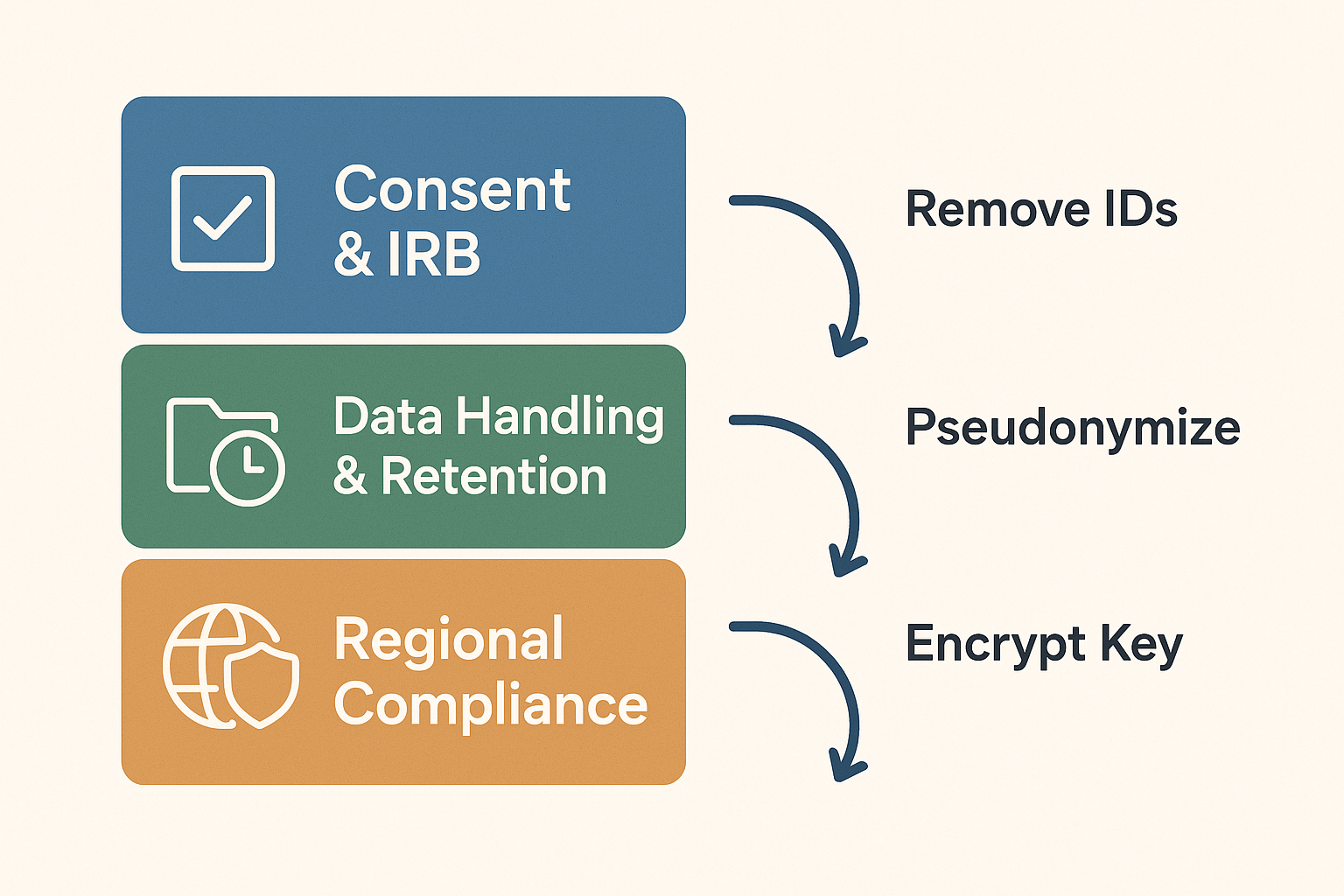
Consent language and a short informed-consent template
Use clear, plain language that lists what you will record, how you will store it, who will see it, and how long you will keep it. Offer options for anonymized quotes and withdrawal.
Suggested oral and written consent line:
- "We will record this interview and create a text transcript. The audio and transcript will be stored on secure servers. Only the research team will have access. Your name will not appear in publications unless you give permission. You can withdraw at any time, and we will delete your data on request within 30 days unless IRB rules require otherwise."
Add these choices as checkboxes in your form:
- Audio recording: Yes / No
- Use of anonymized quotes: Yes / No
- Permission to share deidentified data with future researchers: Yes / No
IRB checklist for interview data
Before collection, get IRB (Institutional Review Board) signoff on these items:
- Recruitment scripts and consent forms. Include audio and transcript uses.
- Data access list. Who can see raw audio, verbatim transcripts, and coded files.
- Storage plan. Specify encryption, backups, and retention windows.
- Deidentification steps. Describe how you will remove direct and indirect identifiers.
- Withdrawal process. How participants ask for deletion and how you will comply.
- Risk assessment. Note sensitive topics and mitigation steps.
Regional compliance and legal flags
Check the rules that apply to your institution and participants. FERPA protects student education records and may cover interviews tied to school records. HIPAA applies when interviews include protected health information. For federal statistical data, know that the law is strict: The Confidential Information Protection and Statistical Efficiency Act (CIPSEA) (44 U.S.C. 3561 et seq.) mandates that information collected by the Bureau of Labor Statistics for statistical purposes under a confidentiality pledge must be used solely for statistical purposes, as noted in Confidentiality Pledge and Laws.
If you work with EU participants, follow GDPR basics: lawful basis for processing, clear consent language, data subject rights, and a data processing agreement with any vendor that stores or processes data.
Anonymization and retention best practices
Use a repeatable workflow to reduce re-identification risk:
- Remove direct identifiers: names, emails, addresses.
- Replace or generalize indirect identifiers: job titles, locations, and unique events.
- Create a key file that maps pseudonyms to real names. Store the key separately and encrypt it.
- Run a quick re-identification check: can someone infer identity from context? If yes, redact more.
Retention guidance:
- Keep raw audio only as long as needed for transcription and QA, typically 6 to 24 months.
- Keep deidentified transcripts longer for secondary analysis, per IRB and funder rules.
- Document deletion dates and actions in your project log.
Practical option: use privacy-by-default tools
Choose vendors that keep data private by default and do not use customer data to train AI models. TicNote Cloud stores data in a U.S.-based environment, uses industry-standard encryption, and does not use customer content to train models. That setup reduces legal and ethical friction for teams worried about model training policies or cross-border data use.
Quick tip
Always record the consent step on audio or keep a signed consent form. That protects participants and simplifies audits.
Pricing, budgeting and comparing TicNote plans vs human transcription services
If you need a quick answer, what is academic transcription in cost terms: AI transcription is usually a low fixed subscription cost, while human services charge per audio minute. Below, I explain TicNote Cloud tiers simply, then walk through three budgeting scenarios for 10, 50, and 200 interview hours and compare AI, human, and hybrid costs.
TicNote Cloud plan snapshot
| Plan | Price (monthly) | Transcription minutes/month |
| Free | $0 | 300 |
| Professional | $12.99 | 1,500 |
| Business | $29.99 | 6,000 |
| Enterprise | Contact sales | Custom |
TicNote Free gives 300 free minutes a month, enough for small projects. Professional and Business scale to larger studies, with long uploads and more monthly minutes. Enterprise is for high-volume teams and comes with negotiated terms.
Budget scenarios: 10, 50, 200 interview hours
Assumptions and ranges: human transcription services commonly charge about $$1 to$$3 per audio minute ($$60 to$$180 per hour). AI subscription costs are month-based, and hybrid work adds human editing time. For context, In May 2024, the median annual wage for medical transcriptionists was $37,550, according to U.S. Bureau of Labor Statistics (2024).
- 10 interview hours (600 minutes)
- Best AI fit: Professional plan, $$12.99, covers 1,500 minutes. Total AI cost:$$12.99.
- Human service: $$600 to$$1,800.
- Hybrid (AI + human edit): TicNote $$12.99 plus 10% to 30% edit time. Estimated total:$$50 to $260 depending on editor rates.
- 50 interview hours (3,000 minutes)
- Best AI fit: Business plan, $$29.99, covers 6,000 minutes. Total AI cost:$$29.99.
- Human service: $$3,000 to$$9,000.
- Hybrid: TicNote $$29.99 plus editing (10% to 30% of audio). Estimated total:$$300 to $900.
- 200 interview hours (12,000 minutes)
- AI approach: Two months of Business at $$29.99, total about$$60, or an Enterprise negotiation for heavy use.
- Human service: $$12,000 to$$36,000.
- Hybrid: Two months Business plus edits. Estimated total: $$1,000 to$$3,000 depending on edit depth and hourly editor rates.
Hidden costs to watch for
- Long-tail editing, time to correct names and jargon.
- Storage and backups for raw audio and transcripts.
- Export and formatting work for verbatim vs clean transcripts.
- Annotation, timestamping, and coding for qualitative analysis.
- Vendor overhead for secure data handling or special export formats.
If you want to test on real interviews, start with the Free plan. Academic teams can request pilots or ask about institutional discounts for larger studies.