TicNote on nutikas märkmete rakendus, mis ühendab kõne tekstiks teisendamise, AI intelligentse viimistluse ja teadmusbaasi haldamise. AI tehnoloogia sügava rakendamise kaudu ei ole TicNote mitte ainult märkmete tööriist, vaid ka teie teine aju, mis aitab teil paremini mõelda, õppida ja luua.
TicNote kasutusjuhend
Tarvikute nimekiri
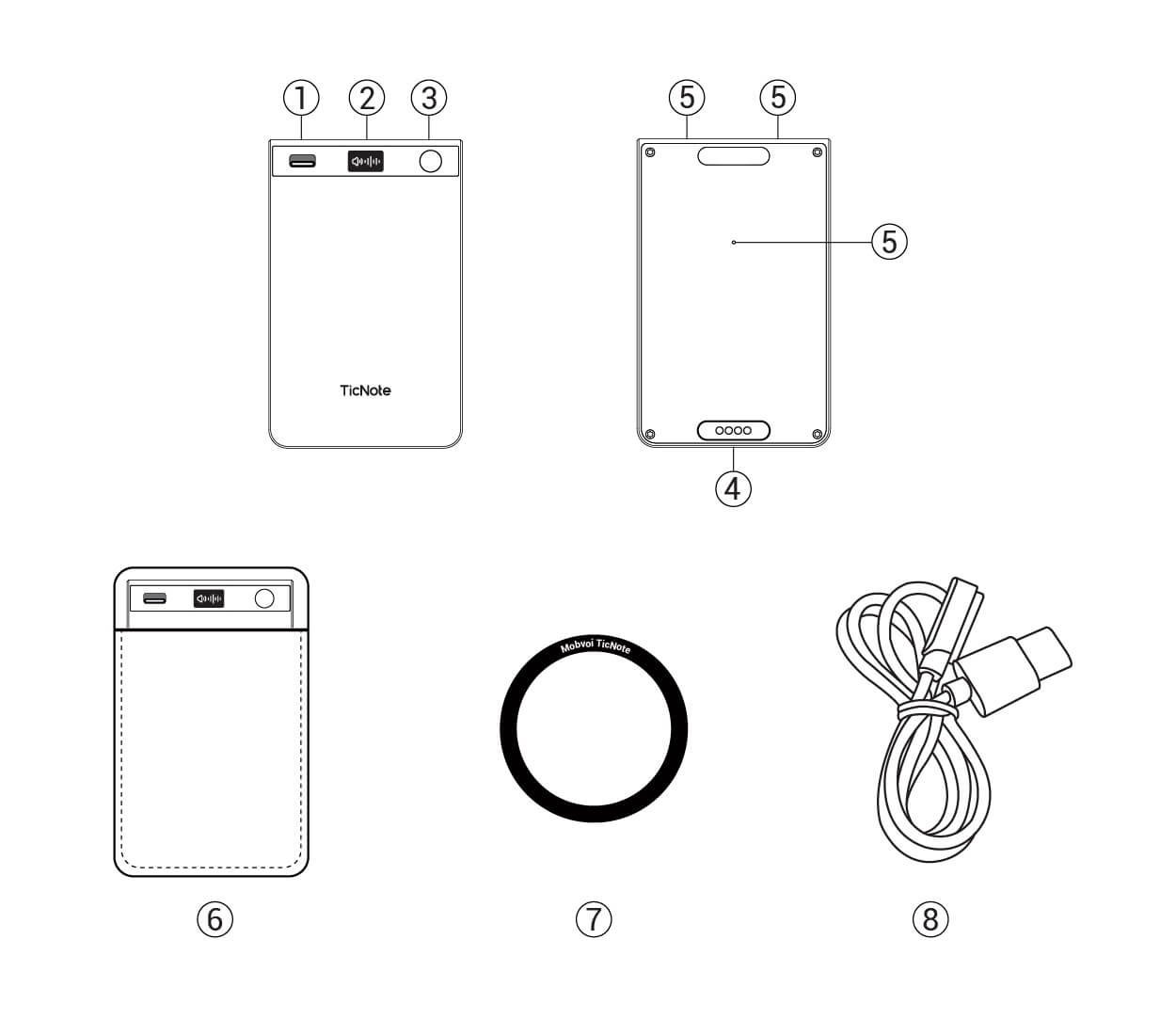
TicNote Card põhiseade
Ainult 3mm ülipeenike keha, valmistatud kosmoseindusliku alumiiniumsulamist CNC integreeritud vormimisega, anodeeritud protsess annab delikaatse tunde. Sisseehitatud 64GB eMMC salvestusruum, toetab 400+ tundi salvestamist. Toetab MagSafe magnetkinnitust, kinnitub hõlpsasti iPhone 12 ja uuematele. Pärast seadme sidumise tühistamist kustutatakse riistvaraandmed automaatselt
USB laadimiskaabel
Standardne laadimiskaabel, Type-C / USB-A liides juhuslikult saadetud. Laadimine võtab umbes 2 tundi aku täielikuks laadimiseks. Tugev akukestus, võib täislaetuna pidevalt salvestada üle 20 tunni, rahuldades kogu päeva kasutamise vajadusi
MagSafe magnetrõngas
Magnetadaptatsiooni lahendus spetsiaalselt mõeldud mitte-MagSafe telefonidele. Kasutades tugevat liimi, pärast telefoniümbrise tagaküljele kinnitamist võib igal telefonil olla MagSafe magnetvõime. Tugev magnetjõud, ei kuku maha isegi jooksmise või spordi ajal
Kiirjuhend
Paberil kasutusjuhend, mis katab seadme aktiveerimist, rakenduse allalaadimist ja sidumist, põhiliste toimingute demonstratsioone ja teisi põhifunktsioone. Illustreeritud disain võimaldab teil alustada 3 minutiga ja kiiresti kogeda TicNote'i intelligentset võlu
✨ Tehnilised eripärad
3-mikrofoni süsteem
1 luujuhtivus + 2 kõigsuunalist silikoonmikrofoni, intelligentne režiimivahetus
120+ keelt
Reaalajas transkriptsioon ja tõlge, 98% täpsus
Ülipikk akukestus
Üle 20 tunni pidev salvestamine, 2-tunnine kiire laadimine
64GB suur mahutavus
Võib salvestada 400+ tundi salvestisi
Seadme sidumine
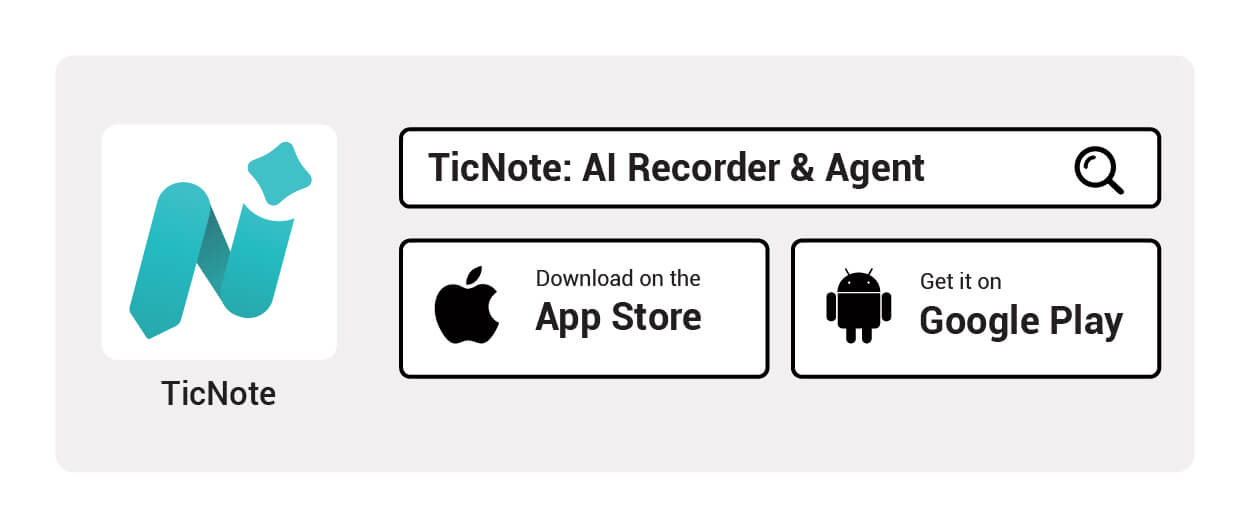
Laadige alla TicNote'i rakendus
Otsige "TicNote" App Store'ist (iOS) või rakenduste poest (Android), klõpsake allalaadimiseks ja installimise lõpetamiseks. Rakenduse suurus on umbes 150 MB, toetab iOS 13+ ja Android 8+ süsteeme
Näpunäide: Rakenduse esmakordsel avamisel peate andma mikrofoni, Bluetoothi ja märguannete load, et tagada täielik funktsionaalne kogemus
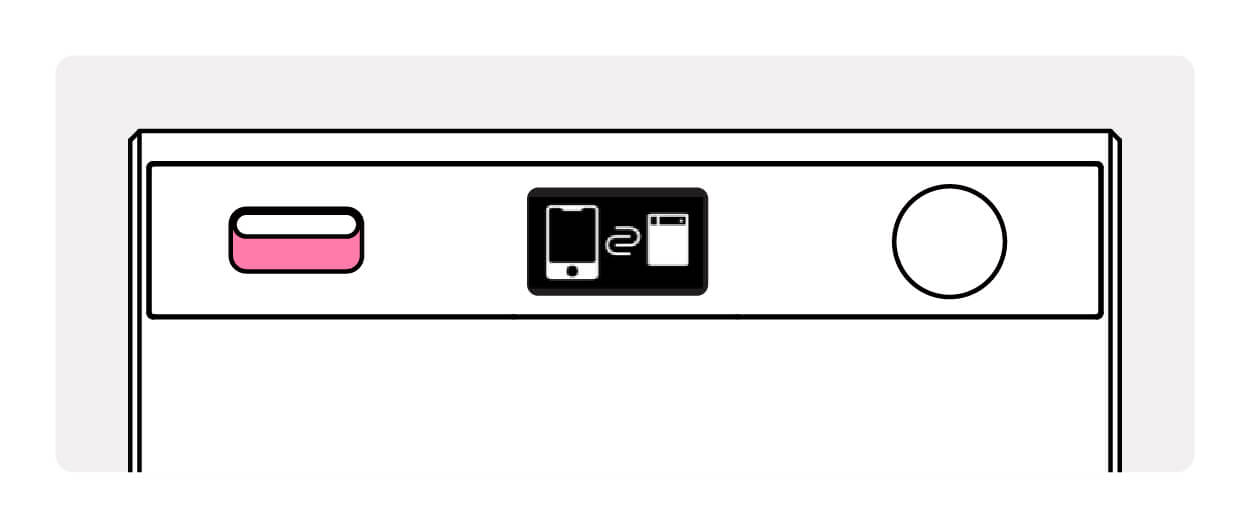
Aktiveeri ja lisa seade
TicNote Card sisselülitamiseks hoidke toitenuppu all 0,5 sekundit, seade vibreerib tagasisideks, kuid ekraanil ei toimu mingeid muudatusi. Seejärel avage rakendus ja klõpsake avalehel nuppu "+ Lisa seade". Süsteem otsib automaatselt läheduses olevaid TicNote seadmeid. Pärast ühenduse loomist ilmub TicNote seadmesse salvestuse ooteikoon (kõlari või kõrvaklapi režiimile vastav ikoon)
Märkus: Veenduge, et telefoni Bluetooth on sisse lülitatud, seade on telefonist kuni 5 meetri kaugusel ning vältige takistusi, mis võivad ühendust blokeerida
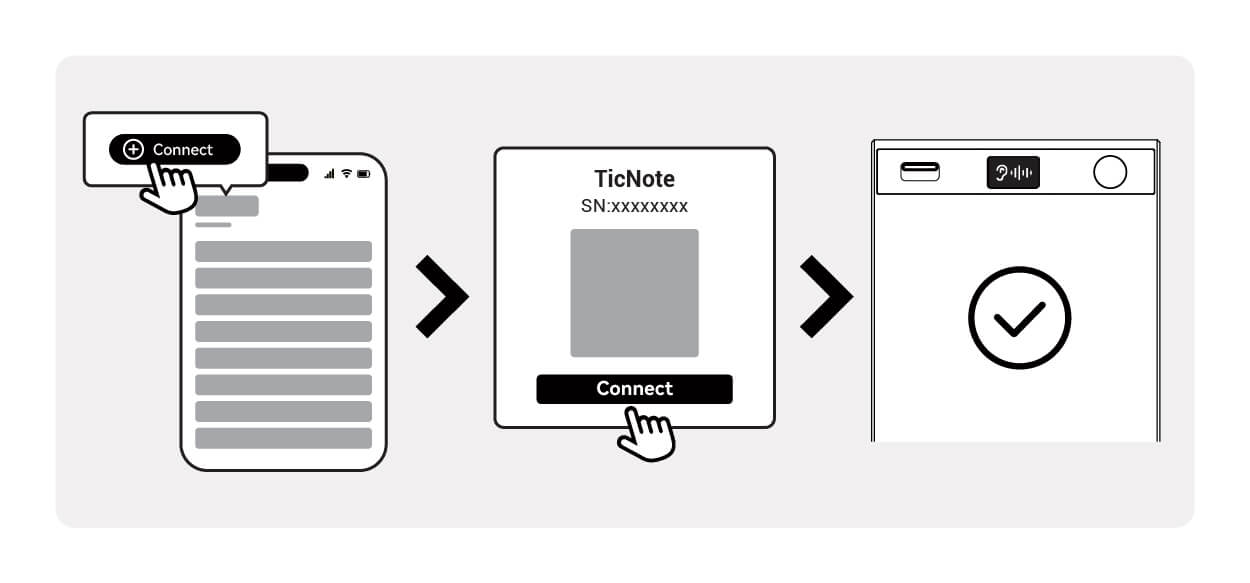
Sidumine õnnestus, alusta kasutamist
Rakendus kuvab teate "Sidumine õnnestus" ja seadme ekraanil kuvatakse salvestuse ooteikoon. Sel ajal on TicNote Card valmis, salvestamise alustamiseks hoidke toitenuppu all 2 sekundit. Salvestuse sisu sünkroniseeritakse rakendusega reaalajas ja transkribeeritakse automaatselt tekstiks
Sidumine lõpetatud! Nüüd saate:
- Vajutada ja hoida toitenuppu 2 sekundit all, et alustada/lõpetada salvestamist
- Vaadata reaalajas transkribeeritud teksti rakenduses
- Kasutada AI-funktsioone kokkuvõtete ja tõlgete loomiseks
Ühendusprobleemid?
Seadet ei leitud
- Veenduge, et seade on laetud ja akus on piisavalt energiat
- Hoidke toitenuppu 15 sekundit all, et taastada tehaseseaded (seadme andmeid ei kustutata)
- Taaskäivitage telefoni Bluetooth, puhastage seotud nimekiri
Sidumine ebaõnnestus või ühendus katkes
- Veenduge, et vahemaa on kuni 5 meetrit ja takistusi pole
- Sulgege teised Bluetooth seadmed, mis põhjustavad häireid
- Värskendage rakendust viimasele versioonile
Kasutusjuhend
📖 Kiirjuhend
🧲 Seadme magnetkinnitamine
Viige TicNote Card iPhone'i tagaküljel oleva MagSafe-piirkonna lähedale (kaamera kohal). Magnetiline süsteem joondub automaatselt ja kinnitub kindlalt, "klõps" heli annab teada, et kinnitamine õnnestus. MagSafe-ita telefonide puhul kinnitage esmalt magnetrõngas, et nautida sama mugavat magnetilist kogemust.
🎙️ Ühe puudutusega salvestamine
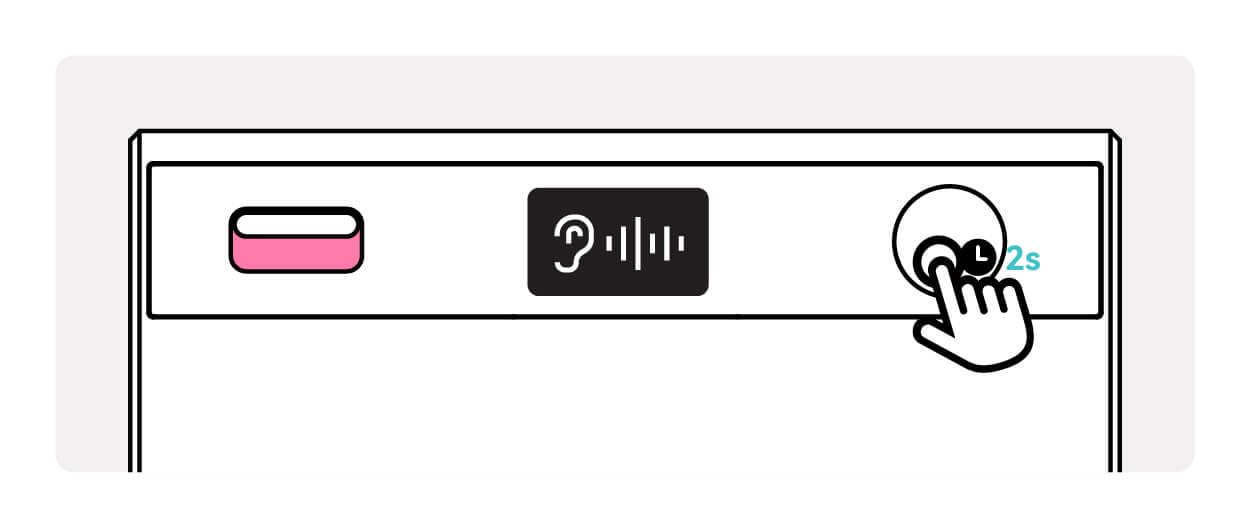
Hoidke toitenuppu 2 sekundit all, seade vibreerib kohe tagasisideks, OLED-ekraan näitab salvestamise olekut ja alustab salvestamist. TicNote toetab nii veebisalvestust kui ka offline-salvestust – kaks režiimi: veebisalvestus võimaldab reaalajas transkriptsiooni ja kiiret failide sünkroonimist; offline-salvestuse ajal töötab seade iseseisvalt ja salvestatud failid sünkroonitakse automaatselt rakendusega, kui rakendus seadmega uuesti ühendub, seejärel laaditakse need pilve. Täislaetuna suudab see pidevalt salvestada rohkem kui 20 tundi, rahuldades pikkade koosolekute, loengute ja muude stsenaariumite vajadused
✍️ Reaalajas transkriptsioon ja tõlge
Avage TicNote'i rakendus, salvestatud sisu transkribeeritakse rääkimise ajal tekstiks, ootamata salvestuse lõppu. Toetab 120+ keele tuvastust (hiina keele täpsus 98%) ning oskab ka reaalajas tõlkida teistesse keeltesse. AI tuvastab intelligentselt kuni 50 kõnelejat, eristades automaatselt erinevaid kõnelejaid, muutes koosolekuprotokollid selgemaks
💾 Lõpeta salvestamine ja pilvesalvestus
Hoidke toitenuppu uuesti 2 sekundit all, et salvestamine lõpetada, OLED-ekraan näitab lõpetamise olekut, seade vibreerib kaks korda kinnituseks. Salvestatud failid salvestatakse automaatselt rakenduse pilve, tagades andmete turvalisuse. Rakenduses saate neid igal ajal vaadata, redigeerida ja jagada, toetades eksporti PDF-, Word-, TXT- ja muudesse vormingutesse
📱 Ühilduv kõigi telefonidega
MagSafe oma seadmed
iPhone 12 / 13 / 14 / 15 seerial on MagSafe'i magnetfunktsioon, lisatarvikuid pole vaja, saab otse kinnitada kasutamiseks. Tugev ja stabiilne magnetjõud, ei tule lahti isegi intensiivsete spordialade puhul nagu jooksmine ja jalgrattasõit
Kõik teised telefonid
Android, vanemad iPhone'id ja muud mitte-MagSafe seadmed saavad kasutada kaasasolevat magnetrõngast. Kinnita magnetrõngas telefoniümbrise tagaküljele (soovitatav joondada kaamera kohale), et nautida sama magnetilist kogemust nagu päris MagSafe.
💡 Kasutusnõuanded
Magnetjoondus
Selge "klõpsu" heli tähendab, et magnetkinnitus on kindel ja seade on kasutusvalmis.
Võrgus/võrguühenduseta salvestamine
Veebisalvestus toetab reaalajas transkriptsiooni ja kiiret sünkroonimist; võrguühenduseta salvestamine võimaldab seadmel töötada iseseisvalt, failid sünkroonitakse automaatselt taasühendamisel.
Müravähenduse kaugus
Optimaalne heli vastuvõtu kaugus on 3-5 meetrit, AI-mürasummutus filtreerib automaatselt välja keskkonnamüra, nagu klaviatuuri ja konditsioneeri helid.
Salvestusrežiimid
Kahe režiimi intelligentne salvestussüsteem
Erinevate kasutusstsenaariumite põhjal pakub TicNote Card kahte professionaalset salvestusrežiimi koos intelligentsete ümberlülitustega, et tagada optimaalne helikvaliteet ja tuvastustäpsus.
Kõlarirežiim
Vaikerežiim · Lükake lüliti alla · OLED-ekraan
Sobivad stsenaariumid
Koosolekute protokollid, loengud klassiruumis, intervjuusalvestused, koolituskõned, seminarid ja muud avatud keskkonnad.
Heli salvestamise võime
3-mikrofoniga intelligentne süsteem: Kõrvakuulde režiim (1 luu juhtivusega mikrofon + 1 suundantennita digitaalne ränimikrofon) sobib telefonikõnede salvestamiseks; Kõlarirežiim (2 suundantennita digitaalset ränimikrofoni) sobib koosolekuteks/loenguteks, selge heli vastuvõtt, AI tunneb intelligentselt ära mitme inimese vestlused.
Tehnilised omadused
16 kHz salvestussagedus, AI-mürasummutusalgoritm filtreerib reaalajas keskkonnamüra (klaviatuurihääled, tuulemüra, konditsioneeri müra jne)
💡 Kasutusvihje: Asetage seade laua keskele või kinnitage see märkmiku külge, et saavutada parim igasuunaline helipüük
Kõrvaklappide režiim
Telefonisalvestus · Libistage lüliti üles · OLED-ekraan
Kasutusstsenaariumid
Telefonintervjuud, klienditeeninduskõnede salvestused, kaugkoosolekud, telefonikonsultatsioonid, ärisuhtlus ja muud kõnestsenaariumid
Töötamise põhimõte
Tuvastab automaatselt telefonikõne oleku, salvestab sünkroonselt mõlema poole kõne sisu (teie pool + teine pool), transkribeerib reaalajas tekstiks
Vahetusmeetod
Libistage seadme küljel olevat lülitit ülespoole, OLED-ekraanile kuvatakse "Kuularirežiim" ikoon, mis näitab, et lülitus õnnestus
⚠️ Oluline märkus:
• iOS-süsteem: Asetage TicNote kuulari lähedale
• Android-süsteem: Toetab globaalset salvestamist, ilma asendipiiranguta
📸 Illustreeritud kasutusviisid
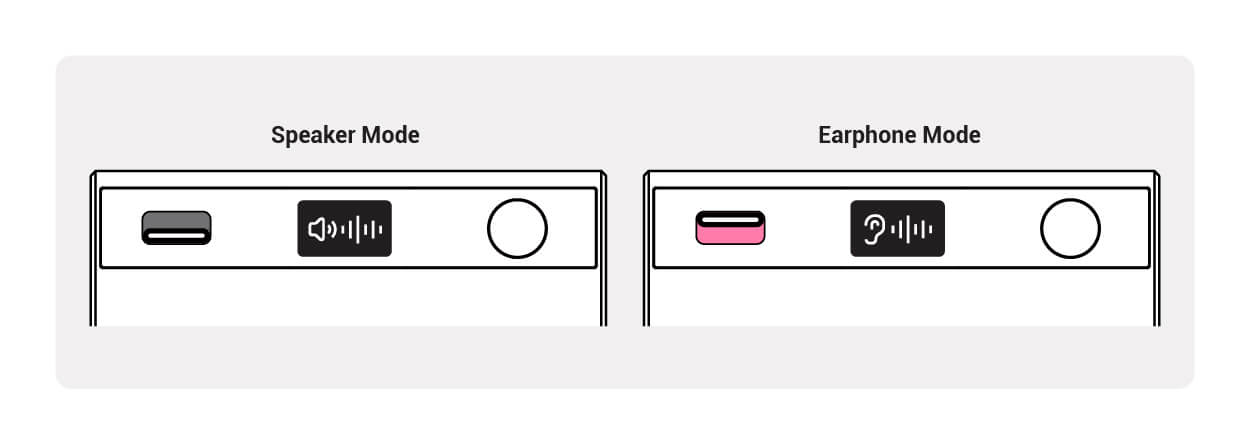
Režiimi vahetamise juhend
Lülitage libistuslüliti abil kõlari- ja kuularirežiimi vahel, OLED-ekraan kuvab hetkeseisu reaalajas
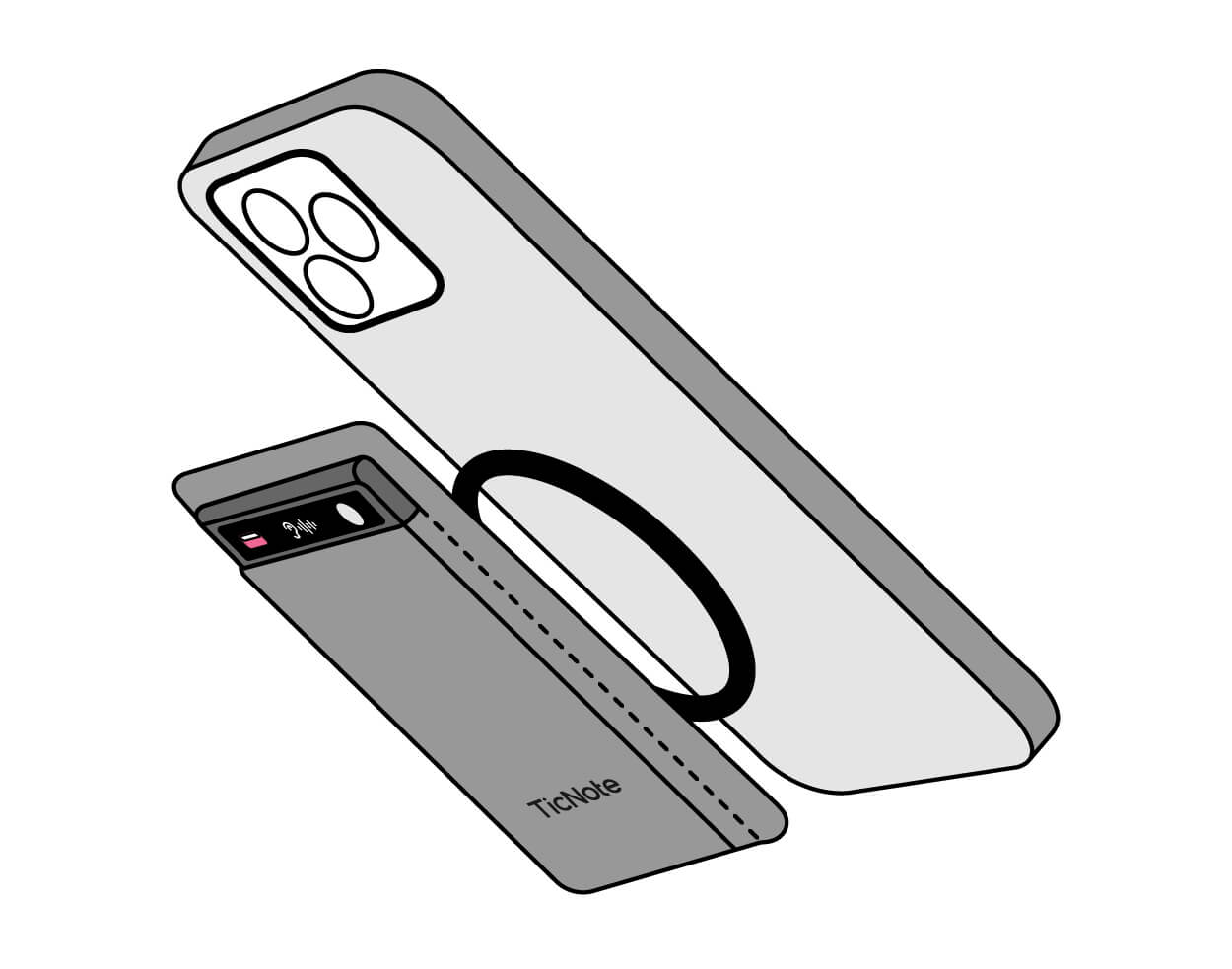
Magnetjoonduse demo
Viige kaart iPhone'i tagakülje lähedale, magnetjõud joondab selle automaatselt kaamera ala kohal ning klõpsuheli kinnitab kinnitamise õnnestumist
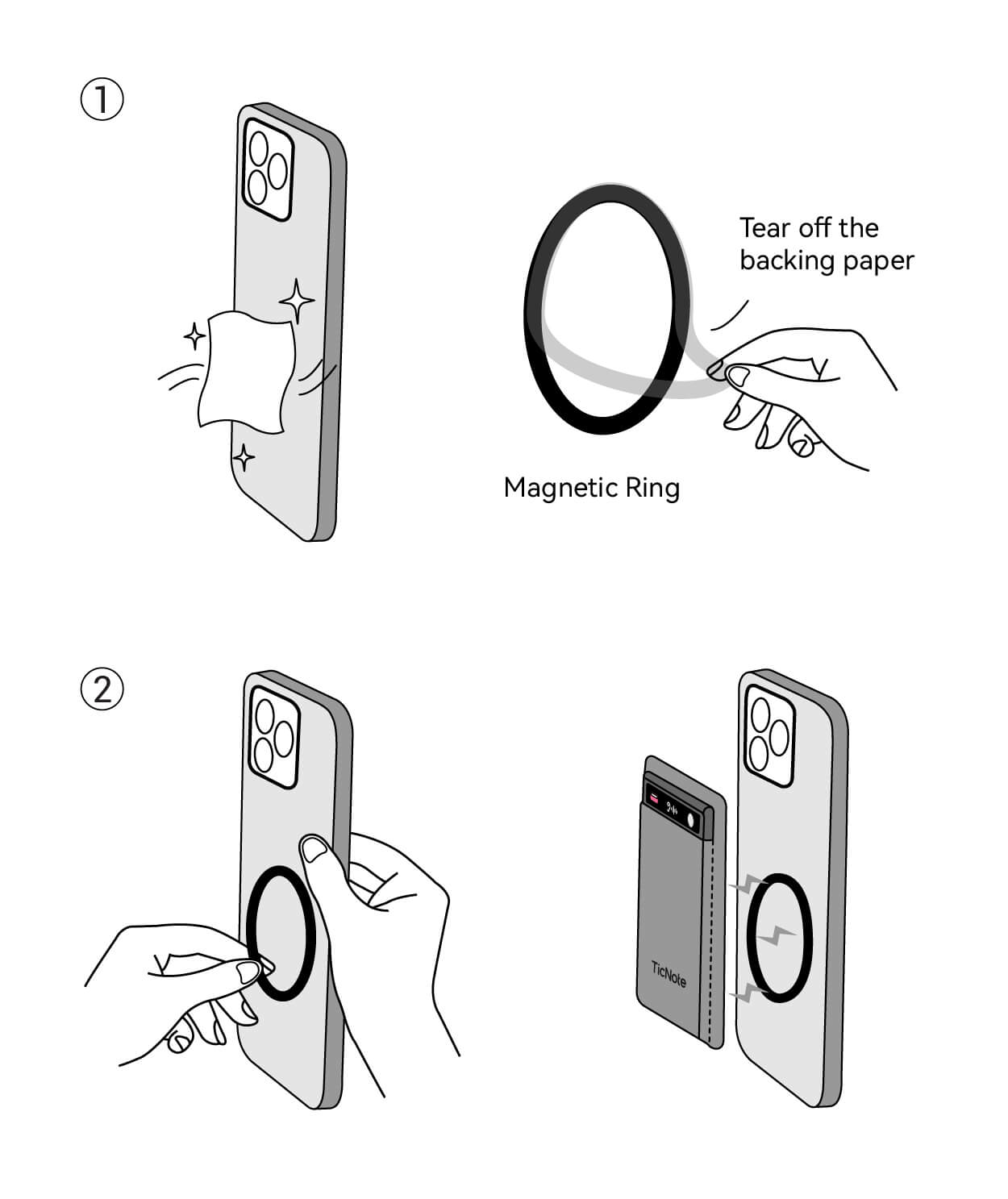
Magnetrõnga paigaldamise õpetus
Pärast magnetrõnga kinnitamist telefonidele, mis ei ole MagSafe'iga, saate nautida sama mugavat magnetkogemust kui originaal-MagSafe puhul.
🤖 AI intelligentne täiustus
Intelligentne müravähendus
AI-algoritm filtreerib reaalajas klaviatuurimüra, tuulemüra, konditsioneerimüra ja muud keskkonnamüra
Mitu kõnelejat tuvastamine
AI tunneb kõnelejad intelligentselt ära, muutes koosolekumärkmed selgemaks
Reaalajas tõlge
Toetab 120+ keelt samaaegseks salvestamiseks ja tõlkimiseks, võimaldades keelteülest suhtlust
FAQ
TicNote Lite kasutusjuhend
Mida karbis on
💡Toote positsioneering: sissejuhatava taseme ülekergete salvestuskomplekt
TicNote Lite on loodud eelarveteadlikele kasutajatele: põhiline salvestamine ja transkriptsioon säilinud, ekraan ja lisafunktsioonid eemaldatud, hind madalam. Ideaalne üliõpilastele, alustavatele spetsialistidele või kõigile, kes vajavad lihtsaid märkmeid liikvel olles.
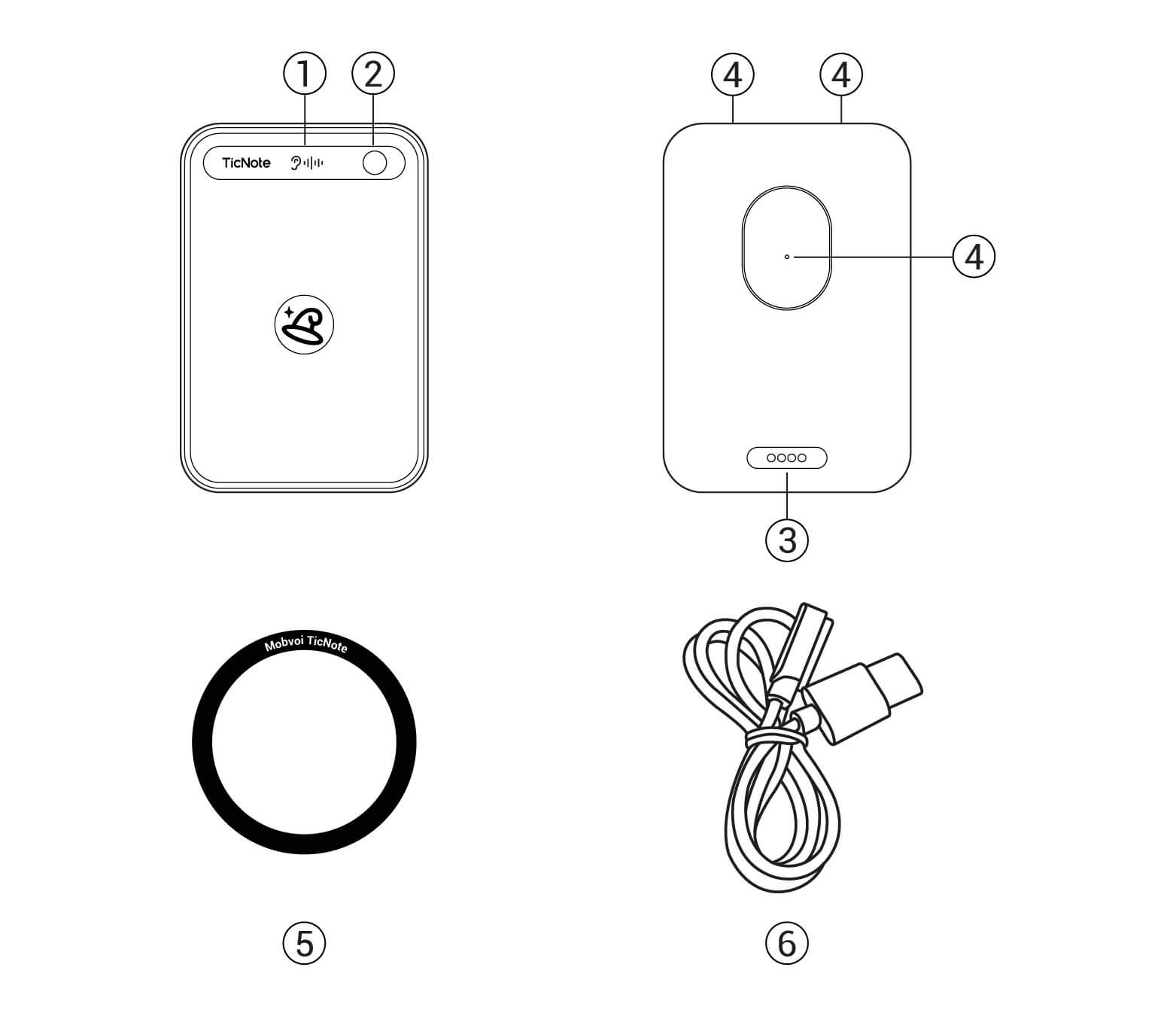
TicNote Lite põhiseade
Õhem ja kergem korpus (5,8 mm, 40 g), kulude vähendamiseks pole ekraani. 64 GB sisemälu salvestab 400+ tundi heli. >20 tundi pidevat salvestamist täislaetult — piisab igapäevaseks kasutamiseks.
USB-C laadimiskaabel
Standardne 5 V / 1 A Type-C, 2,5 tundi täislaadimiseks. Töötab telefonilaadijate ja akupankadega — lisaadapterit pole vaja.
Kiijuhendi kaart
Lühikesed sammud sidumiseks, OLED-ikoonid ja põhitoimingud. Skannige kood täieliku veebijuhendi jaoks.
📺 OLED olekuikoonid
🔵 Bluetoothi sidumine
Ootab sidumist
🔄 OTA-uuendus
Püsivara uuendamine
📡 Wi-Fi kiire ülekanne
Failiedastus aktiivne
🎙️ Salvestamine
Salvestamine käib
🔌 Laadimine
Aku laeb
🪫 Madal aku
Madala aku hoiatus
🔋 Täislaetud
Aku täis
📊 Lite vs Standard
| Funktsioon | TicNote Card | TicNote Lite |
|---|---|---|
| Mudel | NE-79 | NE-79 |
| Mõõtmed | 86×55×3 mm | 94×58×5,8 mm |
| Kaal | 29 g ✓ | 40 g |
| Kere | Alumiinium ✓ | PC/ABS plastik |
| Mälu | 64 GB ✓ | 64 GB ✓ |
| Salvestustunnid | 434 h ✓ | 434 h ✓ |
| Ekraan | 0,42" OLED ✓ | 0,42" OLED ✓ |
| Bluetooth | BLE 5.0 | BLE 5.0 |
| Võrk | BT5.0 BLE / Wi-Fi 2.4 G | BT5.0 BLE / Wi-Fi 2.4 G |
| Mikrofonid | Kuular: 1 luukõrgus + 1 omnidirektsioon Kõlar: 2 omnidirektsiooniga ✓ | 1 luukõrgus + 2 omnidirektsiooniga |
| Salvestusrežiim | Kahekordne (kuular / kõlar) ✓ | Standardne |
| Aku | 470 mAh Li-Po | 470 mAh Li-Po |
| Salvestuse kestus | >20 h ✓ | >20 h ✓ |
| Ooterežiim | >20 päeva ✓ | >20 päeva ✓ |
| Laadimisaeg | 1,5 h | 1,5 h |
| Laadimisport | Magnetiline Type-C | Magnetiline Type-C |
| Salvestuskaugus | 10 m ✓ | 10 m ✓ |
| Magnetkomplekt | Rõngas (ID 45 mm, OD 55 mm) | Sisseehitatud rõngas ✓ |
| Pakendi kaal | 204 g | 188 g ✓ |
Sobib kõige paremini: üliõpilastele, noortele spetsialistidele või kõigile, kes soovivad põhilist salvestamist madalama hinnaga.
Seadme sidumine
Paigaldage TicNote rakendus
Otsige rakenduspoest "TicNote". Andke mikrofoni, Bluetoothi ja teavituste load küsimisel.
Lite ja Standard versioonid jagavad ühte rakendust; andmed sünkroonitakse sama konto kaudu.
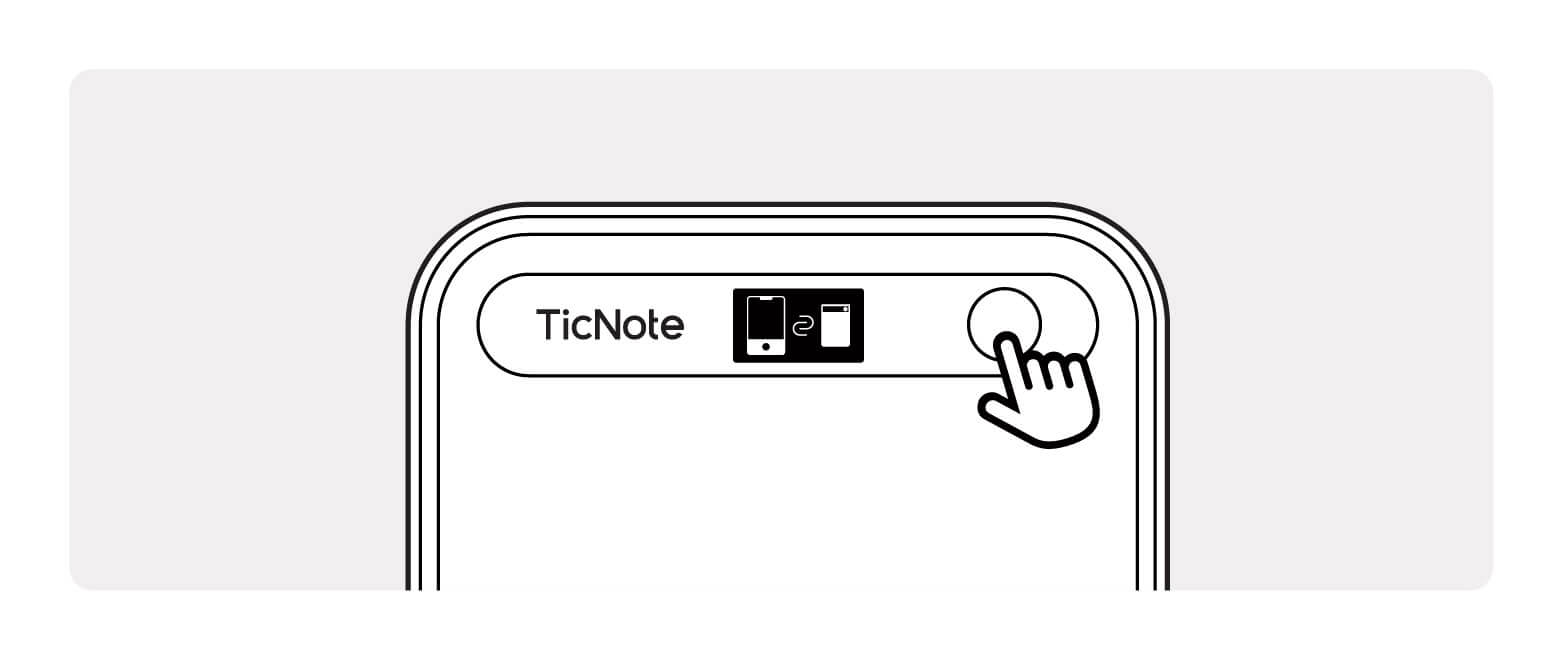
Sisselülitamine ja otsing
Vajutage toitenuppu 0,5 s; OLED näitab Bluetoothi ikooni. Rakenduses puudutage "+ Lisa seade" ja laske sellel otsida.
OLED hoiab teid kursis iga olekumuutusega.
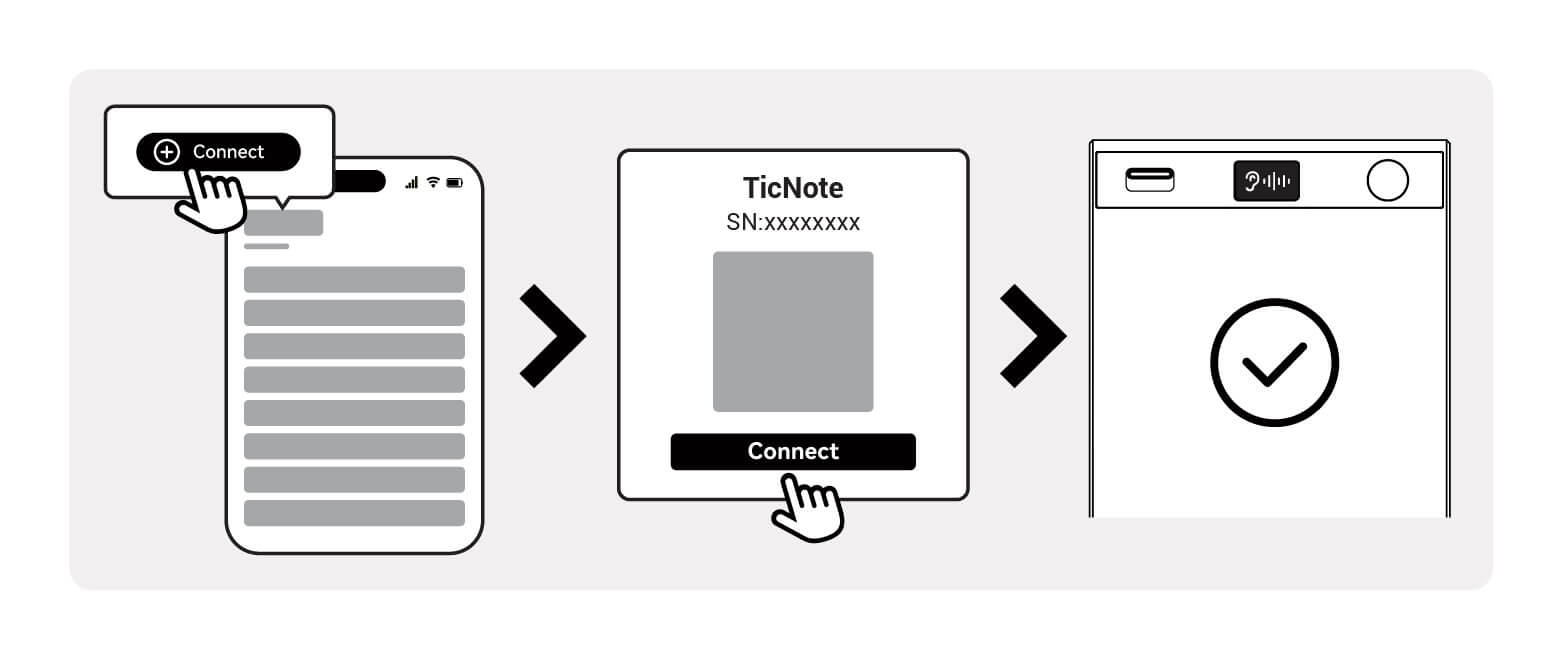
Seotud
Rakendus näitab "Seade ühendatud" ja OLED kinnitab. Aku ja salvestuse olek on nüüd nähtav mõlemas kohas.
Valmis! Hoidke toitenuppu 2 s, et alustada oma esimest salvestust.
TicNote Lite kasutamine
🎯 Põhitoimingud
Alusta salvestamist
Hoidke toitenuppu 2 s
Peata salvestamine
Hoidke toitenuppu uuesti 2 s
Automaatne sünkroonimine
Failid laaditakse pilve, kui telefon on lähedal
Loe transkriptsiooni
Avage rakendus, et näha teksti reaalajas
💎 Põhiomadused
Võrguühenduseta salvestamine
4 GB mahutab ~200 t. Sünkroonib automaatselt, kui olete tagasi levipiirkonnas.
Lihtsustatud kasutamine
Ühe nupu disain, OLED-tagasiside — lihtne lastele ja eakatele.
Suurepärane hinna ja kvaliteedi suhe
60-70% Standardi hinnast, säilitades tehisintellekti transkriptsiooni, pilvesünkroonimise ja mitme kõneleja tuvastamise.
💡 Näpunäited
- Kontrolli akut: vaata rakenduses—seadmel ekraani ei ole.
- Võrguühenduseta režiim: salvestused vahemällu; need laaditakse üles, kui naasete.
- Lähtestamine: hoidke toide 15 s taaskäivitamiseks.
KKK
TicNote Pods kasutusjuhend
Mis on karbis
👑Toote positsioon: AI-salvestuse ja avatud kõrvaga kõrvaklappide täiuslik suland
TicNote Pods on TicNote perekonna lipulaev—maailma esimene 2-ühes kõrvaklapp + salvestaja. Nautige tipptasemel avatud kõrva heli ja professionaalset salvestust ning transkriptsiooni samaaegselt. Loodud ärinimestele, sisuloojatele ja kõigile, kes nõuavad kõrget helikvaliteeti.
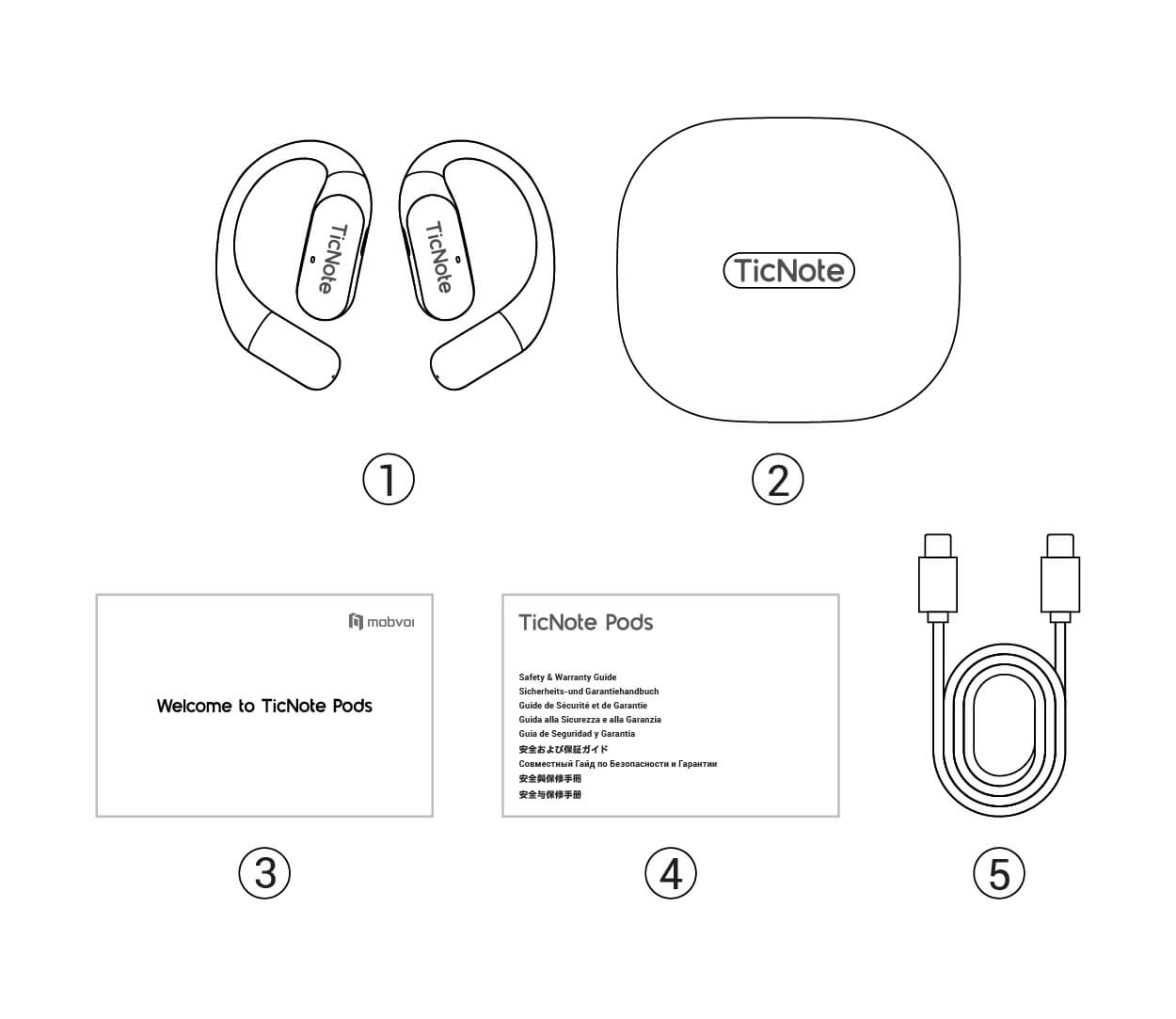
Tarvikud üksikasjalikult
TicNote Pods kõrvaklapid
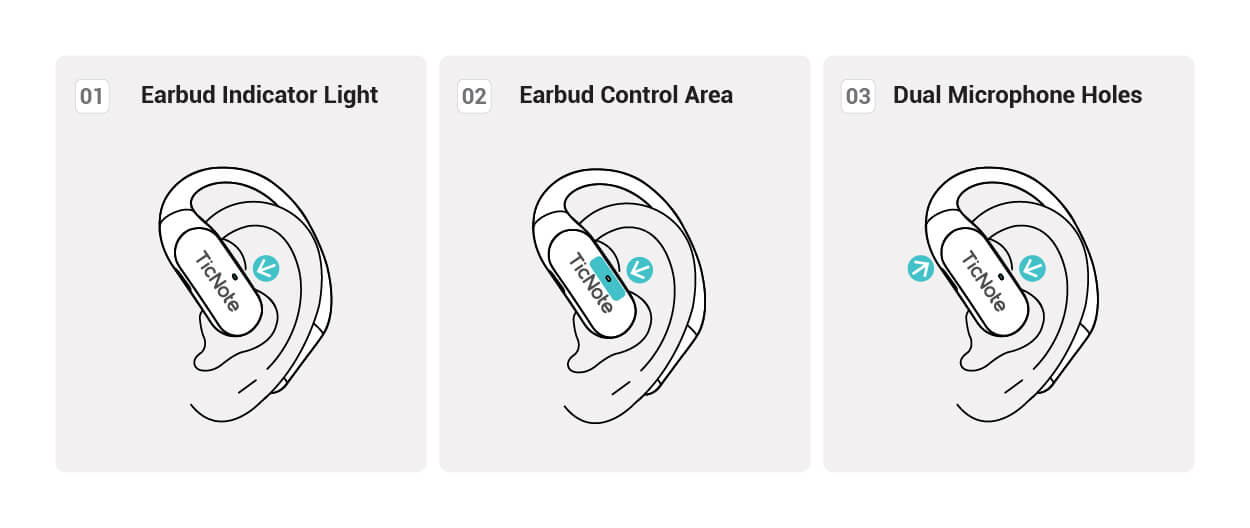
Kaks mikrofoni mõlemal küljel, 13,4 mm dünaamilised draiverid, AAC/SBC-koodekid. Avatud kõrvaga disain, ainult 4,5 g ühe kõrvaklapi kohta – mugav terve päeva kandmiseks.
Laadimiskarp
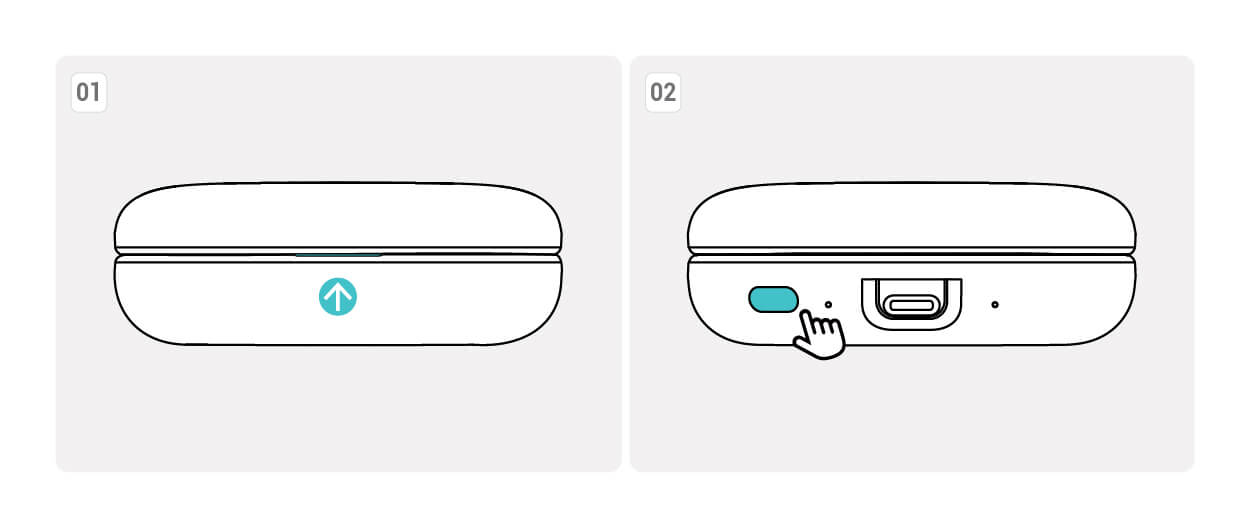
Sisseehitatud 750 mAh aku annab 3 täiendavat täislaadimist. Type-C juhtmega laadimine. Magnetiline kaas avaneb ühe käega ja näitab aku LED-tulesid.
Type-C laadimiskaabel
Standardne Type-C port. Karp laeb täielikult ~2 h, kõrvaklapid ~1,5 h. Töötab tavaliste telefoni/tahvelarvuti laadijatega.
Kiirkäivituskaart
Illustreeritud juhend kandmiseks, puutejuhtimiseks, rakendusega sidumiseks ja salvestusrežiimi vahetamiseks. Skaneeri kood täieliku veebijuhendi vaatamiseks.
🚀 Tehnilised esiletõstmised
Avatud kõrva mugavus
Puudub surve kõrvas, pikaajaline kandmismugavus
Kahe mikrofoniga süsteem
Selged kõned ja salvestised, jäädvustab iga sõna
28 h aku kogukestus
7 tundi ühe laadimisega + 3 täiendavat laadimist korpusest
Type-C laadimine
Standardne port, magnetkaas lihtsaks avamiseks/sulgemiseks
Seadme sidumine
Laadi rakendus alla
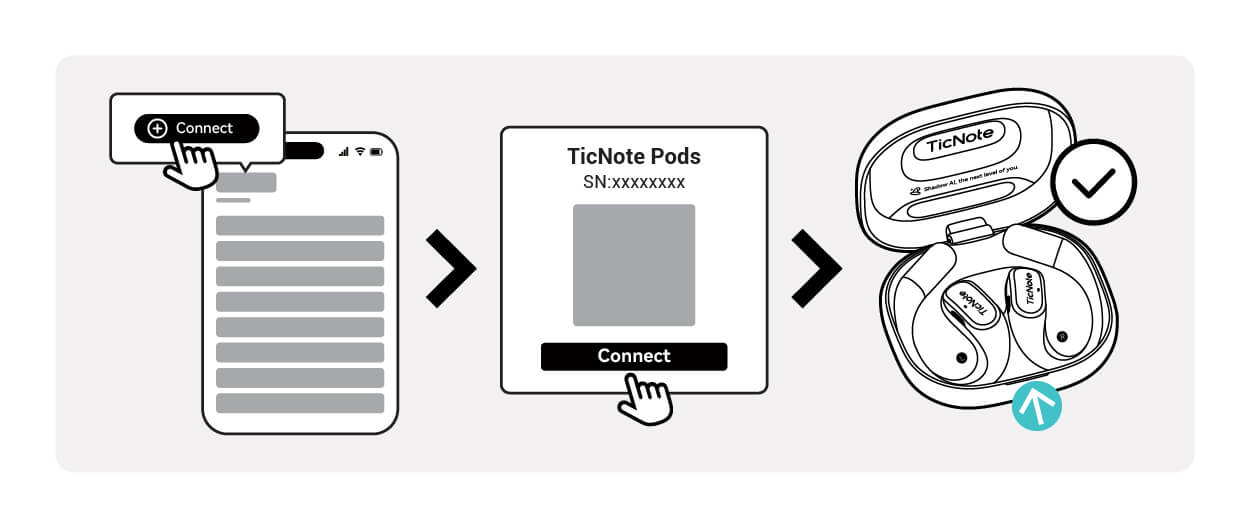
Kiirkäivitus
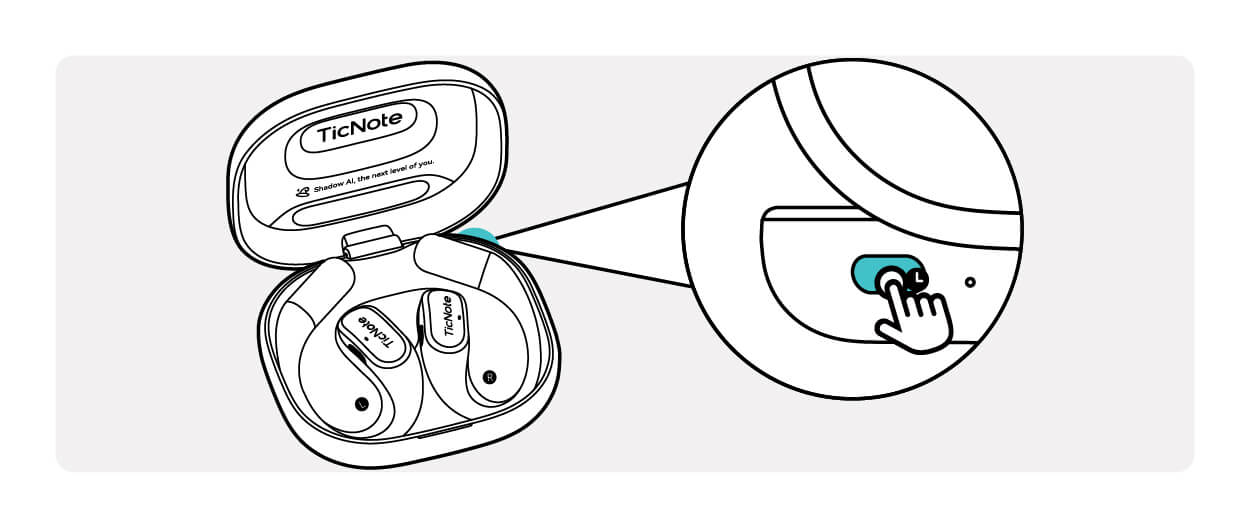
Lülitu sidumisrežiimi
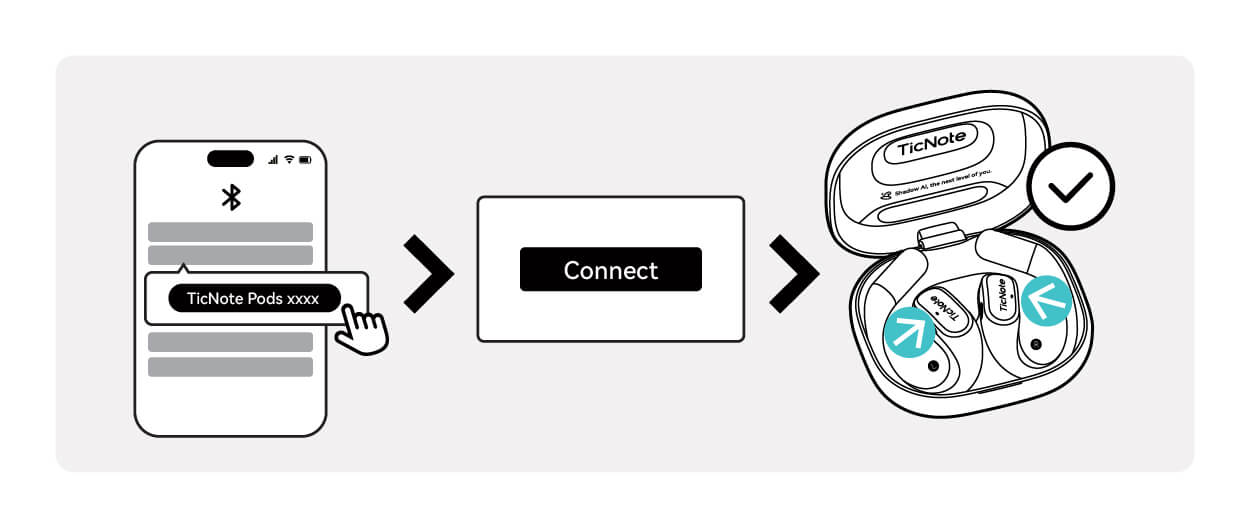
Ühendatud
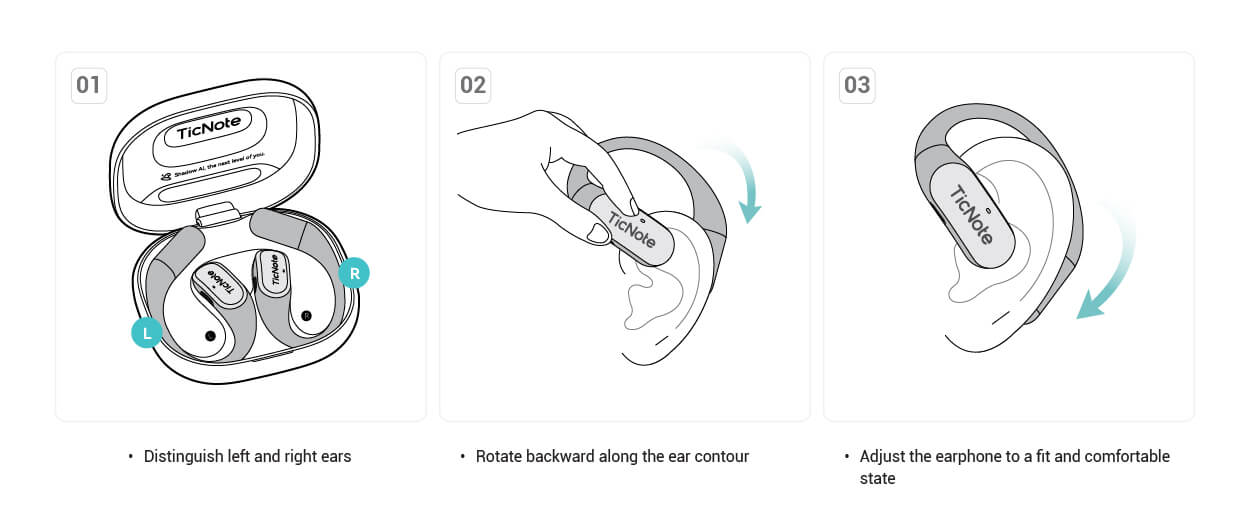
Kandmisjuhend
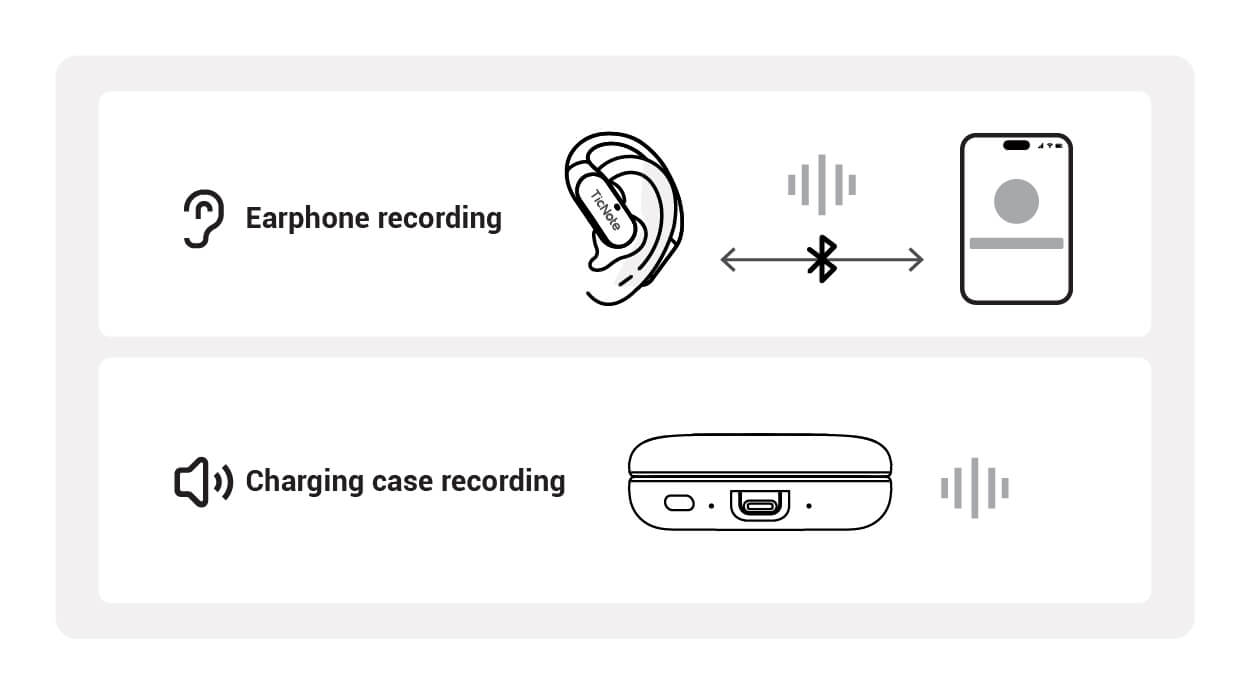
Salvestusrežiim
TicNote Pods'i kasutamine
🎯 Topeltpuudutus kõrvaklapi paneelil
Sissetulev kõne
Topeltpuudutus kummalgi kõrvaklapil vastamiseks
Kõne ajal
Topeltpuudutus kõne lõpetamiseks
Muusika esitamine
Topeltpuudutus, et liikuda järgmisele loole
FAQ
TicNote rakenduse funktsioonid
Nutikas salvestamine · AI täiustamine · Teadmusjuhtimine, teie teise aju ümber defineerimine
Rohkem kui salvestamine, teie intellektuaalne mõtlemispartner
TicNote integreerib sügavalt AI tehnoloogiat, et mitte ainult aidata teil salvestada, vaid ka mõelda, õppida ja luua
I. Professionaalne salvestus
Stabiilne ja tõhus salvestusmootor
Pikaajaline salvestamine
Üksik salvestus kuni 20+ tundi, stabiilne ja katkematu. Toetab veebipõhist ja võrguühenduseta salvestamist, reaalajas transkriptsioon veebipõhises režiimis ja automaatne sünkroniseerimine pärast taasühendamist võrguühenduseta režiimis
Reaalajas transkriptsioon ja tõlge
Transkribeerige rääkides, toetades 120+ keelt. Hiina keele täpsus 98%, toetab 27 dialeklist salvestamist. Reaalajas tõlge ületab keelebarjäärid
Multimeedia salvestamine
Lisage salvestamise ajal tekstimärkmed, fotod ja ajatemplid. Märkige võtmemomendid märkimisnupuga lihtsaks ajajoone ülevaatamiseks
II. AI sisu korraldamine
Intelligentselt põhiväärtuse ekstraheerimine
Automaatne kokkuvõte ühe klõpsuga
AI genereerib automaatselt koosoleku protokollid ja loengute kokkuvõtted. Toetab mitut stiili (lühike, detailne, punktid). Järeldus-esmane lähenemine kiireks mõistmiseks
Mõttekaardi genereerimine
Genereerige automaatselt struktureeritud mõttekaardid kokkuvõtete põhjal. Visualiseerige loogilisi seoseid mõtte selgitamiseks. Eksportige piltidena jagamiseks
「Aha」 arusaamade avastamine
AI avastab proaktiivselt peidetud väärtuspunktid vestlustes—need varjatud, kuid olulised ideed, inspiratsioonid ja teadmised. Ärge kunagi jätke maha säravat hetke
Sügava uurimistöö assistent
Koguge seotud materjale, genereerigeuge struktureeritud uurimisaruanded, kus kõigil seisukohtadel on jälgitavad tsitaadid. Võimas tööriist akadeemiliseks kirjutamiseks ja tööstuse analüüsiks
Podcasti genereerimine ühe klõpsuga
Sünteesige avaldatav helisisu otse transkriptidest. Toetab esitusloendi haldust professionaalse salvestuskvaliteediga. Õnnistus sisu loojatele
III. Projektid ja Shadow
Ehitage oma teine aju
Automaatne projekti ehitamine
AI tuvastab automaatselt teemat ja ehitab isiklikud projektid failisisu ja vestluste salvestuste põhjal. Hallake teadmisi projekti mõõtmete järgi, hüvastage hajutatud failidega. Toetab pesastatud alamprojekte teadmussüsteemide ehitamiseks
Intelligentsed AI küsimused ja vastused
Projektideülene otsing läbi kõigi teie teadmusbaaside, täpselt vastates igale küsimusele. Iga vastus on märgitud tsitaatide allikatega, klõpsatav hüppamiseks algse teksti juurde. Äratage magavad teadmised ellu
🎯 Kõigi põhifunktsioonide ülevaade
Reaalajas transkriptsioon
Mitmekeelne tõlge
Mitu kõnelejat tuvastamine
Pilve sünkroniseerimine
Siltide klassifikatsioon
Häälotsing
Versiooni uuendused
Tutvuge TicNote'i uusimate funktsioonide ja täiustustega
Võtke meiega ühendust
Oleme alati siin, et pakkuda abi ja tuge