Extension
TL;DR: Best AI agent for interview workflows in HR
The best AI agent for interview workflows is TicNote Cloud when HR teams need resume batching, structured scoring, interview notes, transcripts, and auditable hiring recommendations in one project workspace.
Screening often breaks when resumes, notes, and scorecards live in separate tools. That creates inconsistent shortlists and weak evidence for hiring reviews. With TicNote Cloud as a shared screening workspace, teams keep candidate evidence, rubric-based scores, and comparisons together.
Best-fit shortlist: TicNote Cloud for evidence-backed screening; HeyMilo for high-volume conversational screening; Humanly for chat engagement; Paradox Olivia for hourly hiring; Metaview for note capture; HireVue for enterprise video assessments.
Best AI agent for interview tools for HR teams
The best AI agent for interview workflows depends on the job you need done: screen resumes, run candidate conversations, capture interview notes, or move people through scheduling. For HR teams, the strongest setup is usually an evidence workflow: every resume, note, score, and decision sits in one place.
TicNote Cloud
TicNote Cloud is the first pick for HR teams that want a screening workspace, not just another interview bot. Each role gets its own Project, so recruiters can upload the job description and resumes, then keep interview notes, transcripts, decision rationale, and score evidence together.
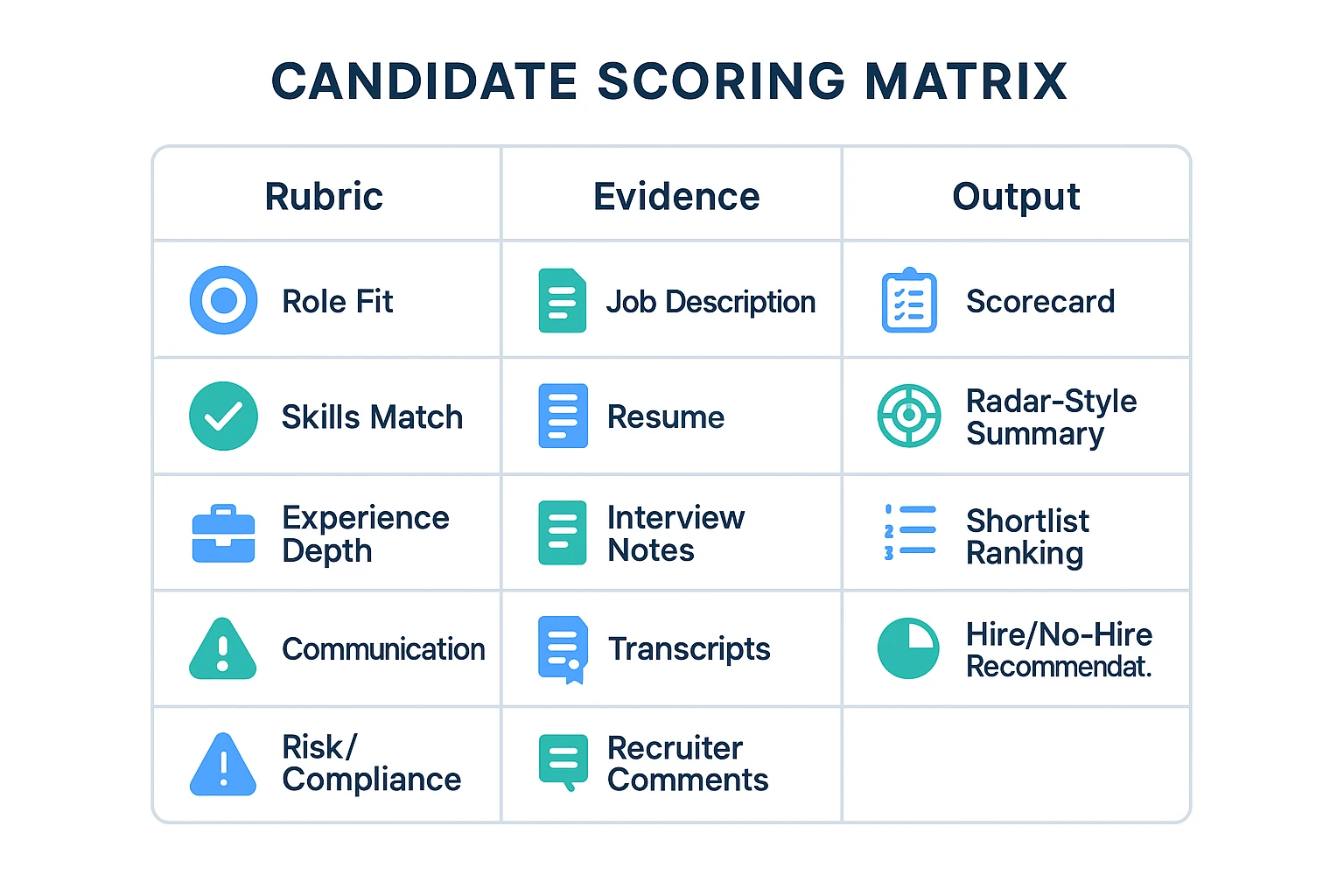
For screening, the agent scores applicants on 5 dimensions, creates interactive radar-chart reports, and gives clear hire/no-hire recommendations. It also batch-processes applications, generates side-by-side comparison scorecards, auto-archives resumes, and ranks candidates automatically.
That makes it useful when a team has 50, 100, or 500 applicants and needs consistent shortlists. The agent sharpens to your team's criteria over time, which helps hiring managers align on what "qualified" means for each role. It is free to start, no credit card needed, and customized agent features are expected to launch in about 2 months.
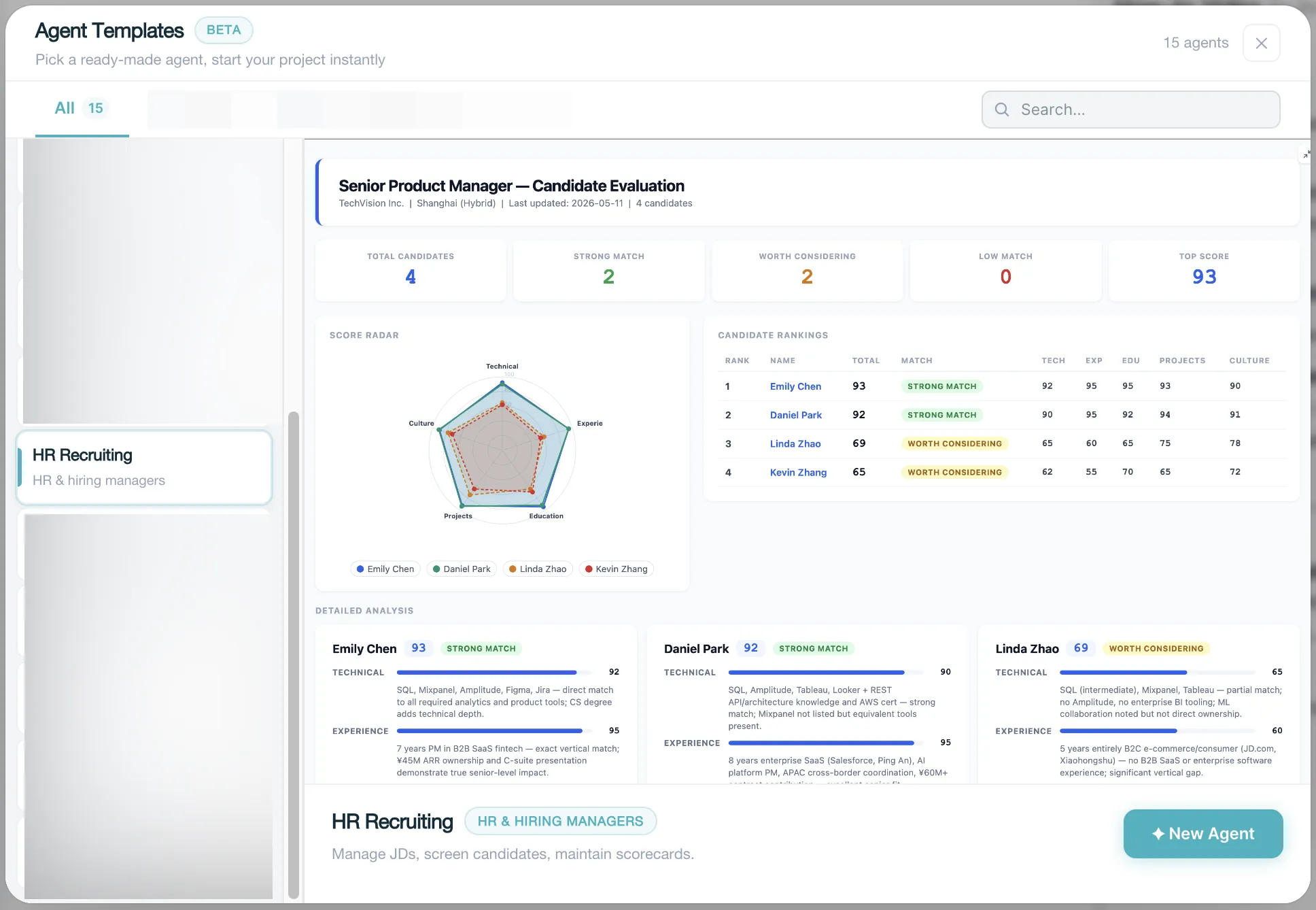
TicNote Cloud keeps updating. This is a preset skill, and the function will be published soon. Before that, you can go to TicNote Cloud and create your own project based on your own needs.
TicNote Cloud also fits teams already building an all-in-one AI workspace around meetings, documents, and searchable team knowledge.
HeyMilo
HeyMilo is best for high-volume conversational screening across SMS, voice, and video. It helps standardize early interviews, ask consistent questions, and send structured criteria, candidate scores, and insights back to recruiters or the ATS.
Check language depth, proctoring or cheating-detection claims, integration coverage, and how the platform explains scoring.
Humanly
Humanly works well for automated candidate engagement and screening chat. It helps reduce drop-off by answering FAQs, checking eligibility, and handing candidates to scheduling.
Buyers should review scoring transparency, audit trails, and how cleanly the handoff works for recruiters.
Paradox Olivia
Paradox Olivia is strongest in hourly and scheduling-heavy workflows. Its center of gravity is candidate communication and scheduling automation, with screening depth depending on the setup.
Check how far its rubrics go beyond logistics.
Metaview
Metaview is built for interview note-taking, structured summaries, interviewer enablement, and recruiter coaching. It fits later-stage interviews where teams need cleaner notes and more consistent feedback.
Confirm whether it does true resume screening and ranking, or mainly capture and notes.
HireVue
HireVue is best for enterprise video interviewing and assessment programs. Its structured interview flows and assessment governance help large teams standardize evaluation.
Review candidate experience, regional compliance posture, and assessment explainability before rollout.
Bottom line: "AI recruiter" can mean screening agent, interview capture tool, assessment platform, or scheduling assistant. The comparison table below normalizes those capabilities side by side.
Comparison table: top AI interview agents for screening, scoring, and hiring decisions
To compare any ai agent for interview fairly, use the same workflow axes. This table normalizes AI screening agent, AI interview software, and note capture tools across resume review, evidence capture, scoring, and hiring pipeline automation. For broader AI workspace context, see this guide to work AI tools with citations and privacy.
Normalized comparison axes
Definitions: automated resume screening means matching resumes to role criteria at batch scale. Interview capture means storing structured notes, transcripts, or evidence. Candidate ranking is the ordered shortlist across applicants. Scorecards are rubric-based evaluations. Collaboration covers recruiter, hiring manager, and reviewer workflows.
| Product | Best for | Core HR use case | Resume screening | Interview capture | Candidate ranking | Scorecards | Multilingual support | Collaboration | Pricing visibility | Key limitation |
| TicNote Cloud | HR screening workspace | Batch resumes, interview notes, cited comparisons | Yes, via Project files and Shadow AI | Yes, transcripts and notes | Yes, comparison reports | Yes, rubric tables | 120+ languages | Projects, comments, permissions | Public tiers plus Enterprise | Not a native ATS |
| HireVue | Enterprise video assessment | Structured video interviews | Limited; usually via integrations | Yes, video-first | Yes | Yes | Varies by package | Enterprise workflows | Quote-based | Higher change management |
| Spark Hire | SMB video interviews | One-way and live interviews | No | Yes, video-first | Basic | Basic | Limited public detail | Team review | Public plans | Less evidence synthesis |
| Metaview | Interview note capture | Recruiter note automation | No | Yes, interview notes | Limited | Supports interview feedback | Limited public detail | ATS-linked teams | Quote-based | Not built for resume batching |
| Paradox | High-volume recruiting | Chat, scheduling, screening | Yes, frontline screening | Limited | Yes | Basic | Multilingual chatbot support | Hiring team workflows | Quote-based | Stronger in automation than audit detail |
| Greenhouse | ATS workflow | Pipeline and scorecards | Via partners | Notes and feedback | Yes | Yes | Varies | Strong ATS collaboration | Public starting point | AI depth depends on add-ons |
CTA row: Try TicNote Cloud for Free — Start free with no credit card. It's the fastest way to standardize candidate scoring AI, side-by-side comparisons, and evidence-backed review in one HR screening workspace.
Buyer takeaway: Scheduling-heavy tools speed up coordination, but they can be weak on evidence and auditability. Video assessment platforms add structure, yet they often need more process change. If your main gap is automated resume screening plus consistent hiring decisions, prioritize tools that keep resumes, interview notes, scorecards, and recommendations in one reviewable workspace.
How to choose the right product
Pick the ai agent for interview workflows by the bottleneck you need to remove. For most HR teams, the strongest starting point is a screening workspace that keeps resumes, interview notes, scorecards, and hiring rationale in one reviewable place.
Choose TicNote Cloud for Project-based HR screening and evidence-backed candidate comparison
Choose TicNote Cloud when you need repeatable screening across roles, not just faster calls. It fits HR teams that want each open role to have its own Project, with the JD, resumes, interview notes, transcripts, rubrics, and candidate comparisons kept together.
"Evidence-backed" means every score should connect to a source: the job description, the candidate's resume, and the interview record. Recruiters can keep the rubric visible, compare candidates side by side, and review why one person ranked higher than another.
The operational win is simple: batch resume processing and auto-archiving reduce manual sorting. It also keeps the pipeline tidy as roles scale from 10 applicants to 100+. If your team already uses AI for calls, this is where an AI meeting assistant workflow can become a structured hiring record.
Choose HeyMilo for high-volume conversational interviewing
Choose HeyMilo when your main constraint is the number of first-round screens. It fits large applicant pools where conversational Q&A, structured evaluation, and multilingual coverage matter more than deep evidence management.
Choose Humanly for automated candidate engagement and screening chat
Choose Humanly when candidate drop-off, slow replies, or missed follow-ups hurt conversion. It works best as an always-on communication layer that handles basic screening, routing, and status updates.
Choose Paradox Olivia for hourly hiring and scheduling-heavy workflows
Choose Paradox Olivia when scheduling is the dominant pain. It is a strong fit for multi-location, shift-based, and hourly hiring teams that need candidates moved through coordination steps quickly.
Choose Metaview for interview note-taking and recruiter coaching
Choose Metaview when you already have interview stages in place but need better notes, feedback quality, and interviewer calibration. It helps teams standardize what gets captured after each interview.
Choose HireVue for enterprise video interviewing and assessment programs
Choose HireVue when you need standardized video assessment programs, strong governance, and enterprise scale. It is best for organizations with formal evaluation models and centralized hiring controls.
Default decision: if you want an AI screening agent that also works as an HR screening workspace with auditable scoring and side-by-side comparisons, pick TicNote Cloud first. Then add scheduling or candidate-engagement tools where your hiring process needs extra automation.
AI screening workspace for evidence-backed interview decisions (step-by-step)
An AI agent for interview screening works best when it has a clean evidence base, not a loose pile of resumes and notes. In TicNote Cloud, each open role can become its own Project, so recruiters, hiring managers, and people teams review the same job criteria, candidate files, transcripts, and scorecards in one place.
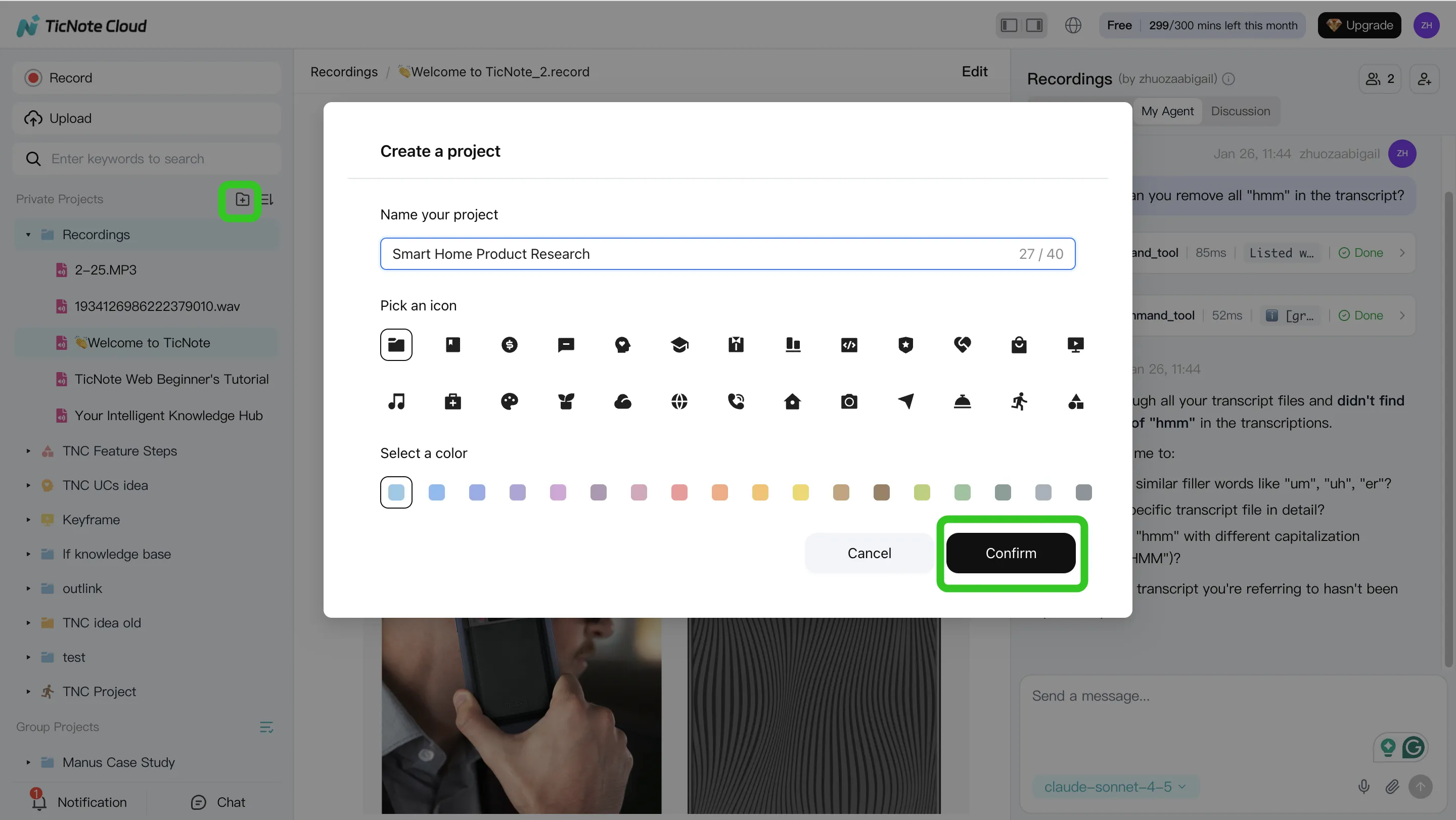
1. Create or open a role Project and add content
Start by creating a Project for the open role, such as "Customer Support Lead — Q3 Hiring." Add the job description first. This gives Shadow AI one source of truth for must-have skills, key responsibilities, and disqualifiers.
Then upload resumes, scorecard templates, interview question banks, and supporting documents. If interviews are recorded or transcribed, add those files too. For teams new to this workflow, it helps to understand how meeting transcripts become searchable evidence before using them in hiring reviews.
You can add files directly through the Project folder area, or attach files in the Shadow AI chat panel and ask the agent to save them to the right folder.
2. Use Shadow AI to search, analyze, edit, and organize
Next, ask Shadow AI to extract the hiring criteria from the job description. Then run structured checks across the resume batch: eligibility, relevant experience, skills evidence, role fit, and risk flags.
The key is consistency. Use the same rubric for every candidate, such as "strong," "acceptable," or "no evidence." Shadow AI can also organize notes into comparison tables, rewrite unclear summaries, and keep the source trail visible for review.
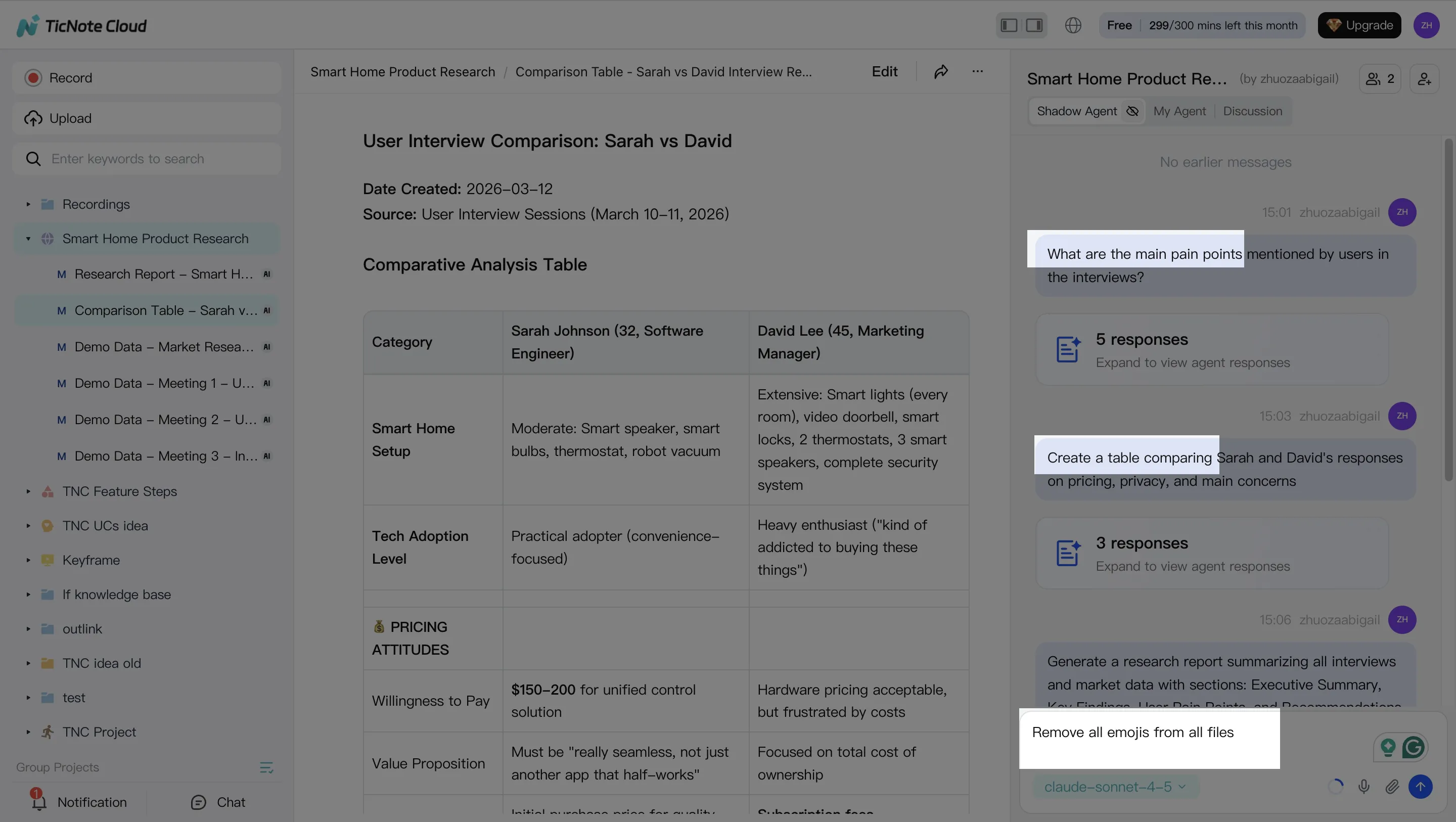
3. Generate screening deliverables
Once the evidence is organized, generate practical outputs for the hiring team. Useful deliverables include a shortlist, candidate-by-candidate rationale, open questions for interviews, and a hiring decision memo for leadership.
You can ask Shadow AI to create a structured report or use the Generate option for formats such as PDF reports, HTML presentations, mind maps, or HTML pages.
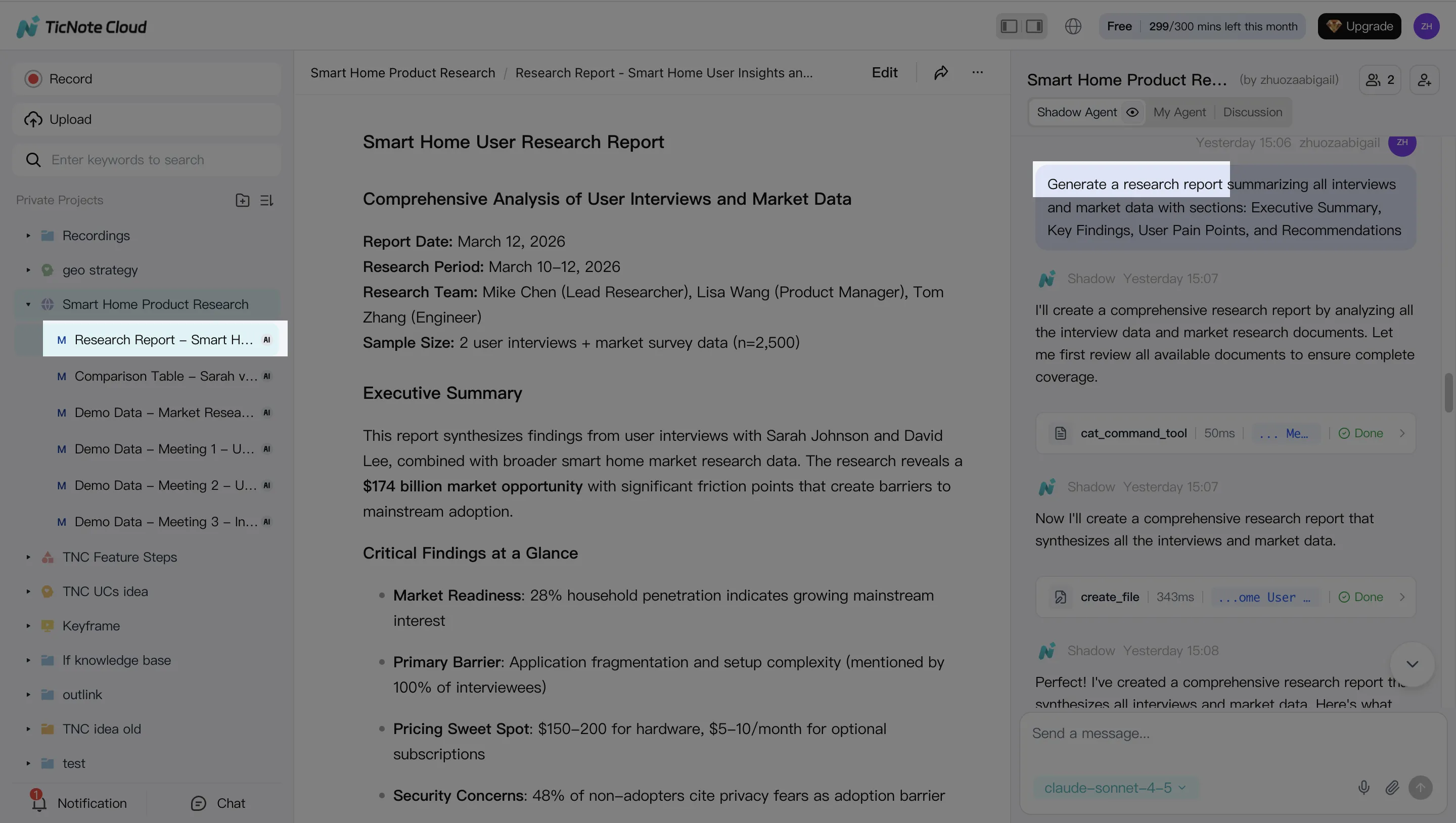
4. Review, refine, and collaborate
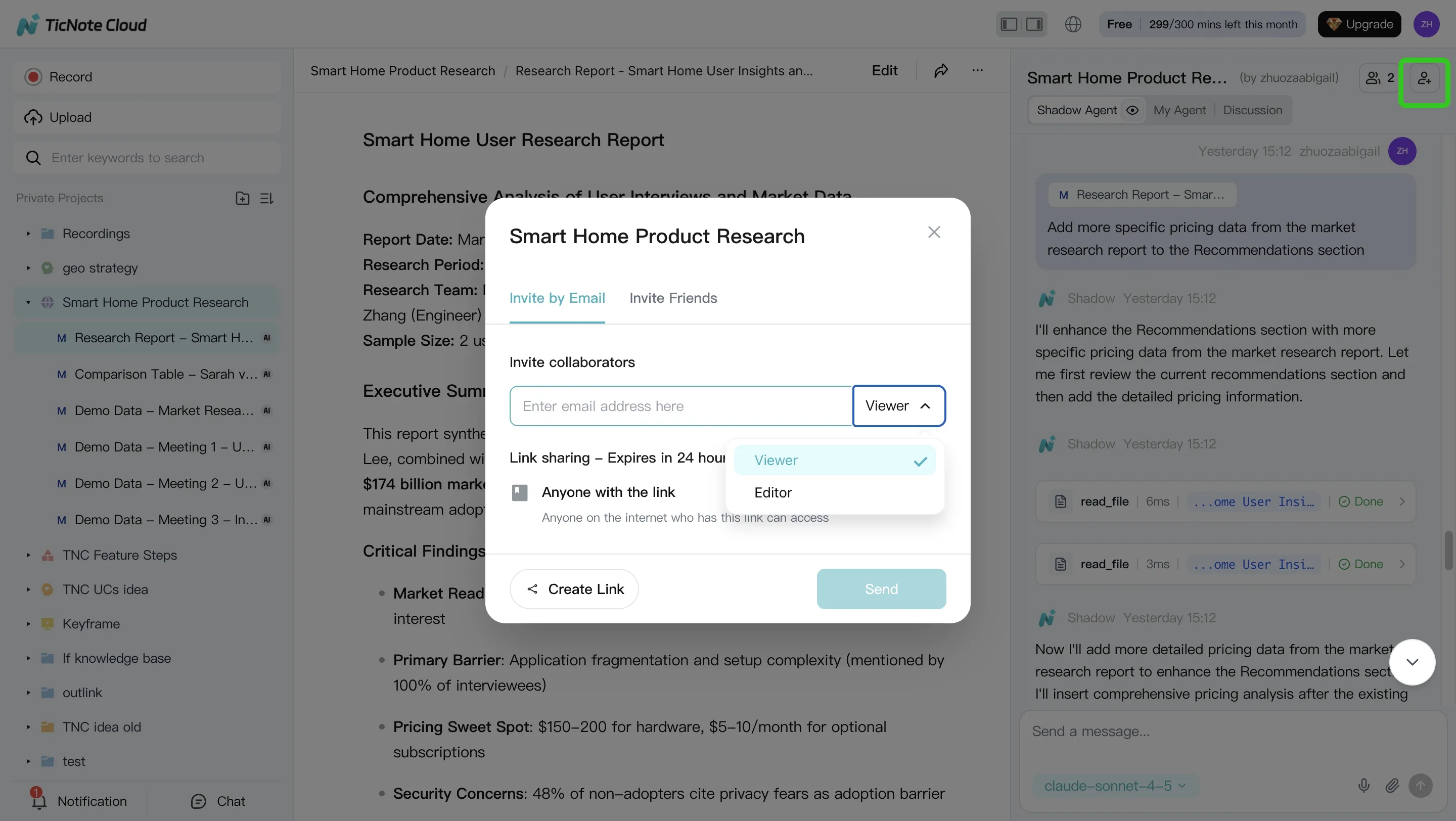
Finally, share the Project with recruiters and hiring managers using the right permissions. Team members can comment, ask follow-up questions, and refine criteria. Human review stays central: final recommendations should always be checked against the underlying evidence.
After a deliverable is created, click into sections to verify the original source, request edits, and track changes inside the Project.
Try TicNote Cloud for Free: Start free with no credit card and build your first role-based screening workspace before your next shortlist review.
What should an AI interview agent cover beyond scheduling?
Scheduling is only the front door. A strong AI agent for interview workflows should manage the evidence layer: role requirements, resumes, scorecards, notes, team comments, and recommendations. Treat it like a hiring knowledge base, not a calendar assistant.
Job description and resume intake
Intake means bringing the job description and resumes into one workspace, so the agent screens against the actual role. For staffing teams, batch resume processing is a must during hiring spikes.
Structured screening criteria
Screening should follow a rubric, not free-form opinions. Use 5–7 clear dimensions, such as:
- Skills evidence
- Relevant experience
- Role competencies
- Communication signals
- Constraints or eligibility
Candidate comparison and ranking
Candidate ranking AI should return an ordered shortlist, reasons for each score, and confidence or uncertainty notes. Side-by-side views help hiring managers review trade-offs fast.
Interview notes and transcript memory
Transcript memory turns past interviews into a searchable context. It reduces repeat questions and keeps interviewers aligned. Use linked notes, not detached summaries, so every claim supports a team knowledge base.
Recruiter collaboration
Recruiters need shared scorecards, comment threads, and change history for calibration. Permission controls also matter when hiring managers, HR, and interview panels work together.
ATS-adjacent workflow fit
Many teams don't need a full ATS replacement. They need a screening workspace that fits alongside ATS steps: shortlist handoff, interview-stage notes, rejection reasons, and reporting.
Multilingual and accessibility needs
Validate language coverage, translation quality, and accommodation support before rollout. These checks improve candidate clarity, fairness, and reduce friction across global or distributed hiring teams.
Best fit: TicNote Cloud is the most complete option when you want intake, scoring, comparison, and auditable evidence in one HR screening workspace.
Trust, fairness, privacy, and candidate experience checks
An AI agent for interview workflows can improve speed, but governance decides whether its scores are usable. Treat every score as evidence to review, not a verdict. Align checks with EEOC, FTC, NIST AI RMF, or EU guidance relevant to your region.
Explain what is scored and what is not scored
Document the inputs behind each score:
- Job-description match signals
- Resume evidence, such as skills, tenure, or certifications
- Interview evidence, such as answers tied to the rubric
- Exclusions, such as protected traits, accent, appearance, age signals, or off-topic social data
Publish this guidance for recruiters and hiring managers.
Keep humans in the final decision loop
AI should support screening and consistency. Humans make hiring decisions. Set clear "needs human review" thresholds, such as low confidence, missing evidence, conflicting interviewer notes, or borderline scores within 5–10 points of the cutoff.
Review bias and consistency regularly
Run calibration sessions by role, location, and job family. Spot-check score patterns across demographics where legally permitted. Log every rubric change so scoring drift doesn't happen silently.
Clarify consent and recording rules
Tell candidates when AI, transcription, or recording is used. Recording laws differ by jurisdiction, so get consent where required. Also explain accommodations and offer a non-AI path when needed.
Confirm data retention, encryption, and model-training policies
Verify retention windows, access controls, encryption, audit logs, and whether candidate data trains models. Regulated teams should run a formal security review before rollout.
Safe buying stance: choose vendors that can show governance, explanations, and controllable retention—not black-box scores.
Final thoughts
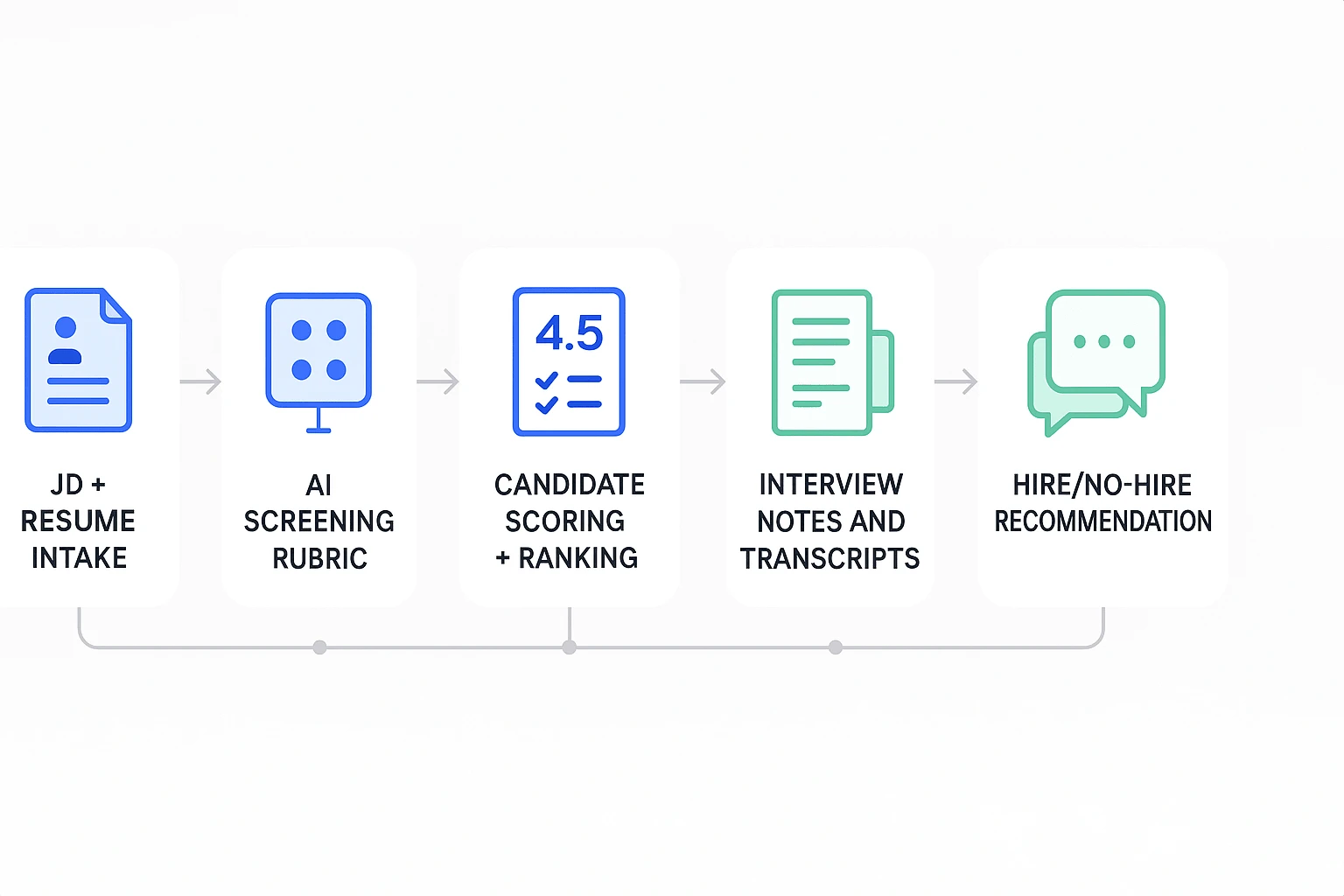
The best AI agent for interview workflows doesn't just book calls or summarize chats. It strengthens the full evidence chain: JD intake, automated resume screening, structured scoring, side-by-side comparisons, and documented hiring recommendations.
For most HR teams, TicNote Cloud is the best starting point because it works as a practical screening workspace. Each role can live in its own Project, with batch resume review, 5-dimension scoring, radar-style reporting, and clear hire/no-hire recommendations teams can audit later.
Setup is simple: create a role Project, upload the JD and resumes, run scoring, then review the shortlist with your hiring team.
Start free with no credit card.