Extension
TL;DR: What an AI agent changes in research (and what stays human)
Try TicNote Cloud for Free to run research like a loop, not a one-off chat: plan, collect, synthesize, check, store, and reuse. That's how AI agents will change research day to day: faster first drafts, more sources handled, and work that carries over between sessions.
Problem: research notes scatter across docs, chats, and meeting notes. Agitate: then you re-ask the same questions, lose context, and can't trace claims later. Solution: with TicNote Cloud, you can capture transcripts and docs, summarize them, and keep your question and constraints in one project so the next run stays consistent.
What stays human-led is non-negotiable:
- Verification: you approve any claim that matters.
- Provenance: every key statement must trace to a source.
- Accountability: a named owner signs off on the output.
10-minute quick start: pick one narrow question, define "done" plus stop rules, ask the agent for an outline and reading list, then make a simple claims table for big assertions. Save the question and constraints in your project notes so every future run matches.
How will AI agents change research workflows in practice?
In practice, AI agents change research by turning scattered steps into a guided workflow: plan the work, fetch evidence, summarize, and keep notes linked to sources. That's different from a one-off chat reply. It's also the core of how ai agents will change research day to day: more throughput, more traceability, and fewer dropped steps.
AI agent vs. chatbot: what's the real difference?
A chatbot mostly answers a single prompt. It doesn't reliably keep state, follow a plan, or take tool actions unless you keep steering it.
An AI agent is a system that can:
- Plan a multi-step path toward a goal (like "map the evidence on X")
- Call tools (search, files, databases, spreadsheets)
- Keep state (memory) across steps, so later work builds on earlier decisions
In research, "agent" usually means workflow automation plus reasoning plus retrieval. It does not mean human-level independence.
Use an autonomy ladder (and stay as low as you can)
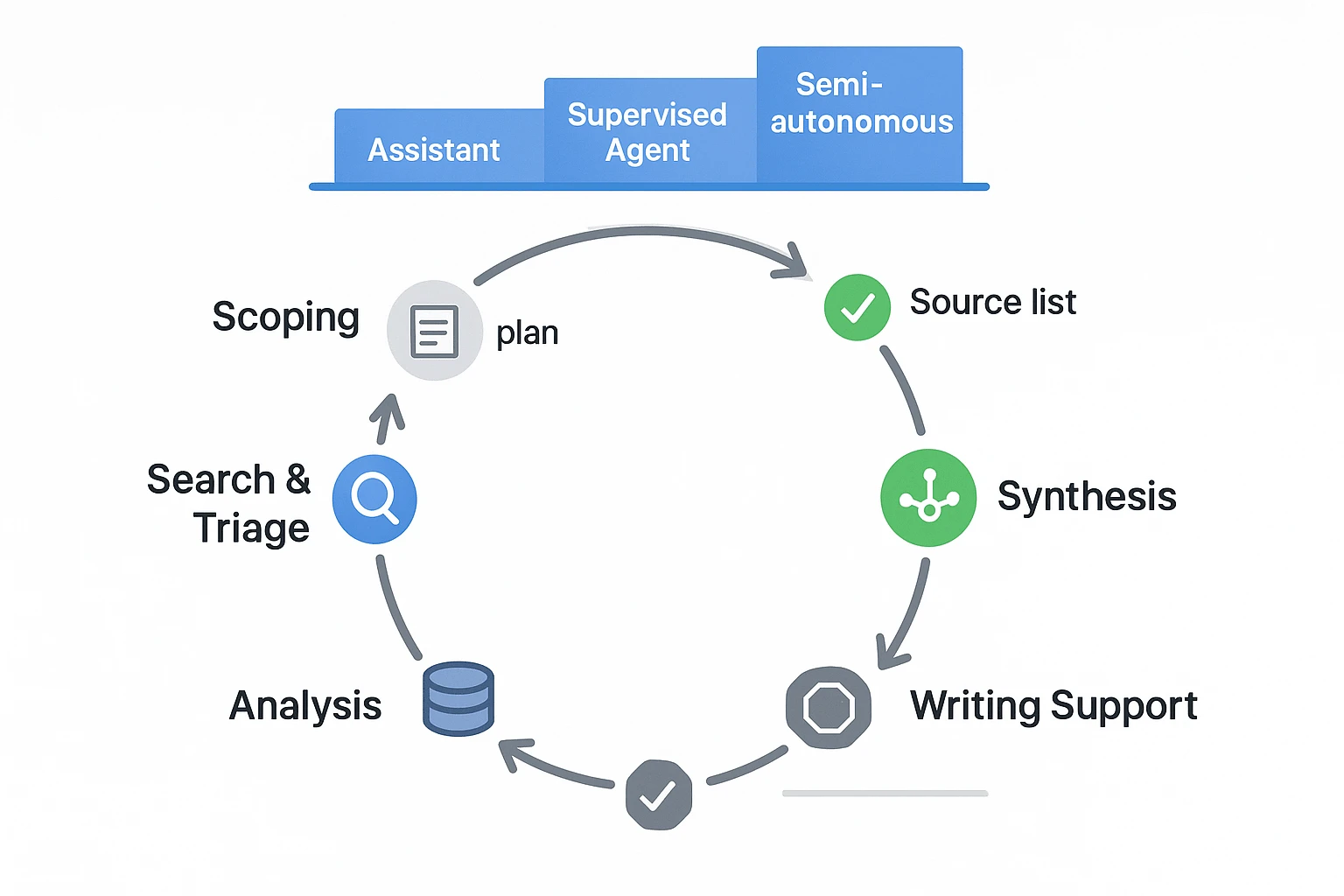
You'll see three common levels of autonomy:
- Assistive: drafts, extracts, tags, and reformats. No external actions.
- Supervised agent: proposes a plan, runs searches and summaries, but pauses for approvals at checkpoints.
- Semi-autonomous: runs bounded tasks (like weekly monitoring) with strict limits and audit logs.
Rule of thumb: pick the lowest autonomy that still saves time. You can always move up later.
Where agents already fit in the research loop
Most research workflows have "agentable" zones where speed matters, but humans still own the conclusions:
- Scoping: clarify the question, set inclusion and exclusion rules, draft a query plan.
- Search and triage: collect candidate sources, dedupe, rank, and flag gaps.
- Synthesis: cluster themes, build concept maps, extract methods, results, and limits.
- Analysis: compare findings, test rival explanations, and list open questions.
- Writing support: draft outlines and sections, format references, and keep claims tied to evidence.
As one institutional data governance lead put it: "Agents change throughput, not responsibility." You can delegate the steps, but you still sign your name to the claims.
Which research tasks should you let an AI agent do first?
Start with tasks that are easy to check fast. That's the safest way to learn how ai agents will change research without letting errors shape your thinking. Think: clean inputs, clear outputs, and simple "did it match the source?" tests.
Low-risk starters (do these first)
These are high value and low harm because you can verify them in minutes.
- Meeting-note cleanup: turn messy notes into bullets, decisions, and action items.
- Outline a review or memo: draft headings, key questions, and an argument flow.
- Extract key terms and definitions: build a glossary from your own material.
- Build a reading queue: group papers by topic and priority.
- Summarize your own notes with anchors: cite timestamps (for meetings) or page numbers (for PDFs) so you can jump back.
- Create consistent tags: standardize labels like "method", "dataset", "limitation", "open question".
Medium-risk tasks (add a required verify step)
These can mislead you if the agent over-generalizes. Still, mistakes are catchable if you force evidence.
- Literature mapping: cluster papers into themes, methods, and schools of thought.
- Gap finding scans: list "what's missing" as hypotheses, not facts.
- Interview synthesis: merge themes across interviews, with supporting quotes.
Verification rule: every theme needs 2+ supporting sources, and you should spot-check quotes against the original transcript or PDF.
High-risk tasks (set red lines)
Don't let an agent be the final voice on:
- Experiment design choices that affect safety or ethics
- Clinical or legal claims
- Primary statistical conclusions
- Funding, hiring, or publication decisions
Agents can suggest options, but a human must independently validate and write the rationale.
| Research task | Automate with an agent | Keep human |
| Scoping | Draft search terms, dedupe topics, build a question list | Pick the real research question and boundaries |
| Reading | Pull key points, define terms, extract citations to pages | Judge quality and relevance |
| Synthesis | Cluster themes, draft tables, summarize conflicts | Make the final model of "what's true" |
| Meetings | Convert talk into decisions, tasks, and open questions | Handle nuance, politics, and commitments |
| Writing | Create outlines, format references, turn notes into sections | Make claims, tone, and final conclusions |
How do you run a safe human-in-the-loop agent workflow?
A safe human-in-the-loop workflow turns an AI agent into a controlled research helper, not an unchecked author. The goal is simple: let the agent do the busywork, but keep humans accountable for scope, evidence, and final claims. That's the practical way to think about how AI agents will change research day to day.
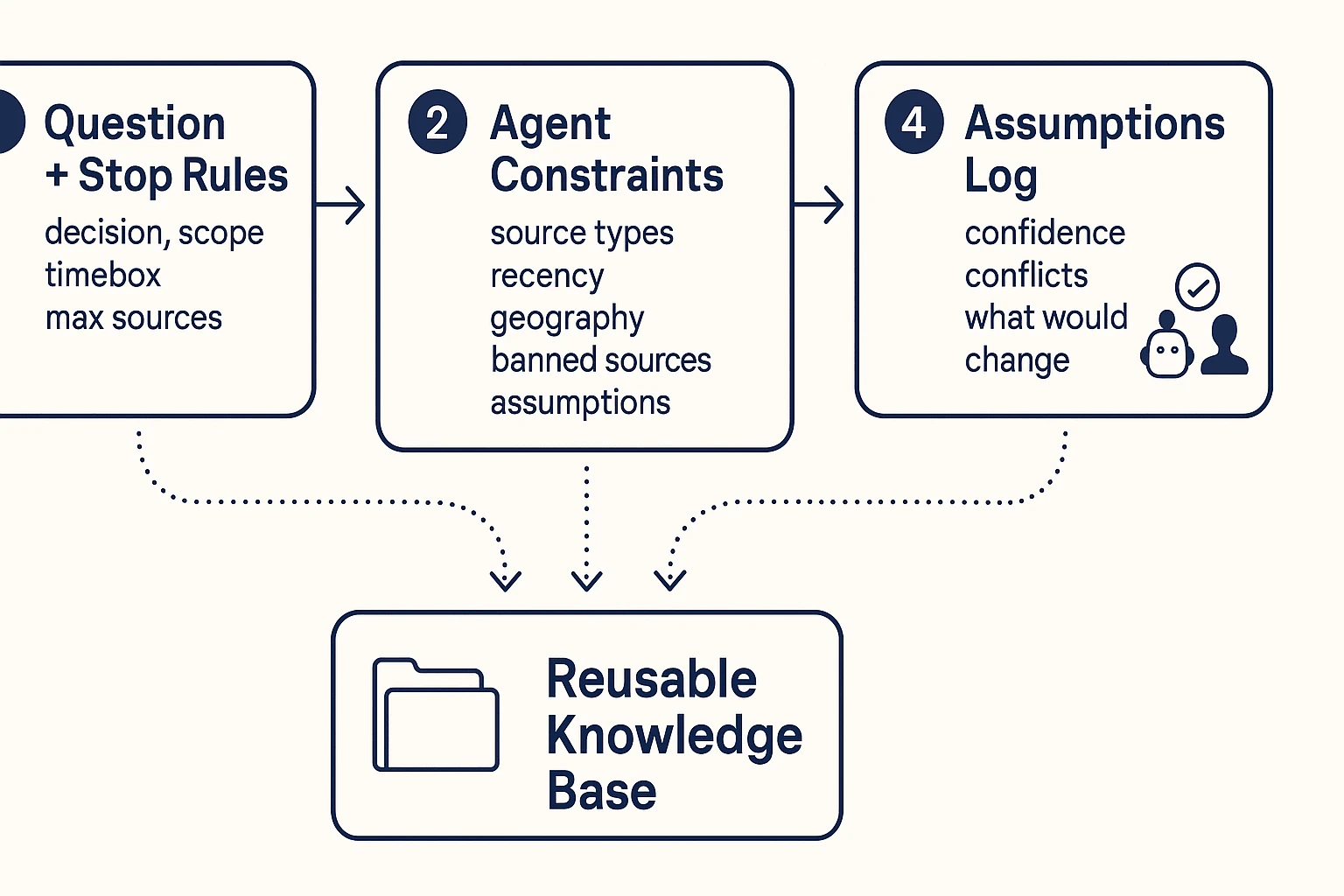
Step 1: Define the question and stop rules
Start with a tight research question tied to a real decision. Vague prompts cause vague outputs, and that's where errors sneak in.
Use this quick template before you run the agent:
- Research question: What do we need to know?
- Decision it supports: What will we choose or change?
- Audience: Who will read and act on it?
- Scope boundaries: What's in and out (topic, time, region)?
- Stop rules:
- Time box (example: 60 minutes)
- Max sources (example: 25)
- "Sufficient evidence" definition (example: 3 independent sources agree)
Step 2: Give the agent constraints (scope, time, source types)
Next, tell the agent what it may use and what it must avoid. Don't assume it will "know" your standards.
Good constraints include:
- Preferred sources: peer-reviewed papers, standards, internal notes, recorded meetings
- Recency window: example: last 5 years, unless it's a classic study
- Geography: example: EU only, or global with a US and APAC cut
- Banned sources: low-quality blogs, scraped content, anonymous forums
- Required transparency: the agent must list assumptions, unknowns, and where evidence is thin
Step 3: Add checkpoints (draft → verify → finalize)
Break the run into three gates. Each gate has an owner.
- Draft (agent-owned): Outline, key claims, and a source list.
- Verify (human-owned): Check a claims table, open sources, and confirm any quoted text.
- Finalize (human-owned): Edit the narrative, add limits, and sign off.
On teams, consider a simple two-person rule: one person verifies evidence, a second approves the final version.
If you want a deeper governance view, use the same structure as an agent architecture and governance playbook and apply it to research.
Step 4: Record assumptions and uncertainties
Every agent output should ship with an audit trail. Future readers need to know what was assumed.
Log these items right next to the deliverable:
- Assumptions: what you treated as true
- Confidence level: high, medium, low (and why)
- Conflicts: where sources disagree
- What would change the conclusion: what new evidence would flip the call
This is where an agent-ready knowledge base helps: if you keep the prompt constraints, claims tables, and meeting transcripts together inside one project space, you can rerun the workflow later and compare results.
Try TicNote Cloud for Free to keep transcripts, constraints, and verified research notes organized in one workspace.
How do you verify agent output (and reduce hallucinations)?
AI agents can speed up research, but you still need a simple way to check what's true. The goal isn't to "trust the model more". It's to make every output easy to verify, repeat, or discard.
Use a lightweight claims table (and require "no evidence found")
When an agent writes a summary, don't review it line by line. Review its claims. A claims table forces the agent to separate what it says from what it can prove.
Include these columns:
- Claim (one sentence)
- Evidence (what supports it)
- Direct quote or extracted data (verbatim)
- Source pointer (link, page, figure, or timestamp)
- Confidence tag (High, Medium, Low)
Also require rows that say "No evidence found" when the agent can't support a claim. That's a win. It prevents quiet guesswork.
Cross-check fast: triangulate, then attack your own answer
Use quick pressure tests before you rely on agent output:
- Triangulate: confirm the same point from at least two independent sources.
- Counter-prompt: "What's the best argument against this claim?"
- Ask for edge cases: "When would this fail or not apply?"
- Compare to your prior notes: check against what your lab, team, or past work already observed.
If the agent can't reconcile conflicts, treat the output as a lead, not a fact.
Provenance basics: what "good" looks like
Provenance means you can trace a statement back to an exact place.
- Papers: DOI plus page or figure number, and the exact quote.
- Web sources: URL plus access date, and the quoted passage.
- Meetings or interviews: timestamp range plus speaker label (for example, "00:14:10 to 00:15:05, Participant 3").
This makes your work reproducible and reviewable. A teammate can re-check it. Future you can re-run it.
When to discard results (and re-run with a narrower scope)
Discard or redo the output if you see:
- Missing sources for key claims
- Quotes you can't find in the cited place
- Overconfident language that isn't backed by evidence
- Unresolved conflicts across sources
In those cases, re-run the agent with tighter inputs, clearer definitions, and fewer questions.
Verification checklist (copy into your notes)
- Claims table completed (including "no evidence found" rows)
- Two-source triangulation for important claims
- Counter-prompt run and reviewed
- Provenance captured (DOI/page, URL/access date, or timestamps)
- Reproducibility notes saved: inputs used, prompts, tool/model version, date, human reviewer
What risks and ethics issues do AI research agents raise?
AI agents can speed up research, but they also raise new risks. The big shift is control. You may delegate steps, but you can't delegate accountability.
Close the responsibility gap (own the errors)
If an agent drafts methods, numbers, or claims, someone must still own them. That "responsibility gap" shows up when the output is wrong, but no one can explain why. Pick one accountable reviewer per project, and require a simple sign off note: what was checked, what sources were used, and what is still uncertain.
Reduce bias and representativeness problems (including WEIRD)
Agents can amplify source bias because they summarize what they see most. They can also worsen sampling bias by ignoring harder to find work.
WEIRD means Western, Educated, Industrialized, Rich, and Democratic. If your sources are mostly WEIRD, your findings may not generalize.
Mitigation checklist:
- Pull from more than one database or corpus.
- Add non English or regional sources when needed.
- Ask "what's missing?" and list excluded groups, geos, and time windows.
Protect privacy, security, and sensitive data
Don't paste sensitive data into uncontrolled tools. In labs and companies, "sensitive" often includes PII (names, emails), patient data, client contracts, unpublished results, and internal incident notes. Use role based access, least privilege, and redaction before sharing transcripts or notes.
Prevent skill atrophy (keep core skills in training)
If the agent does all the reading, teams lose judgment. Protect skills like reading primary methods, critical appraisal, and basic statistical reasoning. Set "manual days" or periodic audits where a human re does a sample of searches and extractions.
"As an institutional data governance lead told us, governance is the price of speed."
How do you turn agent work into a repeatable 'always-on' research system?
An AI agent is only useful if its work sticks. To make it repeatable, treat agent output like lab notes: one home, clear names, consistent tags, and a simple review rhythm. That's how you scale what you learned last week into what you can reuse next month (without re-reading everything).
Build a single source of truth
Start with a simple information architecture (IA) your whole team can follow:
- Project spaces: one per topic, study, or client.
- Naming:
YYYY-MM-DD_source_topic_v1for meetings, papers, and memos. - Standard tags:
method,dataset,assumption,decision,risk,open_question. - Source registry note: one living page that lists key sources, where they live, and what they're for.
Keep it boring. Boring scales.
Run continuous research loops (with a bounded scope)
An "always-on" system is a loop, not a pile:
- Watch: track a tight set of journals, keywords, competitors, or policies.
- Collect: drop items into an inbox folder inside the right project.
- Summarize with provenance: each summary includes "what it says" plus "where it came from."
- Alert: write a short "what changed" note, then link it to prior conclusions.
Set a cadence: weekly triage for new items, and a deeper monthly synthesis.
Track metrics that actually matter
Use low-effort signals, not vanity metrics:
- Time to first usable synthesis (minutes or hours)
- % of key claims with a named source
- Rework rate (how often you revise conclusions)
- Decision usefulness (one-line postmortem: "Did this change a call?")
Assign light roles: Owner (scope), Reviewer (checks claims), Curator (keeps the knowledge base clean). Tools that keep transcripts, docs, and structured exports together make reuse easier across teams, especially when you later compare projects or onboard new researchers. If you're evaluating platforms, start with a quick scan of all-in-one AI workspace patterns so your IA and exports don't break later.
Try TicNote Cloud for Free and keep agent outputs organized by project.
How to operationalize agent-assisted research notes (step-by-step)
The fastest way to make agent work usable is to treat every note like a mini system: clear inputs, supervised processing, and stored outputs with provenance (what it used and when). Below is a tool-agnostic workflow, shown using TicNote Cloud, that turns messy meetings, PDFs, and chats into research notes you can re-check and reuse.
Step 1: Create a Project and add content (plus a one-page scope card)
Start by creating a Project for one research question. Keep it narrow. "Do we have evidence that X improves Y?" works better than "Tell me everything about X."
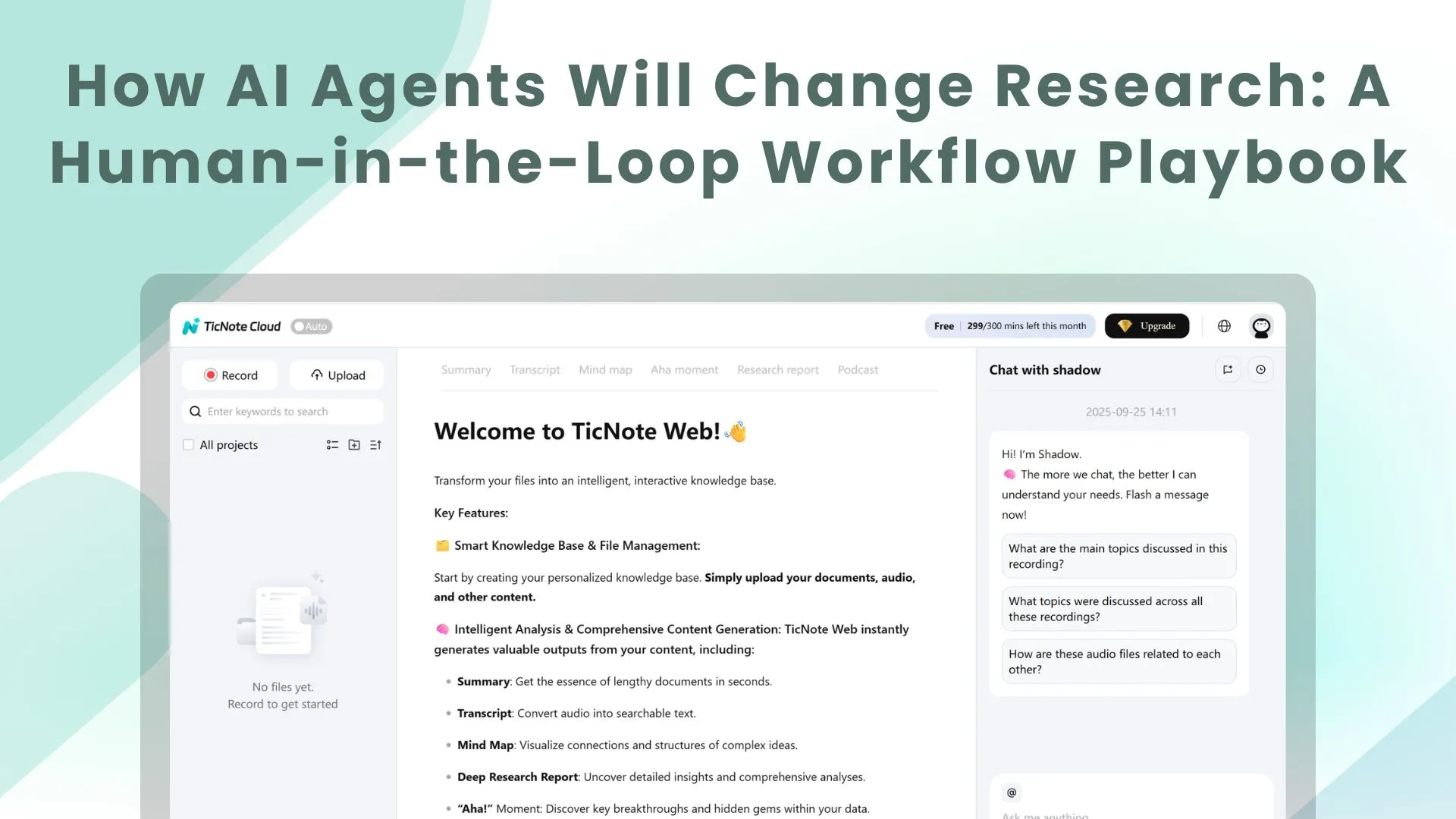
Add your raw inputs first: meeting recordings, existing transcripts, PDFs, and any scratch notes. In TicNote Cloud web studio, you can upload files directly in the file area, or attach them in Shadow AI and ask it to save them to the right folder.
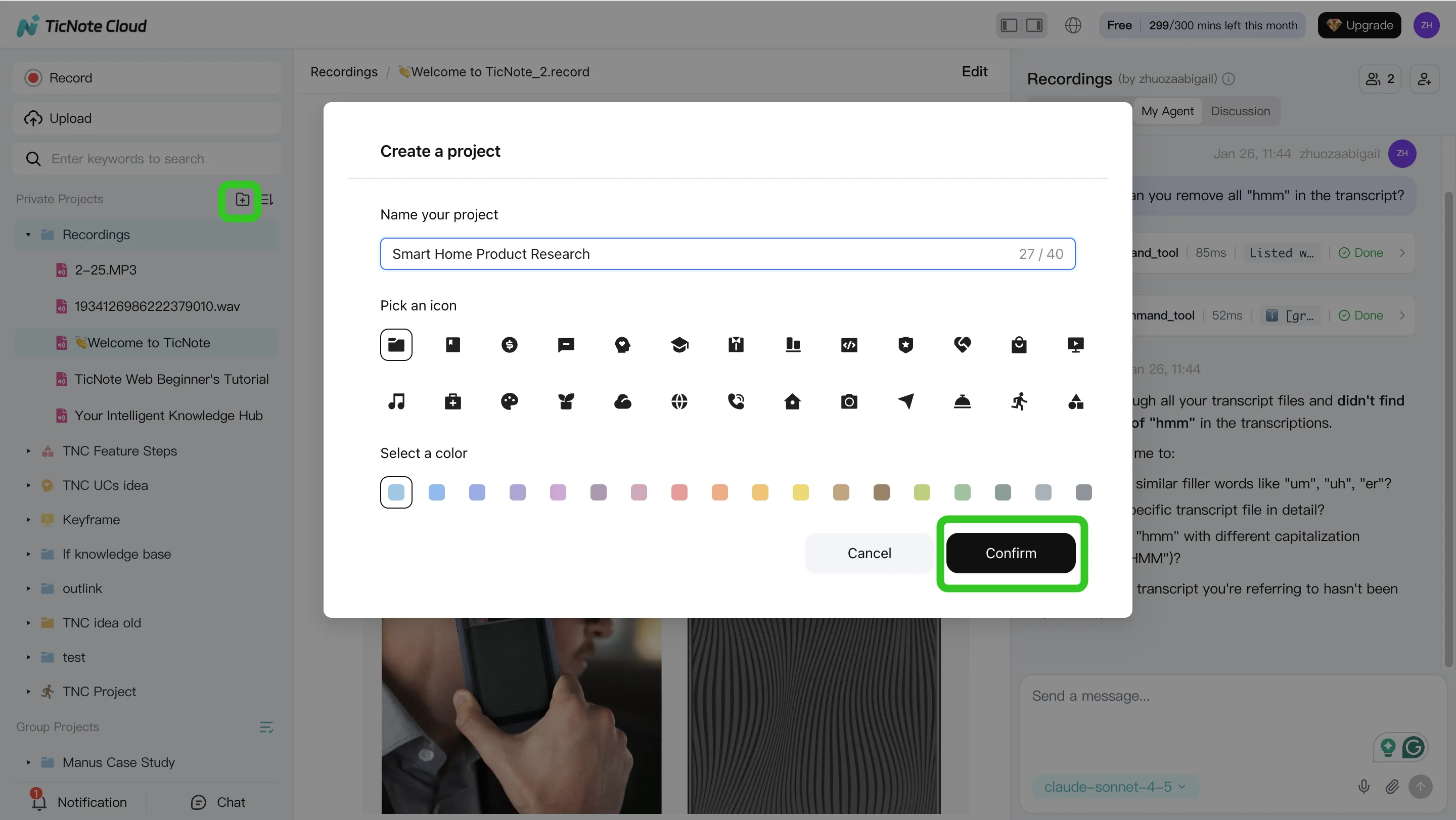
Before you ask an agent to analyze anything, create a short "scope card" file in the Project. It should include:
- Research question and why it matters
- In scope vs. out of scope
- Stop rules (when to stop searching or summarizing)
- Constraints (time window, geography, methods, key terms)
- Output format you want (claims table, outline, brief)
This one file keeps the agent from drifting.
Step 2: Use Shadow AI to search, analyze, edit, and organize the evidence
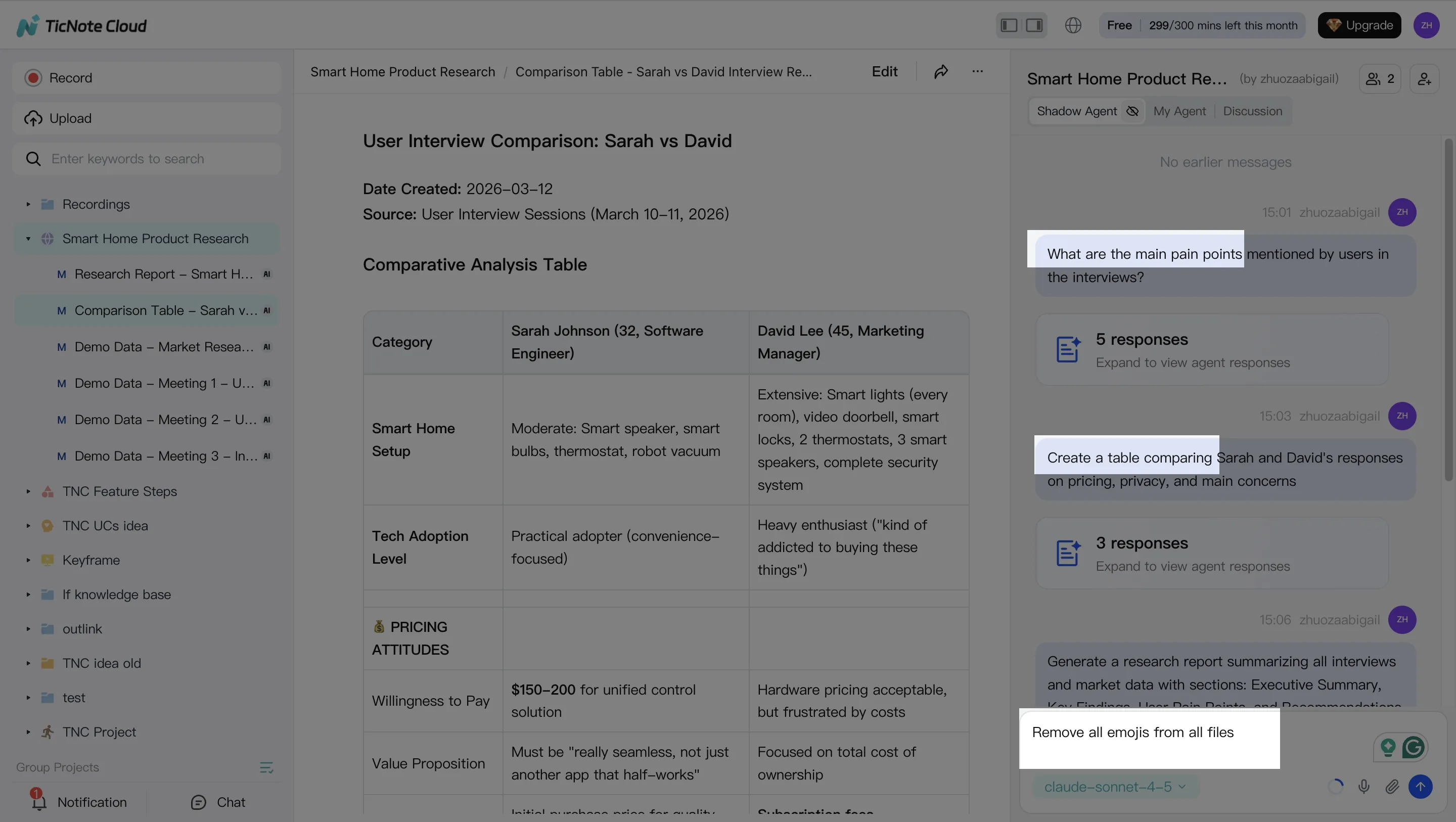
With your inputs in place, use Shadow AI on the right side of the screen to ask grounded questions over a single file, a folder, or the whole Project. Your goal is not "a summary." Your goal is traceable building blocks you can verify.
Ask for extractions that stay tied to the source, such as:
- Key points with timestamps from interviews or meetings
- Theme lists across multiple sessions
- A "claims table" note (claim, support, source location, confidence)
Then use Shadow to clean and structure notes using templates. For example, ask it to rewrite a section in plain language, convert bullets into a table, or split one long note into topic-based files. Finish by organizing outputs into folders and tags so future you can find them.
Step 3: Generate deliverables (and force limitations to the surface)
Once you have structured notes, generate a deliverable that fits the moment: a deep research-style report, a presentation-ready outline, or export-ready summaries for sharing.
In TicNote Cloud, you can ask Shadow AI directly, or use the Generate button to produce formats like reports, web presentations, podcasts, mind maps, or HTML pages.
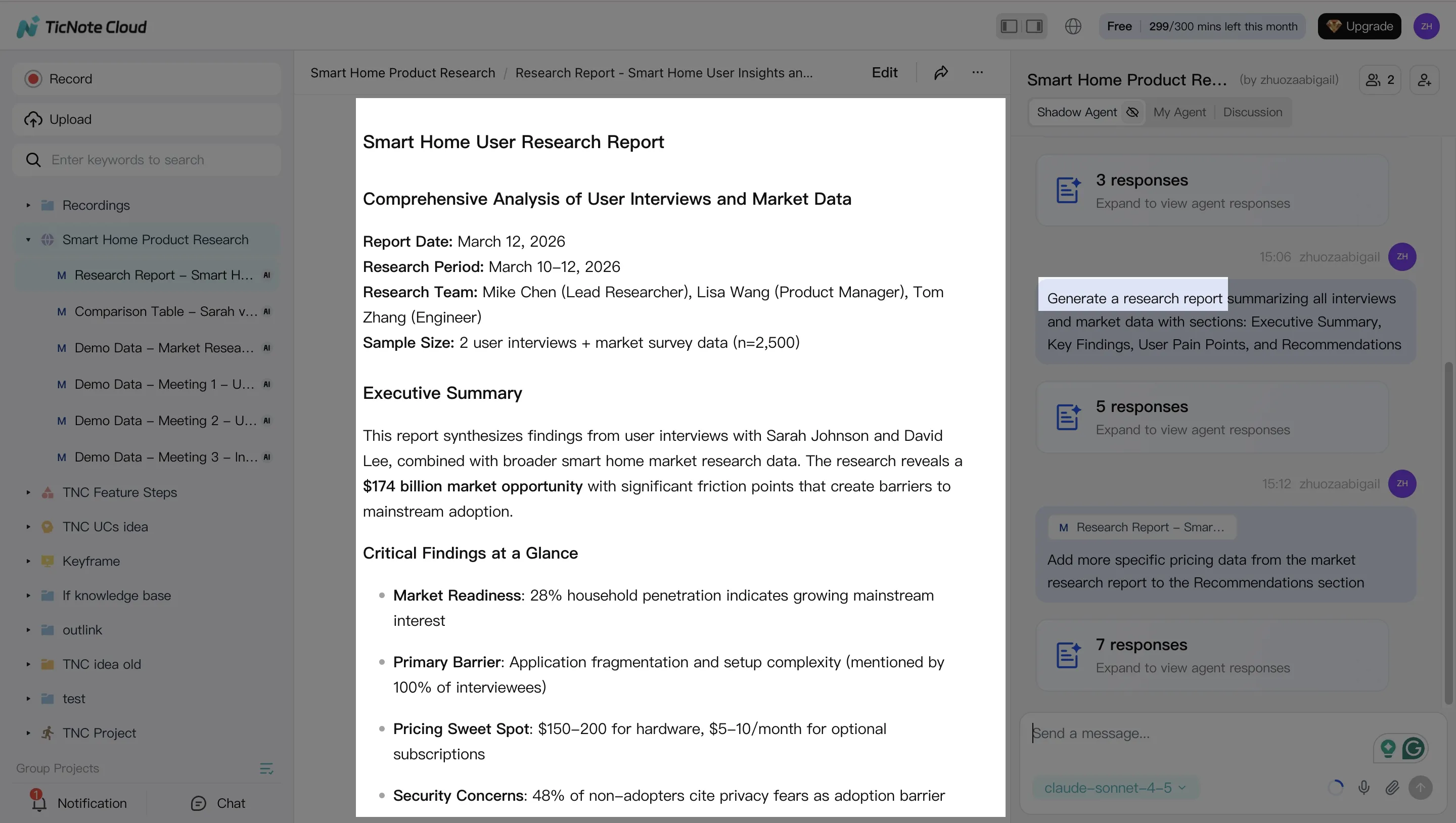
Whatever format you choose, require two sections every time:
- Limitations (what the inputs did not cover)
- Open questions (what you still need to verify, measure, or read)
That single habit cuts overconfidence and makes review faster.
Step 4: Review, refine, and collaborate with a lightweight audit trail
Next, run a human review loop. Assign one reviewer to check disputed claims and spot missing sources. Then edit for clarity and add "what changed" notes when you revise.
In TicNote Cloud, you can refine sections by asking Shadow to modify specific parts, and jump from a paragraph back to the original source for verification. When it's ready, store the final deliverable plus a short audit note: date, inputs used, key assumptions, and reviewer sign-off.
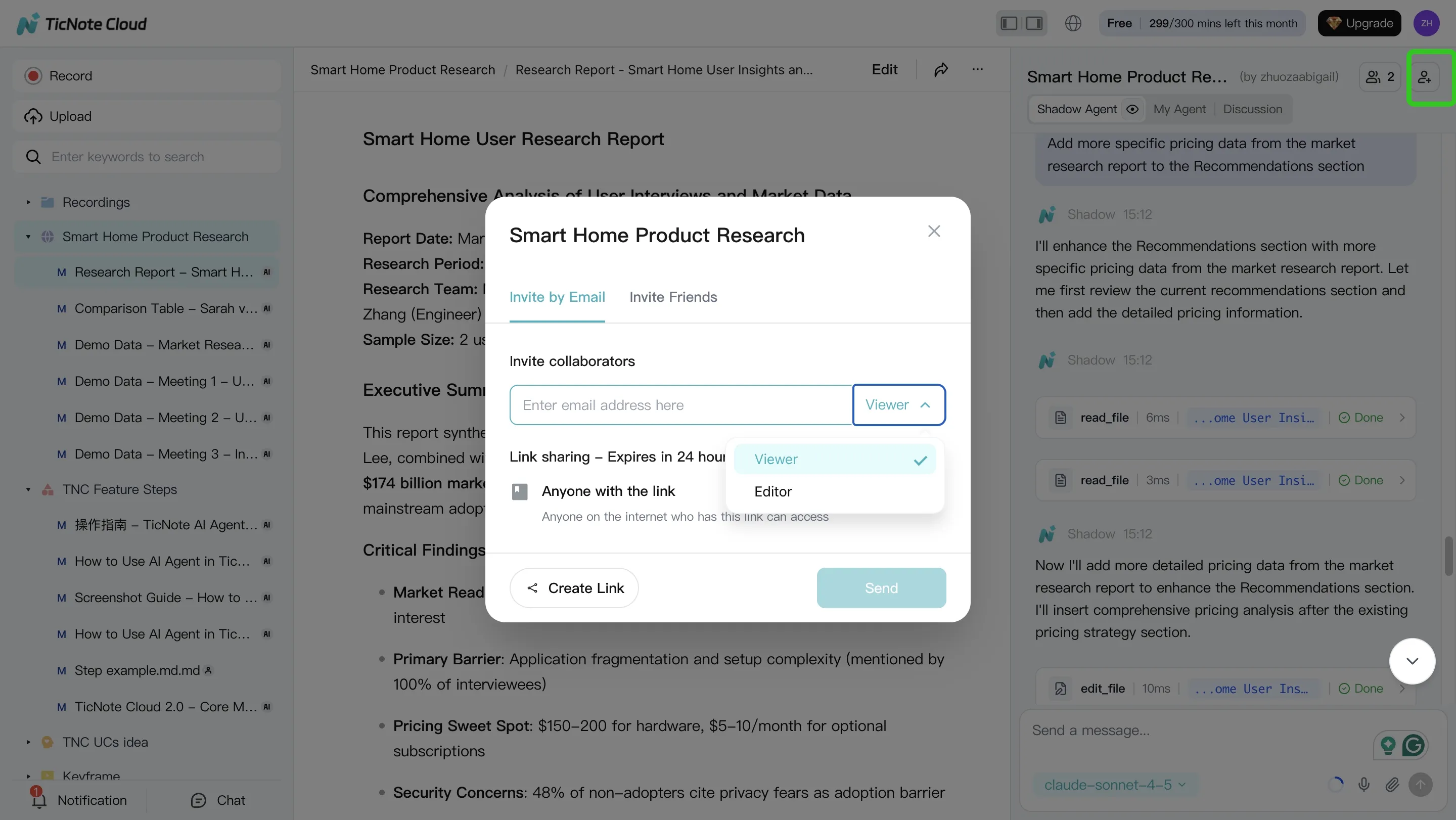
If you work with a team, use role-based access in team projects so reviewers can comment and ask questions without breaking your structure.
Quick App workflow: capture on mobile, synthesize on web
On the app, create a Project, record or upload audio, and run a first-pass summary and Q&A right away. Then switch to the web studio for longer synthesis work like a claims table, a deep report, and exports (Markdown, DOCX, or PDF) for sharing.
Try TicNote Cloud for Free to turn raw research inputs into organized, verifiable project notes.
Which TicNote Cloud features are exclusive for building an agent-ready research knowledge base?
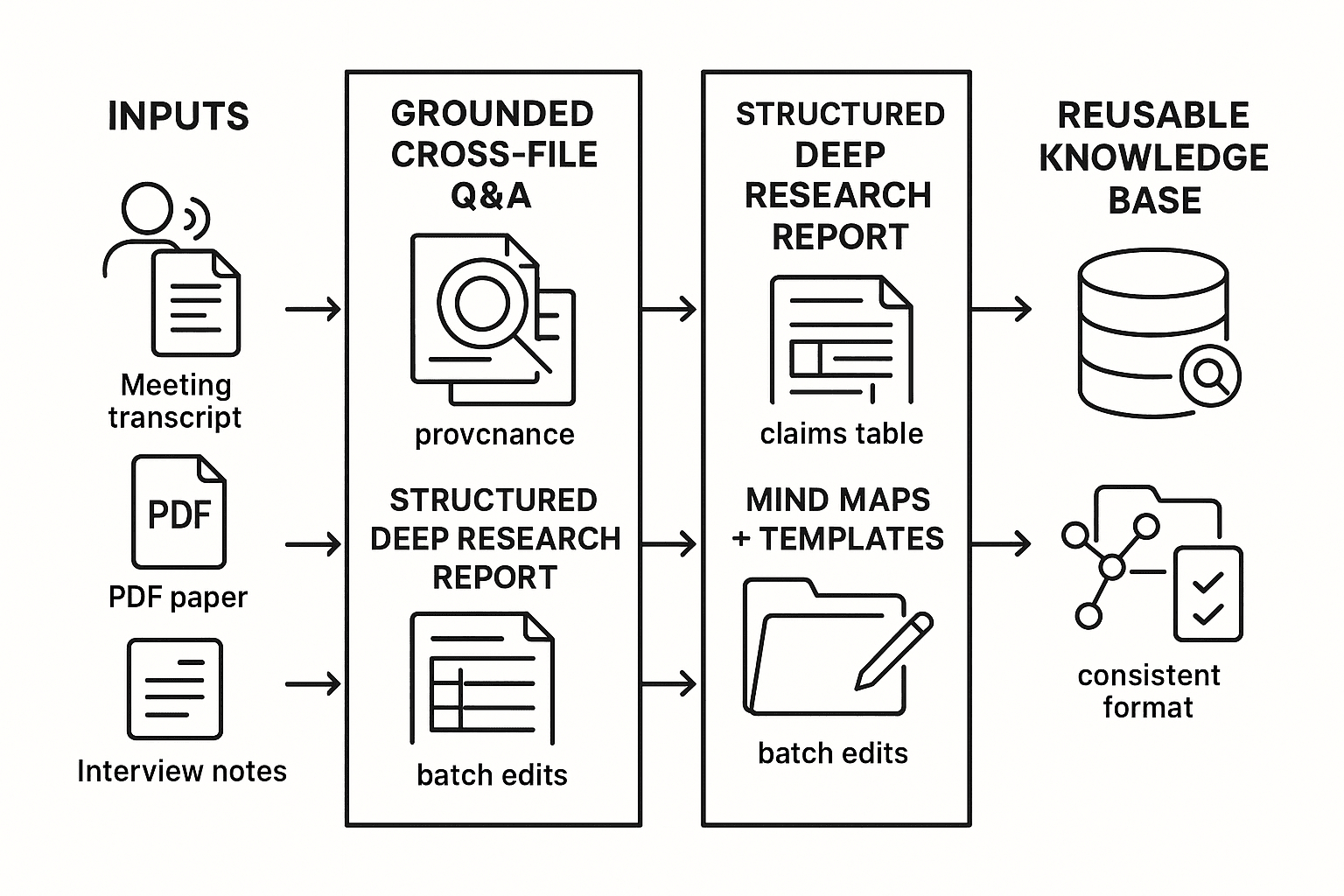
Agent work only helps if it sticks. TicNote Cloud is built to turn meetings, papers, and chats into a grounded knowledge base you can query later. That matters when you're tracking decisions, updating evidence, and trying to avoid re-reading the same sources every week.
Recall decisions fast with Shadow cross-file Q&A
Shadow cross-file Q&A lets you ask questions across files, folders, or whole projects. This supports research continuity when you need to:
- Find the last decision you made and the reasoning behind it
- Trace "why we believe X" back to the exact note or transcript
- Reuse prior scans and summaries instead of repeating them
The key is that answers stay tied to your stored notes and transcripts, so you can sanity-check the trail before you cite anything.
Generate consistent deliverables with Deep Research and Deep Think
Deep Research report generation helps you standardize how results are written up. You can push for a repeatable structure like: question, method, evidence, counterpoints, and limits.
Deep Think mode adds a useful constraint: it pushes explicit assumptions and alternatives. After that, route the output into a simple claims table (claim, support, source note, confidence) so your human review is quick and consistent.
Make chat output durable with Shadow Agent CRUD
Shadow Agent CRUD (create, read, update, delete) turns "good chat" into real project files. That means you can:
- Create a living literature map note
- Update a running bibliography entry-by-entry
- Batch standardize headings, tags, or study summaries across many files
This reduces lost work from one-off chats and keeps your research system tidy.
Align teams with mind maps and templates
Mind maps give a fast visual of themes and links, which helps in lab meetings or stakeholder reviews. Templates keep every study note consistent, for example: background, evidence, risks, next steps. That consistency is what makes later cross-file Q&A reliable.