


 Extension
![[Free Credits] Claude Opus 4.7 Prompting: How to Write Explicit Prompts That Stay on Scope (with Reusable Context)](https://cdn-digitalhuman-pb.weta365.com/voice-recorder-prd/static/backend/2026/05/09/2052957189386579970.webp)
TL;DR: Hot model Claude Opus 4.7 rewards precise prompts and durable context
Get 30 credits to use Claude Opus 4.7 Premium for free every month if you want to test it without adding another AI subscription. A strong Claude Opus 4.7 prompt states scope, constraints, output format, source context, and the exact done state.
Scattered meeting notes make prompts vague. Vague prompts force the model to infer missing decisions, which creates off-scope answers and repeated setup. TicNote Cloud helps turn meetings and project files into reusable, cited context before you prompt.
Use explicit instructions, not implied intent. Treat context as a durable asset, not a one-time paste.
What makes a Claude Opus 4.7 prompt different now?
A Claude Opus 4.7 prompt needs fewer hints and more rules. The main shift is simple: the model draws tighter boundaries around your instruction, so words like "help," "improve," and "clean up" are risky shorthand. That's good for repeatable workflows and API pipelines, but it punishes missing specs.
Replace vague verbs with exact tasks
Vague verbs can point to several jobs at once:
- "Improve" could mean rewrite, shorten, expand, or critique.
- "Clean up" could mean fix grammar, remove duplicates, or restructure.
- "Review" could mean find bugs, score quality, or suggest edits.
- "Refactor" could mean rename functions, split files, or preserve behavior only.
A more literal model may choose the narrowest valid meaning and stop early. If you're comparing model behavior, this Claude 4.7 validation guide is a useful companion.
Define the finish line before you ask
Use this checklist before sending the task:
- Scope fence: what to change and what to leave alone.
- Constraints: don't add facts, change tone, or rename entities.
- Output schema: headings, bullets, tables, or JSON.
- Length controls: word count, section count, or max bullets.
- Done state: clear acceptance criteria.
- Missing info rule: ask questions first, don't guess.
This matters in chat, code plans, API system prompts, and team research. In cross-session work, the real gap is often scattered meeting context. For 4.7, prompt engineering becomes context + specification engineering.
Prompt rules that work across chat, code, API, and team research
A strong Claude Opus 4.7 prompt defines the finished result, not just the action. Instead of "summarize this meeting," write the business outcome: "Create a stakeholder-ready decision brief that separates confirmed decisions from open questions." That shift gives the model a target it can check against.
Write the outcome, then the task
Use this compact pattern across chat, code review, API calls, and research work:
- Goal: What the final answer must help someone do.
- Inputs allowed: Files, transcript sections, tickets, code blocks, or pasted notes.
- Output format: Bullets, table, JSON, memo, diff, or report.
- Checks: What must be true before the answer is done.
Example: "Analyze these interview notes. Goal: identify the top 5 onboarding blockers. Inputs allowed: only the pasted notes. Output: table with blocker, evidence, frequency, and severity. Check: every claim must cite a note excerpt."
Add negative constraints
Negative constraints stop scope creep. They're often the difference between a safe edit and a surprise rewrite.
Use direct rules:
- Don't invent data.
- Don't change meaning.
- Don't alter variable names, function names, or API fields.
- Don't add new recommendations unless asked.
- Don't rewrite approved copy outside the selected section.
Make missing context explicit
Tell the model when to pause. A practical rule is: "If critical fields are missing, ask up to 3 questions first. Otherwise proceed, but mark assumptions as ASSUMPTION." This reduces silent guessing and makes review faster.
Then invite a second pass: "After completing the task, list relevant risks, contradictions, or missing information in a short 'Review Notes' section."
Set response controls
Add exact controls for tone, depth, fallback behavior, and length:
- Tone: direct, neutral, stakeholder-ready.
- Depth: 1-page brief, 10-bullet scan, or deep report.
- Fallback: if sources conflict, show both and ask.
- Length: 4 sections, max 120 words each.
Prompt lint checklist: Is the goal clear? Are inputs bounded? Are output rules defined? Are "don't" rules included? Do any instructions conflict?
Before-and-after Claude Opus 4.7 prompt examples
A strong Claude Opus 4.7 prompt leaves less room for implied work. Instead of asking the model to "figure out the rest," give it scope, evidence rules, and a target format. The payoff: fewer elegant guesses and more reusable outputs.
Example 1: turn meeting notes into an action register
Before: "Summarize this meeting and next steps."
After:
Summarize this meeting as: 1) decisions, 2) action items with owner and due date, 3) unresolved items, 4) key quotes with timestamps. If owner or date is missing, write "Not stated."
Expect a short literal summary from the first prompt. The second produces a structured register your team can track.
Example 2: keep product research inside the sources
Before: "Find customer themes from these interviews."
After:
Use only the provided docs and transcripts. For every claim, cite file name plus timestamp or section. Add an "Unknown / needs follow-up" bucket for anything not supported.
This prevents confident-sounding guesses because unsupported ideas have a required destination.
Example 3: fence code planning before coding
Before: "Improve the API handler."
After:
Work only in /api/billing and billingService.ts. Do not refactor unrelated files. First propose a plan, then list tests to add, then wait for approval before code.
Add CLAUDE.md-style standing rules for naming, testing, logging, and review limits. That keeps repeated engineering norms out of every prompt.
Example 4: control executive email tone
Before: "Write an update email."
After:
Write an executive email under 150 words. Tone: direct, calm, no hype. Structure: one-sentence context, three bullets, one explicit ask.
Use this when stakeholders need the point in 30 seconds.
4.6-style vs 4.7-style behavior
- Where 4.6 might "helpfully" expand the scope, 4.7 is more likely to stop at the stated task.
- If you want proactive thinking, ask for it directly: "Add an observations block with risks, gaps, and suggested next questions."
- If you want no extras, say: "Do not add assumptions, recommendations, or sections not requested."
How should teams store context so 4.7 stops guessing?
A reliable Claude Opus 4.7 prompt starts with stable context, not a long chat thread. Treat context as a short project brief the model can reread every session. Include 7 fields: goal, users, constraints, current state, decisions made, open questions, and glossary. This works like acceptance criteria: it tells the model what done means before it writes.
Keep rules in one place
Pin standing rules in a CLAUDE.md-style file or team prompt note. Add:
- Writing style and tone defaults
- Approved sources of truth
- What to do when information is missing
- Output schemas for reports, tickets, or briefs
- Safe vs unsafe actions, such as never changing API behavior without approval
TicNote Cloud Projects fit this pattern when meeting transcripts, docs, and decisions live together. Shadow AI can answer across those files with citations, so the next prompt starts from shared evidence instead of memory.
Split explore from execute
Use two modes. Explore means ask questions, propose options, and label assumptions. Execute means follow the spec, add no extra features, and produce the deliverable. Mode confusion is a top reason 4.7 gives literal but wrong output.
| Problem | Symptom | Fix |
| Conflicting constraints | Short but detailed | Rank priorities |
| Missing scope fence | Edits spill over | State exact files or sections |
| Over-formatting | Structure beats substance | Simplify schema |
| Unclear priority | Model guesses | Number rules |
Prompt debugging checklist: remove conflicts, add scope fences, state missing-info behavior, rank constraints, and test with one small task first.
How to build prompt-ready project memory from meetings and files
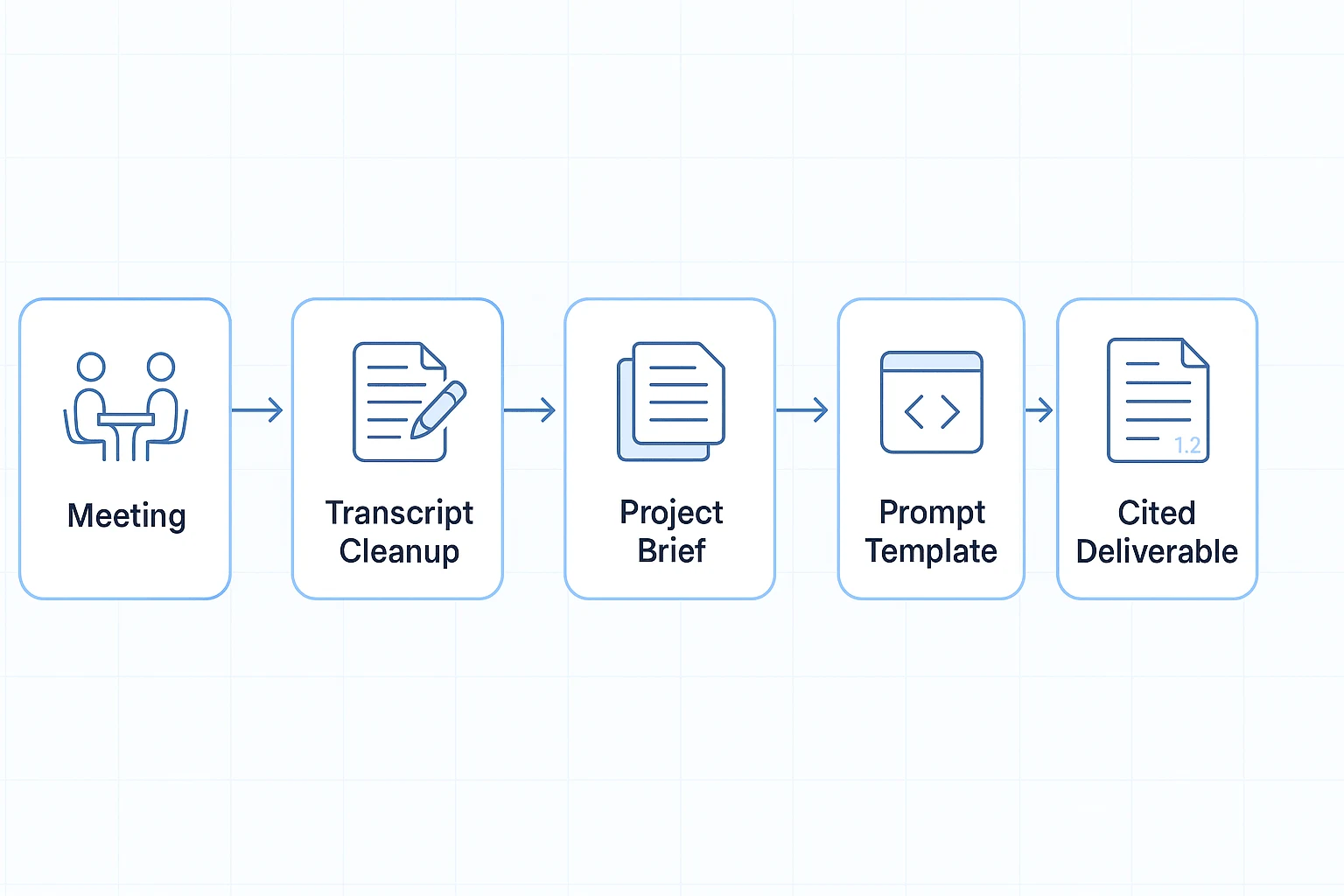
We'll use TicNote Cloud as the example workspace for this workflow. A stronger Claude Opus 4.7 prompt starts with clean project memory: the meetings, files, terms, and decisions the model should use instead of guessing.
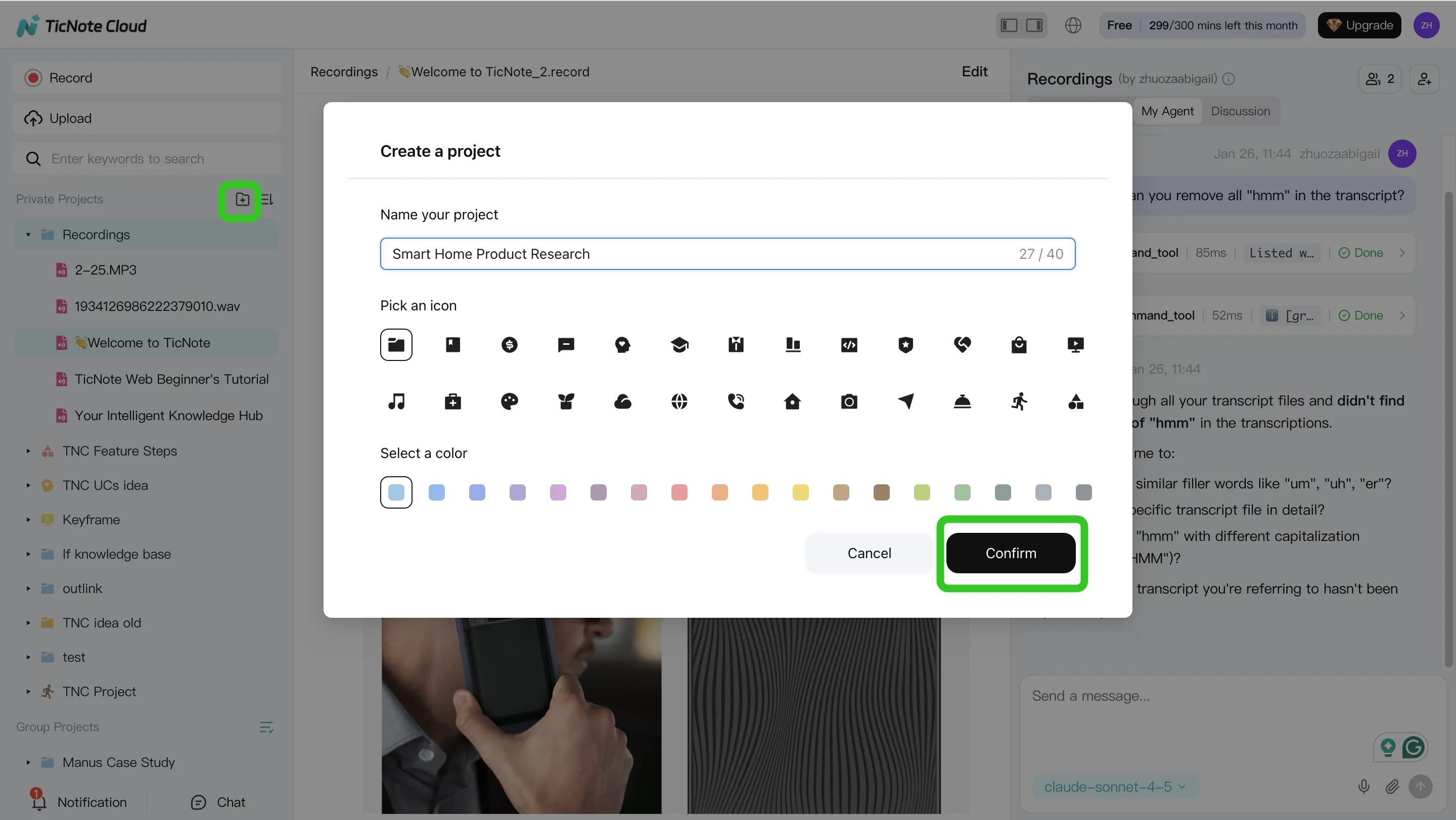
Step 1. Create or open a Project and add content
In TicNote Cloud web studio, create a Project or open an existing one. Name it by initiative, client, sprint, or research stream. Then upload audio, video, and documents, or record meetings into that Project.
Use tags or folders so later prompts can say, "Use only this Project." You can add files directly from the folder area, or attach them in the Shadow AI panel and ask Shadow to save them to the right folder.
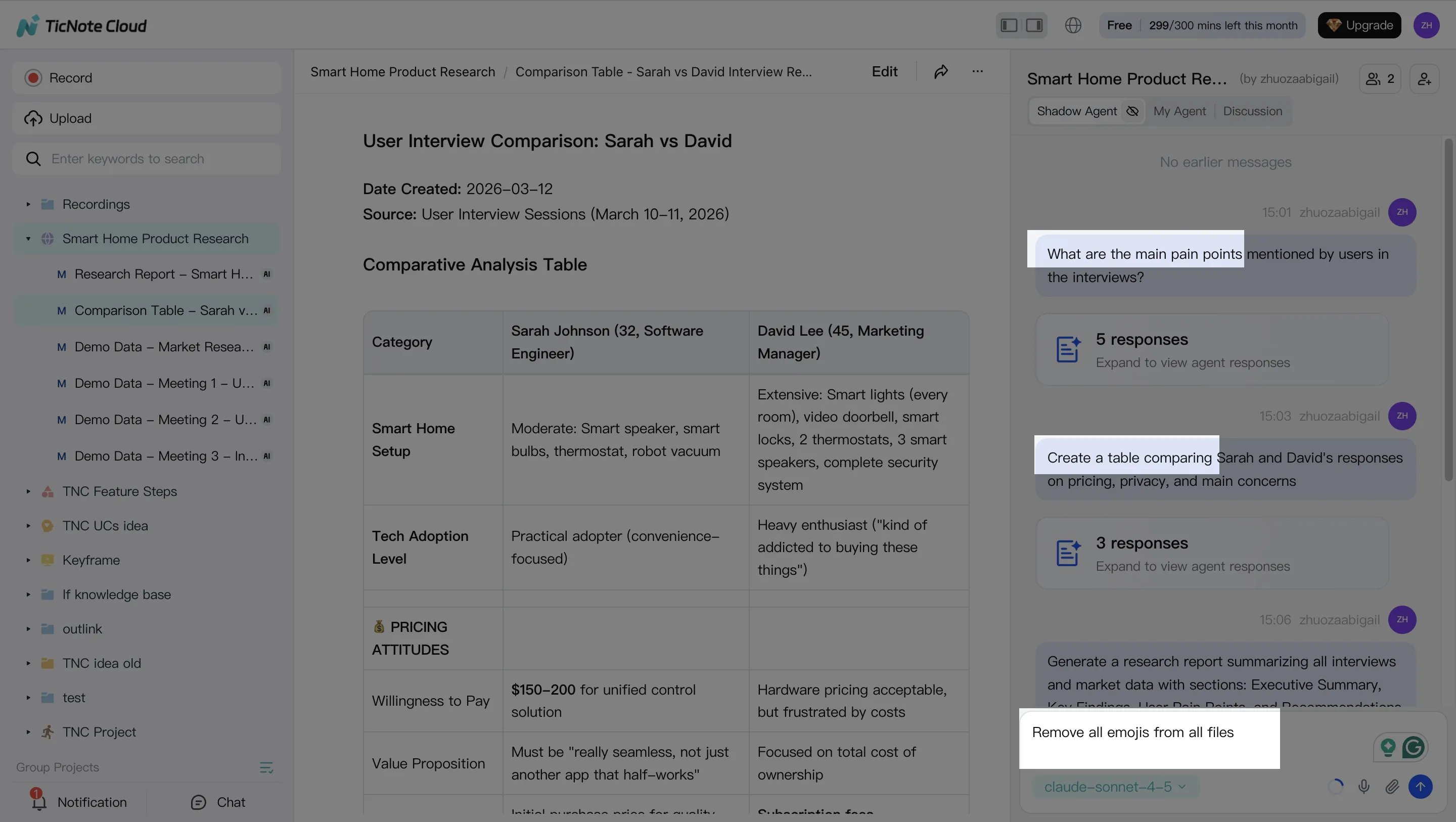
Step 2. Use Shadow AI to search, analyze, edit, and organize content
Open Shadow AI on the right side of the Project. Ask cited questions across meetings and files, such as "What decisions were made?" or "Extract owners, deadlines, and product definitions."
Then clean the source layer. Fix transcript errors, add annotations, and organize action items or themes. Cleaner inputs create tighter prompts later.
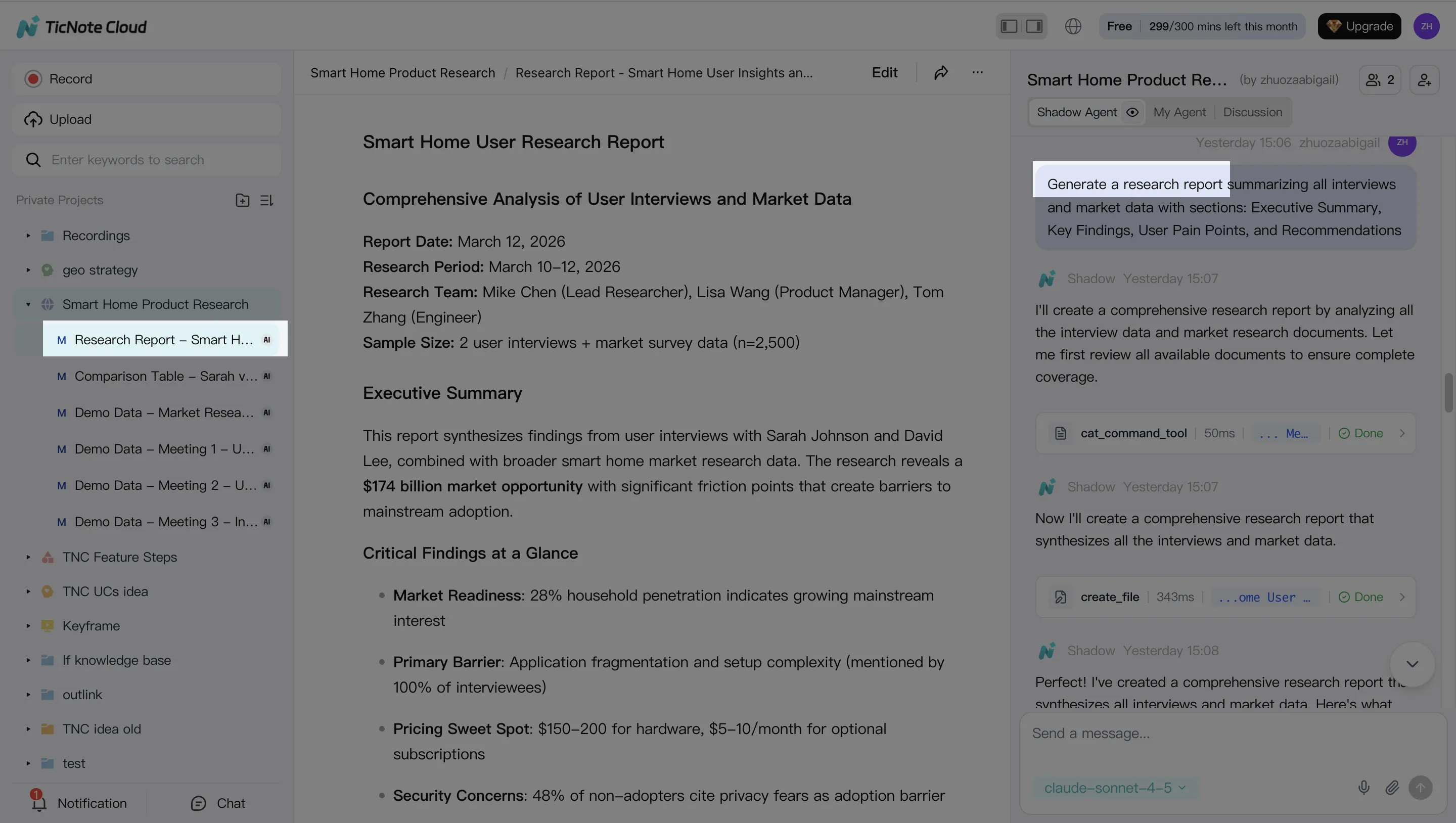
Step 3. Generate deliverables with Shadow AI
Pick a format: research report, web presentation, podcast, mind map, or HTML page. Define the audience, length, and goal. Shadow AI creates a first draft with links back to source moments, so reviewers can verify claims before export.
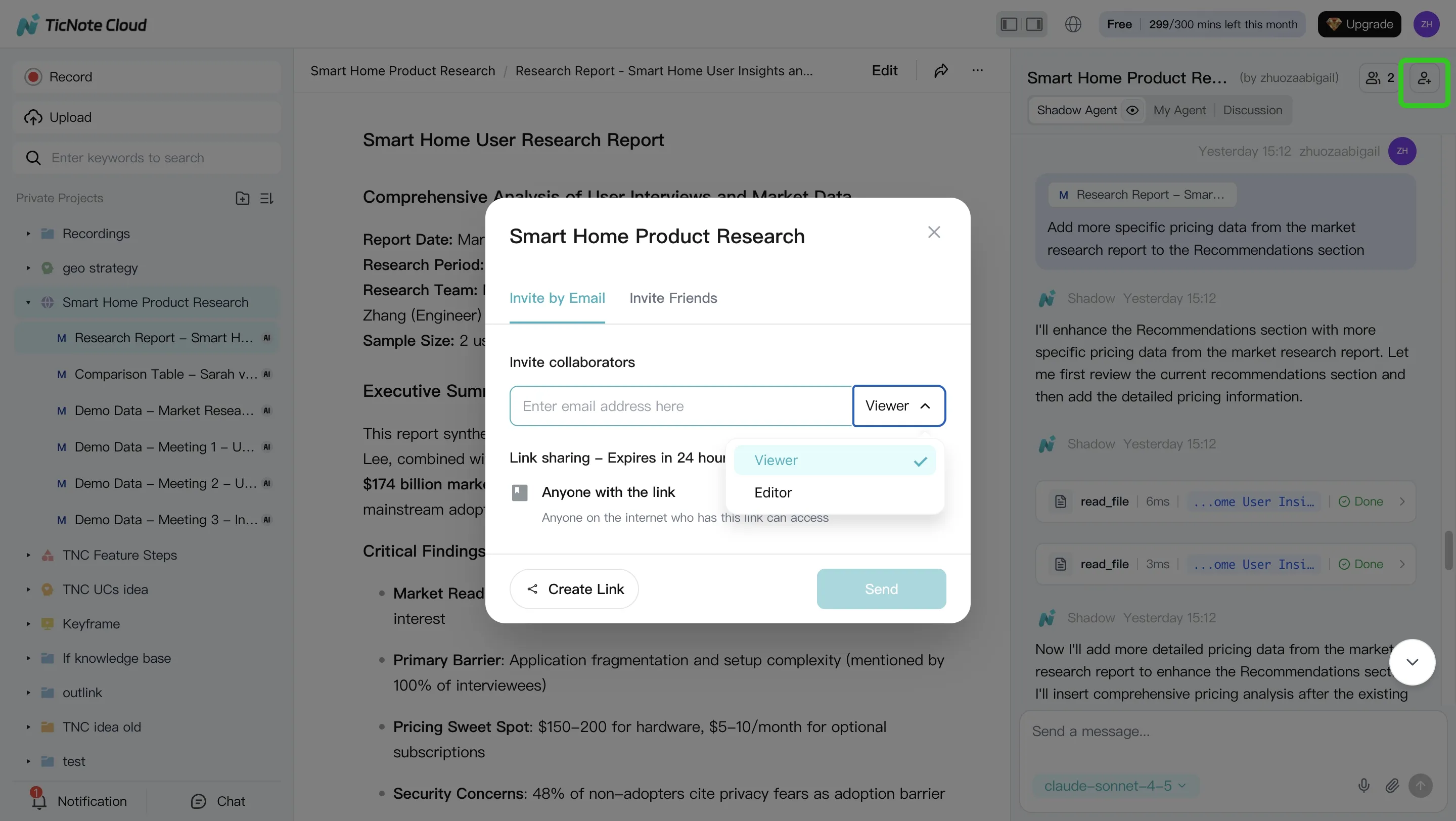
Step 4. Review, refine, and collaborate
Share the Project with teammates using Owner, Editor, or Viewer permissions. Team members can comment on transcripts, review generated outputs, ask Shadow follow-up questions, and rerun drafts with tighter constraints.
Keep one living "Project brief" note with scope, vocabulary, decisions, and open questions. That note becomes reusable context for future prompts.
Mobile note: capture or upload recordings in the app, add them to the same Project, then run the same Shadow steps for cited Q&A and deliverable generation.
Use Get 30 credits to use Claude Opus 4.7 Premium for free every month when you want to test these prompt-ready workflows with fresh project context.
Prompt templates for meeting-to-deliverable workflows
A strong Claude Opus 4.7 prompt works best when the meeting context is already clean, bounded, and reusable. Use these templates after you've cleaned the transcript, grouped files in a Project, and defined the deliverable.
Template 1: Turn a meeting into decisions, risks, and actions
Use only [SOURCE LIMITS: this transcript / this Project]. Audience: [AUDIENCE]. Create: 1) a decisions table with decision, reason, owner, timestamp; 2) risks list with severity; 3) actions with owner and due date. Citation rule: [TIMESTAMP PER ITEM]. Keep total output under [WORD COUNT].
Template 2: Synthesize interviews into a research report
Use interviews that meet [INCLUSION CRITERIA]. Exclude [EXCLUSION CRITERIA]. Extract 5–7 themes, cite each with [CITATION RULE], and include contradictions, minority views, and an Unknown / needs follow-up section. Section caps: summary [X words], themes [X], evidence [X], next steps [X].
Template 3: Audit open questions across a project
Review [SOURCE LIMITS]. Group open questions by workstream. For each, list answer owner, current evidence with citations, confidence level, and 2–3 interview questions to ask next. Audience: [AUDIENCE].
Template 4: Convert a transcript into a stakeholder brief
Write for [AUDIENCE] in a direct, non-technical tone. Include one paragraph, 5 bullets, 3 risks, and 3 asks. Hard cap: [WORD COUNT]. Cite each claim using [CITATION RULE].
After you run the templates, Get 30 credits to use Claude Opus 4.7 Premium for free every month.
Store these prompts in one shared place, such as a TicNote Cloud Project note or team prompt library. Then reference them by name in future Claude 4.7 prompting, instead of rebuilding scope rules every time.
API and guardrail patterns for literal models
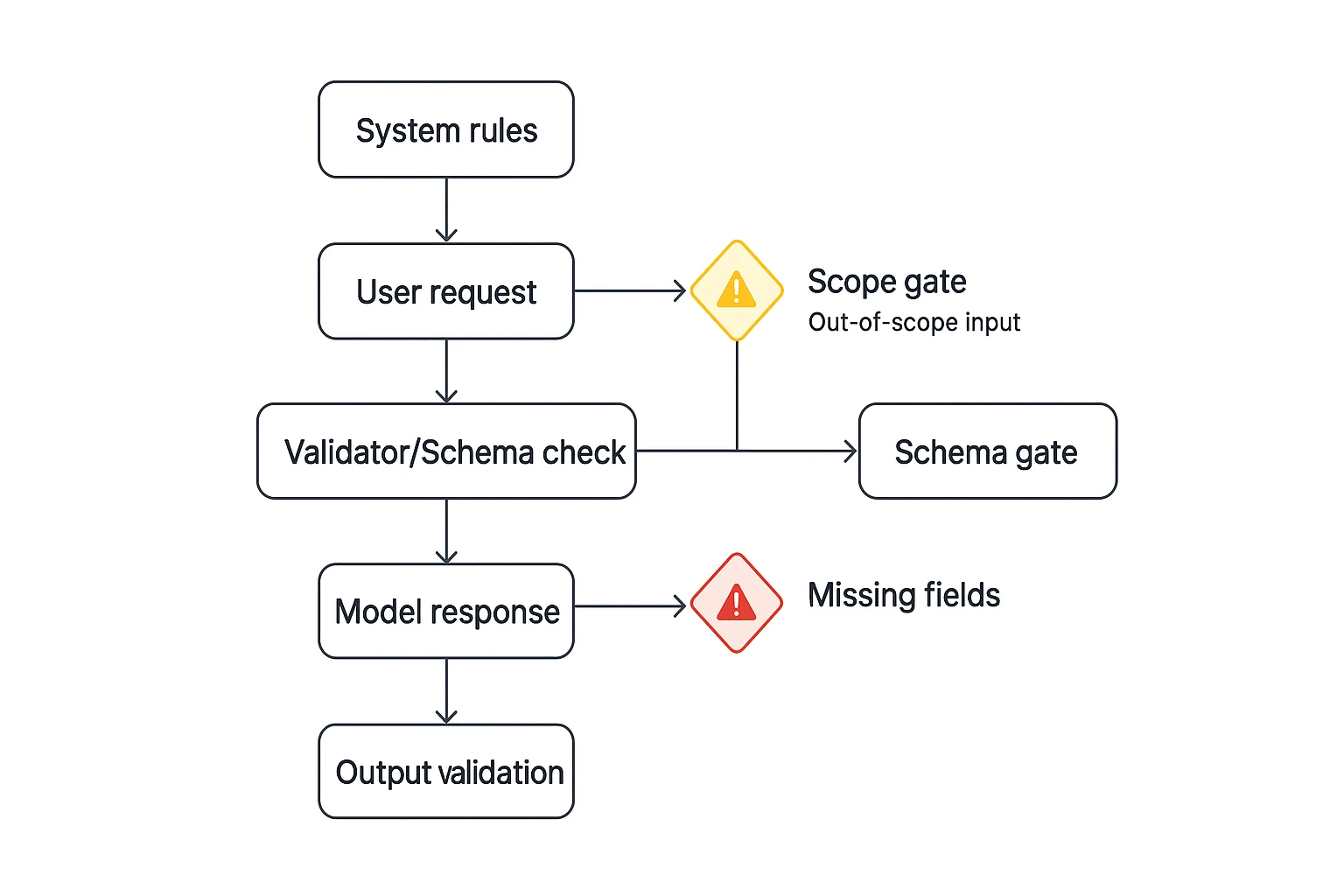
A Claude Opus 4.7 prompt used in an API should act like a contract, not a suggestion. Literal models can follow narrow rules well, but vague instructions create brittle outputs, especially when apps expect structured data.
Lock the shape first
Define a strict JSON or table schema before the task: fields, types, allowed enums, required versus optional fields, and "no extra keys." Add one clear output rule: "Return valid JSON only." Include 2–3 edge-case examples, such as empty source arrays, unknown speakers, or mixed priorities.
Fence the work
Put an allowlist and denylist in the system prompt:
- Allowed: summarize supplied sources, classify tickets, draft scoped responses.
- Out of scope: invent sources, change pricing, provide legal advice, ignore schema.
Make fallback behavior deterministic
Use short failure paths:
- Missing fields: return an error object listing required fields.
- Out of scope: refuse in one sentence and state the needed input.
- Weak sources: write "cannot conclude" and ask the next 1–3 questions.
Run a pre-launch guardrail test
Test four cases before production: conflicting length versus format, missing required fields, contradictory scope fences, and "do X but don't change Y" edits.
Guardrail checklist:
- Schema validated before and after generation
- No extra keys permitted
- Refusals are 1 sentence plus next step
- Unsafe or missing inputs never trigger guessing
Final thoughts: precision plus context wins on Claude Opus 4.7
A Claude Opus 4.7 prompt works best when it reads like a small spec. Define the task, scope, constraints, source context, and output format before asking for analysis, code planning, or a client-ready draft.
The real unlock is stable context. Keep meeting notes, files, decisions, and project rules together so each prompt starts from the same facts and stays on scope.
If you want to access Claude Opus 4.7 without paying for multiple AI subscriptions, TicNote Cloud includes Claude Opus 4.7 Premium for free, with 30 requests per month.
Get 30 credits to use Claude Opus 4.7 Premium for free every month


