


 Extension
![[Free Credits] Claude Opus 4.7 GA: What Changed, What Regressed, and How to Validate It Fast](https://cdn-digitalhuman-pb.weta365.com/voice-recorder-prd/static/backend/2026/04/29/2049438227789033473.webp)
TL;DR: What Claude Opus 4.7 GA means for agent workflows—and how to capture the value
To capture the upside fast, use Claude Opus 4.7 for free in TicNote Cloud. Claude Opus 4.7 GA is mainly a reliability push for harder coding and longer agent loops, plus clearer screenshot/diagram reading, with tighter safety rules.
Problem: agent runs leave behind scattered notes, diffs, and "why" decisions. That makes wins hard to repeat and regressions hard to prove. A practical fix is to keep outputs, prompts, and meeting context together in a shared Project using TicNote Cloud, so your team can review, cite, and reuse the work.
- Headline change: better consistency on complex coding, reviews, and multi-step agent tasks.
- Vision: higher-res inputs, so UI screenshots, charts, and diagrams parse more cleanly.
- Cost control: "effort" and task budgets matter more; set them per job to cap spend.
- Behavior shift: instruction following is more literal, which can feel worse for narrative or creative tone.
- Treat it like a workflow change: run 3–5 real tasks as a controlled 4.6 vs 4.7 A/B, then save outputs plus evidence so the team can search and audit later.
Who should care: devs and eng leads (CI-style loops), PMs (stakeholder-ready checklists), security teams (new cyber guardrails and escalation expectations), and enterprise buyers (pricing, migration, and governance).
What is Claude Opus 4.7 and why is it trending right now?
Claude Opus 4.7 GA is the "general availability" release of Anthropic's top Opus model line. In plain terms, GA means teams can treat it as stable: a consistent model name, clearer docs, and fewer surprises in production routing. That's why it's trending—GA turns a model update into a real migration decision.
General availability: what "GA" changes for teams
For most orgs, GA is less about excitement and more about confidence. It's the point where you can standardize prompts, lock evaluation sets, and set rollout rules across dev and prod.
Here's where teams usually feel the GA impact first:
- Procurement and security review: a stable target makes vendor review and risk sign-off simpler.
- Platform availability: GA models tend to show up broadly across first-party apps and APIs.
- Rollout controls: easier to run canaries (small rollouts), then widen traffic once metrics hold.
The headline claims: coding, long runs, and vision
The core story around this release clusters into three themes:
- Harder software engineering tasks: better performance on multi-file changes, debugging, and refactors.
- Long-running coherence: fewer "lost the plot" moments in long chains of steps.
- Better self-checking: more frequent verification behaviors (like re-reading requirements).
- Stronger vision on dense inputs: improved handling of packed screenshots, UI states, and diagrams.
When people say "agentic work" here, they don't mean one-shot Q&A. They mean multi-step plans plus tool calls (tests, linters, repo search, issue trackers), with iterative verification until the task is done.
The 'regression' chatter: why some users feel a shift
At the same time, some users report "regressions." The most common themes are neutral and predictable for a GA shift:
- More literal instruction following (less guesswork, but also less "creative fill").
- More structured outputs (tables, checklists, templated sections).
- A different writing "voice" (tone can feel flatter or more formal).
- Verbosity changes from token limits and effort settings (more detail in some tasks, more truncation in others).
A model can improve on measured tasks and still feel worse on subjective ones like style. That's why the only safe conclusion is: validate it against your own deliverables—code reviews, PR descriptions, design docs, incident write-ups—then decide where to route traffic. Next, we'll break down what changed vs 4.6, how to read the benchmarks without getting tricked, and how to turn agent outputs into reusable team assets.
What changed vs Opus 4.6 (and what stayed the same)?
If you're upgrading for agentic coding or multimodal reviews, the useful way to read this GA is simple: expect small-but-real shifts in reliability, long-run behavior, and image reading—plus some new guardrails that can change security workflows.
Summary table (normalized buckets, fast scan)
| Bucket | Opus 4.7 GA (as reported) | Opus 4.6 (baseline) | Mythos Preview (as referenced) |
| Coding reliability | Fewer plan→code mismatches; more self-check steps; steadier on long diffs | Solid, but more "looks right" patches under time pressure | Often feels broader, but can be less predictable run-to-run |
| Long-run agent behavior | Better at staying on task in longer runs; fewer mid-run goal swaps | More likely to drift without tighter loop prompts | Can be strong at exploration; may need stricter guardrails |
| Code review behavior | More checklist/table defaults; better at spotting missing tests and edge cases | More narrative reviews; sometimes misses "boring" issues | Can produce deep commentary; may overreach beyond repo facts |
| Vision resolution | Better reading of dense UI screenshots, diagrams, tiny text | Good, but more "squint errors" on packed screens | Often strong, but behavior may vary by preview build |
| Safety/cyber controls | New or tightened cyber safeguards; more refusals in risky areas | Looser in some borderline security requests | Different posture; preview policies can shift faster |
| Effort levels / task budgets | Clearer effort control (how hard it tries) can change latency and tokens | Less consistent "try harder" behavior per run | May expose more aggressive modes; less stable |
| Tokenizer / token usage | Token counting may shift; same prompt can cost more or less | Known spend patterns for existing prompts | Can vary widely; treat spend as unknown until measured |
| Availability surfaces | GA implies broad availability across standard model surfaces | Already widely available | Preview access and surfaces may differ |
| Pricing / migration notes | Reported "direct upgrade" with reported unchanged price points; verify by channel | Your current contracted rates apply | Preview pricing/terms can change; don't assume parity |
What stayed the same (the parts that reduce migration risk)
The core positioning looks unchanged: it's still the "high-capability" option for hard coding, long context work, and multimodal inputs. Pricing is commonly described as unchanged and the move as a direct upgrade, but treat that as "reported," not guaranteed—teams should confirm in their own billing view and by purchase path (API vs cloud marketplace vs enterprise contract).
Practical implications: where you'll notice it first
- Developers: you'll feel it in fewer "patch compiles but fails intent" moments, stronger self-verification, and better handling of long diffs (especially when tests, configs, and docs all change).
- PM / enterprise: more default structure (tables, checklists, action items). Great for execution, but it can flatten narrative unless you ask for a story-first write-up.
- Multimodal teams: better reads on dense screenshots and diagrams. Budget for image tokens, because high-detail images can raise per-run cost.
- Security and ops: tighter cyber controls can mean more refusals or redactions in legit testing work. Update runbooks now: define allowed scopes, escalation paths, and how to document intent.
Mini-results table template (fill this in to normalize anecdotes)
Use this after 1–2 days of trials so "it feels better" becomes comparable data.
| Category | Task you ran | Success rate (e.g., 7/10) | Time to usable output (min) | Token/cost delta vs 4.6 | Notes (failure mode) |
| Coding | |||||
| Vision | |||||
| Safety | |||||
| Cost |
How do you read the Claude Opus 4.7 benchmarks without getting misled?
Benchmarks can help you decide if Claude Opus 4.7 is worth routing to. But they're easy to over-read. Most scores reflect a narrow task, a fixed dataset, and a specific scoring harness (the script that runs prompts, grades outputs, and totals points). If your team uses tools, private repos, or long agent loops, the public chart may not match your reality.
Benchmarks decoded (plain English)
A benchmark usually measures one constrained skill:
- Coding task suites: "Solve this ticket" problems with unit tests. Great for syntax and basic reasoning. Weak at capturing your repo rules.
- Code review recall / bug finding: Find defects in a diff or explain risk. Often rewards "spot the obvious" patterns.
- Long-context reasoning: Read long docs and answer questions. Sensitive to truncation (when the model hits max tokens).
- Document reasoning: Pull facts, reconcile sections, or extract structured fields. Strong signal for analyst workflows.
- Vision understanding: Read charts, UI screenshots, and diagrams. Usually tested on clean images, not messy real screens.
What it doesn't measure: your build system, your permissions, your tool stack, and your "definition of done" (style, security rules, latency).
What to look for (so the chart doesn't fool you)
Benchmarks swing more than people admit. Use this checklist:
- Multiple runs, not one: If you don't see 3–5 runs, assume variance.
- Judge bias: "Model-as-judge" graders can prefer certain writing styles.
- Harness changes: A new prompt template can move scores without real model gains.
- Truncation risk: Higher "effort" or longer reasoning can hit token limits earlier.
- Tool settings: Sandboxed vs tool-enabled runs are not comparable.
Agent workflows amplify all of this. Later-turn drift, loop resistance, and tool error recovery can dominate results after turn 10.
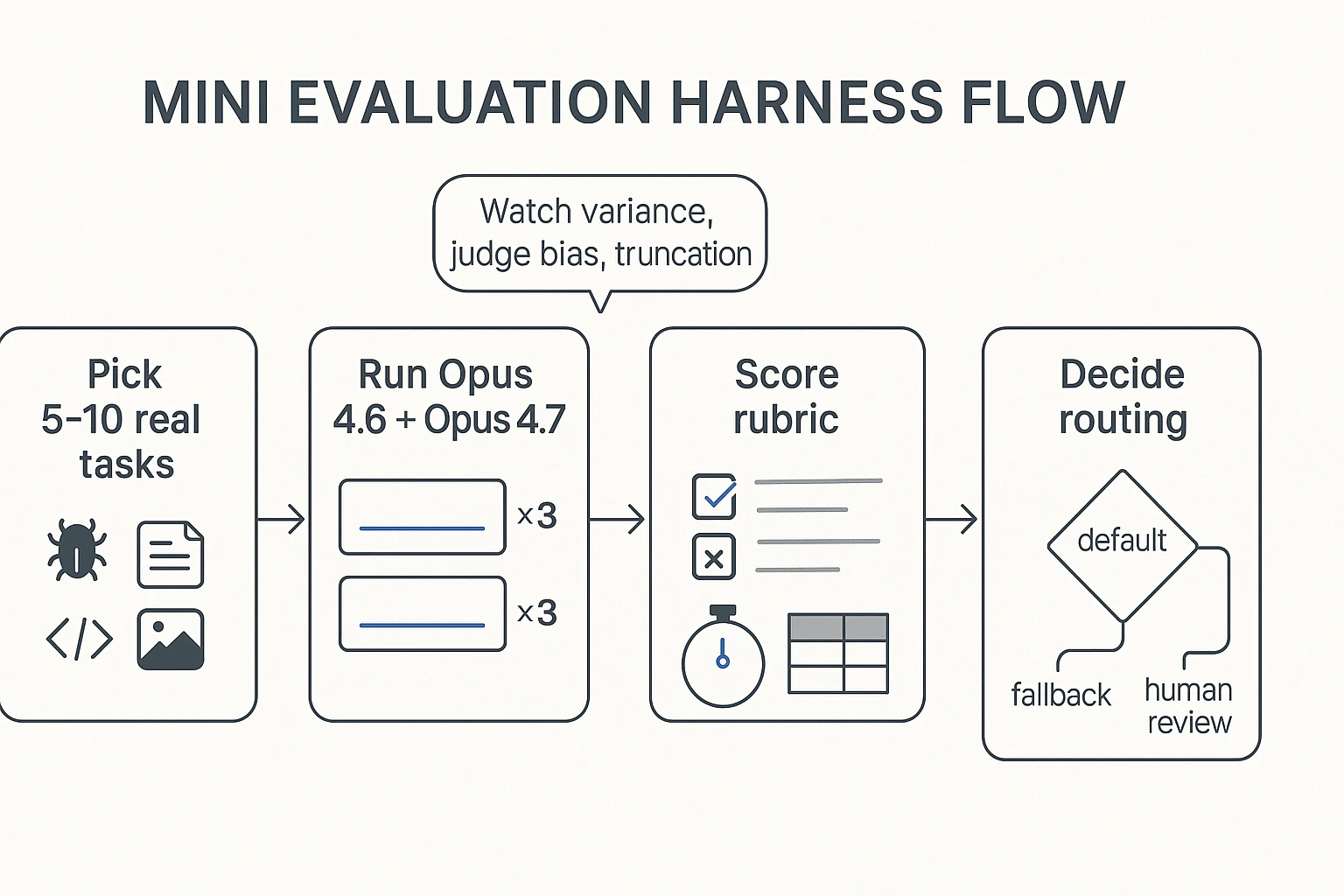
Validate fast on your own work (a 60–90 minute mini test)
Run a tiny, high-signal eval:
- Pick 5–10 tasks that represent your week (1 bug fix, 1 refactor, 1 review, 1 doc Q&A, 1 vision/UI read).
- Define pass/fail in advance (tests pass, correct file touched, no policy violation, answer cites the right section).
- Freeze settings: same prompt, same max tokens, same tools/permissions.
- Run 4.6 vs 4.7 for 3 repeats each (≈30–60 total runs).
- Record: time-to-done, tokens/cost, and top failure modes (hallucinated file, missed edge case, stuck loop).
Save "evidence" with each run: the full input context, final output, and what files/sources it relied on. That gives you an audit trail and makes prompt tuning cumulative.
Next, we'll map where 4.7 tends to help in real agent work, and how effort/tokenization changes can shift spend.
Where does Opus 4.7 help most in real agentic work (coding, reviews, long runs)?
Claude Opus 4.7 GA helps most when the job has sharp constraints: code must compile, tests must pass, and the agent has to stay "on plan" across many steps. In practice, "more reliable" only matters if you can observe it in your repo and tickets, not in a demo.
Advanced coding and tougher tasks: define "reliable" in outcomes
For agentic coding, reliability shows up as fewer wrong assumptions per iteration. You'll notice it in four places:
- Better constraint tracking (it remembers API contracts, style rules, and edge cases)
- Fewer compile or test failures per loop (less "try-and-pray")
- Cleaner uncertainty when inputs are missing (it asks, or it marks an assumption)
- Less scope drift (it doesn't "helpfully" redesign what you didn't ask for)
Concrete examples you can validate fast:
- API migration: It updates call sites, adapts payloads, and flags breakpoints (auth headers, pagination, error shapes).
- Refactor-with-tests: It changes internals, keeps public behavior, and updates tests only when behavior truly changes.
- Concurrency fix: It narrows the race, picks one synchronization strategy, and explains why it prevents the bug.
Review-style work: catch mistakes before you ship them
Opus 4.7 is also useful as a review agent: reading diffs, spotting logic bugs, calling out design debt, and flagging security footguns (like unsafe deserialization, missing auth checks, or surprising data exposure). The practical signal to watch for is "mid-output self-correction": it notices an inconsistency, revises the recommendation, and leaves you with a clearer final call.
If you're deciding when to use an agent at all, keep a simple rule from this agent vs chatbot decision matrix: use an agent when you need actions, checks, and traceability—not just answers.
Long-context and multi-step runs: fewer loops, cleaner recoveries
Long-run success looks boring (and that's good): fewer repeated tool calls, fewer "lost state" moments, and faster recovery after a tool error. A simple routing rule: use 4.7 for long-run, tool-heavy, auditable work (migrations, test sweeps, review queues). Consider 4.6—or change your prompt style—when you want more narrative prose or exploratory back-and-forth.
One last bridge: agent outputs only create value when they become searchable, reviewable team assets—not stranded chat logs.
What's new with vision, memory, and effort control—and how does cost shift?
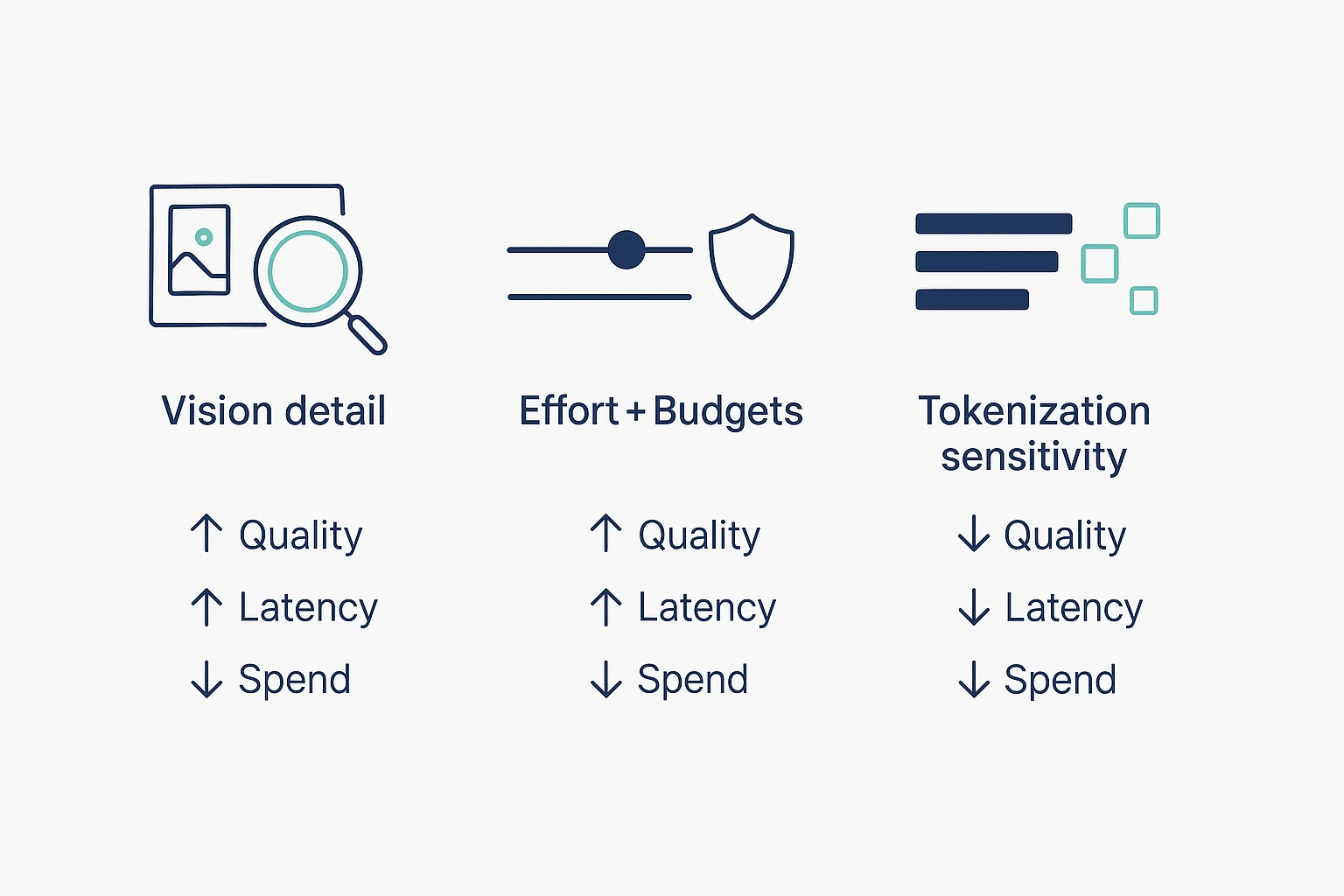
Claude Opus 4.7 GA pushes three levers that matter in day-to-day agent work: sharper vision inputs, better continuity across longer workflows, and "effort" controls that trade spend for consistency. The catch is cost becomes more sensitive to how you send images, how long you let tasks run, and how text gets tokenized.
Vision upgrade: higher-res inputs (and when to downsample)
The practical win is simple: the model can read denser visual detail. That helps with screenshots full of small text, busy diagrams, and UI-like layouts where labels and icons are tiny.
To keep latency and spend under control, treat image quality like any other input budget:
- Crop first, then send. If you only need one panel of a diagram, don't send the whole canvas.
- Only use the resolution you need. Higher resolution can improve accuracy, but it's slower and often costs more.
- Prefer text extraction when possible. If the "image" is mostly text (logs, tables, error messages), paste the text instead of sending pixels.
Memory claims: what "project memory" means in practice
In release talk, "memory" usually means workflow continuity, not magical long-term recall. Practically, it's the model staying grounded in the files and context you provide across a longer session, multi-step plan, or project-style run.
Teams feel this in two places:
- Less re-explaining. Fewer repeated context dumps as you move from analysis → draft → revision.
- Cleaner handoffs. A long run keeps terms, constraints, and decisions consistent across steps.
The rule: if it wasn't provided in your current working set (messages + attached files + allowed context), don't assume it "remembers" it later.
Effort levels + task budgets: control quality vs spend
Effort controls are a plain trade: higher effort can reduce mistakes on hard tasks, but it can also increase tokens and time. Budgets are guardrails for long runs, so agents don't wander into expensive side quests.
Use this quick decision grid:
- Coding + debugging: Start at default effort. Raise effort for flaky tests, tricky refactors, or multi-file reasoning.
- Summaries + meeting notes: Use lower effort with tight output limits. It's usually enough.
- Q&A over documents: Default effort is fine. Raise it only when answers need strict consistency.
- Long agent runs (plans, migrations, reviews): Keep effort moderate, and always set budgets (max tokens, step limits, or stop rules).
Tokenizer change: cost scenarios teams should model
Two common "why did spend jump?" patterns show up after upgrades:
- Same prompt, different token count. A tokenizer change can split text differently, so the same content may bill differently.
- Higher effort, longer outputs. More effort often means more reasoning and more verbose completions.
A practical before/after scenario to model (not a promise of behavior):
- Before: A code-review agent gets one file + a short checklist, and returns a tight diff summary.
- After: You attach more context, turn effort up, and the agent returns a longer explanation plus extra edge cases. Even if the prompt text is similar, tokens can rise from both tokenization and output length.
How to validate impact fast:
- Measure on a small traffic slice (say 5–10% of runs) and compare tokens, latency, and "task success."
- Set
max_tokensand enforce concision ("Answer in 8 bullets, no prose"). - Use budgets for long runs so agents stop when the value flattens.
- Track successful task, not token. A slightly higher token bill can still be cheaper if it avoids reruns.
Cost control needs measurement and governance, not guesswork—carry these settings into your migration checklist and make them part of the rollout plan.
What are the new cyber safeguards and what should security teams expect?
Claude Opus 4.7 GA puts tighter guardrails around cyber requests that look "too actionable." In plain terms: if a prompt reads like step-by-step intrusion help, exploit construction, or evasion guidance, expect a refusal or a heavily constrained answer. But defensive work—secure coding, hardening checklists, threat modeling, and incident response playbooks—should still be available when it's framed around protection and policy.
What gets blocked vs allowed (high-level categories)
Security teams should plan around these buckets:
- Often blocked: exploit development steps, payload crafting, credential theft, stealth or persistence tactics, and "how to break into X" instructions.
- Usually allowed: secure configuration advice, code review findings, OWASP-style remediation guidance, detection engineering ideas, and high-level summaries of known CVEs.
- Where it gets messy: anything that can be "defensive" and "offensive" at once (dual-use). That's where refusals can show up mid-workflow.
Borderline cases: pentest-like workflows and friction points
Most enterprise friction happens in legitimate work that resembles attacker tradecraft:
- Red team simulation writeups: you may get blocked on reproducing steps, even for internal reports.
- Exploit reproduction for patch validation: "prove it's fixed" can look like "teach me to exploit."
- Malware analysis: deobfuscation and behavior notes are fine; re-weaponization steps may be refused.
- Incident response: containment and eradication guidance is fine; "how the attacker did it" detail may be limited.
A workable process is simple and repeatable:
- Pre-approve scope (targets, timebox, allowed tools, and what "success" means).
- Store artifacts (logs, hashes, screenshots, and exact error messages) so you don't rely on model memory.
- Use human review for any output that could be reused as an attack recipe.
Verified access: how escalation typically works (conceptual)
Some vendors run "verification programs" for cyber use. Conceptually, they combine identity checks with intent and scope checks, plus logging for accountability. Even after verification, you should expect limits on content that enables harm, because policy isn't only about who asks—it's also about what can be done with the answer.
Governance checklist for security leaders
Treat this like any other control plane rollout:
- Model routing rules: send high-risk prompts to approved models or internal tools.
- Prompt redaction: strip client names, IPs, secrets, and live indicators.
- Audit logging: capture prompts, outputs, reviewers, and ticket IDs.
- Approval flows: require sign-off for dual-use tasks (exploit reproduction, reverse engineering).
- Compliance documentation: keep a short "acceptable use" policy and a review record.
Finally, make the work auditable. Store findings, decisions, and the source evidence together, with clear citations and change history. When security discussions live in a searchable project space (for example, meeting notes + incident docs), audits get faster—and teams stop re-litigating the same risk calls.
What's the fastest adoption plan for teams this week? (migration + governance checklist)
Move fast by testing three real workflows in parallel: coding, doc/review, and multimodal. Keep inputs fixed, change one variable at a time, and decide routing by Friday. That's the quickest way to capture Claude Opus 4.7 gains without shipping surprises.
A 1-week migration plan (prompts + budgets + "done")
- Day 1: Pick 3 workflows
- Coding: implement a small feature + tests
- Review: PR review + refactor suggestions
- Multimodal: read one screenshot/diagram and produce actions
- Day 2: Freeze an evaluation harness
- Lock the exact prompts, tools, and input files.
- Run 10–20 tasks per workflow.
- Save raw inputs/outputs so results are comparable.
- Day 3: Set budgets on purpose
- Set max_tokens for each task type (short answers vs long diffs).
- Pick a default effort level (effort = how hard the model tries).
- Define "done" in one line, such as:
- "Build passes tests, no new lint errors, diff under 200 lines."
- "Review finds ≥3 real issues, zero hallucinated APIs."
- Day 4: Retune prompts for literal following If outputs feel stiff or over-formatted, fix the prompt first.
- Remove vague asks like "make it better."
- Add style constraints: "Use 6 bullets max. No tables. No extra headers."
- Add stop rules: "If unsure, ask 1 question, then stop."
- Day 5: Ship a routing policy Don't debate "best model overall." Route by task.
- Use the new model where it wins.
- Keep a fallback for regressions (older model or a lower-effort run).
Normalized mini-results table (copy/paste template)
| Task | Model version | Effort / budget settings | Inputs (text/image) | Pass/Fail | Defects found | Time-to-fix (min) | Token spend proxy | Regression log (what got worse + prompt fix) | Notes |
Use token spend proxy as a simple index (e.g., 1× baseline, 1.4×) if exact counts vary by tool. The key is consistency across runs.
Governance checklist (so the rollout sticks)
- Data classification: label what's public, internal, confidential, regulated.
- Paste rules: define what can't enter prompts (secrets, keys, customer PII).
- Retention: how long you keep prompts, logs, and outputs (and where).
- Human review gates: require approval for:
- code that touches auth, payments, or infra
- security findings and exploit-like content
- policy or legal text
- Traceability: log model version, effort/budget, prompt, and final diff.
- Central artifact store (enterprise): keep the harness, decisions, and routing rules in one place so they survive staff changes. A practical pattern is to store meeting decisions plus test artifacts in a shared Project, then use an agent governance playbook to keep roles, rules, and audit steps stable over time.
Final thoughts: should you move to Opus 4.7 now?
If your work depends on hard coding, code review, long agent loops, or dense image reading, test Claude Opus 4.7 now. The real win is simple: fewer dead-ends per run, so you spend less time babysitting. If you mostly do narrative drafts or "warm" exploration, plan to retune prompts or route that lane to a different model.
A simple go/no-go rule you can run this week
Use a mini harness (10–30 tasks) that matches your real work. Track three numbers:
- Success rate: did it finish the task without hand fixes?
- Reviewability: can a human verify fast (clear steps, stable diffs)?
- Spend: total tokens and retries per task.
Go if 4.7 improves success and reviewability at a spend you accept. No-go if it raises retries, makes outputs harder to audit, or adds cost with no clear lift. In that case, keep 4.6 for those lanes and upgrade only where 4.7 wins.
One more thing: model gains compound only when teams capture outputs and decisions. The fastest teams turn agent results, meeting notes, and approvals into cited assets in one place—so next week's work starts with better context. That's the point of a project knowledge system like TicNote Cloud: reusable deliverables that stay searchable and verifiable across meetings, not trapped in chat logs.
Try TicNote Cloud for Free and keep every Claude output tied to decisions and citations.


