


 Extension
TL;DR: Chatbot, LLM chatbot, or AI agent—what to pick today?
If you want a fast answer, start by trying TicNote Cloud for free and let it turn one meeting into a usable deliverable—then decide what level of automation you actually need for your AI agent vs chatbot choice.
Problem: Teams drown in meeting notes and follow-ups. It gets worse when decisions live in chat threads and docs. Solution: TicNote Cloud keeps meetings as the source of truth and helps produce traced outputs.
Quick pick rules (3 yes/no questions):
- Is the task simple and repeatable (FAQ-style)? Yes → rules-based chatbot.
- Is it mostly language work (Q&A, search, summaries) with few actions? Yes → LLM/RAG chatbot.
- Does it need multi-step work, tool actions, and monitoring? Yes → AI agent.
If you only remember one thing: chatbots talk; agents work. For meeting-heavy teams, an agent workspace beats a standalone chat UI because you need project memory, citations, and repeatable outputs.
A simple chatbot is still right for: store hours, order status FAQs, password reset routing, narrow form-fills, and strict brand scripts—where flow design and control matter most.
AI agent vs chatbot: what is the real difference (and where LLM chatbots fit)?
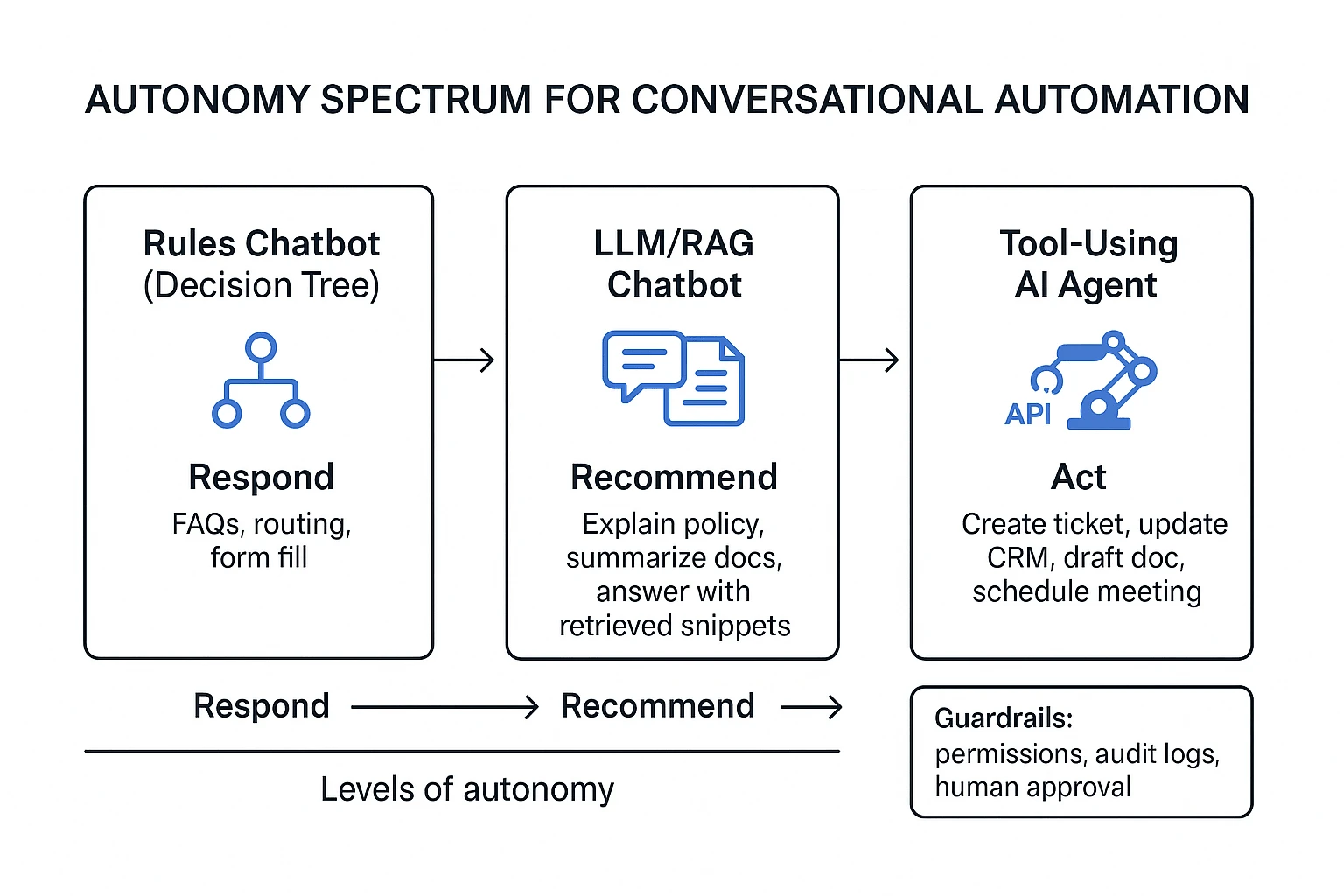
Most teams use "chatbot," "AI assistant," and "AI agent" like they're the same thing. They aren't. The fastest way to end the confusion is to sort them by autonomy: does the system only reply, does it guide a human, or can it complete work in your tools?
A plain-language taxonomy (3 types)
Here are the three buckets that matter in business settings:
- Rules-based chatbot: a scripted bot that follows a decision tree to route users to a fixed answer or next step.
- LLM/RAG chatbot: a natural-language chatbot that uses an LLM (large language model) and often RAG (retrieval-augmented generation) to answer based on your docs.
- AI agent: an LLM system that can plan steps, use tools (APIs), and keep working toward a goal with memory and logs.
In practice, that looks like this:
- A rules bot handles "Where's my order?" by asking 2–5 questions, then showing a tracking link or routing to a person. It's reliable, but brittle. If the user says something unexpected, it breaks or loops.
- An LLM/RAG chatbot answers "What's our refund policy for annual plans?" by pulling the right paragraph from your policy doc and explaining it in plain English. It's flexible, but it still mostly stops at answers.
- An AI agent can take "Refund this customer and notify finance" and execute: check the order, create the refund in the billing tool, open a ticket, draft the email, and log what it did.
Autonomy spectrum: respond → recommend → act
Think of automation as a simple ladder:
- Respond (chatbot): answers questions and routes conversations.
- Recommend (assistant / agent assist): suggests next best actions, drafts replies, or fills forms, but a human clicks "send."
- Act (AI agent): performs actions in systems (support desk, CRM, calendar, docs) under defined rules.
The key is governance, not bravado. As autonomy rises, permissions must narrow. A "respond" system can be broad. An "act" system should be scoped to specific workflows, systems, and approval rules.
What "tools/actions, planning, memory" mean (in normal terms)
These three words are what separate an agent from a chat interface:
- Tools/actions: real operations, usually API calls. Examples: create a Jira ticket, update a Salesforce field, send a Slack message, draft a Google Doc, or move a file into a Project folder.
- Planning: breaking one request into smaller steps. Example: "Turn these 3 interviews into a report" becomes: extract themes → pull quotes → structure sections → draft → revise.
- Memory: keeping context so work doesn't reset each chat. This includes short-term chat context and longer-term "project memory" across files and meetings (what was decided, what changed, and why).
This is where citations change trust. If an AI answer shows click-to-source quotes (with timestamps or document links), reviewers can verify faster. It also makes audits possible: you can see what inputs drove the output, not just the final text.
For meeting-heavy teams, this "project memory + citations" pattern matters more than generic chat. It's also why many teams graduate from Q&A bots to agentic workflows that operate on meeting transcripts, docs, and exports in one place. If you want the architecture and controls behind that jump, this AI agent governance playbook for analytics-style workflows maps the same building blocks (tools, permissions, evaluation) to real implementation choices.
What can each option do well (and where do they fail)?
Picking between a rules-based chatbot, an LLM chatbot, and an AI agent is mostly about risk and scope. If you map each option to its failure modes, you'll avoid the common trap: buying "smarter chat" when you really need controlled automation (or vice versa). Below is an executive comparison you can use in reviews, support, and ops.
1) Rules-based chatbots: high control, narrow scope, predictable flows
A rules-based chatbot is a scripted system that routes users through fixed steps. It's strongest when you need strict compliance and repeatable outcomes.
What they do well:
- Enforce policy wording and required disclosures
- Route cleanly (billing vs tech vs returns) with low variance
- Deflect simple questions fast (hours, password reset, order status)
- Produce consistent metrics because the flow is deterministic
Where they fail (common failure modes):
- Brittle phrasing: users say it "wrong" and the bot breaks
- Flow sprawl: new edge cases create endless branches to maintain
- Poor at messy problems (multi-issue tickets, exceptions, empathy)
- Low learning: it won't get better unless you rewrite the logic
When "chatbot vs AI agent for customer support" still favors chatbots: if your top priority is compliance scripts (finance, healthcare, regulated claims) and simple deflection, rules win. You get predictability, safer wording, and easier approvals.
2) LLM chatbots: better language, still mostly "talk-only"
An LLM chatbot uses a large language model to respond in natural language. With RAG (retrieval-augmented generation), it can answer from your docs. In practice, "LLM chatbot vs AI agent" often comes down to one line: LLM chatbots explain and draft; agents do and verify.
What they do well:
- Summarize long threads, calls, or docs into readable notes
- Draft replies in a consistent tone (if you set guardrails)
- Answer questions over a knowledge base faster than search
Where they fail (common failure modes):
- Hallucination: confident answers that aren't in your sources
- Inconsistent tone across sessions without strong constraints
- Weak traceability if you don't require citations per claim
- Unsafe execution: they may suggest steps, but shouldn't change systems
If you want language help without system changes, an LLM chatbot is usually enough.
3) AI agents: multi-step execution across systems, with verification needs
An AI agent is a tool-using system that can plan tasks, call APIs/apps, and complete multi-step work. That's powerful for ops and "meeting-to-deliverable" workflows, but it raises the bar on control.
What they do well:
- Orchestrate steps (plan → act → check → log) across tools
- Turn unstructured inputs into outputs (tasks, briefs, reports)
- Reduce cycle time on repeatable workflows, not just Q&A
Where they fail (common failure modes):
- Permission risk: too much access can cause real damage
- Hidden errors: a step "succeeds" but the outcome is wrong
- Tool fragility: API changes or missing fields break automations
- Governance gaps: no audit log, no rollback, no clear owner
If you go agentic, require: human-in-the-loop approvals for high-impact actions, automated evaluations on key tasks, monitoring/alerts, and rollback paths. For a broader map of scenarios and controls, see this guide on enterprise AI agent use cases and governance.
Top tools for ai agent vs chatbot use cases (best picks by scenario)
Most teams don't need "the smartest bot." They need the right level of control for the job. Use this decision-led list to match your scenario to the best tool type—support chatbot, LLM (large language model) assistant, or tool-using AI agent that can take actions.
Best for meeting-to-deliverable work: TicNote Cloud (AI agent workspace for meetings and projects)
If your work starts in meetings and ends in assets (briefs, reports, plans), TicNote Cloud is the cleanest fit. It's a meeting-centered AI workspace that turns calls into project-ready outputs—without copy-paste—and keeps every output tied to sources.
What it's best at:
- Project workspace (shared memory): Group many meetings, docs, and videos into one Project, so context compounds over time.
- Shadow AI agent (execution, not just chat): Ask for synthesis, rewrites, structured tables, or deliverables based on Project files.
- Citations and traceability: Answers and generated content can point back to the exact source passages, so teams can verify fast.
- Exports that match real work: Generate and export PDF/DOCX/Markdown/HTML, plus podcasts and mind maps, so outputs ship in the formats stakeholders expect.
- Permissions for teams: Share Projects with Owner/Member/Guest roles to keep access controlled.
Scenarios where it wins:
- User research synthesis: Turn 5–10 interviews into themes, pain points, and a ranked opportunity list.
- Client interview → report: Produce a structured report with quoted evidence and clear recommendations.
- Sprint planning → action list + brief: Convert planning talk into a clean scope, owners, dependencies, and next steps.
Inline CTA: Try TicNote Cloud for Free
You can also compare this "workspace + agent" approach with other categories in this guide to all-in-one AI workspaces if you're standardizing across teams.
Best for website support and deflection: Intercom (customer support chat + automation)
Intercom is a strong choice when your goal is deflection (customers solve issues without a human) and routing (send the right issues to the right queue). It fits the classic support chatbot shape: fast, on-brand, and focused on common questions.
Where a chatbot or LLM bot fits:
- FAQ and policy questions (pricing, plans, refunds)
- Order status prompts and simple troubleshooting flows
- Triage: collect context, detect intent, route to the right team
Where an "agent" can be risky in support:
- Taking actions like cancellations, refunds, or account changes without strong approvals
- Any step that can cause irreversible changes or compliance issues
Best for ticket-first ops: Zendesk (help desk with bot and agent assist)
Zendesk is a good fit if your operation runs on tickets, SLAs, and macros. The value is less about open-ended chat and more about making ticket handling faster and more consistent.
Strong use cases:
- Auto-summaries of long threads (so agents don't reread everything)
- Suggested macros and reply drafts for common issues
- Routing and prioritization inside established ticket workflows
Limitations to note:
- If you need "meeting-to-project execution," a ticketing tool won't hold deep project context.
- LLM help is only as good as the knowledge base and tagging hygiene.
Best for CRM-native actioning: Salesforce Agentforce (agentic CX on CRM data)
Agentforce is built for teams that already live in Salesforce and want automation that can read and act on CRM data. The key benefit is governance: actions can align with existing roles, permissions, and objects.
Great fits:
- Service workflows that update cases, fields, and next steps
- Sales workflows that create tasks, draft follow-ups, and log activities
Watch-outs:
- CRM actions need strict guardrails, because wrong writes are expensive.
- You'll still need evaluation and auditability for regulated processes.
Best for complex contact centers: Cognigy (enterprise conversational AI and agentic automation)
Cognigy fits large enterprises that need orchestration across many channels (voice, chat, messaging) and complex routing. Think: high volume, multiple languages, multiple systems, and strict reporting needs.
Where it shines:
- Omnichannel flows with handoffs and queue logic
- Combining classic NLU (intent detection) with more agentic steps
- Enterprise-grade deployment patterns
Trade-off:
- Heavier implementation. It's not a "set it up in an afternoon" tool.
Best for Microsoft-stack teams: Microsoft Copilot Studio (build assistants + connectors)
Copilot Studio is a practical choice when your data and workflows sit in Microsoft tools. It's most useful when you want controlled automation with connectors and approval loops.
Good scenarios:
- Internal help desks (HR, IT) with structured requests
- Assistants that draft responses but require approval before sending
- Workflows tied to Microsoft identity and access
Limits:
- It's better for guided workflows than for messy, multi-meeting synthesis.
Best for ad-hoc drafting: ChatGPT (general-purpose LLM chat)
ChatGPT is a fast option for brainstorming, drafting, and rewriting when you don't need deep integration. It's ideal when the "job" is language, not execution.
Use it for:
- Outline + first draft of emails, docs, and scripts
- Quick explanations and ideation
Limits for business execution:
- Governance is not native to your org systems by default.
- "Project memory" is weak unless you structure and store context.
- Citations depend on your setup and what sources you provide.
Comparison table: which "top" option matches your needs?
Most teams compare "ai agent vs chatbot" in a messy way: vendor A shows a demo, vendor B shows a different workflow, and you can't tell what's actually comparable. The table below normalizes the choices so you can score them on the same axes: autonomy, integration depth, memory, and proof (citations and logs). Use it to match the tool to the job, not the marketing.
Normalized comparison (apples-to-apples)
| Evaluation Area | Rules-based Chatbot | LLM / RAG Chatbot | Tool-using AI Agent (Agentic Workflow) | TicNote Cloud (Meeting + Project Workspace Agent) |
| Autonomy (can it act without you?) | Low | Low-Med | High | High |
| Integrations (systems it can touch) | Low-Med | Med | High | Med (Notion/Slack + rich exports) |
| AI Agent Tools & Actions (calls tools, writes files, triggers workflows) | None | Limited (mostly 'suggest') | High | High (creates project assets and exports) |
| AI Agent Orchestration (plan -> act -> verify -> log -> hand off) | None | Low | High | High |
| Memory Scope (what context it can use) | Session | KB + session (RAG) | Workspace + session | Project-scoped, cross-file memory (meetings + docs) |
| Citations / Traceability (click-to-source, audit logs) | Low | Med (depends) | Med-High (depends) | High (clickable sources + traceable operations) |
| Control & Predictability | High | Med | Low-Med | Med-High (project boundaries + permissions) |
| Best Fit | FAQs, routing, fixed scripts | Q&A over policies/docs, basic triage | Ops automation, multi-step tasks across tools | Meeting-to-deliverable work: research synthesis, project updates, reports |
Scoring notes: "High" autonomy usually means the system can execute steps and produce artifacts with minimal prompts. "High" traceability means you can inspect what it used (sources) and what it did (logs). For meeting-heavy teams, project-scoped memory is often the make-or-break feature because decisions live across many calls, not one chat.
Hidden costs most buyers miss (and why agents shift the budget)
Callout: Budget these cost buckets early
- Integration build: connectors, APIs, webhooks, data mapping
- Permissions setup: roles, least-privilege access, secrets handling
- Evaluation harness: test sets, regression checks, quality gates
- Conversation design: intents, fallbacks, safe phrasing, UX
- Ongoing KB hygiene: doc updates, dedupe, stale-content cleanup
- Incident response: alerting, audit review, rollback and comms
Chatbots tend to cost more in flow design and upkeep. Agents tend to shift cost toward governance, monitoring, and evaluation—because "doing work" needs stronger controls than "answering questions."
How to choose the right product
Pick the tool that matches where work starts and where it must finish. If your team's work starts in meetings and ends as docs, plans, and follow-ups, the best default is TicNote Cloud. If your work starts as web chats or tickets, you'll usually win with a support-first platform.
Quick recommendation map (pick by scenario)
- TicNote Cloud: choose this when meetings are your source of truth Use it when calls, workshops, and interviews create the decisions you must ship. TicNote Cloud captures meetings, stores them in Project workspaces with related docs, and uses Shadow AI to answer questions with citations and generate deliverables (reports, presentations, mind maps, podcasts). Teams typically see faster follow-ups, fewer missed decisions, and "compounding" project knowledge because each new meeting lands in the same searchable workspace.
- Intercom: choose this for website support + deflection If you have high chat volume and need fast routing, macros, and clear handoff rules, Intercom is the fit. This is also where a scripted chatbot can beat an agent: strict policy, low variance questions (order status, password reset), and short paths to resolution.
- Zendesk: choose this for ticketing-first support teams Pick Zendesk when the ticket is the system of record and every outcome must become a case update. It's strong for workflows like triage, summarization, suggested replies, and next steps that stay inside the ticket lifecycle.
- Salesforce Agentforce: choose this for CRM-native service and sales workflows Choose it when actions must live on CRM objects (leads, opportunities, cases) with approvals, role-based access, and strict auditability. It's built for "do the work where the data already lives."
- Cognigy: choose this for large contact centers needing orchestration This is the enterprise pick for omnichannel flows (voice + chat), complex routing, and governance at scale. Choose it when you need orchestration across systems, teams, and channels—not just better answers.
- Microsoft Copilot Studio: choose this for Microsoft-stack automation If Teams and M365 are your hub, Copilot Studio is the clean path. It fits organizations that want connectors, admin controls, and approvals aligned with Microsoft governance.
- ChatGPT: choose this for ad-hoc drafting and ideation Use it when you need quick writing help, brainstorming, or lightweight analysis for individuals. The trade-off is control: governance, team permissions, and reliable "project memory" take extra process and tooling to manage.
For deeper adoption patterns and governance across teams, see this guide to AI agents for team collaboration as you shortlist vendors.
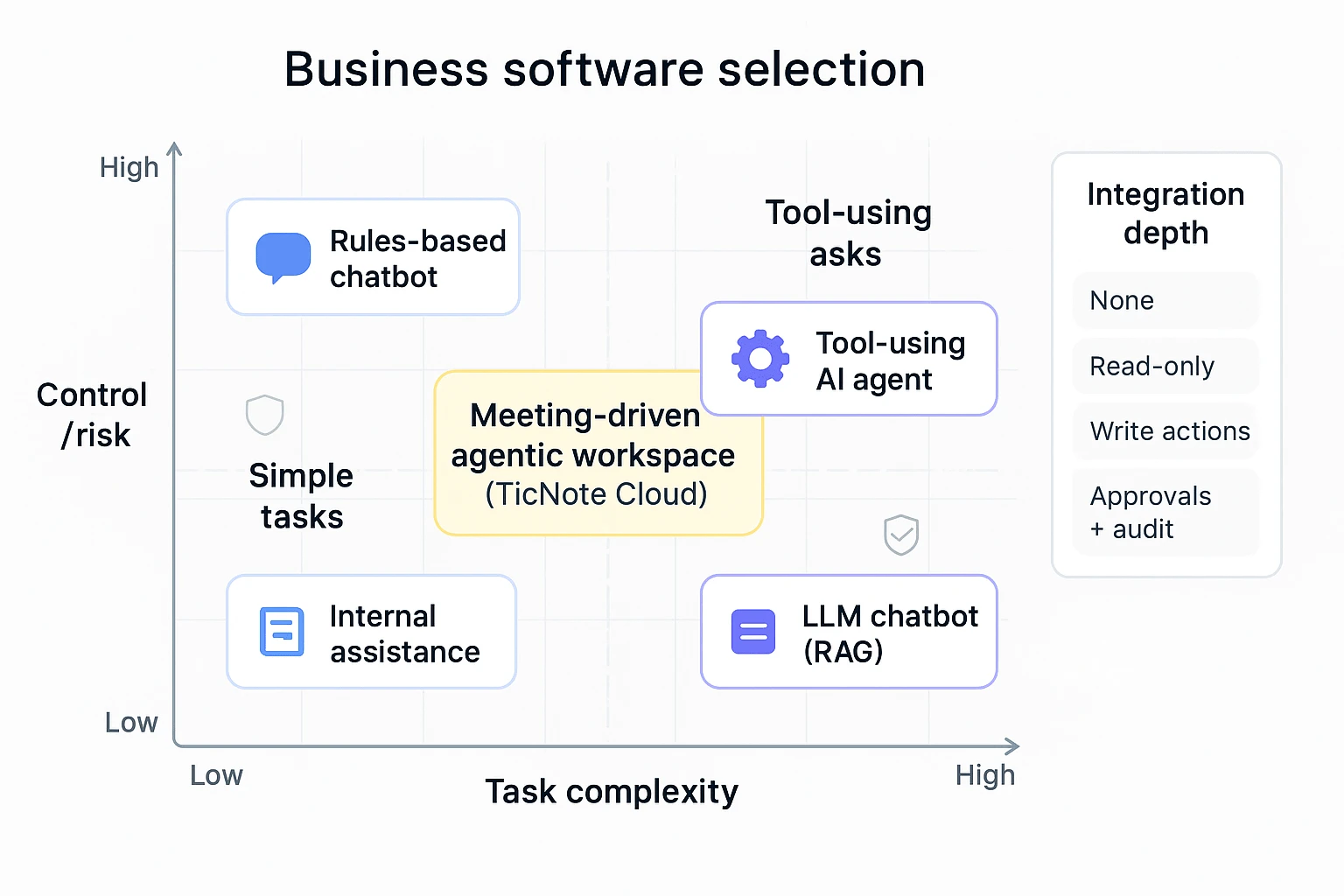
AI agent decision matrix (complexity × control × integration depth)
Use this as a fast filter. First, place your use case on the grid (complexity vs control/risk). Then sanity-check integration depth (how deeply it must write back to your systems).
Axis definitions (simple):
- Task complexity: how many steps, sources, and exceptions exist (low → high).
- Control/risk: how costly a wrong answer or action is (low → high).
- Integration depth (callout): none → read-only → write actions → approvals + audit.
Quadrant guide
- Low complexity + High control (strict rules, low tolerance for variance)
- Best fit: Rules-based chatbot
- Typical tools: Intercom (scripts, routing), sometimes Zendesk bot flows
- Use for: policy FAQs, account access steps, order status, simple returns
- Low-to-medium complexity + Low control (fast help, low risk)
- Best fit: LLM chatbot (often with RAG: retrieval-augmented generation)
- Typical tool: ChatGPT for drafting; internal Q&A when answers don't trigger actions
- Use for: drafts, summaries, brainstorming, quick internal explanations
- Medium-to-high complexity + Medium control (multi-source knowledge work)
- Best fit: AI agentic workspace (tool-using + project memory)
- Best pick when meetings drive outputs: TicNote Cloud
- Use for: meeting-to-deliverable workflows, research synthesis, project plans, decision logs
- High complexity + High control (must act in core systems safely)
- Best fit: AI agent with deep integrations + governance
- Typical tools: Salesforce Agentforce, Microsoft Copilot Studio, Cognigy
- Use for: CRM/case updates, approvals, regulated workflows, omnichannel service
Integration depth tie-breaker (the "third axis")
- If you only need answers: LLM chatbot or RAG search can be enough.
- If you need write-backs into tickets/CRM: pick Zendesk or Salesforce/Microsoft.
- If you need meeting-first knowledge that becomes deliverables: pick TicNote Cloud.
The "best default" rule (when you don't want to overthink it)
If work starts in meetings and ends as deliverables, pick TicNote Cloud. It's designed around Projects that hold your meetings plus supporting files, so Shadow AI can generate follow-ups and assets with traceability instead of one-off chat outputs.
Image idea execution note: show the matrix with three labeled zones (Chatbot, LLM Chatbot, AI Agent) and place "meeting-driven agentic workspace (TicNote Cloud)" in the medium-high complexity, medium control area, with an integration-depth callout pointing to exports and collaboration permissions.
What does it take to implement an AI agent safely (beyond a chatbot)?
A chatbot answers. An AI agent can take actions in your systems. That jump in autonomy is where most risk lives—and where most value comes from. To implement an agent safely, you need four things: clean inputs, scoped access, ongoing evaluation, and a clear human handoff.
1) Get integrations and data "agent-ready" (before you automate)
Most agent failures come from bad or unclear data. If the agent can't tell what's true, it will still try to act.
Start with these prerequisites:
- Defined systems of record: Pick the "source of truth" for customers, orders, tickets, policies, and projects (for example: CRM, ERP, ITSM, PM tool). If two systems disagree, decide which one wins.
- Clean knowledge base (KB): Remove outdated pages, duplicate policies, and "tribal knowledge" docs. If your KB has a 20% error rate, your agent will, too.
- RAG sources you can defend: RAG (retrieval-augmented generation) means the model pulls from your docs at answer time. Decide which repositories are allowed (help center, SOPs, contract templates) and which are blocked (personal drives, drafts, HR comp).
- Tool endpoints with clear contracts: Every action tool needs a stable API, strict input rules, and safe defaults (create ticket, issue refund, update record). If an endpoint is flaky, the agent will be flaky.
- Data ownership and retention: Name owners for each dataset, define retention windows, and decide what can be stored as "memory."
Meeting-heavy teams also need a project memory AI plan. Meetings create fast-moving facts: decisions, owners, dates, and scope changes. Treat meeting transcripts, docs, and deliverables as a governed repository:
- Project-level folders, naming, and version rules
- What counts as "approved" vs "draft"
- How citations map back to the exact source clip, timestamp, or paragraph
2) Enforce least privilege with role-based, scoped access
An agent should have the smallest set of permissions needed. Anything else is an avoidable blast radius.
Key controls to require in vendor and internal design:
- Role-based access control (RBAC): Different roles for reading, drafting, and executing actions. Tie access to your org chart and team boundaries.
- Environment separation: A sandbox for testing tools and prompts; production for real actions. Don't let a new workflow "learn" in prod.
- Token and secret management: Short-lived tokens, rotation, and no secrets in prompts or logs.
- Approval gates for high-risk actions: Add checks for money movement, customer-facing messages, data exports, and deletions. A simple rule: if it's hard to undo, it needs approval.
- Scope limits: Time windows (last 30 days), project boundaries, customer boundaries, and maximum action counts per run.
3) Monitor and evaluate like a product, not a demo
Agents drift over time. Your docs change. Your policies change. Even your ticket mix changes. So you need evaluation that runs every release.
A practical evaluation plan includes:
- Golden test set: 50–200 real tasks with expected outcomes (answers, citations, actions). Update monthly.
- Regression tests: Re-run the golden set after prompt, model, or tool changes. Block releases if key scores drop.
- Hallucination checks: Track "uncited claims" rate for any answer that should be grounded in your KB.
- Tool-call reliability: Measure tool-call success rate, retries, and partial failures. Target >99% success for core actions.
- Latency and cost budgets: Set max seconds per step and max dollars per completed task. If it exceeds budget, it should degrade gracefully.
- Audit logging: Log what the agent saw, what it decided, which tools it called, and what changed.
4) Design human-in-the-loop (HITL) and escalation paths upfront
Human oversight shouldn't be an afterthought. It should be a workflow pattern.
Common HITL patterns that work:
- Confirm-before-send: The agent drafts a customer reply; a human clicks send.
- Draft-for-approval: The agent prepares a refund, contract edit, or policy exception; a manager approves.
- Handoff with full context: The agent escalates with the transcript, sources, attempted actions, and open questions.
- Safe fallback: If confidence is low or tools fail twice, it stops and routes to a queue.
AI agent safety checklist (copy/paste)
- Data: system of record defined; KB cleaned; allowed RAG sources listed; data owners assigned
- Tools: APIs stable; input validation; safe defaults; clear error handling
- Access: RBAC; least privilege; prod vs sandbox; token rotation; action approval gates
- Eval: golden set; regression runs; hallucination tracking; tool-call success; latency/cost budgets; audit logs
- HITL: confirm-before-send; draft-for-approval; escalation with context; fallback rules
What are the risks of AI agents, and what safeguards should you require?
AI agents can do things, not just chat. That's the big shift in the ai agent vs chatbot decision. When an agent can create tickets, edit docs, send emails, or update records, small errors turn into real costs. Buyers should treat agents like junior operators: useful, fast, and always in need of controls.
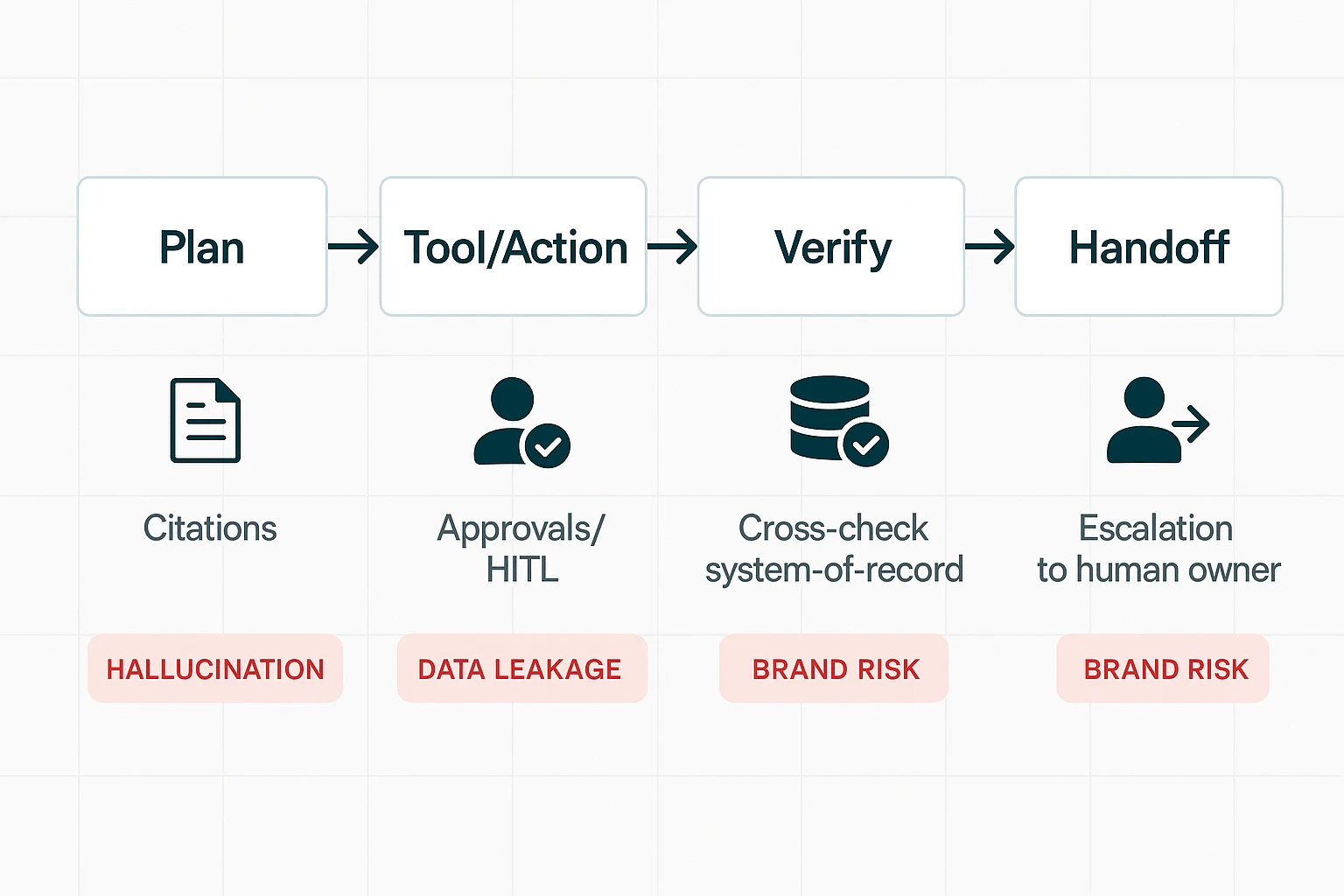
Stop hallucinations with "cite → cross-check → confirm"
Agents will sometimes invent details (hallucinate). Your safeguard is a verification pattern that matches the risk of the action:
- Cite: Require citations for any claim pulled from internal files (meeting notes, docs, CRM notes). "No citation" should mean "not trustworthy."
- Cross-check: For numbers, dates, SKUs, contract terms, and customer status, the agent must check the system of record (CRM, ERP, billing). Don't accept "it was said in a meeting" as final truth.
- Confirm before execution: Split work into two modes:
- Answering mode: The agent summarizes, drafts, and suggests.
- Changing-data mode: The agent proposes the exact change and waits for approval (human-in-the-loop).
A practical contract requirement: "Any destructive action (delete, send, update, approve) must be previewed with the exact fields that will change." This cuts silent errors.
Reduce data leakage with minimization, retention, and logs
Most agent risk is basic data hygiene. Require these minimums:
- Data minimization: Only send what the task needs (not full transcripts by default).
- Retention windows: Set a clear retention period for agent inputs/outputs and logs. This aligns with Regulation (EU) 2016/679 (General Data Protection Regulation) (2016) stating that personal data must be "kept in a form which permits identification of data subjects for no longer than is necessary for the purposes for which the personal data are processed."
- PII handling: Redaction options for names, emails, phone numbers, and health/financial data.
- Access logs: Who accessed what, when, and from where. Logs should be exportable.
- No training on customer data: Get it in writing.
- Incident response: Clear SLAs for breach notification and containment steps.
If you operate in the EU or serve EU customers, add GDPR alignment and regional data handling as items in your security review.
Protect brand voice with guardrails, escalation, and audit trails
An agent can damage trust faster than a bad FAQ bot. Require a governance layer:
- Approved phrases and tone rules: Simple do's and don'ts (e.g., "don't promise refunds," "don't admit fault," "don't invent policy").
- Do-not-do list (hard blocks): No legal advice, no pricing exceptions, no policy changes, no customer account edits.
- Escalation triggers: Route to a human when confidence is low, sentiment is negative, or the request touches compliance (PII, billing, contracts).
- Review queues: Sampling (e.g., review 5–10% of outputs weekly) plus mandatory review for high-risk categories.
- Audit logs that show sources + actions: You need a trace of what the agent saw, what it did, and why.
What an agentic meeting-and-project workflow looks like (step-by-step example)
An AI agent workflow isn't "chat and copy-paste." It's a loop where your meeting content becomes a living project space: capture → organize → generate → verify → share. Here's what that looks like in TicNote Cloud, end to end, with the same habits you'll need for any ai agent vs chatbot rollout: clear inputs, tool use, and review with traceable sources.
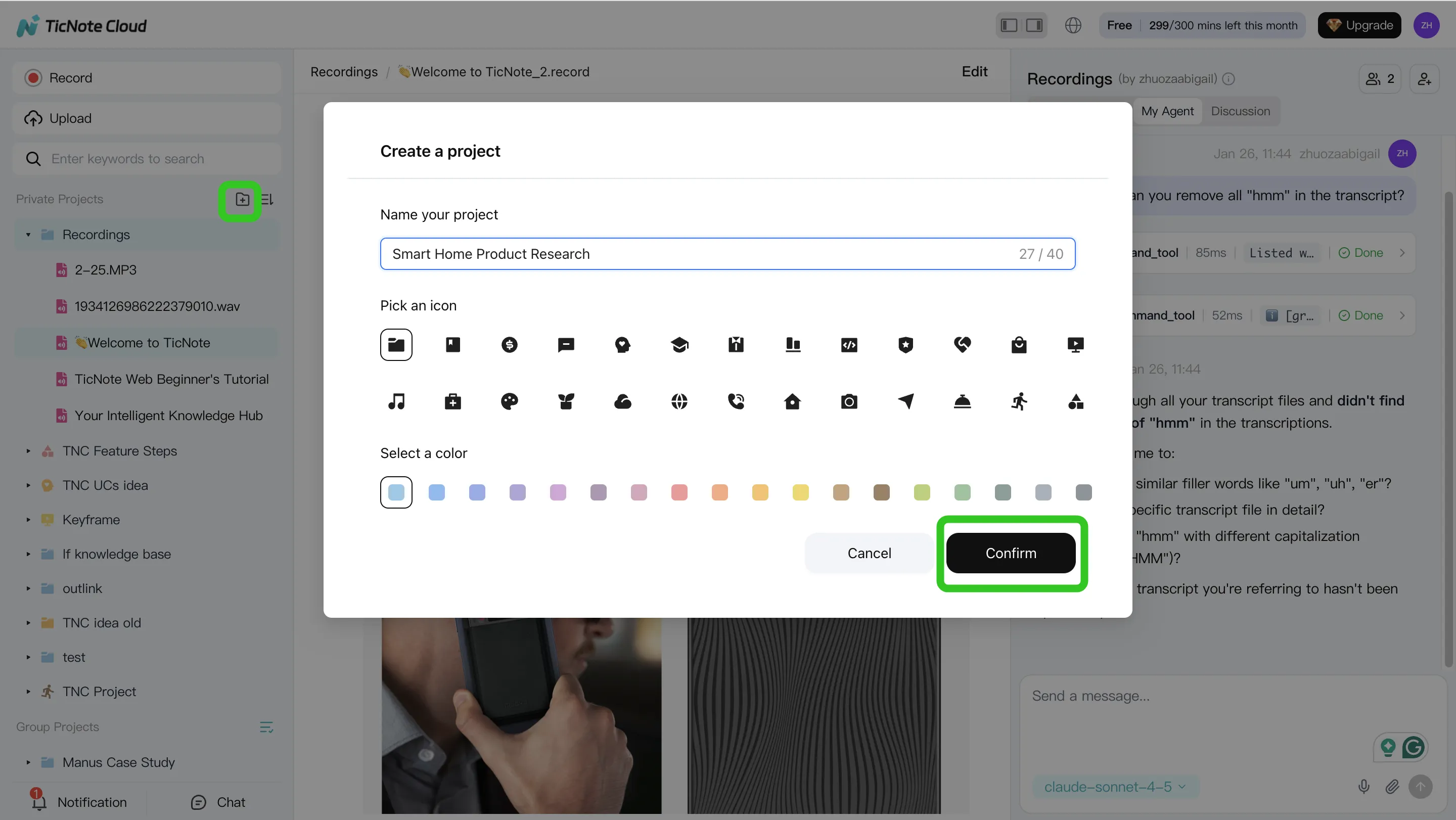
Step 1. Create or open a Project and add content
Start by creating a Project (or opening one you already use). Name it by how your team works, like a client, a sprint, or a research theme. This keeps everything scoped, which makes later answers tighter and safer.
Then add your raw material:
- Meeting audio/video and transcripts
- Supporting docs (PRDs, briefs, decks, research notes)
- Any reference files you want the agent to use later
You can add files two ways: use a direct upload in the file area, or attach files in the Shadow AI panel and ask Shadow to file them into the right folder.
Step 2. Use Shadow AI to search, analyze, edit, and organize content
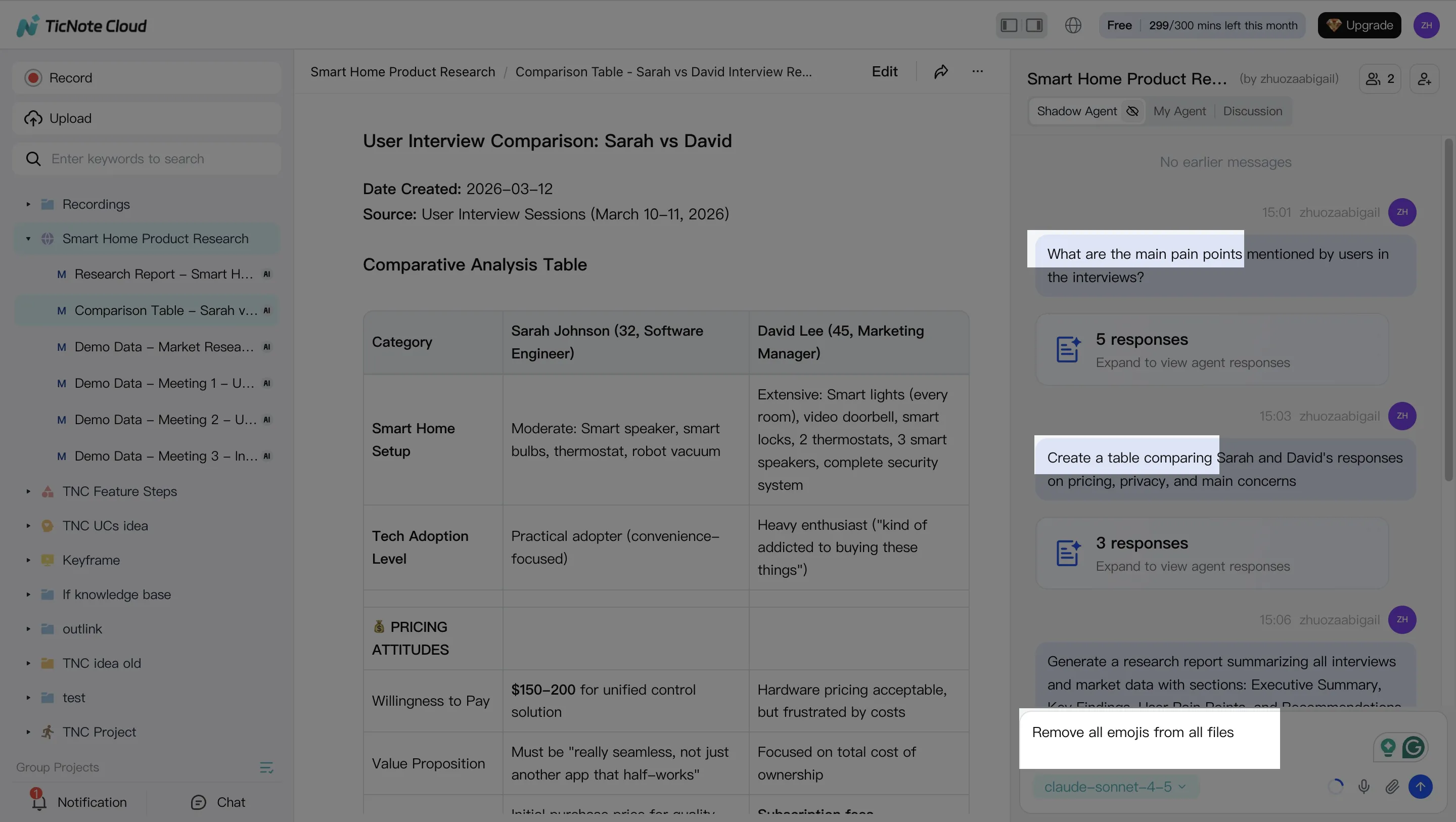
With content in place, Shadow AI stays open on the right side of the workspace. Instead of asking general questions, ask project-scoped questions that force the model to use your files.
A simple pattern is: ask → check citations → turn into structure.
Try prompts like:
- "What are the main pain points mentioned by users?"
- "Compare the 3 interviews and extract common themes."
- "Organize action items from all meetings and group by owner."
When Shadow answers, use the citations/traceability to jump back to the exact source lines. That's the practical difference between "it sounded right" and "we can prove it."
Also, don't treat transcripts as read-only. Edit the transcript, fix names, and add short annotations (what was decided, what's pending). Over time, that cleanup makes the Project memory more reliable and reduces rework.
Step 3. Generate deliverables with Shadow AI (and keep them consistent)
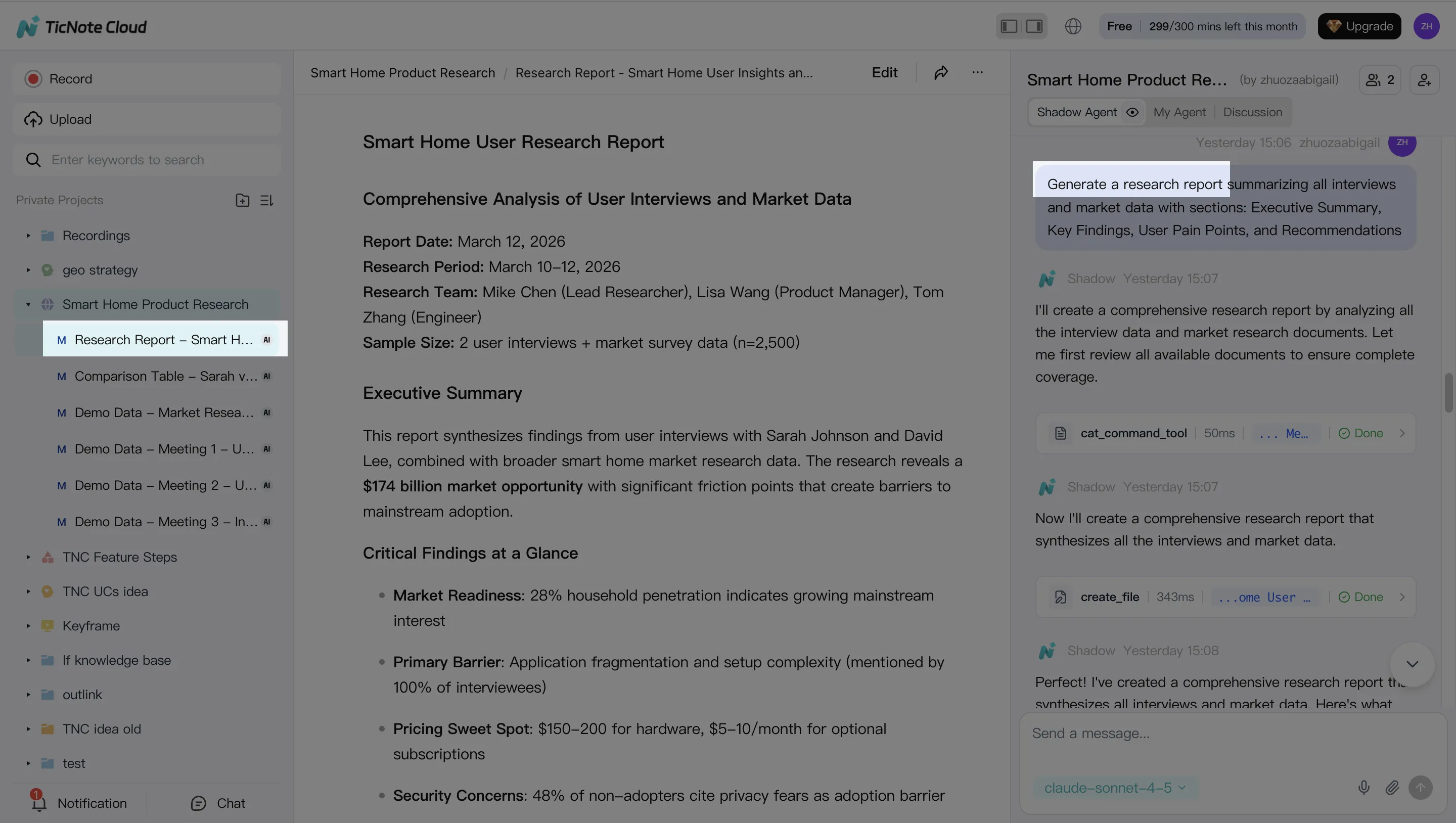
Now you shift from analysis to output. You can ask Shadow directly or use Generate to produce deliverables in the format your stakeholders expect.
Common one-click outputs include:
- Research report (PDF)
- Web presentation (HTML)
- Podcast with show notes
- Mind map
If your team wants repeatable quality, lean on templates and tight prompts (same sections, same tone, same labeling). Then export to the format you need—PDF/DOCX/Markdown/HTML—so the deliverable can live in your normal workflow.
Citations matter here, too. They make reviews fast because a reviewer can click from a claim to the original meeting moment.
Step 4. Review, refine, and collaborate before anything goes external
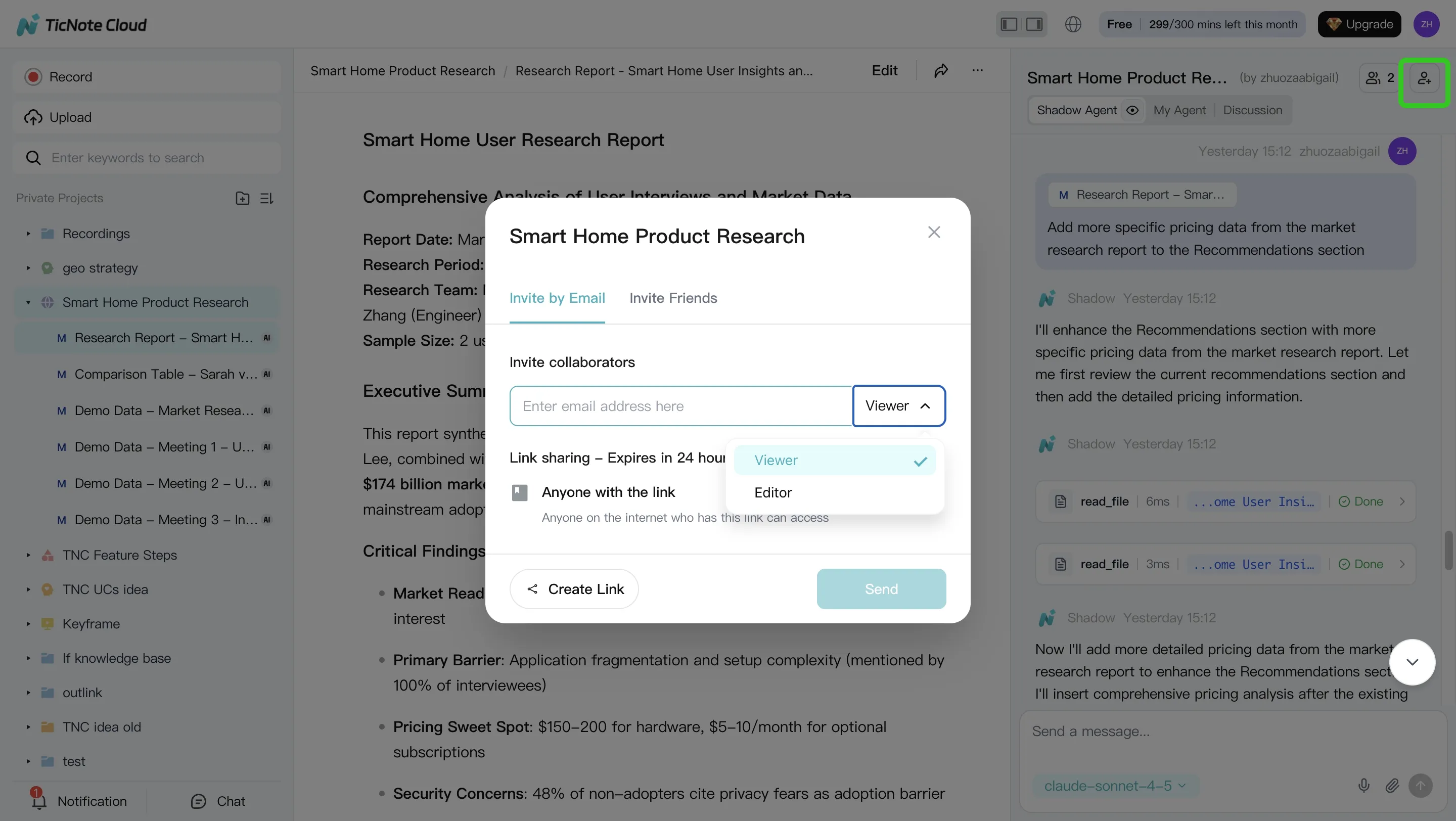
Treat the first output as "draft 1." Ask Shadow to revise specific parts, not the whole doc. For example: "Rewrite the risks section in simpler language" or "Add a 5-bullet exec summary."
Then add a lightweight approval step:
- Owner reviews with citations and fixes gaps
- Team comments or requests targeted edits
- Final export and share externally
Set access by role (Owner/Member/Guest) so people only see what they should. And because Shadow operations are traceable and work inside those permissions, you get a clearer audit trail than ad-hoc copy-pasting between tools.
The app workflow (same habit: verify with sources)
On mobile, the loop stays the same: create a Project (or add to an existing one), upload audio/video right after the meeting, then run Shadow for quick summaries and first-draft deliverables while details are fresh. When you're back at your desk, you can refine with the team in the same Project, using the same citations-first review habit so nothing "mysteriously" appears in the final output.
Try TicNote Cloud for free and turn one meeting into a cited deliverable today.
Final thoughts: when "hybrid" beats picking only one
Most teams don't need to "pick a winner" in the ai agent vs chatbot debate. In practice, the best setup is a hybrid stack: a simple bot for safe tasks, a smarter chatbot for knowledge, and an agent for scoped execution. That mix keeps risk low while still cutting real work.
A pragmatic hybrid stack that matches real operations
- Rules-based chatbot (Level 1): Use it for strict flows like FAQ, basic status checks, and ticket routing. It's fast, predictable, and easy to audit—but it breaks when users go off-script.
- LLM/RAG chatbot (Level 2): Add it when you need better language handling and answers grounded in company content (RAG = retrieval-augmented generation). It's great for "find and explain" work, but it shouldn't take actions that can harm customers or data.
- Tool-using AI agent (Level 3): Use it when the task is "do the work," not just "talk about it." Keep it scoped (clear permissions, limited tools), and add human-in-the-loop for risky actions like sending messages, changing records, or publishing content.
Where the hybrid model wins: meetings → projects → deliverables
A lot of work starts in calls and ends as artifacts: notes, decisions, tasks, a client update, a research brief, or a slide deck. This is where an agentic workspace helps most, because it can:
- keep project memory across meetings and files
- generate outputs with citations and traceability back to the source
- reduce "rework loops" (teams often spend 2–3 revision rounds chasing what was actually decided)
If your workflow is meeting-driven, TicNote Cloud fits this hybrid model well: capture the call, group work into Projects, and let Shadow AI execute deliverables while staying anchored to your source material. For more depth on shipping-ready outputs, see this guide to an agent workflow for content that includes QA and governance.
Try TicNote Cloud for free to turn meeting content into cited, project-ready deliverables.


