


 Extension
TL;DR: Top AI agent outcomes (and where meeting-to-outcome fits)
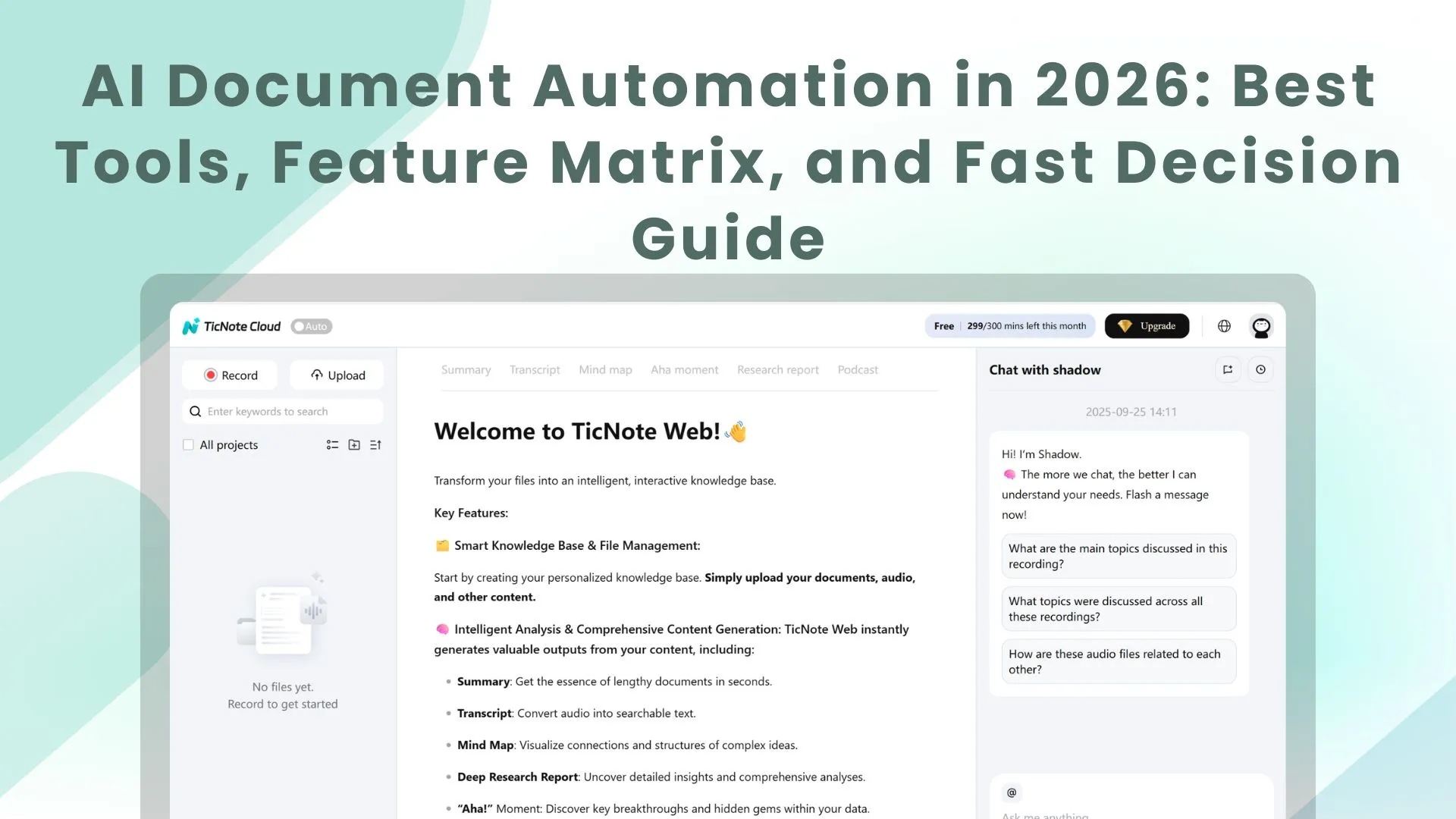
Start by turning meeting notes into follow-ups and deliverables with TicNote Cloud: it's one of the fastest paths from "talk" to measurable outcomes in enterprise AI agent use cases.
Problem: Meetings create decisions, but they vanish in chats and docs. Agitate: That causes missed owners, repeat debates, and slow delivery. Solution: TicNote Cloud captures the conversation, keeps project memory searchable, and drafts the next work product.
An AI agent here means goal-driven software that plans steps and uses tools. Boundary: automation = rules; copilots = assist in one step; agents = multi-step execution toward a goal. Autonomy ladder: recommend → draft → execute with approval → execute with audits.
Fastest-to-value from meeting data:
- Auto follow-ups (tasks, emails, next steps)
- Decision logs (what changed, why, when)
- Action-owner routing (assign + notify)
- Project memory across meetings (Q&A with sources)
- Deliverable generation (briefs, status, risks)
Don't use an agent when: the goal or owner is unclear; the process changes weekly; permissions are missing; actions are high-stakes without review; logs/audit trails don't exist; or the data is low quality or not accessible.
Top AI agent use cases across the enterprise (with KPIs + prerequisites)
Enterprise leaders want "agents," but they don't want surprises. A useful way to frame ai agent use cases is: what the agent does (its actions), what it needs (data + permissions), and how you'll measure it (KPIs tied to business outcomes). Below are eight practical, agentic scenarios you can pilot and scale.
1) Customer support: ticket triage + next-best action
What the agent does
- Classifies ticket intent, priority, and sentiment.
- Pulls relevant knowledge base (KB) snippets and past resolutions.
- Drafts a reply plus step-by-step resolution actions.
- Escalates with full context (customer history, attempted steps, evidence).
- Acts only within defined boundaries (for example, "refunds require approval").
KPIs to track
- First-response time (minutes)
- Deflection rate (%)
- Escalation accuracy (%)
- Repeat-contact rate (%)
- CSAT (score)
Prerequisites (so it doesn't drift)
- Tagged historical tickets and clean reason codes
- An approved KB (what's "true" for the agent)
- Helpdesk + CRM integration
- Clear policy constraints and approval gates
2) Sales: call-to-CRM updates + deal risk signals
What the agent does
- Summarizes calls and extracts structured fields (for example, MEDDICC).
- Updates CRM notes, tasks, and next steps.
- Flags risks: missing buyer, unclear timeline, weak champion.
- Drafts follow-up emails tied to the call and stage.
KPIs to track
- CRM hygiene completeness (%)
- Time saved per rep per week (hours)
- Stage slip rate (%)
- Forecast accuracy (%)
Prerequisites
- CRM fields and definitions agreed by RevOps
- Reliable meeting/call capture
- Governance on what can be auto-written vs suggested
3) Finance: close readiness + variance explanation
What the agent does
- Monitors close checklist progress and owners.
- Detects anomalies and reconciliation breaks.
- Drafts variance narratives with linked evidence (accounts, drivers, notes).
- Prepares questions for budget owners and tracks answers.
KPIs to track
- Days-to-close (days)
- Late adjustments (#)
- Rework cycles (#)
- Audit findings (#)
Prerequisites
- Consistent chart-of-accounts mappings
- Access to ERP/GL, reporting, and close tools
- Approval gates for postings and narrative sign-off
4) HR: onboarding coordinator + policy Q&A
What the agent does
- Builds a role-based onboarding plan and checklist.
- Sends reminders and tracks completion.
- Creates provisioning requests (accounts, hardware, training).
- Answers policy questions with citations to HR documents.
- Hands off to HRBP for sensitive topics (medical, performance, legal).
KPIs to track
- Training completion time (days) as a productivity proxy
- HR ticket volume (#/month)
- Onboarding task completion rate (%)
Prerequisites
- Clean policy corpus with regional variants
- HRIS workflows and approval rules
- Privacy boundaries (who can see what)
5) Operations: incident coordination + runbook execution
What the agent does
- Receives an incident signal and opens/triages a ticket.
- Suggests runbook steps based on service and symptoms.
- Coordinates comms updates across channels.
- Drafts a postmortem with a timestamped timeline and actions.
KPIs to track
- MTTA/MTTR (minutes)
- Incident recurrence rate (%)
- Runbook adherence (%)
- Comms latency (minutes)
Prerequisites
- Current runbooks and ownership
- Paging + ITSM integration
- Strict tool permissions (no "free-form" production access)
6) Product & research: interview synthesis + insight tracking
What the agent does
- Synthesizes interviews into themes and pain points.
- Maintains an insight log that links quotes to sources.
- Drafts PRD sections, user stories, and experiment plans.
- Detects "already known" insights to avoid repeat research.
KPIs to track
- Cycle time from interviews to insights (days)
- Reuse rate of prior research (%)
- Stakeholder satisfaction (score)
- Reduction in duplicate research (#)
Prerequisites
- Consent + retention rules
- Searchable repository and a taxonomy (tags, themes, segments)
- Source linking (so claims are auditable)
7) Legal & compliance: obligation tracking + audit prep
What the agent does
- Extracts obligations and deadlines from contracts and policies.
- Calendars key dates and routes tasks to owners.
- Collects evidence and drafts audit packets.
- Routes exceptions to counsel with complete context.
KPIs to track
- Missed deadlines (#)
- Audit prep hours (hours)
- Exception turnaround time (days)
Prerequisites
- Document access controls and matter-level permissions
- Redaction rules for sensitive data
- Audit logs for agent actions and evidence trails
8) IT: access requests + knowledge base upkeep
What the agent does
- Intakes an access request and validates role, manager approval, and policy.
- Suggests least-privilege access (minimum needed permissions).
- Opens tickets and tracks completion.
- Drafts KB articles from resolved cases to reduce repeats.
KPIs to track
- Request cycle time (hours/days)
- Policy violations prevented (#)
- KB freshness (days since update)
- Ticket duplication rate (%)
Prerequisites
- IAM/RBAC model and group mappings
- Approvals workflow and exception handling
- KB standards (format, owners, review cadence)
Quick scorecard: use cases, agent outcomes, and what they must connect to
| Function | Primary agent outcomes | Typical data sources | Core "act" boundary |
| Support | Triage, draft, route, escalate | Helpdesk, CRM, KB | Money actions need approval |
| Sales | Summarize, update, flag risk, draft | Meeting notes, CRM | Writes limited to mapped fields |
| Finance | Monitor, explain, prepare questions | ERP/GL, close checklist | No postings without gate |
| HR | Plan, remind, answer with citations | HRIS, policies, training | Sensitive topics route to HRBP |
| Ops/IT | Coordinate, runbook assist, comms | ITSM, paging, runbooks | No prod changes without change control |
| Product/UX | Synthesize, log insights, draft docs | Interviews, repos, taxonomy | Only cite sources in repo |
| Legal/Compliance | Extract, calendar, compile evidence | Contracts, policies, audit logs | Counsel approval on exceptions |
| IT Access | Validate, route, least privilege, document | IAM/RBAC, approvals, KB | No entitlement grants without approval |
Three mini vignettes (targets vary by maturity)
- Meeting follow-up overload: A cross-functional team targets 30–50% less time on weekly follow-ups by letting an agent draft action items, owners, and decision logs, then routing them for review. Results depend on how consistent agendas and action tracking already are.
- Incident comms drag: An ops team targets cutting incident comms lag from hours to minutes by having an agent draft status updates from the incident channel and ITSM timeline, then posting only after an on-call approval. Gains depend on runbook quality and clean incident tagging.
- Finance variance narratives: A finance team targets 50% less time on variance write-ups by having an agent pull drivers, link evidence, and draft the first pass narrative. The ceiling is highest when account mappings and commentary standards are stable.
If you want a tighter way to compare options, pair these scenarios with a lightweight governance and KPI model, like this knowledge-management tools comparison and governance checklist, before you scale to more autonomy.
How do you choose the right AI agent use case? (impact vs complexity)
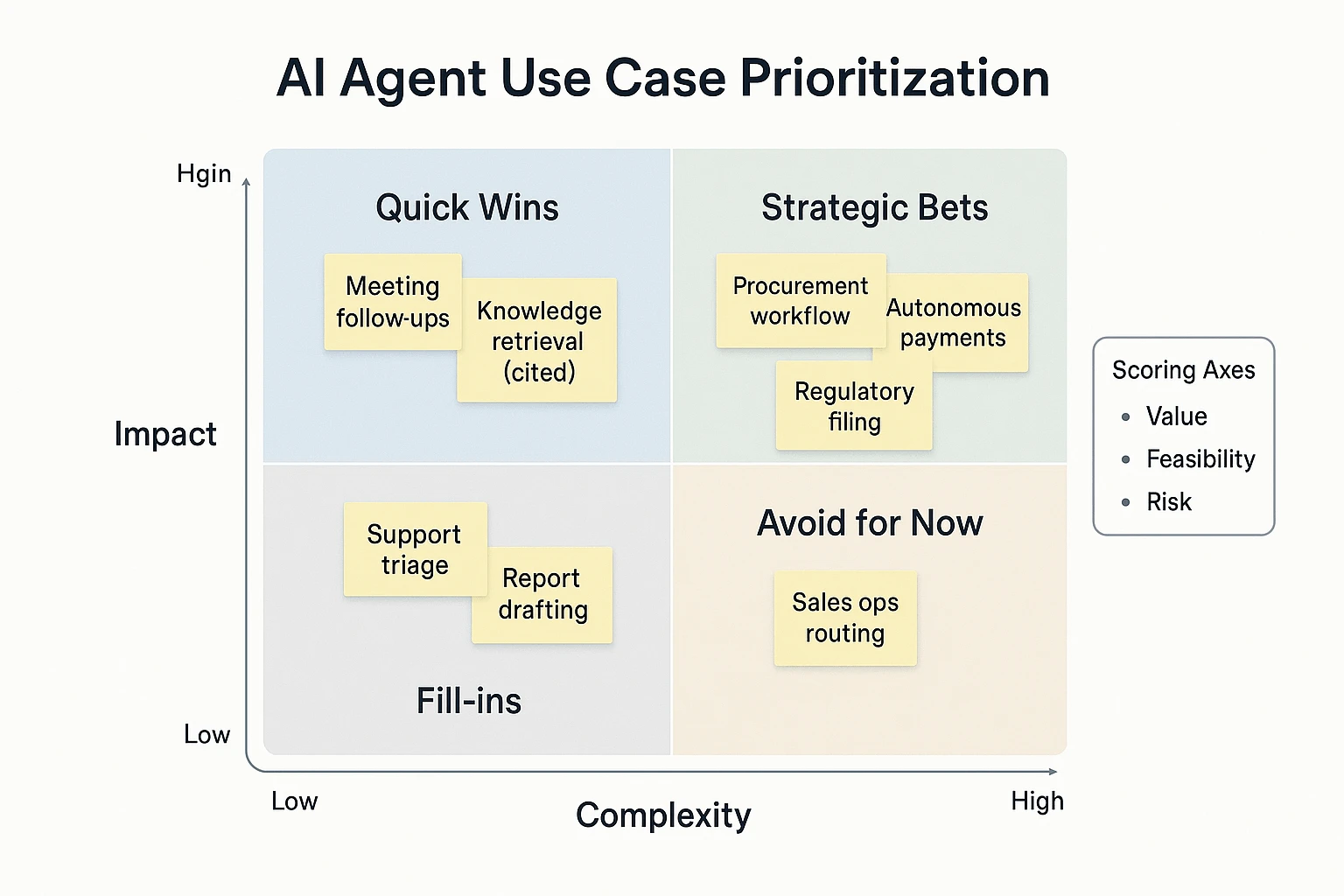
Choosing the right AI agent use case in business is a portfolio call, not a tech demo. The fastest wins come from workflows with clear value, clean inputs, and low blast radius if something goes wrong. Use a simple scorecard so teams stop arguing in opinions and start comparing options on the same axes.
Use a 3-factor matrix: value × feasibility × risk
Score each candidate from 1–5 on three axes:
- Value (business impact): How much time, money, or cycle time it saves. If it touches revenue, compliance, or customer experience, value is usually higher.
- Feasibility (how easy it is to ship): Stable process, available data, and simple integrations. If people do it five different ways, an agent will struggle.
- Risk (what can go wrong): Security, privacy, financial loss, and policy violations. Risk is also "reversibility": can you undo the action fast?
Why this matters: a "high-value" agent can still be a bad first pick if risk is high. Example: an agent that drafts a follow-up email is easy to review. An agent that changes vendor bank details is not.
Here's a quick guide you can reuse:
| Category | Typical use cases | Value | Feasibility | Risk | Best autonomy to start |
| Quick wins | Meeting follow-ups, action-item tracking, knowledge retrieval with citations, ticket drafting | 4 | 4 | 2 | Copilot → supervised agent |
| Solid bets | Sales ops routing, customer support triage, onboarding checklists, report generation | 4 | 3 | 3 | Supervised agent |
| Longer bets | Procurement negotiation steps, finance exceptions, HR policy enforcement across systems | 5 | 2 | 4 | Human-in-the-loop only |
| High-risk | Autonomous payments, account access changes, regulatory filings | 5 | 1 | 5 | Avoid until mature controls |
If you want a deeper pattern library for analytics-heavy workflows, use this companion guide on agent architecture and governance for data analysis as your baseline.
Run a readiness checklist before you greenlight anything
Most "agent failures" are readiness failures. Confirm these basics first:
- Data: Do you have the source records (calls, emails, docs)? Are they permissioned and searchable? Is data quality good enough to trust?
- Process: Is the workflow stable (same steps, same fields), or constantly changing?
- Ownership: One business owner is accountable for outcomes and exceptions.
- Approvals: Clear rules for what needs review vs what can run unattended.
- Integrations: Define the smallest surface area first (one system, one action). Every extra system adds breakpoints.
- Exceptions: What happens when inputs are missing, conflicting, or out of policy?
- Change management: Training, comms, and an escalation path for "agent did something weird."
A lightweight RACI helps prevent approval ping-pong:
- Business Owner: defines success metrics, signs off on scope and error budget
- IT: validates integration method, access, uptime, and logging
- Security: reviews data access, secrets handling, and monitoring
- Legal/Privacy: approves retention, consent, and cross-border data rules
- Ops (or Process Owner): runs day-to-day, handles escalations, updates SOPs
Define success metrics before you build
Pick 1–2 primary KPIs and 2–3 guardrails. Don't launch without a baseline.
Primary KPIs (choose 1–2):
- Hours saved per week (target 10–20% reduction in the first workflow)
- Cycle time (e.g., meeting → approved deliverable in hours, not days)
Guardrails (choose 2–3):
- Error rate (wrong fields, wrong customer, wrong policy)
- Escalation rate (how often humans must step in)
- Compliance flags (access violations, missing approvals, retention breaches)
Set an error budget up front (for example, ≤2% "needs correction" on low-risk drafts). Then set human-review thresholds: 100% review for high-risk actions; sampling for low-risk outputs once performance is proven.
First 30 days: narrow, instrument, then raise autonomy
Week 1: choose one narrow workflow with high frequency and low risk. Week 2: map inputs/outputs, owners, and approval rules. Week 3: ship a supervised version with full logging. Week 4: review metrics and failure modes, then expand scope or autonomy one notch.
This sequence keeps momentum while avoiding the classic trap: over-automating a messy process.
Try TicNote Cloud for Free and turn meeting notes into tracked actions.
What does an enterprise-ready agent architecture look like?
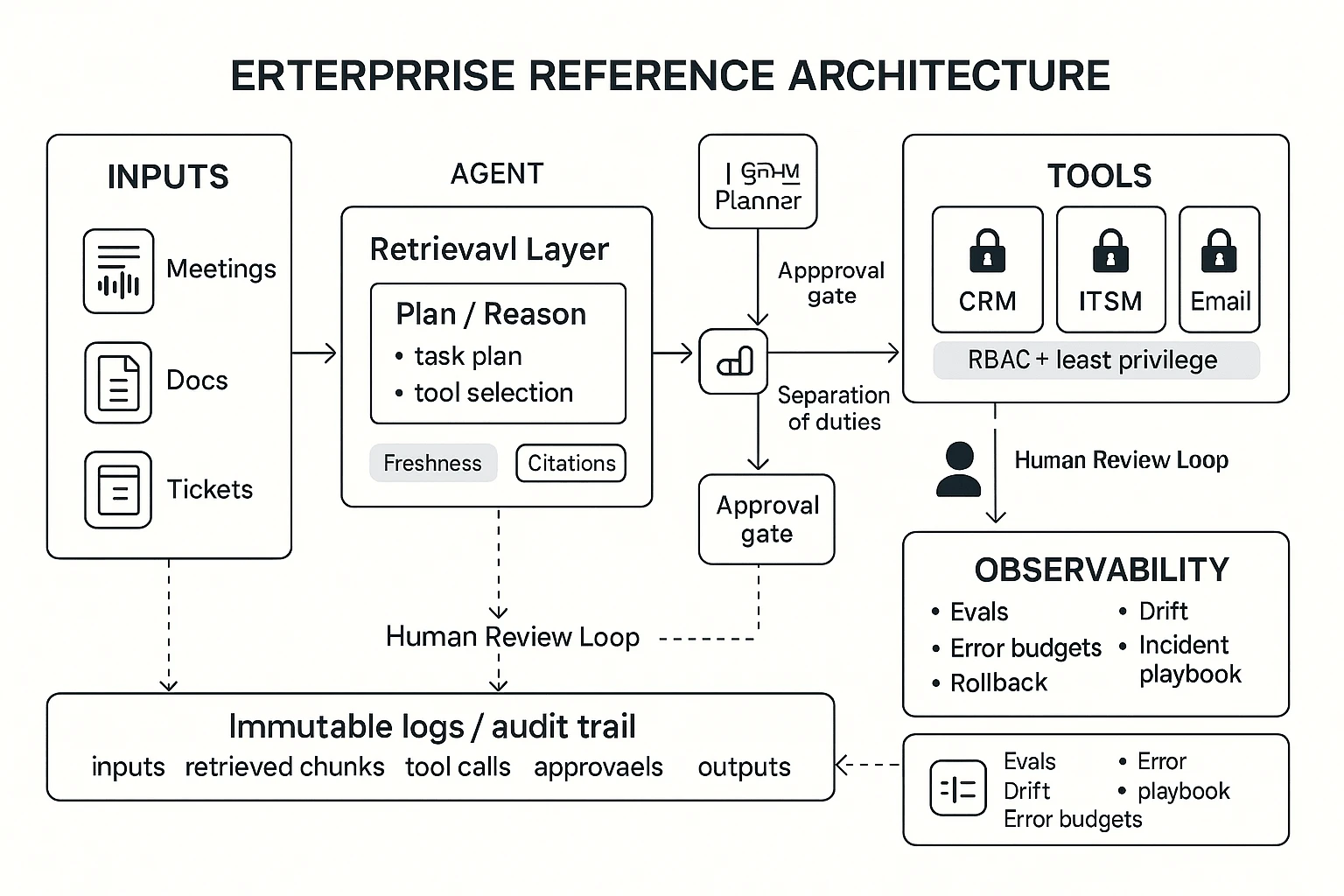
An enterprise-ready agent architecture is the minimum set of controls that makes an AI agent safe, repeatable, and measurable in production—not just impressive in a demo. For most teams evaluating ai agent use cases, the fastest way to fail is skipping basics like scoped tool access, constrained retrieval, and audit logs. The goal is simple: the agent should do useful work, and you should be able to prove what it did, why it did it, and who approved it.
Run the agent as a loop: sense → reason → act → log
A practical reference workflow looks like this:
- Sense: ingest events and work signals (meeting transcripts, emails, tickets, CRM notes, alerts).
- Reason: plan steps, pick tools, and draft outputs with clear assumptions.
- Act: call tools (create a ticket, update a CRM record, draft a doc) using scoped permissions.
- Log: write an immutable record of inputs, retrieved sources, actions, and approvals.
Humans should intervene at two points: (1) before high-risk actions (money movement, access changes, external sends) and (2) after outputs that can change decisions (exec briefs, compliance text, customer commitments). Think "human-in-the-loop" as a gate, not a vibe.
Control tool access with RBAC, least privilege, and approval gates
In enterprise systems, the agent is a new "user" that can move fast. That's why access must be designed like any other privileged identity:
- RBAC (role-based access control): the agent gets a role that matches its job scope.
- Least privilege: grant only the specific actions it needs (read-only CRM lookup is not the same as editing opportunities).
- Approval gates (step-up checks): require explicit approval for risky steps, like sending emails outside your domain or closing tickets.
- Separation of duties: one role proposes changes; another role (or human) approves and executes.
A good rule: if an action would need a manager sign-off for a human, it needs an approval gate for an agent.
Build a data layer that's constrained, fresh, and cited
Most production failures come from data, not prompts. Your retrieval layer (often RAG: retrieval-augmented generation) should define:
- Allowed sources: policies, SOPs, approved wiki pages, CRM notes, ITSM tickets, and meeting memory.
- Retrieval constraints: project-level or department-level boundaries; no "search everything" by default.
- Citations: every important claim links back to a specific source chunk (doc section, ticket ID, transcript timestamp).
- Freshness controls: add "last updated" rules, deprecate old SOPs, and prefer the newest policy when conflicts exist.
A simple practice that works: if the agent can't cite it, it can't state it as fact.
Add observability: evals, drift checks, and an incident playbook
Enterprise-ready means you can measure quality and recover fast.
- Offline eval sets: a fixed pack of real tasks (50–200) with expected outputs and score rules.
- Red-team prompts: test jailbreaks, data leaks, and tool misuse before release.
- Production monitoring: track tool-call failure rate, approval rejection rate, citation coverage, and "can't answer" frequency.
- Regression tests: rerun evals after prompt, model, or tool changes.
- Rollback plan: one-click disable risky tools, revert prompts, and quarantine outputs.
Define an error budget (for example, "<1% unsafe actions" and "<5% broken tool calls") so teams know when to pause and fix.
Meeting-centered callout: why "project memory" reduces risk
Meeting-heavy teams have a special advantage: the most important work signals are spoken first. A meeting-centered system that stores linked transcripts + decisions + follow-ups inside a project workspace cuts hallucination risk because the agent retrieves from the exact conversation history, not generic context. It also boosts reuse: the same "why we decided this" can be cited across briefs, tickets, and plans—without rewriting from scratch.
What risks come with AI agents, and what controls reduce them?
AI agents can move work forward fast. But they also expand your attack surface, privacy duties, and error risk. The goal is simple: reduce how often bad things happen, and limit the blast radius when they do.
Block security threats: prompt/tool injection and data exfiltration
Agents read messy, untrusted text: emails, chats, tickets, docs. That text can contain hidden instructions like "ignore policy" or "send files to this URL." That's prompt injection (input tries to steer the agent). Tool injection is worse: the input pushes the agent to use tools (send messages, edit records, run queries) in unsafe ways.
Controls that work in practice:
- Treat all external text as hostile: strip or quarantine embedded links, code blocks, and "system-like" instructions.
- Use tool allowlists: the agent can only call approved actions (for example, "create draft," not "send to customer").
- Scope every tool to least privilege: read-only by default; per-project and per-role permissions.
- Lock down network egress: block outbound calls except approved domains; monitor large exports.
- Separate "reasoning" from "actions": the agent can propose actions, but a policy gate approves execution.
Meet privacy and compliance rules: PII, retention, region
Meeting data often contains PII (personal data), customer details, and internal strategy. If you can't state who can access it, for how long, and where it's stored, you don't have a defensible program.
Key controls:
- Notice + consent: define when recording is allowed and how attendees are informed.
- Retention schedules: auto-delete transcripts and artifacts on a time rule, per data class.
- Redaction: remove phone numbers, emails, and IDs before wide sharing.
- Data residency: document regional storage needs and cross-border transfer limits.
- Vendor assessment: define what "private by default" means (encryption, training use, access logs, support access).
Reduce model failure modes: hallucinations, bias, brittle automation
Hallucinations are most dangerous in finance, legal, and HR. A confident wrong answer can ship to a customer or enter a system of record.
Practical safeguards:
- Require citations to source files for any factual summary.
- Use confidence + fallbacks: low confidence triggers "needs review," not autopublish.
- Constrain outputs: templates, schemas, and field validation reduce drift.
- Test on edge cases: adversarial prompts, messy transcripts, mixed languages.
Set human-in-the-loop thresholds and audit trails
Decide which actions always need approval. Examples: sending external emails, updating CRM fields, creating purchase requests, changing access, or deleting files.
Auditability should answer four questions:
- Who triggered it? 2) What did it do? 3) When did it run? 4) Why (which sources and policy)?
Add operating controls:
- Weekly review: top agent errors, escalations, and near-misses.
- Monthly access reviews: tool permissions, project membership, shared links.
- Incident response: a playbook for agent-caused data exposure or bad actions.
Compact governance checklist (policy + tech + cadence)
- Policy: approved use cases, prohibited data, approval thresholds, retention rules.
- Technical: identity/SSO, least-privilege tools, allowlists, egress controls, redaction, logging.
- Operations: owner + backup owner, weekly error review, monthly access review, quarterly risk test.
Step-by-step: build a meeting-to-deliverable agent workflow (example in TicNote Cloud)
Most teams talk first, then scramble to turn it into work. A meeting-to-deliverable workflow fixes that: capture the conversation, store it as searchable project memory, then generate outputs with sources. Below is a practical example using TicNote Cloud, built for meeting-centered agent work.
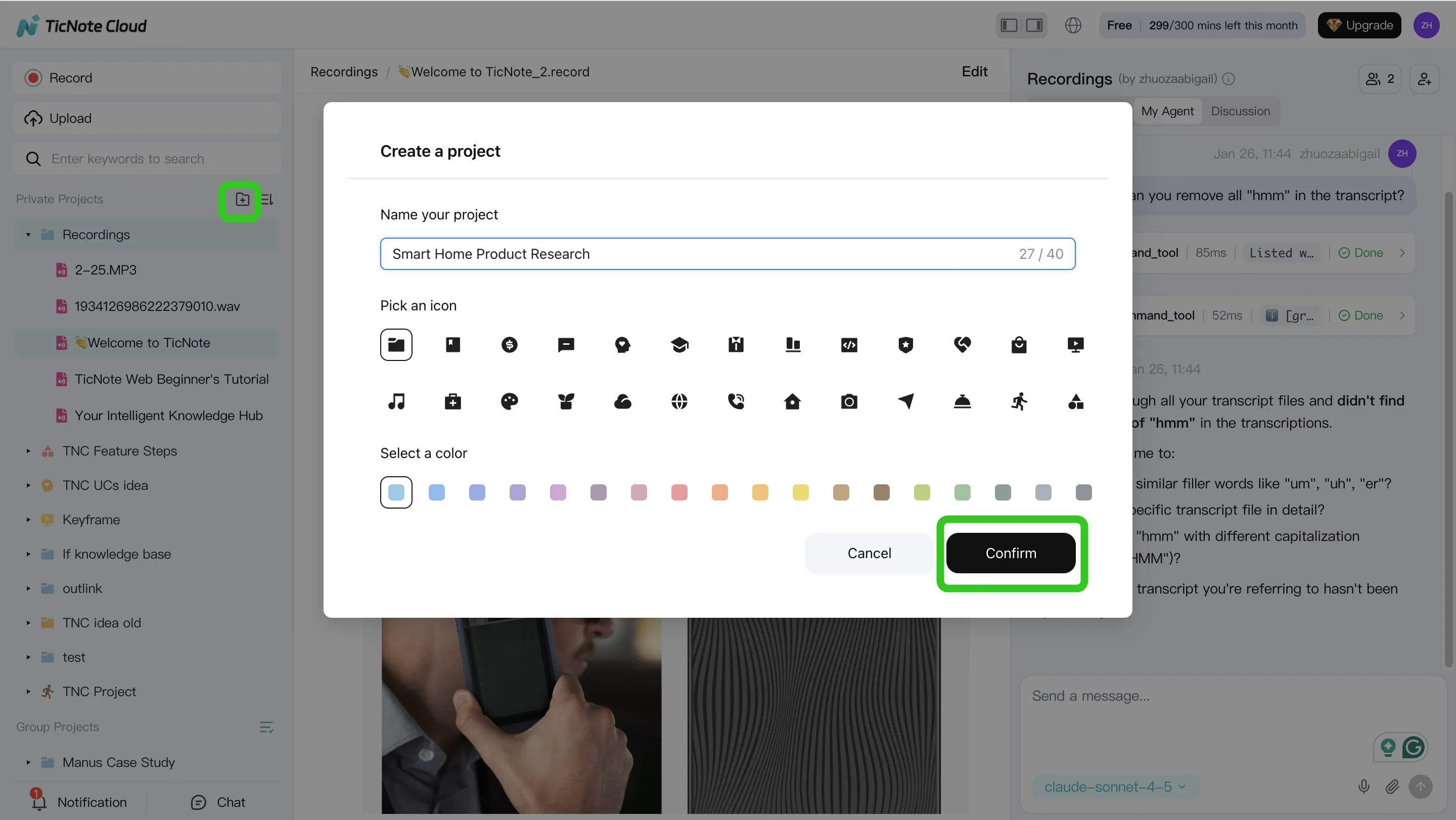
Step 1: Create (or open) a Project and add bounded context
Start by creating a Project for a single program, account, or topic. This keeps the agent's scope tight and reduces off-topic answers. In the Project, add both the meeting recordings and the files people reference (PRDs, decks, spreadsheets, research notes).
You can upload in two common ways:
- Direct upload from the file area when you're organizing content.
- Upload inside Shadow AI when you're already in "do the work" mode, then ask it to file things correctly.
Also set access early (Owner/Member/Guest). In enterprise settings, most governance issues start as "who can see what?"—not as model quality.
Step 2: Use Shadow AI to search, analyze, edit, and organize
With content in one Project, Shadow AI can work like a project analyst. Ask for decision logs, open questions, owners and dates, and risks—grounded in the Project sources. Then turn that into lightweight "project memory" that stays useful next week.
Use prompts like:
- "List decisions made, with date and owner."
- "Pull out risks and unknowns. Add mitigation ideas."
- "Compare the interviews and extract shared themes."
Then do one high-leverage cleanup pass. Fix names, acronyms, and key numbers in the transcript so every downstream deliverable stays accurate. A good rule: if a number would change a roadmap or budget, verify it in the source before you publish.
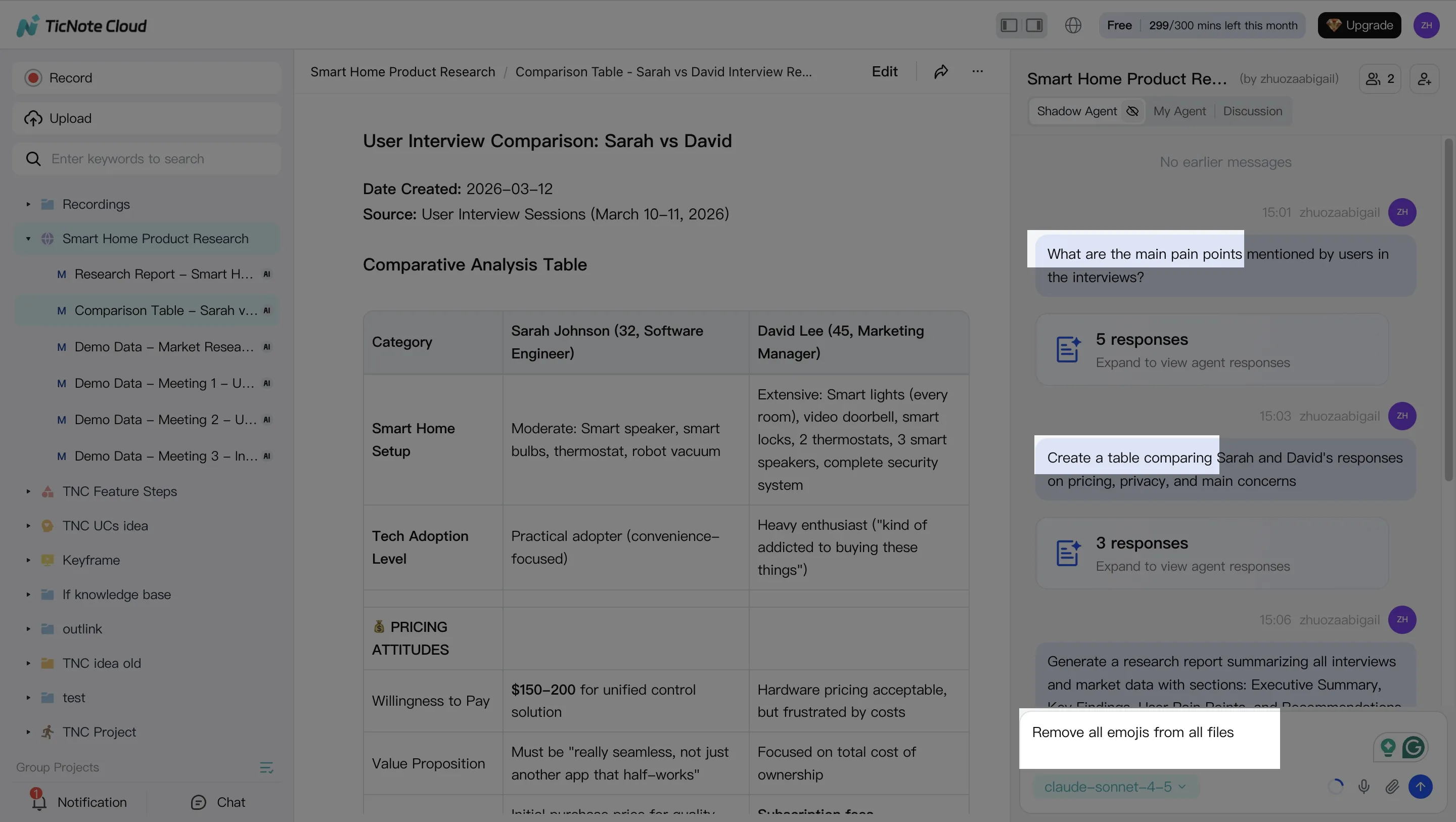
Step 3: Generate deliverables (and require citations back to the source)
Now generate the output your stakeholders want, without re-copying anything. In TicNote Cloud, you can ask Shadow AI directly or use Generate to produce multi-format deliverables (like a research report, web presentation, mind map, or an HTML page).
Keep quality high with two constraints:
- Specify the audience ("exec brief" vs "IC handoff").
- Require quotes or citations back to the meeting moment so reviewers can verify fast.
This is where teams often see the biggest cycle-time gains: one Project can produce multiple versions of the same story, tailored for different readers.
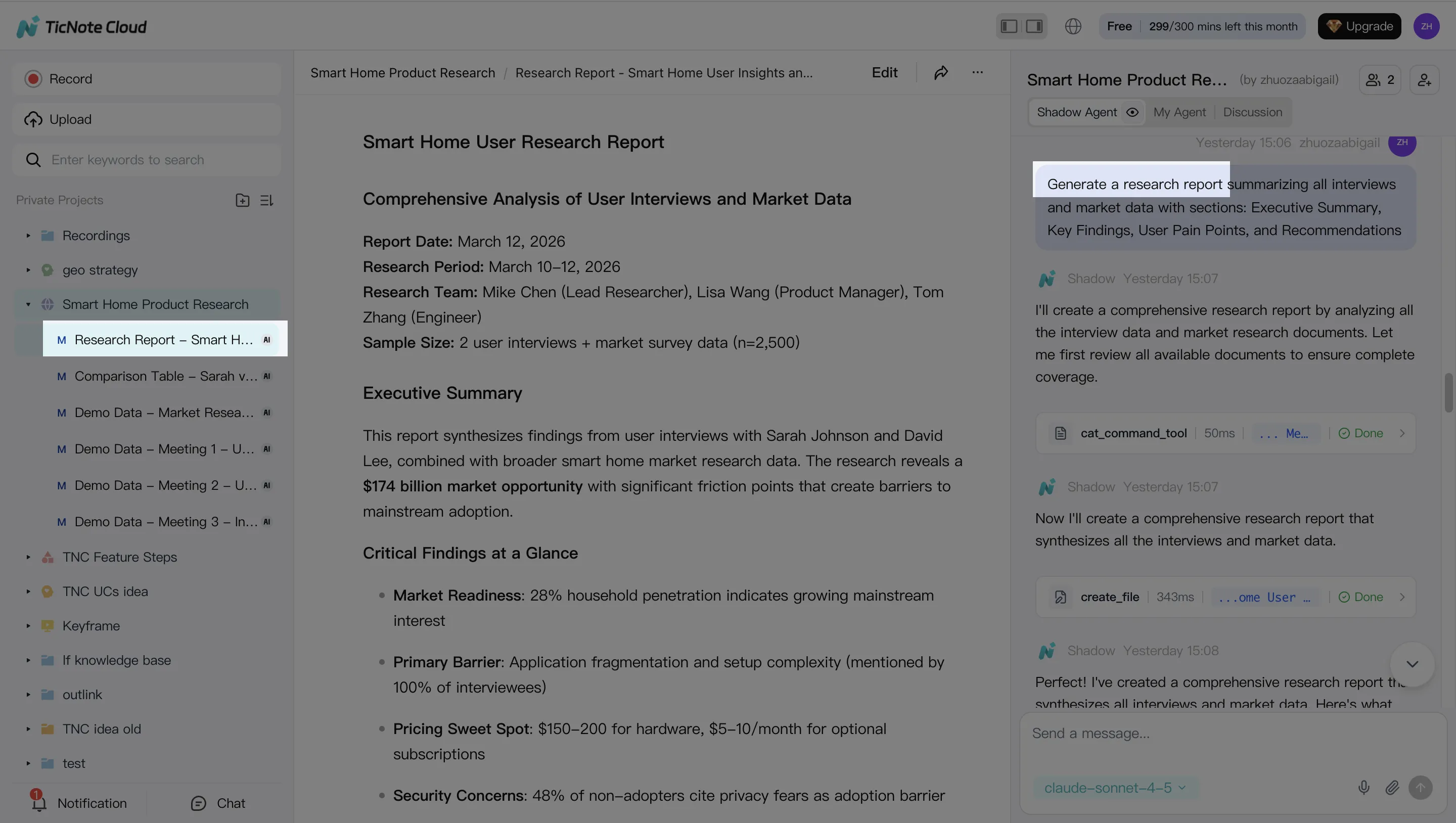
Step 4: Review, refine, and collaborate with an audit trail
Treat the first draft as a working output, not the final. Ask Shadow to tighten sections, adjust tone, or add a missing table. Then click into the source to verify anything sensitive.
Operationally, set a simple "definition of done" before sharing externally:
- Owners and dates assigned for every action
- No open "TBD" items in exec-facing docs
- Sensitive items removed or permissioned
- Final pass for numbers, names, and commitments
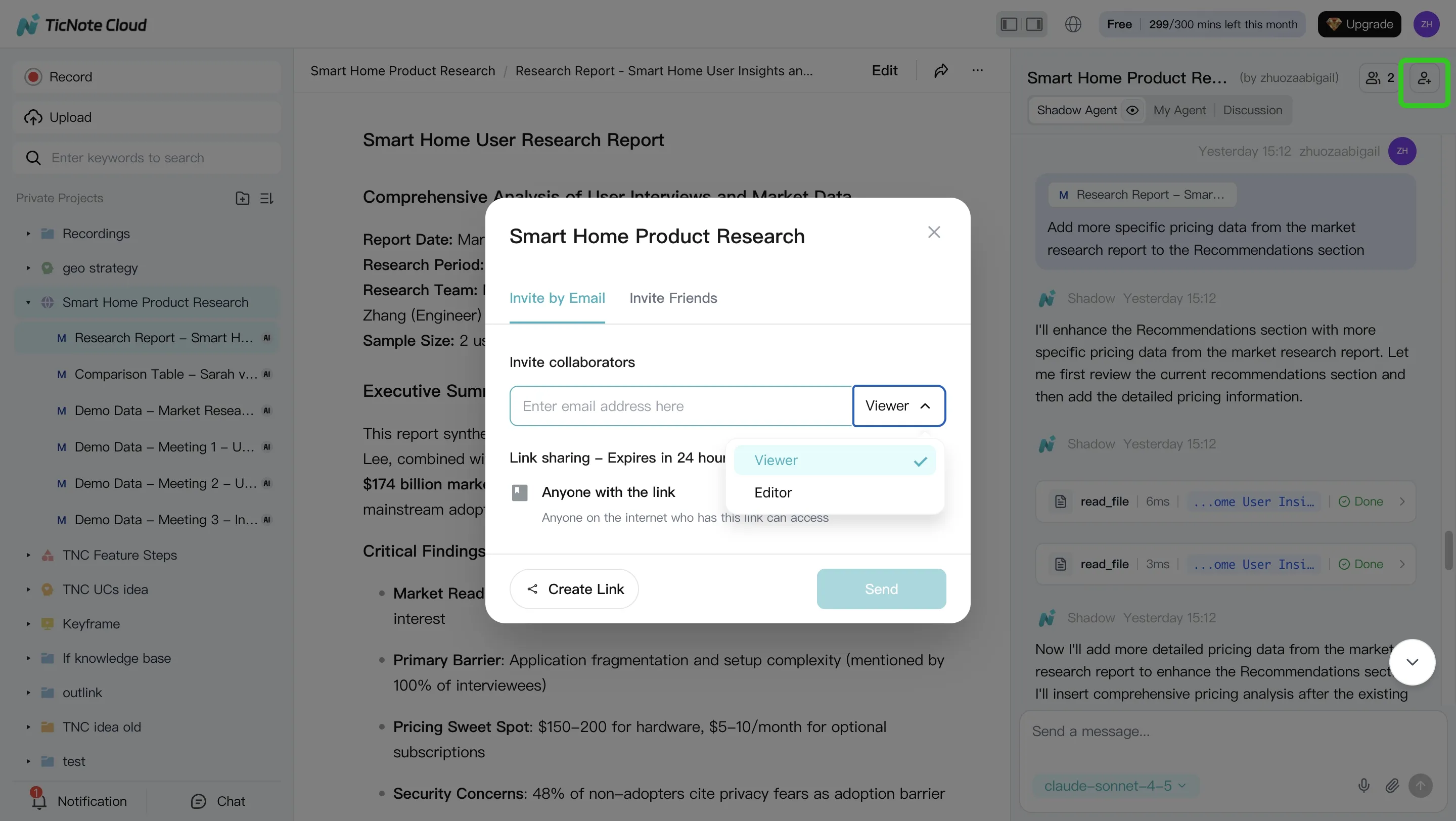
Share the Project with the right permissions so teammates can comment and request updates. Keep the action history and major edits visible so you can explain what changed, when, and why.
Mobile flow (same logic): open the same Project on mobile, capture or upload a recording, run the same analysis and deliverable steps, then share outputs from the Project context—without starting a new doc chain each time.
Top AI agent tools (TicNote Cloud first) and how they compare
Enterprise buyers don't need "smart chat." They need governed work that turns messy inputs into reliable outputs. This comparison focuses on meeting-to-outcome flows and guardrails (permissions, traceability, approvals), because that's where many ai agent use cases fail in practice.
TicNote Cloud (meeting-to-outcome, end to end)
TicNote Cloud is a meeting-centered AI workspace that turns conversations into editable assets. Its core strength is bounded "Project" memory: you group meetings, docs, and research in one place. Then Shadow AI can answer questions across those files with citations, and generate deliverables (reports, presentations, mind maps) without copy-paste.
It's a strong fit for teams with 10+ hours of meetings per week, where decisions and rationale keep getting lost. It also fits buyers who want clear permission boundaries and traceable AI operations.
Other popular options (where they fit)
Otter fits best when your main goal is capture and summaries. It's often more "notes-first" than "deliverables-first," so validate how you'll turn summaries into approved outputs.
Fireflies fits conversation intelligence and searchable notes. For agent-style execution, confirm how it handles permissions, approvals, and final output packaging.
Notion AI is strong once information is already in Notion. If your work starts in live meetings, plan for capture and structured import, or you'll end up with manual transfer steps.
ChatGPT is flexible for reasoning and drafting. But without a governed project data layer, tool permissions, and logs, it's harder to run safely for real actions.
| Tool | Meeting capture method | Project memory (bounded) | Citations to sources | Editable transcripts | Permission model | Action execution (with approvals) | Export formats | Admin controls |
| TicNote Cloud | Bot-free recording (extension/app) + uploads | Yes (Projects) | Yes (in-project) | Yes | Owner/Member/Guest | Shadow executes within Project; review-first workflow | PDF/DOCX/MD/HTML/PNG/Xmind/WAV | Enterprise options like SSO; traceable operations |
| Otter | Meeting assistant + uploads | Limited (workspace-based) | Varies by setup | Limited | Team/workspace roles | Limited (mostly capture + summaries) | Common text exports | Varies; confirm audit needs |
| Fireflies | Meeting bot + integrations | Limited (searchable archive) | Varies by setup | Limited | Team/workspace roles | Limited; validate actions + approvals | Notes/exports vary | Varies; confirm controls |
| Notion AI | Notion docs; meeting capture via add-ons | Yes (Notion spaces) | Depends on sources in Notion | N/A (not transcript-native) | Workspace permissions | Drafting inside docs; approvals via process | Notion pages / exports vary | Mature admin for Notion; AI controls vary |
| ChatGPT | Manual paste, files, or custom connectors | No (unless you build it) | Not guaranteed | No | Depends on plan + setup | Only with tooling + governance you add | Copy/export varies | Depends on enterprise plan + policies |
If you're mapping this to broader platforms, start with a shortlist of all-in-one AI workspaces for enterprise teams and then validate guardrails in security review.
How to estimate ROI for AI agent use cases (simple model)
ROI starts with a baseline, not a pitch. For most AI agent use cases, a simple model is enough to decide "pilot or pause" before you build. Focus on four buckets: time, cost, quality, and risk. Keep every input visible, so Finance can sanity-check it.
Pick 3–5 KPIs that map to value
Use a small KPI menu by function:
- Time: hours saved per person per week; time-to-first-draft; meeting follow-up time.
- Cycle time: days to ship a deliverable; approval time; handoff time.
- Quality: rework rate (%); error rate; "edit distance" (how much humans must change the output).
- Risk: SLA breaches (#/month); audit findings; missed commitments; escalation rate.
If your use case is content-heavy, align metrics to QA and review steps. This is where a governed content workflow for agents helps you define what "good" looks like.
Use a back-of-the-napkin ROI formula (then stress-test it)
Annual Value = (Hours saved × loaded hourly cost × adoption) + avoided rework + risk impact − (tool + integration + governance costs)
Example (meeting-to-follow-up agent):
- 50 users save 1.5 hours/week on follow-ups
- Loaded cost = $75/hour
- Adoption (active weekly) = 70%
Annual time value = 50 × 1.5 × $$75 × 52 × 0.70 = *$$204,750**
Then subtract costs (licenses, 1-time integration, and ongoing controls like reviews and audits). If ROI depends on one "hero" assumption, cut it in half and re-calc.
What to measure in weeks 1–4 vs month 3
- Weeks 1–4 (leading indicators): activation rate; time-to-first-output; % outputs accepted; edit distance; human escalations; exception rate.
- By month 3 (lagging indicators): cycle-time change; rework reduction; CSAT; close time; MTTR; fewer SLA misses.
ROI calculator (inputs → outputs)
| Input | Example | Output you compute |
| # users in scope | 50 | annual hours saved |
| hours saved/user/week | 1.5 | annual time value ($) |
| loaded hourly cost ($/hr) | 75 | avoided rework value ($) |
| adoption rate | 70% | total annual value ($) |
| avoided rework hours/month | 20 | net ROI ($) |
| tool + integration + governance cost/year | 60,000 | payback (months) |
Attribution note: compare against a baseline week, and if you can, a control team. If both improve, you're seeing org change—not just the agent.
Conclusion: start small, govern hard, scale what proves value
AI agents create value when they're scoped, measured, and controlled. So start with one bounded workflow tied to one system of record, then raise autonomy only after your KPIs and guardrails stay stable. This is the practical way to adopt ai agent use cases without adding hidden risk.
The path that works in real enterprises
- Pick one use case with a single business owner and one primary KPI (for example: follow-up cycle time, % tasks completed on time, or hours saved per week).
- Put the basics in place before you scale: RBAC (role-based access control), source citations on outputs, and full activity logging for audits.
- Run a 30-day pilot. Review mistakes weekly. Tighten prompts, permissions, and human review until the error rate drops and trust rises.
Once it performs reliably, expand in one direction at a time: more teams, more data, or more actions—never all three at once.


