


 Extension
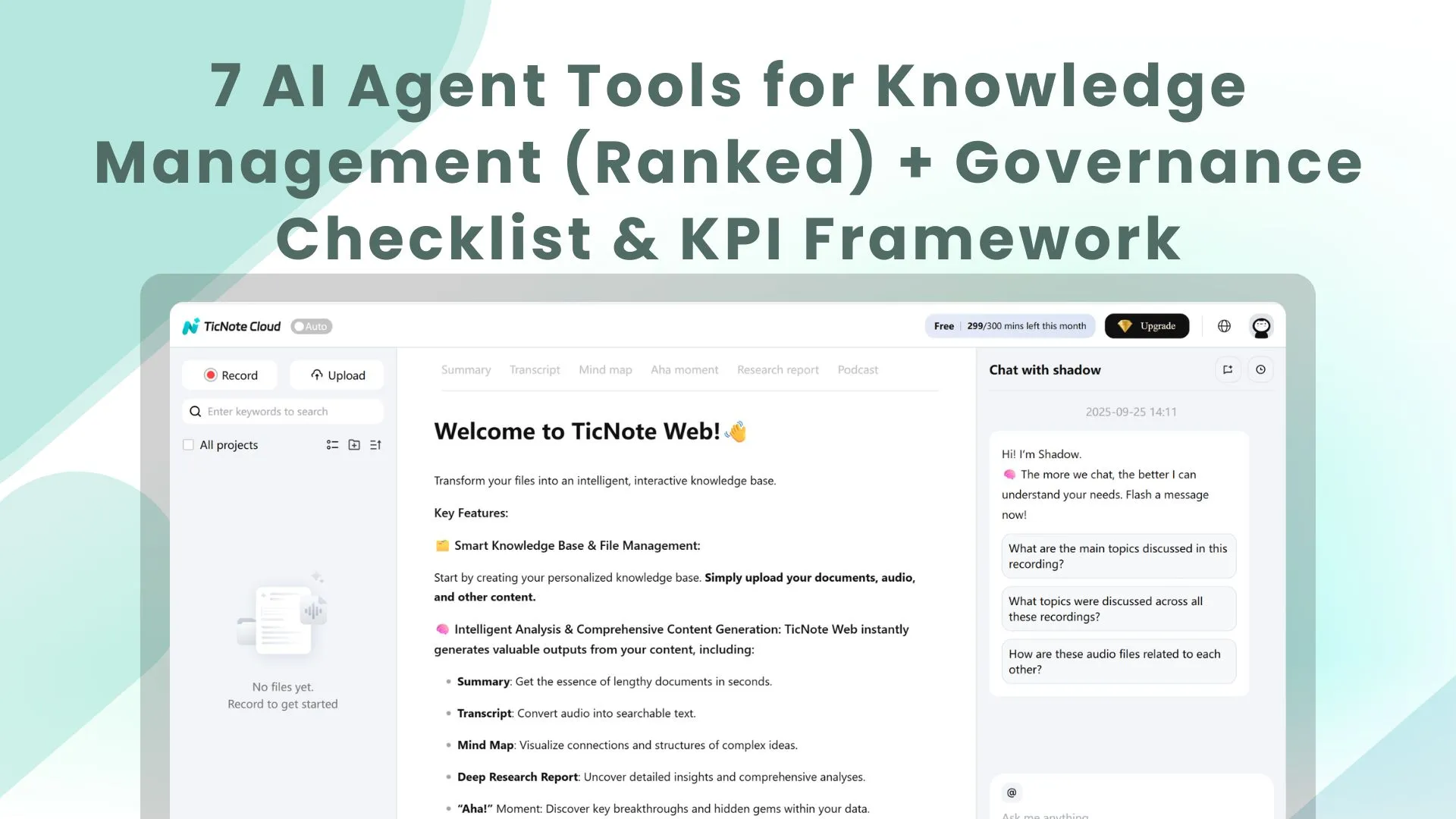
TL;DR: Top AI agent tools for knowledge management (ranked)
Try TicNote Cloud if your knowledge lives in meetings and you want an AI agent for knowledge management that answers with sources, not vibes. What matters most: fast, grounded answers (citations), permission-aware access (RBAC/SSO), audit logs, and freshness checks that cut time-to-answer.
Problem: decisions get buried across calls, docs, and chats. That makes teams repeat work and miss context. Solution: use TicNote Cloud to turn meeting transcripts into a searchable Project workspace where answers stay tied to evidence.
Best pick by use case: Meetings → TicNote Cloud. Support → a ticketing/CRM-first agent. Engineering → a repo/wiki-first agent. HR/Policy → a doc-approval and permissions-first agent. Enterprise-wide → a search-first platform with strong connectors.
Quick snapshot (normalized):
- Best for: meeting-first vs search-first vs KB-first vs CRM-first
- Sources: meetings, docs, chat, tickets, repos (connector depth varies)
- Retrieval: RAG (retrieval-augmented generation), hybrid (keyword+vector), or keyword-only
- Governance: RBAC/SSO, permission inheritance, audit logs, PII redaction, citation rules
- Time-to-value: hours (meeting-first) to weeks (enterprise connector rollouts)
- Outputs: Q&A, summaries, SOPs, briefs, presentations, action items
- Limits: stale content risk, weak permissions, thin citations, hard-to-evaluate quality
What is an AI agent for knowledge management (and how is it different from search or a chatbot)?
An AI agent for knowledge management is a system that finds trusted company knowledge and then takes useful actions with it—like drafting an SOP, routing a question, updating a page, or packaging a brief—while respecting permissions. Unlike basic Q&A, it stays focused on a goal and completes work inside your tools.
Agent vs chatbot vs enterprise search (plain-language)
Enterprise search helps people find things. It returns a list of links and files.
Chatbots help people ask things. They turn a question into an answer, but they usually stop there.
Agents help teams get things done. They can use tools (search, create pages, update a KB, open tickets), keep task context, and log what they did.
When to use which:
- Use enterprise search when you need the source file fast (policy PDF, runbook, contract).
- Use a chatbot when you need quick Q&A and low risk (definitions, how-to pointers).
- Use a KM agent when the work has steps (draft → review → publish) or must follow rules (approvals, redaction, citations).
What "knowledge management" means here (capture → organize → find → reuse)
KM is a simple loop: capture (meetings, tickets, docs), organize (tags, owners, structure), find (search plus RAG answers, with sources), and reuse (templates, SOPs, replies, training). The business payoff is clear: faster onboarding, fewer repeat questions, and consistent answers to policy and support issues.
Where agents add value (tools, memory, actions)
Agents add value through four building blocks:
- Tool access: read and write in the systems you use.
- Working memory: keep the right context for a project or queue.
- Action execution: create drafts, update articles, or start workflows.
- Feedback loops: learn from edits and measure answer quality.
Mini-case (anonymized): a CX team treats meeting transcripts as the source of truth. The agent turns repeated decisions into a reusable FAQ, drafts responses in the right tone, and flags old guidance for review. If you want a practical view of this style of rollout, see this human-in-the-loop agent workflow for research.
How do knowledge management AI agents work end-to-end? (Reference architecture you can copy)
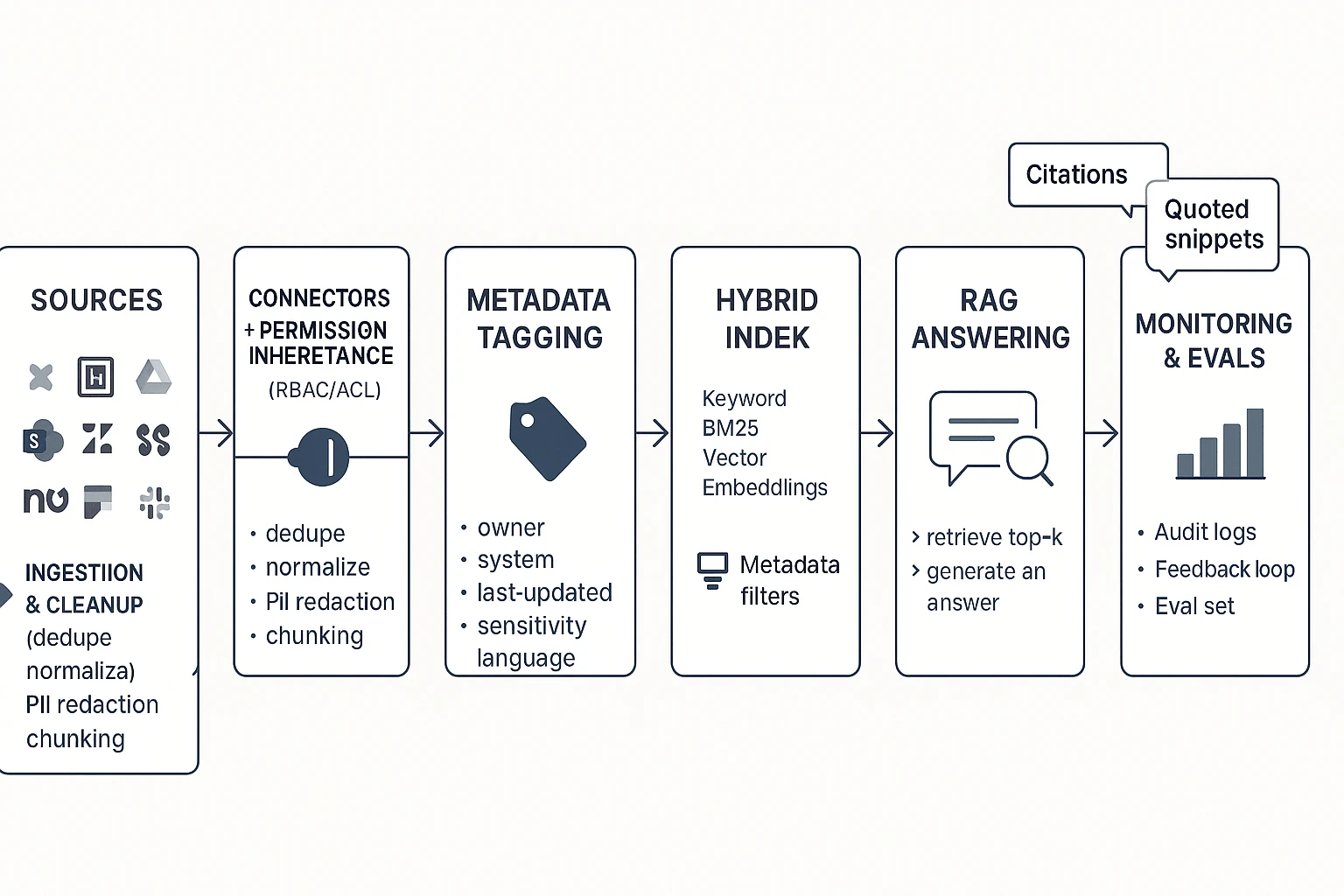
A solid knowledge management AI agent is just a governed RAG flow (Retrieval-Augmented Generation): it finds the right internal sources first, then writes an answer with citations. This is easier to audit than "black box" chat because every response can point back to the exact doc, ticket, or meeting line it used.
Start with sources and connectors (where governance begins)
Most enterprise KM agents pull from a predictable set of systems:
- Docs: Confluence, Notion, Google Drive, SharePoint, GitHub wikis
- Tickets: Zendesk, ServiceNow, Jira Service Management
- Chat: Slack, Microsoft Teams
- Meetings: transcripts, notes, action items, recordings
- CRM + product docs: Salesforce, product requirement docs, release notes, SOPs
The key design rule: permission inheritance must start at the connector layer. If a user can't open a Confluence page or ticket, the agent must not retrieve it, quote it, or summarize it. Build this once at ingestion, and every downstream step (indexing, RAG, actions) stays safer.
Clean and structure the content before you index it
Ingestion is where KM quality is won or lost. A practical pipeline looks like this:
- De-duplicate and normalize (remove copies, standardize headings)
- Chunk (split into small sections, often 200–800 tokens)
- Add metadata (so retrieval can filter and rank)
- Language handling (detect language; store translated titles if needed)
Metadata that pays off fast:
- System of record (Confluence, Zendesk, etc.)
- Owner/team
- Last updated + last verified by
- Sensitivity tag (public/internal/confidential)
- Product area, customer segment, region
KM content best practices help more than model tweaks:
- Use stable titles ("Refund policy — B2B") so links don't rot
- Write clear sections with scannable H2/H3 headers
- Add a "Last verified by" and date so agents can warn on staleness
Choose retrieval: keyword vs vector vs hybrid
Retrieval is how the agent finds candidate sources.
- Keyword search wins for exact terms: policy names, error codes, SKUs, legal clauses.
- Vector search wins for meaning: paraphrases, "how do I…?" questions, vague queries.
- Hybrid retrieval is the default for enterprise KM because it typically boosts recall (finding more of the right stuff) without losing precision (avoiding off-topic matches).
A simple rule: use hybrid, then add filters from metadata (team, product, region, permission).
Generate grounded answers with RAG (and show proof)
RAG works like this: retrieve top sources → draft the answer → attach citations. Your agent should also follow refusal rules: if it can't find sources, it should say so, ask a clarifying question, or route the user to the right owner.
Good confidence signals are visible and testable:
- Show sources with titles and timestamps
- Quote short snippets for key claims
- Use a clear fallback: "I couldn't find this in your KB. Here's what I checked."
Close the loop with feedback, edits, and evals
You don't need fine-tuning to improve outcomes. Most teams get better results by fixing content and retrieval first.
Lightweight feedback loop:
- Thumbs up/down on answers
- "Missing doc" flag that creates a backlog item
- Editorial fixes to the source doc (not just the answer)
- An evaluation set built from real questions (support tickets, onboarding, incident reviews)
If you want a deeper technical playbook, this AI agent architecture and governance guide for analytics maps well to KM agents too.
Copyable reference workflow (ASCII)
Sources (Docs / Tickets / Chat / Meetings / CRM) Connectors + Permission Inheritance (RBAC/ACL)
Ingestion & Cleanup
- dedupe, normalize, redact PII
- chunk + metadata (owner, last-updated, sensitivity) Indexes
- Keyword index (BM25)
- Vector index (embeddings)
- Hybrid ranker + metadata filters RAG Answering
- retrieve top-k
- generate answer
- citations + quotes + refusal rules Agent Actions
- create/update KB article draft
- file ticket, post to Slack/Teams
- generate SOP, summary, or report Monitoring & Evals
- answer quality set
- drift/staleness checks
- audit logs + feedback triage
Which governance and security controls should a KM AI agent have?
A knowledge management AI agent only helps if people trust it. That means three things: it must respect access rules, protect private data, and show its work. Use the checklist below to buy an agent that's safe in production and easy to maintain.
Lock down access (RBAC, inheritance, least privilege)
If the agent can "see everything," it will leak something. Your baseline controls should include:
- SSO (SAML/OIDC) for centralized login
- SCIM (if available) for automated user provisioning and offboarding
- RBAC (role-based access control) with Owner/Editor/Viewer roles
- Group-based access (mapped to IdP groups)
- Permission inheritance from source systems (Drive/Confluence/SharePoint/etc.)
Least privilege means each user (and the agent acting for them) gets the minimum access needed. The agent must not summarize, quote, or even retrieve restricted content "by accident," including in prompts, citations, or cached context.
Protect privacy and PII (redaction, retention, residency)
KM agents often ingest meetings, tickets, and HR or customer threads. Assume sensitive data will appear.
Checklist:
- PII detection and redaction (names, emails, phone numbers, IDs)
- Retention controls (by workspace, project, and content type)
- Deletion workflows (user request, legal hold exceptions, admin delete)
- Data residency options and clear sub-processor list
- Vendor policy: your data is not used to train public models
Questions to ask in security review:
- Where is data stored and processed (region by default and by choice)?
- Is any content used for model training or human review? Under what opt-in?
- How fast can you fulfill delete requests, and what's the backup purge window?
- How is encryption handled (in transit, at rest, and key management)?
Make every answer auditable (logs, traceable actions, source links)
If you can't audit it, you can't govern it. Require logs that capture:
- Who asked (user, group, tenant)
- What the agent retrieved (documents, chunks, timestamps)
- What it generated (final text, intermediate drafts if stored)
- What actions it took (create page, update doc, send message)
- How to reproduce the run (agent version, prompt/tool versions, retrieval settings)
Also require clickable citations back to the original source. In practice, tools like TicNote Cloud's Shadow AI make operations traceable and include citations, so reviewers can jump from an answer to the exact meeting moment or file section that supports it.
Control change (versioning, approvals, environment separation)
Agents change fast. Your governance should slow down risky changes, not all changes.
- Version prompts, tools, and policies (with changelogs)
- Approval gates for high-risk actions (posting externally, editing canonical docs)
- Separate dev/test/prod indexes when possible, with promotion rules
Prepare for incidents (bad answers, rollback, escalation)
Define failure modes up front:
- Hallucinations (unsupported claims)
- Stale content (old policy wins over new)
- Permission leakage (restricted data appears)
Response plan:
- "Report a problem" button on every answer
- Quarantine flagged outputs and underlying sources
- Roll back to a prior prompt/agent version
- Notify content owners and security, then document the fix
What KPIs prove a knowledge management agent is working (and how to measure them)?
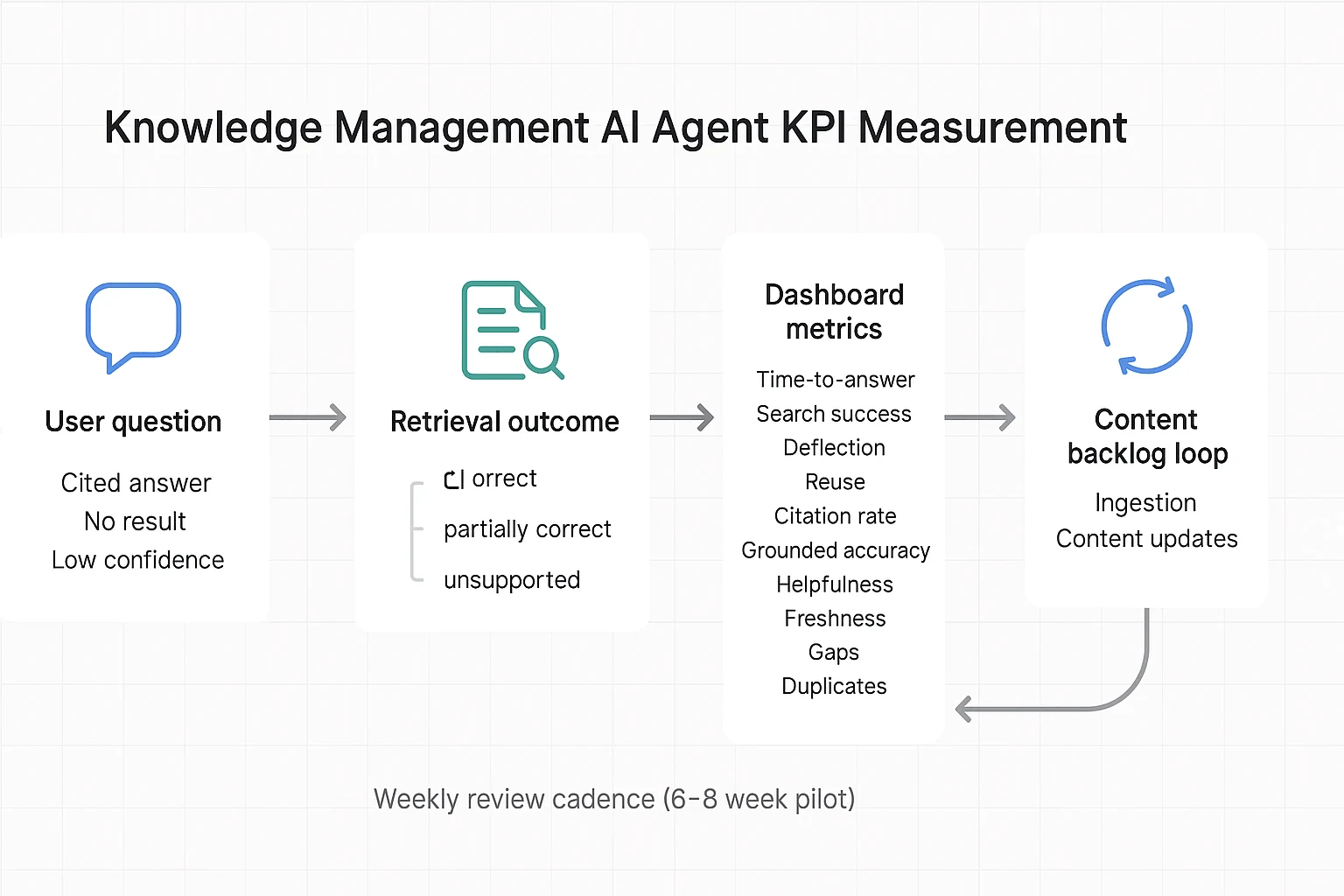
A knowledge management AI agent is "working" when people get correct answers faster, with fewer escalations, and your content gets healthier over time. The key is to measure outcomes from systems you already have: helpdesk tickets, search logs, and lightweight user feedback. Baselines matter more than targets—set week-1 baselines, then track trends weekly in a 6–8 week pilot.
Core KPIs you can run in a pilot
- Time-to-answer: median minutes from question to resolved answer; collect from helpdesk first-response + resolution time, or timestamped chat sessions. Starting point: 20–40% faster vs baseline.
- Search success rate: % of queries that end in a click, save, or "answered" rating; collect from intranet/search analytics or agent thumbs-up/down. Starting point: +10–25 points vs baseline.
- Deflection rate: % of questions resolved without a ticket; collect by tagging "answered by agent" in intake forms or chat handoff logs. Starting point: 10–30% on eligible topics.
- Reuse rate: % of agent outputs reused (linked, pasted into docs, sent to customers); collect via link tracking, template usage, or "used this" button. Starting point: 15–35%.
Quality metrics that keep you honest
- Citation rate: % of answers that include at least one source link; measure directly in agent logs. Starting point: 70–95% for internal KM.
- Grounded accuracy: weekly spot-check with a 3-label rubric: correct / partially correct / unsupported; sample 30–50 answers across teams. Starting point: keep "unsupported" under 5–10%.
- Helpfulness: 1–5 rating plus "needed follow-up?" yes/no; capture in chat UI or a one-question form. Starting point: 4.0+ average, and follow-up needed under 25–35%.
Content health signals (the compounding effect)
- Freshness: % of top-viewed docs verified in the last 60–90 days; collect from doc metadata plus a simple "last verified" field. Starting point: 60–80%.
- Gaps: count of unanswered/low-confidence queries; convert to a weekly content backlog. Starting point: backlog shrinks week-over-week.
- Duplicates/conflicts: # of "two sources disagree" flags; route to governance owners for merge/resolve. Starting point: trending down after week 3.
Simple ROI formula (with conservative pilot inputs)
ROI = (hours saved × fully loaded rate) + (deflected tickets × cost per ticket) − tool cost.
Example for a 6–8 week pilot: 40 users save 0.5 hr/week (40 × 0.5 × 8 = 160 hrs). At 75/hr**, that's **12,000. If you deflect 60 tickets at 20/ticket**, add **1,200. Subtract tool cost for the pilot window. If you use TicNote Cloud to turn meeting transcripts into one-click deliverables, track two extra KPIs: time-to-publish (meeting end → doc shipped) and deliverable reuse across Projects—both usually move quickly once follow-ups stop being manual.
Top AI agent for knowledge management tools (ranked cards + comparison table + decision guide)
Buying an AI agent for knowledge management is less about "best AI" and more about what you can trust, govern, and scale. The rankings below prioritize enterprise KM outcomes: fewer repeat questions, faster decisions, and answers you can verify.
Ranking method (what we weighted most):
- Governance fit: RBAC, permission inheritance, audit trails, and safe sharing.
- Retrieval quality: grounded answers (citations), freshness, and fewer wrong hits.
- Integrations: how well it connects to where work already lives.
- Time-to-value: how fast teams ship a working KM loop.
- Enterprise fit: admin load, rollout risk, and cost predictability.
1) TicNote Cloud — best when meetings are your "source of truth"
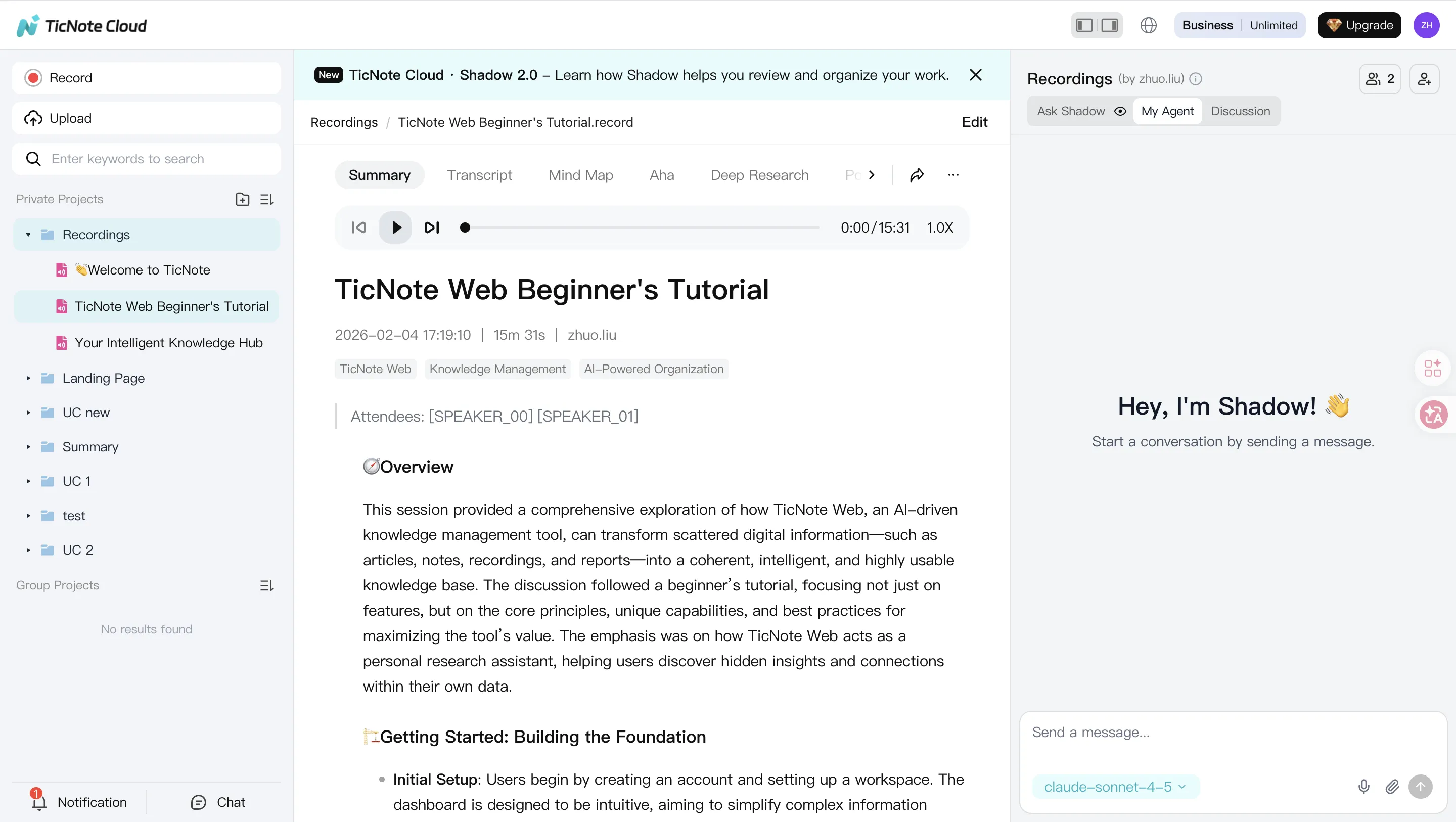
TicNote Cloud is a meeting-centered AI workspace that becomes an AI knowledge base through Projects. It's strongest when decisions, customer calls, research interviews, and sprint rituals drive your knowledge.
Try Ticnote Cloud Free Plan That Never Expire
Why it ranks #1 for meeting-first KM:
- Bot-free capture, so you can record without a meeting bot joining.
- Editable transcripts, which makes the transcript a governed source (fix names, add context, remove sensitive lines).
- Project-level long-context memory, so knowledge compounds across many sessions.
- Shadow AI cross-file Q&A with citations, so teams can verify answers fast.
- One-click deliverables: research report, web presentation, podcast, and mind map.
Where it's not perfect (transparent limits):
- Best fit when meeting knowledge is central; if you need "search every app in the company," pair it with enterprise search.
- Validate enterprise controls (SSO, retention, and data residency) in your security review.
2) Slack (AI knowledge base / enterprise search) — best for Slack-native teams
If most knowledge lives in channels, threads, and shared links, Slack can act like a lightweight knowledge layer. It's especially useful for "what did we decide?" questions.
Watch-outs:
- Governance depth and connectors vary by plan.
- Permissions can get tricky if channels are messy or widely shared.
3) Glean — best for enterprise-wide search across many systems
Glean is built for org-wide search across tools like docs, tickets, chat, and wikis. It's a strong pick when the problem is "knowledge is everywhere," not "knowledge starts in meetings."
Watch-outs:
- Expect real admin work up front (connectors, indexing rules, access controls).
- Cost and licensing can scale fast with headcount.
4) Guru — best for verified knowledge and CX enablement
Guru shines when you need "approved answers" for support and success teams. The card model makes it easy to keep responses consistent.
Watch-outs:
- Verification workflows require ongoing ownership.
- If no one maintains cards, quality drops quickly.
5) Confluence (Atlassian AI) — best for documentation-heavy Atlassian orgs
Confluence is a strong fit when your KM system is already structured around pages, spaces, and templates. It works well for engineering and IT documentation.
Watch-outs:
- Content hygiene matters: messy spaces lead to noisy retrieval.
- Permissions can be complex across large orgs.
6) Notion AI — best for lightweight internal KB writing
Notion AI is useful for teams that want quick docs, summaries, and a simple home for internal knowledge.
Watch-outs:
- Cross-system retrieval is limited unless you heavily centralize content in Notion.
- Governance needs a careful review for regulated teams.
7) Salesforce (Agentforce/Service) — best for CRM-first service workflows
For service orgs, Salesforce is the natural home for cases, accounts, and customer history. An agent can help draft replies, route work, and surface account context.
Watch-outs:
- High setup and admin load.
- Data model complexity can slow time-to-value.
Normalized comparison table (use this to shortlist)
| Tool | Primary use case | Data sources/connectors | Retrieval approach (keyword/vector/hybrid) | Citations support | Access control/SSO | Audit logs | Content curation tools | Best-fit team | Watch-outs |
| TicNote Cloud | Meeting-to-knowledge base in Projects + deliverables | Meetings/recordings, docs; Notion, Slack; exports | Hybrid (project search + semantic over project content) | Yes (source-linked answers) | Project roles; SSO in Enterprise (validate) | Shadow ops traceable | Editable transcripts, project organization, templates | Product, research, consulting, CX insights | Meeting-first scope; confirm retention/residency/SSO needs |
| Slack | Team knowledge in chat + app search | Slack messages + connected apps (plan-dependent) | Keyword + semantic features (plan-dependent) | Limited/varies | Slack RBAC; SSO in enterprise tiers | Yes | Pins, canvases, channel structure | Ops, support, cross-functional squads | Governance/connectors vary by plan |
| Glean | Enterprise-wide knowledge discovery | Broad connector catalog across SaaS | Hybrid | Yes (varies by config) | Enterprise RBAC/SSO | Yes | Admin policies, collections | IT, KM, large enterprises | Setup effort; cost scales |
| Guru | Verified answers for support/sales | Browser/app integrations; KB content | Keyword + AI assist (varies) | Limited/varies | SSO (tier-dependent) | Yes | Verification, knowledge cards | Support ops, enablement | Requires steady maintenance |
| Confluence (Atlassian AI) | Internal documentation hub | Confluence + Atlassian suite | Keyword + semantic (varies) | Limited/varies | Atlassian permissions + SSO options | Yes | Templates, page workflows | Engineering, IT, PMO | Content hygiene and structure needed |
| Notion AI | Lightweight KB + writing assist | Notion workspace (external varies) | Keyword + semantic in-workspace | Limited/varies | Workspace permissions; SSO options | Limited/varies | Pages, databases, templates | Startups, product teams | Weak cross-app coverage |
| Salesforce (Agentforce/Service) | Service agent actions in CRM | Salesforce data + integrations | Hybrid over CRM objects | Yes (context-dependent) | Enterprise RBAC/SSO | Yes | Knowledge articles, flows | Support/service orgs | Complexity and admin load |
Decision guide: pick fast based on your constraints
Use these defaults to avoid analysis paralysis:
- If meetings and cross-meeting decisions drive your knowledge: pick TicNote Cloud.
- If you need cross-app enterprise search at scale: pick Glean.
- If you need support verification workflows: pick Guru.
- If you're CRM-first in service: pick Salesforce.
One more shortcut: if you're building an "AI workspace" (not just search), start with a system that produces reusable assets (reports, briefs, training notes). For a deeper look at this category, see our guide to all-in-one AI workspaces and what to evaluate.
Mini-case (anonymized): A product + research team runs 6–10 customer calls each week. They put recordings and notes into a single Project, fix the transcript in minutes, then ask the agent for themes with citations. At month-end, they generate a stakeholder-ready insight report and a short web presentation in one pass. Result: fewer repeat debates and a faster monthly insights cycle.
See plans: (pricing/plans section)
How to roll out a meeting-centered KM agent (step-by-step example)
The steps below are demonstrated using TicNote Cloud as an example so you can copy the workflow with any tool that supports projects, retrieval, and governed actions. The goal is simple: turn meeting noise into a searchable, updated knowledge base your team can trust (with sources, owners, and review).
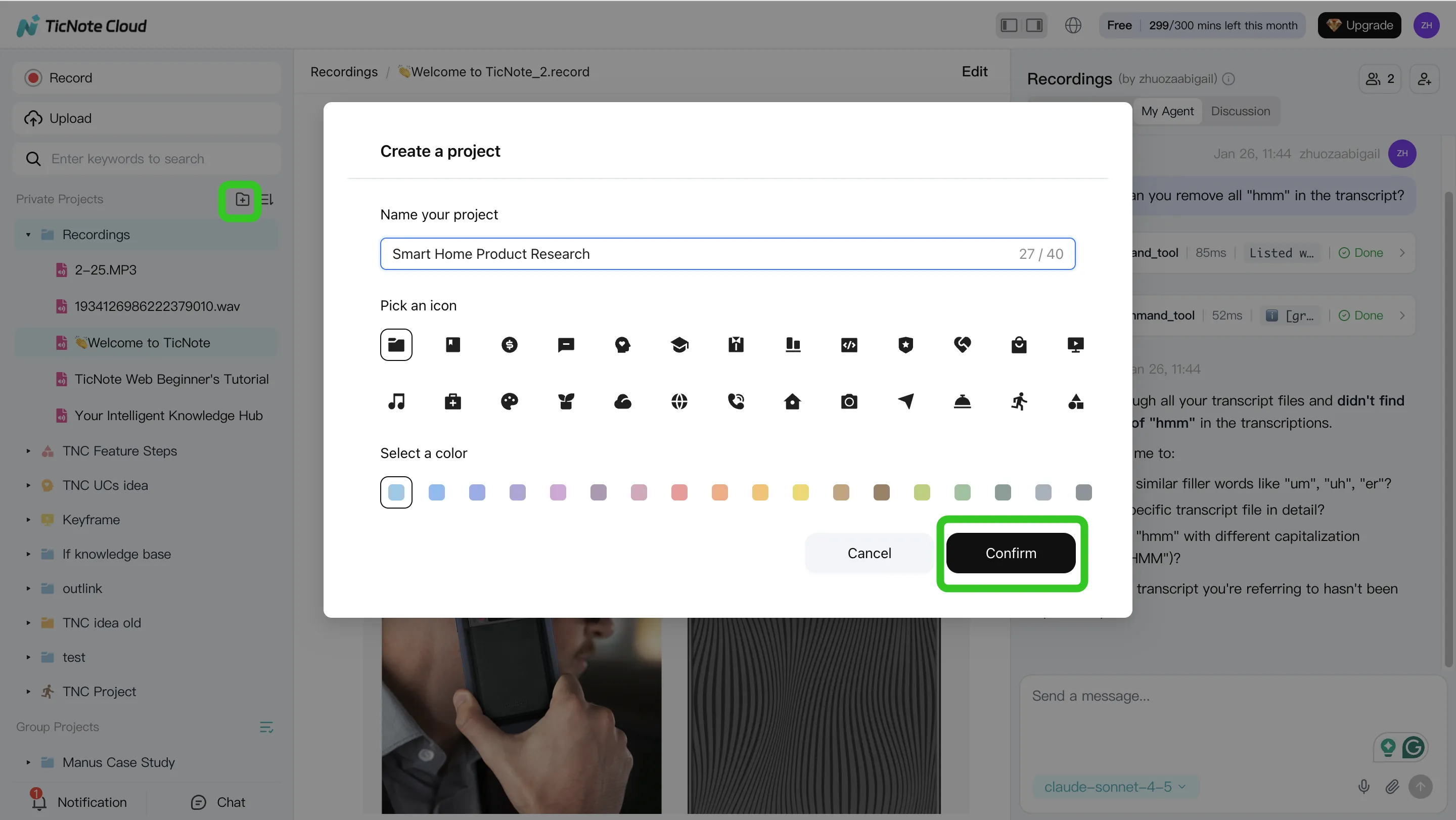
Step 1: Create a Project and add content (direct upload or via Shadow AI attachment)
Start with one domain per Project, like "Support Escalations" or "Customer Discovery Q2." This keeps retrieval clean and avoids mixing policies, decisions, and customer feedback.
Add content as you go:
- Upload meeting recordings, transcripts, and key docs (policies, playbooks, specs).
- Add files during work using Shadow AI attachments, so new context lands in the right place.
Also set metadata up front (it saves you later): owner, team, sensitivity level, and "source of truth" rules (for example: "Policy doc beats meeting notes" or "Latest decision log wins").
Step 2: Use Shadow AI to search, analyze, edit, and organize content
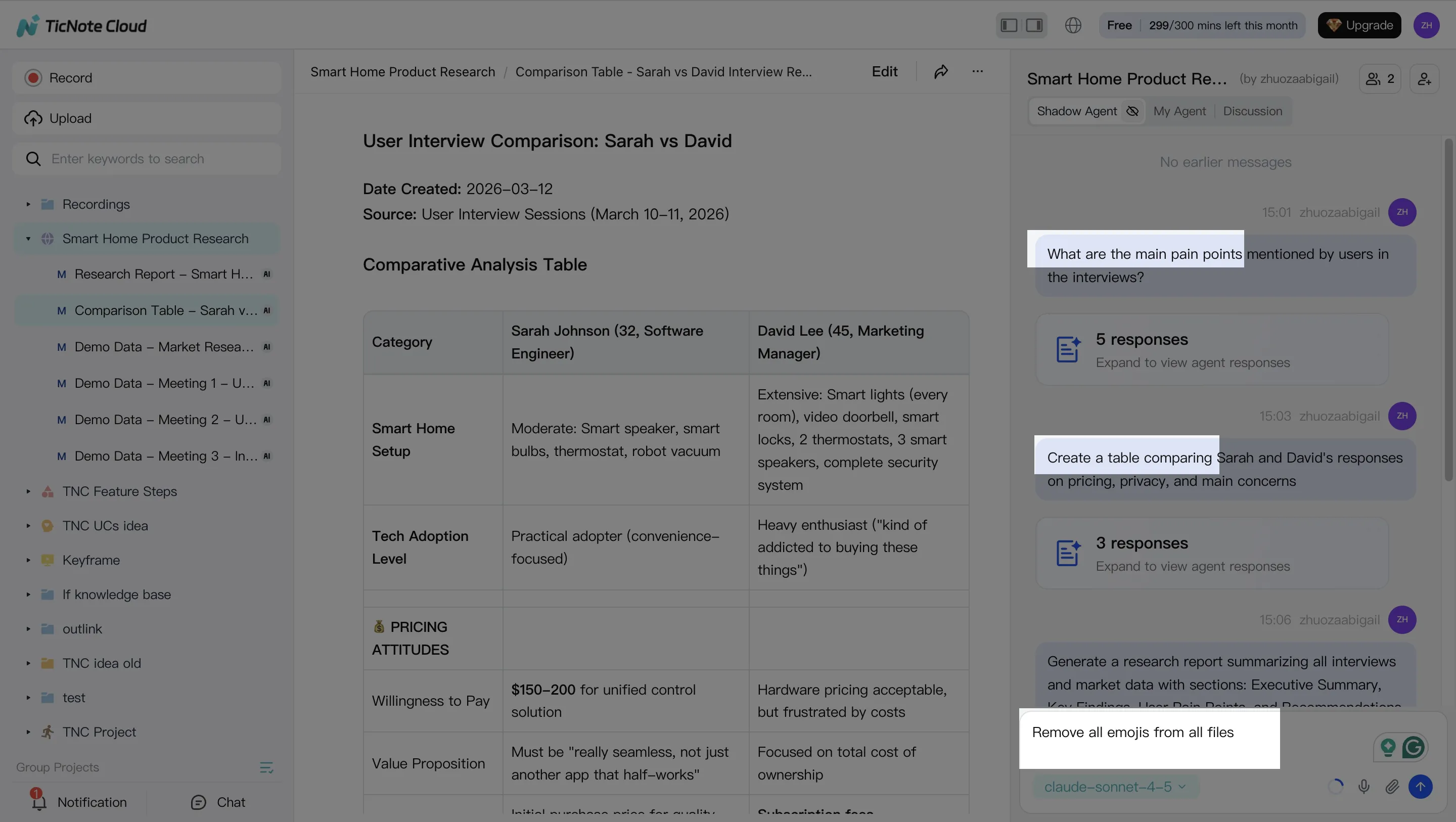
Now turn the Project into a working system. Use cross-file Q&A with citations to pull out decisions, policy details, and recurring issues. Ask focused questions like "What changed in our escalation policy?" or "What are the top 5 customer complaints this month?"
Next, keep the base accurate: clean up and edit transcripts when names, numbers, or action items are wrong. This matters because small transcript errors become big downstream errors.
Finally, convert raw talk into reusable assets:
- FAQs for repeat questions
- A simple decision log (date, owner, decision, evidence)
- SOP drafts that can be reviewed and approved
Step 3: Generate deliverables with Shadow AI (reports, presentations, podcasts, etc.)
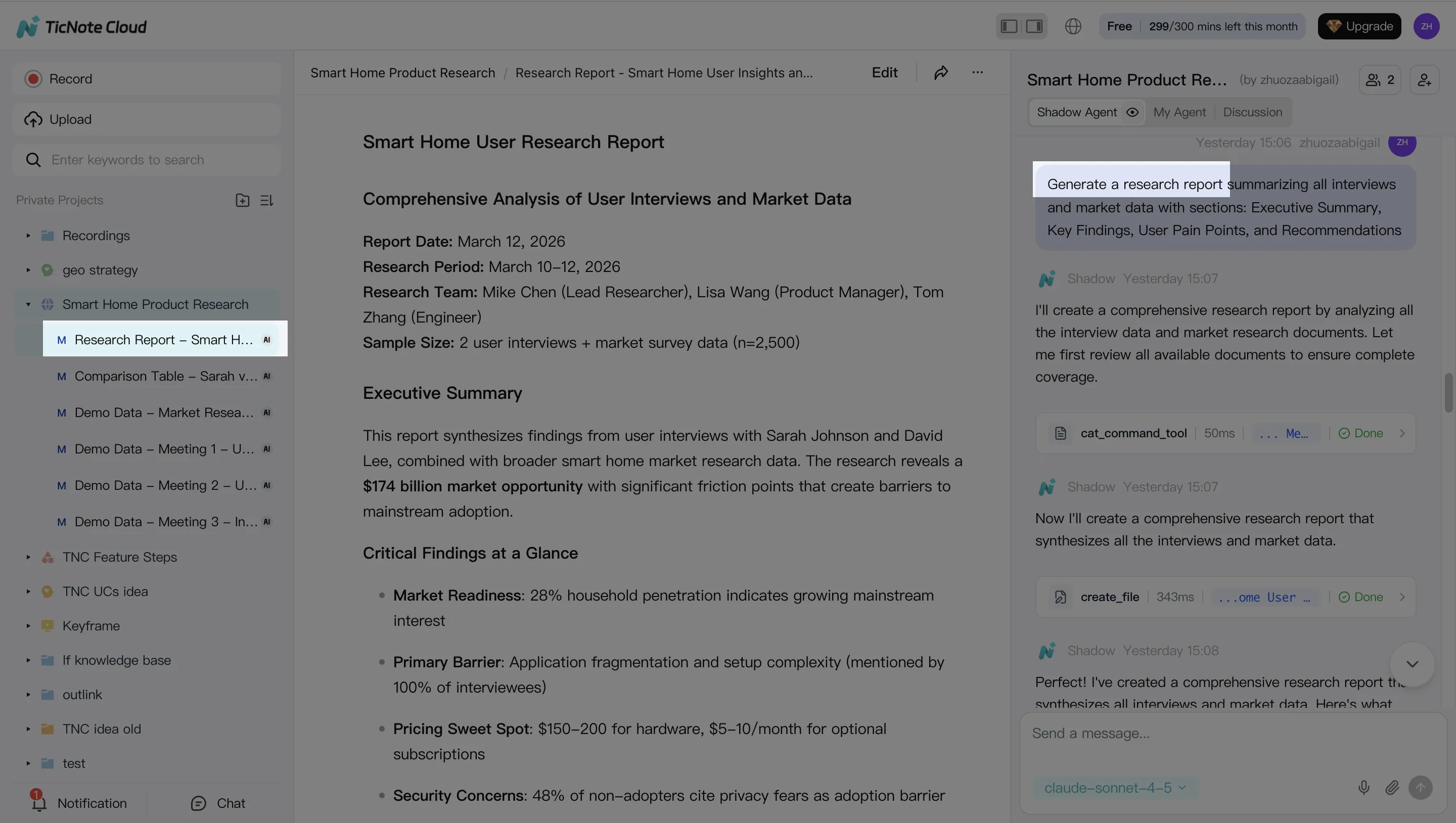
Once your content is organized, generate stakeholder-ready outputs from the same Project context. Create a research report or weekly summary for leaders. Then produce a web presentation when you need something easy to share across teams.
If your org runs on internal updates, add a short podcast-style recap. For navigation, generate a mind map so people can browse topics instead of hunting.
Step 4: Review, refine, and collaborate with your team
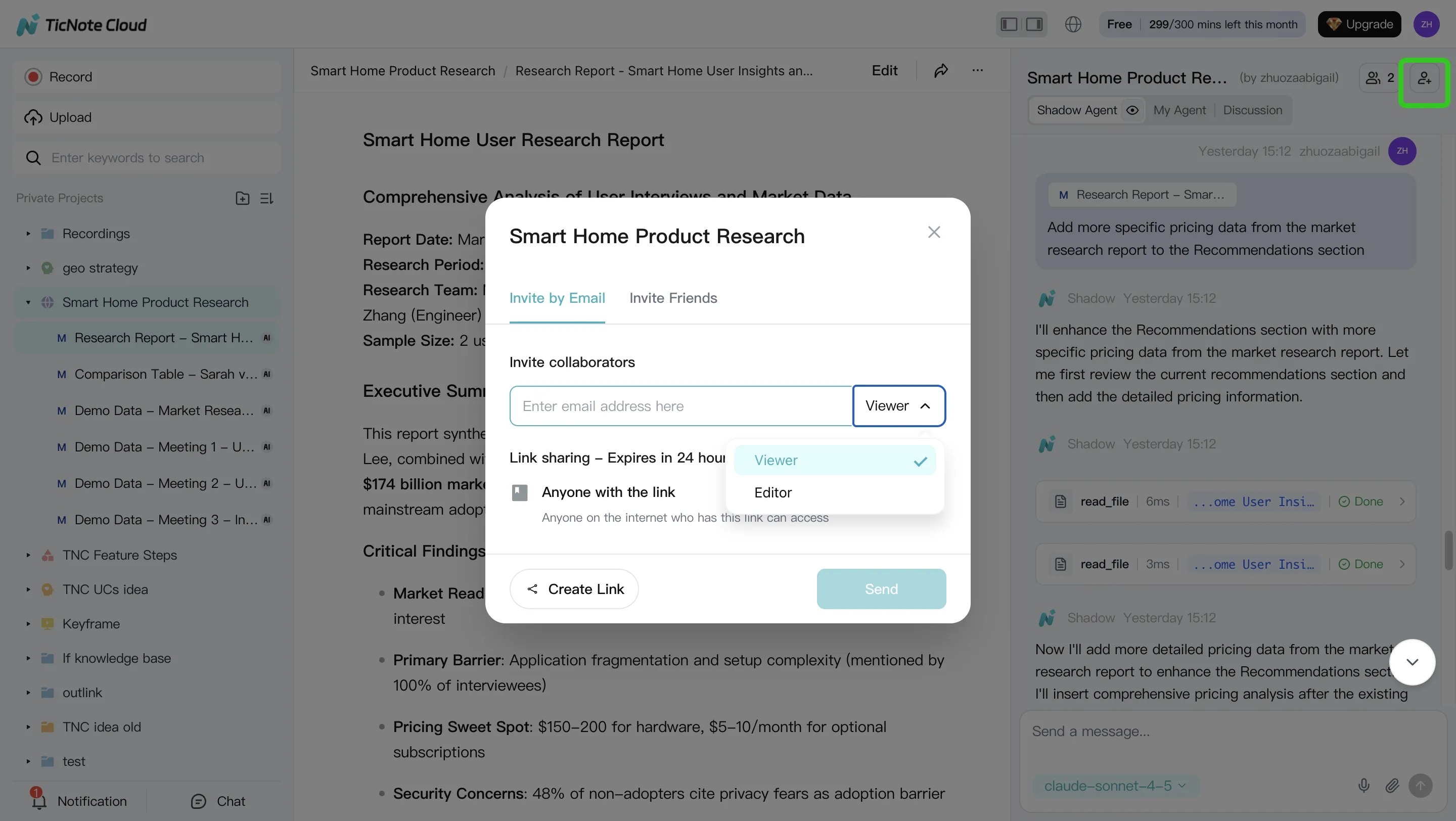
Treat outputs like any other knowledge artifact: review, refine, then publish. Have teammates comment, request edits, and assign an owner for each key asset.
Use a lightweight QA checklist before you mark anything "approved":
- Citations: can a reviewer click through to the source?
- Permissions: is the Project shared only to the right roles?
- Accuracy: are dates, metrics, and commitments correct?
As feedback comes in, turn it into a backlog: missing docs to ingest, unclear policies to rewrite, and duplicates to merge. If you also run agent-driven writing workflows, pair this with a QA-first content workflow for AI agents so knowledge outputs stay consistent.
App workflow (summary)
On mobile, the flow stays the same: open a Project, upload or import a recording, then ask Shadow AI questions to extract decisions and action items. Share the generated report or presentation back to the team for review, and capture the same evidence trail (sources + owners).
Screenshot plan to capture (in order): Project creation, upload/import, cited Q&A, transcript edit, deliverable generation, and collaboration review.
Try TicNote Cloud for Free and turn one week of meetings into a usable Project.
Final thoughts: a practical rollout plan for your first KM agent (without overbuilding)
A first knowledge management agent should feel like a focused service, not a "big platform" project. Keep the scope tight so you can prove value fast, reduce risk, and earn the right to scale.
Start small, prove one outcome
Pick one domain (like support policies), one audience (like Tier 1 agents), and one metric. A strong first target is: cut time-to-answer for the top 20 questions by 30% in 30 days.
Use this simple launch recipe:
- Choose the "top 20" real questions from tickets, Slack, or CRM.
- Confirm the source of truth for each answer (docs, tickets, meetings).
- Require citations for every answer (click back to the source).
Assign clear ownership (so the agent stays accurate)
Most rollouts stall because nobody owns freshness. Lock in three roles before you build:
- KM owner: defines scope, success metric, and rollout cadence.
- IT/security reviewer: validates access, logging, and risk controls.
- Content owners: approve updates and own "last reviewed" dates.
If one of these roles is missing, your agent will drift.
Build an eval set from real queries (then review weekly)
Before you tune prompts or models, build a small evaluation set (often 50–100 questions). Score answers weekly on:
- Grounded (has correct citations)
- Useful (solves the task)
- Safe (no restricted info)
Fix content first when you see misses. Only then adjust retrieval or prompts.
Operationalize governance on day one
Treat governance like a product feature, not paperwork:
- RBAC (role-based access control) with permission inheritance
- Audit logs for queries, sources used, and actions taken
- Citation rules (no citation = no "final" answer)
- Incident handling for data exposure, wrong guidance, or policy changes
Scale by repeating the pattern
Once the first domain hits the KPI, repeat the same playbook:
- Add 1–2 new sources (not 20 at once)
- Expand to the next team
- Report KPI movement monthly (time-to-answer, deflection, freshness)
That's how you grow coverage without growing chaos.
Try TicNote Cloud for free and turn meeting knowledge into cited, reusable answers in minutes.
If you're planning procurement, review plans and pricing to match your rollout stage.


