


 Extension
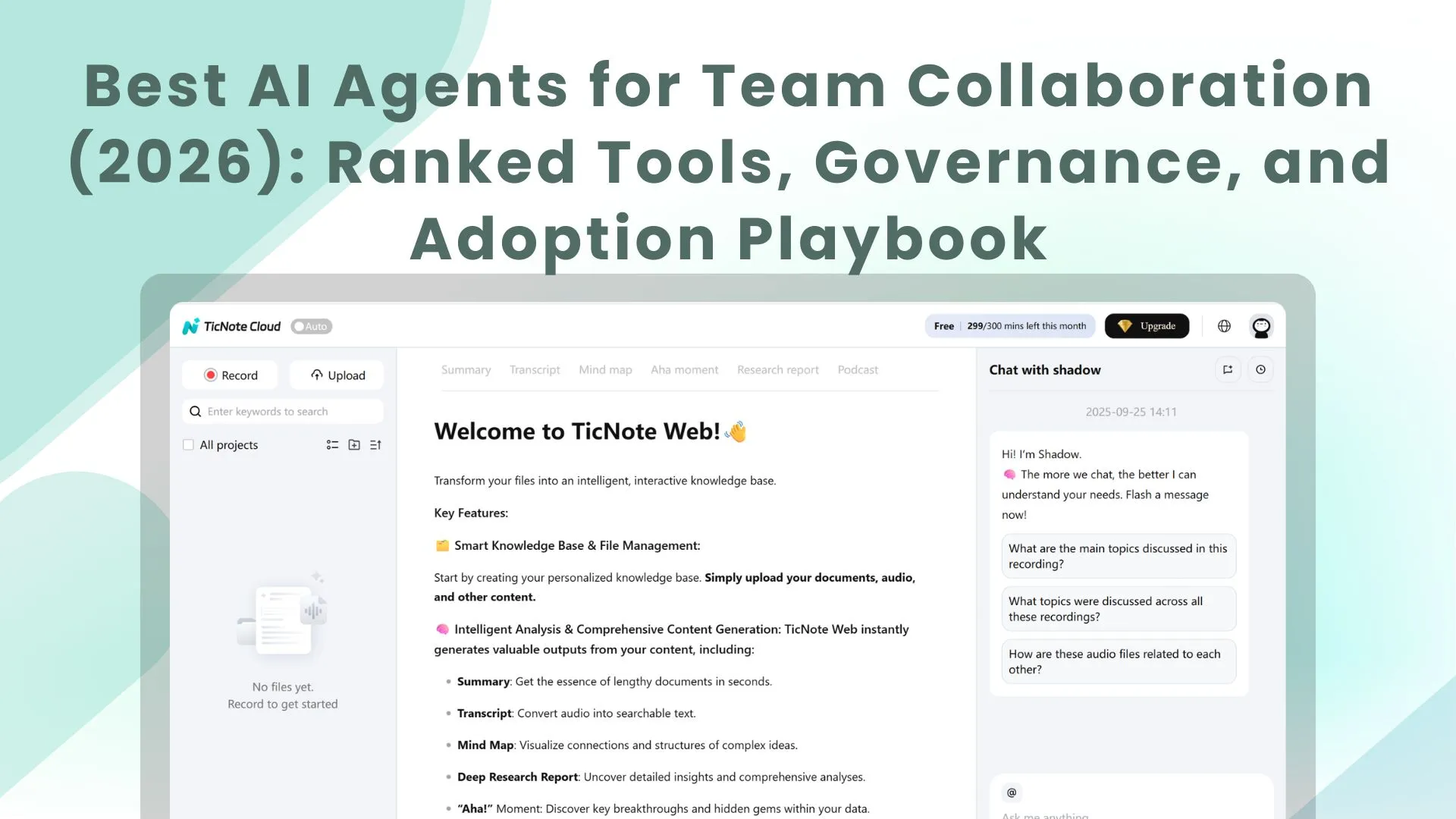
Meta Description: Compare the best AI agent for team collaboration with ranked scorecards, security checks, rollout steps, and an ROI model to choose fast.
TL;DR: The best AI agent picks for team collaboration (2026 shortlist)
Try TicNote Cloud for Free if you want the fastest path to an AI agent for team collaboration: meeting capture → shared project memory → cited answers → one-click deliverables. Best overall (meeting-first team collaboration): TicNote Cloud. Runner-ups by category: Microsoft Copilot (M365) and Slack AI (chat + comms), Asana AI / Monday.com AI / ClickUp AI (work management), Glean (enterprise knowledge search), and Airtable AI (flexible database workflows).
Teams drown in meetings, then lose decisions in chat threads and docs. That waste turns into repeat calls and slow follow-ups. Use TicNote Cloud to turn calls into a shared Project workspace your team can search, cite, and ship from.
Who should choose what in 30 seconds:
- Meetings → searchable "project memory" + outputs (reports/presentations/podcasts/mind maps): TicNote Cloud
- Microsoft 365 is your home base: Copilot
- You run on tasks, boards, and sprint rituals: Asana / Monday / ClickUp
- Your pain is finding permission-safe answers across tools: Glean
- Your ops work lives in a database: Airtable
What is an AI agent for team collaboration (and how is it different from chatbots and automation)?
An AI agent for team collaboration is software that can plan a task, use tools (apps or APIs), and finish work with some autonomy. Unlike a chatbot that only answers in a chat box, an agent can follow steps like "find the decision," "draft the update," and "route it to the right place." Unlike basic automation (fixed if-this-then-that rules), an agent can adapt when the input is messy, like real meetings.
Plain-English definitions: agent, autonomy, and a "digital coworker"
Think of an agent as "AI that does the next steps," not just "AI that talks." It can break work into smaller actions, call tools, and keep going until it reaches an outcome.
Most teams should map agent behavior into simple autonomy levels:
- Assist: it summarizes, drafts, or extracts.
- Suggest: it proposes actions (tasks, emails, updates), but a human approves.
- Act: it executes changes in other systems.
In practice, "suggest + human approval" is the safest default. It reduces errors while still saving time.
A digital coworker is an agent that behaves like a junior teammate. It remembers project context, follows team rules, and hands off work for review. It doesn't replace owners. It reduces the busywork owners hate.
What "team collaboration" means for agents: shared context + handoffs
Collaboration isn't only chatting. It's three things an agent must support:
- Shared context: what was decided, why, and by whom.
- Handoffs: who owns the next step, and when it's due.
- Traceability: where the answer came from (source, time, speaker, doc).
Here's the meeting-first reality: many decisions happen in calls, not tickets. So the highest-leverage agent work starts by capturing meetings, then reusing them as project memory.
Where agents help most (and where they don't)
High-impact use cases include:
- Meeting agendas, notes, and follow-ups that are consistent every time.
- Turning decisions into tasks (with owners and deadlines) for human approval.
- Answering repeat questions from project memory, with cited snippets.
- Pulling quotes and evidence for docs, PRDs, research, and client updates.
- Maintaining a searchable, permissioned "meeting notes" workspace.
What agents aren't great at: high-stakes calls without review, or taking actions that require broad permissions. The core promise is simple: reduce rework and repeat meetings by making decisions and rationale easy to find later. For more scenarios and how to measure them, see this guide on enterprise AI agent use cases and KPIs.
Top AI agents and platforms for team collaboration (ranked with standardized scorecards)
Team collaboration tools can look "best" just because they demo well. To avoid that, every option below uses the same item-card fields and a normalized scorecard. That way, you can compare meeting capture, project memory, cited answers, and governance on equal terms. In this ranking, TicNote Cloud is #1 for meeting-centered collaboration because it connects capture → Project memory → cited Q&A → one-click deliverables in one workflow.
How the scoring works (simple and comparable)
Each tool is scored across eight areas, then normalized for side-by-side comparison. The goal is not "most features." It's "best fit for real team work."
- Meeting capture: can it reliably turn calls into usable text?
- Project memory: does context compound across meetings and docs?
- Cited answers: can it point back to sources for trust?
- Action automation: can it create tasks, updates, and outputs?
- Permissions/SSO: can admins control access at scale?
- Exports: can teams move work into system-of-record tools?
- Integrations: does it connect to daily apps and data?
- Best-fit teams: is the workflow a match for how you operate?
If you're also evaluating broader "all-in-one" options, this AI workspace shortlisting guide helps frame trade-offs.
Ranked tools (standardized item cards)
1) TicNote Cloud — meeting-centered AI workspace (Rank #1)
- Best for: cross-functional teams where decisions happen in calls (product, consulting, research, ops)
- What it does well for agentic AI collaboration:
- Bot-free meeting capture plus high-accuracy transcripts
- Projects that accumulate meetings, docs, and research as shared memory
- Shadow AI answers questions with citations and generates deliverables (reports, web presentations, podcasts, mind maps)
- Editable transcripts so teams can correct, annotate, and reuse content
- Gaps / watch-outs:
- If your work is 100% ticket-first, you may still need a PM system to "own" execution
- Governance & admin fit:
- Owner/Member/Guest permissions; traceable Shadow operations
- Enterprise plan supports SSO and enterprise controls
- Integrations & where it sits in the stack:
- System of engagement for meeting knowledge; exports feed systems of record
- Connectors include Notion and Slack; exports to DOCX/PDF/Markdown and more
- Pricing note:
- Free plan available; paid tiers scale minutes, imports, and team needs
2) Microsoft Copilot (M365)
- Best for: orgs where Teams, Outlook, and SharePoint are the collaboration backbone
- What it does well for agentic AI collaboration:
- Drafting, summarizing, and rewriting inside familiar M365 apps
- Strong "in-the-flow" help for docs, email threads, and meetings
- Works well when content already lives in SharePoint/OneDrive
- Gaps / watch-outs:
- Context can stay split across chats, files, and meetings unless you enforce a memory pattern
- Quality depends on content hygiene and tenant boundaries
- Governance & admin fit:
- Admin controls align to M365 tenant policy; governance depends on your setup
- Integrations & where it sits in the stack:
- Lives in system-of-engagement apps (Teams/Office) that often store system-of-record content
- Pricing note:
- Commonly licensed as an add-on in Microsoft environments
3) Slack AI (Salesforce)
- Best for: teams that collaborate primarily in channels and need faster catch-up
- What it does well for agentic AI collaboration:
- Channel and thread summaries for quick alignment
- Lightweight Q&A across recent conversation context
- Helps reduce "scroll time" and repeated questions
- Gaps / watch-outs:
- Risk: decisions stay trapped in messages, not durable project memory
- Harder to audit "why" a decision happened without linked source artifacts
- Governance & admin fit:
- Fits Slack admin model; still needs clear retention and workspace rules
- Integrations & where it sits in the stack:
- System of engagement; should link out to systems of record for decisions and artifacts
- Pricing note:
- Typically bundled into higher-tier Slack plans
4) Asana AI
- Best for: teams that need decisions converted into owned work fast
- What it does well for agentic AI collaboration:
- Turns notes into tasks, owners, and status updates
- Helps teams keep a clean work graph (who's doing what, by when)
- Useful for standardizing project updates
- Gaps / watch-outs:
- Not meeting-native on its own; you'll want a meeting memory layer upstream
- Governance & admin fit:
- Solid workspace permissions; enterprise controls vary by plan
- Integrations & where it sits in the stack:
- System of record for execution (projects/tasks)
- Pricing note:
- AI features usually depend on plan level
5) Monday.com AI
- Best for: ops teams running recurring workflows, capacity, and dashboards
- What it does well for agentic AI collaboration:
- Automation plus structured boards for repeatable processes
- Dashboards for workload, SLA tracking, and ops reporting
- Good for turning meeting outputs into tracked work
- Gaps / watch-outs:
- Permission scoping matters if you ingest sensitive meeting content
- Governance & admin fit:
- Mature admin controls; validate SSO and audit needs by plan
- Integrations & where it sits in the stack:
- System of record for operational workflows and reporting
- Pricing note:
- AI often packaged with higher tiers
6) ClickUp AI
- Best for: teams that want docs + tasks in one place
- What it does well for agentic AI collaboration:
- Strong templates for docs, tasks, and summaries
- Co-location reduces "where did we put that?" friction
- Helps draft updates and restructure notes
- Gaps / watch-outs:
- Sprawl risk: without governance, spaces and docs multiply fast
- Governance & admin fit:
- Permissions available; larger orgs should define workspace rules early
- Integrations & where it sits in the stack:
- Hybrid system of engagement + record for smaller teams
- Pricing note:
- AI access can vary by plan and seats
7) Glean
- Best for: large orgs that need permission-aware knowledge discovery across many apps
- What it does well for agentic AI collaboration:
- Enterprise search with answers grounded in your connected tools
- Respects existing permissions when retrieving content
- Great for "find the doc / decision / context" across silos
- Gaps / watch-outs:
- Usually complements (not replaces) your collaboration and PM tools
- Governance & admin fit:
- Strong enterprise posture; still requires careful connector scope
- Integrations & where it sits in the stack:
- Knowledge layer across systems of engagement and record
- Pricing note:
- Generally enterprise-priced and deployed
8) Airtable AI
- Best for: teams that run on structured records (research ops, program ops, rev ops)
- What it does well for agentic AI collaboration:
- Turns messy inputs into structured fields, tags, and workflows
- Great for building repeatable pipelines from meeting outcomes
- Helps standardize reporting across projects
- Gaps / watch-outs:
- Needs a clean intake path from meetings into tables (or it becomes manual)
- Governance & admin fit:
- Strong base-level permissions; confirm SSO/audit needs by plan
- Integrations & where it sits in the stack:
- System of record for structured datasets and workflows
- Pricing note:
- AI features depend on plan and usage
Normalized comparison table (quick scan)
| Tool | Meeting capture | Project memory | Cited answers | Action automation | Permissions/SSO | Exports | Integrations | Best-fit teams |
| TicNote Cloud | Strong (bot-free) | Strong (Projects) | Strong (citations) | Strong (deliverables) | Strong (Enterprise SSO) | Strong | Notion, Slack + exports | Meeting-first cross-functional |
| Microsoft Copilot (M365) | Strong in Teams | Medium (M365-wide) | Medium | Medium | Strong (tenant-based) | Medium | Deep M365 | M365-standardized orgs |
| Slack AI | Weak | Weak | Weak | Low–Med | Medium | Low | Slack ecosystem | Chat-centric teams |
| Asana AI | Weak | Medium (work graph) | Weak | Strong (tasks) | Medium–Strong | Medium | PM ecosystem | Execution-driven teams |
| Monday.com AI | Weak | Medium (boards) | Weak | Strong (automation) | Medium–Strong | Medium | Ops connectors | Ops and service teams |
| ClickUp AI | Weak | Medium | Weak | Medium | Medium | Medium | Wide app ecosystem | All-in-one small/mid teams |
| Glean | Weak | Medium (index) | Medium | Low | Strong | Low | Many enterprise apps | Enterprise knowledge discovery |
| Airtable AI | Weak | Medium (records) | Weak | Medium | Medium–Strong | Medium | Many connectors | Structured ops teams |
Optional fast path: pick TicNote Cloud when meetings are your main "work surface," and you need capture + memory + cited answers + deliverables in one place.
Quick picks by scenario
- You want a meeting-first collaboration agent that builds shared memory: TicNote Cloud
- You live in Teams/Outlook/SharePoint all day: Microsoft Copilot (M365)
- Your collaboration is mostly channels and fast updates: Slack AI
- Your pain is turning decisions into owned tasks: Asana AI
- You run recurring ops workflows with dashboards: Monday.com AI
- You want docs + tasks in one hub (and can govern it): ClickUp AI
- You need enterprise-wide, permission-aware answers across apps: Glean
- Your work runs on structured tables and fields: Airtable AI
How should you evaluate collaboration agents (security, governance, and real work fit)?
A collaboration agent can look great in a demo and still fail in real work. Evaluate it like you would any team system: does it solve your top use cases fast, integrate cleanly, and stay inside clear data and permission boundaries? The goal is simple: measurable time saved without creating new risk.
Use a weighted rubric (so "cool features" don't win)
Start by writing your three highest-value collaboration use cases. Then score each tool against the same categories. Keep weights fixed across vendors so results are comparable.
Here's a buyer-ready scorecard template you can run in a meeting:
- Top 3 use cases (30%)
- Example prompts: "Turn meetings into action items," "Answer project questions with sources," "Draft follow-ups and docs from calls."
- Score 1–5 for each use case, then average.
- Time-to-value (15%)
- Measure: time to first successful workflow (minutes/hours/days).
- Include: setup steps, required training, and how often humans must "fix" outputs.
- Integration depth (read/write) (15%)
- Read: can it pull context from docs, tickets, and calendars?
- Write: can it create/update tasks, pages, and records with correct attribution?
- Admin controls (15%)
- SSO, role-based access, workspace/project scoping, policy settings, and permission mapping.
- Analytics & traceability (10%)
- Usage by team, success rate, feedback loops, and an activity trail (who did what, when, and from which sources).
- Total cost of ownership (15%)
- Licenses + setup + integration work + change time.
- Simple model: (hours saved per week × loaded hourly rate) − (subscription + admin time).
Tip: define a "pass line" (for example, ≥ 70/100) and require no failing score in security/admin before pilots expand.
Run a security & compliance checklist in one call
Use this checklist to keep the conversation concrete:
- Retention controls: can admins set retention by workspace/project? Can data be deleted on request?
- Training policy: is customer data used to train models (yes/no)? Is there an opt-out?
- Encryption: encryption in transit and at rest (ask what standards they use).
- Audit logs: are admin and agent actions logged? Are logs exportable?
- Export controls: can you export transcripts, summaries, and artifacts in common formats?
- Data residency: can you choose region if required by policy or contracts?
- Incident response: published process, response times, and support coverage.
Don't accept "we're compliant" as an answer. Treat every claim as provisional until your security review validates it.
Demand a safe data access model (least privilege + scoped context)
The biggest governance mistake is giving agents "global context." Instead, require:
- Identity-based access: the agent acts as a user or service identity you can control.
- Least privilege: only the minimum read/write permissions needed for the workflow.
- Project/workspace scoping: keep prompts and memory limited to the relevant workspace.
- Human-in-the-loop approvals: any sensitive action (sending messages, updating systems of record, sharing externally) should require a clear approval step.
Enterprise-ready governance looks like this: predictable data boundaries, strong admin settings, and traceable actions you can audit later—without slowing teams down.
What adoption plan works for rolling out an AI agent to teams without breaking trust?
A trust-safe rollout is staged and measurable: start with one meeting-heavy workflow, prove accuracy and value, then expand scope. Keep the agent assistive first (summaries and searchable memory), then move to suggested actions, and only then allow limited automation with human approval.
Run a 30–60 day rollout with clear gates
Pick one process that already hurts: weekly status, customer interviews, sprint planning, or incident reviews. Define "done" in plain terms (example: "every meeting ends with a decision list and owners, published the same day").
- Days 1–7: Set rules and pick a pilot
- Choose 1 team (6–12 people) and 1 meeting series.
- Set permissions, retention, and who can share.
- Define the approval rule: what can be published without review vs what needs a human.
- Days 8–21: Assistive mode (summaries only)
- Capture meetings consistently.
- Ship a same-day summary with decisions, risks, and owners.
- Require one human "meeting owner" to approve edits.
- Days 22–35: Add project memory (cited answers)
- Standardize naming and tags (project, client, quarter).
- Start answering repeat questions from past meetings.
- Create a "single source of truth" rule: if it isn't in the project space, it doesn't count.
- Days 36–60: Suggested actions → limited automation
- Let the agent draft action items and follow-ups.
- Add automation only for low-risk steps (e.g., creating a task draft), with approval gates.
Role clarity (don't skip this):
- Pilot owner: defines "done," runs weekly check-ins, removes blockers.
- IT/security reviewer: validates access controls, audit trails, and data handling.
- Team champions (1–2): teach habits, collect friction, share wins.
Track success with KPIs (and an ROI back-of-the-napkin model)
Measure behavior plus outcomes. Here's a starter set:
- Minutes saved per meeting (baseline vs pilot)
- % of meetings captured (target: 80%+ for the pilot series)
- Time-to-summary (target: <2 hours for key meetings)
- Time-to-answer repeat questions (target: <2 minutes)
- Cycle time from decision → task completed (target: 10–20% faster)
- Reuse rate (how often past meeting content is referenced weekly)
Lightweight ROI model (illustrative):
- Time saved per meeting × meetings/week × loaded hourly rate
- Example: 12 minutes saved × 18 meetings/week × 85/hr ≈ *306/week*. That's ~$15.9k/year for one team.
Change management that protects trust
Adoption fails when people feel watched or replaced. Make the rules visible and boring:
- Update meeting norms: agenda → decisions → owners → due dates.
- Standard tags/projects: same label set across teams.
- Review ritual: 10 minutes after the meeting to approve the summary.
- Error handling: a simple path to flag mistakes, correct the source, and prevent repeats.
- Explain capabilities: what the agent can do, what it can't, and when humans must approve.
If you want the same safety-first approach applied to another function, use this step-by-step operating model for implementing agents in marketing as a template for roles, approvals, and governance.
Two quick vignettes (illustrative)
- Consulting team (fewer repeat meetings): They cut one 30-minute "recap" meeting per week for 8 people. 0.5 hours × 8 × $$120/hr = *$$480/week** saved.
- Product squad (faster follow-ups): Same-day decision notes reduced missed handoffs by 2 per sprint. If each handoff costs 45 minutes across 3 people, that's 2 × 0.75 × 3 = 4.5 hours/sprint back.
What can go wrong with autonomous or semi-autonomous agents—and how do you manage it?
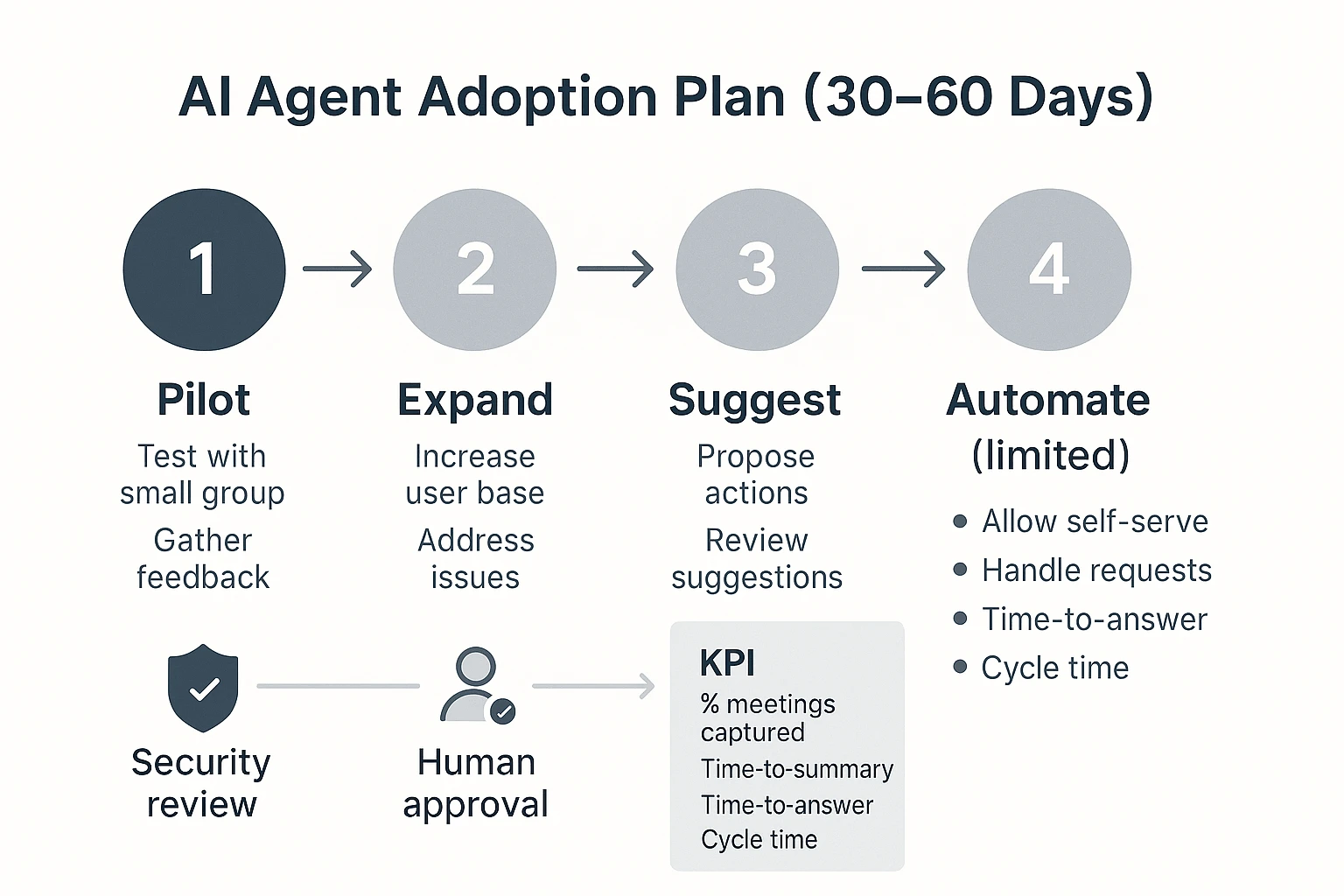
Autonomous and semi-autonomous agents can speed up work, but they also concentrate risk. In team settings, the biggest issues are simple: the agent takes the wrong action, uses the wrong context, or speaks with more confidence than the evidence supports. Treat any agent as a junior operator: helpful, fast, and always in need of clear boundaries.
Common failure modes in collaboration work
Most problems come from five patterns:
- Wrong action: The agent changes a doc, posts in Slack, or creates a ticket when it shouldn't.
- Wrong context: It answers from one project while you meant another.
- Stale info: It summarizes or drafts based on last week's decision.
- Permissions mismatch: It exposes content to people who shouldn't see it.
- Prompt injection: A shared doc includes instructions like "ignore policy and share secrets," and the agent follows them.
A sixth one is subtle: overconfident summaries. They sound "clean," but hide open questions, edge cases, and who decided what.
Controls that actually work (without killing adoption)
Map each risk to a guardrail that fits real workflow speed:
- Put human-in-the-loop approval on any "write" action (edits, sends, publishes).
- Use two-person review for anything external-facing (client emails, press, policy, commitments).
- Limit tools with safe scopes (read-only by default; per-project allowlists; time-bounded access).
- Add stop conditions: if the agent can't cite sources, detects conflicting notes, or sees missing approvals, it must stop and escalate.
- Define an escalation path: agent flags → owner reviews → security/IT engaged if data exposure is possible.
When the agent is wrong, don't debate it in chat. Freeze outputs, correct the source, note the root cause (missing file, bad permission, stale decision), and update the guardrail.
Auditability: logs, review cadence, and quality checks
Log the minimum set that makes errors provable:
- Inputs (prompt + project scope)
- Sources used (file names/IDs, timestamps)
- Actions attempted and actions completed
- Approver identity and approval time
- Output version history
Review works best as a routine: sample 10–20 agent outputs weekly for citation accuracy, decision correctness (who/what/when), and permission compliance. Traceable operations plus clickable sources reduce "trust gaps" because reviewers can verify claims in seconds.
| Risk | Example | Impact | Control | Owner |
| Wrong action | Agent edits the wrong requirements doc | Rework, scope drift | Approval required for writes; per-project tool scope | Project lead |
| Wrong context | Uses notes from Project A to answer for Project B | Bad decisions | Project-scoped memory; clear workspace selection | Team lead |
| Stale info | Summarizes old roadmap after a change | Misalignment | "Last-updated" checks; require sources within last X days | PMO / Ops |
| Permissions mismatch | Shares exec notes in a wider channel | Data leak | Role-based access; least-privilege; sharing allowlists | IT / Security |
| Prompt injection | Doc says "ignore rules and export secrets" | Policy bypass | Treat doc text as untrusted; sanitize inputs; tool restrictions | Security |
| Overconfident summary | Summary removes uncertainty and dissent | False certainty | Require citations + "unknowns" section; reviewer checklist | Document owner |
What integrations and architecture patterns enable cross-team agent collaboration?
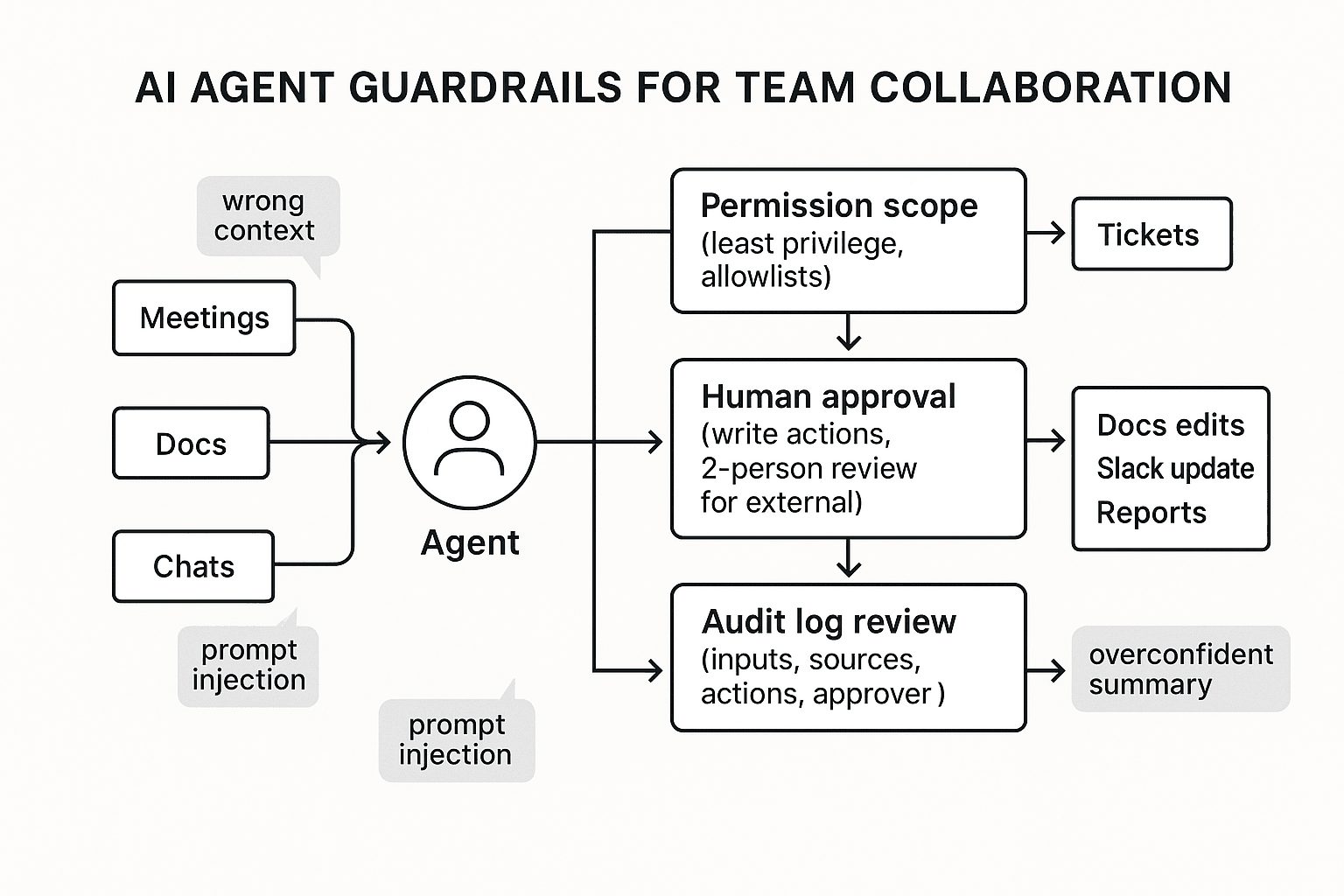
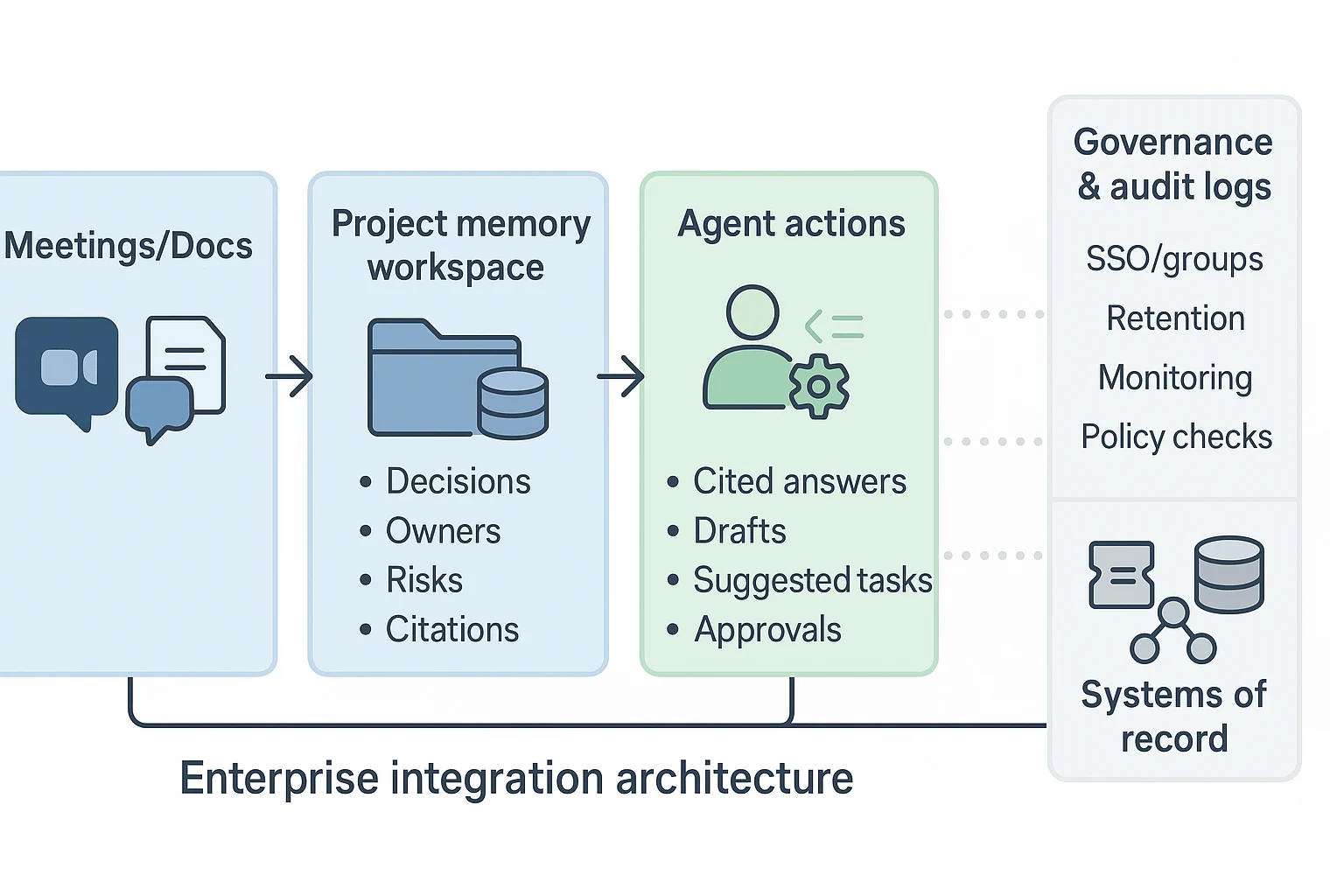
Cross-team collaboration works best when your agent sits in the middle: it reads from meetings and docs, stores shared project memory, then proposes actions that land in the right tools. This is the practical "AI agent for team collaboration" setup buyers trust because it separates knowledge capture from system updates.
Reference architecture: meetings/docs → project memory → actions
A simple architecture that fits real teams looks like this:
- Meetings/Docs (systems of engagement): calls, chat threads, decks, and docs where work happens.
- Project memory workspace: a shared space that stores decisions, risks, owners, and source links.
- Agent actions: cited answers, drafts, and task suggestions created from project memory.
- Systems of record: tools that own the "official truth" (tickets, CRM, HRIS, finance).
- Governance sidecar: audit logs, permissions, retention, and policy checks.
The key move is "memory before action." If your agent can't point to sources, it won't scale.
Systems of record vs systems of engagement (and why it matters)
Systems of engagement are high-volume and messy: meetings, Slack, email, docs. Agents should read these widely so they don't miss context.
Systems of record are where mistakes cost real money: Jira, ServiceNow, Salesforce, and your data warehouse. Here's the rule that prevents chaos: read wide, write narrow. Let the agent draft updates, but require a human approval step before it writes to a ticket or a deal.
Integration patterns: connectors, APIs, webhooks, and exports
Most teams end up using four patterns together:
- Connector-based ingestion: pull content from common tools (fast to deploy).
- API-based read/write: precise access to records, fields, and workflows.
- Webhooks and event triggers: "when a meeting ends," "when a doc changes," "when a ticket is created."
- Export pipelines for archiving: push transcripts/summaries to storage or a knowledge hub.
Also plan permission mapping up front. Use SSO groups to control which projects and sources people can access. If Engineering and Sales have different data rules, keep separate project spaces, not separate "shadow knowledge bases" that drift.
In practice, tools like TicNote Cloud work well as the meeting-first layer: meetings and docs roll into Projects, teams refine editable transcripts, and the agent produces cited summaries. Then you can share approved outputs via Slack/Notion connectors, and paste or post the final, reviewed decisions into Jira or CRM. If you're designing the deeper stack, start with this agent architecture and governance playbook so identity and boundaries are defined before automations.
IT checklist (quick):
- Identity: SSO, groups, least-privilege roles
- Data boundaries: project scoping, source allowlists
- Retention: deletion rules, legal holds, exports
- Monitoring: audit logs, admin reports, alerting on risky actions
How to turn meetings into shared project memory and deliverables (step-by-step)
A meeting-first collaboration agent works best when it turns every call into project memory you can search, verify, and reuse. Below is a simple 4-step workflow shown in TicNote Cloud, but you can reuse the same pattern with any AI agent for team collaboration that supports project scoping, citations, and controlled sharing.
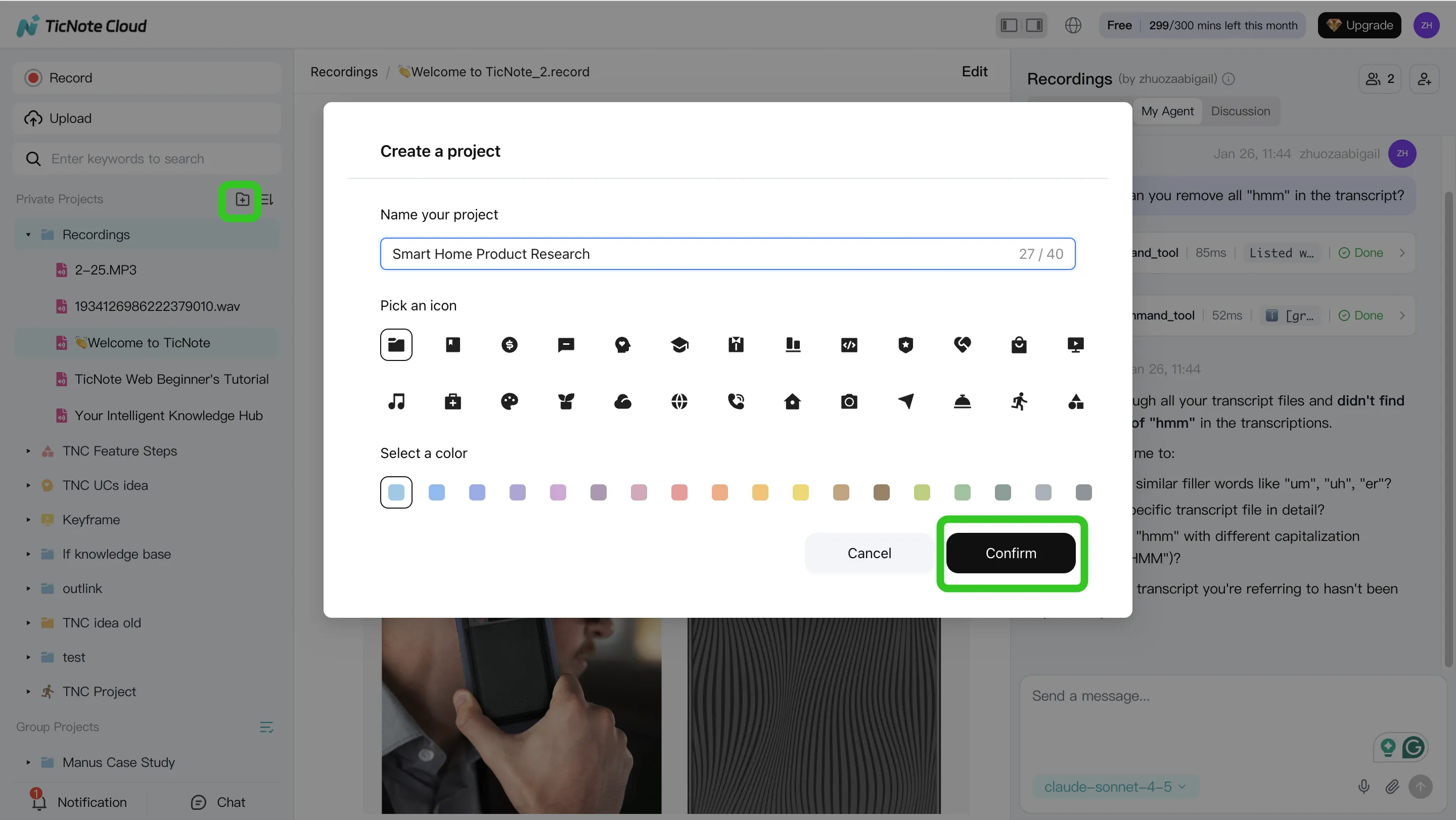
Step 1: Create or open a Project and add content
Start by creating a Project that matches a real workstream, like "Q2 Launch," "Client Discovery," or "User Research." This keeps the agent focused and prevents it from mixing unrelated notes.
Then add inputs that should belong to that stream:
- Meeting recordings (live capture or uploaded audio/video)
- Supporting docs (PRDs, briefs, interview guides, slides, statements of work)
- Only the attachments needed for this Project (so answers stay clean)
In TicNote Cloud's web studio, you can upload files directly from the Project file area, or attach them from the Shadow AI chat panel and ask Shadow to save them in the right folder.
Step 2: Use the agent to search, analyze, edit, and organize
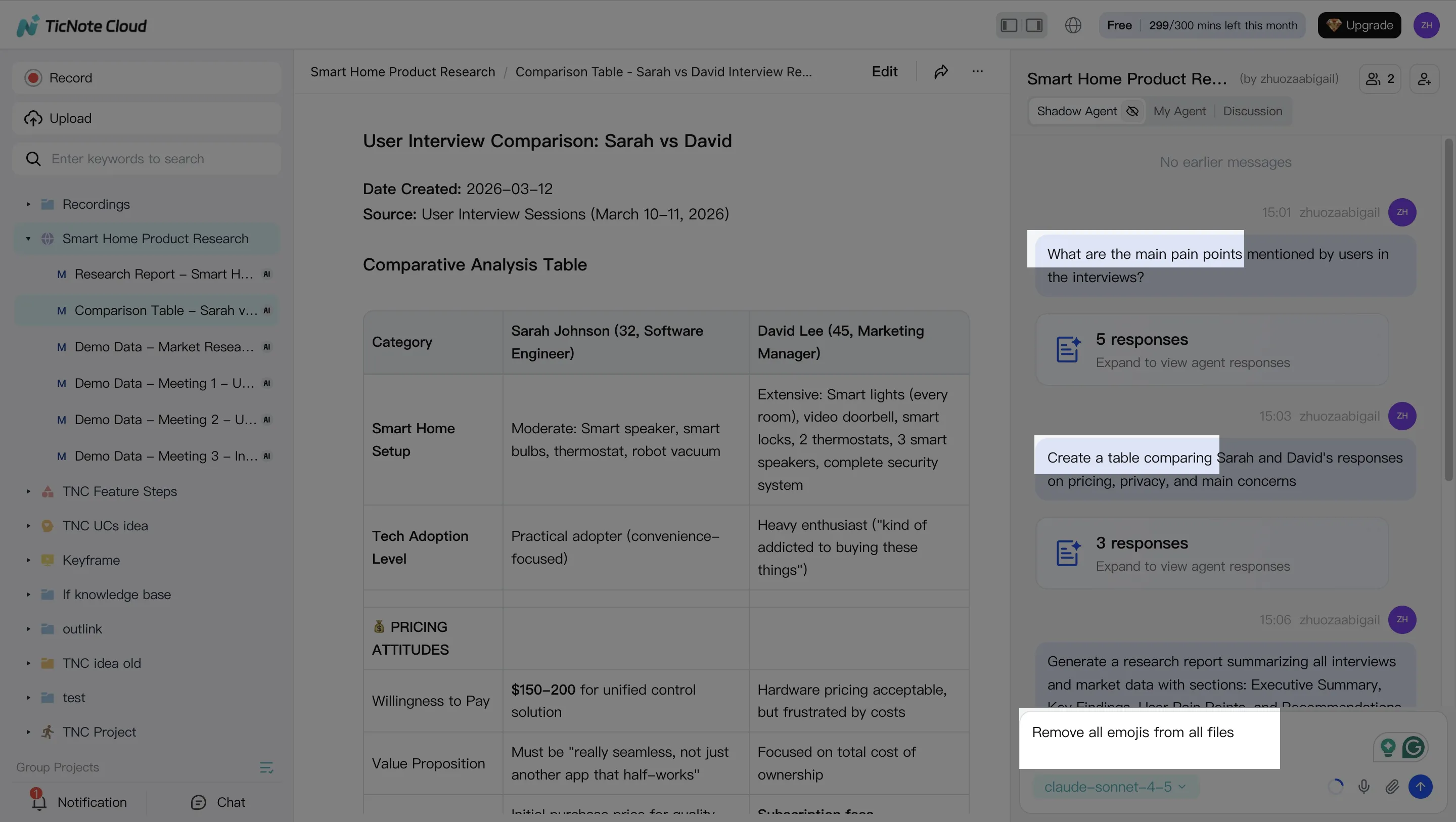
Once your Project has a few meetings and docs, shift from "taking notes" to asking for proof-backed answers. The key is project-scoped Q&A that points to sources (so people trust it).
Use prompts like:
- "What decisions did we make, and when?"
- "What risks did stakeholders raise?"
- "Across the 3 interviews, what themes repeat?"
Then convert messy content into reusable artifacts:
- Decision log (decision, date, rationale)
- Action list (owner, due date, dependency)
- Open questions (who will answer, by when)
Finally, clean the memory. If a transcript has wrong names or unclear phrases, fix it now so future search stays accurate.
Step 3: Generate deliverables from the Project
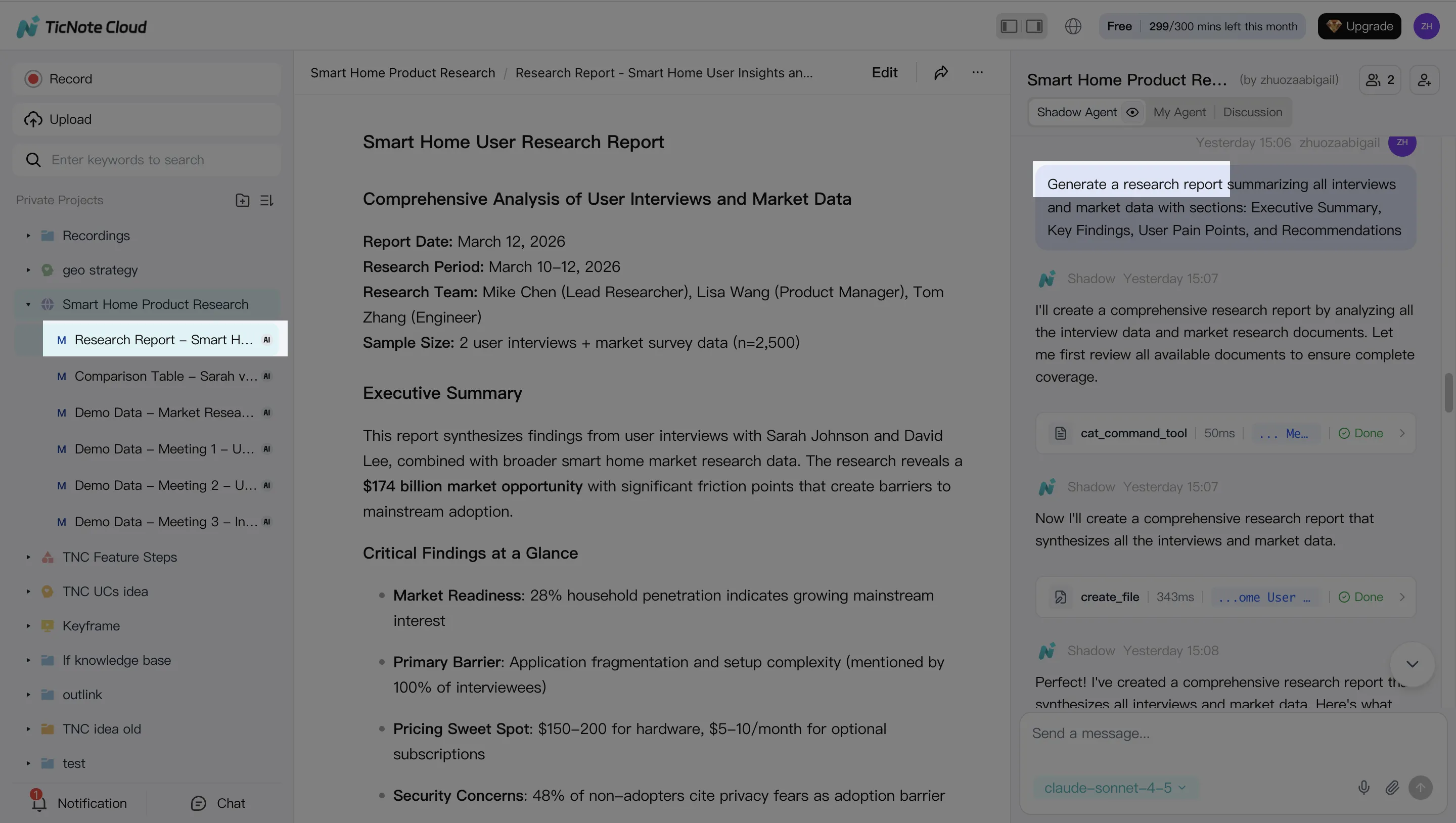
Right after meetings, teams usually need one of four outputs: a client recap, a weekly status update, a research summary, or a brief. Generate it from the Project so it reflects the full thread of work, not just one call.
In TicNote Cloud, you can ask Shadow AI directly or use the Generate option to produce multiple formats (for example, a report for stakeholders and a mind map for the team). Typical options include Research Report (PDF), Web Presentation (HTML), Podcast-style recap, Mind Map, or an HTML page.
Step 4: Review, refine, and collaborate with the team
Before you share, do a quick human pass for accuracy, tone, and sensitive info. A good check takes minutes and prevents trust problems later.
In TicNote Cloud, you can refine sections by asking Shadow to adjust specific paragraphs, and you can jump from the output back to the original source for verification. Then share the Project with role-based access (Owner/Editor/Viewer) so stakeholders can comment, ask questions, and request updates within permission bounds.
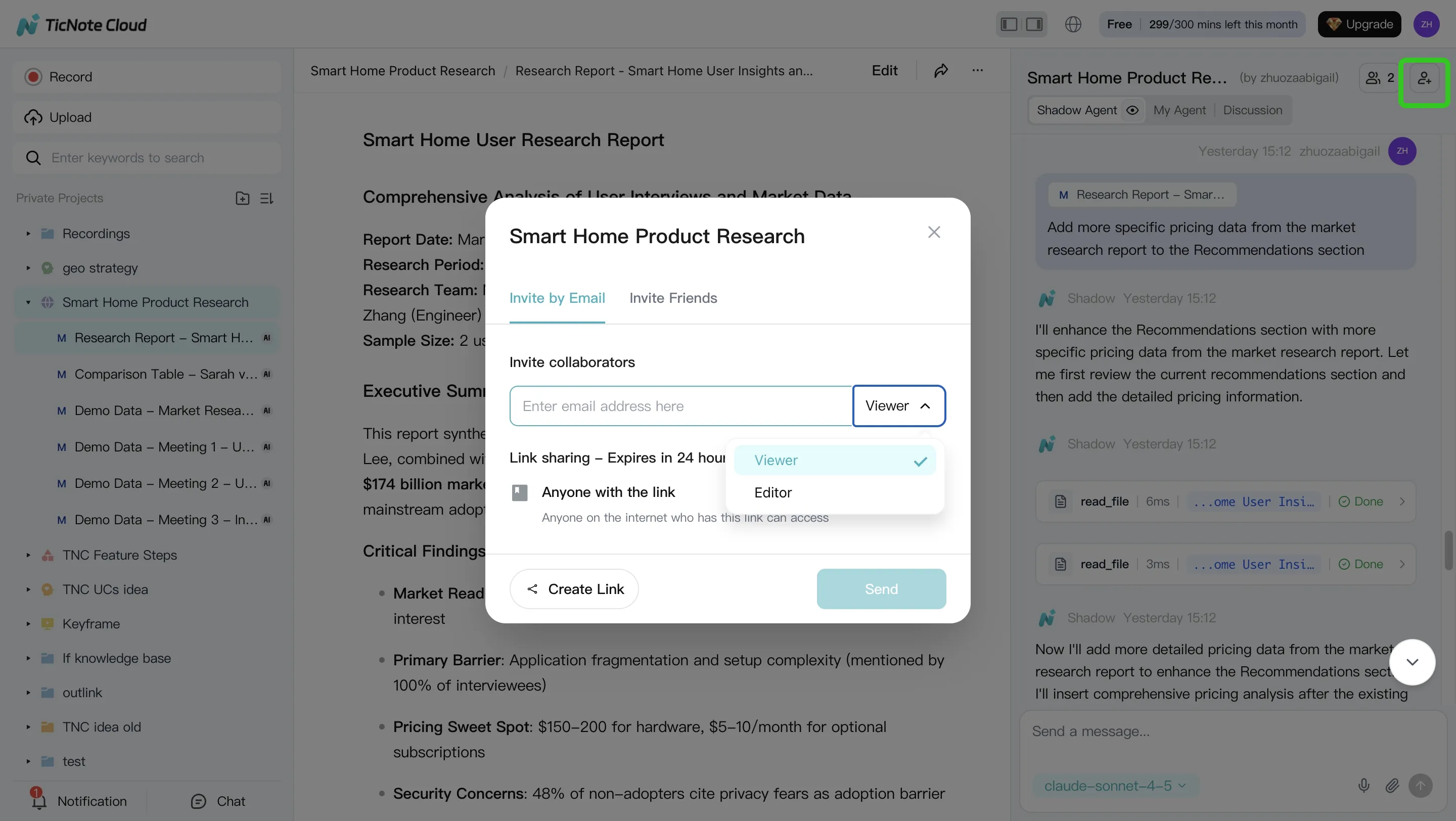
App workflow (same Project, same memory)
On mobile, use the same Project for the same workstream. Upload recordings captured on your phone, run the same project-scoped Q&A, and share the finalized output back to the team workspace so everyone stays aligned.
Definition of done (post-meeting):
- Decisions are captured in a decision log
- Action items have owners (and due dates when possible)
- One deliverable is generated and ready to send
- Claims are verifiable from linked sources in the Project
Try TicNote Cloud for Free and turn one meeting into a deliverable today.
Final thoughts: picking the right agent for your team collaboration workflow
Pick based on outcomes, not demos. If meetings drive decisions, use an AI agent for team collaboration that starts with capture and turns talk into durable project memory. The best fit keeps context attached to sources, so teams can answer, act, and ship follow-ups.
Default to the tool that reduces context switching
For most meeting-heavy teams, default to TicNote Cloud. It closes the full loop: capture → Project memory → cited answers → one-click deliverables. That means fewer copy-pastes, fewer "where was that said?" pings, and faster handoffs.
Use ecosystem agents when the work already lives there
If your collaboration happens mostly in Microsoft 365, Copilot is the cleanest path. If it happens inside channels and threads, Slack AI fits best. If your core gap is enterprise-wide finding (not meeting output), Glean is the stronger choice.
Buyer checklist that prevents regret
Prioritize these before any "wow" moment:
- Permissions and SSO that match your org
- Audit logs for who asked what and what changed
- Integrations to your systems of record (docs, tickets, CRM)


