Extension
TL;DR: A safe, repeatable way to use an AI agent in marketing
Start by trying TicNote Cloud for free to capture one workflow request, turn it into a clear draft, and keep one human approval gate so nothing goes live unattended. This operating manual shows how to implement ai agents for marketing as a repeatable system, not a pile of prompts. Pilot one narrow job in 30 to 60 minutes: one trigger, one data source, one action.
You've felt it: requests live in Slack, decisions get lost, and follow-ups slip. That chaos slows cycle time and adds risk. A single workspace like TicNote Cloud helps you record requirements, summarize decisions, and keep approvals in one place so the agent work stays governed.
Expect faster handoffs, fewer missed follow-ups, and shorter time from request to draft to publish. Don't skip the non-negotiables: clean taxonomy plus key CRM fields, explicit human-in-the-loop gates, and a simple measurement plan so you can prove lift, not just speed.
What are ai agents for marketing (and how are they different from chatbots or automation)?
An AI marketing agent is software that can pursue a goal for you, not just answer questions. It follows a loop you can audit: perceive (watch signals), plan (pick the next best steps), act (use approved tools), and learn (use results to improve next time). That's why ai agents for marketing feel less like "chat" and more like a governed workflow with goals, tools, and feedback.
Use the perceive → plan → act → learn loop
Here's the plain-English version:
- Perceive: it reads inputs like briefs, campaign performance, CRM notes, or site events.
- Plan: it breaks a goal into tasks, priorities, and checks.
- Act: it drafts, updates systems, or triggers next steps within limits.
- Learn: it logs what happened and adjusts future choices.
If you want the deeper architecture and governance model, this pairs well with a practical AI agent architecture and playbook you can adapt for marketing.
Agents vs copilots vs rules-based automation (quick comparison)
Below is the easiest way to separate the terms.
| Type | Autonomy level | Inputs | Outputs | Control model | Best-fit marketing tasks | | left-aligned | left-aligned | left-aligned | left-aligned | left-aligned | left-aligned | | Rules-based automation | Acts, but only as pre-set rules | Fixed triggers and fields | Deterministic system changes | If/then logic, QA tests | Routing leads, sending alerts, SLA reminders | | Copilot (chat assistant) | Suggests, you decide | Prompt plus pasted context | Drafts and recommendations | Manual review by default | Ideation, outlines, ad variations, first drafts | | AI agent | Decides and acts within guardrails | Tool access plus event stream and memory | Drafts plus system actions | Approvals, budgets, rate limits, audit logs | Campaign ops, optimization loops, reporting, QA |
Key difference: automation is deterministic. It always does X when Y happens. An agent can choose actions based on context, like pausing one ad set and boosting another after it checks spend, pacing, and conversion quality.
Where multi-agent "teams" fit
Start with a single agent when the workflow is narrow and the tools are few. Add a multi-agent setup when you have many channels, many stakeholders, or parallel work that needs coordination.
A common pattern is an orchestrator plus specialists:
- Orchestrator agent: takes the goal, sets the plan, assigns work, enforces one approval gate.
- Specialist agents: content agent (emails and landing page copy), paid agent (budgets and keywords), reporting agent (dashboards and anomalies).
Example: the orchestrator gets "launch Q2 webinar campaign." It routes tasks to specialists, then collects drafts, checks brand rules, and sends one package for approval. After launch, it logs results and what changed, so next quarter starts from a proven baseline.
Don't get stuck on labels. What matters is governed execution: clear goals, allowed actions, and a review trail you can trust.
Which marketing workflows should you automate with an agent first?
Don't start with the flashiest idea. Start with a workflow you can test, review, and roll back fast. In early pilots, the safest wins come from agent help that makes suggestions and drafts, not final actions.
Score candidates with a 5-point rubric
In a team meeting, list 3 to 5 workflows and score each 1 to 5.
- Impact: Will it save hours, reduce cycle time, or lift pipeline?
- Risk: What's the blast radius for brand, legal, or budget?
- Data: Do you have clean inputs (UTMs, IDs, naming rules, CRM fields)?
- Effort: How much integration, build, and training does it need?
- Reversibility: Can you undo changes in minutes, not days?
Pick the workflow with high Impact and Data, low Risk and Effort, and strong Reversibility. That's your first "agent lane."
Six starter workflows that are safe in early pilots
- Content ops: brief to outline to draft, then route through a QA checklist.
- Lead ops: enrichment and routing suggestions for an ops manager to approve.
- Paid media: anomaly detection plus pause and bid recommendations, human approved.
- Lifecycle: next best nurture email ideas by segment, with brand tone checks.
- Sales handoff: auto build account context, call prep points, and create tasks.
- Reporting: weekly performance story with flagged tests to run next.
If you want a deeper example, use a governed content agent workflow with QA and SEO checks before you automate anything customer facing.
Avoid these early (high risk)
Skip auto publishing to major channels, unsupervised spend changes, regulated claims writing, and any flow that exposes raw PII.
Pilot charter checklist: one owner, one channel, one metric, one rollback plan.
What data and access does an AI marketing agent need to work well?
An AI marketing agent is only as reliable as the data you let it use. Give it a small, clean set of inputs, plus clear access rules, and it can plan, draft, and optimize with less risk. If those inputs are missing, it fills gaps by guessing, and guesswork is how brands ship wrong claims, waste budget, or contact the wrong people.
Start with a minimum data set (so the agent doesn't guess)
At minimum, your agent needs three signal layers:
- CRM basics: account and contact IDs, lifecycle stage, source and medium, and opportunity linkage.
- Campaign taxonomy: naming rules, channel definitions, and UTM standards.
- Web or product events: intent signals like pricing page views, integration page views, demo starts, and key activation steps.
If lifecycle stage is stale, the agent may push bottom funnel offers to top funnel leads. If UTMs are inconsistent, it can't learn what worked, so it "optimizes" on noise.
Add safe context sources (retrieval beats training)
For an AI marketing agent workflow, the safest approach is retrieval (pulling from approved sources) instead of training a model on old files. Retrieval is easier to update and easier to audit.
Best sources to index:
- Brand voice rules: do and don't, taboo terms, formatting rules.
- Positioning docs: ICP, use cases, objection handling, competitive lines.
- Past campaigns: what ran, what won, and why.
- Claims and proof library: approved statements, customer quotes, and legal notes.
Set permissions and PII boundaries (least privilege)
Don't give broad access "just in case." Define what the agent must never see or do:
- Minimize PII (personally identifiable information) and mask it when possible.
- Avoid raw email bodies unless the use case demands it.
- Block list exports and CRM ownership changes by default.
- Split read versus write scopes, use time boxed tokens, and grant least privilege.
| Readiness area | What "ready" looks like | Owner | Refresh cadence | Access controls |
| Data quality | Required fields complete and consistent | RevOps | Weekly | Read only by default |
| Taxonomy | One naming and UTM standard across channels | Marketing Ops | Monthly | Changes require approval |
| Event tracking | Key pages and conversion events instrumented | Growth | Weekly | Aggregated where possible |
| Context library | Current voice, positioning, claims, proof points | Brand or PMM | Quarterly | Versioned, approved sources |
| Permissions | Separate read and write roles | Security or IT | Quarterly | Least privilege, time boxed |
How do you design a marketing AI agent workflow step by step?
Designing an AI agent for marketing is less about "prompting" and more about workflow design. You're building a small system that knows its goal, what it's allowed to change, what to look up, and when to stop for review. If you get those parts right, you can scale safely across ABM, lifecycle, content ops, and paid.
Step 1: Write one clear goal and one success metric
Start with one sentence for the goal and one sentence for the metric. Keep it narrow. One agent, one job.
Examples:
- Goal: "Reduce webinar campaign build time from request to first draft."
- Metric: "Median cycle time and percent of tasks completed without rework."
Avoid mixing brand work, demand gen, and ops in one pilot. If the goal needs three teams to agree, it's too big for v1.
Step 2: Define the agent's allowed actions
Next, list what the agent can do to your assets and systems. This is your safety boundary.
Use levels:
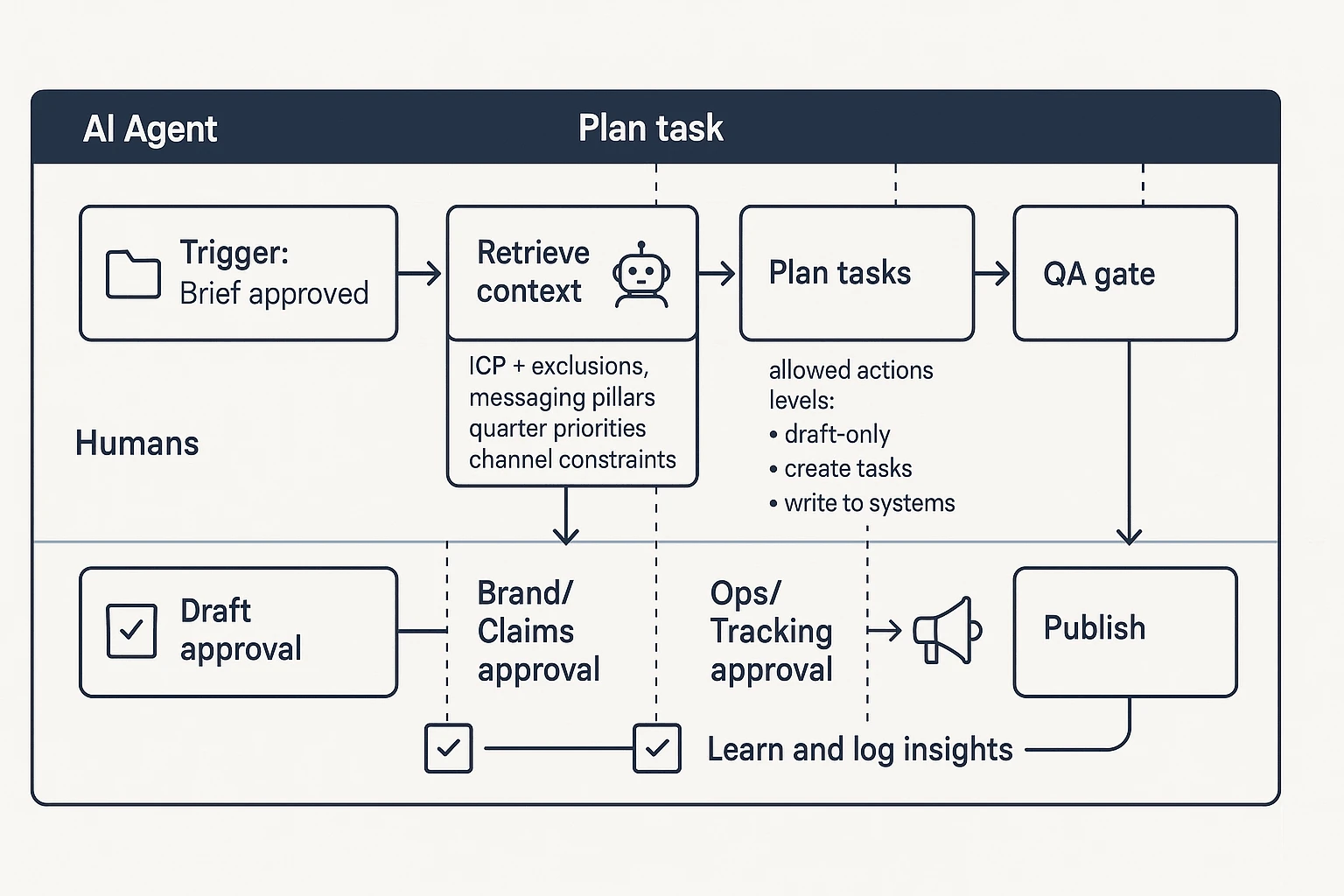
- Draft-only (safe): drafts briefs, ads, landing page copy, subject lines.
- Suggest plus create tasks (safe): creates Jira or Asana tasks, assigns owners, proposes timelines.
- Write to systems (advanced): updates CRM fields, launches campaigns, changes budgets, publishes pages.
For ABM and GTM teams, start with "draft plus task creation." Let the agent propose audience segments, draft outreach emails, and generate a launch checklist, but keep spend, send, and publish locked until your process is stable.
Step 3: Add retrieval context packs
Agents fail when they guess. Fix that by defining what it must look up before it plans.
Minimum context packs:
- ICP plus exclusions (who this is not for)
- Messaging pillars and approved claims
- Current quarter priorities (what matters now)
- Channel constraints (regions, legal, brand rules)
Keep one "source of truth" folder for retrieval. If your agent pulls from five places, you'll get five versions of the truth.
Step 4: Add review gates from draft to approval to publish
Treat this as human-in-the-loop marketing automation. Build gates that match real risk.
A simple gate design:
- Gate 1: Marketing owner approves the brief and inputs
- Checklist: goal, audience, offer, channel, deadlines, must-include links
- Gate 2: Editor or brand reviewer approves copy and claims
- Checklist: tone, proof, no forbidden claims, correct product names, legal notes
- Gate 3: Ops approves launch and tracking
- Checklist: UTMs, events, QA links, audience checks, send lists, rollback plan
Step 5: Set monitoring and rollback
Assume something will go wrong. Plan the "stop" before you ship.
Operational guardrails:
- Rate limits: cap changes per day and per channel
- Safe mode: fallback to draft-only if alerts trigger
- Alerts: spend spikes, CTR drops, deliverability issues, or unusual edits
- Rollback: clear steps, plus a named "stop button" owner
Reference architecture in prose (the loop)
Here's a vendor-neutral workflow you can use as your baseline.
- Trigger: a brief is approved.
- Retrieve: pull the right context packs.
- Plan: break the work into tasks and dependencies.
- Act: take only allowed actions.
- QA: run checks and hit approval gates.
- Ship: publish or schedule.
- Analyze: read performance data.
- Learn: log what worked and update the playbook.
Starter agent spec (copy, then fill in)
Use this mini-template to keep builds consistent:
- Goal:
- Success metric:
- Inputs (brief fields):
- Context sources (folders, docs):
- Tools (ads, CRM, PM tool):
- Allowed actions (level 1 to 3):
- Review gates (who approves what):
- Monitoring (alerts, rate limits):
- Rollback steps and stop owner:
- Escalation path (when to ask a human):
What guardrails keep AI agents from harming your brand, budget, or compliance posture?
AI agents can move fast. That's the risk. The safest setup is simple: define what the agent can say, see, and change, then log every step so you can explain and undo it.
Brand safety checklist (claims, tone, prohibited topics)
Set rules the agent must follow before anything ships. Treat it like a mini style guide plus a claims policy.
| Guardrail area | Rule | Practical implementation | | left | left | left | | Claims policy | No unverifiable superlatives (best, #1). Sources required for stats. | Require citations in the brief. Flag any number or "market-leading" language for review. | | Tone rules | Match brand voice. No fear, shame, or insults. | Add tone examples: "do" lines and "don't" lines. Add banned phrases list. | | Taboo topics | Block sensitive topics you won't touch. | Maintain a prohibited-topics list (regulated advice, politics, adult content). | | Competitive positioning | Don't misrepresent competitors or invent comparisons. | Only allow comparisons that can be supported by public pages or internal docs. | | New messaging | New positioning needs approval. | Gate new taglines, ICP changes, and category claims behind Brand approval. |
Privacy and security checklist (PII, consent, data retention)
Agents often fail through data leakage, not bad copy. Lock down inputs and outputs.
- PII controls: redact emails, phone numbers, customer names, and IDs in prompts and logs.
- Consent flags: always respect do-not-contact, region rules, and suppression lists.
- Retention: set time limits for transcripts, prompts, outputs, and tool-call logs.
- Access review: least privilege (only the systems and folders the agent needs). Use workspace roles and periodic permission audits.
Budget and change-control limits (caps, approvals, safe mode)
Limit the "blast radius" so one bad run can't drain budget or break tracking.
- Spend caps: per day and per week, per channel.
- Channel locks: block edits to billing, conversion goals, and attribution settings.
- Two-person approval: required for high-impact actions (budget increases, audience expansion, new landing pages).
- Dry-run mode: agent outputs a change set (what it would change) for review before execution.
Audit trails and incident response (who investigates what, when)
If something goes wrong, you need to replay the decision. Log:
- Inputs: brief, data sources used, and constraints.
- Tool calls: what systems were touched and what changed.
- Approvals: who approved, when, and what version.
- Outputs: final copy, targeting, budgets, and published assets.
- Repro pack: the prompt plus a context snapshot (what files and settings were visible).
Incident playbook (lightweight): Marketing Ops triages first, Brand reviews external messaging risk, Security reviews data exposure, and a single owner can pause the agent. Revert by rolling back the last approved change set, then update the rules that failed.
Marketing AI governance checklist
- Policies: claims, tone, privacy, and competitive rules documented
- Owners: Brand, Legal/Privacy, Security, Marketing Ops (named roles)
- Review cadence: monthly for policies, weekly for high-risk workflows
- Escalation contacts: who to page for brand incident, spend incident, data incident
How do you measure whether an AI agent is actually improving marketing performance?
Measuring an agent is not the same as measuring "more output." You need proof it improved results, reduced risk, or saved time, without hurting quality. The cleanest approach is to set a baseline, pick 1 to 2 KPIs tied to the workflow, then run a simple test with clear stopping rules.
Pick KPIs from a simple "menu" by workflow
Start by matching the agent's job to the metrics your team already trusts:
- Content ops
- Cycle time (brief to publish)
- Rework rate (rounds per asset)
- On-brief score (simple 1 to 5 reviewer rating)
- QA defect rate (brand, legal, formatting issues)
- Paid media
- CPA or ROAS (when tracking is solid)
- Wasted spend avoided (budget paused before loss)
- Time to detect anomalies (hours to flag tracking or CPC spikes)
- Lifecycle and email
- Conversion rate by stage (MQL to SQL, trial to paid)
- Unsubscribe rate and complaint rate
- Sales handoff and follow-up
- Meeting to opportunity rate
- Lead response time
- SLA compliance (percent of leads worked on time)
Also track agent reliability so you do not "buy" wins with hidden risk:
- Approval pass rate (percent accepted without major edits)
- Hallucination or claim violations (count per 100 outputs)
- Tool error rate (failed API calls, broken links, bad exports)
Use lightweight experiments that fit the channel
Keep tests small, but real:
- Define the unit: lead, account, email send, or ad group.
- Set a minimum duration: long enough to cover a full cycle (often 2 to 4 weeks).
- Write stopping rules: what metric change ends the test, and when you will call it.
Use the simplest design that answers the question:
- A/B tests for copy, landing pages, and subject lines.
- Holdouts for lifecycle, routing, and ABM (keep a control group that gets the old process).
- Geo tests for paid, when you can separate regions cleanly.
Avoid common attribution traps (and reduce them)
Attribution can lie if you are not careful:
- Last-click bias can over-credit the agent's last touch.
- Selection effects happen when the agent "chases easy wins" (best segments first).
- Seasonality and parallel changes can mask what really drove lift.
Mitigate with holdouts, consistent tracking, and pre-registered hypotheses (write what you expect before you look).
Add an ongoing drift routine
Agents drift when data, tools, or prompts change. Use a simple cadence:
- Weekly: spot-check samples against brand and claim policy.
- Monthly: compare KPI trends to the baseline and control.
- Triggered: re-validate when schemas, naming, or tracking change.
Finally, document every test. Record inputs (data used), constraints (budget, policy), prompts, approvals, and decisions so results are repeatable.
How do you roll out AI agents with humans in the loop (without chaos)?
Rolling out AI agents for marketing goes smoothly when you lock in roles, gates, and a phased launch. Don't start with "full autonomy." Start with draft work, clear sign-off, and a tight feedback loop so teams can trust what ships.
Set a simple RACI you can explain in 30 seconds
Use four roles, in plain language:
- Owner: accountable for outcomes and safety. Sets scope, success metrics, and guardrails.
- Approver: signs off on launches and risky actions (budget, claims, compliance).
- Reviewer: checks brand, legal, data, and ops details before release.
- Executor: the agent, plus a named human backup who can finish the task.
One rule prevents confusion: one agent equals one owner. If two teams "own" it, nobody does.
Manage change like a process, not a memo
You need three basics before you scale:
- Prompt policy: what people can and can't ask, what tools the agent can touch, and where prompts live.
- Training: how review gates work, what "stop and escalate" looks like, and who to contact.
- Comms: tell Sales and RevOps what changed so downstream teams trust outputs. If you're evaluating platforms, see this overview of all-in-one AI workspaces to understand what "system of record" features to look for.
Roll out in three phases (pilot → expand → standardize)
Use a staged launch with go or no-go checks.
- Pilot: 1 use case, 1 team, draft-only outputs.
- Expand: add data sources and tools; allow limited write actions (like creating draft briefs).
- Standardize: shared templates, a governance cadence, and a shared knowledge base.
Go or no-go checklist for each phase:
- Quality: does it meet your brand bar without heavy rewrites?
- Risk: are claims, privacy, and budget controls working?
- Measurement: do you have baselines and a test plan?
- Documentation: are prompts, decisions, and approvals captured?
Want a cleaner rollout with fewer "who approved this?" moments? Try TicNote Cloud for Free to capture meeting decisions, store prompt templates, and keep a searchable record of approvals and learnings.
How to capture requirements, decisions, prompts, and approvals for agent-led marketing ops (step-by-step)
If you want agent work to be safe and repeatable, you need a system of record. Below is a simple flow you can run in TicNote Cloud to capture requirements, decisions, prompts, approvals, and what you learned, so your ai agents for marketing don't drift over time.
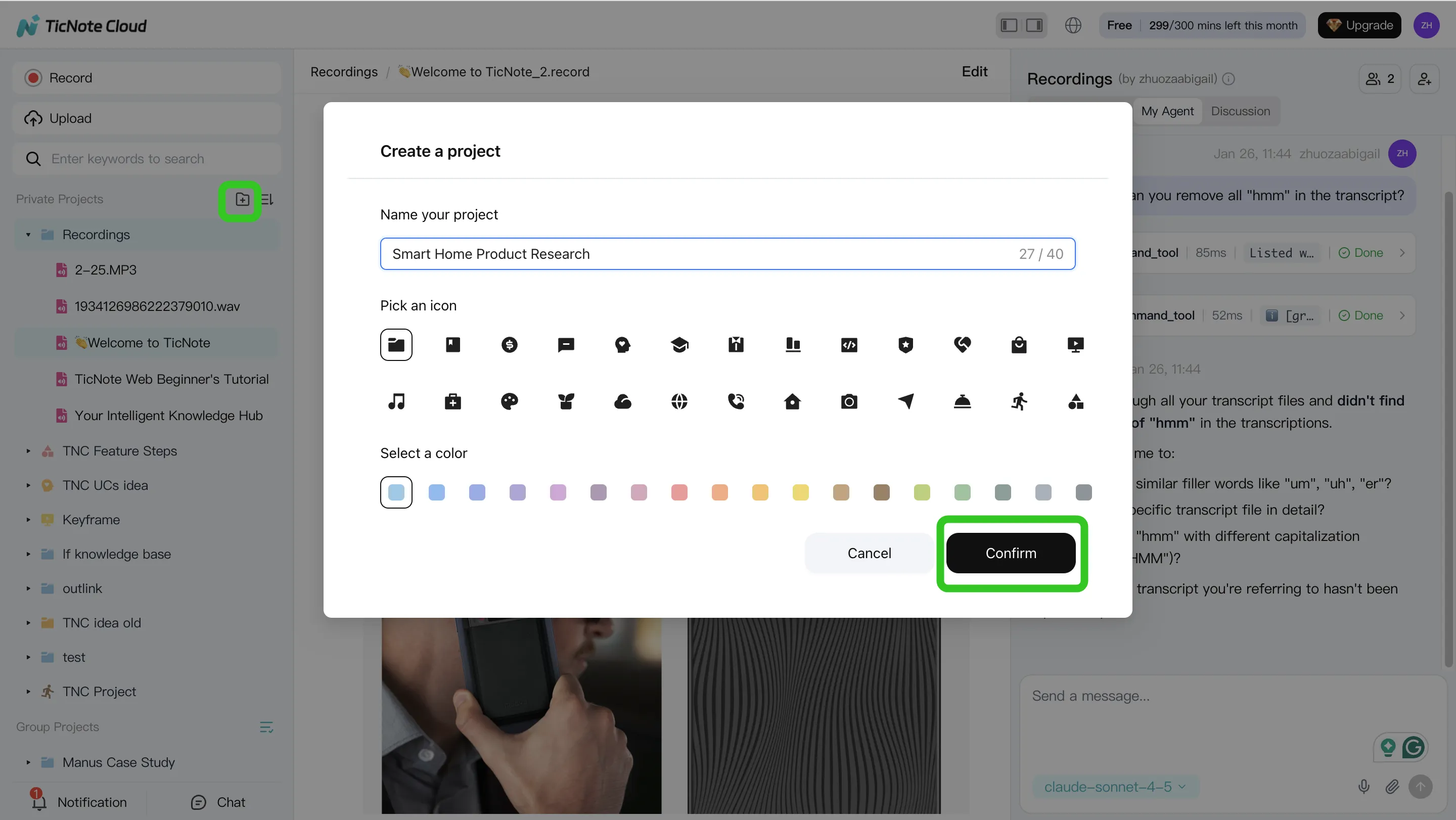
Step 1: Create a Project and add content (so context is always complete)
Start by creating a dedicated Project for your pilot, like "Q2 Lifecycle Agent Pilot". Then add the inputs your agent work depends on: recordings and transcripts, old briefs, brand voice rules, campaign taxonomy notes, and performance recaps.
To reduce mistakes, keep two clear folders:
- Approved policies (what the agent can reuse)
- In-progress drafts (what still needs review)
In the TicNote Cloud web studio, you can upload content two ways: a direct upload in the file area, or an attachment added from the Shadow AI panel and saved into the right folder.
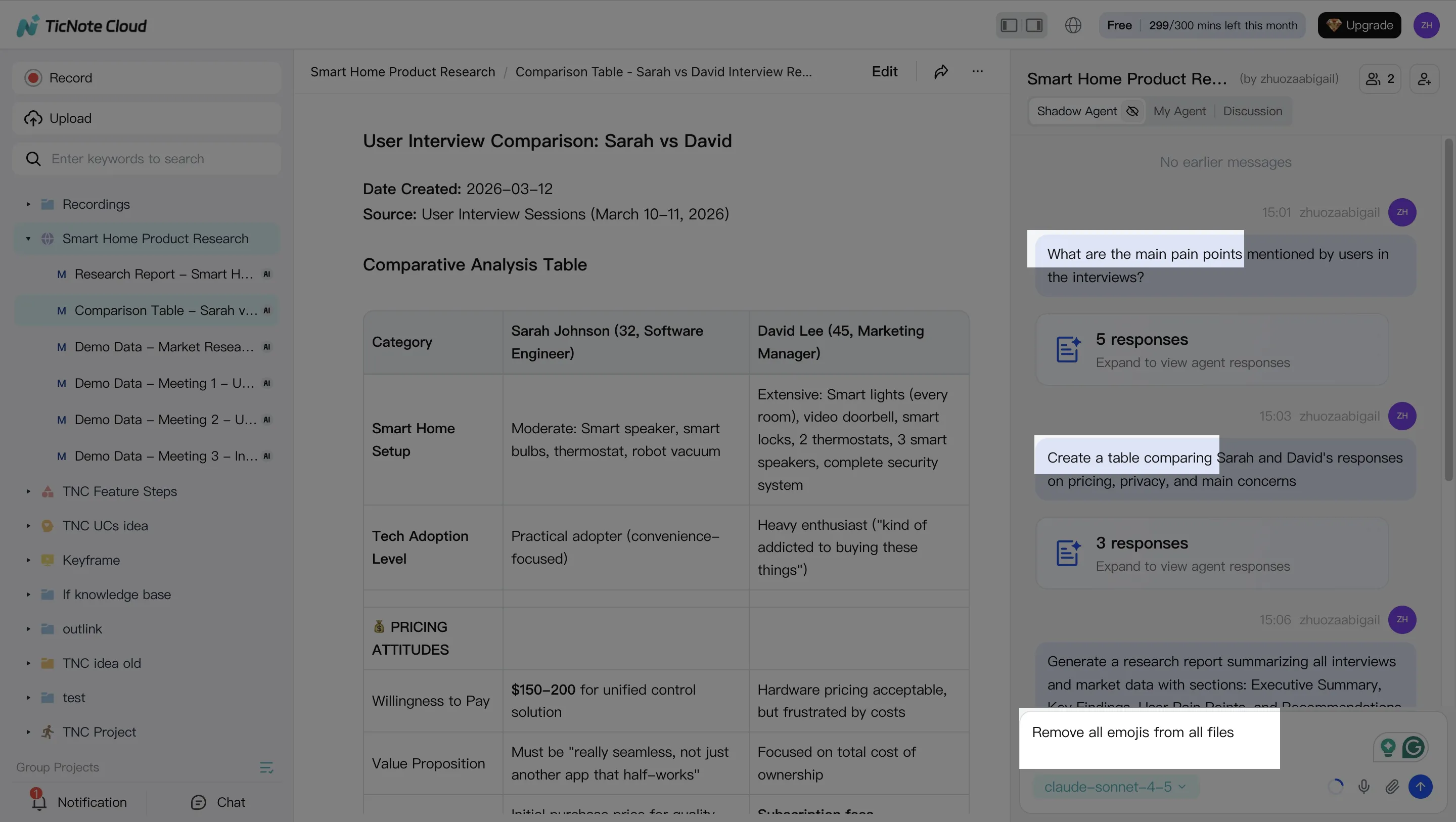
Step 2: Use Shadow AI to search, analyze, edit, and organize content (turn talk into requirements)
Next, use Shadow AI (on the right side) to ask questions grounded in your Project. For example, "What did we decide about target segments?" or "Compare these interviews and pull shared pain points." This keeps requirements tied to real inputs, not memory.
Then convert messy notes into a structured set of fields your team can approve:
- Goal (what success means)
- Constraints (brand, legal, budget)
- Allowed actions (what the agent can do)
- Review gates (what needs approval)
If your teams run different meeting styles, standardize your marketing meeting notes with the same template so handoffs stay clean across ABM, growth, and Marketing Ops.
[[IMG:web26 alt="Use Shadow AI to search, analyze, edit and organize content"]]
Step 3: Generate deliverables with Shadow AI (and keep them editable)
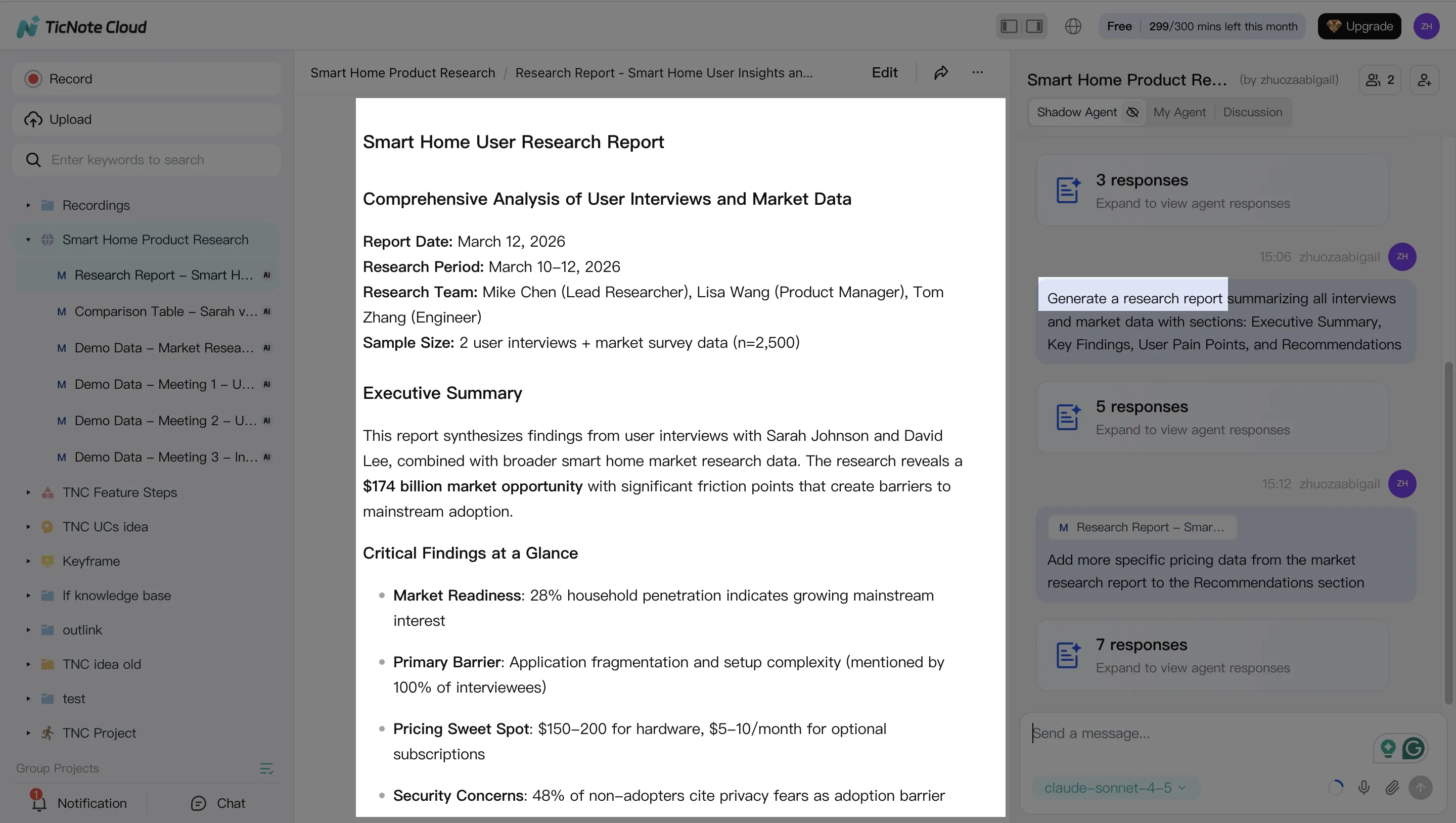
Once your Project has the right context, generate the docs your agent program needs. Create an agent brief, a QA checklist, and an experiment plan as editable files. You can also ship a weekly summary that answers: what changed, why it changed, what to review next, and open risks.
Over time, keep one lightweight "playbook" document that accumulates approved prompts, examples, and outcomes. That's how you avoid repeating the same debates every month.
Step 4: Review, refine, and collaborate (so approvals leave an audit trail)
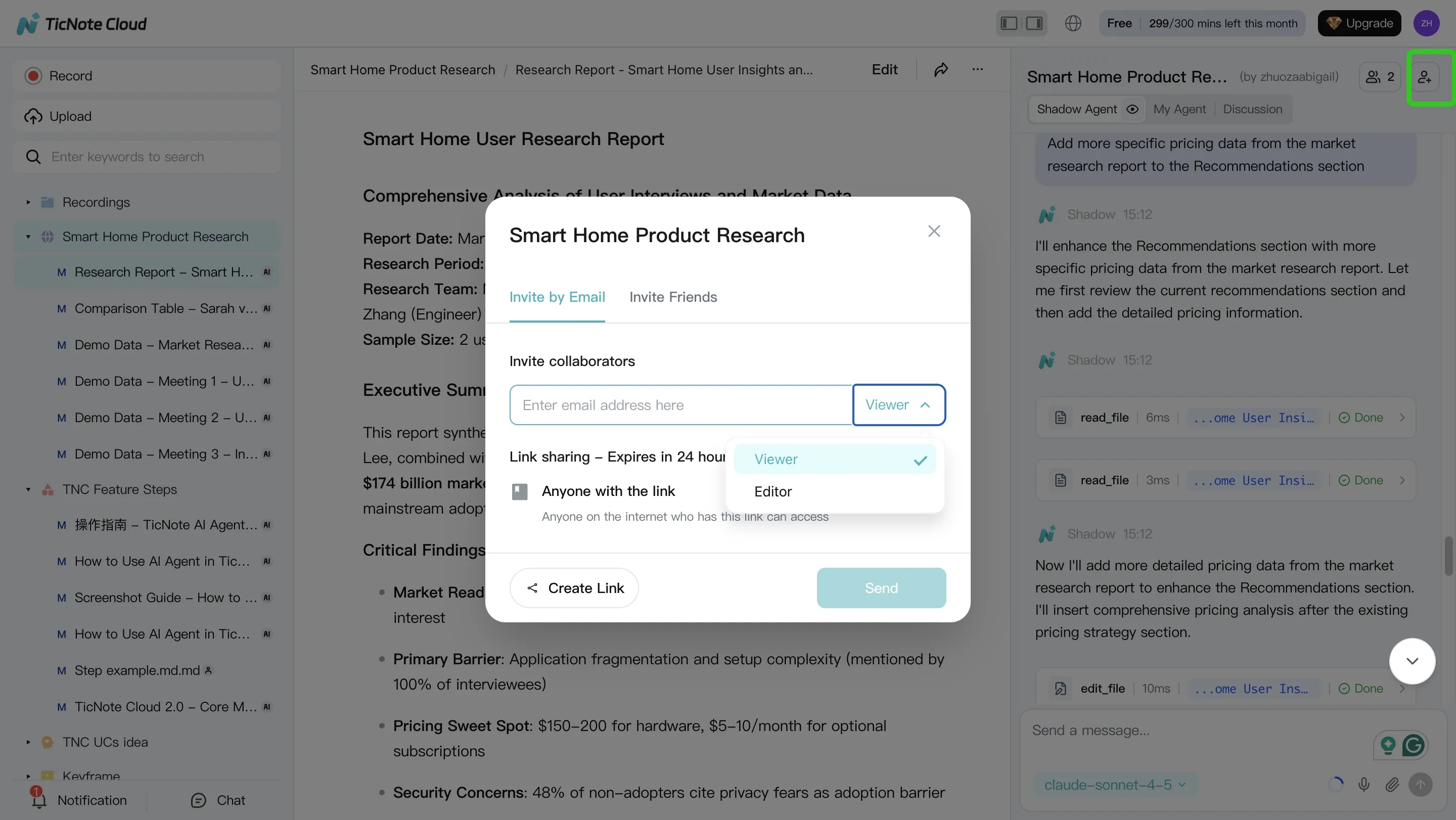
After Shadow generates a deliverable, refine it with targeted edits. When needed, jump back to the source to verify what was said.
Share the Project with role-based access so reviewers can approve or comment. Log approvals and key decisions as dated notes. After each iteration, add a short learning note: what the agent got wrong, which guardrails changed, and which template fields you updated.
Quick mobile app workflow (capture context on the go)
Use the mobile app to open the same Project, then upload or record content when you're away from your desk. Run Shadow Q and A for quick alignment, then generate a short summary your team can review asynchronously.
Try TicNote Cloud for Free and turn meeting transcripts into governed briefs, prompts, and approvals.
What can you do with TicNote Cloud that is exclusive for agent-led marketing operations?
Agent-led marketing breaks when people can't find the last decision. Or they can't explain why it was approved. TicNote Cloud helps you run safer AI agents for marketing by turning messy meetings, briefs, and experiments into a searchable system of record.
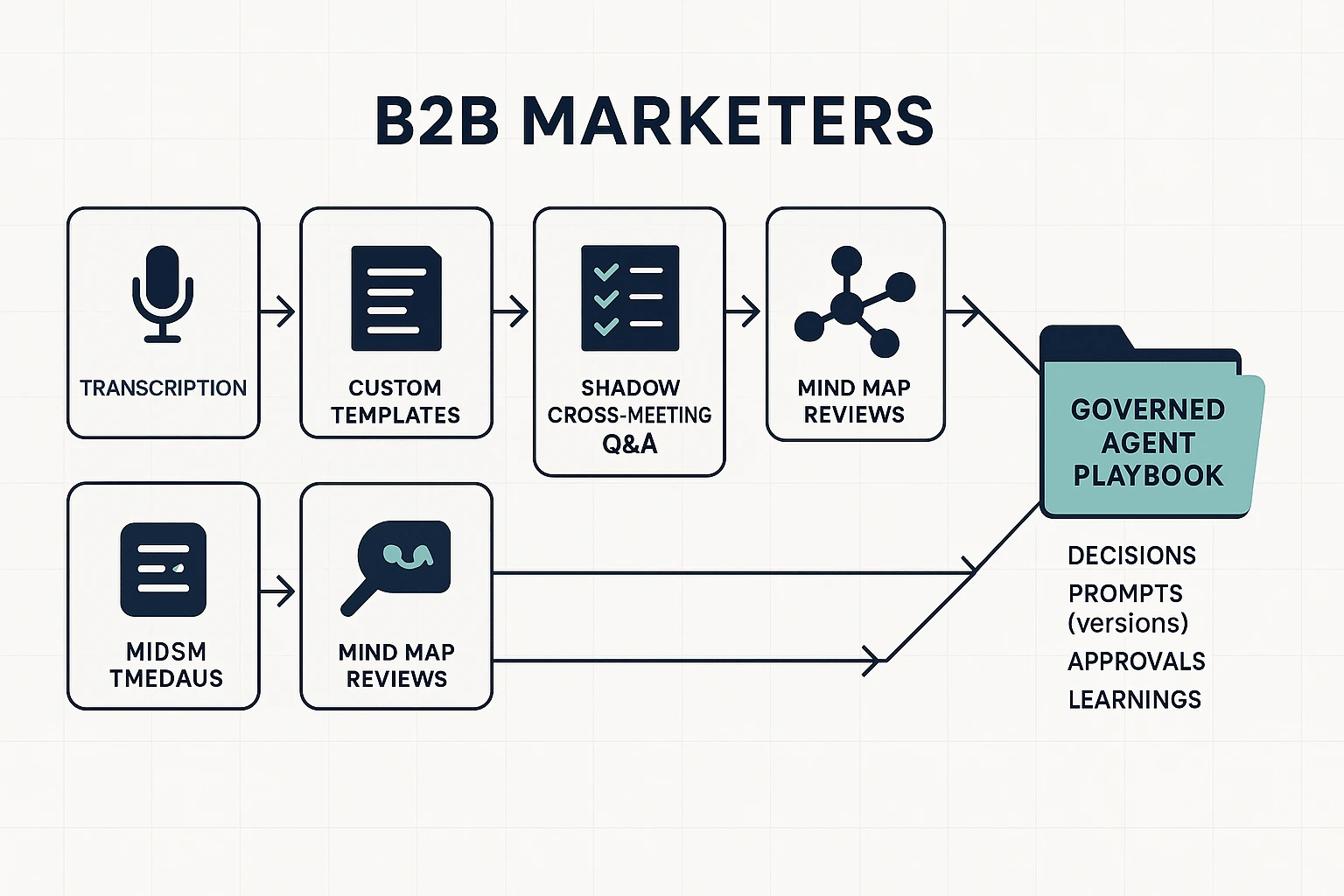
Use Shadow cross-meeting Q&A to answer "what did we decide?"
Shadow can answer questions across files and projects, so you can pull the exact owner, decision, and reason fast. That matters when an agent changes a headline, audience, or bid rule and you need to know if it's allowed.
Use it to stop prompt drift (small changes that add up). Before a new run, ask Shadow:
- What claims did we approve for this product?
- What audience exclusions did Legal require?
- Which UTM rules and naming conventions are required?
Simple weekly rhythm:
- Hold a short marketing ops review.
- Run Shadow cross-meeting Q&A for open questions and past approvals.
- Update your agent guardrails and brief templates.
Standardize agent briefs with custom templates and structured notes
Templates reduce variance, which makes reviews faster. Use an "approval-ready" brief format so your team reviews judgment calls, not formatting.
Include these fixed sections:
- Goal and success metric
- Audience and exclusions
- Constraints (brand voice, legal, pricing, regions)
- Allowed sources and link policy
- Claims policy (what needs proof, what's banned)
- Tracking requirements (UTMs, events, CRM fields)
Review journeys and handoffs with Mind Map
Mind maps help you see the whole workflow at once. Use them to spot gaps like missing owners, missing tracking, or an unclear definition of success.
Quick checks to run in review:
- Does each step have an owner?
- Do experiments have a primary metric?
- Are handoffs clear (content, paid, web, sales)?
Turn calls into a tested playbook with Deep Research
Deep Research converts unstructured notes into reusable assets. You can summarize discovery calls into objections and proof points, draft a stakeholder POV, and keep a living "what worked vs. what didn't" library tied to experiments.
System-of-record checklist:
- Decisions live in one project space, not in DMs
- Prompts and briefs are versioned with dates and owners
- Approvals are logged alongside the final asset and the rationale
- Learnings are tagged to the campaign and experiment ID