Extension
TL;DR: A fast summarizer workflow you can reuse
Try TicNote Cloud when you need to summarize fast: use the 30-second rule of 1 main claim + 3 to 5 key points + the result (so what?), in plain words.
Problem: summaries take too long when you're juggling classes or back-to-back calls. It gets worse when you miss the main point and then you have to redo it. A faster path is to use TicNote Cloud to capture the source, then clean it into a short, defensible summary.
Write only what you can prove the author or speaker said. Skip quotes, side stories, and tiny details. If you can't point to where it appears, cut it.
Quick check before you share: match each point to the source, remove your opinion, and rewrite any phrase that sounds copied.
How to summarize any text in 5 clear steps
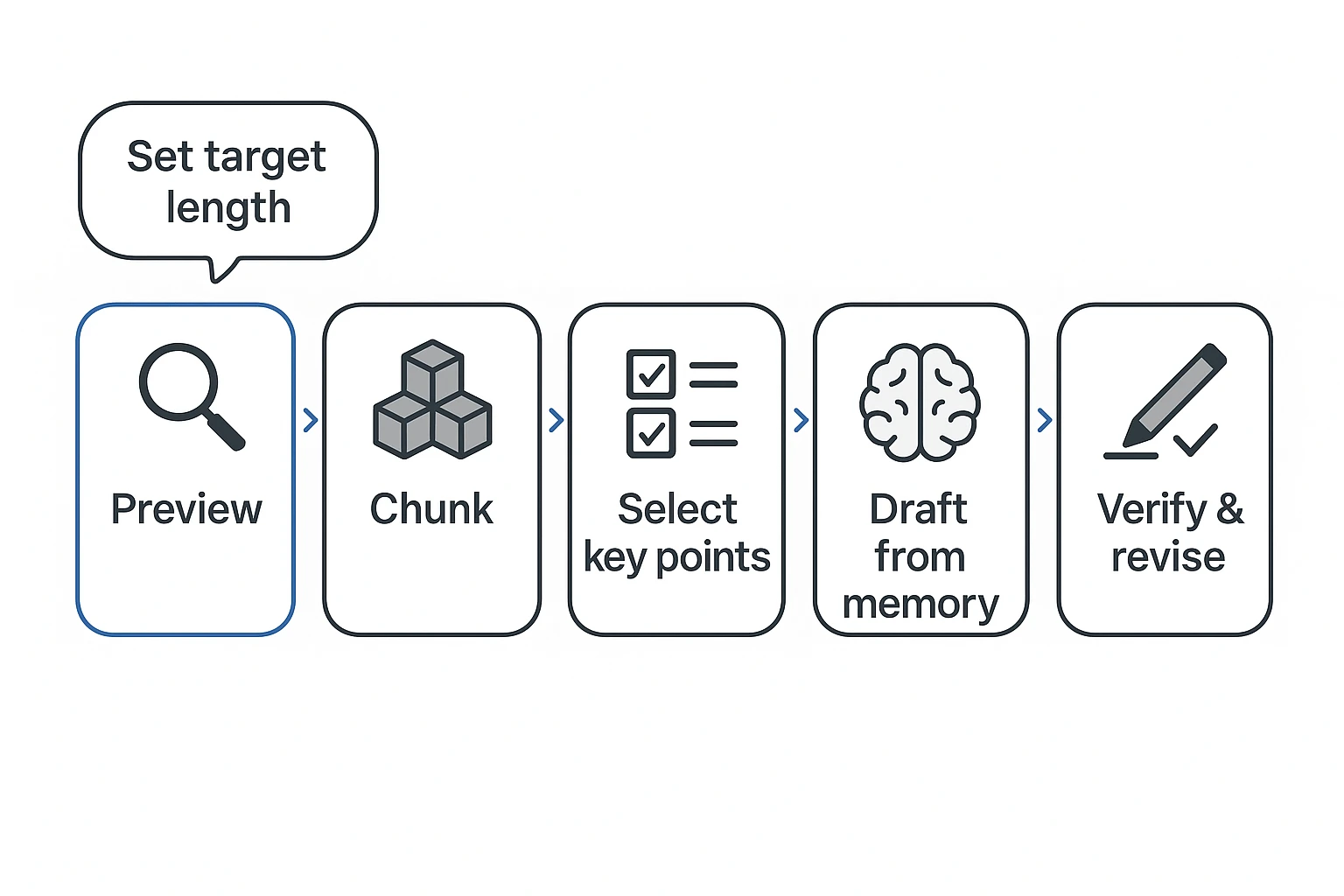
If you want to learn how to summarize faster and with fewer mistakes, use this 5-step loop: preview, chunk, select, draft, verify, then tighten. It works for essays, articles, and research papers because it forces you to decide what matters before you start writing.
Step 1: Preview for purpose, audience, and thesis
Start by scanning, not reading. Your goal is to find the main point and set guardrails.
- Define your purpose: Is this for a class assignment, a literature review, or a meeting recap?
- Name your reader: Your professor, your team, or your future self?
- Set a target length now: 1 sentence, 150 words, or one paragraph.
- Skim for the thesis or main question:
- Title, headings, abstract
- First paragraph (problem and thesis often live here)
- Conclusion (final claim, limits, next steps)
Quick check: If you can't say what the author is trying to do in one line, keep previewing.
Step 2: Chunk the text (headings, themes, or turns)
Most strong summaries have 3 to 7 chunks. Chunks can be:
- Headings or sections
- Themes (A, B, C)
- Argument turns (problem, cause, counterpoint, solution)
- Research flow (question, method, result, meaning)
No headings? Use margin labels.
- For each paragraph, write a 3 to 6 word label.
- Group similar labels.
- Name each group as a chunk.
Example margin labels might look like: "defines issue," "gives example," "main reason," "limits," "what to do next."
Step 3: Pull the key points (what you must keep)
Now choose what survives the cut. Use these selection rules.
Must keep:
- The main claim (thesis)
- The top reasons or evidence types (data, examples, expert views)
- The key result or conclusion
- Limits or implications only if they change meaning
For each chunk, answer:
- What is the point here?
- How does it support the thesis?
- What changed (new claim, result, or decision)?
Fill-in template (use it as a first draft):
"In [Title], [Author] argues that ___. They support this by __, __, and __. They conclude that ___."
Step 4: Write from memory, then verify
Close the source. Draft from your understanding. This helps you avoid patchwriting (copying the source's wording with small swaps).
Then verify line by line:
- No new claims that the source didn't make
- No shifted certainty (suggests vs proves)
- No missing "not," "may," "often," or other hedges
Do a simple claim-to-source check:
- For every sentence in your summary, point to where it appears in the original.
- If you can't point to it, revise or delete.
Step 5: Revise for length, clarity, and neutral tone
Cut words without cutting meaning. Edit in this order:
- Remove examples and side stories first.
- Compress lists (keep categories, not every item).
- Replace long phrases with one verb.
- "makes the claim that" → "claims"
- "is able to" → "can"
Keep tone neutral:
- Prefer "argues," "suggests," "reports," "finds."
- Use "proves" only if the source truly proves.
One-minute final checklist:
- Does the first sentence state the main claim or main result?
- Did I keep only the biggest supports?
- Is every sentence faithful to the original?
- Is the tone neutral and precise?
- Does it fit the target length?
Mini walkthrough 1: A short article
Goal: 150-word class summary.
- Preview: Skim title, intro, conclusion. Write the thesis in 12 words.
- Chunk: Mark 4 turns: problem, cause, proposed fix, expected impact.
- Select: Keep 1 sentence per turn. Drop anecdotes.
- Draft from memory: Write 6 to 8 sentences.
- Verify and revise: Check each sentence against the article. Cut two sentences by merging similar ideas.
Result: A clean paragraph that tracks the article's logic without copying its phrasing.
Mini walkthrough 2: A research paper
Goal: One paragraph for a literature review.
- Preview: Read abstract, then discussion and conclusion. Note the research question.
- Chunk: Use IMRaD style chunks (intro, methods, results, discussion), even if headings differ.
- Select:
- Keep: question, method type (not every step), main result, key limit.
- Drop: brand names of tools, full stats tables, minor secondary findings.
- Draft from memory: Write a tight "question → method → result → meaning" paragraph.
- Verify: Re-check numbers and direction of effects. Keep cautious language if the paper is cautious.
Your summary ends up useful for comparison across studies, not just a reworded abstract.
What should a good summary include (and leave out)?
A good summary is a clean, accurate map of someone else's work. It tells the core point and the key support, with clear attribution. If you're learning how to summarize, this is the part that keeps you accurate and plagiarism-safe.
Include: author, title, main claim, main support, outcome
Use this "must-have" set as your default:
- Author + title: Name the source so readers know what you're summarizing.
- Main claim (thesis): What the author argues, explains, or concludes.
- Main support: The 2 to 4 reasons, themes, or results that carry the claim.
- Outcome: The author's ending, implication, or recommendation.
What that looks like in common sources:
- Argumentative essay: "In Title, Author argues [claim] because [reason 1], [reason 2], and [reason 3]. The author concludes [outcome]."
- Research study: "In Title, Author studies [research question]. Using a [method type, like survey/experiment/observational study], the author finds [key finding] and concludes [so what]."
Tip: Keep verbs like argues, claims, finds, reports. They signal attribution and reduce misrepresentation.
Leave out: examples, quotes, background, and your opinion
Cut these first:
- Color details: anecdotes, scenes, side stories
- Extra examples: even if they're memorable
- Quotes: unless the exact wording is the point
- Background setup: long history, definitions used only to frame the topic
- Non-central stats: numbers that don't change the main takeaway
- Your take: praise, criticism, agreement, or advice
A summary reports. A response evaluates. If you add "I think" or "This is wrong," you've switched tasks.
Bad vs good (opinion sneaks in):
- Bad: "Lopez proves remote work is better, and her evidence is convincing."
- Good: "Lopez argues remote work improves productivity, citing fewer interruptions and flexible scheduling."
A simple finished-summary checklist (10 items)
Use this before you submit:
- I named the author and title.
- I used clear attribution verbs (argues/finds/reports).
- I stated the main claim in one plain sentence.
- I included only the main supports (not side points).
- I captured the ending (conclusion, result, or recommendation).
- I didn't add any new claims or facts.
- I didn't cherry-pick support that changes the meaning.
- I left out quotes, unless essential.
- My sentences are short and easy to read.
- The wording is mine, not the source's phrasing.
Which summary format do you need (1 sentence, 150 words, paragraph, executive summary)?
The "right" summary length depends on what your reader must do next. A study buddy needs the key point fast. A manager needs a decision. A professor may want methods and limits. So pick the format first, then cut with purpose.
A cut-first table: what to remove when you run out of space
Use this as a trim guide when your draft is too long. Keep what your reader needs to understand the main point and why it matters.
| Format | What to cut first (in order) | What must stay |
| 1 sentence | examples and quotes → minor supports → background/context | main claim or finding + outcome (so what) |
| ~50 words | examples → extra supports → side issues → background | claim + 2 key supports (or method type) + result |
| ~150 words | examples → small details → long background → extra limitations | citation lead-in (if needed) + claim/question + 2–3 supports or method type + conclusion |
| 1 paragraph | examples → extra background → deep methods detail → extra implications | claim + 3–5 main points + outcome + 1 key context line |
| Executive summary | story-like background → technical detail → long literature context | purpose + key points + recommendation or decision + risks/next steps |
1-sentence summary formula
Use this when you need a quick, accurate "what it says" line.
Formula: "[Author] argues/claims/suggests/finds that ___ because ___, leading to ___."
Pick one verb that matches certainty:
- "finds" for data-backed results
- "suggests" for cautious claims
- "argues" for opinion or interpretation
Examples (topic-agnostic):
- "The author argues that clear goals improve learning because they guide attention, leading to better recall."
- "The study finds that reminders reduce missed payments because they prompt action, leading to higher on-time rates."
- "The speaker suggests that stress harms focus because it drains working memory, leading to more errors."
150-word academic summary structure
When you have a small paragraph to work with, follow this order:
- Citation lead-in (if required): author, title, year.
- Main claim or research question.
- 2 to 3 supports, or the method type (survey, experiment, case study).
- Key result and conclusion.
- Limitation or implication only if it's central.
This structure helps you stay objective. It also keeps you from adding your own opinion.
Executive summary vs abstract vs annotation (plain definitions)
Executive summary: A decision tool. It tells busy readers what to do, and why.
Abstract: A research snapshot. It tells researchers what was studied, how, and what was found.
Annotation: A reading-list note. It briefly describes the source and how you might use it.
Same source, different outputs:
- Abstract: question, method, results, conclusion.
- Executive summary: problem, options, recommendation, impact, next steps.
- Annotation: topic, angle, credibility, best use.
Quick decision guide:
- If your reader needs to decide, write an executive summary.
- If your reader needs to cite or compare studies, write an abstract-style summary.
- If your reader needs to remember what to read later, write an annotation.
- If your reader just needs the point fast, use a 1-sentence or 150-word version.
How do you summarize without plagiarizing?
To summarize without plagiarizing, you need to restate the ideas in a new structure, in your own words, and cite the source. The biggest risk is writing a "summary" that still follows the source line by line. A safe approach is: read, pause, write from memory, then check.
Paraphrase vs patchwriting (how to spot the difference)
Patchwriting is paraphrasing that stays too close to the original sentence shape. It may swap a few words, but the bones of the sentence stay the same.
Use these quick cues to catch it:
- Same word order: your sentence marches in the same sequence as the source.
- Synonym swapping: you replaced words like "important" with "crucial," but kept the same structure.
- Copied technical phrases without quotes: you lifted a unique phrase (or a coined term) and didn't quote it.
One simple fix: write from memory. After reading, look away and explain the point like you're telling a friend. Then verify facts against the source.
Bad vs good example: too close to the source
Original passage (made-up): "Remote work can raise output, but only when teams set clear goals and protect focus time. Without those supports, employees often work longer hours and report more burnout."
Too close (patchwriting): "Remote work can increase productivity, but only if teams create clear goals and protect focused time. Without these supports, workers often put in longer hours and report higher burnout."
Corrected summary (plagiarism-safe): "Remote work helps performance when a team manages it well. The author links results to two conditions: clear goals and time to concentrate. If those are missing, the tradeoff is longer days and more burnout."
What changed:
- Structure: it stops mirroring the original sentence order.
- Verbs: "can raise output" becomes "helps performance" and "links results."
- Grouping of ideas: conditions are grouped together, then the downside is stated as a separate consequence.
When to quote instead of summarize
Quote when the exact words matter, such as:
- Definitions (a precise meaning)
- Legal or policy language (exact wording can change obligations)
- Memorable phrasing (a line you're analyzing)
- Disputed claims (you need the author's exact statement)
Keep quotes short, use quotation marks, and cite them.
Citation basics (in-text + reference list)
Rule of thumb: if the idea or fact isn't yours, cite it, even if you rewrote it.
- In-text: (Author, Year) or [Author Year] or whatever your style requires.
- Reference entry: Author, title, where it was published, date, and a locator (URL, DOI, or page range).
Follow your instructor's style guide or your company's standard.
Integrity workflow checklist: Draft → compare to source → rewrite if too close → cite → final check.
How do you summarize non-prose sources like lectures, videos, or podcasts?
To summarize non-prose sources, treat spoken content like a clear path: what it's about, what it argues, how it supports that, and what you should do with it. Even if it's full of stories, you can still capture the point. Your job is to turn "what happened" into "what that proves."
Capture the backbone: topic, claim, reasons, examples, takeaways
Most lectures and podcasts follow an argument or a sequence. Listen for these parts:
- Topic: What's the session about?
- Main point (claim): What does the speaker want you to believe?
- Reasons: Why do they think that's true?
- Examples: What story, case, or data supports it?
- Takeaway: What should the listener remember or do?
When a speaker tells a long story, translate it into one line: "This story shows that ____." That keeps your summary focused and neutral.
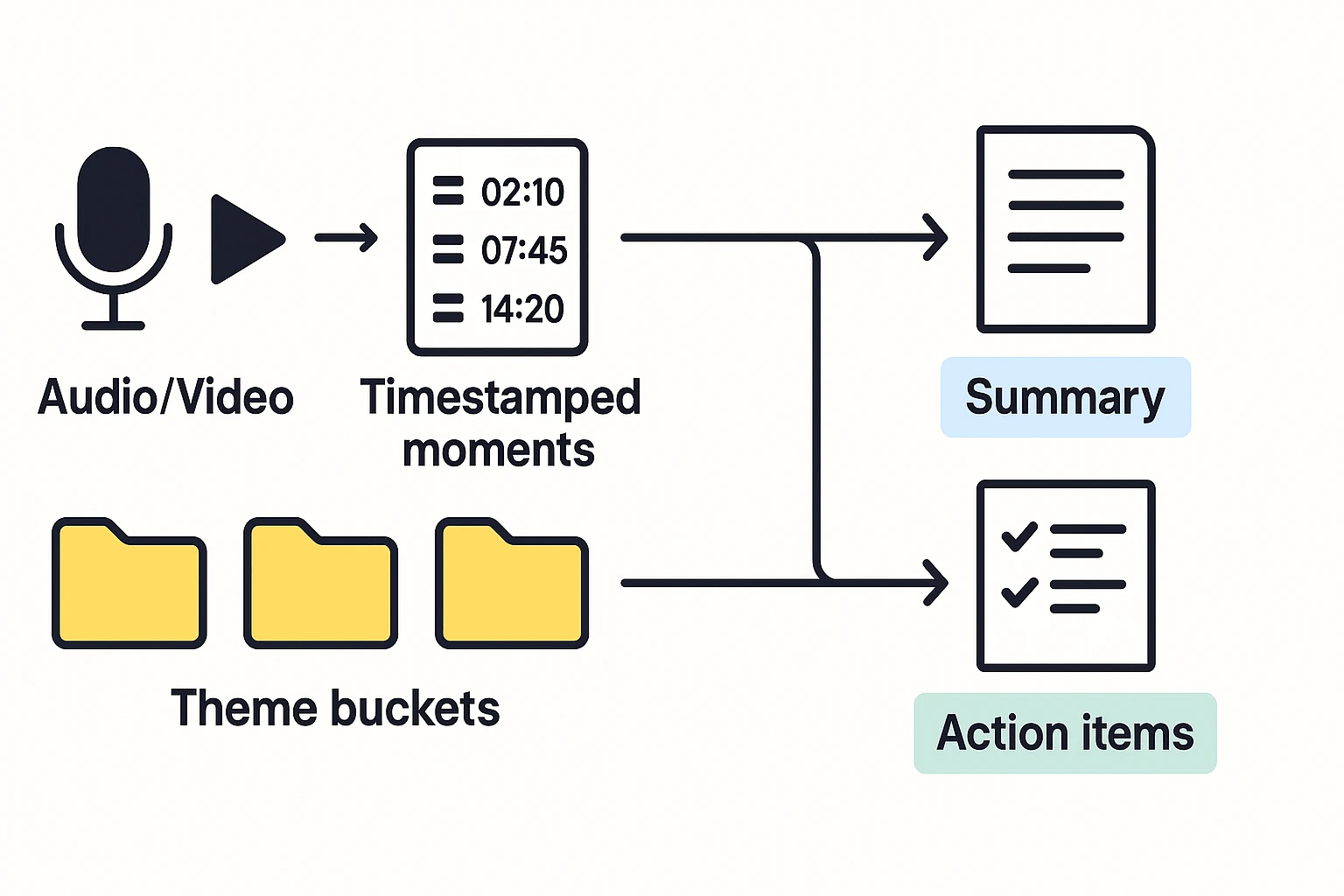
Time-stamp method: turning moments into key points
This method works even without a full transcript.
- Mark timestamps when the topic changes.
- Write a one-line label for each moment (8 to 12 words).
- Group labels into 3 to 6 themes (the "buckets").
- Write one short paragraph that covers the themes in order.
Example moment labels:
- 02:10 Defines the key term in plain language
- 07:45 Gives a real-world example and why it matters
- 14:20 Lists limits and common mistakes
Handling multiple speakers and action items
For multi-speaker content, keep attribution simple and factual: "Speaker A proposes… Speaker B objects… the group decides…". Don't blend opinions into the summary.
Separate output into two labeled blocks so readers don't confuse what was said with what must happen next:
- Summary (neutral): What was discussed and concluded.
- Actions (doable): What someone needs to do.
Mini template:
- Decisions:
- Actions (owner + due date):
- Open questions:
Image idea: Audio/Video → Timestamped moments → Theme buckets → Summary + Action items (separated lanes)
How do summaries change by discipline (humanities vs STEM vs business)?
A strong summary keeps the same core idea, but it changes what it spotlights. In humanities, you track claims and meaning. In STEM, you report the research logic and results. In business, you drive to a decision and next steps. If you want to learn how to summarize across fields, start by asking: "What would my reader do with this?"
Humanities: claims, themes, and evidence choices
In humanities, lead with the author's main claim and the key themes. Then show how the author supports that reading.
Keep your focus on:
- The central argument or interpretation
- 2 to 3 themes or lenses (like power, identity, causation)
- Evidence types (novels, court cases, historical records) and why they matter
Skip long method detail unless the method is the point (for example, "close reading" or "archival analysis").
STEM: question, method, key results, limits
In STEM summaries, readers expect the study shape. Use a tight structure: question, approach, results, and what they mean.
A simple STEM summary frame:
- Research question or hypothesis
- Method type (experiment, survey, model) plus 1 key detail
- Key results (direction and meaning, not every number)
- Limits and implications (what might change the conclusion)
How much method to keep depends on length. One sentence: method type only. 150 words: add the sample, setting, or main metric. Executive style: add constraints and confidence limits.
Business: decision, rationale, risks, next steps
Business summaries are action-first. Your reader wants the call, not the backstory.
Include:
- The decision or problem
- Rationale and trade-offs
- Risks and assumptions
- Owners, deadlines, and next steps
Keep numbers only if they change the decision (cost, revenue, timing, capacity). Everything else can go.
One core idea, three reframes (same source)
Core idea: "Remote work improved output but raised onboarding issues."
- Humanities: The author argues remote work reshapes team identity, using interviews as evidence.
- STEM: A survey study finds output rose while onboarding scores fell; limits include self-report bias.
- Business: Keep remote work, fix onboarding; assign an owner and deadline, and track retention.
How to summarize meetings and documents faster (step-by-step workflow)
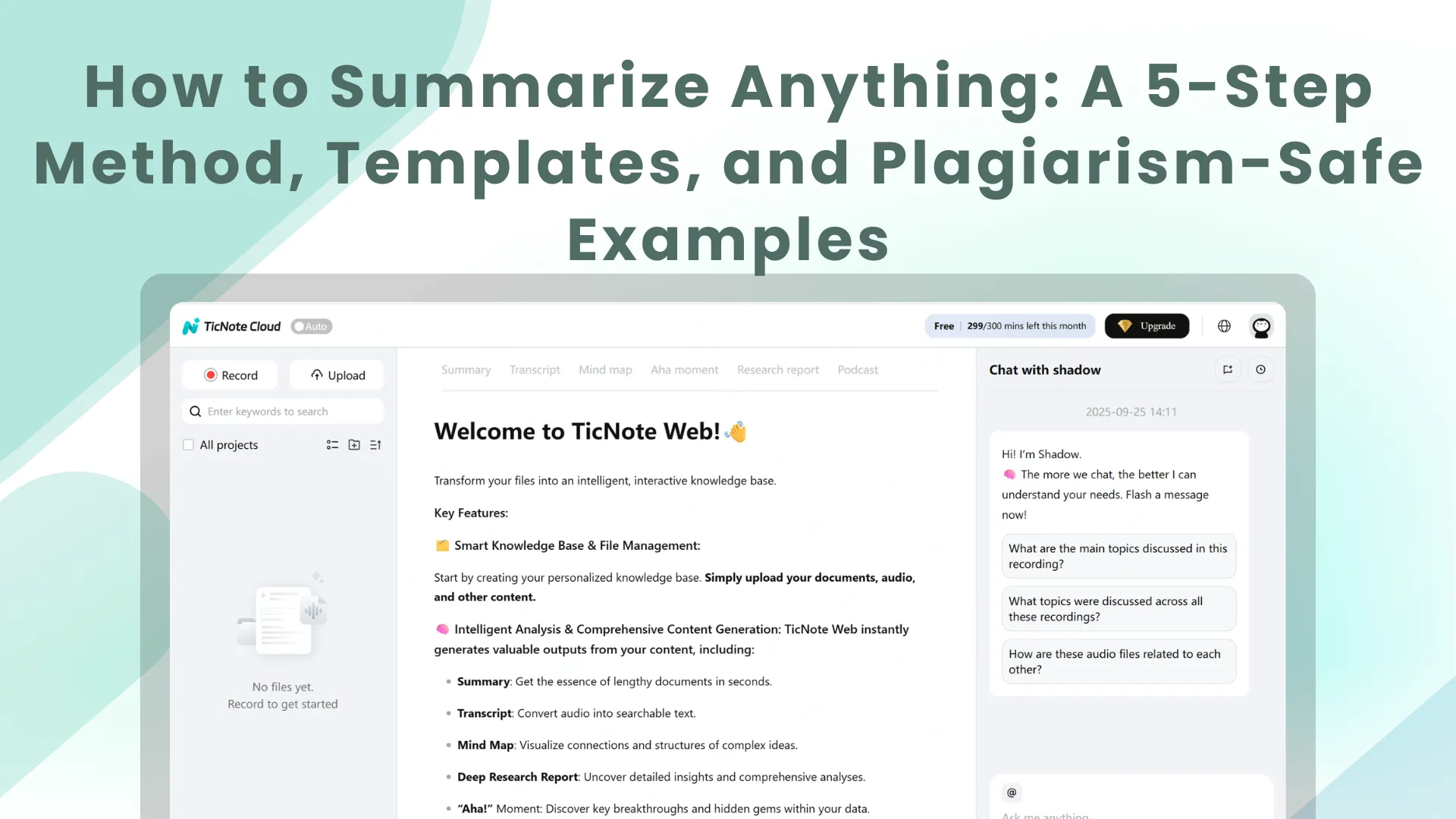
When you need a summary fast, aim for an editable first draft you can verify. The point isn't to accept the first output. It's to get to "good and checkable" in minutes, then fix facts, names, and next steps. This workflow uses TicNote Cloud as the example tool, but the same steps work in any setup.
Web workflow: upload, draft, verify, export
- Upload your source file (and keep it organized)
In the TicNote Cloud web studio, start by creating a project for each class, client, or team. Then click Upload to add your source. This can be audio, video, PDFs, or Word docs. If it's audio or video, you can also generate a transcript first, which makes reviewing much easier.
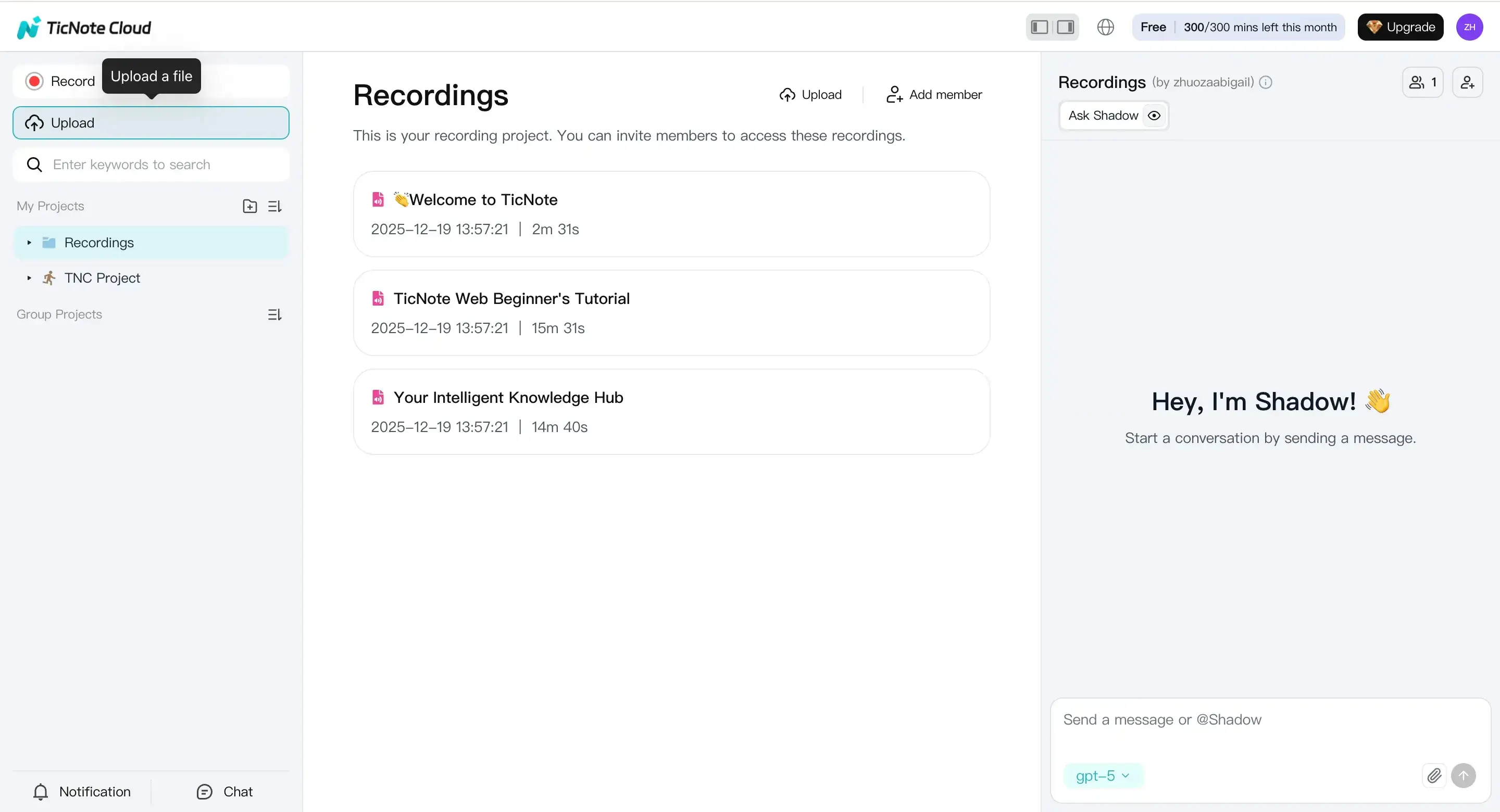
Tip: use clear project names like "BIO 101 Lectures" or "Client A Weekly Calls." It saves time later when you need to confirm what was said.
- Generate a first-pass summary, then edit what matters
Open the Summary tab to get the first draft. Treat it like a rough outline that needs human checks. Your first edit pass should focus on three things:
- Main claim or decision: what was the point of the doc or meeting?
- Speaker attribution: who promised what, and who disagreed?
- Action items: make tasks specific (owner + due date if known).
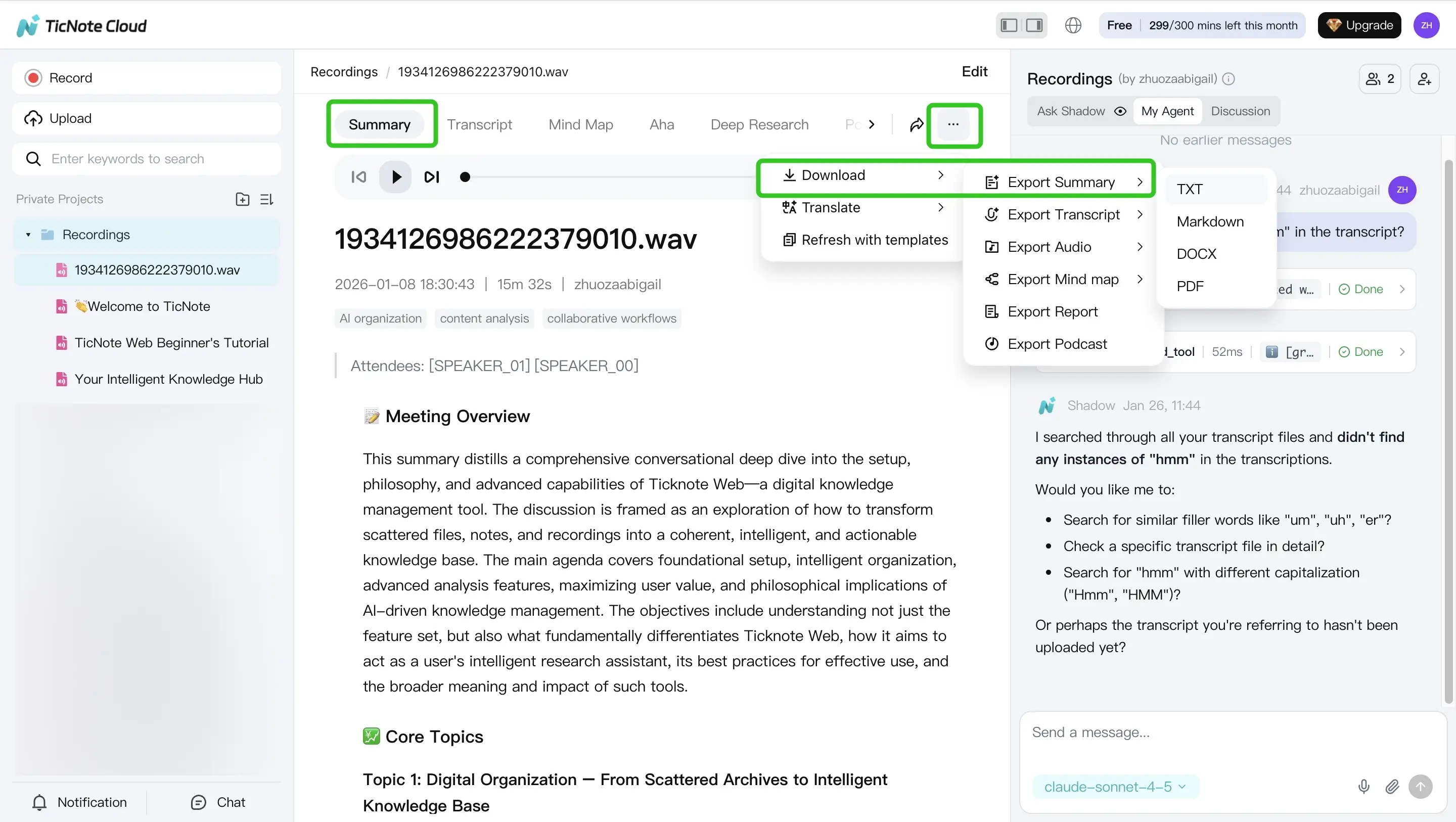
Quick check: read the summary once while skimming the transcript or doc headings. Fix any wrong numbers, names, or "almost right" phrasing.
- Export or reuse the summary in the right format
Once the summary is accurate, export it in the format you need (Markdown, DOCX, or PDF). Save a "final" version for sharing, and keep the draft inside your project so you can update it after follow-ups.
App workflow (short version): do it from your phone
If you're summarizing on the go, the TicNote mobile app is the quick path.
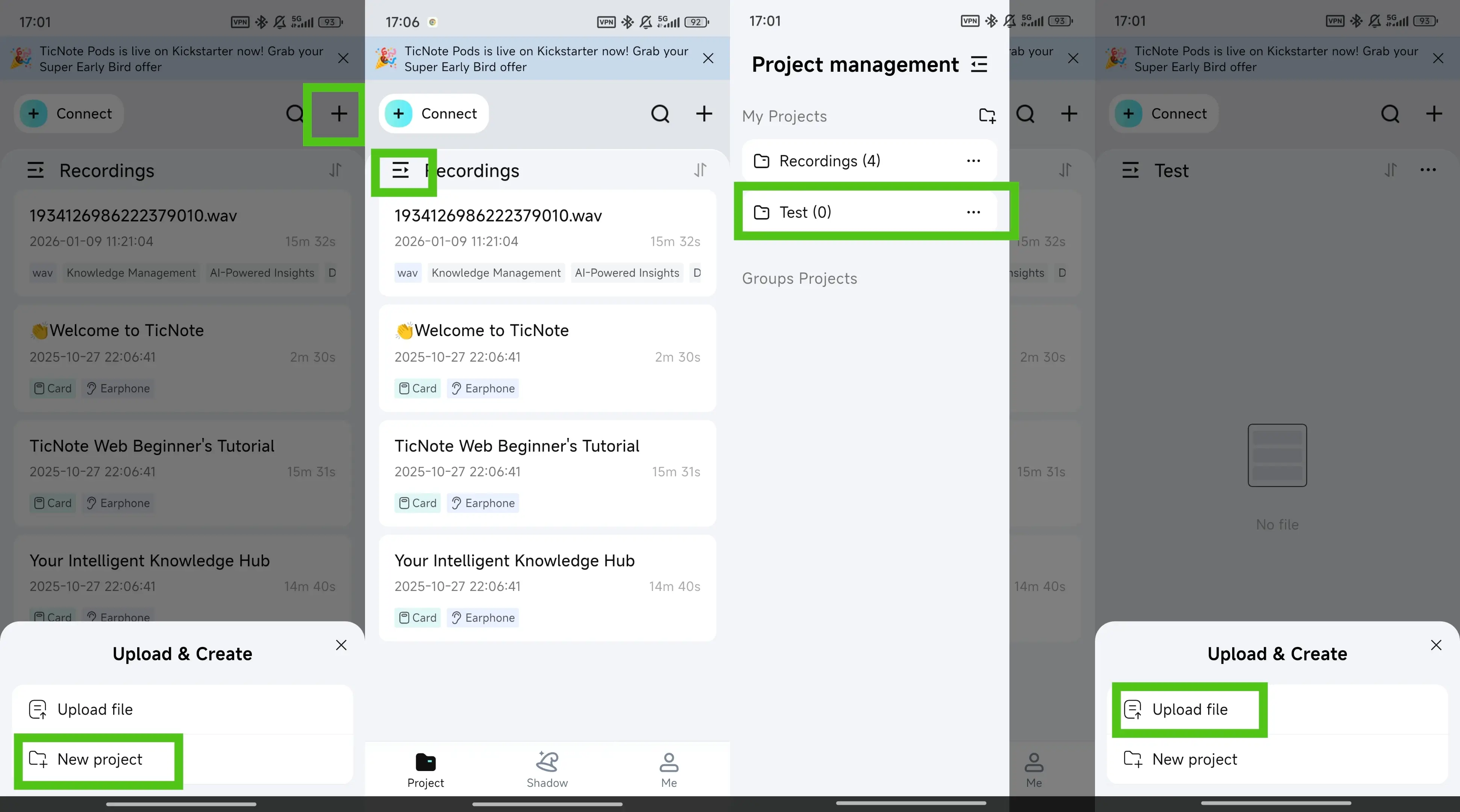
- Upload from your phone
Tap the add button to upload a file into a project. You can create a new project or use an existing one. It supports common doc types (like PDFs and Word files) plus audio and video.
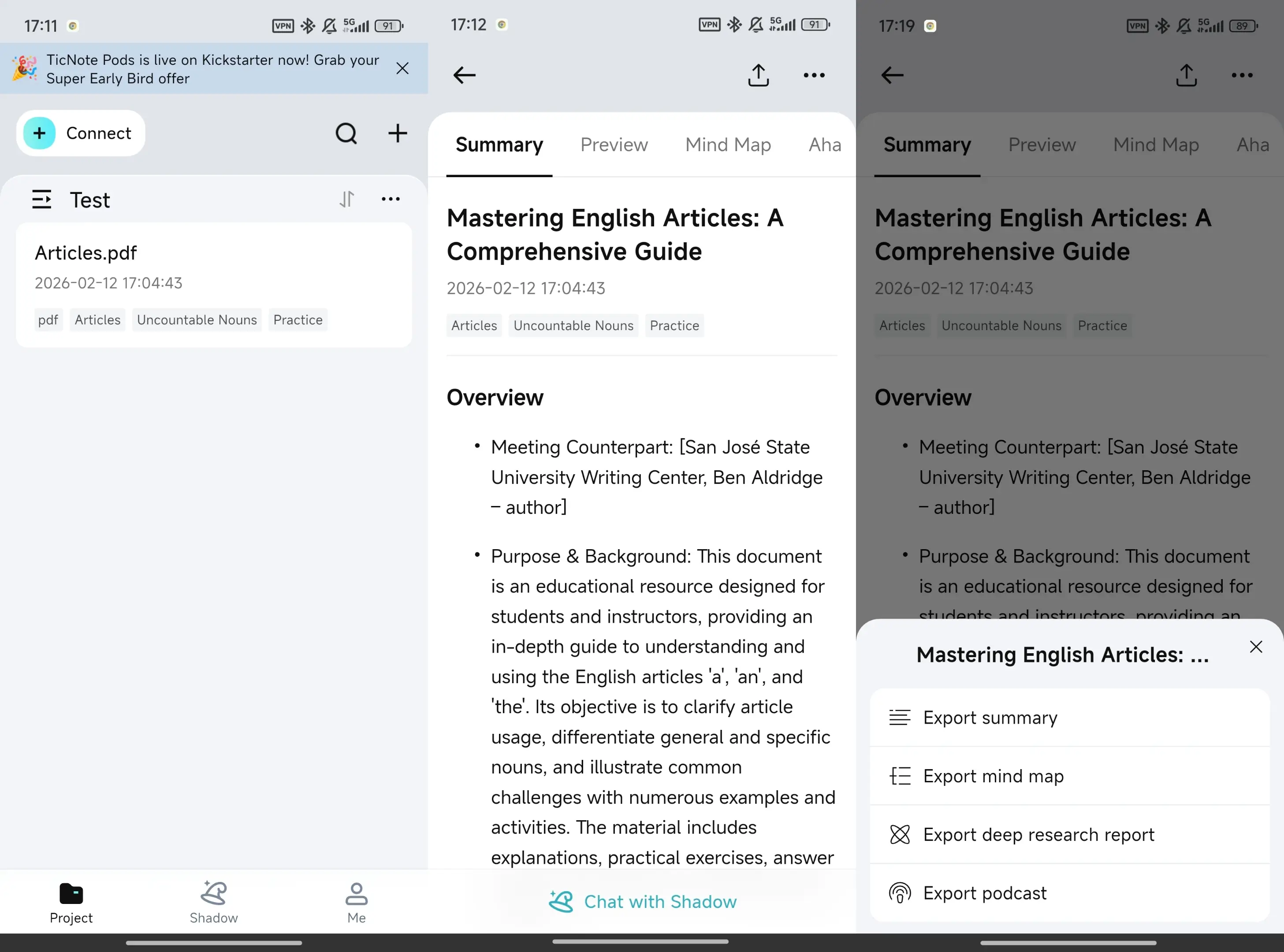
- Generate the summary, make quick edits, and export
Tap Summary, edit key facts and action items, then export from the three-dots menu. Choose your format and share it where it needs to go.
Academic integrity note (don't skip this)
AI summaries are drafts, not sources. You're responsible for checking accuracy, adding citations when you quote or paraphrase, and using your own original wording. If something looks unclear, confirm it in the transcript, recording, or original document before you submit or send it.
Generate your first AI summary in minutes
What summarizing features are exclusive to TicNote Cloud (and hard to replace)?
Most tools can shorten text. What's harder is building summaries that stay consistent across many sources. TicNote Cloud is built for that workflow. It helps you summarize notes, calls, and docs without losing key decisions, context, or open questions. If you're still comparing options, this quick explainer on how AI summarizers work and how to trust them will help.
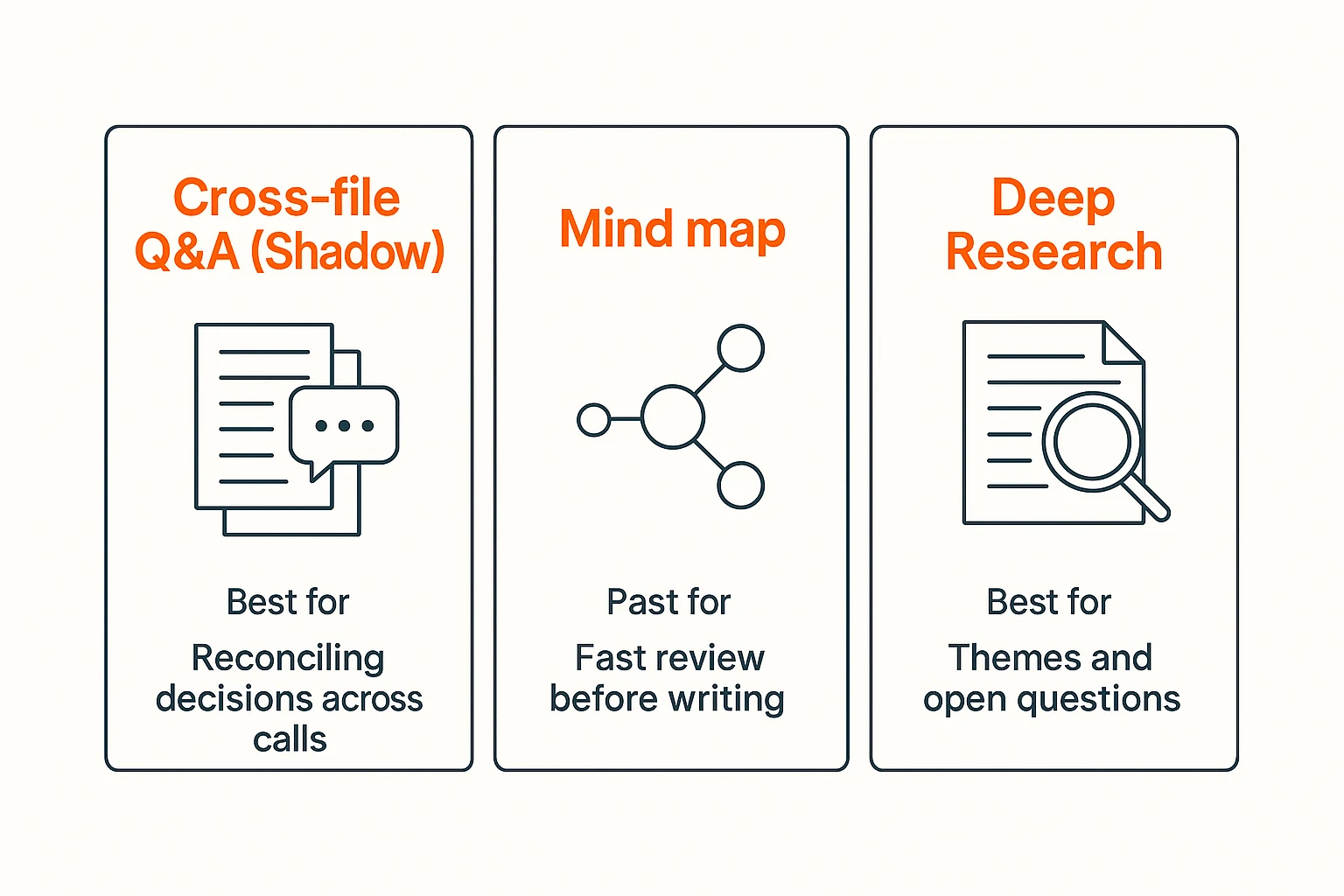
Cross-file Q&A across meetings and docs (Shadow)
When you summarize a month of meetings, contradictions sneak in. One call says "ship in March." Another says "pause until legal approves." With Shadow, you can ask across files and get answers grounded in your own workspace.
Try questions like:
- "What did we decide about X across all calls this month?"
- "Which action items mention the onboarding bug?"
- "Where did we reject option B, and why?"
That makes your final summary cleaner and less likely to conflict.
Mind map summaries for quick review
Mind maps help when you need to see structure fast. They're great for exam review, project handoffs, or a long lecture.
A simple workflow:
- Generate a mind map from the source.
- Use the main branches as your outline.
- Turn each branch into 1 to 2 plain sentences.
- Combine and smooth into one paragraph summary.
Deep Research reports from your materials
When you have many docs, "summary" can mean "find patterns." Deep Research reports help pull themes, agreement and disagreement, and unanswered questions from what you uploaded. This is useful for literature reviews, project discovery, and stakeholder alignment.
No-bot recording options for policy-friendly teams
Some teams can't invite meeting bots. With TicNote Cloud, you can capture audio with no bot joining the call. That makes it easier to use in stricter client or internal settings.