Extension
TL;DR: Best Jamie AI alternatives in 2026 (quick picks by use case)
If you're evaluating a jamie ai alternative, Try TicNote Cloud for Free when you want bot-free capture, editable transcripts, Project-based reuse, and one-click AI deliverables (reports, decks, mind maps, podcasts) from meetings and files.
Meetings pile up fast. Notes get split across docs, and action items vanish. A Project workspace fixes that: TicNote Cloud keeps source truth, lets you edit the transcript, and turns multiple calls into usable outputs.
- Best for bot-free capture + editable transcripts + deliverables: TicNote Cloud
- Best for sales teams needing CRM-friendly call notes: Fireflies.ai
- Best for fast, live captions during meetings: Otter.ai
- Best for heavy multi-language meeting work: Zoom AI Companion
- Best for org-wide meeting libraries and summaries: Microsoft Teams Copilot
- Best for conversation intelligence and coaching: Gong
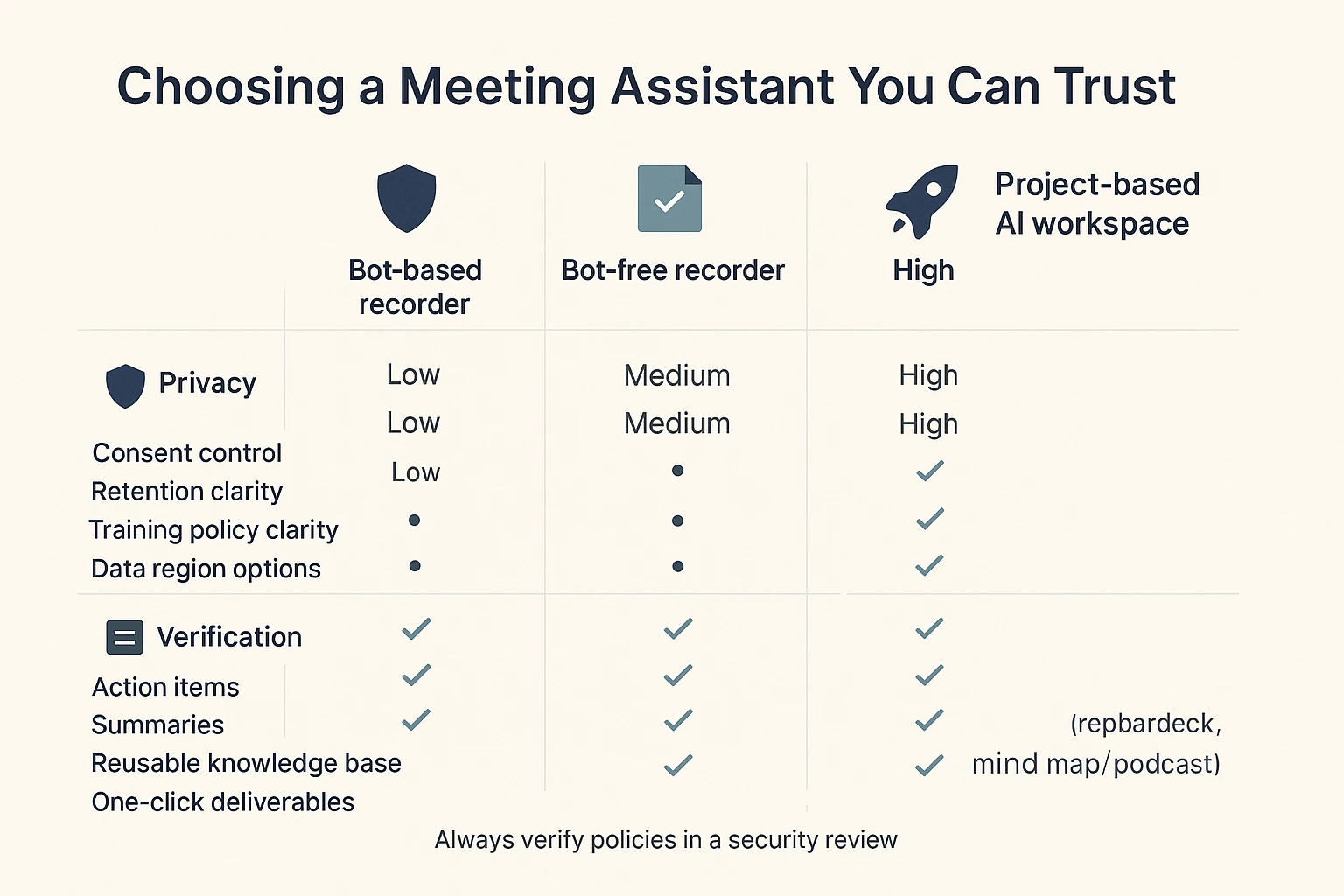
Buyer note: Bot-free doesn't mean compliant by default—confirm consent rules, retention, and your data region.
What should a Jamie AI alternative do better (and what trade-offs matter)?
A strong Jamie AI alternative should do more than write a cleaner summary. It should help you verify what was said, protect sensitive data, and push meeting content into real work outputs (tasks, docs, CRM updates). In other words: evidence first, workflow second, and privacy always.
Playback and verification (don't skip this)
Playback (audio or video) is your safety net. It lets you confirm quotes, resolve "who said what," and correct the small errors that AI transcription still makes. This matters most for legal, HR, finance, and customer commitments, where one wrong line can create risk.
Trade-off: playback raises sensitivity. Storing recordings increases breach impact and creates retention questions. If a tool keeps audio for 30 days vs 365 days, that's a big difference in exposure. Treat retention controls as a buying requirement, not a settings footnote.
Bot-free vs bot-based capture (bot-free meeting recorder)
Bot-based recorders work by joining the call as a participant. Bot-free tools record locally or through a device/app flow, without an extra "person" entering the meeting.
Practical trade-offs you'll feel:
- Consent and visibility: bots can be obvious (good for signaling), but can also trigger objections.
- Platform restrictions: some orgs block third-party bots by policy.
- Reliability: bot access can fail if the invite, waiting room, or permissions break.
- Admin control: "bot-free" can reduce third-party presence, but you still need clear controls for who can record and where data goes.
Real-time vs post-meeting
Real-time transcription means you see words appear live. Post-meeting processing means you record first, then get the transcript and summary after.
Live helps when speed matters: accessibility needs, fast decisions, and shared understanding during a messy call. Post-meeting often wins on focus and quality. People stay present, and the assistant can spend more compute time cleaning text, labeling speakers, and producing structured outputs.
In-person and offline needs
If you do interviews, workshops, or on-site client meetings, "online-only" breaks fast. Here, offline usually means "record now, transcribe later" once you're back online. True on-device transcription is different: it processes without the cloud, which can reduce risk but may limit accuracy, languages, and features.
Exports and downstream workflows (where notes become work)
Summaries are nice. Exports are what make the tool stick.
Minimum outputs to demand:
- Full transcript with timestamps
- Speaker labels and searchable highlights
- Action items and decisions (separated, not mixed)
- Clips or shareable moments (when supported)
- Structured fields you can map into other systems
Typical destinations include Google Docs or Notion for writing, Jira/Linear/Asana for execution, Slack for team broadcast, and HubSpot/Salesforce for revenue workflows. If you care about reuse across many meetings, look for a project-based knowledge approach—this is the difference between "one meeting, one note" and a cumulative asset.
Privacy basics in plain terms (what to ask every vendor)
Here's the short checklist most evaluators use:
- Data retention: How long are audio, transcripts, and summaries stored?
- Training policy: Is your data used to train models (yes/no)?
- Data region: Where is data stored and processed (EU, US, other)?
- Encryption: Is data encrypted in transit and at rest?
- Access controls: Roles, permissions, and sharing limits.
- Audit logs: Can admins see who accessed, exported, or shared content?
Next: the rubric we use to score every Jamie AI alternative consistently.
How we evaluated each Jamie alternative (simple, repeatable rubric)
To compare any jamie ai alternative fairly, we used the same inputs, the same checks, and the same scoring rules. The goal wasn't to "crown" a winner in a lab. It was to mirror what real teams need: reliable notes, clean handoffs, and outputs you can ship.
Test setup (3 meeting types that stress real workflows)
We ran each tool through three common meeting shapes:
- 1:1 interview (30–45 min): open questions, long answers, and lots of context.
- Project meeting (45–60 min, 5–8 people): fast turn-taking, overlapping talk, and decisions buried in discussion.
- Sales/demo call (30–45 min): product terms, names, numbers, and "next step" commitments.
To reflect real life, we included crosstalk (2 people speaking at once), keyboard noise, and mixed accents (at least 2 accent types across speakers). That mix exposes weaknesses fast.
What "accuracy" means (and why % claims don't settle it)
Accuracy is not just "did it get the words." We scored it in user terms:
- Correct words: key nouns, numbers, names, and domain terms.
- Correct speakers: the right person attached to the right quote.
- Correct outcomes: the real decision and the real next steps.
Vendor "98% accurate" claims often use different datasets and rules. So we treat accuracy as verifiable: can you replay audio, spot-check tough segments, and fix errors quickly?
Speaker labels and timestamps (diarization = "who said what")
Diarization means the system labels who said what. We looked for:
- Stable speaker IDs: "Speaker 1" doesn't flip mid-call.
- Easy correction: quick relabeling when it guesses wrong.
- Useful timestamps: tight timestamps you can quote in email or docs.
If a tool is great at words but weak at diarization, trust drops fast.
Summary quality (what we expect from a usable recap)
We checked whether summaries:
- Capture decisions, not just topics.
- List action items with owners (not vague tasks).
- Call out risks and unknowns.
- Avoid hallucinations (adding details not said).
Most important: you must be able to trace claims back to the source, via timestamps, clickable citations, or direct highlights.
Integrations and export checks (can the notes leave the tool?)
We standardized basic "handoff" tests:
- Work apps: Slack and Notion connections (if offered).
- Automation: Zapier/webhooks (if offered) and whether triggers are practical.
- Exports: DOCX/PDF/Markdown for summaries; clean transcript exports for archiving.
We scored how fast it is to move from meeting notes into a real system of record.
Admin/security signals to look for (fast buyer checklist)
For teams with risk reviews, we noted whether a product offers:
- SSO/SAML, plus SCIM for user provisioning
- Role-based permissions (who can view, edit, export)
- Audit logs (who accessed or changed what)
- DPA availability (data processing terms)
- Regional hosting options (where data sits)
These aren't "nice to have." They reduce procurement time.
Scoring model (1–5) and how to read it
Every tool gets 1–5 scores in five areas:
- Accuracy (5): strong transcription + speakers + decisions, with fast correction.
- Usability (5): simple setup, clean UI, low friction for daily use.
- Automation (5): dependable workflows that reduce follow-up work.
- Privacy (5): clear controls, strong admin signals, and transparent policies.
- Outputs (5): meeting content becomes deliverables (reports, decks, briefs), not just a recap.
Next up is the normalized table, so you can compare tools side-by-side using the same yardstick.
Comparison table: Jamie alternatives side-by-side (features, privacy, and pricing)
If you're comparing a Jamie AI alternative, this normalized matrix helps you scan the real differences fast: whether a bot must join, what you can replay, what you can export, and which tools help you turn meetings into actual deliverables.
How to read this table (one-line definitions)
- Bot required: A meeting bot auto-joins the call to record.
- Real-time transcription: Live captions/notes during the meeting.
- Audio/video playback: You can replay the recording in the app.
- In-person/offline: Works for room audio or offline capture.
- Languages: Transcription language coverage (broad vs limited).
- Integrations: Calendar, chat, docs, CRM, and conferencing links.
- Exports: Common formats like DOCX/PDF/MD plus audio/video.
- Data region options: Choice of where data is stored (ex: US/EU).
- Compliance signals: Public trust signals (ex: SOC 2, GDPR claims).
- Starting price: Lowest listed paid plan (or free if available).
- Notes/limits: Common caps and gotchas (minutes, permissions, auto-join).
| Tool | Bot required | Real-time transcription | Audio/video playback | In-person/offline | Languages | Integrations | Exports | Data region options | Compliance signals | Starting price | Notes/limits |
| TicNote Cloud | No | Yes | Partial (audio focus) | Partial | 120+ | Notion, Slack | WAV, TXT, DOCX, PDF, MD, PNG, Xmind, HTML | US (vendor-stated) | GDPR-aligned (self-claimed); encryption; no-training policy (vendor-stated) | $0 free;$12.99/mo Pro | Bot-free capture; editable transcripts; Project workspace; generates reports/presentations/podcasts/mind maps; Chrome extension for Meet/Teams; app capture for Zoom/Lark; meeting minute caps by plan. |
| Otter | No | Yes | Yes | Partial | Partial | Calendar, Zoom/Meet/Teams, apps | Common doc exports | Limited/varies | Varies by plan; review vendor docs | Varies | Strong for live notes; output is mostly summaries and exports (less "meeting → deliverable" automation). |
| Fireflies.ai | Yes (often) | Partial | Yes | Partial | Broad | Many apps + CRM | Common doc exports | Limited/varies | Varies by plan; review vendor docs | Varies | Bot auto-join is a common blocker in strict orgs; watch calendar permissions and external-meeting rules. |
| Fathom | Yes (often) | Partial | Yes | No | Partial | Zoom/Meet + docs | Clips + notes exports | Limited/varies | Varies by plan; review vendor docs | Varies | Great for quick highlights; check platform support and whether a bot presence is acceptable. |
| Avoma | Yes (often) | Partial | Yes | No | Partial | Strong sales stack | Notes + CRM fields | Limited/varies | Varies by plan; review vendor docs | Varies | Best for sales teams; expect setup work for CRM + call libraries. |
| tl;dv | Yes (often) | Partial | Yes | No | Partial | Zoom/Meet/Teams + docs | Clips + notes exports | Limited/varies | Varies by plan; review vendor docs | Varies | Solid playback + sharing; confirm storage region needs and bot behavior for guests. |
| Notion AI (w/ Notion) | No | No | No | Partial | N/A | Notion-first | Doc exports | Limited/varies | Varies by plan; review vendor docs | Varies | Not a recorder; you still need capture/transcription elsewhere, then move text in. |
| ChatGPT (general) | No | No | No | Partial | N/A | Via manual workflows | Copy/paste | N/A | N/A | Varies | Not a meeting system; no native recording, timestamps, or governed project knowledge without extra tooling. |
Now that you've scanned the table, here are the ranked tool cards with standardized pros/cons and who each fits best.
Top picks: the best Jamie alternatives (ranked tool cards)
If you're comparing a Jamie AI alternative in 2026, don't stop at "nice summary." The best tools help you (1) capture without friction, (2) verify what was said, and (3) turn meetings into real work: briefs, reports, decks, and searchable knowledge your team can reuse.
1) TicNote Cloud
- Best for: Privacy-conscious teams who want bot-free capture plus "meeting notes → deliverables" in one workspace.
- What it does well:
- Bot-free recording (no meeting bot joins) with live transcription.
- Editable transcripts (not read-only) plus comments and real-time collaboration.
- Project-based knowledge reuse: ask across meetings/files with citations, then generate reports, HTML presentations, podcasts, and mind maps.
- Watch-outs:
- You'll get the most value when you organize work by Project.
- Some advanced features vary by plan and usage limits.
- Bot required? No.
- Playback: Audio.
- AI meeting notes quality (what's reliable vs needs review): Good for structured summaries, action items, and theme grouping; review speaker attributions and any dense, fast cross-talk.
- Outputs (summaries, action items, clips, deliverables like reports/decks): Summaries and action items; one-click Research Reports (PDF/Word), Web Presentations (HTML), Podcasts with show notes, Mind Maps (PNG/Xmind), plus interactive HTML pages.
- Privacy quick check (retention, training policy, region options; "last verified"): Training policy: data not used to train AI models (per product info). Region: U.S.-based cloud (per product info). Retention: confirm in your security review. Last verified: 2026-03.
- Integrations/exports (short list): Notion, Slack; exports include TXT/DOCX/PDF transcripts, Markdown/DOCX/PDF summaries, WAV audio, PNG/Xmind mind maps, HTML presentations.
- Starting price + free plan/trial note (no hard selling; add "last verified"): Free plan (0) available; paid starts at 12.99/month (annual billing option). Last verified: 2026-03.
- Score (1–5): Accuracy 4, Usability 4, Automation 4, Privacy 4, Outputs 5.
2) Otter
- Best for: Live transcription and quick collaboration in fast-moving teams.
- What it does well:
- Real-time notes that are easy to share.
- Solid search across a growing library.
- Simple team collaboration flows.
- Watch-outs:
- Often uses a meeting bot, which can trigger internal privacy reviews.
- Accuracy drops with overlap, accents, or noisy rooms.
- Bot required? Yes (typical workflow).
- Playback: Audio.
- AI meeting notes quality (what's reliable vs needs review): Reliable for basic recap and highlights; review names, numbers, and multi-speaker debate sections.
- Outputs (summaries, action items, clips, deliverables like reports/decks): Summaries and action items; limited "deliverable" formats versus report/deck generation.
- Privacy quick check (retention, training policy, region options; "last verified"): Check retention controls, model-training policy, and data region in your vendor review. Last verified: 2026-03.
- Integrations/exports (short list): Common calendar and doc exports; varies by plan.
- Starting price + free plan/trial note (no hard selling; add "last verified"): Has free/paid options depending on tier. Last verified: 2026-03.
- Score (1–5): Accuracy 4, Usability 5, Automation 3, Privacy 3, Outputs 3.
3) Fireflies
- Best for: Broad meeting platform coverage plus a searchable meeting library.
- What it does well:
- Strong "meeting vault" search and recall.
- Works across many meeting setups.
- Helpful clip and share workflows.
- Watch-outs:
- Bot-based recording is common, so expect security and consent questions.
- Extra work if you need polished deliverables (briefs/decks) outside the tool.
- Bot required? Yes (typical workflow).
- Playback: Audio.
- AI meeting notes quality (what's reliable vs needs review): Reliable for topic summaries and action lists; review technical terms and cross-talk.
- Outputs (summaries, action items, clips, deliverables like reports/decks): Summaries, action items, soundbite-style clips; deliverables usually require export and rewrite.
- Privacy quick check (retention, training policy, region options; "last verified"): Verify bot behavior, retention, training policy, and region options in admin settings. Last verified: 2026-03.
- Integrations/exports (short list): Common CRMs and collaboration tools; transcript exports.
- Starting price + free plan/trial note (no hard selling; add "last verified"): Free/paid tiers vary by plan. Last verified: 2026-03.
- Score (1–5): Accuracy 4, Usability 4, Automation 4, Privacy 3, Outputs 3.
4) Fathom
- Best for: Easy summaries and sharing on customer calls.
- What it does well:
- Quick setup and fast post-call recap.
- Clean sharing for client-facing follow-ups.
- Helpful highlight moments for coaching.
- Watch-outs:
- Less built for cross-meeting "project memory."
- Privacy reviews may depend on how recording is handled.
- Bot required? Optional (varies by setup).
- Playback: Video.
- AI meeting notes quality (what's reliable vs needs review): Reliable for concise summaries; review commitments, dates, and pricing details.
- Outputs (summaries, action items, clips, deliverables like reports/decks): Summaries, action items, highlights; limited report/deck generation.
- Privacy quick check (retention, training policy, region options; "last verified"): Confirm recording method, retention, and training policy. Last verified: 2026-03.
- Integrations/exports (short list): Common CRM/share tools; exports vary.
- Starting price + free plan/trial note (no hard selling; add "last verified"): Free/paid tiers vary. Last verified: 2026-03.
- Score (1–5): Accuracy 4, Usability 5, Automation 3, Privacy 3, Outputs 3.
5) tl;dv
- Best for: Video-centric workflows, clips, and async sharing.
- What it does well:
- Strong video playback with timestamped highlights.
- Great for async handoffs across time zones.
- Useful for enablement libraries.
- Watch-outs:
- Heavier video focus can be overkill for text-first teams.
- Deliverables usually mean exporting into other tools.
- Bot required? Optional (varies by setup).
- Playback: Video.
- AI meeting notes quality (what's reliable vs needs review): Reliable for key moments and basic recap; review nuance and multi-thread discussions.
- Outputs (summaries, action items, clips, deliverables like reports/decks): Summaries, highlights, clips; limited multi-format deliverables.
- Privacy quick check (retention, training policy, region options; "last verified"): Verify video storage, retention, and training policy. Last verified: 2026-03.
- Integrations/exports (short list): Common docs and collaboration exports.
- Starting price + free plan/trial note (no hard selling; add "last verified"): Free/paid tiers vary. Last verified: 2026-03.
- Score (1–5): Accuracy 4, Usability 4, Automation 3, Privacy 3, Outputs 3.
6) Avoma
- Best for: Sales coaching, call intelligence, and CRM field workflows.
- What it does well:
- Coaching and talk-track analysis.
- Strong sales-oriented structure (pipeline hygiene).
- Helpful automation for follow-ups.
- Watch-outs:
- More complex setup than "just notes."
- Not optimized for non-sales deliverables (research reports, decks).
- Bot required? Yes (common).
- Playback: Audio.
- AI meeting notes quality (what's reliable vs needs review): Reliable for sales summaries and next steps; review objections, numbers, and stakeholder names.
- Outputs (summaries, action items, clips, deliverables like reports/decks): Sales summaries, action items, coaching signals; deliverables beyond sales need manual work.
- Privacy quick check (retention, training policy, region options; "last verified"): Verify call recording controls, retention, and training policy. Last verified: 2026-03.
- Integrations/exports (short list): CRM integrations; exports vary.
- Starting price + free plan/trial note (no hard selling; add "last verified"): Paid product; pricing varies by edition. Last verified: 2026-03.
- Score (1–5): Accuracy 4, Usability 3, Automation 4, Privacy 3, Outputs 3.
7) MeetGeek
- Best for: Automation, templates, and team-level consistency.
- What it does well:
- Strong meeting workflows and repeatable templates.
- Useful metrics and team rollups.
- Good for ops-heavy teams.
- Watch-outs:
- Bot behavior may not fit sensitive meetings.
- Outputs tend to be "meeting artifacts," not finished deliverables.
- Bot required? Yes (typical).
- Playback: Audio.
- AI meeting notes quality (what's reliable vs needs review): Reliable for structured minutes; review edge cases and rapid decision shifts.
- Outputs (summaries, action items, clips, deliverables like reports/decks): Summaries, action items, templates; limited deck/report generation.
- Privacy quick check (retention, training policy, region options; "last verified"): Confirm retention and training policy in admin controls. Last verified: 2026-03.
- Integrations/exports (short list): Calendar and collaboration exports; varies.
- Starting price + free plan/trial note (no hard selling; add "last verified"): Free/paid tiers vary. Last verified: 2026-03.
- Score (1–5): Accuracy 4, Usability 4, Automation 4, Privacy 3, Outputs 3.
8) Read AI
- Best for: Analytics and coaching-style signals from meetings.
- What it does well:
- Strong meta-insights (engagement, pacing, patterns).
- Helpful for manager coaching loops.
- Fast post-meeting recap.
- Watch-outs:
- Bot presence and analytics can raise trust and consent concerns.
- Less focused on "project knowledge base" reuse.
- Bot required? Yes (typical).
- Playback: Audio.
- AI meeting notes quality (what's reliable vs needs review): Reliable for high-level recap; review any "tone" or "engagement" interpretations.
- Outputs (summaries, action items, clips, deliverables like reports/decks): Summaries, action items, analytics; limited deliverable formats.
- Privacy quick check (retention, training policy, region options; "last verified"): Verify what's stored, for how long, and how analytics are computed. Last verified: 2026-03.
- Integrations/exports (short list): Common calendar/collab exports; varies.
- Starting price + free plan/trial note (no hard selling; add "last verified"): Free/paid tiers vary. Last verified: 2026-03.
- Score (1–5): Accuracy 3, Usability 4, Automation 3, Privacy 3, Outputs 2.
9) Notta
- Best for: Multilingual transcription and translation.
- What it does well:
- Strong language coverage for global teams.
- Useful translation flows for mixed-language calls.
- Simple transcript exports.
- Watch-outs:
- Outputs beyond notes can be limited.
- Privacy posture depends on your plan and region settings.
- Bot required? Optional (varies by workflow).
- Playback: Audio.
- AI meeting notes quality (what's reliable vs needs review): Reliable for transcripts in clear audio; review translation nuances and proper nouns.
- Outputs (summaries, action items, clips, deliverables like reports/decks): Transcripts, summaries, translations; limited report/deck/podcast-style outputs.
- Privacy quick check (retention, training policy, region options; "last verified"): Confirm region options and training policy. Last verified: 2026-03.
- Integrations/exports (short list): Common file exports; varies.
- Starting price + free plan/trial note (no hard selling; add "last verified"): Free/paid tiers vary. Last verified: 2026-03.
- Score (1–5): Accuracy 4, Usability 4, Automation 3, Privacy 3, Outputs 2.
10) Sembly
- Best for: Meeting intelligence plus task detection inside a workspace.
- What it does well:
- Solid meeting organization and recall.
- Helpful auto-task and follow-up capture.
- Team workspace model fits ongoing programs.
- Watch-outs:
- Often bot-based, which can block regulated teams.
- Deliverables still need polishing outside the app.
- Bot required? Yes (typical).
- Playback: Audio.
- AI meeting notes quality (what's reliable vs needs review): Reliable for action extraction; review dependencies and owner assignments.
- Outputs (summaries, action items, clips, deliverables like reports/decks): Summaries, tasks, follow-ups; limited multi-format deliverables.
- Privacy quick check (retention, training policy, region options; "last verified"): Verify bot behavior, retention, and training policy. Last verified: 2026-03.
- Integrations/exports (short list): Workspace exports and common integrations; varies.
- Starting price + free plan/trial note (no hard selling; add "last verified"): Free/paid tiers vary. Last verified: 2026-03.
- Score (1–5): Accuracy 4, Usability 3, Automation 4, Privacy 3, Outputs 3.
If you're also weighing Otter-style live notes, this deeper Otter alternative comparison can help you sanity-check trade-offs.
Next up: if your real goal is "meeting notes → deliverables," the workflow matters more than the summary. The next section shows what a project-based meeting knowledge base can do, step by step.
What a project-based meeting knowledge base can do (step-by-step example)
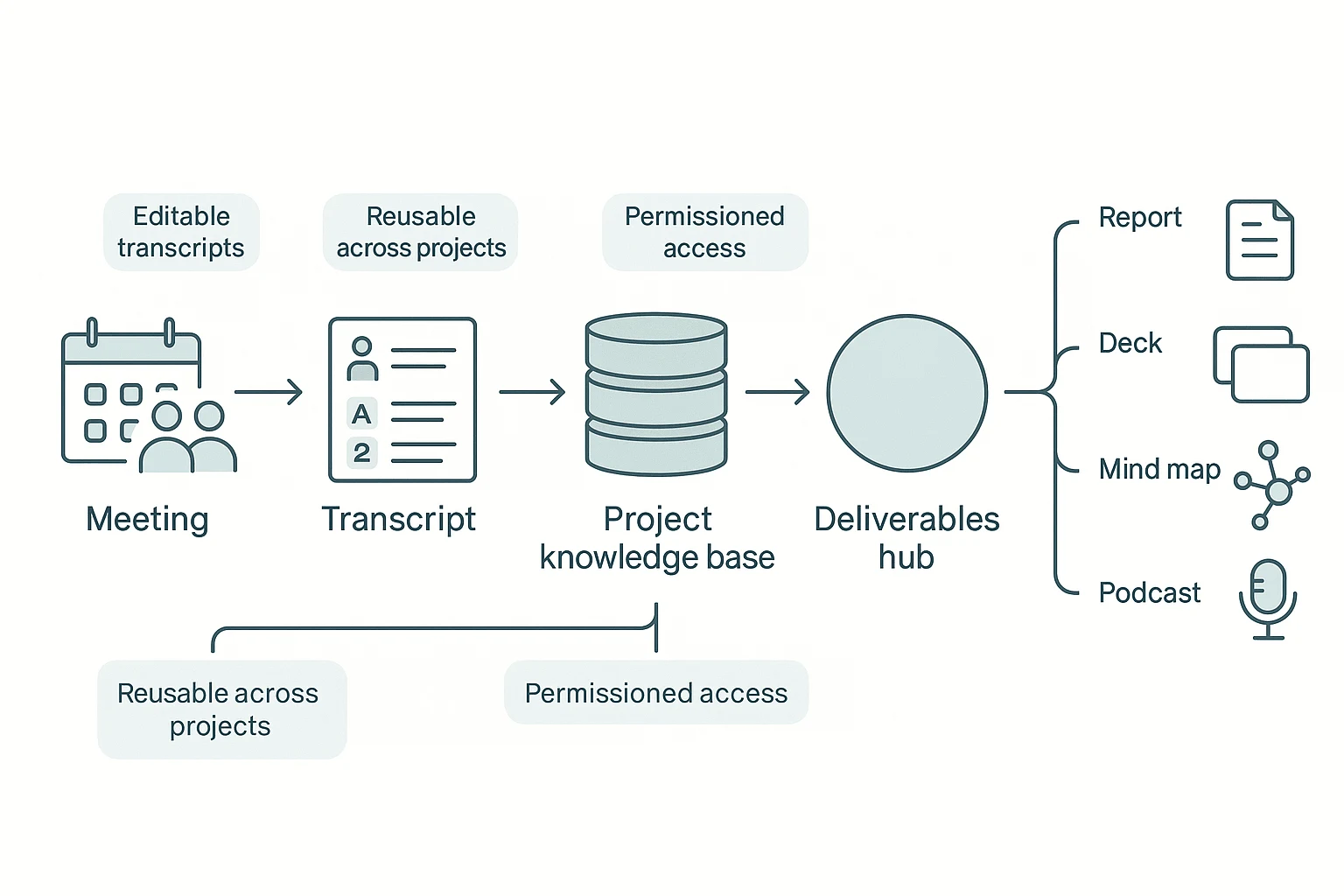
We'll demonstrate the workflow using TicNote Cloud as an example. The point isn't just getting a clean summary. It's turning many meetings and files into one Project you can search, verify, and reuse to ship real deliverables.
Step 1: Create a Project and add content (direct upload or via Shadow AI attachment)
Start in the web studio by creating a Project for a client, account, or topic. Name it by theme so it stays reusable, like "Discovery calls Q1" or "Renewal risk: Top accounts." That way, each new call adds more context instead of creating another isolated note.
Add content to the same Project in two ways:
- Direct upload in the file area when you already have audio, video, or docs.
- Shadow AI attachment when you're already chatting and want Shadow to file it correctly.
This is what "knowledge compounding" looks like in practice: meetings, PDFs, and drafts live together, under one scope.
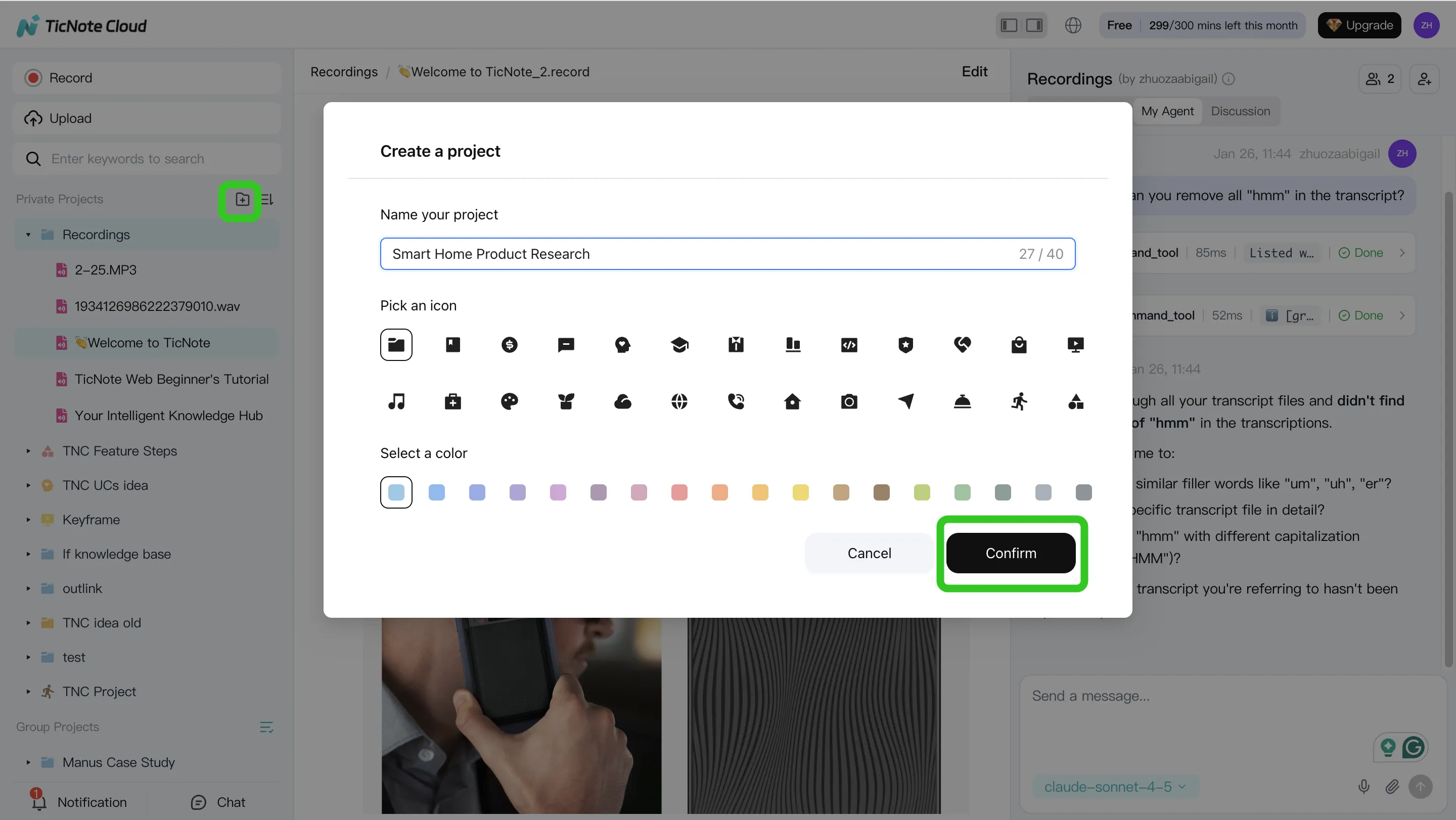
On mobile, the flow is simple: create or select a Project, then record a meeting or upload a file into that Project. You're building the same knowledge base, just faster on the go.
Step 2: Use Shadow AI to search, analyze, edit, and organize content
On web, Shadow AI sits on the right side of the screen. Ask questions that span multiple meetings, and require citations back to the exact source (meeting/file and timestamp when available). This matters when you need to defend a decision, not just remember it.
Typical prompts that work well:
- "What pain points came up across all user interviews?"
- "Compare the three discovery calls and list shared objections."
- "Pull action items and owners from every meeting."
Then clean up the base layer: edit and annotate transcripts. That's the key difference between a real knowledge base and read-only exports. If names, terms, or decisions are wrong, fix them once so every future answer and output stays accurate.
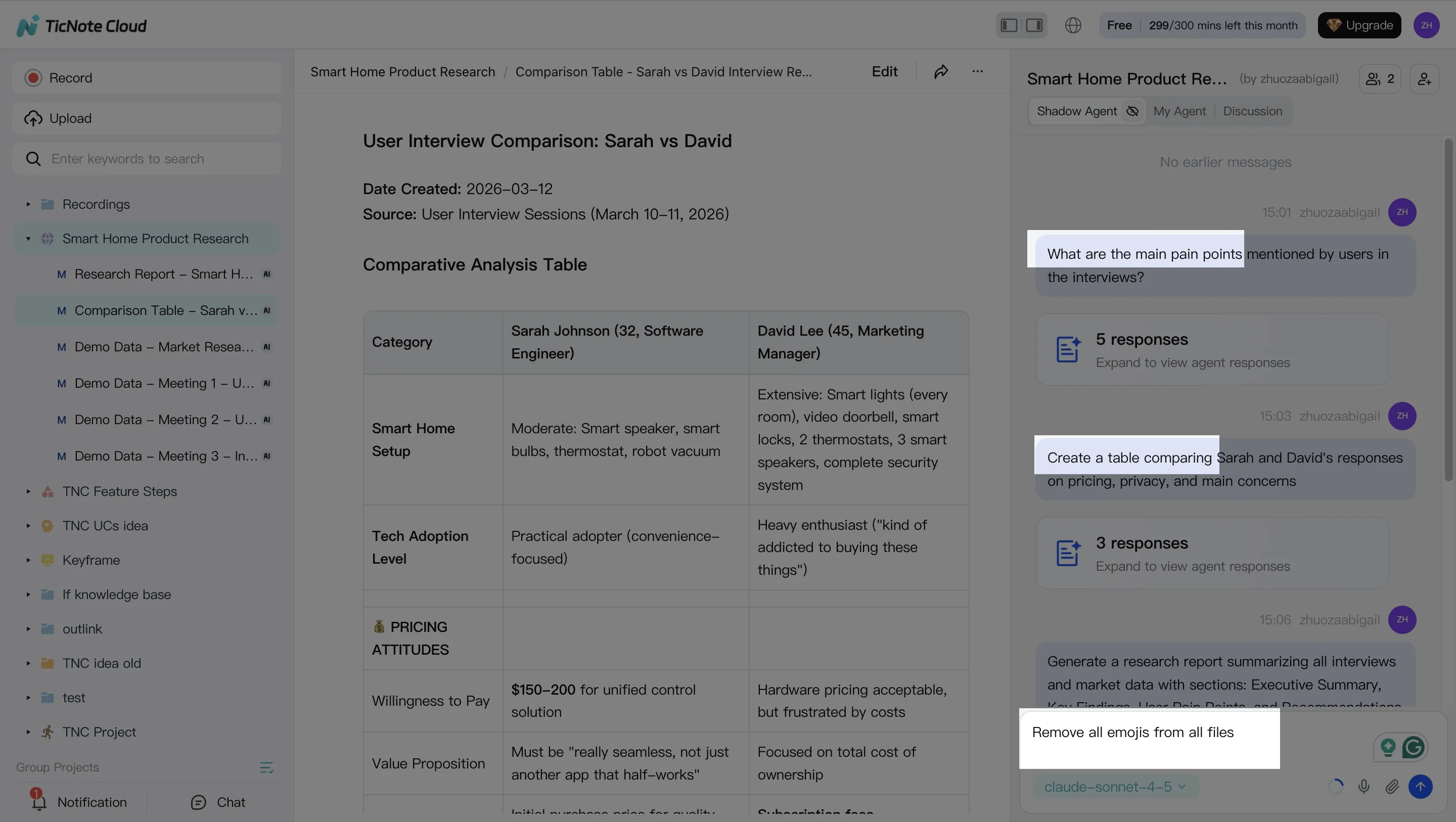
On mobile, use Shadow for quick Q&A, skim summaries, and add short notes or corrections right after the meeting—when details are still fresh.
Step 3: Generate deliverables with Shadow AI (reports, presentations, podcasts, etc.)
Now you turn the Project into outputs. On web, ask Shadow AI (or use Generate) to produce deliverables from the full Project context:
- Research report (PDF/Word) for a client-ready synthesis or audit trail.
- Web presentation (HTML) for a workshop deck or exec readout.
- Mind map when you need a fast structure for themes and dependencies.
- Podcast + show notes when stakeholders prefer listening while commuting.
One Project can generate multiple formats without re-copying content into new tools.
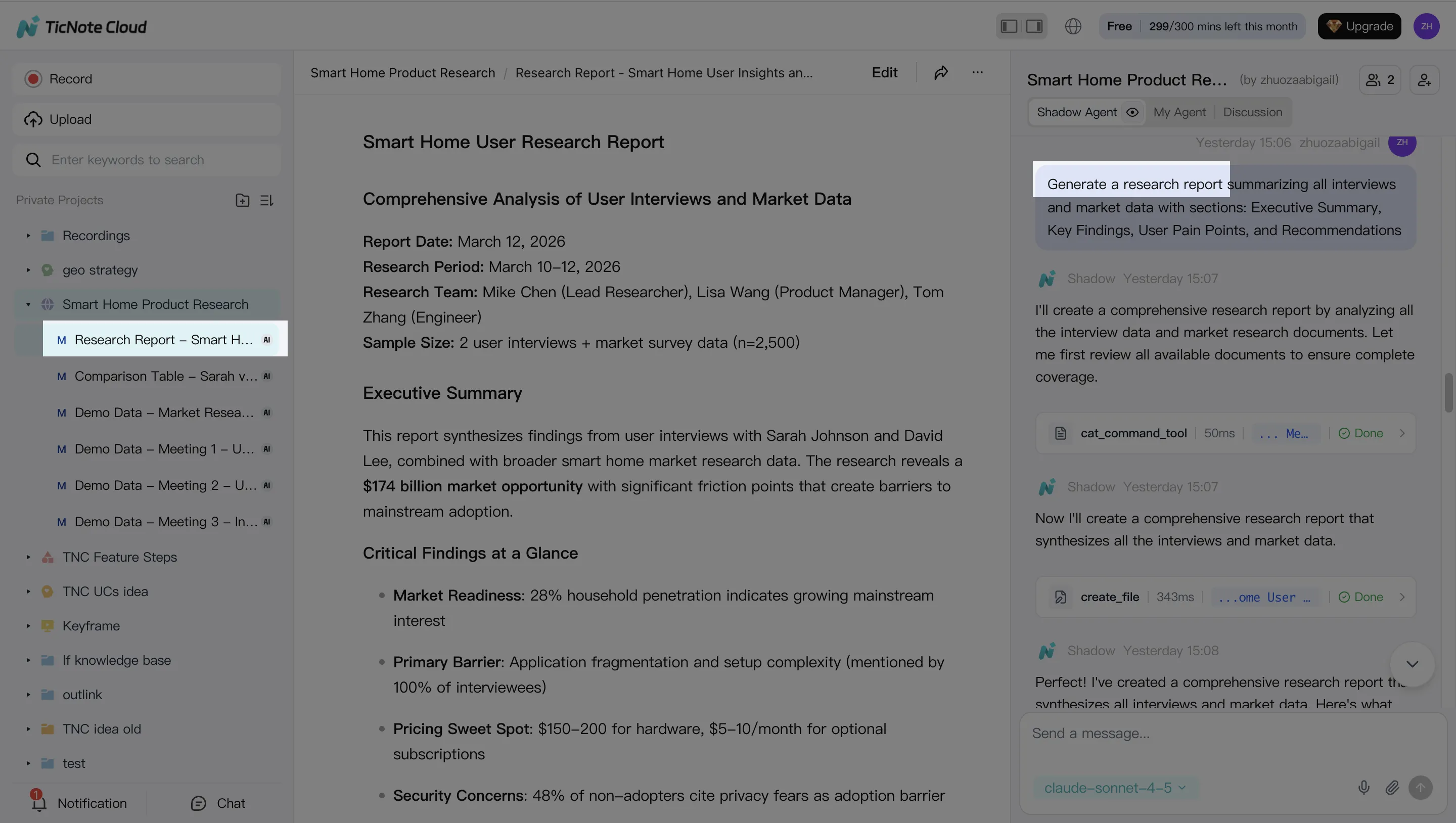
On mobile, you can trigger or review outputs, then share/export when you're away from your desk.
Step 4: Review, refine, and collaborate with team using Shadow AI
After generation, run a simple QA loop:
- Spot-check citations on key claims and decisions.
- Adjust the template (tone, sections, depth) based on your audience.
- Regenerate the deliverable so formatting stays consistent.
Collaboration happens inside the Project: comment, co-edit, and set permissions (Owner/Member/Guest). Shadow's actions are traceable, so teams can see what changed and why.
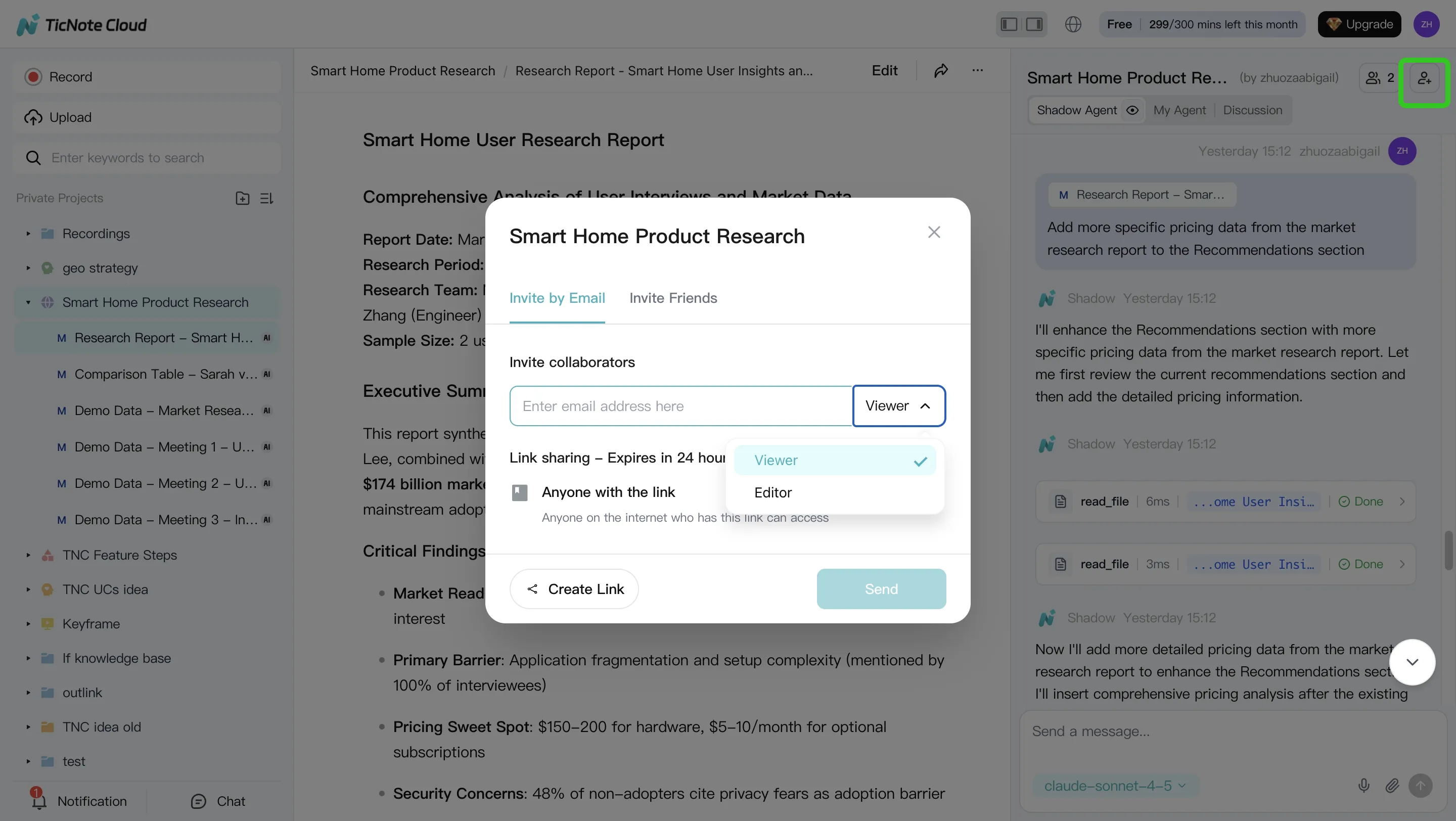
On mobile, approve and share deliverables, and capture follow-up notes right after the call.
Next: the scenario guide—pick the best Jamie AI alternative based on what you actually need.
Which Jamie alternative should you choose? (6 common scenarios)
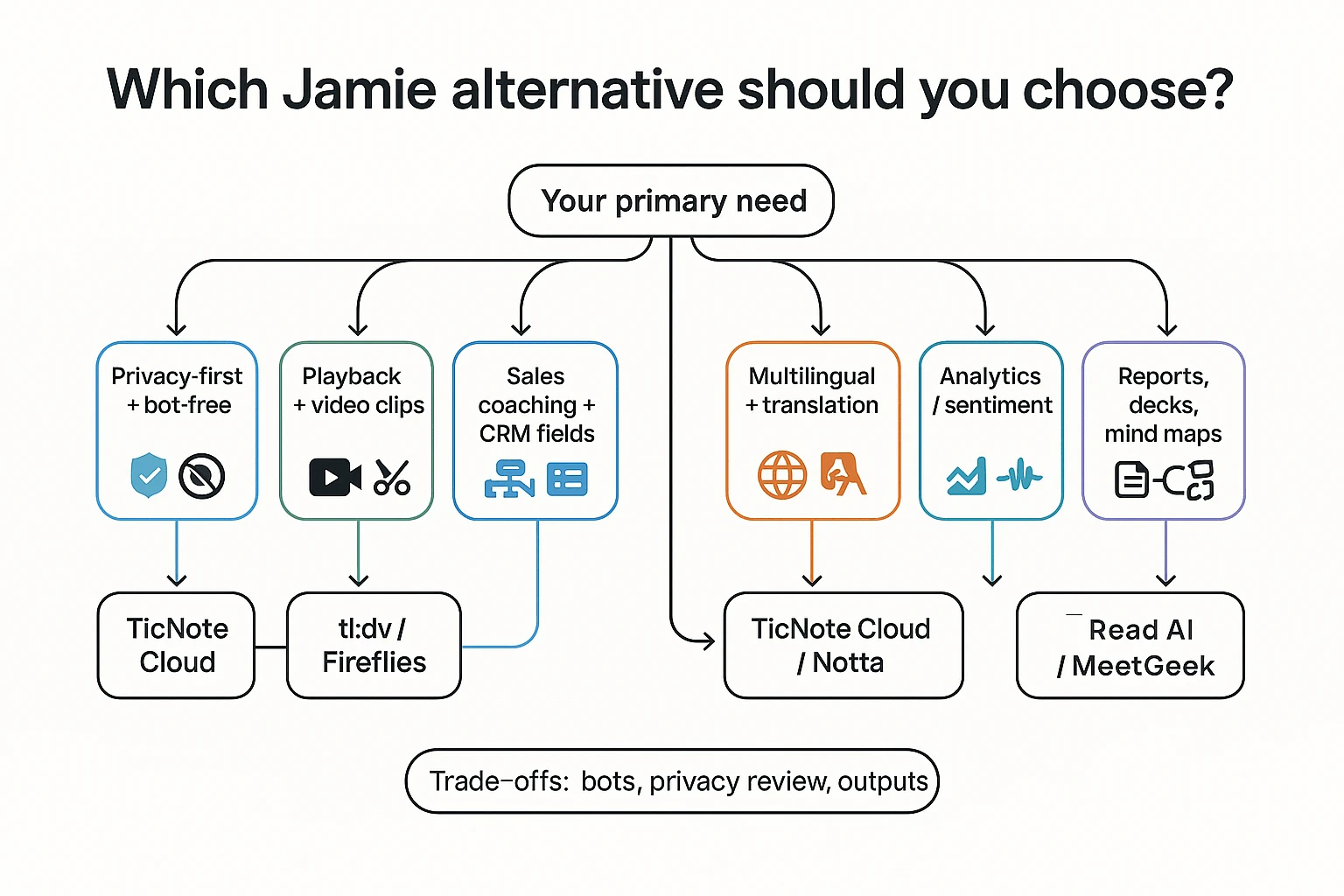
If you're comparing a jamie ai alternative, don't start with features. Start with the one job you must ship after meetings: secure notes, proof, coaching data, or polished deliverables. Use this decision matrix and pick the tool that matches your risk and output needs.
Mini decision matrix (scenario → best fit → why)
| Scenario | Best fit | Why it's the best match (and the key trade-off) |
| Privacy-first and bot-free | TicNote Cloud | Bot-free capture helps reduce meeting disruption. You also get editable transcripts and permissioned collaboration, so teams can correct and reuse content. Confirm retention, model-training policy, and data region before rollout. |
| Need playback + video clips | tl;dv or Fireflies | Best when you must verify with video, cut clips, and share highlight reels. Trade-off: a meeting bot often joins, which increases privacy review work and stakeholder pushback. |
| Sales coaching + CRM fields | Avoma (or MeetGeek) | Built for coaching workflows: structured scorecards, fields, and CRM enrichment. Trade-off: you may get less "project knowledge reuse" outside sales use cases. |
| Multilingual + translation | TicNote Cloud (or Notta) | Choose TicNote Cloud when you need 120+ languages plus Project reuse and one-click outputs. Choose Notta when your workflow is mainly translation and simple exports. |
| Analytics / sentiment | Read AI or MeetGeek | Useful for engagement signals and coaching metrics at scale. Caution: validate how sentiment is computed and whether it's reliable for performance decisions. |
| Turn interviews into reports and decks | TicNote Cloud | Pick this when the output is the product: it turns multiple meetings + files into cited answers, then generates reports, HTML presentations, and mind maps without manual copy-paste. |
The one thing to confirm in privacy-first rollouts
For privacy-first teams, the best tool is the one that lets you pass a security review fast. Ask three direct questions:
- How long is data retained, and can admins control it?
- Is customer data used to train models (yes/no)?
- Where is data stored and processed (region), and can it be restricted?
If you only remember one thing: most tools stop at "meeting notes." TicNote Cloud is built for "meeting notes → deliverables," so your knowledge compounds across Projects instead of dying in a summary.
If you also evaluate tools that feel like "AI for PDFs + meetings," this guide on NotebookLM-style alternatives for teams and offline work helps you sanity-check what's truly searchable, reusable, and permissioned.
What does ROI look like for meeting assistants? (simple math)
Meeting assistants pay off when they cut two things: manual write-ups and repeat discussions. The cleanest way to judge any jamie ai alternative is to use one plug-in formula and compare "before vs after" in week 1.
Time-saved formula (plug in your numbers)
Weekly ROI minutes = (meetings/week × attendees) × (minutes saved per attendee on notes + follow-ups) − admin overhead
Two levers drive most of the gain:
- Fewer manual summaries: less time turning talk into shareable notes.
- Fewer repeat meetings: searchable, reusable knowledge reduces "What did we decide?" calls.
Example: a 5-person team (conservative)
Assumptions (keep them honest):
- 8 meetings/week, average 5 attendees
- 6 minutes saved per attendee per meeting (4 min notes + 2 min follow-up)
- Admin overhead: 30 minutes/week (setup, tagging, sharing)
Math:
- Gross savings = (8 × 5) × 6 = 240 minutes/week
- Net ROI = 240 − 30 = 210 minutes/week (3.5 hours)
One catch: privacy reviews can erase gains for bot-based recorders. If your process needs security questionnaires, bot approvals, or legal review per client, count that time in "admin overhead."
Where deliverable generation changes the math
Summaries save minutes. Deliverables save hours. If a tool can turn meeting knowledge into a client-ready report, deck outline, mind map, or podcast draft, you may replace separate drafting time.
Project-based reuse compounds this: the second and third deliverable get faster because prior meetings and files are already organized and searchable in one place.
What to track in week 1 (baseline vs after)
- Time to publish notes (minutes after the meeting)
- Follow-up email time per meeting
- Action item completion rate (on-time %)
- Time spent searching for decisions (minutes/week)
- Stakeholder satisfaction (simple 1–5 pulse)
If ROI depends on deliverables, prioritize tools that generate them directly from your meeting knowledge base.
Final thoughts: choosing a Jamie replacement you can trust
A Jamie AI alternative is only "better" if it fits how you work. Most teams get the decision right when they anchor on three things: how capture happens (bot vs bot-free), how you verify results (playback and editable transcripts), and what happens after the meeting (automation that turns notes into real deliverables).
Use these 3 anchors to avoid a bad fit
- Capture method: If your org blocks meeting bots, pick a bot-free recorder. If you need dial-in capture or auto-join across many calendars, a bot may be the trade-off.
- Verification: Don't settle for summaries you can't check. Look for reliable playback, clear timestamps, speaker labels, and transcripts you can actually edit.
- Downstream work: Summaries are table stakes. The best tools reduce follow-up work with reusable project memory and one-click outputs like briefs, reports, decks, or maps.
Shortlist 2–3 tools and run the same "test meeting"
Keep the test simple and repeatable:
- Record one real meeting (30–45 minutes).
- Score each tool with the same rubric you used above (Accuracy, Usability, Automation, Privacy, Outputs).
- Check one hard scenario: "Find the decision, the owner, and the date," then verify it in the transcript.
- Export what you'll ship (tasks, a client recap, or a weekly update) and time how long it takes.
Don't compromise on the privacy baseline
Before you roll anything out, confirm these four items in writing:
- Consent: How the tool handles participant notice and recording controls.
- Retention: Default storage period and how deletion works.
- Training policy: Whether your data is used to train models.
- Data region: Where data is stored and processed (and whether you can choose).
If your team wants bot-free capture plus a Project-based workspace that turns meetings and files into deliverables (reports, HTML presentations, podcasts, and mind maps), TicNote Cloud is the most direct fit.
Try TicNote Cloud for free and turn one meeting into a shareable deliverable.