


 Extension
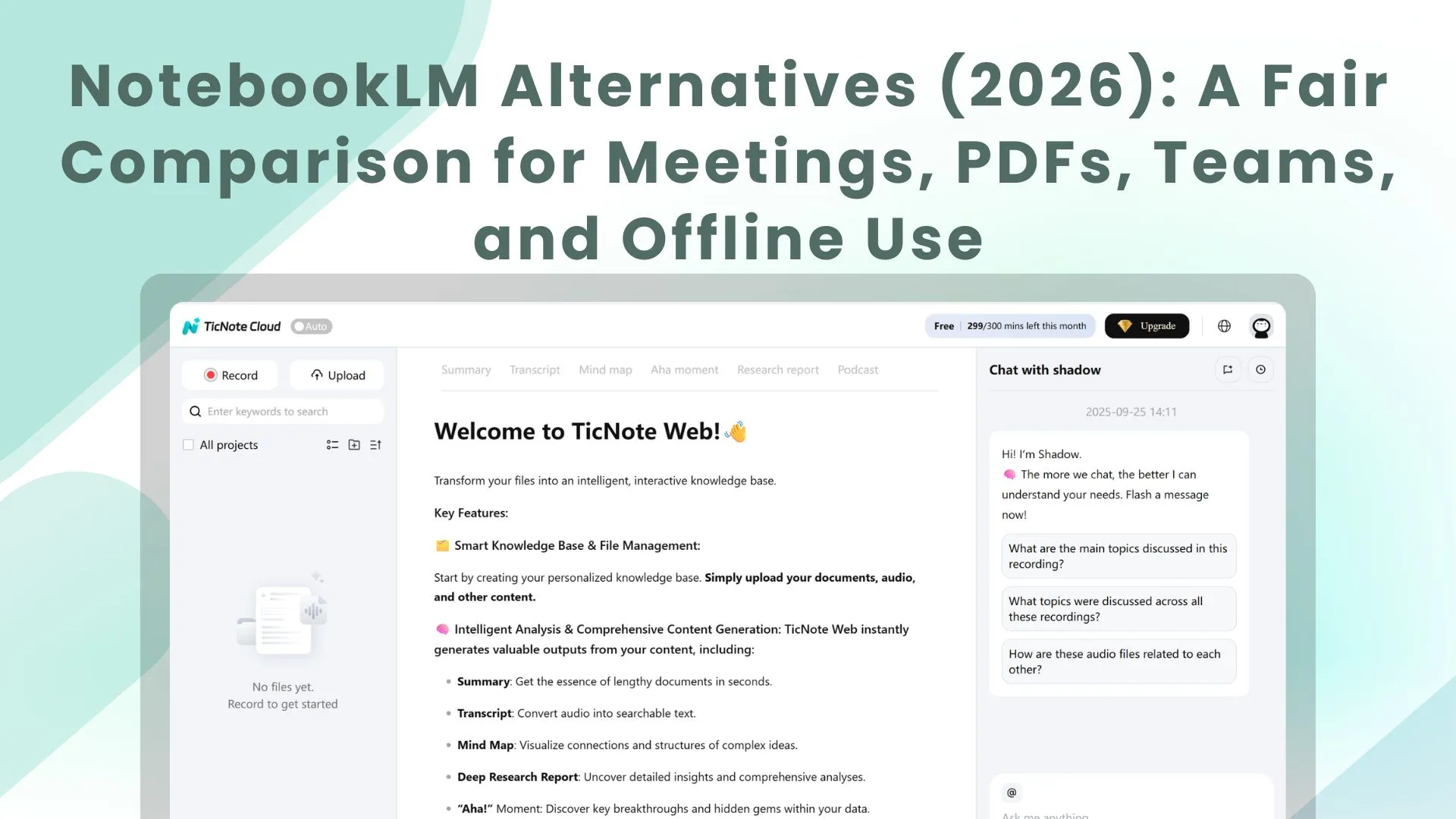
TL;DR: Which NotebookLM alternative should you pick in 2026?
To replace NotebookLM in 2026, start by choosing the tool that matches your main "source" type—then try TicNote Cloud for free if your sources are mostly meetings and transcripts. NotebookLM is great at grounded Q&A on uploaded files, but alternatives win on meeting capture, team workflows, exports (lock-in risk), model flexibility, and offline/self-hosting.
Problem: your decisions live in calls, not PDFs. Agitate: if transcripts and action items stay scattered, you re-litigate the same topics and lose hours to rewrites. Solution: with TicNote Cloud, meetings become project memory, you get cited answers, and you can generate a report, presentation, mind map, or podcast without copy-paste.
- Meetings + transcripts → deliverables: pick a meeting-first AI workspace that records/transcribes, keeps project memory, answers with citations, and exports finished outputs.
- PDFs + document Q&A with citations: pick a document-first research assistant if you mostly query static sources.
- Team wiki + project ops: pick a collaborative workspace if you need databases, permissions, and workflows.
- Offline / privacy-first: pick a local-first or self-hosted option if cloud storage is a non-starter.
What are the best NotebookLM alternatives for your workflow (not just PDFs)?
Most people searching for notebooklm alternatives aren't just trying to "chat with a PDF." They want a tool that can use their sources—docs, meeting transcripts, notes, and links—to give grounded answers, clean summaries, and reusable knowledge they can trust. In 2026, the bar is higher: you need capture, organization, collaboration, and outputs you can actually ship.
Quick definition: what people really mean by a "NotebookLM alternative"
A true alternative does four things well:
- Ingests your sources (PDFs, docs, transcripts, links, notes)
- Answers with traceable grounding (quotes, timestamps, or citations back to source)
- Builds memory over time (projects/spaces, not one-off chats)
- Produces exports and deliverables (docs, slides, briefs, summaries, maps)
If a tool only does Q&A on one file, it's a reader—not a workflow.
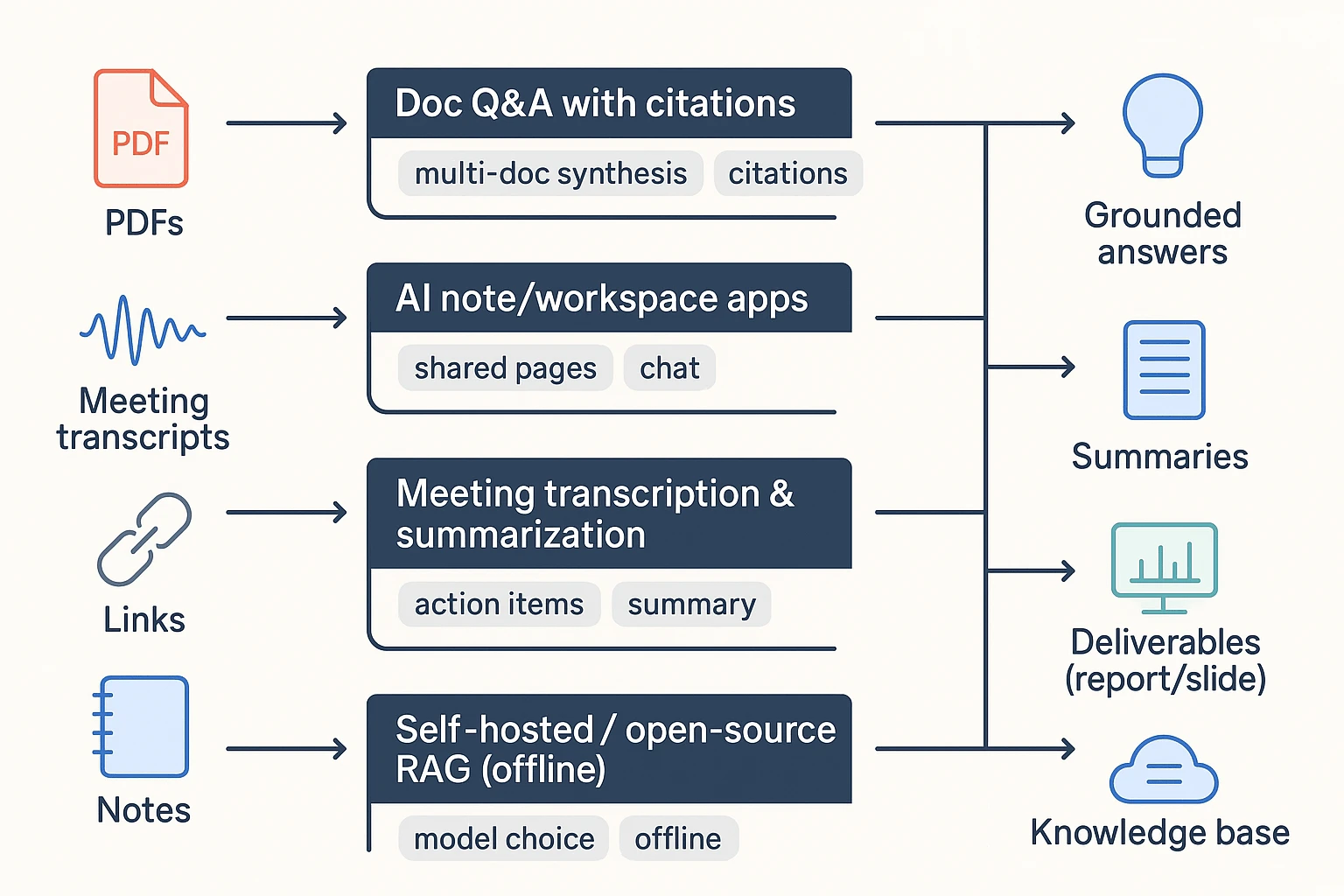
The 4 categories that cover real workflows
Most options fall into one of these buckets. Knowing the bucket helps you pick faster.
- Doc Q&A with citations Best for: fast reading, multi-doc synthesis, research packets, and drafting reports. These tools shine when your input is mostly PDFs and web pages, and you mainly need cited answers.
- AI note/workspace apps Best for: a long-lived knowledge base with pages, tasks, and databases. The AI is there to draft, summarize, and recall, but you still do more manual organizing.
- Meeting transcription and summarization tools Best for: audio/video, action items, follow-ups, and stakeholder updates. If your "sources" are mostly calls, interviews, and weekly syncs, this category usually beats doc-first tools on speed and accuracy.
- Self-hosted / open-source RAG (retrieval-augmented generation) Best for: maximum control, model choice, and offline use. The trade-off is setup time: you're choosing storage, embeddings, access control, and evaluation—great for IT-heavy teams, slower for everyone else.
Why people switch (the problems that show up at scale)
Switches usually happen when the workflow outgrows "upload a doc and ask." The most common triggers:
- Source limits and file-type gaps: long projects, lots of interviews, mixed media.
- Team needs: shared spaces, roles, permissions, and audit trails.
- Better capture and integrations: Slack/Notion/Drive, plus smoother ingest from meetings.
- Exports to avoid lock-in: Markdown, DOCX, PDF, HTML, and mind maps matter when you need to reuse work.
- Privacy and security: encryption, admin controls, and where data is stored.
"If you can't export cleanly—and trace every summary back to the exact quote or timestamp—you don't have a knowledge base. You have a dead-end UI."
How did we test and score each alternative (so the ranking is fair)?
Most "best tool" lists hide the method. We didn't. To keep this NotebookLM alternatives ranking fair, we ran the same dataset, the same prompts, and the same expected outputs in every tool. Then we scored results with a weighted rubric that favors grounded answers, reusable knowledge, and clean exports.
The test dataset we used (small, realistic, repeatable)
We built one compact workspace that matches real work. It included:
- 2–3 PDFs: one policy doc, one research report, and one slide-deck export (PDF)
- 1 meeting transcript (45–60 minutes): multiple speakers, a few decisions, and clear next steps
- 5–10 web notes/snippets: requirements, competitor notes, and short pasted bullets
This mix matters because most teams don't live in PDFs alone. They live in meetings, docs, and scraps.
The tasks we ran in every tool (same prompts)
Each tool had to complete four tasks. We kept prompts consistent to reduce bias:
- Answer with citations: "What did we decide and why?"
- Action extraction: "Extract risks + owners + due dates."
- Synthesis writing: "Write a 1-page exec brief + a longer report draft."
- Knowledge base entry: "Create a meeting-to-project entry we can reuse next week."
We graded both the output and the path to get there (time, friction, and edits needed).
The scoring rubric (with weights, so you can disagree intelligently)
We used a 100-point rubric. Weights reflect what actually breaks workflows.
- 30% Grounding & citations quality: Are sources clickable, precise, and stable?
- 15% Capture: Transcript quality, import types, speed, and setup friction
- 15% Synthesis: Cross-file linking, multi-meeting memory, and "what changed?" tracking
- 15% Outputs: Report/presentation/mind map/podcast support and editability
- 10% Collaboration: Roles, permissions, comments, and traceability of AI actions
- 10% Privacy/exports: Retention controls and export formats you can keep
- 5% Cost: Predictable pricing, team viability, and free plan limits
We chose these dimensions because AI tools need governance, not just clever text. The NIST AI Risk Management Framework 1.0 (2023) states the Govern function is "a cross-cutting function that is foundational" to the other functions (Map, Measure, and Manage), which is why we score traceability, exports, and grounded outputs.
What we verified (and what we didn't)
As of March 2026, we checked pricing pages, plan limits, and official docs for core features and exports. We also re-checked recent product updates when changelogs were available.
Limits you should know:
- We did not run security audits or pen tests
- We did not test every language, model option, or enterprise setting
- Results vary with audio quality, speaker overlap, and messy PDF formatting
Use the comparison table as decision support. Don't treat it as a performance guarantee.
Comparison table: NotebookLM vs top alternatives (features that actually decide)
Most comparison pages mix features and opinions. So below is a normalized table: same columns, and the same rules for "Yes / Partial / No". It's the fastest way to see which NotebookLM alternatives fit meetings, PDFs, teams, and offline work.
The normalized comparison table (same columns, same rules)
| Tool | Document Q&A with citations (click to exact passage) | File types (PDF/Doc/MD; audio/video; URLs) | Meeting transcription + summaries | Exports (DOCX/PDF/MD/HTML; mind map) | Offline / local-first | Platforms | Integrations | Team controls | Starting price |
| NotebookLM | Yes | Partial | No | Partial | No | Web | Partial | Partial | Free/Varies |
| TicNote Cloud | Yes | Yes | Yes | Yes | No | Web + iOS/Android + extension | Yes | Yes | Free; paid from $12.99/mo |
| Notion (AI) | Partial | Partial | No | Partial | No | Web + desktop + mobile | Yes | Yes | Paid/Varies |
| ChatGPT (Projects/Files) | Partial | Partial | Partial | Partial | No | Web + desktop + mobile | Partial | Partial | Free/paid |
| Perplexity | Yes | Partial | No | Partial | No | Web + mobile | Partial | Partial | Free/paid |
| Otter.ai | Partial | Partial | Yes | Partial | No | Web + mobile | Partial | Partial | Free/paid |
| Fireflies.ai | Partial | Partial | Yes | Partial | No | Web | Yes | Partial | Free/paid |
| Obsidian | Partial | Yes | No | Yes | Yes | Desktop + mobile | Partial | Partial | Free/paid |
| Logseq | Partial | Yes | No | Yes | Yes | Desktop | Partial | Partial | Free/paid |
Note: If you want meeting-first capture plus one-click deliverables (report, presentation, mind map, podcast), TicNote Cloud is the outlier in this list. If that's your workflow, try it for free.
What "Partial" means (plain language)
"Partial" usually means the feature exists, but breaks in real work:
- Citations show the source doc name, not the exact quoted lines.
- Transcripts work only if you import them (no recording, no speakers).
- Exports exist, but lose structure (headings, tables, timestamps), or trap you in a proprietary page format.
Common gotchas that decide the winner
Before you pick a tool, watch for these three issues:
- Citations that don't land on the passage. If you can't click into the exact span, reviews get slow and trust drops.
- Transcript capture that needs a separate meeting bot. That can create friction with guests, or fail in locked-down orgs.
- Exports that don't stay portable. If you can't move content cleanly into DOCX/MD/PDF/HTML, you're buying lock-in.
A practical rule: if your output must be shared outside your tool (clients, execs, classmates), prioritize passage-level citations and clean exports over "fun" AI features.
Which NotebookLM alternatives are best? (Standardized tool cards)
Most "NotebookLM alternative" lists compare features in a vacuum. The tool cards below use the same fields each time, so you can match the tool to your real inputs (meetings, PDFs, teams, or offline work) and your real outputs (cited answers, follow-ups, reports, and shareable deliverables).
To keep this fair, each card covers: Best for, What it replaces (vs NotebookLM), Strengths / limits, Citations + transcript fit, Exports + lock-in notes, Privacy/offline notes, and a Decision tip.
TicNote Cloud
- Best for: Meeting-heavy teams that need transcripts turned into finished assets (reports, presentations, mind maps, podcasts).
- What it replaces (vs NotebookLM): A meeting-first workflow: capture calls, build Project memory across sessions, then generate deliverables. It's not just "chat with docs."
- Strengths / limits:
- Strengths: bot-free recording options (no bot joins the call), high-accuracy transcription, speaker recognition, timestamps, and editable transcripts (not read-only).
- Strengths: Project-level memory plus cross-file Q&A using Shadow AI, with clickable citations back to sources.
- Strengths: one-click outputs in multiple formats (report, web presentation, podcast, mind map) so your work ships faster.
- Limits: best value shows up when your workflow is transcript- and project-driven, not just occasional PDF Q&A.
To get started with TicNote Cloud's meeting transcription workflow, see how to transcribe meetings for a platform-by-platform guide.
- Citations + transcript fit: Built for transcripts first. Citations are tied to timestamps and source context, which makes review and "where did this come from?" checks fast.
- Exports + lock-in notes: Strong export paths reduce lock-in: transcript (TXT/DOCX/PDF), summaries (Markdown/DOCX/PDF), presentation (HTML), mind map (PNG/Xmind), and audio (WAV). If you need to leave later, you can take both text and deliverables with you.
- Privacy/offline notes: Cloud-based. Private by default, with industry-standard encryption and "not used to train AI models" positioning; validate in your security review if you're in regulated environments.
- Decision tip: Pick this if your week is mostly calls and you want "meeting → cited answers → deliverable" in one workspace.
Notion
- Best for: Team wiki, project docs, and databases that need flexible structure.
- What it replaces (vs NotebookLM): Your "source of truth" layer: docs, tasks, and lightweight knowledge base in one place.
- Strengths / limits:
- Strengths: strong collaboration, commenting, permissions, and page/database flexibility.
- Limits: meeting capture isn't native; doc Q&A and citations vary based on setup; exports can feel clunky when you want clean handoff to other tools.
- Citations + transcript fit: Works if you paste/import transcripts and keep them organized, but transcript-to-output workflows take more manual steps.
- Exports + lock-in notes: Exports exist, but complex workspaces don't always export "cleanly." Plan your exit path early if governance matters.
- Privacy/offline notes: Primarily cloud. Offline is limited and not ideal for heavy knowledge work on planes or in restricted environments.
- Decision tip: Choose Notion when your main problem is organizing team work, not producing cited deliverables from audio.
Obsidian (with AI plugins)
- Best for: Offline-first research and long-term note ownership.
- What it replaces (vs NotebookLM): Local, durable "second brain" notes with optional AI on top.
- Strengths / limits:
- Strengths: plain Markdown on your device, strong linking, huge plugin ecosystem, future-proof storage.
- Limits: AI features and citation quality depend on plugins and your model setup; team workflows and permissions usually require extra tooling.
- Citations + transcript fit: Possible, but you're assembling the stack (transcription source + ingestion + retrieval + citations).
- Exports + lock-in notes: Excellent. Your notes are files. That's the lock-in antidote.
- Privacy/offline notes: Strong offline story. You control storage, sync, and models if you self-host.
- Decision tip: Pick Obsidian if you value ownership and offline more than "one-click deliverables."
Tana
- Best for: Structured notes that link cleanly across projects.
- What it replaces (vs NotebookLM): A "structured knowledge graph" style workspace where retrieval is driven by fields and tags.
- Strengths / limits:
- Strengths: fast capture, schema-like tagging, powerful retrieval once you commit to structure.
- Limits: learning curve is real; team/permission depth varies; transcript workflows depend on how you import and model your data.
- Citations + transcript fit: Better for structured takeaways than raw transcript-heavy review, unless you build a consistent transcript schema.
- Exports + lock-in notes: Check export options before standardizing. Structured systems can be harder to migrate cleanly.
- Privacy/offline notes: Mostly cloud.
- Decision tip: Choose Tana if you like "structured fields" and you'll invest in a system.
Mem
- Best for: Low-friction capture and "remind me later" AI recall.
- What it replaces (vs NotebookLM): Fast personal knowledge capture with AI retrieval.
- Strengths / limits:
- Strengths: quick capture, auto-linking, and strong recall for personal workflows.
- Limits: collaboration depth and exports can be limiting; meeting transcripts are often a separate step (record elsewhere, then import).
- Citations + transcript fit: Works for summarizing, but transcript traceability depends on how sources are stored.
- Exports + lock-in notes: Review export formats if you need long-term portability.
- Privacy/offline notes: Primarily cloud.
- Decision tip: Pick Mem when you want speed and recall over formal deliverables.
MyMind
- Best for: Visual inspiration libraries and "save now, sort later."
- What it replaces (vs NotebookLM): A lightweight personal archive of links, images, and snippets.
- Strengths / limits:
- Strengths: minimal organization effort; good for creative reference.
- Limits: weak for transcript-heavy research and team deliverables; not designed for cited, multi-source analysis.
- Citations + transcript fit: Not a strong match for transcripts.
- Exports + lock-in notes: Verify export before committing if it becomes mission-critical.
- Privacy/offline notes: Primarily cloud.
- Decision tip: Use it as a side library, not your main research engine.
Evernote
- Best for: Classic cross-device notes and web clipping.
- What it replaces (vs NotebookLM): A long-standing note vault with capture and search.
- Strengths / limits:
- Strengths: solid capture flows, web clipper, broad platform support.
- Limits: not purpose-built for cited multi-source Q&A; meeting intelligence and transcript-first workflows are limited.
- Citations + transcript fit: Better for storage than for traceable, cited synthesis.
- Exports + lock-in notes: Exports exist, but test a full export/import before scaling across a team.
- Privacy/offline notes: Some offline access, but not an "offline-first AI research" tool.
- Decision tip: Choose Evernote if capture is your bottleneck, not analysis.
AnythingLLM (open-source / self-hosted)
- Best for: Teams that want an open-source alternative with model choice and tighter control.
- What it replaces (vs NotebookLM): A self-managed "chat with your files" system with configurable retrieval (RAG).
- Strengths / limits:
- Strengths: strong privacy/control potential; can run offline with local models.
- Limits: setup and maintenance take time; citation quality depends on your chunking, embeddings, and RAG config.
- Citations + transcript fit: Can be good, but you'll tune it. Poor config = weak citations.
- Exports + lock-in notes: Typically good, since you control storage.
- Privacy/offline notes: Best-in-class potential if you truly self-host.
- Decision tip: Pick this if IT ownership is a feature, not a burden.
Paperguide
- Best for: Academic workflows: papers, references, literature review.
- What it replaces (vs NotebookLM): Research discovery plus citation-centered writing support.
- Strengths / limits:
- Strengths: citation workflows and paper-focused features.
- Limits: less suited to meeting-heavy teams and shared project memory.
- Citations + transcript fit: Stronger on papers than transcripts.
- Exports + lock-in notes: Check reference export and doc export paths.
- Privacy/offline notes: Typically cloud.
- Decision tip: Choose it when your inputs are papers, not calls.
Anara (Unriddle) / Logically (Afforai)
- Best for: Document Q&A with citations across multiple files.
- What it replaces (vs NotebookLM): Multi-file doc chat, often optimized for PDFs.
- Strengths / limits:
- Strengths: focused on document querying and citations.
- Limits: less of a full workspace; meeting transcription may be import-only, and deliverable generation may be narrower than "workspace" tools.
- Citations + transcript fit: Good for PDFs; transcript workflows depend on import and how well the tool preserves source traceability.
- Exports + lock-in notes: Check what you can export beyond summaries.
- Privacy/offline notes: Usually cloud.
- Decision tip: Choose these when your core problem is "search these PDFs," not "run the team's meetings."
Don't overfit your choice
The "best" pick depends on your primary input. If you mostly have meetings, prioritize transcript quality, citations, and exports. If you mostly have PDFs, focus on multi-file retrieval and citation traceability. And if offline or enterprise controls matter, choose for governance first, features second.
If you're also comparing general-purpose assistants, this guide to work-focused ChatGPT alternatives with citations and privacy can help you shortlist faster.
How to turn meeting transcripts into cited deliverables (step-by-step)
A good meeting-first workspace turns raw talk into work you can ship: a summary with proof, a report with quotes, and a deck with a clear story. Below is a simple, repeatable workflow shown in TicNote Cloud, but it applies to any tool that can keep transcripts, files, and citations in one place (many people start looking for notebooklm alternatives when they need this kind of output from meetings, not just PDFs).
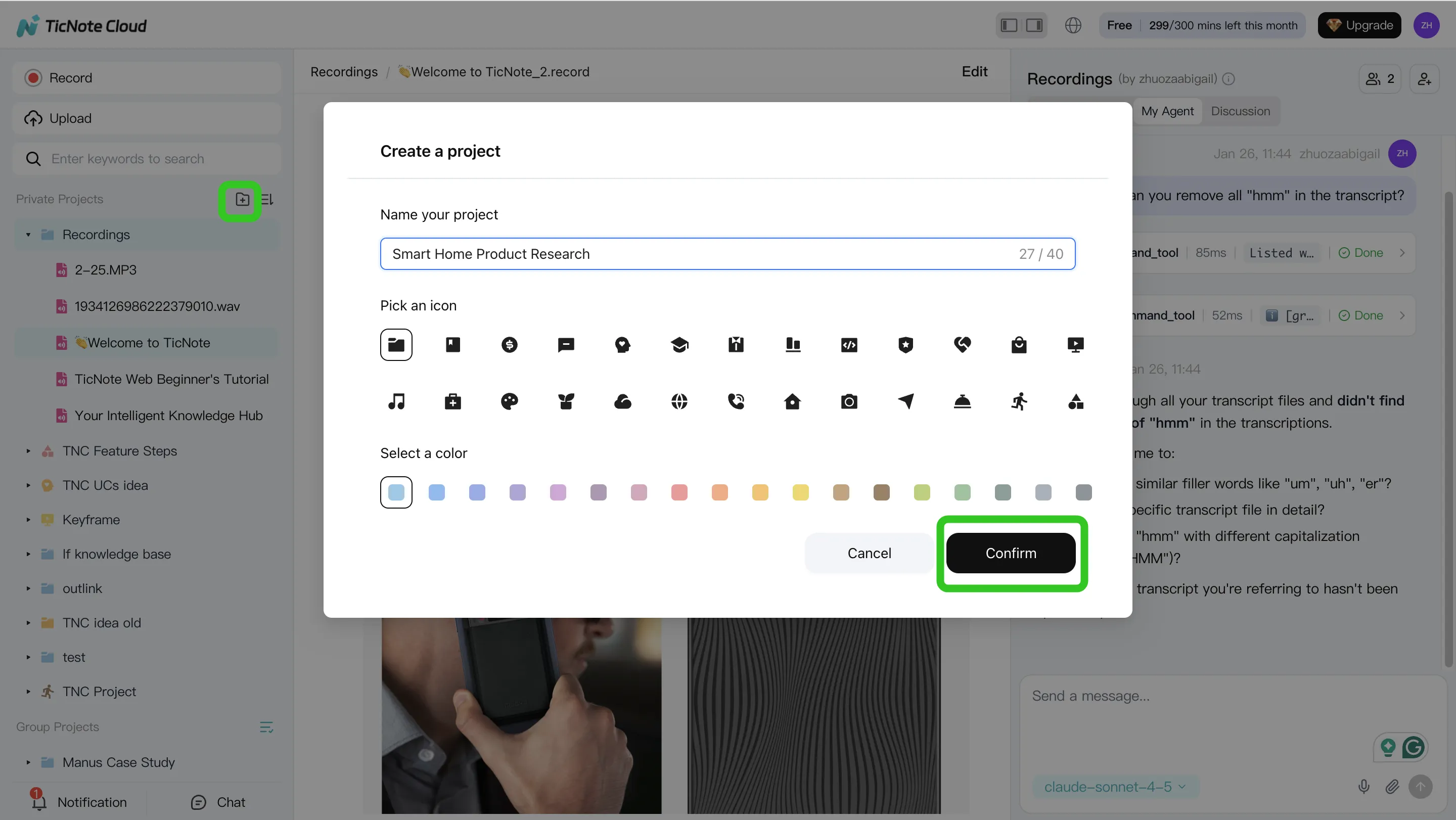
Step 1) Create a Project and add content (keep one "question space")
Start by creating a Project for one real workstream, like "Q2 Customer Interviews" or "Exec Weekly Sync." The rule is simple: one Project equals one question space, so your answers don't mix sources.
In TicNote Cloud's web studio, add the meeting and the docs it references (briefs, PRDs, proposals, PDFs). You can bring files in two ways: direct upload from the file area, or by attaching them in the Shadow AI chat and asking it to place them in the right folder.
Step 2) Search, verify, edit, and organize with Shadow AI
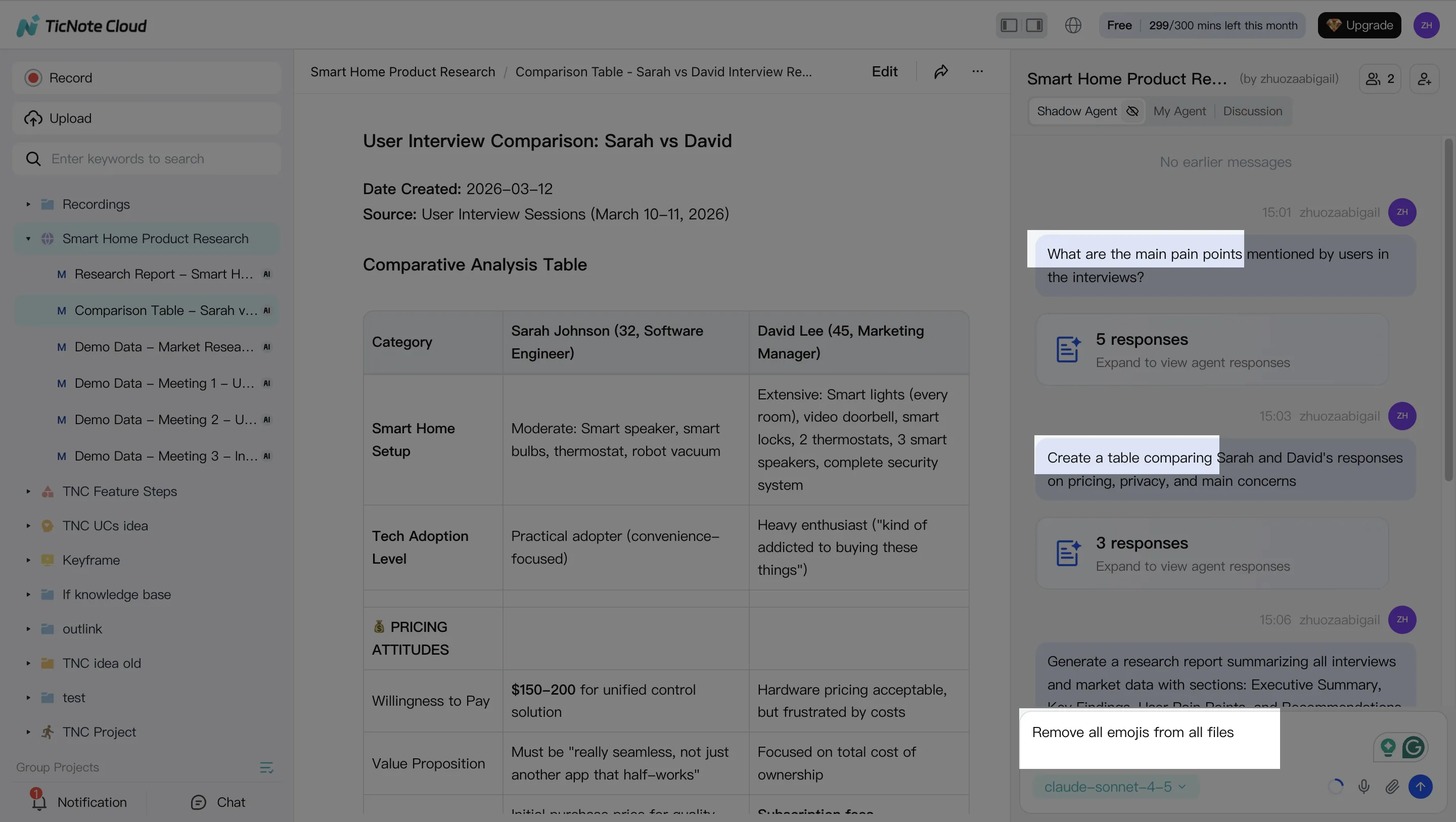
Next, use the AI panel to pull the truth out of the pile. Ask grounded questions that map to real deliverables, such as:
- "What decisions did we make, and what's still open?"
- "List the top risks mentioned, and who raised them."
- "Compare the last 3 calls and extract repeated themes."
Then do the cleanup that makes citations dependable. Fix speaker names, acronyms, and key terms. Promote important moments into reusable blocks you can paste into any output:
- Decisions (what, when, why)
- Action items (owner + due date)
- Objections and evidence (who said what)
- Next-meeting agenda (questions that unblock work)
The key habit: click into cited sources and spot-check the exact transcript segment before you publish anything.
Step 3) Generate one deliverable per audience (and export to avoid lock-in)
Now generate outputs that match how people actually consume updates. One meeting can produce several assets:
- Exec summary (1 page)
- Detailed report (findings → evidence → recommendations)
- Web presentation (a shareable narrative)
- Mind map (topics → subtopics → proof)
- Optional podcast-style recap for audio-first stakeholders
In TicNote Cloud, you can ask Shadow AI to generate these directly, or use the Generate button to pick a format.
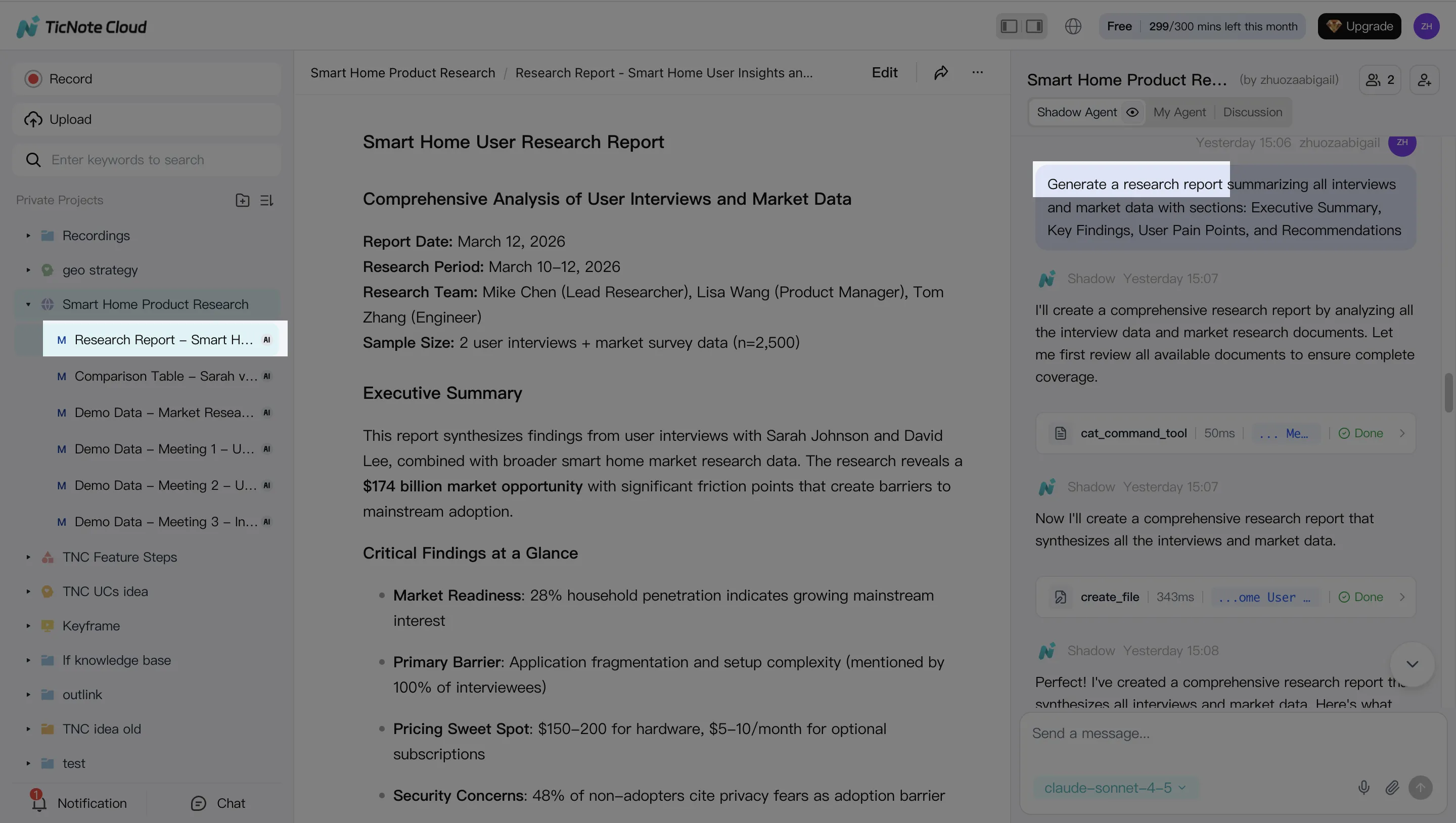
Keep your exits open. Prefer tools that export in common formats (DOCX, PDF, Markdown, HTML, and mind-map formats like Xmind) so your work stays portable.
Step 4) Review, refine, and collaborate (then close the loop)
Treat the first draft as a starting point. Co-edit the transcript and the output, leave comments, and assign owners for follow-ups. In TicNote Cloud, you can also jump from a paragraph back to the source for quick verification, and share the Project with role-based access so teammates can review and request updates.
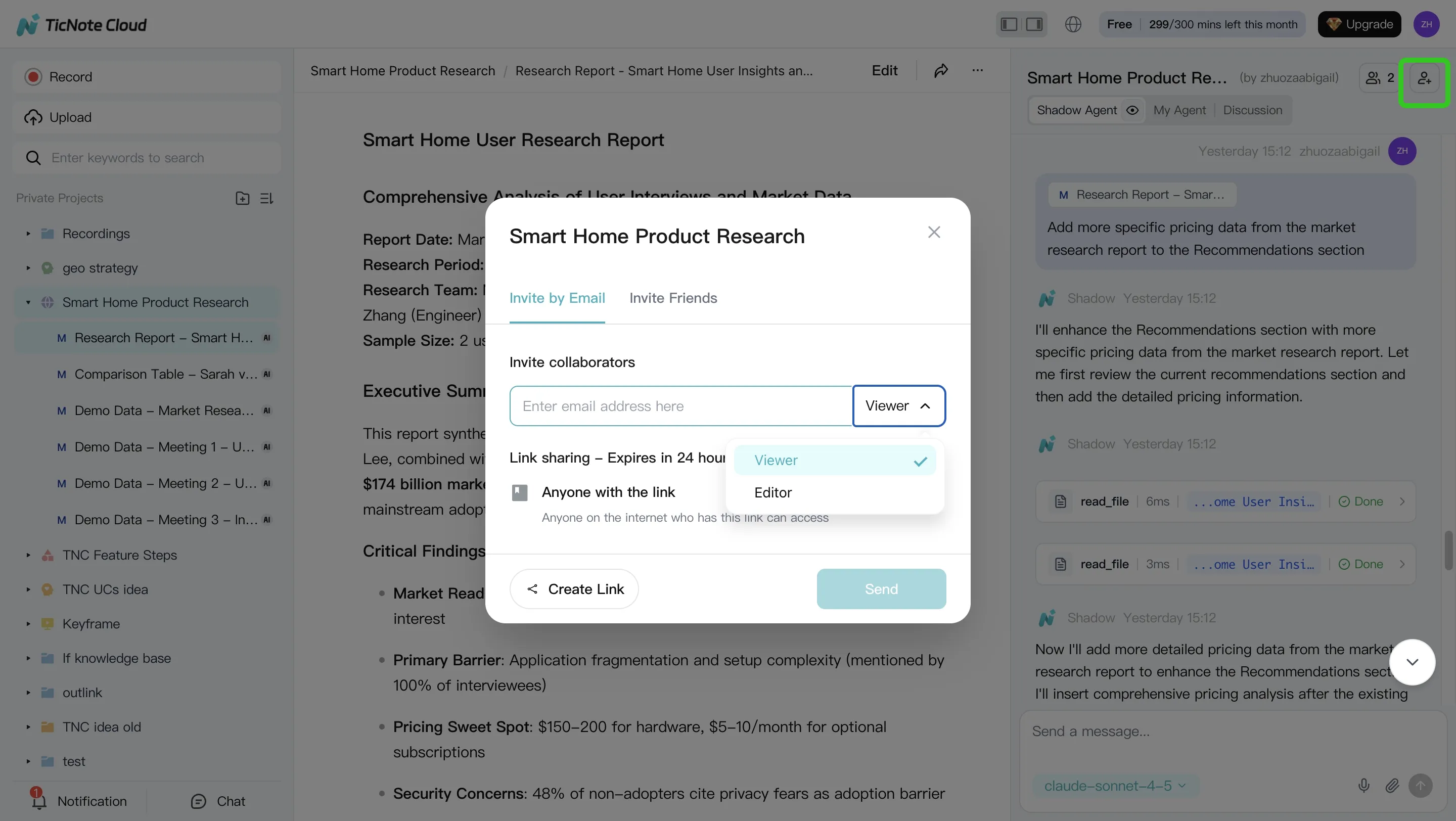
Before you move on, close the loop: ask the AI to generate the next meeting brief based on unresolved items, open questions, and risks. That's how knowledge compounds across weeks instead of resetting every call.
Web vs mobile: a practical split
Use Web for the full loop: Project setup, deep analysis, multi-format deliverables, and collaboration. Use iOS/Android for capture on the go (record or upload), then return to the same Project later to query and generate the final outputs.
Try TicNote Cloud for Free and turn one transcript into a cited deliverable today.
Which alternative should you choose for your situation? (Decision guide)
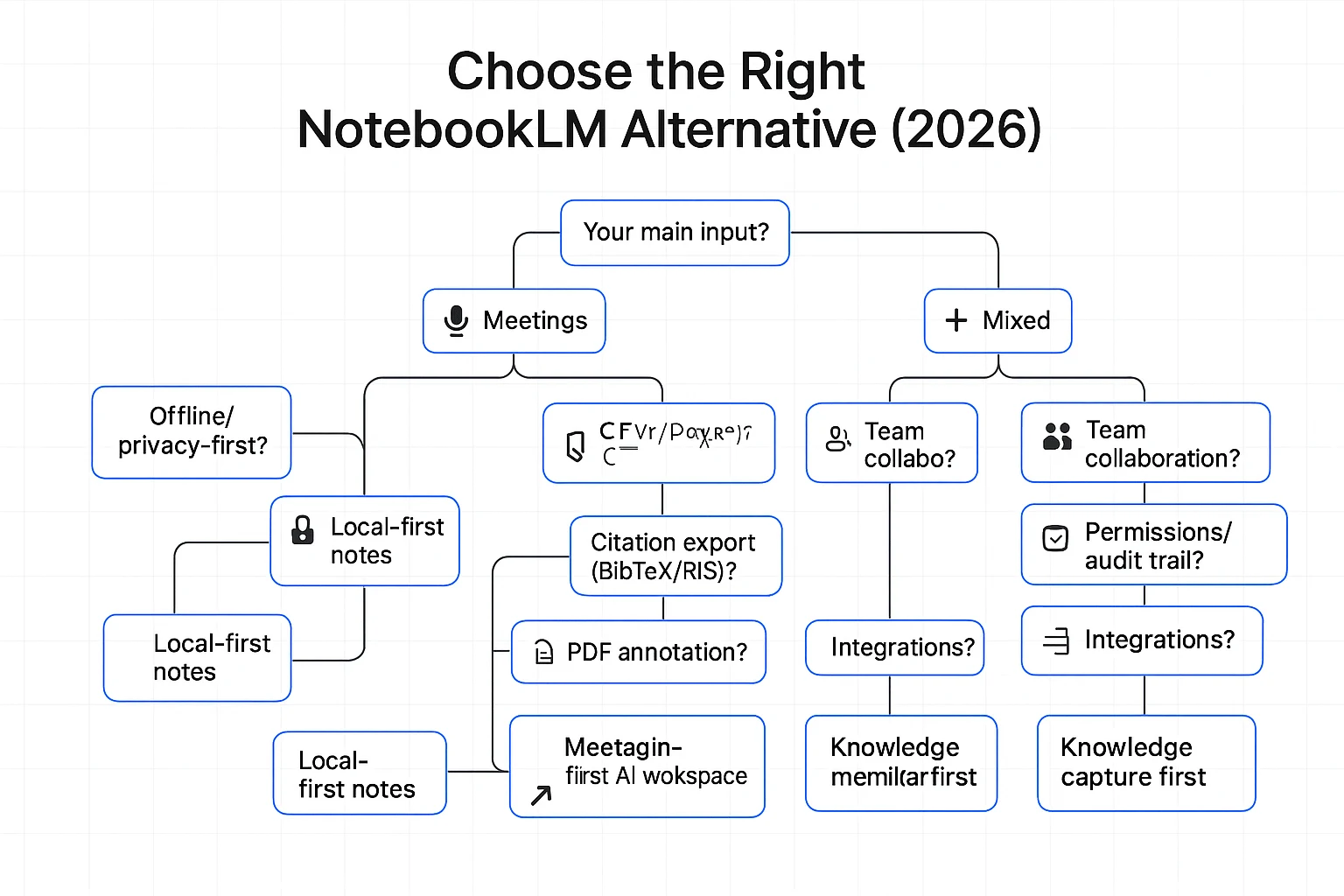
Most "NotebookLM alternatives" pages compare chat quality. That's not the real choice. Pick based on your inputs (meetings vs PDFs), your constraints (team, offline, compliance), and your required outputs (emails, briefs, reports).
If your inputs are mostly meetings, pick a meeting-first system
Choose a meeting-first tool when you need three things to be reliable every week: capture, edit, and ship.
Use this checklist for an "AI meeting notes alternative to NotebookLM":
- Transcript capture that doesn't break (speaker labels, timestamps, long calls)
- Editable transcripts (so the record matches what was said)
- Answers with citations back to the transcript (so you can verify fast)
- One-click exports for follow-ups (email), exec briefs, and client-ready reports
- Project memory across sessions (so insights compound across sprint reviews, interviews, and QBRs)
If your work is meeting-driven research, TicNote Cloud fits this category well because it's built around Projects (many meetings + docs) and produces cited outputs without copy-paste.
If you need offline or privacy-first, choose your control level
You generally have two routes:
- Local-first notes: fast, portable, and low risk. But built-in AI is limited, and citations across many files are usually manual.
- Self-hosted RAG (retrieval-augmented generation): maximum control and model choice, but you pay in setup time and upkeep.
Before you commit, verify:
- Encryption (at rest and in transit)
- Data retention and deletion controls
- Whether any content is sent to external APIs
- Whether the model runs locally, and what metadata is logged
If you need a team wiki + PM system, decide what comes first
For teams, the deciding features are rarely "summary quality." They're governance.
Prioritize:
- Role-based permissions (Owner/Member/Guest), plus sharing rules
- Comments and review workflow
- Audit trail (who changed what, and when)
- Integrations (Slack, Notion, calendars) and export formats
Then make one key call:
- "Workspace first" if docs/tasks are the system of record
- "Knowledge capture first" if meeting transcripts are the system of record
If you need academic citations and reference workflows, pick literature-first tools
If most of your inputs are papers, choose tools that treat references as first-class objects.
Look for:
- Stable citations and reference libraries
- Citation export formats (BibTeX/RIS/EndNote-style)
- PDF annotation and highlights that stay linked to quotes
- Project libraries for a repeatable literature review flow
If you need self-hosted control and model choice, budget for maintenance
Self-hosted can be a win, but only if you price your time.
Check:
- License (open-source terms), Docker deployment, and update cadence
- User management (SSO/SCIM if needed) and permission model
- Connectors to drives, wikis, and ticket systems
- How "citations" are produced (exact quotes + file + timestamp/locator)
A practical rule: if you can't maintain it monthly, don't self-host it.
Budget-based picks (by price and time saved)
- Free/low-cost: best for solo use with light inputs; expect more manual organization.
- Mid-tier paid: best when you ship weekly deliverables; time saved is usually the highest here.
- Business/enterprise: best when permissions, retention, and support matter as much as output quality.
If meetings are your main input and you want cited briefs and reports quickly, start with the free tier and test a real week of calls end-to-end.
What's the ROI of switching from NotebookLM to a meeting-first workspace?
ROI here is simple: a meeting-first workspace pays back when it shrinks the time you spend turning conversations into usable work. If you're evaluating notebooklm alternatives, don't start with "cool features." Start with the hours you can reclaim each week.
Use a plain time-saved formula (plus the hidden cost)
Use this model for a before/after check:
- ROI minutes per week = (minutes in meetings + minutes writing follow-ups + minutes searching) − (same three after switching)
- ROI minutes per quarter = ROI minutes per week × 13
- Add hidden cost: rework from missing context (clarification pings, "what did we decide?" threads, and redo work)
This matters because knowledge work already fills most weekdays: U.S. Bureau of Labor Statistics — American Time Use Survey (2019) reports employed people ages 25–54 averaged 8.36 hours per weekday working or on work-related activities.
Example: exec sync + two stakeholder calls → fewer pings, faster outputs
Say you run:
- 1 weekly exec sync (60 min)
- 2 stakeholder calls (45 min each)
Old flow: you spend 30–45 minutes per meeting on follow-ups, then 20–30 minutes later searching for the exact quote or decision.
Meeting-first flow: transcripts live with the project. You generate a cited brief for the week, then reuse that same source-backed project knowledge for a report draft, a lightweight presentation, and clean handoffs. Result: fewer clarification messages and fewer "redo the recap" cycles.
What to track (no heavy analytics needed)
Track these for 2–4 weeks before and after:
- Time to first draft of the recap (minutes)
- Count of "what did we decide?" questions per week
- Number of follow-up meetings created just to clarify
- Times a past decision gets reused with a citation
One more ROI lever: exportability. When your transcripts, summaries, and outputs export cleanly, you lower future switching costs—and that protection compounds over time.
Final thoughts: choosing a NotebookLM alternative that compounds over time
Picking a NotebookLM alternative isn't just about "better chat." It's about whether your knowledge gets stronger each week. If your work is built on meetings, interviews, and quick decisions, a meeting-first system will compound faster than a doc-only setup.
When NotebookLM is still enough
NotebookLM is still enough when your workflow is mostly solo doc Q&A. If you mainly read PDFs, ask a few questions, and paste the answers into your own notes, it can do the job. It's also fine if you don't need transcript capture, shared editing, or many export formats.
When a meeting-first system wins long-term
Choose meeting-first when your real "source of truth" is conversations. The best systems turn calls into reusable project memory: each transcript adds context, decisions stop getting re-litigated, and onboarding gets faster because new teammates can search what was said (with timestamps and speakers) instead of asking for a recap.
"If you can't export cleanly, and if your transcript trail isn't traceable, you don't have a knowledge base—you have a black box."
Checklist to decide in 2 minutes
- Do you need transcript capture and editing?
- Do you need cited Q&A across many files, not one doc?
- Do you need team permissions and traceability?
- Do you need exports (DOCX/PDF/MD/HTML/mind map) to avoid lock-in?
- Do you need offline or self-hosted control?
Try TicNote Cloud for Free if meetings drive your research and outputs.


