


 Extension
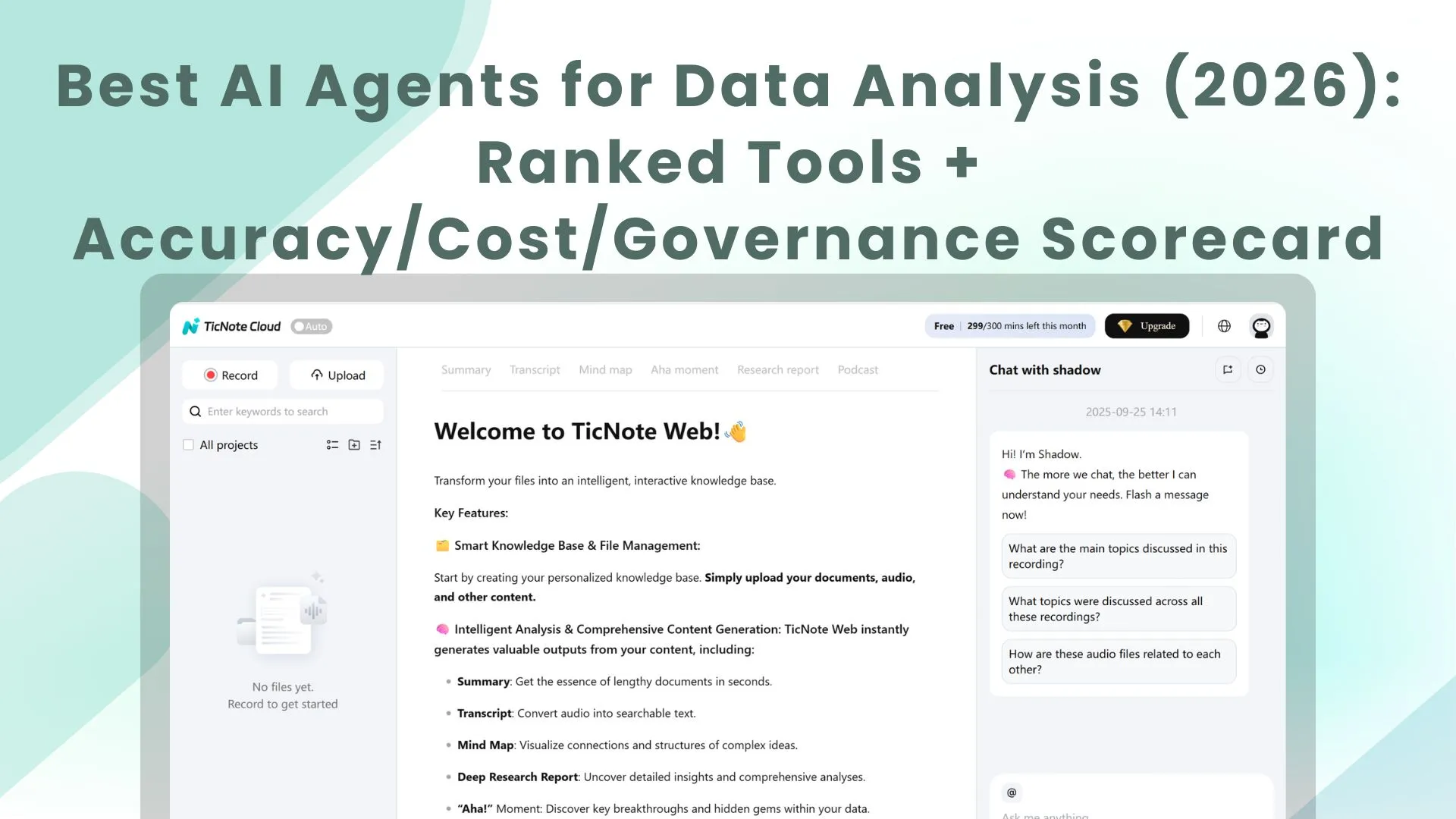
TL;DR: Top AI agent picks for data analysis (and who each is for)
Try TicNote Cloud for Free if your analysis starts with meetings, interviews, and internal docs (an AI agent for data analysis that answers with citations and turns notes into deliverables fast).
Too many teams lose decisions in scattered notes. That leads to repeat meetings and rework. Use TicNote Cloud to keep transcripts and docs in one Project, ask Shadow AI for sourced answers, and ship a report.
Quick shortlist (best for):
- TicNote Cloud — meeting- and document-driven analysis, shared Projects, cited answers, and one-click deliverables
- Microsoft Fabric + Copilot — Power BI and warehouse teams living in the Microsoft stack
- Databricks Assistant — Lakehouse analytics with notebooks, SQL, and governed data products
- Snowflake Copilot/AI features — teams centered on Snowflake data plus SQL-first workflows
- Google BigQuery + Gemini — GCP-native analytics with fast SQL and managed services
- ChatGPT — quick ad hoc reasoning and drafting when data can be safely pasted
What "best" means here: accuracy/correctness, cost to run, latency (time-to-insight), governance/auditability, and data fit (meetings/docs vs warehouse/BI). If your data lives in meetings and docs, start with TicNote Cloud: create a Project, add transcripts/docs, ask Shadow AI for cited answers, then generate your first report or presentation.
What is an AI agent for data analysis (and how is it different from BI and copilots)?
An AI agent for data analysis is a goal-driven system that can plan a multi-step analysis, use tools (SQL, Python, search, connectors), and deliver a checkable result. Instead of only "answering in chat," it decides what to do next: pull the right data, validate it, run calculations, and draft an output you can review.
Plain-English mini glossary (so we stay consistent)
- Agent: A system that plans and acts. It can call tools, store context, and complete a task end to end.
- Copilot: An assistant that helps you do the work. You drive the steps; it suggests queries, charts, or text.
- Agentic analytics: Analysis as a workflow, not a prompt. Think "inputs → steps → checks → report," often run from a playbook.
If you want a deeper blueprint, this ties directly to a practical agent architecture and governance playbook you can reuse across tools.
BI vs AI-assisted vs agent-led: who does what?
- Traditional BI dashboards (human-driven): You ask the question, pick filters, and interpret charts. Best for stable KPIs.
- AI-assisted BI / copilots (prompt-driven): You ask in natural language; the copilot helps draft SQL or explain a chart. You still validate joins, definitions, and edge cases.
- Autonomous analytics agents (playbook-driven): The agent investigates. Example: "Conversion dropped 8% WoW—find drivers, segment, and draft a 1-page summary." It can be triggered on a schedule, follow a runbook, and produce a report with evidence.
Where agents fail (and why grounding matters)
Common failure modes you should expect and test:
- Metric definition drift (it uses "active user" differently than finance).
- Schema mismatch (wrong table or column assumptions).
- Bad joins (double-counting, missing keys, fan-outs).
- Stale context (it doesn't know the latest launch or policy change).
- Prompt injection (malicious text in docs or chats that steers outputs).
That's why enterprise buyers push for grounding: a semantic layer, citations back to sources, and automated checks (row counts, reconciliations, unit tests).
Rule of thumb: use a dashboard for known, recurring questions. Use an agent when the question changes weekly, the inputs are messy (meetings, docs, research), or you need a draft narrative plus evidence.
How do data-analysis agents work end to end (tools, planning, and guardrails)?
An AI agent for data analysis is a system that doesn't just "answer." It plans work, pulls the right context, runs tools, checks results, and then produces a usable output. In vendor calls, you'll hear a lot of new terms. But the real question is simple: can it move from messy inputs (meetings, docs, tables) to a decision-ready result, safely?
The standard loop: trigger → plan → retrieve → run tools → verify → report/act
Most data-analysis agents follow the same operating loop. The difference across vendors is how well each step is controlled.
- Trigger (start the job)
- A user asks a question ("What drove churn last month?")
- Or a schedule fires ("Every Monday at 9am, summarize weekly pipeline risks")
- Plan (break it into tasks)
- The agent turns one request into smaller steps
- Example: define metrics, pick time window, choose data sources, run cuts
- Retrieve (gather trusted context)
- Pull relevant docs, definitions, and prior work (often via RAG)
- Pull tables or BI metadata from your warehouse or semantic layer
- Run tools (do the real work)
- NL2SQL (natural language to SQL) to query a warehouse
- Python to clean data, run stats, or build charts
- BI APIs and connectors to read dashboards, tickets, CRM, or product events
- Verify (catch wrong answers early)
- Basic checks: row counts, duplicates, missing values, time-window sanity
- Metric checks: "Is this using net revenue or gross?"
- Citation checks: can it point to the table, query, or source paragraph?
- Report or act (ship the output)
- A short narrative + table/chart + assumptions
- Optional "safe actions": notify Slack/email, create a Jira ticket, open a PR
If you're mapping use cases, tie each step to measurable outcomes like time-to-insight, rework rate, and review load; the practical KPI set is covered in this guide to enterprise agent use cases and ROI metrics.
Architecture choices (plain English): RAG, tool calling, and single vs multi-agent
RAG (retrieval-augmented generation) means the agent looks up your internal sources first, then writes with that context. It's how an agent stays grounded in your docs, meeting transcripts, and policies instead of guessing.
Tool/function calling means the agent can run actions like "execute this SQL," "run this Python," or "pull this BI report." That's what turns it from a chat box into a worker.
Single-agent setups are easier to govern. You have one brain, one set of permissions, and fewer handoffs to audit.
Multi-agent setups split work into specialists (SQL agent, research agent, reporting agent). This can raise quality on complex jobs, but coordination risk rises: more prompts, more tool calls, more ways to leak data or mix definitions.
Where the semantic layer fits (and why buyers care)
A semantic layer is a shared set of metric definitions, filters, and permissions. It's where "Active user," "Churn," and "ARR" get defined once, with lineage (where the number came from) and access rules (who can see what).
Without it, agents often answer fast but wrong. With it, the agent can:
- Select the right metric definition by default
- Respect row-level access and team boundaries
- Produce audits: "this chart used metric X from model Y, filtered by Z"
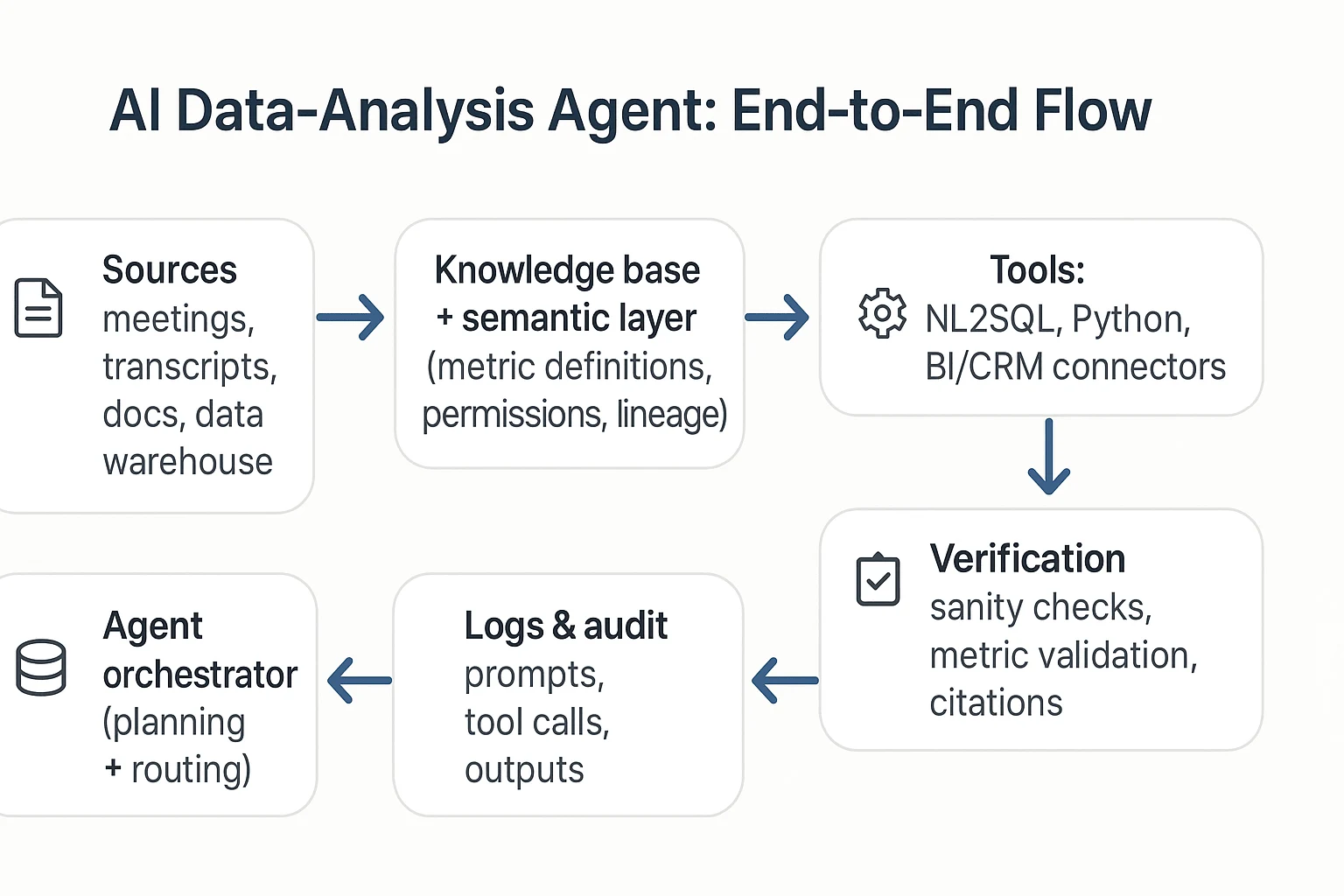
Here's a text-only reference architecture you can use to sanity-check vendor diagrams:
Sources (meetings/docs/warehouse) → Knowledge base/semantic layer → Agent orchestrator → Tools (NL2SQL, Python, connectors) → Verification checks → Logs/audit → UI & exports
What should you measure before you buy (accuracy, cost, latency, and business impact)?
Buying an AI agent for data analysis is a measurement problem, not a vibes problem. If you can't score answers, runs, and workflows the same way across vendors, you'll reward the best demo—not the best performer in your environment. The goal is a repeatable rubric that ties model behavior to business outcomes.
Score accuracy like an analyst (not like a chatbot)
For agentic analytics, "accuracy" isn't one number. You need four KPIs that map to how work actually fails:
- Answer correctness (0–2): 0 = wrong, 1 = partly right, 2 = matches ground truth. Ground truth can be a trusted dashboard, a known metric definition, or a validated sample.
- SQL validity (0–2): 0 = doesn't run, 1 = runs with fixes, 2 = executes first try. Check syntax, permissions, and whether it hits the right tables.
- Citation quality (0–2): 0 = no source, 1 = vague, 2 = traceable. "Traceable" means you can click back to the exact doc, transcript span, or query result used.
- Task success rate (0–2): 0 = fails the workflow, 1 = completes with manual rescue, 2 = completes end to end. Example workflows: "meeting notes → themes → table → exec summary" or "question → query → chart → narrative."
Add them up (0–8) per test case, then track the % of cases scoring ≥6. That single rate is easy for buyers to compare.
Model cost and speed with the right drivers
Cost usually comes from four buckets:
- Seats (who needs access), 2) tokens (long prompts and long context), 3) tool calls (retrieval, SQL, web/research steps), 4) retries (when the agent loops or needs human fixes).
Latency comes from retrieval time, warehouse query time, and multi-step orchestration. Use simple time-to-insight targets by use case:
- Ad-hoc Q&A: p50 ≤ 15s, p95 ≤ 45s
- Meeting-to-brief (single meeting): ≤ 3 minutes
- Weekly business review pack (multi-source): ≤ 15 minutes
Run a 3-step test plan that holds up in procurement
- Offline benchmark pack (20–50 items): Mix easy, medium, and hard. Include: metric questions, "show your work" SQL tasks, and doc-grounded questions that require citations.
- Vendor bake-off: Same questions, same permissions, same data extracts. Score with the 0–8 rubric and record failure modes (bad joins, wrong metric definition, missing source).
- 2–4 week online pilot: Real users, real deadlines. Add human review sampling: review 10–20% of outputs weekly, with an escalation path (block, fix prompt/tool policy, or route to a human).
Tie results to ROI (and pick one north-star)
Use a mini model you can defend:
- Time saved per analysis (minutes): baseline minus agent-assisted time
- Rework avoided (%): fewer reruns due to wrong numbers or missing context
- Adoption (WAU/eligible users): weekly active users as a % of target seats
- North-star: decision turnaround time: time from question asked to decision made
If decision turnaround drops and rework stays low, the agent is doing real work—not just writing nicer paragraphs.
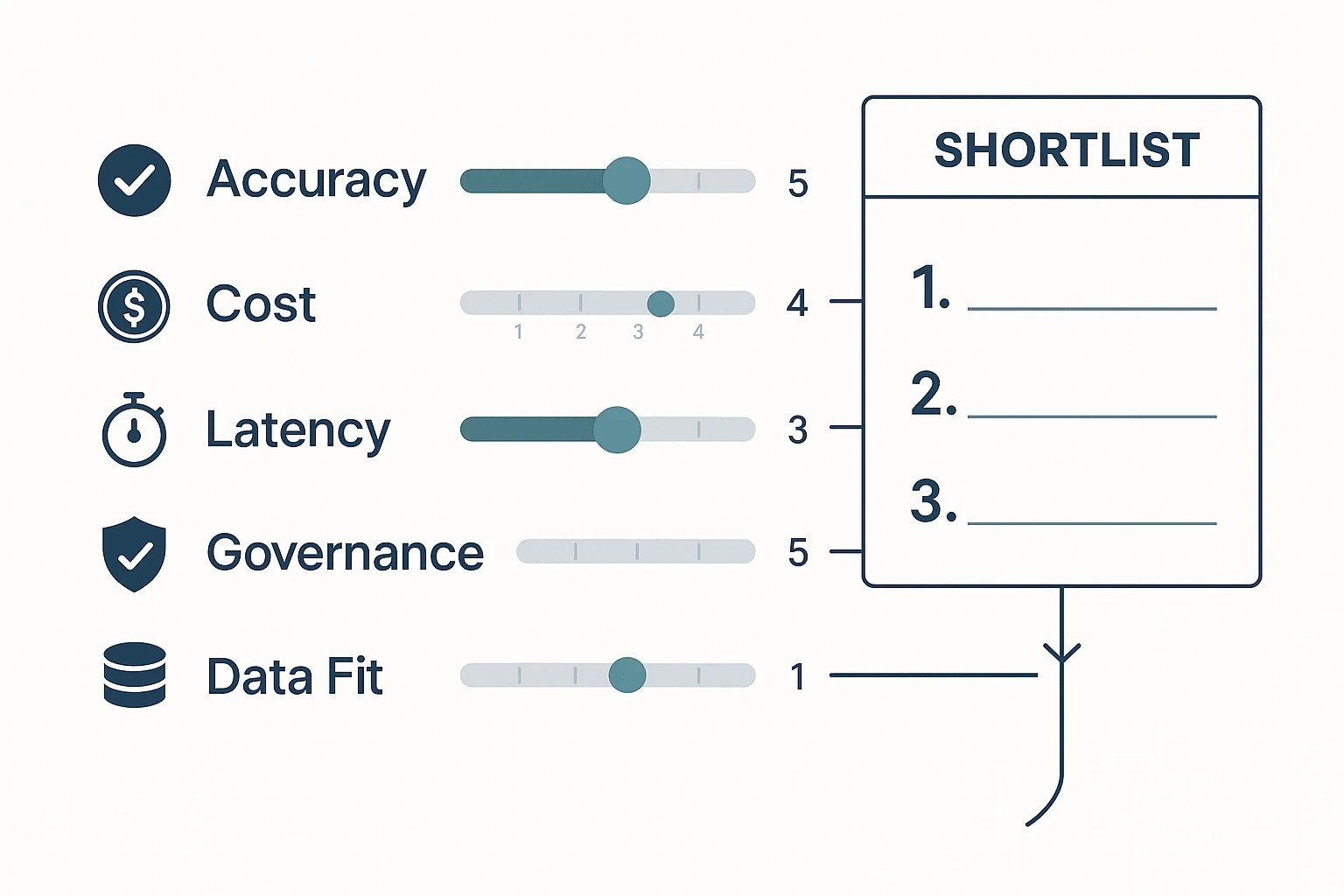
Image prompt: Create a clean 4:3 infographic scorecard. Five horizontal grading lanes labeled Accuracy, Cost, Latency, Governance, Data Fit. Each lane has 0–5 tick marks and a slider indicator. Arrows flow into a "Shortlist" box on the right with 3 ranked slots. Include small icons: checkmark for accuracy, coin for cost, stopwatch for latency, shield for governance, database for data fit. Minimal color palette (navy, gray, teal), plenty of whitespace, crisp sans-serif typography, enterprise style, flat vector design, high resolution.
Best AI agent for data analysis: top tools (ranked)
Not all "agents" are equal. Some excel at meeting-to-insight work. Others shine in code-first exploration or BI metrics. Below is a ranked shortlist for commercial evaluation, using the same lens across tools: what they're best for, how they work, what you can verify, what they output, and what controls you get.
1) TicNote Cloud — best for meeting- and knowledge-driven analysis
Best for: Teams that analyze meetings, interviews, research calls, and internal docs—and need clean outputs fast.
How it works: You organize inputs into Projects (a scoped workspace). Then Shadow AI works across everything in that Project to answer questions, compare themes, and draft structured artifacts. Deep Research helps turn messy notes into a report-style narrative. A key difference: transcripts are editable, so you can fix names, terms, or speaker labels before analysis.
Evidence and traceability: Shadow AI answers with clickable citations to source snippets, so reviewers can verify where each claim came from. Shadow operations are designed to be traceable, which matters when insights drive decisions.
Outputs and exports: One-click deliverables (research reports, web presentations, podcasts with show notes, mind maps) plus exports like DOCX/PDF/Markdown for summaries and TXT/DOCX/PDF for transcripts.
Controls: Project sharing with roles (Owner/Member/Guest) and permission boundaries; enterprise options include SSO on the Enterprise tier.
Pricing (copy-ready summary): Free (0) plan available; Professional (12.99/month or 79 annually); Business (29.99/month or $239 annually); Enterprise (contact sales) for custom usage, SSO, and support.
Generate your first report from a meeting in minutes
2) ChatGPT (with Advanced Data Analysis) — best for fast exploratory analysis + code execution
Best for: Analysts who want quick charts, regressions, forecasts, data cleanup, and "try-it-now" questions.
Strengths: Strong Python-based workflows for EDA (exploratory data analysis). Flexible reasoning for messy questions. Good for prototyping transforms and explaining results in plain language.
Limits to plan for: Governance depends on your org's configuration and user behavior. Repeatability can drift unless you standardize prompts, datasets, and evaluation tests. Connectors vary by plan and environment, and there's always risk if sensitive data is pasted in ad hoc.
Where to use safely: Non-sensitive datasets, sandboxed work, or when outputs are treated as drafts that must be verified in your warehouse/BI tool.
3) Microsoft Copilot (Excel/Power BI ecosystem) — best for Microsoft-first analytics teams
Best for: Orgs already living in Excel, Teams, Power BI, and Microsoft security.
Strengths: In-product help for summarizing, drafting measures, exploring data, and building narratives where work already happens. Often easier adoption because it's "right there" in familiar tools.
Limits: Results depend heavily on a strong semantic model (well-defined measures, naming, and access rules). Tenant governance can be powerful, but also complex to set up and audit across workspaces, datasets, and policies.
4) Tableau (Pulse / AI features) — best for metric monitoring and BI-native workflows
Best for: Teams standardized on Tableau that want faster insight loops on top of trusted dashboards.
Strengths: Strong visualization and metric tracking habits. AI features can help explain changes in key metrics and reduce "dashboard hunting."
Limits: "Agent" autonomy and cross-tool actions vary by deployment and data setup. If you need the system to operate across meeting notes, docs, and multiple apps, you may hit boundaries faster.
5) Perplexity — best for research-first analysis with citations
Best for: External market research, competitor scans, and synthesizing public sources.
Strengths: Citation-forward answers that make it easier to check sources. Great for fast briefs and background context.
Limits: Internal data analysis is limited unless you've integrated your sources in a governed way. It's not a BI semantic layer and won't replace warehouse-grounded metrics.
6) Teradata AgentBuilder — best for Teradata-centric enterprises building governed agents
Best for: Large orgs with Teradata as a core data platform and a need for tighter controls.
Strengths: Platform-first approach that can support enterprise requirements like access control patterns, auditability, and managed deployment.
Limits: More build/ops overhead than turnkey tools. You'll likely need engineering time for workflows, evaluations, and lifecycle management.
7) Notion AI — best for workspace knowledge Q&A
Best for: Teams whose "data" is mostly notes, docs, specs, and project knowledge inside Notion.
Strengths: Fast answers and drafts from your workspace context. Useful for summarizing project pages and turning notes into plans.
Limits: Not designed for warehouse-native NL2SQL at scale. Strict analytics governance (row-level security, audit trails for metric definitions, reproducible queries) typically needs a BI/data platform.
Shortlisting rule (use this to decide in 30 seconds)
- If your inputs are meetings, interviews, and documents and you need deliverables fast, shortlist TicNote Cloud first.
- If you need warehouse-native analytics at scale (semantic models, governed access, repeatable metric logic), shortlist platform-native options next (Microsoft, Tableau, Teradata), and use code-first tools like ChatGPT mainly for exploration and drafts.
If you're mapping these choices to broader tool stacks, this overview of all-in-one AI workspaces and when they fit can help you narrow the list without overbuying.
Comparison table: which AI agent fits your data, team, and risk level?
Most teams don't fail on model quality. They fail on fit: the tool can't reach the right data, can't show sources, or can't pass security review. Use the matrix below to pick a tool you can defend with clear criteria (data fit, traceability, governance, and setup), then follow the use-case guide to avoid "it depends" paralysis.
Normalized comparison matrix (buyer-friendly)
| Tool category / example | Primary data fit | NL2SQL readiness | Citation / traceability | Governance (RBAC/audit) | Autonomy level | Exports / reporting automation | Typical setup effort |
| Meeting-first analysis agent: TicNote Cloud | Meetings, interviews, docs, research notes | Low–Med (not BI-first) | Strong (project-scoped, source-linked) | Med–High (permissions + traceable ops) | Agentic (executes inside Projects) | High (reports, presentations, mind maps, doc exports) | Low (upload/record, organize by Project) |
| General LLM chat: ChatGPT / Claude | Mixed, but weak on private corp data by default | Low unless connected | Low–Med (depends on your process) | Low–Med (varies by plan) | Assist (answers, may draft) | Med (copy/paste or basic exports) | Low (but governance work shifts to you) |
| BI copilot: Microsoft Fabric / Power BI Copilot | Governed warehouse + semantic model | High (best with curated model) | Med (ties to model, not raw evidence) | High (tenant controls, RBAC) | Assist (guided analysis) | High (dashboards, KPI narratives) | Med–High (model + permissions) |
| BI platform copilot: Tableau Pulse / Einstein | Dashboards + published data sources | Med–High | Med | High | Assist | High (BI-native sharing) | Med (data source hygiene) |
| Enterprise data/AI platform: Databricks + agent framework | Lakehouse, notebooks, pipelines | High (if you build it) | Med–High (if you log tools + data lineage) | High | Agentic (when engineered) | High (jobs, notebooks, apps) | High (eng + MLOps) |
| Enterprise warehouse: Teradata Vantage + governance stack | Warehouse-first, regulated analytics | High (SQL-centric) | Med (query + lineage) | High | Assist–Agentic (depends on orchestration) | High (BI outputs, governed SQL) | High (admin + data modeling) |
How to read this table fast:
- If your "data" is mostly calls, meeting notes, and PDFs, pick a meeting/docs-first agent with citations.
- If your "data" is a certified semantic layer (metrics + dimensions), pick a BI copilot.
- If you need custom tools, private execution, and deep control, pick a platform and build.
Decision guide: common scenarios → best pick
- Weekly KPI brief from a governed warehouse: Microsoft Fabric/Power BI Copilot (fast NLQ on curated metrics, strong tenant controls).
- Ad-hoc "why did this metric change?" with a trusted semantic layer: Tableau (best when your org already runs Tableau as standard).
- Meeting synthesis into a board-ready narrative (decisions, risks, owners): TicNote Cloud (projects + editable transcripts + cited answers).
- Turn 10 customer interviews into themes, quotes, and a research report: TicNote Cloud (strong unstructured ingestion and report automation).
- Compliance-heavy analytics where every query must be controlled and logged: Teradata (warehouse governance patterns fit regulated teams).
- A product analytics team that wants a custom agent to run SQL, write notebooks, and trigger jobs: Databricks (best if you have data eng + MLOps capacity).
- Quick Q&A across messy internal docs with minimal setup: TicNote Cloud (project scoping reduces sprawl) or a general LLM if data is non-sensitive.
- Cross-functional "meeting → tasks → summary → deliverable" pipeline: TicNote Cloud (end-to-end from transcript to exportable outputs).
Buy vs build vs partner (rule-of-thumb)
- Buy when you need value in 2–4 weeks, you need citations, and security review is soon.
- Build when you already have a stable semantic layer, strong data engineering, and you can own monitoring and audit logs.
- Partner when you need custom connectors and workflows, but still want shared accountability for governance and uptime.
How to run a meeting-to-insight analysis workflow (step-by-step)
This workflow shows how to turn messy meeting inputs into clean, decision-ready insights using TicNote Cloud. It's built for teams that live in calls, interviews, and docs—and need answers fast, without building a new data pipeline. Think of it as a practical "ai agent for data analysis" loop: capture → verify → synthesize → ship.
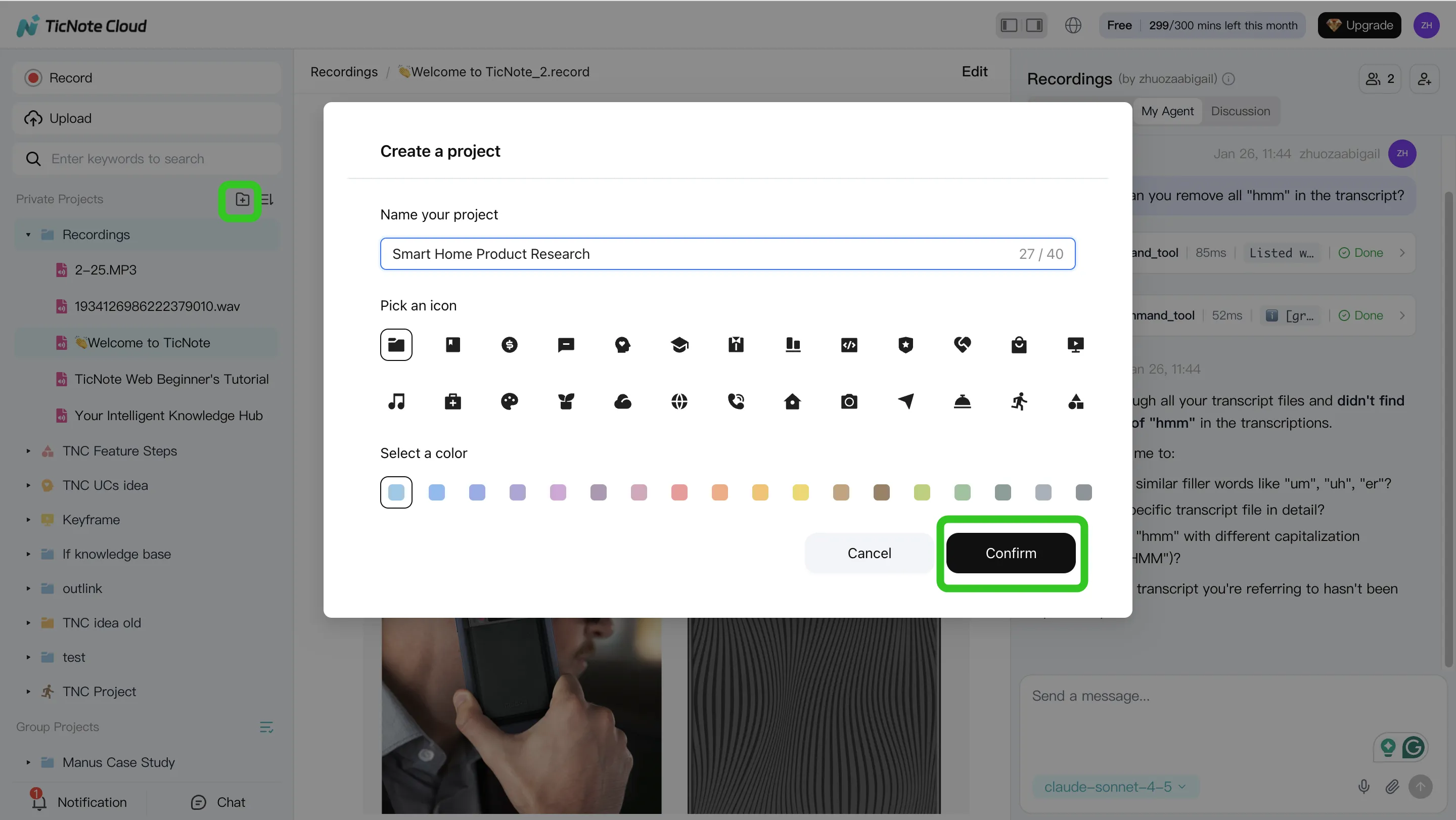
Step 1: Create a Project and add content (upload or attach)
Start by creating a Project around one business question, not a generic folder. A Project like "Q2 customer retention" keeps all later analysis scoped and reusable.
In TicNote Cloud Web Studio, create a new Project (or open an existing one). Then add the raw inputs that usually live in five places at once:
- Meeting recordings (customer calls, renewals, support escalations)
- Interview notes and research docs (PDF, Word, Markdown)
- Internal write-ups (PRDs, launch docs, incident reviews)
You've got two simple ways to bring files in:
- Direct upload from the Project file area
- Upload from the Shadow AI panel (attach files in chat, then ask it to save them)
Step 2: Use Shadow AI to search, analyze, edit, and organize
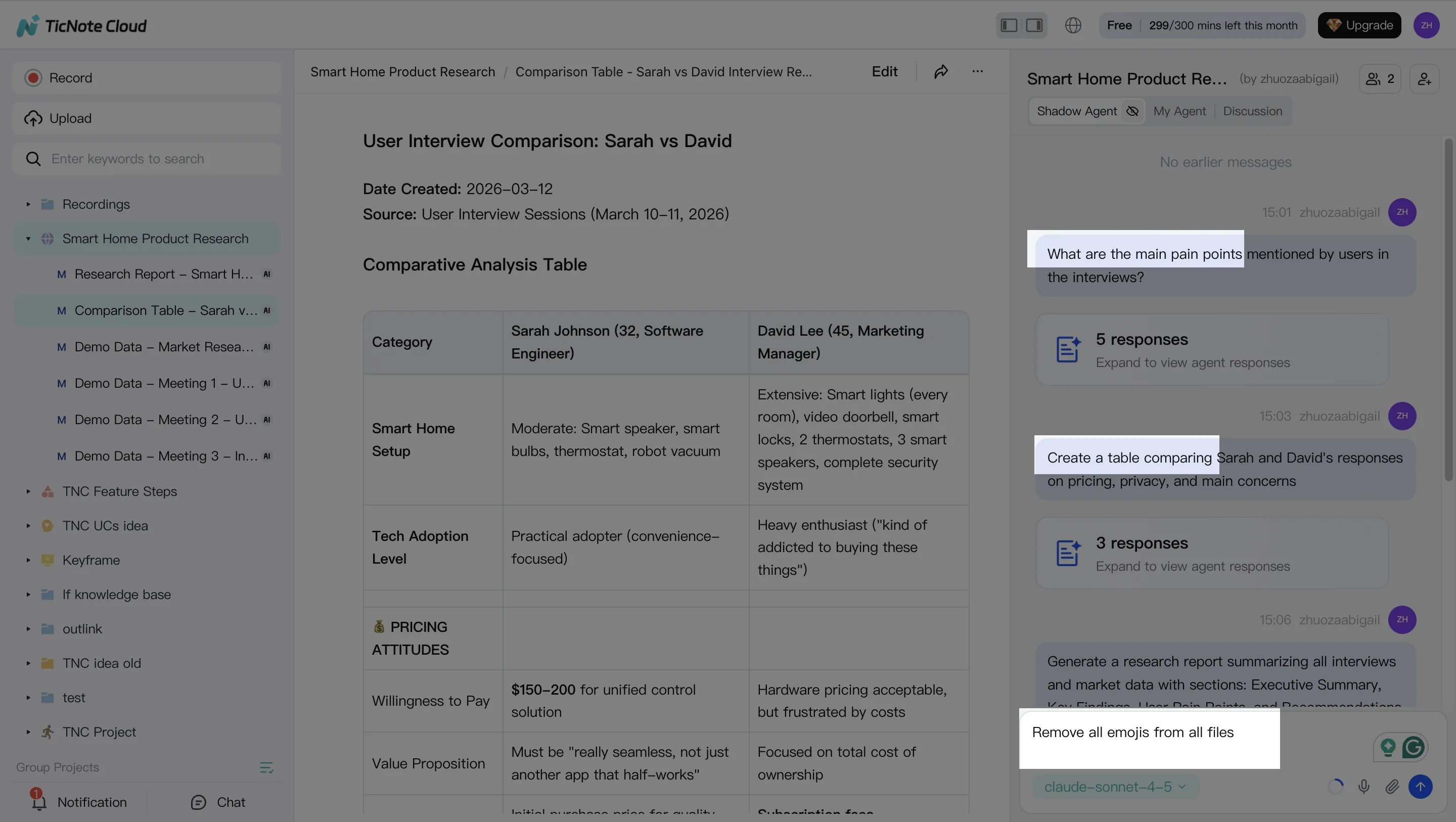
Once your Project has content, Shadow AI becomes your analysis "workbench" on the right side of the screen. Use it for the work that normally takes hours: searching across calls, pulling themes, and turning loose notes into structured outputs.
Ask targeted questions that map to business outcomes. For example:
- "What are the main pain points mentioned by users?"
- "Compare the 3 interviews and extract common themes."
Then move from answers to assets by asking for structure:
- "Create a table comparing user responses."
- "Organize action items from all meetings."
- "Rewrite this section in a formal tone."
Two habits make the workflow more accurate over time:
- Verify with sources. When Shadow AI cites a specific part of a file, click through and confirm the claim before you repeat it in a doc.
- Fix the transcript early. If a product name, competitor, or metric term is wrong, edit it. Small transcript edits reduce repeated errors later and keep your Project's knowledge base clean.
Step 3: Generate deliverables with Shadow AI (reports, presentations, podcasts, mind maps)
When you've got the main themes, ship the first "version 1" deliverable right from the Project. This is where the workflow pays off: the same inputs can become different outputs for different audiences.
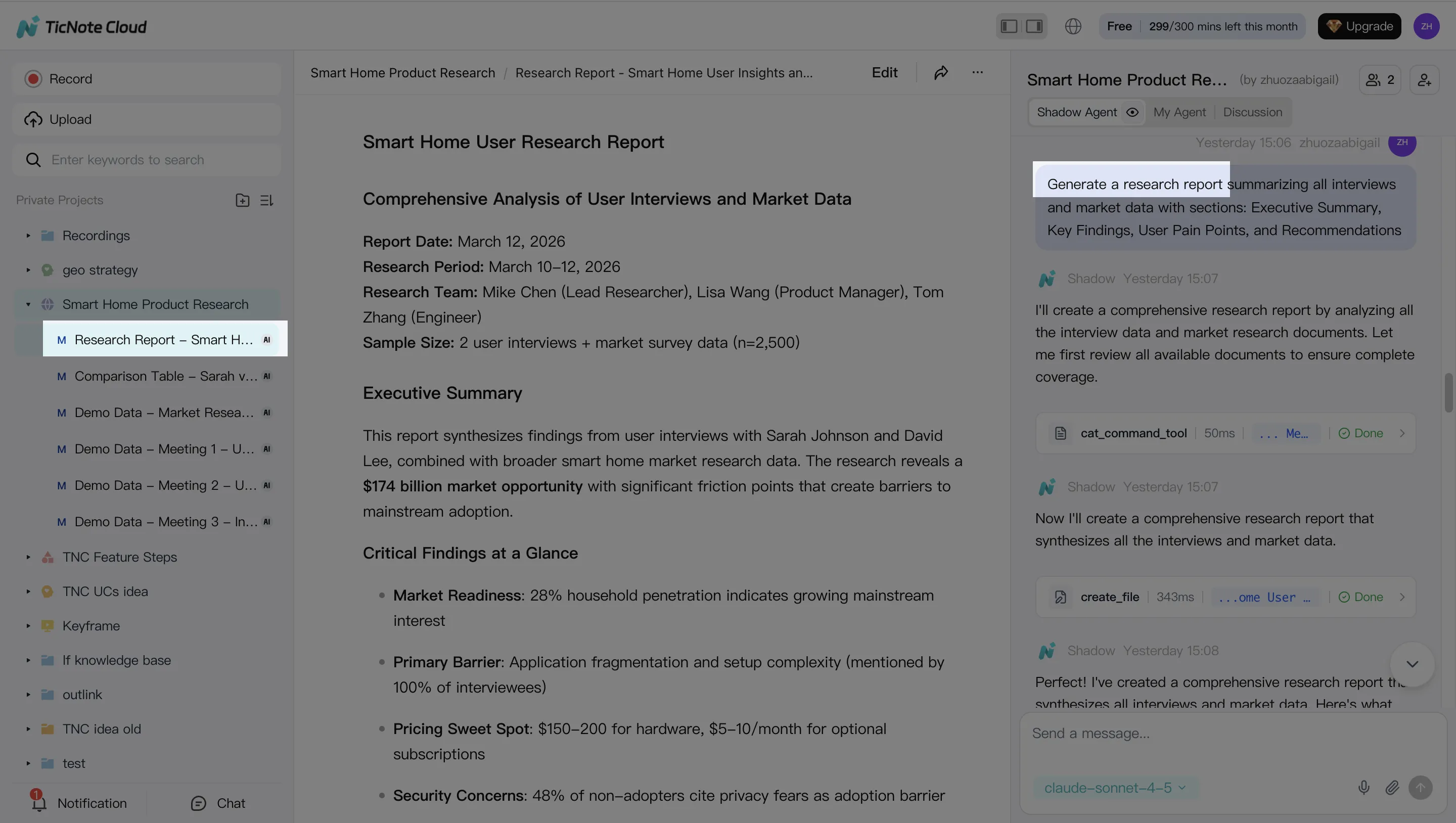
In TicNote Cloud, you can generate multiple formats from the same Project context, including research reports (PDF), web presentations (HTML), podcasts, and mind maps. You can either ask Shadow directly ("Generate a strategic analysis report based on all interviews") or use the Generate button and pick the format.
Practical exports that work well for teams:
- Doc-style exports for stakeholders who want a clean memo
- Markdown-style summaries for wiki or sprint notes
- Web presentation output when you need a shareable narrative fast
Step 4: Review, refine, and collaborate
Treat the first output as a strong draft, then do a fast human review pass. Focus your review time where errors hurt most:
- Quotes: did the speaker say it that way?
- Decisions: are owners and dates correct?
- Metrics: are numbers stated as facts or as estimates?
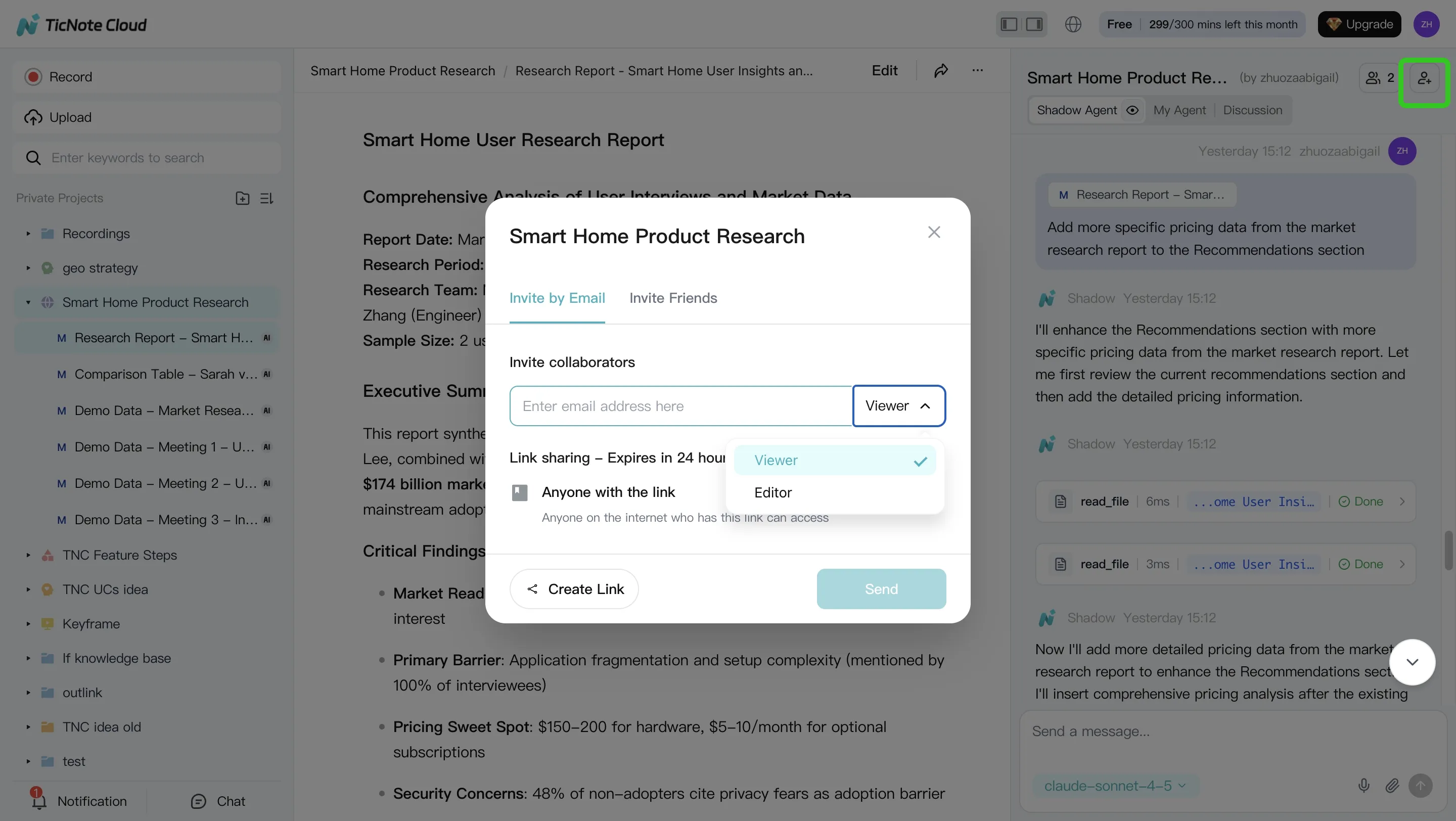
After review, refine with one or two tight follow-up prompts (for example, "Rewrite the findings as risks, impacts, and recommendations" or "Add a short exec summary under 120 words"). Share the Project with the right permission level so teammates can comment and iterate without losing context.
App workflow (quick summary)
If you're working from your phone, keep the same loop: open the Project, add content as it comes in, ask Shadow AI to answer a focused question, then generate a deliverable for review. The key is consistency: one Project per topic, and everything relevant goes inside it.
Safety note: treat AI outputs as drafts until you verify quotes, decisions, and metric statements in the source. Also keep sensitive inputs permission-scoped so Shadow AI only works within what each person is allowed to access.
What governance and security controls should be non-negotiable?
If you want to approve an ai agent for data analysis in an enterprise, require controls that limit blast radius, prove what happened, and stop bad actions fast. The goal isn't "perfect AI." It's managed AI: scoped access, safe tool use, and audit-ready evidence.
Enforce least privilege (what the agent can read and do)
Start with access, not prompts. Give the agent the minimum data and actions it needs.
- RBAC (role-based access control) by workspace/project: keep finance, HR, and customer data separate.
- Scoped tokens per connector: one token per system (warehouse, drive, CRM), time-bound when possible.
- Split read vs write: "query tables" is not the same as "update records" or "publish a report."
- Domain limits: restrict retrieval to approved datasets, folders, and Projects.
- Clear approval path: name the role that can expand access (usually data owner + security).
Practical rule: if the agent can write to production or send externally, it needs a human gate.
Lock down tools and defend against prompt injection
Agents fail most when they can call the wrong tool, on the wrong input, at the wrong time.
- Tool allowlist: the agent can only call approved tools (SQL runner, doc search, export). Block everything else.
- Prompt allowlist / templates: standardize "analysis briefs" that set boundaries (sources, time window, required citations).
- Input sanitization: strip secrets, block hidden instructions in docs, and redact PII (personal data) before retrieval.
- Retrieval filtering: only fetch chunks with matching permissions; exclude low-trust sources by default.
- Safe fallbacks: when confidence is low, it should ask a clarifying question, refuse, or route to an analyst—not guess.
Require audit logs, approvals, and rollback basics
You can't govern what you can't replay. Artificial Intelligence Risk Management Framework (AI RMF 1.0) (2023) is explicit that GOVERN includes "Policies, processes, procedures, and practices…related to the mapping, measuring, and managing of AI risks." That only works with traceability.
Log, at minimum:
- prompt + system instructions used
- tools called (with parameters)
- data sources accessed (tables/files/Projects)
- outputs created (reports, dashboards, exports)
- user who requested it and who approved it
For incidents, you need a simple playbook: disable the agent, rotate keys, review logs, and correct the semantic layer/knowledge base (fix mappings, permissions, or bad source docs).
Don't skip dev/stage/prod separation
Treat analytics agents like software. Keep:
- Dev: experimentation with synthetic or sampled data
- Stage: realistic access, strict monitoring, approval-required writes
- Prod: smallest toolset, strongest reviews, tightest permissions
Governance KPIs to track monthly
- % of outputs with citations: target ≥90% for decision-grade work
- Human override rate: track by workflow; spikes signal bad prompts or weak data quality
- Escaped-policy incidents per month: target 0; every event gets a root-cause fix
Final thoughts: picking an AI agent that your org will trust and actually use
Most teams buy the wrong thing first. When you pick an AI agent for data analysis, prioritize accuracy and governance before you optimize cost or latency. If outputs can't be verified and access can't be controlled, adoption drops fast—and the tool becomes shelfware.
Roll out one workflow, then scale
Start with one high-signal workflow: a weekly insight brief from meetings, interviews, and key internal docs. Track a simple scorecard for 2 weeks:
- Correctness rate (percent of claims backed by sources)
- Time-to-insight (minutes from input to brief)
- Rework time (minutes spent fixing or clarifying)
- Adoption (how many stakeholders actually use the brief)
Once the brief is reliable, expand to adjacent deliverables like decision logs, research summaries, and stakeholder updates.
When TicNote Cloud is the most direct path
If your analysis inputs are mostly meetings and documents, TicNote Cloud is the fastest path from raw context to a usable deliverable. Projects keep related files together, Shadow AI works inside that scope, and citations plus permissions make reviews and sharing safer.
Let Shadow write your next deliverable


