


 Extension
TL;DR: Best AI agent picks for ecommerce teams (quick list + who each is for)
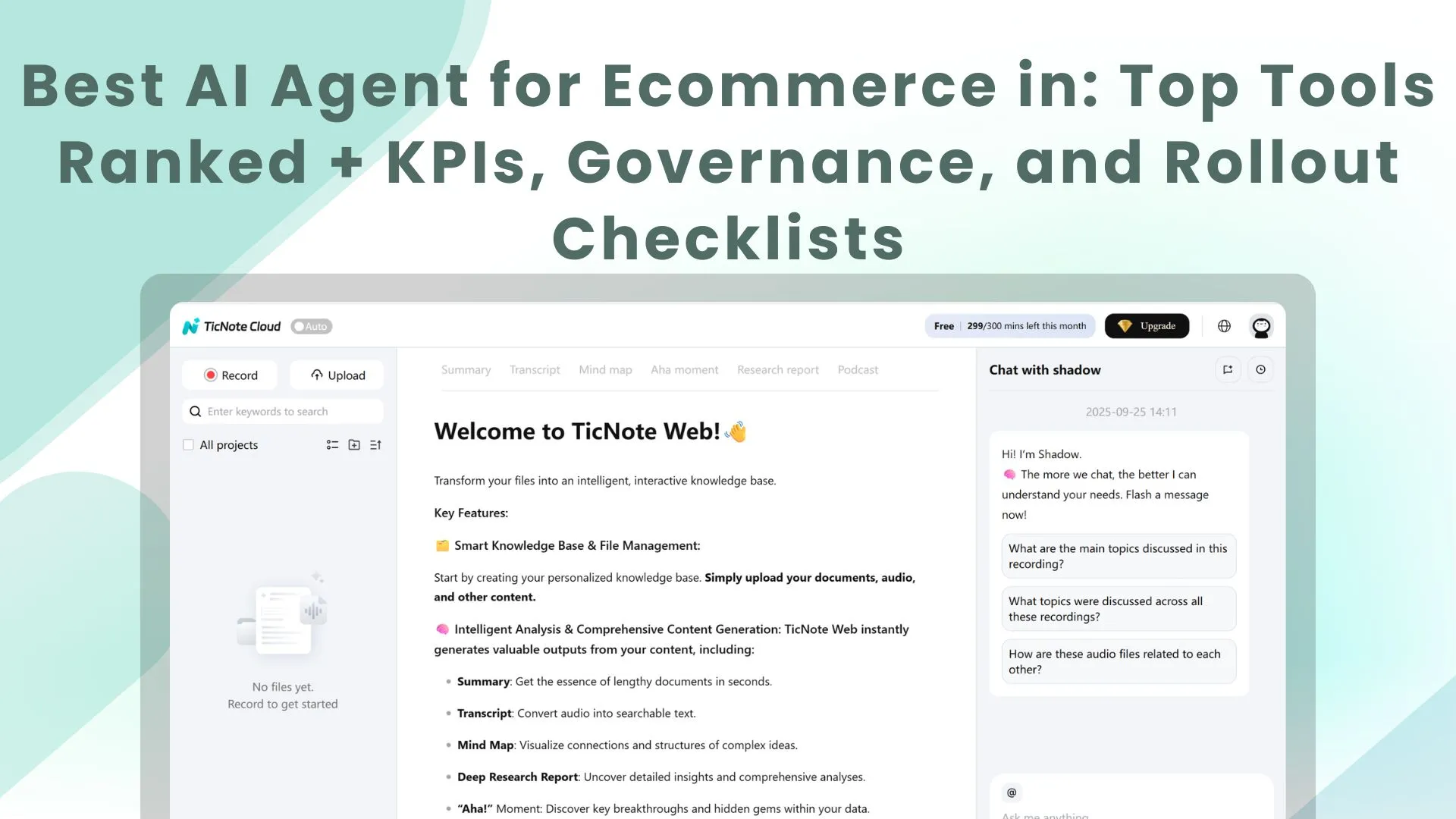
Start with TicNote Cloud if you want an AI agent for ecommerce that can plan work and take actions across your docs and decisions—not just answer questions.
Support teams lose hours to scattered calls, messy notes, and "why did we do this?" debates. That drift turns into repeat tickets and inconsistent policies. TicNote Cloud fixes it by turning customer conversations into a searchable Project, then generating cited SOPs and ops reports you can reuse.
- TicNote Cloud — Best for turning customer conversations into searchable ops knowledge. Capture CX calls, build a Project knowledge base, and generate cited SOPs, reports, and decision trails.
- Gorgias AI Agent — Best for Shopify support actions. Tight helpdesk flow with ticket handling and store actions.
- Zowie — Best for high-automation CX workflows. Strong returns/refunds/tracking automation, with heavier setup.
- Ada — Best for enterprise multilingual. Built for large, global support programs.
- Salesforce Agentforce — Best for Salesforce-led orgs. Best when Commerce + Service + CRM live in Salesforce.
- Triple Whale Moby Agents — Best for ecommerce BI. Ask questions in plain English on unified store data.
- Glide — Best for simple no-code builds. Quick internal tools and lightweight agents.
- Livex.ai — Best for real-time personalization. On-site personalization and recommendations.
Start here: if you need measurable impact fast, begin with support + knowledge capture. Once volume is steady, layer in BI and personalization next.
What is an AI agent for ecommerce (and how is it different from chatbots and basic automations)?
An AI agent for ecommerce is software that can plan and complete work across your store tools, not just talk. It doesn't only generate text like "here's a reply." It can also check systems, decide what to do next, and move the task forward.
Agentic AI vs generative AI vs if/then automation
Here's the clean way to think about it:
- Generative AI creates content. It's great for drafts: product descriptions, email copy, macros, and FAQ rewrites.
- Automation runs fixed rules. Example: "If order is delivered, send review email." It's fast, but it breaks when edge cases show up.
- AI agents combine reasoning + tool use. Example: "Customer says package is missing" → check carrier scan → confirm address rules → choose refund vs reship → update helpdesk ticket → trigger the right workflow.
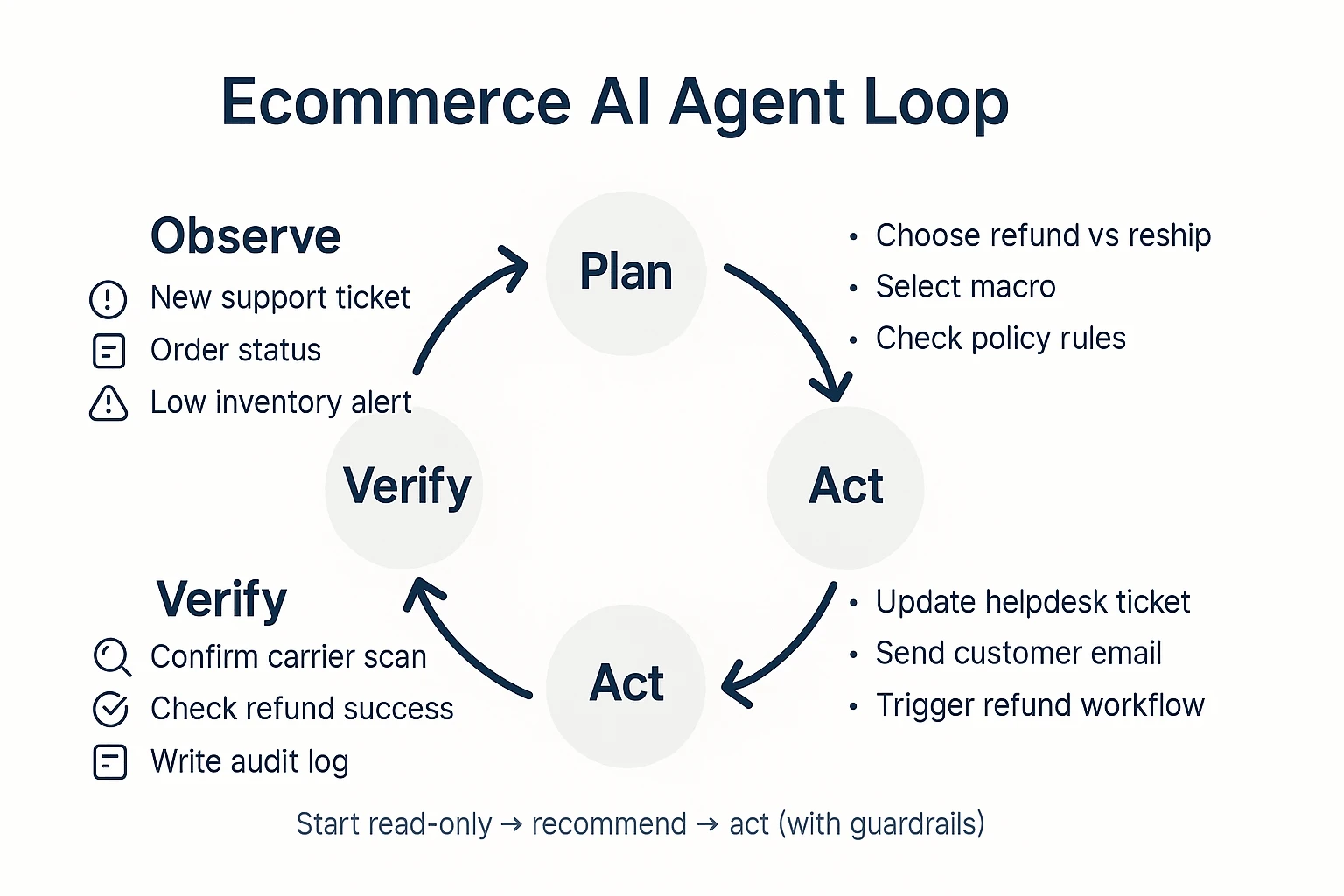
Most agents follow an agent loop:
- Observe (read signals: tickets, orders, inventory, policy)
- Plan (pick the best next steps)
- Act (use tools: helpdesk, Shopify admin, email/SMS)
- Verify (confirm the action worked; log what happened)
That last step matters in ecommerce because mistakes are expensive. "Verify" reduces wrong refunds, bad discounts, and misrouted returns.
What "autonomy" really means in a store (read-only, recommend, act)
Autonomy isn't a vibe. It's a permission level you can control:
- Read-only (lowest risk): summarizes tickets, finds policy answers, flags anomalies (like "late shipment cluster").
- Recommend (medium risk): proposes actions (refund, reship, goodwill credit, reorder point change) but waits for approval.
- Act (highest risk): executes changes in systems (issue refund, edit order, send email) with guardrails.
Practical takeaway: most teams should start with read-only + recommend for 2–4 weeks, then earn "act" with acceptance tests, clear thresholds, and audit logs.
Where agents sit in an ecommerce stack (storefront, CX, data, ops)
Agents connect across the stack:
- Store platform: Shopify/WooCommerce/Magento (orders, products, customers)
- Ops systems: OMS/ERP, WMS, shipping/carrier tools
- Customer systems: helpdesk, CRM, email/SMS
- Data: CDP, analytics, BI dashboards
- Knowledge: policies, catalog data, shipping SLAs, supplier terms, promo rules
Common agent types (and what they own):
- Support agent: triage, draft replies, status checks, RMA decisions
- Merch/reco agent: onsite search tuning, bundles, cross-sells
- Inventory agent: reorder signals, stockout risk, supplier follow-ups
- Pricing agent: promo eligibility checks, margin-safe markdown suggestions
- Fraud/risk agent: risky order flags, verification steps
- Marketing/content agent: campaign briefs, ad variations, landing page drafts
- BI agent: "why did conversion drop?" analysis with traceable inputs
What agents are not: magic or set-and-forget. They need clean data, tight permissions, and monitoring—otherwise they'll confidently do the wrong thing.
How did we rank these ecommerce AI agents (criteria + scoring weights)?
Most "best AI agent" lists hide the math. We didn't. To rank each AI agent for ecommerce, we used a simple 100-point rubric based on what breaks (or saves) store ops: integrations, safe actions, accuracy, and measurable impact.
The scoring rubric (100 points total)
Here's what we scored, with clear weights.
- Integrations coverage (20%): Can it connect to your real stack—Shopify, CRM, helpdesk, 3PL/WMS, and data tools? Native connectors score higher than brittle webhooks.
- Actions & permissions (20%): Can it do more than answer questions? We scored read vs. write access, scoped actions (only refund, only cancel), and approval flows.
- Accuracy & guardrails (20%): Does it ground answers in your data (RAG = retrieval-augmented generation), show citations, and fail safely at low confidence?
- Analytics (10%): Can you see containment rate, revenue influence, deflection, and an audit trail of what the agent did?
- Time-to-value (10%): How fast can a small team go live? We scored setup, data prep, testing, and ongoing QA workload.
- Pricing/TCO signals (10%): Not just list price. We included usage fees, implementation time, and "hidden" maintenance (prompt upkeep, policy tuning).
- Security posture (10%): RBAC (role-based access control), encryption, retention controls, and training opt-out. Bonus if logs make reviews easy.
Why these weights? In ecommerce, "can it act safely?" matters as much as "can it connect." So 60% of the score goes to integrations + actions + guardrails.
If you want a broader version of this framework, see this guide to real AI agent costs and security checks.
What we did not score (and why)
- We don't score marketing claims without a test method.
- We don't assume every store needs full autonomy (often, "suggest + approve" wins).
- We don't rank on feature count. Ten features that aren't governed lose to three that are.
Questions to ask in every vendor demo (copy/paste)
- "Show me the audit log for an action."
- "What happens at low confidence—does it stop, ask, or guess?"
- "Can I set read-only mode by role and channel?"
- "How do you handle PII (names, addresses) and retention?"
- "How do I build a test set and measure accuracy over time?"
- "What does a rollout look like at 10% of traffic, then 50%?"
Where TicNote Cloud fits this rubric (without the hype)
TicNote Cloud is strongest when your team needs repeatable ops and governance. Its Project-based memory keeps work scoped, cited answers make reviews fast, and Shadow AI operations are traceable—useful when you need to explain "why the agent did that" before you let it take more actions.
Top AI agents for ecommerce in 2026 (tool-by-tool breakdown)
Below are the top picks ecommerce teams are buying in 2026. Each one includes: best for, what it does day to day, guardrails you'll need, basic setup notes, which KPIs it moves, and the red flags that can blow up your margins or trust.
TicNote Cloud (store-ops knowledge agent)
Best for: turning CX calls, supplier calls, and weekly ops meetings into a searchable "store-ops brain."
What it does (core workflow): capture conversations → organize them into Projects (returns, sizing, shipping issues, supplier delays) → let Shadow AI answer questions with citations and generate SOPs, training docs, weekly recaps, and short reports.
Why it's agentic for ecommerce ops: Shadow AI doesn't just chat. It executes work across your Project files—searching, summarizing, drafting, and structuring—so outputs are repeatable and reviewable. That matters when you're turning messy call notes into decisions.
Practical use cases:
- Escalation playbooks (late deliveries, damaged items, chargebacks)
- Defect and returns analysis by theme (fit, fabric, breakage, packaging)
- Catalog QA notes (what customers misunderstand, missing specs)
- Voice-of-customer briefs for growth and product pages
- Cross-meeting decision memory (what changed, who owns what, by when)
Guardrails that make it "ops-safe":
- Project-scoped context (less spillover across topics)
- Clickable sources and traceable actions (you can verify)
- Team permissions (Owner/Member/Guest)
- "No copy-paste" knowledge reuse because it works inside Projects
Setup notes (what you need before week 1): pick 3–5 Project buckets (Returns, Shipping, Product QA, Supplier, Weekly Ops). Then standardize how you name and store each meeting so the knowledge compounds.
How to get value in week 1 (fast checklist):
- Create one Project called "Returns & Fit" and upload last week's support call audio plus any return reasons.
- Create one Project called "Shipping & Suppliers" and add your ops meeting recording.
- Ask Shadow AI for a 1-page weekly brief: top 5 issues, owners, and next actions.
- Generate one SOP: "Refund + reship rules" or "Sizing issue playbook."
KPI fit (what it should move):
- Time-to-resolution for internal escalations (hours saved per week)
- Repeat-issue rate (same problem reappears week over week)
- QA throughput (issues found before they hit customers)
- Meeting-to-action lag (days from discussion to assigned task)
Red flags:
- You don't store recordings or you can't share them securely
- No owner for "Project hygiene" (naming, tagging, permissions)
Pricing note: there's a free plan, which is useful for piloting. Validate transcription minutes, file import limits, and chat caps against your team's real volume.
(If you want a broader landscape, see this guide on top all-in-one AI workspaces and where they fit in an ops stack.)
Gorgias AI Agent (support agent that can take actions)
Best for: Shopify-centric support teams that want AI to resolve tickets and take store actions.
What it does: drafts replies, pulls order context, and can trigger workflows like refunds, edits, or reships (depending on your setup).
Guardrails to set:
- Approval boundaries for refunds and order edits (by amount, customer risk, and reason)
- A "must-escalate" list (chargebacks, fraud signals, VIPs, medical claims)
Setup notes: start with the top 10 ticket types and lock policy wording. Then add actions only after answer quality is stable.
KPI fit: deflection rate, first response time, cost per resolved ticket, refund leakage rate.
Red flags: per-automation costs can spike fast if you over-automate low-value tickets.
Zowie (high-automation CX workflows)
Best for: teams aiming for high automation across end-to-end CX flows, not just replies.
What it does: automates multi-step support journeys (status checks, changes, returns) with tighter process design.
Guardrails to set: define where deterministic rules stop and AI decisions start. For money-moving actions, keep clear rules and audit trails.
Setup notes: plan a longer onboarding. You'll spend real time mapping policies and exceptions.
KPI fit: automation rate, handle time, policy compliance, repeat contact rate.
Red flags: if your policies aren't written down, the agent will amplify inconsistency.
Ada (enterprise CX with routing + analytics)
Best for: multilingual, enterprise-grade CX where routing, analytics, and governance matter.
What it does: handles self-serve and agent-assist, routes by intent and priority, and supports large knowledge programs.
Guardrails to set:
- Brand voice control (approved phrases, banned claims)
- Escalation design (what goes to humans, and when)
Setup notes: ask how knowledge is ingested and updated. Stale help content creates confident wrong answers.
KPI fit: containment, CSAT, multilingual coverage, escalation accuracy.
Red flags: if your knowledge base is fragmented, rollout will drag.
Salesforce Agentforce (CRM-native service + commerce workflows)
Best for: Salesforce-first orgs that want agents tied to Service + Commerce + CRM data.
What it does: connects customer records, cases, and commerce workflows so actions happen where your teams already work.
Guardrails to set: decide who owns governance inside Salesforce (service ops, IT, security). Define logging, approvals, and allowed actions.
Setup notes: confirm total cost early (licenses plus usage). Also confirm what data the agent can access by role.
KPI fit: case resolution time, agent productivity, deflection, revenue-at-risk saved.
Red flags: unclear ownership leads to "agent sprawl" and inconsistent policies.
Triple Whale Moby Agents (KPI Q&A + anomaly detection)
Best for: ecommerce BI that answers KPI questions fast and flags anomalies.
What it does: lets operators ask questions in plain language ("why did MER drop?") and surfaces changes in spend, conversion, or AOV.
Guardrails to set: align on a single source of truth. If the model's assumptions don't match your data model, you'll chase ghosts.
Setup notes: validate attribution logic and confirm who owns the warehouse and definitions.
KPI fit: time-to-insight, anomaly detection precision, reduced wasted spend.
Red flags: mismatched metric definitions across teams.
Glide (no-code internal agents and apps)
Best for: simple internal tools like ops dashboards, task triage, and lightweight workflows.
What it does: turns spreadsheets and databases into tools your team can actually use, fast.
Guardrails to set: do not let a no-code agent write into revenue-critical systems unless you have logs, approvals, and rollbacks.
Setup notes: start read-only. Add write actions only after you've tested edge cases.
KPI fit: ops cycle time, error rate, backlog throughput.
Red flags: "silent failures" when inputs change but no one notices.
Livex.ai (real-time personalization)
Best for: on-site personalization and recommendations that adapt in real time.
What it does: tailors product suggestions and offers based on behavior and context.
Guardrails to set: control discount logic. Measure with holdouts (a small group that doesn't get the agent) so you know what's real lift.
Setup notes: define your constraints first: margins, excluded SKUs, and promo rules.
KPI fit: conversion rate, revenue per session, AOV, gross margin after discounts.
Red flags: personalization that "wins" revenue but loses margin.
If you only buy one
For most small-to-mid ecommerce teams, TicNote Cloud is the best first purchase. It creates governed, reusable knowledge from the work you already do (calls and meetings), and that improves every downstream agent—support, merchandising, growth, and ops—because everyone finally operates from the same cited source of truth.
Side-by-side comparison table: features, governance, and total cost signals
Most ecommerce teams don't fail because the agent "can't answer." They fail because the tool can't connect, act safely, or prove what it did. The table below normalizes what operators actually need: channels, integrations, action level, guardrails, analytics, and pricing signals.
Normalized comparison table (what operators should compare)
| Tool / agent type | Primary use case | Channels | Integrations (typical) | Action level | Guardrails | Analytics signal | Pricing model signal |
| TicNote Cloud (project knowledge + cited outputs) | Knowledge, SOPs, vendor/call synthesis | Internal | Notion, Slack + file imports | Recommend | Citations, project scope, traceable ops | Adoption, reuse, answer quality | Per seat |
| Dedicated CX agent (helpdesk automation) | Support deflection + order issues | Chat, email (sometimes voice) | Helpdesk + store + OMS | Act | Approvals, macros, audit logs | Containment, CSAT, AHT | Per ticket / per resolution |
| Personalization / merch agent | Recommendations, bundles, onsite offers | Onsite, email/SMS triggers | CDP, product catalog, analytics | Act | Policy rules, human overrides | Revenue lift, RPV, conversion | % of revenue / tiered usage |
| Ads / growth ops agent | Creative briefs, budget pacing, testing | Internal | Ads platforms + analytics | Recommend → Act | Spend caps, approvals, change logs | ROAS, CAC, experiment velocity | % of spend / per seat |
| BI / analyst agent | KPI answers, root-cause analysis | Internal | Warehouse + dashboards | Read → Recommend | Query controls, lineage, citations | Decision time, metric trust | Per seat / compute |
| No-code workflow agent | Cross-app automations and handoffs | Internal (triggers everywhere) | Hundreds of SaaS connectors | Act | Logs, retries, RBAC (varies) | Run success rate, incident rate | Per task / per run |
How to read this table (fast)
Pick the tool that matches your highest-volume workflow and your governance maturity. If you can't staff review and QA, avoid "Act" tools first. When in doubt, start with the clearest traceability: a project-based knowledge agent with cited outputs (often TicNote Cloud) plus a specialized CX agent later.
What "cost" really includes (beyond the monthly price)
Teams often budget for licenses, then get surprised by labor.
- Setup time (10–40 hours): data cleanup, integration work, and mapping policies to workflows.
- Governance work (5–15 hours): permissions, escalation rules, and acceptance tests.
- QA + iteration (ongoing): prompt/version updates, edge-case handling, and seasonal promo changes.
- Usage fees: per conversation, per ticket, per run, or compute spikes during peak weeks.
Red flags to treat as non-negotiables
- No action log = no safe automation. If you can't replay actions, you can't debug or audit.
- No role-based permissions = high blast radius. One bad prompt can touch every order.
- No sandbox/test mode = risky rollout. You need a safe place to fail before peak season.
Which agent should you deploy first (by use case and store stage)?
Deploy the agent that removes the most daily work first: customer questions, messy policies, and scattered "why did they return?" notes. That's why your first move should be a knowledge-and-ops layer, then an action agent that can safely execute.
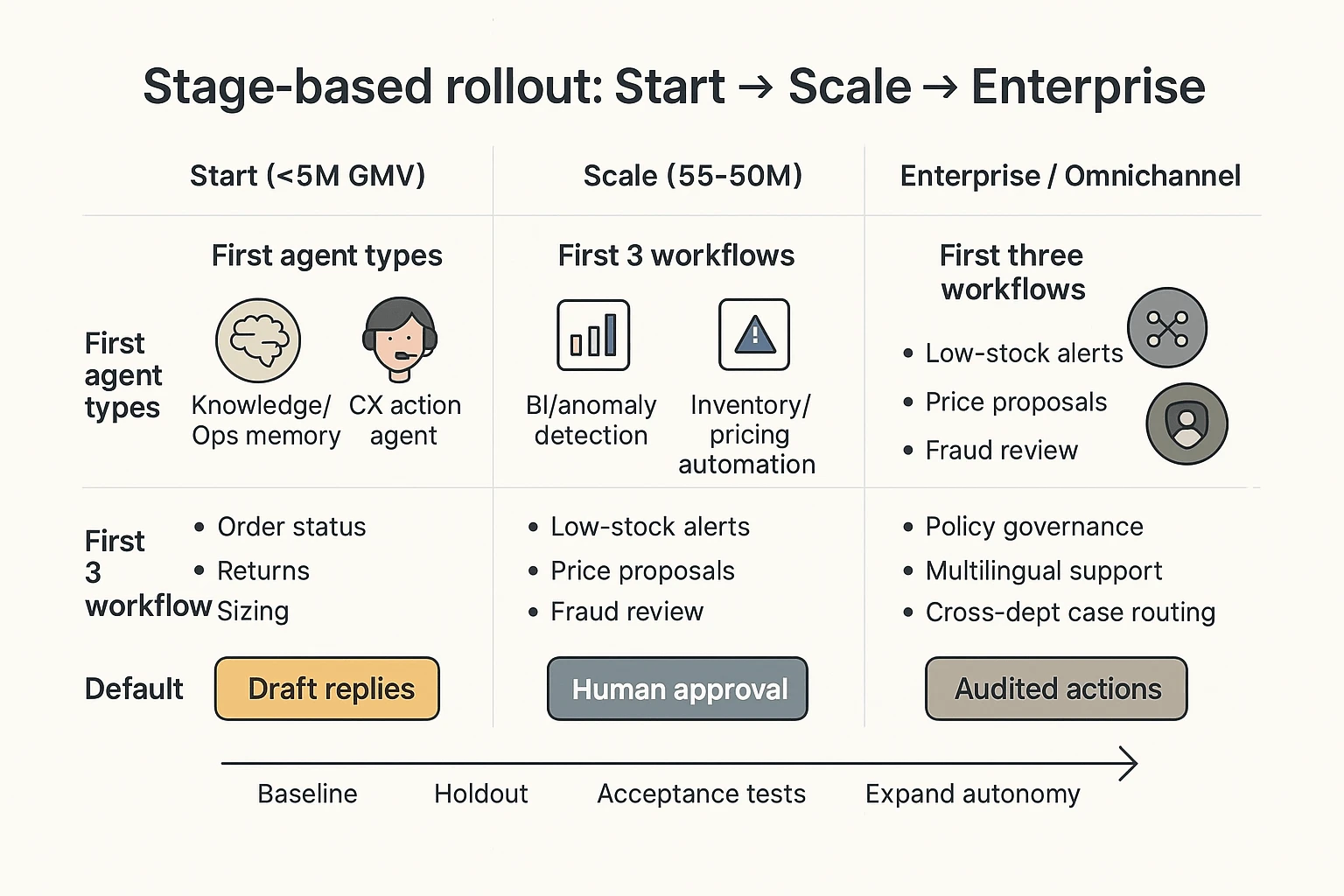
If you're under $5M GMV: start with support + content + cart recovery
Recommendation: Deploy TicNote Cloud first to centralize policies, return reasons, and voice of customer (VOC) into Projects. Then use Shadow AI to turn that source material into clean SOPs and macros with citations, so your team answers the same way every time. After your knowledge is clean, add a CX action agent (like Gorgias AI Agent) to automate replies without drifting.
Starter workflows (week 1–2):
- Order status: "Where's my order?" response + carrier link rules
- Returns: eligibility, label steps, and refund timelines
- Sizing questions: brand-specific fit guidance + common comparisons
- Shipping exceptions: "delayed / lost / damaged" decision tree
- Basic recovery: 1–2 abandoned cart messages and a "browse abandon" follow-up
If you're $5–50M: add inventory + pricing + fraud (in that order)
Sequence: Keep TicNote Cloud as the "ops memory" layer for weekly forecasting meetings, supplier calls, and promo post-mortems. Next, add BI (like Triple Whale) to spot anomalies fast (CVR drops, CAC spikes, AOV shifts). Then add inventory, pricing, and risk automations—but with explicit approvals (human-in-the-loop) until they hit acceptance tests.
Default first automations (weeks 3–6):
- Low-stock alerts tied to lead times and margins
- Price change proposals with guardrails (min margin, MAP, competitor checks)
- Fraud/risk flags with review queues, not auto-cancels
If you're enterprise or omnichannel: go governance-first, then orchestrate
Sequence: Start with governance-first deployment: locked policies, permissioned knowledge, and audit trails. Then add enterprise CX (like Ada) for scale and multilingual support. Finally, add cross-dept orchestration (like Salesforce Agentforce) when Salesforce is your system of record and you need agents that can act across service, commerce, and sales.
A simple 90-day rollout cadence (that actually works)
Pick one workflow. Baseline 14 days of metrics (AHT, CSAT, deflection, refund time, chargebacks). Run a holdout (10–20% of tickets/orders stay manual) for a clean read. Only then expand autonomy: draft-only → suggested actions → auto-actions, and only after the workflow passes acceptance tests.
If you want a deeper pilot structure, use this 60–90 day agent pilot playbook to set guardrails before you scale.
Implementation checklists by agent type (data, integrations, timeline, failure modes)
Below is a practical rollout checklist for an ecommerce AI agent, shown using TicNote Cloud as the example. The same logic works for other tools: start with one workflow, load the right sources, require traceable answers, then add automation only after QA.
Step 1) Create or open a Project and add content (start narrow)
Pick one workflow first, like "Returns & Exchanges". Keep scope tight: one brand, one locale, one policy set. That narrow start usually cuts setup time by 50%+ versus trying to cover "all support" on day one.
In TicNote Cloud's web studio, create a new Project (or open an existing one). Then add 3–5 source types so the agent has real ground truth:
- Support call recordings (refund/return calls)
- Your latest returns policy doc (with effective date)
- Top tickets export (CSV) for the last 30–90 days
- Supplier emails about defects, RMAs, or restocking fees
- Product specs or size charts for high-return SKUs
You can upload in two supported ways:
- Direct upload from the file area
- Shadow AI attachment from the chat panel, then ask Shadow to file it in the right folder
App (quick summary): create the same Project on mobile for fast capture (voice notes, call recordings). Then keep everything in that single Project so context compounds over time.
Step 2) Use Shadow AI to search, analyze, edit, and organize (with citations)
Now use Shadow AI to answer questions across every file in the Project. For ecommerce ops, your default rule should be: no citations = not shippable.
Start with queries that create action:
- "Top 10 return reasons by product line (cite sources)."
- "Where do agents deviate from policy? Quote the policy text."
- "Draft an SOP outline for returns exceptions."
Then create reusable assets inside the Project:
- Macro templates for common cases (damaged item, wrong size, late delivery)
- A structured SOP (intake → eligibility → labels → warehouse steps → refunds)
- Cleaned transcripts where speaker names or key numbers are wrong
App (quick summary): use quick search and summaries before ops standups so you walk in with the top themes and open questions.
Step 3) Generate deliverables you'll actually ship (not just answers)
Once the content is organized, generate outputs that match your real operating cadence:
- Returns playbook (SOP + macros + edge cases)
- Weekly Voice of Customer (VOC) report (themes, top SKUs, policy gaps)
- Training doc for new agents (what to do, what not to do)
Export in formats your team uses:
- Markdown for Notion/Docs workflows
- PDF for versioned policy packs
- HTML presentation for weekly reviews
App (quick summary): generate short briefs for on-the-go review, then bring edits back to the web Project.
Step 4) Review, refine, and collaborate (with a changelog mindset)
Before rollout, do a team review pass. Assign roles (Owners/Members/Guests), add comments, and refine the parts that will touch customers.
Two operating rules that prevent "agent drift":
- Track changes like a changelog: what changed, when, and why.
- Verify claims by jumping from an output back to sources.
Ecommerce failure modes checklist (and how to prevent them)
Use this as your pre-launch gate for any AI agent for ecommerce workflow:
- Wrong policy version used → Scope Projects by locale/brand, and store policy docs with effective dates.
- Hallucinated return window or fee → Require citations on every customer-facing claim, and run acceptance tests (10 common scenarios) before enabling reuse.
- Too-broad access to sensitive data → Restrict roles early; keep any "write actions" (like posting replies) off until accuracy is proven.
Required note: screenshots of the real product should be used in this section to illustrate the Web flow steps.
Governance, privacy, and evaluation: how to keep ecommerce agents safe and accurate
An AI agent for ecommerce can touch orders, refunds, and customer data. That means you need basic controls before you ship it. The goal is simple: protect PII, reduce wrong actions, and prove what the agent did.
Lock down PII: collection, retention, training, and access
Start with a buyer checklist you can send to any vendor:
- What data is collected?
- Customer identifiers (email, phone)
- Shipping data (name, address)
- Payment data (tokenized vs full card data)
- Chats, tickets, and attachments
- Call audio and transcripts (if voice)
- What are retention defaults?
- Default retention period in days
- How deletes work (self-serve vs support ticket)
- Backups: how long they persist after deletion
- Data residency options (US/EU) and subcontractors
- Is your data used for model training?
- Get "not used to train" or a clear opt-out in writing
- Ask if prompts and outputs are stored, and for how long
- Who can access your data?
- Role-based access control (RBAC) for vendor staff
- Audit logs for support access
- Incident response basics: breach notification window, process, and contacts
If a vendor can't answer these in one doc, don't deploy to live customers.
Use human-in-the-loop where risk is real
Safer rollout comes from matching the agent's power to the task:
- Draft-only
- Agent suggests a reply, a tag, and next steps.
- A human sends it.
- Best for: tone control, new brands, regulated products.
- Approve-to-act
- Agent prepares the action (refund, reship, discount, order edit).
- A human clicks approve.
- Best for: refunds, appeasements, subscription changes.
- Auto-act with caps
- Agent can act, but only inside limits.
- Caps can be: $ amount, risk score, customer tier, or order status.
- Best for: address fixes, low-value refunds, simple exchanges.
Pick RAG vs fine-tune based on how fast your store changes
RAG (retrieval-augmented generation) means the agent looks up the right facts at run time. Think: current return policy, current promo rules, and product specs. This fits ecommerce because policies and inventory change weekly.
Fine-tuning changes model behavior and voice. It's slower to update and easier to get wrong when policies shift. Use it only when you need strict tone or stable formatting, and you can retrain often.
TicNote Cloud's Project setup maps well to a practical RAG-style workflow: you keep policies, past incidents, vendor notes, and meeting decisions in one Project, then Shadow AI answers with citations so reviewers can verify.
Test with a golden set (and make hallucinations measurable)
Before you go live, build a golden set of 50–200 real tickets and queries. Cover refunds, lost packages, chargebacks, sizing, warranty, and promos.
Define pass/fail for:
- Correctness (right policy, right order status)
- Tone (brand-safe, no blame)
- Compliance (no PII leaks, no unsafe promises)
- "Must cite source" for policy answers (link to the exact policy snippet)
Add acceptance tests like "refund not allowed if delivered + outside window" and "never ask for full card number."
Monitor what matters: drift, escalations, and audit trails
Once live, watch these weekly:
- Escalation rate (agent → human): target down over time
- Override rate (human edits agent): tells you where it's wrong
- Refund/discount error rate: count and $ impact
- Drift checks after changes: promos, policy updates, shipping SLAs
- Audit logs: every action, who approved it, and which source was used
The minimum governance bar (doable in 7 days)
- Day 1–2: vendor PII + retention answers in writing
- Day 3: choose Draft-only or Approve-to-act for money moves
- Day 4: build the golden set and pass/fail rules
- Day 5: run tests, fix prompts/knowledge gaps
- Day 6: turn on audit logging and escalation paths
- Day 7: limited rollout (one channel, one region, one queue)
KPIs and ROI: what to measure for each ecommerce AI agent
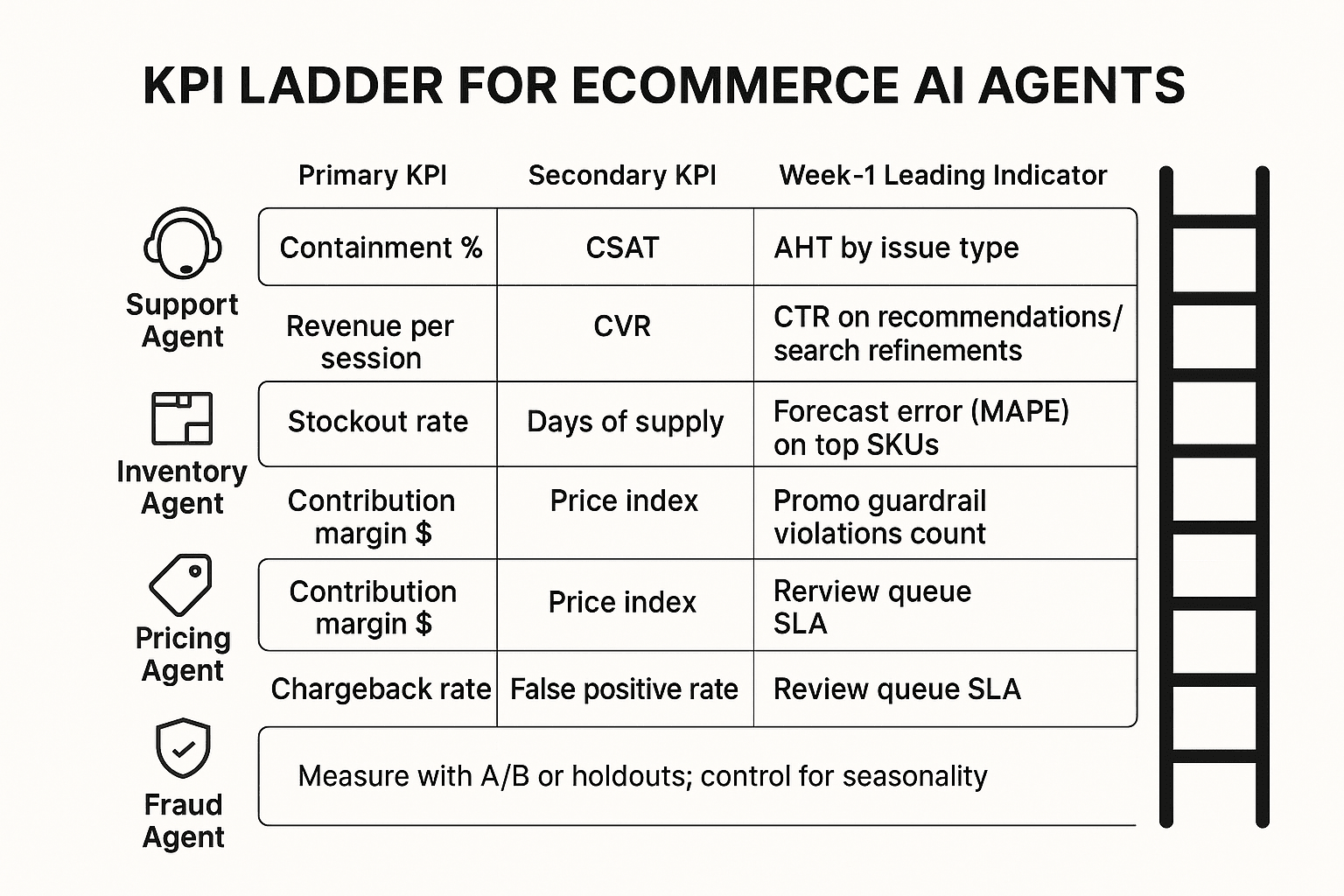
If you can't measure it, don't automate it. For each ecommerce agent, pick 1–2 outcome KPIs plus a week-1 leading indicator. Then compare against a holdout group or A/B test.
Support agent KPIs (CX)
Track speed and quality. Measure weekly, and control for seasonality (holidays, promos).
- Containment = % of contacts fully resolved with no human touch. Measure by conversation outcome tags plus "no follow-up within 7 days."
- CSAT (customer satisfaction) = post-interaction rating change. Sample consistently (same trigger, same scale), and report the response rate.
- FCR (first contact resolution) = % solved in one interaction. Define "one" as 24–72 hours to avoid channel hopping noise.
- AHT (average handle time) = agent minutes per resolved case. Split by issue type, and compare to the same weeks last year.
Merch agent KPIs (recommendations, search, bundles)
Merch agents should earn revenue without masking promo effects.
- CVR (conversion rate) = orders / sessions. Use an A/B test or holdout, and keep traffic sources balanced.
- AOV (average order value) = revenue / orders. Segment by new vs returning shoppers.
- Revenue per session = total revenue / sessions. This is the cleanest single merch metric.
Tip: separate recommendation uplift (treatment vs control) from promo uplift (discount depth, email pushes). If you change both, you can't attribute.
Inventory agent KPIs (forecasting, replenishment)
Inventory agents win by reducing "out of stock" and excess.
- Stockout rate = out-of-stock SKU-days / total SKU-days. Pair it with a lost sales estimate (units missed × gross margin per unit).
- Days of supply (DoS) = on-hand units / expected daily demand. Monitor by category and top SKUs.
- Inventory turns = COGS / average inventory. Higher is better, but watch stockouts.
- Lead time variance = actual lead time spread vs plan. This explains forecast misses fast.
Pricing agent KPIs (rules, competitive pricing, promos)
Pricing agents can raise revenue while hurting profit. Don't let that happen.
- Contribution margin = (revenue − variable costs) / revenue. Track margin dollars, not just %.
- Price index = your price / competitor basket price. Use a stable SKU basket and update weekly.
- Promo lift = incremental profit vs baseline. Add guardrails: max discount, min margin, and inventory limits.
Fraud agent KPIs (payments and abuse)
Fraud is a balancing act: fewer bad orders, but don't block good ones.
- Chargeback rate = chargebacks / transactions (or chargebacks / sales). Track by payment method and country.
- False positives = good orders declined. Estimate the cost as margin lost + support load.
- Review queue volume + SLA = # flagged orders and time-to-decision. If SLA slips, conversion drops.
Simple ROI formula + a worked support example
Use one formula across agents:
- ROI = (value created + cost saved − total cost) / total cost
Worked example (support):
- 8,000 tickets/month, 12% containment gain = 960 tickets avoided.
- Human handling time = 6 minutes/ticket ⇒ 96 hours saved/month.
- Fully loaded cost = 25/hour ⇒ **2,400/month saved**.
- Add a conservative retention proxy: if faster resolution prevents 20 cancellations at 30 gross margin each ⇒ **600/month value**.
- Total monthly cost (tool + implementation amortized + maintenance) = $2,000.
- ROI = (2,400 + 600 − 2,000) / 2,000 = 50%.
Include real costs: integration time, prompt/routing upkeep, QA, and governance reviews.
To keep KPI discussions grounded, use TicNote Cloud as your "evidence layer" for weekly ops reviews: capture meetings, generate KPI narratives with citations back to the discussion, and keep decisions traceable over time.
Final thoughts: building an agent stack that compounds (not a pile of bots)
Most ecommerce teams don't fail with AI because the model is weak. They fail because they deploy too many "helpers" with no tests, no logs, and no shared memory. The store-ops proof approach is simpler: start with one workflow you can measure, build a knowledge base that prevents repeat mistakes, then raise autonomy only after your acceptance checks pass.
Start small, but make it measurable
Pick one workflow where errors are visible and costs are real: order-status replies, returns triage, product attribute cleanup, or promo QA. Run a 30-day pilot and lock in three KPIs on day 1 (for example: deflection rate, time-to-resolution, and error rate). If you can't measure "before vs after," you're not rolling out an agent—you're adding risk.
Build the compounding stack (knowledge → automation → growth)
The safest stacks start with a knowledge layer. When your team captures decisions, edge cases, and supplier notes in TicNote Cloud Projects, you get cited outputs you can verify later. That makes CX automation safer, because answers trace back to source context. Next, that cleaner customer and product context feeds better merchandising and personalization. Finally, the same artifacts tighten BI loops, so pricing, inventory, and CX policies improve faster.
Increase autonomy only after tests pass
Before you let an agent take actions, require:
- Clear permissions (what it can read, write, and trigger)
- Audit logs for every key step
- A fallback path to a human when confidence is low
A pragmatic next step: choose one workflow, define 3 KPIs, and set governance rules on day 1. TicNote Cloud is an easy way to keep decisions auditable and reusable across the team.
Try TicNote Cloud for Free and turn weekly decisions into a searchable Project.


