


 Extension
TL;DR: The best AI agent picks for business (2026 shortlist)
If you want an AI agent for business that turns meetings into real outputs fast, start with TicNote Cloud for meeting-to-deliverable work. For cross-app task automation, pick Make or Zapier. For sales/ops multi-agent flows, choose Lindy; for data- and logic-heavy internal agents, choose Relevance AI.
Meetings create decisions, tasks, and risks—but they often die in notes. That wastes hours and repeats the same talks. A practical fix is to use TicNote Cloud to capture the meeting, keep it editable, and generate briefs, action lists, and client-ready drafts from the same source.
Other best-fit picks: build conversational chat agents with Botpress (more custom) or use Tidio (support-first). For finance-specific help, Intuit Assist is the cleanest fit if you already run QuickBooks.
Who shouldn't buy TicNote Cloud: teams that rarely meet, want fully autonomous outbound actions with no review step, or need deep native integrations beyond light connectors and exports.
How we tested and scored these AI agents (so you can trust the list)
Most "top AI agent" lists don't show their work. We do. We tested each tool on the same three business workflows, tracked setup time, scored outputs with a concrete rubric, then repeated runs to catch flaky behavior. The goal is simple: help you pick an AI agent for business that performs under real meeting and ops pressure.
Test scenarios (3) you can copy
We used three repeatable scenarios that show if a tool can turn messy inputs into usable work.
- Meeting recap → action items → follow-up draft (meeting-first lens)
- Inputs: a 30–45 minute transcript (with speaker labels), a short agenda, and 3–5 "side notes" like decisions made in chat.
- Expected outputs:
- 6–10 bullet recap (decisions + context)
- Action list with owner, due date, and next step
- A follow-up email draft that references the decisions
- What "good" looks like: no made-up owners or dates, decisions are clear, action items are assignable, and the email is send-ready with light edits.
- Customer request triage (route + response draft + tagging)
- Inputs: 8–12 inbound items (email snippets or ticket text), each with a priority hint (ex: "VIP client" or "renewal risk").
- Expected outputs:
- Routing suggestion (Sales / Support / Product)
- A first-response draft per request
- Tags (billing, bug, feature, urgency, account)
- What "good" looks like: correct routing most of the time, polite replies that don't promise features, and tags that a team can filter on.
- Weekly KPI summary (compile metrics + highlights + risks)
- Inputs: a KPI note doc (10–20 lines), last week's numbers, plus 3–5 "events" (campaign launch, outage, big deal won/lost).
- Expected outputs:
- A one-page weekly summary
- A small KPI table (current vs last week)
- Highlights, risks, and asks (what you need from the team)
- What "good" looks like: math and comparisons are correct, risks are tied to evidence, and the summary reads like it came from an operator.
Setup-time tracking (how we measured it)
Setup time started when we clicked "create account" and ended when the tool produced a usable output for scenario #1. We included:
- Account creation and basic workspace settings
- Connecting sources (if the tool supports it)
- Building the first workflow, template, or agent prompt
We report setup as ranges so it stays honest:
- <30 min: ready with defaults and minor prompts
- 30–120 min: needs connectors, roles, or a few iterations
- Half-day+: needs policies, multi-step builds, or admin help
Quality rubric (1–5) with concrete checks
Each scenario output got a 1–5 score across four checks.
- Accuracy (1–5): no invented facts, names, or numbers. A "5" means every claim is grounded in the input.
- Completeness (1–5): captures decisions, owners, dates, and open questions. A "5" means nothing important is missing.
- Formatting (1–5): clean structure (bullets, sections, tables). A "5" means you can paste it into email, Notion, or a doc as-is.
- Business usefulness (1–5): minimal edits needed. A "5" means it's ready to send or execute.
Reliability checks (repeat runs + failure examples)
We ran each scenario three times per tool using the same inputs. Then we tracked failure modes that waste time:
- Missed owners (action items with no "who")
- Wrong dates (due dates inferred but incorrect)
- Hallucinated KPIs (numbers not present in notes)
- Formatting drift (same prompt, different structure)
If a tool failed any of these, we marked it as "human review required" for that workflow.
Scoring weights (1–5) and what counts as a pass
Every tool card uses the same weighted categories (each scored 1–5):
- Setup (speed to first useful workflow)
- Integrations (connectors + export options)
- Output Quality (the rubric above, averaged)
- Controls (permissions, audit trail, review steps)
- Pricing Clarity (predictable cost at SMB usage)
- Collaboration (sharing, comments, team workflows)
A tool "passes" our shortlist bar when it delivers stable outputs, has a clear review/approval path, and offers a predictable cost model for small teams.
Disclosure: results vary by your inputs, your stack (email/tickets/docs), and model/provider updates. This is a decision aid, not a lab benchmark.
What is an AI agent for business (and what it is not)?
An AI agent for business is software that can take multi-step actions toward a goal, not just answer questions. Think: it plans, uses tools, follows rules, and hands you outputs you can ship. That matters most in meeting-heavy teams, where the real cost is missed follow-ups.
Agent vs automation vs chatbot (simple definitions)
These terms get mixed up, but they're different:
- AI agent: a system that can do work in steps (plan → act → check), often across files and tools, with rules and approvals.
- Automation: if-this-then-that steps you define upfront. It's fast and reliable for predictable work.
- Chatbot: a chat interface that can explain or draft text, but often can't complete work end-to-end or keep context.
Meeting-first example: From a call → capture decisions → draft a follow-up email → create tasks → generate a one-page brief. A chatbot usually stops at "draft the email." An agent is expected to finish the chain, then show you what it did.
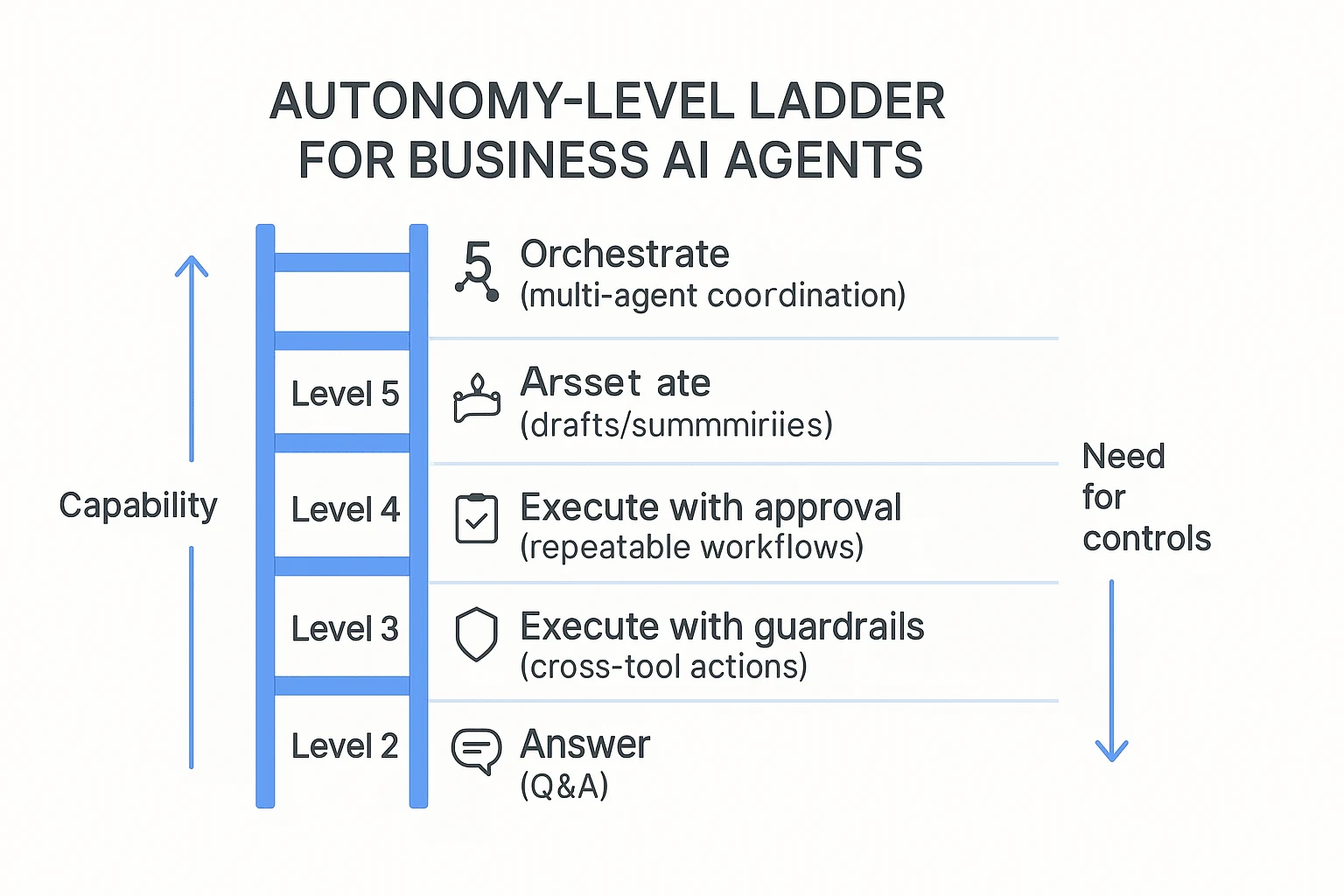
Autonomy levels for SMBs (start low, then scale)
Use a simple autonomy ladder to avoid surprises:
- Level 1 (answer): Q&A, definitions, quick help.
- Level 2 (assist): drafts, summaries, rewrites, templates.
- Level 3 (execute with approval): runs repeatable workflows, but you approve before sending or writing.
- Level 4 (execute with guardrails): acts across systems with tighter policies and monitoring.
- Level 5 (orchestrate): multiple agents coordinate work; needs strong governance.
Practical rule: most small teams should default to Level 2–3 until the outputs stay stable for 2–4 weeks.
Where agents add real value: actions + memory + guardrails
A useful agent needs three things:
- Actions: it produces real outputs that plug into work: task lists, client updates, briefs, and reports.
- Memory/context: it keeps project details across meetings and files, so you don't re-explain the same background.
- Guardrails: approvals, audit trails, and source links so you can verify before sharing.
This is how you get fewer missed action items, less admin work, and better follow-through. If you want a deeper framework, start with this guide to AI agent use cases, KPIs, ROI, and governance and map it to your workflows.
Buyer hint: for meeting-heavy teams, prioritize capture + searchable memory + deliverables over "agent hype."
Comparison table: top AI agent tools for small business (normalized)
Most "best AI agent" lists hide the hard part: cost and control. This table normalizes the top options using the same workload, so you can compare an AI agent for business on setup speed, integrations, autonomy, and guardrails—then sanity-check price before you buy.
| Tool | Best for | Setup time | Integrations | Autonomy (L1–L5) | Controls (HITL/audit) | Pricing clarity | Est. monthly cost (Solo / 5-person / 15-person) |
| TicNote Cloud | Turning meetings into briefs, tasks, and reusable project knowledge | 10–30 min | Google Meet/Teams capture + Zoom/Lark app capture; Notion, Slack; exports to DOCX/PDF/Markdown/HTML | L3 (executes within a Project) | Editable transcripts; citations/source links; roles (Owner/Member/Guest); traceable operations | Seat-based with clear caps by plan | $$12.99 /$$64.95 / $194.85 |
| Microsoft 365 Copilot | Teams-first orgs that live in Outlook, Word, Excel, and Teams | 1–3 hrs | Deep Microsoft 365; Graph-connected apps | L2 | Tenant controls, identity, admin policies; audit via M365 tools | Seat-based add-on, usually clear | $$30 /$$150 / $450 |
| Google Gemini for Workspace | Gmail/Docs/Meet teams that want in-doc help and summaries | 1–3 hrs | Google Workspace suite | L2 | Admin controls in Workspace; data region/policies depend on plan | Seat-based add-on, usually clear | $$20 /$$100 / $300 |
| Slack AI + automation | Chat-heavy teams that want faster answers and routing | 30–90 min | Slack apps ecosystem; workflow builder; typical: Jira, Salesforce, Zendesk | L2–L3 | Workspace roles; message retention; limited workflow audit detail varies | Seat-based; some features plan-gated | $$20 /$$50 / $150 |
| Zapier (AI + automation) | "If X then do Y" ops across many SaaS tools | 1–4 hrs | 6,000+ app connectors | L4 (runs automations) | Approval steps possible; logs per Zap; roles by plan | Usage-based (tasks) can get fuzzy | $$20$$50 / $$150$$300 / $600+ |
| Make (Integromat) | Power users building complex, low-cost automations | 2–6 hrs | Broad connectors; custom HTTP modules | L4 | Scenario history/logs; role controls by plan | Usage-based (operations) needs monitoring | $$10$$30 / $$80$$200 / $$300$$800 |
| OpenAI (ChatGPT Team/Enterprise or API) | Teams building custom agents and internal tools | 2–10 hrs | API ecosystem; connectors depend on your stack | L3–L5 | Depends on your build: approvals, logging, access, citations optional | Credits/tokens vary; hard to predict | $$25$$60 / $$150$$500 / $$500$$2,000+ |
Workload assumptions used for "estimated monthly cost"
To keep the math fair, the estimate assumes 8 hours of meetings per user per month that need summaries and action items, plus 20 agent runs per user (follow-ups like "draft email," "update task list," "make a 1-page brief"). Tools priced per seat map cleanly to team size. Tools priced by tasks/operations/tokens are shown as ranges because usage spikes fast.
Glossary: task, action, interaction, credit (and why you should care)
Vendors reuse these words, but they don't mean the same thing:
- Task: Often one automation step (for example, "create a row," "send a message"). One workflow can burn 5–30 tasks.
- Action: A single tool call (create/update/search). Some platforms count each API call as an action.
- Interaction: One chat turn or one request/response. Multi-step agent plans can be many interactions.
- Credit: A prepaid unit that converts into actions, minutes, or tokens. Credits hide the real unit cost.
This matters because cost surprises come from "compound usage": one meeting can trigger summarization, CRM updates, follow-up emails, and ticket creation—each billed separately. In this post, we normalize pricing by converting units into workflows completed per month (meeting → summary + tasks + follow-up), then showing the same three team sizes.
If you want predictable spend, prefer seat-based pricing or clear usage caps. If you want max flexibility, credits can work—but track burn weekly and set alerts.
Top AI agent platforms for small business (item cards + scorecards)
Small teams don't need more "AI noise." You need a short list you can act on. So every pick below uses the same standard card and the same mini scorecard (1–5) so you can compare fast and choose based on your workflow, not vendor buzz.
How to read the cards (same format for every tool)
Each card covers:
- Best for (the primary workflow)
- Website & pricing (what you'll really pay attention to)
- Key features (what it does well)
- Limitations (where it won't fit)
- Why it stands out (the differentiator)
- Mini scorecard across Setup, Integrations, Output Quality, Controls, Pricing clarity, Collaboration
TicNote Cloud
- Best for: meeting-to-deliverable and project knowledge workflows.
- Website & pricing: TicNote Cloud (homepage). Tiers are Free ($$0)**, **Professional $$12.99/month; $$79 billed annually)**, **Business $$29.99/month; $239 billed annually), and Enterprise (contact sales). The limits that matter most for small teams are transcription minutes per month, maximum recording length per session, and document import caps (Free: 300 mins, 30-min recordings, 3 docs; Pro: 1,500 mins, 3-hour recordings, 30 docs; Business: 6,000 mins, 8-hour recordings, 100 docs).
- Key features:
- Bot-free capture options (record without a meeting bot joining)
- Editable transcripts (not locked exports)
- Project workspaces that group meetings + docs + outputs
- Shadow AI with citations (answers point back to sources)
- One-click deliverables: reports, web presentations, podcasts, and mind maps
- Collaboration + traceability: co-editing, comments, role permissions, and tracked AI actions
- Limitations: It's not a broad "do things in other apps" automation hub. Integrations are lighter than Make/Zapier. If you need outbound actions (create tickets, update CRM), you'll usually rely on exports and connectors.
- Why it stands out: It nails the meeting-first loop: capture → make the transcript usable → build project memory → generate clean deliverables. That combo is hard to find in one place.
Mini scorecard (1–5):
- Setup: 5
- Integrations: 3
- Output Quality: 5
- Controls: 4
- Pricing clarity: 5
- Collaboration: 5
Inline CTA: Try TicNote Cloud for Free
Lindy
- Best for: sales/ops workflows (email, CRM, scheduling), templates, and multi-agent handoffs.
- Website & pricing: Pricing is typically usage/credit-based, so forecast using a "busy week" estimate (emails handled, meetings booked, records updated).
- Key features:
- Strong templates for common ops plays
- Multi-step autonomous runs (handoffs between agents)
- Good fit for inbox-heavy teams
- Limitations: Complexity rises fast as you add branches, exceptions, and approvals. Credit models can be hard to forecast if volume is spiky.
- Why it stands out: If your work starts in email and ends in CRM/calendar, Lindy is built for that path.
Mini scorecard (1–5):
- Setup: 3
- Integrations: 5
- Output Quality: 4
- Controls: 3
- Pricing clarity: 3
- Collaboration: 3
Relevance AI
- Best for: internal, data/logic-heavy agents (scoring, routing, structured outputs).
- Website & pricing: Expect pricing to map to agent runs, data sources, and seats. It's easiest to budget when your inputs are stable.
- Key features:
- Strong structured pipelines (classification, enrichment, extraction)
- Good "memory/logic" feel for internal workflows
- Useful when you need consistent fields, not just prose
- Limitations: More technical setup. You'll get better results with clean data sources and clear schemas.
- Why it stands out: It's closer to an internal decision engine than a note-taker.
Mini scorecard (1–5):
- Setup: 2
- Integrations: 4
- Output Quality: 4
- Controls: 4
- Pricing clarity: 3
- Collaboration: 3
Make
- Best for: visual, branched automations across apps.
- Website & pricing: Usually scales by operations (how many steps run). Budget by counting runs per day and steps per run.
- Key features:
- Visual scenario builder with branches and conditions
- Strong connectors across SMB apps
- Easy to bolt AI steps into workflows
- Limitations: "Agent" behavior is usually workflow + AI prompts. It has less native long-term memory across runs.
- Why it stands out: Great for building a reliable "if X then Y" backbone across tools.
Mini scorecard (1–5):
- Setup: 3
- Integrations: 5
- Output Quality: 3
- Controls: 4
- Pricing clarity: 3
- Collaboration: 3
Zapier
- Best for: simple automations and broad app coverage (fast wins).
- Website & pricing: Typically usage-based. Estimate by your monthly task count (each action counts).
- Key features:
- Fast setup for common triggers (forms, email, sheets)
- Huge app directory
- Solid for "connect A to B" workflows
- Limitations: Complex multi-step flows can get brittle. Scaling can surprise you when task volume jumps.
- Why it stands out: The quickest path from "manual copy/paste" to "hands-off."
Mini scorecard (1–5):
- Setup: 5
- Integrations: 5
- Output Quality: 3
- Controls: 3
- Pricing clarity: 3
- Collaboration: 3
Botpress
- Best for: building chat agents with structured dialogs.
- Website & pricing: Cost usually includes platform + AI usage. Forecast by conversations/month and average turns.
- Key features:
- Strong dialog control (flows, fallbacks)
- Good testing and iteration loop
- Solid for customer support or internal helpdesk bots
- Limitations: Chat-first by design. It needs design and testing time. Integrations vary by channel and backend.
- Why it stands out: When you need predictable conversational control, not just a free-form chatbot.
Mini scorecard (1–5):
- Setup: 3
- Integrations: 3
- Output Quality: 4
- Controls: 4
- Pricing clarity: 3
- Collaboration: 3
Intuit Assist
- Best for: QuickBooks users who want finance-specific automation and insights.
- Website & pricing: Value is tied to your QuickBooks plan and how much accounting work lives there.
- Key features:
- Finance-domain suggestions and automation
- Faster answers inside accounting workflows
- Strong fit for bookkeeping-heavy operators
- Limitations: Narrow scope. If your pain isn't finance ops, impact drops fast.
- Why it stands out: Domain fit beats general tools when your bottleneck is bookkeeping.
Mini scorecard (1–5):
- Setup: 4
- Integrations: 2
- Output Quality: 4
- Controls: 4
- Pricing clarity: 3
- Collaboration: 3
Quick pick by workflow (use this if you're stuck)
- If your weekly pain is meetings → deliverables: pick TicNote Cloud.
- If your pain is app-to-app ops: pick Make or Zapier.
- If your pain is sales ops across channels: pick Lindy.
- If your pain is internal scoring/logic and routing: pick Relevance AI.
If your goal is to keep knowledge reusable (not scattered), pair this section with our guide on AI agent tools for knowledge management so you can evaluate governance and KPIs with the same rigor.
How to turn meetings into deliverables (step-by-step example workflow)
Most "AI agent for business" tools stop at summaries. A meeting-first agent goes further: it keeps the meeting as the source of truth, then turns it into a brief, tasks, and assets your team can ship. Here's an end-to-end example workflow using TicNote Cloud, written for a small team that needs repeatable follow-through.
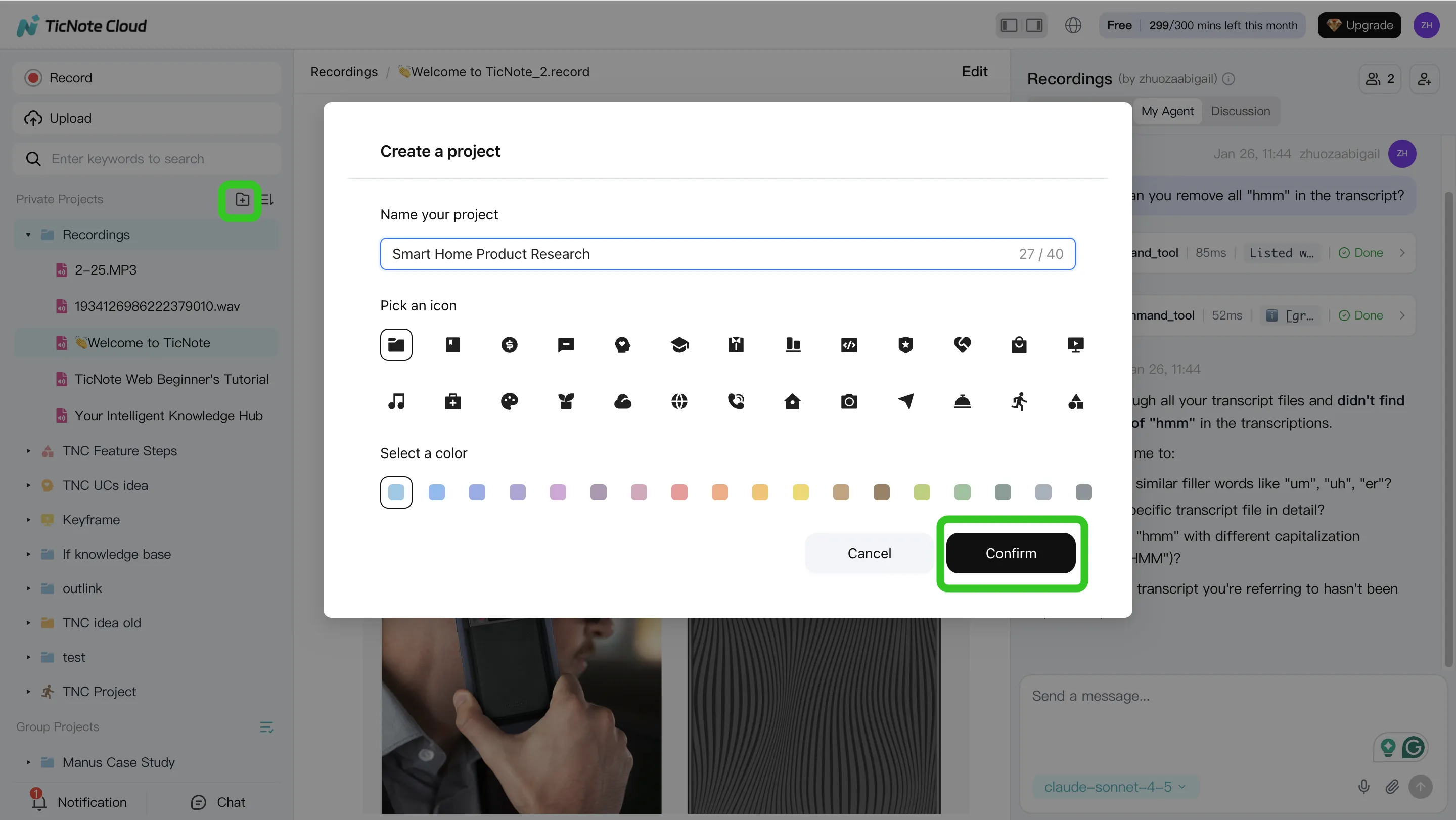
Step 1: Create a Project and add content (upload or attach)
Start by making one Project per client, initiative, or sprint. This is the container where your meetings and docs live together, so the agent can answer questions with the full context.
In the TicNote Cloud web studio, create a new Project (or open an existing one). Then add your meeting files (audio/video) and any supporting docs like a PRD, statement of work, or a customer email thread.
You have two clean ways to upload:
- Direct upload from the file area (fastest when you already have recordings)
- Upload from the Shadow AI panel when you want to attach files mid-workflow and have them saved into the right folder
Tip: attach 2–3 "anchor" docs early (one-pager plan, KPIs, prior notes). It reduces re-explaining later.
Step 2: Use Shadow AI to search, analyze, edit, and organize content
Once your Project has a few meetings, Shadow AI becomes your "find it and shape it" layer. It searches across everything in the Project, not just one transcript.
Use it for two jobs:
- Search + analyze across files
- Find decisions, risks, blockers, and open questions
- Compare calls (for example, three customer interviews) and extract themes
- Clean and structure the source of truth
- Fix speaker names and key terms (product names, acronyms)
- Add short notes where context matters
- Normalize output sections so every meeting rolls up the same way (Decisions / Actions / Owners / Dates)
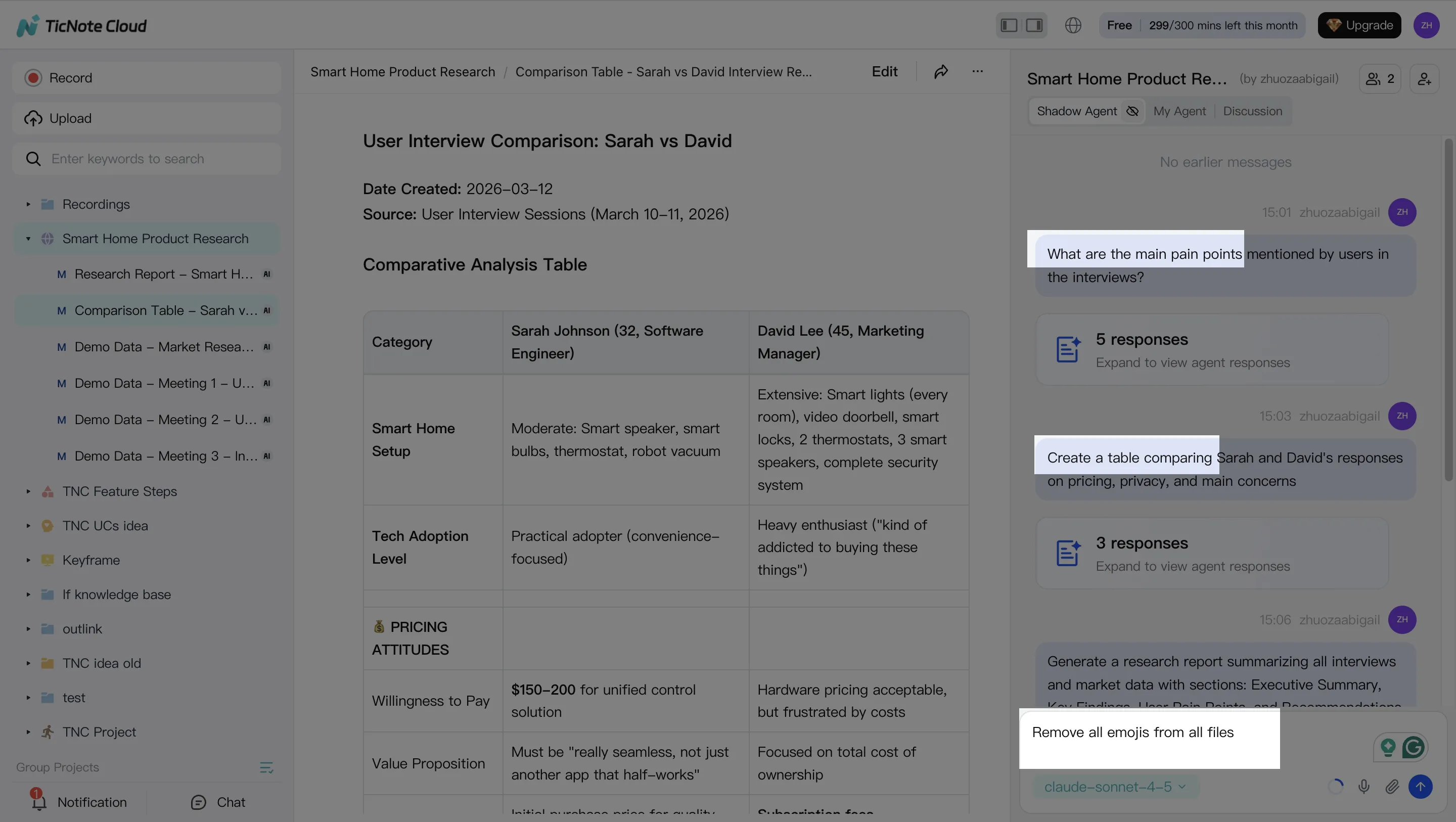
A practical prompt to standardize follow-through: "Extract every decision and action item. Put them in a table with owner and due date. Flag missing owners."
Step 3: Generate deliverables with Shadow AI (reports, presentations, podcasts, mind maps)
Now convert the Project into something you can send. In TicNote Cloud you can ask Shadow AI directly, or use the Generate button to produce multi-format deliverables.
Common deliverables that map well to real ops work:
- Internal brief (1–2 pages): what changed, what we decided, what happens next
- Web presentation (HTML): a shareable update for stakeholders
- Mind map: planning, dependencies, and scope checks
- Podcast + show notes: a recap format for busy teams that prefer audio

Keep one rule: require citations (source references) back to the meeting or doc. That way, anyone can click through and verify the exact line that supports a claim.
Step 4: Review, refine, and collaborate with your team
Treat the first output as a draft. Ask Shadow to tighten sections, change tone, or expand a part that needs detail. When something looks off, jump to the source and correct it at the transcript level so the Project stays consistent.
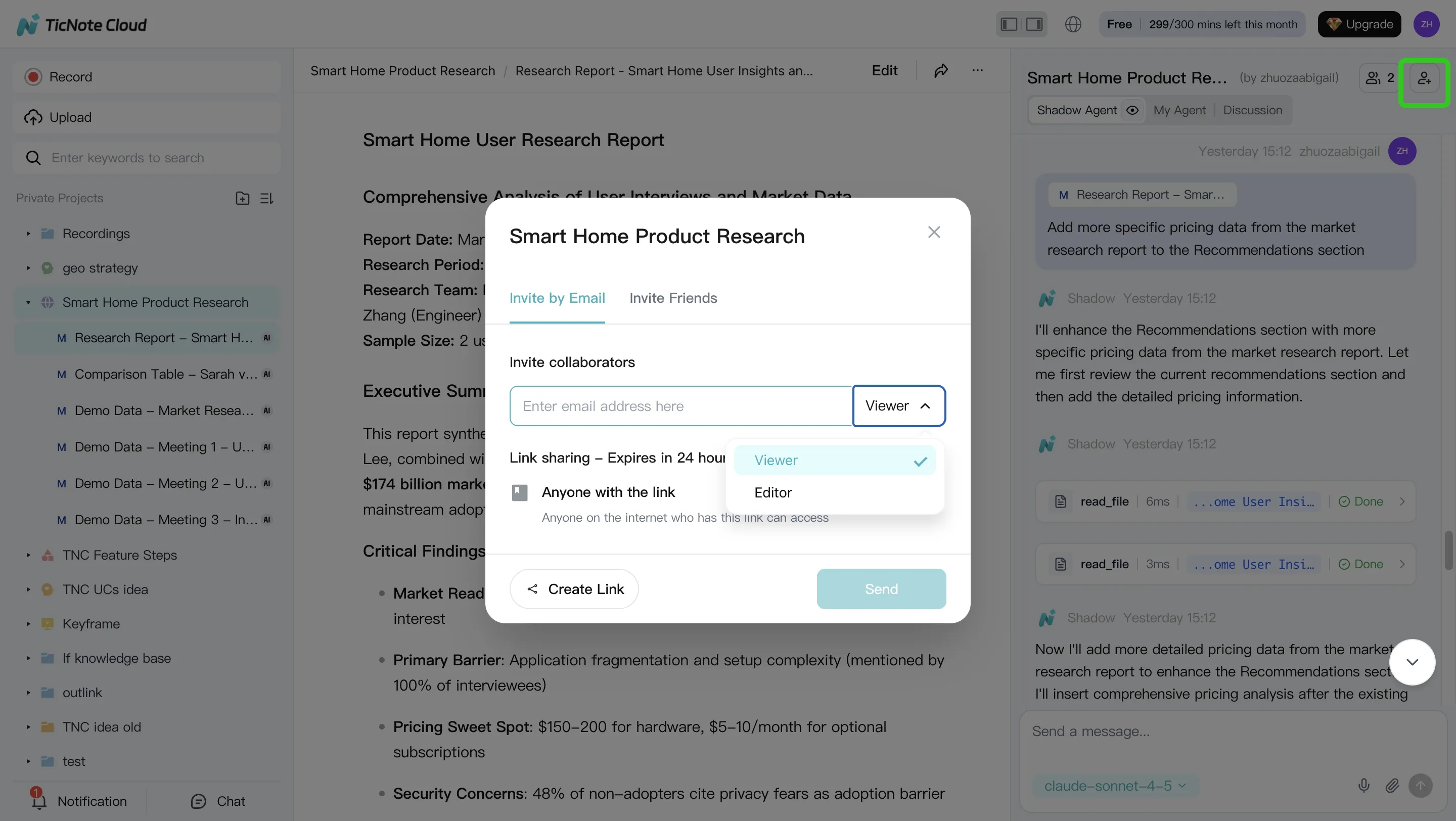
Then collaborate with simple roles and an approval habit:
- Assign reviewers (Owner/Editor/Viewer) before anything goes external
- Collect comments inside the Project, not in scattered DMs
- Keep every deliverable tied to its underlying meeting so edits remain auditable
App workflow (fast version)
On your phone, the flow stays simple: create a Project, add recordings or docs right into it, run Shadow for summaries and deliverables, then share back to your team for review.
Practical tip: start small and standardize
Pick one recurring meeting (weekly ops, sprint planning, or a client check-in). For the first month, generate the same deliverable every time (for example: a one-page brief + an action-item table). After 4 cycles, you'll have a Project that compounds: better context, fewer repeat questions, and faster follow-through.
Try TicNote Cloud for free and turn your next meeting into a client-ready deliverable.
Pricing and ROI: what an AI agent really costs (and how to estimate payback)
Most teams buy an AI agent for business expecting a simple monthly bill. Then the bill changes. The fix is to normalize cost the same way you'll use it: meetings in, deliverables out, follow-ups shipped. That's how we compare tools in this guide—using the same three repeatable monthly workflows, so "cheap" and "expensive" don't get mixed up.
Normalize pricing: four models that create surprises
AI agent pricing usually falls into four buckets. Two are easy to budget. Two are where SMBs get burned.
- Seat-based (per user): Predictable. Costs scale with headcount.
- Usage-based (per action/minute/task): Fair at low volume. Spikes in busy weeks.
- Credits: Looks simple, but it's hard to map credits to real work.
- BYO model spend (platform fee + LLM tokens): Flexible, but you own the variance.
In this post, we normalize by running the same workflows per month:
- capture meeting content, 2) generate deliverables (brief/report/deck notes), 3) create and track follow-ups.
3 SMB scenarios (solo, 5-person, 15-person) and what drives overages
To make costs comparable, use three common team sizes with clear assumptions.
- Solo operator: 6 meetings/week, 30 min each, 6 deliverables/month, 30 follow-ups/month.
- 5-person team: 20 meetings/week, 45 min each, 20 deliverables/month, 120 follow-ups/month.
- 15-person team: 60 meetings/week, 45 min each, 60 deliverables/month, 400 follow-ups/month.
What usually triggers overages:
- More minutes recorded than planned (sales weeks and hiring weeks add up).
- Extra re-runs after edits ("regenerate" loops cost usage or credits).
- Multiple formats per meeting (report + slides + client email).
- More collaborators than expected (external guests, contractors, new hires).
If your work is deliverable-heavy, also compare export and governance needs. Our companion guide on AI report generator tools with evidence and export controls helps you spot hidden limits.
ROI math box (use this before you buy)
ROI is simple when you keep it honest.
- Hours saved per week → monthly hours saved = hours/week × 4.33
- Loaded hourly rate (wage + overhead): use $$60$$120/hour for many SMB roles
- Net monthly benefit = (monthly hours saved × loaded rate) − monthly tool cost
Example: 3 hours/week saved → 13.0 hours/month. At $$80/hour that's$$1,040/month. If the tool costs $$150/month, net benefit is about$$890/month.
Example ROI for meeting-heavy teams using TicNote Cloud tiers
Here's a conservative mapping for a 5-person team.
Assume 20 meetings/week × 45 minutes = 900 minutes/week, or ~3,900 minutes/month. That's the main cost driver.
- Free: works for light meeting volume, but 300 mins/month means you'll hit limits fast.
- Professional: 1,500 mins/month and up to 3 hours per recording fits teams with fewer meetings, or shorter internal calls.
- Business: 6,000 mins/month and up to 8 hours per recording fits meeting-heavy teams that want consistent coverage.
Now the payback.
If each person saves only 30 minutes/week on recap and formatting, that's 2.5 hours/week team-wide, or ~10.8 hours/month. At a $$75 loaded rate, that's $$810/month in time value. Subtract the plan cost, and the net stays positive in many cases—especially when you also count fewer missed action items. Your results will vary, but for meeting-heavy SMBs, TicNote Cloud is usually the fastest payback because it removes both recap work and deliverable formatting.
Security, privacy, and controls checklist (use for every vendor)
If you're buying an AI agent for business, security isn't a bonus feature. It's the difference between "helpful" and "unshippable." Use this checklist on every vendor so meeting notes, client details, and internal decisions don't become a quiet risk.
Data handling: retention, training use, encryption
Start with the basics. If a vendor can't answer these clearly, treat it as a no.
- Model training: Is customer data used for model training by default? Can you opt out, and is it written into the contract?
- Retention: Can you set retention windows (for example, 30/90/365 days)? Can you delete a single file, a Project, or an entire workspace?
- Deletion: Do they support deletion requests with a defined SLA (like 7–30 days)? Do backups also age out?
- Encryption: Is data encrypted in transit (TLS) and at rest (AES-256 or equivalent)?
- Residency: If you need it, can you choose data residency (US/EU) and prove where data is stored?
Access controls: roles, SSO, least privilege
Most SMB incidents are "too much access," not hackers. You want tight roles.
- Roles: Do they support role-based access (Owner/Member/Guest or similar)?
- SSO: Is SSO available when you need it (typically at Business/Enterprise)? Does it support SCIM for offboarding?
- Least privilege: Can you share one Project without exposing the whole workspace? Can an agent be limited to specific Projects and folders?
Auditability: logs, citations, traceable actions
An audit trail should let you answer: who did what, when, and from which sources.
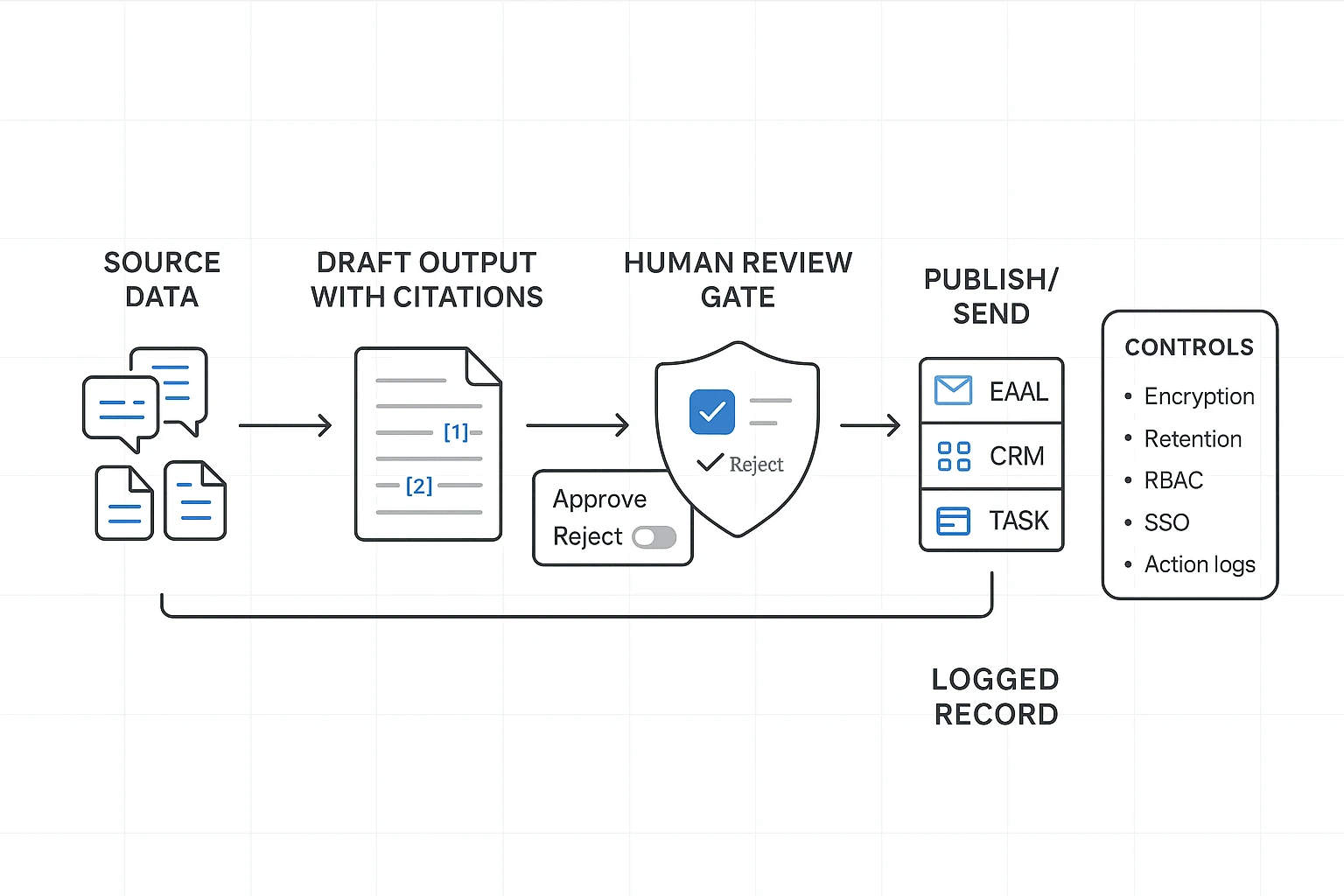
- Action logs: Every agent action is logged (generate, edit, export, share). Include user, time, and object.
- Citations: Outputs link back to source meetings, timestamps, and documents.
- Version history: You can see edits, restore older versions, and review comments.
Meeting-first tools matter here. For example, TicNote Cloud keeps work inside Projects and makes Shadow AI outputs traceable and tied to clickable sources. That reduces "black box" risk for teams.
Hallucination risk: grounding, verification, approvals
AI mistakes are normal. Unchecked AI mistakes are expensive.
- Require citations for key claims (numbers, dates, commitments, pricing).
- Add approval gates before sending emails, updating CRM fields, or creating tickets.
- Maintain a "known facts" Project note (owners, budget, scope, deadlines). Tell the agent to treat it as authoritative.
Compliance notes: what to validate (don't assume)
Even if a vendor says "GDPR-aligned," validate the paperwork and process.
- DPA: Do they offer a Data Processing Addendum?
- Subprocessors: Is the list public and kept current?
- Breach policy: Do they state notification timelines and contacts?
- Cross-border transfers: What legal basis do they use (SCCs, etc.)?
Safe rollout: pilot, monitoring, rollback
Roll out like a system change, not a toy.
- Run a 2-week pilot on one workflow (meeting → summary → tasks).
- Track time saved and error rate (for example, % of tasks needing fixes).
- Expand only after pass criteria is met (like <5% critical errors).
- Keep a rollback plan: remove access, export data, and delete Projects if needed.
Final thoughts: choosing an AI agent that actually reduces work
The best AI agent for business is the one that reliably finishes a workflow you already repeat each week. For most small teams, that workflow starts in meetings. If a tool can't turn talk into tracked work, it won't pay back.
Make your choice based on a finished workflow
Use this guide like a quick buyer test:
- Run the same three test scenarios on every tool, with pass/fail rules.
- Check the normalized cost table at your team size, so "per seat" and usage fees don't surprise you.
- Use the controls checklist before you roll it out, especially for client and HR data.
The common win: meeting → actions → follow-up → deliverable
If your biggest time sink is turning conversations into outputs, start with TicNote Cloud. It combines bot-free capture, an editable source transcript, Project memory that builds over time, and deliverables that cite where each claim came from. That mix cuts the most common rework loop: "Where did we decide that?"
If you want a deeper scan of platforms in this category, use this companion guide on all-in-one AI workspaces while you shortlist.
Try TicNote Cloud for Free and generate one real deliverable from your next meeting.


