


 Extension
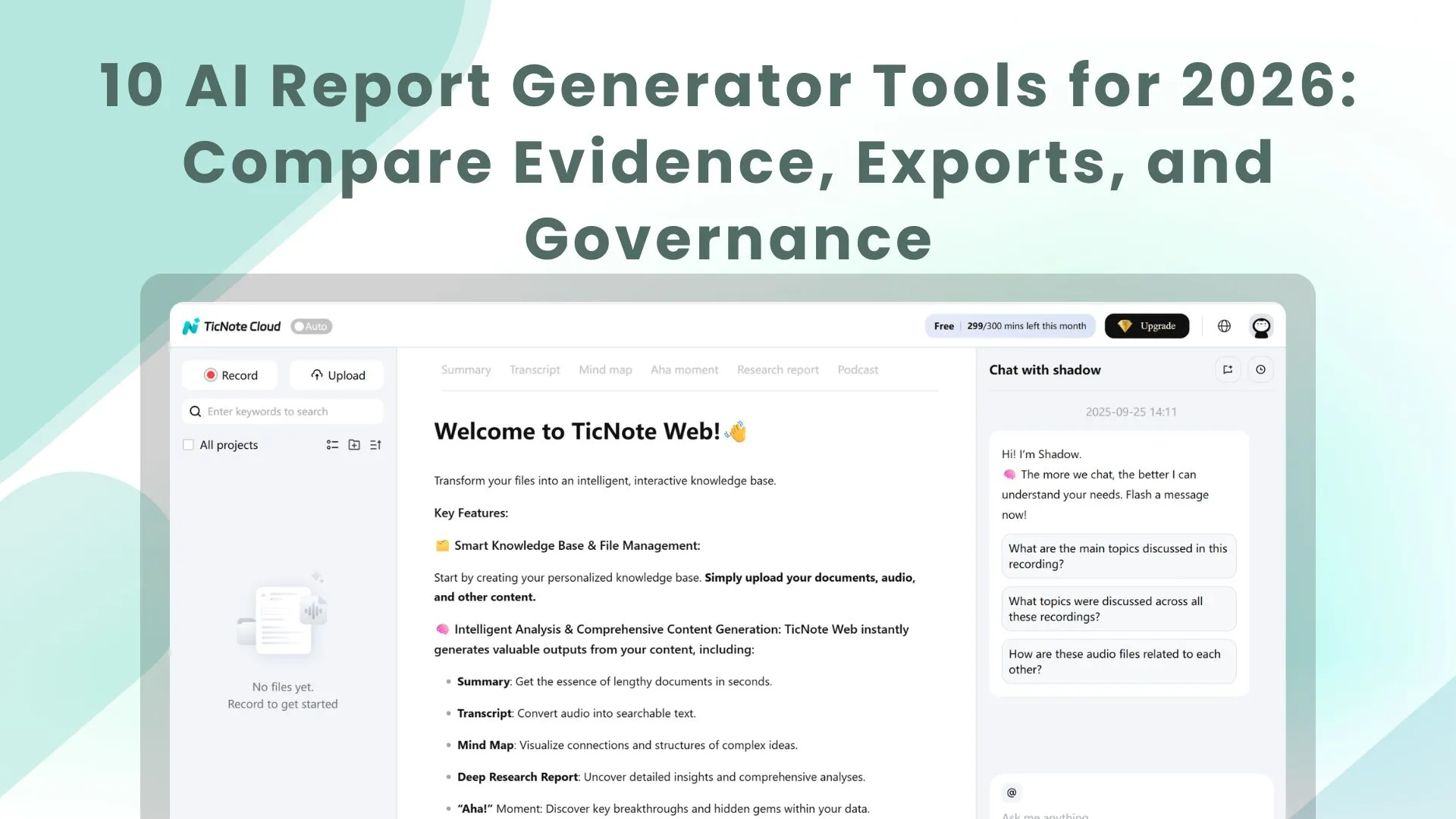
TL;DR: The best AI agent-style report generators (fast picks)
If you want the fastest meeting-to-report workflow, Try TicNote Cloud for Free: it's the best ai report generator when your source is calls, interviews, and internal meetings.
Problem: teams lose hours turning messy notes into clean reports. It gets worse when proof is missing, so reviews drag on. Use TicNote Cloud to turn conversations into editable transcripts with citations, then export a polished report in one click.
- Top pick for meeting-to-report: TicNote Cloud — best when meetings are the source of truth and you need editable transcripts, citations, and multi-format exports.
- Best BI-style option: Tableau — best for governed dashboards from structured data models with natural-language queries.
- Best dashboard automation: Klipfolio — best for KPI dashboards, many connectors, and scheduled sharing.
- Best enterprise search: Glean — best for finding answers across many work apps, then summarizing results.
- Best general-purpose drafting: ChatGPT — best for quick outlines and rewrites when you provide trusted inputs.
Jump to the side-by-side comparison table or the TicNote Cloud item card.
How does an AI report generator work in 2026 (and where AI agents fit)?
In 2026, reporting isn't just charts anymore. A modern ai report generator pulls from data + documents + conversations to write a narrative people can act on. That matters because most "what happened?" context lives in calls, not dashboards.
From static dashboards to agent-led reporting
Classic BI is great at slices and filters. It outputs tables, charts, and scheduled PDFs. But it rarely explains the "why" without someone adding notes.
AI reporting adds natural language. It can read a transcript, scan files, and draft a plain-English update. The next step is AI agent reporting: an execution loop that doesn't just answer. It collects inputs → drafts → checks sources → prepares deliverables.
What "good" output looks like (summary, evidence, actions)
Buyers should demand four deliverables every time:
- Executive summary: what changed, what's blocked, and why it matters.
- Evidence blocks: quotes with speaker names, timestamps, or links back to source files.
- Decisions and actions: owner, due date, and the exact wording agreed in the meeting.
- Repeatable templates: the same structure for weekly, monthly, and QBR cycles.
This is why "natural language reporting" speeds updates. You refresh the inputs, then regenerate the same template in minutes.
Common failure modes (and how governance helps)
Real risks usually come from inputs and scope:
- Poor transcription quality or mixed speakers
- Missing attachments (slides, docs, spreadsheets)
- Stale project files (old versions)
- Prompt leakage (sensitive text pasted into the wrong tool)
- Hallucinated conclusions that aren't in the sources
Governance reduces this with tight source scoping, required citations, human approval before sharing, and audit trails of what the AI used.
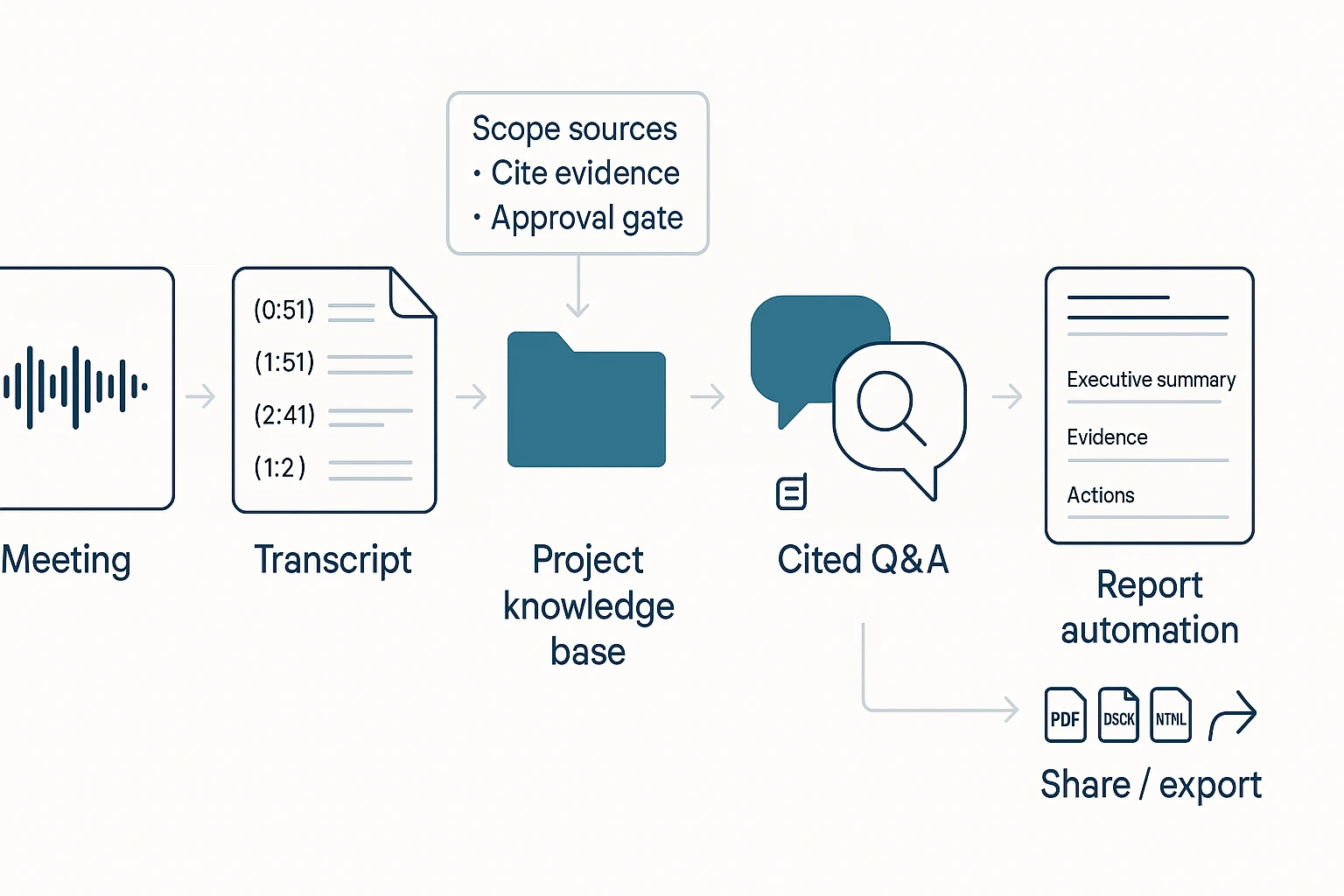
Here's the workflow diagram in words: meeting → transcript → project knowledge base → cited Q&A → report automation → share/export.
How we chose and compared these AI report generator tools
Most "AI reporting" tools still act like writing assistants. So we compared tools the way buyers use them in 2026: can they turn real system inputs (meetings, docs, apps, BI) into repeatable reports with evidence, exports, and controls.
Comparison criteria we used (a scoring frame you can reuse)
We scored each tool across seven buyer-grade checks:
- Input coverage: Can it ingest meetings, docs, and key apps? Bonus for BI connectors.
- NLQ / natural-language reporting: Does natural-language query (NLQ) return structured answers, not just text?
- Evidence & citations: Can you click back to a transcript moment, file section, or row-level source?
- Exports & formats: Practical outputs like DOCX, PDF, HTML, Markdown, and slides.
- Governance: Role permissions, audit trail, data isolation, and retention controls.
- Deployment & integration: SSO, SCIM, and stable connectors.
- Cost clarity: Clear packaging (per seat vs usage) and predictable overages.
If you want a deeper framework for agent deployments, start with this guide on AI agent governance and architecture.
"Reporting" vs "writing": the line that changes your hidden costs
Reporting is grounded in a system of record. It can show its work with traceable sources. Writing drafts fluent text from prompts. Many teams buy a writing tool, then spend extra time on manual verification, source hunting, and version control.
Quick buying checklist (run it in 30 minutes)
- Pick one primary source (meetings or BI) for phase 1.
- Require cited evidence for every claim in the report.
- Define approval roles (author, reviewer, publisher) before rollout.
- Test with two real reporting cycles (same template, new data).
If your work is meeting-heavy, choose TicNote Cloud: it's built around meetings and Projects, so Shadow AI can answer questions with traceable sources and generate multi-format reports without copy-paste.
Next, jump to the comparison table to see the scores side-by-side.
Comparison table: 10 tools side-by-side (best for, pricing, evidence, exports)
If you're shopping for an AI report generator in 2026, a normalized table saves hours. Instead of reading 10 marketing pages, you can scan the same fields for every tool and shortlist fast.
Table columns explained (so you can compare fairly)
Here's what each column means in plain terms:
- Best for: The strongest, most realistic use case.
- Primary inputs: Where the tool starts (meetings, docs, dashboards, apps, or prompts).
- Evidence/citations: Whether it can point back to proof—a meeting quote, a source file, or a data row. (This is what makes a report auditable.)
- Exports: What you can ship (PDF, DOCX, slides, HTML, dashboards, CSV).
- Agent/automation depth: How much it can run end-to-end (retrieve → draft → update → deliver) vs just "help you write."
- Governance controls: Access, retention, audit logs, admin policy, and enterprise security.
- Typical buyer: Who usually owns the purchase (Ops, BI, IT, Consulting, PM).
- Pricing approach: Free tier vs per-seat vs enterprise.
| Tool | Best for | Primary inputs | Evidence/citations | Exports | Agent/automation depth | Governance controls | Typical buyer | Pricing approach |
| TicNote Cloud | Meeting-to-report deliverables with traceable quotes | Live recordings, uploads, Project files | Strong (click back to meeting context) | PDF/DOCX/Markdown/HTML, mind map, audio | High (Project-scoped agent) | Team roles, traceable operations | Consulting, Ops, Product | Free tier + per-seat + enterprise |
| Otter | Fast meeting notes and summaries | Meeting audio | Medium (timestamps, less report-grade linking) | Text/PDF-style exports | Low–medium | Team admin (varies by plan) | Sales, Ops | Per-seat |
| Fireflies.ai | Call summaries + action items across teams | Meeting audio + calendars | Medium | Notes/export + app sync | Medium (workflows, summaries) | Team controls (varies) | RevOps, Customer success | Per-seat |
| Notion AI | Writing inside a wiki you already use | Docs/pages | Low unless you manage sources manually | Pages/PDF (via workspace) | Low | Workspace permissions | Product, Ops | Per-seat |
| ChatGPT | Drafting and restructuring report text | Prompts + pasted context | Low unless you supply references | Copy/paste; file outputs depend on workflow | Low | Depends on org plan | Any team | Freemium + per-seat |
| Jenni AI | Long-form drafting with a writing assistant | Prompts + notes | Low | DOCX-style writing flow | Low | Basic | Individuals, content teams | Per-seat |
| Texta | Quick marketing-style write-ups | Prompts | Low | Text | Low | Basic | SMB marketing | Per-seat |
| Glean | Cross-app answers with org search | SaaS apps + docs | Medium–strong (source links to apps/docs) | Shareable answers; limited "report packaging" | Medium | Strong (enterprise search governance) | IT, Knowledge mgmt | Enterprise |
| Tableau | Analytical reporting from modeled data | Databases, semantic models | Strong (data lineage inside BI workflows) | Dashboards, PDF/images | Medium (scheduled reporting) | Strong | BI/Analytics | Per-seat + enterprise |
| Domo | Business dashboards + operational reporting | Data connectors + ETL | Strong | Dashboards, scheduled exports | Medium–high | Strong | BI, Ops analytics | Enterprise |
| Klipfolio | Lightweight KPI dashboards and sharing | Metrics, spreadsheets, APIs | Medium | Dashboards, scheduled shares | Medium | Medium | SMB ops | Subscription |
What to prioritize by team size and risk
- If your reports start from meetings/interviews and need audit-friendly traceability: TicNote Cloud (see the TicNote Cloud card).
- If you're a BI-heavy org with modeled data and dashboards: Tableau or Domo.
- If you need lightweight KPI sharing and scheduled summaries: Klipfolio.
- If you need cross-app retrieval and summarized answers: Glean.
- If you need drafting help only: ChatGPT/Jenni/Texta (but treat outputs as a first draft and verify everything).
This table reduces evaluation time because it forces apples-to-apples checks: proof, exports, automation, and controls—before you ever book a demo.
Top AI report generator tools (item cards)
These tool "cards" use the same fields, so you can compare fast. Focus on three things: where the tool pulls facts from, how it proves them (evidence), and what you can export and govern.
1) TicNote Cloud
- Best for: Meeting-to-report workflows where you need traceable proof.
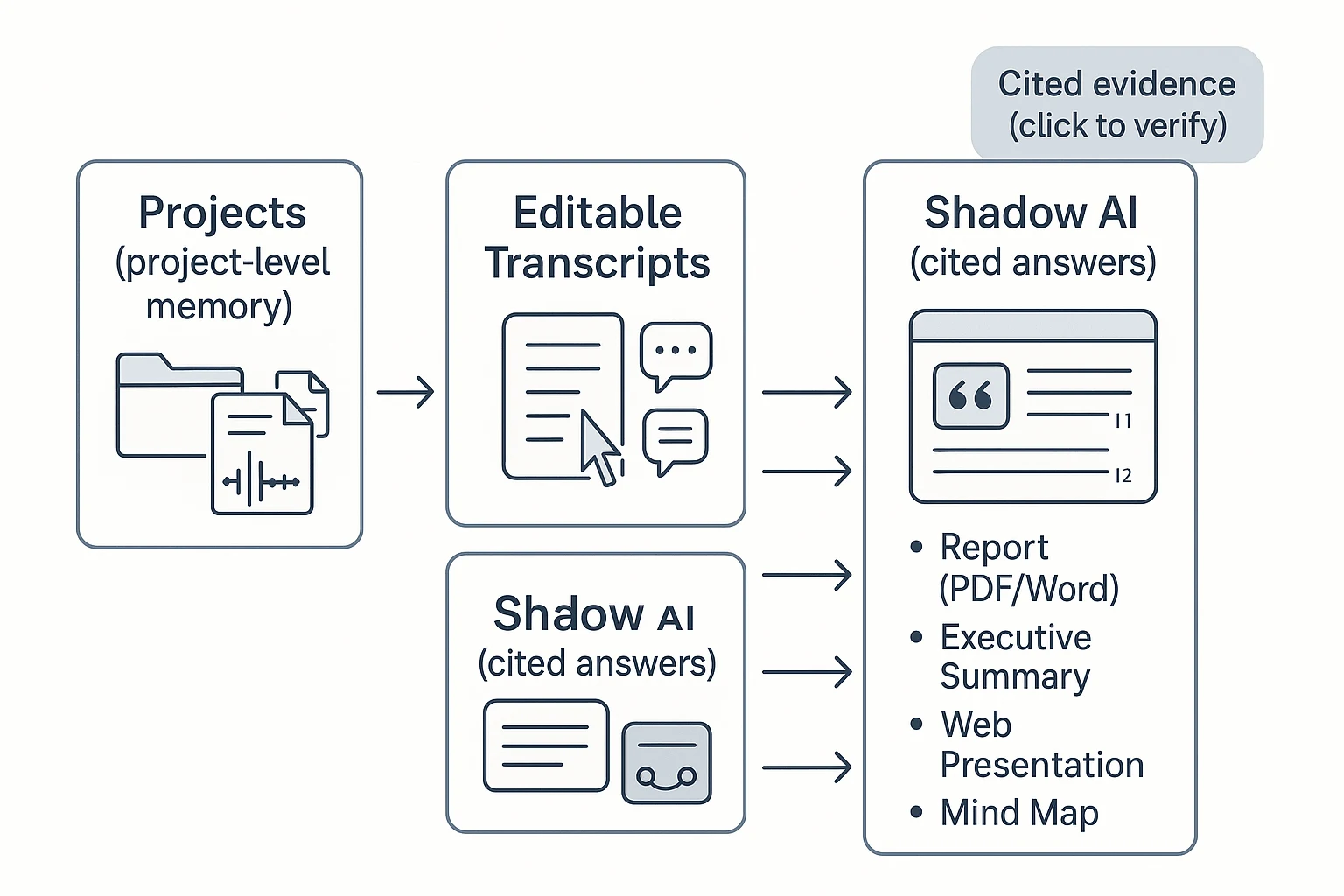
- What it does well: Bot-free capture, high-accuracy transcription, and editable transcripts. Projects turn many calls into one knowledge base. Shadow AI answers with citations and generates reports, presentations, podcasts, and mind maps.
- Where it falls short / watch-outs: Not a BI suite for SQL-grade dashboards. Connector list is smaller than data platforms.
- Evidence & verification: Click back to the exact transcript segment. Keep quotes tied to speakers, timestamps, and Project files.
- Exports: Transcript (TXT/DOCX/PDF), summaries (Markdown/DOCX/PDF), reports (PDF/Word), web presentations (HTML), mind maps (PNG/Xmind), audio (WAV).
- Governance notes: Project permissions (Owner/Member/Guest), operations are traceable, private by default, and data isn't used to train models (per product description).
- Who should choose it: Teams whose reporting starts in interviews, standups, client calls, or stakeholder meetings.
Inline CTA: Generate your first report from a meeting in minutes with Try TicNote Cloud for Free.
2) Tableau
- Best for: BI-first reporting on governed, structured data.
- What it does well: Natural-language querying works best when your data model is clean. Strong visuals and drill-down help explain "why" behind a metric.
- Where it falls short / watch-outs: Setup takes time (data modeling, permissions, certified sources). Learning curve is real for authors.
- Evidence & verification: Evidence is row-level data, calculated fields, and visual context—less about quoting conversations.
- Exports: Dashboards, images, PDFs, and shared links (varies by deployment).
- Governance notes: Strong when admins enforce data sources, roles, and workbook certification.
- Who should choose it: Analytics teams turning warehouse data into weekly exec reporting.
3) Domo
- Best for: End-to-end operational reporting with pipelines.
- What it does well: Connect, transform, and monitor data in one place. Good for recurring business reporting across teams.
- Where it falls short / watch-outs: Onboarding can be complex. Value depends on getting the data model right.
- Evidence & verification: Best when reports link back to governed datasets and lineage.
- Exports: Dashboards and scheduled outputs (common in ops reporting).
- Governance notes: Governance quality depends on admin setup, roles, and dataset standards.
- Who should choose it: Ops leaders who need automated reporting from many systems.
4) Klipfolio
- Best for: KPI dashboards and scheduled reporting.
- What it does well: Lots of connectors and fast dashboard builds for common metrics. Solid for lightweight exec rollups.
- Where it falls short / watch-outs: Advanced formulas can get tricky. At scale, performance and consistency require discipline.
- Evidence & verification: Evidence is "what connector pulled" and how the metric is defined.
- Exports: Dashboard shares and scheduled reports (typical KPI workflows).
- Governance notes: Keep metric definitions documented. Control access to data sources.
- Who should choose it: Teams that want fast KPI reporting without a heavy BI stack.
5) Glean
- Best for: Enterprise search and "answer from company knowledge."
- What it does well: Pulls across many apps and summarizes results. Strong when knowledge is spread across docs, tickets, and wikis.
- Where it falls short / watch-outs: Integration and security alignment take effort. Results quality depends on what's connected.
- Evidence & verification: Evidence depends on connected sources and permissions; good implementations show where answers came from.
- Exports: Typically shareable answers and summaries inside workflows (exports vary).
- Governance notes: Permissions are the product. If access rules are messy, trust suffers.
- Who should choose it: Enterprises that need cross-app retrieval before they write reports.
6) ChatGPT
- Best for: Drafting and synthesis when you provide trusted inputs.
- What it does well: Fast outlines, rewrites, and structured narratives. Great for turning bullet points into a client-ready report.
- Where it falls short / watch-outs: Not connected to your systems by default. Hallucination risk stays unless you anchor it to source text.
- Evidence & verification: Use a simple checklist: paste excerpts, ask it to quote only from them, then verify each claim in the source.
- Exports: Whatever you copy out (docs, slides, email). Export is manual.
- Governance notes: Don't paste sensitive data without approved controls. Keep an audit trail outside the chat.
- Who should choose it: Individuals who already have clean notes and need fast writing help.
7) Sembly AI
- Best for: Quick meeting summaries and action items.
- What it does well: Turns calls into usable summaries fast. Good for follow-ups and lightweight meeting reports.
- Where it falls short / watch-outs: Formal report layouts and deep customization can be limited. Less helpful for non-meeting data.
- Evidence & verification: Validate against the meeting transcript and speaker attributions.
- Exports: Meeting notes and summaries (common formats vary by plan).
- Governance notes: Treat as a meeting system: check retention, access, and sharing controls.
- Who should choose it: Teams that mainly want "what was decided" from recurring meetings.
8) Taskade
- Best for: Turning notes into tasks plus a short report.
- What it does well: Blends work management with AI agents. Useful for sprint notes, action plans, and status updates.
- Where it falls short / watch-outs: Not a BI tool. Evidence often lives in docs and tasks, not source transcripts.
- Evidence & verification: Link claims back to the underlying doc/task items.
- Exports: Doc/task exports and shares (varies).
- Governance notes: Define workspace roles and keep templates consistent.
- Who should choose it: PM and ops teams who want reporting tied to execution.
9) Jenni AI
- Best for: Polished narrative reports with citations.
- What it does well: Strong writing support: structure, clarity, and citation-friendly workflows for long-form text.
- Where it falls short / watch-outs: It doesn't "know" your org data unless you provide it. Facts still need human verification.
- Evidence & verification: Works best when you bring a source pack (quotes, links, tables) and cite as you write.
- Exports: Document-style outputs (typical writing tool flow).
- Governance notes: Keep an internal source-of-truth folder and review steps.
- Who should choose it: Consultants and analysts who already have evidence and need better writing.
10) Texta AI
- Best for: Template-based report drafts at speed.
- What it does well: Fast first drafts and consistent formatting. Helpful when you need volume.
- Where it falls short / watch-outs: Limited integrations. Weak grounding unless inputs are curated and checked.
- Evidence & verification: Treat outputs as a draft. Add quotes, numbers, and sources yourself.
- Exports: Common text formats (varies).
- Governance notes: Use approved templates and a review checklist before sharing.
- Who should choose it: Small teams that need quick drafts and can verify manually.
Most teams choose wrong: If reporting starts in meetings, pick a meeting-centered tool first (then push outputs into BI or docs). If reporting starts in data models and warehouses, pick BI first and keep the narrative layer secondary. If you're evaluating platforms, this guide to all-in-one AI workspaces and how teams use them can help you narrow the shortlist.
What's exclusive to TicNote Cloud for AI-agent reporting?
TicNote Cloud is built for reporting that starts in conversations. Instead of copying notes into a doc, it keeps meetings, files, and outputs tied together—so your AI report generator can stay accurate, repeatable, and easy to defend in reviews.
Build project-level memory (so reports improve week to week)
Projects are durable workspaces, not one-off transcripts. You can group multiple meetings, interview recordings, PDFs, docs, videos, and even AI research in one place. That gives you a living "project knowledge base" that compounds over time.
Practically, this means you can:
- Run the same questions across every new meeting ("What changed since last week?")
- Keep terminology consistent (product names, customer segments, decision owners)
- Generate reports from the full body of work, not a single call
Get cited answers you can verify (and defend)
Shadow AI is designed to answer from your Project content, with citations that point back to the exact evidence (a transcript moment or attached file). When a stakeholder challenges a claim, you don't debate. You click the source and confirm it.
This reduces rework in two common ways:
- Fewer "Where did this come from?" review cycles
- Less time hunting for the quote, decision, or requirement that supports a paragraph
Fix the source: editable transcripts (not read-only)
Most tools treat transcripts like a finished log. TicNote Cloud treats them like working material. Teams can correct names, acronyms, and key decisions—so every downstream summary and report gets better.
Collaboration features keep it controlled:
- Co-editing and inline comments
- Permissions (so only the right people can change source text)
- A clearer audit trail for how outputs were produced
Generate one-click deliverables in the format each stakeholder wants
Different readers need different outputs. TicNote Cloud supports one-click deliverables from the same Project context, including:
- Research reports (PDF/Word)
- Web presentations (HTML)
- Podcasts with show notes
- Mind maps (PNG/Xmind)
Mini vignette: A consultant runs six client interviews over two weeks. They add each transcript to one Project, clean up terms in the transcript, then ask Shadow AI for a theme-based executive report with citations. Finally, they export a shareable HTML presentation for the client, plus a PDF for procurement—without rebuilding the narrative from scratch.
How do you implement AI reporting safely (accuracy, privacy, governance)?
Safe AI reporting is a system, not a prompt. You'll get better accuracy, lower risk, and faster approvals when you standardize your inputs, require evidence, and put clear access rules around what the model can see. Do that, and AI-generated reports become repeatable work—not a one-off experiment.
Prep your data so reports stay grounded
Most "bad AI reports" come from messy sources. Fix the inputs and the outputs improve.
Use these practical rules:
- Name meetings consistently:
Team • Topic • YYYY-MM-DDso summaries sort and search cleanly. - Lock speaker labels early: confirm names, roles, and any aliases (e.g., "Alex P." vs "Alex").
- Attach source docs to the same place: agendas, slides, PRDs, tickets, and research notes.
- Keep one Project as the source of truth per initiative (one product launch, one client, one quarter). Don't split knowledge across five folders.
This structure reduces "context drift" (AI mixing topics) and makes citations easy to check.
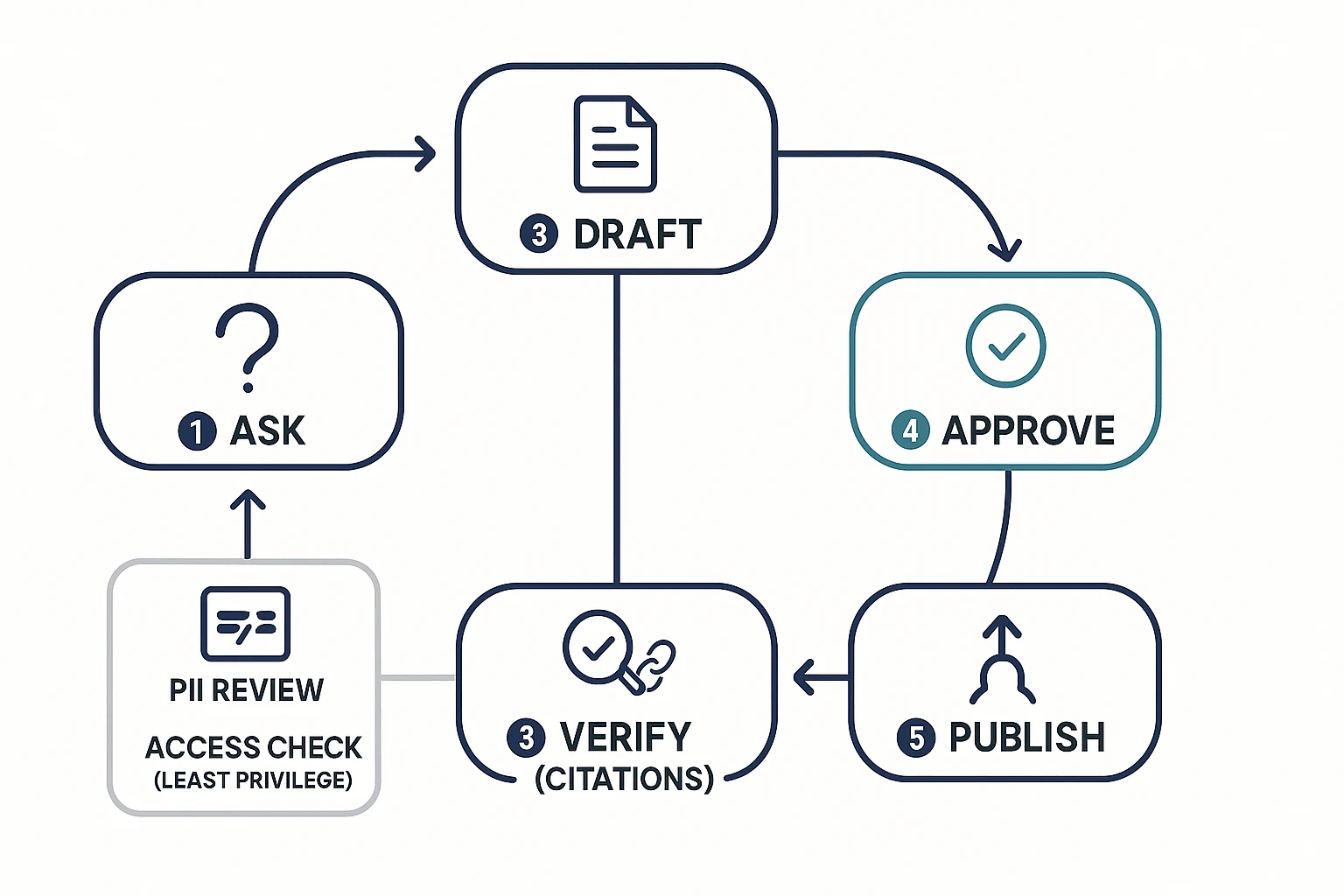
Use a validation loop: ask → draft → verify → approve → publish
Here's a simple diagram-in-words you can reuse:
- Ask: State the audience, scope, and time window.
- Draft: Generate the report with required sections and a fixed template.
- Verify (evidence): Check citations and spot-check quotes.
- Approve: A named owner signs off (especially for external content).
- Publish: Export, share, and store with the same naming rule.
Verification checklist (keep it short, but strict):
- Citations required for key claims, decisions, and quotes.
- Spot-check 3–5 quotes against the transcript or recording.
- Confirm numbers (metrics, dates, pricing) and mark unknowns.
- Confirm owners and deadlines for every action item.
- Log edits: what changed, who changed it, and why.
If a report goes to customers, press, or regulators, keep a human-in-the-loop every time.
Control access and handle PII like a security team expects
Treat reporting data like any internal system:
- Least privilege: only the team who needs the Project gets access.
- PII review path: redact personal emails, phone numbers, addresses, and sensitive health/finance details.
- Retention rules: decide what you keep (final report) vs delete (raw recordings) and when.
- Know where data lives: region, encryption at rest/in transit, and vendor data-use rules.
Security reviewers usually ask: Do you support SSO? How are keys managed? Is data used to train models? Can we audit access?
Make audit trails non-negotiable
Auditability is what turns "AI output" into governed work. You want a clean answer to: who edited what, when, and why. That protects accuracy (you can trace a claim to a source) and governance (you can prove process was followed).
Mini vignette: weekly research insights without weekly chaos
A product team runs five user interviews per week. They store each call and doc in one Project, using the same naming rule. Every Friday, they generate a weekly insights report from a template.
Before sharing, a PM verifies quotes and metrics, and a researcher runs a quick PII check. The result is consistent, easy to trust, and easy to compare week over week.
For meeting-heavy workflows, pick a system that can show evidence for claims and keep permissions aligned with Projects and roles—this is where TicNote Cloud tends to fit best.
What does ROI look like for an AI report generator?
ROI is simple when you count time you get back. Use a conservative model that fits most teams and any ai report generator: (hours saved per week × loaded hourly cost × weeks) − tool cost. "Saved" means less time drafting, formatting, searching old notes, and writing follow-ups.
Simple ROI formula you can run in 5 minutes
Start with what you do today, not the best-case future.
- Hours saved/week: only count repeat work you can time (notes, first draft, slides, status email)
- Loaded hourly cost: use salary + benefits (many teams use 1.2–1.5× base)
- Weeks: run the model over 4–12 weeks first
- Tool cost: licenses for the people who generate reports
Example: a recurring weekly meeting report
A weekly ops meeting outputs minutes, decisions, risks, and an exec summary. Without automation, teams often spend 60–120 minutes turning notes into a clean doc.
With an agent-style workflow, time drops in four places:
- Auto transcription replaces manual note taking.
- Meeting notes → report template creates a first draft fast.
- Cited Q&A cuts "where did that come from?" loops.
- One-click exports remove reformatting for PDF/Doc/Markdown.
To validate ROI in 2 cycles: (1) time your baseline end-to-end, (2) run the AI workflow, then compare total minutes and track quality signals like fewer clarifying pings and fewer missed action items. If you're building a broader system, use this same measurement approach for AI agent reporting with QA and guardrails.
Conclusion: choosing the right AI report generator for your workflow
Pick your AI report generator based on what you feed it most: meetings and interviews, or dashboards and databases. If your inputs are conversations, require evidence (clickable sources) so every claim ties back to a quote, speaker, and timestamp. Next, plan for governance: access controls, audit trails, and clear rules for what can be summarized or exported. Also favor tools that cut context switching, so the work stays in one place from raw input to share-ready output.
For meeting-centered reporting, TicNote Cloud is the safest default. It turns calls into editable transcripts, then uses Shadow AI to answer questions with citations and generate consistent deliverables in one click. Use the comparison table to shortlist 2–3 options, then run a two-cycle pilot (two reporting loops) to test accuracy, exports, and stakeholder trust.
Let Shadow write your next deliverable


