


 Extension
TL;DR: A safe ai agent workflow for SEO that saves time (without publishing blindly)
Try TicNote Cloud for Free to run an AI agent for SEO that speeds up audits and reporting, without auto-publishing anything. A safe agent should focus on collection, synthesis, and quality checks, then hand you clean outputs to approve. Think: faster decisions, fewer missed issues, and no "ship it blind" risk.
Problem: SEO data is scattered across GSC, GA4, and crawls. Agitate: that leads to slow reports and easy-to-miss mistakes. Solution: keep decisions and evidence in one place, so you can turn notes and files into a reviewable knowledge base before anything goes live.
Here's the safe 4-block setup:
- Data: pull facts from GSC, GA4, crawls, and tickets.
- Instructions: strict prompts plus a fixed output format.
- Checks: require evidence, validations, and "unknown" flags.
- Human approval: you decide what ships, every time.
By the end, your agent loop should produce 3 things: (1) a lightweight audit summary, (2) a stakeholder-ready update you can paste into email or Slack, and (3) a content update brief tied to real metrics and cited sources.
What is an ai agent for seo (and how is it different from a workflow)?
An AI agent for SEO is a system that can look at evidence, decide what to check next, and then produce a recommended next step. A workflow is simpler: it runs the same steps every time, like a checklist you can automate. Both save time, but they're built for different jobs.
Workflow vs agent: one concrete example each
Here's the difference in plain inputs, steps, and outputs.
Example A: a workflow (fixed checklist reporting)
- Inputs: last 7 days of GSC clicks, impressions, CTR, average position; last week's same period; list of tracked pages.
- Steps:
- Pull the two time ranges.
- Compute week-over-week deltas.
- Summarize top 10 winners and losers.
- Format into a weekly report template.
- Outputs: a consistent report with tables, deltas, and a short narrative summary.
Example B: an agent (adaptive investigation)
- Inputs: the same GSC export plus a page template map (blog, product, category) and a crawl snapshot.
- Steps:
- Detect an anomaly (example: a 25% click drop on one template).
- Choose the next check (example: compare indexability and canonicals for that template).
- If evidence is missing, request it (example: "run a crawl of /category/ and return status codes + canonical targets").
- Draft hypotheses, rank them by likelihood, and propose next actions.
- Outputs: a short investigation memo: "what changed," "proof," "most likely causes," and "what to do next."
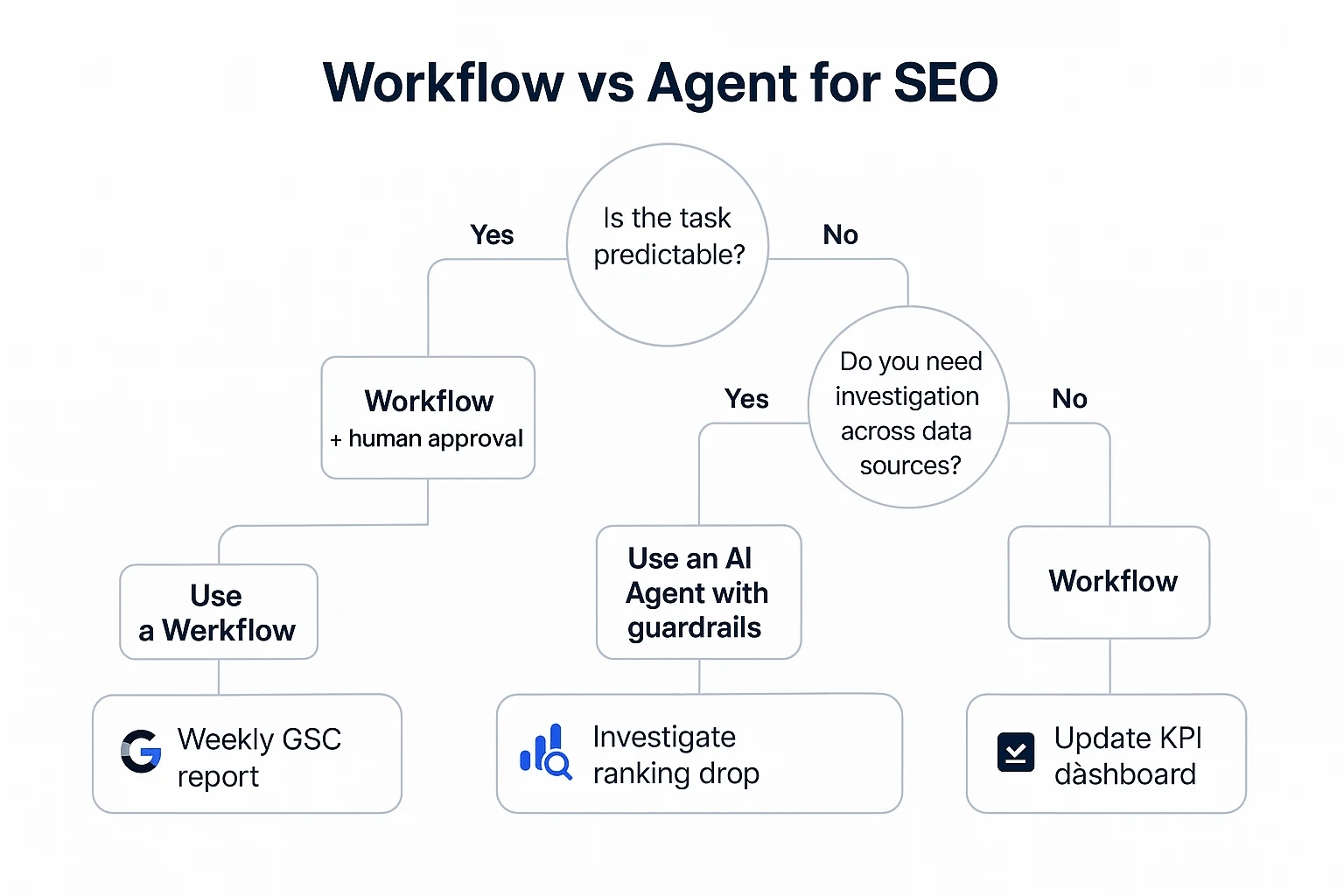
Quick decision tree: when you need autonomy vs rules
Use this rule-of-thumb:
- Are the steps predictable?
- Yes → use a workflow (example: weekly reporting).
- No → go to step 2.
- Is the risk of a wrong action high?
- Yes → workflow or a hybrid with approvals (example: drafting JIRA tickets from findings).
- No → go to step 3.
- Do you need investigation across sources?
- Yes → use an agent with guardrails (example: "why did traffic drop?" analysis using GSC, crawl data, and release notes).
- No → a workflow is enough.
Where agents go wrong (and how to prevent it)
Common failure modes in SEO:
- Making up numbers instead of using your exports.
- Mixing metrics (GA4 sessions vs GSC clicks) and drawing the wrong conclusion.
- Over-general "best practices" that ignore your site type and constraints.
- Missing context like business goals, dev capacity, and what changed this week.
- Taking risky actions (editing robots.txt, rewriting titles, changing canonicals) without review.
The safety pattern you'll use in the rest of this guide is simple: grounded data, an explicit input and output schema, evidence-first prompts that require references, confidence and "needs review" flags, and clear human approval gates before anything ships.
Which SEO tasks should you automate first (and which should stay human)?
Start by sorting your SEO work into three buckets: research, execution, and measurement. Your AI agent should speed up cycles inside each bucket, so issues don't slip through. The goal isn't to replace judgment. It's to catch more problems and write clearer next steps.
Bucket your work so you automate the right parts
- Research (find problems and chances): scan GSC, GA4, crawl exports, and notes to spot patterns.
- Execution (turn findings into action): draft tickets, briefs, and change requests with proof attached.
- Measurement (learn and adjust): monitor weekly changes, explain what moved, and track outcomes.
If you can't map a task to one bucket, don't automate it yet.
Automate these first (high ROI, low regret)
These are the safest wins because they rely on your data and produce reviewable outputs:
- Weekly GSC and GA4 summaries: top landing pages, top queries, clicks, impressions, CTR, and page groups.
- Anomaly detection + "what changed" narrative: flag big swings (for example, week over week) and list likely causes to check (template edits, releases, indexation, seasonality).
- Crawl export synthesis: turn thousands of URLs into a short list of issues, grouped by type (indexability, canonicals, redirects, internal links).
- Prioritized issue lists: score by impact and effort, and tie each item to evidence.
- Ticket drafting: generate Jira/Asana tickets that include steps to reproduce, affected URLs, and acceptance checks.
- SEO QA checklists: before publish (titles, canonicals, schema, links) and before deploy (redirect rules, robots, sitemap updates).
Keep these human (highest risk if you automate)
Don't hand off these decisions to an agent:
- Core positioning and audience strategy
- Final keyword targets and page intent choices
- Editorial voice and brand claims
- Anything that needs real-world context (legal, policy, PR risk)
This guide avoids bulk content generation on purpose. Fast content is useless if it's wrong.
Guardrails for safer keyword research automation
If you automate keyword research, set hard boundaries:
- No keyword without evidence: every suggestion must cite a source (GSC queries, your product taxonomy, or a vetted seed list).
- Require intent labels: tag each keyword as informational, commercial, or transactional, plus a one-sentence reason.
- Block keyword dumps: cap lists (for example, 10 to 25) and require grouping by topic and page type.
- Human approval gate: a person must pick final targets and map them to pages before any brief is created.
What data sources does your SEO agent need (and what should the input/output schema look like)?
An SEO agent is only as good as the data you feed it. If you want an AI agent for SEO that's safe (and useful), start with a minimum data bundle you can export weekly, store, and cite. Then force every recommendation to include evidence, a date range, and a source.
Start with a minimum viable data bundle (4 inputs)
You don't need 20 connectors on day one. You need four inputs that cover demand, behavior, and site health.
- Google Search Console (GSC) performance export: queries and pages with clicks, impressions, CTR, and average position. This is your demand and visibility layer. In Google Search Console Help — Performance report (Search results) Google defines "Position" as "the average position in search results for your site, based on its highest position whenever it appeared in search results" (and if a URL appears multiple times, only the highest position is counted).
- GA4 landing page export: landing page sessions, engagement (engaged sessions or engagement rate), and conversions or key events. This tells you what traffic does after the click.
- Crawl export (from your crawler of choice): status code, indexability, canonical, title tag, meta description, H1, robots meta, and internal links count. This is your technical truth set.
- Content inventory (a simple sheet): URL, page type/template, owner, primary topic, last updated date, and "needs review" flag. This stops the agent from guessing who owns what or which pages are stale.
Aim for at least 90 days of GSC and GA4 data per run. That's long enough to reduce weekly noise.
Use a simple schema that forces evidence (and prevents hallucinations)
You can store this in Sheets, Docs, or JSON. The key is a consistent shape so the agent can join data and write ticket-ready outputs.
- Site: domain, market, goals (example: "increase non-brand signups by 15%"), data window, run date
- Page: URL, type (blog, product, category), primary query cluster, owner
- Issue: name, severity (High/Med/Low), pattern (single URL vs many URLs)
- Recommendation: what to change, where to change it, and any constraints
- Evidence (mandatory): metric, source, date range, and a short quoted finding from the export
- Impact: expected outcome and why (traffic, CTR, conversion rate, crawl efficiency)
- Effort: content effort (S/M/L) and dev effort (S/M/L)
Here's a compact "JSON-like" example you can mirror in a spreadsheet:
- Site: { domain, market, goals, run_date, data_window }
- Page: { url, type, query_cluster, owner, last_updated }
- Issue: { name, severity, pattern, affected_urls_count }
- Recommendation: { change, location, acceptance_criteria[] }
- Evidence: { source, metric, value, date_range, quote, artifact_ref }
- Impact: { expected_outcome, rationale, confidence_0_to_1 }
- Effort: { content_SML, dev_SML, dependencies[] }
If "Evidence" is missing, the agent should output "Needs data" instead of guessing.
Require three outputs every run: summary, tickets, citations
To stay audit-friendly, lock your agent's deliverables to these outputs:
- One-page executive summary: top wins, top risks, and what changed since last run.
- Prioritized backlog (ticket-ready) with fields like:
- Title
- Problem (1–2 sentences)
- Evidence (source + metric + date range)
- Recommendation
- Acceptance criteria (clear pass/fail)
- Impact and Effort
- Citations to source artifacts: links or file references to the exact GSC export, GA4 export, crawl file, and content inventory used.
Store it like an audit trail (raw vs interpreted)
Create one "SEO Ops" location with consistent naming and weekly snapshots. Separate:
- Raw inputs: exports and crawl files (immutable)
- Interpreted outputs: summaries, recommendations, tickets (versioned)
Every output should include the run date and data window (for example, "last 28 days vs previous 28 days"). Add a simple changelog so you can trace what the agent suggested, what you approved, and what shipped.
How do you design prompts and guardrails that reduce hallucinations?
Hallucinations drop fast when your agent must show its work. The goal isn't "better writing". It's tighter inputs, strict evidence rules, and clear stop signs before anything ships. Treat your SEO agent like a junior analyst: useful, fast, and never trusted without proof.
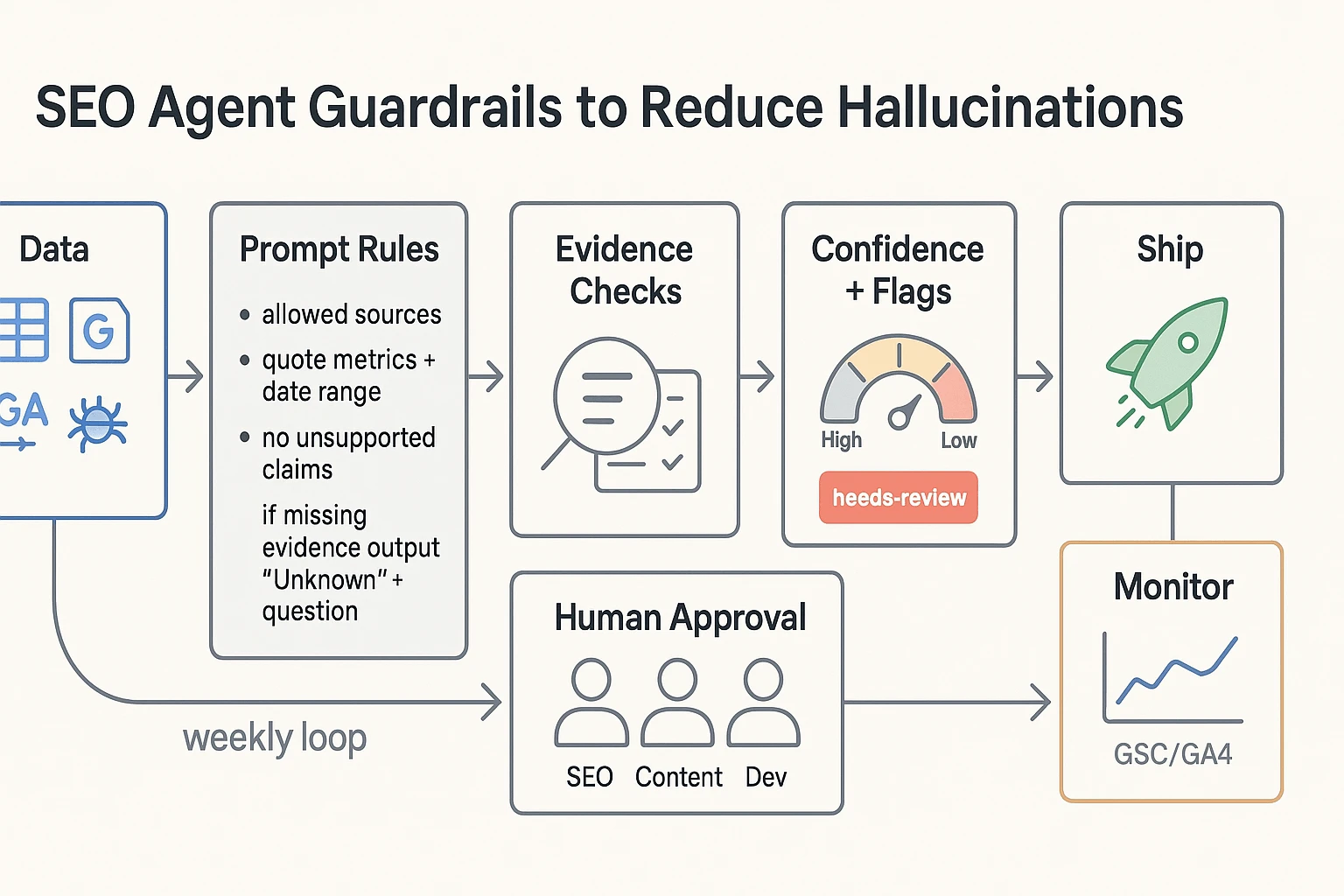
Use a reusable prompt header (role, scope, sources, evidence)
Start every run with the same "prompt header". It forces the agent to stay inside the data you trust.
Include these rules at the top of the prompt:
- Role + scope: "You are an SEO analyst. Only audit and propose changes. Don't publish."
- Allowed data sources: list them (example: GSC export, GA4 export, crawl results, sitemap, robots.txt, internal linking map, existing brief/SOP).
- Quote exact metrics: require exact numbers plus date range (example: "Clicks: 12,431, last 28 days vs previous 28 days").
- No unsupported claims: every recommendation must include an Evidence field with a direct reference to a data row, URL list, or query.
- Missing evidence rule: "If evidence is missing, output Unknown and ask one question you need answered."
A simple output pattern that works:
- Finding
- Evidence (metric + date range + source)
- Recommendation
- Risk level
- Next question (only if Evidence is Unknown)
This makes it hard for the agent to "fill gaps" with guesses. It also makes reviews faster.
Add confidence scoring and a needs-review flag
Force the agent to label uncertainty. A basic system is enough:
- Confidence: High (all required sources present, metrics quoted, rule match is clear)
- Confidence: Medium (some metrics present, but one source missing or partial)
- Confidence: Low (weak data, conflicting signals, or assumptions)
Then add a binary needs-review flag for anything that can break traffic or indexing. Mark needs-review: true for:
- Title/meta changes on high-traffic pages
- Canonicals
- Robots rules and noindex
- Redirects
- Schema changes
- Internal link changes at scale
Rule of thumb: if a mistake can cause deindexing, duplication, or ranking loss, it's "needs review" even when confidence is high.
Constrain tool use with permissions (read-only first)
Most "agent disasters" happen when the model can write to the wrong place. Start with read-only permissions:
- Export data
- Analyze
- Draft a report
- Draft tickets or change lists
If you allow writing, restrict it to a safe surface:
- Only write to a specific folder and one template (report, ticket, or checklist)
- Never write directly to the CMS, server config, sitemap, or robots
- Use a staging approach: draft change set → human review → staging test → scheduled release
This keeps automation benefits while removing the "one prompt changed prod" risk.
Put human approval gates before anything goes live
Use four checkpoints, in order:
- Data sanity check: are exports current, filtered right, and in the right timezone and date range?
- SEO QA: does each claim have evidence, and do the numbers match the source?
- Implementation review: dev or content owner confirms feasibility, scope, and rollback plan.
- Post-change monitoring: define what you'll watch in GSC and GA4 (query set, page group, conversions) and the time window.
Finally, capture decisions. When you store "what we changed and why" as meeting notes and SOPs, future agent runs stay consistent instead of re-arguing old calls. This pairs well with a "ship with QA" approach like an AI content workflow with governance so prompts, evidence, and approvals stay connected.
How do you evaluate and QA an SEO agent's work?
An SEO agent can save hours. But only if its output is safe to act on. The goal of QA is simple: catch wrong calls fast, prove each claim, and keep humans in control of final decisions. Treat the agent like a junior analyst. It drafts. Your team approves.
Set acceptance criteria for every audit finding
Write acceptance rules in plain language. Each issue the agent reports must be:
- Precise: the problem is real (not a false alarm).
- Complete: it covers the major issues, not just small ones.
- Evidenced: it includes proof you can trace back.
Make "minimum evidence" non-negotiable. Here's a simple checklist you can reuse.
- Crawl issues (redirect chains, 4xx, canonicals)
- Required evidence: crawl rows for affected URLs, status codes, and final destination.
- Time window: crawl date and tool settings (user agent, depth, include params).
- Indexing issues (noindex, canonical mismatch)
- Required evidence: URL list plus the exact tag or header found.
- Time window: date captured (crawl date or inspection export date).
- Performance issues (traffic drops, CTR, CWV warnings)
- Required evidence: GSC or GA4 excerpt (metric, segment, and date range).
- Time window: "last 28 days vs previous 28" or "YoY same period".
- Content or intent claims (thin content, wrong intent)
- Required evidence: top queries and the page's primary intent target.
- Time window: query data range used.
If the agent can't attach the evidence, the finding doesn't ship.
Do quick spot checks that small teams can sustain
You don't need a full test lab. Use lightweight checks that take 15 to 30 minutes.
- Random sample 10 URLs from the crawl
- Verify status code, indexability, canonical, and title match reality.
- Cross-validate GSC vs GA4 (when it matters)
- If the agent claims "traffic dropped," confirm it in both tools.
- Expect differences, but big swings should rhyme (direction and timing).
- Run SERP sanity checks for intent statements
- Open the live SERP for the main query.
- Confirm what ranks (blog posts, category pages, tools, videos).
Rule of thumb: any statement that starts with "Google says…" must include a verifiable source quote and link in your internal notes. If it can't, delete the claim.
Keep a tiny benchmark set (20 known issues)
Build a small "truth set" of about 20 issues you already understand. Mix technical and content items, like:
- Redirect chain on a legacy URL
- Accidental noindex on a template
- Duplicate titles across paginated pages
- Slow page template (high LCP)
- Cannibalization between two similar pages
Every time you change your prompt, model, or data inputs, rerun the agent. It should detect and correctly describe the same 20 items. Track misses and new false positives as regressions.
Track operational metrics that show safe scale
Measure what actually improves when you automate.
- Hours saved per week: time from data pull to draft.
- Rework rate: % of tickets that get rewritten after review.
- False positive rate: % of flagged issues that aren't real.
- Decision latency: time from "data available" to "approved action".
Only expand scope when these stay stable for 2 to 4 weeks. That's how you scale an AI agent for SEO without turning your backlog into clean-up work.
How can an AI agent help with technical SEO automation (crawl, sitemap, robots, CWV)?
A well-designed AI agent for SEO can speed up technical work by turning messy exports (crawls, GSC, CrUX) into a short, ranked backlog. The key is safety: it should cluster problems by template, show a few example URLs, and draft tickets humans approve.
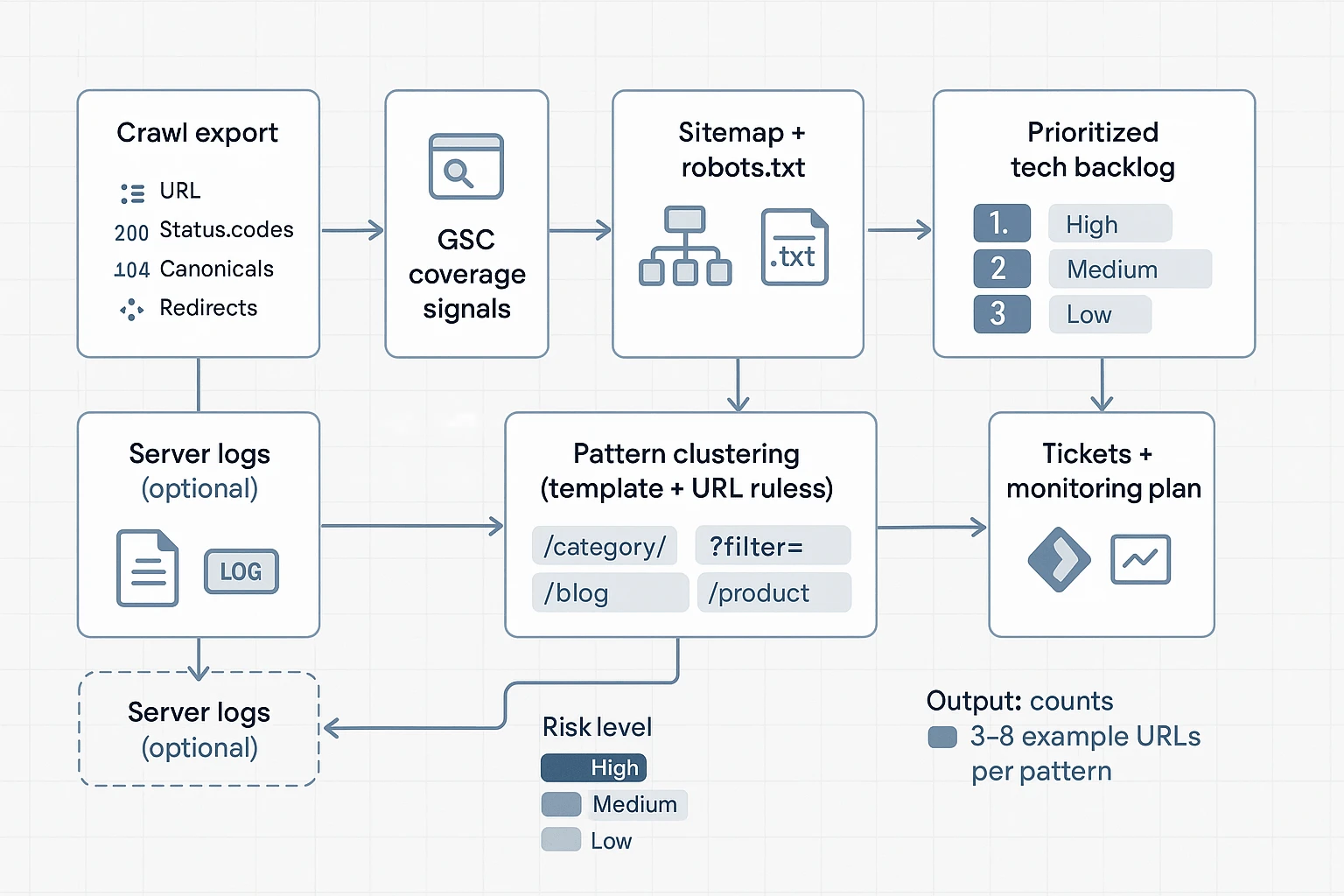
Turn crawl exports into pattern-based issue clusters
Start with a crawl export (Screaming Frog, Sitebulb, or similar). Your agent should group issues by template or URL pattern, not by single URL. That's how you avoid 10,000-line "reports" no one reads.
Have it summarize these buckets:
- Indexability conflicts: indexable vs noindex, blocked vs allowed, inconsistent status codes.
- Canonical problems: self-canonical missing, canonicals pointing to non-200 URLs, cross-template canonical conflicts.
- Redirect waste: chains (3+ hops), loops, and "redirecting canonical" mismatches.
- Error clusters: 4xx and 5xx grouped by directory, template, or parameter set.
- Pagination patterns: rel patterns, duplicate title/meta across paginated sets, thin paginated pages.
- Thin and duplicate templates: near-identical pages driven by filters, internal search, location swaps, or faceted nav.
To keep it actionable, require each cluster to output:
- template or pattern name (rule), 2) estimated affected URL count, 3) top impact risk, and 4) 3 to 8 "example URLs" only.
Check sitemap + robots + GSC for coverage gaps (with risk labels)
Next, combine four signals: sitemap URLs, robots.txt rules, crawl findings, and GSC coverage.
Useful checks an agent can run:
- In sitemap but not crawlable: blocked by robots, returning 3xx/4xx/5xx, or canonicalized away.
- Crawlable but missing from sitemap: often new templates, orphaned sections, or parameter URLs leaking.
- Blocked templates that should be indexable: entire folders disallowed by a broad rule.
- Accidental overlaps: robots disallow plus meta noindex, or conflicting directives across templates.
Because robots changes can be high impact, force the agent to attach a risk label:
- High: robots.txt disallow edits, broad noindex changes, sitemap removals affecting key templates.
- Medium: narrowing a rule to a subfolder, canonical standardization, redirect cleanup.
- Low: sitemap hygiene, monitoring, adding annotations and tests.
Build a safe Core Web Vitals loop from field data to tickets
CWV work goes wrong when it turns into generic advice. Keep it evidence-based: ingest field data exports (CrUX or PageSpeed bulk), map each URL to a template, then prioritize business pages first.
Use Core Web Vitals (web.dev) thresholds as your guardrail: "Good" means LCP of 2.5 seconds or less, INP of 200 milliseconds or less, and CLS of 0.1 or less.
Then require the agent to draft developer-ready tickets that include:
- affected template and top example URLs
- metric failing (LCP, INP, or CLS) and current percentile value from the export
- reproduction notes (device type, page type, key elements above the fold)
- the smallest testable fix (one change per ticket) and how to monitor after release
Optional: log file patterns to watch (and what to report)
If you have server logs, keep the agent's output simple:
- Googlebot crawl rate shifts week over week
- spikes in 5xx tied to a template or endpoint
- important templates not being crawled (or crawled too rarely)
- parameter traps (many unique URLs with low value)
The report should end with "what changed, what broke, what to fix next" in plain language.
Try TicNote Cloud for Free to store SOPs, crawl evidence, and ticket decisions in one place.
Where does a knowledge base fit in the SEO agent stack (and what's exclusive to TicNote Cloud)?
A knowledge base sits between your SEO data and your AI outputs. It's the place your agent checks before it writes. For an ai agent for seo, that means it can answer, "What did we decide?" and "What evidence supports this?" before it drafts an audit, report, or QA note. When decisions, SOPs, prompt versions, and exports live together, you get speed without guesswork.
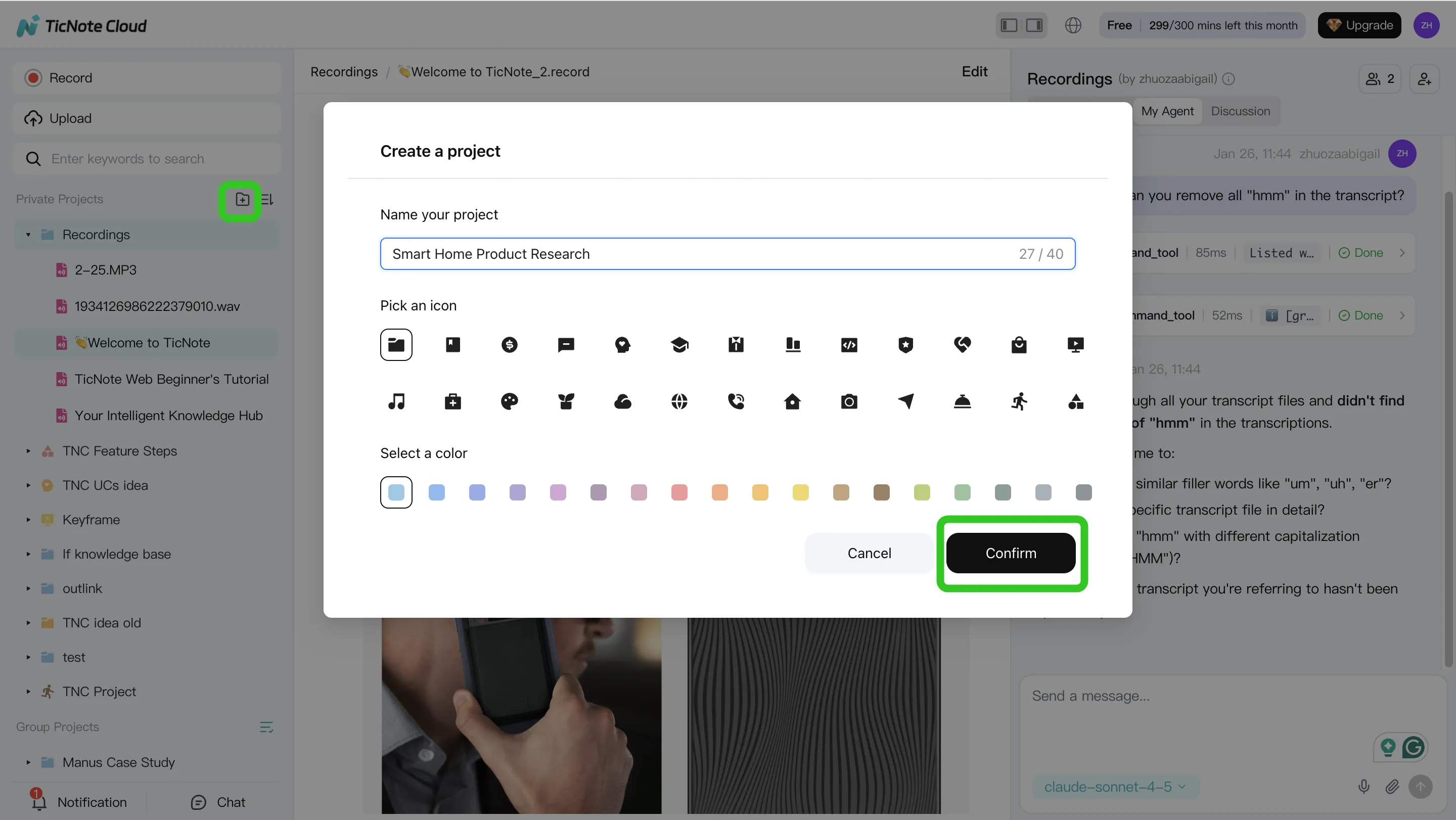
Build a "knowledge-first" SEO Project in TicNote Cloud (web)
Step 1: Create or open a Project and add content
Start by creating one Project per site or client. Then keep the same folders every time, so both people and AI can find things fast.
A simple structure that works:
/Inputs(GSC exports, GA4 notes, crawl CSVs, briefs)/Outputs(weekly reports, audit summaries, ticket drafts)/SOPs(checklists, definitions, templates)/Changelog(what changed, who approved it, when)
In the web studio, you can add inputs two ways: upload files straight into the folder area, or attach them in Shadow chat and ask it to file them correctly.
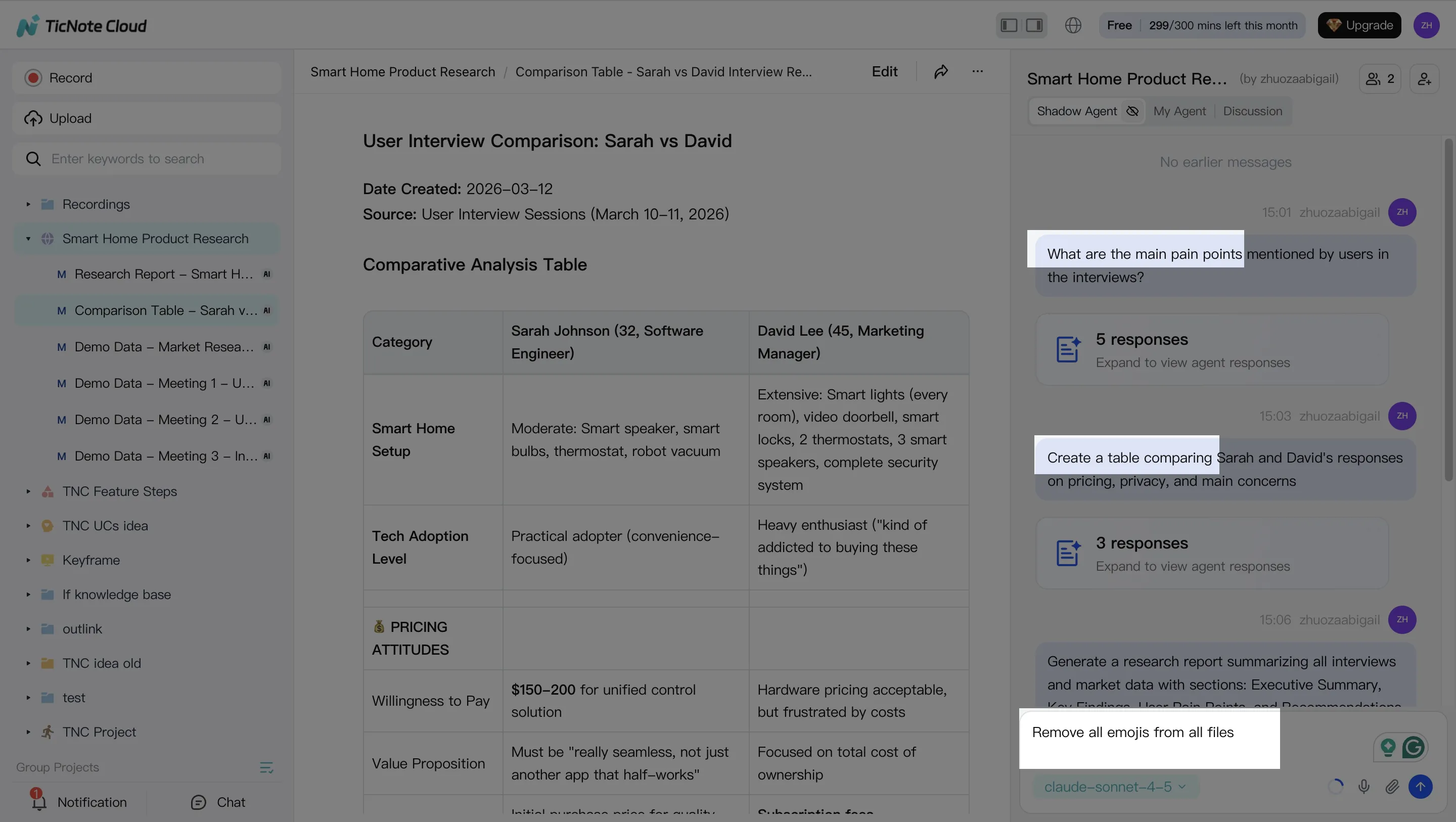
Step 2: Use Shadow AI to search, analyze, edit, and organize content
Shadow AI lives on the right side of the screen, so it's always "in the Project." The win is grounded retrieval: you can ask questions that must be answered from your stored files.
Try prompts like:
- "What did we decide about noindex rules for faceted pages?"
- "Summarize last week's SEO meeting into decisions, risks, and owners."
- "Update the internal linking SOP with the new category rules."
Then use edits to keep the knowledge base clean. For example, have Shadow convert messy notes into one SOP page, or rewrite a template in a consistent format.
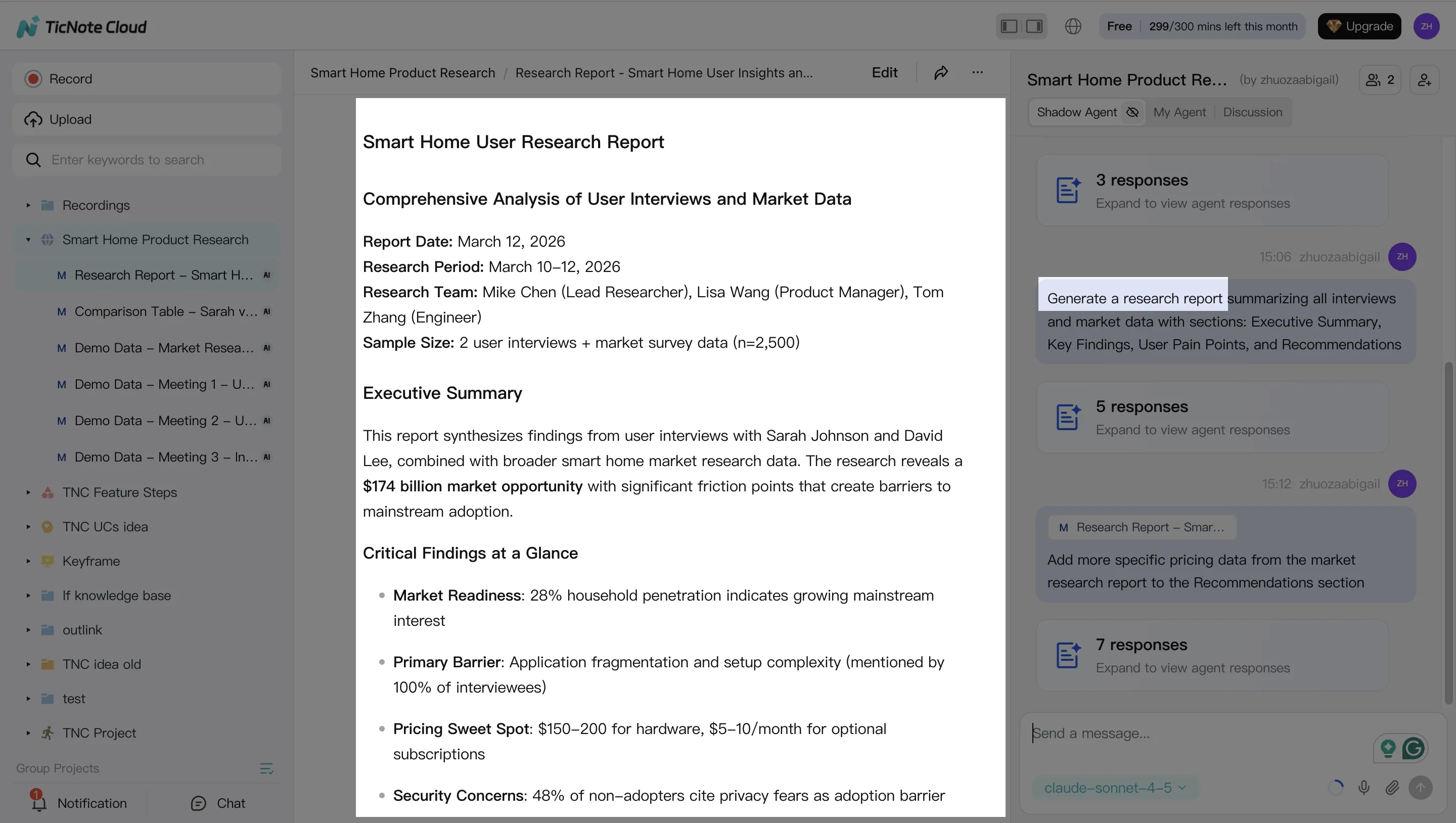
Step 3: Generate deliverables with Shadow AI (with evidence attached)
Once inputs and decisions are organized, you can generate drafts that stay tied to the source material. This is where a knowledge base changes the quality of "automation." Instead of generic advice, you get site-specific deliverables.
Common outputs to generate:
- Weekly SEO report draft (wins, losses, next actions)
- Audit summary (top issues, impact, suggested fixes)
- Ticket-ready recommendations (steps, acceptance checks, priority)
You can ask in chat, or use the Generate button for formats like a research report, web presentation, mind map, or an HTML page.
If you want to compare tools for this style of work, this guide to all-in-one AI workspace setups can help you map features to your process.
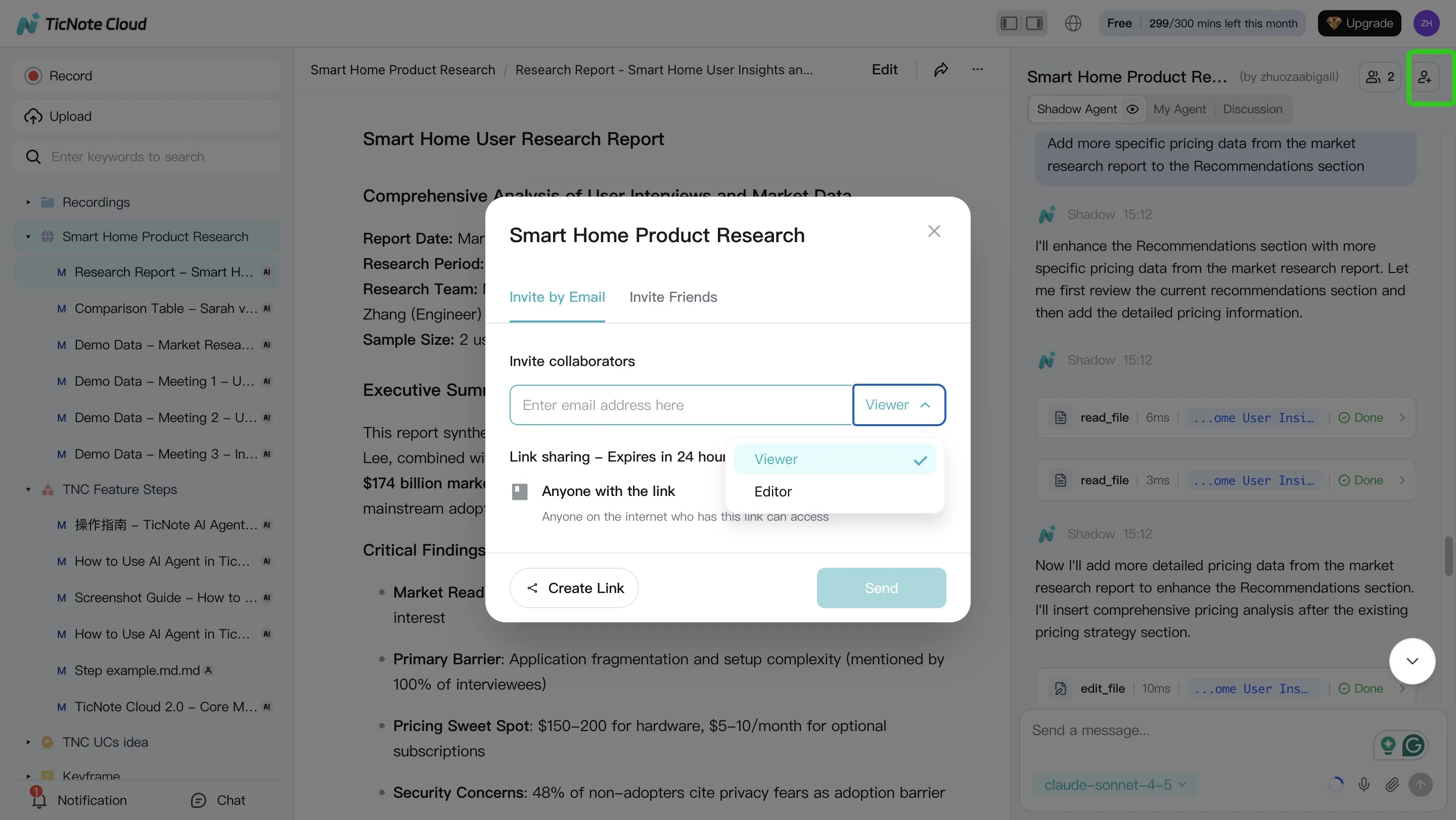
Step 4: Review, refine, and collaborate (human approval gate)
Don't ship the first draft. Review inside the same Project where the evidence lives. Ask Shadow to revise specific lines, and verify key claims by jumping back to the original source.
A simple approval loop:
- Reviewer checks accuracy and tone
- Owner assigns priority and next steps
- Final version is saved to
/Outputs - A short note is added to
/Changelog(approved by, date, what changed)
This keeps your agent honest over time, because next week's run can reference what was approved, not what was merely suggested.
Do the same loop from the mobile app (for agency calls)
On mobile, the flow is simple: record or import the call on your phone, save it into the same client Project, then summarize and chat with it later. This matters when decisions happen fast, like a 15-minute stakeholder sync. If it lands in the Project the same day, your next report and QA pass stays aligned.
How do you run a weekly SEO 'agent loop' using meeting notes (a simple case example)?
A weekly "agent loop" works when it's boring on purpose. You fix the same three problems every week: scattered inputs, fuzzy decisions, and missing QA. The goal is simple: let an AI agent for SEO draft the thinking, then let humans approve the work.
Monday: collect inputs and lock decisions
Keep Monday short. Aim for a 15-minute SEO standup and 30 to 60 minutes of data pulls. Your job is to hand the agent clean inputs and clear rules.
Collect the same snapshots every week:
- GSC export: clicks, impressions, CTR, avg position (last 7 days vs prior 7 days)
- GA4 export: sessions and conversions by landing page
- Crawl delta: new 4xx, 5xx, redirects, canonicals, indexability changes
- CWV snapshot: LCP, INP, CLS for key templates (top pages)
Then capture meeting notes as structured facts, not a transcript. Use a simple format so the agent doesn't argue with last week's strategy:
- Decisions (what we will do): "Fix canonicals on /product/* this sprint."
- Assumptions (what must be true): "Template drives 40% of organic sessions."
- Owners (who approves): "Tech lead approves redirects. SEO lead approves content."
- Constraints (what we won't do): "No URL changes before release freeze."
If you want a deeper governance model, borrow the same controls used in agent governance for analytics work and apply them to SEO inputs and approvals.
Midweek: agent drafts audit, priorities, and questions
On Tuesday or Wednesday, run the agent against this week's inputs plus last week's snapshot. The agent should do three things only:
- Compare deltas (what changed): week-over-week shifts by page group
- Cluster issues (what repeats): patterns by template, directory, or rule
- Draft priorities (what to do first): impact vs effort, with evidence
Have it output three deliverables:
- Top findings with evidence: each finding must include the exact URLs, the metric delta, and the source file it came from.
- A prioritized backlog: 5 to 15 items max, each with "why now," "owner," and "definition of done."
- A list of questions: anywhere data is missing, the agent must ask instead of guessing.
A good run usually flags 60 to 80% of issues as "template repeats." That's where you save time, because one fix can cover hundreds of pages.
Friday: human review, publish tickets, and update stakeholders
Friday is for QA and publishing, not discovery. Do a 30-minute spot check on the top 3 findings:
- Open 5 to 10 example URLs per finding
- Verify the claim matches the evidence (crawl, GSC, GA4, CWV)
- Confirm the fix won't break something else (indexation, internal links)
Then approve the final list and ship it:
- Create 3 to 6 tickets max (keep the sprint real)
- Add monitoring rules: what metrics, what pages, what timeframe
- Send a one-page update: what changed, why it matters, what's next
"No blind publishing" is the rule. The agent drafts. Humans approve. Systems monitor.
Example deliverables (mini case)
Scenario: an in-house team sees a 12% week-over-week drop in organic sessions on a product template.
Midweek, the agent finds two linked causes:
- Canonical inconsistency: 28% of sampled /product/* pages point canonicals to a parameter URL
- CWV regression: LCP worsened by 0.7s on the same template after a UI change
The team approves 3 tickets:
- Canonical rule fix in the template (owner: engineering)
- Remove render-blocking script on product pages (owner: web perf)
- Update internal links to the canonical version (owner: SEO)
Friday's one-page report explains the chain: "UI change slowed LCP, and canonicals split signals." It also includes a monitoring plan: watch GSC clicks and CWV for the template daily, and re-crawl after deploy.
This loop cuts context switching because decisions live in the notes, not in someone's head.


