


 Extension
TL;DR: The best AI agent picks for operations (and the fastest first pilot)
Try TicNote Cloud for free if your first win is meeting-driven ops work: shift handovers, incident reviews, SOP updates, and KPI narratives (it's the fastest way to turn talk into tracked actions and reusable knowledge). For uptime, pick an EAM/CMMS-style agent when the "work" is work orders, labor scheduling, and parts. For quality, pick a computer-vision QC agent when you need line-speed defect detection. For supply chain, pick a planning/risk agent when you need disruption monitoring and scenarios. For KPI storytelling with traceability, pair workflow automation with BI to generate narrative reports you can audit.
Ops teams lose decisions in scattered notes. Then rework shows up as missed handoffs and repeat incidents. TicNote Cloud fixes this by capturing conversations, keeping project memory, and producing editable, source-tied deliverables in minutes.
Fast 60–90 day pilot (6 steps):
- Pick 1 use case with weekly volume (so results show fast).
- Define "auto vs approve" (human sign-off on risky changes).
- Connect only minimum data (start with meetings + one system).
- Run in parallel with humans for 2–4 weeks.
- Track 3–5 KPIs weekly (cycle time, rework, misses, SLA, hours saved).
- Expand autonomy only after audit quality stays high.
What is an AI agent for operations (and how is it different from RPA, copilots, and ML models)?
An AI agent for operations is software that can observe → decide → act toward a goal, using tools like APIs, workflows, and checklists. It doesn't just "answer questions." It can turn signals (system data plus human updates) into routed actions: a drafted work order, a ticket with context, an exception escalation, or a decision log.
Define "agent" and "autonomy" in plain English
An "agent" is a doer. It takes a goal like "reduce repeat breakdowns" and then runs steps to move it forward. "Autonomy" is how much it can do without you. In ops, the safest setup is bounded autonomy: the agent can prepare, draft, and route work, but a person approves the final action.
Agent vs RPA vs copilot vs ML model
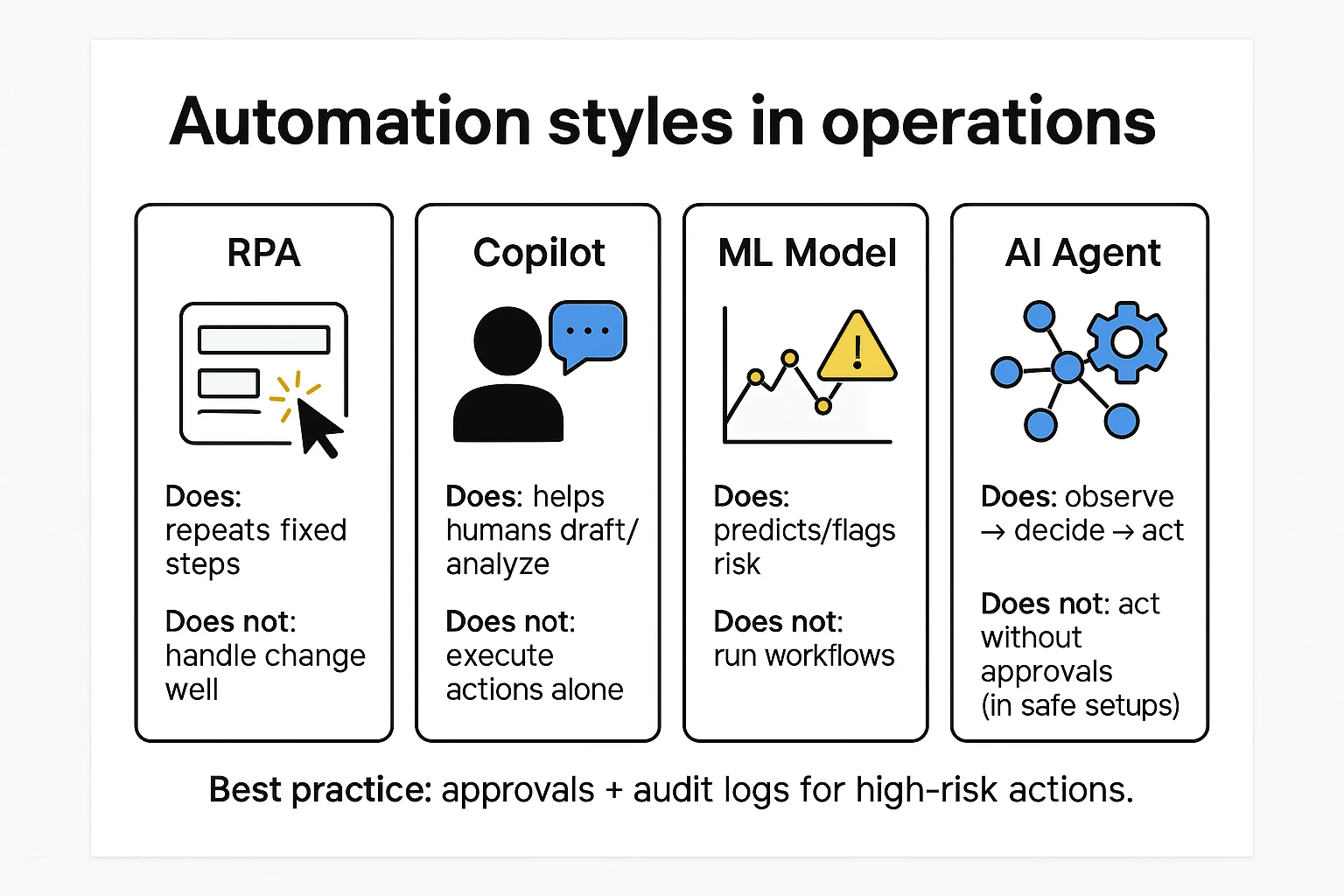
Here's the clean way to separate the terms:
- RPA (robotic process automation): follows fixed clicks and rules. It's fast for stable, repetitive tasks. It often breaks when screens, fields, or pop-ups change.
- Copilot: helps a person write, summarize, or analyze. It usually doesn't execute actions in other systems.
- ML model: predicts or flags (like defect risk or late shipment risk). It produces a score, not a completed workflow.
- Agent: chains steps across systems: ask, check, decide, escalate, write, create. It can also request approvals and record what happened.
Where an ops agent should (and should not) take actions
Good autonomy (low risk, high leverage):
- Summarize shift handovers and create a clean action list
- Draft work orders or tickets for approval
- Prepare post-incident review packs with timelines and evidence links
- Route exceptions to the right owner and SLA (service-level agreement)
- Generate KPI narratives that point to source data and notes
Avoid or limit autonomy (high risk):
- Changing system-of-record fields without review
- Safety-critical parameter changes (setpoints, interlocks)
- Supplier commitments (quantities, dates, penalties)
- Financial postings (invoices, credits, journal entries)
A useful rule: "Autonomy without audit is just faster chaos." In operations, every action needs an owner, an approval path, and an audit trail you can replay later.
Top AI agent for operations tools (item cards + quick reasons)
This list is vendor-neutral by category. It's built for commercial investigation: what each tool is best at, what first pilot it fits, and which governance controls you should verify before anything touches production. Use it to match the "home" of your actions—meetings, CMMS/EAM, ERP, workflow, QMS, or planning.
TicNote Cloud (meeting → actions + compounding ops knowledge)
- Best for: operations knowledge workflows where meetings are the hidden system of record (shift handovers, tier meetings, incident reviews, supplier calls).
- Why it wins early pilots: you can start in days, not quarters. Capture what people already do, then turn it into action-ready assets with less manual work.
- Modules tied to ops agents: Projects (shared memory), Shadow AI (agent-like executor), transcripts, reports, mind maps, exports, permissions, and Enterprise SSO.
- Ops examples: handover summary + action log; post-incident review → corrective actions + SOP edit notes; weekly KPI narrative with cited source snippets.
- Governance checks: role-based access, traceable Shadow actions, private-by-default data stance.
If you want a deeper tool breakdown for knowledge workflows, use this companion guide on AI agent tools for knowledge management to pressure-test governance and KPI fit.
IBM Maximo (EAM/CMMS-style agent for reliability)
- Best for: asset reliability, maintenance execution, parts, and work management.
- First pilot that fits: "condition signal → suggested work order → planner approval." Start with one critical asset class and one failure mode.
- What the agent looks like here: it monitors condition and history, proposes jobs and parts, and routes approvals to maintenance roles.
- Governance checks: approval gates for work orders, role separation (planner vs technician), and full work history audit trails.
SAP Joule / SAP Business AI (ERP-native agents)
- Best for: teams where SAP is the system of record for procurement, production planning, inventory, and finance.
- First pilot that fits: exception handling (late supplier confirmations, PO invoice mismatches, material availability gaps) with proposed resolutions.
- Governance checks: approvals for any posting, segregation of duties (SoD), and strict access controls tied to SAP roles.
Microsoft Copilot Studio + Power Automate (orchestration across M365)
- Best for: routing, drafting, and approvals across Microsoft 365, plus connectors to other systems.
- First pilot that fits: "request → triage → approve → notify" flows (ticket routing, maintenance approval requests, document drafting).
- Governance checks: environment controls, connector allow-lists, data loss prevention (DLP) policies, and action logging.
ServiceNow (workflow-first ops + IT/OT coordination)
- Best for: cross-team workflow where incidents, changes, and approvals must be consistent (operations, IT, security, and shared services).
- First pilot that fits: incident swarming with structured updates, change-risk summaries, and approval routing.
- Governance checks: strong auditability is a strength here, but you need tight process discipline and a clear catalog to avoid "workflow sprawl."
UiPath (RPA + agent decisioning for legacy steps)
- Best for: legacy apps and brittle screen-based work where APIs are missing.
- First pilot that fits: a hybrid pattern: the agent triages and decides; RPA executes clicks and data entry.
- Governance checks: bot credential vaulting, change control for automations, and a plan for ongoing bot maintenance load.
Computer-vision QC platforms (e.g., Landing AI category)
- Best for: visual inspection and defect detection on lines and stations.
- First pilot that fits: one part number + one defect family, with clear pass/fail criteria.
- Inputs/outputs to define: image capture, labeling standards, line context (lighting, camera angle), then push results into QMS/MES workflows for disposition and traceability.
Supply-chain planning platforms (e.g., Kinaxis category)
- Best for: disruption monitoring, scenario planning, and "what-if" response plans.
- First pilot that fits: a single product family or lane where lead times and demand shocks cause real pain.
- Integration needs: orders, inventory, lead times, constraints; outputs are plans that should require human approval before execution.
How to use this list: pick the category that matches where actions live. If your gaps show up in handovers and reviews, start with meeting-to-actions. If work orders and parts are the bottleneck, start in CMMS/EAM. If postings and planning rules drive everything, start in ERP or planning.
Comparison table: Which operations AI agent fits your environment?
This table is normalized so you can compare unlike tools without getting tricked by labels. Start with four filters: (1) your system of record (ERP/MES/QMS/CMMS vs meetings/docs), (2) the risk of the action (suggest vs execute), (3) integration effort (connectors/API vs uploads), and (4) change load on frontline teams (new screens, new steps, new approvals).
How to read this table (systems, data, risk, change load)
If your truth lives in MES/QMS/CMMS, pick an agent that writes back safely (or at least produces structured work orders). If your truth lives in shift handovers, standups, incident reviews, and SOP docs, pick a meeting-and-knowledge agent that can cite sources and export cleanly. And for anything that can stop a line or ship the wrong thing, require human approvals plus audit logs from day one.
| Tool / category | Primary ops domain | System-of-record fit | Typical first pilot | Integration style | Human approvals | Audit logs | Exports (portability) | Permissions + SSO | Pricing approach |
| TicNote Cloud (Projects + Shadow AI) | Knowledge work | Meetings, transcripts, SOPs, docs | "Meetings → actions" for handovers and incident reviews | Manual upload + workspace aggregation; light connectors | Needs workflow (review before publish) | Native (Shadow operations traceable) | TXT/DOCX/PDF, Markdown, HTML, PNG/Xmind, WAV | Role-based permissions; Enterprise SSO available | Transparent tiers + enterprise quote |
| AI meeting note apps (Otter/Fireflies class) | Knowledge work | Meetings and notes | Auto-summaries + action items | Calendar/meeting integrations | Partial | Partial | Text exports (varies) | Team permissions; SSO varies | Usually tiered |
| Workflow automation + agent builders (UiPath/Power Automate class) | Workflow automation | ERP/CRM + apps | Ticket triage + routine back-office steps | Connectors + APIs | Native (workflows) | Native | Logs + workflow artifacts | Enterprise IAM/SSO | Often enterprise quote |
| CMMS/EAM with AI add-ons | Maintenance | CMMS is source of truth | Work order drafting + parts suggestions | Native CMMS modules/APIs | Native | Native | Work order exports (varies) | Enterprise controls | Often enterprise quote |
| Quality analytics / QMS intelligence | Quality | QMS + inspection data | NCR/CAPA clustering + defect narratives | APIs + data pipelines | Needs workflow | Partial to native | Reports/CSV/PDF (varies) | Enterprise controls | Often enterprise quote |
| Supply chain planning w/ AI features | Supply chain | ERP/APS + demand data | Exception management + ETA risk flags | APIs + EDI/data feeds | Needs workflow | Partial | Planning reports (varies) | Enterprise controls | Often enterprise quote |
Quick scoring rubric (pick a first pilot)
Score each candidate 1–5, then total it.
- Impact: Will it move a KPI in 60–90 days?
- Complexity: How many systems and steps change?
- Data readiness: Are the inputs already captured and clean?
- Change readiness: Will frontline teams adopt it this month?
- Risk: What's the worst credible failure?
Choose the highest score that still has clear human approvals and audit logs. If two tie, pick the one with the lowest change load (fewer new clicks per shift).
Which use cases deliver early ROI with AI agents in operations? (Top 5)
You don't need a big system rebuild to prove value. These five use cases are common, measurable, and easy to pilot with tight approvals. Each one uses an AI agent for operations to turn signals and notes into a brief, a decision, and logged actions.
1) Disruption monitoring and response (supply chain)
This is the fastest win when decisions are time-sensitive. Monitor a small set of inputs first:
- Supplier health (missed commits, late ASN, quality holds)
- ETA changes and dwell time at hubs
- Port congestion plus weather and carrier alerts
The agent workflow is simple: detect the change, summarize impact by SKU or lane, propose mitigations, then route to a human approver. Start with 3–5 mitigation playbooks (swap supplier, split shipment, re-allocate inventory, change mode, notify customers).
Track ROI with three tight KPIs:
- Time-to-detect (minutes from alert to human-ready brief)
- Time-to-decide (minutes from brief to approved action)
- Expedite cost avoided (baseline expedite spend minus pilot period)
2) Predictive quality signals (prevent defects)
Many plants already have model outputs or SPC (statistical process control) signals. The early ROI comes from pairing those outputs with an agent that runs the response.
The agent should write a short "quality risk brief" every time risk crosses a threshold. Include lot, machine, shift, top likely causes, and next checks. Then trigger containment steps for approval (hold WIP, add inspection, confirm gauge, run a short trial).
Measure what matters:
- FPY (first-pass yield)
- Scrap and rework rate
- Customer complaints
- Time-to-containment (hours from signal to first action)
3) Inventory and replenishment exceptions
Don't replace planning. Tackle exceptions. Focus on abnormal demand jumps, lead-time shifts, and parameter drift (min/max, safety stock).
The agent flags the outliers, pulls context (recent promos, supplier delays, MOQ changes), and drafts a PO change or a planner note for approval. Keep the "write" step gated by a planner so you don't create noise.
Pilot KPIs:
- Stockouts (count and hours)
- Service level (% lines filled on time)
- Inventory turns
- Planner hours saved (e.g., hours/week on expediting and manual checks)
4) Maintenance planning and work orders
This works when you have condition signals and messy notes. The agent turns vibration or alarms plus technician notes into a prioritized job list. It can draft work orders, check parts needs, and suggest the right craft.
Keep controls tight: the agent drafts; a supervisor approves; the CMMS gets the final entry.
Track:
- Unplanned downtime hours
- MTTR (mean time to repair)
- Schedule compliance (% PMs done as planned)
5) Process exception handling (order holds, shortages, rework loops)
Most ops teams drown in "where is my order" and hold queues. An agent can classify exceptions, pull all context, recommend the next step, and route to the right owner.
Start with 2–3 high-volume exception types (credit hold, missing ASN, picking shortage, rework loop). Build a clear decision tree, then let the agent apply it.
Measure:
- Cycle time and hold time (hours)
- Rework loops (count of repeat exceptions)
- Escalation count (how often it needs a manager)
Mini examples: meetings → actions (the overlooked ROI)
Here's the missed lever: your best decisions happen in standups and reviews. Capture a shift handover, a maintenance standup, a supplier call, or a post-incident review, then have a knowledge agent produce:
- An action log (owner, due date, dependency)
- A "what changed" brief for the next shift
- A KPI narrative for the weekly ops review
- A draft SOP update when a workaround becomes standard
One rule keeps it safe: "Autonomy without audit is just faster chaos." Require human approval for any system-changing step, and keep a searchable log of who approved what.
If you want more scenarios with KPI math, use this library of enterprise agent use cases and governance patterns to score your first pilot.
A simple reference architecture for safe ops agents
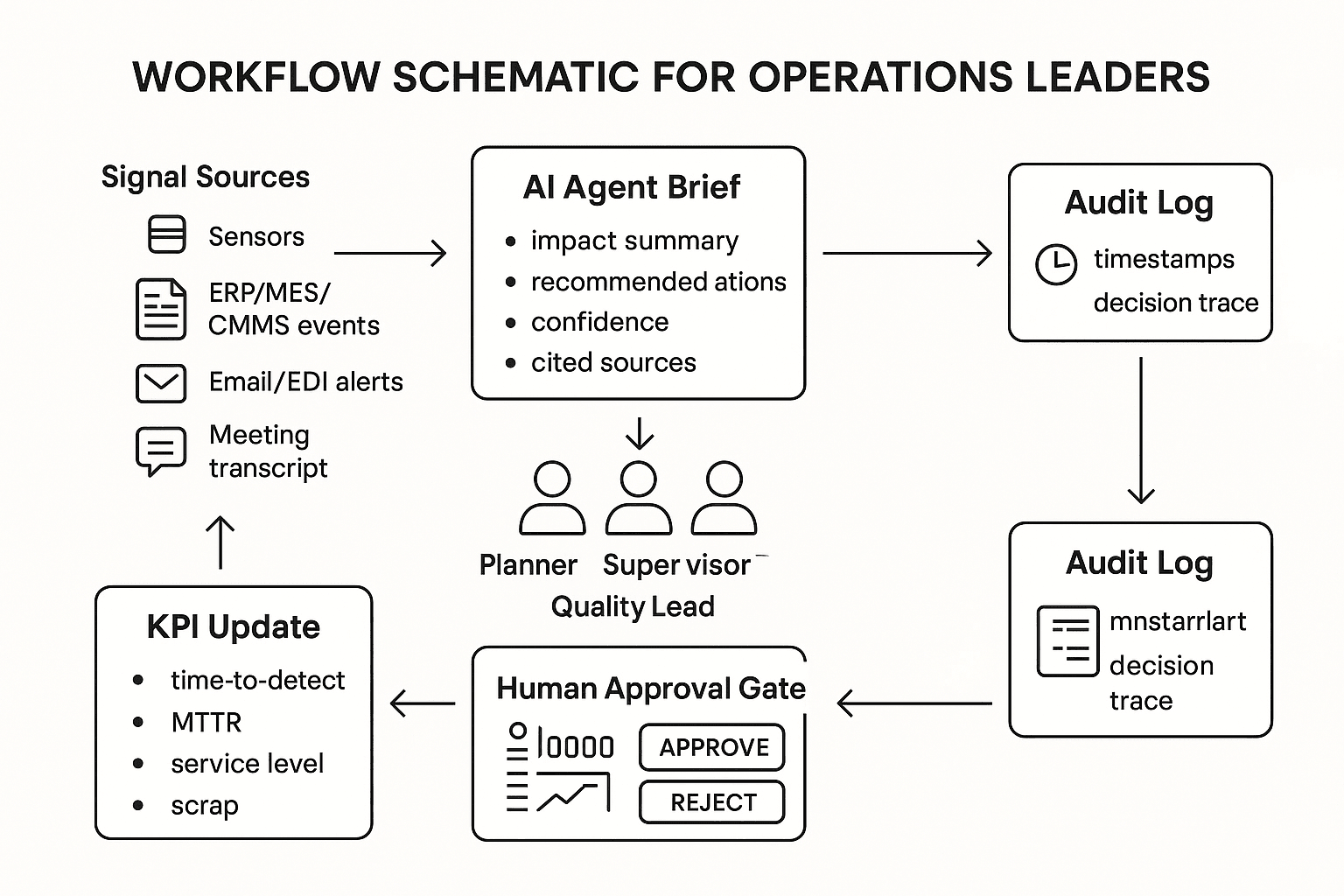
A safe ops agent architecture is simple on purpose: start with a few trusted data sources, keep the agent inside clear permissions, and force human approval before any system-of-record change. This pattern lets you prove value fast without turning your plant, DC, or supply chain into a live experiment.
Start with 1–2 data sources (structured + unstructured)
Most operations stacks already have the "structured" side covered:
- ERP (orders, inventory, vendors)
- MES (production events, downtime codes)
- QMS (NCR/CAPA, audits, defects)
- CMMS/EAM (work orders, PM schedules)
- WMS/TMS (pick/pack/ship, dock and route events)
But early ROI often comes from "unstructured" inputs that hold the why:
- Shift handover notes and daily management logs
- Meeting transcripts (standups, maintenance reviews, supplier calls)
- SOPs and one-point lessons
- Incident writeups, 5-Why, and A3 docs
Start small: one system (like CMMS) plus one unstructured set (handover notes) is usually enough for a first pilot.
Make the runtime about workflow, not the model
An operations agent is not "just an LLM." The value comes from a controlled runtime:
- Retrieval (RAG: retrieval-augmented generation) pulls only trusted docs, policies, and recent events
- Reasoning layer drafts a plan (what it will do, and why)
- Tool calling executes steps through approved tools (create a ticket, draft a work order, request a hold, route to a supervisor)
- Workflow rules keep actions inside limits (site, line, asset class, dollar thresholds)
If the agent can't reliably create, route, and close the work, it's a chatbot—not an ops system.
Put humans at the system-of-record boundary
Use a clear autonomy ladder by action type:
- Draft-only (safe): summaries, KPI narratives, root-cause drafts, SOP update suggestions
- Recommend + request (medium): propose a work order, propose reorder quantities, propose a quality hold
- Execute (restricted): only after approval, and only for low-risk actions (e.g., notify, assign, schedule)
Guardrails that work in real ops:
- Humans approve any write to ERP/MES/QMS/CMMS/WMS
- Least-privilege roles (read vs write, site-scoped access)
- Separate dev/test/prod environments and keys
- Explicit allowlists for tools and actions (no "do anything" permissions)
Log everything, monitor outcomes, and check drift
At minimum, log:
- Inputs used (doc IDs, time ranges, sensor batches)
- Prompts and model/version
- Retrieval results (what sources were cited)
- Tool calls (parameters, success/fail)
- Outputs (draft text, recommended actions)
- Approvals (who approved, when, what changed)
Monitor what matters to operators:
- False alerts rate and alert volume per shift
- Action reversals (how often humans undo agent output)
- Latency (time from event → recommendation)
- Coverage (percent of meetings/incidents that produce tracked actions)
Drift and quality checks should be routine:
- Sensor drift (calibration shifts, missing tags)
- Process drift (new SOPs, line rebalancing, vendor changes)
- Model drift (provider updates, prompt changes)
Text-only architecture diagram:
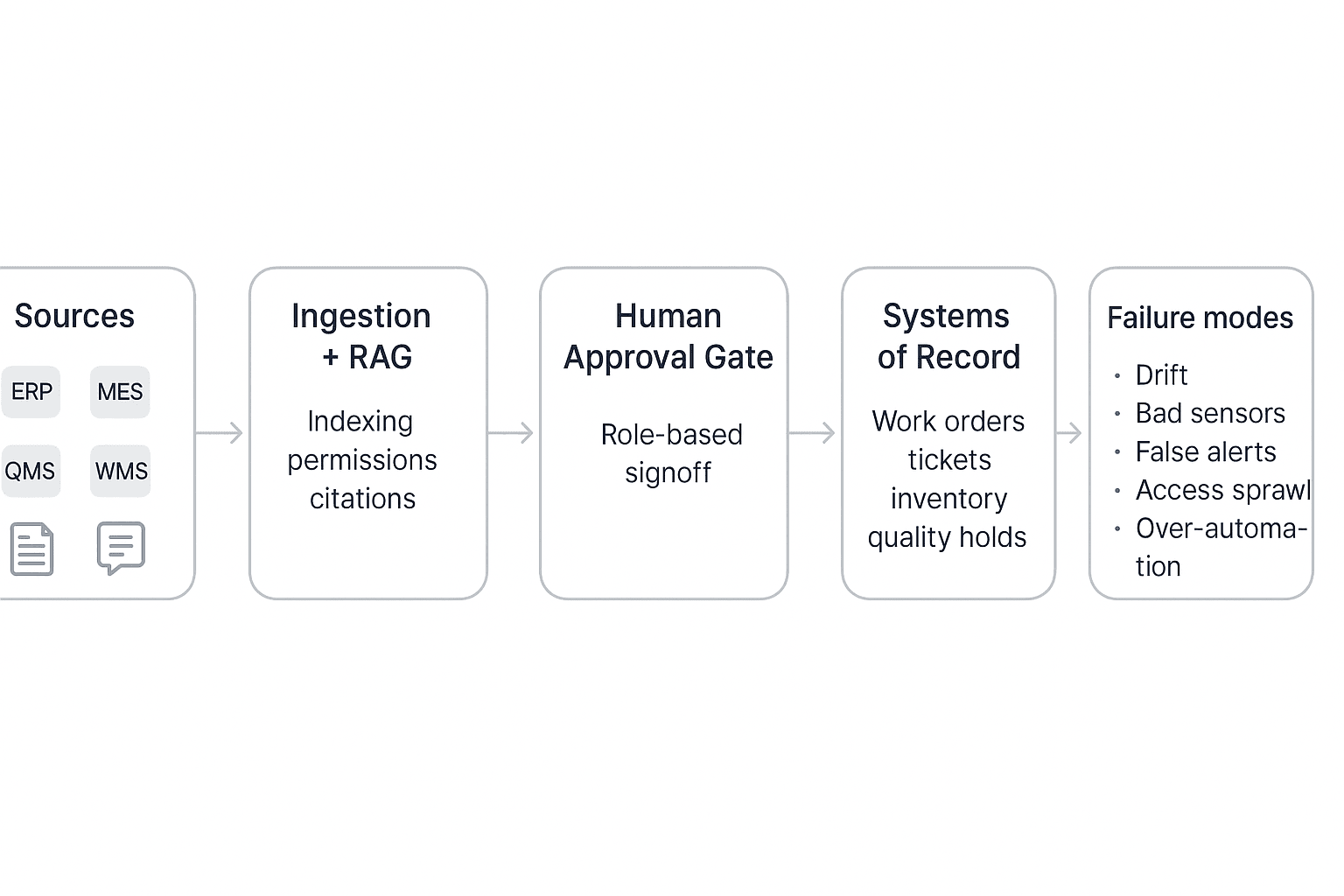
Sources (ERP/MES/QMS/CMMS/WMS + meetings/docs) → Ingestion + RAG (index, permissions, citations) → Agent Orchestrator (reasoning + tool calling) → Human Approval Gate (role-based signoff) → Systems of Record (tickets, work orders, inventory, holds) → Audit Log + Monitoring (metrics, drift checks, alerts)
Failure modes to plan for (before you automate):
- Drift: the process changed, but the agent didn't
- Bad sensors/data gaps: "confident" answers from noisy inputs
- False alerts: teams start ignoring the system
- Access sprawl: too many connectors, too much reach
- Over-automation: the agent moves faster than governance
Pilot checklist: How do you run a 60–90 day AI agent pilot without breaking operations?
A 60–90 day pilot works when it's small, measured, and gated. Your goal isn't "full autonomy." It's proving one high-value workflow with clear human approvals, clean data inputs, and a rollback plan. Treat the agent like a new operator: limited scope, trained steps, and audited outputs.
"Autonomy without audit is just faster chaos."
1) Scope, owners, and success metrics (Week 0–1)
- Pick one process and one site/line. Examples: shift handover notes, maintenance daily standup actions, or nonconformance (NCR) triage.
- Name three owners:
- Ops owner (accountable for outcomes)
- IT/security (access, logging, retention)
- Frontline rep (what really works on the floor)
- Run a baseline week with no automation. Capture current cycle time, rework, and delays.
- Choose 3–5 KPIs and define formulas:
- Time saved (hrs/week) = (baseline minutes/task − pilot minutes/task) × tasks/week ÷ 60
- Defect rate change (%) = (baseline defects/units − pilot defects/units) ÷ baseline defects/units × 100
- Downtime avoided (hrs/week) = baseline unplanned downtime − pilot unplanned downtime
- On-time action closure (%) = actions closed on time ÷ actions due
- Set a weekly review cadence (30 minutes). One page only: KPI trend + top 3 issues + next week's tweak.
2) Data and integration checklist (Week 1–3)
- Identify your system of record (CMMS, MES, QMS, ERP, ticketing). The pilot must write back there, or clearly hand off.
- Define minimal fields (keep it tight): asset ID, work order ID, defect code, timestamp, shift, owner, status, evidence link.
- Choose one pilot integration method:
- API (best control)
- Scheduled exports (CSV/JSON)
- Manual upload (fine for week 1–2 to prove value)
- Set data quality gates:
- Required fields present
- Units normalized (°C vs °F, minutes vs hours)
- Outlier rules (e.g., vibration spikes require confirmation)
- Set retention rules: what the agent stores, for how long, and who can see it. Keep access least-privilege.
If you need a deeper blueprint, start with this agent architecture and governance playbook before you connect production systems.
3) Change management (training, SOP updates, comms) (Week 2–6)
- Train one simple rule: "approve vs auto." Anything that can stop a line, order parts, or change a spec needs approval.
- Update SOPs to include the agent step:
- Input (what staff must capture)
- Review (who approves)
- Output (where it lands: CMMS/QMS/etc.)
- Send a short comms note:
- What changed (e.g., actions drafted automatically)
- What didn't (operators still decide)
- Where to report issues (single channel)
- Never position the pilot as headcount removal. It's a reliability and quality control.
4) Common pitfalls (and countermeasures)
- False alerts → Tune thresholds; require "confidence + evidence" (sensor + log + note) before escalation.
- Noisy data → Add quality gates; quarantine bad signals; label known failure states.
- Over-automation → Use staged rollout: draft-only → approve-to-post → limited auto.
- Model drift (performance drops over time) → Weekly spot checks; re-baseline monthly.
- Access sprawl → Role-based access, short-lived tokens, audit logs.
- No rollback → Keep "shadow mode" for 2 weeks; have a hard stop switch.
Pilot selection rubric (pick high impact, low change load)
Use a 1–5 score (5 is best) and pick the highest total with a clear approval gate.
| Criterion | What "5" looks like | Score (1–5) |
| Impact | Saves ≥2 hrs/shift or prevents repeat defects | |
| Complexity | Few steps, clear inputs/outputs | |
| Data readiness | Clean IDs, timestamps, and history exist | |
| Change readiness | Same crew, stable process, supportive lead | |
| Risk | Low safety/regulatory exposure; easy rollback |
A strong first pilot is the one that improves outcomes fast, without changing how people work too much—and where every critical action still passes a human approval gate.
Where TicNote Cloud is an operations agent alternative (and when it is the best pick)
Many operations "actions" start as talk, not a transaction. A shift handover, a maintenance standup, or a supplier call creates decisions, owners, and deadlines before anything hits ERP. That's where a meeting-centered AI agent for operations like TicNote Cloud fits best: it captures the full record, turns it into usable outputs, and keeps the proof trail.
Best-fit scenarios: conversation-heavy ops work
Use TicNote Cloud when the bottleneck is capture, clarity, and follow-through.
- Shift handovers: turn notes into a clean action log, with owners and due dates.
- Maintenance standups: roll up repeated issues across days, then draft a work plan.
- Vendor and carrier calls: extract commitments, risks, and next steps fast.
- Post-incident reviews: build an evidence pack from transcript → timeline → actions.
- Kaizen and ops excellence reviews: convert ideas into SOP updates and KPI stories.
If your team also needs a broader "workspace" layer, it helps to compare this approach with all-in-one AI workspaces that focus on knowledge reuse.
When to pair it with ERP/CMMS/QMS agents instead
Keep clean boundaries. TicNote Cloud is strong for capture, memory, narratives, and audit-ready summaries. Pair it with system-of-record agents for controlled execution:
- TicNote Cloud: transcript, decisions, action list, SOP draft, KPI narrative, incident write-up.
- ERP/CMMS/QMS agent: create work orders, approve changes, update inventory, close CAPAs.
Rule of thumb: if it changes master data, it belongs in the system of record.
How to evaluate "meeting-to-action" ROI
Track a few simple ratios each week:
- Decision capture rate: decisions logged ÷ decisions discussed (target 90%+).
- Follow-up cycle time: meeting end → first action assigned (cut from days to hours).
- Reopened actions: reopened ÷ closed (lower is better).
- KPI narrative time: minutes to produce the weekly ops story (aim 50% less).
- Incident audit readiness: time to assemble proof (transcript → owner → closure).
How to run an "operations meetings → actions" workflow with an AI agent (step-by-step)
Most ops teams already have the raw signal: shift handovers, maintenance standups, supplier calls, and post-incident reviews. The problem is the signal leaks. Decisions get buried, owners change, and "we agreed on this" turns into rework. Here's a step-by-step workflow that turns meetings into an audited action log and ready-to-file artifacts, using TicNote Cloud as the example (but reusable with any operations knowledge agent).
Step 1) Create or open a Project and add content (so context stays together)
Start with one real flow, not "all operations." Name the Project like "Shift Handover – Line 3" or "Incident Reviews – Site A." Then standardize four tags you'll use every time:
- Date (YYYY-MM-DD)
- Site / line / area
- Meeting type (handover, incident, supplier)
- Owner (role, not a person)
In TicNote Cloud web studio, create a new Project (or open the existing one). Add the meeting recording plus the files people reference mid-call: the SOP, last incident notes, a vendor email, or the checklist.
You can bring files in two ways:
- Direct upload: use the upload button in the file area
- Via Shadow AI: attach files in the chat panel and tell it where to save them
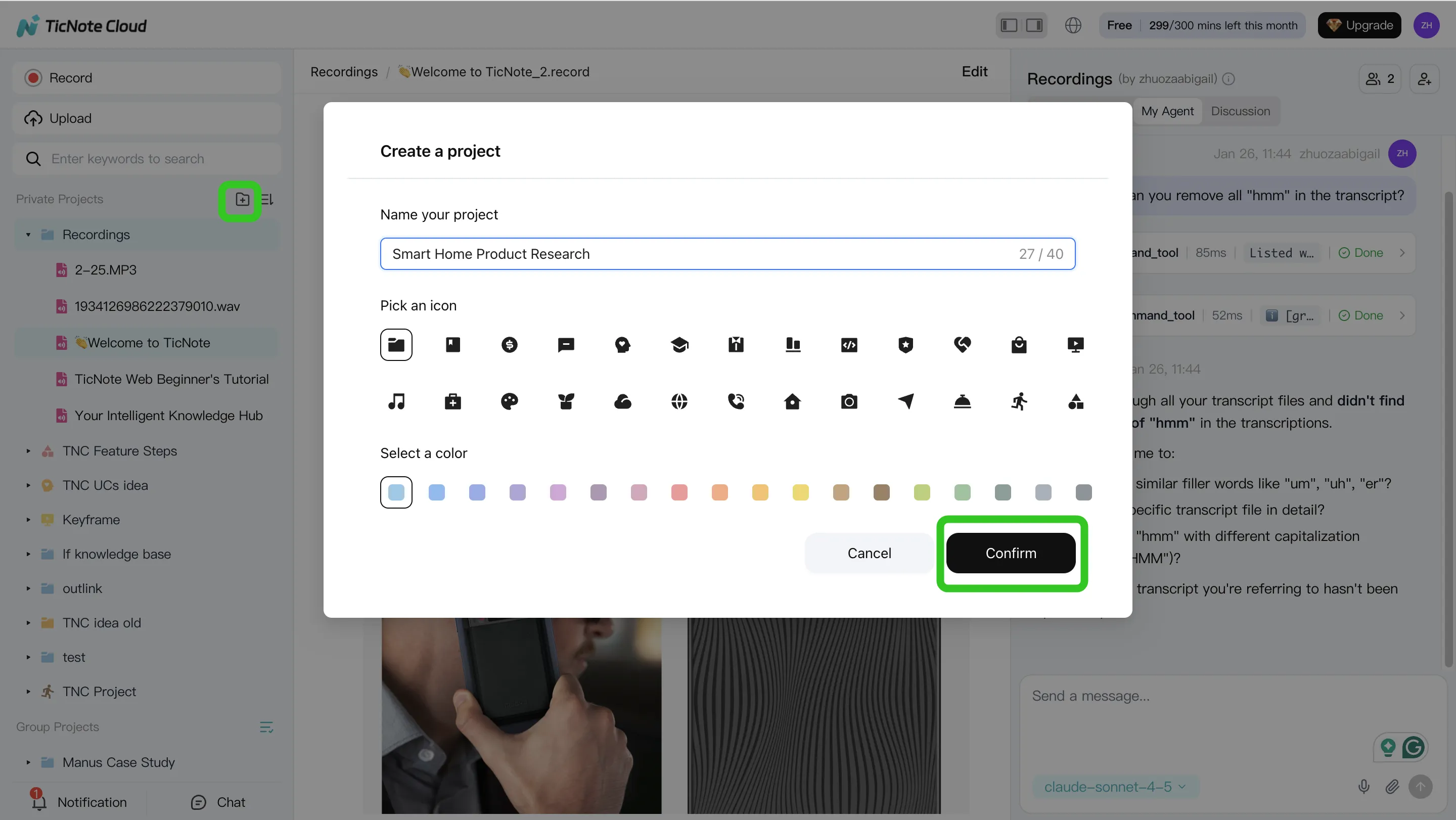
Tip: keep one Project per workflow. That's what makes later searches fast and reliable.
Step 2) Use Shadow AI to extract actions, risks, and "unknowns" (with evidence)
With your content in one place, use the agent like an ops analyst. Ask for four outputs every time:
- Decisions made
- Action items (owner + due date)
- Risks and constraints
- Unknowns to verify (missing data, disputed facts)
Use short prompts that force structure and proof. For example:
- "List action items with owner, due date, and status."
- "Flag any open risks and what evidence supports each one."
- "Add an 'unknowns to verify' section."
Also, require evidence. Make it cite the exact transcript moment or attached doc. That reduces false confidence.
Shadow AI sits on the right side of the web studio, so you can search and analyze without switching tools. You can also correct the transcript when the plant has special terms (part codes, stations, fault names). That one cleanup step prevents repeat errors later.
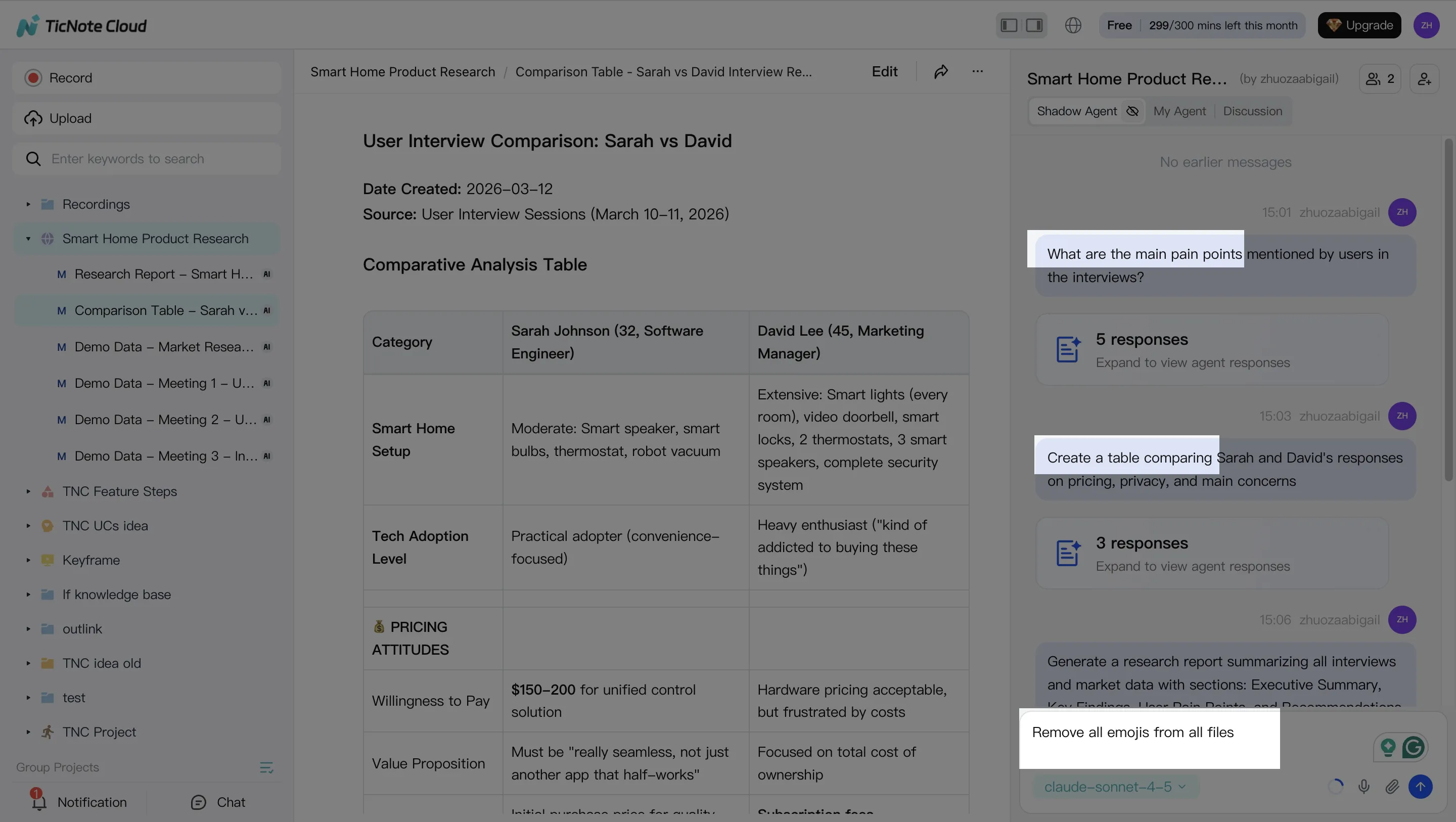
Step 3) Generate one deliverable for the pilot (and export where ops actually works)
Pick one "ops-ready" artifact for the pilot. Don't try to generate everything.
Good first choices:
- Shift handover brief (today's issues, constraints, and next steps)
- Incident review summary (timeline, causes to test, containment, next actions)
- Corrective action list (CAPA-style tasks, owners, dates)
- Weekly KPI narrative (what moved, why it moved, what to do next)
In TicNote Cloud, you can ask Shadow AI directly or use the Generate button to create multi-format deliverables. Export in the format your team already uses (DOCX, PDF, Markdown, or HTML). Then define the storage location and rule: SharePoint folder, QMS doc control, or your ops drive.
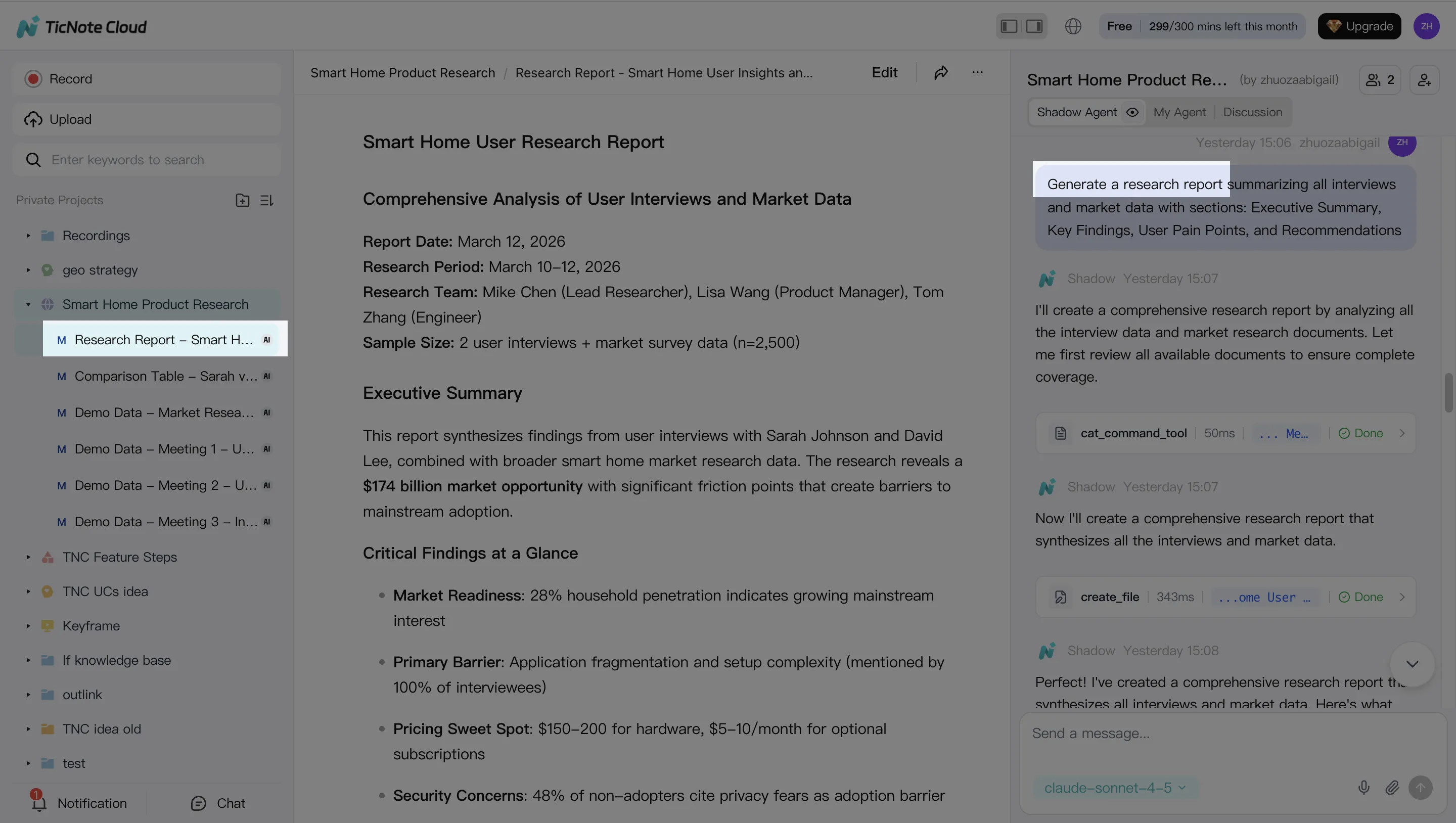
Step 4) Run a tight approval loop and lock in traceability
Don't skip the human gate. Use a simple loop:
- SME reviews the draft (5–10 minutes)
- SME confirms owners and due dates
- One person updates the action log and marks the artifact "final"
In TicNote Cloud, reviewers can ask Shadow AI to revise specific sections. They can also jump from a paragraph back to the source for verification. Share the Project with the right permission level (Owner/Editor/Viewer) and keep the final deliverable stored next to the source meeting and comments.
Define "done" in plain terms:
- Action log updated in your tracker
- SOP update request drafted (if needed)
- KPI note published to the weekly pack
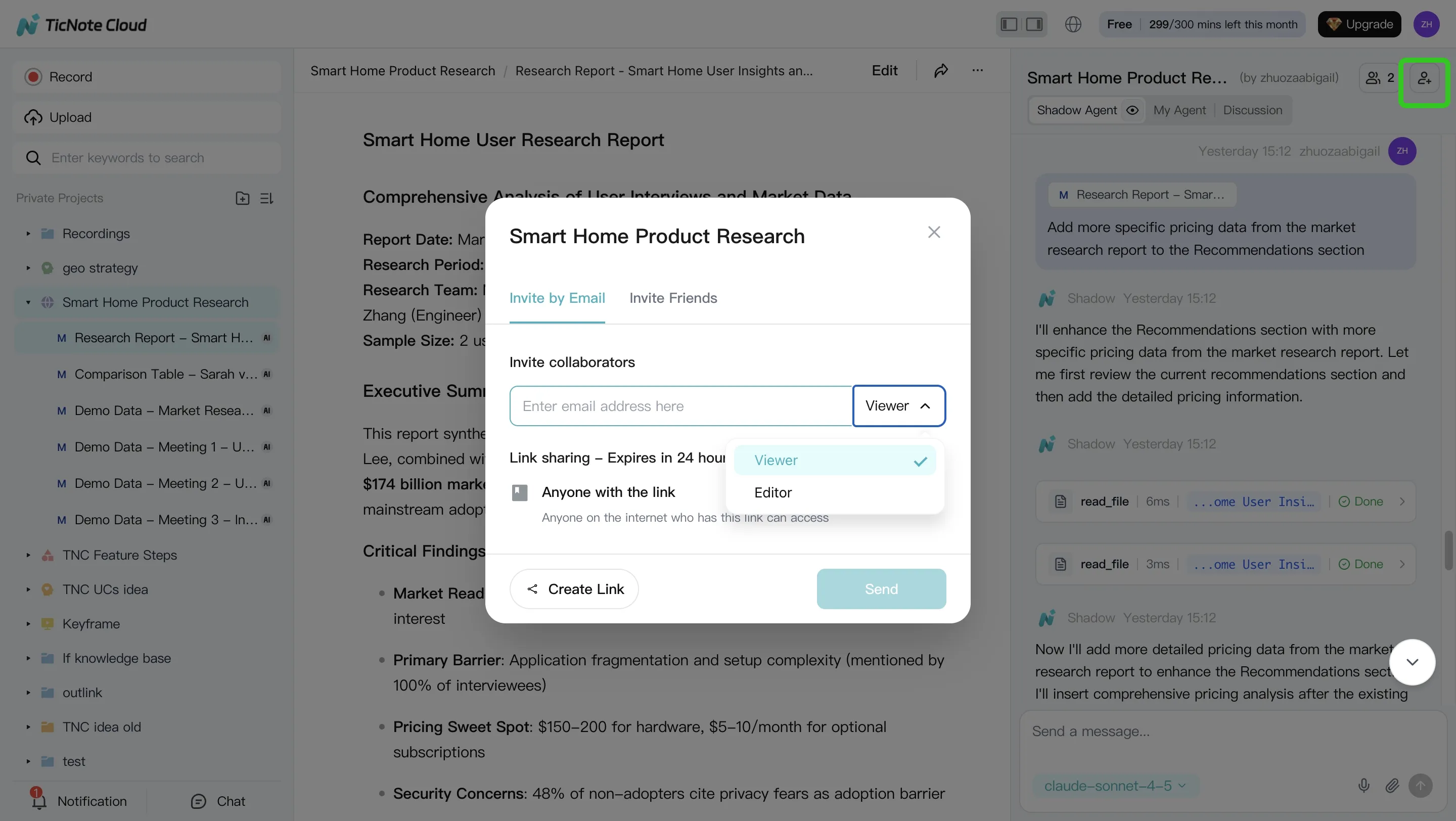
Mobile app workflow (for quick field capture)
Use mobile when you're on the floor and speed matters.
- Open the same Project on mobile
- Upload a recording (or capture audio)
- Ask Shadow AI for action items, risks, and unknowns
Then do final edits and approvals on the web. That keeps control with the team that owns the process.
Reminder: don't let any agent push changes into ERP or QMS systems without an explicit human approval gate and a recorded audit trail.
Conclusion: Pick one agent, prove value, then scale with governance
The best executive move is simple: pick one pilot where an AI agent for operations can move a KPI in 60–90 days, prove it, then scale with controls. Keep humans in the loop for any high-risk step (spend, schedule changes, supplier commits, safety). And require audit logs plus evidence links, so every output can be checked fast.
Start where work already happens: meetings → actions
In many plants and networks, decisions die in standups and reviews. That's a fast win because the data already exists: what people said, agreed, and assigned. Start with a knowledge agent that turns handovers, maintenance standups, supplier calls, and incident reviews into:
- A dated action log with owners and due dates
- SOP and checklist updates (drafted, then approved)
- KPI narratives that cite the exact discussion points
Once that's stable, connect the outputs into CMMS/ERP/QMS as approved updates, not auto-changes.
Scale with governance, not bravery
Before you expand autonomy, lock in the guardrails:
- Approval tiers: draft → review → publish
- Least-privilege access: project or site-level permissions only
- Auditability: every change tied to a source and a user
- Failure-mode reviews: drift, bad sensors, false alerts, access sprawl
As one ops leader put it: "Autonomy without audit is just faster chaos."
Try TicNote Cloud for Free — and run a security review if you need SSO and tighter permission controls.


