


 Extension
TL;DR: Top AI agent picks for enterprise teams (and who each is for)
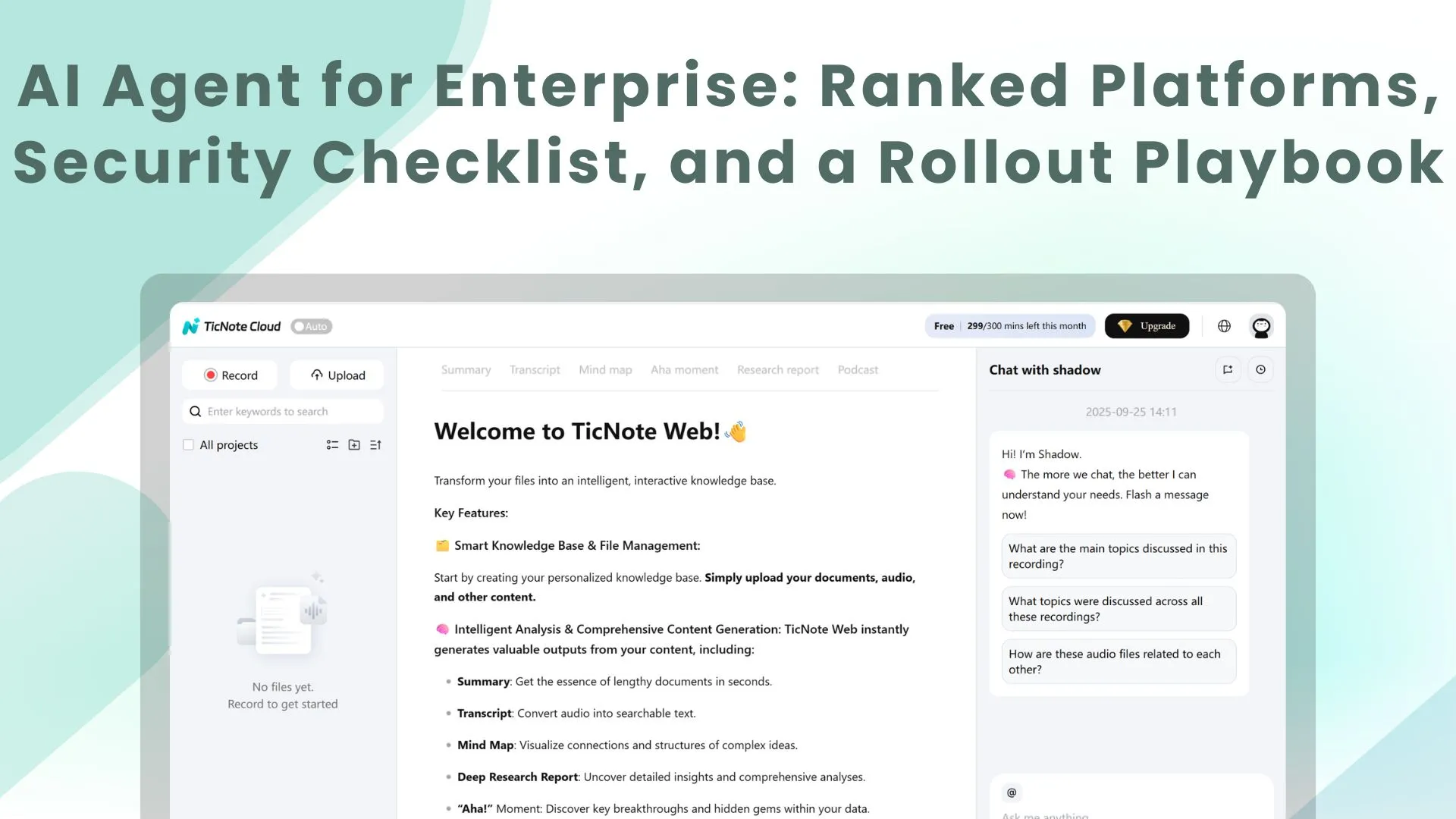
Try TicNote Cloud for Free if you want an AI agent for enterprise that turns meetings into governed, reusable deliverables. Start by picking your "agent job": (1) a knowledge agent that captures decisions from meetings into assets, or (2) an action agent that runs workflows across systems. Then lock in your non-negotiables: SSO/SCIM, RBAC, audit logs, and human-in-the-loop (HITL) approvals.
Your teams lose decisions in scattered notes. That creates rework, repeat meetings, and slow follow-ups. A meeting-first workspace like TicNote Cloud fixes this by turning transcripts into editable source-of-truth content and report-ready outputs.
- TicNote Cloud — best for meeting-centered knowledge-to-deliverables (Projects + searchable memory + exportable reports)
- Microsoft Copilot Studio — best for Microsoft 365-native agents and internal copilots
- UiPath AI Agents — best for RPA-heavy orgs with legacy apps and brittle UIs
- Workato — best for iPaaS automation with governance and IT-managed connectors
- Glean — best for permissioned enterprise search plus knowledge agents across apps
- LangChain — best for teams building custom agents with evals and observability
- Activepieces — best for open-source workflows with HITL steps and self-host options
- If security is first: ask about SSO/SCIM, RBAC granularity, tenant isolation, and audit log retention.
- If execution is first: ask what actions are supported, how approvals work, and how failures retry and roll back.
- If knowledge capture is first: ask how meetings become searchable assets, how edits are tracked, and what exports keep citations to sources.
What is an AI agent for enterprise (and what is it not)?
An AI agent for enterprise is software that can plan work, call approved tools (like CRM, ticketing, docs, and data warehouses), and deliver a result you can use. The "agent" part matters only when it can take controlled actions, not just talk. That's why most teams evaluate agents through risk controls first, and prompts second.
Enterprise agent vs assistant vs workflow automation
Buyers often mix these up. Here's the clean boundary:
- AI assistant: Mostly chat. It answers questions and drafts text, but it usually won't execute changes in systems of record.
- Automation workflow tool: Runs predefined steps ("if X, then do Y"). It's reliable, but it doesn't adapt well when inputs change.
- Enterprise AI agent: Chooses steps, uses tools, and produces outputs (a resolved ticket, a drafted policy, a refreshed pipeline report). In practice, real deployments blend all three: chat for intent, workflows for repeatable steps, and agent logic for the messy middle.
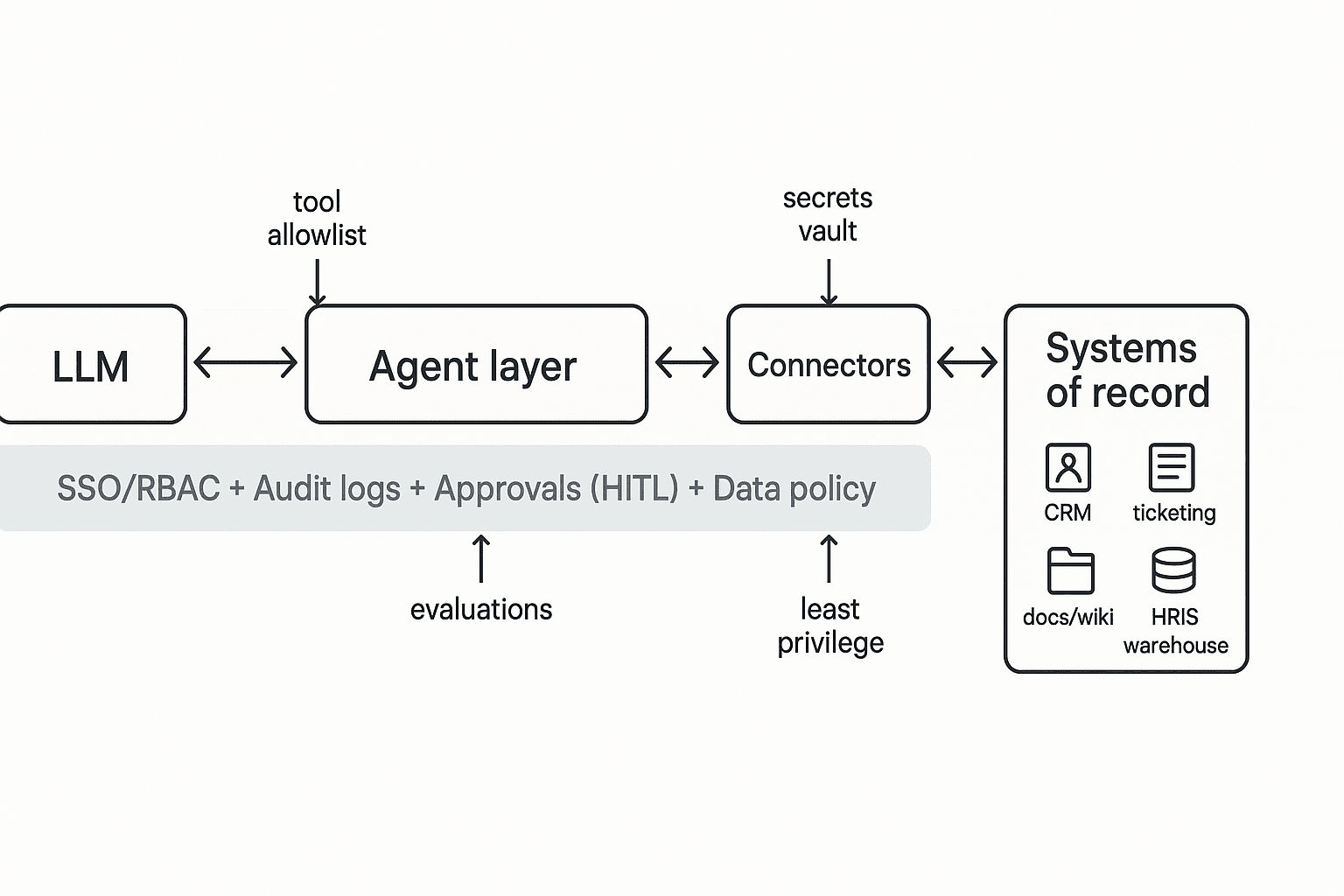
A helpful mental model: the LLM writes the plan and reasons over text; the orchestrator enforces policy, routes tool calls, retries safely, and logs every action.
"Platform" vs "framework" (build vs buy)
Enterprise teams usually pick between:
- Agent platforms (buy): Managed connectors, identity hooks, guardrails, and admin controls. Expect faster time-to-value and simpler governance.
- Agent frameworks (build): Code-first building blocks. You get maximum flexibility, but you also own more: hosting, security design, monitoring, upgrades, and on-call.
A simple staffing rule: platforms fit small enablement teams; frameworks require dedicated engineers plus security reviews for each new capability.
Why permissions beat prompts
Prompts don't prevent data leaks or bad writes. Enterprise risk comes from tool access: permission drift, connector sprawl, and "shadow agents" that quietly gain reach. Your "SSO + RBAC + audit logs" must cover what the agent can read, write, and export, plus who approved it and when.
This article uses one core lens: most programs need two jobs covered—(1) a knowledge management agent that turns meetings into governed, reusable assets, and (2) an operations agent that takes actions across systems like tickets, CRM, and ERP. For a deeper breakdown, use this agent vs assistant decision framework to map your use case to the right level of autonomy.
How did we evaluate enterprise AI agent tools? (rubric + weighting)
Enterprise buyers don't need more feature claims. They need a repeatable way to score risk, fit, and time-to-value for an AI agent for enterprise. So we used a weighted rubric, ran a pilot scorecard, and then normalized the comparison table columns to reduce marketing noise.
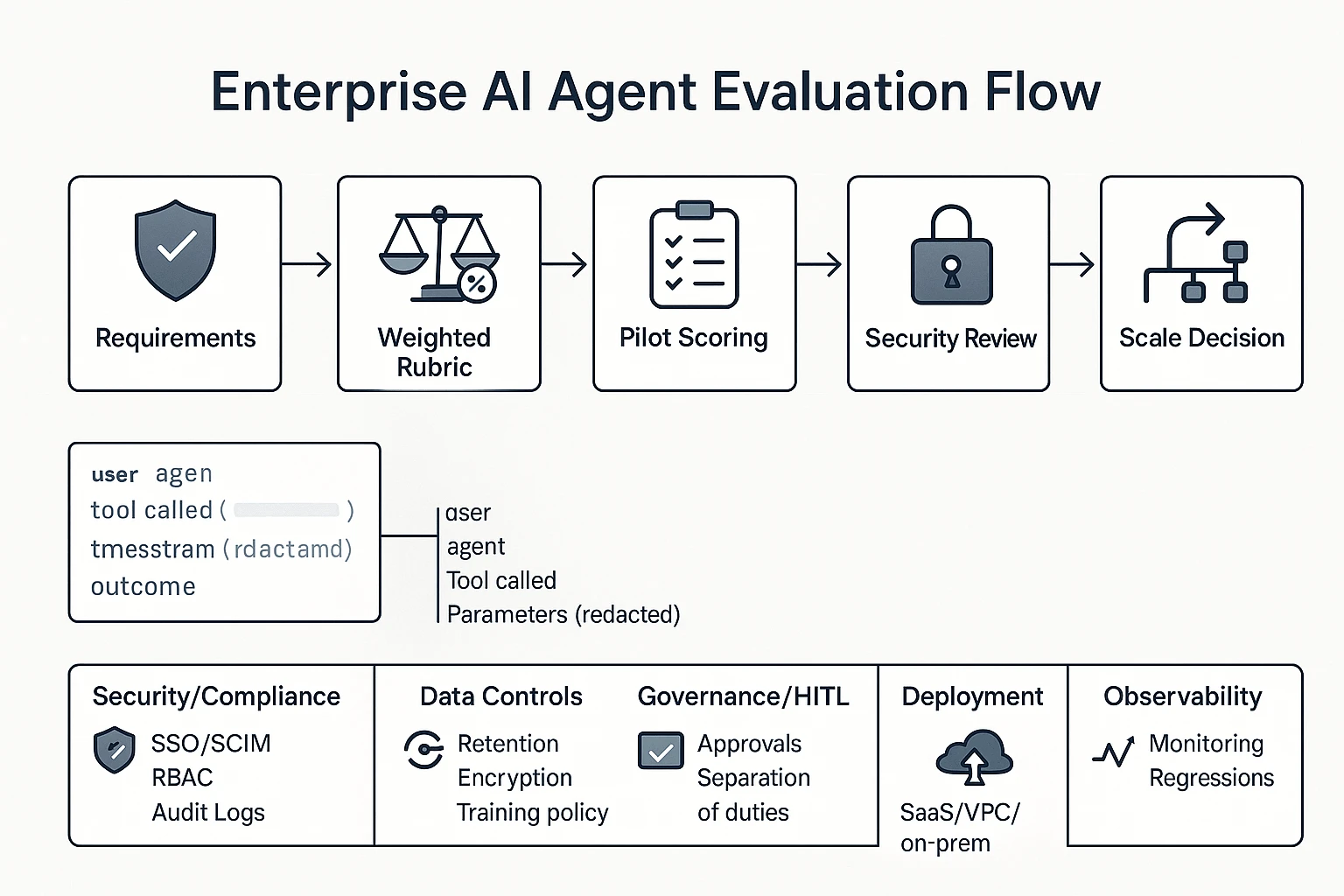
1) Security & compliance signals (identity, access, logging)
These controls decide whether a tool can pass security review.
- SSO (Single Sign-On): One login (SAML or OIDC) tied to your IdP (Okta, Entra ID).
- SCIM (provisioning): Auto-create, update, and remove users and groups.
- RBAC (role-based access control): Roles that limit who can view data or run actions.
- Audit logs: A tamper-resistant record of key events.
Minimum "enterprise-ready" bar:
- SAML or OIDC SSO, plus SCIM
- Clear roles (at least Admin, Builder, Operator, Viewer)
- Immutable audit logs with export or SIEM support
For agents, logs must cover more than logins. Audit events should include: user, agent, tool called, parameter class (redacted), timestamp, outcome, and an approval reference (who approved what).
2) Data controls (retention, training policy, connectors)
Here's what to verify in writing:
- Data residency: Which regions are supported, and can you pin data to one.
- Retention: Default retention, admin-set policies, and delete workflows.
- Encryption: In transit + at rest, plus key management options.
- Model training policy: Whether your prompts/files are used to train models.
- Connector permission mapping: Whether access mirrors the source system.
Also separate two data types:
- Meeting data (transcripts, summaries, action items) often includes sensitive talk.
- System-of-record data (CRM, ticketing, HRIS) includes regulated fields.
Enterprise scoring should include export/egress controls: who can export, which formats, watermarking, and admin disable switches. If a tool can generate reports, it should also control where those reports can go.
3) Governance & HITL (approvals, traceability)
Human-in-the-loop (HITL) can't be a "nice to have." It must be a step in the workflow.
We scored:
- Approval queues: A place where runs wait for review.
- Separation of duties: Builders can't always approve production actions.
- Exception paths: Break-glass rules with extra logging.
- End-to-end traceability: Request → decision → action, with links.
This aligns with NIST's risk framing: Artificial Intelligence Risk Management Framework (AI RMF 1.0) (2023) defines "Govern" as "the culture, processes, and structures that are in place to manage AI risks."
4) Deployment options and real TCO (total cost of ownership)
We treated deployment as a risk-and-speed trade.
- SaaS: Fastest rollout (often weeks), lower IT lift, but more vendor reliance.
- VPC: Better isolation and network control, slower setup, higher ops overhead.
- On-prem: Maximum control, but longest time-to-value and highest maintenance.
Cost drivers we normalized across tools:
- Seats (users/builders)
- Usage (tokens, minutes, runs)
- Traces/log retention (audit volume is real cost)
- Connectors (per connector or per system)
5) Observability & evaluation (monitoring and regression)
Agents fail in predictable ways. So we scored monitoring plus evaluation.
Monitor:
- Accuracy (task success rate)
- Hallucination risk (unsupported claims, missing citations)
- Tool failures (API errors, permission denials)
- Latency (time per run)
- Cost (per run, per workflow)
Good evaluation looks like:
- Golden sets: 50–200 real tasks with expected outputs.
- Regression checks: Re-run weekly after prompt/model changes.
- Human review sampling: 5–10% of runs, higher on high-risk workflows.
Weighting example (so teams can adapt it)
- IT/Sec weighting (risk-first): Security 35%, Governance/HITL 25%, Data controls 20%, Observability 10%, Deployment/TCO 10%
- Ops weighting (execution-first): Integrations/execution 30%, Observability 20%, Governance/HITL 20%, Deployment/TCO 15%, Security/Data 15%
In the next sections, the side-by-side table will keep columns consistent (SSO/SCIM, RBAC, audit logs, deployment, approvals, connectors, export controls, pricing clarity) so you can compare like-for-like.
Comparison table: enterprise AI agents side-by-side (features that change the decision)
The table in the next section normalizes what "enterprise-ready" means across very different tools: meeting-first knowledge agents and operations agents that act across systems. Use it to narrow your shortlist fast—but don't over-trust checkmarks. In enterprise buying, the gap is usually in how a feature works (scope, logs, controls), not whether a vendor says it exists.
What each column really tests (not just "yes/no")
- SSO/SCIM: SSO (single sign-on) for login and SCIM (automated user provisioning) for joiners/movers/leavers. "Meets enterprise needs" means you can deprovision in minutes and enforce MFA and session rules.
- RBAC: Role-based access control. Meeting tools should support workspace/project roles; ops agents should separate "build" vs "run" permissions and limit write access.
- Audit logs: Look for logs of actions (agent ran a workflow, wrote to a system, exported a file, changed a policy), not just logins.
- Deployment: SaaS vs VPC/private options, data residency, and tenant isolation. Also check how quickly you can roll out to 500–5,000 users.
- HITL: Human-in-the-loop approvals. For ops agents, this is "approve before write." For meeting agents, it's "approve before share/publish."
- Integrations/exports: Ops agents need reliable connectors plus retries and exceptions. Meeting agents need recording method (bot-free vs bot), transcript controls (editable, redaction), and cited answers tied to source moments.
- Pricing transparency: Can you estimate cost by seats/usage? Hidden "automation runs" or token add-ons often derail budgets.
- Best fit: The "job to be done"—system execution vs meeting-to-deliverable knowledge reuse.
How to read the table by department
- IT/Sec: Start with identity, audit logs, data handling, and deployment. If any are "verify," route to security review.
- Ops/RevOps: Weight connectors, reliability, exception handling, and HITL. If it can't fail safely, it won't scale.
- KM/PMO: Focus on capture quality, permissioned search, citations, and exports that keep context.
- Engineering: Look for extensibility (APIs/SDKs), eval tooling, and sandboxing to prevent surprise writes.
Unknowns to mark as "verify": SOC 2 report scope, pen test recency, DPA terms, sub-processor list, retention controls, and whether model providers can train on your data. Treat missing answers as gaps until proven otherwise.
Top enterprise AI agent platforms in 2026 (ranked shortlist)
Enterprise "agents" now split into two jobs. Some turn messy conversations into governed knowledge and deliverables. Others run actions across systems with controls. This ranked shortlist is built for fast comparison, with a clear "best for" and an honest "when not a fit" for each.
1) TicNote Cloud — best when meetings are the system of record
Best for: PMO, CS, Product, and research teams where decisions live in calls and you need reusable outputs.
Why it ranks #1 for meeting-centered work:
- Projects = long-context memory. You group meetings, docs, and media by initiative, so context compounds.
- Shadow AI works across Project files with citations. It answers questions and drafts content you can verify.
- Editable transcripts are a control layer. Fix names, numbers, and phrasing before anything becomes "official."
- One-click deliverables. Generate reports (PDF/Word), web presentations (HTML), mind maps, and podcasts from the same Project.
- Bot-free recording option. Useful for sensitive calls where you can't invite a meeting bot.
- Exports that fit enterprise workflows. Common formats (DOCX/PDF/Markdown/HTML, plus mind map exports) reduce lock-in.
When it's not a fit: If your main need is heavy cross-app writeback automation (for example, creating and updating records in ERP/CRM at scale), you'll want an action-first platform.
Mini vignette: Meeting-to-report (PMO/CS)
- Before: Notes sit in docs, chat, and email. Owners rewrite the same status update every week.
- After: Calls and supporting docs go into one Project. Shadow AI pulls themes with citations and drafts the weekly report in minutes. The team reuses the same Project context all quarter.
Mini vignette: Meeting-to-policy (IT/Sec enablement)
- Before: A policy call produces a rough summary. It misses edge cases and exact terms.
- After: The team corrects key lines in the editable transcript first. Then Shadow AI generates a policy draft and maps open questions for review. The draft goes to an approval gate in your normal process.
If you're also evaluating broader "work hubs," start with this guide to all-in-one AI workspaces for enterprise teams to see where an agent should live.
2) Microsoft Copilot Studio — best for Microsoft 365-first enterprises
Best for: Orgs where Teams, SharePoint, and Microsoft identity are the center of gravity.
Why it's strong:
- Graph and M365 proximity. It can ground experiences in your Microsoft content and collaboration layer.
- Identity alignment. Easier SSO posture and policy consistency when you're already standardized.
- Low-code builder. Faster internal agent prototypes without building everything from scratch.
When it's not a fit: If your stack is heterogeneous and M365 isn't the "home screen," it can feel forced.
3) UiPath AI Agents — best for RPA-heavy and legacy desktop workflows
Best for: Shared services, finance ops, and IT ops teams automating across older apps.
Why it's strong:
- Desktop automation. Handles UI-driven work where APIs are missing.
- Document understanding. Useful when inputs are forms, PDFs, and scanned documents.
- Human-in-the-loop orchestration. Clear handoffs when approvals are required.
When it's not a fit: If your team lacks RPA skills, or you already have clean APIs, you may be overbuilding.
4) Workato — best when iPaaS governance and connectors win the deal
Best for: Enterprises that need controlled execution across many SaaS tools.
Why it's strong:
- Connector depth. Broad app coverage reduces custom integration work.
- Governed automation. Central controls for recipes, environments, and operations.
- Enterprise reliability. Built for ongoing run, monitor, and change management.
When it's not a fit: Small teams that need a simple start can find it heavy.
5) Glean — best for permissioned enterprise search and answers
Best for: Knowledge management and IT teams focused on finding answers fast.
Why it's strong:
- Indexing across tools. Pulls knowledge from many systems into one search layer.
- Permission enforcement. Respects access rules, which matters in large orgs.
When it's not a fit: If you need the agent to execute multi-step actions, it's not the right core.
6) LangChain (plus LangGraph/LangSmith) — best for full code-level control
Best for: Engineering-led teams building custom agents with strong evaluation needs.
Why it's strong:
- LangGraph patterns. Useful for stateful, multi-step agent flows.
- LangSmith observability and evals. Helps you test prompts, tools, and outcomes.
- Flexible deployment. You can match your infra and compliance constraints.
When it's not a fit: Non-technical ownership or short timelines. You're buying a framework, not a product.
7) Activepieces — best for open-source workflow control with approvals
Best for: Teams that want self-host control and human approvals in flows.
Why it's strong:
- Self-host option. More control over data locality and operations.
- Human-in-the-loop steps. Approvals and gates are first-class in workflows.
When it's not a fit: Orgs that require fully managed vendor operations and guaranteed support.
How to choose the right product (by org constraints and use case)
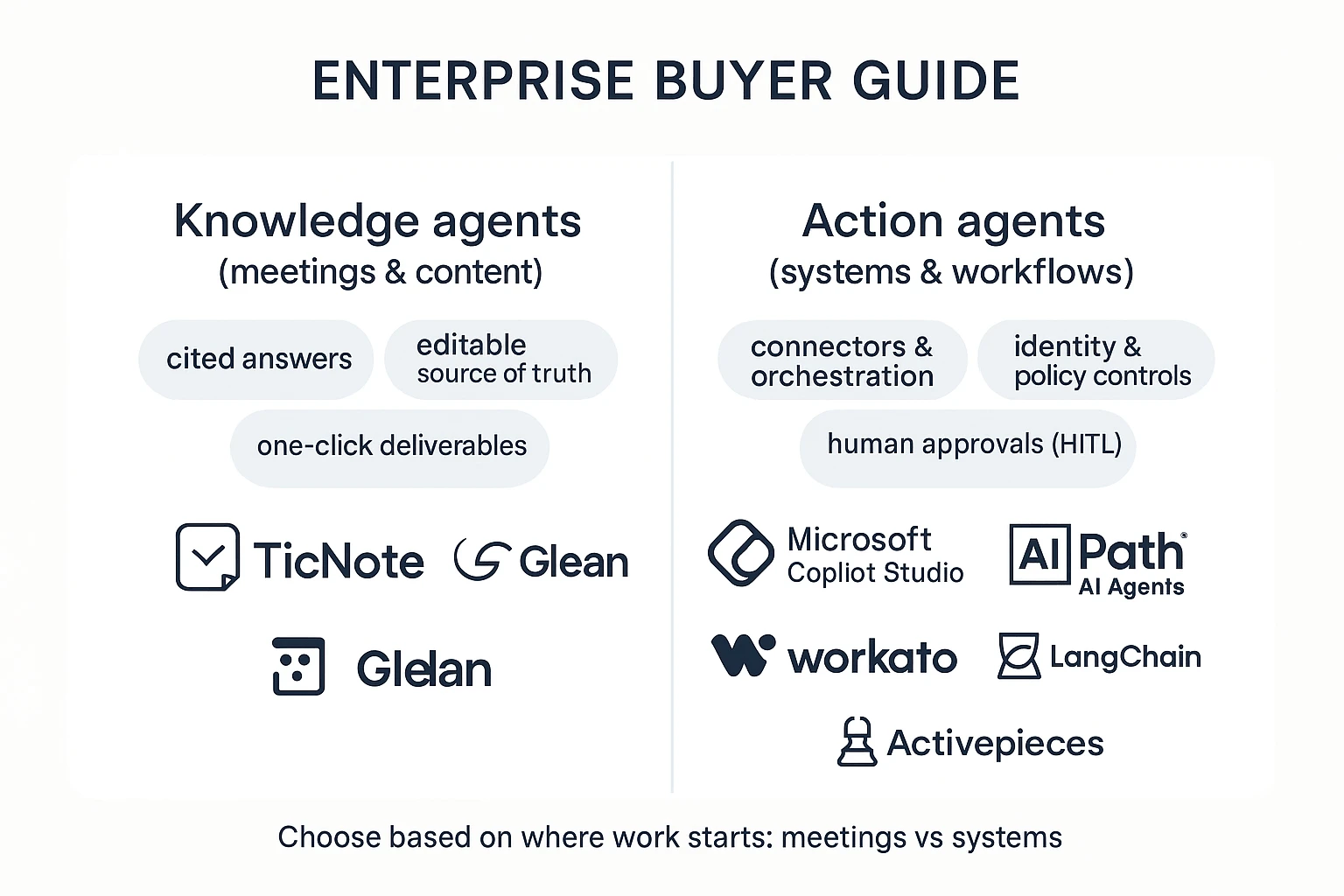
Most enterprise teams don't need "the best agent." They need the best fit for where work starts, what systems are locked down, and what must be provable in audit. Use the scenarios below to pick fast, then accept the trade-offs on purpose.
Choose TicNote Cloud when meetings are your system of record
Pick TicNote Cloud for most KM, PMO, CS, and product teams because meetings create the highest volume of decisions, risks, and next steps. It acts like a knowledge management agent: it turns calls into editable transcripts, then stores them in Projects (shared memory) so context compounds across weeks, not just one meeting.
What you get:
- Traceable answers with citations back to the exact moment in the transcript (useful for audits and policy work)
- Deliverable generation from the same source of truth (reports, presentations, mind maps, podcasts) so teams stop copy-pasting
- Practical exports to downstream tools (DOCX/PDF/Markdown/HTML) to fit your existing workflow
- Enterprise controls when you need them, including SSO on the Enterprise plan
Trade-offs: it's not built to execute write-actions across dozens of business systems. If your goal is "update Salesforce, open a Jira, and change a shipping date," you'll likely pair it with an action platform later.
Choose Microsoft Copilot Studio when you're all-in on Microsoft 365
Choose Copilot Studio if identity, files, and collaboration already live in M365 and you want a Teams-first rollout. It fits orgs that want Graph-connected access patterns, existing admin controls, and governance that matches how Microsoft environments are already managed.
Trade-offs: best outcomes usually depend on how clean your M365 information architecture is (permissions, sites, naming, retention). If meeting knowledge is scattered outside M365, you may still need a meeting-first system to capture it.
Choose UiPath AI Agents when you must automate legacy or desktop apps
Pick UiPath AI Agents for back-office operations where APIs are missing and work happens in desktop screens. This is the strongest fit for reliable desktop flows, exception handling, and approvals for risky steps.
Trade-offs: it can be heavier to roll out than a meeting knowledge agent, and ROI often shows up after process mapping and control design.
Choose Workato when iPaaS governance and connectors are the core need
Choose Workato when integration is the product and you need broad connectors, controlled write actions, and a central hub for governance. It's a clean fit for "connect systems safely" programs led by IT/RevOps.
Trade-offs: it won't replace a meeting-to-deliverable workflow. You'll still need a system that captures decisions and generates artifacts.
Choose Glean when search and permissioned answers come first
Pick Glean when your top job is "find the answer fast" across many apps, with strong respect for existing permissions. It's ideal when knowledge already exists in documents and tickets and you need one query layer.
Trade-offs: search answers don't automatically become polished deliverables. If your organization's knowledge mostly starts in meetings, capture is the missing upstream step.
Choose LangChain when you need full code-level control and custom evals
Choose LangChain for engineering-led builds that need custom policies, testing, and rigorous evaluation (evals) before wide release. It's the best option when you're building a platform, not just buying one.
Trade-offs: you own the security design, monitoring, prompt/version control, and ongoing maintenance. It's power with responsibility.
Choose Activepieces when you want open-source workflow control with HITL
Pick Activepieces if you want open-source ownership, self-hosting options, and HITL (human-in-the-loop) approvals as first-class workflow steps. It fits teams that want to control connectors and reduce vendor lock-in.
Trade-offs: you'll need more internal ops to run it well (updates, permissions, observability). It's a builder tool, not a turnkey knowledge layer.
A default path that works in most enterprises
If you want a low-risk start with fast ROI, begin with governed meeting capture plus deliverable generation. That's where "lost time" and "lost decisions" stack up fastest, often 5–10 meetings per week per manager. Then, once identity, logging, and approvals are proven, add action agents for operations (tickets, CRM updates, finance workflows). For a longer list of scenarios and how to measure them, use this guide to enterprise AI agent use cases and ROI metrics.
Enterprise rollout playbook: from pilot to governed scale
Rolling out an ai agent for enterprise work is less about "turning it on" and more about building a safe operating model. The fastest path is a phased rollout: start with low-risk workflows, lock down identity and access, then expand only after you can measure quality, cost, and control.
1) Pilot: start with 1–2 workflows and hard success metrics
Pick two workflows: one meeting-to-deliverable flow (low integration risk) and one light action workflow (limited blast radius).
- Workflow A (recommended): meeting → transcript → summary → first draft deliverable (report, QBR notes, policy draft).
- Workflow B: "read-only" systems action, like creating tickets or updating a CRM note (no approvals bypass).
Define success metrics up front:
- Quality bar: % of drafts accepted with light edits (target 70–85%).
- Review time: median human review minutes per output (target <10 minutes).
- SLA: response time for a draft (target <30 minutes for meeting summaries; <24 hours for reports).
- Downstream adoption: % of outputs reused (shared, linked, pasted into a system) within 7 days (target 50%+).
2) Governance: approve connectors, manage secrets, enforce least privilege
Treat every connector like a vendor intake. Set an owner model and a simple gate:
- Connector intake: business owner + technical owner + security approver.
- Secrets management: store tokens in a central vault; rotate on a schedule; no secrets in prompts.
- Environment separation: dev/sandbox vs prod connectors and datasets.
- Publishing rights: only a small group can publish agents to production; everyone else uses approved templates.
3) Controls: identity, roles, audit events, and HITL gates
"Good" looks like predictable access and traceability:
- SSO + SCIM (automated provisioning): joiners/movers/leavers handled centrally.
- Role templates: Viewer (read), Operator (run), Builder (edit), Admin (publish/connect).
- HITL (human-in-the-loop) gates: require approval for risky steps (sending emails, writing to CRM, creating vendors, changing policy text).
- Audit log cadence: weekly review for high-risk actions and quarterly control checks; NIST Special Publication 800-53 Rev. 5 (2020), Security and Privacy Controls for Information Systems and Organizations includes control AU-6, "Audit Record Review, Analysis, and Reporting."
4) Quality: evaluations, monitoring, and prompt-injection defenses
Make quality measurable and repeatable:
- Red-team prompts: test jailbreaks, data exfiltration, and "ignore prior instructions" attacks.
- Tool-call allowlists: agents can only call approved tools, with tight parameters.
- Grounding rules: for knowledge work, require citations back to internal sources (meeting transcript segments, docs, tickets).
- Regression tests: keep a fixed set of meetings/docs and re-run monthly to catch drift.
5) Adoption: change management that prevents shelfware
Adoption is an operating rhythm, not a training day:
- Onboarding: 30-minute role-based training (Operator vs Builder).
- Champion network: 1 champion per function (Sales Ops, PMO, Support, IT).
- Written norms: a one-page "how we use agents here" playbook (what's allowed, what needs approval).
- Escalation paths: who handles false outputs, access issues, and connector requests.
Reference architecture (text)
LLM ↔ Agent layer ↔ Connectors ↔ Systems of record ↑ overlay: SSO/RBAC + Audit logs + Approvals + Data policy
What an enterprise meeting-to-deliverable agent workflow looks like (step-by-step)
A meeting-centered AI agent workflow is simple: capture what was said, keep it in one governed place, and turn it into approved outputs. Below is a step-by-step example using TicNote Cloud, built for teams that want fewer copy/pastes and more traceable deliverables.
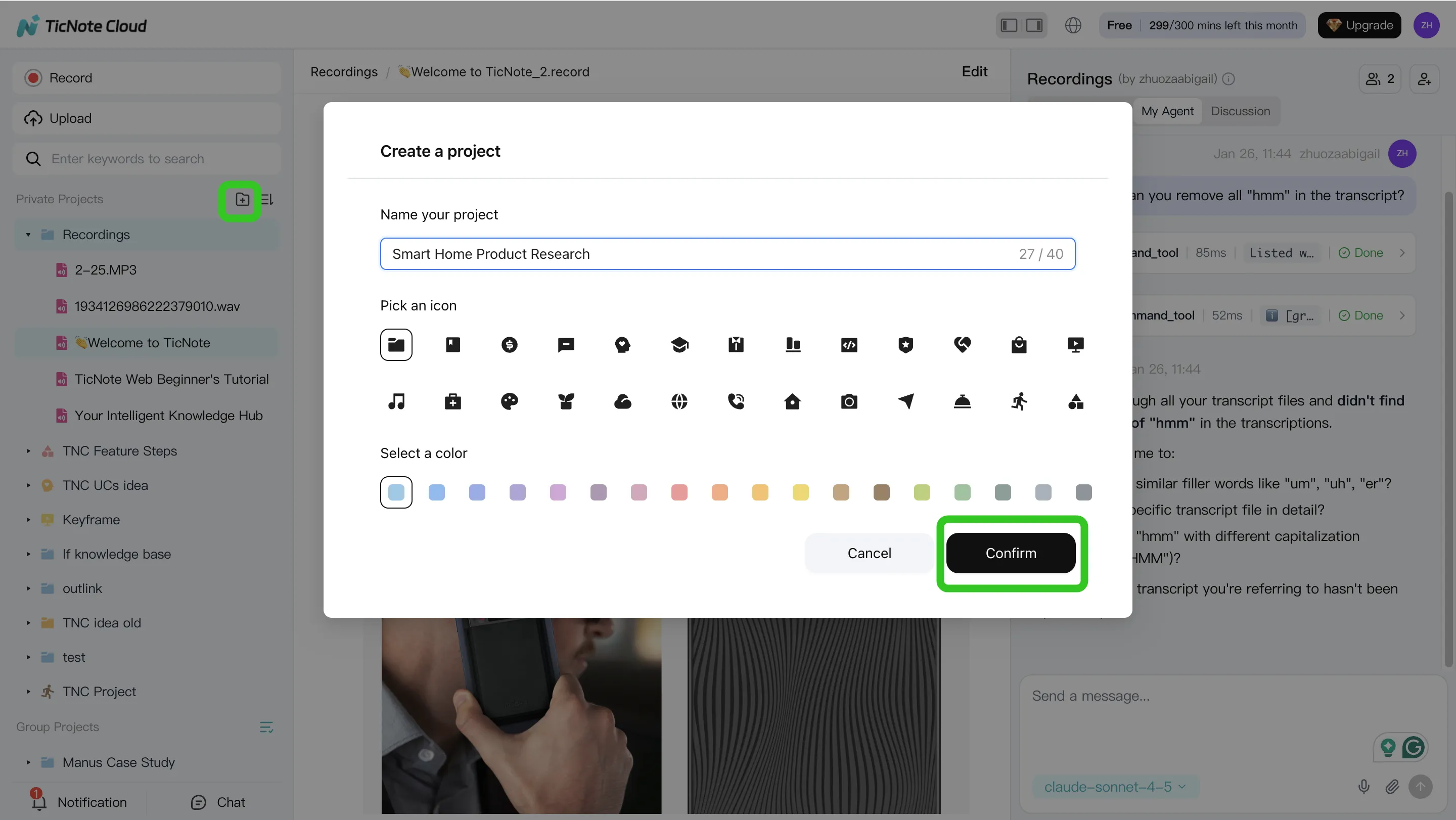
Step 1: Create a Project and add content
Start by creating a new Project (or opening an existing one). Think of a Project as the work container for a program, customer, initiative, or policy stream.
Then add your sources so Shadow AI can use them as context. You have two common paths:
- Direct upload from the Project's file area (audio, video, and documents)
- Upload through the Shadow AI panel and ask it to file the content into the right folder
Step 2: Use Shadow AI to search, analyze, edit, and organize content
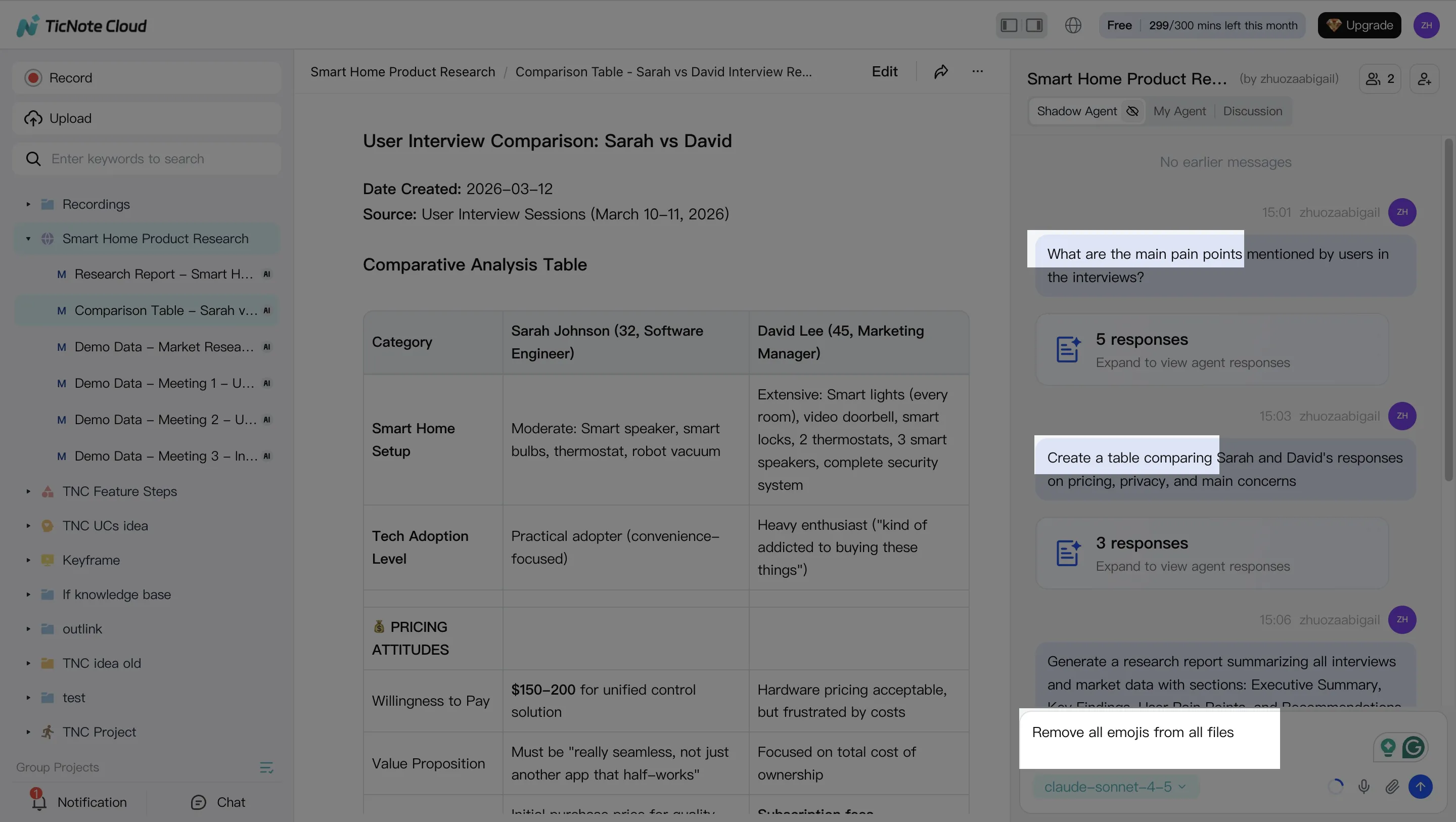
With your content inside the Project, Shadow AI becomes your project-scoped analyst and editor. Ask questions that buyers actually need answered after meetings, like "What decisions were made?" or "What are the risks and owners?" Because it works across everything in the Project, you can synthesize multiple meetings at once.
Use editable transcripts to fix the details that usually break enterprise outputs: names, product terms, account codes, and acronyms. A small correction here prevents bad downstream outputs later.
Common prompts that map to enterprise needs:
- Extract decisions, action items, owners, and due dates
- Compare themes across interviews or stakeholder sessions
- Turn raw notes into a table, outline, or exec-ready summary
Step 3: Generate deliverables with Shadow AI
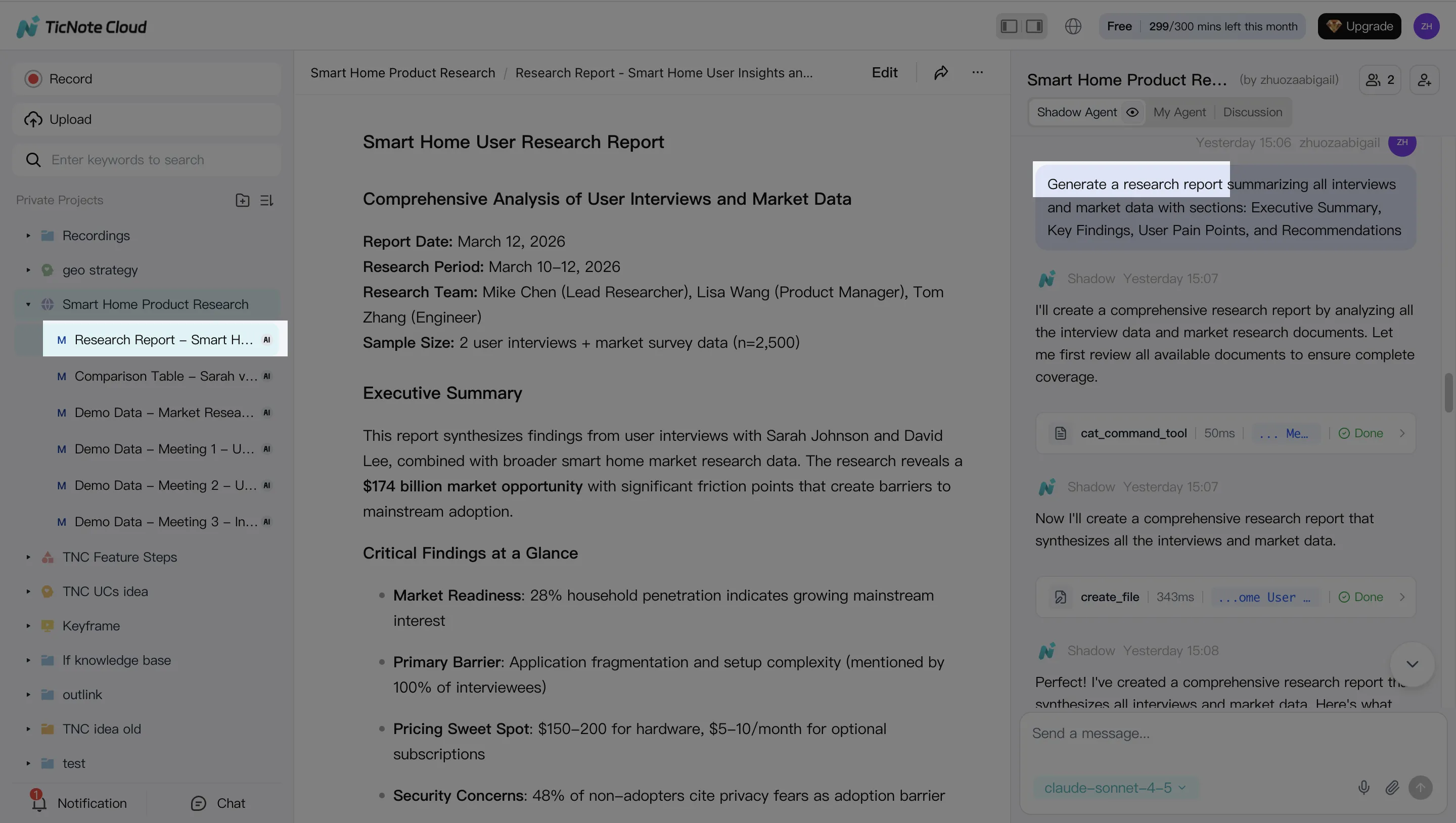
Once the Project is clean, generate the artifact your org actually needs. You can ask Shadow AI directly or use the Generate flow to produce outputs such as a research report (PDF), web presentation (HTML), podcast-style summary, or a mind map.
The key enterprise win is traceability: you should be able to click back from a claim to the source moment in the meeting, so reviewers can verify it fast.
Step 4: Review, refine, and collaborate
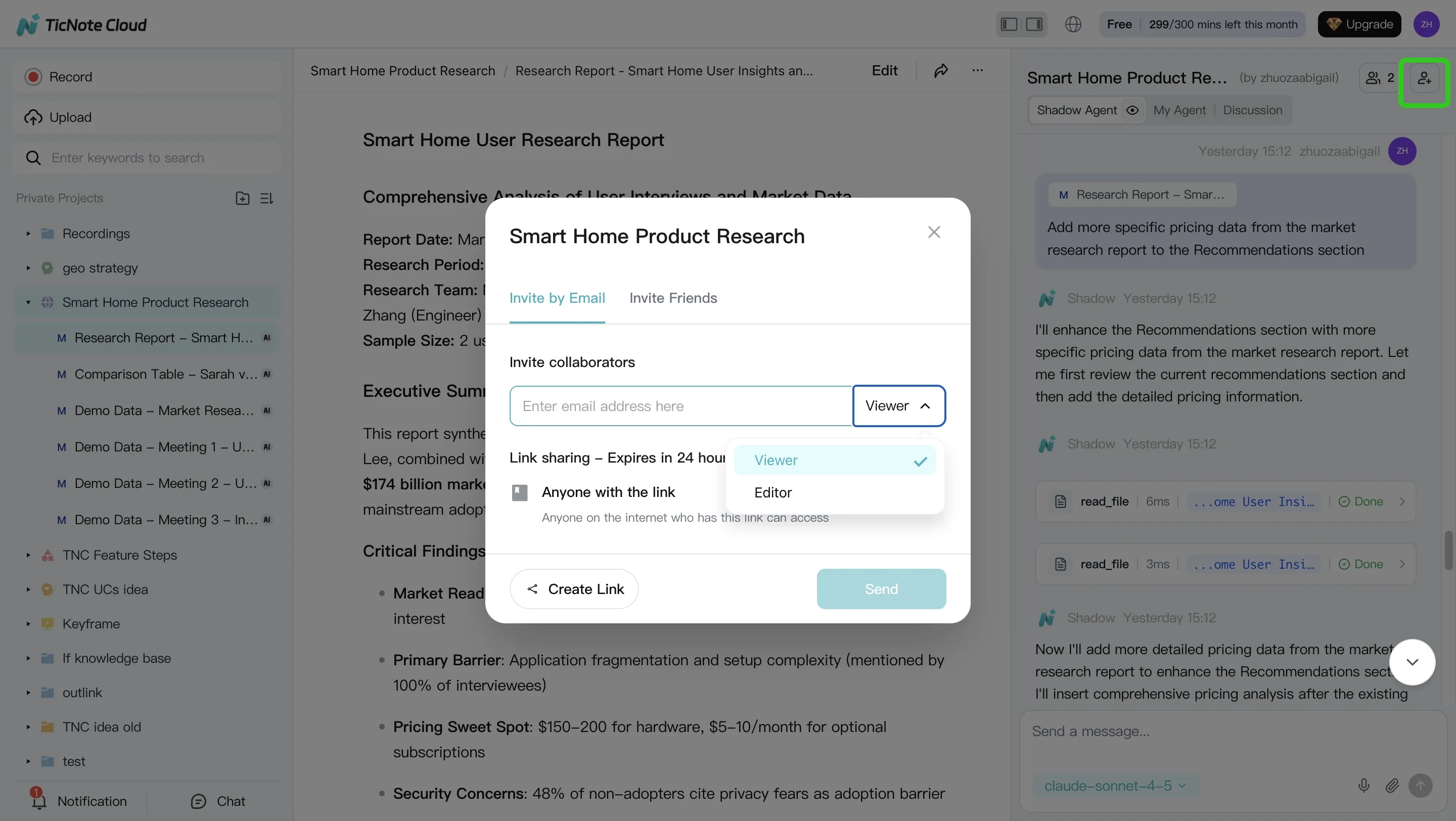
Treat the first output as a draft. Ask Shadow AI to revise specific sections (scope, tone, level of detail, or audience). Then share the Project with controlled roles so the right people can review and contribute without losing ownership.
A practical review loop looks like this:
- Owner reviews and flags sensitive sections
- SMEs comment and request targeted rewrites
- Final approver validates key points by jumping to sources
- Re-run the deliverable to publish the final version
App workflow (mobile capture → same deliverables)
For field teams, hallway interviews, or travel days, use the TicNote Cloud app to capture or upload audio/video. Add it to the right Project, then run the same Shadow AI flow: search across Project content, correct transcript details, and generate a report or brief for the team.
Why this is enterprise-ready
This workflow reduces manual copying between meeting notes, docs, and decks. More importantly, it turns meetings into a governed knowledge asset (Project-scoped content + editable transcripts + traceable outputs) before you expand into broader agentic automation across business systems.
Try TicNote Cloud for Free. For SSO and enterprise controls, contact sales for the Enterprise plan.
Final thoughts: the best enterprise AI agent depends on where work starts (systems vs meetings)
An ai agent for enterprise works best when it matches where work begins. In most orgs, that's either in systems (CRM, ERP, ticketing) or in meetings (decisions, plans, risks). So the clean way to decide is to separate "agents" into two real jobs.
Use the two-job framing to avoid the wrong pilot
- Action agents execute work across systems. They route tickets, update records, and trigger workflows.
- Knowledge agents turn conversations into reusable assets. They capture what was said, what was decided, and what to do next.
If you're choosing a default path, start with meeting-centered knowledge capture. It's universal across teams, fast to pilot in weeks (not quarters), and easier to govern. Then add action automation once you've proven controls, reviews, and logging.
"Enterprise-ready" is controls, not cleverness
Treat enterprise readiness as a checklist, not a promise:
- SSO/SCIM for identity and lifecycle control
- RBAC (role-based access control) so the right people see the right projects
- Audit logs so you can trace who did what and when
- HITL approvals (human-in-the-loop) before anything is shared or shipped
- Clear data policy on retention and model training
For meeting-to-deliverable workflows, TicNote Cloud is built for the knowledge-agent path: Projects keep context together, Shadow AI generates governed outputs, and you can start small without changing core systems.
Try TicNote Cloud for Free, and switch to Enterprise when you need SSO at scale.


