


 Extension
TL;DR: AI agent vs AI assistant—what to pick for meeting-driven work
Start with a workflow tool like TicNote Cloud if your team wants meetings to turn into deliverables fast. An AI assistant is prompt-driven help (Q&A, drafting, rewriting). An AI agent is goal-driven execution (it plans steps, uses tools, keeps state), which is why the AI agent vs. AI assistant choice matters most after the call.
Problem: meeting notes and decisions end up scattered. Agitate: you lose hours chasing owners, versions, and "what did we decide?" Solution: TicNote Cloud keeps meeting content in one Project so an agent-like workspace can produce traceable outputs from the same source.
Decision rule for meeting-heavy teams:
- Need reports/slides/mind maps/tasks from meetings + citations/traceability → pick an agentic setup.
- Need quick answers, email copy, and one-off drafts → pick an assistant.
- High governance needs (auditability, ownership) → lean agentic.
- Low risk tolerance and minimal permissions → start with assistant.
Best-for-business quick picks: assistant for ad‑hoc drafting; agent for a chained workflow that turns meeting notes → actions → outputs.
Minimum agent safety checklist: least privilege, approvals for high-impact actions, sandbox/dry-run mode, audit logs, timeouts/loop limits, and a clear human owner.
AI agent vs AI assistant: what's the real difference (and what's just marketing)?
Most "AI agent vs AI assistant" debates are really about one thing: who decides the next action. An assistant waits for you to ask. An agent can plan steps, run them, and keep going until it hits a goal or a stop rule.
Clear terms (with hard boundaries)
Here are the buckets that actually matter in buying decisions:
- LLM with tool calling: A model that can call functions (send email, create ticket) only when you tell it to. It doesn't pick goals, and it won't keep working after it answers.
- AI assistant: A chat-first wrapper around search (retrieval) + writing (generation). It's great at "answer and draft," but it usually doesn't manage a workflow.
- AI agent: A system with a goal state, a simple plan, and an execution loop (plan → act → check → repeat). It can continue after kickoff, ask for approvals, and recover from small failures.
- Multi-agent: Several specialized agents (researcher, writer, checker) that hand work off to each other. You get better coverage, but more coordination and governance needs.
If a vendor calls it an "agent" but it only chats and drafts, it's still an assistant.
Autonomy spectrum: reactive → guided → goal-seeking
Think of autonomy as a dial:
- Reactive: Responds only to prompts. Best for quick Q&A.
- Guided: Suggests next steps, but waits. Best for teams that want control.
- Goal-seeking: Proposes a plan, runs steps, and pauses for approval at checkpoints. Best for repeatable ops work.
In practice, the difference is whether work continues without more prompts, and whether the system can choose the next tool/action.
Memory scope: chat context vs project memory vs action state
Memory is where "meeting tools" often break.
- Session context (context window): What's in the current chat. It fades fast.
- User profile memory: Preferences like tone, role, formatting.
- Project-scoped memory (knowledge base): Durable info across meetings and docs. This is what makes follow-ups consistent week to week.
- Action state: A running ledger of what's done, what's pending, and what needs approval.
Assistants often forget across calls. Agents need durable project memory plus action state to manage follow-ups.
Examples that don't overlap
- Tool-calling LLM: "Turn these notes into 8 tasks in JSON." It formats, then stops.
- Assistant: "Draft a recap email and key decisions." It writes a solid message.
- Agent: "Close out this meeting." It creates a follow-up plan, drafts the recap, prepares a status update, requests approval, then posts updates where allowed.
- Multi-agent: One agent extracts decisions, another verifies risks, a third writes the stakeholder brief.
If you want more precise boundaries than "agent = automation," use this agent vs chatbot decision matrix to map autonomy to KPIs like cycle time and error rate.
What architectures make assistants and agents behave differently? (planner–executor, tool calling, memory)
Most "AI agent vs AI assistant" debates are really about architecture. An assistant stack is built to answer safely, fast, and in one shot. An agent stack is built to keep going until the job is done, which adds loops, state, and controls.
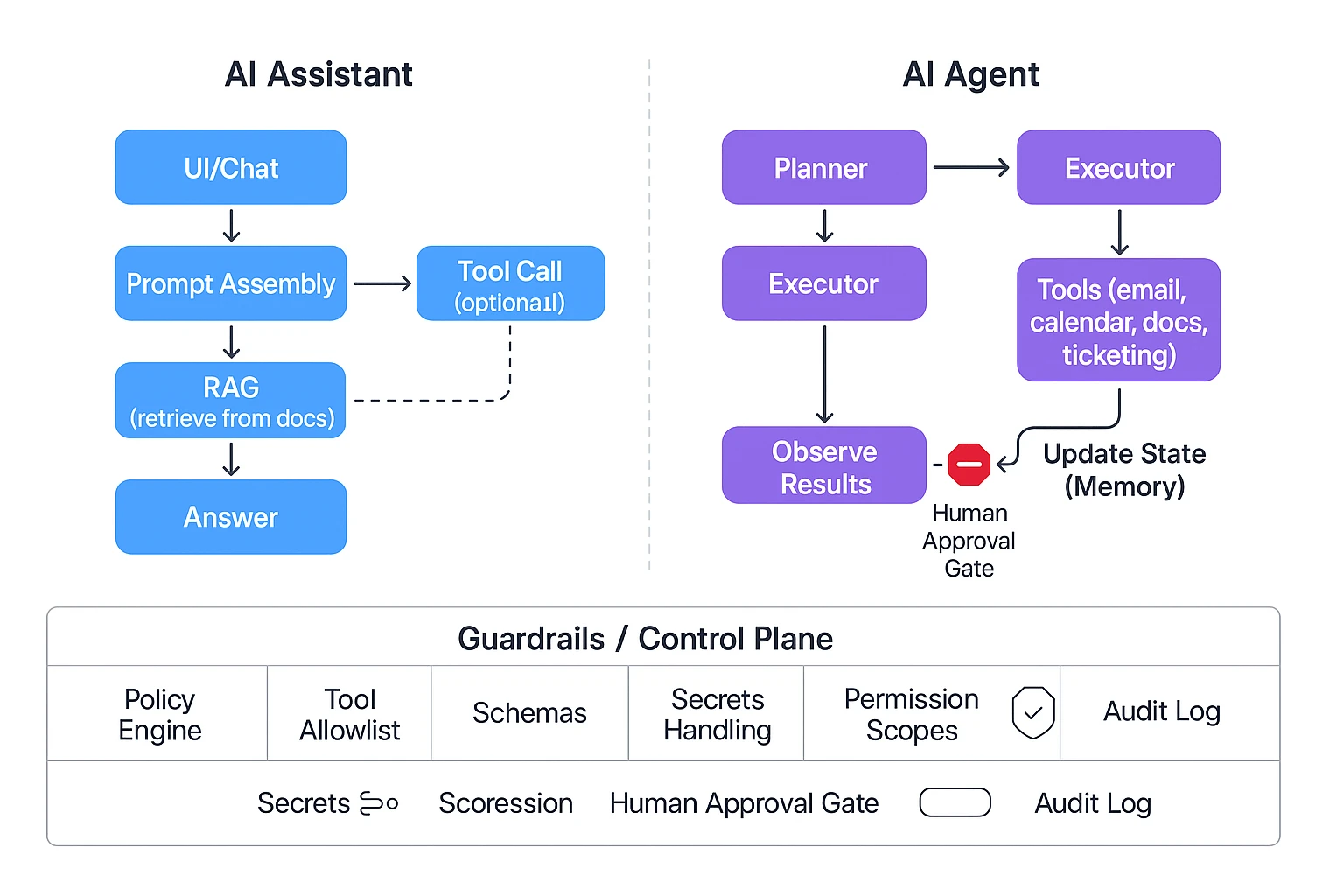
Assistant reference architecture: prompt → retrieval → response
A typical assistant follows a straight line:
- UI (chat box)
- Prompt assembly (your message + instructions)
- Retrieval (RAG: retrieval-augmented generation, meaning it pulls snippets from approved docs)
- LLM response (the written answer)
- Optional tool call (send an email, create a ticket, draft a doc)
This is reliable because the "blast radius" is small. It usually produces one response, with limited side effects. That's why assistants work well for: Q&A, summaries, rewriting, and quick lookups.
But it struggles with follow-through. Multi-step work needs planning, checking tool results, and trying again when something fails. A single-pass assistant often stops at "here's what you should do," instead of doing it.
Agent reference architecture: planner–executor loop
An agent adds a loop and a working state:
- Goal intake (what "done" means)
- Planner breaks the goal into steps
- Executor selects tools and runs actions
- Observe results (tool outputs, errors, new data)
- Update state (memory + current progress)
- Repeat until done, blocked, or timed out
In business terms, it acts more like a junior operator than a help desk. It can draft, check, fix, and continue. Many systems also add "reflection" (a quick self-check) and "retry" logic. That usually improves completeness, but it increases latency.
If you want more detail on agent loops and governance, use this agent architecture and governance playbook as a reference.
Guardrails layer: the control plane that keeps agents safe
Agents need a dedicated control plane, not just a better prompt:
- Policy engine (what actions are allowed)
- Tool allowlists (only approved apps and endpoints)
- Structured outputs (schemas so results must fit a format)
- Secrets handling (no keys in prompts; scoped tokens)
- Permission scopes (project, folder, role-based limits)
- Human-in-the-loop gates (approve before sending, deleting, or publishing)
- Audit logs (who/what/when, plus inputs and outputs)
This is where "AI agent guardrails human in the loop" becomes real. Without these controls, autonomy turns into hidden risk.
Where latency and cost come from (and what to measure)
Cost and speed come from the number of "turns" in the system:
- More steps in the plan = more tokens
- Bigger retrieval sets (more context) = more tokens
- Tool calls = round-trips and waiting time
- Retries/reflection = extra turns
- Parallel tool runs can help, but add complexity
- Caching can cut cost if tasks repeat
In pilots, track metrics you can act on:
- Time-to-first-draft (minutes)
- Tool-call count per task
- Error rate (failed actions / total actions)
- Manual review time (minutes saved or added)
Diagram concept to render on the page:
Assistant: UI → Prompt → RAG → LLM → Answer (→ optional tool)
Agent: UI → Goal → Planner ↔ Executor → Tools → Memory/State → Audit Log, with an Approval Gate before high-risk actions
Top AI agent and AI assistant tools in 2026 (with who they're best for)
Most teams don't need "the most autonomous" AI. They need the right fit for how work happens: meetings, docs, and approvals. In practice, the AI agent vs AI assistant choice comes down to one question: should the system only answer, or should it execute work across your tools and files?
Below are the most common picks teams evaluate in 2026—plus who each is best for.
TicNote Cloud — best for meeting-to-deliverable workflows (agentic workspace)
If meetings are your source of truth, TicNote Cloud fits best. It's a meeting-centered workspace where Projects group related meetings, docs, and research in one place. Then Shadow AI works across that Project to find evidence, answer questions with citations, and generate outputs you can actually ship.
What it's best for:
- Turning multiple calls into a single deliverable (research report, brief, PRD draft)
- Keeping decisions and action items tied to the original transcript
- Building a reusable Project knowledge base that compounds over time
Why teams choose it over "notes-only" tools:
- Bot-free recording (no meeting bot joins)
- Editable transcripts (teams can fix names, terms, and key quotes)
- One-click deliverables: PDF/Word reports, HTML presentations, podcasts, and mind maps
ChatGPT — best for flexible drafting and fast thinking (assistant-first)
ChatGPT is the go-to for general writing, brainstorming, and quick analysis. It's strong when the problem is fuzzy and you need options fast: messaging variants, outlines, email rewrites, or "explain this like I'm new" support.
Best for:
- Drafting and rewriting (docs, proposals, product copy)
- Brainstorming and idea expansion
- Light tool use when your org has a safe setup
Tradeoffs to plan for:
- Your meeting context usually lives outside the tool unless you import it
- Governance (who can do what, and what was changed) depends on your admin setup
- Audit trails and approvals can be uneven across teams
Microsoft Copilot — best for Microsoft 365-native orgs (governed assistant)
Copilot fits best when your company already runs on Microsoft 365. The win is that it can work inside the tools people use all day (Outlook, Word, PowerPoint, Teams) and can align with tenant policies.
Best for:
- Drafting inside Word/PowerPoint
- Email and calendar productivity
- Teams users who want summaries and follow-ups in the Microsoft stack
Limitations teams hit:
- Cross-tool "meeting → research → multi-format deliverable" flows can take extra glue
- If your work spans many non-Microsoft sources, the value drops
Google Gemini — best for Google Workspace productivity (assistant with tight integration)
Gemini is the cleanest fit for Workspace-heavy teams. It shines in day-to-day doc and email throughput, especially where most collaboration happens in Docs, Gmail, Sheets, and Meet.
Best for:
- Writing and refining Docs and emails
- Summarizing threads and documents
- Lightweight analysis in Sheets-style workflows
Where it's weaker:
- Long, cross-project knowledge reuse is harder unless you build structure around it
- Execution beyond Workspace often depends on extra integrations
Otter / Fireflies — best for capture and summaries (meeting assistants)
Otter and Fireflies are classic meeting assistants. They're strong at recording, transcription, and recap outputs. For many teams, that's enough.
Best for:
- Fast transcripts and searchable call history
- Meeting summaries and highlights
- Basic action items and follow-up notes
Important boundary:
- They usually stop at "notes and summaries." Execution (turning meetings into full reports, decks, or structured project assets) is more limited than agentic workspaces.
Notion AI — best for teams already living in Notion (workspace assistant)
Notion AI works best when your company's knowledge base is already in Notion. It helps you draft, reformat, and organize pages quickly.
Best for:
- Turning rough notes into clean internal docs
- Structuring pages, wikis, and specs
- Editing and summarizing content already stored in Notion
Tradeoffs:
- Meeting capture is not the core product, so teams often rely on separate recording tools
- "Execution" varies by workflow and add-ons (often still manual handoffs)
Claude — best for careful writing and reasoning (assistant for analysis)
Claude is a strong assistant when the priority is clarity and careful reasoning. Teams often use it for rewriting sensitive comms, analyzing long text, or drafting structured narratives.
Best for:
- High-quality writing and editing
- Dense document analysis
- Drafting policies, strategy docs, and explainers
Constraint to expect:
- It's typically manual execution unless you connect it to your tools and data
Quick shortlist (pick by primary job-to-be-done)
- If you need "meeting → cited answers → deliverables": TicNote Cloud
- If you need "blank page → good draft fast": ChatGPT or Claude
- If you need "inside our suite with admin controls": Microsoft Copilot or Google Gemini
- If you need "record, transcribe, recap": Otter or Fireflies
- If you need "organize our wiki pages": Notion AI
Try TicNote Cloud for Free if meetings drive decisions and you need outputs (reports, slides, podcasts), not just summaries.
Comparison table: AI agents vs AI assistants (and where TicNote Cloud fits)
If you're deciding on ai agent vs ai assistant for business work, normalize the comparison first. Most "agents" still behave like assistants until you give them tools, memory, and permission to act. The table below keeps it practical: autonomy, actions, memory, citations, audit trails, integrations, and what tends to drive cost and latency.
Normalized comparison (what changes in real teams)
| Category | AI assistant (chat + tool calls) | AI agent (plan + execute) | Meeting-centered agentic workspace (TicNote Cloud fit) |
| Autonomy level | Low–medium (responds to prompts) | Medium–high (runs multi-step tasks) | Medium (project-scoped execution) |
| Can it take actions? | Sometimes (single tool call) | Yes (chains tools, retries, branches) | Yes (generate deliverables, organize project assets) |
| Memory scope | Session or user-level notes | Task + long-term memory (if configured) | Project memory across meetings + files |
| Citations / grounding | Optional; often inconsistent | Needed for safety; varies by stack | Cited answers from project sources |
| Auditability | Chat log, limited action trace | Should include tool logs + approvals | Traceable operations within the project |
| Integrations | Broad (email, docs, web) | Broad, but risk rises with access | Meeting capture + project knowledge + exports |
| Typical latency / cost drivers | Long prompts, retrieval, premium models | Many steps, tool calls, retries, web/RPA | Transcription + cross-file retrieval + output format |
| Best-fit scenarios | Q&A, drafting, quick analysis | End-to-end workflows with clear guardrails | Meeting → decisions → assets (reports, decks, podcasts, mind maps) |
Common failure modes (and what to control)
- Assistants (chat-first):
- Hallucinated facts or confident guesses.
- Stale context (it forgets what changed).
- Overgeneral answers that don't match your docs. Mitigate with: retrieval with citations, "must cite sources" prompts, and spot-check sampling.
- Agents (autonomous execution):
- Bad plans (wrong task order, wrong goal).
- Tool misuse (writes to the wrong system).
- Loops and runaway retries (timeouts, cost spikes). Mitigate with: least-privilege permissions, explicit approvals for writes, sandboxes, timeouts, and audit logs (covered in the guardrails section).
- Meeting tools (capture-first):
- Speaker attribution errors.
- Missed or merged action items.
- Incorrect "who owns what by when." Mitigate with: editable transcripts, action-item confirmation, and linking outputs back to timestamps.
Positioning note: TicNote Cloud sits between generic assistants and transcript-only apps. It keeps memory project-scoped (meetings + docs), then uses Shadow AI to produce deliverables with traceable, source-linked outputs—so teams can move from conversation to execution without losing auditability.
How to choose the right product for your team (decision guide + scored matrix)
Picking between an assistant and an agent comes down to one thing: where work "starts" on your team. If meetings create decisions, tasks, and docs, you'll want an agentic workspace that can turn talk into outputs. If docs and email are the system of record, a suite-native assistant may fit better.
TicNote Cloud: choose it when meetings are your "source of truth"
If your team lives in calls, TicNote Cloud is the best fit for most meeting-driven teams. It groups transcripts and files into Project workspaces, so context doesn't get lost across weeks of discussions. Then Shadow AI answers questions with citations and generates deliverables (reports, presentations, podcasts, mind maps) from that Project context.
It also solves the messy middle. Editable transcripts cut cleanup time, and Project permissions (Owner/Member/Guest) make collaboration simple without copying notes into five places.
ChatGPT: choose it for flexible general-purpose drafting and ideation
ChatGPT is a strong pick when you need fast writing help: outlines, rewrites, positioning drafts, and brainstorms. It's also great when the "execution" step is still human—paste in context, get a first draft, then you do the work.
The trade-off is governance. In many teams, prompts and outputs live outside your system of record, and it can be harder to prove what sources were used or who approved a change.
Microsoft Copilot: choose it for Microsoft 365-native workflows
Copilot fits best when Word, PowerPoint, Outlook, and Teams are where work happens—and tenant controls matter. It shines for turning existing Office artifacts into drafts: summarizing email threads, proposing doc edits, and creating slide outlines from internal content.
Where some teams still add tools: meeting-to-deliverable workflows that require a clean project memory across many calls (and tight traceability from claims back to exact moments in transcripts).
Google Gemini: choose it for Google Workspace-native workflows
Gemini is the closest match for Drive/Docs-first companies. It's a good choice when your "source of truth" is Docs, Sheets, and shared Drive folders, and you want assistance inside that workflow.
Like Copilot, the boundary is usually the same: if your main pain is turning lots of meetings into structured deliverables, you may need a more meeting-centered workspace or a dedicated layer for project memory and follow-through.
Otter / Fireflies: choose them for meeting capture + summaries (light action)
Otter and Fireflies are best when you mainly need capture: record, transcribe, and share summaries. If your goal is "don't miss decisions," these tools often get you there quickly.
But "agentic" follow-through is usually limited. You may still spend 30–60 minutes per meeting moving action items into docs, rewriting updates, and assembling stakeholder-ready outputs.
Notion AI: choose it if your knowledge base already lives in Notion
Notion AI is strong when your wiki is the workflow. If projects, specs, and decisions are already in Notion pages and databases, it can help you write, summarize, and restructure what's there.
Meeting ingestion can be indirect, though. Many teams still have to import notes or transcripts before Notion becomes useful for meeting-driven work.
Claude: choose it for careful writing and analysis with manual execution
Claude is a great choice for high-stakes writing: policy drafts, exec memos, sensitive messaging, and careful reasoning. Use it when quality and clarity matter more than automation.
The trade-off is similar to other general assistants: you typically manage files, approvals, and task execution outside the model.
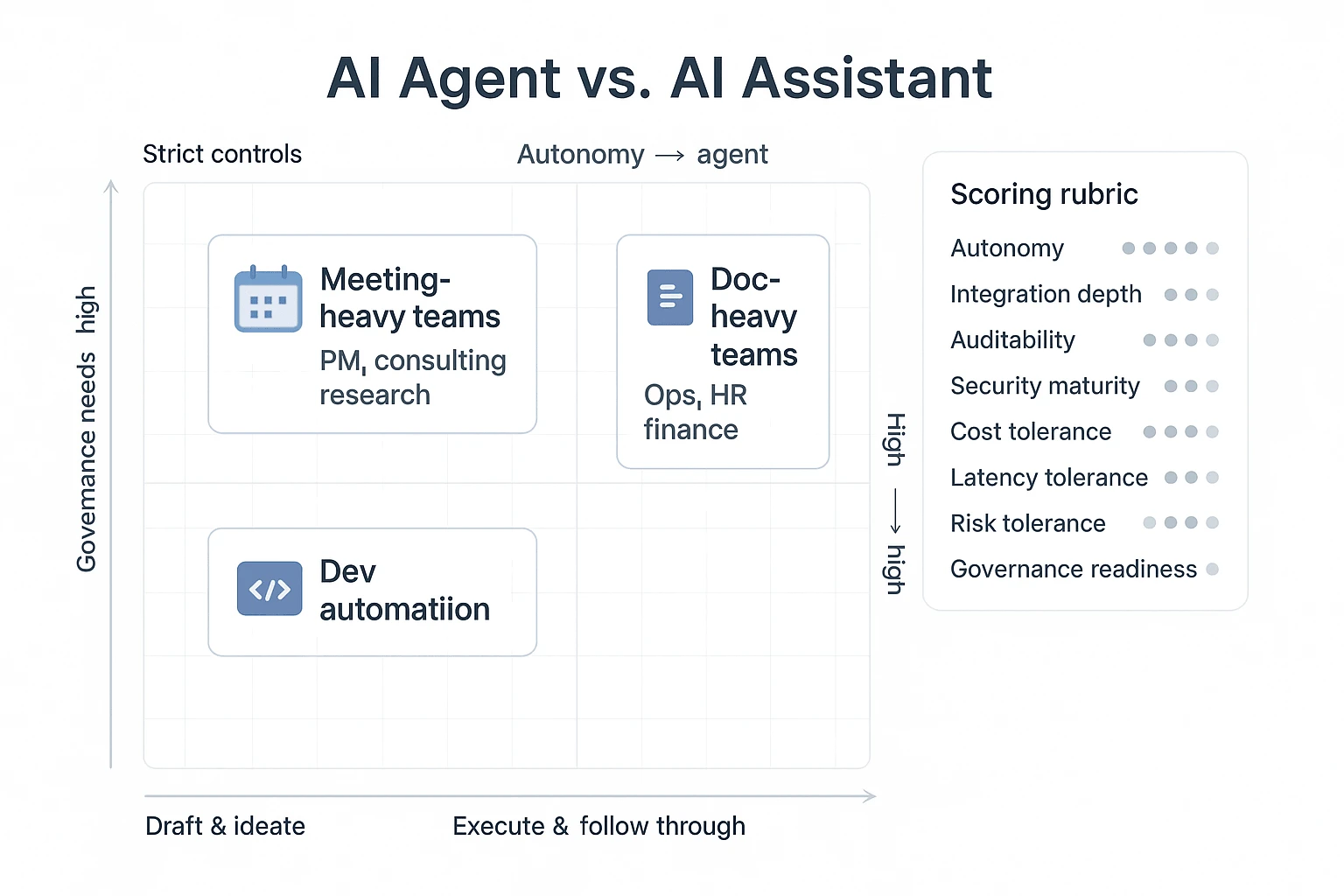
Scored decision matrix (simple rubric you can use today)
Score each option from 1–5 (1 = weak fit, 5 = strong fit). Then weight the criteria that matter most.
- Autonomy needed (can the tool take actions, or just suggest?)
- Integration depth (email/docs/calendar/meeting capture)
- Auditability (can you trace outputs back to sources and edits?)
- Security maturity (SSO, permissions, encryption, admin controls)
- Cost tolerance (per-seat + usage; budget predictability)
- Latency tolerance (seconds are fine vs "must be instant")
- Risk tolerance (what happens if it's wrong?)
- Governance readiness (approvals, review loops, owners)
Here's a lightweight scoring outline you can copy into a sheet:
| Team profile | Autonomy needed | Integration depth | Auditability | Security maturity | Default pick |
| Meeting-heavy delivery teams (PM, consulting, research) | 4–5 | 3–4 | 4–5 | 3–4 | Agentic meeting workspace (TicNote Cloud) |
| Doc-heavy ops teams (finance, HR, legal) | 2–3 | 5 | 4–5 | 5 | Suite-native assistant (Copilot/Gemini) |
| Dev automation teams (scripts, tickets, CI) | 4–5 | 4–5 | 4 | 4–5 | Hybrid agent stack + controls |
If your meetings create the real work—and you want outputs you can verify—choose a meeting-to-deliverable workflow tool. For deeper buying criteria (permissions, monitoring, rollback), use this security-first evaluation checklist for business agents alongside your scoring sheet.
What are the risks of AI agents (and which controls actually work)?
AI agents can do real work: click buttons, update records, send messages, and run multi-step tasks. That's also the risk. When an agent has tools plus "initiative," small mistakes can turn into external emails, wrong CRM updates, or data leaks—fast. The key is to treat agents like junior operators: give them narrow access, require sign-off at the right points, and log everything.
Use human-in-the-loop modes that match the blast radius
Human oversight isn't one thing. It's three modes. Pick the mode per workflow, based on what a mistake would cost.
- Approve-before-action (highest control): The agent drafts a plan and proposed actions, then waits. Use this for anything external or irreversible.
- Best for: sending emails to customers, posting to Slack channels, updating Jira status, changing permissions, pushing code, editing "systems of record."
- Meeting fit: after a meeting, the agent prepares follow-ups and a change list, but a human approves before anything is sent.
- Review-after-action (medium control): The agent executes, but output is queued for review. Use this for internal work that's easy to undo.
- Best for: internal docs, draft PRDs, research summaries, meeting notes, ticket drafts.
- Meeting fit: agent writes the recap and action items, then the owner reviews and edits.
- Supervised autonomy (lowest friction, still safe): The agent runs with periodic checkpoints (every N steps or minutes). Use this for long tasks with clear boundaries.
- Best for: research synthesis, cross-doc analysis, content clustering, backlog grooming.
- Meeting fit: agent groups decisions across meetings and flags conflicts, then stops at checkpoints.
A simple rule: if the output leaves your company or changes a source of truth, require approval.
Lock down tools with least-privilege + allowlists
Most agent failures are permission failures. "It could" becomes "it did" when the agent has broad write access. Use a governance checklist that's specific enough to audit.
AI agent governance checklist:
- Read vs write scopes: default to read-only; grant write only to the one system needed.
- Per-tool allowlists: list which tools the agent can call (and block everything else).
- Per-action allowlists: within a tool, allow only specific endpoints (e.g., "create draft," not "delete record").
- Secrets isolation: never pass raw API keys in prompts; store secrets in a vault or secure runtime.
- Scoped service accounts: use dedicated accounts per agent/workflow, not a user's personal admin token.
- Environment separation: sandbox for testing; production only after approvals and monitoring.
- Data boundaries: restrict what meeting transcripts, projects, or folders the agent can access.
This is where "ai agent vs ai assistant" becomes concrete: assistants often stop at suggestions; agents need permissions that must be engineered.
Prefer dry runs, sandboxes, and rollbacks for safer execution
Safer agents behave like deployment pipelines.
- Dry-run plans: the agent outputs a step list plus the exact tool calls it intends to make.
- Simulation/sandbox: run tool calls against test data first (or a non-prod workspace).
- Versioning: every doc, email draft, and ticket draft has versions so you can compare.
- Rollback paths: define how to undo changes (restore a doc version, revert a status, cancel a send).
- Change logs: track what changed, when, and why, with references to inputs.
If you can't roll it back, don't automate it yet.
Monitor like you mean it: logs, evals, red-teams, and timeouts
Monitoring is your last line of defense when controls fail.
- Audit logs for every action: inputs, tool calls, outputs, and who approved what.
- Alerts on anomalies: spikes in tool calls, unusual destinations, repeated failures.
- Quality evaluations: score accuracy, citation coverage, and format compliance on sampled runs.
- Red-teaming: test prompt injection, data exfiltration attempts, and "confused deputy" cases.
- Loop/time limits: cap steps (e.g., 20 actions) and wall-clock time (e.g., 5 minutes) per run.
The safest first pilot: meeting follow-up with approval gates
Start with a workflow that's valuable but easy to constrain: generate meeting recaps, action items, and follow-up drafts, then require approval before sending emails or updating tools. You get measurable time savings (often 30–60 minutes per meeting) without giving an agent the keys to production systems.
What can a meeting-centered agentic workspace do that typical assistants can't?
This walkthrough uses TicNote Cloud as an example of a meeting-centered, project-scoped agentic workspace. The core difference vs a typical assistant is simple: instead of answering a one-off prompt, an agentic workspace keeps a Project with your meetings and files, then helps you turn that source material into traceable deliverables.
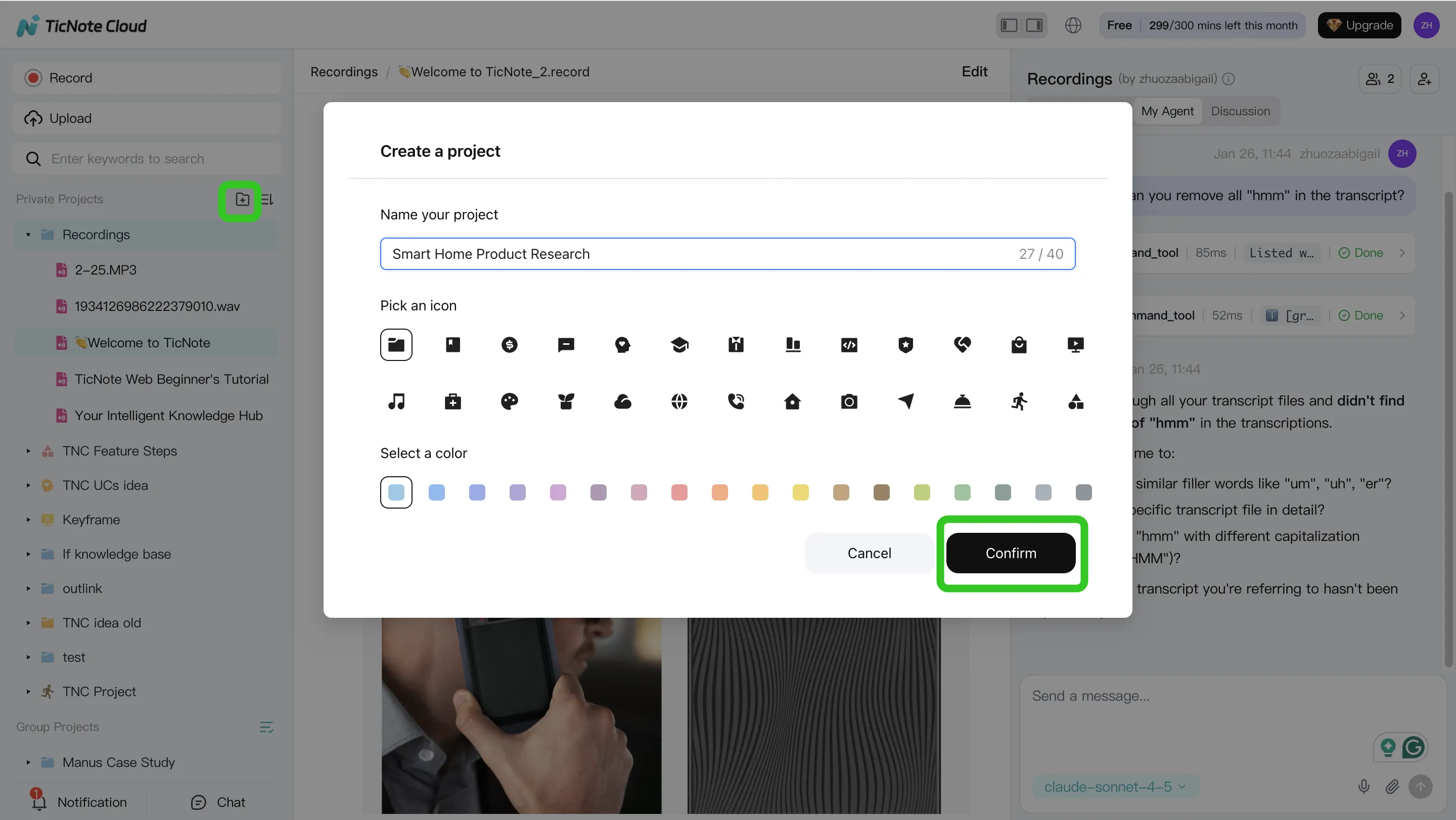
1) Create a Project and add content (so context compounds)
Start by creating a new Project (or opening an existing one) and naming it after the initiative, client, or workstream. This gives your team one place where meetings, docs, and decisions stay connected.
Add source material the same way you already work:
- Upload meeting recordings (audio/video) and supporting docs (briefs, PRDs, notes).
- Keep related items together, so later answers and outputs can cite the right source.
In TicNote Cloud's web studio, there are two common upload paths: direct upload into the Project's file area, or attaching files in the Shadow AI chat and asking it to save them in the right folder.
2) Use Shadow AI to search, analyze, edit, and organize (across meetings, not just one)
Typical assistants work best when you paste a snippet in. A meeting-centered agentic workspace works when you don't have time to paste anything.
With Shadow AI available in the right panel, you can ask cross-meeting questions and require cited, verifiable answers. For example:
- "What decisions did we make across the last 3 calls?"
- "List risks, owners, and due dates mentioned in all sessions."
- "Compare these interviews and pull themes: pricing, onboarding, blockers."
You can also use it to clean up and structure the raw material:
- Edit transcripts for clarity (names, jargon, broken sentences).
- Group outputs into themes like requirements, open questions, and action items.
- Turn scattered notes into a consistent format your team can reuse.
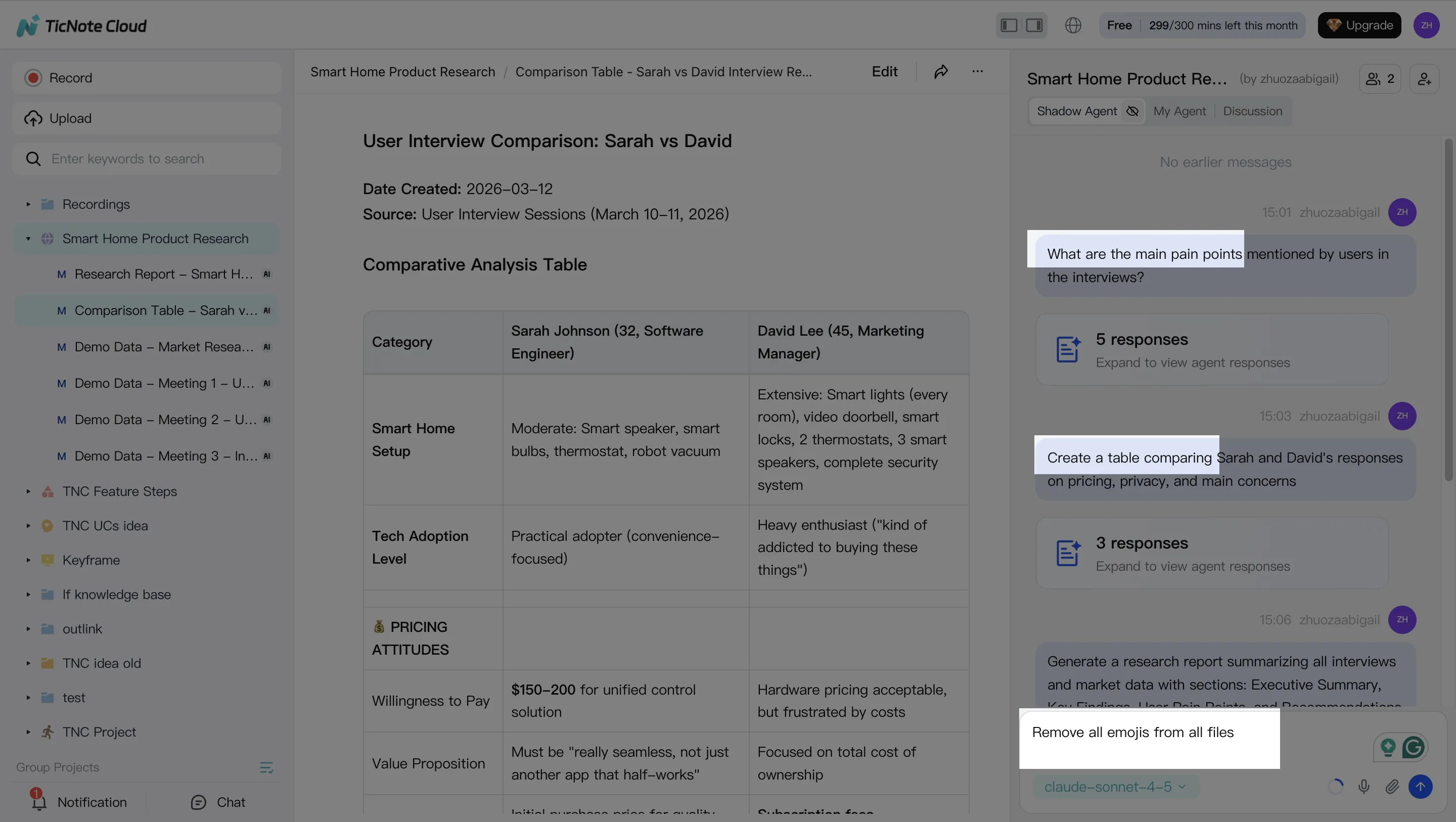
3) Generate deliverables with Shadow AI (meeting-to-output, in one pass)
Here's where a workspace beats a chat box: you can generate full deliverables directly from your Project sources.
In TicNote Cloud, you can ask Shadow AI (or use a Generate option) to produce outputs in multiple formats, such as:
- A research report (with sections like executive summary, findings, and next steps)
- An HTML presentation for sharing updates
- A podcast with show notes for internal enablement
- A mind map to visualize themes and dependencies
The key is to specify structure up front: "Use an executive summary, then findings by theme, then next steps with owners."
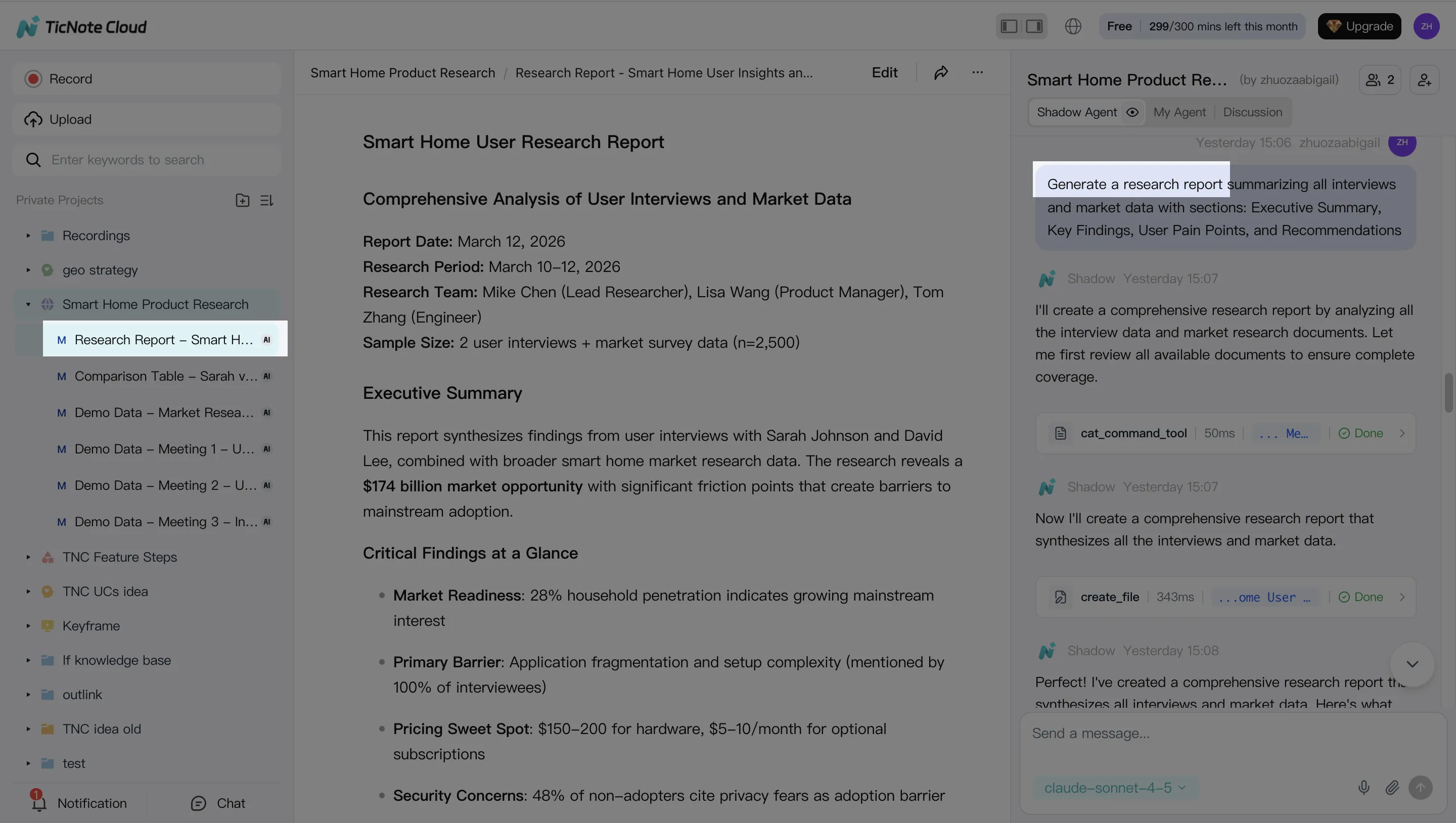
4) Review, refine, and collaborate (with a traceable trail)
Agentic workflows are only safe if humans can review. After a deliverable is generated, refine it section by section with follow-up prompts, and verify claims by jumping back to the original sources.
Then collaborate in the same Project:
- Assign reviewers and roles.
- Use comments to capture feedback where it belongs.
- Keep a traceable record of what changed and which sources informed it.
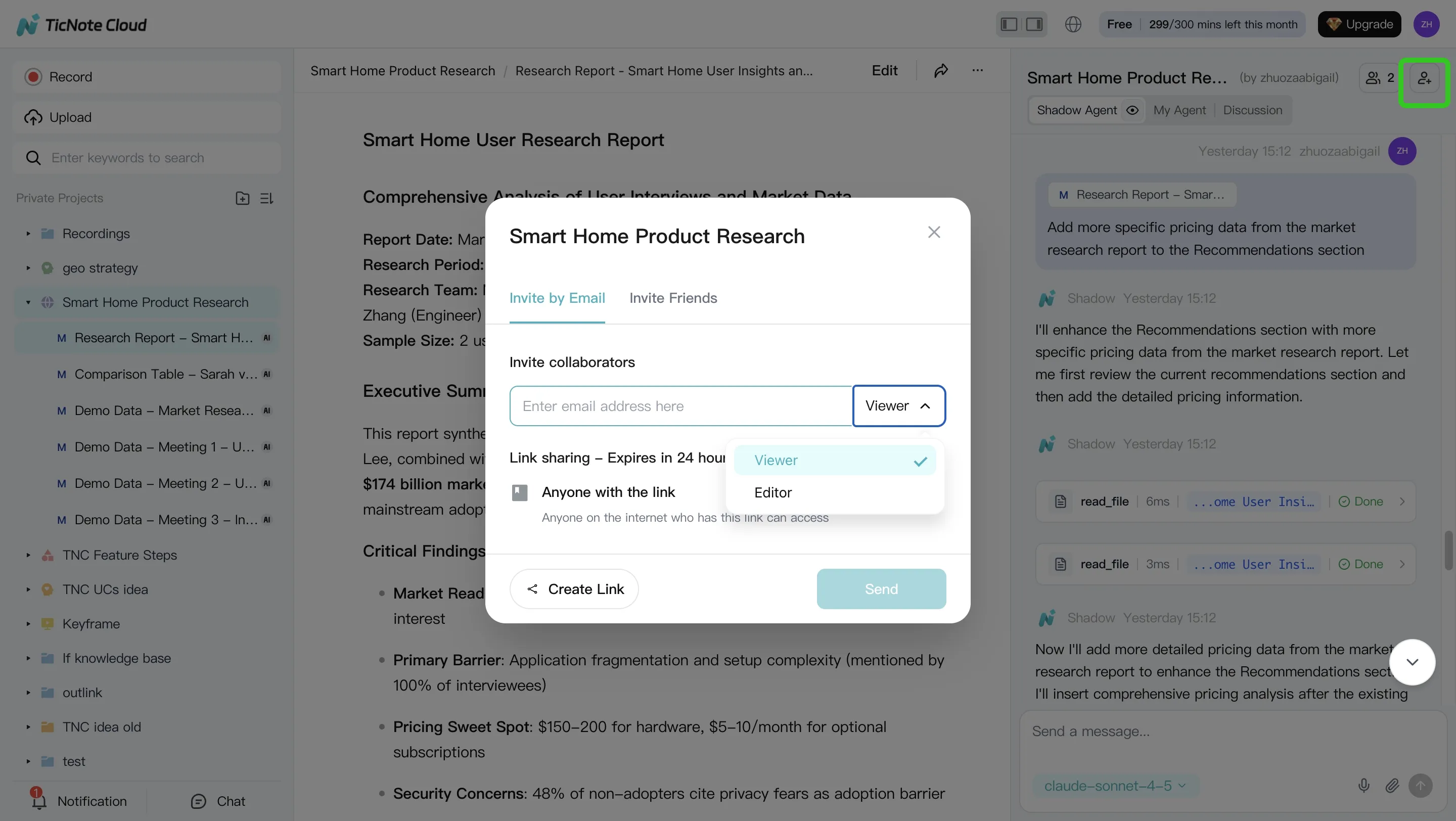
Quick note on the App workflow (capture on mobile, ship in the Project)
On mobile, the flow is the same conceptually: create or select a Project, record or upload content, run Shadow AI prompts for summaries and drafts, and then continue collaborating back in the same Project later on desktop.
Final thoughts: assistants answer, agents execute—use both with the right guardrails
In the ai agent vs ai assistant choice, the clean takeaway is simple: assistants are great for fast, controlled help, while agents are built to run a workflow end to end. If your team lives in meetings, you'll usually want both. Use an assistant to clarify, draft, and sanity-check. Then use an agent to turn approved inputs into real outputs.
A practical hybrid model most teams can run
A safe operating model looks like this:
- Assistant = "Ask and shape." Prompts, summaries, options, and quick edits.
- Agent = "Do and track." Create tasks, generate deliverables, and update project artifacts.
- Guardrails = approvals + permissions + logs from day one.
Your next step: pilot one workflow with metrics
Pick one meeting-driven workflow to pilot (like follow-ups or a weekly brief). Set success metrics before you start: minutes saved per meeting, rework rate (how often humans fix outputs), and adoption (weekly active users). If you want more options, this roundup on all-in-one AI workspaces worth shortlisting can help you compare.
Try TicNote Cloud for Free and pilot one meeting-to-deliverable workflow this week.


