


 Extension
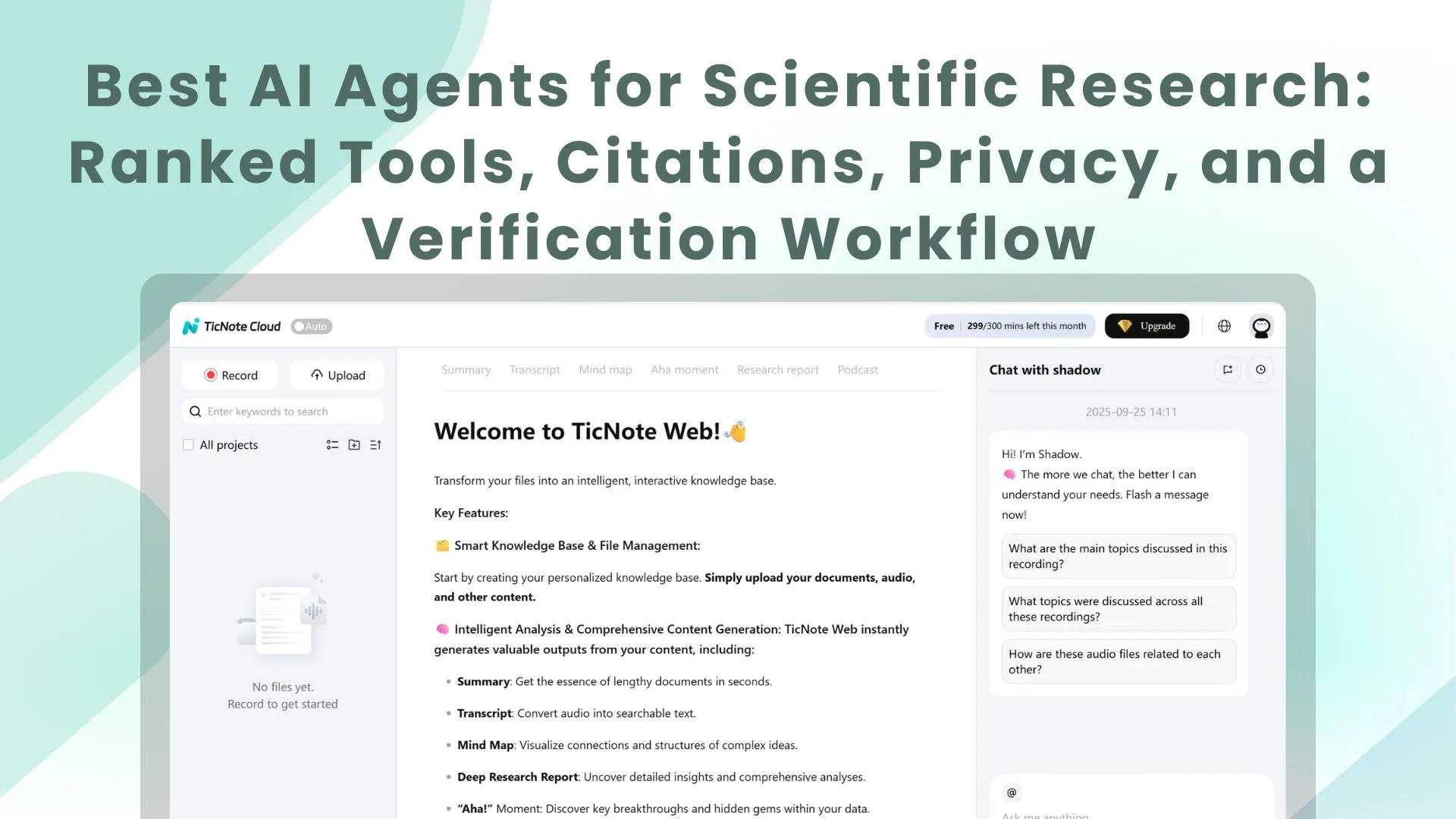
TL;DR: The best AI agent picks for scientific research (and when to use each)
If you want an AI agent for scientific research that turns your own meetings and documents into cited outputs fast, use TicNote Cloud—it keeps project-scoped memory across interviews, protocols, and files, then exports reports, slides, and mind maps with traceable citations. Try TicNote Cloud for Free.
You're probably losing key details across calls, lab notes, and scattered PDFs. That drift creates rework and weak traceability when it's time to write. A project workspace like TicNote Cloud keeps everything in one place so the agent can answer from your sources and generate deliverables you can verify.
- Best overall for research teams: TicNote Cloud — meeting + docs → cited deliverables; best when internal knowledge matters as much as papers.
- Best for web-first deep research: ChatGPT / Claude / Gemini Deep Research — best for broad, current web scans and structured drafts.
- Best for academic paper workflows: Elicit / Consensus / Scite — best when you want paper-first retrieval and evidence signals.
- Best for quick checks: Perplexity — best for fast answers with linked citations.
Safety note: for any methods, stats, or clinical claims, open the original source and verify; treat AI as a draft, not an authority.
What is an AI agent for scientific research, and what should it do well?
An AI agent for scientific research is a system that doesn't just answer questions. It plans the work, pulls evidence, and builds a usable output with traceable sources. That matters in real labs, where you're blending papers with internal knowledge like meetings, interviews, protocols, and pilot results.
Agent vs chatbot: what "agentic" means in research
A chatbot mainly responds from its general training and your prompt. It may sound correct, but it often can't show exactly where a claim came from.
A research agent is "agentic" because it can:
- Plan steps (what to search, what to compare, what to extract)
- Retrieve sources (papers, databases, and your own uploaded files)
- Extract evidence (methods, sample size, endpoints, limitations)
- Produce structured deliverables (tables, briefs, reports) you can review
In practice, you need both worlds: external literature coverage and internal, decision-driving context from your team's conversations.
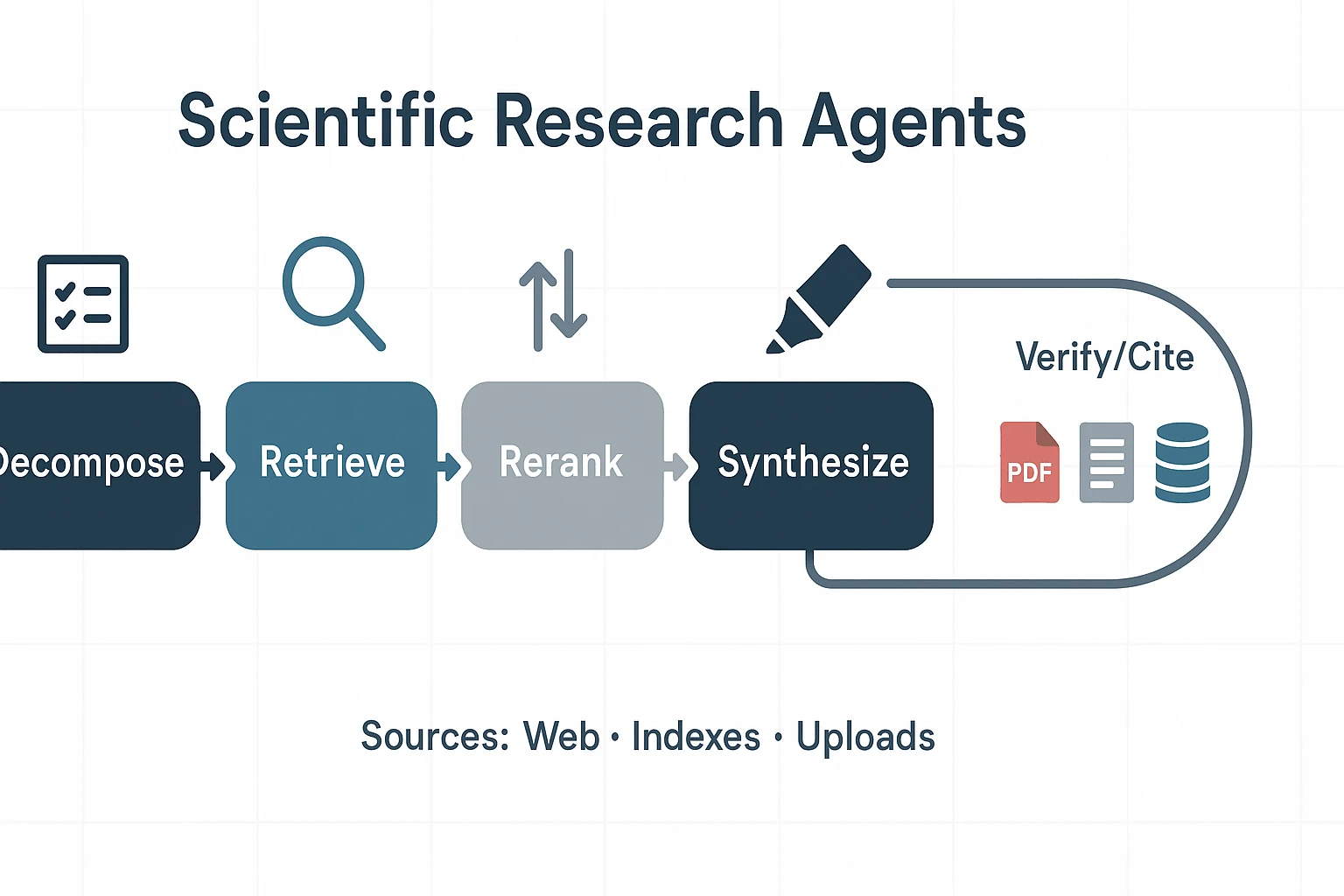
The 5-stage pipeline: decompose → retrieve → rerank → extract → synthesize
A research-grade workflow usually follows five steps:
- Decompose: break the question into sub-questions. In biomed, this often looks like PICO (Population, Intervention, Comparison, Outcome).
- Retrieve: collect candidate sources from the web, academic indexes, and internal docs or transcripts.
- Rerank: push the most relevant and credible sources to the top (study type, recency, journal quality, match to PICO).
- Extract: pull the claim-bearing details (design, n, effect size, confidence intervals, caveats).
- Synthesize: reconcile conflicts, summarize what's consistent, and state uncertainty clearly.
What "good citations" look like (clickable, claim-level, source-linked)
"Good citations" are claim-level: each key statement links to the source that supports it. Better tools point to the exact section, figure, or quoted passage.
For internal knowledge, citations should link back to the original evidence too, like transcript timestamps or the exact paragraph in a protocol. That makes peer review fast.
Common failure modes to watch for
Even strong tools fail in predictable ways:
- Coverage gaps: missed paywalled papers, non-English work, or negative results
- Citation laundering: a citation is present, but it doesn't support the claim
- Abstract-only errors: conclusions change when you read methods and results
- Over-confident summaries: causality overstated, stats mishandled, or findings outdated
What to demand from tools: traceable sources, exportable outputs, and a repeatable verification habit.
How do scientific research agents work under the hood (in plain English)?
An AI agent for scientific research is a workflow engine: it breaks your request into steps, finds relevant sources, pulls out key facts, then writes a grounded answer. Once you understand that pipeline, you can predict failure points and fix them fast (instead of trusting a polished summary that's built on weak inputs).
Retrieval stack basics: search → filters → reranking
Most "research agents" win or lose in retrieval (finding evidence).
- Search sources: The agent queries one or more pools: the open web, PubMed-like indexes, a vendor's private corpus, and your uploads (papers, protocols, meeting transcripts). Coverage matters: a tool that can't reach the right database can't cite the right study.
- Filters: Good agents apply constraints early, such as publication date (for freshness), study type (RCT vs observational), source type (journal vs preprint), geography, and population. One missing filter can flip conclusions.
- Reranking: After search, the tool reorders results to decide what it reads first. Here's the trap: the "top result" is often the most clickable, not the most valid for your question. Domain constraints (population, endpoint, design) help the agent rerank toward what actually matches.
Full-text vs abstract-only: why it changes accuracy
Abstracts are short by design. They often skip exclusions, negative findings, and key methods details.
Full text lets an agent extract what you need for research-grade synthesis:
- Sample size and subgroup definitions
- Endpoints and measurement timing
- Confounders and adjustment choices
- Limitations, bias risks, and protocol deviations
Practical rule: many tools can only summarize what they can access. If the agent can't open the PDF, it may "fill gaps" from the abstract, or from related papers.
Multi-step reasoning and why it can still be wrong
Agents can chain steps (plan → search → read → compare → write). But errors compound. A slightly wrong query can pull the wrong studies, which then produces a confident but incorrect synthesis.
Also, separate two ideas:
- Tool confidence: how certain the model sounds.
- Evidence strength: how strong the underlying studies are.
They aren't the same. To force better behavior, ask for uncertainties, competing explanations, and boundary conditions (when the conclusion should not hold).
A lightweight verification workflow you can repeat
Use this 4-step check on every key claim:
- Open 2–3 primary sources (not blog summaries).
- Confirm the key numbers and claims (effect size, N, endpoint).
- Check dates and methods (population, inclusion/exclusion, bias controls).
- Record what's uncertain (missing full text, conflicting results, weak design).
Keep a simple lab "evidence log" with four columns: Claim → Source → Exact quote → Context (population, method, limitations). For a deeper human-in-the-loop approach, see this guide to a human-in-the-loop research workflow.
Next, we'll rank the top tools, then normalize them in a comparison table—and finish with a safety checklist you can use in real projects.
Top AI agents for scientific research (ranked): which tool is best for what?
Most "research agents" look good in a demo. In real lab work, the details decide trust: can you trace every claim back to a source, and can your team reuse the work next week?
To rank these tools, I used one rubric across all of them:
- Citation traceability: Are sources shown inline, clickable, and easy to audit?
- Source coverage: Web + scholarly + your internal files (meetings, protocols, SOPs).
- Freshness: How well it handles recent papers and fast-moving topics.
- Privacy posture: Upload-only vs web-search; team controls; IP protection signals.
- Internal-knowledge support: Project spaces, long context, and cross-file retrieval.
- Export formats: Can it ship outputs your team actually uses (DOCX/PDF/HTML/tables)?
- Common error modes: Hallucinated citations, missed caveats, over-confident summaries.
Below are standardized item cards, ranked by "research-grade fit" (not hype).
TicNote Cloud
- Best For: research teams doing conversation-to-evidence work (meetings/interviews/protocols → cited reports and presentations) and needing a project-scoped scientific research AI assistant.
- Website domain: ticnote.com
- Pricing snapshot: Free plan available; paid tiers for higher minutes/docs and team usage; Enterprise for SSO/support.
- Key Features: project workspaces; editable transcripts; Shadow AI cross-file Q&A with citations; one-click deliverables (PDF/Word reports, HTML presentations, mind maps, podcasts); bot-free recording options; permissions.
- Limitations: not a web-first crawler; relies on what you import/record for strongest grounding.
- Why it stands out: fastest path from internal research conversations to shareable, cited outputs; traceable actions reduce "black box" risk.
FutureHouse Platform (Crow/Falcon/Owl/Phoenix)
- Best For: high-coverage scientific literature search/synthesis; specialized agents.
- Website domain: platform.futurehouse.org
- Pricing snapshot: Check site (plans and access can change).
- Key Features: specialized agents for research tasks; science-first positioning; API/web access.
- Limitations: experimental agent risk (especially for newer agents); access boundaries; may take setup to fit your workflow.
- Why it stands out: one of the few "agent lineups" designed for science search and synthesis, not general chat.
ChatGPT Deep Research
- Best For: broad web-first research report generation with citations.
- Website domain: openai.com
- Pricing snapshot: Tiered plans; verify current pricing before budgeting.
- Key Features: strong task breakdown; pulls from multiple web sources; generates structured, long reports.
- Limitations: can get long and include low-value material; citations still need spot-checking.
- Why it stands out: reliable generalist "deep research" experience for fast first drafts.
Claude Deep Research
- Best For: concise research synthesis and long-document analysis.
- Website domain: anthropic.com
- Pricing snapshot: Tiered; message limits can apply.
- Key Features: clear writing; good at following complex instructions; strong long-context reading.
- Limitations: rate limits; web research behavior varies by plan and setting.
- Why it stands out: often produces the most readable brief for busy teams.
Gemini Deep Research
- Best For: Google ecosystem + multimodal research.
- Website domain: google.com
- Pricing snapshot: Tiered.
- Key Features: strong Google-connected retrieval; very large context; handles text + images well.
- Limitations: can wander without tight prompts; may need a clear outline to stay focused.
- Why it stands out: strong fit when your workflow already lives in Google tools.
Elicit
- Best For: literature review automation and extraction tables.
- Website domain: elicit.com
- Pricing snapshot: Freemium/tiered.
- Key Features: paper search; screening support; structured data extraction into tables.
- Limitations: narrower outside academic corpora; less helpful for internal meeting knowledge.
- Why it stands out: paper-centric workflow that feels closer to a review pipeline.
Consensus
- Best For: "what does the literature say?" questions with evidence direction.
- Website domain: consensus.app
- Pricing snapshot: Tiered.
- Key Features: study-backed answers; quick evidence signals.
- Limitations: emerging topics may have weak coverage; nuance can get compressed.
- Why it stands out: fast "directional read" when you need an evidence-weighted answer.
Scite.ai
- Best For: evidence verification checklist work—supporting vs contradicting citations.
- Website domain: scite.ai
- Pricing snapshot: Tiered.
- Key Features: citation context classification (how a paper is cited, not just that it's cited).
- Limitations: depends on what citation contexts are indexed; not a full synthesis agent.
- Why it stands out: one of the best tools for catching weak or misleading citations.
Perplexity
- Best For: quick checks and fast source-linked answers.
- Website domain: perplexity.ai
- Pricing snapshot: Free + paid.
- Key Features: fast retrieval; inline citations; good for triage.
- Limitations: not a full systematic workflow; outputs can be shallow for complex questions.
- Why it stands out: speed—use it to map a topic before deeper review.
NotebookLM
- Best For: internal-doc grounded synthesis and study guides.
- Website domain: notebooklm.google
- Pricing snapshot: Included/plan-dependent.
- Key Features: upload-grounded Q&A and summarization; strong "work only from my corpus" behavior.
- Limitations: no true web discovery; your corpus must be provided.
- Why it stands out: a solid choice when privacy and internal-document grounding matter most.
Next up is the normalized comparison table (citations, sources, privacy, and exports). After that, you'll get a practical verification workflow to reduce errors before results enter a lab doc, protocol, or slide deck.
Comparison table: citations, sources, privacy, and outputs (normalized)
Labs and R&D teams don't need more "best tool" claims. They need a decision-ready matrix: where answers come from, how citations behave, what data leaves your boundary, and what you can ship at the end. The table below normalizes common research agents so you can pick based on evidence, privacy, and outputs—not demos.
| Tool | Web search (Y/N) | Uploads (Y/N) | Claim-level citations (None / Partial / Strong) | Full-text handling (Abstract-only / Limited full text / Full text when available) | Best for internal meetings (Weak / OK / Strong) | Export formats (e.g., PDF/DOCX/MD/HTML/mind map) | Integrations (e.g., Slack/Notion/Workspace) | Privacy stance (upload-only vs web-search; training-use statements; auditability) | Starting price |
| TicNote Cloud | N | Y | Strong | Full text when available | Strong | PDF, DOCX, Markdown, HTML, mind map (PNG/Xmind), TXT | Slack, Notion | Upload-first projects; data not used to train models (as stated); clickable sources and traceable operations | from $$0 (Free); Pro from$$12.99/mo |
| Elicit | Y | Y | Strong | Abstract-only to limited full text | Weak | CSV/notes (varies) | Check site | Web + paper database focus; policy and auditability depend on plan | check site |
| Perplexity | Y | Limited | Partial to Strong | Abstract-only to limited | Weak | Share/export (varies) | Check site | Web-first; good freshness; higher exposure surface unless governed | check site |
| Consensus | Y | N | Strong | Abstract-only | Weak | Summaries (varies) | Check site | Paper-lookup oriented; limited internal knowledge handling | check site |
| SciSpace | Y | Y | Partial | Full text when available | Weak | Notes/PDF tools (varies) | Check site | Works well on PDFs; web features vary; governance depends on account controls | check site |
| ChatGPT (general) | Optional | Y | None to Partial | Limited full text | OK | DOCX/PDF via copy or add-ons (varies) | Check site | Not research-audited by default; requires strict process for sources | check site |
Quick takeaways for sensitive R&D
- Safest for proprietary IP: upload-only, project-scoped agents (like TicNote Cloud). Your evidence stays inside the project boundary, and citations point back to your files.
- Best when freshness matters (new preprints, fast-moving methods): web-search tools (Perplexity, Elicit) win on speed, but need stricter governance.
- Best for "conversation-to-evidence" work: tools built around meetings and internal docs outperform literature-only agents for protocol decisions, design reviews, and clinical ops.
- Best for audits: prioritize strong claim-level citations plus click-through to the exact source span.
Privacy/IP lens (simple rule)
Upload-only workflows reduce leakage risk because the agent doesn't browse by default. Web-search tools increase exposure and usually require policy controls (approved connectors, redaction rules, and human review).
If you also need deliverables, this pairs well with a report-generator comparison focused on evidence and governance before you choose.
Next, we'll show a step-by-step workflow to go from meetings + docs to cited deliverables (using TicNote Cloud as the example).
How to turn meetings + documents into cited research deliverables (step-by-step)
The steps below are demonstrated using TicNote Cloud as an example so you can copy the same workflow in any comparable tool. The goal is simple: take what your team said (meetings, interviews) plus what you read (PDFs, protocols) and turn it into a clean deliverable with clickable evidence.
Step 1. Create a Project and add content (direct upload or via attachment)
Start in the web studio by creating a Project for one study or theme. Use a naming rule so files sort fast later (for example: StudyName_YYYY-MM_Interview01). Keep the scope tight: one "question family" per Project, so your agent doesn't mix topics.
Upload your inputs—interviews, lab meetings, protocol docs, PDFs, and dataset notes—so the Project becomes your single source of truth.
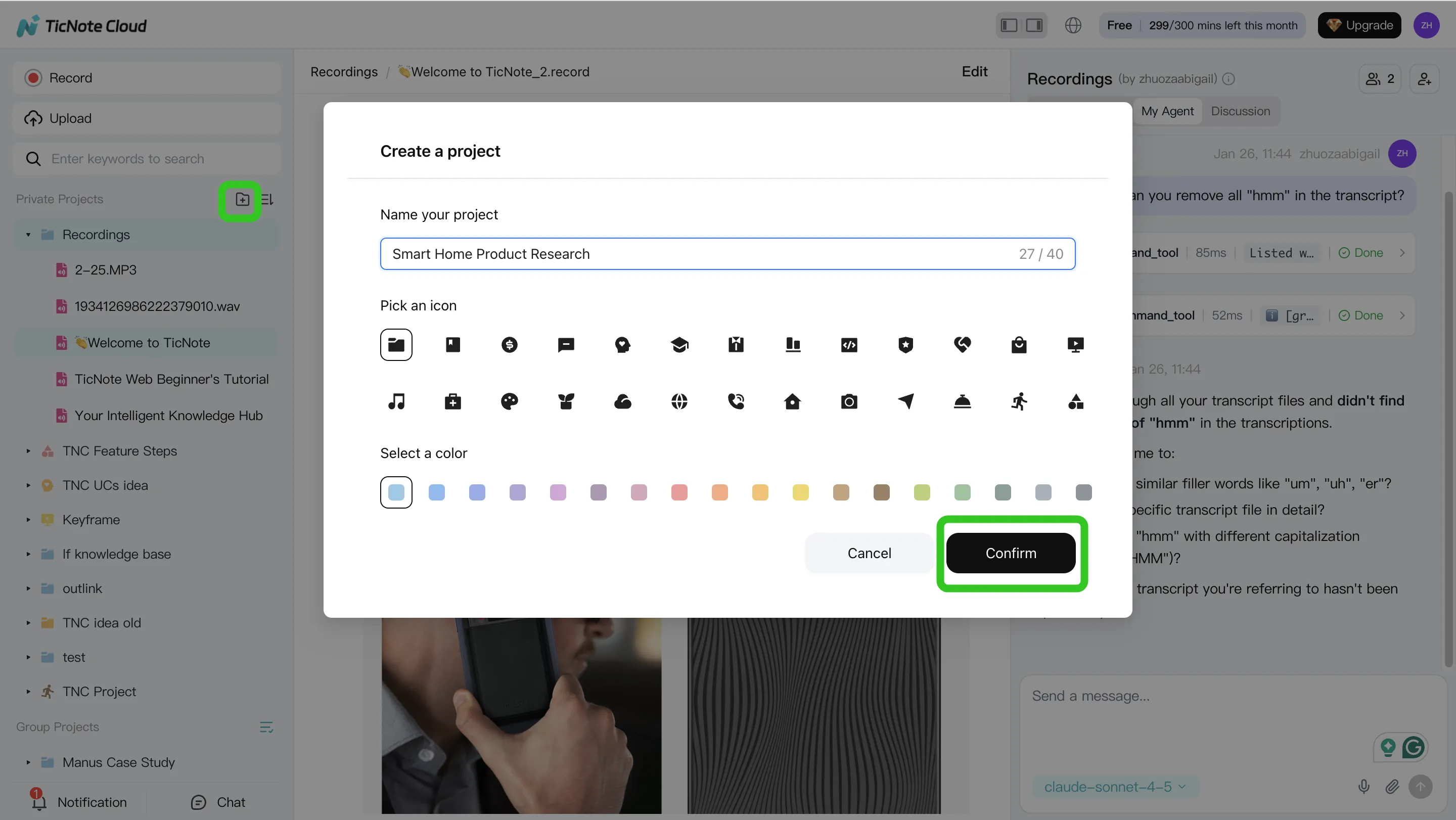
In TicNote Cloud, there are two clean ways to get files into the same Project:
- Direct upload from the file area when you already have the audio/video/docs.
- Attach in chat when you want the agent to ingest files as part of a request (useful when you're already asking a research question).
App summary: On mobile, create or choose a Project, then record or upload. Send everything into that same Project to keep context intact.
Step 2. Use the AI agent to search, analyze, edit, and organize content
Now use the agent (Shadow AI) as your "project analyst." Ask it to find the exact moments where a claim appears, then pull matching passages from your documents. This is the fastest way to build traceable evidence instead of relying on memory.
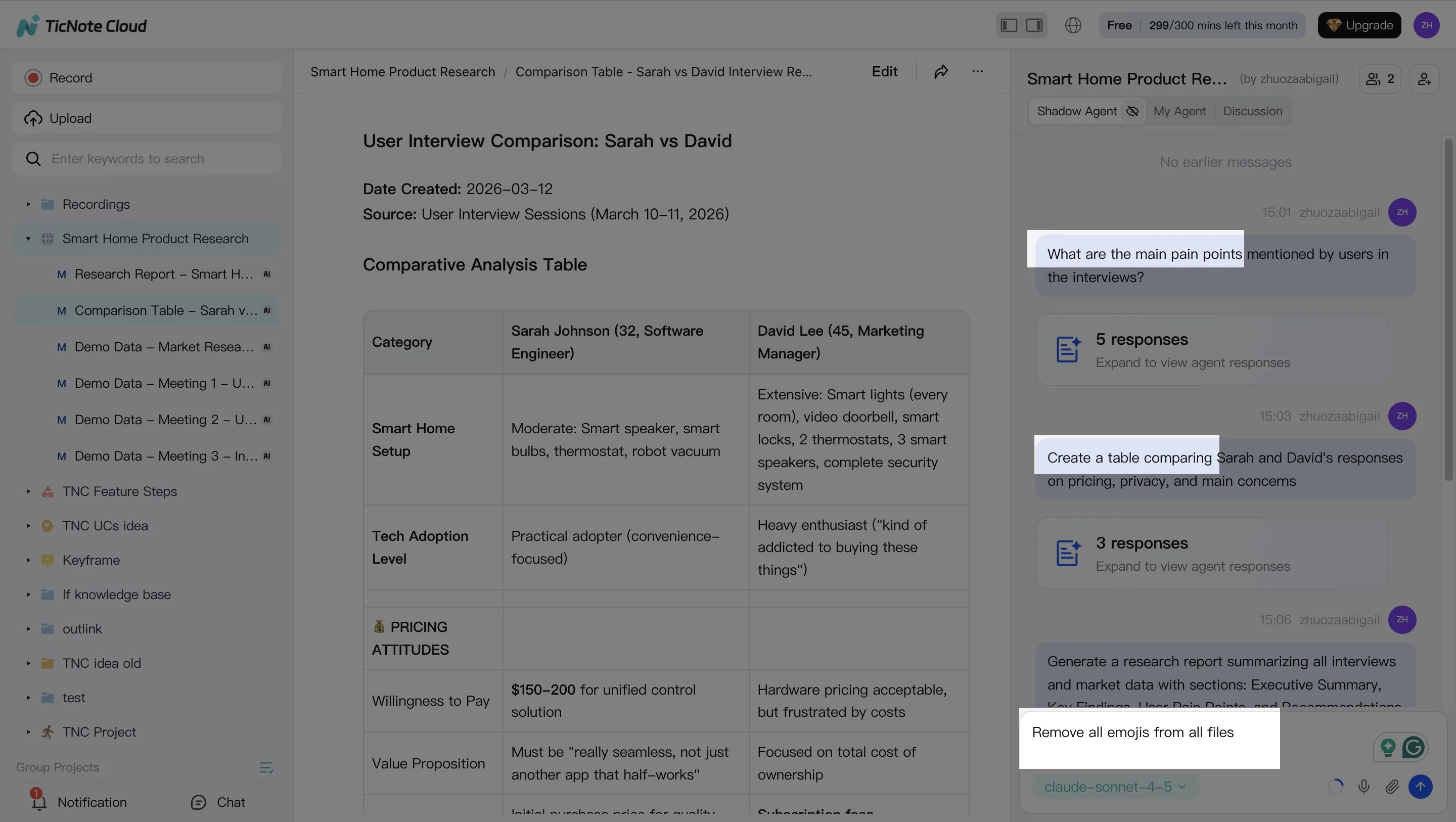
Good prompts for research-grade work:
- "Find where the team defined the primary endpoint. Quote it and link the timestamp."
- "Compare the 3 interviews and list the shared themes."
- "Extract assumptions, decisions, and open questions into a table."
You can also clean transcripts for readability while keeping timestamps. That matters because it preserves auditability (you can still jump back to the original moment).
App summary: Use quick Q&A and short summaries for field notes. Save key highlights back into the Project so the web workflow stays complete.
Step 3. Generate deliverables (reports, presentations, mind maps)
Once the Project is organized, generate outputs that your lab or stakeholders can review quickly. Start with a cited research report where each claim links back to a meeting timestamp or a document passage.
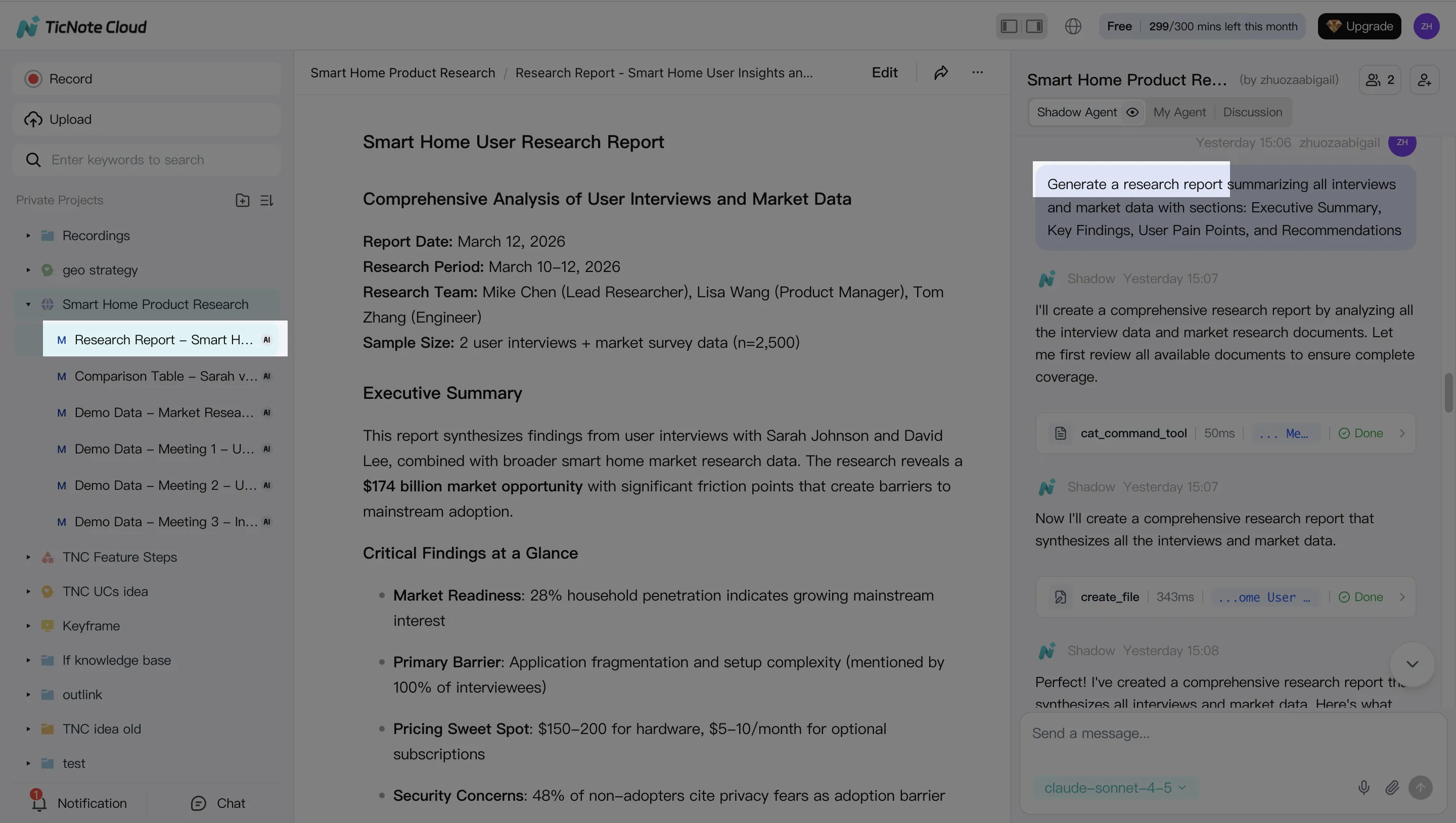
Then create a slide-style HTML presentation for review meetings and a mind map to pressure-test the logic (methods → evidence → findings → next steps). Using three formats usually cuts rework because different reviewers prefer different views.
App summary: Generate a short brief or recap for fast sharing right after a meeting, then expand it into a full report on web when you're back at a desk.
Step 4. Review, refine, and collaborate with your team
Treat the first draft as a starting point. Assign sections for human review, add comments, and rewrite only the parts that changed (instead of regenerating everything). Keep a short "uncertainties" list so reviewers know what still needs checking.
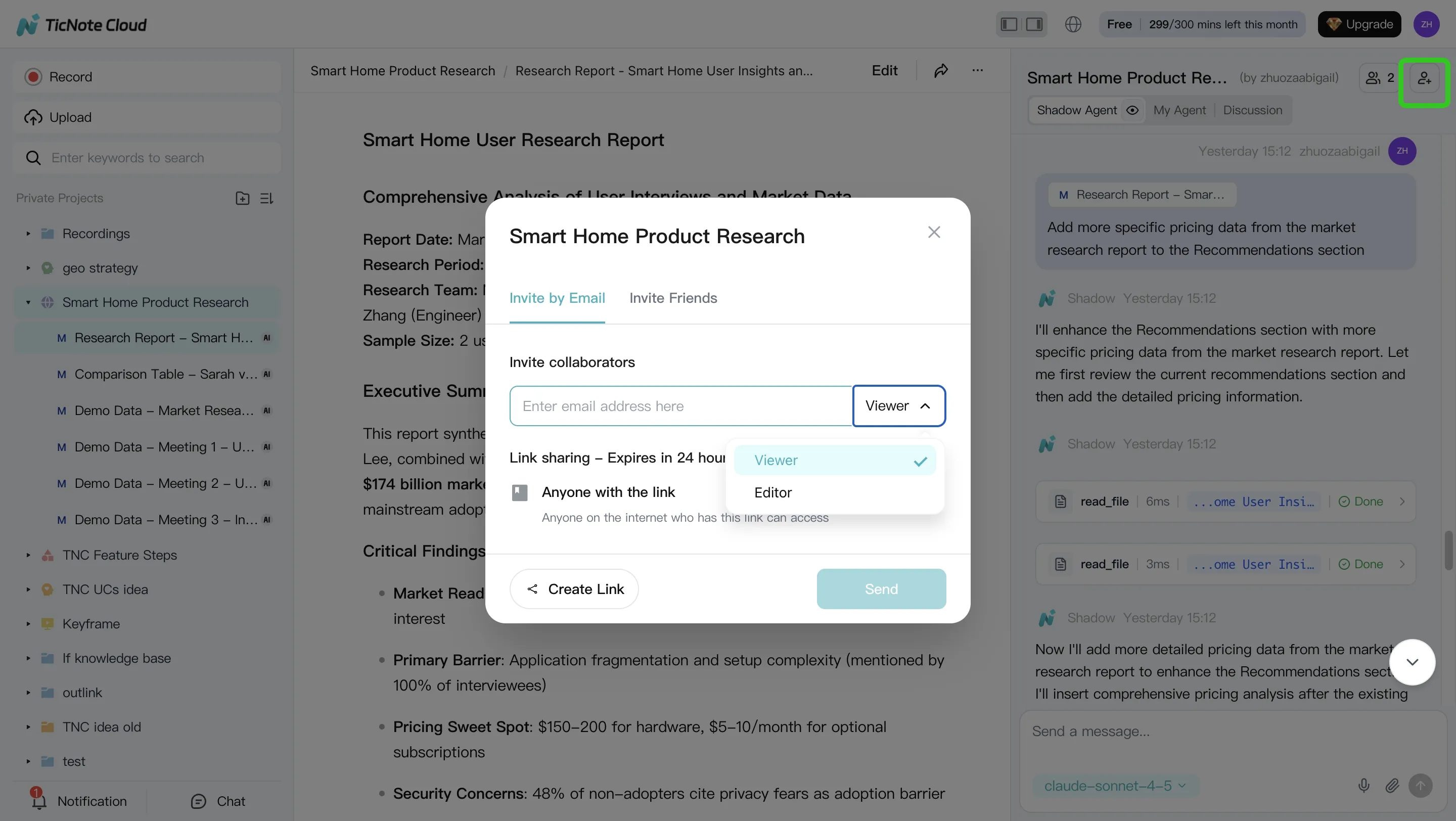
When you're ready, export to the format your org needs—PDF/DOCX/Markdown for reports and notes, plus HTML for shareable presentations. During review, click from any paragraph back to the source to verify the evidence trail before it goes to leadership or into a manuscript.
Create a Project and generate a cited research report in minutes—Try TicNote Cloud for Free.
How should you choose the right research agent (by workflow, not hype)?
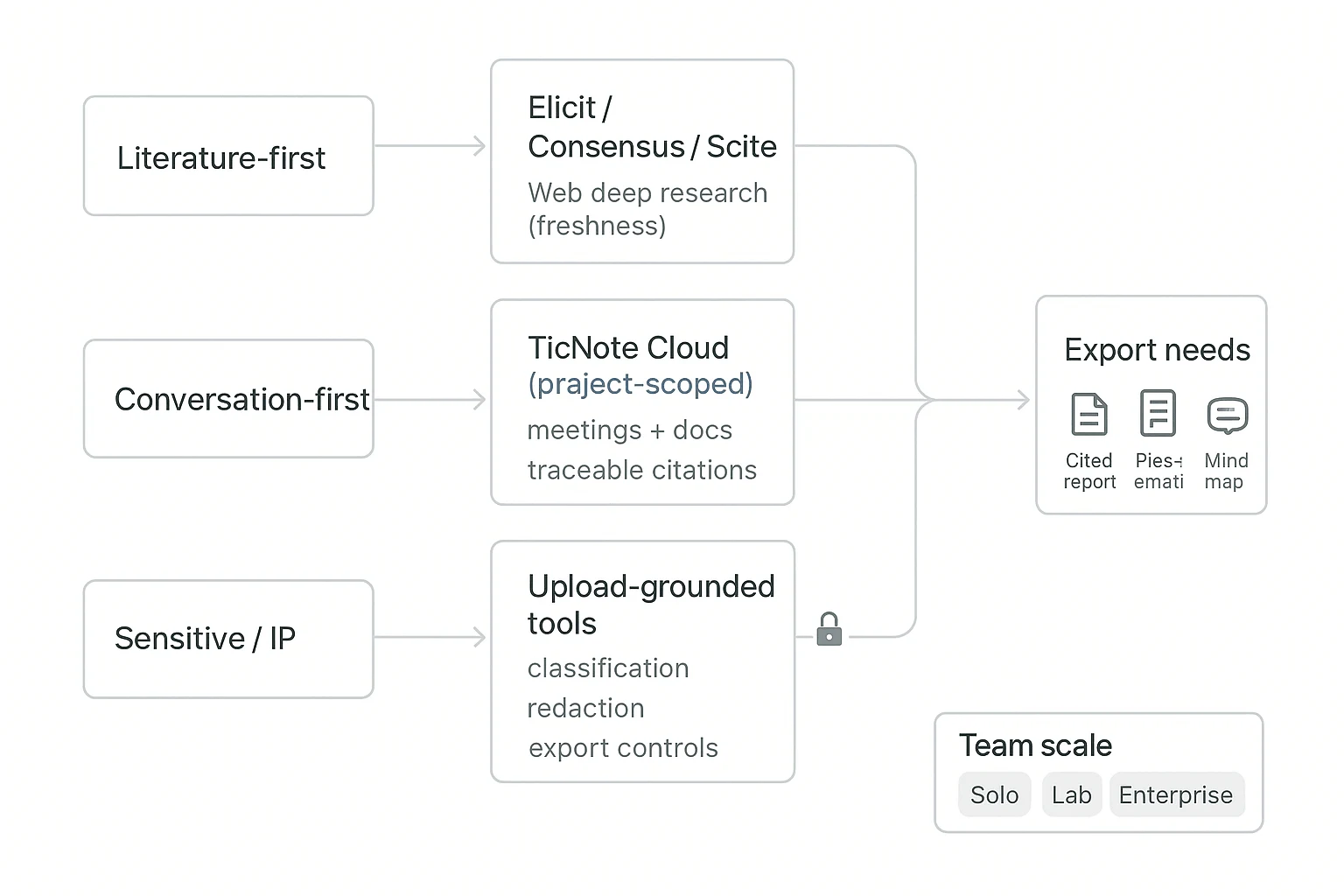
Most teams pick an agent by features. That's backwards. Choose by the work you repeat every week: screening papers, extracting evidence, synthesizing meetings, and shipping review-ready outputs. The right AI agent for scientific research is the one that fits your input (papers vs. conversations), your risk level (IP vs. public), and your deliverable format.
Start with your "input type": literature-first vs. conversation-first
If your work starts in papers (systematic scanning), use literature-first tools. Elicit, Consensus, and Scite are strong for finding claims, paper-level summaries, and checking how studies are discussed. Pair them with one web deep-research tool when you need fresher coverage.
If your work starts in people and process (interviews, lab updates, protocol reviews), default to TicNote Cloud. It's project-scoped, so the agent works inside your own meetings and docs, then answers with traceable citations back to the exact transcript or file segment. That's the fastest path from "we talked about it" to "we can defend it."
Handle sensitive or IP-heavy work with a privacy-first split
Treat web-search agents as "public mode." Use them for non-sensitive questions and broad background.
For proprietary data, use upload-grounded, project-based tools like TicNote Cloud. Set basic policy guardrails:
- Classify data (public / internal / confidential / regulated).
- Redact before upload (names, patient IDs, novel sequences, partner terms).
- Control exports (who can download reports, who can share links).
Choose based on the output you must ship
If you need outputs that survive review (grants, SOPs, study notes), make "research report generator with citations" a hard requirement. TicNote Cloud is built for this step: one Project can produce a cited report, a web presentation, and a mind map—so reviewers can skim structure first, then drill into sources. If you want more options in this category, see this roundup on all-in-one AI workspaces and compare export formats.
Budget and team scale: pick one source of truth
- Solo: use free tiers for triage, but keep one Project space as the source of truth.
- Lab/team (3–30 people): prioritize permissions, shared templates, and repeatable workflows; TicNote Cloud fits best for ongoing synthesis.
- Enterprise/clinical: require SSO, auditability, and support; plan for an Enterprise tier and security review.
ROI snapshot (per review cycle)
A practical target is 30–50% time saved per cycle by reducing manual steps:
- Screening: 1–2 hours saved
- Extraction: 2–4 hours saved
- Drafting + formatting: 2–6 hours saved
Total: ~5–12 hours saved per cycle, depending on scope.
How to reduce errors and increase trust in AI scientific outputs
AI can speed up synthesis, but it also speeds up mistakes. To trust an AI agent for scientific research, you need a repeatable check that makes evidence visible, not hidden. Use the workflow below as a team SOP (standard operating procedure) for every report, slide, or summary.
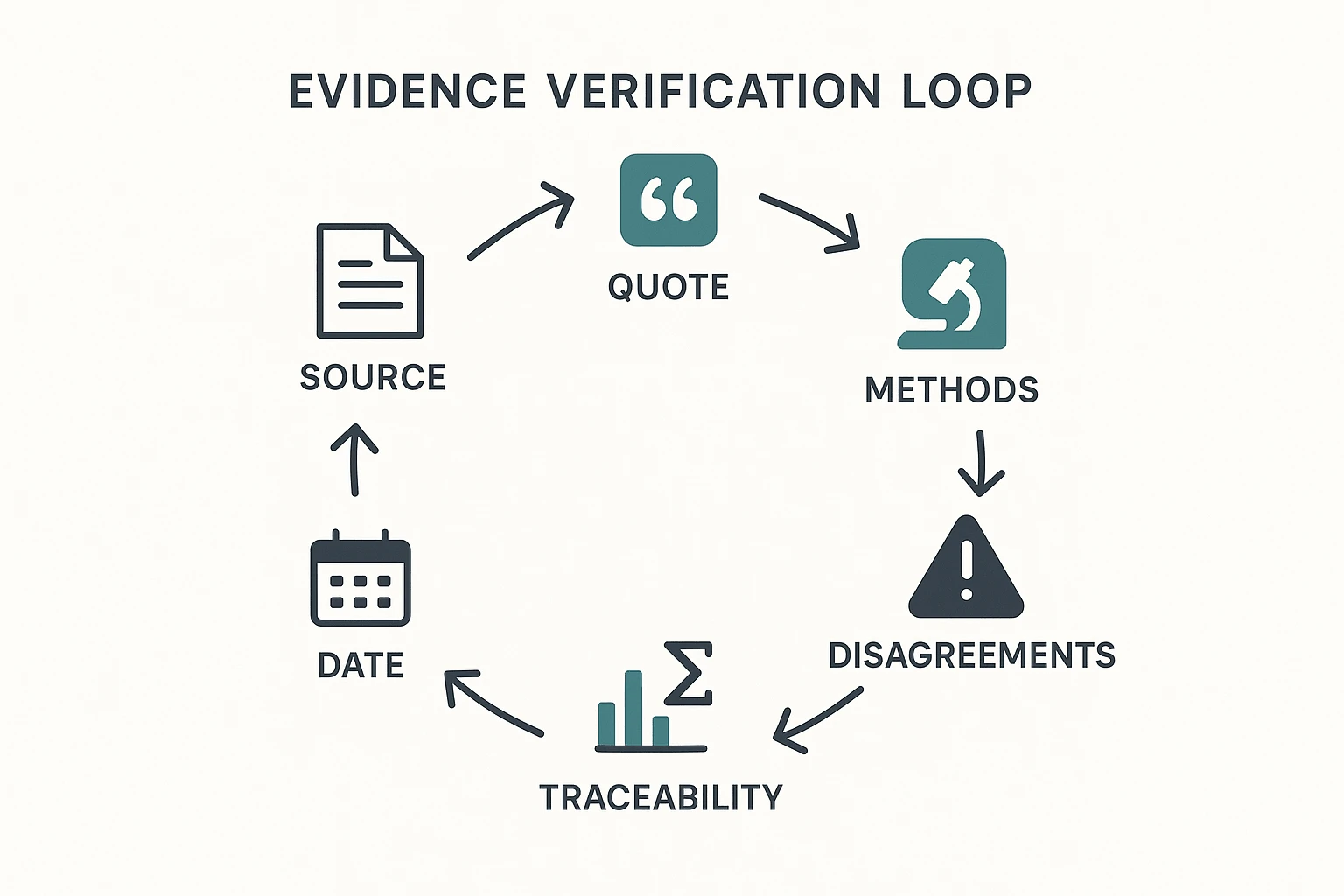
The 8-point evidence verification checklist (copy/paste)
Run this list on every "key claim" (anything that changes a decision):
- Source: Tag it as primary research, review, guideline, or preprint.
- Quote: Save the exact text that supports the claim (or transcript timestamp).
- Date: Confirm it's current enough for the question.
- Methods: Note design, population, controls, and endpoints.
- Stats: Record sample size, effect size, and CIs/p-values if relevant.
- Conflicts: Check funding, conflicts, and retractions/concerns.
- Comparisons: Find at least one strong source that agrees or disagrees.
- Traceability: Every claim gets a link/timestamp; unresolved items get flagged.
For methods and reporting quality, borrow from trial reporting norms: CONSORT 2010 Explanation and Elaboration (BMJ, 2010) states: "For each group, report numbers of participants randomly assigned, receiving intended treatment, and analysed for the primary outcome."
When to avoid using an agent
Don't use any agent as the final authority for high-stakes actions:
- No autonomous protocol changes.
- No dosing or clinical decisions.
- No safety-critical lab steps without human sign-off.
Use agents for drafting, indexing, extracting, and summarizing. Keep final judgment with a qualified reviewer.
Cross-tool triangulation to double-check fast
A fast "two-tool" check catches most failures in minutes:
- Use one academic-focused tool for papers.
- Use one web-focused tool for context.
- Then confirm disputed claims in the primary PDF.
If sources conflict, add a Scite-style check (citation context) to see whether later papers support or dispute the claim.
Document assumptions and uncertainties
Make uncertainty explicit so it doesn't leak into decisions:
- Add an Assumptions + Uncertainty section to each deliverable.
- Keep a changelog of prompts, sources, and decisions for reproducibility.
Trust rises when verification is easy and visible.
Final thoughts: a practical stack for faster scientific research
A fast research workflow only helps if you can trust it. In scientific settings, that usually means one thing: traceability (you can see what claim came from which source). So the "best" stack isn't one tool. It's a small set that covers internal evidence, external papers, and quick checks.
Use a 3-tool stack that matches how teams actually work
- Internal knowledge + deliverables: Use TicNote Cloud as the project hub. It turns meetings, interviews, and lab docs into project-scoped answers with clickable citations, then generates shareable outputs like cited reports, web presentations, and mind maps.
- Literature-first questions: Pair a paper tool (Elicit, Consensus, or Scite) with a web deep-research tool when you need the newest results. This avoids relying on stale training data.
- Quick checks: Use Perplexity for fast, source-linked answers. Then confirm key points in the original paper.
If you remember one rule, make it this: speed is nice, but traceability makes it usable. That's how you defend methods, results, and decisions in reviews.


