


 Extension
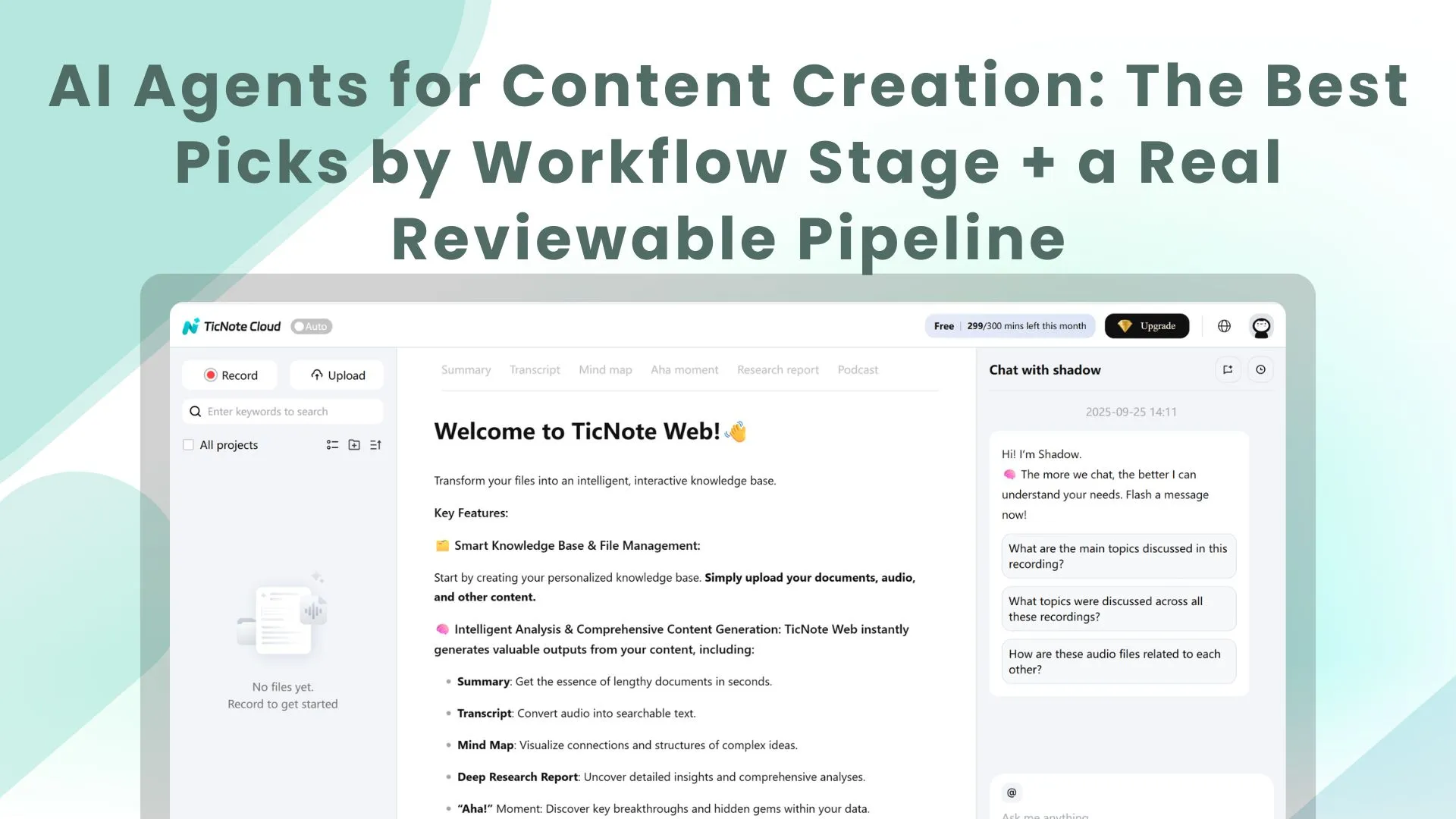
TL;DR: The best AI agent picks for fast, reliable content output
Start with TicNote Cloud if you want one place to turn calls, interviews, and podcasts into drafts you can ship—without copy-paste. It's the most direct option for AI agents for content creation when you need Projects, cited answers, and clean exports.
Your notes are scattered. Then the draft drifts from what was actually said, and reviews take longer than writing. With TicNote Cloud, your transcripts, files, and deliverables stay connected, so you can verify claims fast and publish with confidence.
Best picks by workflow stage:
- Meeting/audio → drafts: TicNote Cloud
- Research + web discovery: Perplexity
- General drafting + rewriting: ChatGPT or Claude
- Repurposing audio/video: Descript
- Automation + handoffs: Zapier
If you pick only one agent, pick the one with source traceability and review gates. That's how you move faster without shipping wrong facts.
What are AI agents for content creation (and how are they different from chatbots)?
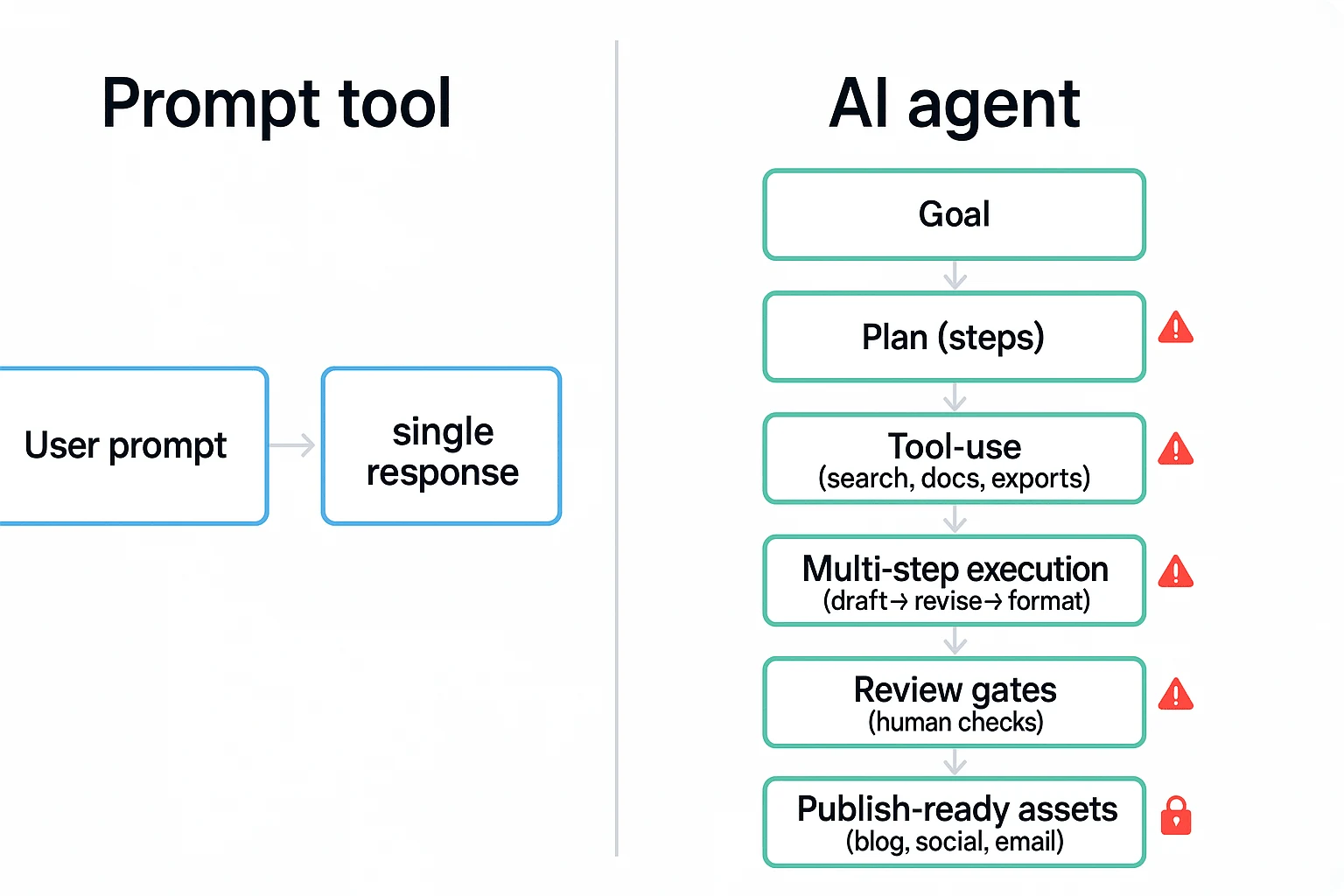
AI agents for content creation don't just "answer." They take a goal like "turn this podcast into a blog + 10 posts," then run the work in steps with checks. A chatbot is mostly a single-turn helper. An agent behaves more like a junior producer with a checklist.
Use this 5-point checklist: agent vs. prompt tool
If a tool misses two or more of these, treat it like a chatbot.
- It can plan: It breaks a goal into steps (outline → draft → polish → format).
- It can use tools: It can pull from files, search a Project, and export to formats.
- It keeps memory: It remembers your brand rules and prior context (within a workspace).
- It runs multi-step execution: It revises based on feedback and produces final-ready assets.
- It's auditable: It shows sources, steps, versions, or clickable evidence.
In practice, the big difference is control. Chatbots are fast. Agents are fast and repeatable.
Where agents fit in a creator pipeline (plan → create → publish → learn)
Most creators already run a pipeline. Agents simply plug into each stage.
- Capture inputs: meetings, interviews, podcast audio, rough notes.
- Research: pull supporting points, quotes, and definitions.
- Outline: choose angles, headers, and key takeaways.
- Draft: write the long-form piece.
- Repurpose: cut it into scripts, clips, emails, and threads.
- QA: fact checks, citations, tone, and "did we say the right thing?"
- Publish: format for your CMS and schedule.
- Learn: review performance and update what worked.
Here's where handoffs break: audio in one app, notes in Docs, context in Slack, outlines in Notion, drafts in a CMS. Each hop drops context. That's why "Project memory" matters. Tools like TicNote Cloud keep transcripts, files, and outputs together, so the agent can work from the same source of truth.
Common failure modes (and how to prevent them)
Agents can speed you up, but they can also fail in predictable ways.
- Hallucinated facts: Require citations or source links for any claim.
- Voice drift: Lock a style guide and add 2–3 "gold standard" examples.
- Context loss: Use a Project workspace and keep the transcript as the root source.
- Over-automation: Add human review gates before anything ships.
- Privacy leakage: Check data controls, permissions, and what's used for training.
Keep the decision simple for the list ahead: choose agents by job-to-be-done (drafting, repurposing, research, publishing) and by governance (citations, permissions, review steps). That's how you get speed without quality surprises.
Top AI agents for content creation (item cards + best-for guidance)
This is a top list + comparison, built with the same item-card rubric. That way you can scan fast, match each agent to a workflow stage, and avoid tool sprawl. The goal isn't "best AI." It's the best agent for the job you do every week.
1) TicNote Cloud (Featured)
Best for: AI meeting notes to content, transcription to blog post, and project-based deliverables.
Why it's different: It keeps your source material and your drafts together. You work inside Projects, edit transcripts (not read-only), and use Shadow AI to generate outputs with clickable citations back to the exact moments in your files.
Standout strengths
- Projects = long-context memory across meetings, interviews, and docs
- Editable transcripts for cleanup before you publish
- Shadow AI with clickable citations so reviews are faster and safer
- One-click deliverables + exports: Markdown, DOCX, PDF, HTML, plus mind maps and more
Mini workflow (audio → publishable assets)
- Upload or record → 2) Save into a Project → 3) Ask Shadow for a blog outline → 4) Generate the draft + social posts → 5) Export to Markdown/DOCX/PDF/HTML.
Good fit if: You create from calls, podcasts, interviews, coaching sessions, webinars, or user research—and you need outputs a human can verify.
2) ChatGPT
Best for: Flexible drafting, rewriting, ideation, and fast variations.
Where it can fail: It won't automatically stay grounded in your project sources. If you need citations or traceability, you have to bring the source text and enforce checks.
Best-practice prompt setup
- Paste transcript excerpts (not just summaries)
- Provide your outline + audience + tone
- Add a QA checklist (facts to verify, claims to avoid, required sections)
Good fit if: You want a general-purpose writing partner and you're comfortable running a strict review pass.
3) Claude
Best for: Long-context synthesis and cleaner prose, especially for "messy" notes.
How to use it well: Treat it like a second-pass editor. Have it restructure, tighten, and improve clarity after the first draft exists.
Human-in-the-loop note: Claude can still introduce subtle inaccuracies when it compresses ideas. Keep a final review gate, especially on numbers, names, and cause-effect claims.
Good fit if: You already have strong raw material and want crisp structure and voice.
4) Perplexity
Best for: Fast web research and cited summaries.
Where it fits in the workflow: Earlier than drafting—think briefs, angle discovery, outline building, and claim checks.
Guardrails that matter
- Verify primary sources (don't trust summaries alone)
- Re-check dates and definitions before publishing
Good fit if: You need quick research momentum before you write.
5) Jasper
Best for: Marketing copy consistency and template-driven outputs.
Why teams like it: It's built for repeatable formats—landing pages, product messaging, email sequences, ad variants—when you want "on-brand" at scale.
Good fit if: You're a small team shipping many similar assets weekly.
6) Copy.ai
Best for: Go-to-market snippets (ads, short posts, email, sales enablement).
Trade-off: It's less ideal as a single source of truth for long-form, factual content. Use it for distribution assets, not for the main narrative when accuracy matters.
Good fit if: Your bottleneck is short-form volume, not deep research.
7) Descript
Best for: Audio/video editing + repurposing.
Where it shines: As a "content repurposing agent." After you clean up the transcript, it helps you cut clips, polish captions, and shape show notes.
Good fit if: Your pipeline starts with recordings and ends with multi-channel output.
8) Zapier
Best for: Workflow "glue" across tools.
What it does in real life: Trigger actions from new recordings, route drafts to review, push approved content into a CMS, and log what happened. The key here isn't automation—it's approvals and audit trails so content doesn't publish by accident.
Good fit if: You have a multi-step workflow and want fewer manual handoffs.
Quick picks: solo creator vs. small team
If you're a solo creator: Start with TicNote Cloud for audio-first capture and reviewable drafts, then add ChatGPT or Claude for extra rewrites. You'll move faster because your sources stay attached to your content.
If you're a small team: Use TicNote Cloud as the shared Project hub (permissions + exports), pair Perplexity for research briefs, and use Zapier to route drafts through review. If you want a deeper operational setup, see this guide on building a content workflow that ships with QA and governance.
How do these tools compare side-by-side for real content workflows?
Most "AI agent" lists skip the details that break real workflows: what you can feed the tool, how it cites sources, how it remembers context, and how teams review changes. The fastest way to compare AI agents for content creation is to normalize them on the same workflow fields—then pick one "core system" and add specialists only where you're blocked.
Use a normalized table (capabilities that actually matter)
Here's the comparison table you should build (described in text). Put tools in rows, and keep columns consistent so you can score them 1–5.
- Input types: meeting audio/video, uploaded docs (PDF/DOCX/MD), web pages/URLs
- Citations + source linking: can it point back to transcript timestamps, files, or links?
- Project memory: does it store long-term context per client/show/project?
- Collaboration + permissions: owner/editor/viewer roles, sharing, team spaces
- Exports: Markdown, DOCX, PDF, HTML (plus audio/podcast outputs if needed)
- Automation hooks: API, Zapier/Make, Slack/Notion connectors, webhooks
- Review controls: approval gates, change traceability, "who did what," versioning
Pricing can be a note below the table (free/pro/team/enterprise tiers). Don't make it the main column. In content work, governance and exports usually matter more than a small monthly delta.
What to prioritize by team type
- Solo creators/podcasters: prioritize transcript accuracy, fast repurposing, and a simple QA pass (names, claims, links, tone). TicNote Cloud fits best as the core because it starts from recordings, keeps everything in a Project, and produces source-backed drafts you can verify.
- Small teams: prioritize shared Projects, permissions, reusable templates, and "memory" that carries across weeks of calls. TicNote Cloud is the default pick here too, because Project context compounds over time—so briefs, follow-ups, and content packs get more consistent.
- Enterprise: prioritize SSO, strict permissions, audit trails, and data policies. Ask vendors: Do you support SSO? Is data used to train models? Can you scope AI actions to a workspace? Can reviewers trace outputs to sources and see action logs?
Quick decision rules (pick based on your bottleneck)
- If meetings are the bottleneck → choose a meeting-centered workspace that turns recordings into drafts with sources (TicNote Cloud).
- If web research is the bottleneck → choose a research-focused agent that can browse, quote, and keep a bibliography.
- If clip output is the bottleneck → choose a repurposing/editor tool built for highlights, captions, and formats.
- If handoffs are the bottleneck → choose an orchestration layer (tasks, routing, approvals, publishing).
Best practice: start with one primary agent (your system of record). Then add 1–2 specialists only when you can name the exact step they'll own.
What does an end-to-end AI agent content workflow look like (with human review gates)?
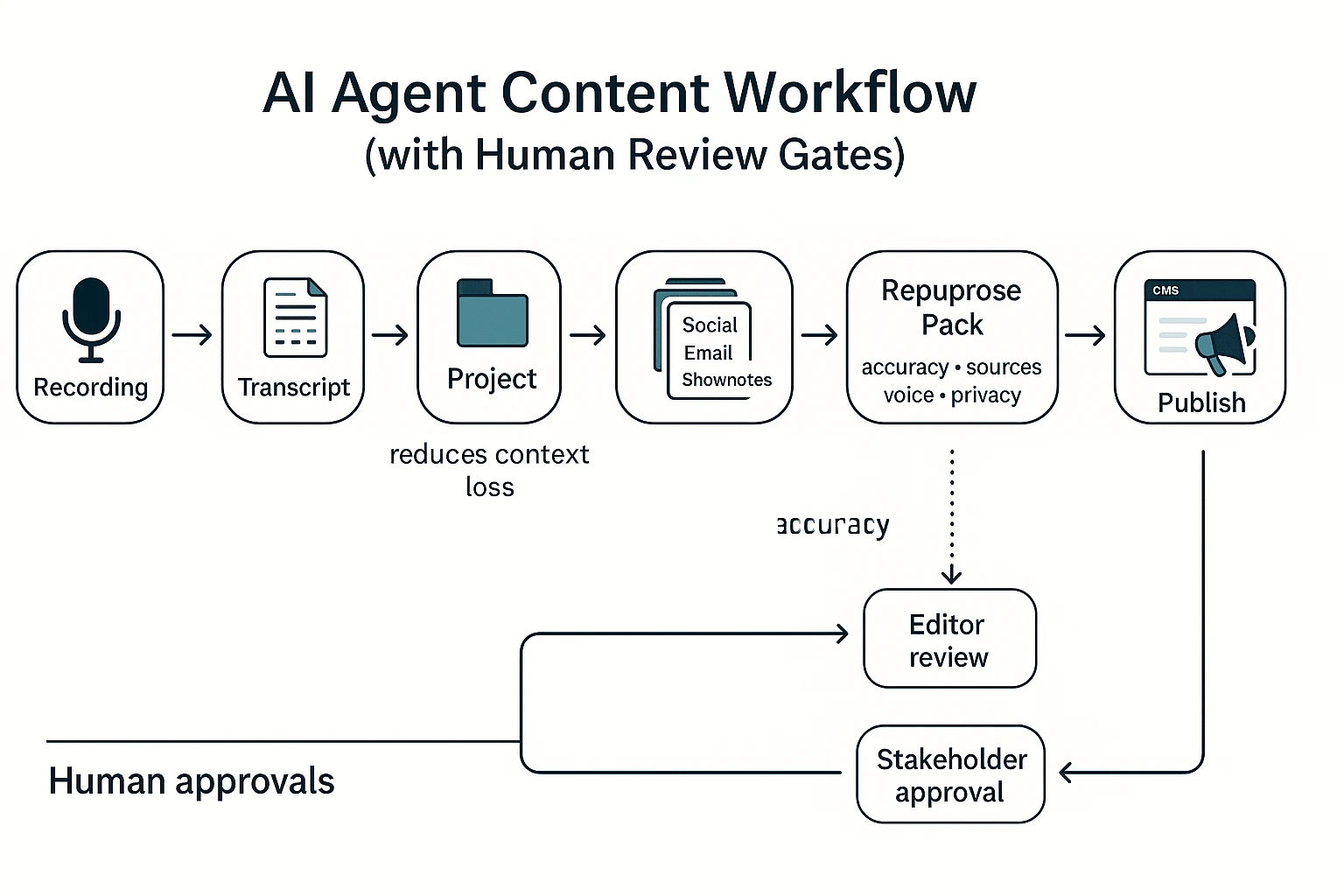
A strong workflow for ai agents for content creation starts with one reliable source: a recorded conversation. Then you turn it into a "Project" (a shared workspace that stores transcript + context) so every draft and rewrite stays tied to the same facts. The goal is simple: fewer copy-pastes, fewer missed details, and faster publishing with clear human approvals.
Run a simple workflow: recording → Project → draft → repurpose → publish
Here's one concrete pipeline that works for a client call or podcast episode:
- Record the call or episode
- Input: Zoom/Meet/Teams audio, a local recorder file, or a podcast track.
- Output: one audio/video file per session.
- Transcribe and clean the transcript
- Use a transcription tool that keeps speaker labels and timestamps.
- Fix names, acronyms, and key numbers once (this prevents errors from spreading).
- Store everything in a Project layer (the context anchor)
- Add the transcript, agenda, slides, and any linked docs into one Project.
- This Project layer cuts "context loss" because the agent can search across all files, not just the latest prompt.
- In TicNote Cloud, this is where Projects + editable transcripts + Shadow AI work together.
- Generate the first blog draft (from the Project, not from memory)
- Ask the agent for a post outline first.
- Then generate a full draft with sections that map to the outline.
- Require "click-back" support: quotes and claims should trace to the transcript or attached docs.
- Create a repurpose pack
- Social snippets (LinkedIn post, X thread), a short email, and 3–5 pull quotes.
- Optional: a show-notes style summary and a short Q&A FAQ.
- QA gate, then export and publish
- Export to Markdown or DOCX for your CMS workflow.
- Send social assets to your scheduler.
- Publish only after approvals (editor + stakeholder, if needed).
Add human review gates (don't "auto-publish")
Treat humans as the default safety layer. A practical approval chain for small teams is:
- Draft created → Editor review → Stakeholder approval → Final formatting → Publish
To avoid "version soup," keep one source of truth:
- The transcript (what was said)
- The Project memory (all supporting files and decisions)
- The current draft (the only editable publishing version)
If edits happen, push them back into the Project notes or transcript annotations. That way the next asset improves instead of drifting.
Use this content QA checklist every time
Run this checklist in under 10 minutes:
- Accuracy checks
- Names, titles, company names
- Numbers, dates, pricing, product specs
- Direct quotes match the transcript
- Source checks
- Citations present for any non-obvious claims
- Links work and point to the right page
- "According to…" lines map to a real source
- Brand voice checks
- Tone matches your style guide
- Remove forbidden phrases and filler
- Keep reading level simple (aim for short sentences)
- Compliance + privacy checks
- Remove personal data (phone, address, health info)
- Confirm you have permission to publish quotes
- Keep client-sensitive details out of public drafts
Try TicNote Cloud for Free and turn one recording into a reviewed publish-ready content pack.
How to turn meeting notes into content with an agent (step-by-step)
If you want a repeatable "audio to assets" workflow, TicNote Cloud is a clean example of how AI agents for content creation should work: they don't just summarize—they search, organize, and generate deliverables inside a project you can review. Below is a practical, review-first pipeline that starts with one meeting or podcast and ends with a blog draft plus a repurpose pack.
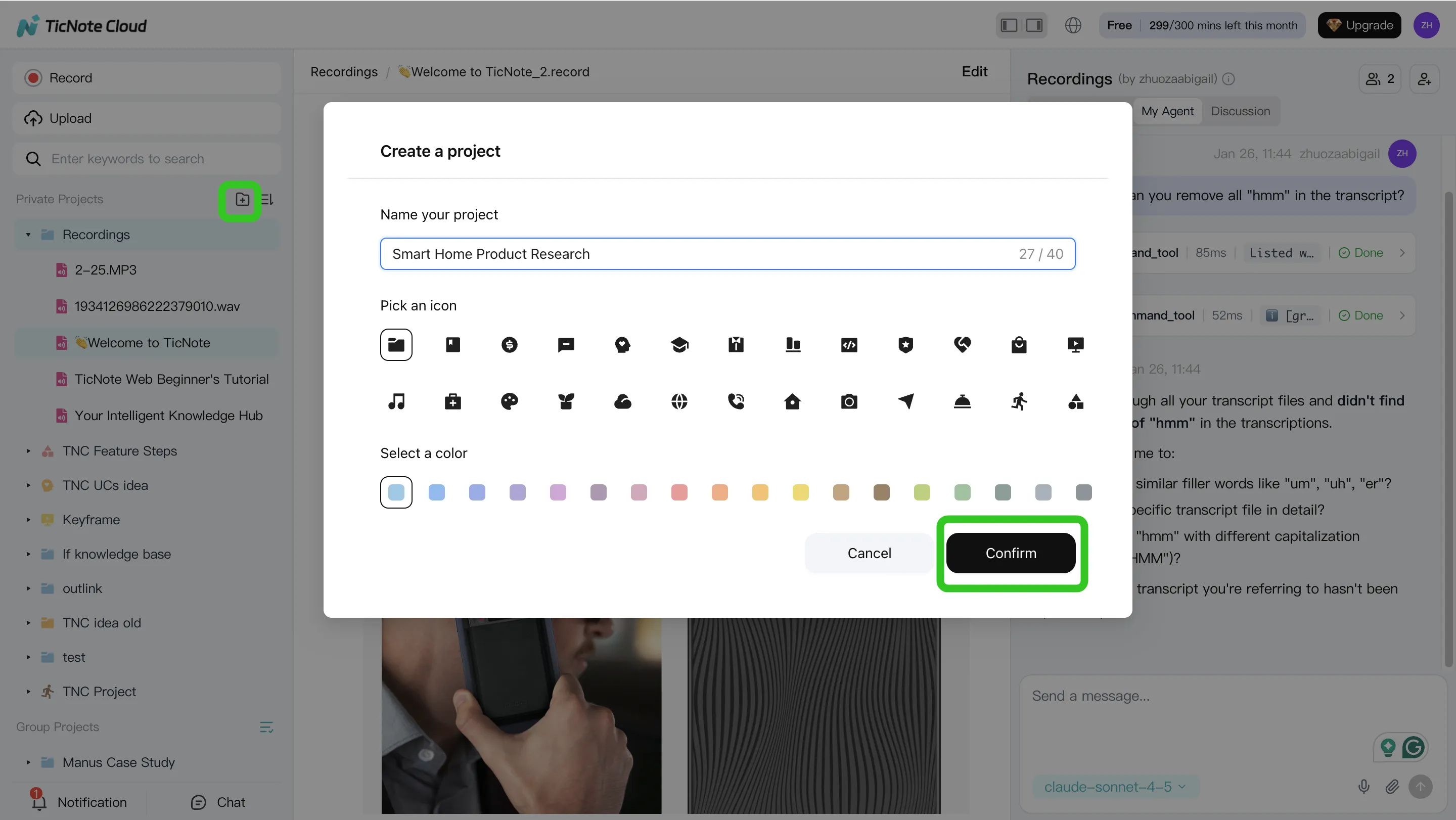
Step 1) Create or open a Project and add content
Start by creating a Project for a series, client, or topic. Think of a Project as the "container" that holds your recordings, docs, and outputs in one place.
In the web studio, add source material in the way that fits your day:
- Upload audio/video (a meeting recording, a podcast episode, or an interview)
- Attach supporting docs (briefs, product notes, outlines) so the agent has context
- Record meetings over time so the Project memory compounds
You can upload files two ways:
- Direct upload from the file area
- Upload from the Shadow AI panel (right side) using the attachment icon, then ask Shadow to save it in the right folder
Step 2) Use Shadow AI to search, analyze, edit, and organize
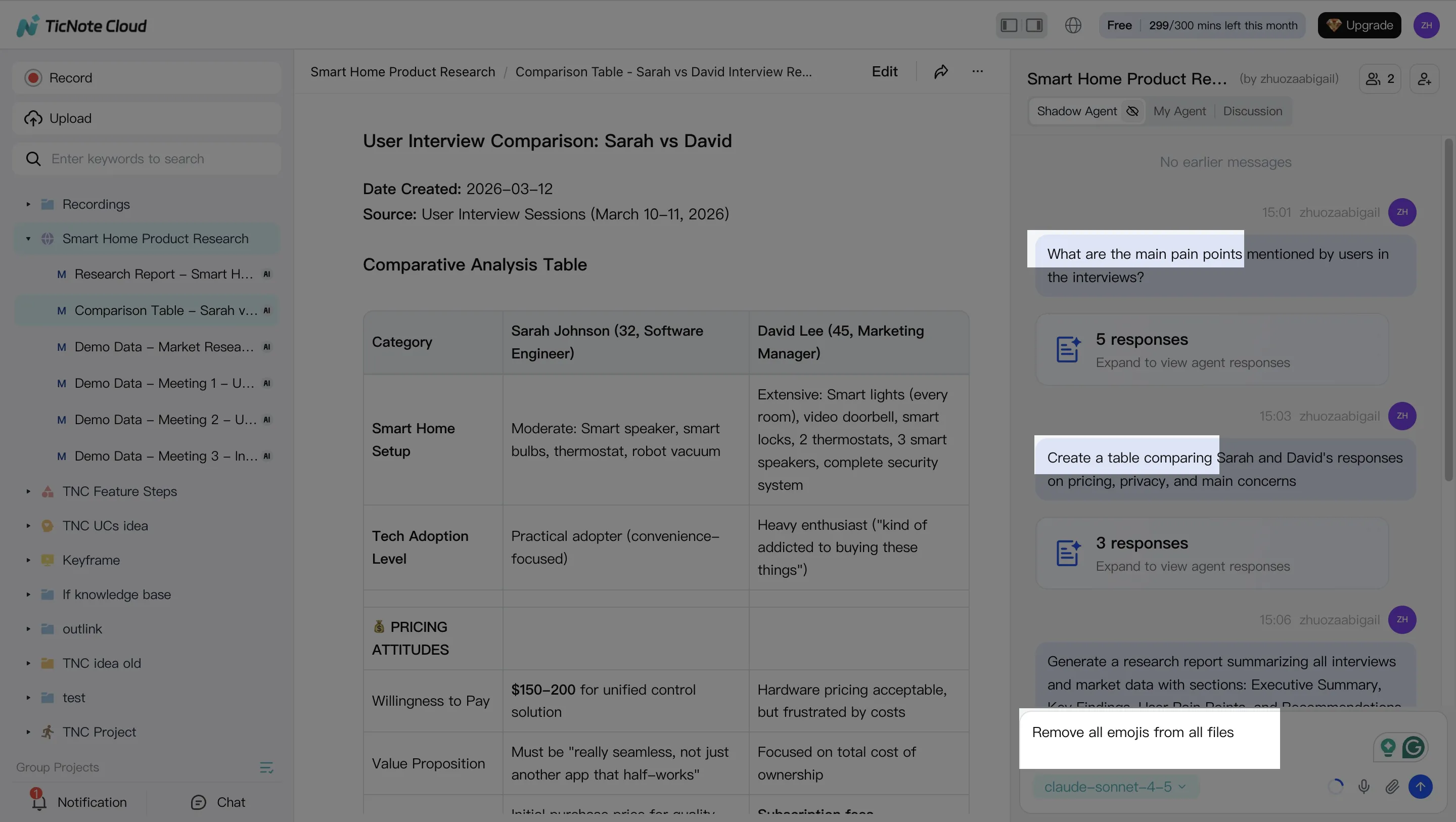
Once your files are in the Project, switch from "reading notes" to "asking for outcomes." Shadow AI sits on the right side of the screen, ready to search across everything inside the Project.
Use it for two fast passes:
- Search & analyze: pull themes, decisions, pain points, and open questions across one or many meetings
- Edit & organize: turn messy conversation into clean structure (tables, action items, and rewritten sections)
Before you generate anything, do a quick transcript cleanup. Fix speaker names and key terms. Even 5 minutes here improves every downstream draft.
Step 3) Generate deliverables (blog + repurpose pack)
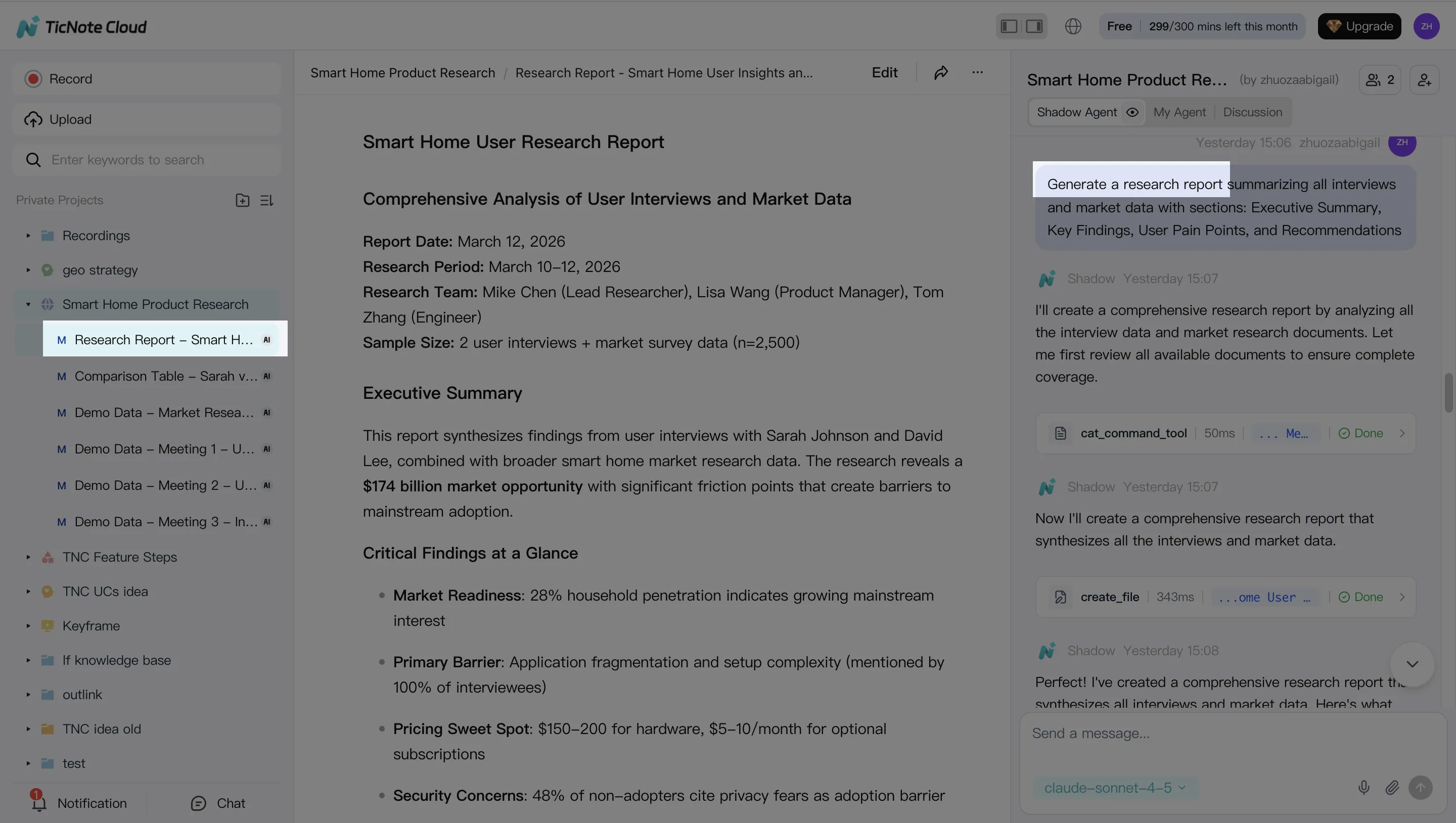
Now generate content from the Project, not from a blank prompt. You can ask Shadow AI directly or use the Generate button to produce deliverables in the format you need.
A simple set that covers most creator workflows:
- Blog post draft (from the outline and the cleaned transcript)
- Newsletter summary (short, skimmable, with key takeaways)
- Social posts (a handful of hooks + 1–2 quote cards worth of text)
- Show notes or a short research brief (when the recording is audio-first)
Exports matter because they remove copy-paste work. Use Markdown/DOCX/PDF for editorial workflows, and HTML when a web presentation helps.
Step 4) Review, refine, and collaborate (human-in-the-loop)
Treat the first draft as a draft. Review it like an editor, then run targeted rewrites instead of regenerating everything. For example, ask for a tighter intro, clearer headings, or a more specific CTA.
Before publishing, verify quotes and key claims against the transcript. In TicNote Cloud, you can jump from generated content back to the original source for quick checks.
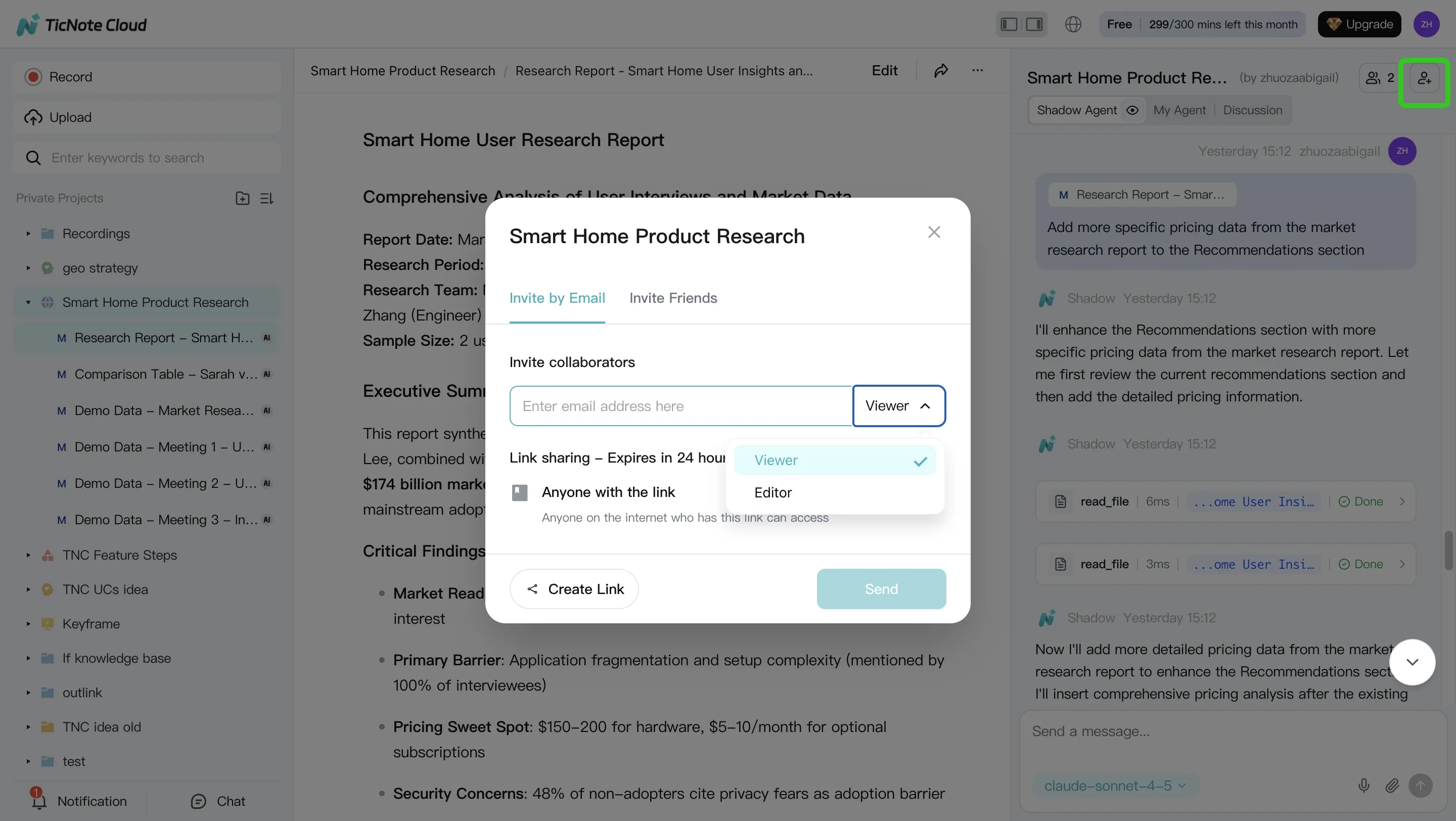
If you work with others, share the Project with permissions (Owner/Editor/Viewer). Teammates can comment, request changes, and keep the workflow controlled.
Mobile path (same workflow, just faster capture)
On mobile, capture or upload audio, add it to the right Project, and follow the same Shadow AI steps: extract themes, clean key transcript errors, generate a draft, and export. That's especially useful when ideas happen right after a call and you want to "bank" the source while it's fresh.
If you're evaluating platforms, this workflow maps closely to what you'll see in an all-in-one AI workspace comparison, where Projects, exports, and review control often decide whether agents are actually usable day-to-day.
Try TicNote Cloud for Free and turn your next recording into a draft you can review.
What metrics and ROI should you track when adopting content agents?
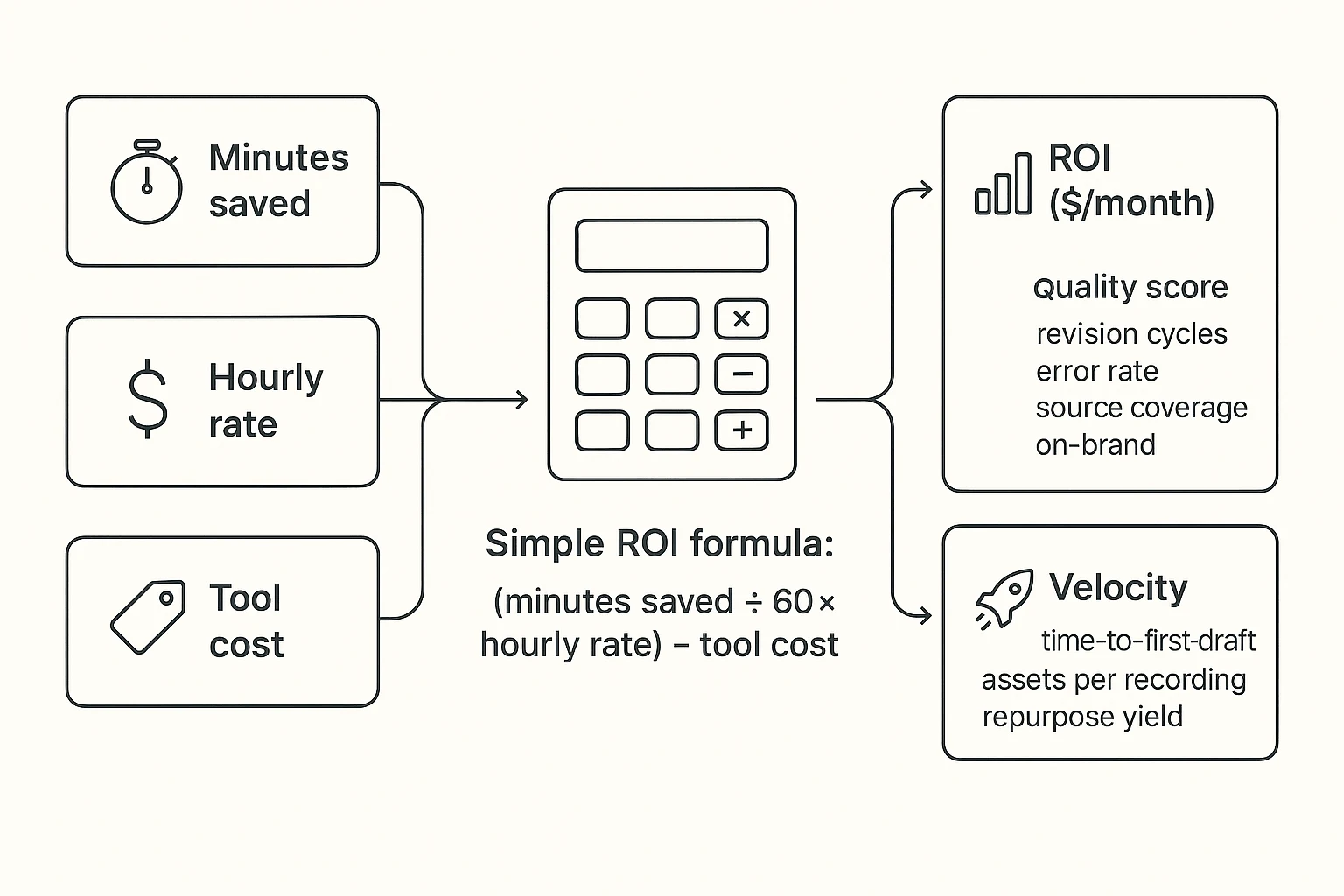
If you can't measure it, you can't improve it. When you adopt AI agents for content creation, track three buckets: ROI (money), quality (trust), and velocity (output). Keep it simple so you'll actually do it every week.
Use a simple ROI formula you can run in 2 minutes
Start with one content asset type (like a blog post). Baseline your time for each step, then track minutes saved.
ROI per month = (minutes saved ÷ 60 × hourly rate) − tool cost
Track savings by step:
- Transcript cleanup minutes
- Outline + first draft minutes
- Repurpose minutes (social, newsletter, video script)
Example: Save 180 minutes/week at 60/hour. That's 180/week, or about 720/month. If your tools cost 30/month, your ROI is about $690/month.
Track quality with 4 lightweight KPIs
Speed doesn't help if quality drops. Use KPIs that match your review gates:
- Revision cycles per asset (goal: fewer rounds)
- Factual error rate (errors per 1,000 words)
- Source coverage (% of key claims backed by a note, transcript quote, or link)
- On-brand pass/fail (voice, audience, CTA, banned words)
Keep a tiny error log. Fix the prompt or template after each repeat error.
Measure velocity: output per recording (your real leverage)
For audio-first workflows, "yield per session" matters most.
Track:
- Time-to-first-draft (minutes)
- Assets shipped per recording (blog + 5 posts + newsletter)
- Repurpose yield per hour recorded (assets/hour)
If you want a deeper KPI set for agent governance, use this guide to track KPIs, ROI, and review controls for agent workflows while keeping your process auditable.
Final thoughts: build a small "agent stack" before you automate everything
The safest way to use ai agents for content creation is to start small. Pick one "primary" agent that matches your main input. For most creators, that input is conversations: meetings, interviews, and podcasts. Then add one specialist agent for either research or repurposing.
Start with a primary agent that keeps you source-locked
Your first agent should hold the raw source and the drafts together. That means transcript-as-source, project memory (so context stacks), and exports that match your workflow. A meeting-centered workspace like TicNote Cloud fits this role well: it keeps calls, transcripts, and deliverables in one Project, and its Shadow AI can answer and write with citations back to your files.
Add one specialist—and keep human gates
After that, add one tool that does one job well (SEO brief research, social repurposing, or image generation). Don't chain five tools yet. Every link adds risk and rework. Keep simple review gates:
- Verify key claims against citations or transcript timestamps
- Check brand voice and tone before publish
- Approve final exports (blog, newsletter, shorts scripts) in one place
Automation only helps if outputs are reviewable—and if you can trace every paragraph back to a source.
Try TicNote Cloud for Free and generate a reviewable deliverable from your next recording.


