


 Extension
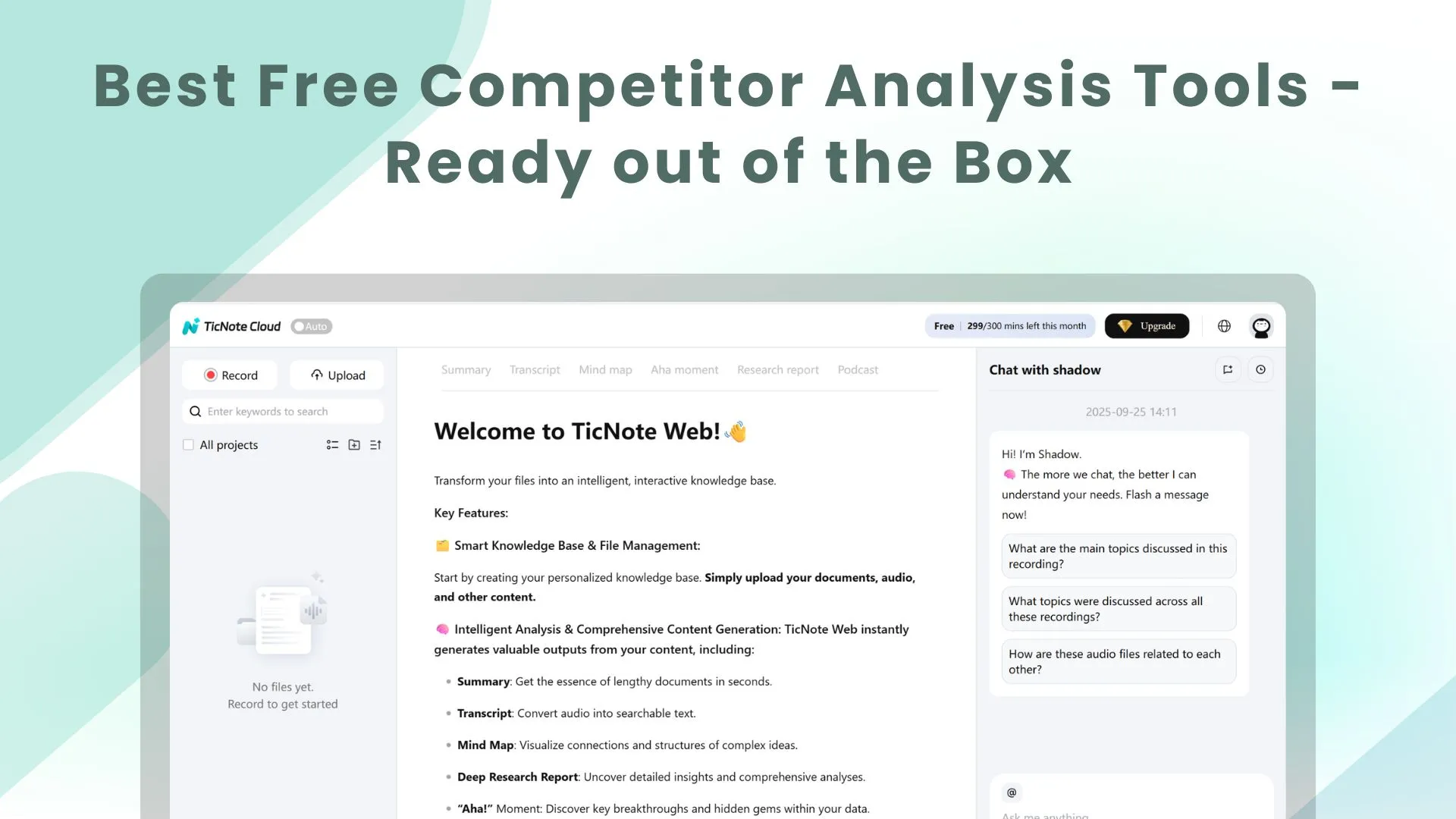
TL;DR: the fastest free stack for competitor analysis skill agents
Try TicNote Cloud for free first if you want the best free competitor analysis tools to end in a usable brief, not a messy bookmark list. Run this 30-minute stack weekly: Google Alerts for mentions, Similarweb Free for traffic channels, G2/Capterra for review pain, LinkedIn for hiring signals, Wayback Machine for pricing shifts, and Wappalyzer or BuiltWith for tech clues.
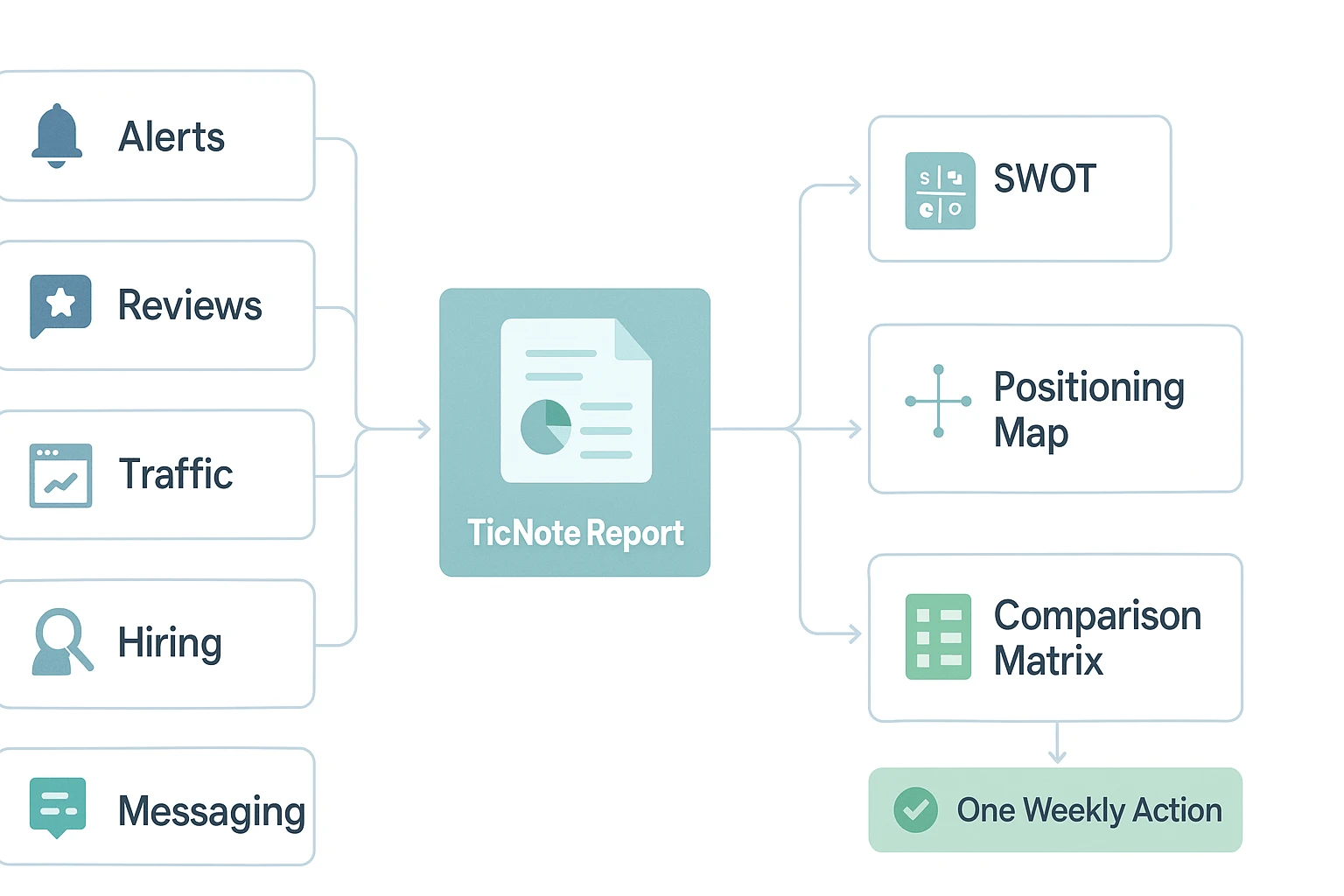
Signals pile up fast. If you don't synthesize them, they become noise and decisions slip. TicNote Cloud's competitor-analysis skill agent turns public findings into SWOT analysis, a positioning map, and a visual comparison matrix you can use for one sales, SEO, product, or pricing move.
The best free competitor analysis tools to start with
The best free competitor analysis tools work best on public signals: mentions, reviews, website copy, tech stack clues, estimated traffic, search demand, and social activity. Don't expect perfect numbers. The goal is a repeatable system that turns 5–10 signals into one clear decision each week.
Start with TicNote Cloud when you need a finished brief
TicNote Cloud's competitor-analysis skill agent is an AI research assistant that turns public competitor signals into structured competitive intelligence reports for small business owners, founders, and lean marketing teams. It's best when you don't want a folder of links; you want a brief your team can act on.
In listicle terms, it fits the "analysis layer" of your free stack. Feed it competitor names, URLs, niche details, and focus areas such as pricing, reviews, social media, or product range. It can then produce:
- A structured report with an executive summary, competitor profiles, gaps, and recommended actions.
- A SWOT analysis tool-style output covering strengths, weaknesses, opportunities, and threats based on sources.
- A positioning map tool-style output showing how competitors cluster by value props, target users, or segments.
- A visual HTML comparison matrix you can share with a client, founder, or sales team.
The trade-off: output quality depends on your inputs and how much public data exists. For teams comparing research tools beyond competitor work, this guide to AI workspace options gives useful context.
Use Google Alerts for public mentions
Google Alerts is a simple competitor monitoring tool for news mentions, PR, product launches, funding notes, and executive changes.
Set alerts for:
- Competitor company names.
- Product names.
- Founder or executive names.
- Category terms like "AI meeting notes software" or "local CRM platform."
Use daily alerts for normal tracking. Use "as it happens" only for high-priority competitors. The main limit is noise: it misses many social mentions and can surface weak matches.
Check Similarweb Free for traffic direction
Similarweb Free is useful for directional traffic estimates. Treat the data as a trend line, not an accounting report.
Check these once per month:
- Visit trend: growing, flat, or declining.
- Top channels: search, direct, referral, social, or paid.
- Referring sites: possible partners, affiliates, or PR wins.
- Geographic mix: where demand appears strongest.
Its free plan has limited history, and estimates are sample-based. Use it to spot movement, then verify with other signals.
Read G2, Capterra, and review sites for customer pain
Review sites are strong for voice-of-customer research. Look for repeated complaints about missing features, confusing pricing, weak support, onboarding friction, or poor integrations.
The best method is to group reviews by theme over time. If 12 recent reviews mention slow setup, that's a positioning chance for your landing page or sales deck. The limit is selection bias: some reviews are from unusually happy, angry, or incentivized users.
Watch LinkedIn for hiring and positioning signals
LinkedIn helps you understand where a company is investing. Job posts often reveal whether a competitor is building product, expanding sales, hiring enterprise roles, or entering new regions.
Track:
- New roles by team and seniority.
- Leadership posts.
- Product marketing language.
- Case studies and launch narratives.
This signal is indirect. Companies can spin progress, and hiring plans can change.
Use Wappalyzer, BuiltWith, and Wayback Machine for hard clues
Wappalyzer and BuiltWith can reveal CMS, analytics, chat, payment, CRM, and ad tools. Stack changes may hint at a new sales motion, ecommerce push, or vendor churn. Detection isn't perfect, and tools behind login screens stay hidden.
Wayback Machine adds the time layer. Compare old and new snapshots of homepages, pricing pages, and product pages. Capture what changed: headline, segment, packaging, proof points, or call to action.
Add Google Trends for demand context
Google Trends shows relative demand, not search volume. Use it for brand-versus-category comparisons, seasonal patterns, and breakout topics. If your category rises while one competitor's brand falls, that's a useful opening for SEO and paid search tests.
These are competitor monitoring tools, not answers by themselves. The value comes from turning public signals into a decision: rewrite a page, adjust pricing, brief sales, prioritize a feature, or test a new segment.
How do these free tools compare at a glance?
Use this table as a quick sorter for the best free competitor analysis tools, not a final verdict. The scorecard grades setup time (5 = fastest), output quality (5 = decision-ready), free-plan value (5 = fewer useful limits), and reliability (5 = easiest to verify with other sources).
| Tool | Best for | Setup time | Free-plan value | Strongest output | Main limitation | Data reliability |
| TicNote Cloud competitor-analysis skill agent | Structured CI; messaging, reviews, pricing | 4 | 4 | Report + SWOT + positioning map + visual comparison matrix | Needs clear competitor inputs | 4 |
| Google Alerts | News and mentions | 5 | 5 | Early-warning mention feed | No scoring or synthesis | 3 |
| Similarweb Free | Traffic and channels | 4 | 3 | Directional traffic/channel snapshot | Sampling and estimate gaps | 2 |
| Review sites | Voice of customer (VoC) | 3 | 4 | Pain-point themes | Skewed toward vocal users | 4 |
| Hiring and positioning | 3 | 3 | Headcount, roles, and message shifts | Limited export and filtering | 3 | |
| Wappalyzer/BuiltWith | Tech stack | 4 | 3 | Stack fingerprint | May miss hidden tools | 3 |
| Wayback Machine | Messaging and pricing history | 4 | 5 | Historical narrative | Snapshots can be incomplete | 4 |
| Google Trends | Demand | 5 | 5 | Relative demand curve | No absolute search volume | 3 |
Read the scores as a decision filter
Best overall for most small teams: TicNote Cloud. It turns scattered public signals into a stakeholder-ready brief, which saves the most time when you need a SWOT analysis, positioning map, and comparison matrix in one place.
Best always-on monitoring: Google Alerts. It's simple, free, and useful for catching launches, PR, partnerships, and executive quotes.
Best for directional market sizing: Similarweb Free. Use it for channel mix and relative scale, not exact traffic counts.
The reliability layer matters most. Strong moves rarely come from one source. Triangulate a traffic estimate, a review trend, a hiring signal, and a messaging change before you change pricing, roadmap, or sales positioning.
How to generate a competitor report (SWOT, positioning map, comparison matrix)
These steps use TicNote Cloud as the example workflow, but you can copy the same process with other free competitive intelligence tools. The goal is to turn public signals into a clear report: SWOT analysis, a positioning map, and a visual comparison matrix, not just another list of tabs.
1. Define the market you want to compare
Write one tight sentence: "We sell project management software to 10–50 person agencies in the U.S." Then pick one focus area for this run: pricing, reviews, social media, or product range. One focus keeps the report useful.
2. Choose 5–10 competitors
Include direct rivals plus 1–2 category alternatives. For example, a meeting AI tool might compare transcription apps, note-taking workspaces, and general AI assistants. If you're weighing broader AI options, this guide to work-focused ChatGPT alternatives can help frame the category set.
3. Run the competitor-analysis skill agent
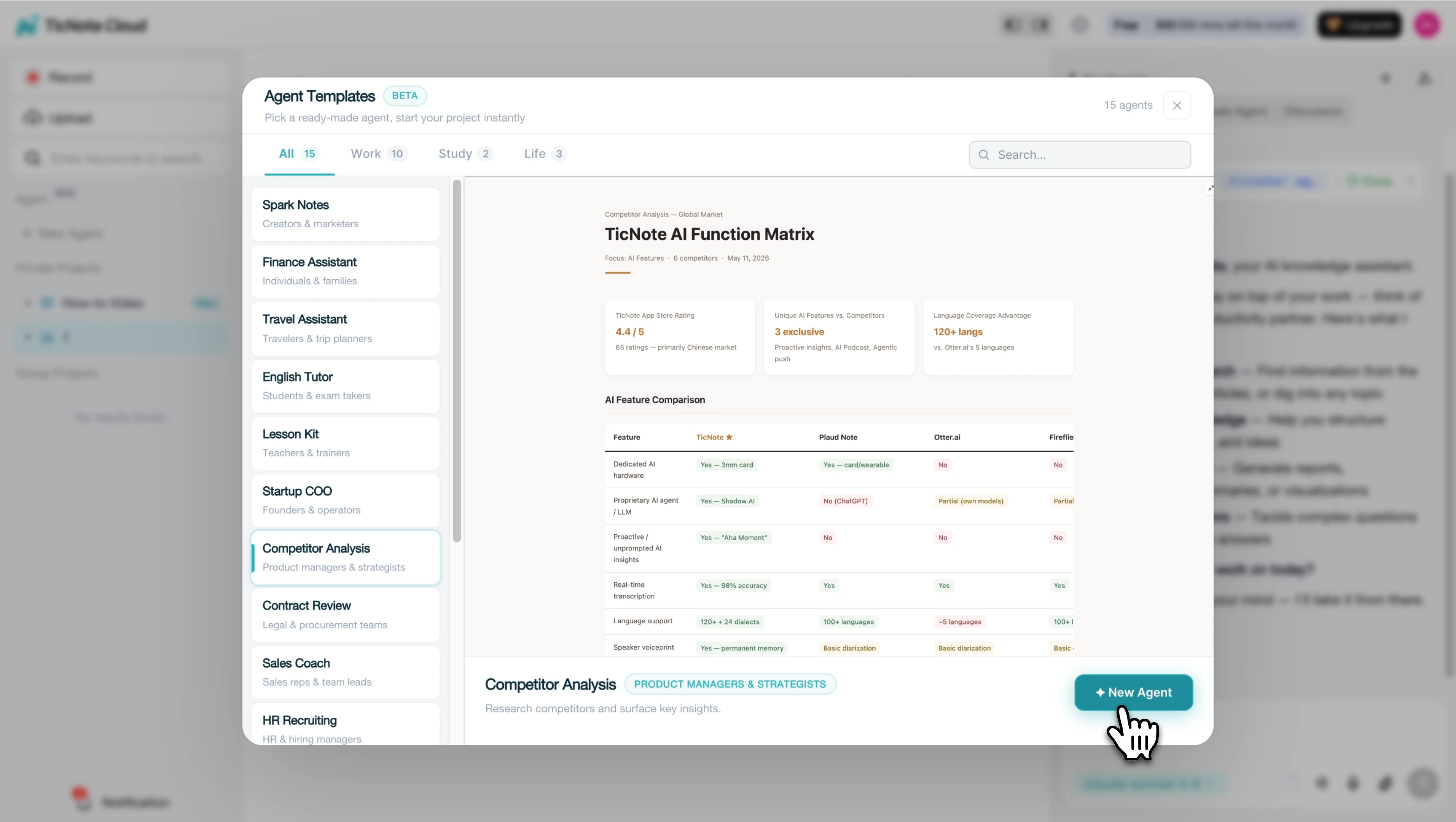
In TicNote Cloud , click Add Agent, open the Skill Agent library, and add the Competitor Analysis skill agent.
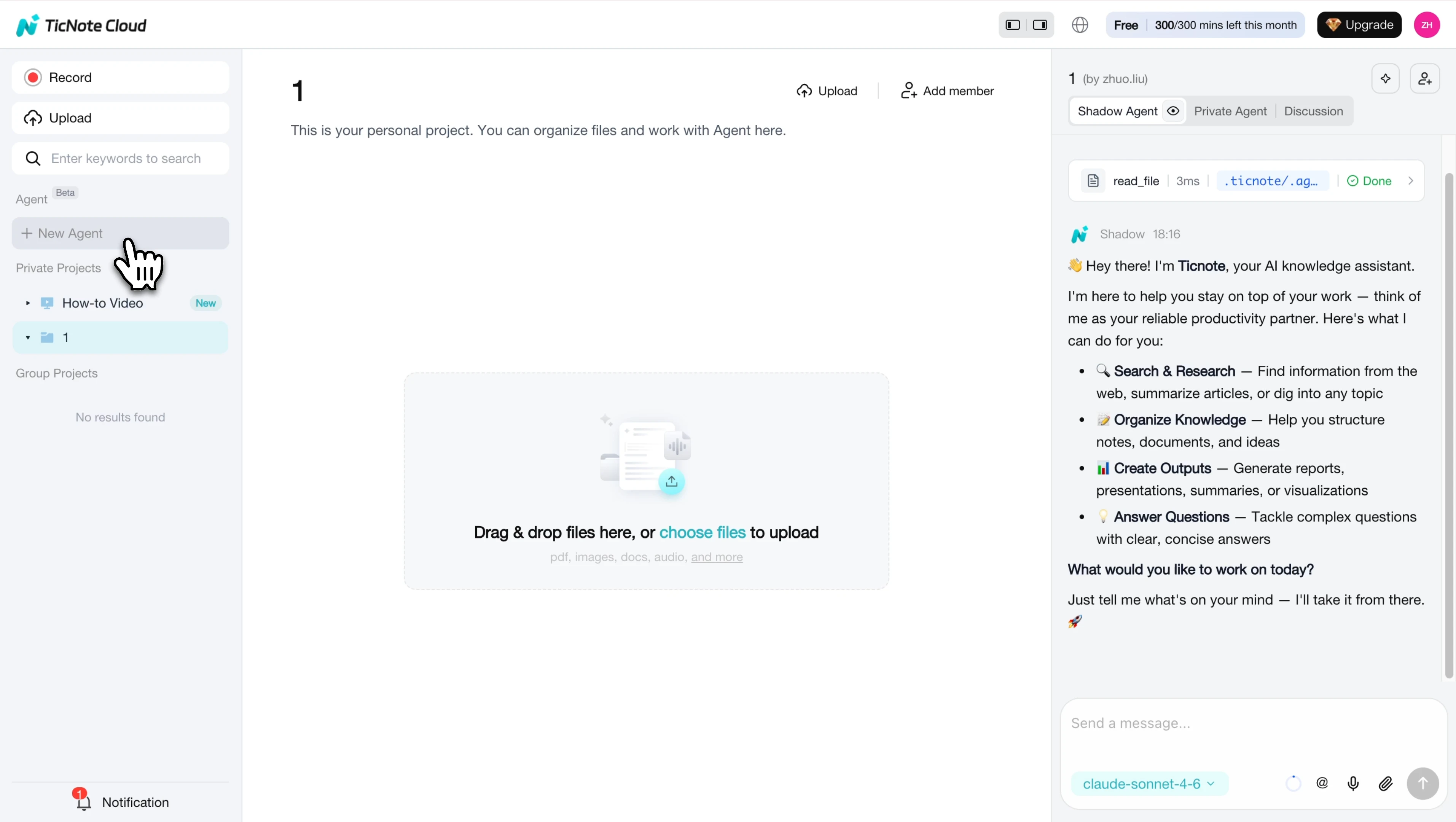
After it appears in your agent list, select it to start the report workflow.
Enter your niche, location, 5–10 competitor names or URLs, and optional focus area.
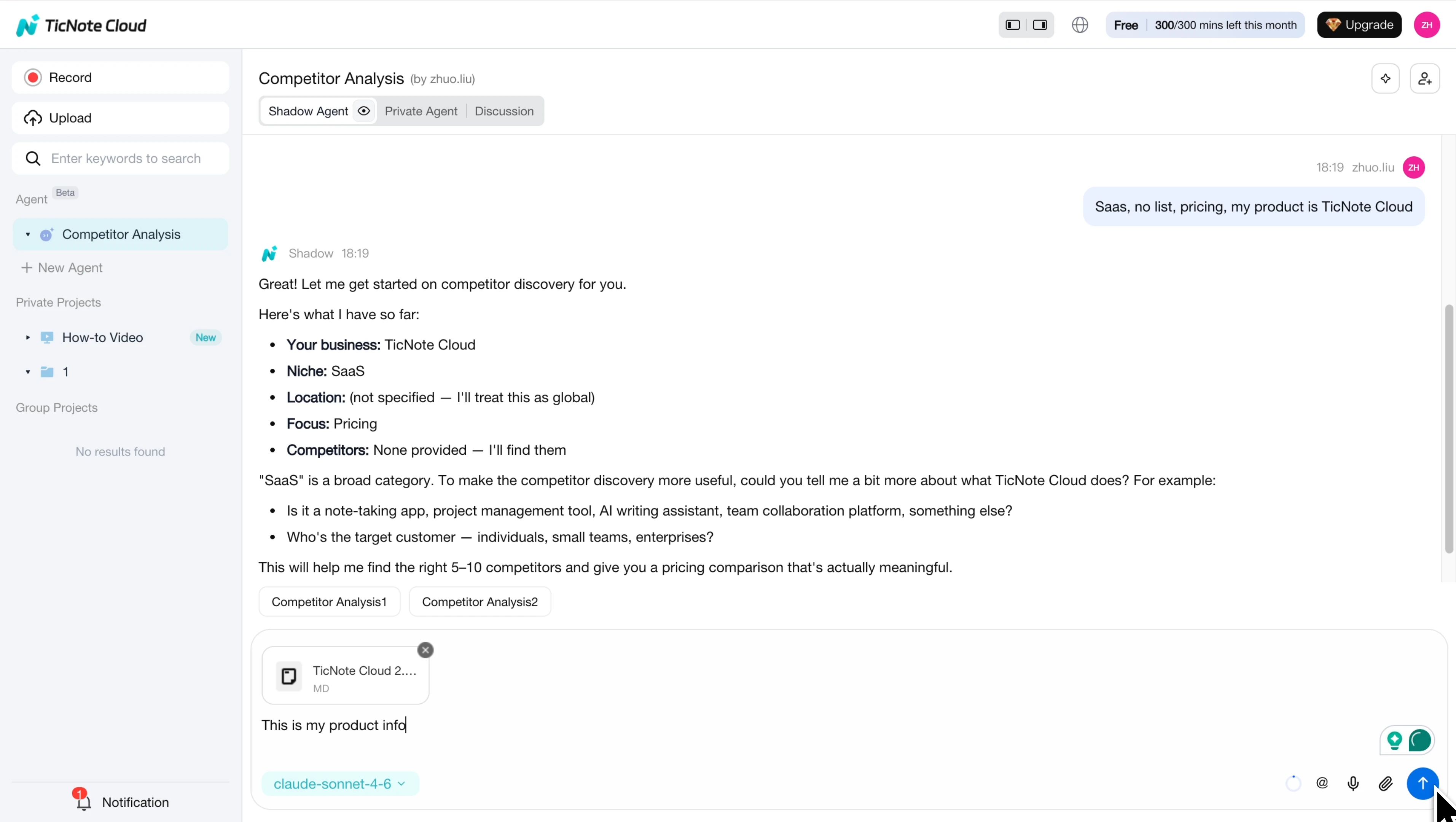
The agent returns a structured competitive intelligence report with an executive summary, head-to-head table, competitor profiles, market gaps, recommended actions, SWOT cards, a positioning map, and a shareable HTML comparison matrix.
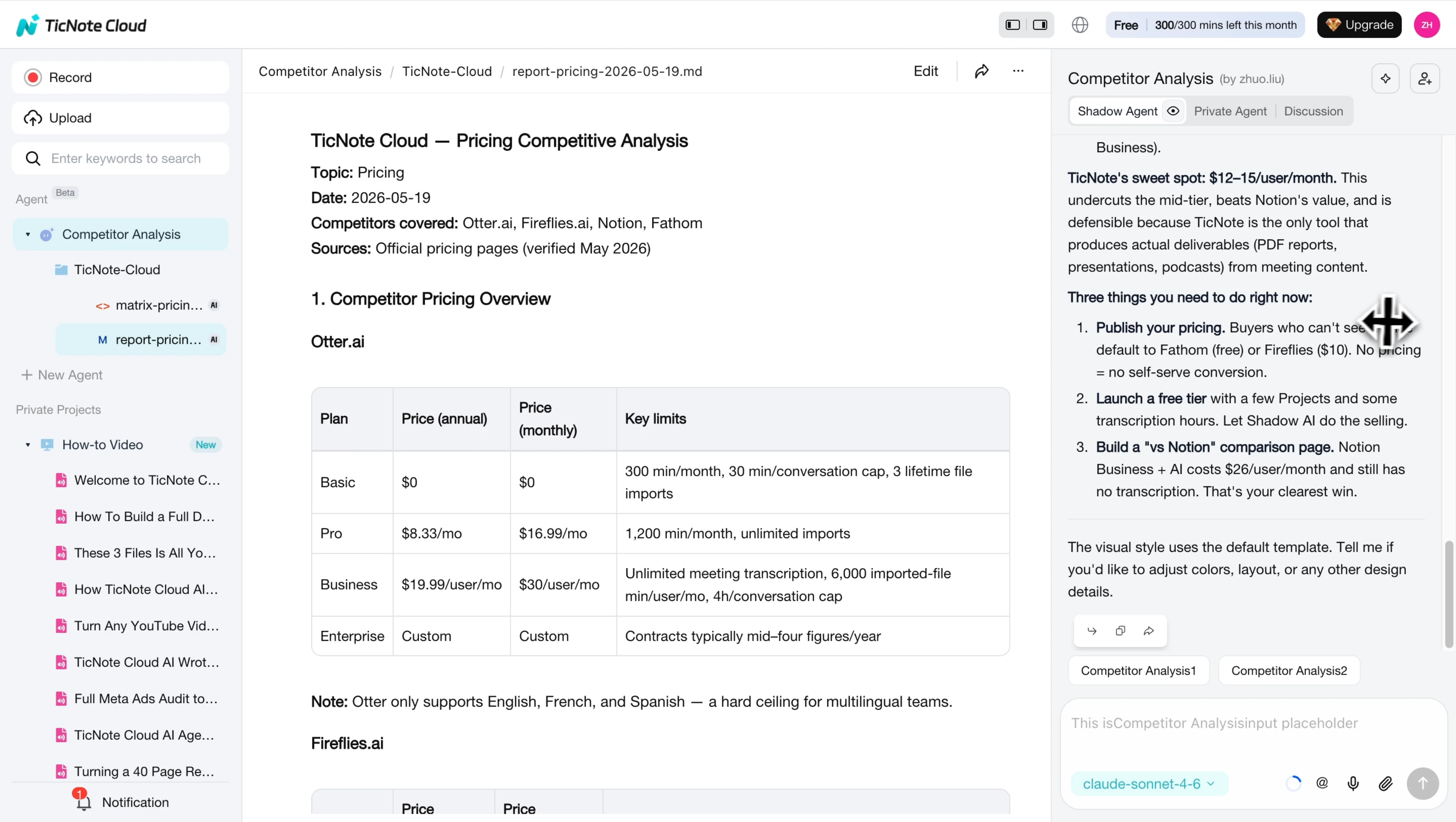
Open the final files to review the written report and the visual matrix.
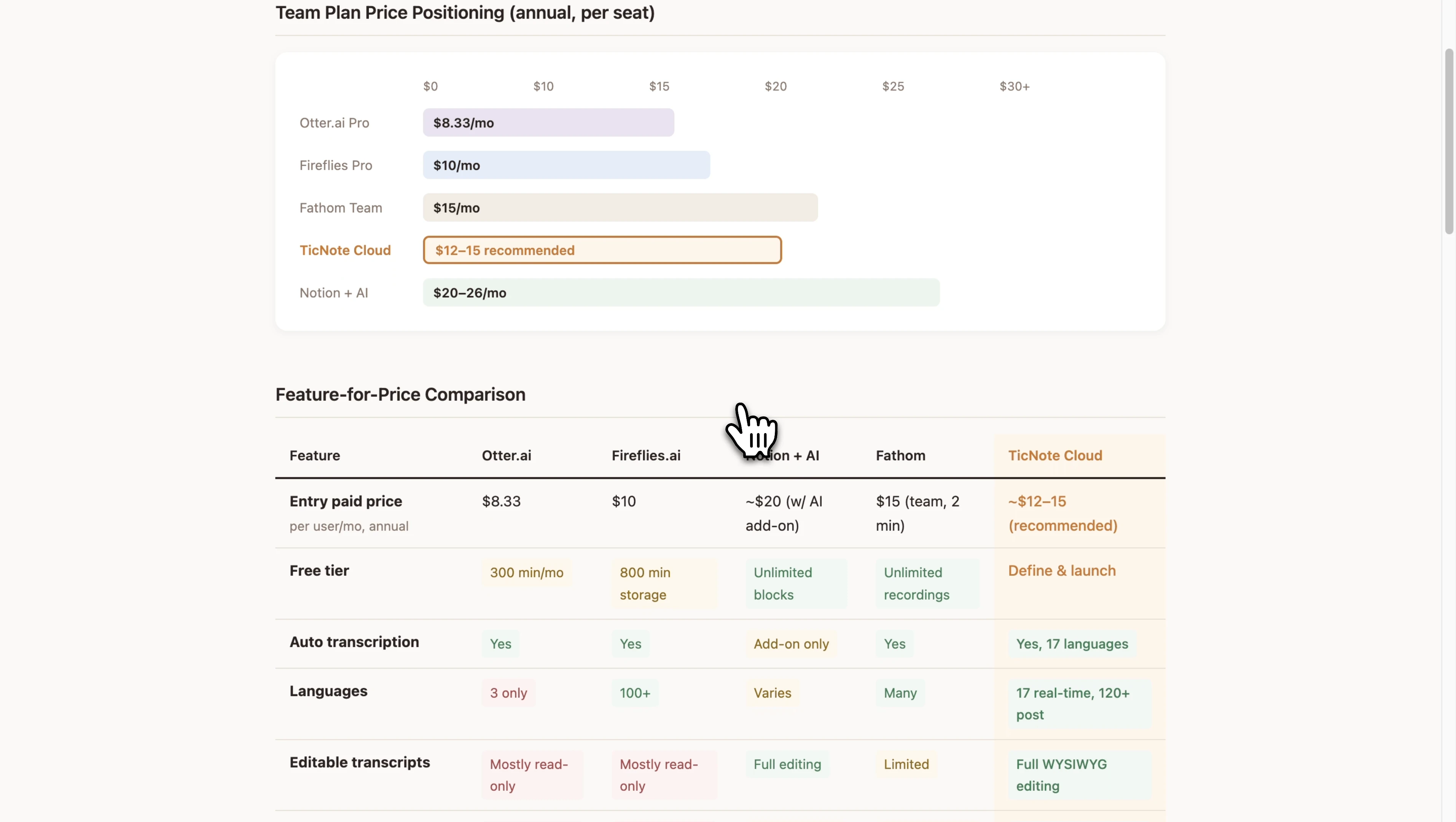
Here is part of the demo output for TicNote Cloud competitor pricing research - the ONE click output.
It focuses on not only the pricing competitor analysis, but also USP/ratings/social media and more.
If you are interested in the skill, please try it now in the TicNote Cloud "Agent" feature.
4. Turn one insight into one decision
Use the report to make one move this week:
- Sales: reviews mention "slow support" → update your pitch with faster response proof.
- SEO: a rival pushes one use case → publish one landing page and two support articles.
- Product: a competitor hires a Head of Partnerships and launches integrations → prioritize one matching integration.
5. Use the same workflow on mobile
On the app, complete the same inputs: niche, location, competitors, and focus. When the report is ready, share or export the matrix and written brief for your team, client, or founder review.
How to choose the right product
The best free competitor analysis tools are not equal. For most lean teams, the right choice is clear: start with one tool that creates an action-ready brief, then add 1–2 monitors for fresh signals. This keeps competitive intelligence focused, shareable, and fast enough to repeat every week.
Start with the finished brief
Choose TicNote Cloud when you need a structured CI report for sales, SEO, or product decisions. Its competitor-analysis skill agent turns public signals into a SWOT analysis, positioning map, and visual comparison matrix that stakeholders can review without extra formatting.
This is the default pick when your output must become a meeting agenda, sales enablement note, comparison page, or roadmap discussion. If your team also captures customer calls, research notes, and planning docs, connect competitor findings to a shared team knowledge base so insights don't disappear after one report.
Add monitors by signal type
Use each free tool for one job, not every job:
- Google Alerts: Use it as the always-on tripwire for launches, PR, partnerships, funding, and executive changes.
- Similarweb Free: Use it to answer, "Is competitor momentum up or down, and where is traffic coming from?" Pair it with Google Trends to separate seasonality from real demand change.
- Review sites: Use G2, Capterra, app stores, Amazon, or niche review sites to find buyer pain points. Turn repeated complaints into objection-handling points, comparison-page bullets, and roadmap hypotheses.
- LinkedIn: Use hiring posts and leadership content to infer strategy shifts, such as moving upmarket, entering a new segment, or pushing AI features.
- Wappalyzer or BuiltWith: Use tech-stack clues to spot integration opportunities, migration patterns, and possible vendor dissatisfaction.
- Wayback Machine: Use it when pricing, packaging, or positioning feels different. Validate when the change happened.
- Google Trends: Use it to check category tailwinds, demand drops, and related topics worth testing.
Use a simple bundle
- Default bundle for most teams: TicNote Cloud + Google Alerts + one of review sites or LinkedIn.
- Go-to-market bundle: Add Similarweb Free + Wayback Machine.
One rule matters most: don't overfit to one source. Triangulate at least 3 signals before changing messaging, pricing, SEO priorities, or roadmap direction.
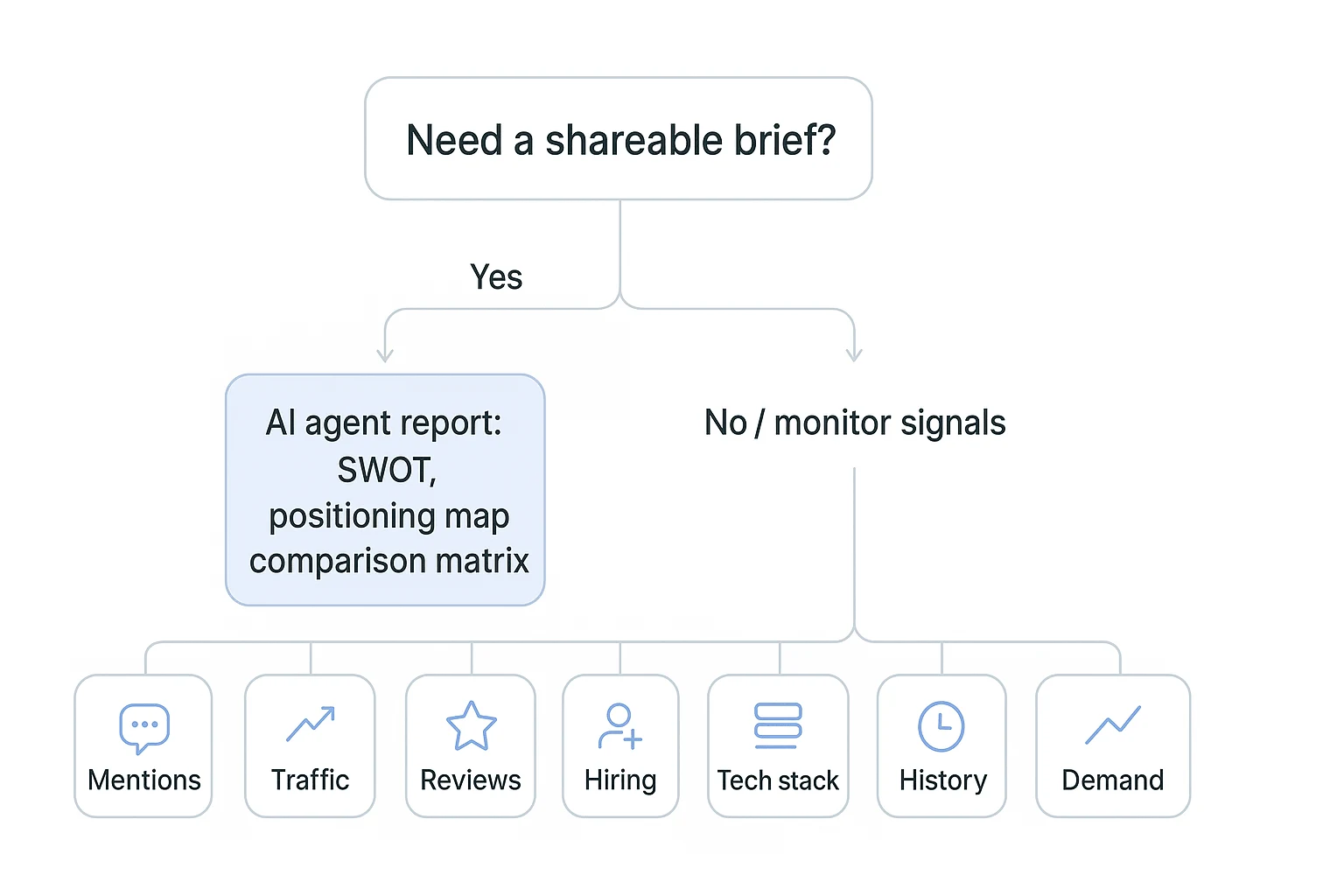
A simple weekly workflow for turning signals into decisions
Free competitor analysis works when it becomes a habit, not a tab-sprawl. Treat the best free competitor analysis tools as a 30-minute operating system: collect public signals, synthesize them, then make one decision. The rule is simple: capture only what can change sales, SEO, product, or pricing.
Build your alert base once
Set up alerts for competitor names, product names, and category terms. Then keep one source list with:
- Competitor homepages and pricing pages
- Review profiles
- LinkedIn company pages
- Key social channels
- Relevant comparison pages
If social is your main channel, pair this workflow with a repeatable social competitor benchmark so your content gaps don't live in a separate file.
Capture five public signals weekly
Spend 10–15 minutes collecting direction, not perfection:
- Traffic: save a Similarweb trend snapshot.
- Reviews: copy 3–5 new reviews and recurring themes.
- Hiring: note new job posts or role changes.
- Messaging: check homepage, pricing, and offer changes; use Wayback when needed.
- Tech stack: record changes only when they affect your market.
Turn notes into a report
Drop the week's competitor list and focus area into TicNote Cloud. Choose one angle: pricing, reviews, social, or product range. The competitor-analysis skill agent can turn those notes into a structured report, SWOT analysis, positioning map, and visual HTML comparison matrix.
Make one decision
End every week with one action:
- Sales: rewrite one battlecard section.
- SEO: refresh one alternatives page.
- Product: validate one feature gap in 3 customer calls.
- Pricing: test one packaging message, not a full reprice.
Keep the cadence tight: a weekly 30-minute operator review and a monthly 45-minute founder summary. Track decisions and outcomes, not just findings. That's how free signals become a real intelligence loop.
Data quality, ethics, and limits to mention before you trust the findings
The best free competitor analysis tools can help you move fast, but they don't remove uncertainty. Treat every finding as a confidence score, not a courtroom fact.
Use a credibility checklist
- Treat traffic numbers as estimates. Use trends over 4–8 weeks, not one absolute number. Sanity-check spikes against Google Trends, ad launches, PR, or visible campaign changes.
- Stay with public data. Use websites, public job posts, public reviews, pricing pages, and press rooms. Don't bypass logins, scrape prohibited areas, or collect private data without a lawful basis. For personal data, Regulation (EU) 2016/679 (General Data Protection Regulation) — Article 6 states in Article 6(1): "Processing shall be lawful only if and to the extent that at least one of the following applies."
- Check review bias. Look for patterns across 2–3 review sites. Watch for sudden bursts, repeated wording, or incentivized ratings.
- Separate signal from rumor. One LinkedIn post isn't strategy. Confirm it with another source.
- Triangulate before acting. Move only when 2–3 independent signals align, such as reviews, hiring posts, and a messaging change.
Competitor analysis should create better customer choices and clearer positioning. It's not a license for harassment, doxxing, impersonation, or copying.
Final thoughts: build a free competitor intelligence habit
The best free competitor analysis tools don't create an advantage by themselves. The advantage comes from a simple weekly habit: collect 5–10 high-signal inputs, compare them, and write down the decision they support.
Your operating system can stay lean:
- Track mentions, reviews, traffic direction, hiring, and messaging.
- Turn the signals into a SWOT analysis, positioning map, and visual comparison matrix.
- Commit to one sales, SEO, pricing, or roadmap action each week.
You'll never have perfect market data. That's fine. Teams win by learning faster and reviewing evidence consistently. If you use AI to summarize findings, follow a basic AI summary quality check before acting.


