


 Extension
TL;DR
If you’re short on time, try TicNote Cloud for free for non clinical transcription like staff meetings, admin calls, and research interviews, then use this guide to pick the best medical transcribing software for direct patient care.
You’re busy, and docs pile up fast. Copying notes by hand leads to missed details and slow billing. For meeting and admin audio, TicNote Cloud helps you capture clean transcripts and quick summaries without extra work.
Best picks by scenario (tradeoff in parentheses):
- Solo clinician: fast dictation (speed and control, but you still edit and sign).
- Small practice: ambient AI scribe (less typing, but you must verify note quality).
- Hospital or enterprise: full workflow tool (strong controls, but longer setup).
- Developers: transcription API (build what you want, but you own compliance).
Before you buy, confirm: specialty accuracy needs, how edits and clinician attestation work, real EHR integration vs copy paste, and whether a BAA (HIPAA contract) is available. TicNote Cloud fits best for medical admin, research, and internal meetings, but not for clinical note generation in an EHR without a formal HIPAA and BAA security review.
What is the best medical transcribing software in 2026?
The best medical transcribing software in 2026 depends on how you document care. Some teams dictate after the visit. Others use ambient AI (listens during the visit). Health tech teams may need an API to build transcription into an app. So “best” means best fit for your workflow, risk level, and integration needs.
Short list worth evaluating in 2026
You’ll see different names in the ranked section, but the best contenders tend to win on four things: clinical concept accuracy (meds, problems, anatomy), speed (latency), speaker labels (diarization), and real integration paths.
- Ambient AI scribes: Best when you want a draft note fast, with less typing. Check how it handles multi-speaker visits and whether it can map to your note format (SOAP, HPI, A&P).
- Clinical dictation tools: Best when you want control and predictability. Look for strong specialty vocab, quick turnaround, and easy correction.
- Human transcription services: Best when you need maximum fidelity or complex audio. Tradeoff is cost and turnaround time.
- Transcription APIs: Best when you need to embed transcription in a product. Prioritize reliability, language support, and clear data retention controls.
- TicNote Cloud: A strong fit for medical admin, operations meetings, and research notes where you want searchable transcripts, summaries, and a knowledge base. It’s not positioned as a clinical scribe, so treat any clinical use as requiring a HIPAA and BAA review with your compliance team.
“Best for X” quick callouts (verify with the vendor)
- Primary care: Ambient AI scribes can reduce after-hours charting, but confirm the tool supports your note style and coding workflow.
- ED and urgent care: Speed matters. Look for low-latency capture and simple review flows. Also confirm it handles interruptions and multiple speakers.
- Behavioral health: Prioritize consent workflows, privacy controls, and support for long, conversational visits with clear speaker separation.
- Radiology and pathology: Dictation-first tools often fit best. Check specialty vocab and structured report templates.
- Telehealth: Choose tools that work well with remote audio and handle crosstalk. Diarization is a must.
- Multilingual clinics: Validate language support in your real accents and medical terms. Also confirm how translated text is reviewed and corrected.
Whatever you shortlist, don’t assume coverage. Ask each vendor to prove specialty fit and to document security, retention, and model training policies before you test with real PHI.
Quick Comparison: Best Medical Transcribing Software 2026
| Software | HIPAA Compliant | Real-Time | EHR Integration | Starting Price |
| TicNote Cloud | ✅ | ✅ | Via export | Free tier |
| Nuance DAX | ✅ | ✅ | ✅ Native | Enterprise |
| Otter.ai | ⚠️ BAA available | ✅ | Limited | $10/mo |
| Whisper (OpenAI) | ❌ | ❌ | ❌ | Free (self-host) |
| Temi | ❌ | ❌ | ❌ | $0.25/min |
Always verify compliance status with the vendor before clinical deployment.
How did we evaluate and score each medical transcription tool?
We scored each tool with a clinician first rubric you can reuse in any demo. The goal is simple: find what’s safe, fast, and accurate enough for your notes, your team, and your patients. We also separate “good transcription” from “good clinical documentation,” because they’re not the same.
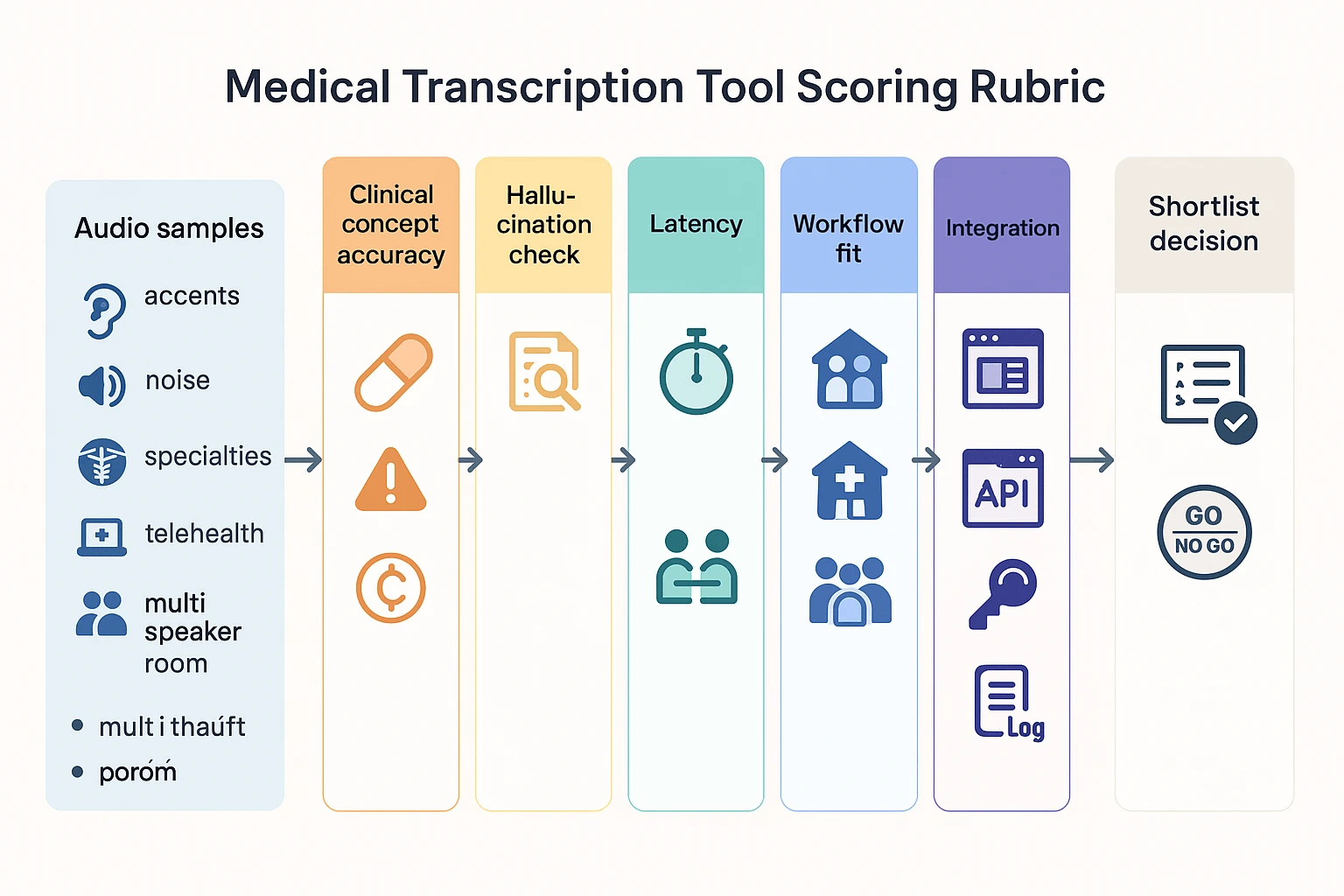
Step 1: Test clinical concept accuracy, not just WER
Most vendors talk about WER (word error rate). WER can help, but it misses what matters in care. So we scored “clinical concept accuracy,” meaning the tool correctly captures:
- Problems and diagnoses
- Med names, dose, route, frequency
- Allergies and reactions
- Procedures and laterality (left vs right)
- Timing and trends (worse, improved, since last visit)
- Negatives (denies chest pain, no fever)
A clean transcript that flips a negative is a clinical risk. Same for missing qualifiers like “rule out” or “history of.”
Step 2: Run a small pilot set that matches real conditions
Before you commit, run a pilot you control. Use 20 to 40 short clips (30 to 120 seconds). Keep it small so you can finish it in a week.
Include variety on purpose:
- 2 to 3 specialties you document most
- 2 accents common in your team and patient base
- 3 environments: quiet office, telehealth, exam room noise
- 2 device setups: laptop mic and clinic room mic
- At least 5 multi speaker clips (provider plus patient or staff)
Then score each clip with a quick rubric:
- Were key clinical concepts correct?
- Were any negatives dropped or reversed?
- Were numbers right (BP, A1c, dose, dates)?
- Did it keep speaker roles clear?
- How much edit time did it need?
If you want a lightweight way to audit outcomes, use a medical dictation accuracy checklist so you grade tools the same way.
Step 3: Check for hallucinations in generated notes
If a tool outputs SOAP notes (Subjective, Objective, Assessment, Plan) or summaries, we add a “no made up facts” test. You’re looking for:
- Added problems that were never said
- Cleaned up statements that change meaning
- Missing negatives (it “helpfully” drops denials)
- Overconfident assessments without support
A practical rule: every plan item should trace back to the audio or chart. If you can’t find the source fast, it’s a fail.
Step 4: Score speed, diarization, and output format quality
Performance is more than accuracy. We scored three “will this work today” factors:
- Latency: real time vs near real time, plus how often it lags
- Diarization (speaker labeling): handles interruptions, overlap, and quick back and forth
- Output quality: raw transcript only vs structured note fields, headings, and templates
We also checked whether the tool supports easy corrections. If edits are hard, adoption drops.
Step 5: Validate workflow fit across care settings
We ran workflow fit tests because inpatient and outpatient needs differ. Here’s what we checked:
- Outpatient: fast visit notes, short turnaround, template support
- Inpatient: longer notes, more interruptions, more multi speaker rounding
- Team based care: handoffs, shared editing, role permissions
- Scribes vs provider only: who clicks what, and when
- Telehealth: audio source quality, browser capture, speaker separation
- Multi speaker rooms: distance mics, patient plus family, staff chatter
If the tool only works when everything is quiet, it won’t survive clinic.
Step 6: Review integration paths, then verify every claim
Integration can make or break ROI. We grouped integrations by effort and risk:
- Native EHR integration: fewer steps, but hardest to validate
- Browser extension or desktop app: often best for telehealth
- Copy and paste plus templates: simple, but error prone
- Document export (DOCX, PDF, TXT): good for review workflows
- Developer paths: HL7 or FHIR interfaces, or a transcription API
Important: we treat all integrations as “verify with vendor.” Ask for a live walkthrough in your environment, not a slide.
Step 7: Apply a HIPAA ready security checklist
Security is part of the score, not a footnote. For each vendor, we checked:
- BAA availability and who signs it
- Data retention and deletion controls (per file and per account)
- Model training policy and opt out language
- Encryption in transit and at rest
- Audit logs (who accessed what, and when)
- Enterprise controls: SSO, role based access, admin reporting
If a vendor can’t answer these clearly, don’t pilot with real patient data.
What types of medical transcription and dictation tools are you comparing?
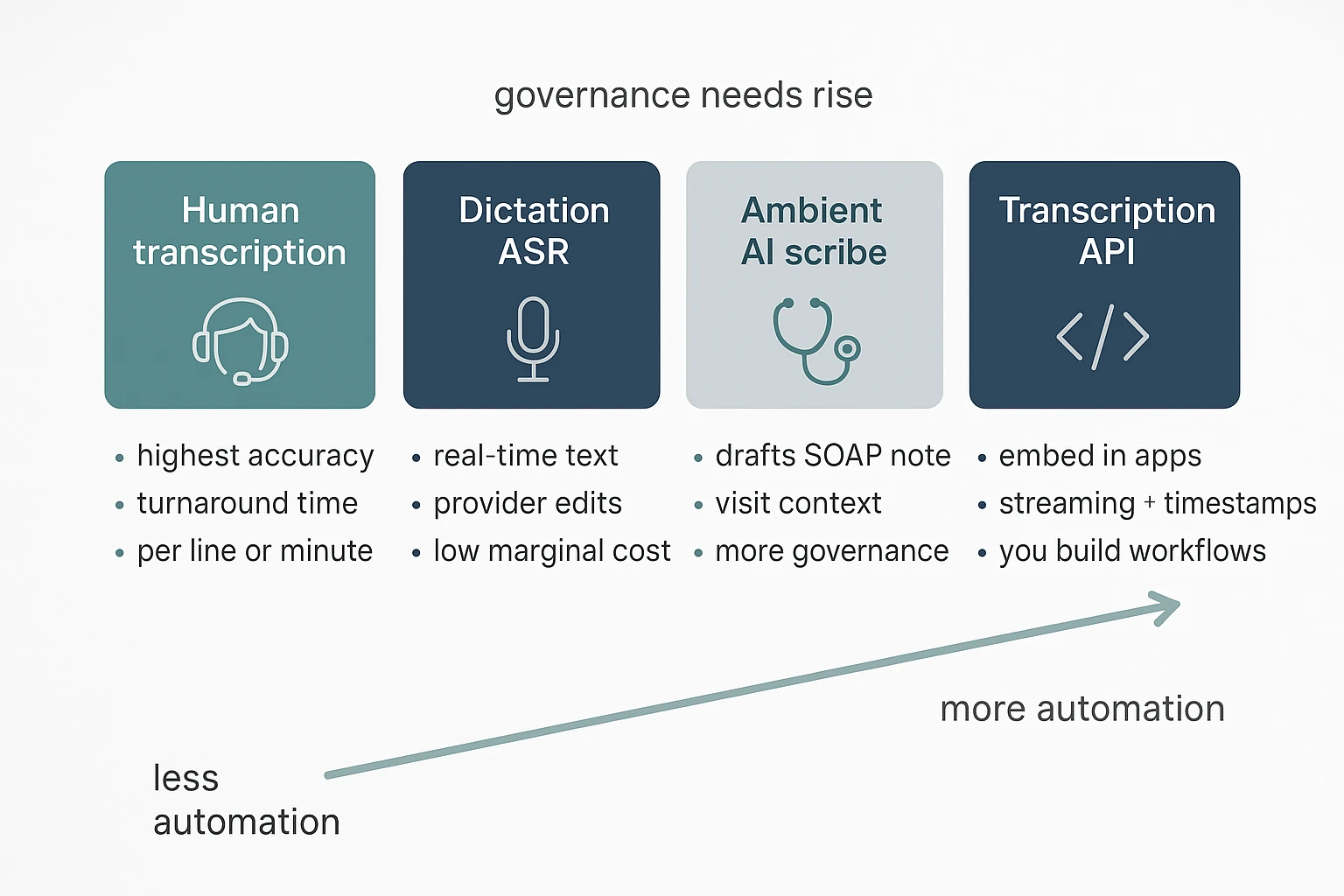
Not all documentation tools do the same job. If you compare the wrong categories, you’ll pick the wrong workflow, price model, and risk level. Here’s the taxonomy we use in this guide, so the “best medical transcribing software” list stays apples to apples.
Choose human transcription when accuracy matters most
Human medical transcription services take an audio file and return a finished note. They tend to perform well with heavy accents, noisy audio, and complex specialty terms. The tradeoff is turnaround time, plus pricing that often looks like per line, per minute, or per report.
This category is a fit when you need:
- High accuracy with minimal editing
- Support for tough audio and multiple speakers
- A predictable deliverable, like an H&P or op note
Use dictation ASR when you want speed and control
Classic dictation ASR (automatic speech recognition) is you speaking, then getting text back fast. You still edit, format, and sign. This works well for providers who prefer to “think out loud” and want the note in their own words.
Typical workflow:
- Dictate after the visit or between patients
- Review for meds, numbers, and negatives
- Paste or send to the EHR
Pick ambient AI scribe tools for visit notes, not just transcripts
Ambient clinical documentation, often called an AI medical scribe, listens during the visit and drafts a structured note (SOAP, HPI, A/P). Some also suggest codes, orders, or problems lists. It’s more automation, but also more governance. You’ll want to validate how it handles consent, speaker roles, and what gets stored.
Use transcription APIs when you’re building, not buying
Transcription APIs are for health tech teams that need speech to text inside an app, call center, or research pipeline. They provide building blocks like streaming transcription, timestamps, and sometimes diarization (who spoke when). They don’t “know” your clinic note style unless you design prompts, templates, and QA around them.
Treat meeting transcription tools as non-clinical by default
General meeting transcription tools can help healthcare teams capture ops meetings, QI discussions, research interviews, and vendor calls. They also help you transcribe meetings into clean, searchable records for internal follow-up.
But don’t assume they’re safe for PHI. Many are not built for HIPAA by default. Before any clinical use, confirm BAA availability, retention and deletion controls, audit logs, encryption, and the vendor’s model-training policy.
Top medical transcribing software: ranked list with mini-spec tables
This ranked list is criteria-led, not “most popular.” In 2026, the best choice depends on what you need: fast dictation into the EHR, an ambient AI scribe that drafts structured notes, or an API your team can build on. Use the mini-spec cards below to compare tools on workflow fit, integration path, pricing unit, and compliance signals.
Mini-spec card template (use this to compare tools)
| Field | What to look for |
| Category | Dictation ASR, ambient scribe, human transcription, API, or non-clinical meeting notes |
| Deployment | Cloud SaaS, on-prem, hybrid |
| Platforms | Web, desktop, mobile, extension |
| Integration method | EHR native, HL7/FHIR, copy/paste, export files, API |
| Output type | Verbatim transcript, SOAP note, specialty template, orders/tasks |
| Diarization | Speaker labels, multi-speaker limits |
| Language support | Clinician language and patient language needs |
| Pricing unit | Per provider, per minute, per visit, usage tier |
| Compliance signals checklist | BAA availability, retention and deletion controls, model training policy, encryption, audit logs, SSO |
Quick recommendation flow
- Need structured clinical notes fast: start with an ambient AI scribe.
- Need quick text inside the EHR: pick a dictation tool.
- Building a product or pipeline: choose a transcription API.
- Need admin meeting notes, not PHI-heavy charting: use a non-clinical transcription platform, with a security review.
Ranked list (with mini-spec cards)
1) Nuance Dragon Medical One
Best for: high-volume clinical dictation, long narratives (radiology, consult notes), and enterprise rollout.
Strengths:
- Strong dictation workflow for clinicians who “think out loud.”
- Good fit when you must document fast during busy clinics.
- Often aligns well with large org IT controls.
Watch-outs:
- It’s dictation, not an ambient scribe. You still structure the note.
- Noise and interruptions can raise edit time, especially in the ED.
- Integration quality can vary by EHR setup.
Mini-spec:
| Spec | Details |
| Category | Enterprise dictation (ASR) |
| Deployment | Cloud |
| Platforms | Desktop, mobile (varies by config) |
| Integration method | EHR integration varies |
| Output type | Dictated text, commands |
| Diarization | Not the core use case |
| Language support | Varies |
| Pricing unit | Usually per provider |
| Compliance signals checklist | Verify BAA, retention, training policy, encryption, audit logs, SSO |
Verify with vendor: BAA terms, supported EHRs, retention and deletion controls, model training policy.
Specialty note: Radiology and long consult dictations do well with dictation-first tools, but plan time for templating.
2) Philips SpeechLive
Best for: practices that want a dictation workflow with routing, queues, and optional human transcription.
Strengths:
- Clear dictation-to-document workflow, useful for teams.
- Helps when you have staff who polish notes.
- Better for predictable “send this to transcription” processes.
Watch-outs:
- If you need real-time structured notes, this can feel slower.
- Cost can rise if you add human services.
- Multi-speaker clinic room audio is not its main design.
Mini-spec:
| Spec | Details |
| Category | Dictation workflow, transcription routing |
| Deployment | Cloud |
| Platforms | Web, mobile |
| Integration method | Exports and workflow integration vary |
| Output type | Transcript/document workflows |
| Diarization | Limited use |
| Language support | Varies |
| Pricing unit | Often per user plus service fees |
| Compliance signals checklist | Verify BAA, retention, training policy, encryption, audit logs, SSO |
Verify with vendor: BAA availability, how long audio is retained, and whether any AI is trained on your data.
Specialty note: Pediatrics often includes caregiver voices. Ask about speaker handling and review burden.
3) Freed
Best for: outpatient clinicians who want an ambient scribe style draft note with less typing.
Strengths:
- Designed around visit flow, not just raw transcription.
- Can reduce “after-hours charting” if drafts are close.
- Useful when you want a note, not a transcript.
Watch-outs:
- You must review every note. Errors can be subtle.
- Busy rooms, accents, and interruptions can reduce quality.
- EHR integration may still mean copy/paste in some setups.
Mini-spec:
| Spec | Details |
| Category | Ambient AI medical scribe |
| Deployment | Cloud |
| Platforms | Typically web/mobile |
| Integration method | EHR support varies, often copy/paste |
| Output type | Structured note draft |
| Diarization | Usually speaker-aware, verify limits |
| Language support | Varies |
| Pricing unit | Often per provider |
| Compliance signals checklist | Verify BAA, retention, training policy, encryption, audit logs, SSO |
Verify with vendor: BAA, exact EHR list, retention controls, and whether audio or text is used for training.
Specialty note: Behavioral health notes carry higher sensitivity. Confirm retention defaults and access logs.
4) DeepScribe
Best for: specialties that want richer visit context and structured outputs.
Strengths:
- Strong “scribe-like” orientation.
- Can fit complex specialty templates if supported.
- Often positioned for end-to-end note workflow.
Watch-outs:
- Draft quality varies by specialty and visit style.
- Onboarding and template tuning can take time.
- Cost predictability depends on pricing unit and usage.
Mini-spec:
| Spec | Details |
| Category | Ambient AI medical scribe |
| Deployment | Cloud |
| Platforms | Web/mobile (varies) |
| Integration method | EHR options vary |
| Output type | Structured note draft |
| Diarization | Verify |
| Language support | Varies |
| Pricing unit | Often per provider or per visit |
| Compliance signals checklist | Verify BAA, retention, training policy, encryption, audit logs, SSO |
Verify with vendor: BAA, EHR integration method, deletion workflow, model training policy.
Specialty note: ED care is interrupt-driven. Ask how the tool handles pauses, handoffs, and rapid topic shifts.
5) Suki
Best for: clinicians who want voice-driven documentation with commands and workflow help.
Strengths:
- Blends dictation style with note support.
- Helpful for quick edits and structured fields.
- Can fit clinicians who don’t want full ambient recording.
Watch-outs:
- Voice command learning curve can be real.
- Output quality depends on how structured your prompts are.
- Integration depth varies.
Mini-spec:
| Spec | Details |
| Category | Voice assistant, dictation plus workflow |
| Deployment | Cloud |
| Platforms | Mobile/web (varies) |
| Integration method | EHR support varies |
| Output type | Dictated text and structured elements |
| Diarization | Not the core feature |
| Language support | Varies |
| Pricing unit | Often per provider |
| Compliance signals checklist | Verify BAA, retention, training policy, encryption, audit logs, SSO |
Verify with vendor: BAA, supported EHRs, retention duration, and audit logging scope.
6) Sunoh
Best for: teams that prefer per-visit pricing and a scribe-like workflow.
Strengths:
- Per-visit pricing can be easier to budget.
- Works well when volume changes month to month.
- Focused on visit documentation outcomes.
Watch-outs:
- Per-visit models can still spike in busy seasons.
- You still need review time and QA.
- Confirm what counts as a “visit” and what add-ons cost.
Mini-spec:
| Spec | Details |
| Category | Ambient scribe style |
| Deployment | Cloud |
| Platforms | Web/mobile (varies) |
| Integration method | EHR options vary |
| Output type | Note draft |
| Diarization | Verify |
| Language support | Varies |
| Pricing unit | Per visit |
| Compliance signals checklist | Verify BAA, retention, training policy, encryption, audit logs, SSO |
Verify with vendor: BAA, visit definition, retention controls, and training policy.
7) Amazon Transcribe Medical
Best for: health-tech teams that need speech-to-text inside a product or data pipeline.
Strengths:
- API-first, easy to integrate into apps.
- Good for bulk audio processing.
- You control the downstream workflow and UI.
Watch-outs:
- You must build note structuring, QA, and clinician UX.
- Diarization and specialty vocab handling need testing.
- Compliance is shared responsibility. Your setup matters.
Mini-spec:
| Spec | Details |
| Category | Transcription API |
| Deployment | Cloud |
| Platforms | API |
| Integration method | API |
| Output type | Transcript |
| Diarization | Options vary |
| Language support | Varies |
| Pricing unit | Per minute or usage |
| Compliance signals checklist | Verify BAA, retention, training policy, encryption, audit logs, SSO |
Verify with vendor: BAA process, log retention, data storage region options, and training policy.
8) Deepgram
Best for: product teams that want low-latency transcription and control over models.
Strengths:
- Strong developer tooling and real-time options.
- Flexible for call centers, telehealth, and analytics.
- Can fit custom pipelines.
Watch-outs:
- Not a clinical note tool by itself.
- You own the clinical safety layer and review UX.
- Diarization accuracy can vary by audio conditions.
Mini-spec:
| Spec | Details |
| Category | Speech platform and API |
| Deployment | Cloud, some enterprise options vary |
| Platforms | API |
| Integration method | API |
| Output type | Transcript, streaming text |
| Diarization | Available, verify limits |
| Language support | Varies |
| Pricing unit | Usage-based |
| Compliance signals checklist | Verify BAA, retention, training policy, encryption, audit logs, SSO |
Verify with vendor: BAA, data retention defaults, and whether data is used for model improvement.
9) TicNote Cloud (non-clinical example)
Best for: medical admin meetings, research interviews, internal ops calls, and policy-friendly note capture where you want a searchable knowledge base.
Strengths:
- Strong meeting transcription plus summaries and templates.
- Useful for turning discussions into reusable internal docs.
- Good for teams that need notes across many files.
Watch-outs:
- Not positioned as a clinical documentation tool.
- Do not assume HIPAA fit. You must run a full security review.
- Keep PHI out until BAA, retention, and training terms are confirmed.
Mini-spec:
| Spec | Details |
| Category | Non-clinical meeting transcription and knowledge base |
| Deployment | Cloud |
| Platforms | Web, iOS, Android, extension |
| Integration method | Exports, Notion, Slack |
| Output type | Transcript and meeting notes |
| Diarization | Option varies by settings |
| Language support | 100+ languages claimed (translation) |
| Pricing unit | Subscription tiers (minutes per month) |
| Compliance signals checklist | Verify BAA, retention and deletion controls, model training policy, encryption, audit logs, SSO |
Verify with vendor: BAA availability, retention and deletion controls, and model training policy before any PHI use.
How do pricing models compare (per provider vs per minute vs per visit)?
Pricing for medical transcription tools usually falls into three buckets: per provider per month, per minute (or hour) of audio, and per visit (per encounter). Each can be “best medical transcribing software” pricing, but only if it matches how your clinic works day to day.
Match the pricing unit to your workflow
- Per provider per month: Best for steady daily use. Budgets are simple, and you can standardize training.
- Per minute or hour: Best for uneven volume. Think research interviews, admin meetings, or part-time clinics.
- Per visit: Best when visit counts are stable. But watch for long visits, phone calls, and extra notes.
Normalize any quote into apples to apples costs
Use a quick conversion so every vendor becomes comparable.
- Estimate monthly volume
- Minutes per provider per month (dictation or ambient audio)
- Visits per provider per month
- Editing time per note (minutes), since editing is still labor
- Convert into two common metrics
- Effective cost per provider month
- Effective cost per note
Here are the simple formulas:
- Cost per provider month = subscription per provider + (audio minutes x per minute rate) + fixed monthly fees
- Cost per note = total monthly cost ÷ total notes (or visits)
Three pricing scenarios to sanity-check quotes
| Scenario | What to plug in | What it tends to favor |
| Solo clinician | Your own visits, your own audio minutes | Per provider if you use it daily |
| 5-provider practice | Add shared roles like QA, ops, and IT | Per provider with team controls |
| Variable-volume clinic | Use best-case and worst-case months | Per minute, with no minimums |
What usually changes the bill
Expect these common “gotchas” in quotes:
- Overage rates when you exceed minutes, visits, or user caps
- Minimum monthly spend for pay-as-you-go plans
- Implementation or onboarding fees
- Hardware costs (headsets, mics, mobile devices)
- Extra seats for reviewers, QA, or supervisors
- Enterprise add-ons like SSO, audit logs, retention controls, and custom security terms
When pay-as-you-go beats subscriptions (and when it doesn’t)
Pay-as-you-go often wins for pilots, seasonal swings, or research teams that transcribe occasionally. Subscriptions usually win when most clinicians document every day and you want one standard workflow across the practice.
What security and HIPAA questions should you ask each vendor?
Most tools claim “HIPAA-compliant”. That phrase is not enough. For best medical transcribing software, you need to confirm the contract, the data flow, and the controls in writing.
Start with the BAA and scope
Ask these first. If you can’t get clear answers, pause.
- Do you sign a Business Associate Agreement (BAA)?
- Which products and features are covered by the BAA (mobile app, web app, API, support tools)?
- Does the BAA cover the vendor’s subcontractors (sub-processors)?
- What is your role, business associate or subcontractor, for each service?
Map the data flow and where PHI lives
You want a simple diagram and plain language.
- Where is audio stored, and where is it processed?
- Where are transcripts, summaries, and “notes” stored?
- Can we choose a region for storage and processing?
- Is any data sent to third parties for speech or AI?
Confirm encryption, access controls, and logs
Security needs both prevention and proof. HIPAA’s Security Rule requires covered entities and business associates to Electronic Code of Federal Regulations — 45 CFR § 164.312 (Technical safeguards) “Implement a mechanism to encrypt and decrypt electronic protected health information.”
- Encryption in transit: Do you use TLS for all traffic?
- Encryption at rest: Are files and databases encrypted?
- Access control: Do you support RBAC (role-based access control)?
- SSO and MFA: Do you support SSO (SAML/OIDC) and enforce MFA?
- Admin logs: Do we get audit logs for logins, access, exports, and admin changes?
Retention, deletion, backups, and exports
“Delete” can mean many things. Make it specific.
- What is the default retention for audio and transcripts?
- Can admins set retention by team, project, or user?
- Can users delete items, and can admins hard delete?
- How long do backups keep data after deletion?
- Do audit logs record transcript edits and exports?
AI model training and sub-processors
This is where risk often hides.
- Is any PHI used for model training or product improvement?
- Is training off by default? If not, how do we opt out?
- Which sub-processors may see data, and how are they vetted?
- How are prompts, transcripts, and embeddings stored and protected?
Demo questions by role
Use these to keep the demo honest.
- Clinician champion: “Show me how I export notes. Where can PHI leak?”
- Privacy officer: “Show me the BAA, retention controls, and your sub-processor list.”
- IT lead: “Show SSO, RBAC, audit logs, and how we revoke access fast.”
Not legal advice. Validate each tool with your HIPAA risk analysis and your counsel.
How do you implement medical transcription safely in real workflows?
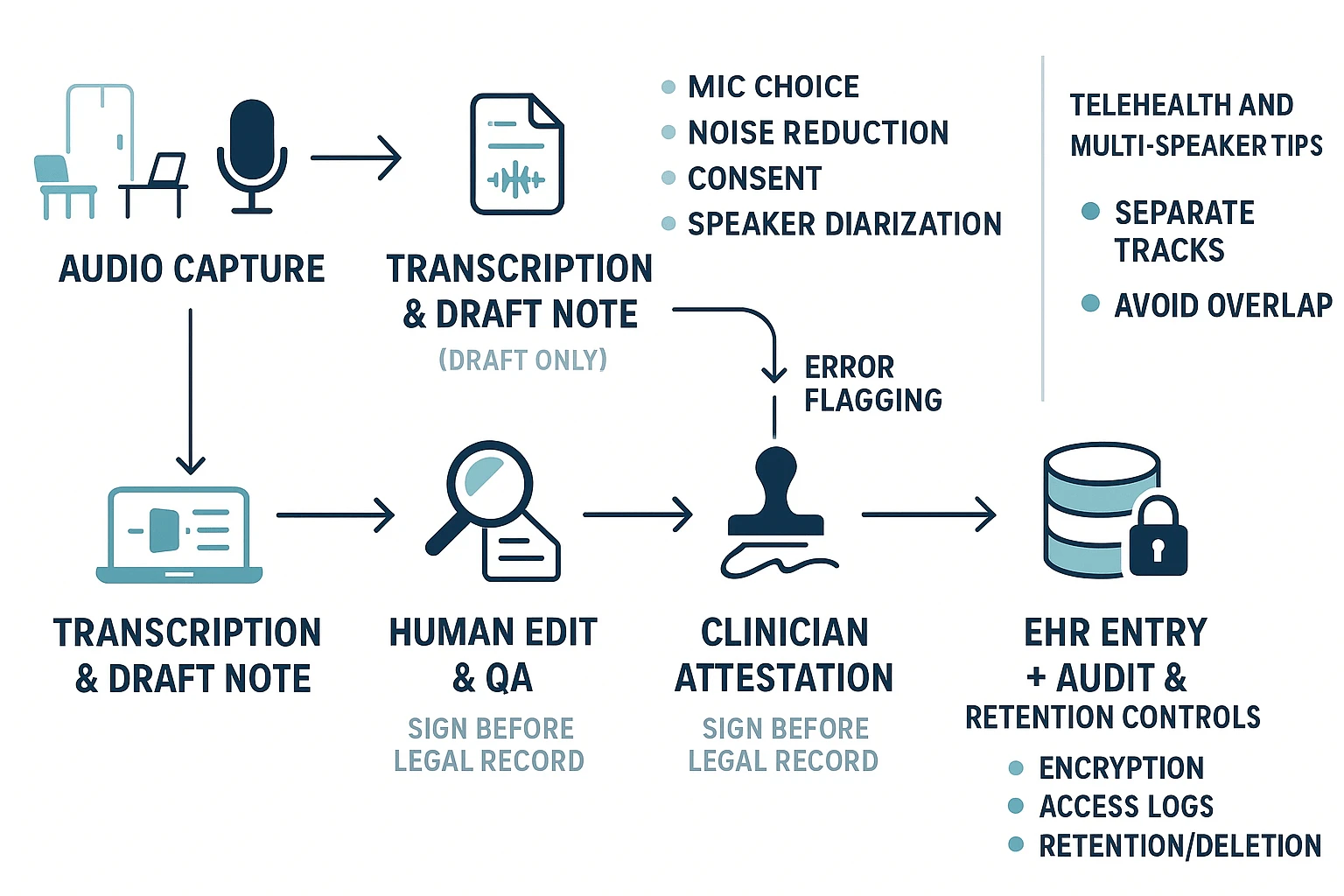
A safe rollout means you treat transcription as a draft, not the record. Your goal is simple: capture clean audio, get a usable first pass, then run a tight review and sign off before anything hits the EHR. This checklist helps you cut rework while protecting patient safety, even when tools differ.
Start with clean audio and clear speaker labels
Bad audio creates bad notes. Fix the input first.
- Pick the right mic for the room:
- Quiet office: a USB desktop mic works well.
- Exam room: a headset reduces room echo.
- Rounding or mobile: a lav mic or phone mic, close to the speaker.
- Reduce noise:
- Close doors, pause printers, silence alerts when you can.
- Avoid typing while dictating.
- Positioning:
- Keep the mic 6 to 12 inches away.
- Speak across the mic, not directly into it.
- Multi speaker setup:
- Turn on speaker diarization (speaker separation).
- Confirm it labels speakers consistently before you scale.
Use a consent script that matches your policy
Get consent in plain language. Keep it short and consistent.
- In person concept: “I’m going to record this to help draft your note. I will review it for accuracy. Is that OK?”
- Telehealth concept: “With your permission, I’ll record our visit to help document. I will verify the note before it’s saved. Do you consent?”
If your policy requires it, document consent in the note.
Build QA, edit rules, and clinician attestation
Transcription errors are normal. Unsafe workflows treat them as rare.
Set rules before go live:
- Define who edits the draft (scribe, MA, clinician, or shared).
- Define how to flag risk items:
- Med names, doses, allergies, laterality, and “denies” statements.
- Require clinician attestation before the note becomes legal record:
- “Reviewed and confirmed” language, plus date and time.
- Keep a clear boundary:
- Draft stays outside the EHR until sign off.
Then run an error review loop every week:
- Track common misses (drug names, accents, specialty terms).
- Update dictionaries and phrase lists.
- Adjust templates.
- Retrain staff on speaking habits (slower meds, spell names, state units).
For a deeper walk through, use this safety first dictation workflow with templates and QA checks inside your rollout plan.
Roll out templates and SOAP automation in phases
Start small. Over templating early increases wrong insertions.
- Phase 1: minimal SOAP (Subjective, Objective, Assessment, Plan) headings.
- Phase 2: standard phrases and macros for common counseling.
- Phase 3: specialty sections only after accuracy is stable.
Tip: keep “copy forward” prompts out of automation until QA is steady.
Manage change for admins and IT
A pilot prevents a messy, practice wide switch.
- Pick a pilot group: 1 to 2 clinicians, one specialty, one clinic site.
- Budget training time: 30 to 60 minutes setup, then short refreshers.
- Track success with simple metrics:
- Time to sign, addenda rate, percent notes needing heavy edits.
- Have a fallback plan:
- Manual dictation, human transcription, or typed notes for outages.
Telehealth and multi speaker tips that reduce edits
- Use separate audio tracks when possible.
- Ask people to say their name early (“This is Dr. L
 ee”).
ee”). - Avoid overlap, take turns for meds and plan.
- Repeat critical items (dose, route, frequency) once, clearly.
TicNote Cloud (Transcribe workspace), best for medical admin, meetings, and research notes
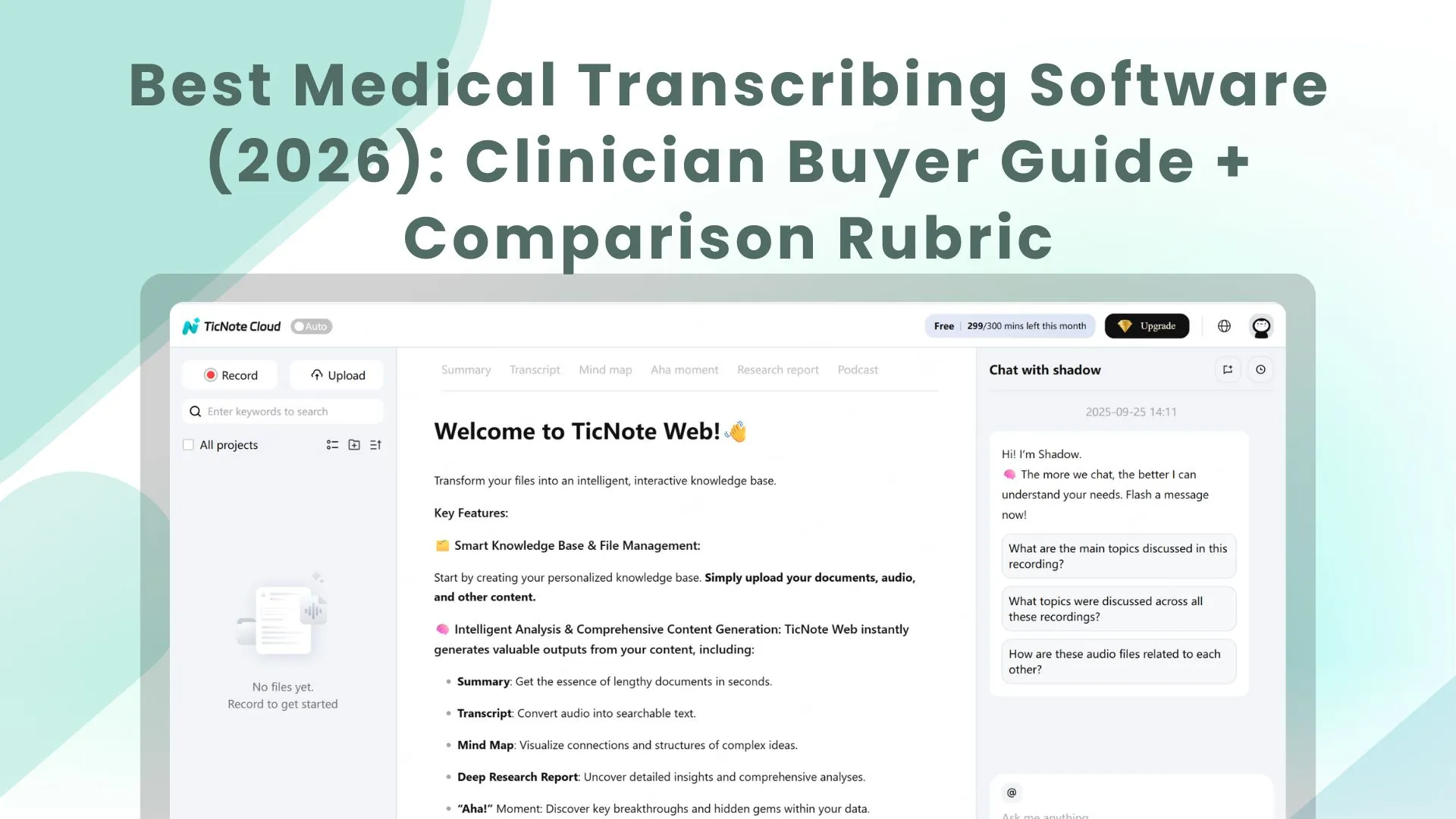
TicNote Cloud is a meeting transcription and knowledge workspace that helps healthcare teams capture discussions, turn them into clean notes, and find them later. It’s a strong fit for non-clinical work where you need searchable transcripts, fast summaries, and shared context across projects. If you’re comparing the best medical transcribing software for clinical notes, treat TicNote as “outside the EHR lane” unless you complete a formal security and BAA review.
TicNote Cloud in Medical Settings: Real-World Use Cases
TicNote Cloud is used by clinicians to transcribe patient consultations, clinical rounds, and case reviews with minimal setup:
- Outpatient clinics: Record patient visits via iPhone or dedicated PLAUD device, auto-generate structured SOAP-style notes
- Telehealth sessions: Connect to Zoom or Teams calls and transcribe in real time with speaker separation
- Case review meetings: Capture multi-speaker discussions and export a clean summary for the team
What TicNote Cloud does well for healthcare teams
TicNote Cloud focuses on turning calls, recordings, and documents into a reusable knowledge base. It’s built for speed, clarity, and retrieval.
Key strengths:
- Live transcription and upload-based transcription for audio and video
- Structured summaries using templates, plus custom templates
- Translation into many languages, useful for global teams
- Mind maps for quick review of long meetings
- A project-based workspace, so notes don’t get lost
- Shadow AI chat for Q&A and edits across your files
TicNote also states that customer data is not used to train AI models. Still, you should confirm this in your vendor security review, along with how data is stored and deleted.
Best-fit use cases in healthcare (outside clinical charting)
This is where a “transcribe plus knowledge base” tool can shine:
- Operations and staffing meetings (hiring, schedules, coverage)
- QI and QA meetings (quality improvement, audits, process fixes)
- Vendor demos and payer calls (requirements, next steps, decisions)
- Training sessions and SOP walk-throughs (repeatable, searchable notes)
- Research interviews and IRB workflows, where you need transcripts organized by study or project
Tip: If your team is building repeatable meeting documentation, you can also use TicNote’s guide to transcribe audio with a repeatable workflow and adapt it to your internal policies.
Important limits for PHI and clinical documentation (verify with vendor)
TicNote Cloud is not positioned here as a “HIPAA-compliant medical transcription solution by default.” For clinical documentation or PHI (protected health information), treat it like any other third-party system and verify requirements before use.
Confirm these items in writing:
- BAA availability (Business Associate Agreement)
- Data retention and deletion controls (who can delete, and when)
- Access controls (roles, least privilege) and SSO needs
- Audit logs (who accessed what, and when)
- Encryption in transit and at rest
- Model-training policy (including sub-processors)
- Integration expectations (EHR integration is usually not the goal here)
If you need ambient clinical notes, EHR workflows, or structured charting, you’ll likely want a dedicated clinical dictation or AI scribe product instead.
Pricing snapshot: which plan fits which team
| Plan | Best fit | Included transcription time |
| Free | Individual admin or light personal use | 300 mins/month |
| Professional ($$12.99/month, or$$79 billed annually) | Solo power user or small shared needs | 1,500 mins/month |
| Business ($$29.99/month, or$$239 billed annually) | Small department with steady volume | 6,000 mins/month |
| Enterprise (contact sales) | Larger orgs needing SSO and support | Custom |
Pick based on how many people will use it and how much audio you generate each month. Also consider whether you need team permissions and SSO.
Evidence-style walkthrough with real UI screenshots (Web Studio)
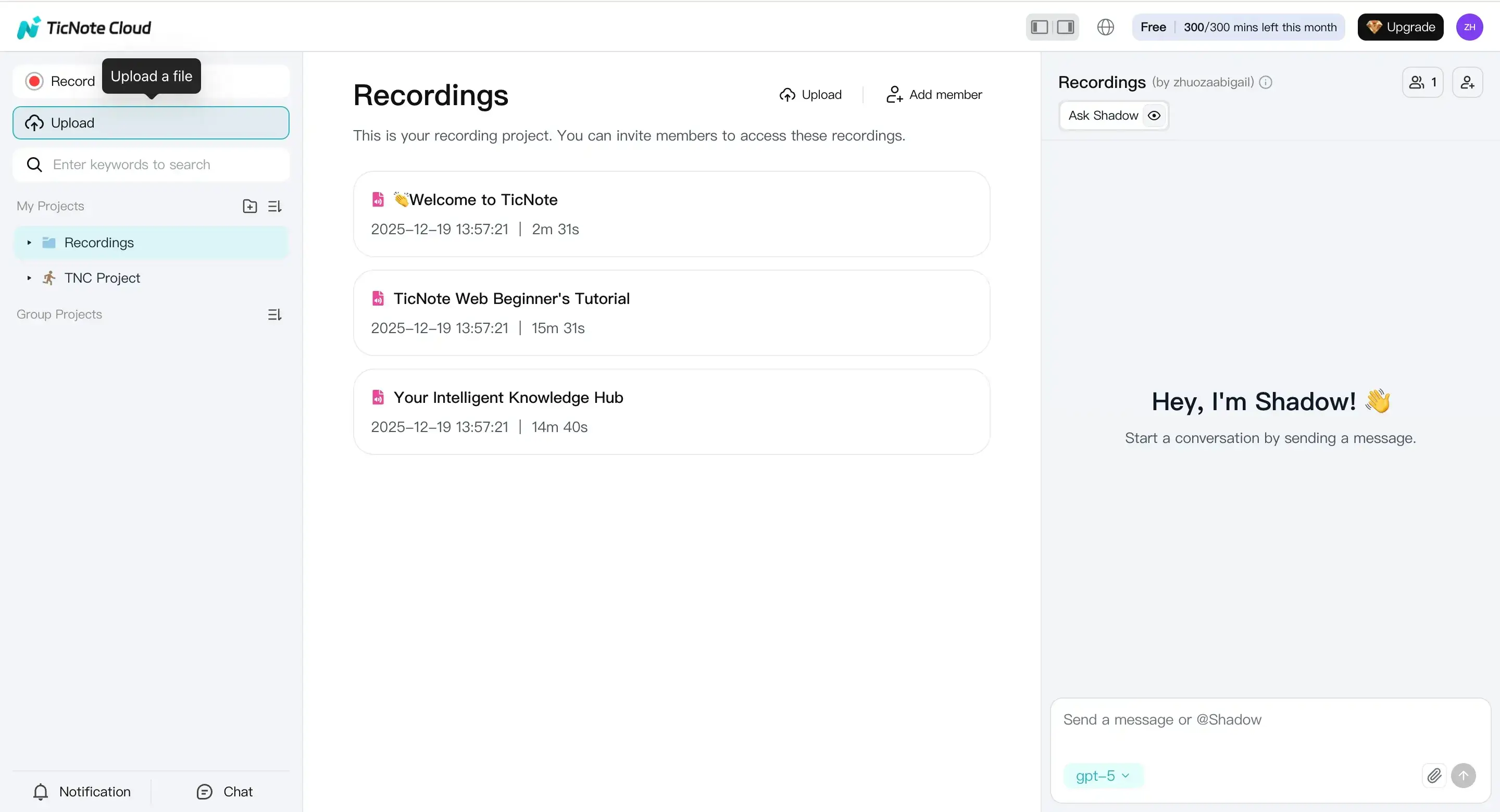
- Upload a file or record a talk
Start in the web studio by creating a project. Then use Upload to add an audio or video file for transcription.
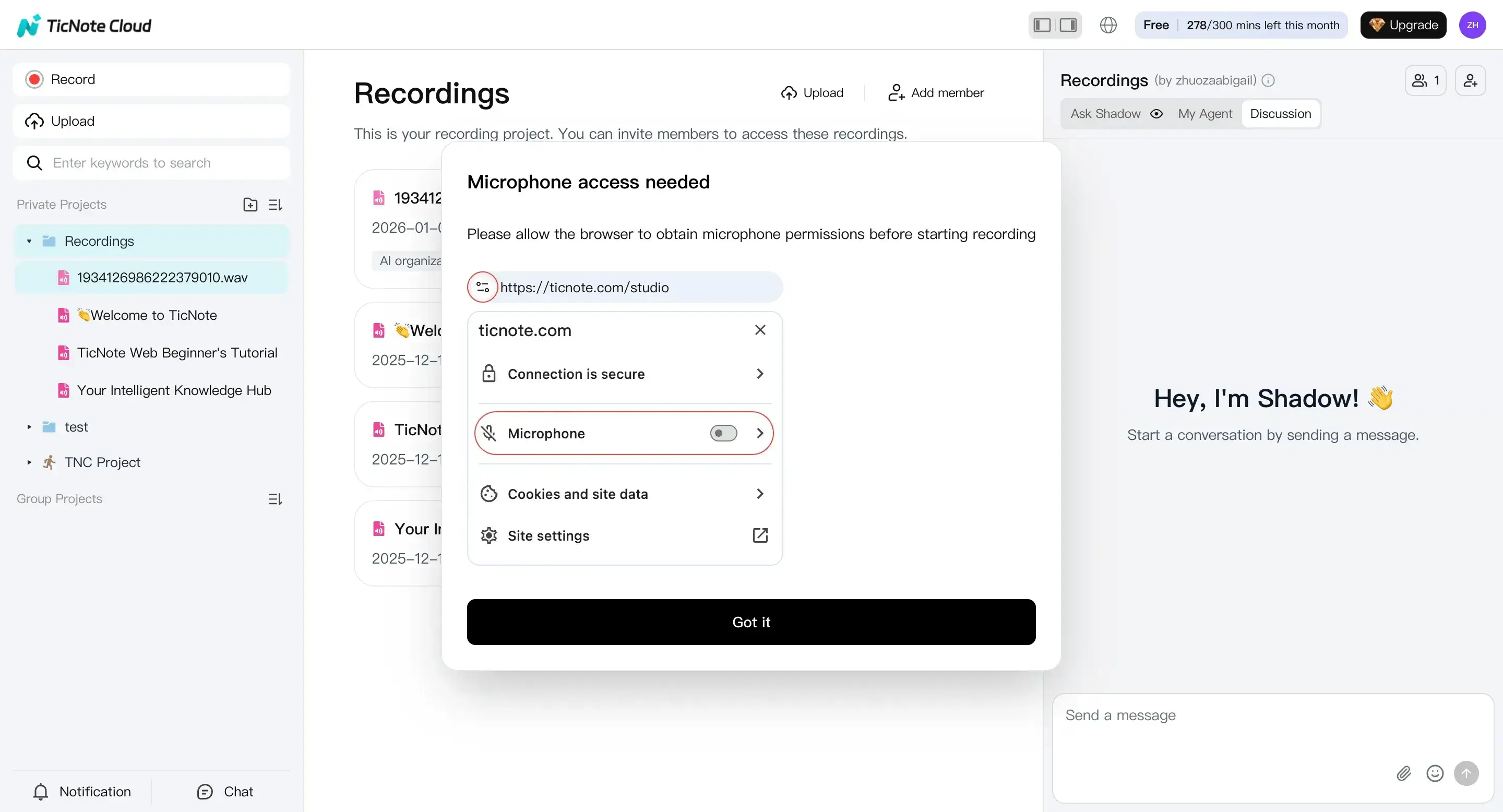
If you’re capturing a live discussion, you can also record directly in the web studio. Make sure your mic permission is on, then end the recording when done.
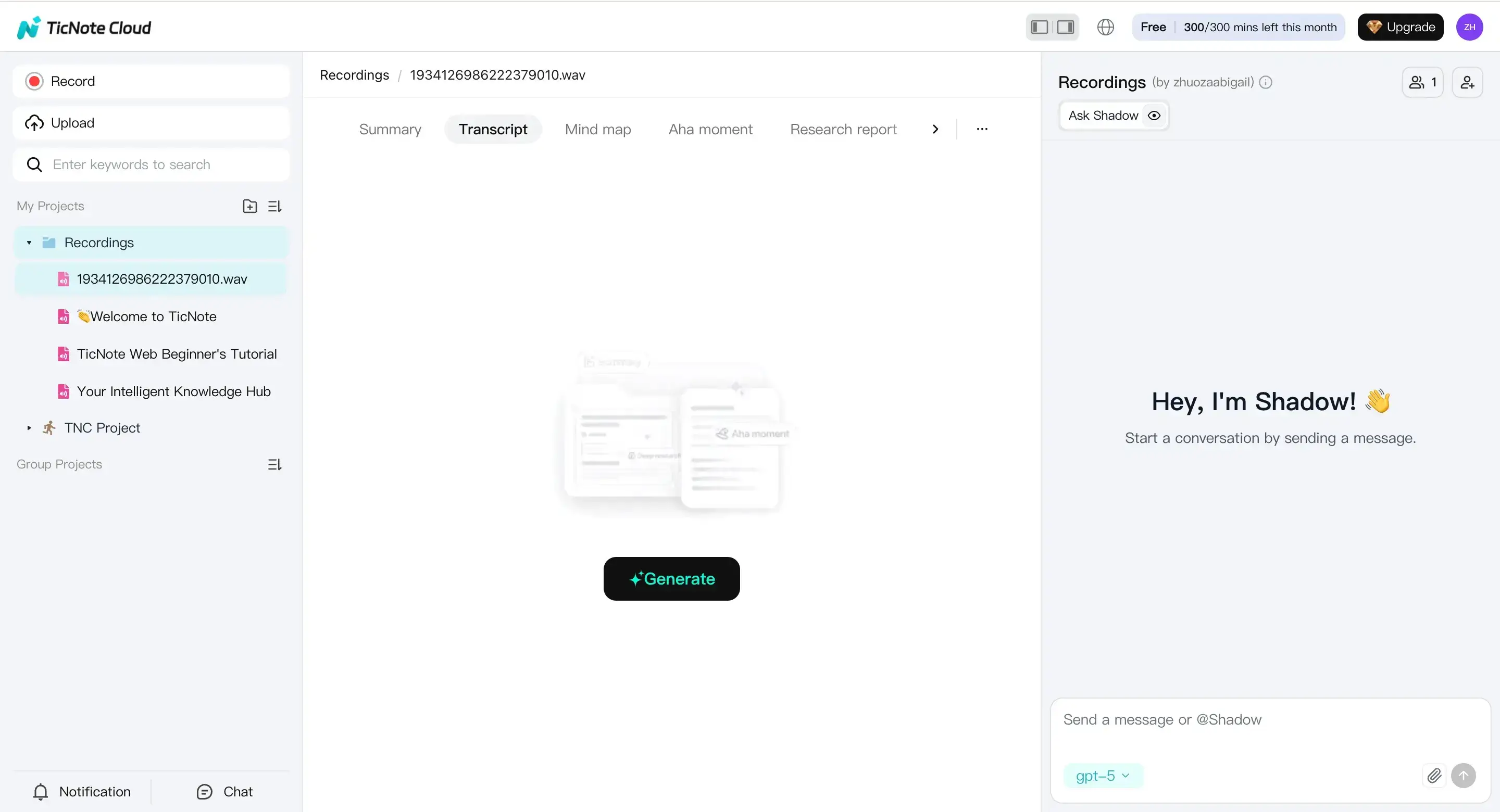
- Prepare to transcribe
Open the file from the left panel. Go to the Transcript tab, then select Generate to start.
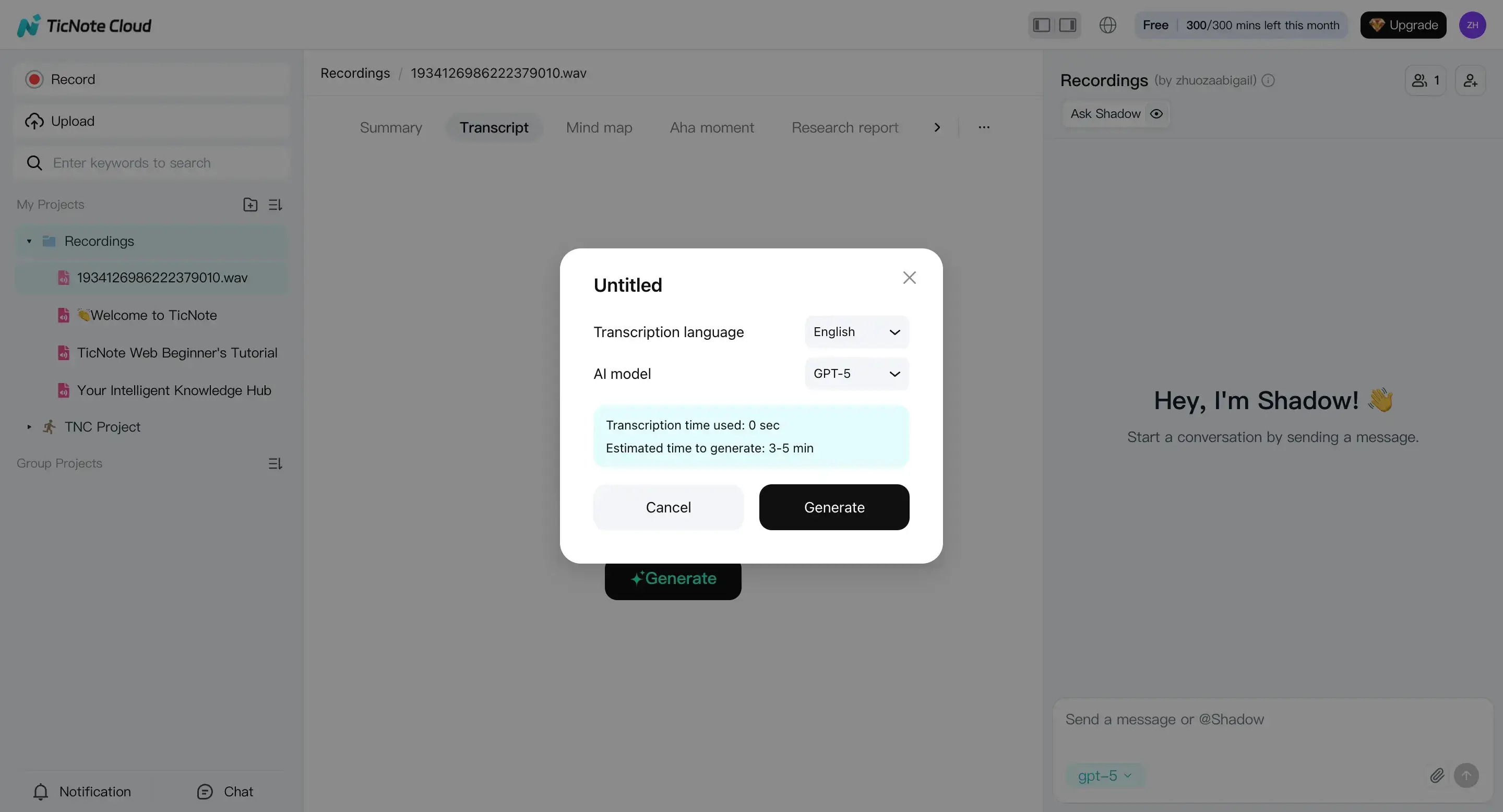
In the pop-up, choose your transcription language and AI model. Then confirm to run the transcript.
- Review the transcript and create outputs
After it finishes, review the transcript in the editor. This is where you clean up names, acronyms, and action items.
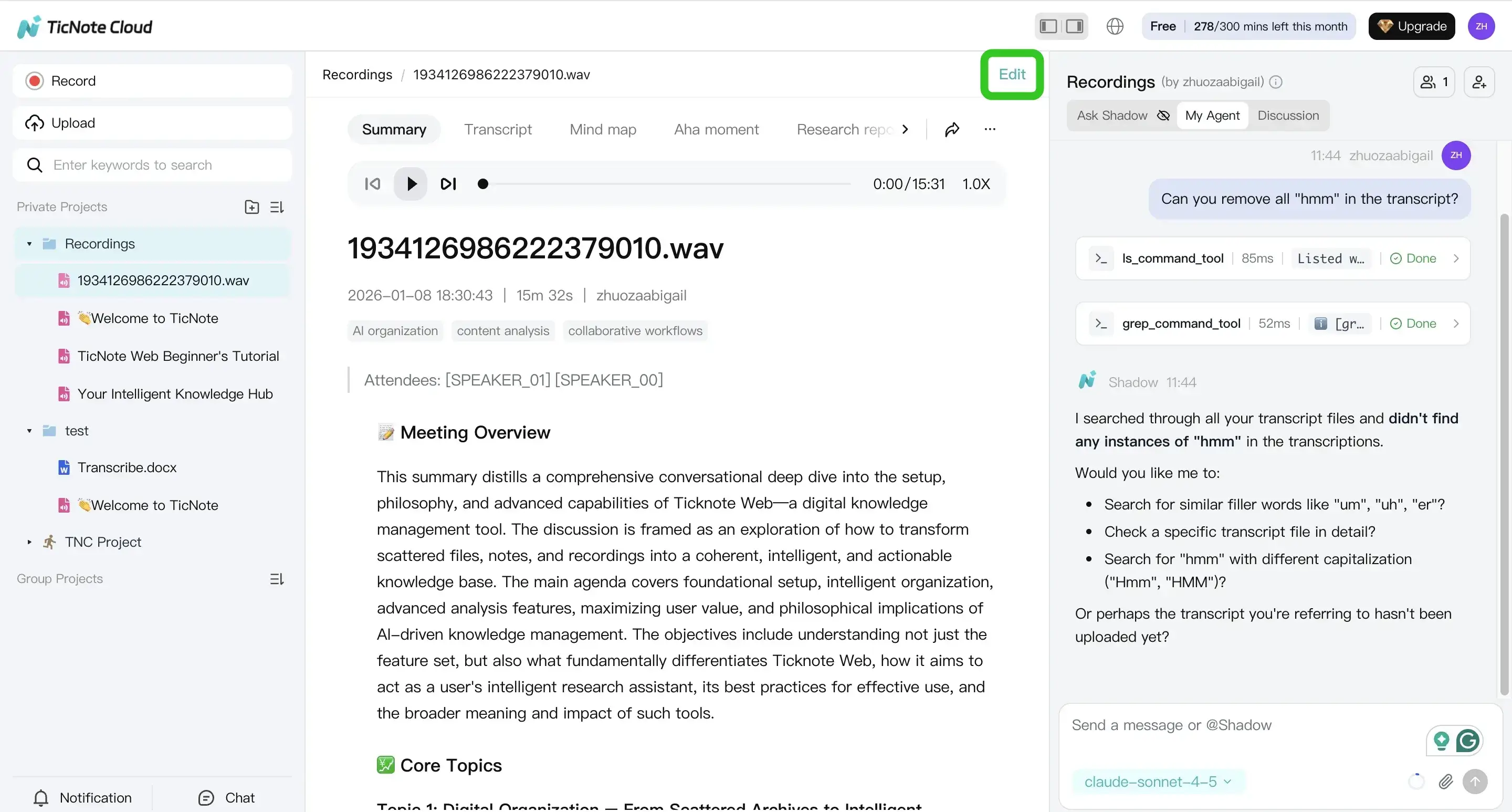
You can also use Shadow AI to summarize, reformat, or help edit wording. This is useful when you need consistent meeting notes across many calls.
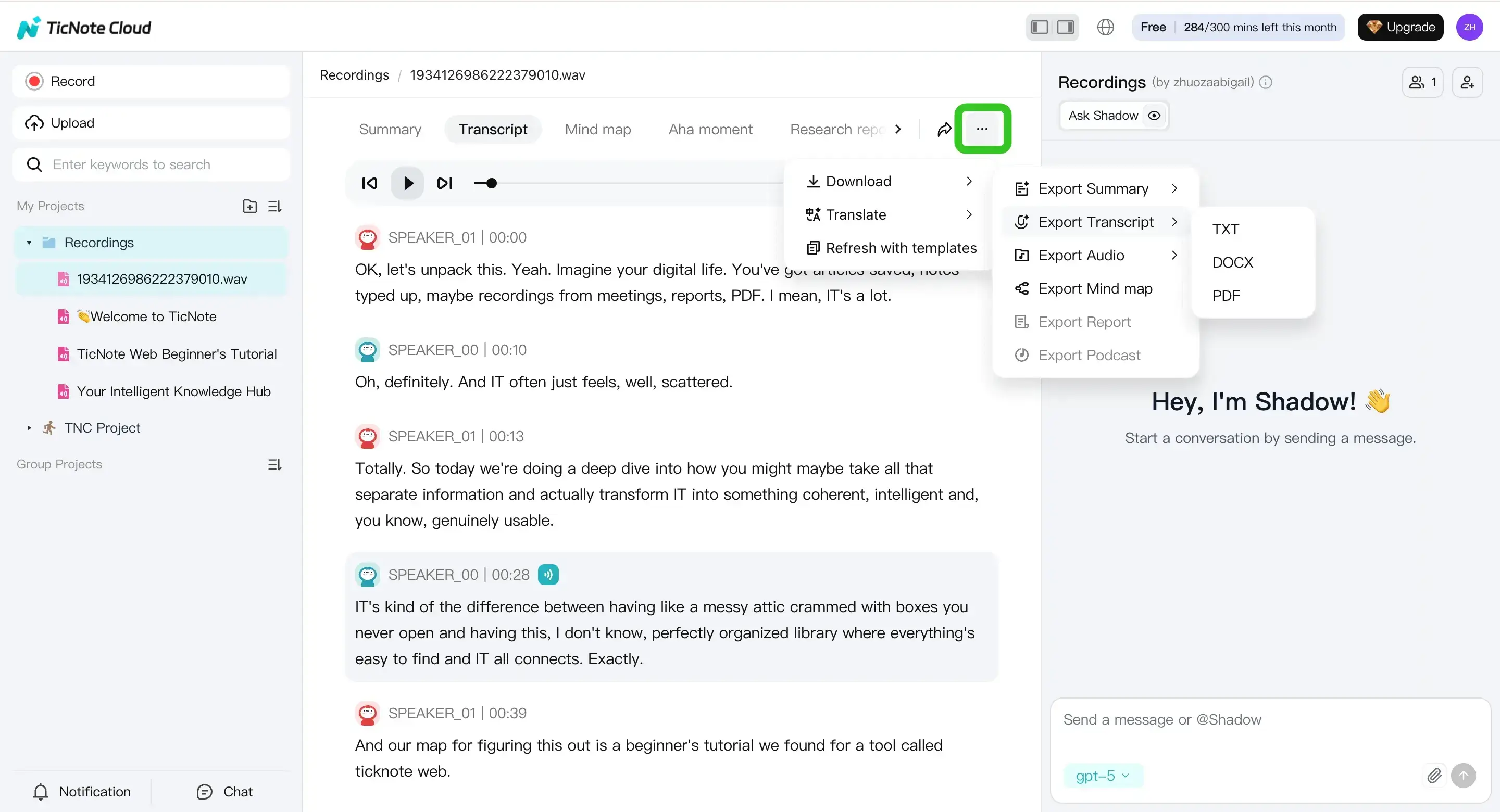
- Export the transcript
When it’s ready, use the three dots menu, then Download, then Export Transcript. Choose the format that fits your workflow.
Mobile app workflow for recording, transcription, and export
On mobile, the flow is similar, but optimized for quick capture. Tap add to upload to a project, then generate the transcript from the file view.
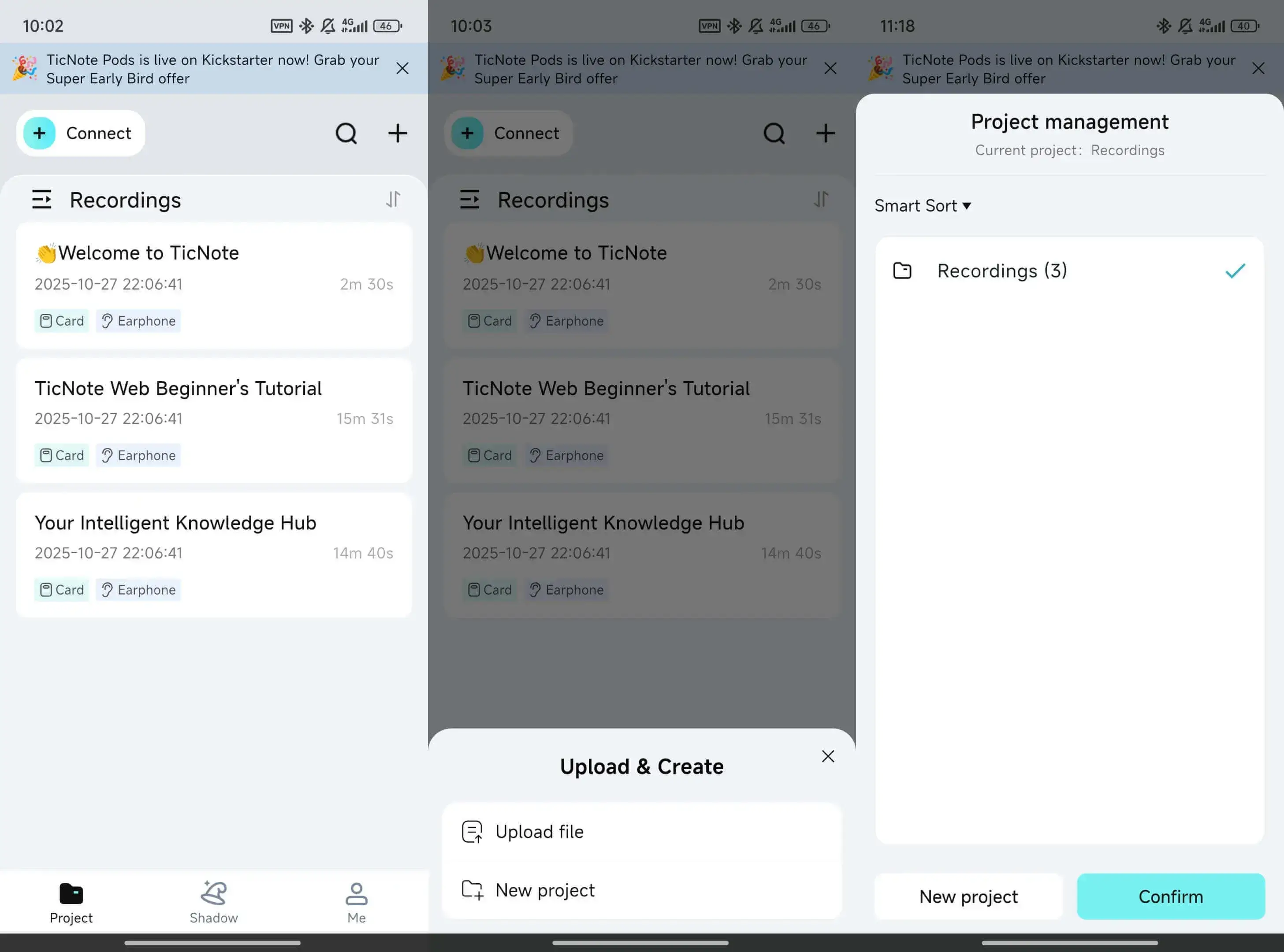
From there, you can edit and export when you’re away from your desk. This can help when you’re leaving a meeting and need the notes fast.


