


 Extension
![[Free Credits] Claude Opus 4.7 vs Grok 4: What Actually Matters for Long-Context, Coding, and Meeting Workflows](https://cdn-digitalhuman-pb.weta365.com/voice-recorder-prd/static/backend/2026/05/09/2053006842849177602.webp)
TL;DR: hot model Claude Opus 4.7 takeaways for AI workspace teams
For Claude Opus 4.7 vs Grok 4, use 30 free monthly Claude Opus 4.7 Premium requests in TicNote Cloud to test the model inside real meeting and deliverable workflows before adding another AI subscription.
Specs don't save a messy workflow. If transcripts, files, decisions, and follow-ups live in different tools, even a strong long-context model loses source grounding. A meeting-centered workspace like TicNote Cloud keeps context attached, so teams can turn conversations into cited answers, reports, and next steps.
Pick Claude Opus 4.7 for long-context reasoning and structured coding-style work. Pick Grok 4 when lower listed token cost and fast experiments matter more.
Claude Opus 4.7 vs Grok 4: what matters for meeting intelligence?
Teams are searching Claude Opus 4.7 vs Grok 4 because frontier models now change faster than team workflows. Pricing shifts, context limits move, and buyers need to know whether a model can handle real meeting work: transcripts, decisions, action items, research files, and cited synthesis.
Compare the operational differences
| Claude Opus 4.7 | Grok 4 | practical impact for meeting-heavy teams |
| Provider/ecosystem: Anthropic; strong enterprise and coding reputation | Provider/ecosystem: xAI; strong real-time and X-adjacent ecosystem signals | Ecosystem affects governance, integrations, and buyer review |
| Context window: verify current published limit | Context window: verify current published limit | Long context only helps if full transcripts fit reliably |
| Output limits: verify before bulk report generation | Output limits: verify before bulk report generation | Short caps can break proposals, specs, and summaries |
| Modalities: text, image, and file support where enabled | Modalities: text, image, and file support where enabled | Multimodal input helps with slides, screenshots, and PDFs |
| Structured outputs/function calling: supported in developer workflows | Structured outputs/function calling: supported in developer workflows | Needed for clean tasks, owners, dates, and CRM fields |
| Tool use: agentic workflows depend on platform setup | Tool use: agentic workflows depend on platform setup | Tools matter when notes become deliverables |
| Safety behavior: generally more conservative | Safety behavior: often more direct | Impacts sensitive HR, legal, and customer-call summaries |
| Pricing notes: check current API and app plans | Pricing notes: check current API and app plans | Model cost matters at 10, 100, or 1,000 meetings/month |
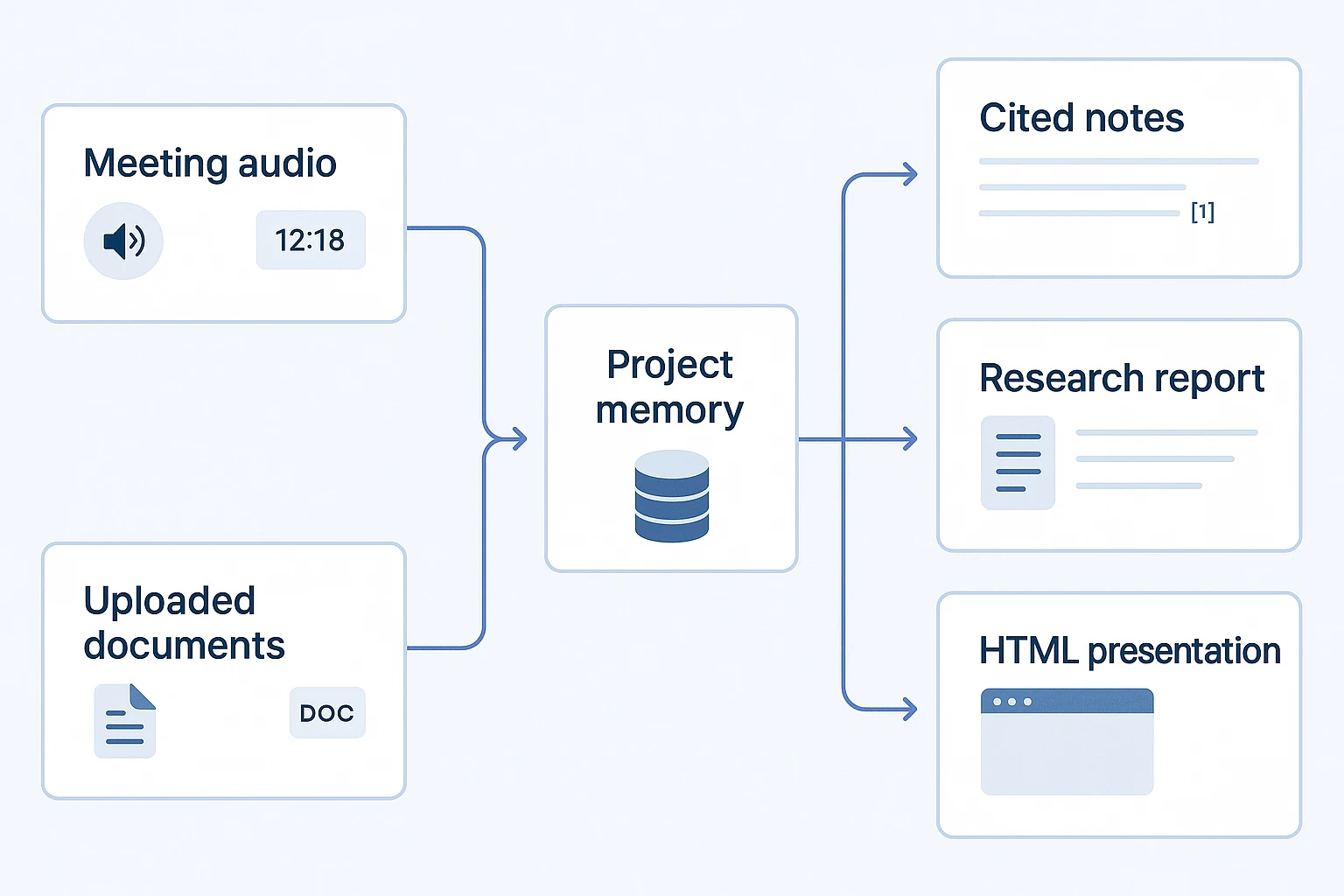
Meeting intelligence is simple: capture → organize → ask → cite → deliver. Even the best long-context LLM fails when notes live across recordings, docs, chats, and exports. TicNote Cloud's Shadow AI works inside Project memory, so teams can ask across files with citations instead of pasting fragments into a blank chat. For model-release checks, use this guide to validate Claude Opus changes before standardizing.
Try the workflow end to end: Get 30 credits to use Claude Opus 4.7 Premium for free every month.
Specs, pricing, and availability signals to verify before you decide
In a Claude Opus 4.7 vs grok 4 evaluation, specs matter only when they map to real work: transcripts, files, prompts, and final reports. Treat every provider claim as a production checklist, not a headline number.
Check context before trusting long context
Verify four limits in official docs: maximum input context, maximum output tokens, reasoning-mode limits, and any quality notes for very long prompts. "Can accept 1M tokens" is not the same as "can use 1M tokens well." For meeting transcription, the model must find decisions, names, and action items buried across hours of speech.
Compare cost with one blended example
Use a simple 70/30 input-output estimate:
- 70% input: transcript ingestion, documents, project memory, prompt templates
- 30% output: summaries, reports, structured JSON, slides
Then test your real workload. Tool calls, retries, streaming, schema-constrained outputs, and verbose templates can raise token use. Meeting search is input-heavy; deliverable generation is output-heavy.
Verify availability before prod
Confirm:
- Endpoint name and model version
- Direct API or cloud marketplace access
- Region coverage and latency
- Rate limits, quotas, and fallback models
- Data retention and training settings
- Whether each provider exposes the same multimodal, long-context, and structured-output capabilities
Benchmark evidence and missing data that buyers should treat carefully
For Claude Opus 4.7 vs grok 4, benchmarks are evidence, not a buying decision. SWE-bench Verified tests whether a model can fix real GitHub issues, but scores depend on tools, repo setup, patch execution, and agent harness. A 5-point lead may vanish when your private codebase has different tests, dependencies, or style rules.
Read benchmark rows like audit logs
Check:
- Date of run and model version
- Prompt settings, temperature, and system policy
- Tool access, retry limits, and scoring rules
- Links to prompts, traces, or leaderboards
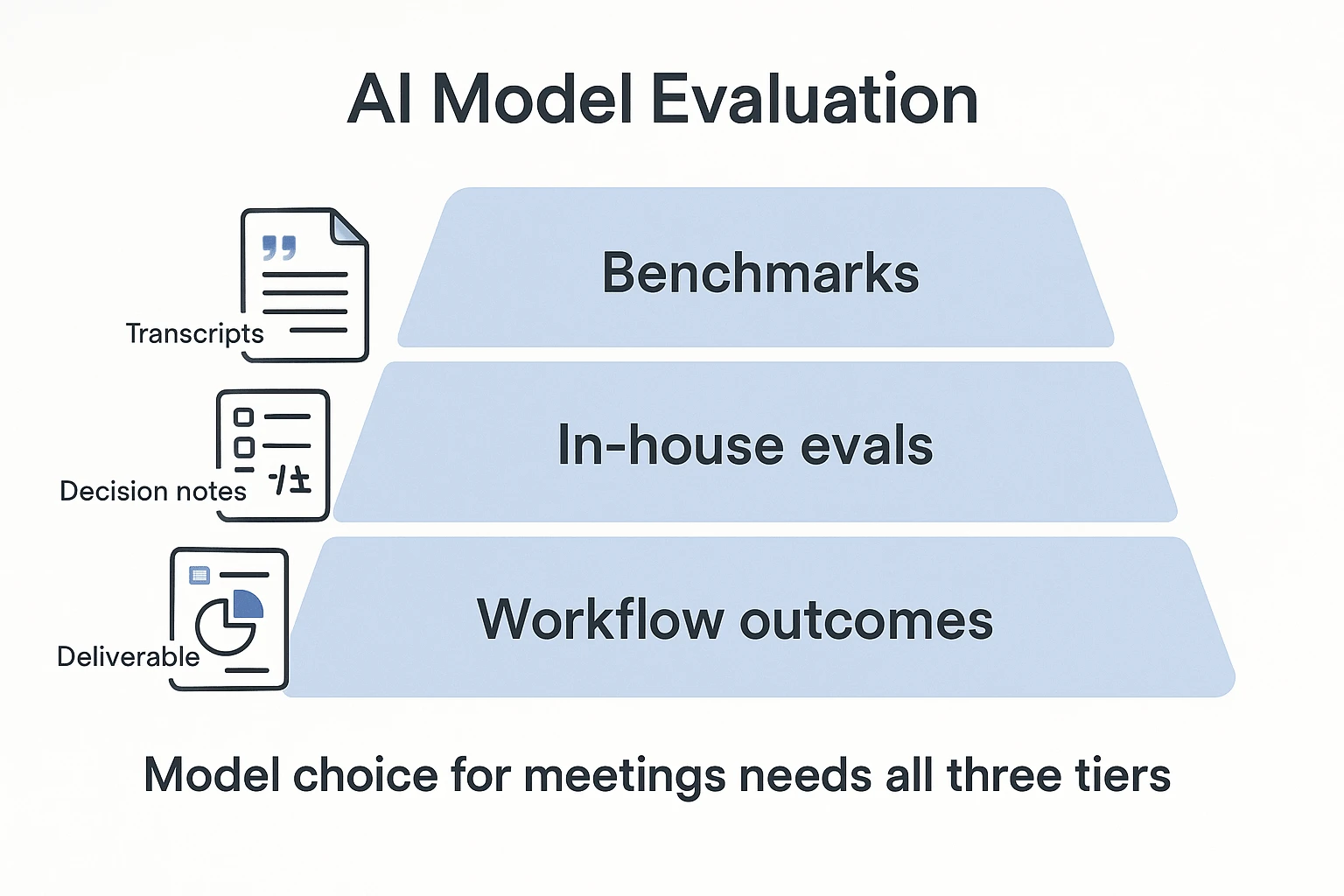
Reasoning, math, and instruction-following scores need the same care. Refusal behavior, prompt policy, and JSON or table constraints can change outcomes, even when the model is strong. Build a small internal eval instead: same transcript, same rubric, same expected deliverable.
Test the work you actually ship
For multimodal input and long context, measure image-text grounding, citation faithfulness, and whether long transcript summaries preserve owners, decisions, risks, and deadlines.
Missing data ≠ bad model. Treat absent or old benchmarks as incomplete evidence. Require dated rows, prompt settings, and source links before comparing vendors.
Which model fits coding, long-context, and multimodal work?
For Claude Opus 4.7 vs grok 4, the practical question is not which model sounds smarter. It is which one turns real inputs into usable work: repos, transcripts, research files, screenshots, and meeting notes.
Default to Claude Opus 4.7 for deep synthesis
Claude Opus 4.7 is the stronger default when teams need long-context reasoning (working across large files or many documents), stable structured outputs, and complex analysis. Developers can use it for repo-scale code review, architecture reasoning, and multi-file debugging. Researchers and PMs can use it to turn several meeting transcripts into a cited brief, or extract decisions, owners, and deadlines into a strict JSON schema.
Verify modalities at the endpoint before rollout. Model capability, API exposure, file handling, vision input, and tool use can differ by plan or provider. Also budget for higher cost sensitivity, access gaps, and latency variance.
For coding-specific routing, compare pass rate and cost-per-success with an agentic coding routing checklist.
Test Grok 4 for fast drafts
Grok 4 fits cost-sensitive teams that need quick summaries, lightweight action items, and first-pass drafts before polishing. Before using it broadly, verify vision and file inputs, output limits, and safety or refusal behavior.
| If your main job is... | Start with... |
| Weekly long-context synthesis | Claude Opus 4.7 |
| Strict meeting schemas | Claude Opus 4.7 |
| Cheap draft generation | Grok 4 |
| Fast experiment loops | Grok 4 |
| Source-preserved team memory | Either, inside a workspace that keeps citations |
Bottom line: use Claude Opus 4.7 for weekly deep synthesis. Test Grok 4 for inexpensive drafts, but keep outputs inside a workspace that preserves sources.
A step-by-step meeting-to-deliverable workflow (with screenshots)
For teams comparing Claude Opus 4.7 vs Grok 4, the real test is not only model speed. It's whether meeting content becomes trusted decisions, clean notes, and reusable deliverables without copy-paste. Here's a practical workflow using TicNote Cloud as the example AI meeting workspace.
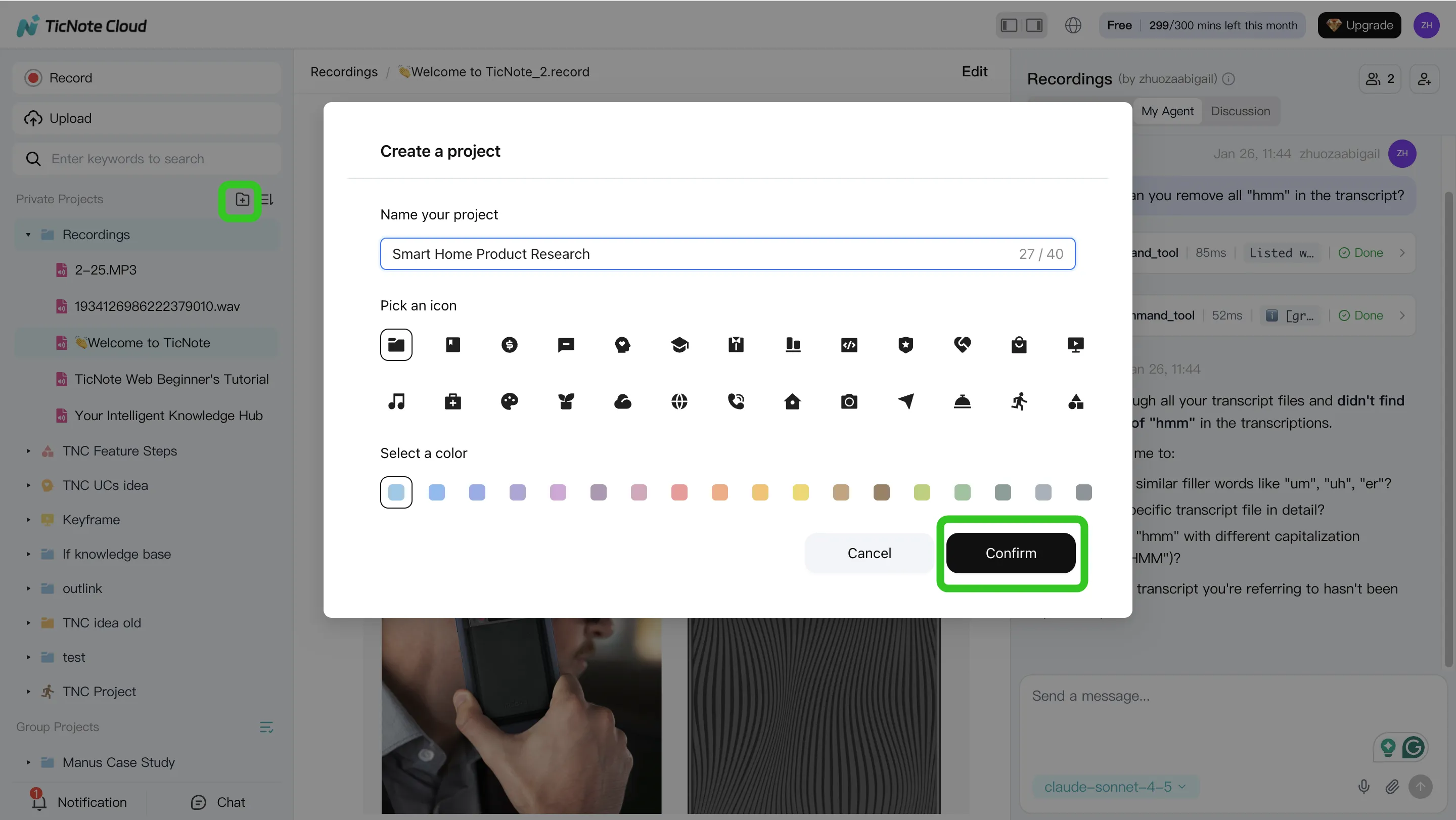
1. Create or open a Project and add content
Start in TicNote Cloud Web Studio. Create a Project for a client, sprint, user research theme, or internal initiative. Then add source material: recordings, uploaded audio or video, transcripts, PDFs, Word files, or reference documents that Shadow AI can use as context.
You can add files directly from the Project folder area, or attach them in the Shadow AI chat panel and ask Shadow to save them to the right folder.
2. Ask Shadow AI to search, analyze, and organize
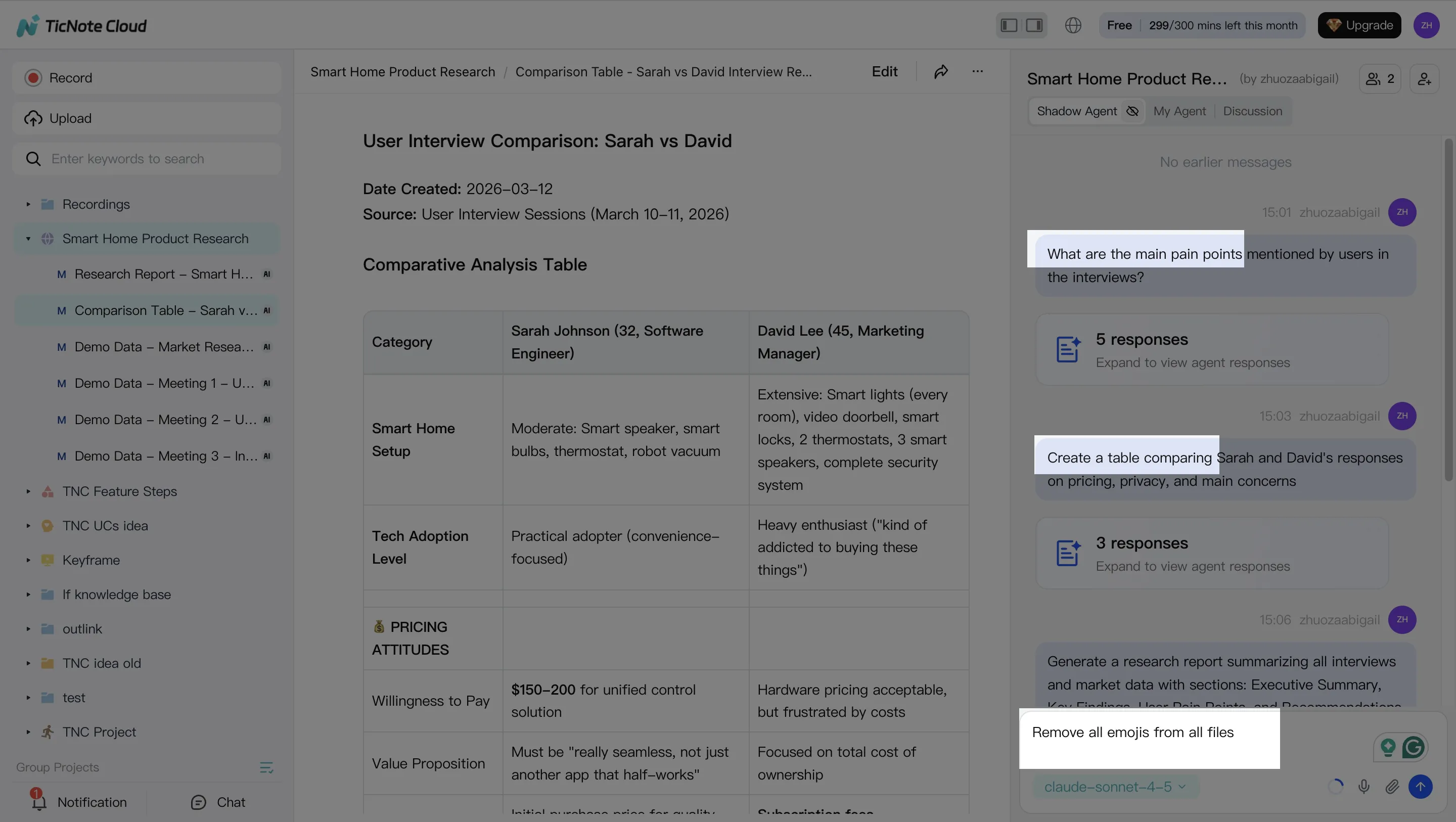
Once the Project has content, use Shadow AI on the right side of the screen to ask focused questions:
- "What decisions were made across these calls?"
- "List open risks and owners."
- "Compare three interviews and extract common themes."
Clean up transcripts as needed, because accurate project memory improves every later output. Then ask Shadow to organize notes into decisions, actions, issues, and cited findings.
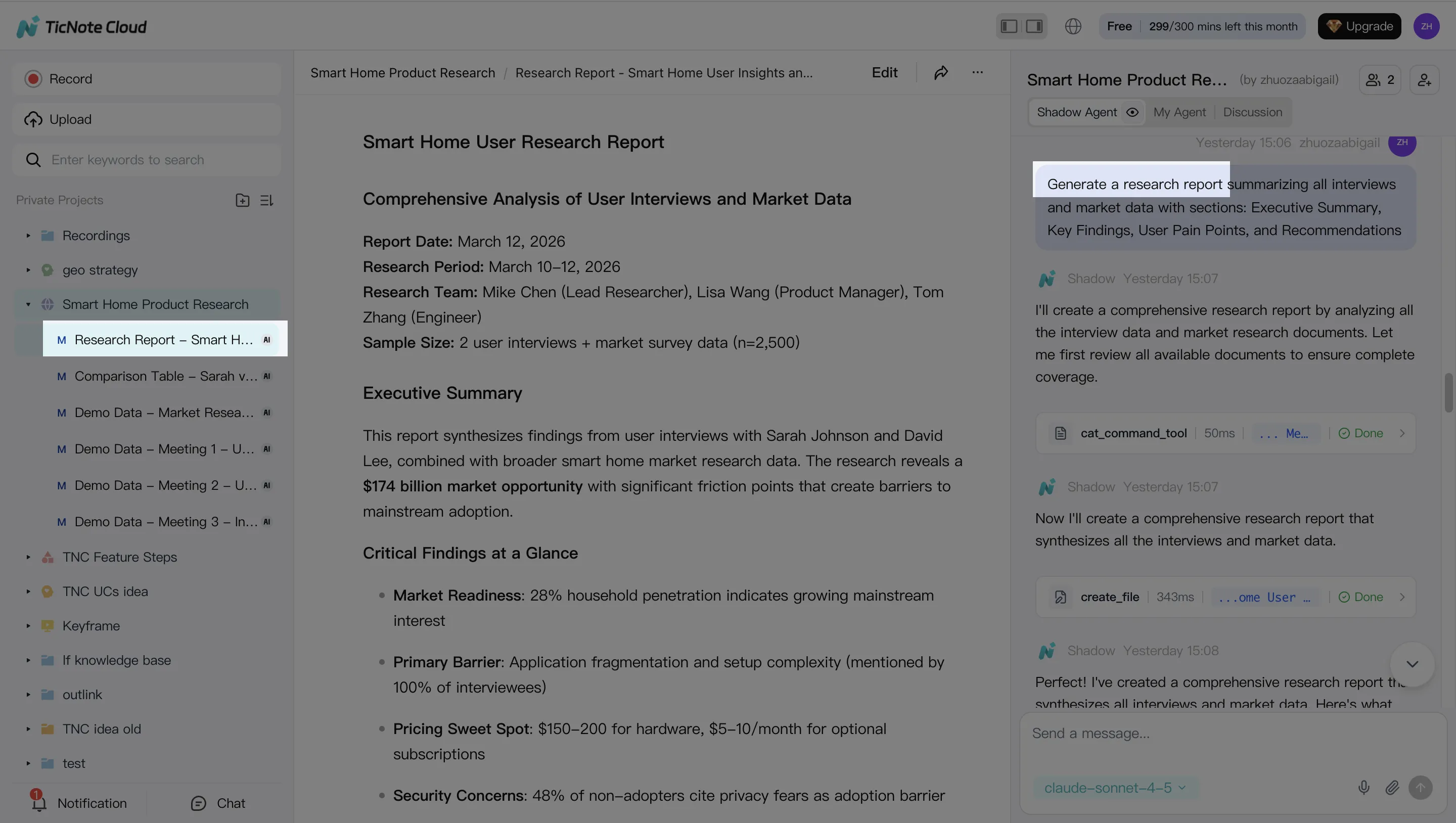
3. Generate deliverables
Next, ask Shadow AI to create meeting notes, follow-up emails, research summaries, or client-ready reports. You can also generate alternate formats, including a web presentation, mind map, podcast script, show notes, or HTML page.
Signup box: Get 30 credits to use Claude Opus 4.7 Premium for free every month.
4. Review, refine, and collaborate
Review the generated output, click back to source paragraphs for verification, and ask Shadow to revise specific sections. Share the Project with Owner, Editor, or Viewer permissions so teammates can comment, co-edit, and run their own project-scoped questions.
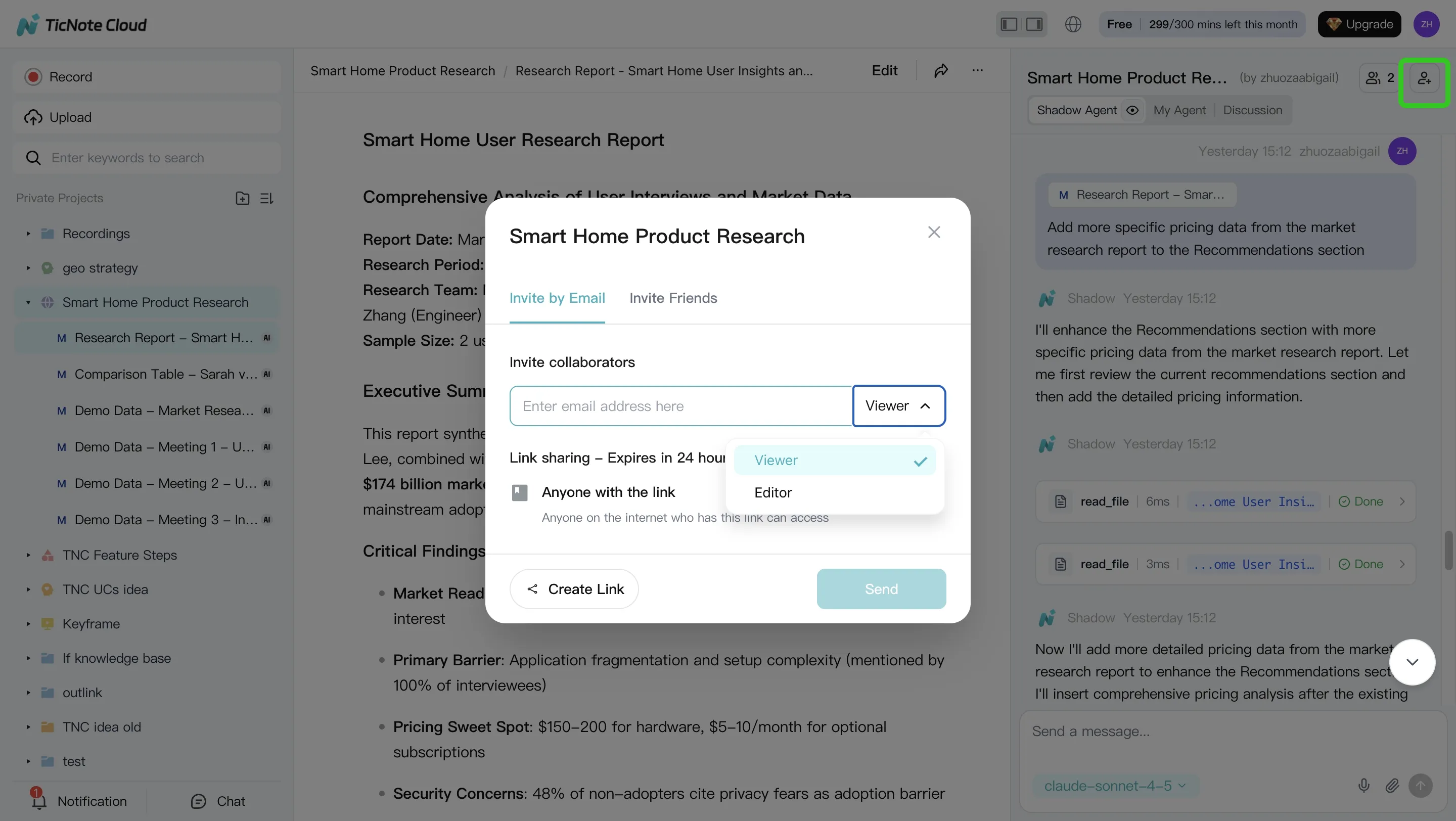
On mobile, the flow is shorter: open or create a Project, add recordings or uploads, run Shadow AI, and sync the results back to the same shared Project.
How TicNote Cloud can make model choice safer for real teams
In Claude Opus 4.7 vs Grok 4 evaluations, the safest workflow isn't "pick the smartest model." It's keeping every answer tied to evidence. TicNote Cloud stores meeting transcripts, timestamps, documents, and generated outputs inside Projects, so each claim can point back to the exact source.
Keep source context attached
Meeting hallucinations happen when a model summarizes without the original record in reach. Shadow AI reduces that risk by answering from Project files with citations to transcript timestamps, uploaded docs, or source clips. That matters when teams test Claude Opus 4.7, Grok 4, or lower-cost models, because the verification layer stays the same. For budget planning, compare token pricing assumptions before routing long meetings to a frontier model.
Work where the data lives
Copy-pasting notes into chatbots creates 2 problems: stale context and unmanaged Shadow AI, meaning tools used outside approved controls. TicNote Cloud centralizes the work. This is the "Shadow AI inside project files with citations" pattern: search, edit, and generate inside one Project, with permissions and traceable operations.
Turn model output into team assets
For most teams, TicNote Cloud is the practical default because transcripts, files, and outputs stay editable together. Use structured outputs like:
- Action-item schemas with owner, due date, and status
- Decision logs with evidence links
- Risk registers for open issues
- Report sections ready for client or sprint review
Let Shadow write your next deliverable.
Final thoughts: choose the model, but protect the workflow
Claude Opus 4.7 vs Grok 4 is worth tracking, but the business win is not the model name. It's the workflow: capture meetings, preserve long context, and turn decisions into sourced deliverables your team can verify.
For most teams, model choice should support three controls:
- Accurate meeting transcription
- Project memory across files and calls
- Traceable reports, summaries, and next steps
Users now can use Claude Opus 4.7 Premium in TicNote Cloud for free (30 requests/month). If you want to access Claude Opus 4.7 without paying for multiple AI subscriptions, use TicNote Cloud.
Get 30 credits to use Claude Opus 4.7 Premium for free every month


