


 Extension
TL;DR: The best Granola alternative picks (and who each is for)
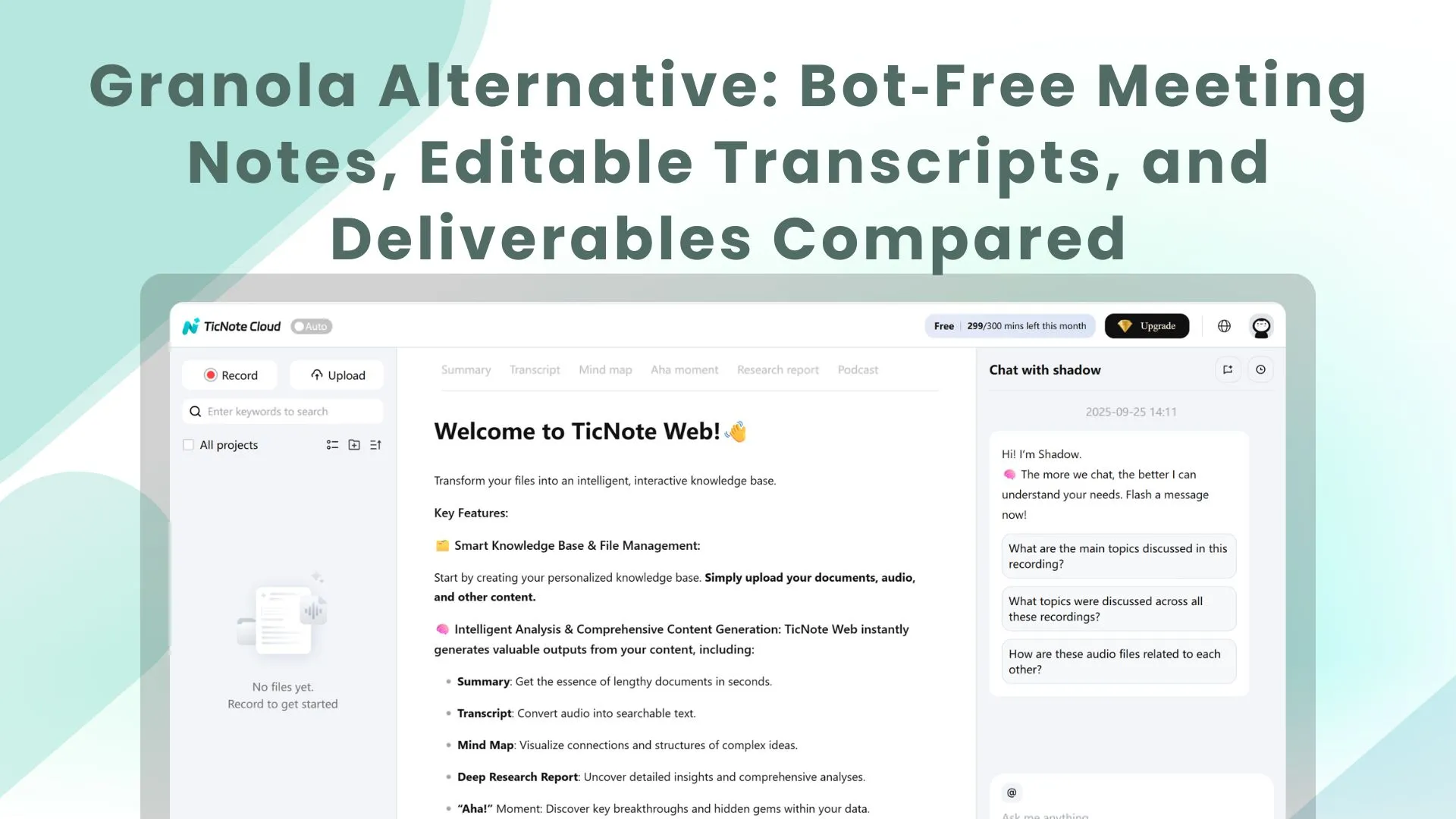
If you want a Granola alternative that turns meetings into usable outputs, start with Try TicNote Cloud for Free: it's bot-free, transcripts are editable, and it can generate reports, presentations, podcasts, and mind maps from Project content.
Meetings don't fail at transcription—they fail after. Notes live in docs, tasks scatter, and you rebuild context every week. Use TicNote Cloud to keep a single Project "source of truth" and generate the deliverable you need without copy-paste.
- #1 Pick: TicNote Cloud — best for turning meetings into project assets (editable transcripts + Project workspaces + one-click deliverables).
- Best bot-free option for audio quality: Krisp — best when noise/echo is the main risk.
- Best CRM-centric bot option: Fireflies — best for sales/ops teams that want CRM sync and accept a bot.
- Best lightweight summaries: Supernormal — best when you mainly want fast notes and action items.
- Best mobile-first recorder: Notta / Vomo — best for phone-first capture and quick recaps.
- Best local-only Mac option: Slipbox AI — best for Mac-only teams that want local-first storage.
Choose TicNote Cloud if you need editable transcripts plus "meeting → report" outputs; choose Krisp for noisy meetings without a bot; choose Fireflies for CRM workflows with a bot; choose Supernormal for simple summaries; choose Notta/Vomo for mobile capture; choose Slipbox AI for local-only Mac privacy.
What makes a good Granola alternative for meeting notes in 2026?
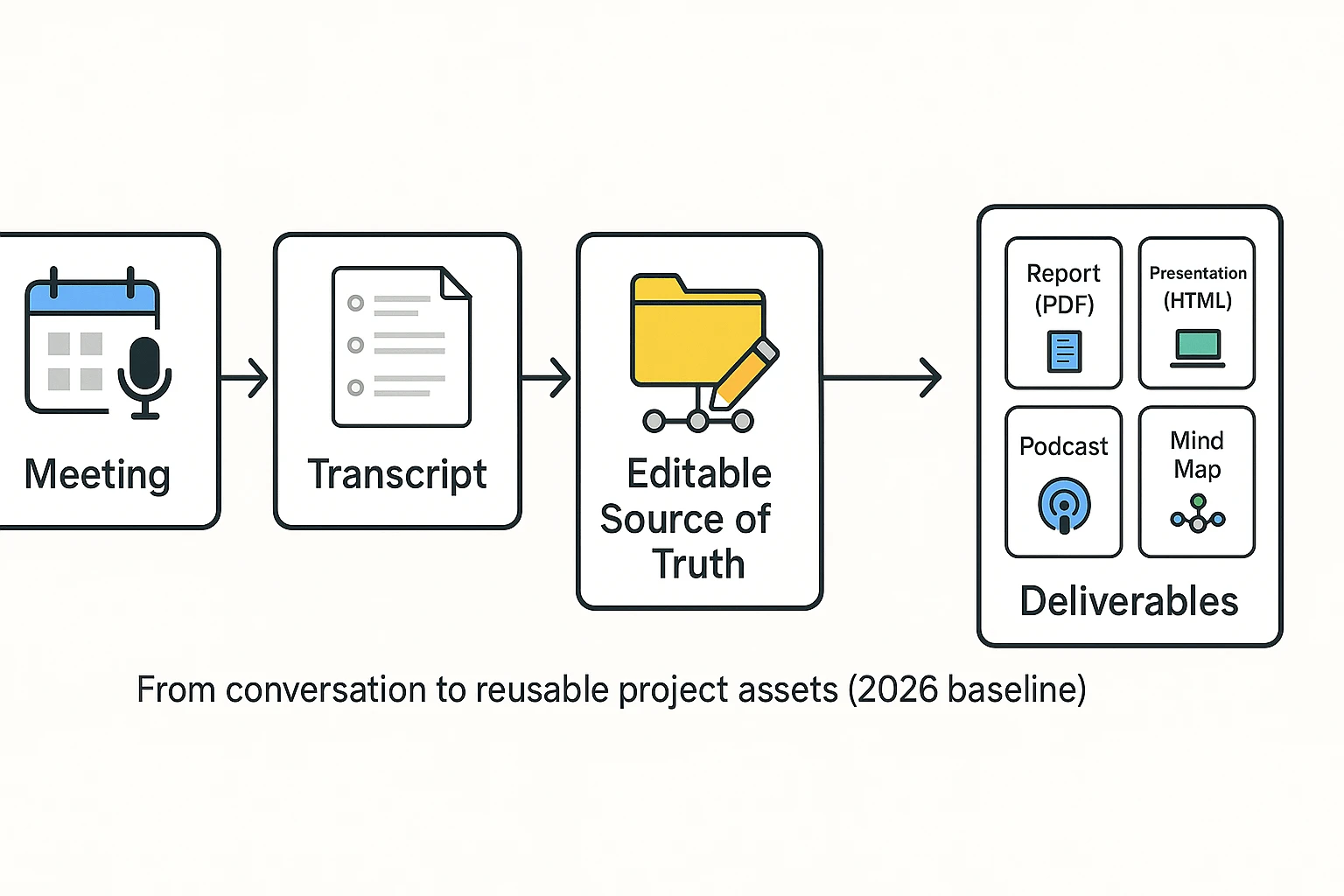
Most teams switch to a granola alternative when the basics stop being reliable: the transcript gets numbers wrong, speakers get mixed up, or the tool doesn't fit how the team actually works across devices and meeting types. In 2026, "good" isn't just "it records." It's "it becomes a clean source of truth you can reuse," then turns into outputs your team can ship.
Spot the switching triggers (fast)
Accuracy failures are the #1 trust killer. People don't verify every line. They verify the risky parts first: prices, dates, names, metrics, and commitments. If your tool turns "$$15k by Friday" into $$50 by Monday," you'll waste 10–20 minutes per meeting doing manual cleanup—and your team will still doubt the notes.
Speaker mix-ups are next. When diarization (who-spoke-when) is wrong, action items lose owners. That breaks accountability in sales calls, standups, and stakeholder reviews. A modern tool needs strong speaker recognition, plus an easy way to rename speakers and fix segments.
Then come platform gaps. Many teams are cross-platform by default: one person on Windows, another on Mac, some on mobile. Add hybrid reality (in-room audio plus remote attendees) and it gets harder. If your meeting notes tool can't capture clean audio, import files, or support your meeting apps, the workflow collapses.
Finally, workflow pain shows up after the meeting. "Notes exist" is not the goal. The goal is "notes become work": turning AI meeting summaries into a client brief, PRD, research memo, or follow-up email without starting from scratch.
The 2-minute must-have checklist (use this before you buy)
If a tool misses any of these, it won't scale past a few meetings a week:
- Platform coverage: Web plus the devices your team uses (desktop and/or mobile). Also check imports: audio, video, and documents. Imports matter when clients send recordings or you do field research.
- Bot-free vs. bot (and why it matters): Some orgs block meeting bots, and some clients dislike "a bot joining the call." Bot-free meeting transcription means the capture happens locally (for example, via an extension or app) without adding a visible participant.
- Speaker recognition you can correct: Look for diarization quality, speaker mapping (rename once and reuse), and quick edits when it's wrong.
- Editable meeting transcripts: Read-only transcripts push work into Google Docs and Slack threads. Editable transcripts let you fix names, numbers, and phrasing where the source lives, then reuse it downstream.
- Summary quality you can trust: Judge summaries on five outputs: action items (with owners), decisions, risks, open questions, and key numbers. If it can't surface those consistently, it's not saving time.
- Exports that don't trap your data: At minimum: DOCX, PDF, and Markdown for notes. If you do captions or clips, add SRT/VTT. A meeting notes generator should help your workflow, not lock it in.
The nice-to-have list (these become must-haves as you scale)
These are the features that separate "a transcript tool" from a meeting system:
- Offline support (be precise): "Truly offline" usually means on-device transcription with no cloud processing. Many tools instead let you record offline and transcribe later in the cloud. Decide which you need for travel, secure sites, or spotty Wi‑Fi.
- Search + memory across meetings: Per-meeting chat is fine for one-off calls. Teams doing projects need workspace memory: search across sessions, link themes, and answer questions using prior meetings.
- Integrations (only when they remove steps): Slack/Notion/CRM integrations matter if they auto-route deliverables. If they only dump a transcript, clean exports can be enough.
- Long meetings + multi-session projects: Check limits like max recording length, monthly minutes, batch uploads, and whether the tool can synthesize across 5–20 sessions without you copy-pasting.
2026 baseline checklist (screenshot this)
- Captures meetings without breaking etiquette (bot-free option)
- Accurate on numbers, names, and dates
- Speaker recognition with fast speaker renaming and fixes
- Editable transcript (not just export-only)
- Summaries include actions, decisions, risks, questions, metrics
- Exports: DOCX, PDF, Markdown (+ SRT/VTT if needed)
- Imports: audio + video (and docs if you build project context)
- Search works across a project, not only one meeting
- Handles long recordings and multi-session synthesis
How we compared these Granola AI alternatives (so the ranking is fair)
Most "granola alternative" lists mix opinions with feature checklists. We didn't. We used the same meeting set, the same scoring rubric, and the same pricing normalization so you can reproduce the logic—and swap in your own priorities if needed.
Test setup: same meeting mix, real-world audio
We tested each tool across four common meeting types, because a tool that shines in a quiet 1:1 can fall apart in a workshop.
- Meeting types
- 1:1 interview (question-led, lots of proper nouns)
- Team standup (fast turns, acronyms)
- Sales discovery (objections, pricing, next steps)
- Workshop (long, messy, multiple speakers)
- Audio conditions
- Laptop mic only
- Headset mic
- Mixed remote (one strong mic, one weak mic)
- Crosstalk (overlap and interruptions)
- Light background noise (HVAC, typing)
- Lengths
- Short: 15–30 min
- Medium: 45–60 min
- Long: 90+ min
We also included one in-person recording (phone or laptop capture) because that's where speaker separation and room echo tend to break.
What we measured: the parts that fail first
Most tools can produce "a summary." The gaps show up when you need the notes to survive real follow-up work.
- Accuracy (names, numbers, acronyms)
- We checked how often each tool got names, dates, amounts, and domain acronyms right.
- We tracked correction effort: how many edits it took to get to a clean source of truth.
- Speaker turns (diarization) and overlap handling Speaker turns matter because ownership drives action. We scored:
- Diarization stability (does Speaker A stay Speaker A?)
- Overlap handling (what happens during interruptions?)
- Ease of fixing labels (can you correct speakers quickly, or is it painful?)
- Summary usefulness (for real follow-ups) We judged summaries by whether they:
- Capture decisions and action items clearly
- Stay specific (not vague "discussed X" lines)
- Can be pasted into a follow-up email or working doc with minimal edits
- Outputs (deliverable-first vs summary-only) This is where many tools separate. We scored whether you can turn meeting content into:
- A structured report
- A usable presentation
- A shareable podcast-style recap
- A navigable mind map
If a tool only exports a transcript and a generic summary, it scored lower on Outputs—even if transcription was solid.
Notes on pricing and "vendor-stated" claims
Pricing is messy, so we normalized it.
- We compared starting paid plan pricing (not annual prepay discounts unless clearly shown).
- We called out the billing model:
- Seat-based (per user/month)
- Usage-based (minutes, hours, storage, or "AI credits")
- Hybrid (seat + limits)
And for claims, we kept the language tight:
- Language counts, "98% accuracy," and security badges are treated as vendor-stated unless we could independently verify them.
- The practical checks above (names, numbers, speakers, edits) are what decided scores.
Unified scoring rubric (used in every item card)
Each tool gets a 1–5 score in five areas:
- Accuracy: names/numbers/acronyms, plus time to correct
- Workflow: how fast you go from recording → searchable notes → next steps
- Collaboration: sharing, permissions, comments, and team reuse
- Privacy: bot/no-bot options, data controls, and clarity of policies
- Outputs: deliverables beyond a summary (reports, decks, audio recap, mind maps)
Tie-breakers (when totals were close):
- Bot-free capture for sensitive teams and external calls
- Editable transcripts (not read-only exports)
- Strong deliverable generation from the meeting + project context
Features and prices change fast—verify details on each vendor's site before you buy.
Comparison table: Top Granola alternatives (features, privacy, pricing)
If you're shopping for a granola alternative, this table helps you decide in about 30 seconds. Scan left to right: first check Platforms and Bot-free, then confirm Editable transcript and Speaker recognition, and finish with Deliverables and Exports. The goal isn't "best transcript." It's "meeting → editable source of truth → usable outputs."
How to read this table fast (30 seconds)
- Bot-free: "Yes" means no meeting bot joins your call. The tool records from your device (extension/app) or from an uploaded file.
- Offline capture: Some tools can record audio/video offline, but still need the cloud to transcribe. "Full offline transcription" is rare.
- Speaker recognition: Look for both speaker labels and the ability to fix them.
- Deliverables: This is where tools split. Many only export notes. Fewer generate project-ready outputs like reports, decks, podcasts, or mind maps.
Normalized comparison table (vendor-stated where applicable)
| Tool | Platforms (Web/Windows/Mac/iOS/Android) | Bot-free (no bot joins call) | Offline capture | Speaker recognition (labels + fix) | Editable transcript (collab notes) | Project/workspace memory | Deliverables (capability matrix) | Integrations (Notion/Slack/CRM) | Exports (DOCX/PDF/Markdown/SRT, audio) | Security notes (vendor-stated) | Starting price (vendor-stated; 2026-03) |
| TicNote Cloud | Web; iOS; Android; Extension | Yes | Record offline: Limited / varies by device; Full offline transcription: No | Yes (real-time speaker recognition; editable) | Yes (WYSIWYG editing; real-time co-editing + comments) | Project library (meetings + docs + media; long-context memory) | Report: Yes; Presentation: Yes (HTML); Podcast: Yes; Mind map: Yes | Notion; Slack | Transcript: TXT/DOCX/PDF; Summary: Markdown/DOCX/PDF; Mind map: PNG/Xmind; Audio: WAV; Presentation: HTML | U.S.-based cloud; encryption; data not used to train AI; operations traceable; GDPR-aligned (validate) | 0 |
| Otter.ai | Web; iOS; Android | Usually No (often uses meeting assistant/bot for live calls) | Record offline: Yes (mobile); Full offline transcription: No | Yes (varies by plan; editing available) | Partial (edit text; collaboration varies) | Per workspace, mainly meeting-centric | Report: Limited; Presentation: No; Podcast: No; Mind map: No | Varies | Common exports include text/PDF (varies) | Cloud processing; enterprise controls vary | Paid plans vary |
| Fireflies.ai | Web | Usually No (bot joins many meetings) | Record offline: No | Yes (labels; correction varies) | Limited | Meeting library | Report: Limited; Presentation: No; Podcast: No; Mind map: No | Slack; CRM options vary | Common exports vary; audio often available | Cloud processing; policy varies | Paid plans vary |
| Fathom | Web | Usually No (joins as assistant for supported calls) | Record offline: No | Yes (varies) | Limited | Meeting history | Report: Limited; Presentation: No; Podcast: No; Mind map: No | CRM options vary | Common exports vary | Cloud processing; policy varies | Paid plans vary |
| Avoma | Web | Usually No (meeting bot/assistant common) | Record offline: No | Yes (varies) | Limited | Meeting + revenue workflows | Report: Limited; Presentation: No; Podcast: No; Mind map: No | CRM-heavy (Salesforce/HubSpot, varies) | Common exports vary | Cloud processing; policy varies | Paid plans vary |
| Notion AI (with notes/imports) | Web; Windows; Mac; iOS; Android | Yes (no bot; you provide text/audio via other means) | Record offline: Yes (notes); Full offline transcription: No | N/A (depends on your transcription source) | Yes (docs are editable; collaboration strong) | Project/workspace docs | Report: Yes (docs); Presentation: Limited; Podcast: No; Mind map: No | Many via API/3rd party | Exports vary (Markdown/PDF, etc.) | Workspace controls vary | Paid plans vary |
Deal-breakers people hit (and how to spot them)
- "No bots allowed" policy: If your clients block unknown attendees, choose Bot-free = Yes. It avoids invite friction and recording fails.
- Editable transcripts (not just exports): If your team needs a clean "source of truth," look for in-app editing plus comments and co-editing. A read-only transcript forces extra tools and copy/paste.
- Offline needs: If you do field work or travel, "offline capture" matters. Most tools still require cloud transcription later, so plan for that delay.
- Deliverables, not summaries: If the output must be client-ready (report/deck/podcast/mind map), prioritize tools with a clear deliverables matrix—otherwise you'll be formatting by hand.
Best overall for turning meeting notes into reports
If your workflow ends with a report or presentation, TicNote Cloud is the most complete option in this shortlist because it pairs bot-free capture with editable transcripts and project-based deliverable generation (so outputs stay tied to sources).
Try TicNote Cloud for Free — the free plan includes 300 transcription minutes/month, live transcription, AI summaries, mind maps, translation, and a deep research report.
Top Granola alternatives (ranked): detailed item cards
Here are the top options, ranked, with one promise: every card uses the same framework, so you can scan fast and compare fairly. If you're evaluating a granola alternative for 2026, focus on three things: capture method (bot vs no-bot), how editable the transcript is, and whether the tool can turn meetings into real deliverables.
1) TicNote Cloud (Rank #1)
- Best For: Consultants, PMs, and researchers who need "meeting notes → report" without copy-paste.
- Website | Pricing: TicNote Cloud | Free plan ($$0). Paid starts at *$$12.99/month** (individual plans; higher tiers for teams).
- Key Features:
- Bot-free capture (no meeting bot joins the call)
- Real-time speaker recognition + timestamps
- Editable transcripts (shared source of truth, not read-only)
- Project workspaces that group meetings + files
- Shadow AI: project Q&A with citations, rewriting, and structured outputs
- One-click deliverables: reports, web presentations, podcasts, mind maps
- Exports: WAV (audio); transcript TXT/DOCX/PDF; summary Markdown/DOCX/PDF; mind map PNG/Xmind; presentation HTML
- Integrations/connectors: Notion, Slack (plus export-first workflows)
- Limitations:
- If you only need a quick summary and nothing else, the project layer can feel "more than necessary."
- Some advanced features are tier-gated (template customization and higher monthly minutes).
- Why it stands out:
- Editable transcript + Project memory means decisions stay maintainable over time.
- Deliverable generation is built-in (report/presentation/podcast/mind map), not an afterthought.
- Privacy & data handling (vendor-stated; verify): U.S.-based cloud, private by default, data not used to train AI models, encryption, and traceable AI actions. Verify retention, admin controls, and DPA/SOC2 needs in security review.
- Score (1–5): Accuracy / Workflow / Collaboration / Privacy / Outputs: 4.6 / 4.8 / 4.5 / 4.3 / 4.9
*If you're also comparing "Jamie-style" tools, this bot-free notes + deliverables comparison can help you sanity-check capture and privacy trade-offs.
2) Krisp
- Best For: Teams that prioritize clean audio plus bot-free capture.
- Website | Pricing: Krisp | Paid plans vary; often seat-based for teams.
- Key Features:
- Strong noise cancellation and echo removal
- Bot-free approach (audio processing on your device, depending on setup)
- Meeting assistance features (notes/summaries vary by plan)
- Exports typically include text notes and transcript formats
- Limitations:
- Less "project memory." You'll still stitch meetings into deliverables elsewhere.
- Deliverables (reports, decks, podcasts, maps) are not the core product.
- Why it stands out:
- Audio quality can improve transcript quality downstream.
- Great fit for noisy home offices and hybrid calls.
- Privacy & data handling (vendor-stated; verify): Noise processing may occur locally or in cloud depending on feature. Verify where audio is processed, retention, and admin controls.
- Score (1–5): 4.2 / 3.6 / 3.2 / 4.0 / 2.6
3) Supernormal
- Best For: Fast structured summaries, action items, and follow-ups.
- Website | Pricing: Supernormal | Typically subscription; team pricing may be seat-based.
- Key Features:
- Strong meeting summary templates (decisions, tasks, next steps)
- Often works via calendar/meeting connections and note sharing
- Exports to common doc tools (varies by workspace)
- Limitations:
- Platform and extension constraints can shape your workflow.
- More "notes output" than "deliverables engine."
- Why it stands out:
- Clean structure with minimal setup.
- Great for teams that live in action lists.
- Privacy & data handling (vendor-stated; verify): Verify consent workflows, where recordings/transcripts are stored, and whether data is used to train models.
- Score (1–5): 4.0 / 4.1 / 3.6 / 3.7 / 2.9
4) Fireflies.ai
- Best For: CRM-centric workflows, searchable libraries, and sales coaching.
- Website | Pricing: Fireflies.ai | Subscription; team plans often seat-based.
- Key Features:
- Large searchable meeting archive
- Integrations with CRMs and collaboration tools
- Track topics, keywords, and talk-time style signals (depends on plan)
- Exports and share links for notes
- Often uses a meeting bot that joins calls
- Limitations:
- Bot attendance can raise trust and consent friction in some orgs.
- Turning meetings into polished deliverables usually needs extra steps.
- Why it stands out:
- Strong integration story for sales and revops.
- Good for coaching and call review routines.
- Privacy & data handling (vendor-stated; verify): Bot joining means you must get meeting consent right. Verify data retention, training policy, and admin controls.
- Score (1–5): 4.1 / 4.0 / 4.0 / 3.5 / 3.1
5) Notta
- Best For: Multilingual transcription and exports across devices.
- Website | Pricing: Notta | Subscription; team options vary.
- Key Features:
- Multilingual transcription
- Mobile + desktop usage patterns
- Multiple export formats
- Summaries and highlights (plan-dependent)
- Limitations:
- Speaker accuracy can vary more by mic quality and room setup.
- Enterprise security requirements may need deeper review.
- Why it stands out:
- Flexible for people moving between phone and laptop.
- Good export coverage for downstream tools.
- Privacy & data handling (vendor-stated; verify): Verify where data is stored, whether model training uses customer data, and enterprise controls.
- Score (1–5): 3.9 / 3.7 / 3.2 / 3.6 / 2.8
6) Vomo AI
- Best For: Mobile summaries and quick uploads.
- Website | Pricing: Vomo AI | Subscription; pricing varies by tier.
- Key Features:
- Fast mobile recording and summarization
- Upload-based workflow for audio
- Simple exports
- Limitations:
- Limited collaboration and team controls for heavy workflows.
- Less structure for long-running projects and deliverables.
- Why it stands out:
- Great "capture anywhere" experience.
- Low friction for solo users.
- Privacy & data handling (vendor-stated; verify): Verify device vs cloud processing, retention, and account deletion controls.
- Score (1–5): 3.7 / 3.5 / 2.6 / 3.4 / 2.4
7) Bluedot
- Best For: Browser-first recording with templates.
- Website | Pricing: Bluedot | Subscription; team plans may be seat-based.
- Key Features:
- Browser-led workflow and note templates
- Sharing and searchable meeting library
- Exports to common doc formats
- Limitations:
- No offline-first capture.
- Org controls and permission depth can depend on plan.
- Why it stands out:
- Clean "record → summarize → share" loop.
- Template-driven consistency.
- Privacy & data handling (vendor-stated; verify): Verify access controls, retention, and how shared links are secured.
- Score (1–5): 3.8 / 3.6 / 3.3 / 3.5 / 2.7
8) Slipbox AI
- Best For: Local-only Mac users who want a privacy-forward posture.
- Website | Pricing: Slipbox AI | Pricing varies; often single-user.
- Key Features:
- Local-first or local-only workflow (depending on configuration)
- Fast capture for personal knowledge
- Simple summaries and search
- Limitations:
- Mac-only limits team standardization.
- Long sessions can stress performance and storage.
- Why it stands out:
- Privacy posture can be simpler for sensitive work.
- Great for individual workflows.
- Privacy & data handling (vendor-stated; verify): Confirm what stays local, what leaves the device, and any third-party model calls.
- Score (1–5): 3.6 / 3.4 / 2.2 / 4.4 / 2.3
9) Flownote
- Best For: Simple iOS recording and summaries.
- Website | Pricing: Flownote | Subscription; usually individual-focused.
- Key Features:
- iPhone-first capture
- Basic summaries and share options
- Lightweight exports
- Limitations:
- Limited transcript editing depth.
- Collaboration and permissions are minimal.
- Why it stands out:
- Quick for personal notes.
- Low setup overhead.
- Privacy & data handling (vendor-stated; verify): Verify iCloud/device storage vs vendor cloud, and retention settings.
- Score (1–5): 3.5 / 3.2 / 2.0 / 3.5 / 2.0
10) Limitless
- Best For: People bought into a continuous "memory" concept.
- Website | Pricing: Limitless | Subscription and/or hardware-linked pricing.
- Key Features:
- Always-on style capture (varies by device and setup)
- Search across captured moments
- Summaries and recall workflows
- Limitations:
- Hardware dependence creates rollout risk for teams.
- "Always on" can be a hard sell for privacy and consent.
- Why it stands out:
- Strong for personal recall and daily logging.
- Useful if you want a timeline of life/work.
- Privacy & data handling (vendor-stated; verify): Verify how consent works, what's recorded by default, retention windows, and admin controls.
- Score (1–5): 3.6 / 3.3 / 2.4 / 3.0 / 2.2
If you only try one
If your real goal is usable outputs, pick the tool that makes a clean source of truth. TicNote Cloud leads here because it pairs bot-free capture with editable transcripts, then turns the same Project into reports, decks, podcasts, and mind maps—without rebuilding context each time.
What can a deliverable-first meeting notes tool do that most Granola alternatives can't?
A deliverable-first meeting notes tool doesn't stop at "here's the transcript." It turns each meeting into an editable source of truth, then uses that verified content to produce client-ready outputs (reports, decks, recaps) without copy-paste. That's the real gap with many Granola alternatives in 2026: they capture the meeting, but they don't reliably ship the work that comes after.
The steps below are demonstrated using TicNote Cloud as an example.
Step-by-step: meeting → editable transcript → project → deliverables (with screenshots)
1) Create a Project and add content
Start by making a Project for a client, sprint, or research theme. The goal is simple: keep every source in one place so the outputs stay grounded in what was actually said.
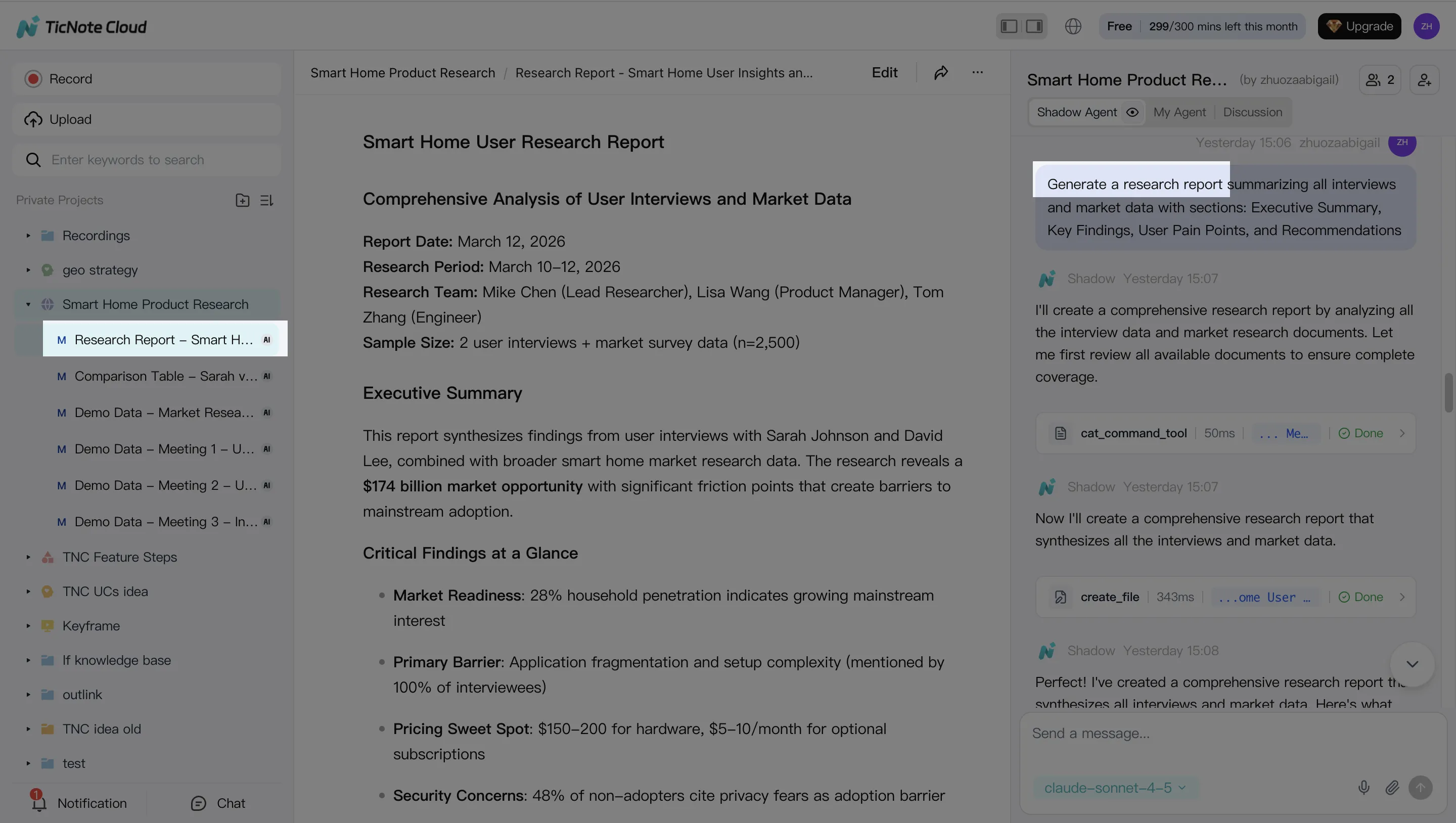
In TicNote Cloud's web studio, you create a new Project (or open an existing one) and add source materials: meeting recordings plus any supporting docs.
- Use direct upload when you already have files ready (audio, video, PDFs, docs).
- Use the Shadow AI attachment flow when you're already in chat and want to file things as you work.
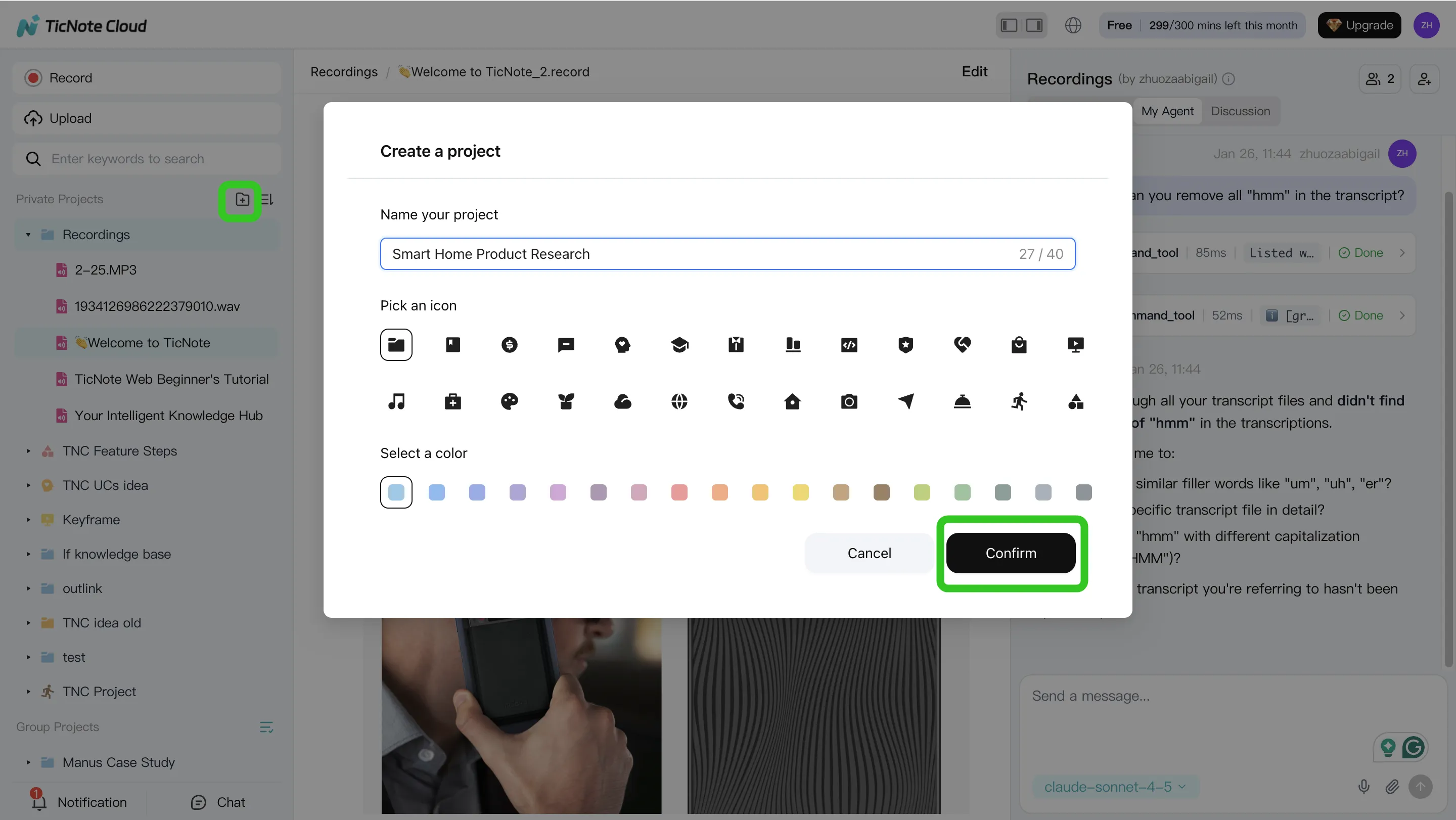
Why this matters: when your meetings and docs sit together, your "final" report can point back to the exact moment in the transcript. That cuts follow-up questions and rework.
2) Use an AI agent to search, analyze, edit, and organize Project content
Next, you use an AI agent inside the Project to do four jobs that usually get split across tools: search, analysis, editing, and organization.
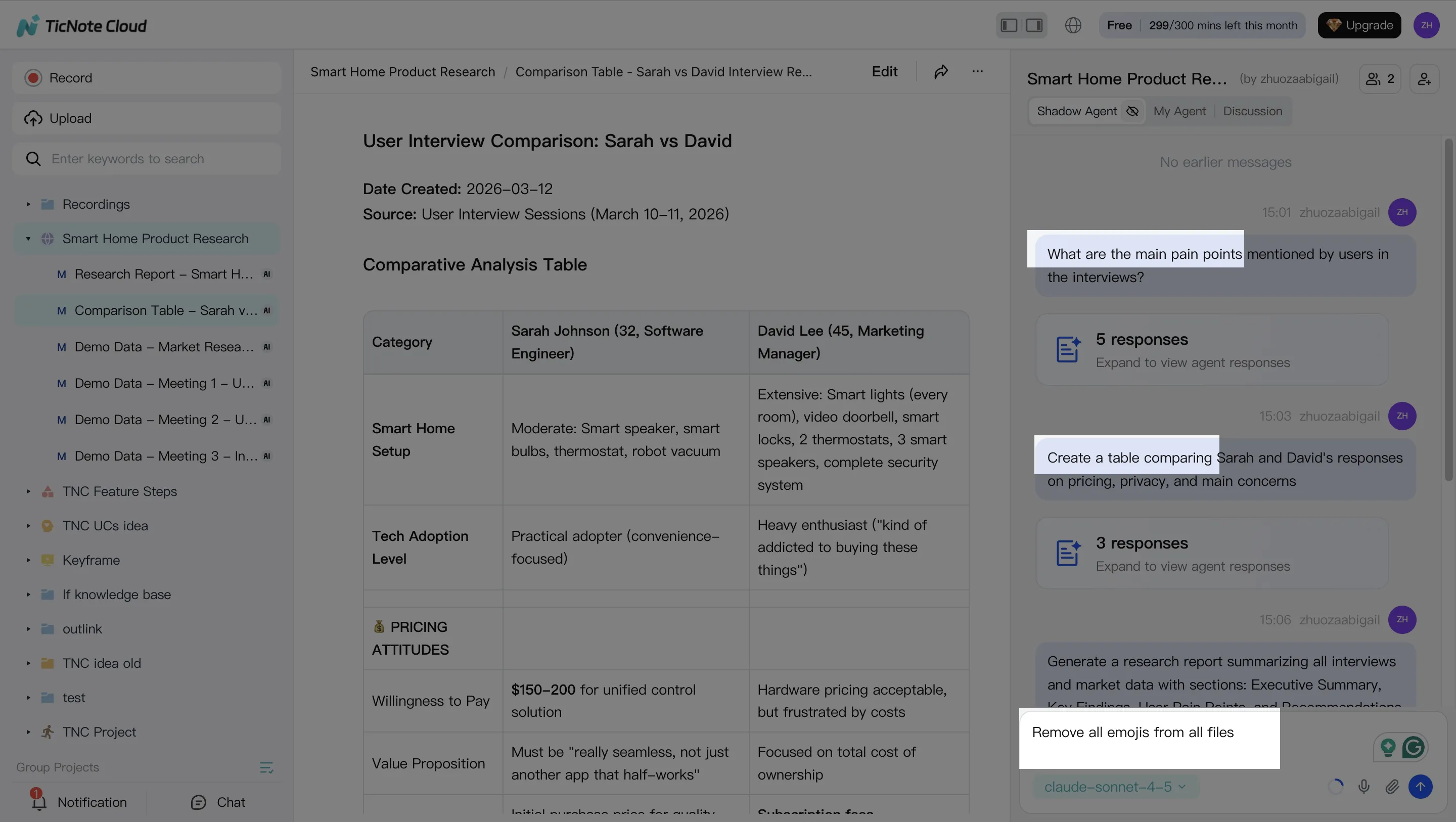
In TicNote Cloud, Shadow AI stays open on the right. You can ask questions across every file in the Project, then require answers with references back to sources. This changes the work from "hope the summary is right" to "verify and fix fast."
Typical prompts that match real workflows:
- Search + analysis: "What are the main pain points?" "Compare the 3 interviews and list shared themes."
- Edit + organize: "Create an action-item list with owners." "Rewrite this section in a formal tone."
The key step most teams skip: fix the transcript before you generate final outputs. Clean speaker names, correct numbers, and update key terms (product names, metrics, dates). Then re-run the summary so your downstream deliverables inherit the corrected facts.
3) Generate deliverables from the Project
Here's where deliverable-first tools separate from typical meeting note apps: you don't just export notes—you generate finished assets from the same Project context.
In TicNote Cloud, you can ask Shadow AI to create deliverables or use the Generate button to pick a format. Common options include:
- Client-ready report (PDF): best for consulting readouts, research synthesis, or quarterly business reviews.
- Web presentation (HTML): best for internal updates that need fast sharing, clear structure, and easy skim.
- Podcast-style recap: best for async teams that want a listenable summary with key points.
- Mind map: best for planning sessions, discovery calls, or surfacing scope and dependencies.
Instead of rebuilding the same content in Google Docs, slides, and Slack, you generate a first draft that already reflects the meeting record and Project files.
4) Review, refine, and collaborate
A deliverable isn't done when it's generated. It's done when the team agrees it's accurate.
After the output is created, refine it by asking for targeted edits (tighten an intro, add a risks section, change tone). When you need to verify a claim, jump back to the original source so reviewers can check context fast.
Collaboration stays inside the Project:
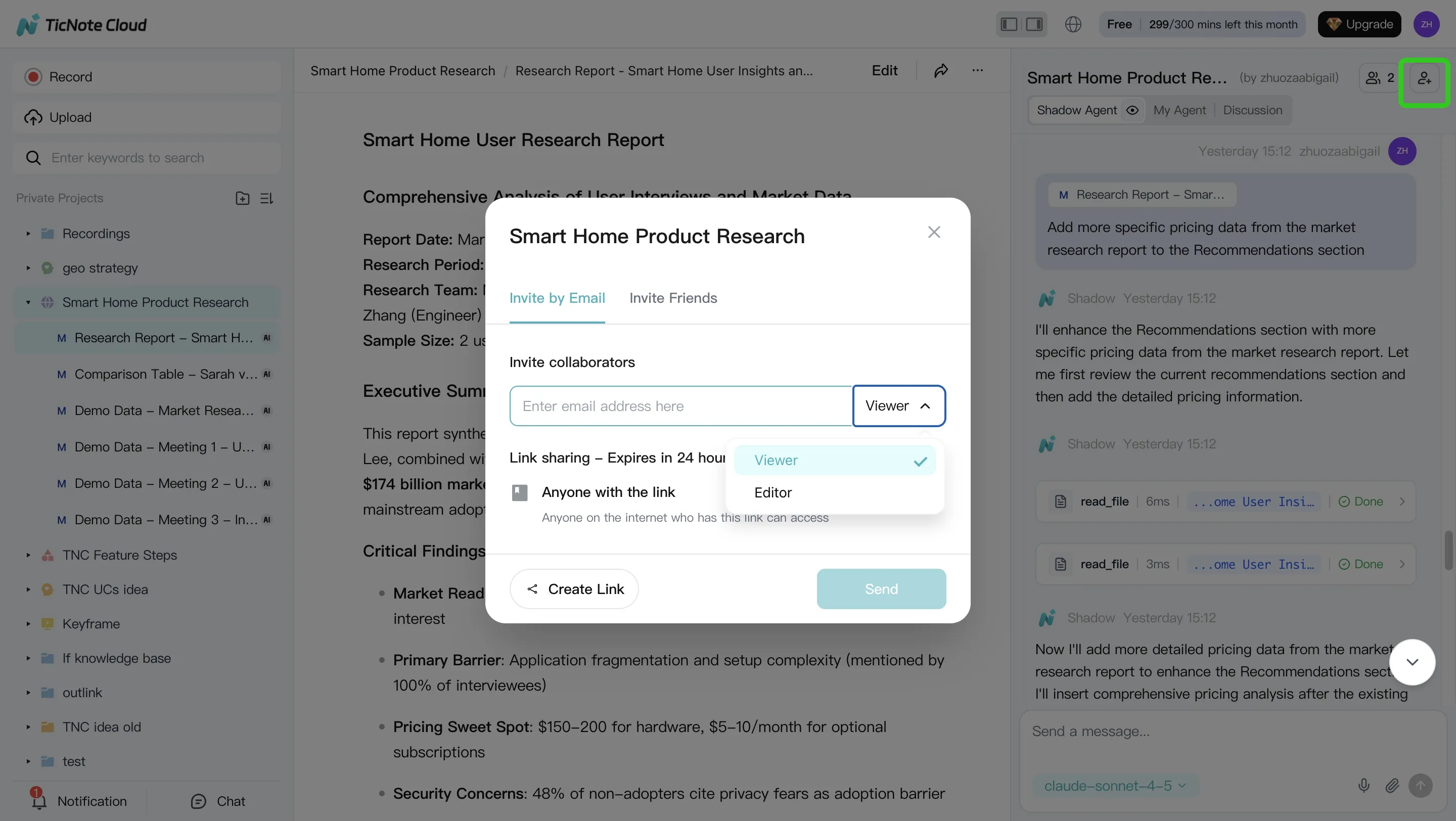
- Share the Project with role-based access.
- Add comments and assign owners.
- Keep the transcript as the shared source of truth, so changes are traceable.
Finally, export in the formats teams actually ship—so the deliverable fits your downstream workflow, not the other way around.
App workflow (summary)
On mobile, the workflow stays Project-based: open or create a Project, then record or upload audio to capture field interviews and quick updates. Later, finalize summaries or generate deliverables from the same Project on web, where editing and review are faster.
Common pitfalls (and how editable transcripts reduce rework)
Most "bad meeting notes" come from three predictable issues:
- Bad speaker labels → decisions get attributed to the wrong person.
- Missed numbers and dates → budget, targets, and timelines drift.
- Unclear names and acronyms → follow-ups break when context is lost.
Editable transcripts fix this at the source. You correct the record once, then every summary, report, and presentation that follows becomes more accurate. In practice, that can cut review cycles from 2–3 passes to 1 pass for many teams, because fewer people have to "re-interpret" the meeting from scratch.
Which Granola alternative should you pick for your workflow? (Decision guide)
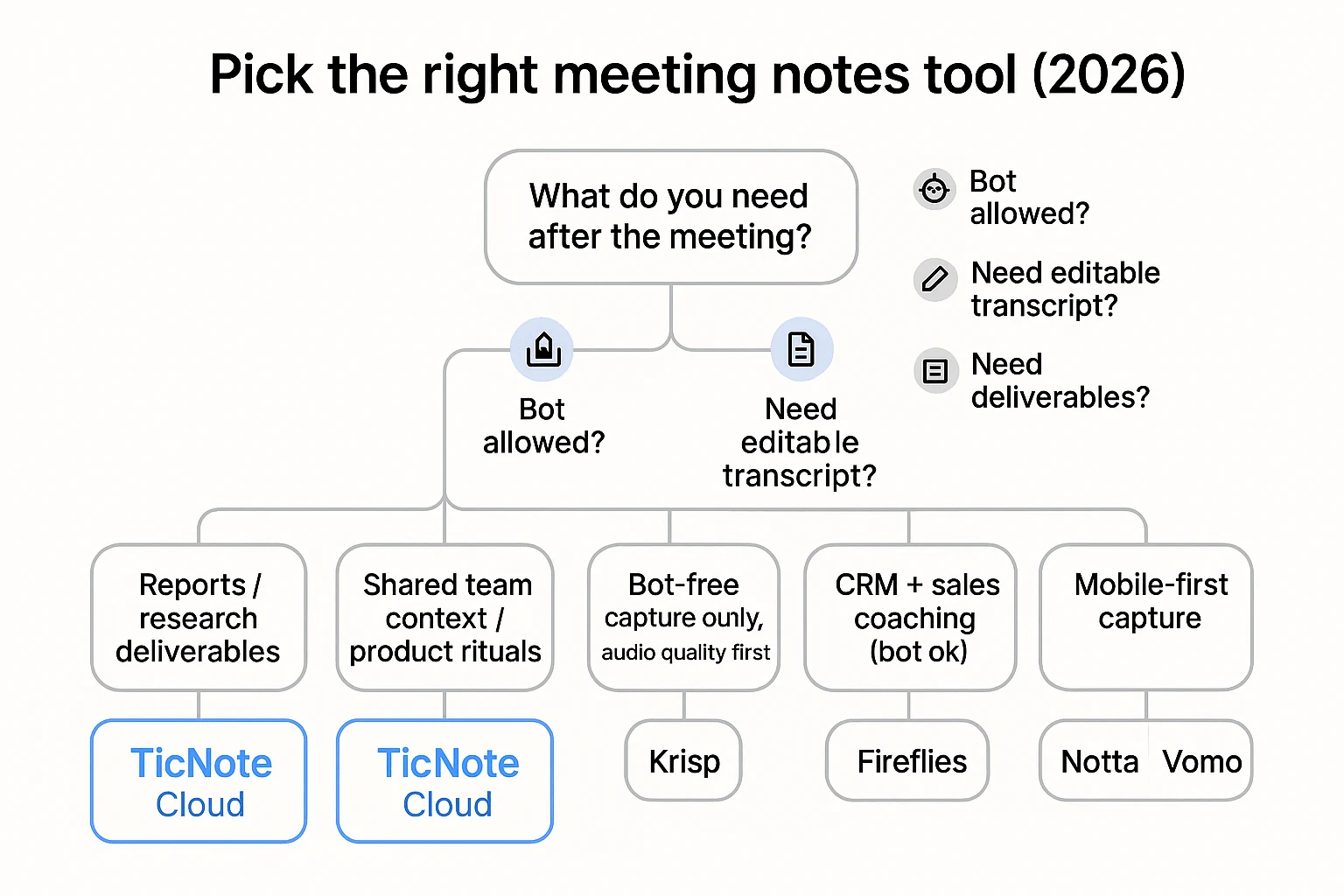
If you're comparing a Granola alternative in 2026, pick based on one thing: what you need after the meeting. Use the routes below to choose fast, then use the bullets to sanity-check the fit.
If you are a consultant or researcher shipping reports
Pick TicNote Cloud for editable transcripts + Project memory + "meeting notes → report" deliverables.
Why this is the right fit:
- Combine many interviews into one source of truth. Drop multiple calls into a single Project, so themes carry across sessions instead of living in scattered exports.
- Keep citations to exact moments. When you draft a finding, you can trace it back to the timestamped source, which is critical for defensible research.
- Turn raw conversations into client-ready outputs. Generate a structured research report (PDF/Word) or a web presentation (HTML) without reformatting.
- Edit transcripts like a working doc. Fix names, terms, and key quotes directly, so your deliverable isn't built on messy text.
Need more context tooling beyond meetings? Pair this with a team-friendly ChatGPT alternatives guide to see which tools handle citations and privacy best.
If you run product teams and need shared context
Pick TicNote Cloud for collaborative editing, permissions, and reusable Project workspaces.
Why this is the right fit:
- One Project per initiative. Keep sprint planning, retros, and user research in the same workspace so decisions don't reset every week.
- Fewer repeat debates. Project memory makes past trade-offs searchable, so you don't re-litigate the same points in every sync.
- Collaborative cleanup. Teammates can correct speaker labels, clarify action items, and tighten wording while context is still fresh.
- Permission-aware sharing. Invite cross-functional partners (or guests) without dumping raw recordings into public channels.
If you need bot-free capture only (audio quality first)
Pick Krisp when noise and echo are the biggest problems and you mainly need clean audio and basic notes.
Why this is the right fit:
- Audio cleanup is the priority. If your calls are often in cafés, open offices, or travel, noise reduction can beat fancy workflows.
- Low meeting friction. You're optimizing for "sound good" more than "build a knowledge base."
- Fast path to understandable notes. Cleaner audio usually means fewer transcript errors downstream.
If you also need deliverables (reports, decks, podcast-style recaps), route back to TicNote Cloud—clean capture is only step one.
If you need CRM and sales coaching
Pick Fireflies if a bot is acceptable and CRM sync is the primary goal.
Why this is the right fit:
- Sales workflow comes first. If your day is pipeline, follow-ups, and deal review, CRM-linked notes matter more than long-form deliverables.
- Coaching-friendly outputs. Conversation intelligence features are built for call review and rep improvement.
- Automation over editing. Many teams prefer auto-logging to manual transcript cleanup.
Quick consent checklist before enabling meeting bots:
- Confirm your org's policy allows recording/transcription for sales calls.
- Check local laws for one-party vs two-party consent.
- Add a spoken disclosure in the first 10 seconds.
- Verify what gets stored, for how long, and who can access it.
- Confirm whether data is used to train models, and how to opt out.
If you are mobile-first
Pick Notta or Vomo for phone-first capture when your meetings happen on the move.
Why this is the right fit:
- Fast recording from your phone. Great for hallway chats, field interviews, and ad-hoc voice notes.
- Simple capture beats perfect workflow. You'll actually use it when you're away from a laptop.
- Good enough for personal recall. If it's mostly for you (not a team), lightweight tools win.
If you need team workflows and repeatable outputs, move your "final" work into a Project-based system like TicNote Cloud so meetings become reusable assets instead of one-off transcripts.
60-second checklist: answer these 5 questions
Use this to decide in under a minute:
- Bot policy: Can a bot join the call, or must it be bot-free?
- Editing: Do you need editable transcripts, or is read-only fine?
- Speaker recognition: Do you need reliable speaker labels for quotes and accountability?
- Exports: Do you need DOCX/PDF/Markdown/HTML outputs for clients or stakeholders?
- Outputs: Do you need deliverables (report, presentation, podcast, mind map), not just notes?
If you answered "yes" to editing + outputs, TicNote Cloud is the cleanest route.
What's the ROI of switching from Granola to a deliverable-first tool?
The ROI usually shows up as fewer hours spent rewriting notes into "usable" docs. A deliverable-first tool turns one meeting into an editable source of truth, then reuses it across a Project. That cuts the two biggest time sinks: cleaning transcripts and rebuilding the same context in every follow-up.
Use a simple ROI formula (hours saved × hourly cost)
Keep it simple. You only need five inputs:
- Meetings per week (M)
- Average meeting length (L, hours)
- Rewrite time (R, hours per meeting): time to turn notes into a clean recap, doc, or draft
- Follow-up time (F, hours per meeting): time spent answering "what did we decide?" and re-sending context
- Blended hourly cost (C): average loaded cost for the people doing the work (salary + overhead)
Then estimate:
- Hours saved per meeting = (R saved + F saved)
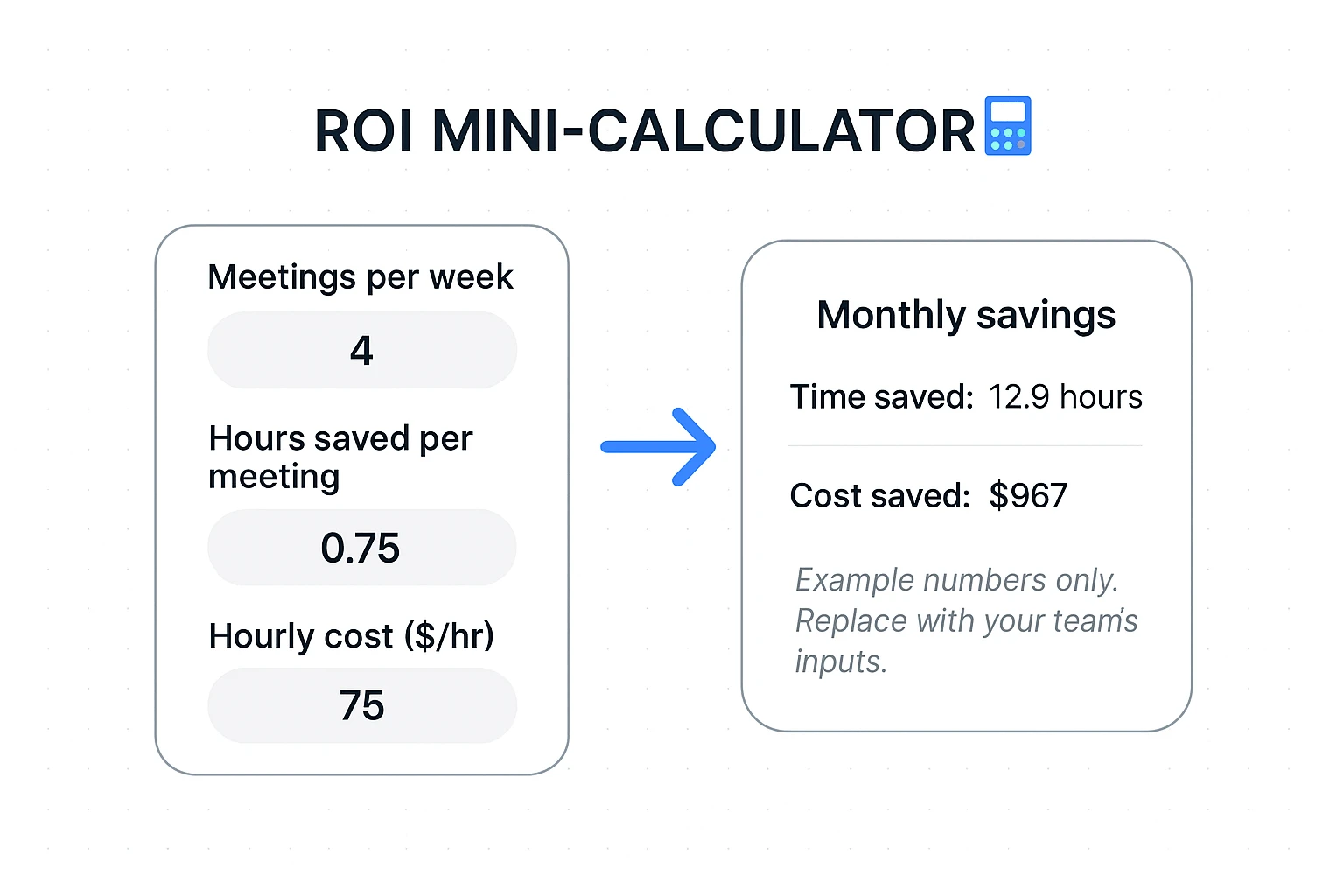
- Monthly savings ($) = M × 4.3 × (R saved + F saved) × C
A conservative starting point is saving 30–60 minutes per meeting once your Project holds the transcript, decisions, and outputs in one place.
Example scenario: meetings → one Project → report + slides
Say a small team runs:
- 1 weekly client call (60 min)
- 3 research interviews (45 min each)
That's 4 meetings/week feeding the same client engagement. In a typical workflow, someone:
- rewrites notes into a clean recap,
- copies key quotes into a research doc,
- drafts a report,
- then formats slides.
A deliverable-first setup changes the work pattern:
- Fewer copy/paste steps because the transcript is already in the Project.
- Less re-explaining because the Project keeps decisions, themes, and supporting snippets together.
- Less formatting overhead because the report and slides start from a generated first draft.
A credible estimate for this scenario is:
- Rewrite saved: 0.5 hours/meeting (less manual recap + less "clean-up")
- Follow-up saved: 0.25 hours/meeting (fewer clarification pings)
- Total saved: 0.75 hours/meeting
If C = $75/hour (blended), then monthly savings are:
- 4 meetings/week × 4.3 weeks × 0.75 hours × $$75 ≈ *$$967/month**
Even if you cut that in half, it's still meaningful.
Where the savings typically come from
Most teams see savings from three places:
- Less rewriting: Editable transcripts reduce the "fix, re-export, re-send" loop.
- Fewer follow-ups: Project memory keeps context in one place, so people stop asking for the same details.
- Faster deliverables: One-click drafts reduce doc and slide formatting time.
ROI mini-calculator (quick estimate)
- Meetings/week: ____
- Hours saved/meeting: ____
- Hourly cost ($/hour): ____
- Monthly savings = meetings/week × 4.3 × hours saved/meeting × hourly cost = ____
Tip: Start with 0.5 hours saved/meeting if you want a conservative baseline.
Final thoughts: the best Granola alternative for teams that need usable outputs
A "better than a Granola alternative" choice in 2026 isn't the app that makes the longest transcript. It's the one that turns every meeting into an editable source of truth, then turns that truth into deliverables your team can ship. Think: clean notes you can fix, shared context that doesn't vanish, and outputs like reports, decks, and briefs.
If you want the safest default pick for most teams, it's TicNote Cloud. It records without a meeting bot, so calls feel normal. Then it gives you editable transcripts (not read-only exports), plus Project memory that keeps related meetings and files together. The payoff is speed: you can generate usable deliverables—like a research report, a web presentation, a podcast, or a mind map—without copy-paste or rebuilding context each week.
Other tools still make sense in specific workflows:
- Krisp is a strong fit when your main problem is messy audio (noise, echo) and you want cleaner calls first.
- Fireflies is often best when you rely on bot-based capture and tight CRM follow-up flows.
- Notta or Vomo can be better when you're mostly on your phone and need fast, mobile-first capture.
If your team's pain is "we have notes, but nothing we can use," switch to outputs-first. Try TicNote Cloud for Free and generate one real deliverable from this week's meeting—then decide if it replaces your current stack.


