


 Extension
TL;DR: The best Happy Scribe alternative options (pick by use case)
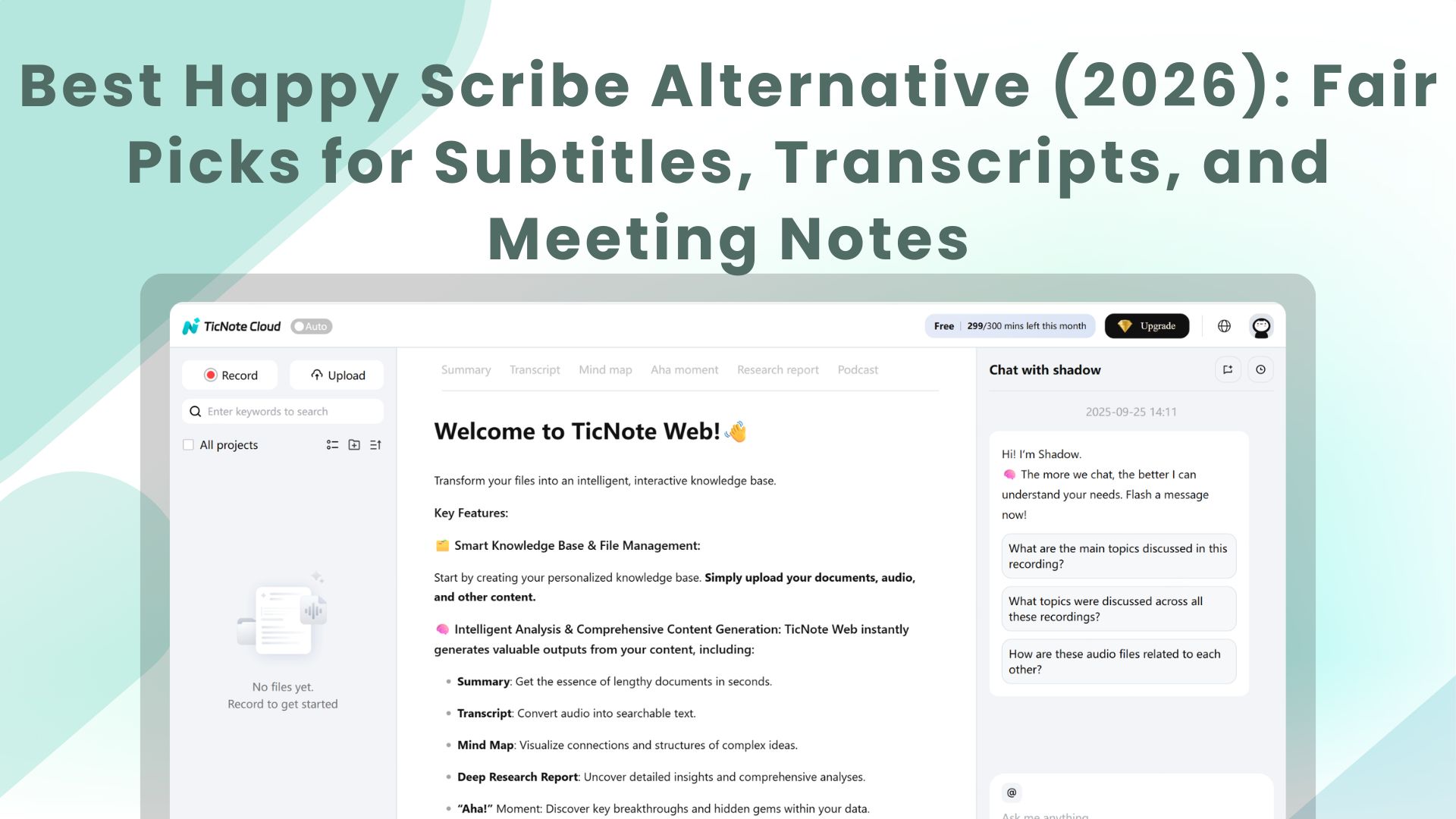
If you want one tool that covers meeting transcription and notes, editable transcripts, and one-click outputs, use Try TicNote Cloud for Free as your happyscribe alternative.
Meetings pile up, and key decisions get lost in exports. Then you waste hours re-writing notes into docs and decks. A meeting-first workspace like TicNote Cloud keeps everything in Projects, so you can edit the transcript and ship outputs fast.
- Best overall replacement (teams shipping deliverables): TicNote Cloud — editable transcripts, Project workspace, cited Q&A, and exports (reports, presentations, mind maps, podcasts).
- Best for subtitles/captions workflows: a subtitle-first editor when CPS/CPL, localization, and caption QA matter most.
- Best for highest accuracy when mistakes are costly: a human-reviewed transcription provider when error tolerance is near-zero.
- Best for meeting notes and action items: a meeting assistant when live summaries and recall matter more than subtitle tooling.
- Best for creators editing audio/video by text: a creator editor when the transcript is the editing timeline.
If you only need transcripts, optimize for accuracy, speaker labels, editor speed, and exports. If you need finished assets, optimize for reusable Project context, collaboration, governance, and one-click output formats.
What are you replacing when you search for a happyscribe alternative?
Most people don't replace "a transcription tool." They replace a small production line. When you search for a happyscribe alternative, you're usually trying to go from audio/video to a usable asset your team can ship.
Start by naming the job: file, meeting, or creator editing
Happy Scribe is used for three different jobs, and mixing them up causes bad switches.
- File transcription (upload-first): You upload MP3/MP4 and get text back. This is common for interviews, lectures, and podcasts.
- Meeting capture (live calls): You record a live call (often with speaker labels) and want notes, tasks, and follow-ups.
- Creator editing (timeline workflows): You need time-coded editing for subtitles and clips, not just a transcript.
If your real need is meetings, you may want a workspace that also stores decisions and context. That's similar to how teams compare meeting tools to docs tools in a Notion-style knowledge workflow, not just "who has the best transcript."
The deliverables you actually depend on
Buyers often say "transcript," but they mean one (or several) outputs:
- Verbatim transcript (every word, fillers included)
- Clean transcript (readable, with light edits)
- Subtitles/captions (usually SRT or VTT)
- Translated versions of the transcript or captions
- Share links for review and approval
- Quote and clip extraction for reports, articles, or social
This is where switching pain shows up: you can get text, but you can't ship the final asset fast.
The hidden requirements people forget (until it's too late)
These details decide whether a replacement works week to week:
- Speaker labels (diarization): consistent names, easy renaming, and better handling of overlap.
- Glossaries/custom vocabulary: product names, acronyms, and proper nouns.
- Subtitle controls: CPS/CPL (characters per second/line), line breaks, timing tweaks, and SDH (subtitles for the deaf and hard of hearing) needs.
- Turnaround and throughput: batch jobs, long files, and predictable processing times.
- Auditability: version history, comments, who changed what, and share permissions.
- Security basics: retention options, export controls, and clear "data not used for training" rules.
Next, we'll use this replacement map to match each job-to-be-done to the best competitors by category.
How did we compare Happy Scribe competitors (and what we tested)?
Most "accuracy" claims don't match real work. So we compared each Happy Scribe alternative using the same small test set, the same inputs, and the same scoring rubric. The goal wasn't to crown a lab winner. It was to find the tool that gets you to a usable transcript, captions, and shareable outputs with the least fixing.
Test set and conditions (so results are repeatable)
We used four short recordings that mirror common work:
- Clean interview (1:1): quiet room, steady pace, one speaker.
- Messy meeting: 3–5 speakers, interruptions, quick back-and-forth.
- Accented speaker: same language, strong accent, normal speed.
- Noisy clip: background noise plus some overlap (two people talking).
To keep variables stable, every tool got:
- The same language, same files, and same approximate length (about 5–10 minutes each).
- The same audio format per run (we used one consistent upload format).
- The same speaker count expectation (we didn't "help" one tool with manual speaker hints unless the feature exists across tools).
And we tracked one metric many reviews skip: manual edit time. In practice, a transcript with a slightly worse Word Error Rate (WER) can still "win" if it needs fewer replays and edits.
Scoring rubric we used in every tool card
Each tool was scored on a simple 1–5 scale (5 = best) across these categories:
- Accuracy + edit effort: How often did we have to replay audio? How many obvious word fixes per minute?
- Diarization (speaker labels): Are speakers split correctly? Do labels stay consistent across the file?
- Subtitle/caption tooling: Timing controls, line length, speaker changes, and translation workflow.
- Workflow actionability: Does it produce usable summaries, action items, and clean exports for clients or teammates?
- Security/admin fit: SSO/SAML, retention controls, audit logs, "data used for training" policy, and GDPR alignment.
- Pricing clarity: Can you predict cost at 10 hours/month vs 100 hours/month, or do usage rules surprise you?
Why this mix? Because accuracy alone doesn't ship work. Teams ship approved captions, meeting notes, and final assets.
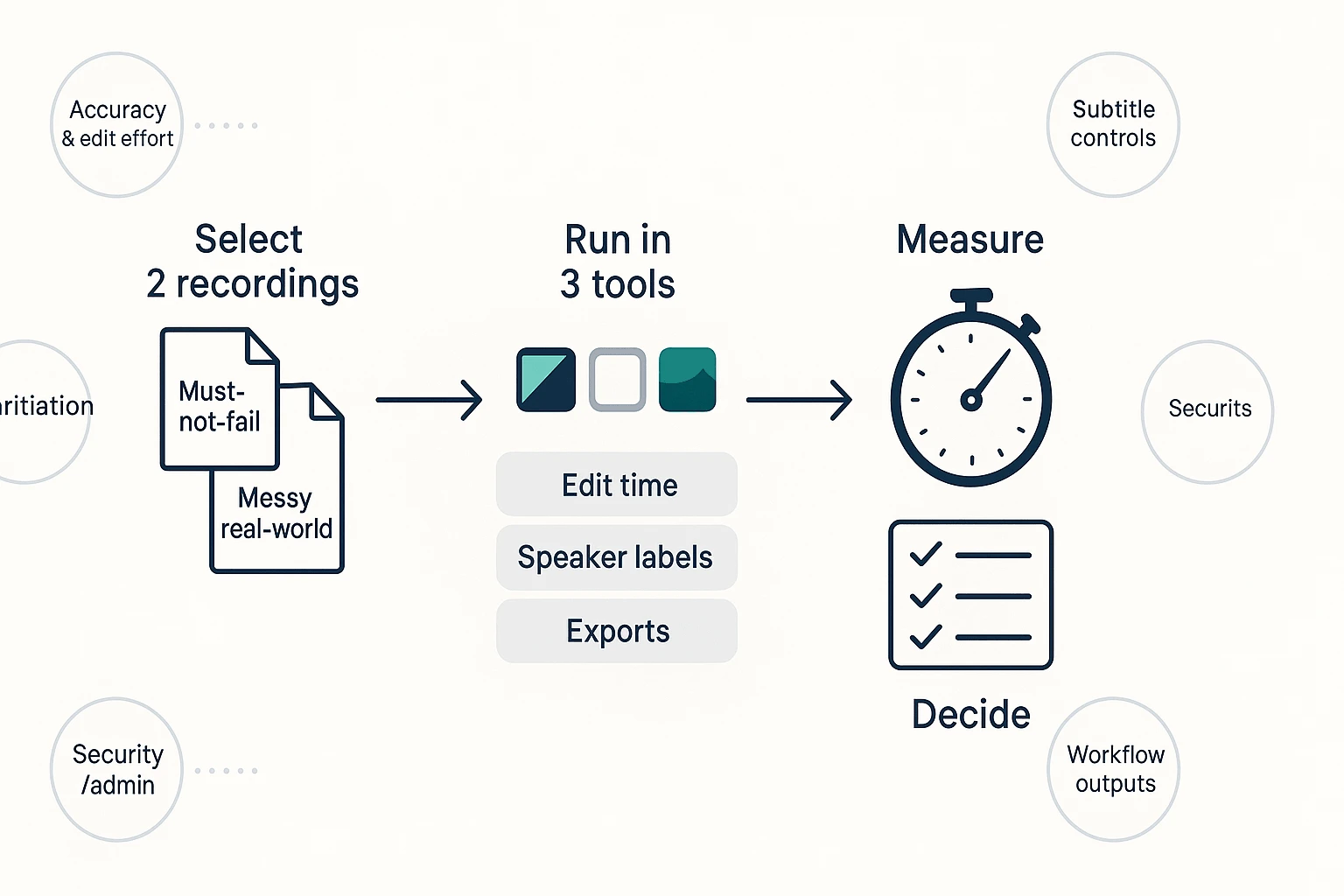
How to run your own 30-minute proof-of-fit
Do this before you commit budget or move a team:
- Pick two files:
- One must-not-fail recording (the type you do weekly).
- One realistic messy file (overlap, accents, noise).
- Test three tools max (more than that blurs your notes).
- Time-box to 30 minutes per tool:
- Upload/record → generate transcript
- Fix speaker labels and key errors
- Export/share once (DOCX/PDF/SRT—whatever you deliver)
- Create one downstream deliverable (summary, action items, or a client-ready report)
Pass/fail checklist:
- Speaker labels are usable without constant relabeling.
- Captions look acceptable after light timing and formatting.
- Exports open cleanly in your target tools.
- Admin basics are covered (access control, retention, training policy).
This method is built for commercial investigation searches. It keeps the comparison fair, but you should still validate on your own data before switching.
Comparison table: top Happy Scribe alternatives (features, security, and pricing scenarios)
Comparing a happyscribe alternative is messy because each tool prices "minutes" differently. So below, we normalize around two real workloads and show what usually changes your total cost: edits, exports, and admin controls.
Normalized scenarios (so pricing is apples-to-apples)
Scenario A: 10 hours/month (solo)
- About 20 meetings × 30 minutes (or a few long interviews)
- Needs: decent diarization (speaker labels), basic exports (DOCX/PDF/SRT), light sharing
Scenario B: 100 hours/month (team of 5)
- About 200 meetings × 30 minutes (or 5–10 research sessions/week)
- Needs: faster review, shared access, consistent exports, and basic admin
How to read mixed plans (subscription + overages):
- Many vendors include a monthly pool, then charge per extra minute.
- Normalize by asking: "What's my all-in cost at 10h and 100h if we go over?" and "Does the tier that unlocks exports or integrations also raise the base price?"
Also: minutes included is only half the story. In most teams, editing + turning notes into deliverables (reports, slides, briefs) costs more than the transcription itself.
Enterprise checklist (what procurement will ask for)
Use this short checklist to avoid surprises:
- SSO/SAML (single sign-on), plus role-based access and guest sharing
- Retention + deletion controls (how long data stays, and how to purge it)
- AI training policy (clear "never train on customer data" or an enforceable opt-out)
- GDPR alignment and whether third-party security attestations exist
One compliance anchor to keep straight: the Regulation (EU) 2016/679 (General Data Protection Regulation) — entry into application date sets that GDPR applies from 25 May 2018, which is why vendors should be able to explain lawful basis, retention, and deletion.
Notes on add-ons and overages (common gotchas)
Before you choose, ask these "hidden cost" questions:
- Human review: is it a separate per-minute fee?
- Translation: billed per minute, per language, or locked behind higher tiers?
- Subtitle exports: are SRT/VTT/ASS paywalled, watermarked, or limited?
- Limits: max file length, storage caps, or concurrency (how many jobs run at once)
- Integrations/API: sometimes only on Business/Enterprise plans
| Tool | Category | Best for | Subtitle depth | Editable transcripts | Outputs / exports | Integrations | Security / admin basics | Scenario A (10h/mo) | Scenario B (100h/mo, team of 5) |
| TicNote Cloud | Meeting workspace | Editable transcripts + project knowledge + one-click deliverables | Good (SRT use-case; translation supported) | Yes (real-time co-editing) | TXT/DOCX/PDF, summaries (MD/DOCX/PDF), mind map (PNG/Xmind), presentation (HTML), podcast | Notion, Slack | Permissions, traceable AI actions; Enterprise adds SSO | $0–$13 (Free or Pro; watch minute caps) | $30–Enterprise (Business caps; Enterprise for high volume + SSO) |
| Happy Scribe | Creator editor | Subtitles + transcript editing for media workflows | Strong (caption editing focus) | Yes | Common caption and doc exports; translation options vary by plan | Limited compared to meeting suites (varies by tier) | Team controls vary; check SSO and audits | Mid (subscription or pay-as-you-go) | High (often overages + seat costs) |
| Otter | Meeting assistant | Live meeting notes and fast summaries | Basic | Limited (editing exists; deliverables are lighter) | Transcripts, summaries, highlights; exports vary by tier | Calendar + meeting apps (plan-dependent) | Team features and admin vary by plan | Low–mid | Mid–high (seat-based scaling) |
| Fireflies.ai | Meeting assistant | Call recording + searchable meeting library | Basic | Limited | Transcripts, summaries, action items; exports vary | Strong app connectors (often tier-gated) | Admin controls vary; check retention and SSO tier | Low–mid | Mid–high (connector + admin tiers) |
| Descript | Creator editor | Podcast/video editing with text-based edits | Good (caption workflows exist) | Yes (editing is the product) | Audio/video exports; transcript-based editing | Creator stack (varies) | Team/admin depends on plan; verify compliance needs | Mid | High (heavy media usage) |
| Sonix | File transcription | Fast transcription + translation for uploaded media | Good (subtitle exports common) | Yes (web editor) | Common transcript + subtitle formats | Some integrations; API often plan-based | Business features vary; check SSO and retention | Mid (depends on minutes + add-ons) | High (minute-based scaling) |
| Trint | Creator editor | Editorial teams needing collaboration on transcripts | Good | Yes | Doc and caption exports; newsroom-style workflows | Varies (check connectors) | Often stronger team controls; confirm SSO tier | Mid–high | High (seat + usage) |
Quick read: if you ship subtitles, prioritize "subtitle depth." If you ship decisions, briefs, or client outputs, prioritize "editable transcripts" plus "outputs/exports" and admin controls.
Top tools like Happy Scribe: detailed picks (standardized cards)
You can waste hours comparing features that don't match your real job. So below, every Happy Scribe competitor uses the same "card" so you can scan fast: Best for, strengths, trade-offs, security notes, exports, pricing fit, and when to choose it instead.
TicNote Cloud — best for turning meetings into reusable deliverables
- Best for: Meeting-heavy teams that need more than transcripts: editable text, shared project context, and outputs you can ship.
- Strengths:
- Editable transcripts (not read-only). Fix wording, add notes, and collaborate.
- Project workspace: group many meetings, docs, and videos by client or topic.
- Cited Q&A across Project sources (answers link back to the source context).
- One-click deliverables: research reports, presentations, podcasts, and mind maps.
- Bot-free recording option for privacy-conscious orgs (no "meeting bot" joins the call).
- Trade-offs: It's a workspace, not just a file uploader. If you only need a quick SRT once a month, a simple transcription tool may feel lighter.
- Security notes: Private by default; data not used to train AI models; encryption; traceable AI operations; Enterprise offers SSO.
- Exports: Transcript (TXT/DOCX/PDF), summaries (Markdown/DOCX/PDF), mind map (PNG/Xmind), presentation (HTML), audio (WAV).
- Pricing fit (normalized):
- 10h solo/month: Good fit on Professional ($12.99/month) if you want deliverables and Project memory.
- 100h team/month (5 seats): Strong fit if you need a shared workspace; Business ($29.99/month) increases minutes, Enterprise adds SSO.
- When to choose instead: Pick a human service for publication-grade text, or a creator editor if you're producing full podcasts/videos end-to-end.
Rev — best for highest-stakes accuracy with humans
- Best for: Legal, academic, or public-facing captions where near-perfect text matters.
- Strengths: Human transcription and captioning workflows; strong for "can't be wrong" outputs.
- Trade-offs: Cost grows fast at scale, and turnaround is slower than AI-only tools.
- Security notes: Review data handling and retention before uploading sensitive work.
- Exports: Common transcript and caption formats (confirm your required subtitle standard).
- Pricing fit (normalized):
- 10h solo/month: Works if accuracy is the top priority.
- 100h team/month: Usually expensive; plan for budget and lead times.
- When to choose instead: If you need fast drafts, searchable knowledge, and repeatable deliverables from many meetings.
Sonix — best for fast AI transcription with a strong editor
- Best for: People who want quick AI transcripts, a good editor, and custom dictionaries.
- Strengths: Speed, editing UX, and vocabulary support for names and jargon.
- Trade-offs: Pricing can get complex with add-ons; validate subtitle features and export flow for your exact needs.
- Security notes: Check admin controls if you're rolling out to a team.
- Exports: Typical transcript and caption exports (confirm SRT/VTT options).
- Pricing fit (normalized):
- 10h solo/month: Can be solid if the plan matches your hours.
- 100h team/month: Watch how minutes, seats, and add-ons stack.
- When to choose instead: If you want meeting-to-report automation and a Project knowledge base.
Descript — best for creators who edit by editing text
- Best for: Podcasts and video teams that want to cut audio/video by editing the transcript.
- Strengths: Creator-focused editing workflow; good for assembling episodes and clips.
- Trade-offs: Overkill if you mainly need meeting notes, clean exports, and team-ready summaries.
- Security notes: Check workspace permissions if you share projects widely.
- Exports: Audio/video outputs plus transcripts (confirm caption format needs).
- Pricing fit (normalized):
- 10h solo/month: Great if you're actively producing content.
- 100h team/month: Worth it for creator teams; not ideal for pure meeting ops.
- When to choose instead: If your core job is decisions, action items, and reusable project knowledge.
Otter.ai — best for meeting summaries and sharing
- Best for: Teams that want live meeting notes, summaries, and action items.
- Strengths: Meeting-centric sharing and recap workflows.
- Trade-offs: Subtitle depth and language coverage may be lighter than dedicated caption tools; accuracy can drop in noisy calls or with heavy accents.
- Security notes: Validate admin features and data controls per plan.
- Exports: Common note and transcript exports.
- Pricing fit (normalized):
- 10h solo/month: Often a reasonable starting point.
- 100h team/month: Works if your meetings are consistent and mostly English.
- When to choose instead: If you need editable transcripts plus project-level deliverables (reports, slides, mind maps).
Trint — best for journalism-style collaboration
- Best for: Newsrooms and research teams that build stories, quotes, and themes together.
- Strengths: Collaboration for quote pulling and narrative building.
- Trade-offs: Seat costs can run high; pricing can be less transparent; confirm subtitle standards if captions are central.
- Security notes: Review permissions and audit needs if you handle sensitive sources.
- Exports: Transcript exports and collaboration outputs (confirm caption formats).
- Pricing fit (normalized):
- 10h solo/month: Can be pricey for individuals.
- 100h team/month: More suited to teams that truly use the collaboration layer.
- When to choose instead: If you want a single workspace where meetings and docs become deliverables.
Notta — best for real-time transcription across devices
- Best for: People who want live transcription on calls and on the go.
- Strengths: Real-time capture across devices; simple workflows for quick notes.
- Trade-offs: Verify privacy and model-training policy by plan; subtitle features vary, so check before committing.
- Security notes: Confirm retention, admin controls, and whether data is used for training.
- Exports: Common transcript exports (validate caption and translation needs).
- Pricing fit (normalized):
- 10h solo/month: Good if live notes are the priority.
- 100h team/month: Works if privacy and admin needs are met.
- When to choose instead: If your team needs a tighter buying checklist, use this Notta alternative evaluation guide to compare security and workflow fit.
Category reminder (so you don't buy the wrong thing)
- File transcription tools are best when you mainly upload recordings and export text.
- Meeting assistants are best when you mainly need call summaries and action items.
- Workspaces (like TicNote Cloud) are best when you need reusable Project knowledge and one-click deliverables, not just transcripts.
Step-by-step: turn a meeting into editable transcripts and deliverables
If you're replacing Happy Scribe, the real test isn't "can it transcribe?" It's whether you can turn a meeting into an editable transcript, then ship a clean output (report, deck, mind map, or audio summary) without copy-paste. Below is a simple workflow using TicNote Cloud as an example—use the same checklist to judge any transcription tool.
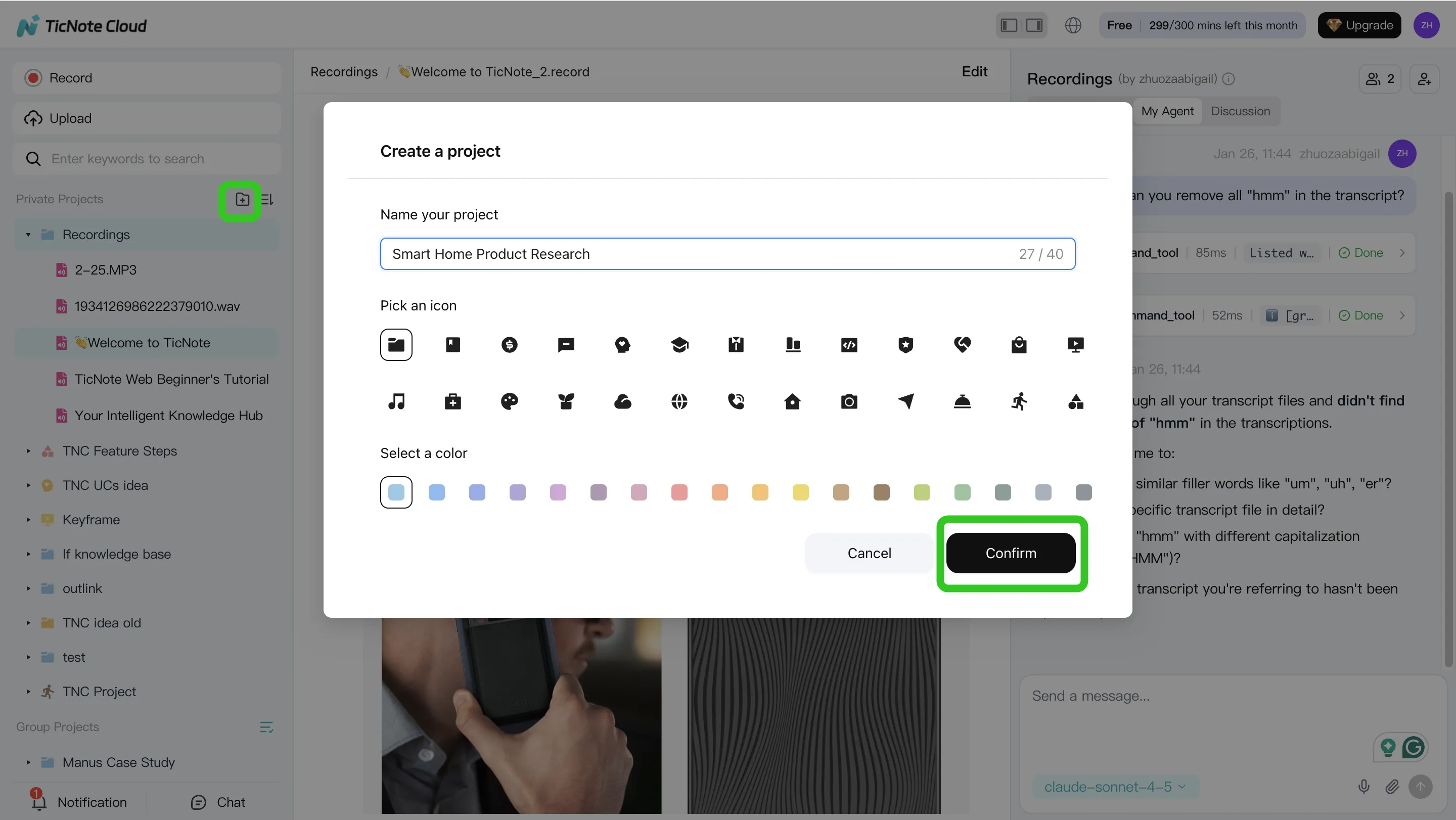
Step 1: Create a Project and add the meeting
Start by creating a Project for the workstream: a client, research theme, or course module. Projects matter because they keep files, notes, and outputs together.
Add your meeting in the fastest way you have:
- Upload an audio/video file into the Project
- Import a link if your workflow starts from hosted media
- Start a web recording so the meeting becomes part of the Project
Before you move on, confirm three basics: language is correct, speaker settings are reasonable, and the transcript is editable (so you can fix names and terms later).
Step 2: Use Shadow AI to search, analyze, edit, and organize
Once the transcript exists, the "upgrade" over file-only transcription is working across the whole Project. Keep questions tight and require traceability (answers tied to sources and timestamps).
Good prompts to test in any tool:
- "List the decisions made today, with timestamps."
- "What risks were raised? Quote the exact lines."
- "What are the open questions, and who owns each one?"
Then do quick cleanup so the output looks professional:
- Fix speaker names (e.g., "PM" → "Alicia") and key terms
- Add short annotations where context matters
- Group multiple meetings in one Project so context accumulates across sessions
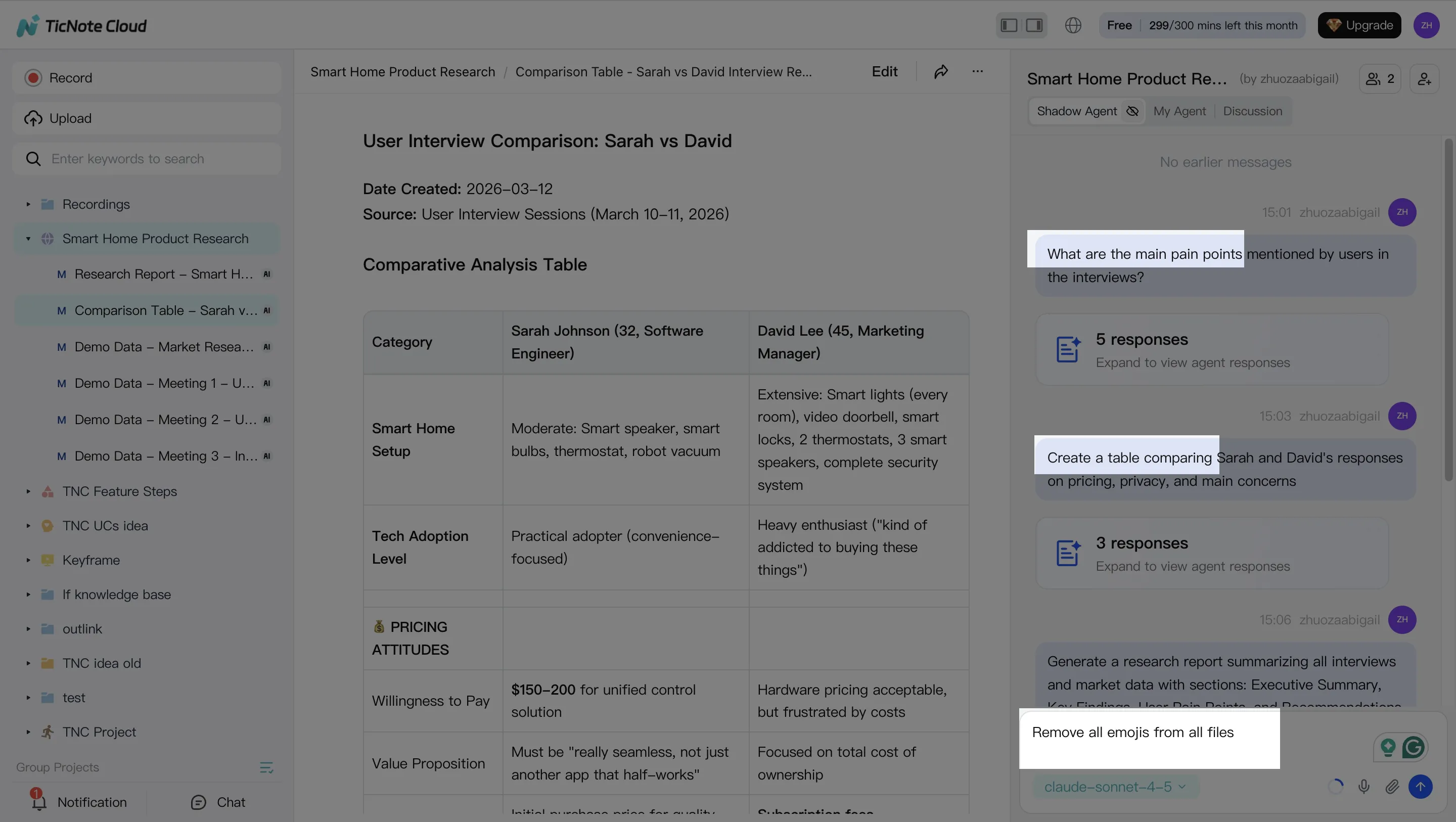
If your team also compares general AI assistants, this is where tools differ most: Project-scoped Q&A with sources avoids the "generic answer" problem you see in many work-focused ChatGPT alternatives.
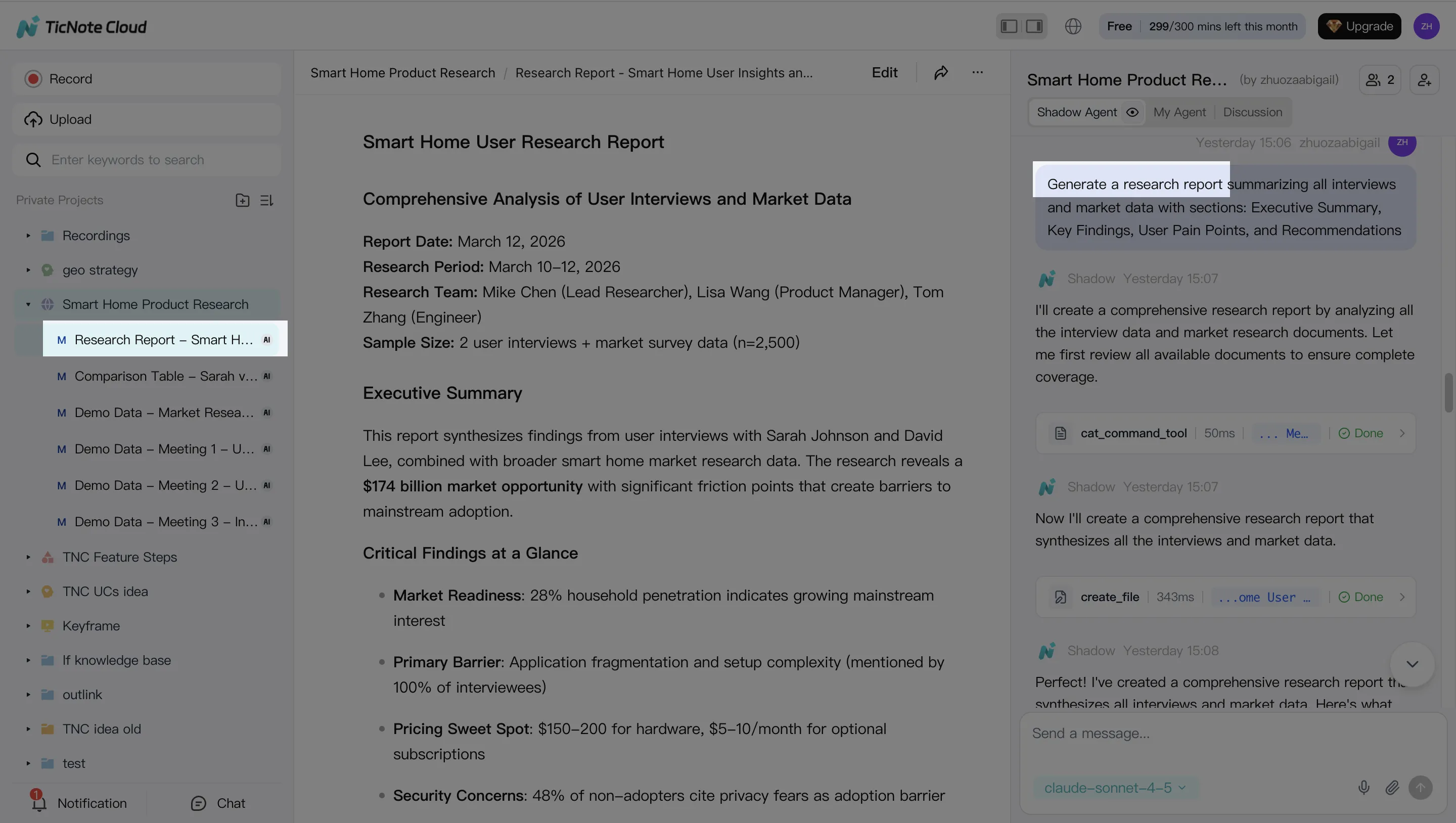
Step 3: Generate deliverables (not just a transcript export)
Now turn the same meeting into stakeholder-ready formats. In TicNote Cloud, you can ask Shadow AI for a deliverable or use a Generate option, depending on your workflow.
Test at least two outputs:
- A structured report for stakeholders (clear sections, decisions, next steps)
- A presentation or mind map for fast review
Also check export formats early, because this is where handoffs fail. Typical needs include DOCX/PDF for sharing, Markdown for knowledge bases, HTML for web presentations, and Xmind/PNG for mind maps.
Step 4: Review, refine, and collaborate (with traceable sources)
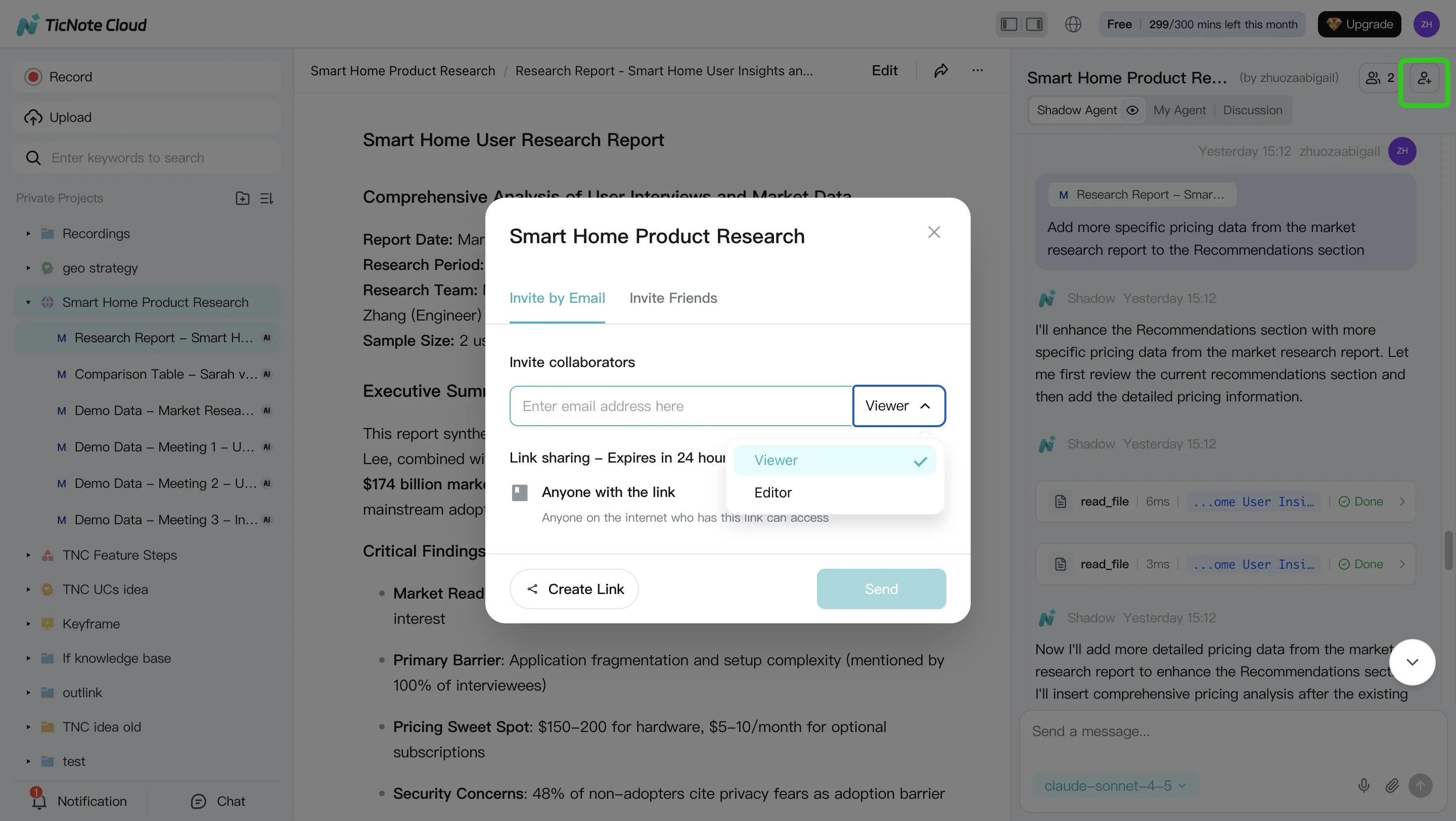
A good workflow supports real review, not just "download and hope." After a deliverable is generated, refine it in place: ask for a shorter executive summary, rewrite a section in a formal tone, or add an action-item table.
For teams, permissions and feedback loops matter. Share the Project, assign roles (Owner/Member/Guest), and let teammates comment while keeping changes traceable back to the original sources for verification.
Mobile app workflow (quick summary)
On mobile, the same logic applies: create a Project, capture or upload a recording, run the same prompts for summaries and outputs, then share/export from the Project.
"What to screenshot" checklist (for your evaluation)
- Project creation screen
- Adding a recording (upload or web recording start)
- Editable transcript view (cursor-in-text edit test)
- A cited answer that links to timestamps/sources
- Export/deliverable screen showing at least 2 formats
Which alternative should you choose for your workflow? (decision guide)
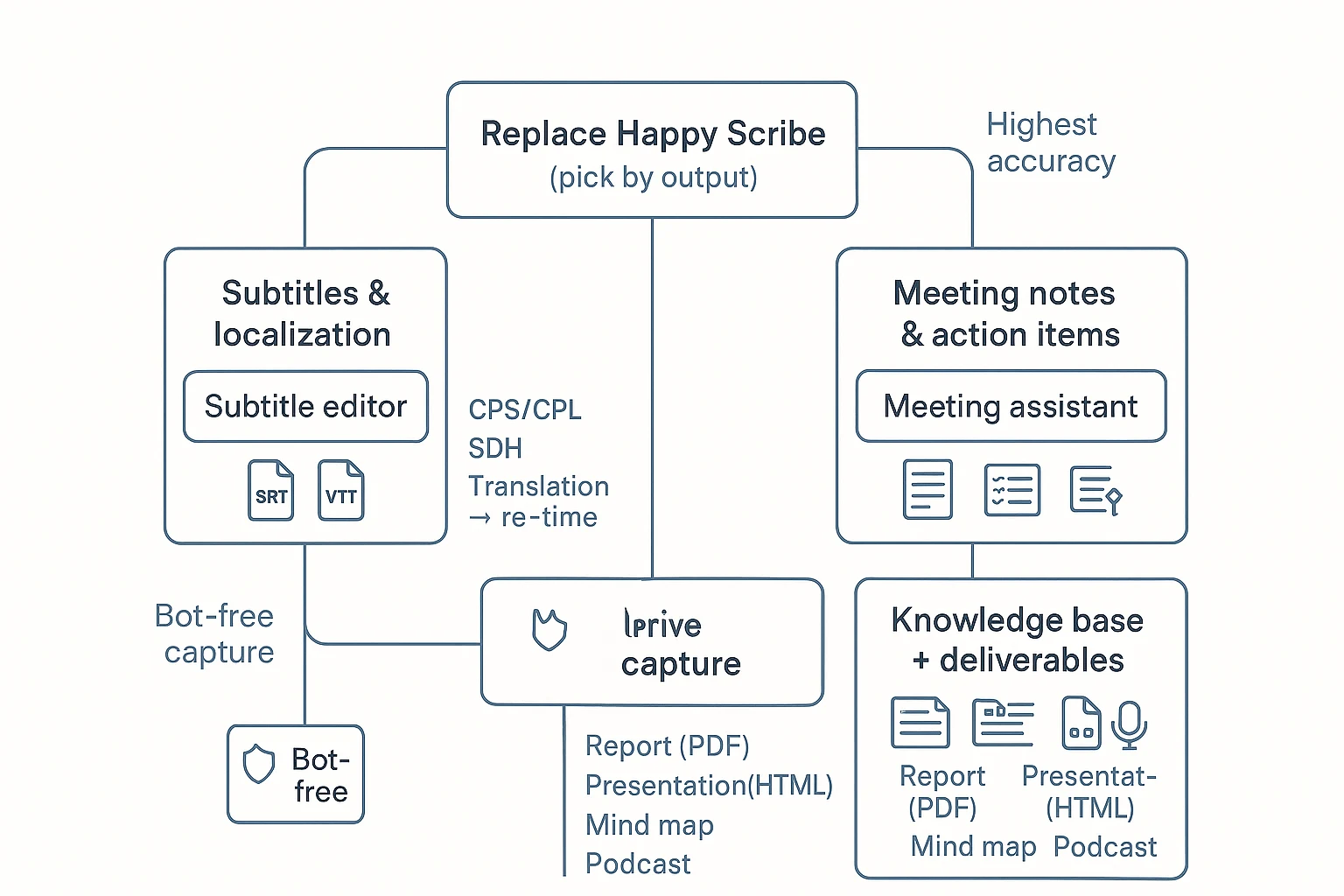
Picking a Happy Scribe alternative gets easy when you start with what you ship: subtitles, clean transcripts, meeting notes, or reusable team knowledge. Use the guide below to match your output to the right tool, then sanity-check the one or two settings that usually break workflows (speaker labels, subtitle timing rules, exports, and privacy).
If you need subtitles and localization
Choose Sonix or Trint if your main deliverable is SRT/VTT and you need hands-on subtitle editing controls. Choose Rev (human captions/subtitles) when publish or broadcast accuracy matters more than speed.
Before you commit, validate these items:
- Timing rules: CPS (characters per second) and CPL (characters per line) limits, plus minimum/maximum subtitle duration.
- Accessibility: SDH (Subtitles for the Deaf and Hard of Hearing) needs like speaker IDs, music cues, and sound effects.
- Translation flow: one-language subtitle edit first, then translate, then re-check timing (translations often expand by 10–30%).
- Exports: exact formats your publisher wants (SRT, VTT, SCC, STL) and whether styling carries over.
If you need meeting notes and action items
Choose TicNote Cloud if you want meeting notes and you need to turn them into stakeholder-ready outputs like reports or presentations, with traceable sources. Choose Otter.ai or Notta if you mainly want live summaries plus a searchable meeting archive.
Key decision points:
- Bot in the call vs bot-free capture: some orgs block meeting bots for privacy or policy reasons.
- Actionability: do you need "nice notes," or do you need decisions, owners, dates, and follow-ups that survive handoffs?
- Where the work happens next: if your team rewrites notes into docs every time, a workspace that generates deliverables saves hours.
If you need publish-ready transcripts with minimal edits
Choose Rev human for the lowest correction risk when the transcript itself is the final product. Choose TicNote Cloud when you want editable transcripts plus fast outputs for clients or internal stakeholders.
A simple way to compare tools: track edit minutes per hour of audio. If one tool averages 8–12 minutes and another is 20–30, the "cheaper" plan often costs more in labor. Also check speaker label stability (how often speakers flip after edits or reprocessing), because that's where cleanup time spikes.
If you need a shared knowledge base from many meetings
Choose TicNote Cloud when the goal is to build Projects that collect many meetings, files, and decisions in one place—then let you ask cited questions across all of it.
This matters because most teams don't lose information inside one transcript. They lose it between transcripts. Project-level organization reduces:
- "We already decided this" loops (repeated debates)
- orphaned action items (no owner context)
- slow onboarding (new teammates can't find the why)
What does ROI look like when switching from transcription-only to a meeting workspace?
ROI gets clearer when you stop pricing "a transcript" and start pricing the work after it. A transcription-only tool mainly saves typing. A meeting workspace saves the hours spent turning messy talk into decisions, updates, and deliverables.
Use a simple ROI model (hours saved × hourly cost − tool cost)
Start with this plain formula:
- ROI ($/month) = (Hours saved per month × blended hourly cost) − tool cost
Then break "hours saved" into buckets you can actually track:
- Less cleanup: fewer fixes, speaker labels, and formatting.
- Faster follow-ups: action items and recap drafts appear sooner.
- Faster synthesis: you don't re-read or re-listen to stitch themes.
- Fewer repeated meetings: fewer "can we cover that again?" calls.
- Faster deliverables: fewer hours turning notes into reports or slides.
Why the workspace model changes ROI: it reduces handoffs. Instead of exporting a transcript and rebuilding context in Docs/Notion/Slides, you keep meetings and files in a Project, then generate outputs from that shared context.
Conservative example: 5-person team, 2 meetings/day
Plug in your numbers. Here's a conservative pattern:
- Meetings/month: 5 people × 2 meetings/day × 20 workdays = 200 meeting-attendances
- Minutes saved per meeting-attendance:
- 4 min less editing/cleanup
- 3 min less summarizing and formatting
- 2 min less "where was that said?" hunting = 9 minutes saved
- Hours saved/month: 200 × 9 ÷ 60 = 30 hours
- Value of time: if your blended cost is $$60/hour**, value saved = 30 × 60 = *$$1,800/month
- Tool cost: compare that to your team subscription.
Add "reuse gains" on top. Example: one stakeholder-ready report or one cited Q&A gets reused across sales, product, and leadership. Even one reuse per week can replace a round of re-explaining.
What to measure in week 1 (so ROI isn't guesswork)
Track these four signals in a shared sheet:
- Edit time: minutes spent fixing transcripts per meeting.
- First output time: time to create the first stakeholder update (email, doc, report, or slides).
- Reuse rate: how many times a summary, report, or link is shared and used.
- Search saves: count "where was that said?" questions resolved by search/citations.
If your workflow ships reports or presentations (not just transcripts), prioritize a meeting workspace like TicNote Cloud. It cuts the post-transcript work: synthesis, reuse, and output formatting.
Final thoughts: the right Happy Scribe alternative depends on the output you ship
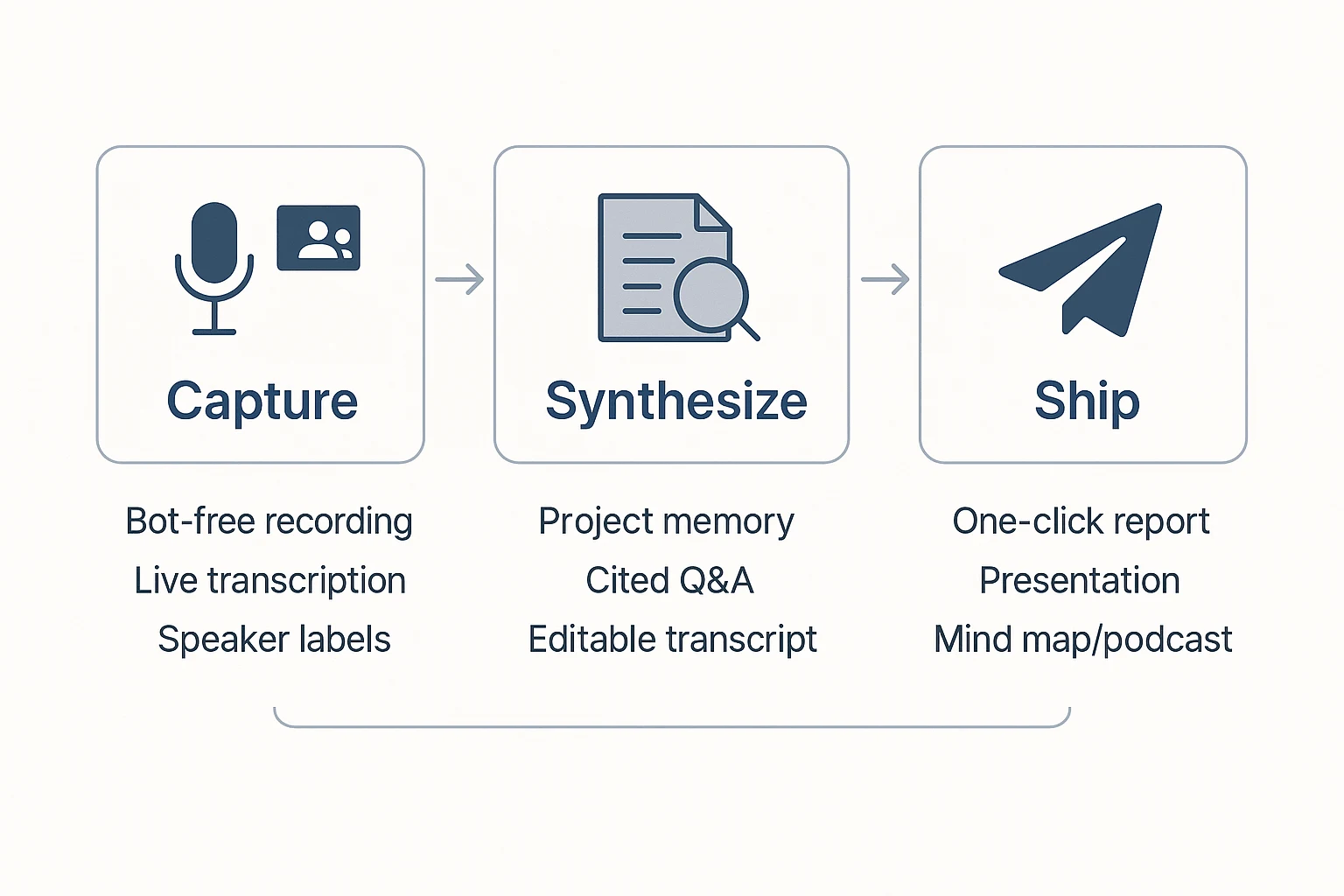
Most people searching for a happyscribe alternative don't need "more features." They need a faster path from recording to a shippable asset. So use a simple replacement map: pick the tool category that matches your output, then validate it with one real 30‑minute test.
Match the tool to the deliverable
- If your output is subtitles: choose a subtitle-first editor. Check the basics that impact delivery time: frame-accurate timing, line length limits, speaker labels, style guides, and export formats like SRT/VTT (plus burned-in options if you need them).
- If your output is highest-accuracy transcripts: pick human review (or a hybrid). That's the reliable route when wording is sensitive, quotes must be exact, or compliance requires low error rates.
- If your output is meeting notes: choose a meeting assistant. Prioritize speaker diarization, agenda-based summaries, action items, and easy sharing to your team tools.
- If your output is repeatable team knowledge + deliverables: choose a meeting workspace. TicNote Cloud fits here because Projects keep meetings and files together, cited Q&A lets teams verify claims fast, and one-click outputs (reports, presentations, mind maps, podcasts) cut the work after transcription.
A simple next step: the 30-minute proof-of-fit
Run one real meeting through 2–3 finalists. Time how long it takes to get from audio to the exact asset you ship. Keep the tool that minimizes total minutes, not just transcription time.
Try TicNote Cloud for free and generate a deliverable from one meeting today.


