


 Extension
TL;DR
Procurement automation replaces manual, error-prone tasks, including PO creation, invoice matching, supplier tracking, and contract monitoring, with systems that handle them automatically. This guide covers five specific workflows any small team can automate today, plus a step-by-step walkthrough using TicNote Cloud's Supplier Management skill.
Try TicNote Cloud for Free and automate your first procurement workflow, from supplier quote upload to formatted PO output, in minutes.
Most small procurement teams lose hours each week to manual data entry, approval email chains, and contract deadlines buried in a shared calendar. Every missed price change or expired contract costs money. TicNote Cloud's AI-powered Supplier Management skill automates the core workflows, including document parsing, PO generation, price alerts, and contract deadline tracking, without expensive software or IT setup.
What is procurement automation?
Procurement automation is the use of technology to replace manual procurement tasks with systems that run automatically, or with minimal human input. According to McKinsey & Company (2024), agentic AI could increase procurement efficiency by 25 to 40 percent, primarily by shifting hours spent on transactional work to automated processes.
Definition and scope
The scope ranges from automating a single workflow, such as generating a PO from an approved quote, to end-to-end procure-to-pay systems that handle everything from sourcing to payment. For most small teams, the highest-value entry point is automating the tasks that consume the most time and generate the most errors: document data entry, PO creation, and contract tracking.
What manual procurement looks like in practice
Before automation, a typical procurement cycle for a small team looks like this: receive a supplier quote by email, copy vendor details and pricing into a spreadsheet, create a PO manually using a template, email it to a manager for approval, forward the approved PO to the supplier, and then hope the contract deadline reminder shows up on someone's calendar. Each handoff is a chance for something to be missed.
Who benefits most
Small and mid-size teams managing 10 to 100 vendors get the most immediate return. If your team spends more than four hours per week on procurement admin tasks, if a missed contract renewal has caused a real problem, or if you can't easily answer "what price did we last pay this supplier?", you're a strong candidate for automation.
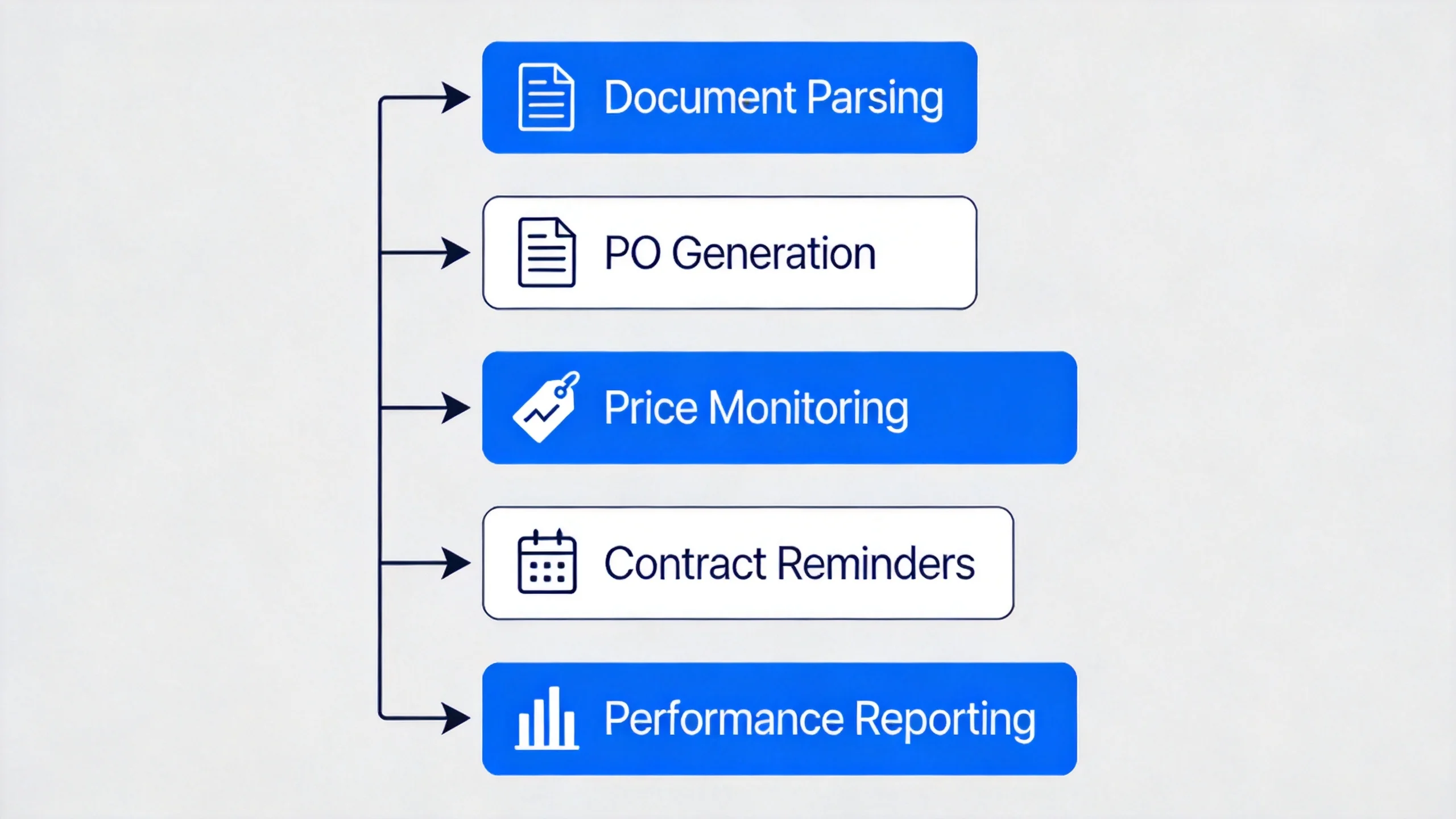
5 procurement workflows you can automate today
These five workflows generate the most manual work for small procurement teams. Each one can be automated without enterprise software. According to Ardent Partners' AP Metrics That Matter in 2025, best-in-class organizations drive invoice processing costs 80% lower and processing times 74% faster than their peers by leveraging automation.
For teams that also need to tighten up their contract review and sign-off process, that workflow is a natural companion to the five below.
Supplier document parsing and database entry
Manual process: download a quote PDF, copy vendor name, pricing, MOQ, and lead time into a spreadsheet, and repeat for every document. One typo or missed field means a discrepancy when you go to place an order.
Automated: upload the document and the AI extracts all fields, normalizes the data, and adds it to your supplier database. If the price on the new quote differs by more than 5% from the previous record, the system flags it immediately.
Purchase order generation
Manual process: open a PO template, copy vendor info from an email, fill in line items, calculate totals, send to a manager for approval, then forward to the supplier. The whole process takes 20 to 40 minutes per order and involves at least two context switches.
Automated: prompt the system with the supplier name and quantity needed. The AI pulls the archived quote, asks for any missing info such as delivery address or payment terms, and generates a formatted PO ready to send. Total time: under two minutes.
Price change monitoring
Manual process: compare each new quote to the previous one manually. With three or four active suppliers for the same product category, it's easy to miss a 4% price increase that compounds over 12 months into a meaningful cost variance.
Automated: the system compares each new quote to the previous record for that supplier and item. Any change above your defined threshold triggers an alert before anything else is processed.
Contract expiry and deadline reminders
Manual process: maintain a separate contract calendar, set reminders manually for each renewal date, and rely on someone actually acting on the reminder. When a contract lapses without renewal, you either lose negotiated terms or continue on expired terms you didn't intend to keep.
Automated: the system reads contract dates from uploaded documents and surfaces upcoming deadlines at every session start, categorized by urgency. You always know what needs attention before you ask.
Supplier performance reporting
Manual process: collect data from multiple sources, build a scorecard in Excel, update it quarterly when someone remembers to. The result is usually a snapshot that's already two weeks out of date.
Automated: request a performance report on demand. The system generates a formatted HTML review with composite scores, price history, and delivery performance from archived data, covering whatever period you specify.
How to automate procurement step by step
This section walks through setting up TicNote Cloud's Supplier Management skill and running your first automated procurement workflow. No technical setup is required. Steps are demonstrated using TicNote Cloud as an example, covering both web and app workflows.
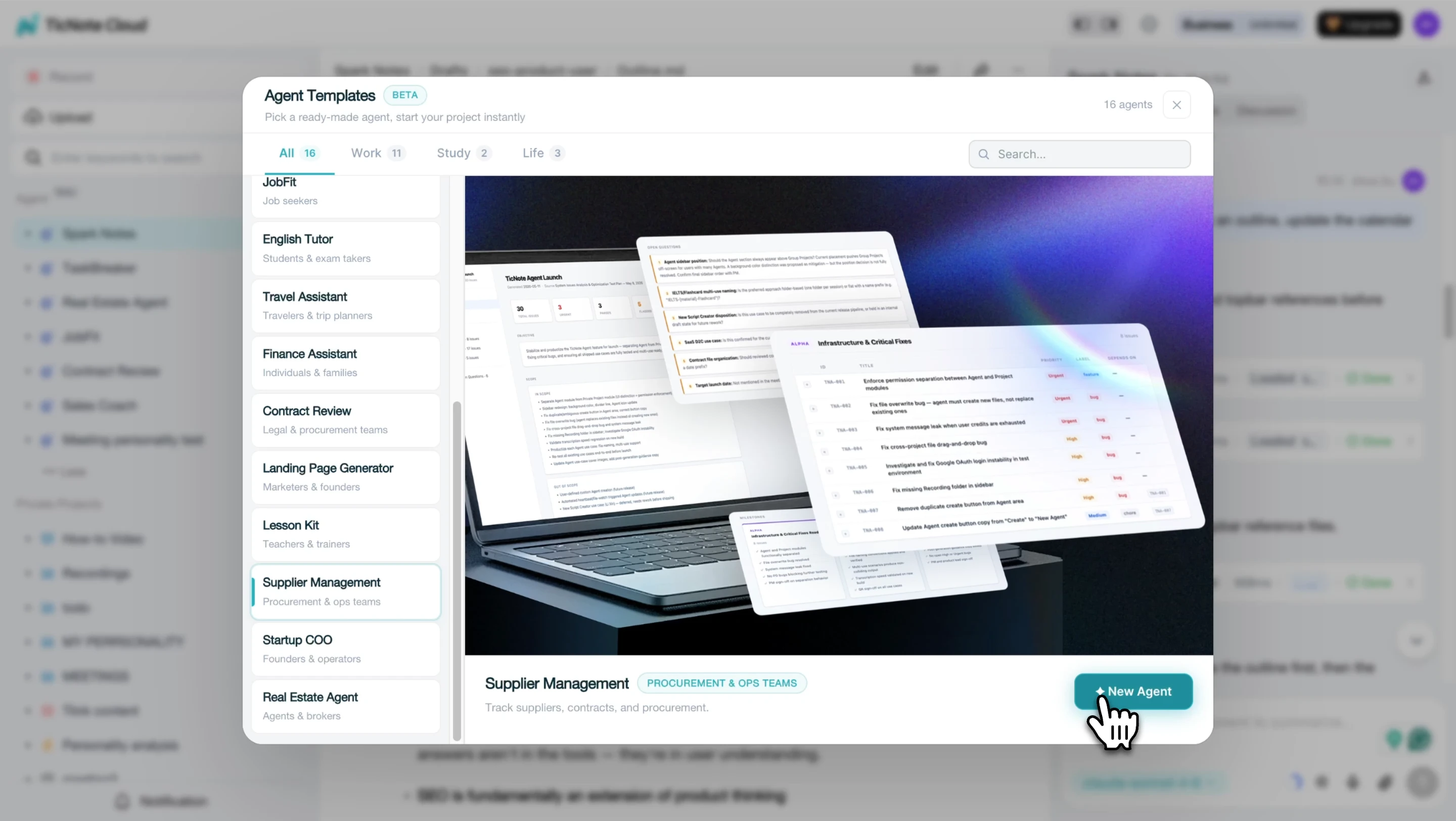
Step 1. Add the Supplier Management skill on TicNote Cloud.
In TicNote Cloud, click Add Agent and browse the Skill Agent library. Select the Supplier Management skill to add it to your workspace. No configuration is required.
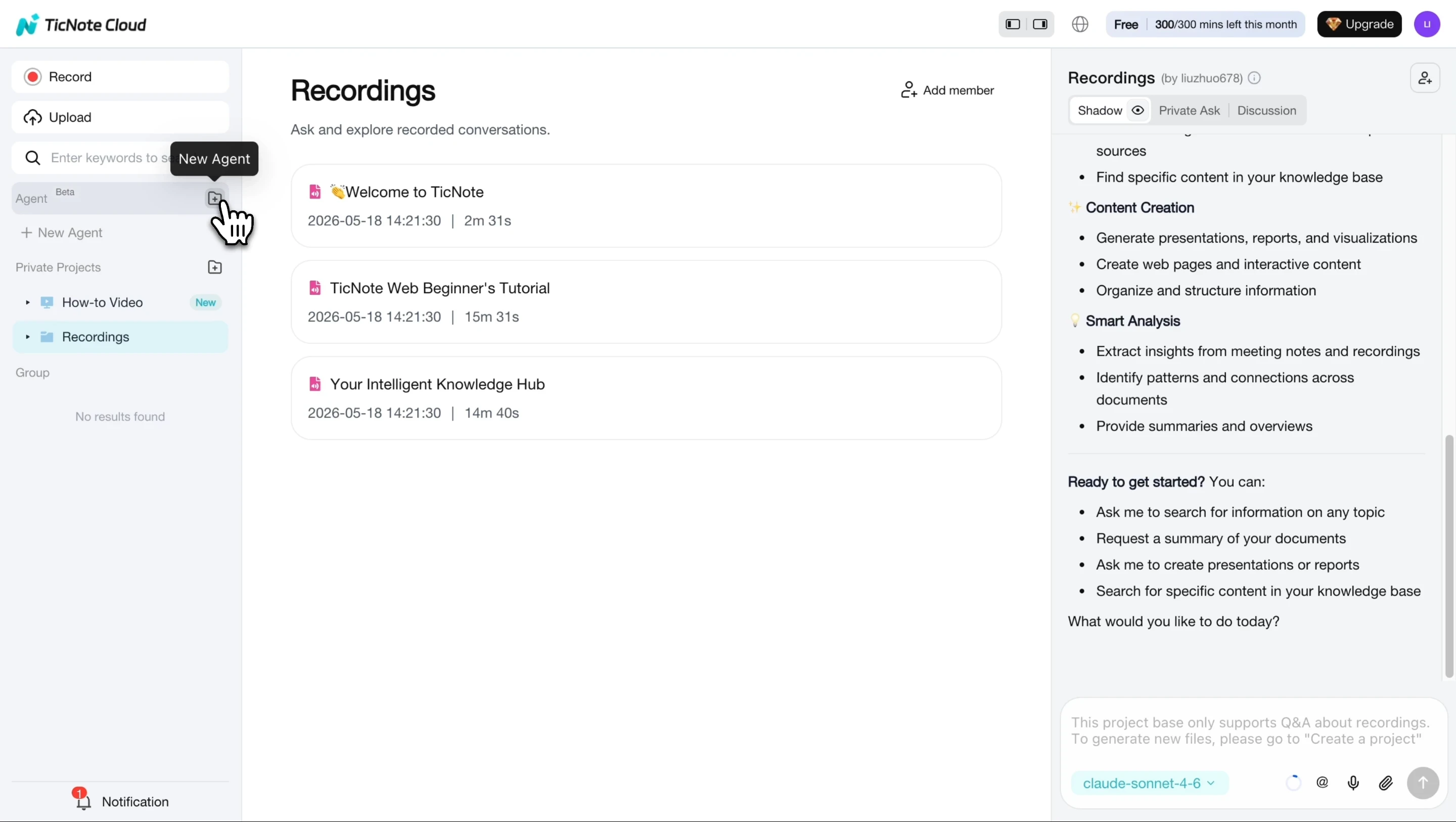
Once added, the skill appears in your agent list immediately.
Step 2. Upload your first supplier document.
Attach a quote sheet, contract, or delivery note to the chat. The skill parses every field and archives the data. If a price change exceeds 5% versus the previous record for that supplier and item, you'll see an alert in chat before anything else.
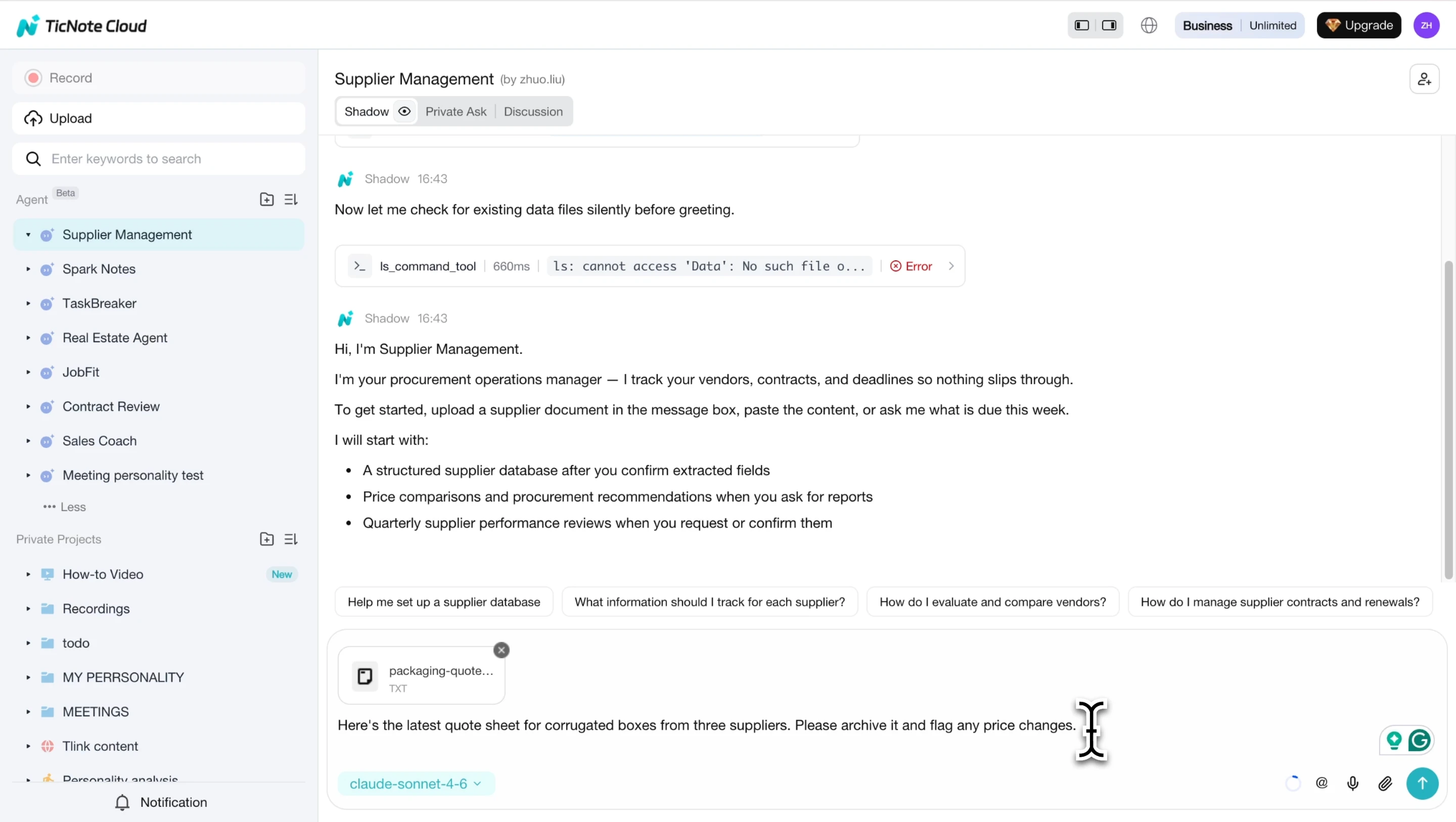
Step 3. Generate a purchase order from the archived quote.
Type "generate purchase order for [supplier name]." The AI identifies any missing fields, such as order quantity, delivery address, or payment terms, and asks you to confirm them before building the document.
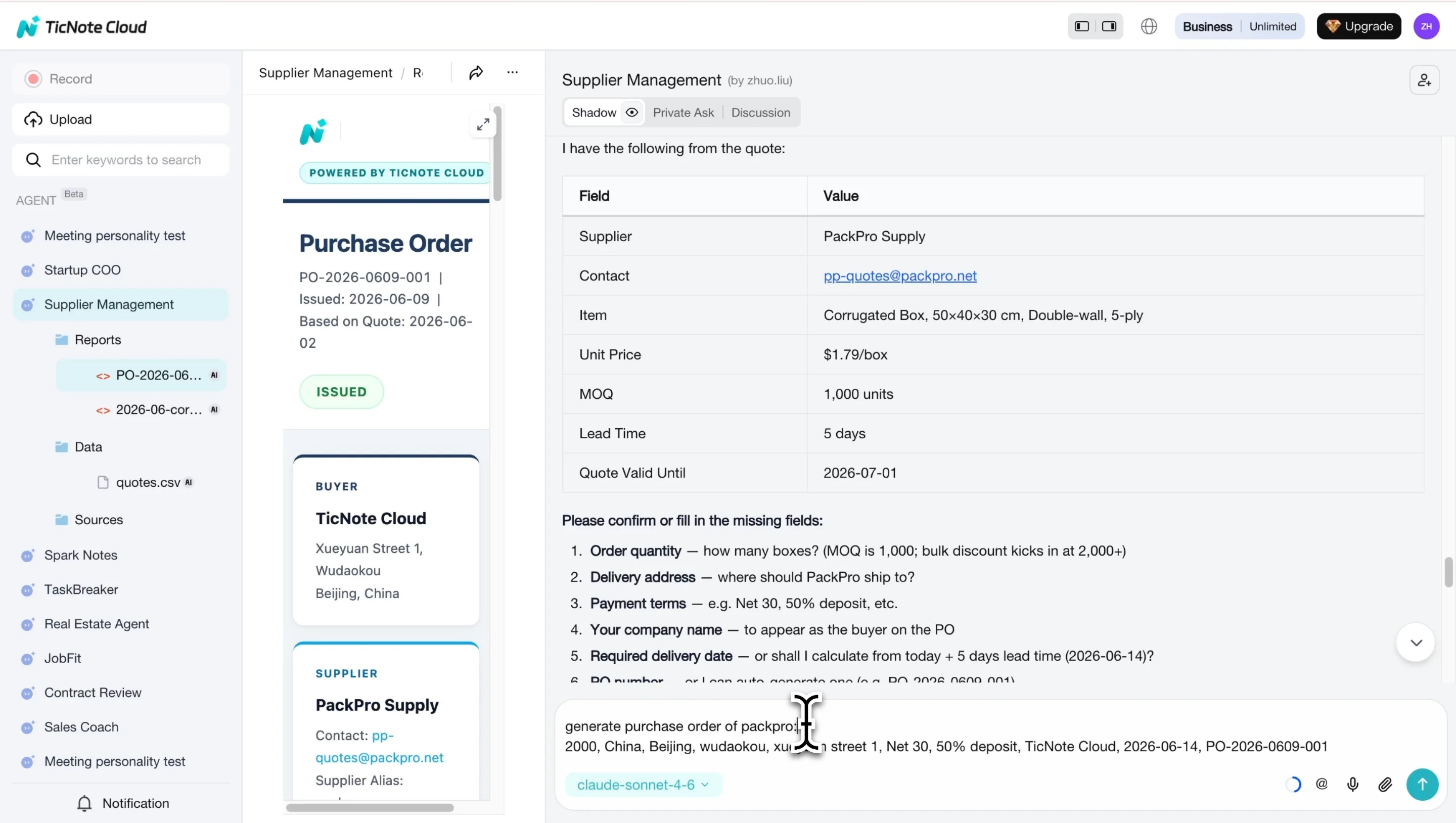
Step 4. Review the generated purchase order.
The skill outputs a complete, formatted purchase order: buyer and supplier details, line items, bulk discount calculation, order total, and deposit breakdown. Ready to share or export, no manual editing required.
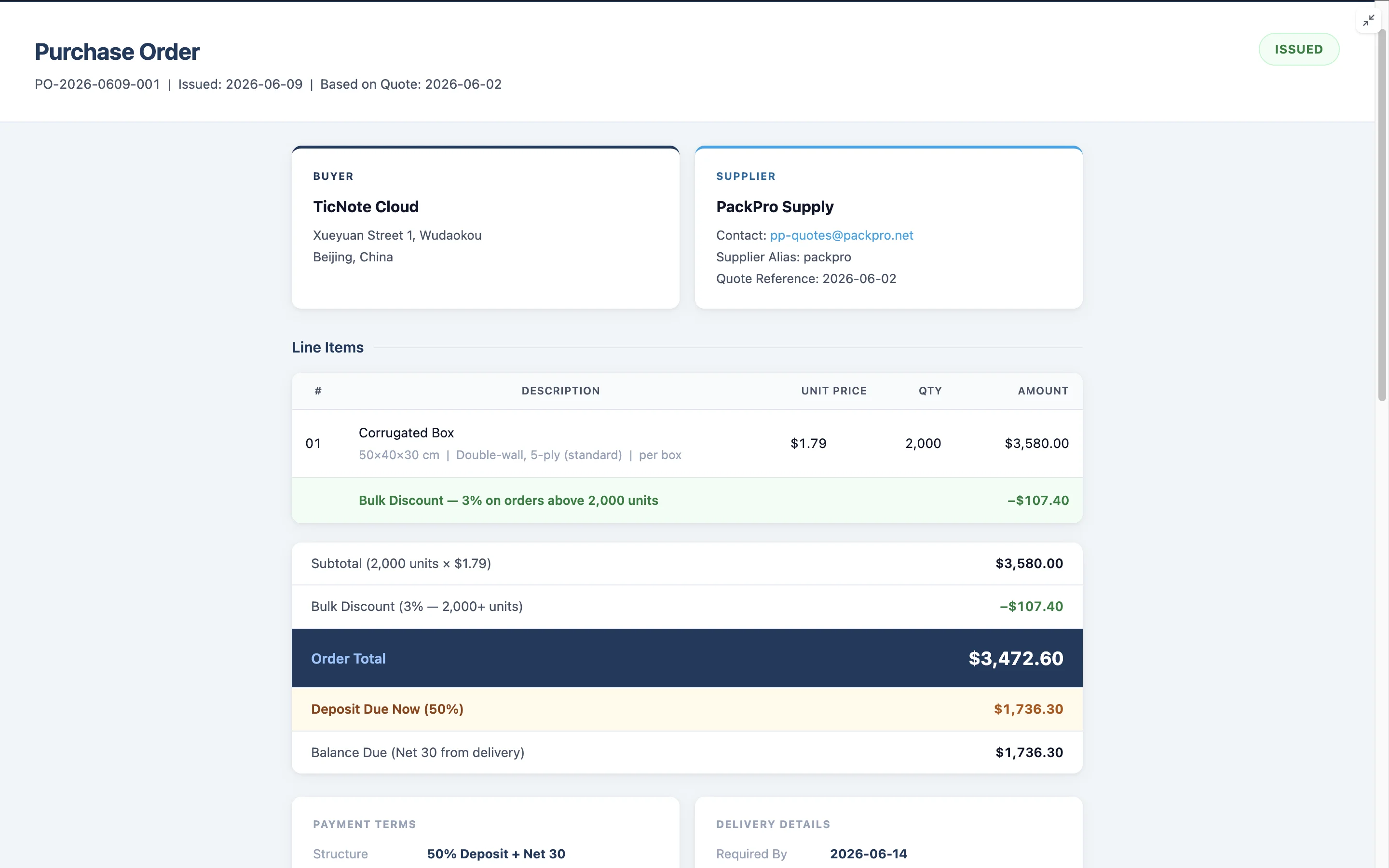
Step 5. Check contract deadlines and request reports.
At any session start, the skill surfaces upcoming contract expiry and payment deadlines as URGENT, IMPORTANT, WATCH, or INFO. To generate a performance report, ask for it directly: "Generate a Q2 supplier performance report." The skill outputs a formatted HTML review from your archived data.
On mobile, open the TicNote Cloud app, select the Supplier Management agent, and attach documents via the + button. The same parsing and generation workflows apply. Voice input is supported for quick queries like "what contracts are expiring this month?"
Start automating your procurement workflows with TicNote Cloud's Supplier Management skill, free to try today.
Common challenges when starting procurement automation
Getting started with automation is straightforward, but a few objections come up consistently. Here is how to think through each one.
"We don't have clean data to start with"
Most automation tools work best with your actual documents, not pre-cleaned spreadsheets. TicNote Cloud specifically works from raw supplier documents: PDFs, TXT files, CSVs, and email attachments. You don't need to reorganize anything before you start. The first upload builds the first record.
"Our team will resist the change"
Start with one workflow that saves obvious time. PO generation is the easiest win: show a colleague that typing one prompt produces a complete, formatted PO in 90 seconds, and they'll want the same. One person using it for a week builds more internal proof than any presentation.
"We're not ready for enterprise software"
Most small teams don't need Coupa or SAP Ariba. A tool like TicNote Cloud handles the five workflows above at $12.99 per month, with no IT involvement and no integration project. For teams building out their first formal processes, pairing it with standard operating procedures for your procurement cycle is a practical next step.
"We worry about losing control over the process"
Automation doesn't remove approval steps. TicNote generates POs and reports for you to review and send. The system asks for missing information rather than guessing. All archived data stays in your workspace, and every output is traceable to the source document.
Conclusion
Procurement automation is not an enterprise-only project. The five workflows covered here, including document parsing, PO generation, price monitoring, contract reminders, and performance reporting, can be running today without an IT team or a six-figure software budget. If your team is still copying supplier data into spreadsheets or chasing PO approvals by email, that's the workflow to automate first.
Try TicNote Cloud free today and set up your first automated procurement workflow in minutes.


