


 Extension
TL;DR: How to transcribe and use sales calls (fast, accurate, and compliant)
To transcribe sales calls fast and keep them usable, start with a tool like try TicNote Cloud for free, then follow a simple loop: record, transcribe, QA, redact, store, and analyze. The goal is a repeatable workflow that turns every call into a searchable record for coaching, QA, and clean follow-ups.
You're trying to coach reps and move deals, but key details get lost in messy notes. That leads to missed next steps, fuzzy handoffs, and "he said, she said" call reviews. A lightweight system like TicNote Cloud helps you capture the call, turn it into searchable notes, and review it consistently.
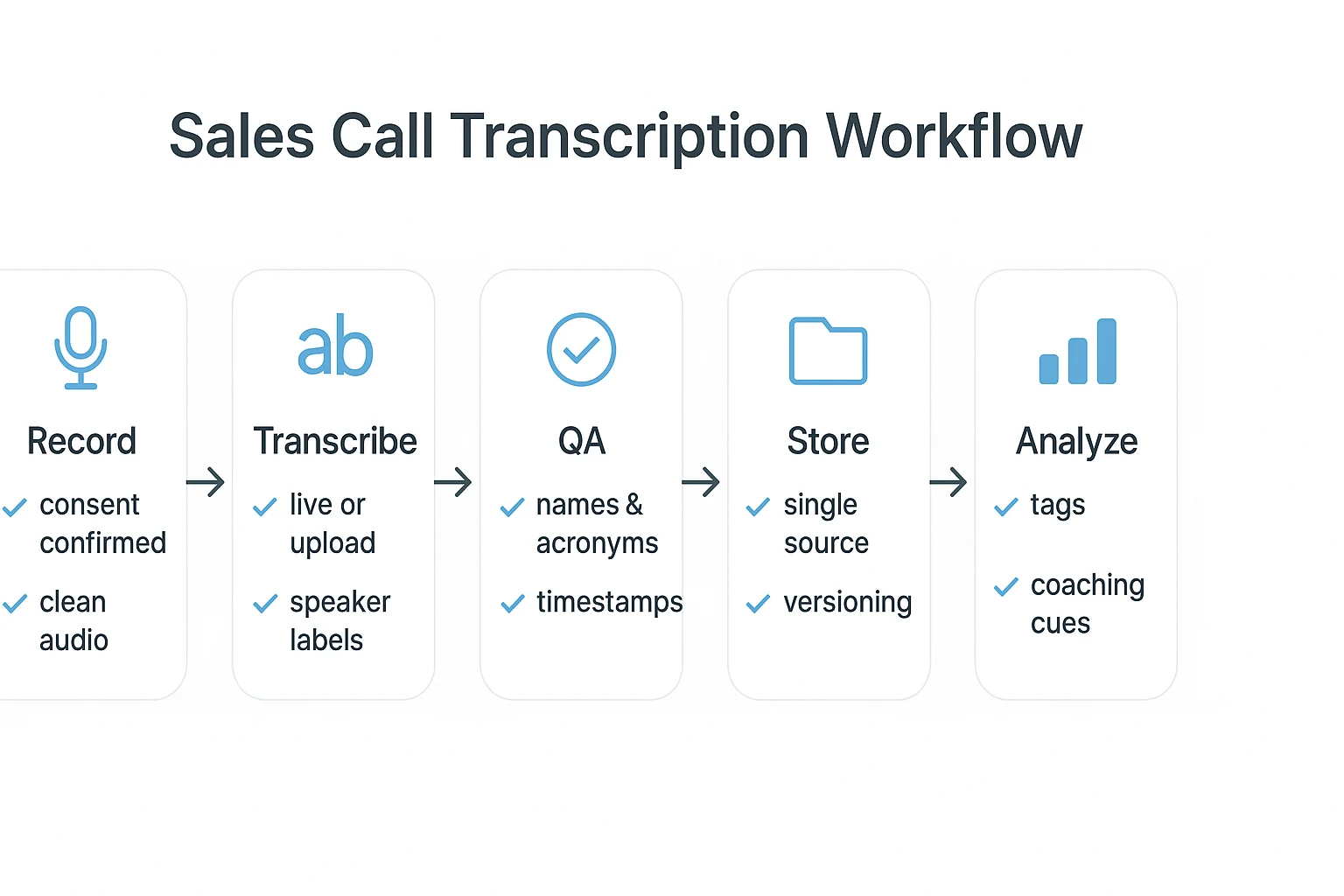
- Record: capture clear audio and get consent up front.
- Transcribe: pick live transcription or upload later; include speaker labels.
- QA: fix names, acronyms, and obvious timing issues.
- Redact: remove PII (personal data) and payment details before sharing.
- Store: keep one source of truth with access controls.
- Analyze: tag calls and pull signals like pain, objections, and next steps.
Don't skip:
- Consent language at the start of the call.
- Quick speaker intros for diarization (speaker detection).
- A simple tagging taxonomy so you can find calls later.
AI-only is usually fine (with light QA) for internal coaching and quick follow-ups with clean audio. Add deeper human review for high-stakes deals, regulated sales, noisy audio, lots of speakers, or heavy jargon.
How to transcribe sales calls step by step
A solid sales call transcript starts before you hit record. You need clear consent, clean audio, the right transcript style, and a simple QA pass. Then store it in one place, with access control, so the team can trust it later.
Step 1: Get consent and set expectations
Before you record, confirm you're allowed to. If the prospect says no, switch to written notes and a post call recap.
Use a plain script so reps don't improvise:
- Standard: "Before we start, do you mind if I record this call? It helps me take accurate notes and share them with my team."
- Training focused: "Is it OK if I record? We use recordings for notes and coaching."
- Inbound variant: "Since you reached out, is it alright if I record so I don't miss anything?"
- Outbound variant: "Quick check, is it OK if I record for notes and follow up accuracy?"
If you get a "yes," log it. Add a short line in your CRM call notes like: "Consent to record: Yes" or "Consent: No, notes only."
Step 2: Record with clean audio
Good audio is the fastest path to fewer transcript edits. Aim for clear speech and less echo.
Practical setup tips:
- Use a headset mic, not a laptop mic.
- Pick a quiet room. Close doors and mute Slack.
- Avoid speakerphone. Echo breaks speaker detection.
- Keep internet stable. Hardwire if you can.
For multi speaker calls, reduce confusion early:
- Ask everyone to introduce themselves at the start.
- Remind people to avoid talking over each other.
Pre call checklist you can send reps:
- Headset on, mic test done.
- Quiet room, notifications muted.
- Recording tool set, storage folder ready.
- Ask intros to help speaker labels.
Step 3: Pick a transcript style
There are two common transcript styles:
- Verbatim: captures filler words, false starts, and interruptions. Useful when details matter.
- Clean read: removes filler and tidies grammar, while keeping meaning. Better for sharing.
Use this decision tree:
- If it's for coaching or QA, go more verbatim.
- If it's for handoffs and follow ups, use clean read plus a structured summary.
- If you need legal grade documentation, consider stricter verbatim plus a careful review process.
Step 4: Transcribe live or from an upload and capture speaker names
You have two paths.
- Live transcription: best for fast note taking and quick follow ups right after the call.
- Upload transcription: best when you already have recordings from Zoom, Meet, Teams, or a dialer export.
Either way, speaker labels matter. At minimum, label "Rep" and "Prospect." Even better, correct names for each person. That makes coaching clips, keyword search, and handoffs much easier.
If you want a broader primer on formats and workflows, this guide on how to transcribe audio for meetings and interviews gives a helpful baseline.
Step 5: QA and edit the transcript
Do a tight QA pass before you share it. You're not polishing prose. You're fixing what breaks trust.
QA checklist:
- Check speaker swaps. Fix any mislabeled turns.
- Correct names, acronyms, and industry terms.
- Verify numbers, dates, and pricing mentions, without re stating sensitive details.
- Confirm timestamps are consistent so managers can reference moments in coaching.
Step 6: Store, share, and lock access
Put transcripts in a single source of truth, organized by account or deal. That could be a shared workspace with project folders, one per account.
Set clear access rules:
- Who can view transcripts?
- Who can edit or export?
- Who can share outside the company?
Treat the transcript as the canonical record. If you edit it, keep changes auditable. Versioning prevents "which copy is correct?" issues.
Workflow callout to keep in mind (expanded later):
| Workflow | Speed | Cost | Risk | Scalability |
| DIY manual (listen and type) | Slow | Low tool cost, high labor | Medium | Low |
| AI first plus QA | Fast | Low to medium | Medium | High |
| Human transcription | Medium | High | Low to medium | Medium |
Try TicNote Cloud for free to capture, transcribe, and organize sales calls in one workspace.
What should a good sales call transcript include?
A good sales call transcript is only useful if it's easy to search, safe to share, and tied to the right deal. That means two things: clear metadata up top and clean, consistent formatting in the body. Nail those, and you can turn calls into coaching, QA, and reliable follow-ups.
Capture the required metadata (so RevOps can use it)
Add this at the top of every transcript, in the same order each time:
- Date and start time, plus time zone
- Account name and contact(s)
- Deal ID and stage (or a direct opportunity link)
- Call type (discovery, demo, renewal, negotiation)
- Attendees with roles (AE, SE, buyer, legal)
- Recording source (Zoom, Meet, dialer, mobile)
If you're still building your standard, this quick guide on [transcription formatting rules that hold up] (https://ticnote.com/en/blog/how-to-transcribe-a-conversation) can help you keep fields consistent.
Keep the transcript readable (so humans will actually use it)
Simple rules make a big difference:
- Put a speaker label on every turn.
- Keep paragraphs short, with one idea per block.
- Add timestamps at logical points (topic changes, pricing, next steps).
- Mark unclear audio the same way every time, like: [inaudible 00:12:08].
Redact before sharing (so you don't leak sensitive data)
Redact based on your policy and who will read it. Common items to remove include:
- Emails, phone numbers, addresses, ID numbers
- Payment card or bank details
- Sensitive customer details or contract terms (when needed)
Keep an unredacted copy only in restricted storage when your policy requires it.
Add CRM-ready fields (so you can tag and report)
Even if your transcript is "just text," capture these as structured tags or fields:
- Pains and desired outcomes
- Objections and responses
- Timeline and next steps
- Stakeholders and decision process
- Competitor mentions
What does a real sales call transcript example look like?
A useful sales call transcript isn't just "raw text." It reads like a clean record you can coach from, search later, and safely share when needed. Below is a realistic discovery snippet with labels, timestamps, redactions, and manager notes.
Example snippet (discovery call) with labels + timestamps
[00:00] Rep: Thanks for making time. What pushed you to take this call?
[00:07] Prospect: We're missing follow-ups. Notes sit in Slack, and nobody can find them.
[00:15] Rep: What happens when a follow-up slips?
[00:19] Prospect: Deals stall. Last month we lost two renewals because the handoff was messy.
[00:29] Rep: What do you use today?
[00:31] Prospect: Zoom recording sometimes. But no transcript. We don't tag anything.
[00:39] Rep: Got it. What would "better" look like?
[00:42] Prospect: Searchable calls. Clear action items. And something we can share with CS.
The same snippet with redactions (safe to share)
[00:00] Rep: Thanks for making time. What pushed you to take this call?
[00:07] Prospect: We're missing follow-ups. Notes sit in Slack, and nobody can find them.
[00:15] Rep: What happens when a follow-up slips?
[00:19] Prospect: Deals stall. Last month we lost two renewals because the handoff was messy.
[00:29] Rep: What do you use today?
[00:31] Prospect: Zoom recording sometimes. But no transcript. We don't tag anything.
[00:35] Prospect: You can reach me at [EMAIL] or [PHONE].
What to redact before sharing: emails, phone numbers, addresses, card data, and any IDs.
What not to redact: pain, impact, current tools, and outcomes. That context is what you coach on.
Example coaching annotations managers can search later
[00:19] Prospect: Deals stall. Last month we lost two renewals. [COACHING NOTE: ask cost of delay]
[00:31] Prospect: Zoom recording sometimes. [COMPETITOR: Zoom] [OBJECTION: "we already record"]
[00:42] Prospect: Searchable calls. Clear action items. [NEXT STEP: security review scheduled]
These bracketed notes map cleanly to tags and fields later (for example: Objection Type, Competitor, Next Step Date). That's how a transcript becomes a repeatable coaching artifact. If you're deciding between verbatim and clean read, use this quick guide on choosing the right transcript level and QA steps.
How do you improve transcription accuracy on sales calls?
Accuracy starts before you hit record. If you want reliable notes, searchable quotes, and fewer cleanup passes, treat sales call transcription like an ops process. Most errors come from fixable audio issues, unclear speaker turns, and messy jargon.
Fix audio issues reps can solve in 60 seconds
Poor audio creates the worst mistakes. Do this every time:
- Use a headset mic instead of a laptop mic.
- Turn off noisy fans and close the door.
- Don't put two people on one mic.
- Ask people to mute when they're not talking.
Make speaker labels easier (diarization)
Speaker diarization (who said what) breaks when people talk over each other. Simple call habits help a lot:
- Start with quick intros: name and role.
- Say names before questions, like "Jamie, can you walk me through…"
- Ask one question at a time and limit interruptions.
Control jargon with a lightweight glossary
AI often trips on product terms, acronyms, and customer names. Keep a living glossary for:
- Product features
- Competitors
- Industry acronyms
- Customer-specific terms
One QA rule: pick one spelling and use it everywhere. That keeps search and reporting clean.
Reality check: errors cluster around accents, jargon, overlap, and bad audio. Plan review time based on risk. A renewal call or legal promise needs more QA than a low-stakes discovery call. If you want the full end-to-end checklist, follow this meeting transcription workflow and adapt it to sales calls.
What are the legal and compliance basics for recording and transcribing sales calls?
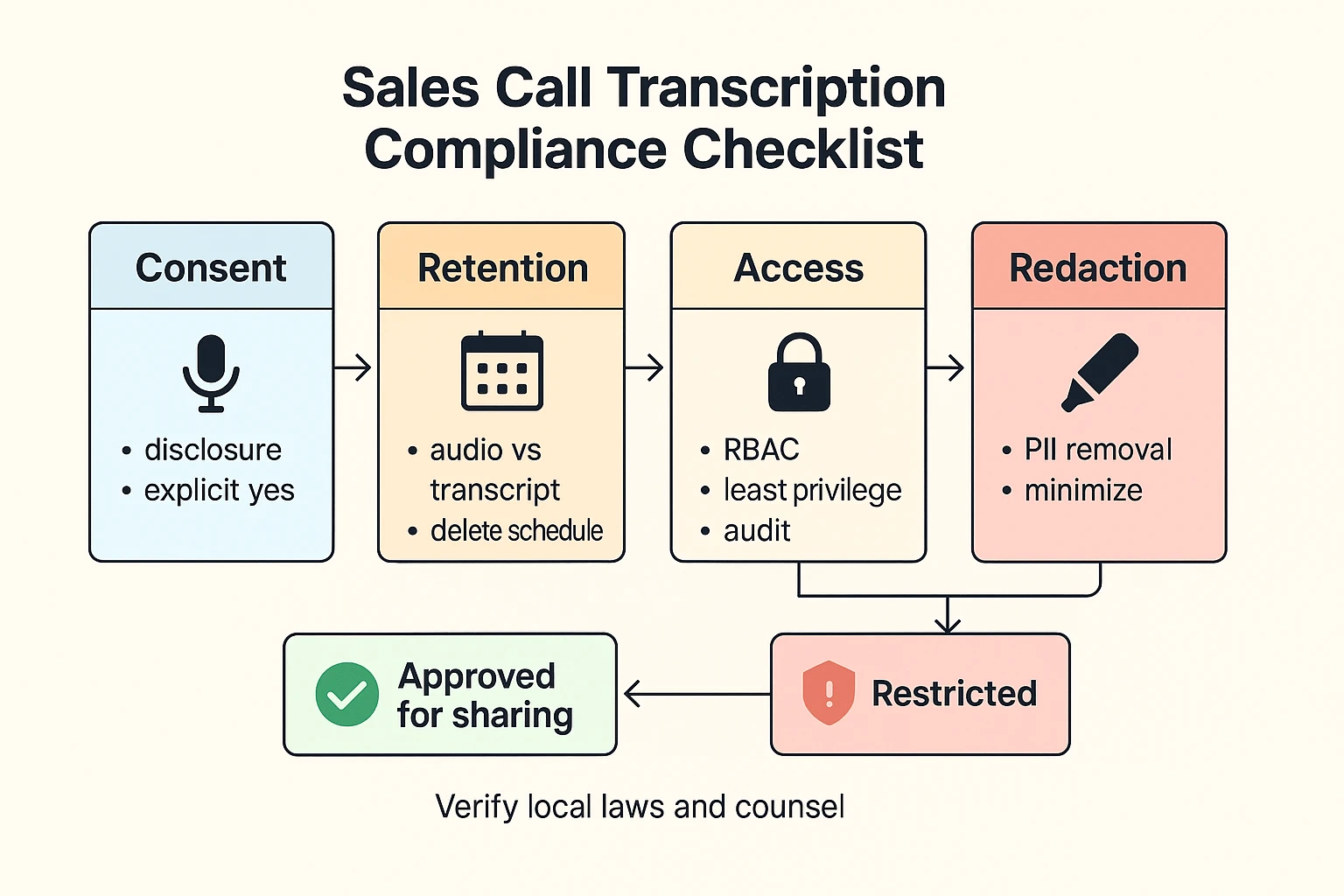
Recording and transcription can sharpen coaching and follow ups. But they also create legal and privacy risk. If you want to know how to transcribe sales calls safely, treat consent and data handling as part of the workflow.
Get consent right (one party vs all party)
Consent rules vary by place. Some areas allow recording if one person on the call agrees. Others require every person to agree. Cross border calls can trigger more than one rule, so the strictest rule may apply.
Operational basics that reduce risk:
- Use a short, standard disclosure at the start of every call.
- Ask for a clear yes when the other side joins late.
- If anyone says no, stop recording and note it.
- Save proof of consent. For example, keep the timestamped line in the transcript.
A simple script you can standardize:
- "This call may be recorded and transcribed for notes and training. Is that OK?"
Lock down data handling (retention, encryption, access)
Think in two layers: the audio file and the transcript. Audio is usually more sensitive. Set clear rules before your team starts sharing clips.
Governance checklist:
- Retention: define how long you keep audio vs transcript. Delete audio sooner if you can.
- Encryption: confirm encryption in transit and at rest during vendor review.
- Access control: use role based access and least privilege.
- Audit trail: track who viewed, exported, or shared records.
Share safely (coaching vs external use)
Internal coaching is not the same as external sharing. For coaching, limit access to managers and enablement. For anything sent outside your org, minimize and redact.
- Redact PII (personal data like phone, email, payment details).
- Remove unrelated sensitive details before forwarding.
- Avoid pasting raw transcript text into tools with wide access.
Verify rules in the right places
Use official sources for your state, province, or country. Check privacy regulator sites for recording and processing rules. Then confirm your exact setup with counsel, based on where reps and customers are located.
This is not legal advice. It is an ops checklist to help you reduce risk.
How do you turn transcripts into coaching and pipeline signals?
A sales call transcript is more than a record. It's a clean input for coaching, QA, and deal reviews. When you tag each call the same way, you can spot patterns fast and act on them.
Tag every call with a simple minimum set
Keep tags small so reps will use them. Here's a set that works for most teams:
- Objection type (price, security, timing, feature gap)
- Pain theme (manual work, risk, churn, slow onboarding)
- Stakeholder role (champion, economic buyer, IT, legal)
- Timeline signal (this quarter, next quarter, "no date")
- Budget signal (range, approved, unknown)
- Next step (demo, pilot, security review, mutual plan)
- Competitor (named, "build vs buy", status quo)
Use the tags to:
- Coach: find calls where one objection repeats
- QA: check if next steps are always captured
- Enablement: pull real snippets for battlecards
- Handoffs: give SDR to AE, or AE to CS, full context
Run a lightweight transcript scorecard
Transcript metrics are proxies, not truth. Use them to ask better questions.
- Discovery quality: count open questions vs statements
- Commitments captured: dates and owners written down
- Objection handling: acknowledge, clarify, respond
- Next-step clarity: who does what, by when
Build a win library without the noise
After each call, save 1 to 2 short moments. Good picks are pricing, differentiation, and close. Add context notes like industry, deal size band, and stage, then store the snippet with the same tags.
One safeguard: remove or avoid sensitive customer details before you reuse clips for training.
A searchable workspace plus grounded Q&A over transcripts can speed up finding "top objections" and "next steps" across many calls, so managers spend less time hunting and more time coaching.
How do you organize transcripts across a team and connect them to your workflow?
If transcripts live in random folders, they don't get used. A simple system makes sales call notes easy to find, easy to compare, and safe to share. The goal is one source of truth that links each call to the account, stage, and next steps.
Standardize names and folders (then enforce it)
Pick one naming rule and make it the default for every rep and manager.
Naming formula:
YYYY-MM-DD | Account | Stage | Call type | Rep
Examples:
2026-02-05 | Acme Co | Discovery | Intro | J.Kim2026-02-05 | BrightBank | Eval | Pricing | R.Singh
Then choose one folder or project structure:
- By account: best for account teams and long deal cycles
- By rep: best for weekly coaching and QA
- By quarter: best for reporting and pipeline reviews
Don't mix systems. One structure beats a clever one nobody follows.
Use a light tagging taxonomy (BANT and MEDDIC-friendly)
Tags turn transcripts into pipeline signals. But don't over-tag. Start with 8 to 12 tags, then add more only when you can use them for coaching or reports.
| Tag group | Tag | What to mark in the transcript |
| BANT | Budget | Price range, budget owner, procurement limits |
| BANT | Authority | Who signs, who influences, legal or IT gates |
| BANT | Need | Pain points, current tool gaps, required features |
| BANT | Timeline | Target go live date, renewal date, buying window |
| MEDDIC | Metrics | Hard outcomes, KPIs, baseline numbers |
| MEDDIC | Economic buyer | Person who owns the budget decision |
| MEDDIC | Decision criteria | What "yes" depends on (security, ROI, fit) |
| MEDDIC | Decision process | Steps, stakeholders, approvals, deadlines |
| MEDDIC | Identify pain | Clear business problem and urgency |
| MEDDIC | Champion | Internal advocate, strength of support |
Optional add-ons (only if you'll act on them): competitor mentioned, security review, pricing objection, next-step scheduled.
Export formats that cut rework (and feed your CRM)
Use the format that matches the job:
- TXT: raw transcript portability and long-term storage
- Markdown: internal docs, playbooks, and Notion-style pages
- DOCX or PDF: customer-ready recap or formal handoff (after redaction)
Operationalize key fields so they don't stay trapped in text:
- Next step and date
- Stakeholders and roles
- Key requirements
- Risks and blockers (security, legal, budget)
Compare workflows before you scale
| Workflow | Speed | Effort | Risk | Scale | Cost notes |
| DIY manual (listen and type) | Slow | High | Medium | Low | Low tool cost, high labor cost |
| AI-first plus QA (edit and redaction) | Fast | Medium | Medium | High | Typically best balance for teams |
| Human transcription | Medium | Low | Low | Medium | Higher per-hour cost, still needs review |
How to transcribe sales calls step by step (example workflow)
This is a simple, repeatable workflow you can use to transcribe sales calls and turn them into clean notes your team can search, share, and reuse. Below, the steps use TicNote Cloud as an example so you can see the full path from adding audio to QA and export. The takeaway stays tool neutral: you want reliable input, clear settings, fast review, and exports that fit your systems.
Web Studio workflow: add audio, generate transcript, QA, export
Step 1: Add the call audio (or record when a bot can't join)
Start by creating a project in the web studio and uploading the call file. Before you upload, do two quick prep steps: name the file with the account and date (so you can find it later), and confirm you have consent to record and transcribe.
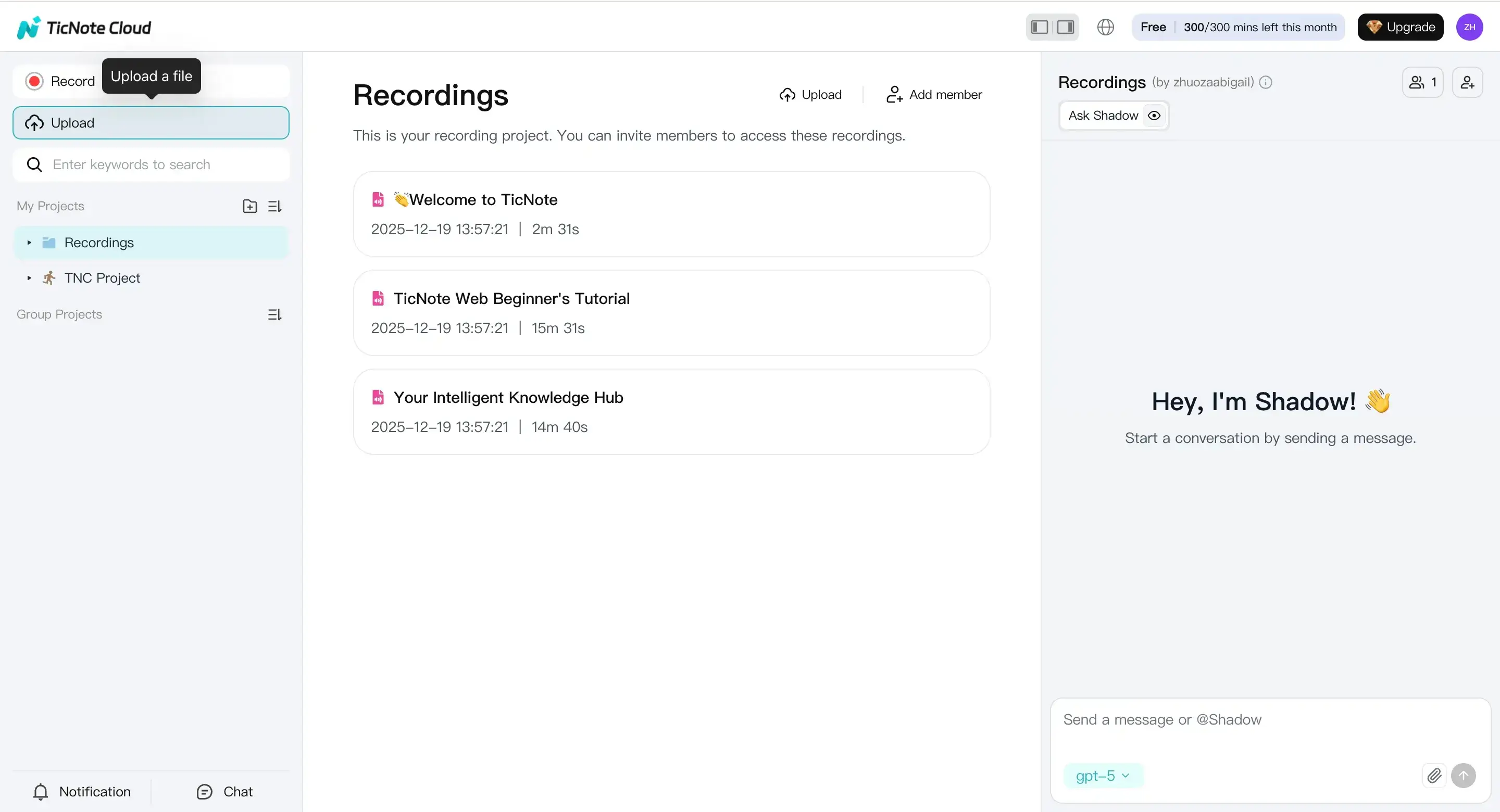
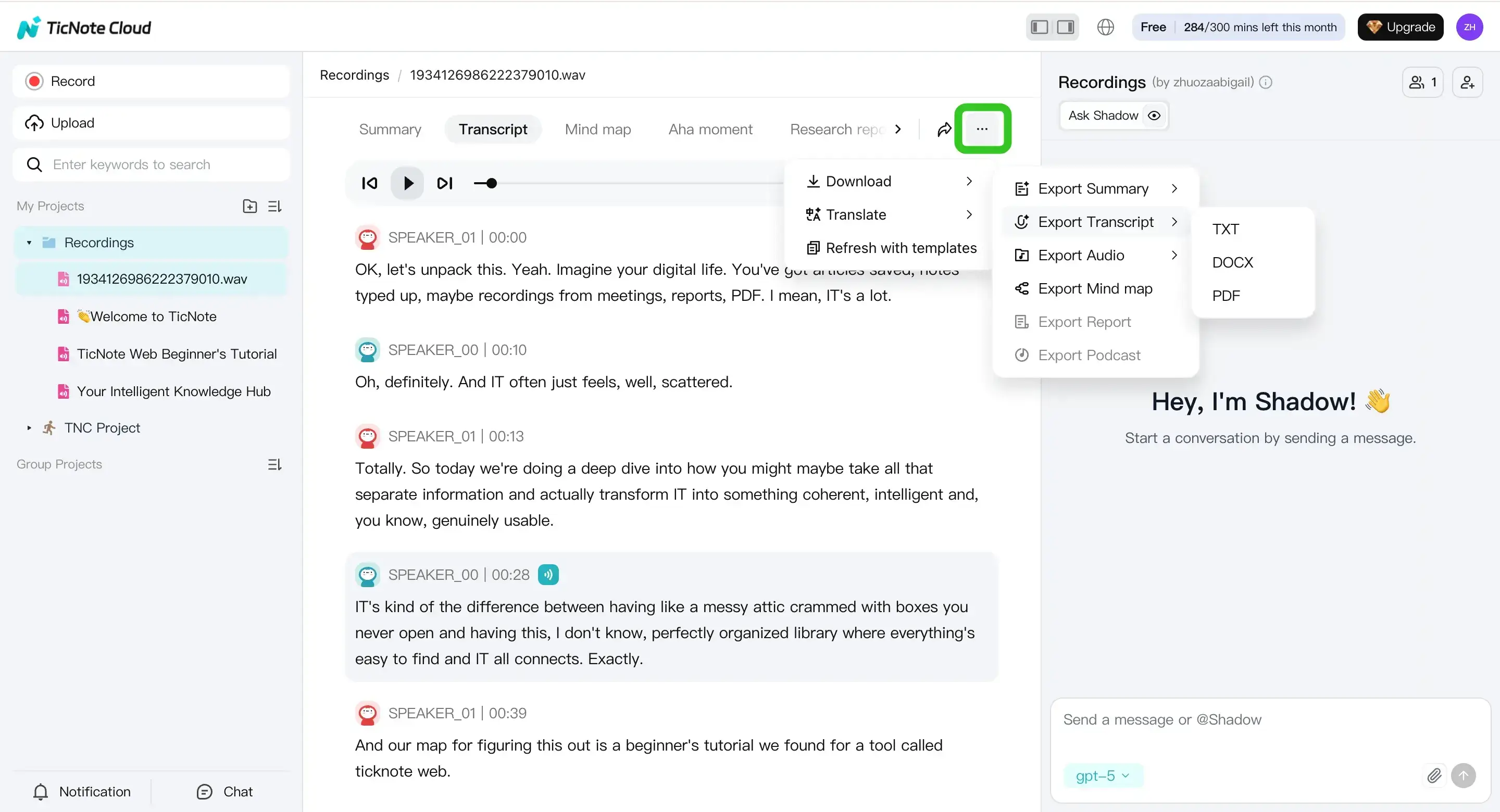
If you don't have a recording yet, you can record audio right in the web studio instead. This is helpful when your customer won't allow meeting bots. Turn on mic access first, then record the call. When you stop, the file saves to the default Recordings project.
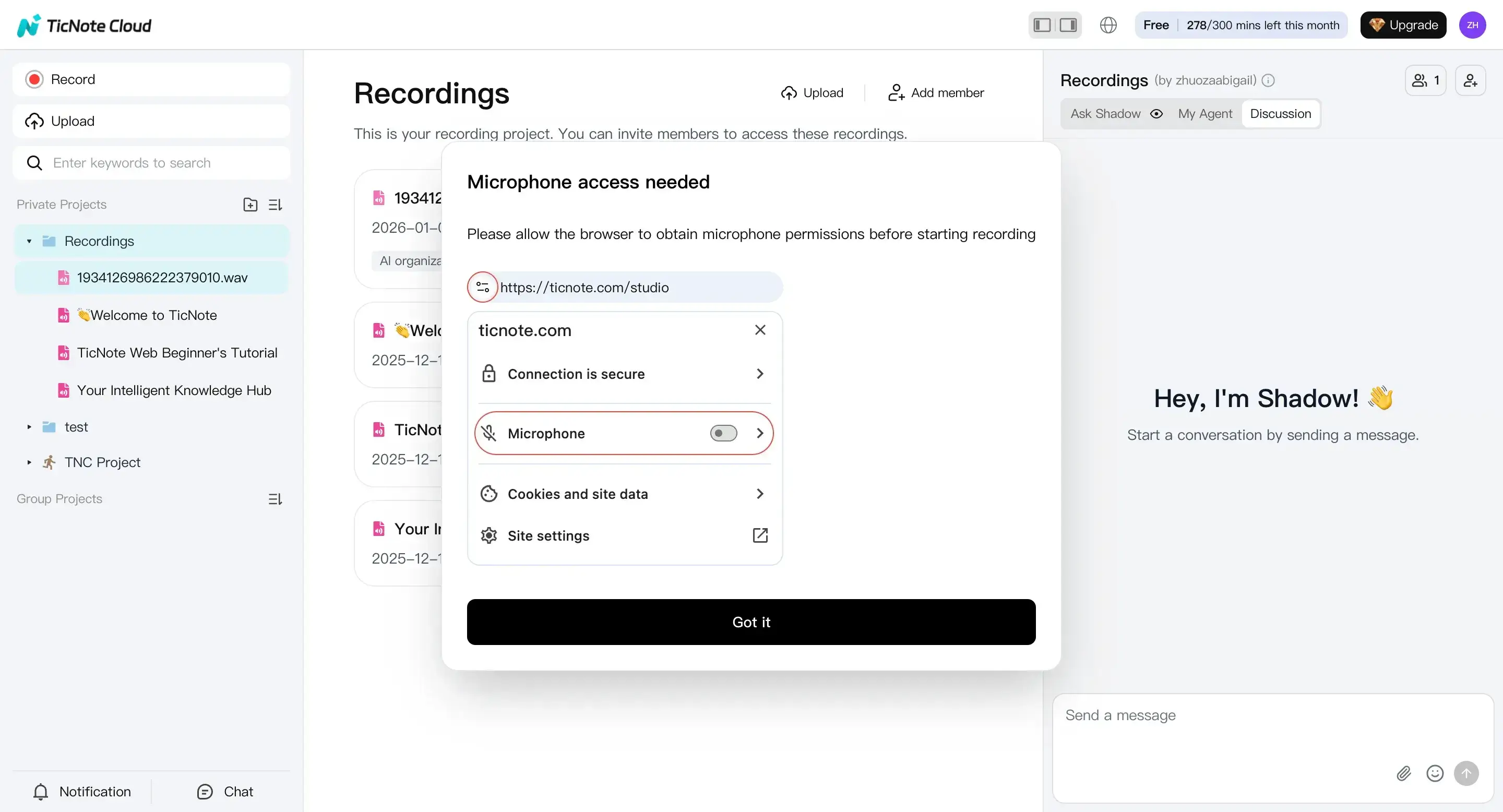
Step 2: Configure transcription settings before you generate
Open the file you just uploaded or recorded. Then go to the Transcript tab and start the transcript generation.
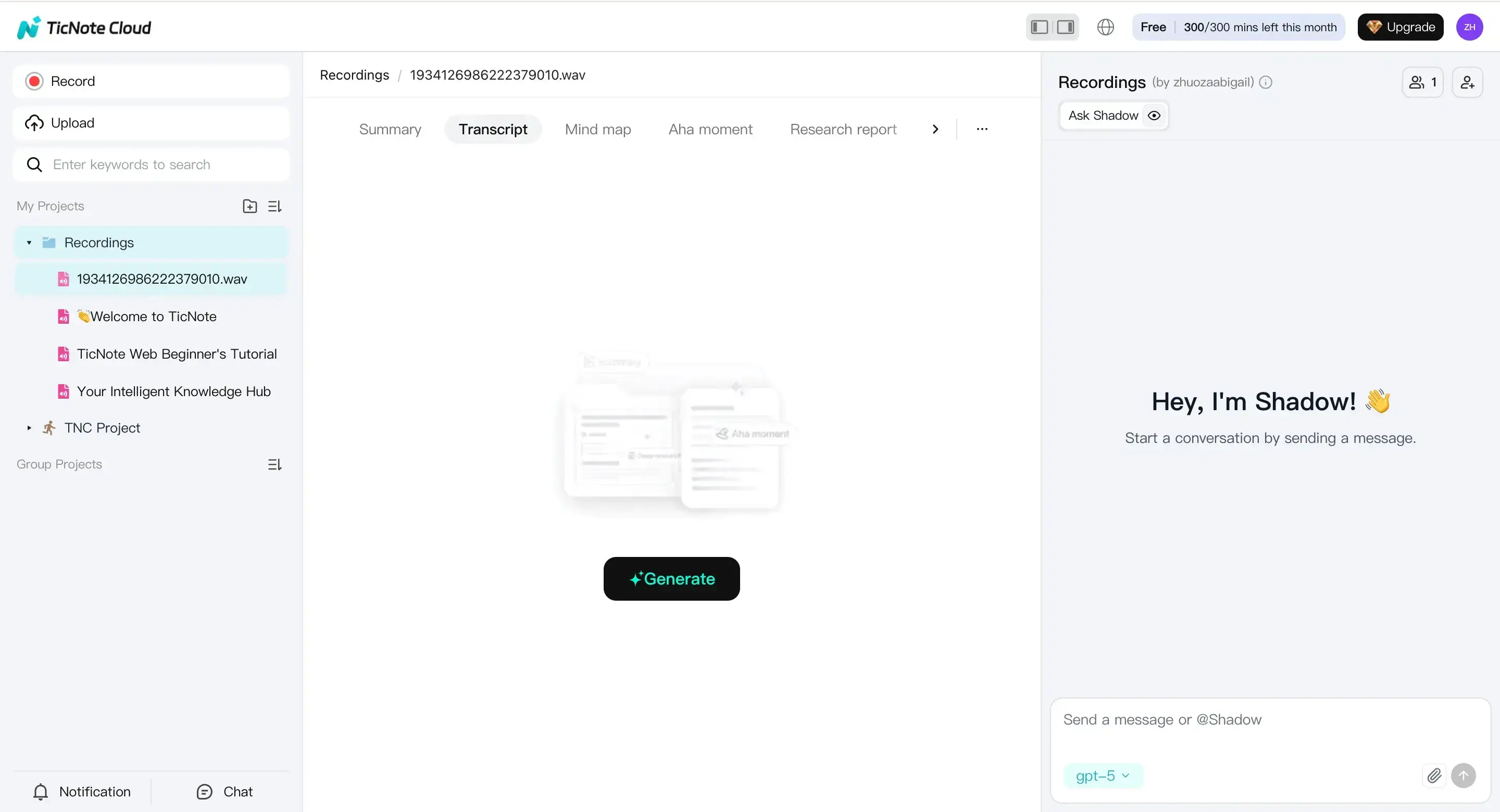
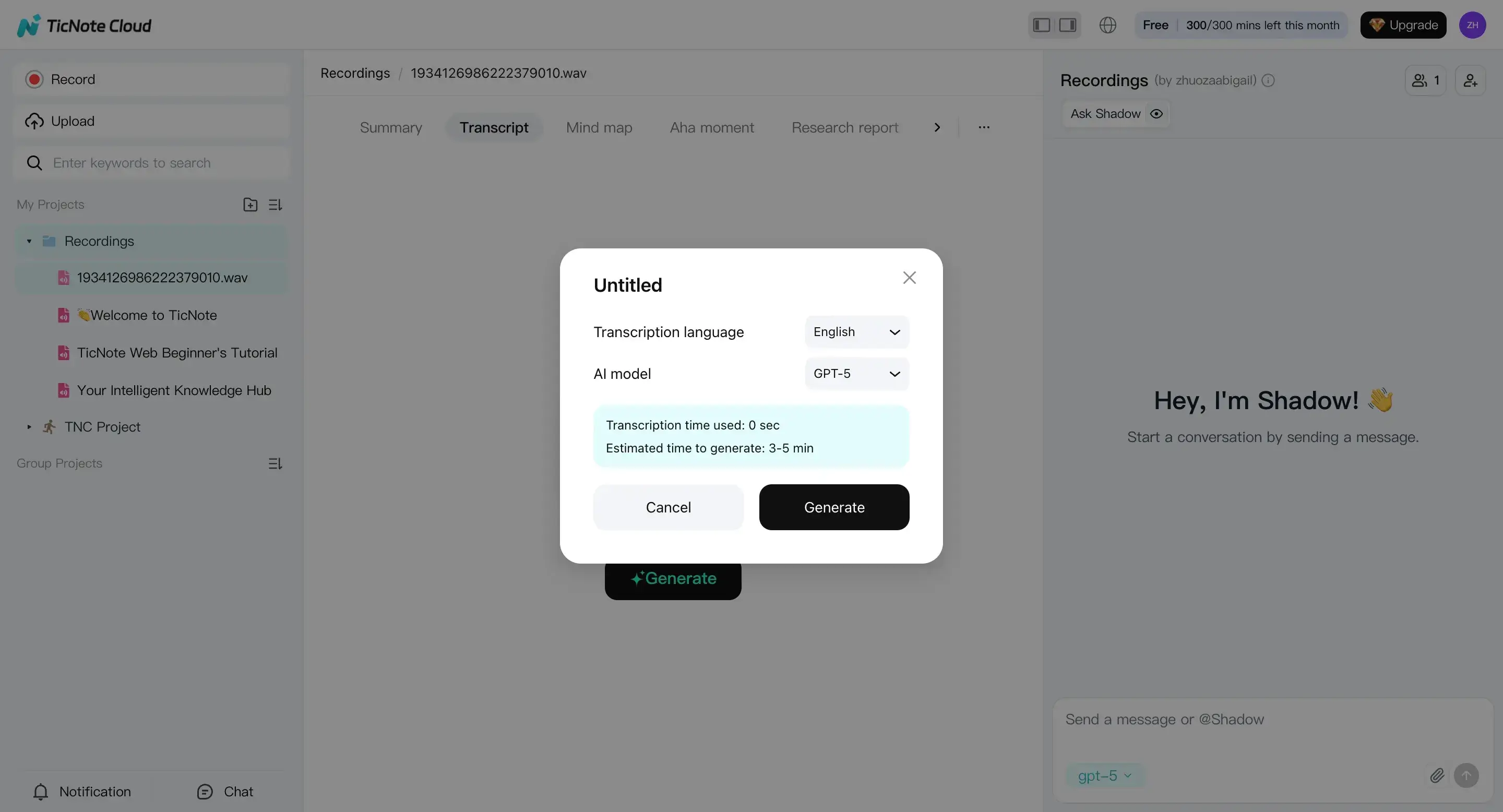
In the settings window, pick the spoken language and choose the AI model option available. If your team sells across regions, decide now if you'll need a translated version later. That way, you can export the right language for the right audience.
Step 3: Review and QA the transcript, summary, and map
Once it's generated, read the transcript like a deal artifact. Fix the items that matter most for sales: names, acronyms, product terms, and speaker labels. Then scan for "sales critical" lines like pricing, timelines, technical constraints, and next steps.
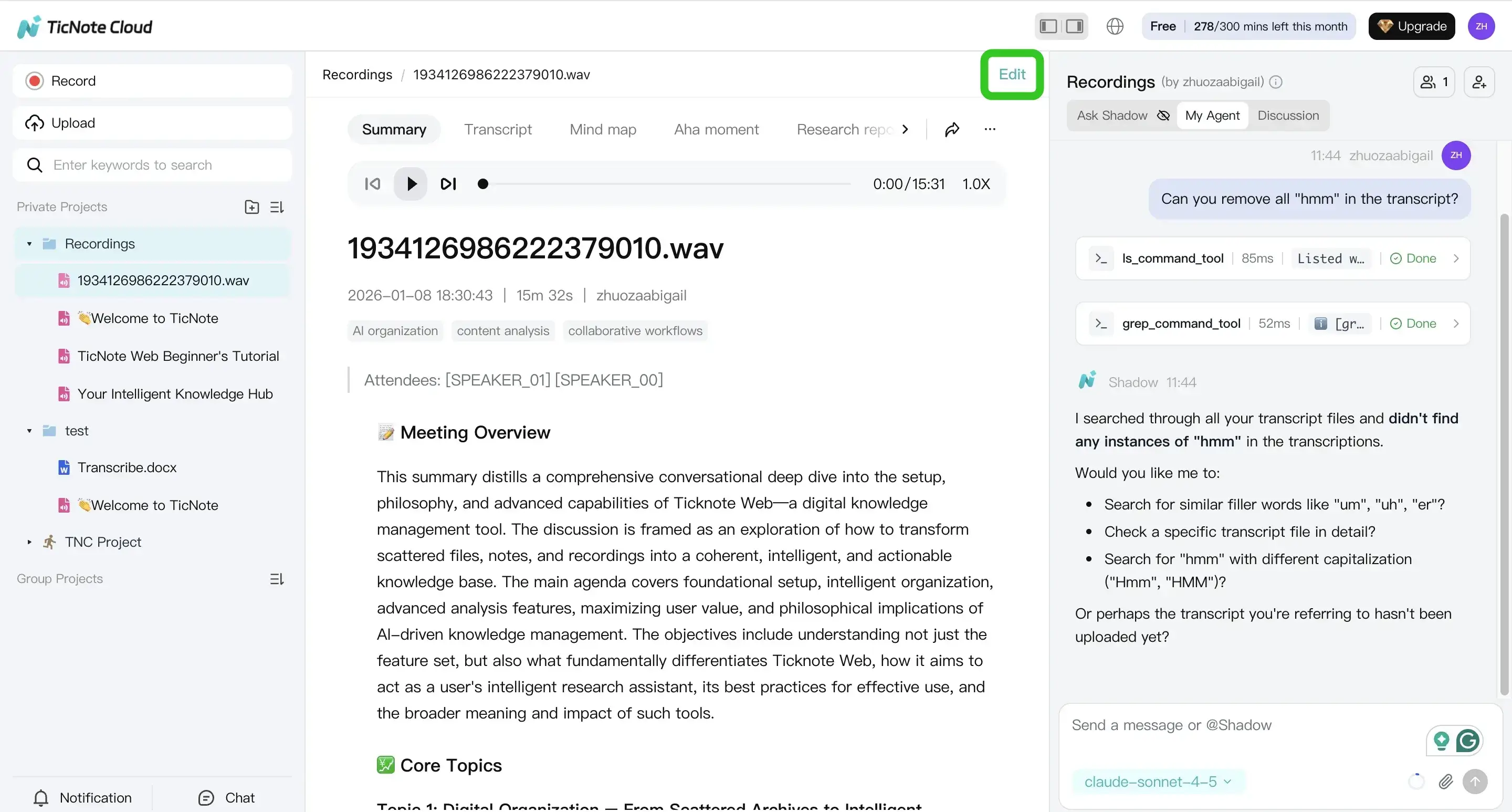
To speed up QA, use Shadow chat for grounded checks such as:
- What objections came up, and when?
- What's the next step, date, and owner?
- Was any competitor mentioned?
Also check the summary and mind map for gaps. If an action item is missing or a key risk got skipped, edit it before you share.
Step 4: Export in the format your workflow needs
When the transcript is clean, export it to match how your team works. A common pattern is:
- Transcript as TXT for archiving and search
- Summary as Markdown, DOCX, or PDF for the account team
Before anything leaves the core deal team, apply your redaction rules. Remove sensitive fields like phone numbers, personal emails, payment details, or other PII.
App workflow: capture fast, fix on the go
If you're away from your desk, you can upload or record in the TicNote app, then generate a transcript and make quick edits. This works well for hallway debriefs, onsite meetings, or voice notes right after a call.
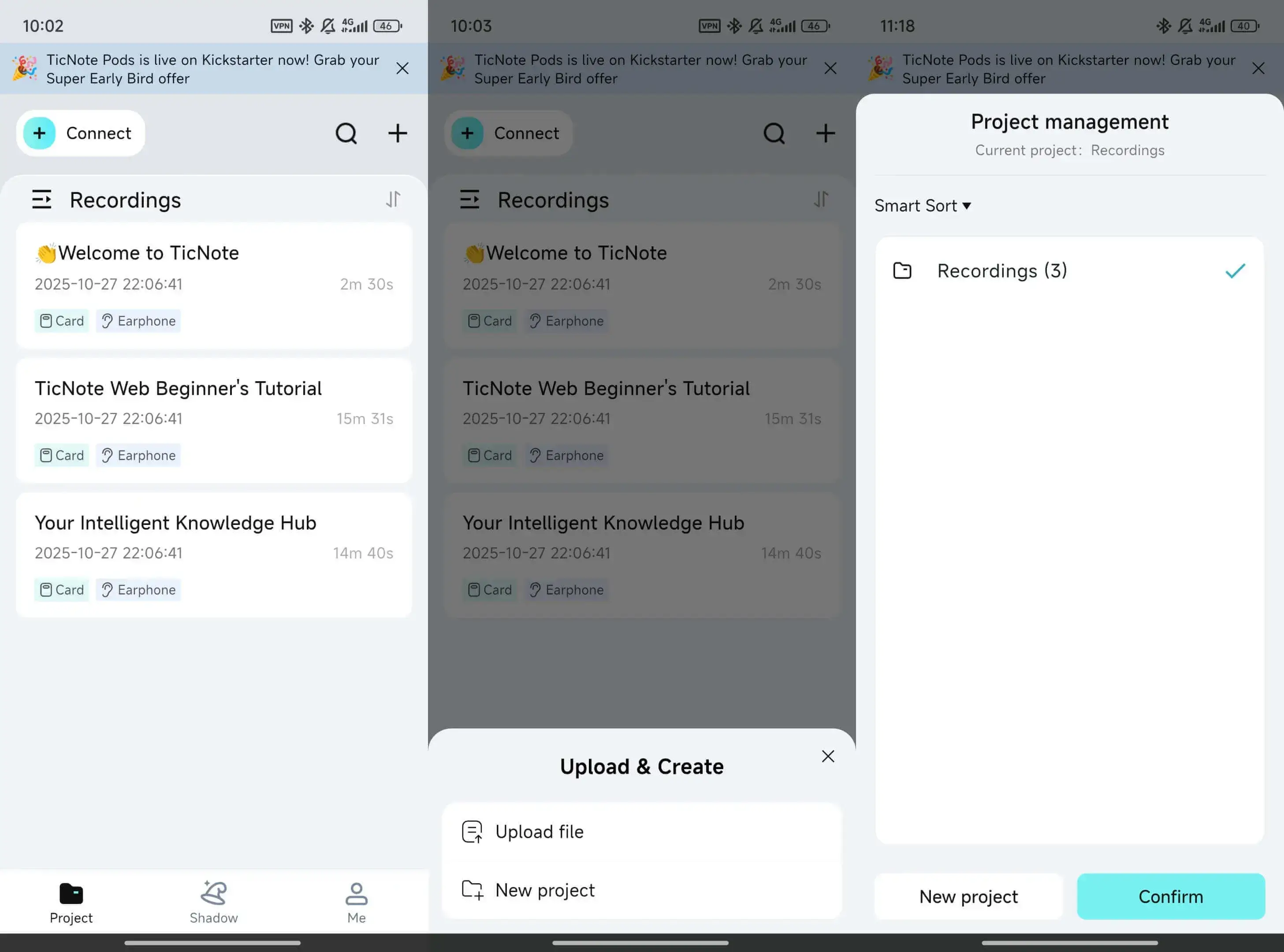
Keep the same standards: correct names and key terms, confirm the next step, and export the format your team expects.
Try TicNote Cloud for Free and run this workflow on your next sales call.



