Extension
TL;DR: How to transcribe recordings accurately and choose the right verbatim level
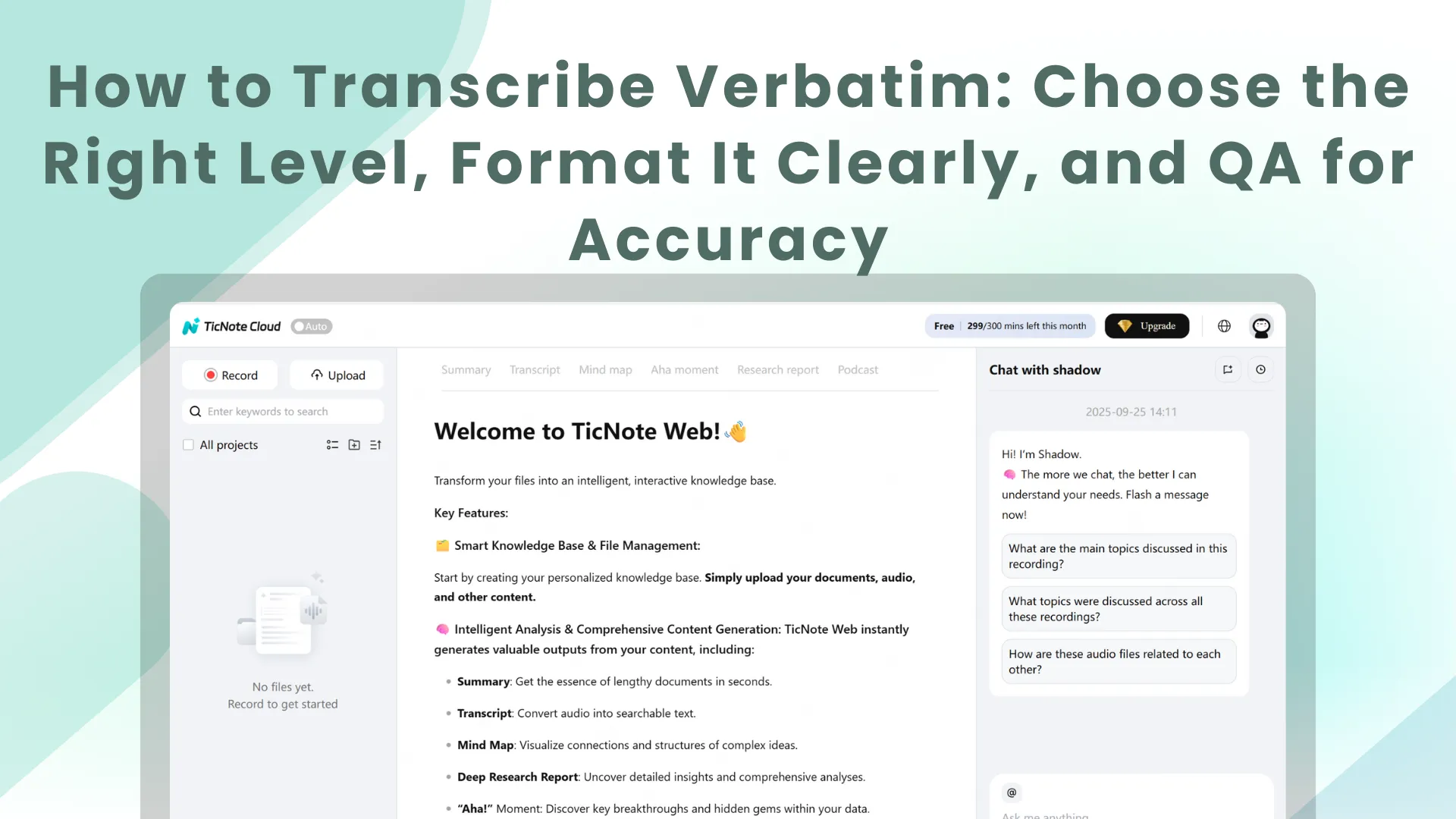
To transcribe verbatim fast and safely, start by capturing your audio in one place and keeping your transcript settings consistent. You can try TicNote Cloud for free to record or upload a file, generate a word-for-word transcript, and keep everything stored by project for easy review.
You spend time fixing transcripts because teams pick different rules each time. That makes speaker labels, timestamps, and tags drift fast. A consistent workflow in a single workspace like TicNote Cloud helps you standardize the level, format, and QA steps before you export.
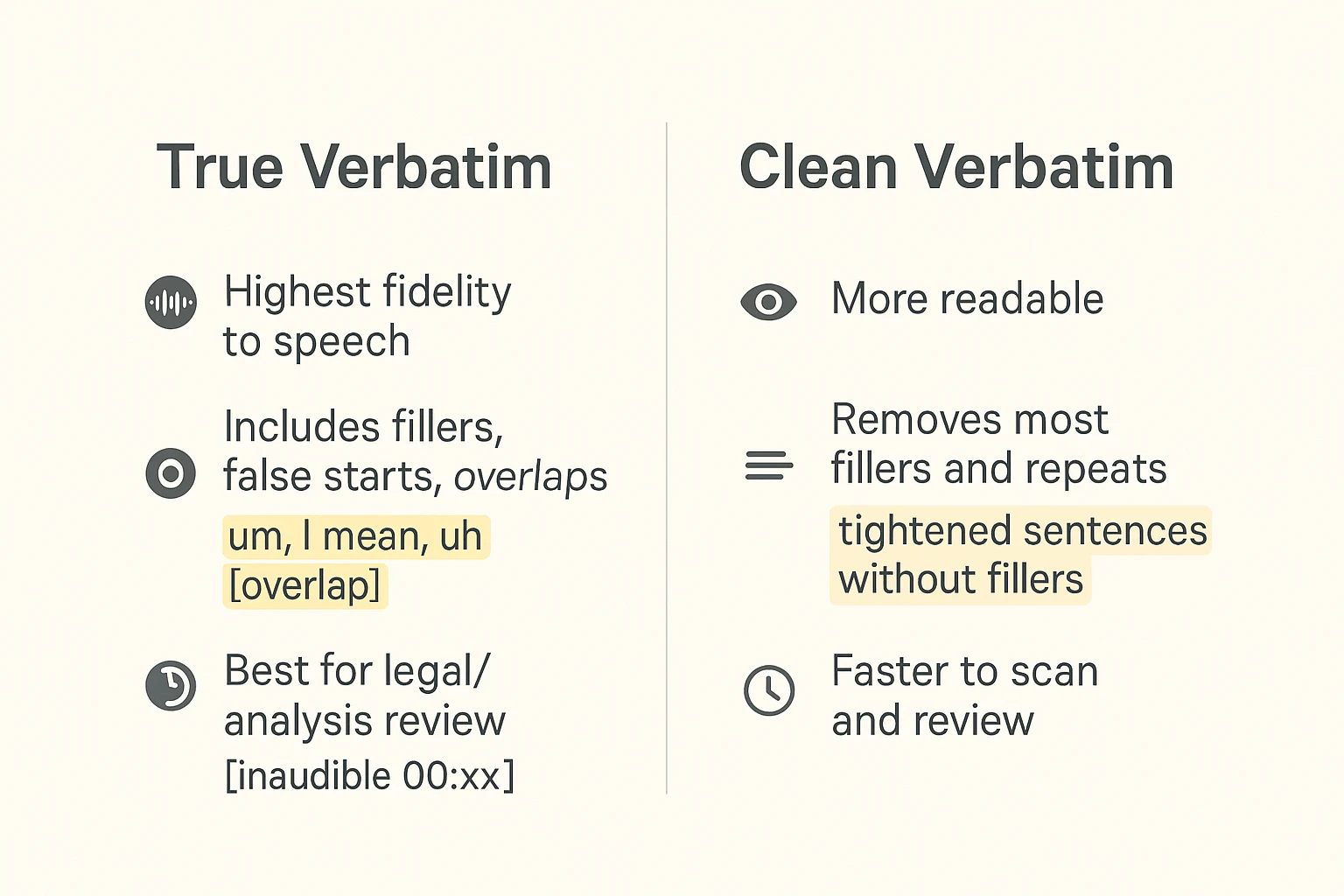
Verbatim means word-for-word, but the "level" changes what you keep. Use true or full verbatim when every pause, filler, and false start matters. Use clean verbatim when you want the same meaning with fewer distractions.
One rule prevents most transcript issues: pick your conventions once, then apply them everywhere. This guide includes a copy-paste mini style guide and a worked multi-speaker example, plus a time reality check. Workflow: Record/Upload → Transcribe → Apply style guide → QA pass → Export (TXT/DOCX/PDF) → Store in project → Ask Shadow across files.
What does it mean to transcribe verbatim (and what are the main levels)?
To transcribe verbatim means you write what people actually said, not what you wish they said. That includes spoken wording, informal grammar, and many "messy" speech patterns. Before you start, align on the level with your team, then follow a consistent workflow like this guide on how to transcribe a conversation with solid formatting rules.
Know the difference: standard vs true (full) verbatim
Most teams use "verbatim" to mean standard verbatim: the speaker's words stay intact, but you don't try to capture every tiny vocal tic. You keep the wording as spoken, plus key items like interruptions and clear cut-offs when they affect meaning.
True or full verbatim goes further. It usually includes:
- Fillers (um, uh, like)
- False starts and restarts (I think we, I mean we should)
- Repeated words (we we we need)
- Stutters
- Sometimes non-speech events (laughs, sighs, coughs), if your style guide calls for it
Quick note on "what counts as a word?" In verbatim, affirmations like "mm-hmm" and "uh-huh" count as spoken tokens, and cut-off words are often marked (for example, "I was go-").
Clean verbatim vs edited (non-verbatim)
Clean verbatim keeps the meaning but removes clutter. You delete most fillers and obvious stutters, and you may drop repeated words that add no value. The point is clarity without changing what the speaker meant.
Edited, or non-verbatim, changes the surface language. It may fix grammar, remove repetition, and sometimes rephrase. That's helpful for readability, but it stops being a word-for-word record.
One warning: don't mix levels in one transcript. Reviewers can't tell what was removed versus never said.
Quick decision table you can paste into an SOP
| Purpose | Audience | Best level | Deliverable | Why it fits downstream use |
| Legal record, compliance, disputes | Court, regulators, counsel | True/full verbatim | Transcript-only | Strongest for evidence, exact wording, challenges |
| Qual research coding, conversation analysis | Research team, client | Standard or true verbatim | Transcript-only | Preserves speech detail needed for coding and audit trails |
| Pulling direct quotes for a story | Editors, readers | Standard verbatim | Transcript plus quotes | Quote accuracy matters, but filler can be filtered later |
| Meeting archive, decisions, action items | Internal teams | Clean verbatim | Transcript plus summary | Better search and reuse without noisy filler |
When should you use verbatim transcription—and when should you avoid it?
Verbatim transcription is best when the exact words matter. Use it when you may need to defend what was said, quote it, or analyze how it was said, not just what it meant.
Use verbatim when accuracy is the point
Choose verbatim when you need a record that can stand up to scrutiny.
Common best fit cases include:
- Legal and compliance work: hearings, HR investigations, grievance meetings, incident reports, and audits
- Journalism and quoting sources: interviews where exact phrasing and intent matter
- Qualitative research: focus groups and interviews where pauses, hedges, and self-corrections are data
- Multi-party discussions: panels, stakeholder calls, and disputed "who said what" moments
In these settings, a true word-for-word record can protect you. It preserves credibility cues like uncertainty, emphasis, and interruptions.
Avoid true verbatim when it lowers clarity
True verbatim can be hard to read. It can also make smart speakers look less fluent. Fillers, stutters, and false starts can add stigma, especially for non-native speakers or people under stress.
Also, it costs more time.
- Cleaned verbatim is often enough for internal review.
- Edited transcripts are often better for publishing, training, or PR.
A simple rule: if readers need meaning fast, use clean verbatim plus a short summary.
Consent and ethics: decide what to capture
Before you record or transcribe, align on ethics and risk.
Mini checklist:
- Did everyone consent to recording and transcription?
- Will you notify late joiners and people who speak briefly?
- Are sensitive topics present, like health, minors, or finances?
- Should you include non-speech cues like [laughs] and [sighs], or leave them out?
If identifiers are not needed, redact them. Keep it transparent by using tags like [NAME REDACTED] or [ADDRESS REMOVED], so readers know an edit happened.
How do you set up a verbatim transcription job for success?
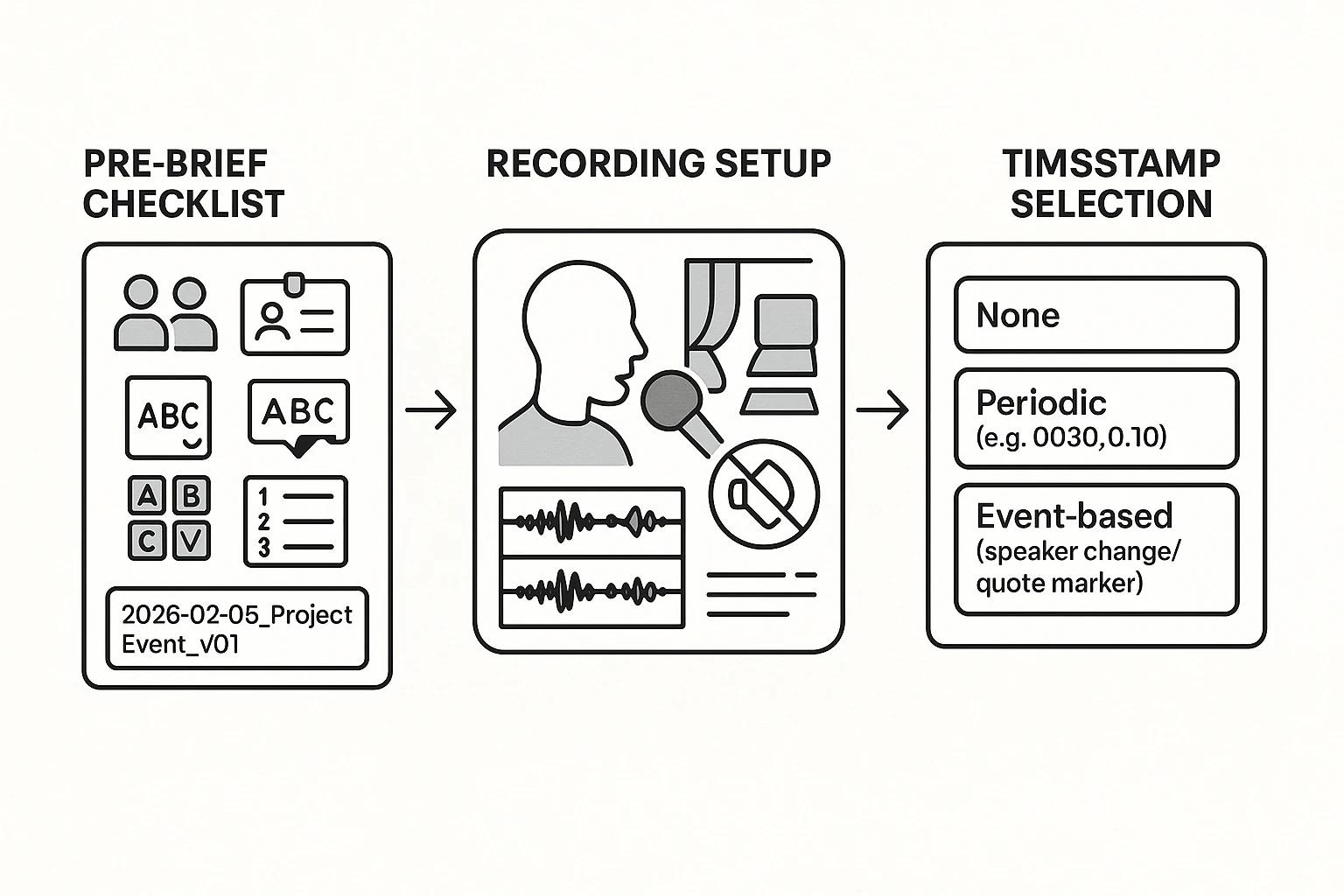
A clean setup saves hours later. Before you transcribe verbatim, lock in three things: a pre-brief (who, what, spellings), solid audio capture, and timestamp rules. If you also need a broader workflow, this audio transcription step-by-step guide helps you standardize the full process.
Start with a pre-brief (so you don't guess)
Send or collect this checklist before the recording:
- Speaker list: full names, roles, and who interviews whom
- Spellings: company names, product names, locations, and people
- Acronyms and jargon: what they stand for, plus common shortcuts
- Topic map: 5 to 10 expected themes and sensitive areas
- Style rules: true vs clean verbatim, and how to tag inaudible parts
Use a simple file name so versions don't drift:
- Format: YYYY-MM-DD_project_event_v01 (example: 2026-02-05_Acme_UserInterview03_v01)
- Change log rule: every revision bumps the version and adds 1 line at top: date, editor, what changed
Fix the "boring but decisive" audio details
Small recording choices decide your accuracy.
- Get the mic close: 6 to 12 inches is a good target
- Cut echo: soft room, curtains, carpet, or a quiet corner
- Avoid speakerphone: it adds noise and drops consonants
- If you can, record separate tracks per speaker (faster review)
Special cases to plan for:
- Phone calls: test levels first, and ask speakers to use wired headphones
- Hybrid meetings: one mic per side beats one mic for the whole room
- Soft voices: move the mic closer and ask for clearer turn-taking
Decide timestamps up front (it changes effort)
Pick one pattern and stick with it:
- None: fastest to type, slower to review
- Periodic: every 30 to 60 seconds; good for interviews and research
- Event-based: at speaker changes, key quotes, and exhibits; best for legal review
Rules of thumb:
- Interviews: periodic timestamps
- Legal or compliance review: event-based timestamps
- Team meetings: periodic timestamps plus action markers like "ACTION:" and "DECISION:"
Try TicNote Cloud for Free to organize recordings and transcripts in projects.
How do you format a verbatim transcript so others can use it?
A verbatim transcript is only useful if readers can scan it fast and quote it safely. So your goal is simple: make it easy to see who spoke, when they spoke, and what you did not hear.
Lock down speaker labels (so quotes don't drift)
Use one speaker per paragraph or line block. Keep labels consistent from start to finish. Pick one system and stick to it:
- NAME: JORDAN, PRIYA
- ROLE: INTERVIEWER, PARTICIPANT
- Neutral IDs: S1, S2 (best when names are sensitive)
If you don't know a speaker, label them as S? and add a short note once, then keep the label stable:
- S? (unknown male voice, near mic)
Later, when you identify them, don't rewrite the whole transcript. Replace only the label, not the structure. Example: change S? to S3 (ALEX) everywhere. That way, any page or timestamp references still point to the same lines.
Quick re-identification rule: use the full label the first time, then a short label after.
- First mention: PRIYA PATEL (FACILITATOR):
- After that: PRIYA:
Add timestamps readers can trust
Timestamps help others find the audio fast. For most interviews, add a timestamp every 30 to 60 seconds. If the talk is dense, emotional, or full of overlap, timestamp more often.
Placement options:
- Inline at the start of the turn:
[00:12:30] PRIYA: ...(easy to copy) - Margin-style on its own line:
[00:12:30]then the next line is the speaker (easy to scan)
Whatever you choose, keep the timestamp format identical. Don't mix 0:12 and 00:12:00.
Use a tight set of tags and don't improvise
Create a small tag set your team uses every time. Here's a copy and paste style block:
Core verbatim tags (copy/paste)
- [inaudible 00:12]: audio is not possible to hear
- [unclear 00:12]: audio is heard but words can't be confirmed
- [best guess: "word" 00:12]: you think you heard it; mark the risk
- (pause 2s): silence that matters to meaning
- [crosstalk]: multiple people talking at once
- [overlap]: two speakers overlap at this point
- [laughs] [sighs] [clears throat]: only when it changes meaning
Rule of thumb:
- Use inaudible when sound is missing.
- Use unclear when sound exists but words are not safe.
- Use best guess when you must capture a likely word but need to flag it.
Handle overlap and interruptions without chaos
Don't cram two voices into one line. Split into short blocks and mark the moment of collision. What must never be ambiguous is: who said what, and what wasn't heard.
Use simple conventions:
- Keep each speaker in their own block.
- Use [overlap] right where the overlap starts.
- If someone gets cut off, end with an ellipsis and move on.
Example:
- S1: I think the main issue is the timeline, because we...
- S2 [overlap]: Sorry, can I jump in?
- S1: Yeah, go ahead.
If you can't separate speakers, be explicit:
- [crosstalk 00:18:44] [unclear]
Try TicNote Cloud for Free and keep speaker labels, timestamps, and verbatim tags consistent inside a project, so your transcripts stay easy to review and reuse.
How do you handle hard parts like crosstalk, accents, and background noise?
Hard audio is where "transcribe verbatim" work can fall apart. The fix is simple: follow clear rules for overlap, mark uncertainty fast, and verify high risk details like names and numbers. Don't try to make messy audio sound neat on the page.
Triage overlap (crosstalk) without guessing
Use one rule: if overlap doesn't change meaning, tag it. If it changes meaning, split it.
- Minor overlap (same idea, short): keep one line and add a marker like [overlapping].
- Meaning changes (different points, argument, decision): put each speaker on their own line and keep the interruption.
- If you can't tell who said what, don't invent clarity. Use markers like [crosstalk] or [unclear] instead of "fixing" it.
Mark unclear audio with confidence notes and timestamps
When you're unsure, leave a trail for reviewers.
- Use [inaudible] when you can't hear it at all.
- Use [unclear] when you hear speech but can't decode it.
- Use partial words when cut off: "inter-" or "pro-".
- If you take a best guess, mark it: [best guess: "interface"].
- Add a timestamp right there, like [00:12:48], so someone can jump back fast.
Verify numbers, names, and technical terms (don't assume)
Most serious errors are: numbers, dates, units, and proper nouns.
Verification methods:
- Check the agenda, slide deck, or shared doc.
- Keep a spellings list for names and products.
- If allowed, confirm with a public source or ask the speaker.
QA tip: search for likely confusions (there/their, 15/50, B2B/B2C), then re listen to only those spots. If you need a tighter review loop, use the same checks you'd use to transcribe an interview with a repeatable workflow.
Try TicNote Cloud for Free to store transcripts in projects and re-check tricky moments faster.
What does a real multi-speaker verbatim transcript look like?
A good way to learn verbatim is to see it. Below is the same moment transcribed two ways. First is true verbatim (everything said, including rough edges). Second is clean verbatim (same meaning, easier to read). This helps you decide what "transcribe verbatim" should mean for your project.
Short excerpt (true verbatim)
[00:18] Maya (PM): Okay, um, so, quick check in. We said Friday, right? (pause) For the client handoff.
[00:22] Ben (Sales): Yeah, Friday. Well, I mean, uh, Friday if legal signs. If not, then, like, Monday.
[00:26] Priya (Legal): It's not "if." It's when. (laughs) But I need the revised clause, the, the… the one about data retention.
[00:31] Jordan (Research): Wait, sorry, which clause? The one in section three or the adden, addendum?
[00:34] Ben (Sales): The adden… yeah, addendum. The retention language.
[00:36] Maya (PM): Right. I can send that today. Uh, but I'm also worried about the onboarding doc. It's still not, you know, final.
[00:41] Priya (Legal): (overlap) The doc can be "not final," but the contract can't.
[00:43] Maya (PM): (overlap) Yep, agreed. I just don't want them reading the wrong steps.
[00:46] Jordan (Research): There's also the quote from last week, the one where the user said, um, "I don't trust it." That's going in the deck, right?
[00:52] Ben (Sales): (cut off) I mean, yes, but maybe we don't lead with that.
[00:55] Maya (PM): (pause) Also, who's owning the follow up email?
[00:58] Priya (Legal): I can't. I'm in hearings from, uh, two to four.
[01:01] Jordan (Research): I can draft it. But I'll need the exact dates. The timeline part got fuzzy when you all talked over each other.
[01:07] Ben (Sales): The date is… [inaudible 00:01:08]. Sorry, my mic cut.
[01:10] Maya (PM): Okay, we'll confirm in writing. Ben, you'll send dates in Slack, then Jordan drafts.
The same excerpt (clean verbatim)
[00:18] Maya (PM): Quick check in. We said Friday for the client handoff, right? (pause)
[00:22] Ben (Sales): Friday if legal signs. If not, Monday.
[00:26] Priya (Legal): It's "when." (laughs) I need the revised data retention clause.
[00:31] Jordan (Research): Which clause? Section three or the addendum?
[00:34] Ben (Sales): The addendum. The retention language.
[00:36] Maya (PM): I can send it today. I'm worried the onboarding doc isn't final.
[00:41] Priya (Legal): (overlap) The doc can change, but the contract can't.
[00:43] Maya (PM): (overlap) Agreed. I don't want them reading the wrong steps.
[00:46] Jordan (Research): The user quote from last week ("I don't trust it") is going in the deck, right?
[00:52] Ben (Sales): Yes, but maybe we don't lead with that.
[00:55] Maya (PM): (pause) Who owns the follow up email?
[00:58] Priya (Legal): Not me. I'm in hearings from two to four.
[01:01] Jordan (Research): I can draft it. I'll need the exact dates.
[01:07] Ben (Sales): The date is [inaudible 00:01:08]. My mic cut.
[01:10] Maya (PM): We'll confirm in writing. Ben sends dates in Slack, then Jordan drafts.
What changed (and what must never change)
What can change:
- Fillers and stutters: "um," "uh," repeated starts.
- Light tightening: remove extra words that add no meaning.
- Some overlap detail: keep it only when it affects understanding.
What must never change:
- Meaning and intent, including hedges like "if" vs "when."
- Facts: dates, names, numbers, promises, and decisions.
- Speaker attribution: who said what.
- Timing cues used for navigation (timestamps and key tags).
Mini QA checklist (avoid "silent edits"):
- Use the same speaker labels throughout (Ben vs Benjamin).
- Use the same tags throughout: (pause), [laughter], [overlap], [inaudible 00:xx].
- Don't "fix" wording inside quotes unless you mark it.
- If you remove a filler, don't remove a commitment with it.
- Re-listen to every [inaudible] segment before you ship.
How to capture, transcribe, and export a verbatim transcript (step-by-step)
This workflow shows how to transcribe verbatim using TicNote Cloud, but the same steps work in most tools: keep the source file organized, generate a draft, then do a fast two-pass QA before you export. The goal is simple: a transcript people can trust, plus the audio for proof.
Web Studio: end-to-end workflow
Step 1: Upload or record (and file it in the right project)
Start in the TicNote web studio by creating a project for the job. Name it by client, study, or matter, then keep every related file inside that one project.
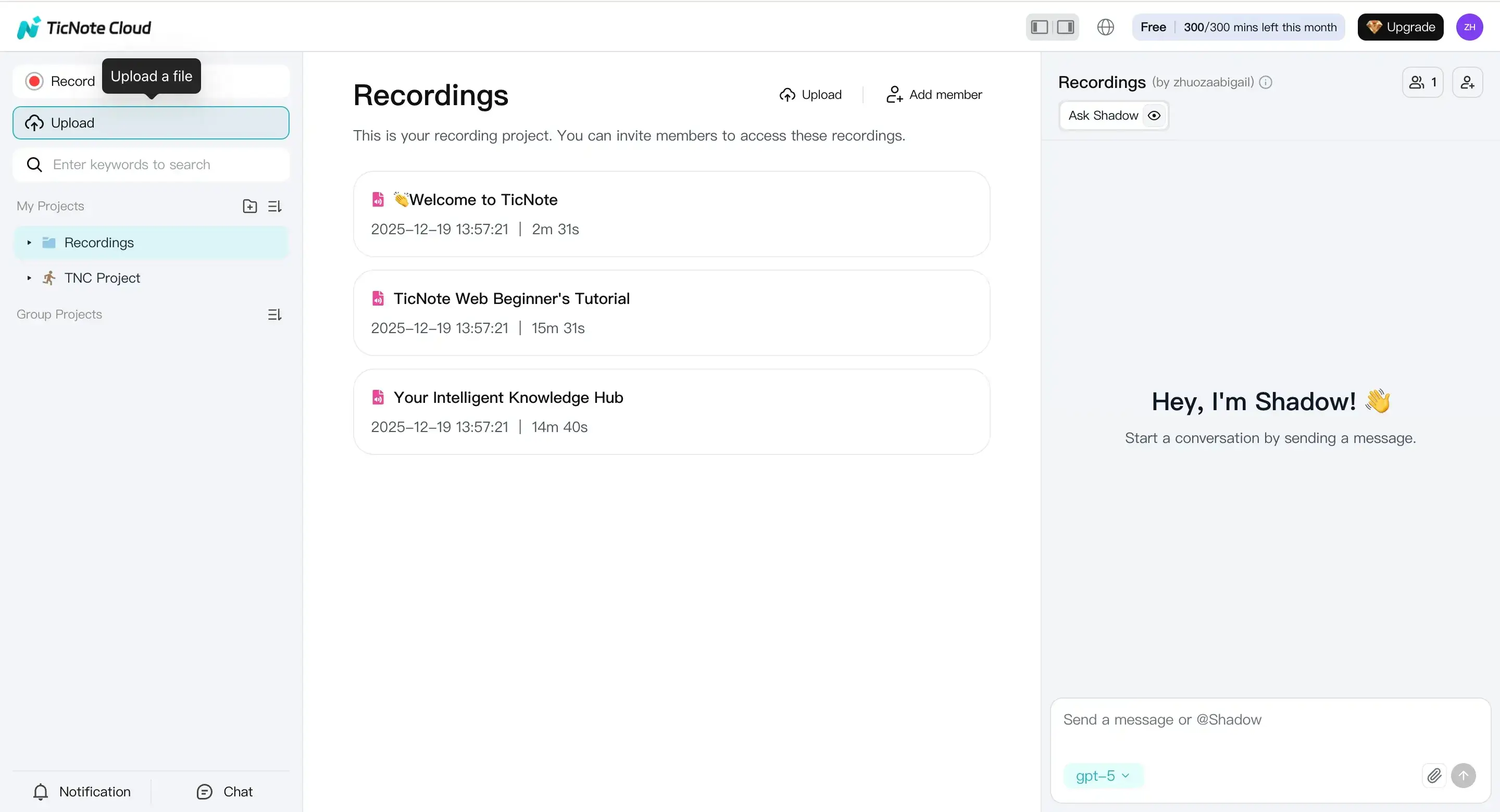
Step 2: Set transcription options (before you generate)
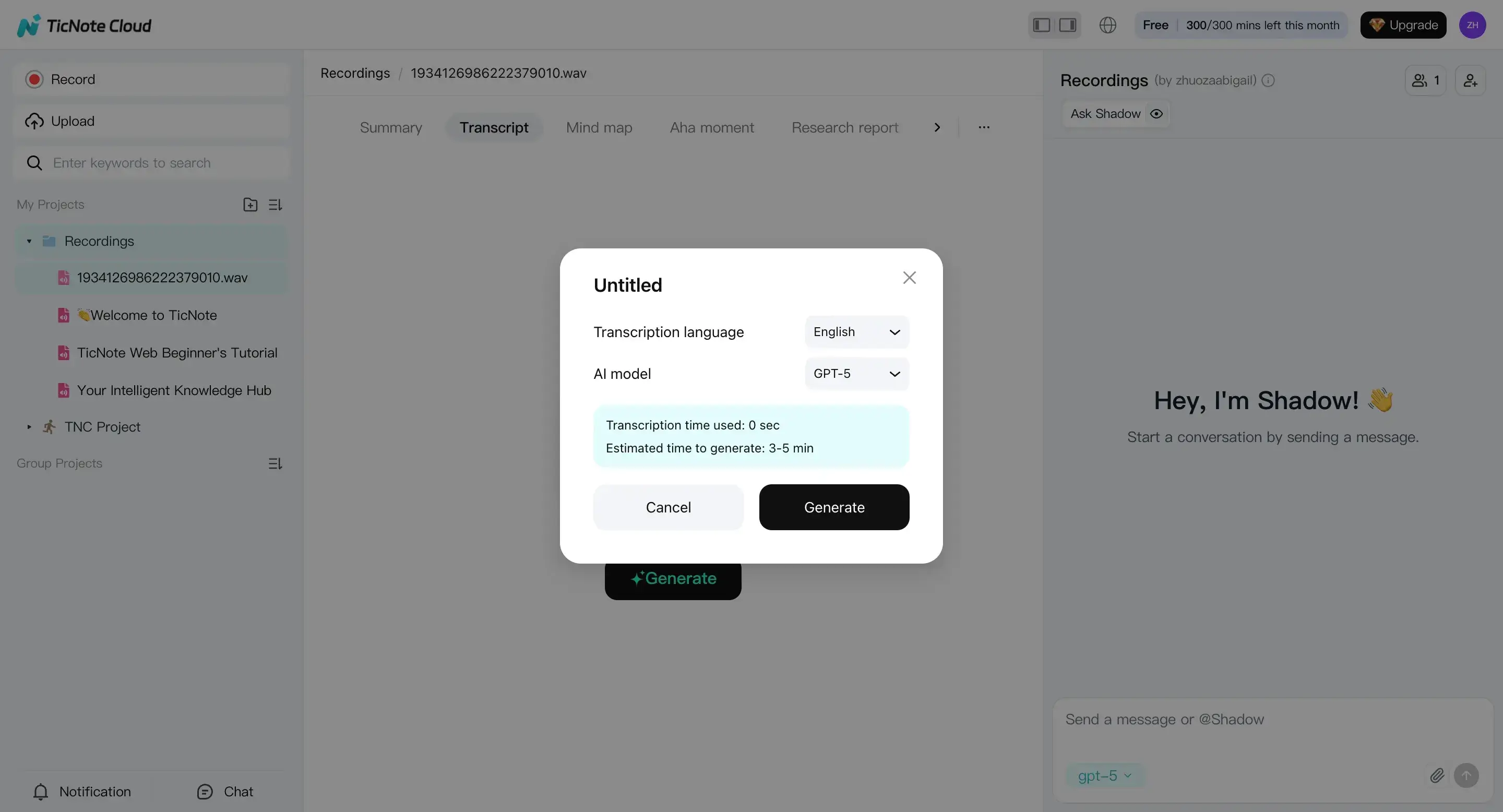
Tip: Decide your verbatim level in your team SOP. Even if your tool makes a raw draft first, you still need to know if you're delivering true verbatim (every filler and false start) or clean verbatim (light cleanup without changing meaning).
Step 3: Review and refine (two-pass QA)
Once the draft appears, do a two-pass edit. This keeps you fast and consistent.
Pass 1: Correctness pass (make it true)
- Fix names, brands, and key terms.
- Check numbers, dates, and amounts.
- Repair speaker turns and obvious diarization errors.
- Add tags like [inaudible 00:12:08] when you can't recover audio.
Now do your conventions pass. This is where you make it usable.
Pass 2: Conventions pass (make it consistent)
- Standardize speaker labels (Speaker 1, Interviewer, etc.).
- Apply overlap rules (for crosstalk) and interruption markers.
- Ensure timestamps follow one format.
- Make tag style consistent: [laughs], [crosstalk], [pause].
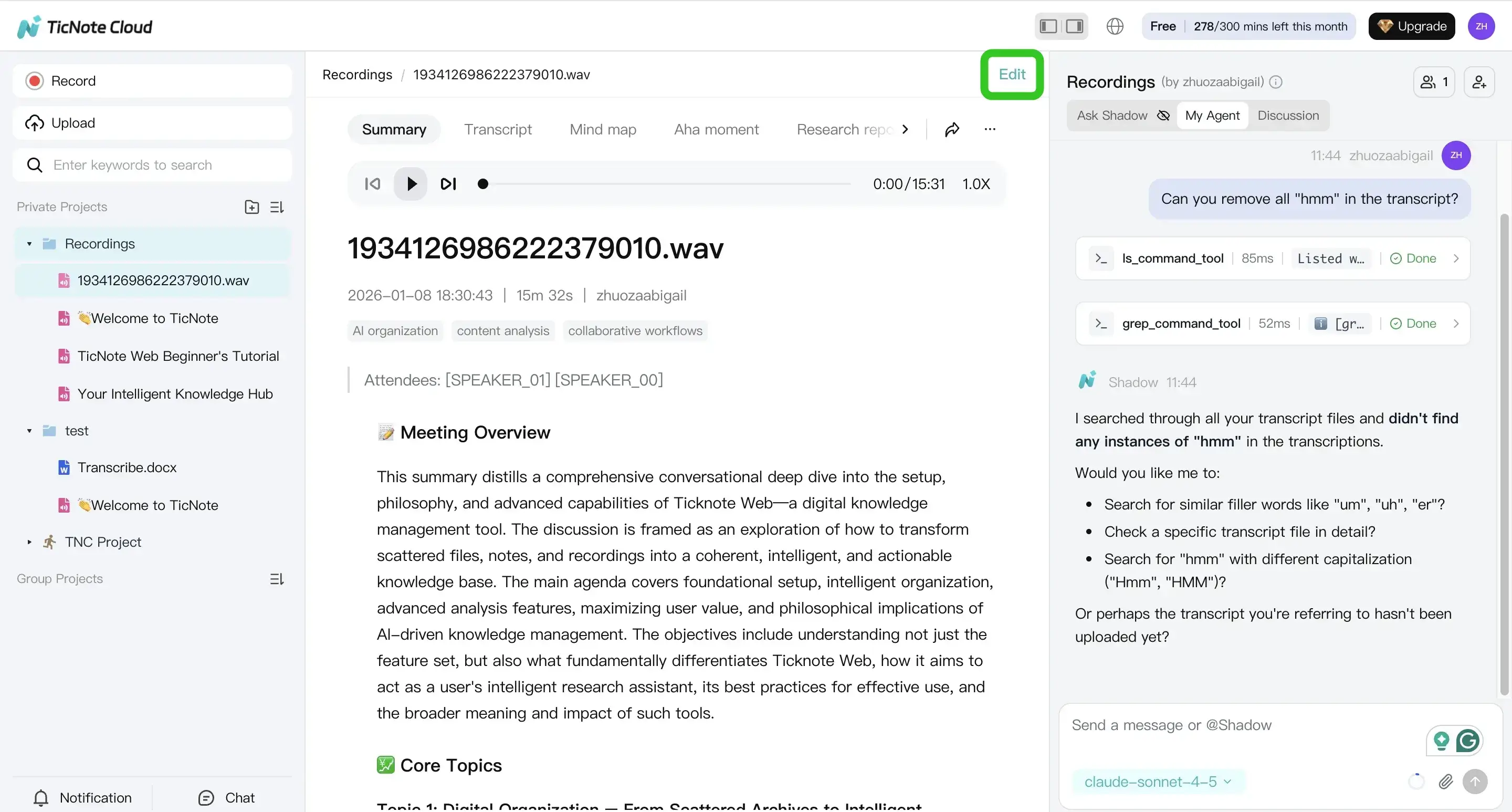
Step 4: Export (and keep the audio for audit)
When the transcript matches your chosen verbatim level, export it for the people who need it.
Common handoffs:
- Transcript (TXT) for legal, research coding, or archiving
- Summary exports (Markdown, DOCX, PDF) for stakeholders who won't read the full text
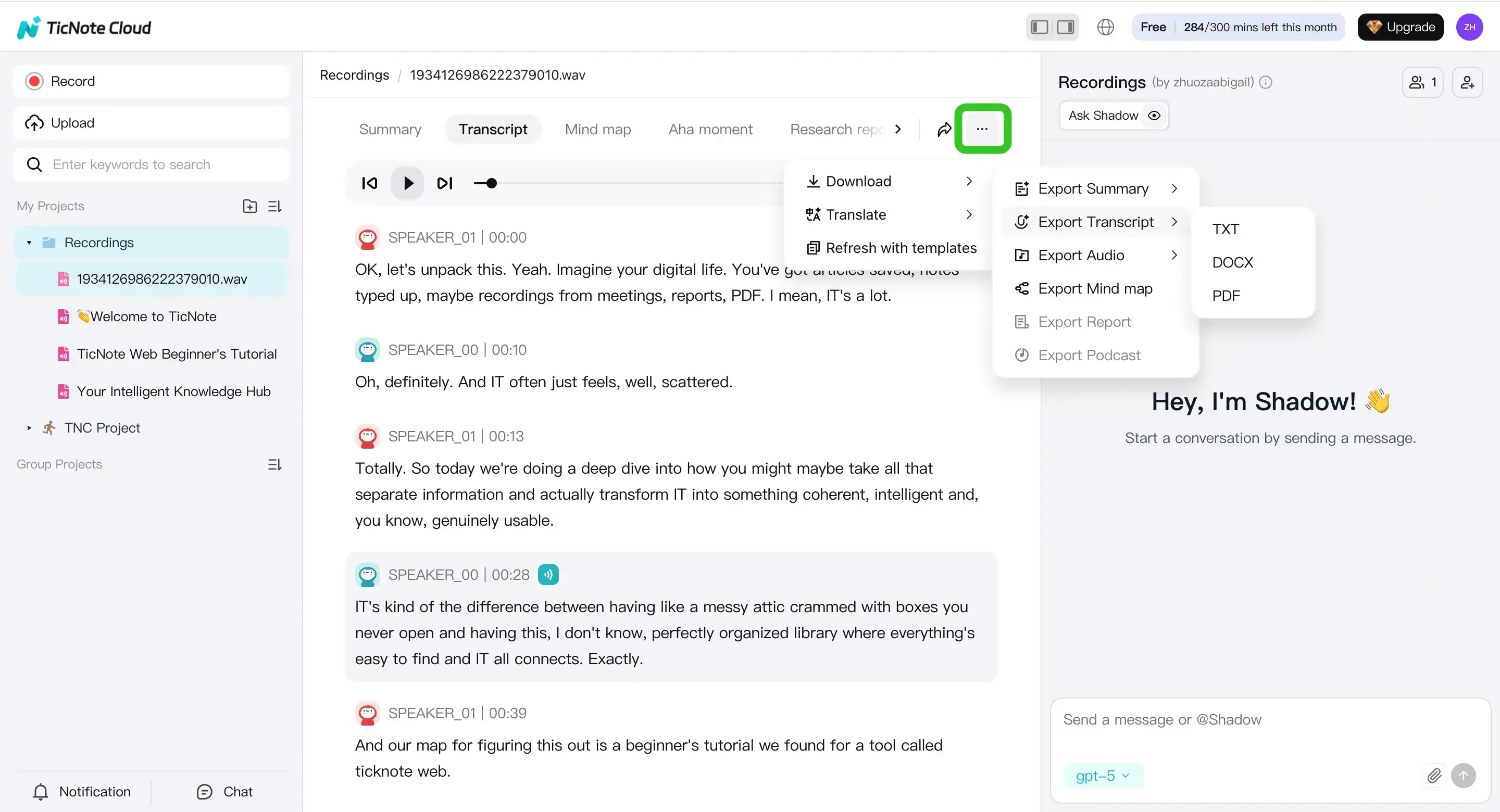
Final check: Store the original audio with the exported transcript. That way, you can re-check disputed lines later.
Optional: record online meetings with the Chrome extension
If your source is a live meeting, you can record and capture a live transcript with the TicNote Cloud extension, then review everything later in the web studio.
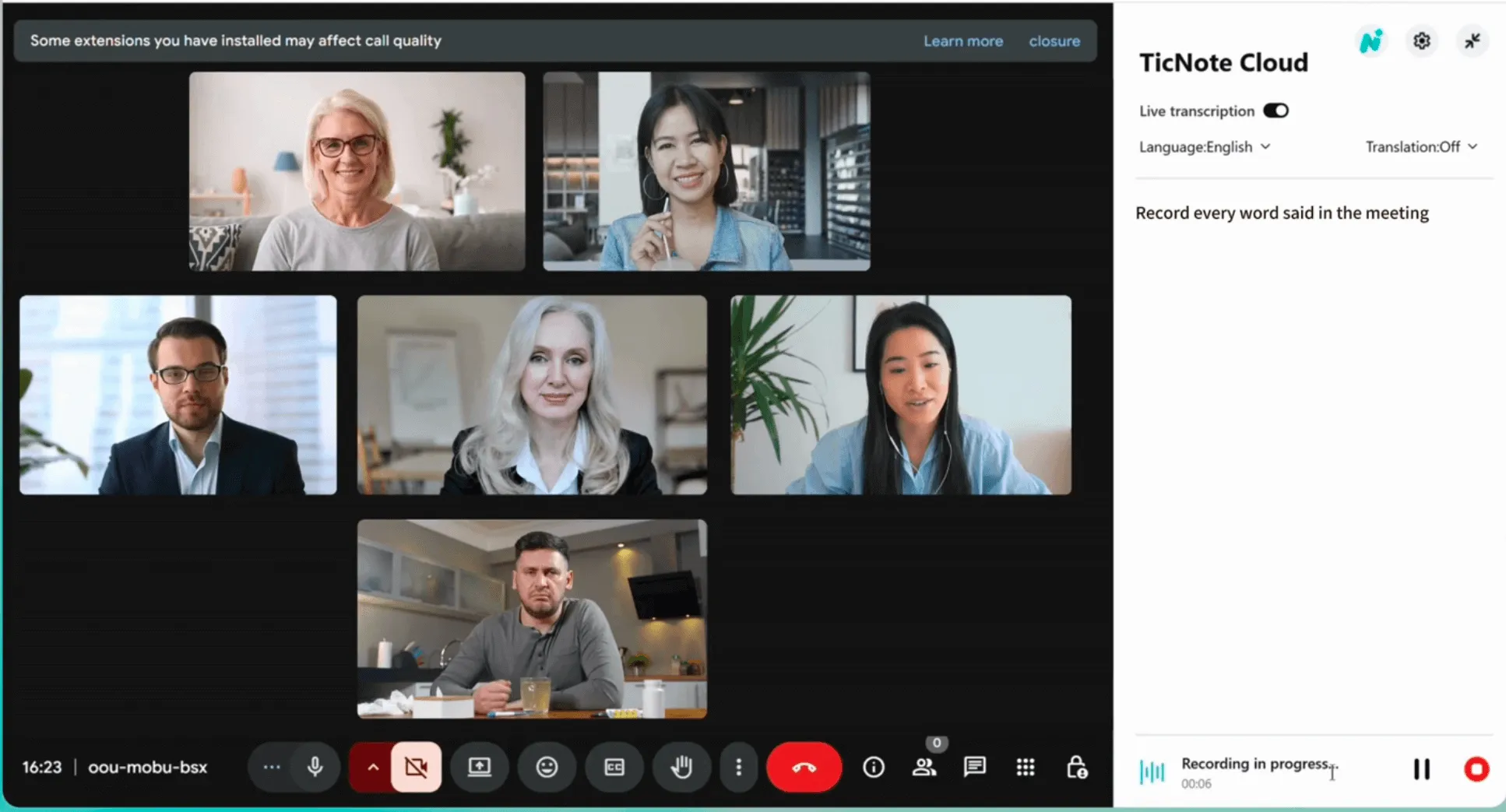
Create a new project, upload one file, and run your first transcription so you can apply your style guide right away.
Verbatim transcription for specific industries: what changes
The core rules of verbatim transcription are universal, but different industries have specific requirements that affect format, retention, and legal standing.
Legal transcription
True verbatim is the standard in depositions, court proceedings, and legal interviews. Every filler word, false start, and non-verbal sound must be captured. Speaker labels must match witness/counsel/judge roles exactly. Timestamps are typically required at minimum every 5 minutes or at each speaker change. DOCX or PDF with line numbers is the standard export format.
Market research / UX research
Clean verbatim is usually preferred. Filler words are removed, but false starts and self-corrections are kept because they reveal uncertainty or emphasis. Timestamps are optional but useful for clip retrieval. Verbatim notes on emotion (e.g., [laughs], [long pause]) are valuable for qualitative analysis.
Medical transcription
Medical dictation typically uses edited (non-verbatim) transcription, but clinical interviews and patient intake sessions may require clean verbatim. Accuracy for medical terminology, drug names, and dosages is critical — use a glossary and always flag uncertain terms rather than guessing.
Journalism and oral history
Clean verbatim is standard for print quotes. True verbatim is used for archival oral history projects where the spoken rhythm matters. Attribution accuracy is paramount — never "clean up" a quote beyond removing obvious filler without editorial approval.
Which TicNote Cloud features are exclusive for turning verbatim transcripts into reusable knowledge?
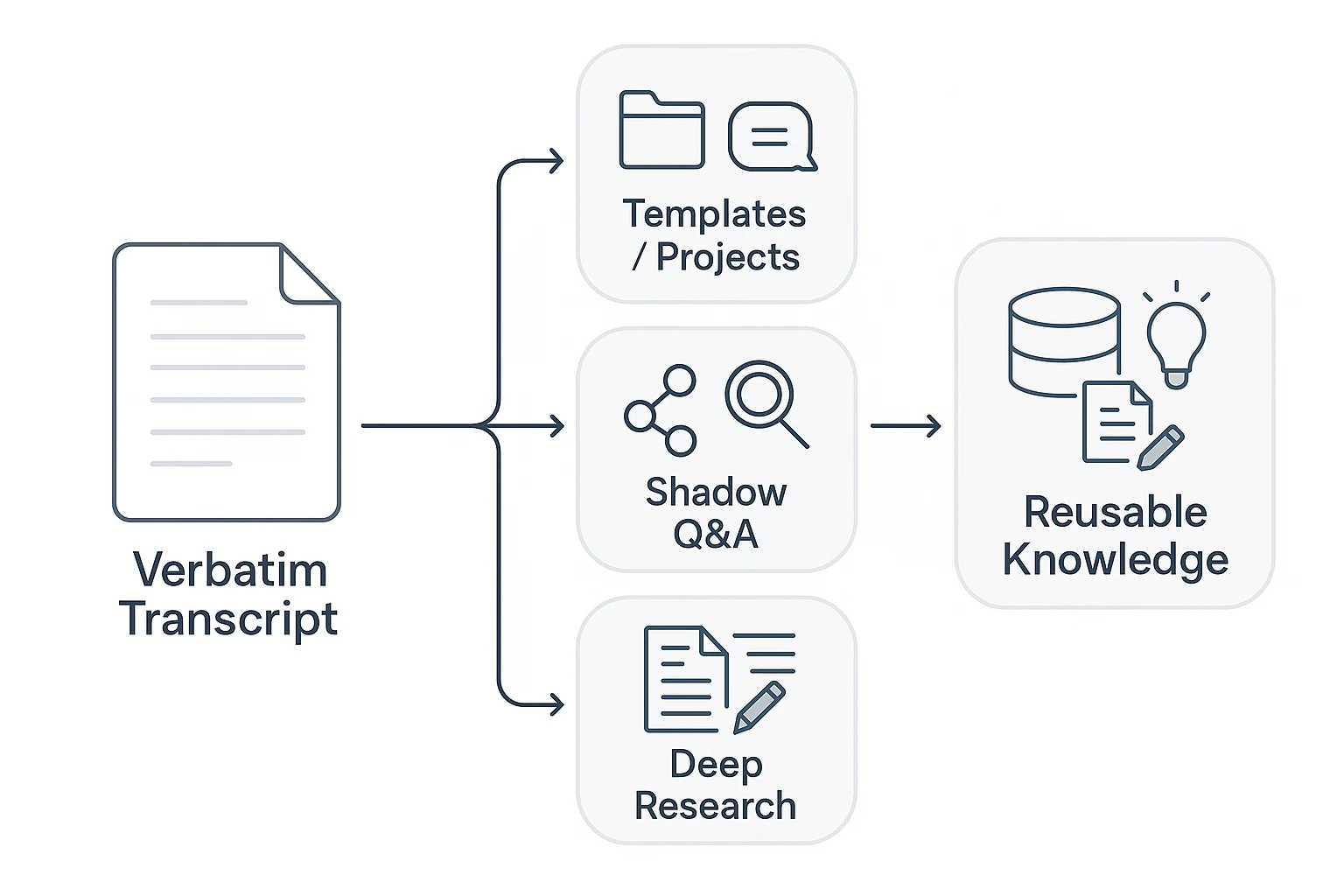
Verbatim transcripts are useful, but they're also long. The real challenge is turning that raw record into something your team can search, reuse, and trust later. TicNote Cloud is built for that next step: it keeps transcripts inside project folders, then layers Q&A, maps, and reports on top of your source files.
Use Shadow cross-file Q&A to find decisions, quotes, and action items
When you have 6 interviews or 12 meetings, "find the line" becomes the slowest part of the job. With Shadow cross-file Q&A, you can ask questions across a project and get answers grounded in your own transcripts.
Common queries include:
- Where did we agree to ship X?
- What did Speaker B say about pricing?
- Which interviews mention competitor Z?
It's especially handy when you need a quote fast, or you're double-checking what was actually said.
Turn transcripts into a Mind Map for faster review
A mind map gives you a quick review layer without rewriting the transcript. Instead of scrolling pages of dialogue, you can scan topics, drill into subtopics, and jump back to supporting lines when needed.
Use it for:
- Debriefs right after a meeting
- Research readouts with themes and evidence
- Follow-ups where stakeholders want "the shape" of the discussion
Build Deep Research reports from multiple transcripts
Deep Research can turn several verbatim transcripts into structured themes with supporting quotes. Done well, this speeds up analysis while keeping traceability back to the original sources.
One caution: always verify quotes before publishing or sharing. Keep speaker attribution intact, and don't "clean up" meaning when you export.
Control access with project-based permissions and privacy-by-default
For sensitive notes, TicNote Cloud's project structure helps you scope data to the right people. Use role-based access so only the right teammates can view, edit, or export transcripts.
Quick sharing checklist:
- Confirm who truly needs access
- Redact PII (personal data) before sharing outside the core team
- Keep raw verbatim transcripts internal when possible
- Set clear retention rules for high-risk projects