


 Extension
TL;DR
A request for quote template standardizes what suppliers submit so every quote lands in the same format, making price, lead time, and terms instantly comparable. Whether you're sourcing packaging, raw materials, or recurring services, sending a consistent RFQ means you get responses you can actually evaluate side by side.
Try TicNote Cloud for Free and generate a structured vendor comparison report from any uploaded quote document automatically.
Most teams collect quotes over email and paste numbers into spreadsheets by hand. That takes hours and still produces inconsistent data because every supplier formats their response differently. A standard RFQ template fixes the input side; TicNote Cloud's Supplier Management skill agent handles the comparison side automatically from the documents suppliers send back.
What is a request for quote (RFQ)?
A request for quote is a formal document a buyer sends to suppliers to collect standardized pricing and terms for a specific purchase. When you know exactly what you need, an RFQ is how you ask multiple vendors, "how much, on what terms, and by when?"
RFQs are used whenever price and terms vary by supplier: raw materials, packaging, recurring services, contract manufacturing, or any commodity purchase where spec is already defined. If you're still figuring out what you need, you'd use an RFP (request for proposal) instead. The key difference: an RFQ asks "how much and on what terms?" while an RFP asks "what can you do and how?"
An RFQ also differs from a purchase order. The RFQ comes before you've made a decision, collecting competing offers. A PO comes after, confirming the order with your chosen supplier. Mixing up the two creates confusion about whether a quote is binding.
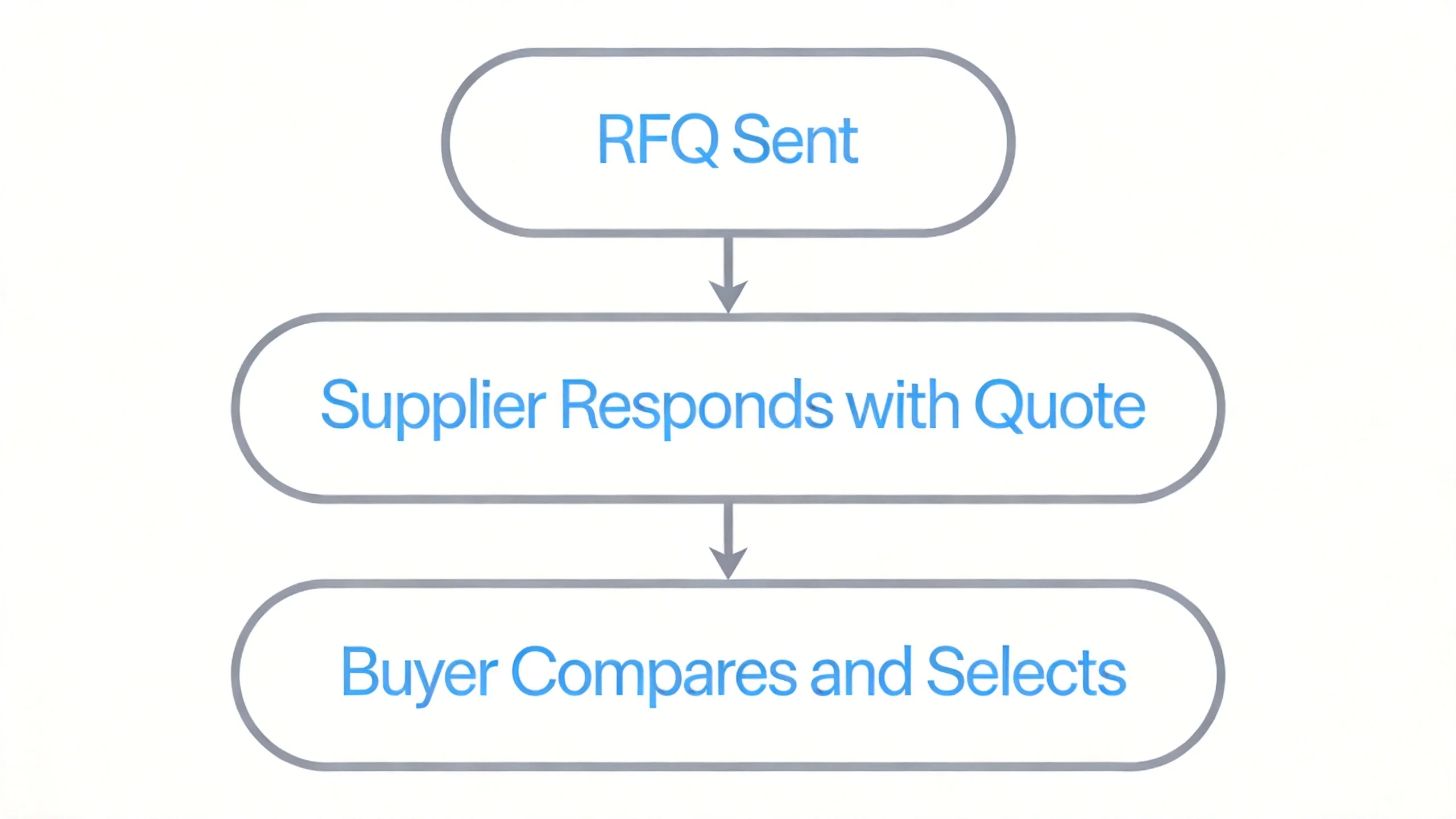
Sending an RFQ to three to five qualified suppliers at once does two things. It signals to vendors that they're competing, which encourages sharper pricing. And it gives you a shared baseline, so negotiations start from a consistent set of numbers rather than informal conversations that are hard to compare.
If you want to move beyond manual RFQ tracking, procurement automation workflows can connect the quote collection and comparison steps directly into a repeatable process.
What should a request for quote template include?
A good RFQ template removes ambiguity. When every supplier fills in the same fields, you're comparing like with like instead of spending hours reformatting responses.
According to the CIPS Glossary of Procurement and Supply Chain Terms, a quote includes an estimated value of goods based on unit cost plus additional factors such as insurance and freight, which is why capturing these fields separately matters for accurate comparison.
Here are the six categories every RFQ template should cover.
Buyer information
Include your company name, contact person, department, and the deadline for quote submission. Add a quote validity date so suppliers know how long their price holds.
Item or service specifications
Describe the item or service precisely: SKU or description, unit of measure, quantity requested, and any quality standards or certifications required. Vague specs produce vague quotes.
Pricing fields
Ask for unit price, volume price breaks at relevant quantity tiers, currency, tax treatment, and a total cost calculation. This makes it easy to compare offers without manual arithmetic.
Delivery and lead time
Capture lead time per unit or batch, delivery location, applicable Incoterms (FOB, CIF, DDP), and packaging requirements. Incoterms define who bears freight and insurance risk, so they directly affect your total landed cost.
Commercial terms
Include payment terms (net 30, 50% deposit on order), minimum order quantity (MOQ), warranty coverage, and returns policy. These terms affect cash flow and risk, not just price.
Evaluation notes field
Add a free-text notes field where suppliers can flag exceptions, propose substitutions, or clarify scope. Suppliers who can't meet a spec exactly often have alternatives worth considering.
Free request for quote templates (with example values)
All three templates below are ready to copy. Choose the format that fits your procurement type: single-supplier evaluation, multi-supplier comparison, or AI-assisted comparison via TicNote Cloud.
Standard single-supplier RFQ template
Use this when you're sending the same request to one supplier or want a clean baseline before comparing.
| Field | Example value |
| Buyer company | Acme Retail Ltd |
| Contact person | Sarah Chen, Procurement Manager |
| Quote valid until | 2026/7/15 |
| Submission deadline | 2026/7/8 |
| Item description | Corrugated shipping box, 30×20×15 cm, single-wall |
| SKU / spec reference | BOX-3020-SW |
| Quantity requested | 5,000 units |
| Unit of measure | Per unit |
| Unit price (quoted) | $0.38 |
| Volume break at 10,000 units | $0.31 |
| Currency | USD |
| Tax | Excluded (buyer self-assesses) |
| Lead time | 14 calendar days from PO |
| Minimum order quantity (MOQ) | 1,000 units |
| Incoterms | DDP Chicago warehouse |
| Payment terms | Net 30 from delivery |
| Warranty / returns | Defective units replaced within 30 days |
| Notes / exceptions | Supplier to flag any spec substitutions |
Multi-supplier comparison RFQ template
Use this to compare three or more suppliers on the same criteria. Fill in your suppliers' names as column headers and score each row.
| Criteria | Supplier A (PackPro) | Supplier B (BoxCo) | Supplier C (ShipRight) | Winner |
| Unit price (5,000 units) | $0.38 | $0.41 | $0.36 | Supplier C |
| Lead time | 14 days | 10 days | 21 days | Supplier B |
| MOQ | 1,000 | 500 | 2,000 | Supplier B |
| Payment terms | Net 30 | Net 15 | Net 45 | Supplier C |
| ISO 9001 certified | Yes | No | Yes | Supplier A / C |
| Notes | Price alert: +5% vs last quote | Fastest lead time | Lowest unit price but long lead time |
Add a final row for your overall decision, noting which criteria mattered most.
AI-generated RFQ comparison with TicNote Cloud
Instead of building the comparison table by hand, you can upload the quote documents suppliers send back and let TicNote Cloud's Supplier Management skill agent generate the comparison report automatically.
Here's how it works: add the Supplier Management skill agent to your TicNote Cloud workspace, then upload each quote document (PDF, Excel, or text) to the agent chat. The agent parses every field, normalizes units, and archives the data. If any quote shows a price change greater than 5% versus your previous record for that supplier, you'll see an alert in chat before anything else.
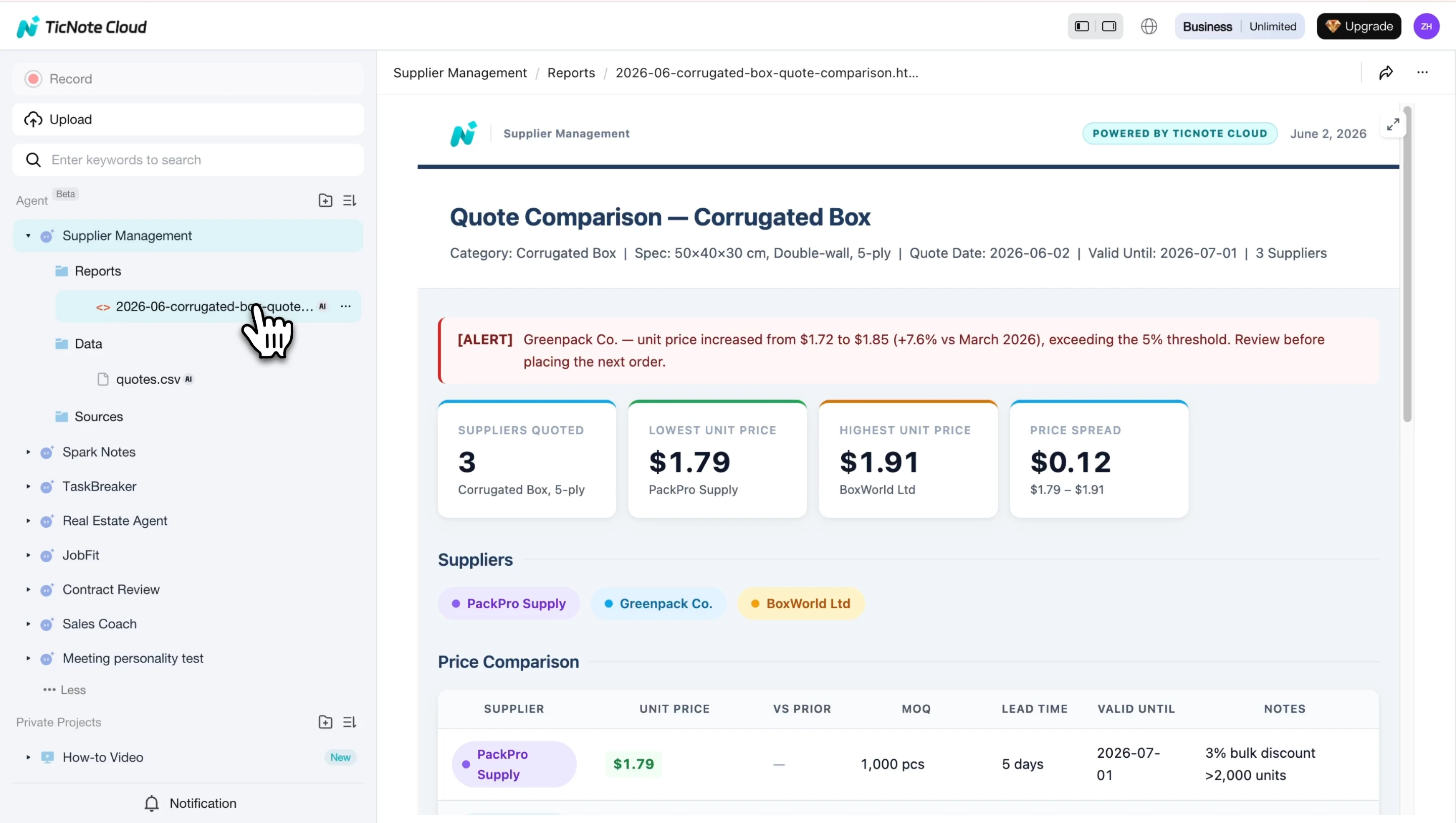
The output is a self-contained HTML comparison report with an alert banner, summary metric cards, and a full side-by-side price table across all suppliers, ready to share with your team or manager. For teams managing a growing vendor list, vendor list templates can also help keep your supplier database organized alongside the RFQ workflow.
How to compare vendor quotes fairly
The lowest unit price is rarely the best deal. Hidden freight costs, tight MOQs, and slow lead times can easily flip the calculation. Here's a repeatable five-step process for evaluating quotes accurately.
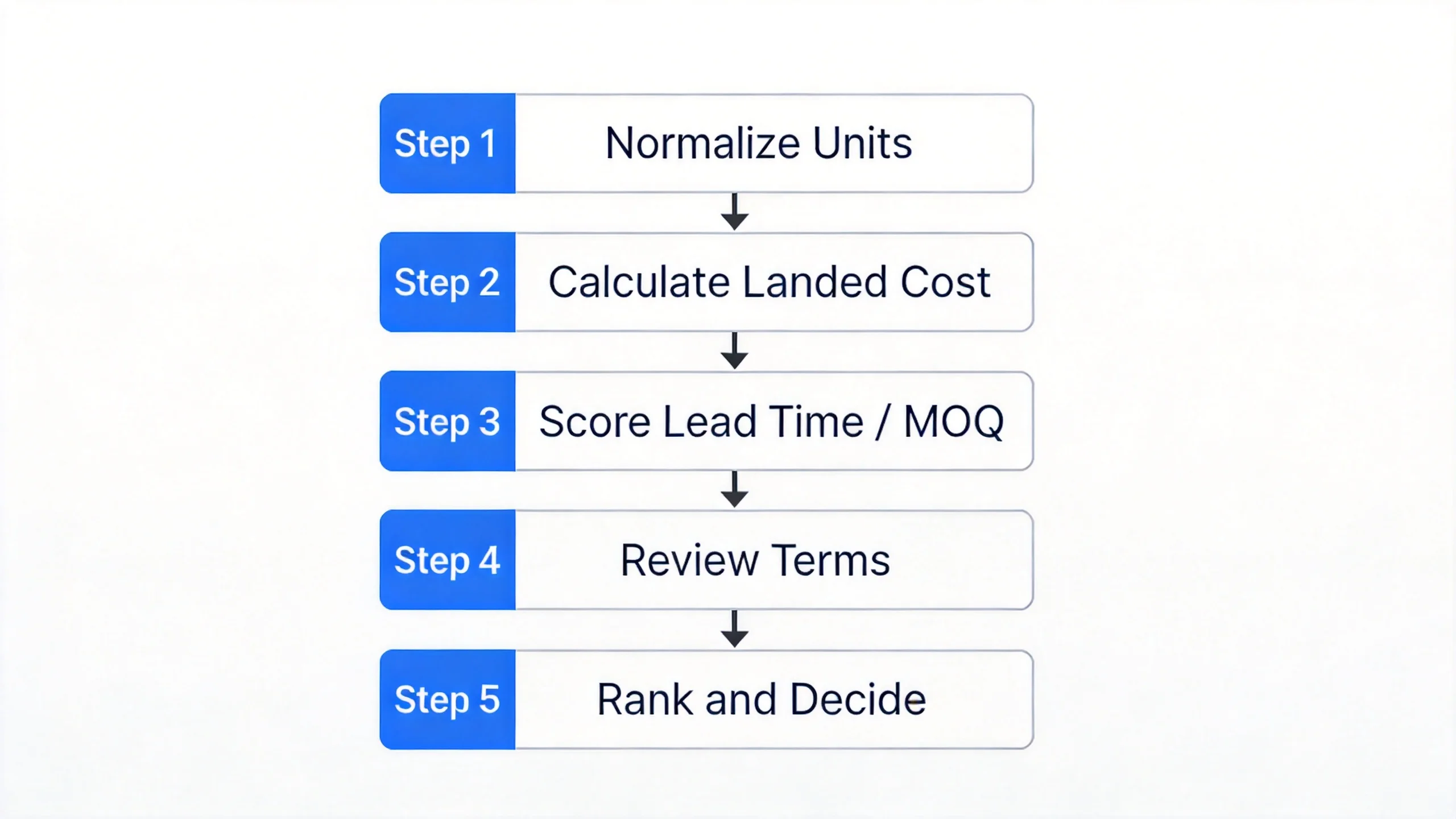
Step 1: Normalize units and quantities
Before you compare prices, make sure all quotes are using the same unit of measure and the same quantity tier. A supplier quoting per carton and another quoting per unit aren't comparable until you convert.
Step 2: Calculate total landed cost
Add unit price + freight + import duties + packaging to get your true cost per unit at your warehouse. The Institute for Supply Management's Total Cost of Ownership framework defines TCO as all acquisition costs including delivery, installation, and maintenance, not just the invoice price. For goods, that means freight and duties belong in your comparison, not in a separate column you forget to check.
Step 3: Score lead time and MOQ fit
Flag any quote where lead time exceeds your reorder point or where MOQ exceeds your storage capacity. A cheaper unit price that requires you to hold six months of inventory may cost more in working capital than a slightly higher price with a smaller MOQ.
Step 4: Review commercial terms
Check payment terms (net 30 vs. net 15 affects your cash flow), return policy, warranty coverage, and any auto-renewal or price escalation clauses. These terms show up in disputes, not in the original comparison, which is why most teams overlook them.
Step 5: Rank and decide
Weight your criteria by priority: cost, lead time reliability, and flexibility. Pick the supplier that scores highest across all criteria, not just on unit price. Document your rationale so the next review has a benchmark to measure against.
Conclusion
A standard request for quote template makes quote collection consistent and eliminates the manual normalization step that wastes procurement time. When every supplier fills in the same fields, comparison becomes arithmetic instead of detective work.
If you want to skip the manual comparison step entirely, TicNote Cloud's Supplier Management skill agent turns uploaded quote documents into a structured comparison report automatically, complete with price alerts when any supplier's pricing shifts more than 5% from their previous quote.