


 Extension
TL;DR: A podcast-based study workflow that actually boosts recall
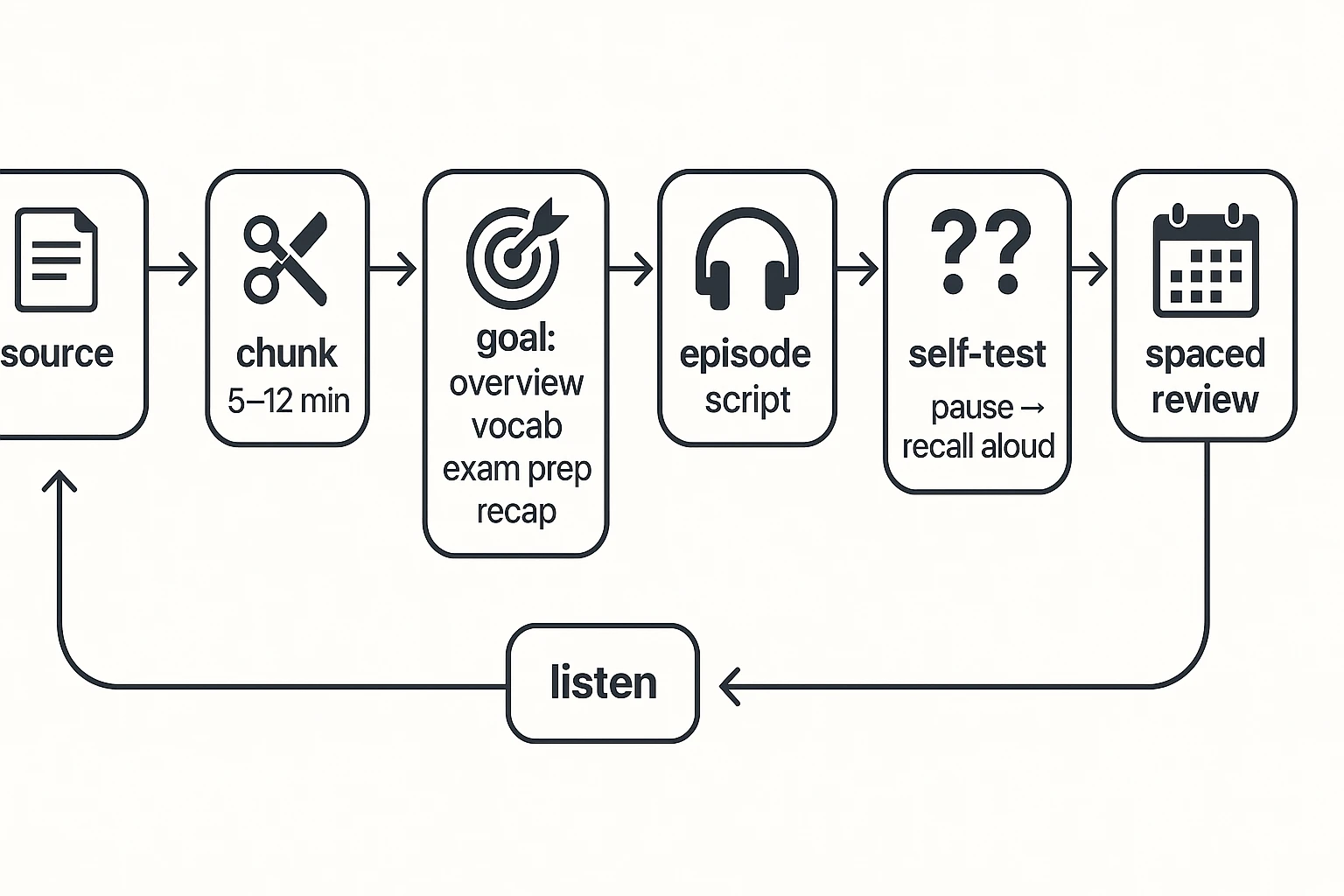
Turn your notes into a short "study podcast" with TicNote Cloud, then follow this loop for How to Study by Turning Content into Podcasts: make → listen → test → repeat. Audio works best when your eyes are busy (commute, chores, walks) or for fast review. Don't use it as your only source for heavy visuals like math proofs, charts, code, or tables.
Problem: You listen while doing other things and nothing sticks. It's worse when you replay the same episode and still can't explain it. Solution: use TicNote Cloud to keep episodes short and structured, then force recall right after listening.
- Make: one episode from one small chunk (5 to 10 minutes).
- Listen: play it once, no multitasking.
- Test: pause and answer recall questions out loud (no notes).
- Repeat: re-listen on a spaced schedule so it stays in memory.
How to Study by Turning Content into Podcasts (without losing key details)
Studying with audio works best when you treat it like a study tool, not entertainment. The trick is to plan what goes into the "episode" so you keep the testable details, and leave the parts that need visuals in your notes. Here's a simple way to do How to Study by Turning Content into Podcasts without turning it into a vague recap.
Pick the right source (and define the exam surface area)
Start with one source that has a clear goal. Good options include a single lecture, one textbook section, or one meeting agenda you're allowed to use.
Before you script anything, list your "exam surface area":
- Terms and definitions
- Steps in a process (what happens first, next, last)
- Cause and effect (if X changes, what happens to Y?)
- Common confusions (pairs that people mix up)
Then decide what must stay visual. Audio is great for meaning and sequences. But keep these in a doc or card set:
- Formulas and symbol-heavy work
- Diagrams, tables, and charts
- Anything you must "scan" to compare fast
If you need more detail on the build part, follow this AI podcast workflow with quality checks and then come back to the study method here.
Chunk content into 5 to 12 minute episodes
Short episodes win for studying. They're easier to finish, easier to replay, and easier to space out across days.
Use one rule every time:
- 1 topic = 1 episode, or
- 1 learning objective (one thing you must be able to do) = 1 episode
Use this quick template to avoid rambling:
- Hook: "By the end, you can explain…"
- Key ideas: 3 to 5 points, in order
- Example: one worked example or scenario
- Recap: 20 seconds max
- Self-test: 3 prompts (questions you can answer aloud)
Decide the goal before you write the script
Your goal controls what stays in. Pick one:
- Overview: big picture, parts, and how they connect
- Vocabulary: definitions, contrasts, and how to use each term
- Exam prep: common question types and the usual traps
- Recap: what you forgot last time, plus the key links
Here's your "done" rule: if you can answer the three self-test prompts without looking, the episode is good enough. Don't keep editing past that.
Try TicNote Cloud for Free by making one short episode from one chunk, then use the active-recall steps later in this guide.
What should you turn into a "study podcast," and what should you avoid?
The best way to study with audio is to use it for ideas you can explain out loud. When you're learning How to Study by Turning Content into Podcasts, pick material that works like a spoken lesson. Save the "look at this" stuff for your notes.
Choose content that sounds clear (and tests well)
Audio shines when the goal is understanding, not perfect formatting. These are strong candidates:
- Concepts and "why it works" explanations
- Definitions with one or two examples
- Theories, models, and frameworks
- Timelines, stories, and case studies
- Lecture recaps, chapter summaries, and "big picture" reviews
Quick transforms that work:
- Glossary list → a mini-episode with "term, meaning, example, common mistake"
- Lecture outline → a recap episode with 3 key points and 5 self-quiz questions
- Case study notes → a story format: context, problem, decision, result, lesson
If you want a deeper build process, follow this guide to turn text into a podcast script and clean audio before you study.
Avoid content that needs your eyes (or exact symbols)
Some material often breaks in audio because tiny details matter:
- Long numbers and step-by-step calculations
- Code and syntax (punctuation changes meaning)
- Citation-heavy passages and long quote chains
- Dense tables, charts, and figure references
Workaround pattern: make the audio teach intuition and steps, then keep a short "visual companion" note. That note holds exact formulas, variable names, tables, and references.
30-second decision checklist
Ask:
- Can I explain it out loud without pointing at a diagram?
- Are there fewer than about 5 critical numbers or symbols?
- Do I have permission or rights to upload and use it?
- Can I test myself with questions right after listening?
Audio is best for review and recall. Don't treat it as your only source of truth.
How do you create a study podcast from your materials (step-by-step)?
Turning your notes into audio is simple. The key is to shape it like a short lesson, not a long reading. Here's a repeatable workflow using TicNote Cloud as the example, so you can study by listening and still keep the important details.
Web Studio workflow (step-by-step)
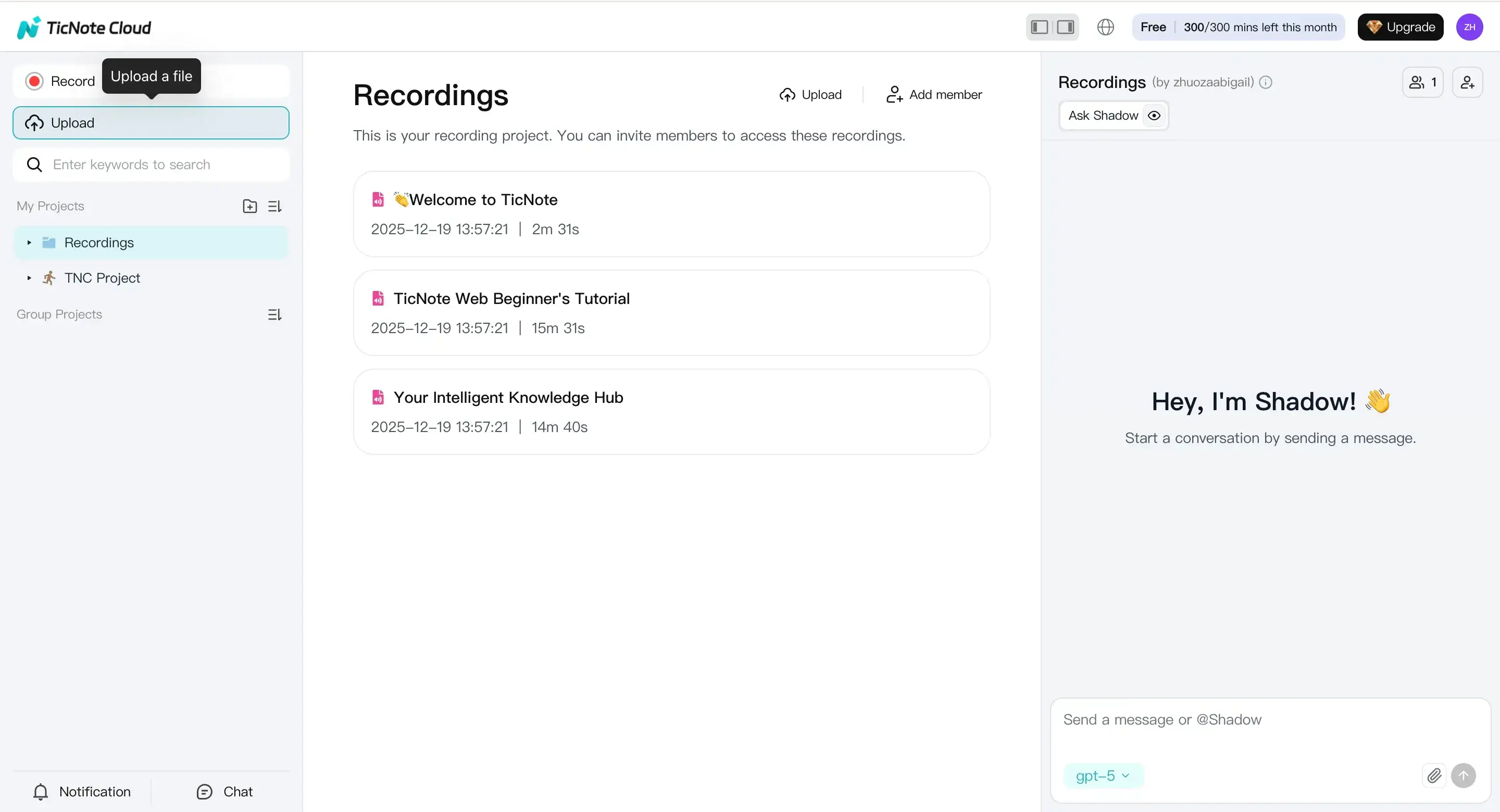
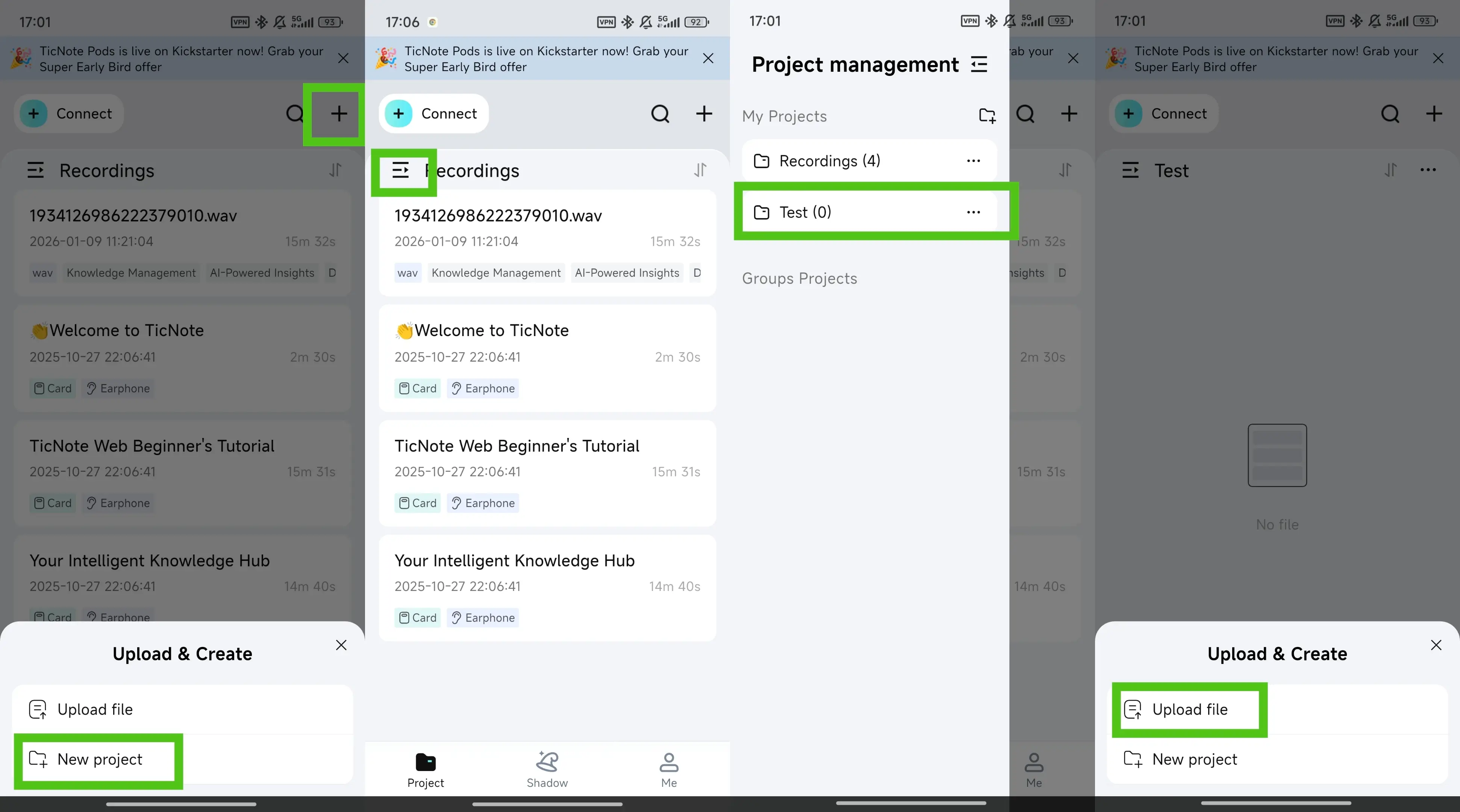
Step 1: Upload one clean, focused source file
Start in TicNote Cloud Web Studio by creating a new project. Then click Upload and add your file (audio, video, PDF, Word, and more). If you upload audio or video, you can also get a transcript, which helps you spot-check facts fast.
Before you upload, do three quick prep moves:
- Rename the file with the class and topic (Example: "BIO101 Cell Membrane").
- Remove sensitive details (names, IDs, patient data, client info).
- Keep the scope tight (one lecture or one chapter per episode).
Step 2: Generate the podcast, then keep the study supports
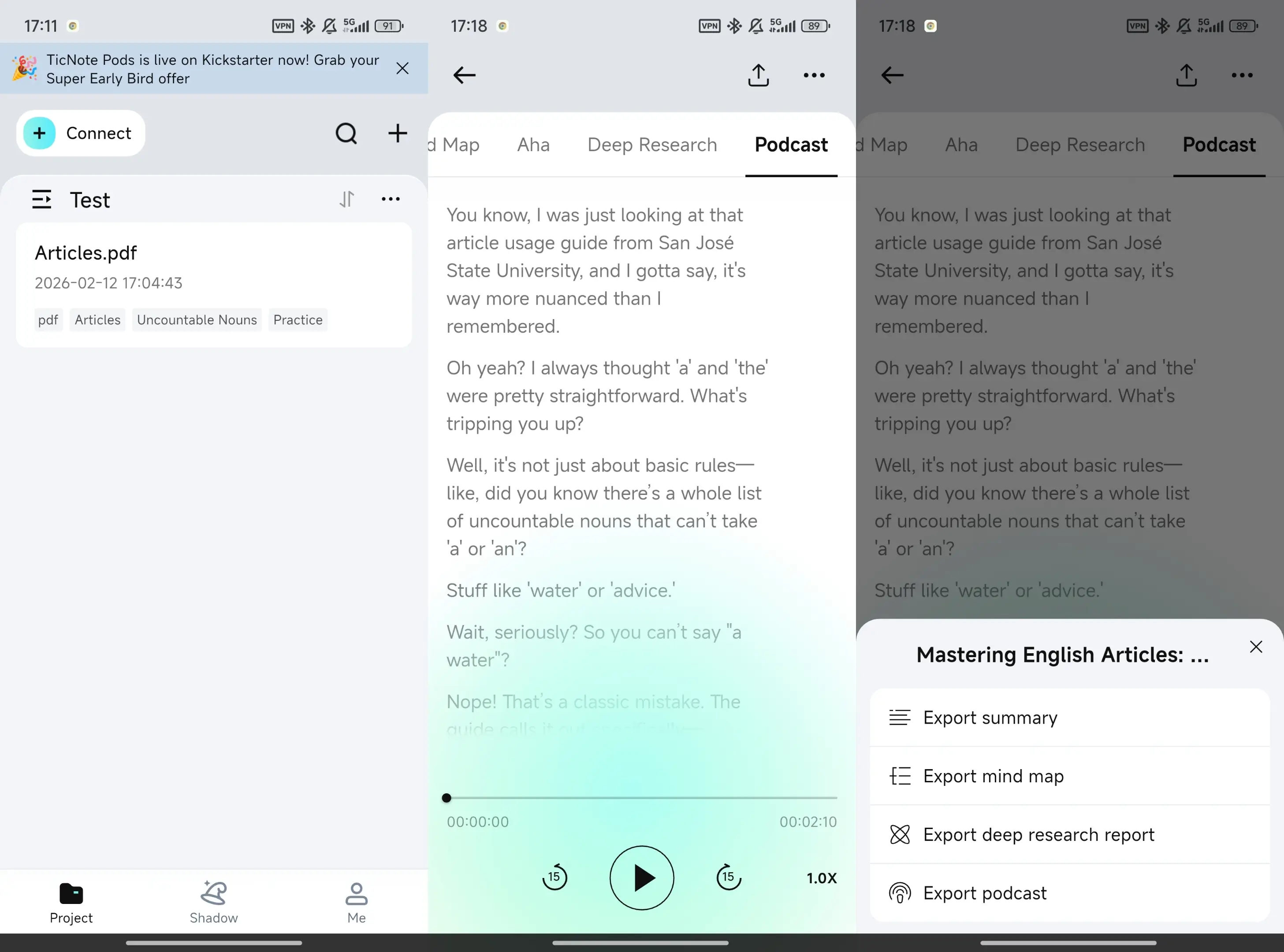
Next, open the Podcast tab. You'll see the generated podcast-style audio and its transcript. Use the three-dots menu to export what you'll use later.
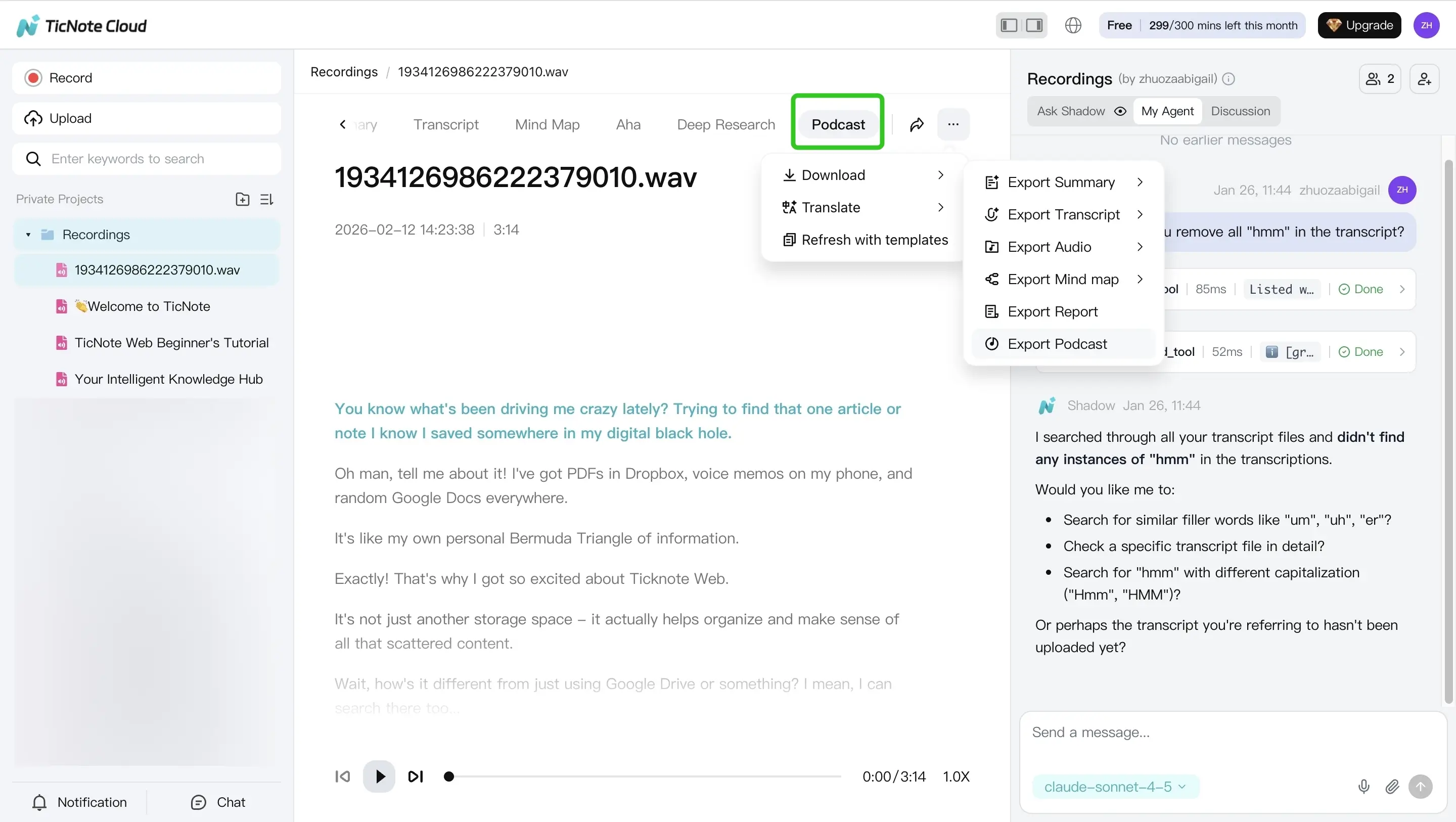
To keep it study-focused, aim for a short "episode" that sounds like a tutor. When you generate the podcast, ask for:
- 5 to 12 minutes total
- Plain language (no fluff)
- Key terms spelled out (so you can search them later)
- A quick recap at the end
- 3 self-test questions (so you can do active recall)
Also keep these outputs next to the audio:
- Transcript for fast accuracy checks
- Summary for quick review before quizzes
App workflow (quick mirror of the web steps)
On mobile, the flow is nearly the same. Open the TicNote app and tap the add button to upload your file into a project (new or existing). PDFs and Word docs work here too, and audio or video can be transcribed.
Then go to the Podcast tab. To export, tap the three-dots button at the top, choose Export Podcast, pick a format, and tap Export. Save only what you'll really study with: the audio plus a transcript and summary.
"Make it study-ready" finishing touches (tool-agnostic)
Before you rely on the episode, do a light QA pass:
- Listen to the first 60 seconds to confirm it matches the topic.
- Check names and definitions against your source.
- Verify numbers and dates by scanning the transcript.
Finally, set up export habits that fit real life:
- One folder per class or project
- A clear naming rule (Example: "Week 3, Topic, v1")
- Keep episodes short (5 to 12 minutes) so you'll replay them
How do you study with the podcast using active recall (not passive listening)?
Passive listening feels productive, but it fades fast. The fix is to turn your study podcast into a loop of short tests. In other words, you learn by stopping, retrieving, and checking yourself as you listen.
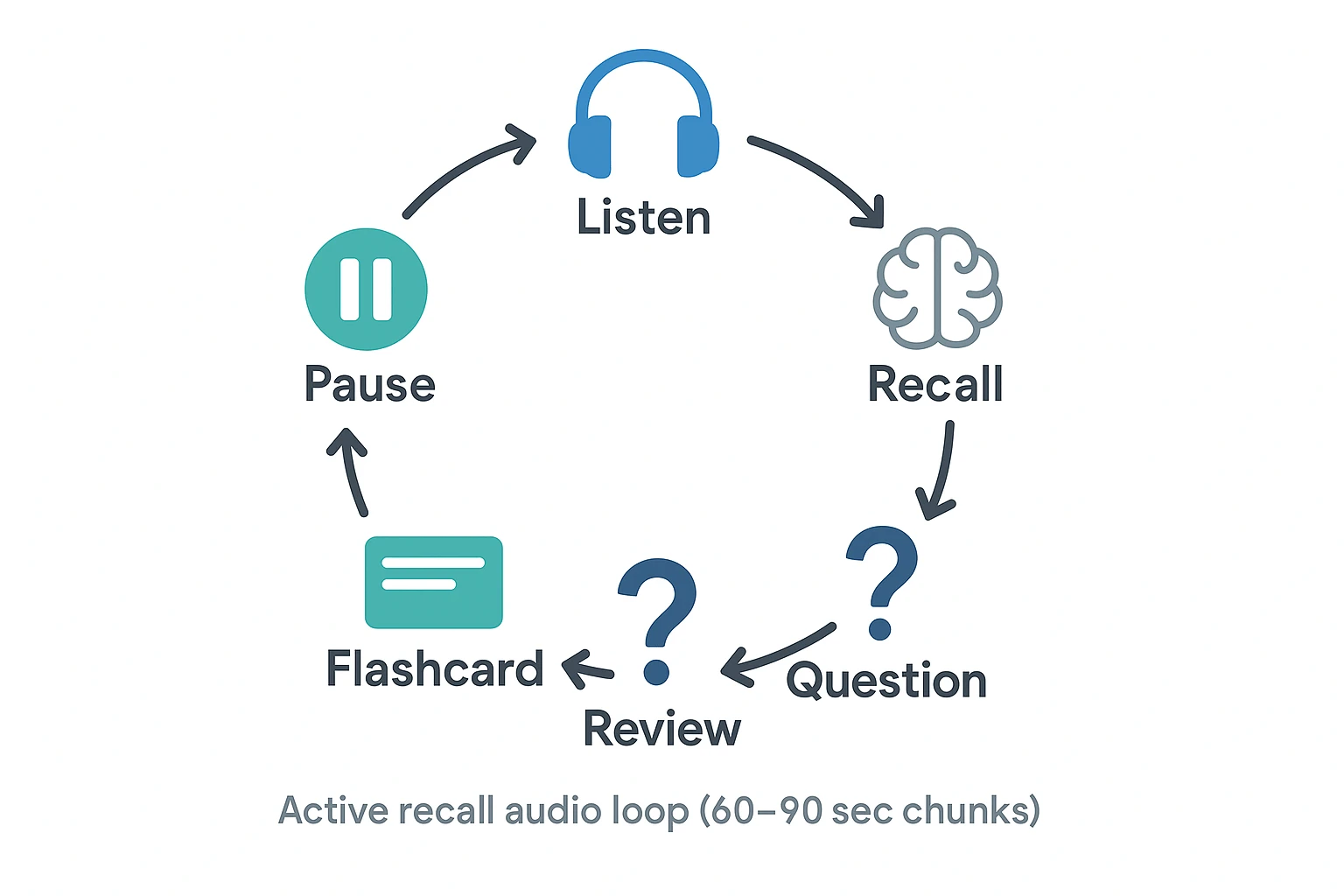
Use the pause-and-recall method (every 60 to 90 seconds)
Here's the simple rule: every 60 to 90 seconds, pause. Then say out loud, or write, what you remember.
Use these prompts each time:
- Main point?
- Why does it matter?
- What example was used?
- What would I confuse this with?
Add a clear check. If you can't explain it in 2 to 3 sentences, you failed that chunk. Rewind 20 to 30 seconds and try again.
Outline while listening (a fast 3-level outline)
Outlining forces your brain to organize ideas. That's how you avoid the "I listened but learned nothing" trap.
Use this 3-level outline:
- Topic (what section is this?)
- Key claims or steps (what must be true or done?)
- Evidence or examples (what proves it?)
Keep it messy and short. You can clean it later using the transcript.
Turn confusing moments into questions (who, what, why, how)
The best time to learn is the moment you get stuck. When you feel confusion, pause and write one question.
Try stems that match most course content:
- Why does X cause Y?
- How does the process start and end?
- What is the difference between A and B?
- What would happen if one step changed?
Convert Q and A into flashcards
Make flashcards from the questions you just created:
- Front: the question
- Back: 2 to 4 bullet points plus one example
Don't re-listen to fix wording. Use your transcript or summary to tighten the answer fast, then move on.
Study tip: create one short episode today, do a quick self-quiz now, then again in 48 hours. Compare what you recall. That tiny test will show if this method beats rereading.
How can you use spaced repetition with audio so it sticks for exams?
Spaced repetition works best when audio is a trigger, not the whole study session. Use your study podcast for quick refreshers, then test yourself right away. This keeps reviews short and makes recall stronger over time.
Follow a simple 1–3–7–14 day audio review plan
Use the same podcast each time, but change the task. Early reviews can include a short re-listen. Later reviews should be mostly testing.
Roediger III, H. L., & Karpicke, J. D. (2006). Test-enhanced learning: Taking memory tests improves long-term retention notes: "In the typical distribution condition, learning trials were separated by 30 sec, and test trials were separated by 1 min."
| Day | Audio time | What you do | Goal |
| Day 1 | 10 to 15 min | Listen once, then write a 5-bullet outline from memory | Build the first memory trace |
| Day 3 | 5 to 8 min | Re-listen only to weak parts, then do a no-notes quiz | Find gaps fast |
| Day 7 | 3 to 5 min | Skip most audio, do recall first, then spot-check audio | Make recall the default |
| Day 14 | 2 to 3 min | Only quick audio cues, then full self-test | Lock it for exam week |
Mix short re-listens with short self-quizzes
Try the "2x2 rule":
- 2-minute skim of the summary or transcript
- 2-minute quiz with no notes
Audio fits best right before the quiz. Use it as a warm-up, then pause and retrieve. If you can't answer, don't replay the whole track. Jump to the exact segment, then test again.
Track what to relearn with an error log
An error log is a tiny table you update after each quiz. It tells you what you missed, why, how you'll fix it, and when you'll review again.
Common error types:
- Definition is fuzzy (you know the term, not the meaning)
- Steps are out of order (you remember pieces, not the sequence)
- You mixed two terms (similar concepts collide)
Keep the goal simple: fewer, smarter reviews, not endless replays.
How do you verify accuracy and cite sources in AI-generated podcasts?
AI podcast episodes can save time, but you still need a fast accuracy check before you study with them. When you're learning How to Study by Turning Content into Podcasts, treat the audio as a study aid, not a source. Your goal is simple: make sure every key claim matches the original lecture, reading, or notes.
Use a 60-second QA rubric (before you trust the audio)
Scan the podcast transcript and spot issues with this quick rubric:
- Facts: Does the claim match the source meaning?
- Definitions: Is it correct, and not too simplified?
- Names and terms: Are words spelled right and used right?
- Numbers and dates: Do they match exactly?
- Cause and effect: Does it avoid made-up links?
If one line fails, fix that line before you keep listening.
Spot-check 5 claims (a repeatable workflow)
Here's a simple check you can do in minutes:
- Pick 5 testable claims (dates, formulas, rules, key steps).
- Find each claim in the podcast transcript.
- Jump to the same spot in your source (slides, chapter, article).
- Confirm the wording, numbers, and limits.
- If 2 or more are wrong, regenerate from a smaller chunk.
TicNote Cloud helps here because you can keep the podcast audio next to the transcript and exports, so it's easier to search, correct, and re-export the version you'll actually study.
Catch hallucination red flags (and fix them fast)
Common red flags:
- Very confident tone with no support
- Extra details not found in your source
- "Studies show" with no citation
- Wrong units, years, names, or locations
What to do:
- Narrow the input to one section at a time.
- Regenerate using cleaner notes or the exact paragraph.
- Rewrite the key part in your own words, then regenerate.
Cite the original material (not the AI audio)
For school or work, don't cite the AI podcast as a primary source. Cite what it was made from:
- Lecture: Course name, lecture title, date
- Book or PDF: Chapter/section and page range
- Article: Title, publisher, and URL
That keeps your attribution clean and avoids accidental miscrediting.
What about accessibility, multilingual study, and accommodations for audio learning?
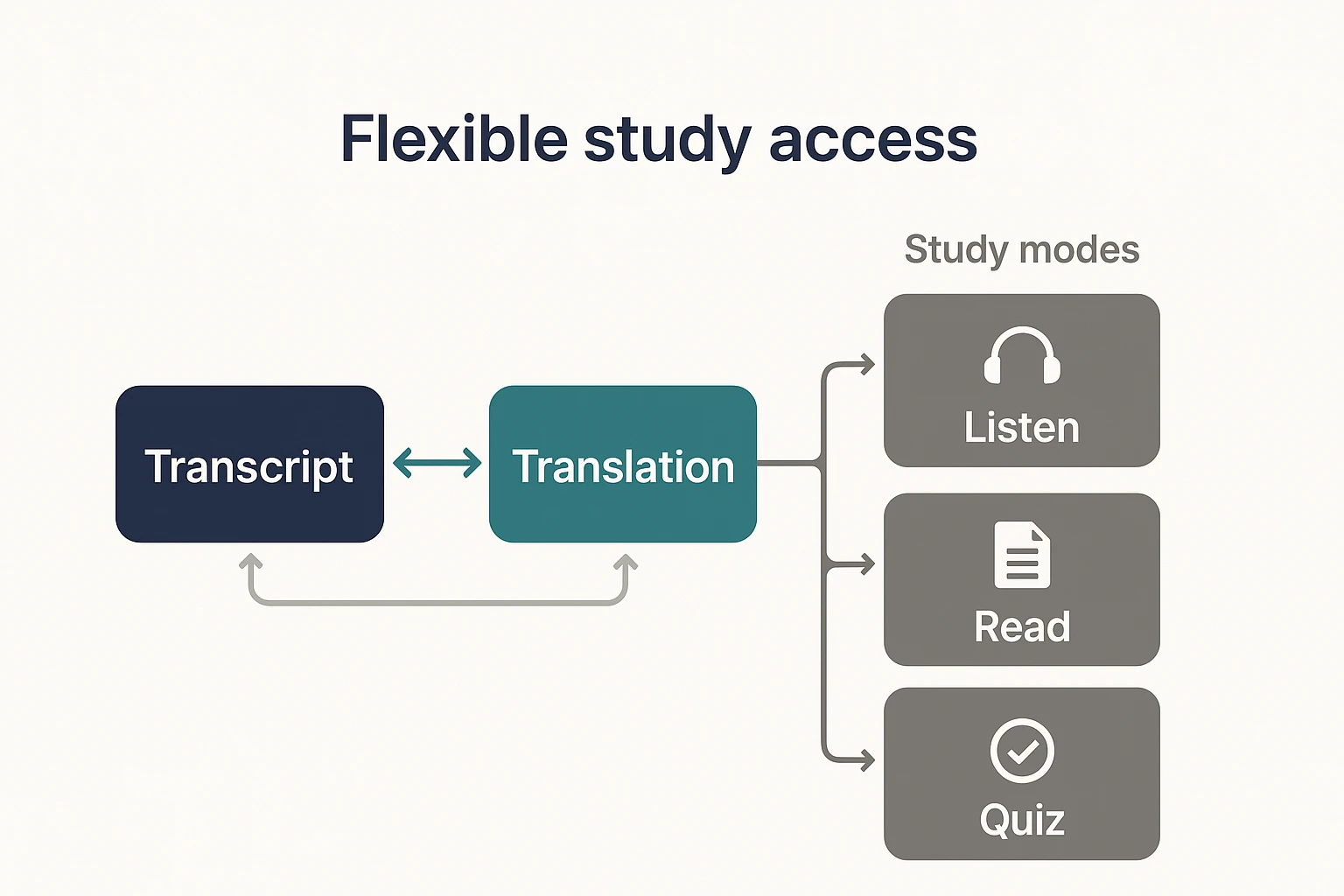
Audio should be an option, not a rule. When you're learning How to Study by Turning Content into Podcasts, the goal is flexible access: listen, read, quiz, or mix all three based on what works for you.
Use transcripts for dual-channel learning
Dual-channel learning means you listen while lightly tracking the transcript. You're not reading every word. You're using the text to catch key terms, names, and structure.
Try this simple loop:
- While listening, highlight 5 key terms in the transcript.
- After the episode, turn each term into a question.
- Answer from memory, then check the transcript for gaps.
Keep pacing steady, and make terms easy to catch
A steady pace beats a fast one. Add short chapter breaks between ideas so your brain can "file" what you heard.
For hard vocabulary, use this three-step script:
- Spell the term once.
- Define it in plain words.
- Give one quick example.
Review in two languages with transcript-first translation
If you're studying a second language, keep the workflow consistent:
- Generate a transcript.
- Translate it.
- Listen in the target language.
- Test yourself in either language.
This is where TicNote Cloud fits naturally: you can translate transcripts and export text files for clean multilingual review.
Options for hearing-impaired learners (and anyone who prefers text)
You can study without audio and still get the benefits:
- Do transcript-first study with highlights and margin questions.
- Use summaries for quick review before quizzes.
- Write text-based self-quizzes from headings and key terms.
Small habits help too: clear formatting, readable font size, and extra time for recall checks.
How do you protect privacy and follow school or workplace policy when uploading materials?
Turning notes into audio can be great for recall. But privacy rules still apply when you study by turning content into podcasts. Before you upload anything, check your school, employer, or client policy. If you are not sure, ask.
Know what not to upload
Use this quick rule: Would I be allowed to email this to a classmate or coworker? If no, don't upload it.
Common "do not upload" items include:
- Health info (PHI), therapy notes, or medical records
- Client names, case details, or contracts
- Grades, student IDs, or discipline records
- HR files, payroll, or performance reviews
- Unpublished exam questions or answer keys
- Confidential workplace docs (roadmaps, incident reports, internal financials)
De-identify your notes before processing
If you only need the concept, strip the identifiers first:
- Remove names and emails; swap in roles (e.g., "Patient A," "Manager")
- Delete IDs, account numbers, and ticket numbers
- Generalize locations ("local clinic," "EU office")
- Use short excerpts, not full documents, when possible
Set sharing and retention habits
A few habits reduce risk fast:
- Keep school and work in separate projects
- Limit who can access exported audio or transcripts
- Delete drafts you no longer need
Tools can help, but they don't replace policy. TicNote Cloud notes are private by default and not used to train AI models, but you should still follow your rules.
Respect copyright (simple examples)
You need rights or permission to upload and transform content.
- Your own notes: usually fine
- A library PDF with download limits: maybe not
- A professor's slides: ask first
- A paid course workbook: likely restricted
When in doubt, use your own summary as the input and keep originals offline.



