


 Extension
TL;DR: A fast workflow to turn content into a podcast (with AI)
Try TicNote Cloud to turn any text into a podcast-style episode fast: pick one clean source, set your goal and voice plan, then generate a script and export publish-ready assets. This is the quickest way to learn how to turn content into a podcast with AI without learning audio production.
If your notes are scattered, you waste time rewriting and fixing tone. Then small errors slip into the final audio. A practical fix is to use TicNote Cloud to ingest the file, shape it into a host script, and run a quick accuracy pass before you export.
What you need:
- One clear source (blog, PDF, link, transcript)
- A listener and goal (teach, recap, explain)
- A voice plan (one host or two, AI or human, plus a short disclosure)
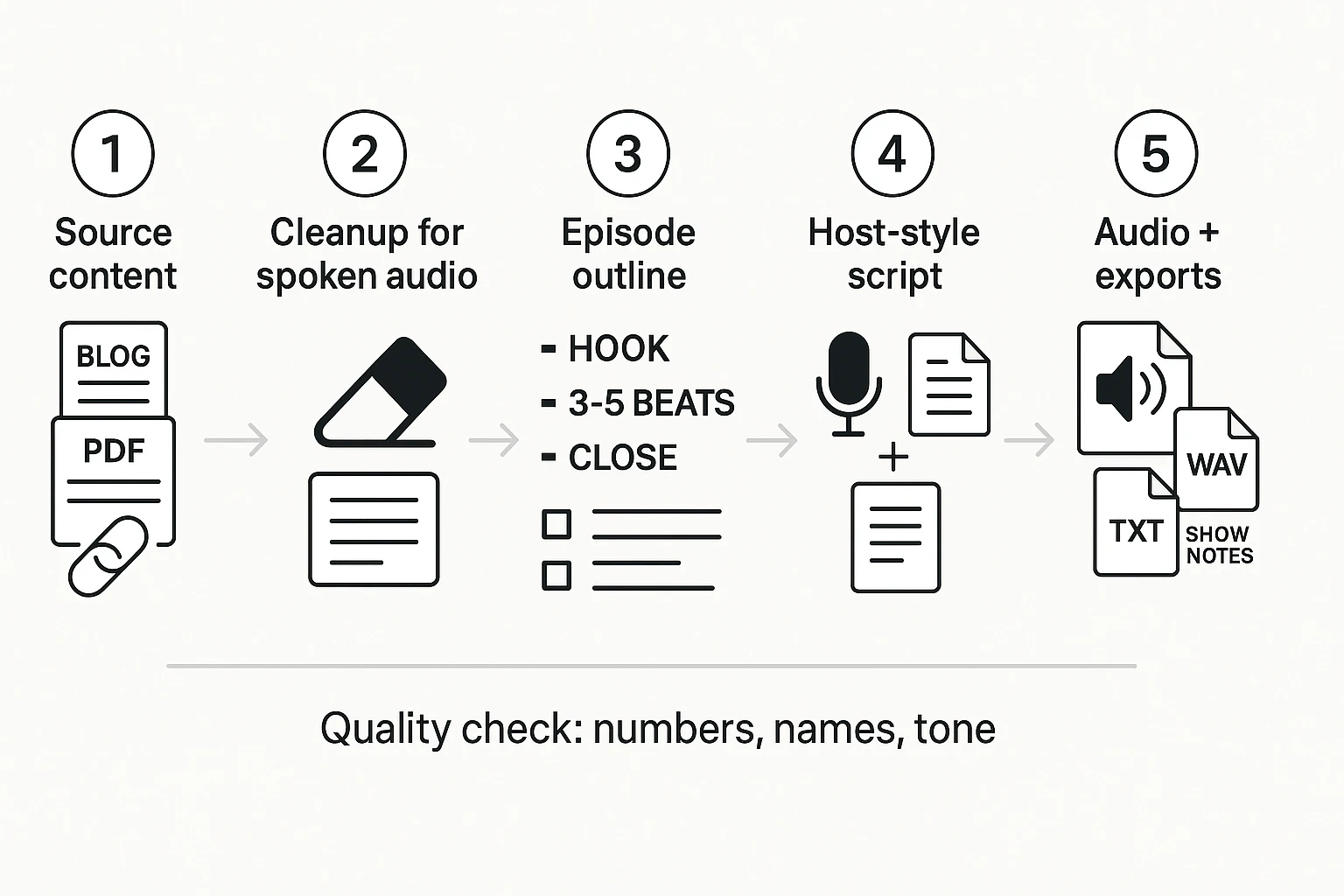
5 step loop:
- Choose the source
- Clean and structure for speech
- Outline the beats
- Write a host style script and transcript
- Generate audio and export your assets
How to Turn Any Content Into a Podcast with AI (end-to-end steps)
You can turn almost any written or spoken material into an episode if you treat it like a simple pipeline: pick a source, make it speakable, outline it, script it, then produce audio and export. This is the fastest way to repurpose docs, links, and transcripts without learning full audio production. If you want the bigger picture and quality checks, this ties directly into the full guide on turning content into a podcast with AI.
Step 1: Choose the source and match it to your episode goal
Your "source content" is anything that already has the ideas you want to say:
- A blog post, Google Doc, or internal wiki page
- A PDF guide, white paper, or proposal
- A URL to an article (plus your notes)
- A meeting transcript, interview transcript, or webinar notes
Next, pick one clear episode goal:
- Inform: explain a topic in plain language
- Update: share what changed this week or this quarter
- Teach: walk through a process with steps
- Recap: summarize a meeting, event, or report
Tiny decision rule: if the source is long or very technical, aim for a shorter episode or split it into two parts. A tight 7 minute episode beats a rushed 18 minute one.
Step 2: Clean and structure the text for spoken audio
Podcast audio is spoken. Most text is not. Before you generate anything, do a quick "speakability" pass.
Remove or rewrite:
- Heavy formatting (nested bullets, long bold sections)
- Long quotes and block quotes
- Footnotes and citations that interrupt flow
- Tables (turn them into 2 to 4 simple takeaways)
- Dense paragraphs (split into 1 to 2 ideas each)
- Unexplained jargon (define it once in plain words)
Add:
- Short headings that sound like prompts
- Short sentences with a single point
- Clear transitions like "Next," "Here's the catch," and "So what?"
Common failure points when turning text into podcast audio with AI:
- Robotic tone from copy that reads like a report
- Run-on sentences that are hard to breathe through
- Numbers read wrong (dates, ranges, acronyms, currencies)
Step 3: Generate an episode outline (hook, 3 to 5 beats, close)
Use one standard structure. It keeps the episode focused and makes editing easier.
- Hook (15 to 25 seconds): what this is and why it matters
- 3 to 5 key beats: the main points in order
- Quick recap: 2 to 4 bullets in spoken form
- Close: one clear next step or takeaway
Use this lightweight format picker to avoid overthinking:
| Your situation | Best format | Target length |
| Short source (under ~800 words) and broad audience | Solo host explainer | 5 to 8 min |
| Medium source (~800 to 1,800 words) with steps | Solo host with simple segment breaks | 10 to 15 min |
| Long or technical source (2,000+ words) | Two-host chat or split into parts | 10 to 15 min per part |
| Transcript with opinions, tradeoffs, or debate | Two-host chat | 10 to 15 min |
Step 4: Draft a host-style script and transcript
Now convert the outline into a script that sounds like a person. Your goal is not to read the source. Your goal is to explain it.
What to do in the draft:
- Use speakable phrasing (short, direct, conversational)
- Add signposting ("First… second… last…") so listeners don't get lost
- Define key terms the first time they appear (in one sentence)
- Add one simple call to action at the end (subscribe, try the workflow, or read the full post)
Mini checklist to make AI voice sound natural:
- Add pronunciation notes for names, brands, and acronyms
- Mark emphasis on key words (what must land)
- Add pacing cues like "pause" after dense points
- Write tone notes like "say this like you're helping a teammate"
Also keep a clean transcript. It helps accessibility, search, and future repurposing.
Step 5: Produce audio, then export for publishing
Generate the voiceover-ready audio, then do one full listen with a checklist mindset. Fix the issues that break trust:
- Misread numbers and dates
- Wrong names or terms
- Awkward sentences that sound fine on paper
- Inconsistent tone (too formal, too salesy, or too flat)
When it's clean, export what you need for publishing:
- WAV audio (for hosting platforms)
- TXT transcript (for captions, blog embeds, and SEO)
- Show notes (a short summary plus key links you're allowed to share)
What source content works best, and how should you prep it?
Almost any text can become audio, but clean inputs sound human faster. Before you convert content to a script, prep it for speaking. That means short blocks, clear claims, and numbers written how you want them read.
Use simple prep rules that improve audio
Use these edits before you generate a podcast-style transcript:
- Keep paragraphs short (2 to 4 lines).
- One idea per sentence. Cut stacked clauses.
- Use headings that match the story arc (problem, why it matters, steps, recap).
- Define acronyms once, then use the short form.
- Rewrite numbers and dates for speech (for example, "twenty twenty six" or "February thirteenth").
- Quotes: keep them to 1 or 2 sentences, and add clear attribution.
- Lists: limit to 3 to 5 items, and keep each item parallel.
Handle long PDFs and reports with chunking
Long PDFs work best when you chunk them. Split by major sections, summarize each chunk, then stitch the summaries into one narrative. Keep a small "source of truth" note for each chunk with key facts, definitions, and any must-keep wording. If you want a deeper PDF workflow, start with this guide on prepping a PDF for a podcast-style script before you record.
Turn links into usable notes before you script
Links are tricky because they often mix opinion, missing context, and recycled stats. Use a capture pattern:
- Title and publisher
- Key claims (3 bullets)
- Quotes (2 to 3) with who said it
- Stats with the original source noted
Plan extra verification time for link-based episodes.
| Source type | Prep tips that help | Common failure points |
| Blog post | Add headings, tighten intros, rewrite numbers for speech | Long paragraphs, vague claims, no definitions |
| PDF or report | Chunk by section, summarize, keep a source-of-truth note | Tables, footnotes, charts, dense jargon |
| Meeting transcript | Label speakers, remove chatter, confirm decisions | Unclear speakers, off-topic tangents, missing context |
| Video or webinar | Strip filler words, keep timestamps for key moments | Rambling, repeated points, audio-only references like "as you see" |
What settings and creative choices shape the final podcast?
The final audio isn't just about the script. It's about format, voice direction, and language choices. If you set these upfront, it's easier to keep quality high when you How to Turn Any Content Into a Podcast with AI.
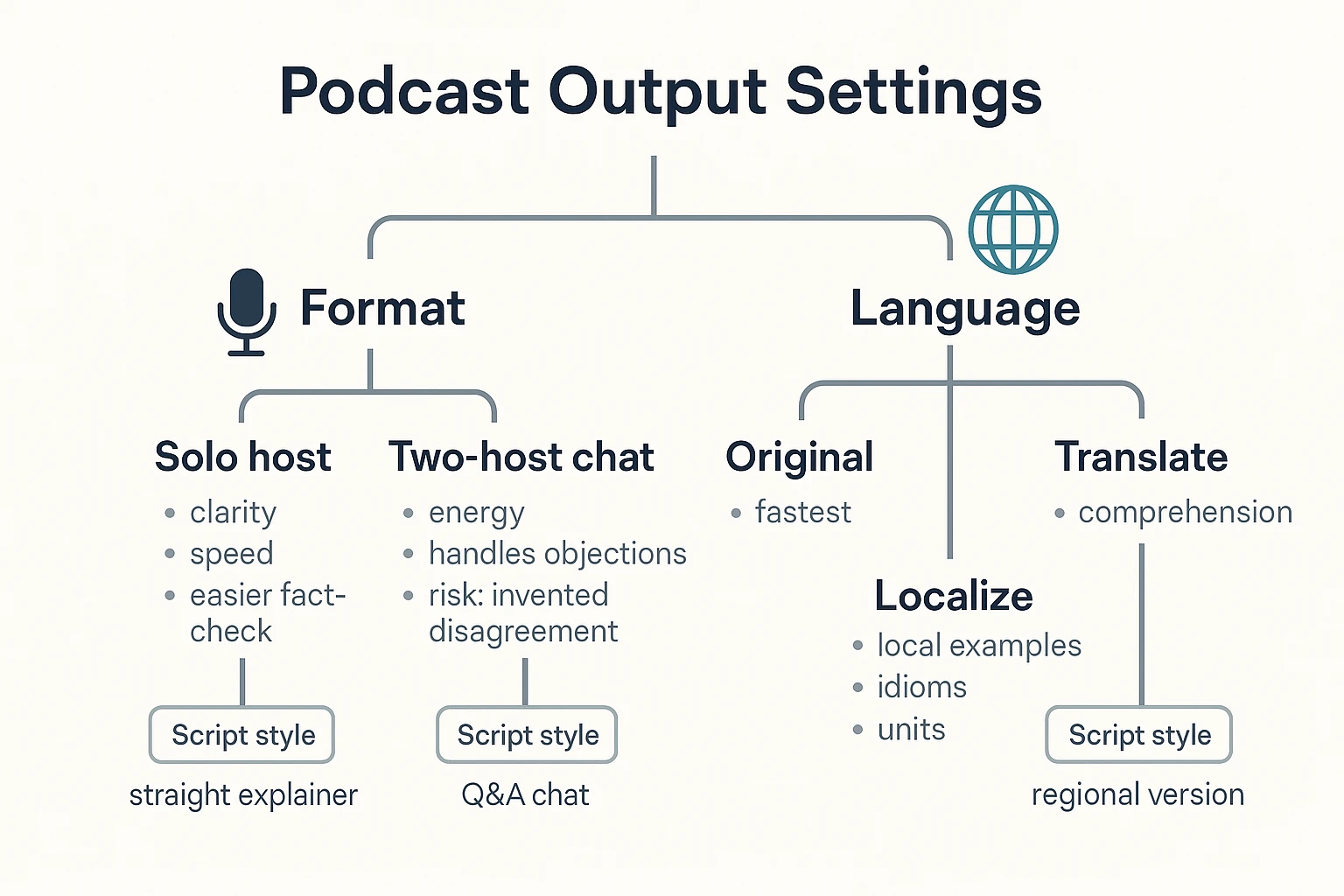
Pick a format that matches your goal
Solo host is best when you need speed and clarity. It's also easier to fact-check.
Two-host chat can feel more lively. It also helps handle objections, like "but what about cost?" or "will this work for my team?" Still, be careful. If the model improvises, a debate format can invent conflict or fake pushback.
Control tone, pace, and pronunciation
Decide your target listener first. Then set:
- Reading level: simple, short sentences
- Pace: steady and calm, not rushed
- Pronunciation: spell tricky names, brands, and acronyms
Paste this direction line into your prompt: "Write a [solo or two-host] podcast for [audience]. Keep it simple. Aim for a steady pace. Pronounce: [terms]. Avoid making up opinions or disagreements."
Translate or localize for multilingual episodes
Translate when you only need understanding. Localize when you also need local examples, idioms, and units (miles vs km).
A solid workflow is one source to many languages, then re-check names, dates, and numbers after translation. If your source is video, follow a video-to-podcast workflow so your transcript stays grounded.
What does a real "blog post → episode" example look like?
Here's a concrete way to turn written content into audio that feels like a real show, not a read aloud. The key is to keep the facts, but rewrite the flow for listening.
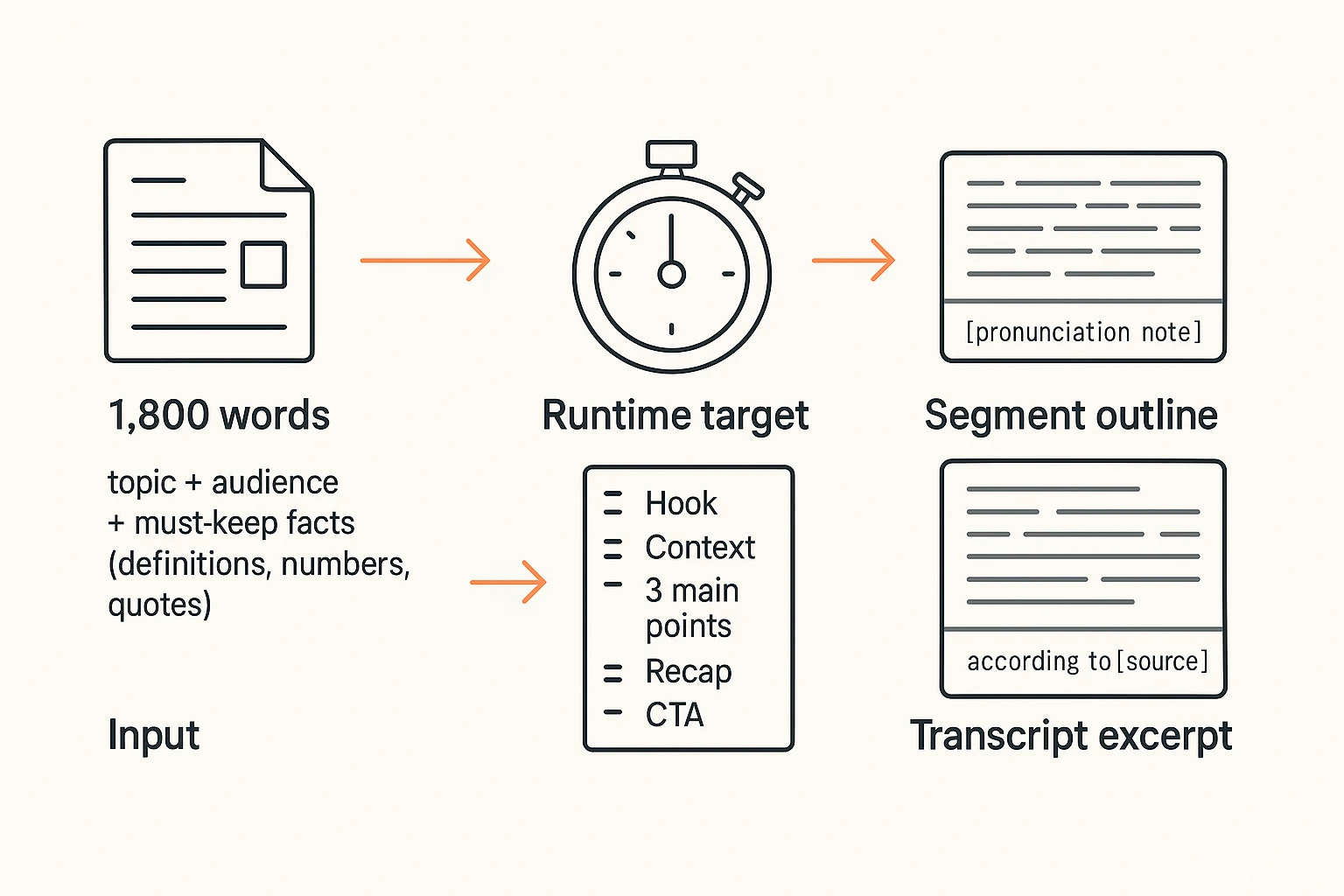
Example inputs (word count, topic, target listener)
Source: a ~1,800 word blog post titled "Zero Trust Basics for Small Teams."
Target listener: a busy IT manager who wants the main ideas fast.
Must stay accurate:
- Definitions (what "zero trust" means)
- Any numbers (percentages, costs, timelines)
- Direct quotes (keep exact wording)
Goal: a 10 to 12 minute episode with a host style script, short transitions, and one clear takeaway.
Example output (runtime target and segment plan)
A clean rule of thumb: 1,800 words becomes about 10 to 12 minutes once you cut repeats and add breathing room. For audio, you'll often merge sections because listeners can't skim.
Segment plan:
- Hook (0:00 to 0:30)
- Context and who it's for (0:30 to 1:30)
- Point 1: what zero trust is (1:30 to 4:00)
- Point 2: common mistakes (4:00 to 7:00)
- Point 3: a simple rollout plan (7:00 to 10:30)
- Recap and next step (10:30 to 12:00)
Short transcript excerpt (intro + one segment transition)
Host: What if your "trusted" network is the biggest risk?
Host: Today, we'll turn zero trust into plain steps.
Host: This is for small teams with limited time.
Host: Pronunciation note: [say "ZEE-roh trust," not "ZAY-roh"].
Host: First, a quick definition. Zero trust means "never trust, always verify."
Host: According to [source], the key is checking identity and device health.
Host: Next, let's talk about the mistake most teams make.
Host: They buy tools first, then fix process later.
Host: Quick recap so far: define trust, then verify every request.
How do you keep AI podcast output accurate and consistent?
AI can turn text into audio fast. But it can also sound sure while being wrong. When you turn content into a podcast with AI, plan a quick check that catches bad facts and sloppy voice details before you publish.
Run a 5-minute factuality pass
Do one sweep for "hard facts" before you listen.
- Names and titles: spellings, company names, job roles
- Dates and timelines: months, years, and "last week" style phrases
- Numbers: prices, percentages, counts, rankings, and time ranges
- Quotes: make sure they're exact, in context, and credited
If the script includes a stat, match it to the original line in your source. If you can't find it, remove it or mark it as "needs confirmation."
Stop made-up details before they enter the script
Use simple rules that keep you safe:
- If the source doesn't say it, don't add it
- Swap "definitely" and "always" for "often," "may," or "in this case"
- Don't invent citations, studies, or "according to" lines
- Watch for common failures: swapped numbers, wrong names, and fake quotes
These are frequent issues in podcast transcript generator tools. They fill gaps to sound smooth.
Do a human QC pass (then regenerate only what changed)
Listen at 1.25× speed with the script open. Mark timecodes where it goes wrong. Fix the script, then re-generate only that segment if your tool allows it.
Quality-control checklist:
- Accuracy: facts match the source
- Tone: matches your brand and audience
- Speaker consistency: same style and phrasing throughout
- Pronunciation: names, acronyms, and product terms
- Disclosure: note when AI helped create the episode
What should you export, and how do you publish and monetize responsibly?
When you turn content into audio, your job isn't done at "it sounds okay." You need a clean export bundle, solid metadata, and a plan to publish and monetize without misleading people.
Export the minimum bundle (so you can publish anywhere)
Export a small set of files you can reuse across hosts, editors, and platforms:
- WAV audio (master file): best for editing and archiving.
- TXT transcript (cleaned): fix names, acronyms, and any numbers.
- Show notes: a short summary, key takeaways, and the links you mentioned.
- Episode title + description: written for humans first, then search.
Keep the transcript even if you don't post it in full. It supports accessibility, helps with on-page SEO if you publish a web version, and makes corrections fast when someone flags an error.
Publish with the basics: host, RSS, directories, metadata
Most podcasts work like this: you upload your episode to a podcast host, the host updates your RSS feed (the file that carries new episodes), and directories read that feed.
Simple conventions that prevent mess later:
- File names: 001-topic-keyword-guest.wav and 001-topic-keyword-transcript.txt
- Episode titles: "Verb + outcome" (example: "Turn meeting notes into a 10-minute episode")
- Metadata checks: episode number, description, cover art, explicit flag (if needed)
If you want a clean launch plan, use this minimal vs pro publishing checklist to pick the right setup for your goals.
Monetize only when your quality is consistent
Common options:
- Ads: easiest to start, but you need steady downloads.
- Sponsorships: best when your audience is specific and brand-safe.
- Memberships: works when you can publish on a reliable schedule.
Don't monetize until you can ship accurate, repeatable episodes. Also add clear disclosures for paid placements, and avoid reading claims you can't verify.
What are the legal and ethical rules for AI-made podcasts?
When you turn a doc, meeting, or blog into audio, the legal rules don't disappear. The safest approach is simple: only adapt content you own or have clear permission to use, and don't let AI output imply a human did work they didn't do.
Clear rights before you script or narrate
Copyright usually covers the text itself, not just the final audio. So paywalled pieces, newsletters, books, and "download this PDF" reports can be risky if you narrate them in full.
Use this quick permission checklist:
- Who owns the source: you, a client, an employer, or a publisher?
- What license applies: original, Creative Commons, syndication, guest post terms, or an internal policy?
- What's allowed: summarize, quote short excerpts, translate, or create a full narrated version?
- Where it will run: public podcast feeds, internal training, or paid member content?
- What you must include: attribution, links, or "no derivatives" limits.
Get consent for AI voices and identity
Don't clone, imitate, or "sound like" a real person without written permission. Treat voice like a right you must clear, even for internal shows.
If you're using a brand voice or spokesperson style, set rules in advance:
- Approved speakers and voice models
- Who can sign off on tone and claims
- What topics require legal or PR review
Add a clear disclosure in show notes
A short disclosure protects trust. It also helps listeners understand what they're hearing.
Copy-ready examples:
- "This episode was produced with AI assistance and edited by a human."
- "AI was used to draft the script and generate the narration. We fact-checked key claims."
- "Some voices in this episode are synthetic. Quotes and sources are noted in the description."
Ethics rule of thumb: never mislead people about who is speaking, reporting, or endorsing the content.
When is an AI note-taking workspace a practical alternative for this workflow?
An AI note-taking workspace is a practical pick when you want one place to store the source, turn it into a podcast-style script, and export files you can publish. It's also helpful when your inputs come from many places: PDFs, docs, meeting audio, and video. In other words, it can simplify How to Turn Any Content Into a Podcast with AI because your content stays linked to its project, notes, and follow-up checks.
Web Studio: upload once, generate, then export
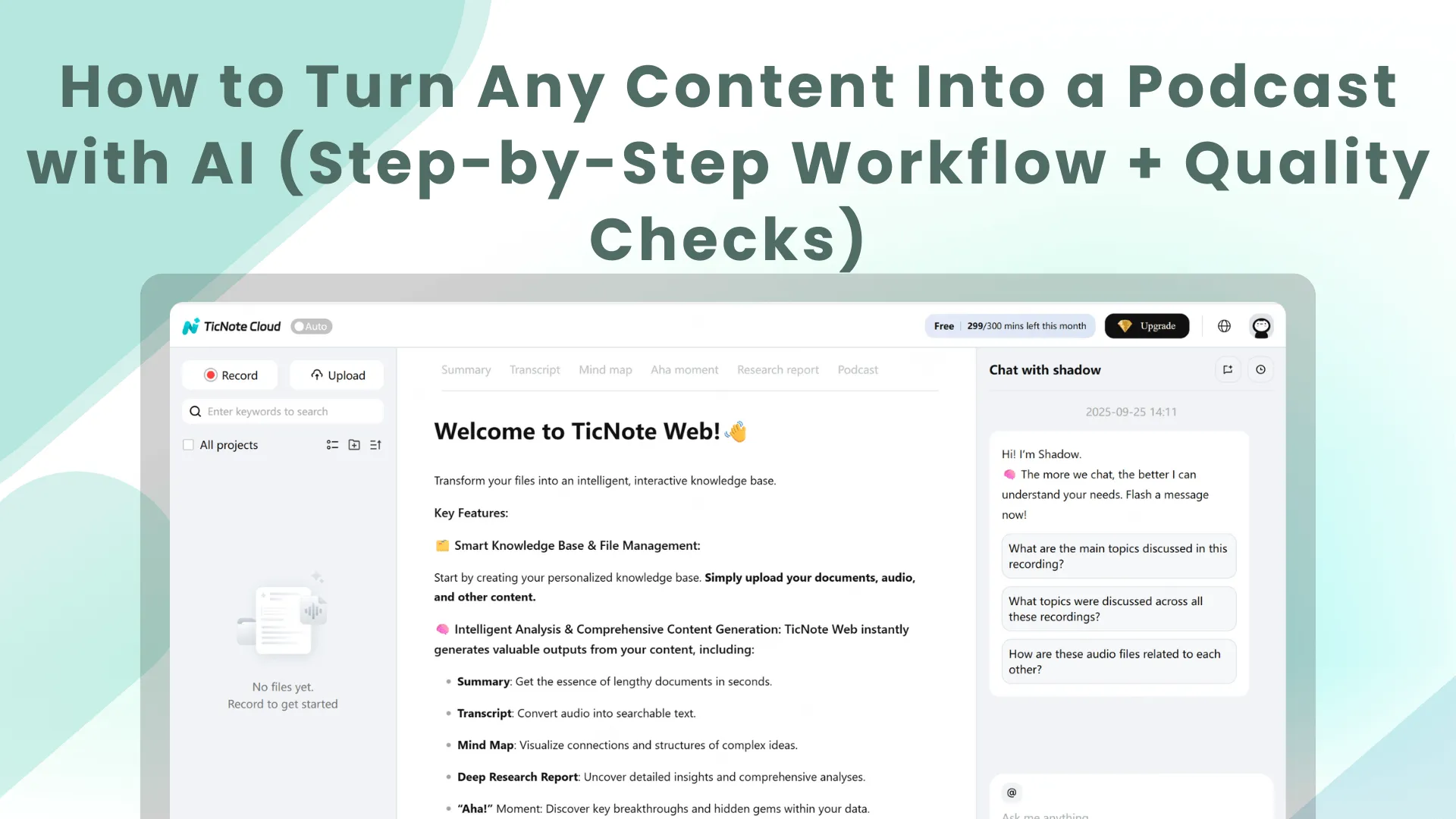
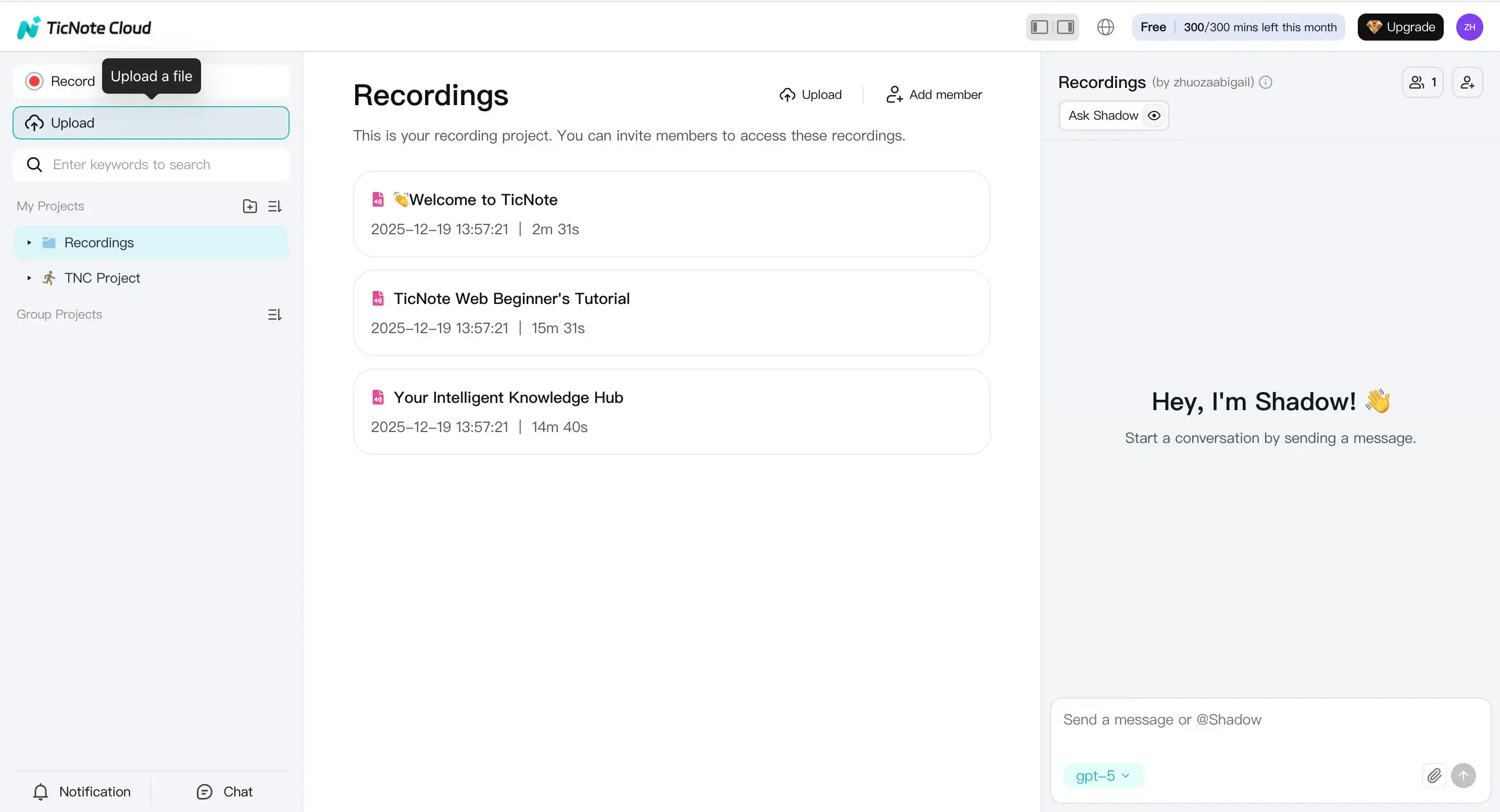
Step 1: Upload a file (and keep its context). Create a new project in TicNote Cloud Web Studio, then click Upload to add your source file. Use a clear title, and add a short note like: goal, target listener, and voice style (friendly, formal, two-host chat, etc.). If your source is audio or video, you can also generate a transcript so you have text to review.
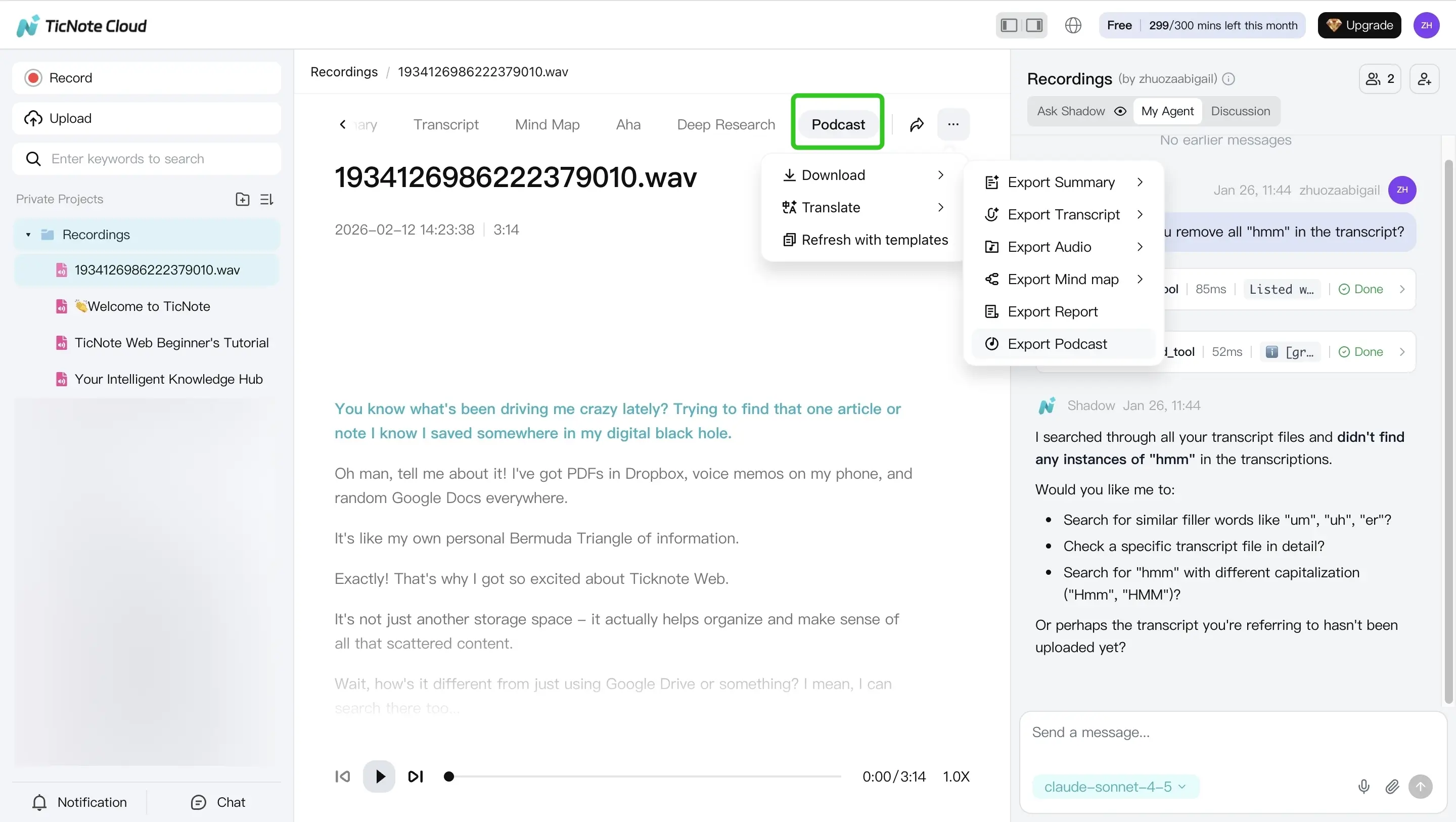
Step 2: Get the podcast output and check it. Open the Podcast tab to generate a podcast-style result based on the file. Then do a fast review for "speakability" (short sentences, natural transitions) and accuracy (names, numbers, key claims). When it looks good, use the three-dots menu to export.
To tie this back to the broader workflow, you can:
- Ingest your source into a project (so you can find it later)
- Summarize with templates when you need a tighter outline
- Use Shadow Q&A to ask grounded questions against the file before you finalize claims
- Translate when your audience is multilingual
- Export what you need for publishing: WAV for audio, TXT for a voiceover-ready transcript, and Markdown for show notes
App: capture on the go, finish edits later
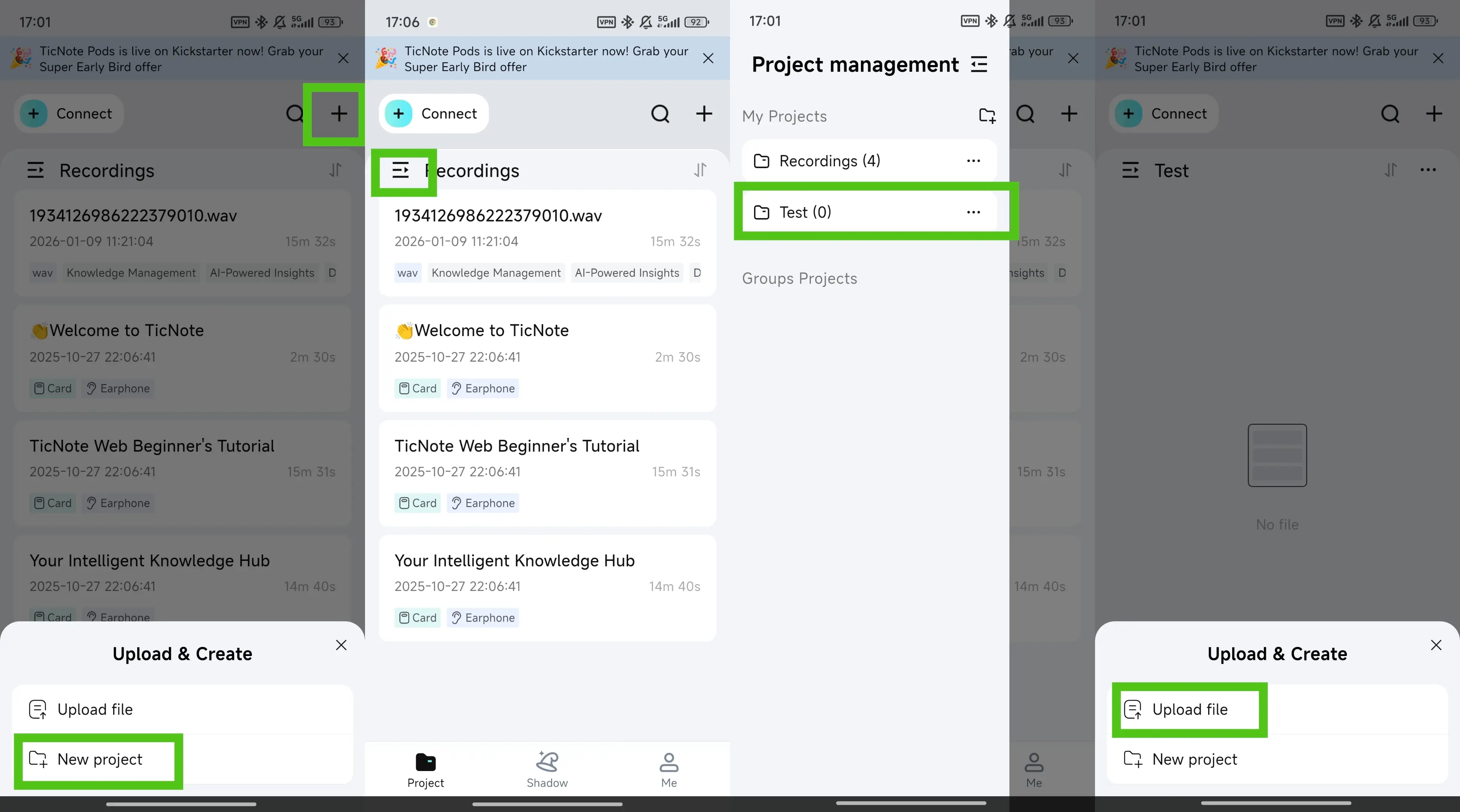
If you're collecting content away from your desk, the TicNote app keeps the flow simple. Tap add to upload into a new or existing project. Then go to the Podcast tab and export in the format you need. This is a good option when you want to capture material now and tighten the script later on web.
Use TicNote Cloud to Create Podcast for Free


