


 Extension
TL;DR: A skill agent-ready action plan format
An action plan template should convert one goal into assigned, dated, measurable work: goal, success metric, milestones, tasks, owners, start dates, due dates, dependencies, resources, risks, status, and notes.
Plans often fail when meeting notes, files, and follow-ups live in separate places. That gap creates missed owners and stale dates, so a customizable task breakdown skill can turn transcripts, project files, and discussions into a context-aware plan without rebuilding the format each time.
Use this structure as your default matrix before work starts.
Free action plan template: the fill-in format to use
An action plan template is a goal-tied document that lists the work needed to reach a clear outcome. It isn't a random task list. Use it when you need to connect goals, owners, dates, metrics, risks, and next steps in one view.
Goal and success metric
Start with one objective and one measurable result. A good success metric uses a number, date, or pass/fail standard. Example: "Increase qualified demo bookings by 20% by June 30." This keeps the plan focused and makes reporting easier.
Action steps and action items
Action steps are the larger milestones. Action items are the smaller, verb-led tasks inside each milestone. For example, "Build campaign assets" is an action step. "Draft landing page copy" is an action item.
| Objective | Milestone | Task | Owner | Start date | Due date | Dependency | Resource | KPI | Risk | Status | Notes |
| [Goal] | [Phase] | [Verb + task] | [Name] | [Date] | [Date] | [Input needed] | [Budget/tool/file] | [Metric] | [Risk note] | [RAG] | [Update] |
Owner, start date, due date, dependencies, and status
Every task needs one owner. Shared ownership slows decisions. Add start and due dates, then list dependencies such as approvals, data, design files, legal review, or another team's handoff. Use RAG status (red, amber, green) to show progress in seconds.
Resources, assumptions, risks, and notes
The missing fields make the template useful in real work. Add resources, assumptions, blockers, approval notes, risk notes, and reporting updates. These fields help teams spot weak points before work starts. In TicNote Cloud, meeting notes and AI summaries can feed this structure through the task breakdown skill.
Word-style and Excel-style layout tips
A plan of action template Word layout works best for narrative plans, corrective actions, stakeholder approvals, and student assignments. An action plan template Excel layout works best for tracking owners, dates, dependencies, KPIs, and RAG status. Use this format for team follow-ups, sales initiatives, business process improvement, marketing campaigns, research projects, corrective action plans, and personal goals. If your plan starts with market notes, pair it with free competitor research tools before assigning tasks.
When should you use an action plan instead of another planning document?
An action plan template is the right tool when the goal is clear and the main risk is weak execution. Use it to turn a decision into assigned tasks, dates, success measures, dependencies, and status checks.
Action plan vs to-do list
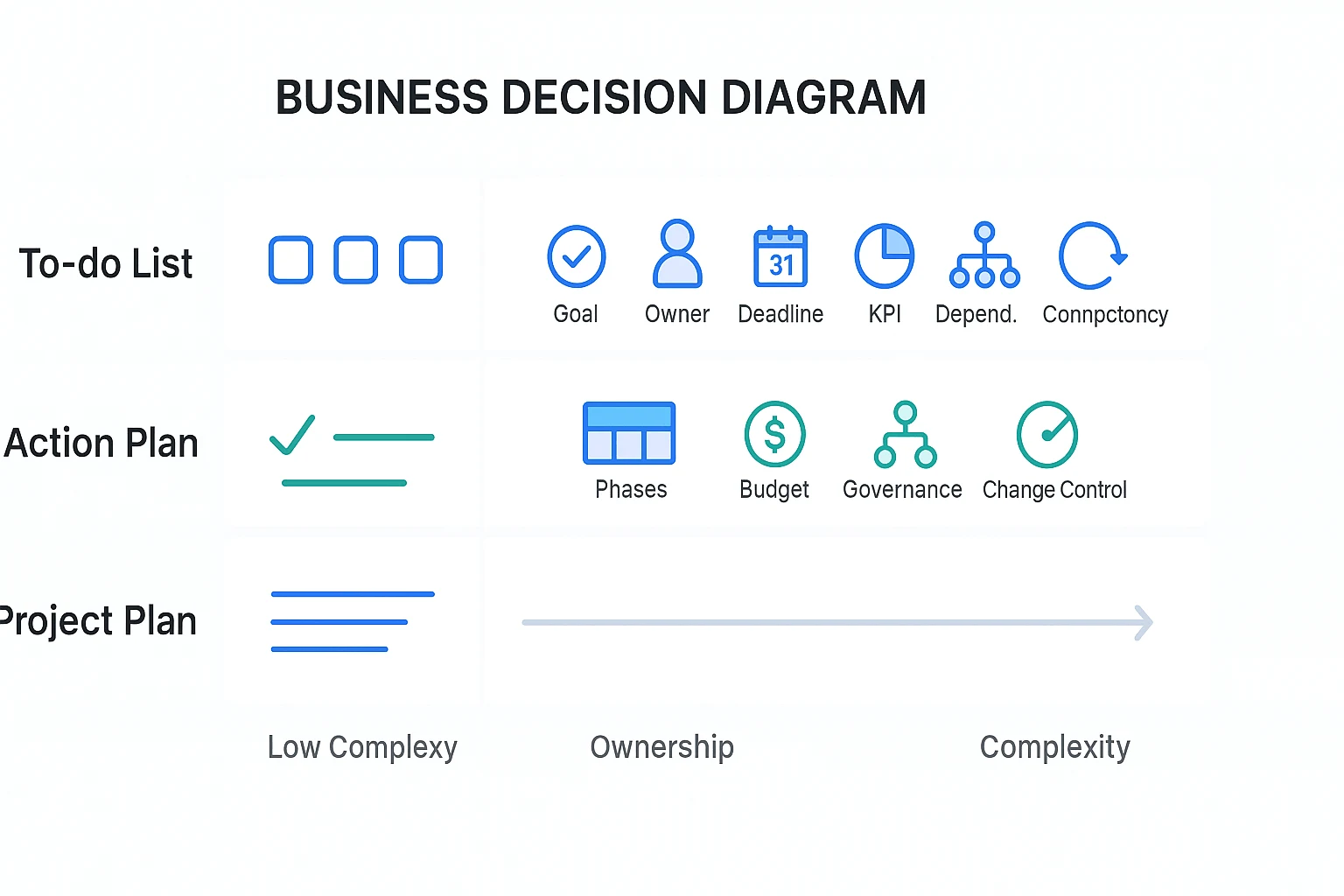
A to-do list collects tasks. Those tasks may be unrelated, personal, or missing a shared outcome. An action plan adds the "why," "who," and "by when," so a team can track accountability instead of just checking boxes.
Action plan vs project plan
A project plan is larger and more formal. It often includes scope, phases, budgets, work breakdown structures, governance, procurement, change control, and stakeholder reporting. An action plan can sit inside that plan as the execution layer for one goal, milestone, or corrective action.
Action plan vs strategy
Strategy sets direction. It explains choices, priorities, markets, positioning, or trade-offs. But it usually does not assign every task, owner, due date, KPI, and risk response. That is where a practical plan of action closes the gap.
Quick decision guide
Use an action plan for:
- Short- to mid-term goals that need visible ownership
- Meeting follow-ups with decisions and next steps
- Corrective actions after a missed target or issue
- Lightweight projects without heavy governance
- Process fixes, handoff improvements, or audit cleanup
- Campaign launches with owners, dates, and KPIs
- Research synthesis that must become recommendations
- Cross-functional next steps across product, design, sales, or operations
Keep the format simple. If the work has many phases, budget controls, procurement steps, or regulated approvals, treat the action plan as a supporting artifact inside a larger project plan.
How do you write an action plan from goal to assigned tasks?
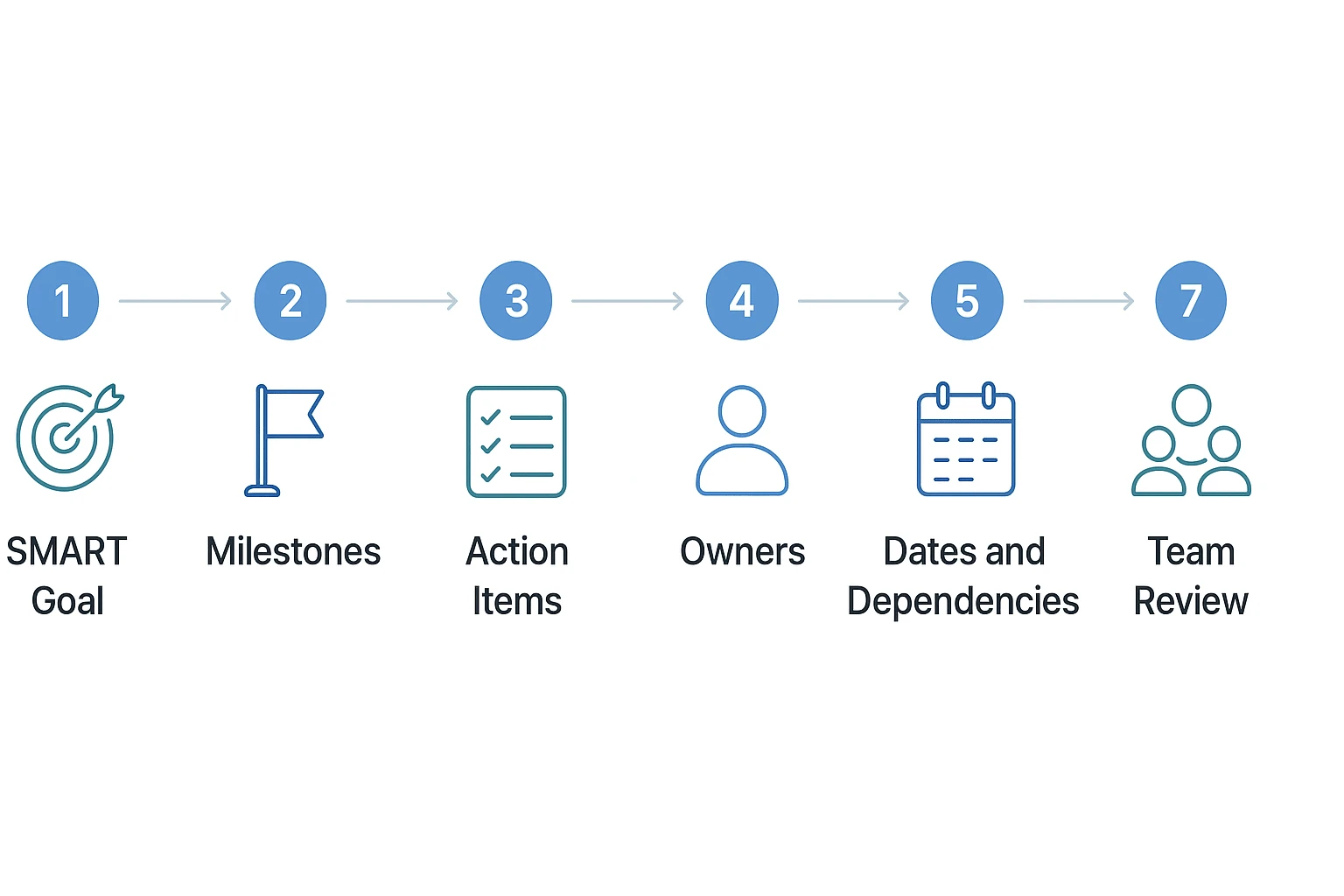
An action plan template works best when it moves in one direction: outcome, milestones, tasks, owners, dates, and review. That sequence is the core of how to write an action plan without turning it into a loose wish list.
Start with a SMART outcome
A SMART outcome is specific, measurable, achievable, relevant, and time-bound. Write one sentence that says what will change, by when, and how success will be measured.
Use this format: "By [date], we will [change/result] for [audience/process], measured by [metric]." For example: "By June 30, we will reduce onboarding setup time for new customers by 25%, measured by average time from contract signature to first live workspace."
Break the goal into milestones
Next, split the goal into 3–6 milestones. Milestones are checkpoints, not tiny tasks. They should show visible progress and help the team see the path from strategy to execution.
A clean milestone set might include research, planning, production, review, launch, and measurement. If you need more than six, the goal may be too broad for one plan.
Convert milestones into action items
Each milestone needs concrete action items. Start every task with a verb and name the expected result.
Good action items look like this:
- Interview five pilot users and summarize top onboarding blockers.
- Draft the revised onboarding checklist in the shared template.
- Review checklist with Sales, Support, and Product.
- Publish the final version in the customer success workspace.
Avoid vague tasks like "support launch" or "help with research." They hide the real work and make status reporting weak.
Assign owners and resources
Give each task one accountable owner. Contributors can help, but one person must answer for completion.
Then list the resources needed: budget, data, meeting time, templates, subject matter experts, approvals, and tools. If your source material is scattered across calls and documents, TicNote Cloud's task breakdown skill can turn meeting notes, AI summaries, and editable transcripts into a structured first draft.
Estimate effort, dates, and dependencies
Estimate effort before you commit to dates. Check workload, time blocks, handoffs, holidays, approval cycles, and review time.
Then sequence the work:
- What must happen first?
- What can run in parallel?
- What blocks the final outcome?
- Which dependency needs an escalation path?
This is where many plans fail. A task with no dependency listed can still be blocked by missing data, delayed feedback, or an unavailable approver.
Review the plan with the team
Before work starts, review the plan with the people doing the work. Confirm assumptions, remove duplicate tasks, clarify owners, and document decisions in the plan itself.
End by agreeing on a status cadence, such as twice-weekly updates or a Friday RAG status check (red, amber, green). Keep the action plan as the single source of truth so updates don't drift into side chats.
Complete action plan example for a team initiative
Here's a realistic action plan example you can model: a product team wants to improve post-meeting follow-up because decisions, owners, and next steps keep getting lost across weekly planning, sprint, and customer review meetings.
Scenario setup
Goal: within 30 days, every important meeting should produce a clear follow-up record with decisions, owners, due dates, and measurable next steps.
The team uses one action plan template to move from scattered notes to assigned work. Meeting summaries are connected to a shared project workspace, so the plan stays tied to the original context instead of living in a separate file.
Filled action plan matrix
| Objective | Task | Owner | Start date | Due date | Dependency | Resource | Success metric | Status | Notes |
| Improve follow-up | Audit last 10 meeting notes | Priya, PM | Mar 3 | Mar 5 | Access to notes | Transcripts, summaries | 100% reviewed | Green | Found 38 loose action items |
| Improve follow-up | Define follow-up template | Mateo, Ops | Mar 5 | Mar 7 | Audit findings | Template doc | Template approved | Green | Includes decision, owner, date |
| Improve follow-up | Assign decision owners | Lena, Eng Lead | Mar 7 | Mar 10 | Template approval | RACI list | 90% decisions assigned | Amber | Design owner missing for 2 items |
| Improve follow-up | Connect summaries to workspace | Omar, Product Ops | Mar 8 | Mar 12 | Project structure | TicNote Cloud Projects | 100% meetings linked | Amber | Needs naming standard |
| Improve follow-up | Run two-week pilot | Priya, PM | Mar 13 | Mar 27 | Owners assigned | Team calendar | 80% on-time follow-ups | Green | Pilot covers 6 meetings |
| Improve follow-up | Review KPI movement | Mateo, Ops | Mar 28 | Mar 29 | Pilot data | KPI dashboard | 25% fewer missed actions | Not started | Baseline is 16 missed/month |
| Improve follow-up | Update team norms | Lena, Eng Lead | Mar 30 | Apr 2 | KPI review | Team handbook | Norms adopted | Not started | Add to onboarding |
Example RAG status update
RAG status means red, amber, green reporting. For RAG reporting, Infrastructure and Projects Authority — Delivery confidence assessments defines Green as "Successful delivery is highly likely and there are no major outstanding issues that threaten delivery."
Use these definitions:
- Green: on track with no blocker.
- Amber: delay, missing input, or dependency risk needs attention.
- Red: deadline or outcome is at risk and needs escalation.
Sample updates:
- Amber: decision-owner assignment is blocked by missing design coverage. Next step: design lead names a backup owner by Friday.
- Amber: project workspace setup is delayed by inconsistent meeting names. Next step: adopt one naming rule before imports continue.
- Green: the two-week pilot started on time and covers 6 recurring meetings.
What this example teaches
Owners create accountability. Dates create urgency. Dependencies reveal sequencing risks before they turn into delays. Metrics stop success from becoming vague. Notes capture changes during execution, which is critical when scope, owners, or deadlines shift.
You can adapt the same format for corrective action, sales, business process, marketing, research, or personal planning examples. The structure stays the same: goal, task, owner, date, dependency, metric, status, and next step.
Measure progress, effort, and risk before work starts
A basic action plan template lists tasks, owners, and dates. An execution-ready plan goes further: it proves the team can measure progress, absorb the workload, handle dependencies, and respond when risk becomes real. Before kickoff, pressure-test the plan with five controls.
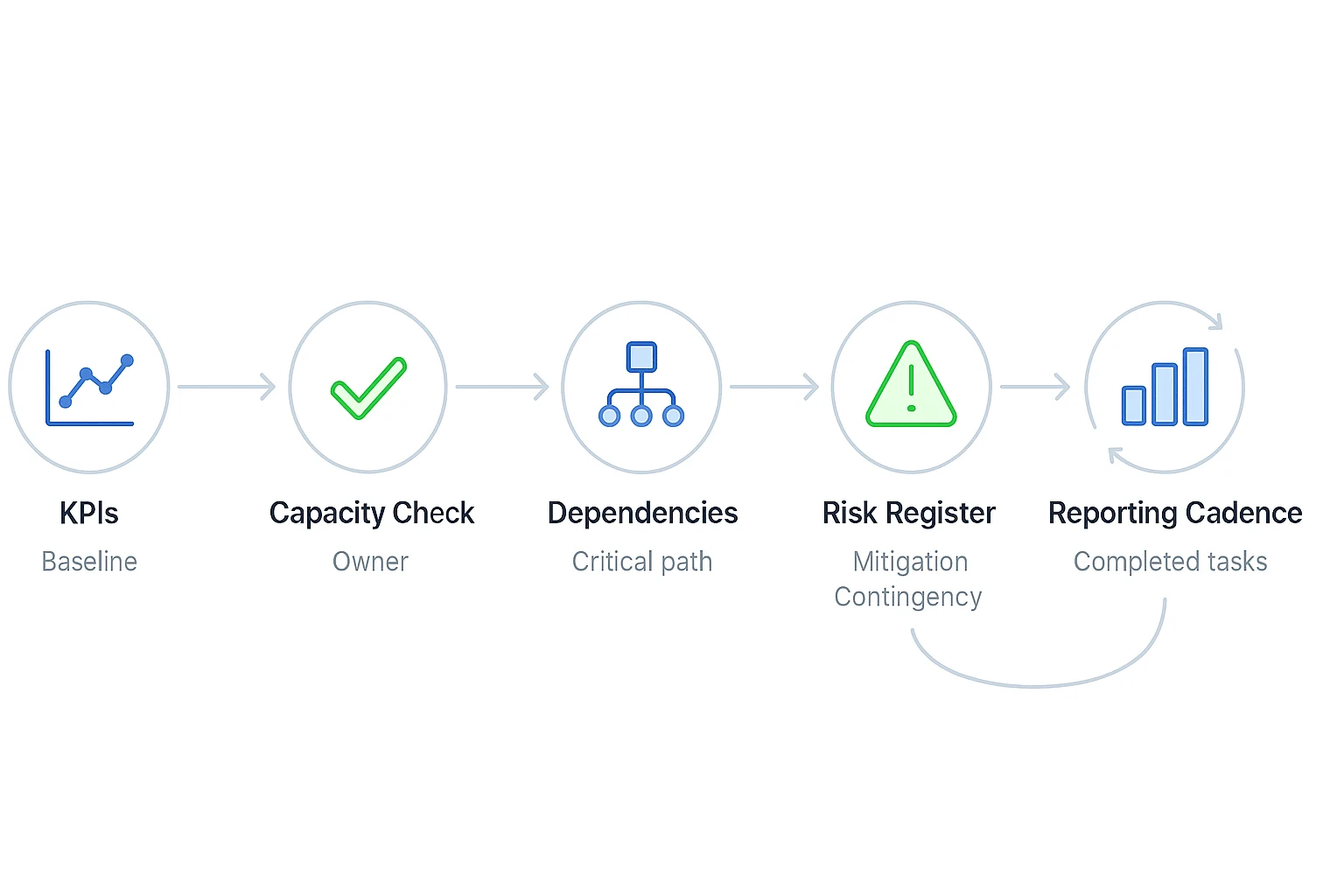
Choose leading and lagging KPIs
Leading KPIs are early signals that work is moving. Examples include drafts completed, meetings scheduled, interviews coded, approvals received, or tickets moved to review. Lagging KPIs measure the result after the work lands, such as reduced follow-up time, higher completion rate, improved sales conversion, fewer defects, or stakeholder sign-off.
Use this KPI checklist before you commit the plan:
- Baseline: What is the current number?
- Target: What exact result defines success?
- Owner: Who updates the metric?
- Data source: Where does the number come from?
- Review date: When will the team inspect it?
If your source material sits in TicNote Cloud Projects, Shadow AI can help pull decisions, approvals, and repeated blockers from meeting transcripts so your metrics reflect real project context.
Estimate effort and capacity
Every owner should confirm capacity before the plan is approved. Ask them to check workload, time blocks, handoffs, approval windows, and unavailable dates. A task that needs 6 hours of focus can still fail if the owner only has 30-minute gaps.
Capacity checks should answer four questions: Who does the work? When can they do it? Who must review it? What date is already blocked?
Map dependencies and critical path risks
A dependency is work that needs another task, person, tool, or approval before it can move. The critical path is the chain of tasks that can delay the full plan if one item slips.
Mark these items clearly with RAG status: red for blocked, amber for at risk, green for on track. This makes the plan readable in 30 seconds.
Add a risk register and contingency actions
For risk planning, ISO 31000:2018 Risk management — Guidelines "provides principles and generic guidelines on risk management." Keep the register simple enough to update weekly.
| Field | Example entry |
| Risk | Legal review delays launch copy |
| Probability | Medium |
| Impact | High |
| Owner | Marketing lead |
| Mitigation | Send draft 5 business days early |
| Contingency | Use approved fallback copy |
| Trigger | No response within 48 hours |
| Next review date | Friday status check |
Set a reporting cadence
Report weekly or at each milestone. Capture status, blockers, decisions, scope changes, and completed tasks. Keep it short: 5 minutes to update, 15 minutes to review. That rhythm keeps the plan alive instead of turning it into a static document.
How to create an action plan from project context
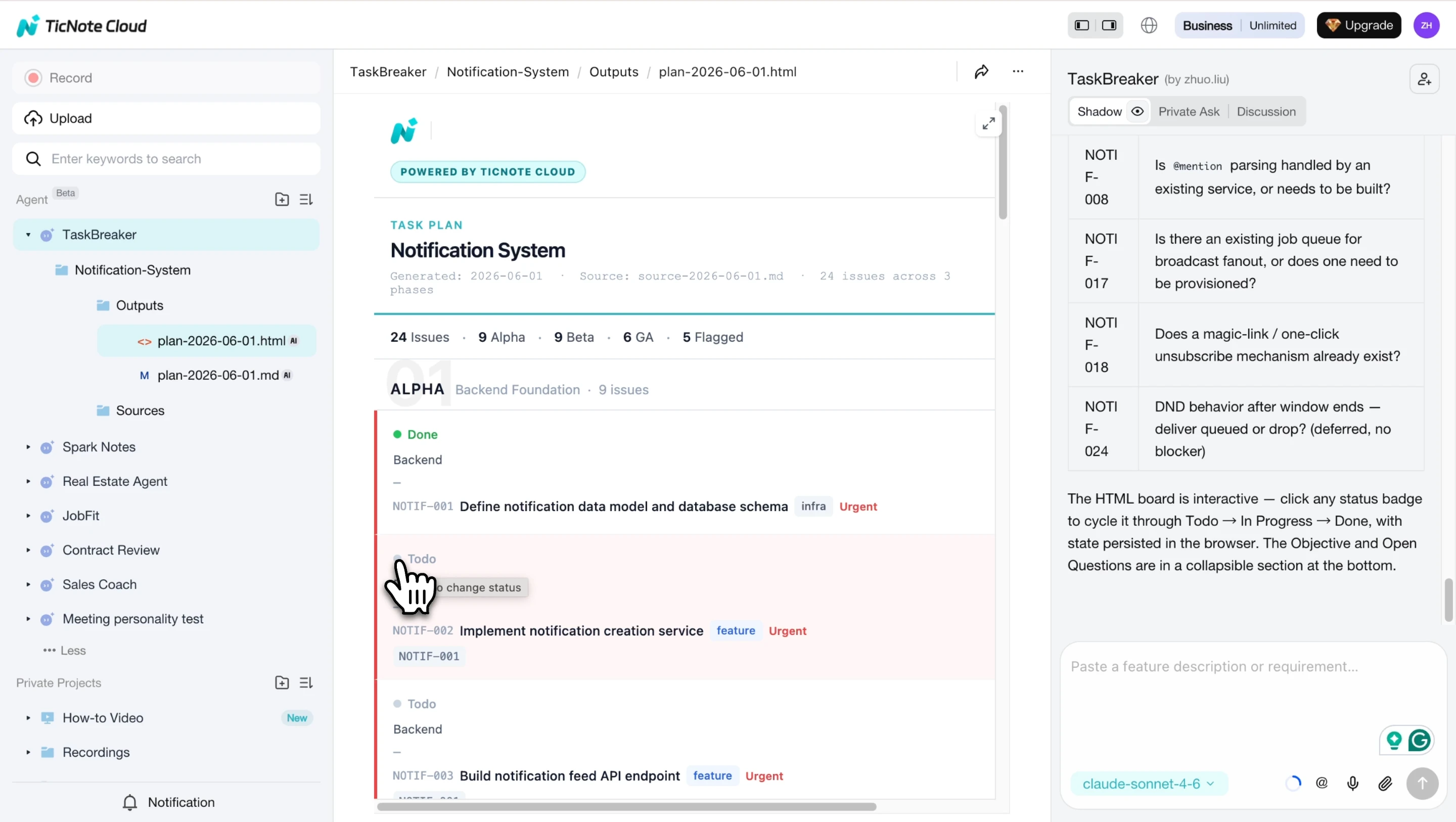
An action plan template works best when it starts with real inputs, not a blank page. In TicNote Cloud, the TaskBreaker skill agent can turn PRDs, feature specs, meeting recordings, and transcripts into a structured first draft your team can review.
Add the TaskBreaker skill agent
Open TicNote Cloud, click Add Agent, and browse the Skill Agent library. Select TaskBreaker to add it to your workspace. No setup is required.
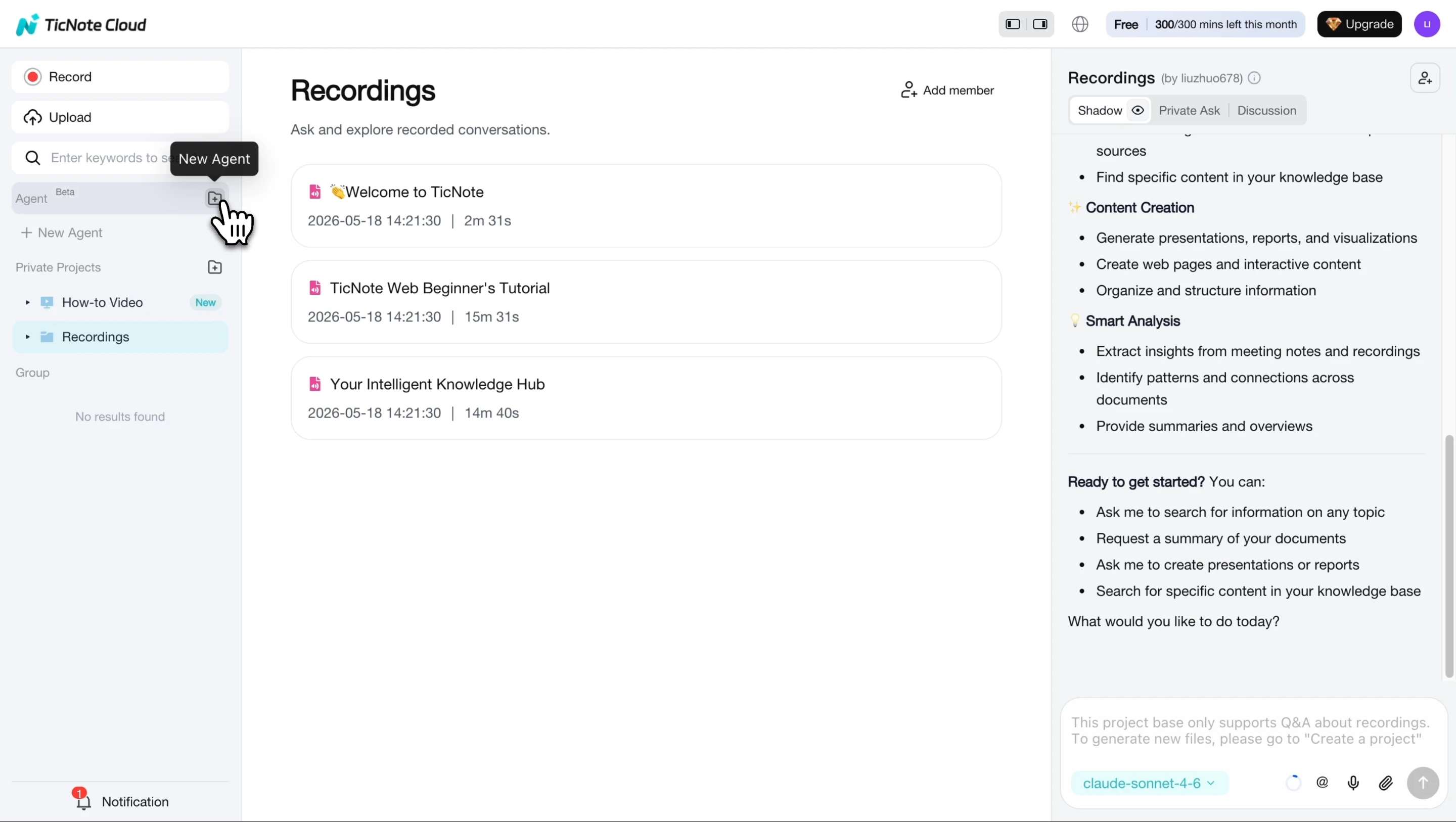
After it's added, TaskBreaker appears in your agent list and is ready to use.
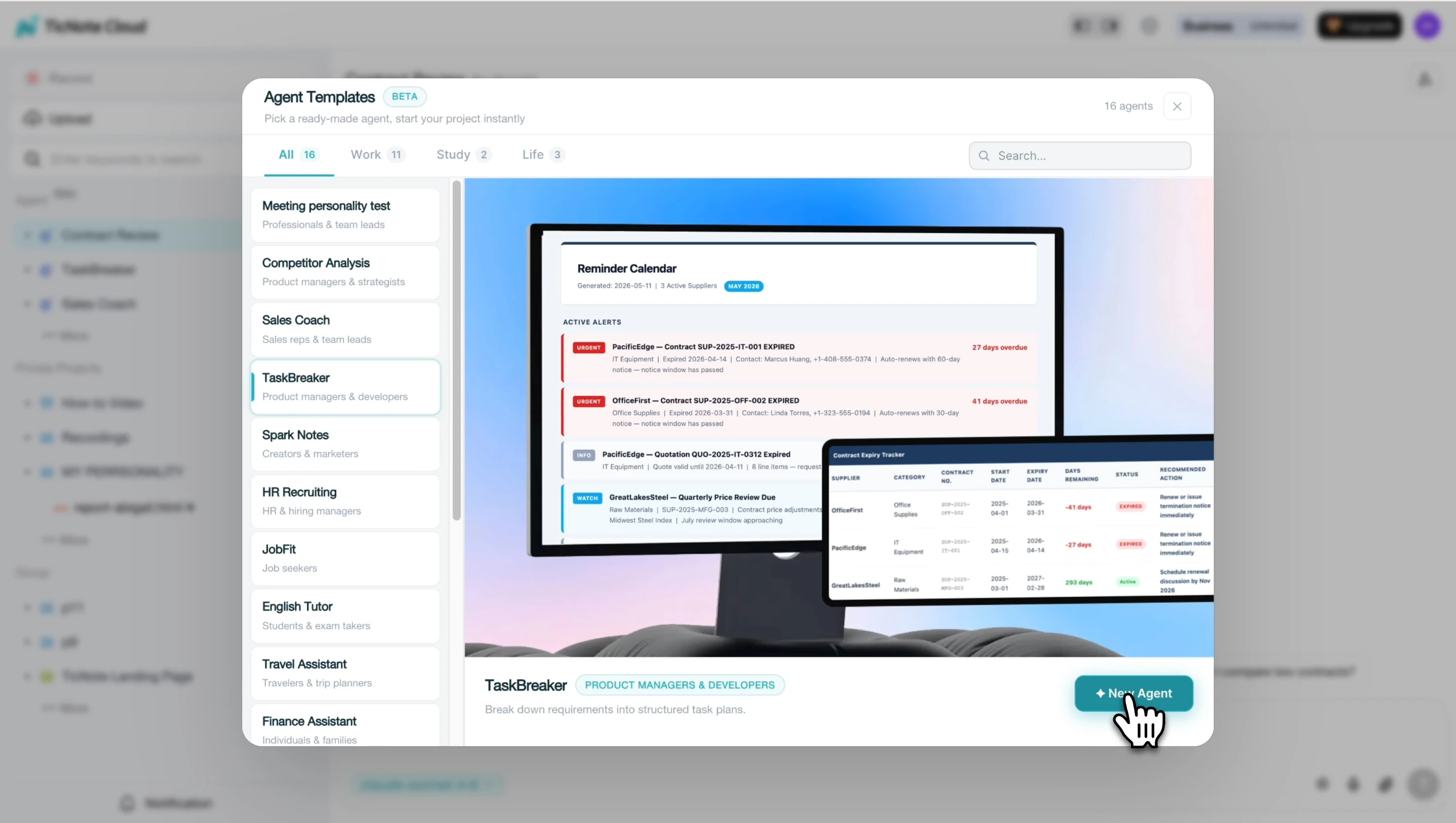
This fits well if your team already uses a meeting skill system to turn discussions into follow-ups.
Paste or upload your source material
Paste or upload a PRD, feature spec, strategy doc, meeting recording, or transcript. The agent accepts flexible source formats, then reads the material before building the plan.
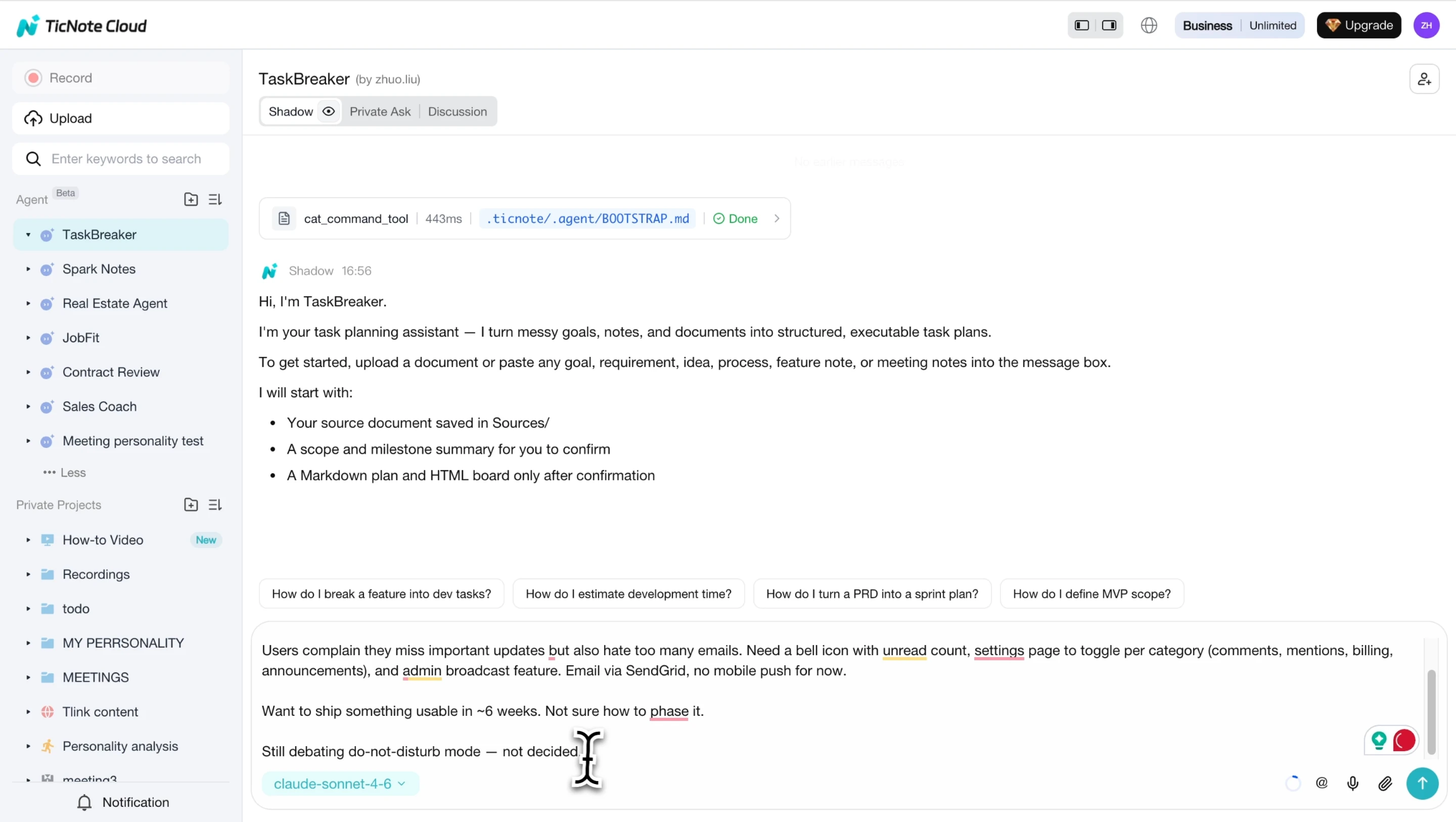
Before generating work, it confirms the objective, scope in and out, team roles, proposed milestones, and open questions. That checkpoint prevents a vague plan of action from becoming engineering debt.
Review the generated project plan
Next, review the summary, answer open questions, and check any inline ambiguity marked as [NEEDS CLARIFICATION].
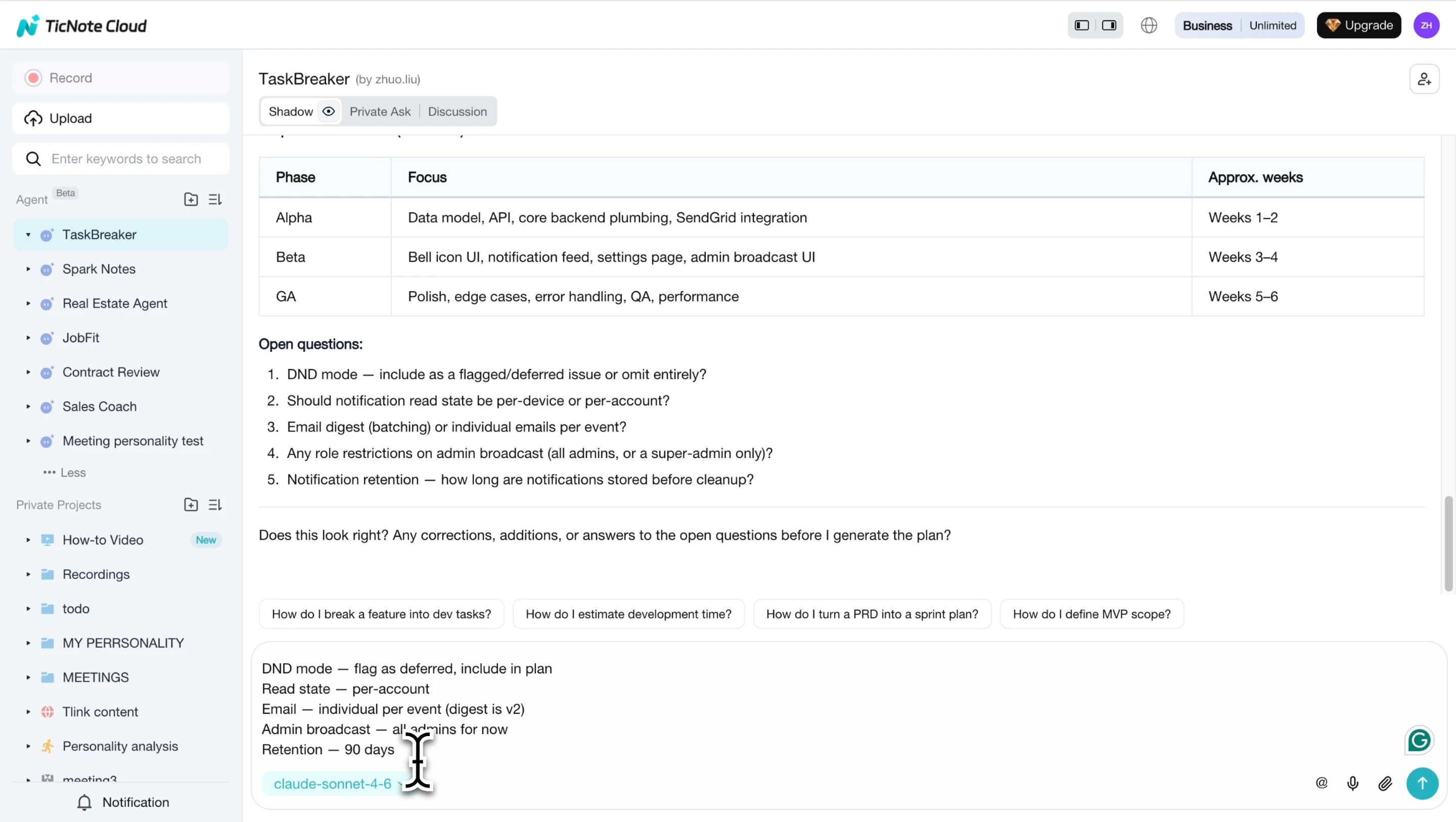
The expected output is a set of sprint-sized issues with titles, descriptions, acceptance criteria, labels, priorities, phases, and dependencies. Product managers and engineering leads can then adapt those issues into owners, due dates, follow-ups, and status reporting.
Use the plan across Web and App workflows
On Web, copy or export the Markdown project plan, plus a CSV ready for Jira, Linear, GitHub Issues, or another tracker. On the App, use the lighter workflow: capture or upload meeting material on mobile, send it into the right Project, then return to Web for deeper review and import-ready outputs.
Why context-aware planning beats a static template
A static template starts empty. TicNote Cloud's Projects, editable transcripts, AI summaries, Shadow AI, cited cross-file Q&A, mind maps, reports, and presentations give TaskBreaker accumulated context. That context produces a more complete first draft, so your team spends less time reconstructing decisions and more time assigning work.
Start an action plan with TicNote Cloud's task breakdown skill and try TicNote Cloud for free.
Final thoughts: turn plans into accountable next steps
A strong action plan template is more than a tidy table. It's a shared agreement on the outcome, owners, dates, dependencies, measures, risks, and reporting rhythm.
Keep it simple enough to update, specific enough to assign, and visible enough to guide execution. If your next plan starts in a meeting, pair it with a repeatable facilitation system so decisions turn into tasks before people leave the room.
When the source is meetings, notes, or project files, TicNote Cloud can help. Its task breakdown skill uses that context to turn goals into owners, timelines, and accountable next steps.
Try TicNote Cloud for free and build your next action plan from real project context.


